battery NISSAN TEANA 2003 Repair Manual
[x] Cancel search | Manufacturer: NISSAN, Model Year: 2003, Model line: TEANA, Model: NISSAN TEANA 2003Pages: 3502, PDF Size: 74.56 MB
Page 518 of 3502
ATC-140
REFRIGERANT LINES
Removal and Installation of Low-pressure Pipe 2 and High-pressure Pipe 2BJS000HU
REMOVAL
1. Set the temperature (passenger side) at 18°C, and then disconnect the battery cable from the negative
terminal.
2. Use a refrigerant collecting equipment (for HFC-134a) to discharge the refrigerant.
3. Remove extension cowl top lower panel. Refer to EI-21, "
COWL TOP" .
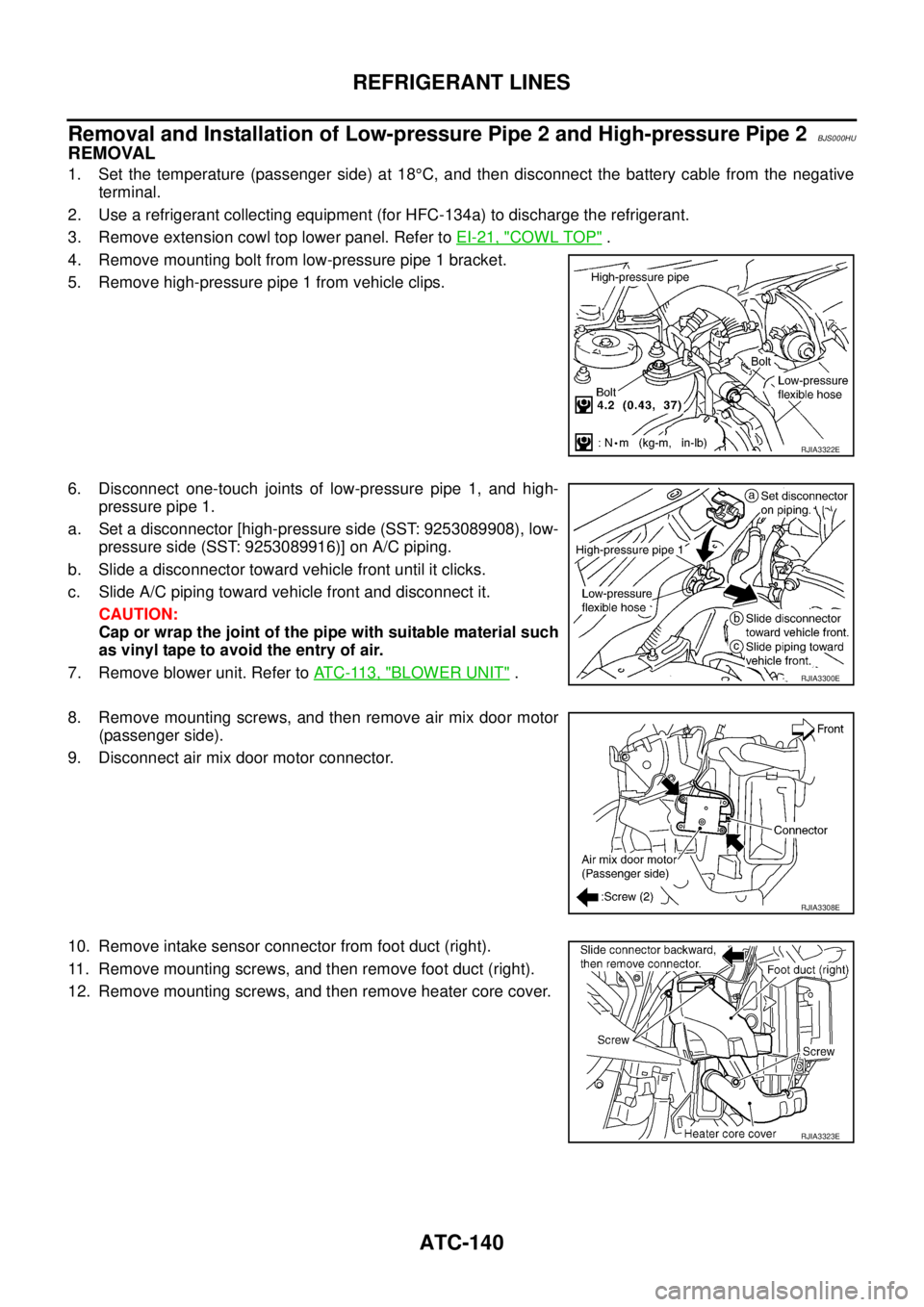
4. Remove mounting bolt from low-pressure pipe 1 bracket.
5. Remove high-pressure pipe 1 from vehicle clips.
6. Disconnect one-touch joints of low-pressure pipe 1, and high-
pressure pipe 1.
a. Set a disconnector [high-pressure side (SST: 9253089908), low-
pressure side (SST: 9253089916)] on A/C piping.
b. Slide a disconnector toward vehicle front until it clicks.
c. Slide A/C piping toward vehicle front and disconnect it.
CAUTION:
Cap or wrap the joint of the pipe with suitable material such
as vinyl tape to avoid the entry of air.
7. Remove blower unit. Refer to AT C - 11 3 , "
BLOWER UNIT" .
8. Remove mounting screws, and then remove air mix door motor
(passenger side).
9. Disconnect air mix door motor connector.
10. Remove intake sensor connector from foot duct (right).
11. Remove mounting screws, and then remove foot duct (right).
12. Remove mounting screws, and then remove heater core cover.
RJIA3322E
RJIA3300E
RJIA3308E
RJIA3323E
Page 520 of 3502
ATC-142
REFRIGERANT LINES
Removal and Installation of CondenserBJS000HV
REMOVAL
1. Use a refrigerant collecting equipment (for HFC-134a) to discharge the refrigerant.
2. Remove air duct (inlet). Refer to EM-17, "
AIR CLEANER AND AIR DUCT" (QR engine) or EM-131, "AIR
CLEANER AND AIR DUCT" (VQ engine).
3. Remove front grille. Refer to EI-20, "
FRONT GRILLE" .
4. Remove battery. Refer to SC-4, "
BATTERY" .
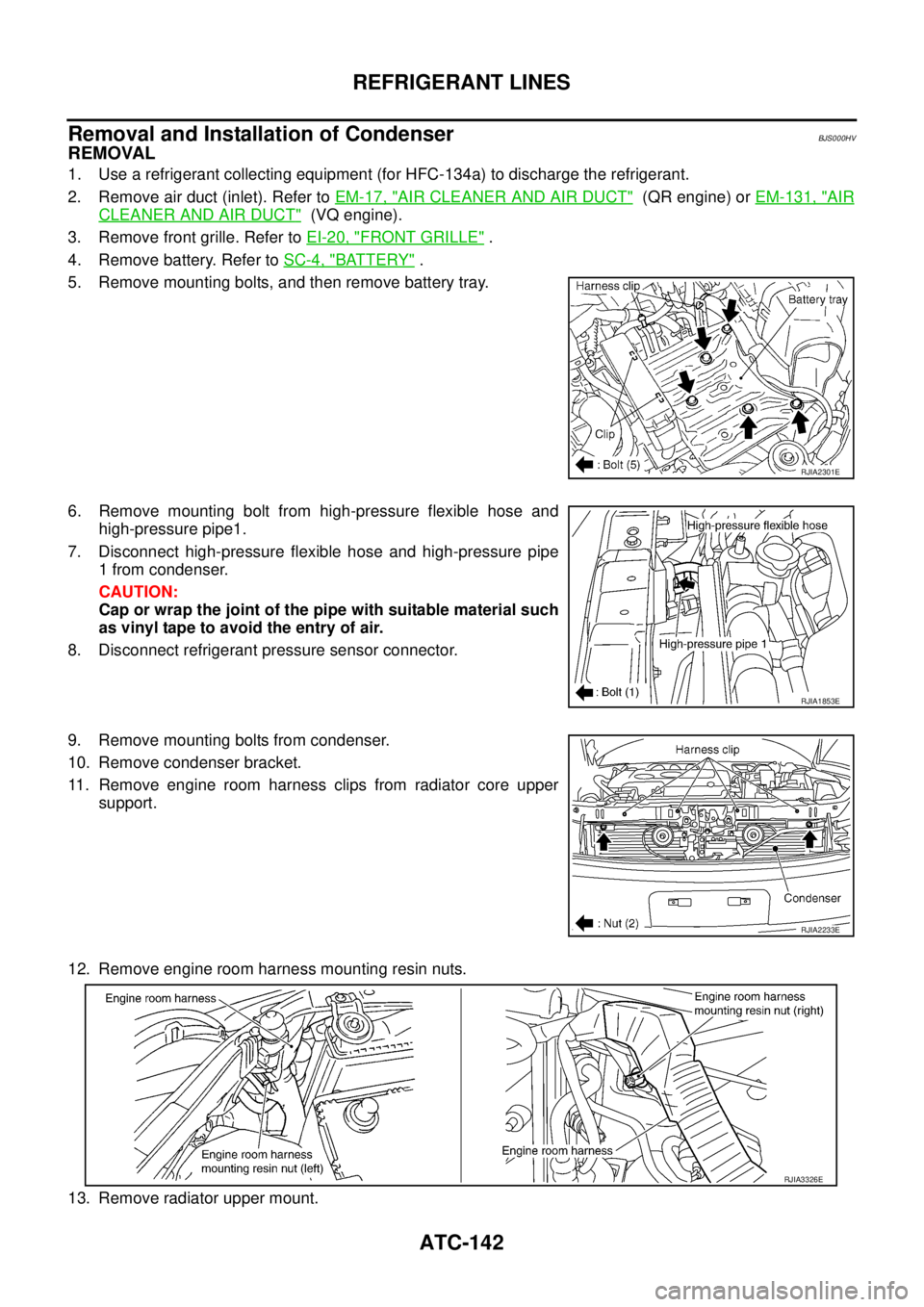
5. Remove mounting bolts, and then remove battery tray.
6. Remove mounting bolt from high-pressure flexible hose and
high-pressure pipe1.
7. Disconnect high-pressure flexible hose and high-pressure pipe
1 from condenser.
CAUTION:
Cap or wrap the joint of the pipe with suitable material such
as vinyl tape to avoid the entry of air.
8. Disconnect refrigerant pressure sensor connector.
9. Remove mounting bolts from condenser.
10. Remove condenser bracket.
11. Remove engine room harness clips from radiator core upper
support.
12. Remove engine room harness mounting resin nuts.
13. Remove radiator upper mount.
RJIA2301E
RJIA1853E
RJIA2233E
RJIA3326E
Page 539 of 3502
AUDIO (WITH INTEGRATED DISPLAY SYSTEM)
AV-11
C
D
E
F
G
H
I
J
L
MA
B
AV
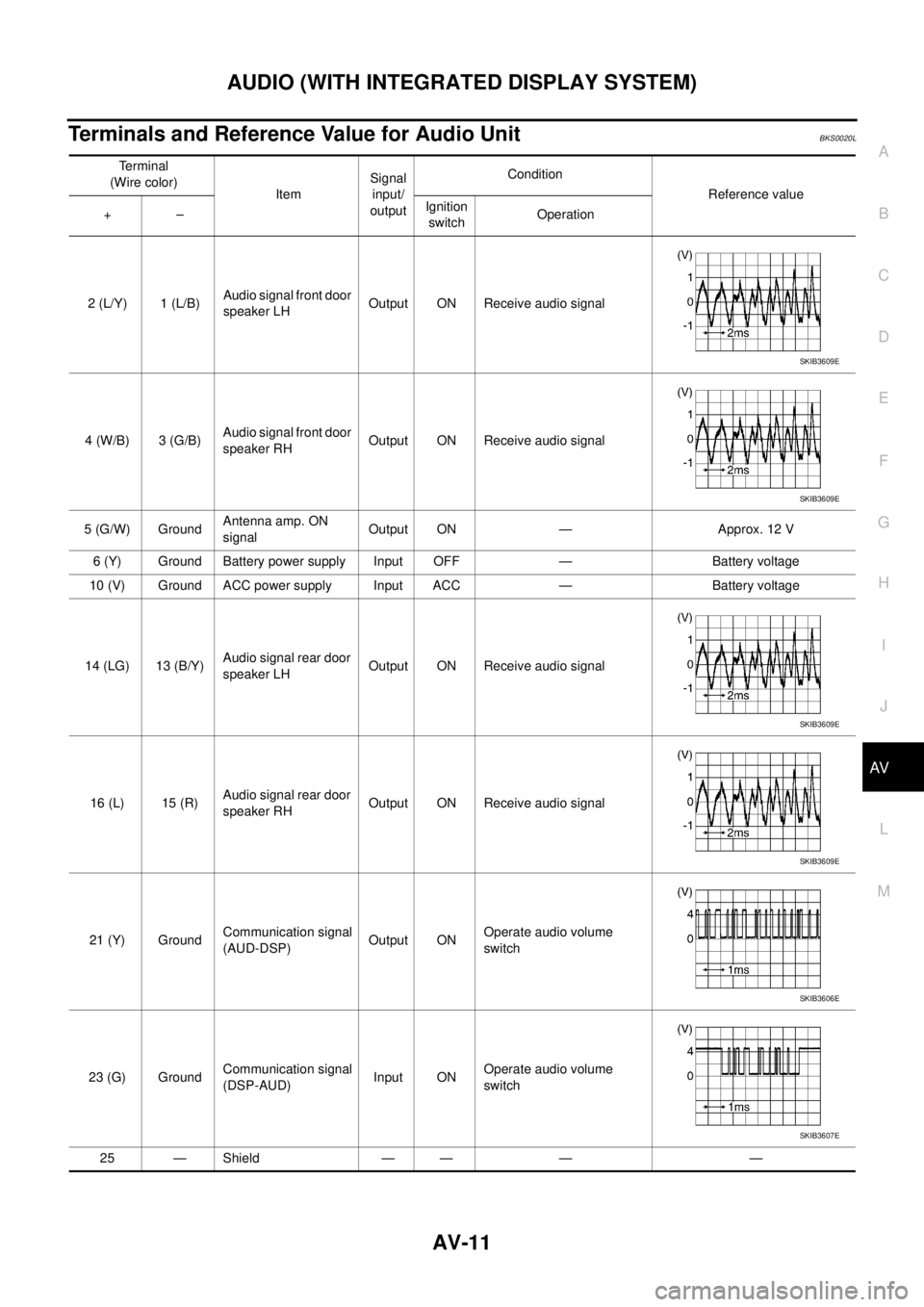
Terminals and Reference Value for Audio UnitBKS0020L
Terminal
(Wire color)
ItemSignal
input/
outputCondition
Reference value
+–Ignition
switchOperation
2 (L/Y) 1 (L/B)Audio signal front door
speaker LHOutput ON Receive audio signal
4 (W/B) 3 (G/B)Audio signal front door
speaker RHOutput ON Receive audio signal
5 (G/W) GroundAntenna amp. ON
signalOutput ON — Approx. 12 V
6 (Y) Ground Battery power supply Input OFF — Battery voltage
10 (V) Ground ACC power supply Input ACC — Battery voltage
14 (LG) 13 (B/Y)Audio signal rear door
speaker LHOutput ON Receive audio signal
16 (L) 15 (R)Audio signal rear door
speaker RHOutput ON Receive audio signal
21 (Y) GroundCommunication signal
(AUD-DSP)Output ONOperate audio volume
switch
23 (G) GroundCommunication signal
(DSP-AUD)Input ONOperate audio volume
switch
25 — Shield — — — —
SKIB3609E
SKIB3609E
SKIB3609E
SKIB3609E
SKIB3606E
SKIB3607E
Page 540 of 3502
AV-12
AUDIO (WITH INTEGRATED DISPLAY SYSTEM)
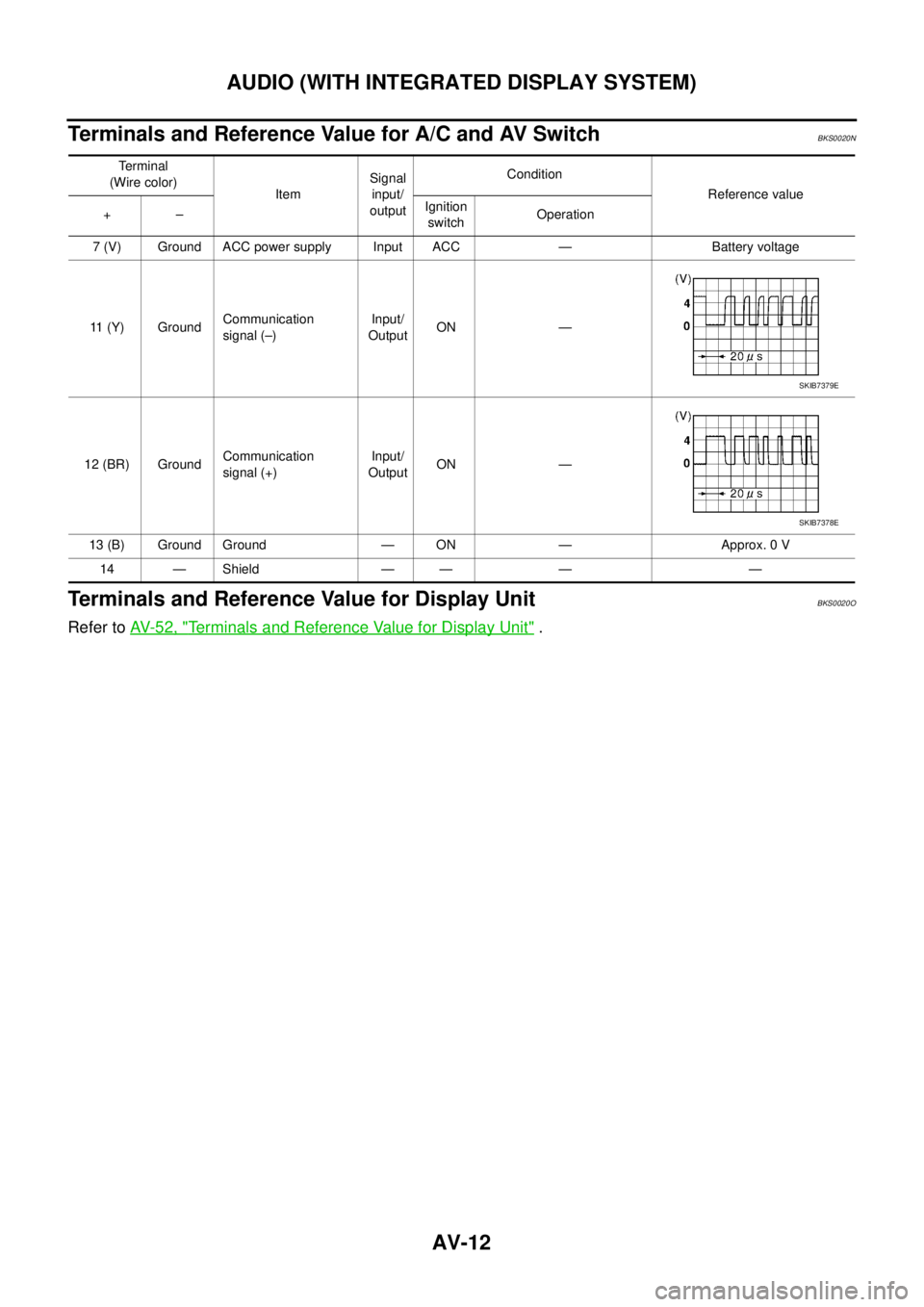
Terminals and Reference Value for A/C and AV SwitchBKS0020N
Terminals and Reference Value for Display UnitBKS0020O
Refer to AV- 5 2 , "Terminals and Reference Value for Display Unit" .
Te r m i n a l
(Wire color)
ItemSignal
input/
outputCondition
Reference value
+–Ignition
switchOperation
7 (V) Ground ACC power supply Input ACC — Battery voltage
11 (Y) GroundCommunication
signal (–)Input/
OutputON —
12 (BR) GroundCommunication
signal (+)Input/
OutputON —
13 (B) Ground Ground — ON — Approx. 0 V
14 — Shield — — — —
SKIB7379E
SKIB7378E
Page 556 of 3502
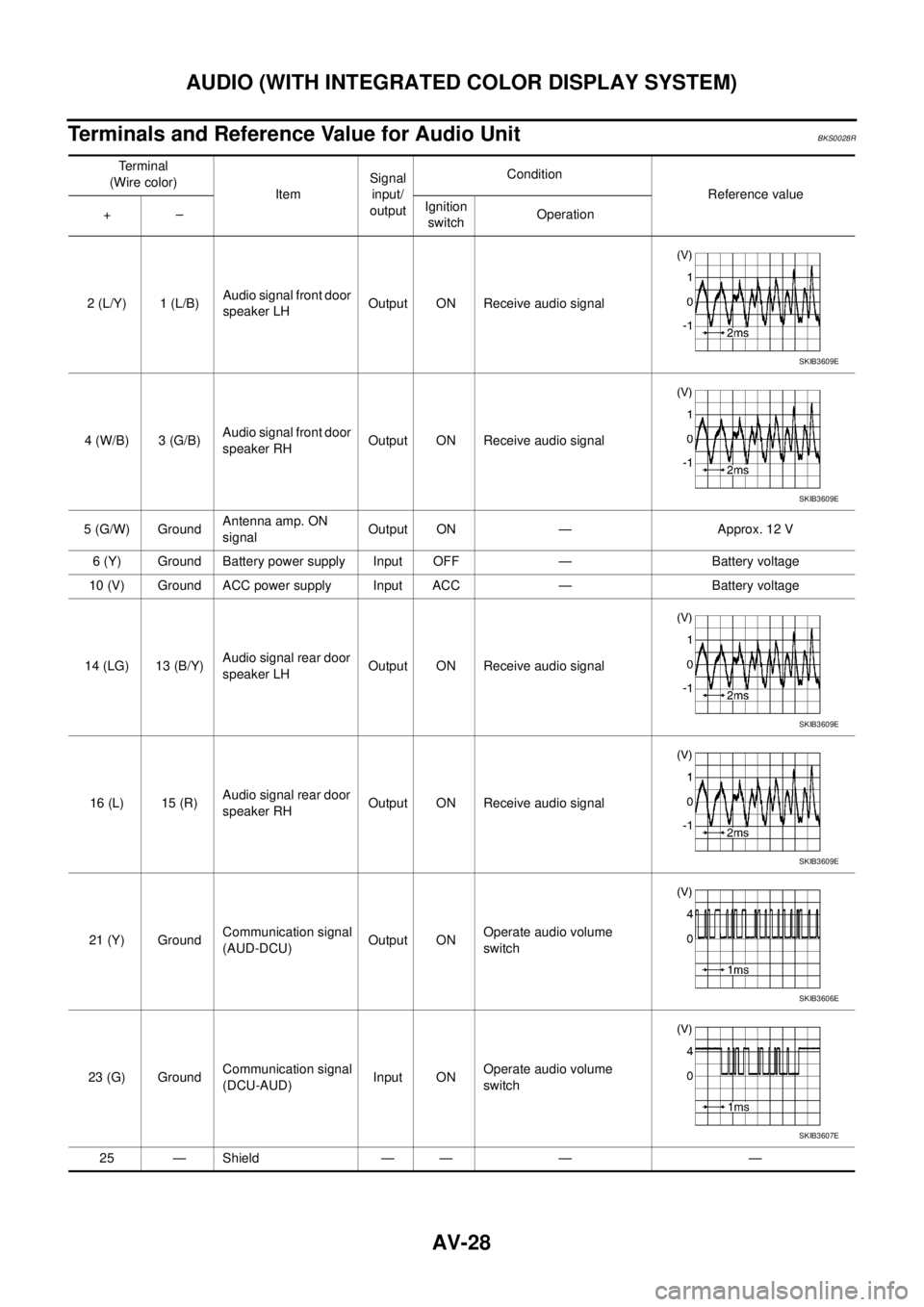
AV-28
AUDIO (WITH INTEGRATED COLOR DISPLAY SYSTEM)
Terminals and Reference Value for Audio UnitBKS0028R
Te r m i n a l
(Wire color)
ItemSignal
input/
outputCondition
Reference value
+–Ignition
switchOperation
2 (L/Y) 1 (L/B)Audio signal front door
speaker LHOutput ON Receive audio signal
4 (W/B) 3 (G/B)Audio signal front door
speaker RHOutput ON Receive audio signal
5 (G/W) GroundAntenna amp. ON
signalOutput ON — Approx. 12 V
6 (Y) Ground Battery power supply Input OFF — Battery voltage
10 (V) Ground ACC power supply Input ACC — Battery voltage
14 (LG) 13 (B/Y)Audio signal rear door
speaker LHOutput ON Receive audio signal
16 (L) 15 (R)Audio signal rear door
speaker RHOutput ON Receive audio signal
21 (Y) GroundCommunication signal
(AUD-DCU)Output ONOperate audio volume
switch
23 (G) GroundCommunication signal
(DCU-AUD)Input ONOperate audio volume
switch
25 — Shield — — — —
SKIB3609E
SKIB3609E
SKIB3609E
SKIB3609E
SKIB3606E
SKIB3607E
Page 558 of 3502
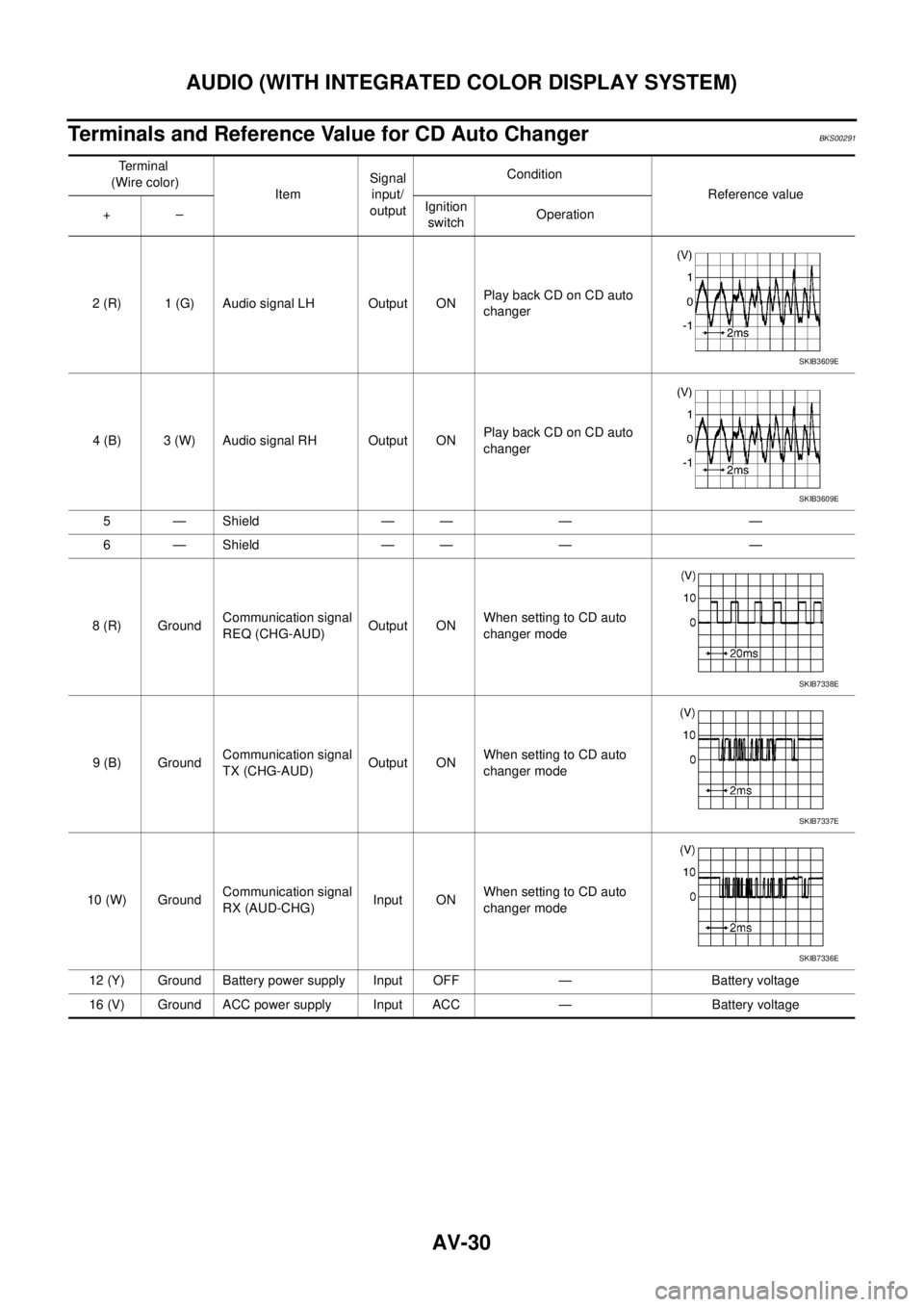
AV-30
AUDIO (WITH INTEGRATED COLOR DISPLAY SYSTEM)
Terminals and Reference Value for CD Auto ChangerBKS00291
Te r m i n a l
(Wire color)
ItemSignal
input/
outputCondition
Reference value
+–Ignition
switchOperation
2 (R) 1 (G) Audio signal LH Output ONPlay back CD on CD auto
changer
4 (B) 3 (W) Audio signal RH Output ONPlay back CD on CD auto
changer
5 — Shield — — — —
6 — Shield — — — —
8 (R) GroundCommunication signal
REQ (CHG-AUD)Output ONWhen setting to CD auto
changer mode
9 (B) GroundCommunication signal
TX (CHG-AUD)Output ONWhen setting to CD auto
changer mode
10 (W) GroundCommunication signal
RX (AUD-CHG)Input ONWhen setting to CD auto
changer mode
12 (Y) Ground Battery power supply Input OFF — Battery voltage
16 (V) Ground ACC power supply Input ACC — Battery voltage
SKIB3609E
SKIB3609E
SKIB7338E
SKIB7337E
SKIB7336E
Page 559 of 3502
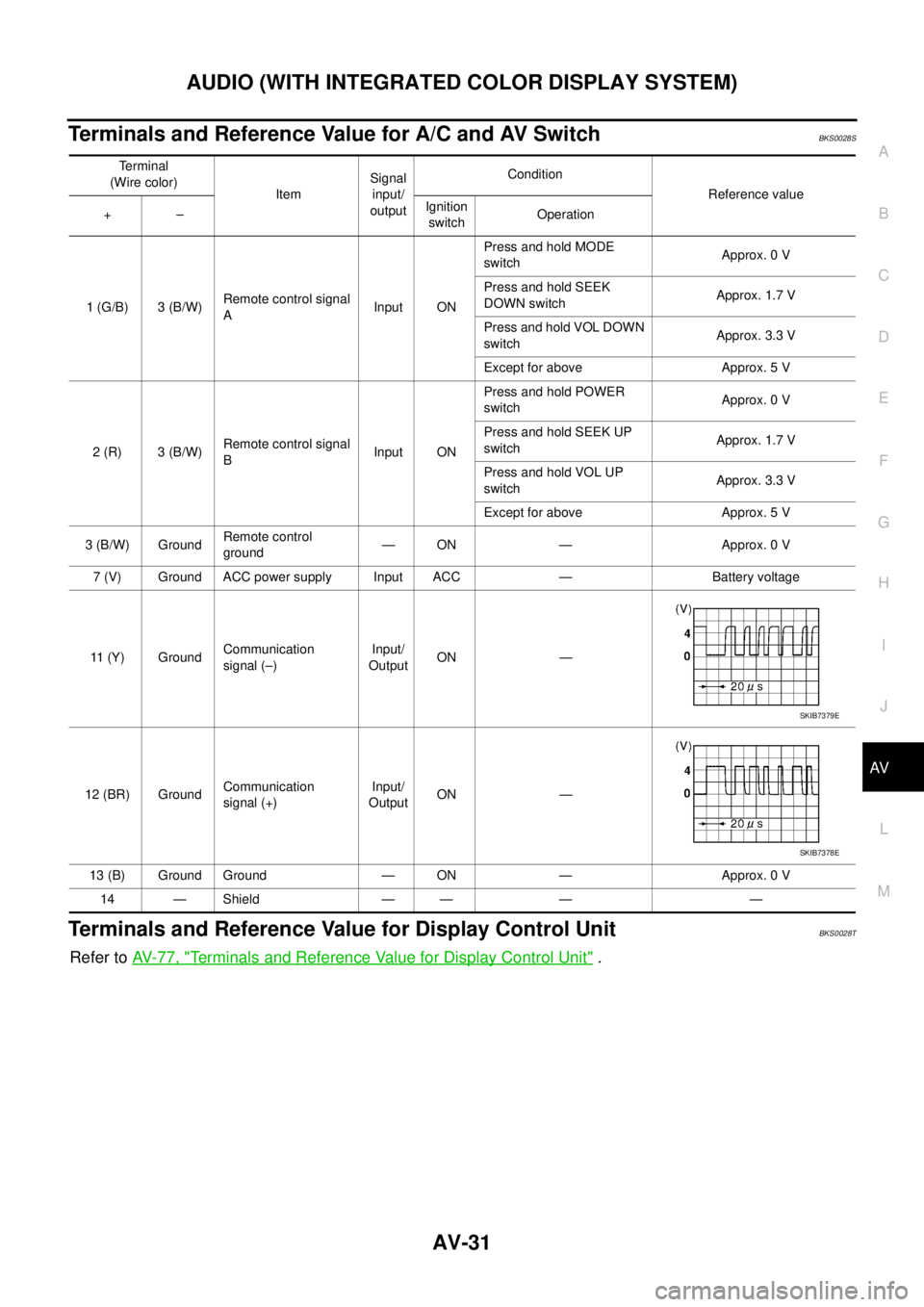
AUDIO (WITH INTEGRATED COLOR DISPLAY SYSTEM)
AV-31
C
D
E
F
G
H
I
J
L
MA
B
AV
Terminals and Reference Value for A/C and AV SwitchBKS0028S
Terminals and Reference Value for Display Control UnitBKS0028T
Refer to AV- 7 7 , "Terminals and Reference Value for Display Control Unit" .
Terminal
(Wire color)
ItemSignal
input/
outputCondition
Reference value
+–Ignition
switchOperation
1 (G/B) 3 (B/W)Remote control signal
AInput ONPress and hold MODE
switchApprox. 0 V
Press and hold SEEK
DOWN switchApprox. 1.7 V
Press and hold VOL DOWN
switchApprox. 3.3 V
Except for above Approx. 5 V
2 (R) 3 (B/W)Remote control signal
BInput ONPress and hold POWER
switchApprox. 0 V
Press and hold SEEK UP
switchApprox. 1.7 V
Press and hold VOL UP
switchApprox. 3.3 V
Except for above Approx. 5 V
3 (B/W) GroundRemote control
ground— ON — Approx. 0 V
7 (V) Ground ACC power supply Input ACC — Battery voltage
11 (Y) GroundCommunication
signal (–)Input/
OutputON —
12 (BR) GroundCommunication
signal (+)Input/
OutputON —
13 (B) Ground Ground — ON — Approx. 0 V
14 — Shield — — — —
SKIB7379E
SKIB7378E
Page 580 of 3502
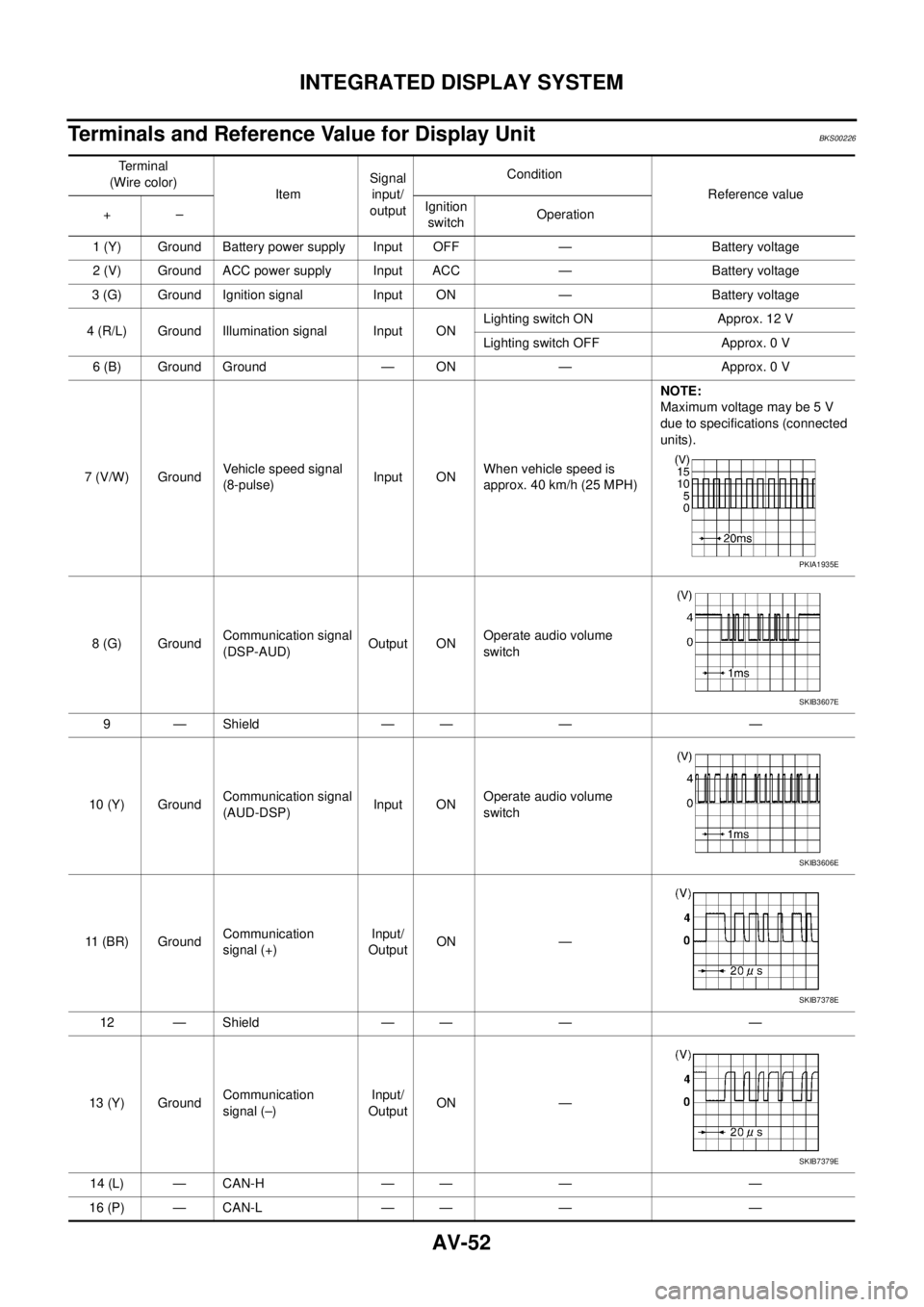
AV-52
INTEGRATED DISPLAY SYSTEM
Terminals and Reference Value for Display UnitBKS00226
Te r m i n a l
(Wire color)
ItemSignal
input/
outputCondition
Reference value
+–Ignition
switchOperation
1 (Y) Ground Battery power supply Input OFF — Battery voltage
2 (V) Ground ACC power supply Input ACC — Battery voltage
3 (G) Ground Ignition signal Input ON — Battery voltage
4 (R/L) Ground Illumination signal Input ONLighting switch ON Approx. 12 V
Lighting switch OFF Approx. 0 V
6 (B) Ground Ground — ON — Approx. 0 V
7 (V/W) GroundVehicle speed signal
(8-pulse)Input ONWhen vehicle speed is
approx. 40 km/h (25 MPH)NOTE:
Maximum voltage may be 5 V
due to specifications (connected
units).
8 (G) GroundCommunication signal
(DSP-AUD)Output ONOperate audio volume
switch
9 — Shield — — — —
10 (Y) GroundCommunication signal
(AUD-DSP)Input ONOperate audio volume
switch
11 (BR) GroundCommunication
signal (+)Input/
OutputON —
12 — Shield — — — —
13 (Y) GroundCommunication
signal (–)Input/
OutputON —
14 (L) — CAN-H — — — —
16 (P) — CAN-L — — — —
PKIA1935E
SKIB3607E
SKIB3606E
SKIB7378E
SKIB7379E
Page 581 of 3502
INTEGRATED DISPLAY SYSTEM
AV-53
C
D
E
F
G
H
I
J
L
MA
B
AV
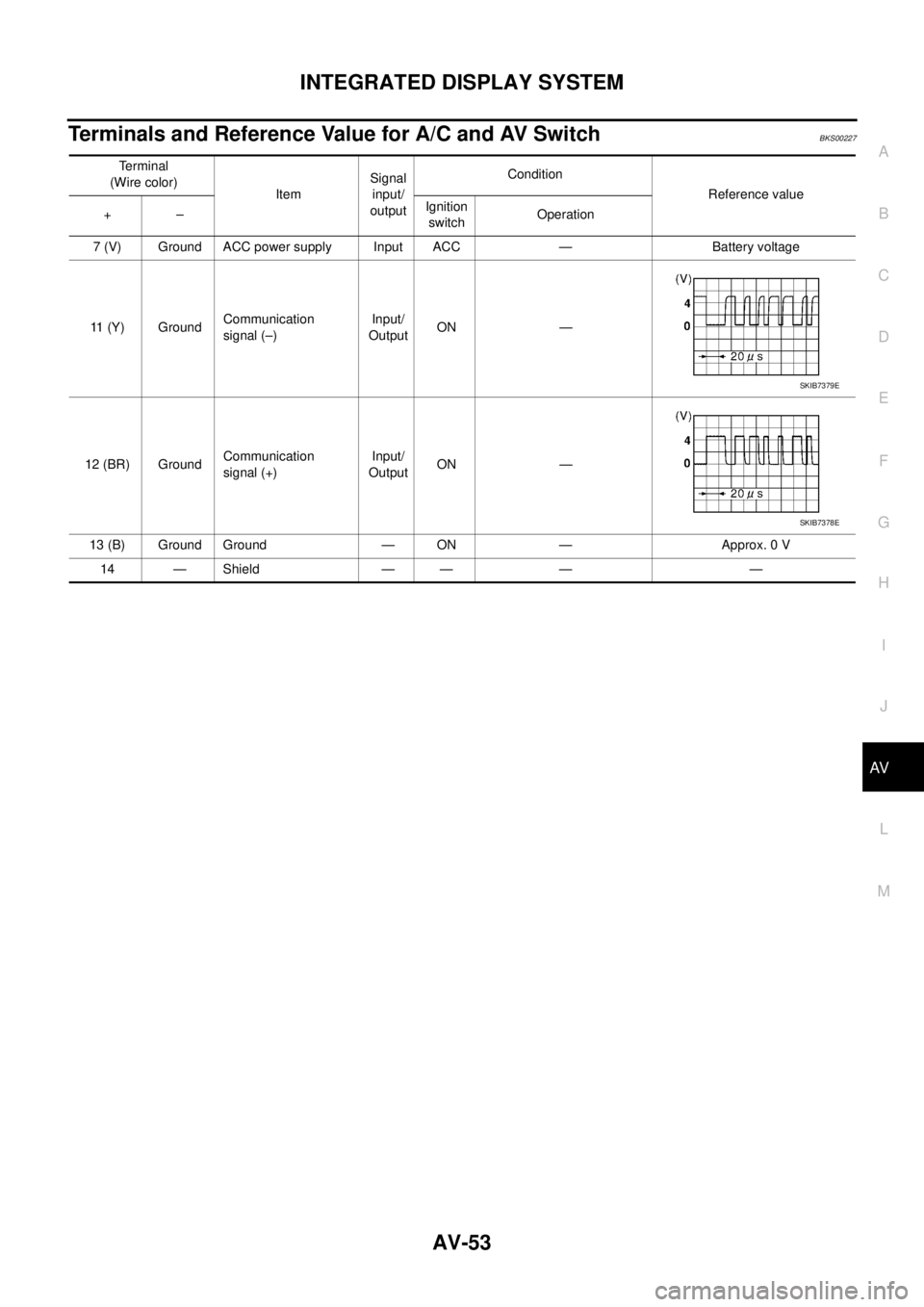
Terminals and Reference Value for A/C and AV SwitchBKS00227
Terminal
(Wire color)
ItemSignal
input/
outputCondition
Reference value
+–Ignition
switchOperation
7 (V) Ground ACC power supply Input ACC — Battery voltage
11 (Y) GroundCommunication
signal (–)Input/
OutputON —
12 (BR) GroundCommunication
signal (+)Input/
OutputON —
13 (B) Ground Ground — ON — Approx. 0 V
14 — Shield — — — —
SKIB7379E
SKIB7378E
Page 586 of 3502
AV-58
INTEGRATED DISPLAY SYSTEM
Unable to Operate System with A/C and AV SwitchBKS0022J
1. CHECK CONDITION
1. Turn ignition switch ON.
2. Check if an image is displayed on the screen.
Is an image displayed on the screen?
YES >> GO TO 2.
NO >> Repair malfunctioning part. Refer to AV- 5 7 , "
Symptom Chart" .
2. SELF-DIAGNOSIS OF A/C AND AV SWITCH
Start self-diagnosis of A/C and AV switch, and check the self-diagnosis result. Refer to AV- 5 4 , "
A/C and AV
Switch Self-Diagnosis Function" .
OK or NG
OK >> GO TO 4.
NG >> GO TO 3.
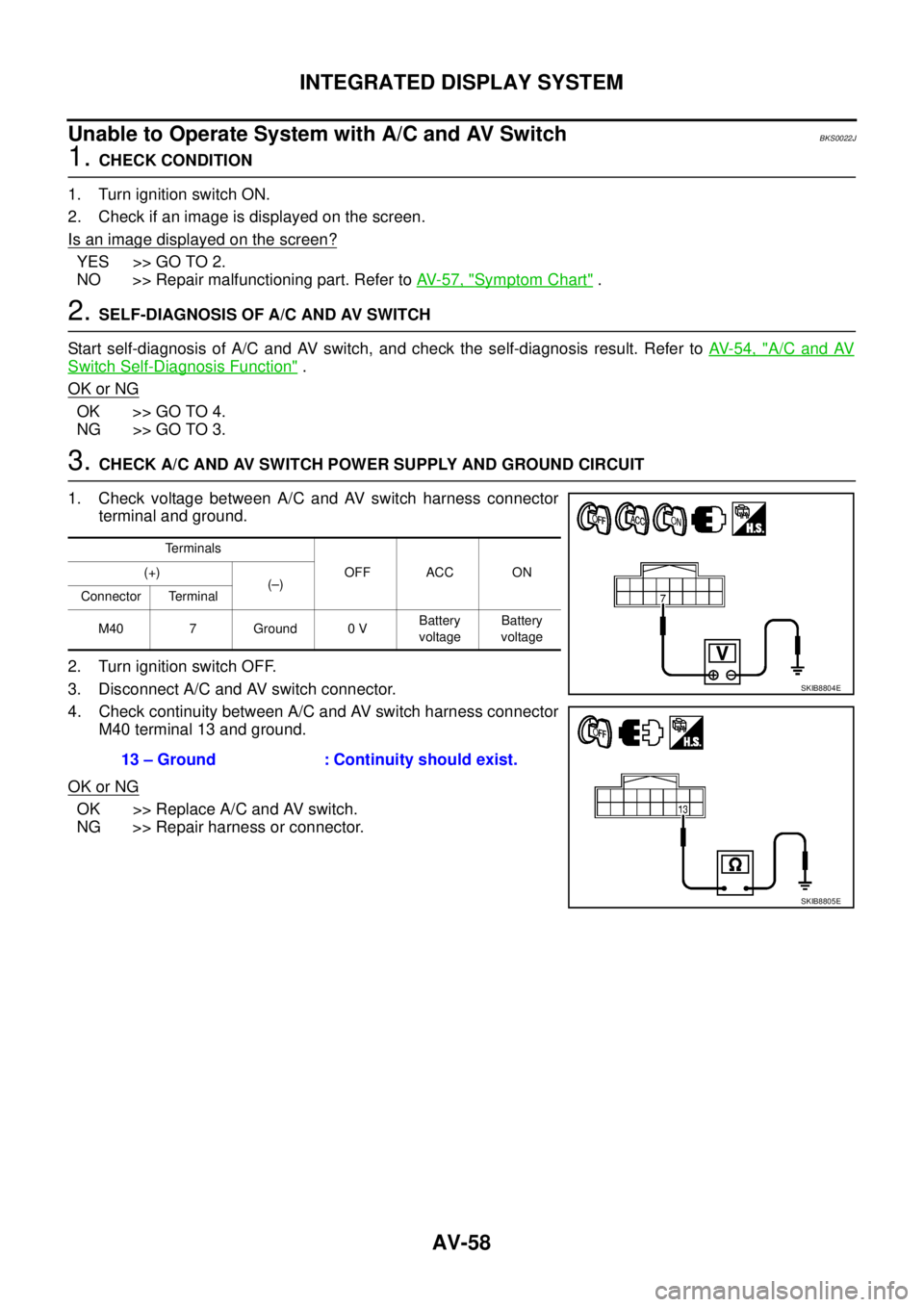
3. CHECK A/C AND AV SWITCH POWER SUPPLY AND GROUND CIRCUIT
1. Check voltage between A/C and AV switch harness connector
terminal and ground.
2. Turn ignition switch OFF.
3. Disconnect A/C and AV switch connector.
4. Check continuity between A/C and AV switch harness connector
M40 terminal 13 and ground.
OK or NG
OK >> Replace A/C and AV switch.
NG >> Repair harness or connector.
Terminals
OFF ACC ON (+)
(–)
Connector Terminal
M40 7 Ground 0 VBattery
voltageBattery
voltage
13 – Ground : Continuity should exist.
SKIB8804E
SKIB8805E