Condition NISSAN TEANA 2008 Service Manual
[x] Cancel search | Manufacturer: NISSAN, Model Year: 2008, Model line: TEANA, Model: NISSAN TEANA 2008Pages: 5121, PDF Size: 69.03 MB
Page 5093 of 5121

IPDM E/R (INTELLIGENT POWER DISTRIBUTION MODULE ENGINE ROOM)
WW-81
< ECU DIAGNOSIS >
C
D
E
F
G
H
I
J
K
MA
B
WW
N
O
P
49
(R/B)Ground ECM relay power supply OutputIgnition switch OFF
(More than a few seconds after turning
ignition switch OFF)0 V
Ignition switch ON
Ignition switch OFF
(For a few seconds after turning igni-
tion switch OFF)Battery voltage
51
(LG)Ground Ignition relay power supply OutputIgnition switch OFF 0 V
Ignition switch ON Battery voltage
52
(Y/G)Ground Ignition relay power supply OutputIgnition switch OFF 0 V
Ignition switch ON Battery voltage
53
(R/W)Ground ECM relay power supply OutputIgnition switch OFF
(More than a few seconds after turning
ignition switch OFF)0 V
Ignition switch ON
Ignition switch OFF
(For a few seconds after turning igni-
tion switch OFF)Battery voltage
54
(G/W)GroundThrottle control motor re-
lay power supplyOutputIgnition switch OFF
(More than a few seconds after turning
ignition switch OFF)0 V
Ignition switch ON
Ignition switch OFF
(For a few seconds after turning igni-
tion switch OFF)Battery voltage
55
(W/L)Ground ECM power supply Output Ignition switch OFF Battery voltage
56
(R/Y)Ground Ignition relay power supply OutputIgnition switch OFF 0 V
Ignition switch ON Battery voltage
57
(O)Ground Ignition relay power supply OutputIgnition switch OFF 0 V
Ignition switch ON Battery voltage
58
(Y)Ground Ignition relay power supply OutputIgnition switch OFF 0 V
Ignition switch ON Battery voltage
69
(W/B)Ground ECM relay control OutputIgnition switch OFF
(More than a few seconds after turning
ignition switch OFF)Battery voltage
Ignition switch ON
Ignition switch OFF
(For a few seconds after turning igni-
tion switch OFF)0 - 1.5 V
70
(O)GroundThrottle control motor re-
lay controlOutputIgnition switch ON → OFF0 -1.0 V
↓
Battery voltage
↓
0 V
Ignition switch ON 0 - 1.0 V
72
(R/B)Ground Starter relay control InputIgnition
switch ONSelector lever in any posi-
tion other than P or N0 V
Selector lever P or N Battery voltage
74
(Y)Ground Ignition relay power supply OutputIgnition switch OFF 0 V
Ignition switch ON Battery voltage Te r m i n a l N o .
(Wire color)Description
ConditionVa l u e
(Approx.)
Signal nameInput/
Output +−
Page 5094 of 5121
WW-82
< ECU DIAGNOSIS >
IPDM E/R (INTELLIGENT POWER DISTRIBUTION MODULE ENGINE ROOM)
75
(P/L)Ground Oil pressure switch InputIgnition
switch ONEngine stopped 0 V
Engine running Battery voltage
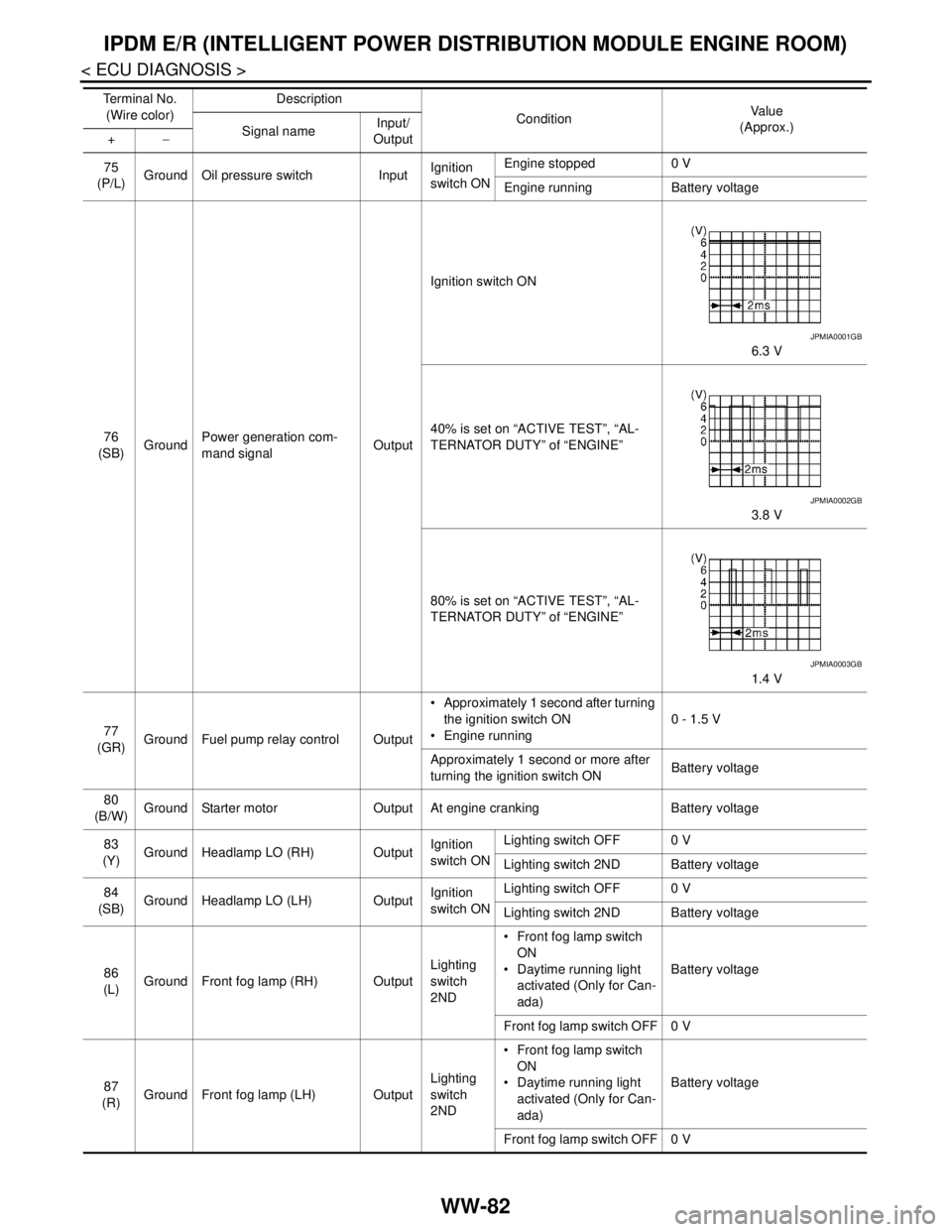
76
(SB)GroundPower generation com-
mand signalOutputIgnition switch ON
6.3 V
40% is set on “ACTIVE TEST”, “AL-
TERNATOR DUTY” of “ENGINE”
3.8 V
80% is set on “ACTIVE TEST”, “AL-
TERNATOR DUTY” of “ENGINE”
1.4 V
77
(GR)Ground Fuel pump relay control Output Approximately 1 second after turning
the ignition switch ON
Engine running0 - 1.5 V
Approximately 1 second or more after
turning the ignition switch ONBattery voltage
80
(B/W)Ground Starter motor Output At engine cranking Battery voltage
83
(Y)Ground Headlamp LO (RH) OutputIgnition
switch ONLighting switch OFF 0 V
Lighting switch 2ND Battery voltage
84
(SB)Ground Headlamp LO (LH) OutputIgnition
switch ONLighting switch OFF 0 V
Lighting switch 2ND Battery voltage
86
(L)Ground Front fog lamp (RH) OutputLighting
switch
2ND Front fog lamp switch
ON
Daytime running light
activated (Only for Can-
ada)Battery voltage
Front fog lamp switch OFF 0 V
87
(R)Ground Front fog lamp (LH) OutputLighting
switch
2ND Front fog lamp switch
ON
Daytime running light
activated (Only for Can-
ada)Battery voltage
Front fog lamp switch OFF 0 V Te r m i n a l N o .
(Wire color)Description
ConditionVa l u e
(Approx.)
Signal nameInput/
Output +−
JPMIA0001GB
JPMIA0002GB
JPMIA0003GB
Page 5095 of 5121
IPDM E/R (INTELLIGENT POWER DISTRIBUTION MODULE ENGINE ROOM)
WW-83
< ECU DIAGNOSIS >
C
D
E
F
G
H
I
J
K
MA
B
WW
N
O
P
88
(P)GroundWasher pump power sup-
plyOutput Ignition switch ON Battery voltage
89
(W)Ground Headlamp HI (RH) OutputIgnition
switch ON Lighting switch HI
Lighting switch PASSBattery voltage
Lighting switch OFF 0 V
90
(O)Ground Headlamp HI (LH) OutputIgnition
switch ON Lighting switch HI
Lighting switch PASSBattery voltage
Lighting switch OFF 0 V
91
(O)Ground Parking lamp (RH) OutputIgnition
switch ONLighting switch 1ST Battery voltage
Lighting switch OFF 0 V
92
(L)Ground Parking lamp (LH) OutputIgnition
switch ONLighting switch 1ST Battery voltage
Lighting switch OFF 0 V
93
(BR)GroundHeadlamp aiming motor
(RH)OutputIgnition
switch ONLighting switch 1ST Battery voltage
Lighting switch OFF 0 V
94
(Y)GroundHeadlamp aiming motor
(LH)OutputIgnition
switch ONLighting switch 1ST Battery voltage
Lighting switch OFF 0 V
99
(W)Ground Ambient sensor ground Input Ignition switch ON 0 V
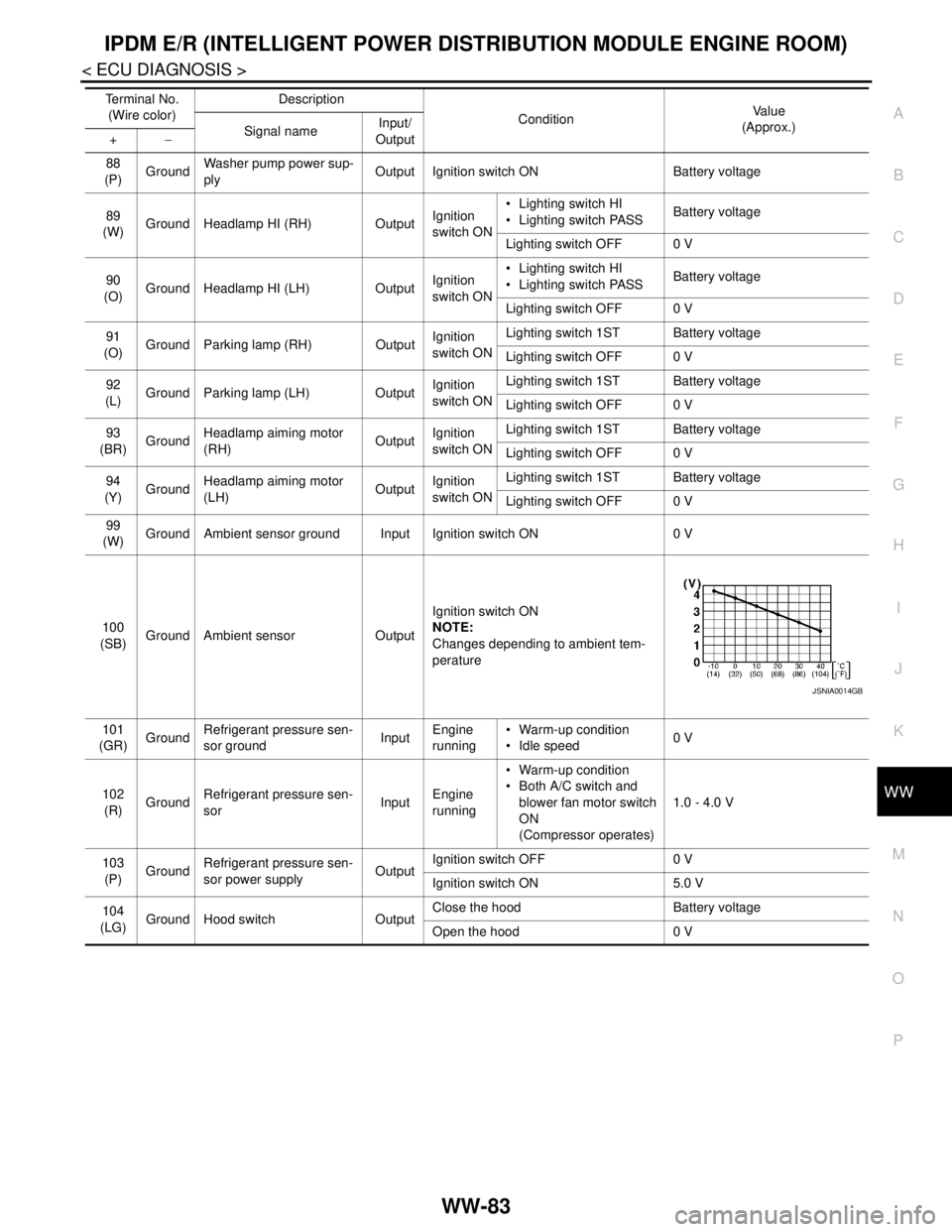
100
(SB)Ground Ambient sensor OutputIgnition switch ON
NOTE:
Changes depending to ambient tem-
perature
101
(GR)GroundRefrigerant pressure sen-
sor groundInputEngine
running Warm-up condition
Idle speed0 V
102
(R)GroundRefrigerant pressure sen-
sorInputEngine
running Warm-up condition
Both A/C switch and
blower fan motor switch
ON
(Compressor operates)1.0 - 4.0 V
103
(P)GroundRefrigerant pressure sen-
sor power supplyOutputIgnition switch OFF 0 V
Ignition switch ON 5.0 V
104
(LG)
Ground Hood switch OutputClose the hood Battery voltage
Open the hood 0 V Te r m i n a l N o .
(Wire color)Description
ConditionVa l u e
(Approx.)
Signal nameInput/
Output +−
JSNIA0014GB
Page 5100 of 5121

WW-88
< ECU DIAGNOSIS >
IPDM E/R (INTELLIGENT POWER DISTRIBUTION MODULE ENGINE ROOM)
If No CAN Communication Is Available With BCM
IGNITION RELAY MALFUNCTION DETECTION FUNCTION
IPDM E/R monitors the voltage at the contact circuit and excitation coil circuit of the ignition relay inside it.
IPDM E/R judges the ignition relay error if the voltage differs between the contact circuit and the excitation
coil circuit.
If the ignition relay cannot turn OFF due to contact seizure, it activates the tail lamp relay for 10 minutes to
alert the user to the ignition relay malfunction when the ignition switch is turned OFF.
FRONT WIPER CONTROL
IPDM E/R detects front wiper stop position by a front wiper auto stop signal.
When a front wiper auto stop signal is in the conditions listed below, IPDM E/R stops power supply to wiper
after repeating a front wiper 10 seconds activation and 20 seconds stop five times.
Control part Fail-safe operation
Cooling fan Turns ON the cooling fan relay-2 and the cooling fan relay-3 when ignition switch is
turned ON (Cooling fan operates at HI)
Turns OFF the cooling fan relay-1, the cooling fan relay-2 and the cooling fan relay-3
when the ignition switch is turned OFF (Cooling fan does not operate)
A/C compressor A/C relay OFF
Alternator Outputs the power generation command signal (PWM signal) 0%
Control part Fail-safe operation
Headlamp Turns ON the headlamp low relay when the ignition switch is turned ON
Turns OFF the headlamp low relay when the ignition switch is turned OFF
Headlamp high relay OFF
Parking lamps
License plate lamps
Illuminations
Tail lamps Turns ON the tail lamp relay when the ignition switch is turned ON
Turns OFF the tail lamp relay when the ignition switch is turned OFF
Front wiper The status just before activation of fail-safe control is maintained until the ignition
switch is turned OFF while the front wiper is operating at LO or HI speed.
The wiper is operated at LO speed until the ignition switch is turned OFF if the fail-
safe control is activated while the front wiper is set in the INT mode and the front wiper
motor is operating.
Front fog lamps Front fog lamp relay OFF
Horn Horn OFF
Ignition relay The status just before activation of fail-safe is maintained.
Starter motor Starter control relay OFF
Steering lock unit Steering lock relay OFF
Headlamp washer relay Headlamp washer relay OFF
Voltage judgment
IPDM E/R judgment Operation
Ignition relay contact sideIgnition relay excitation coil
side
ON ON Ignition relay ON normal —
OFF OFF Ignition relay OFF normal —
ON OFF Ignition relay ON stuck Detects DTC “B2098: IGN RELAY ON”
Turns ON the tail lamp relay for 10 min-
utes
OFF ON Ignition relay OFF stuck Detects DTC “B2099: IGN RELAY OFF”
Page 5101 of 5121
IPDM E/R (INTELLIGENT POWER DISTRIBUTION MODULE ENGINE ROOM)
WW-89
< ECU DIAGNOSIS >
C
D
E
F
G
H
I
J
K
MA
B
WW
N
O
P
NOTE:
This operation status can be confirmed on the IPDM E/R “Data Monitor” that displays “BLOCK” for the item
“WIP PROT” while the wiper is stopped.
STARTER MOTOR PROTECTION FUNCTION
IPDM E/R turns OFF the starter control relay to protect the starter motor when the starter control relay remains
active for 90 seconds.
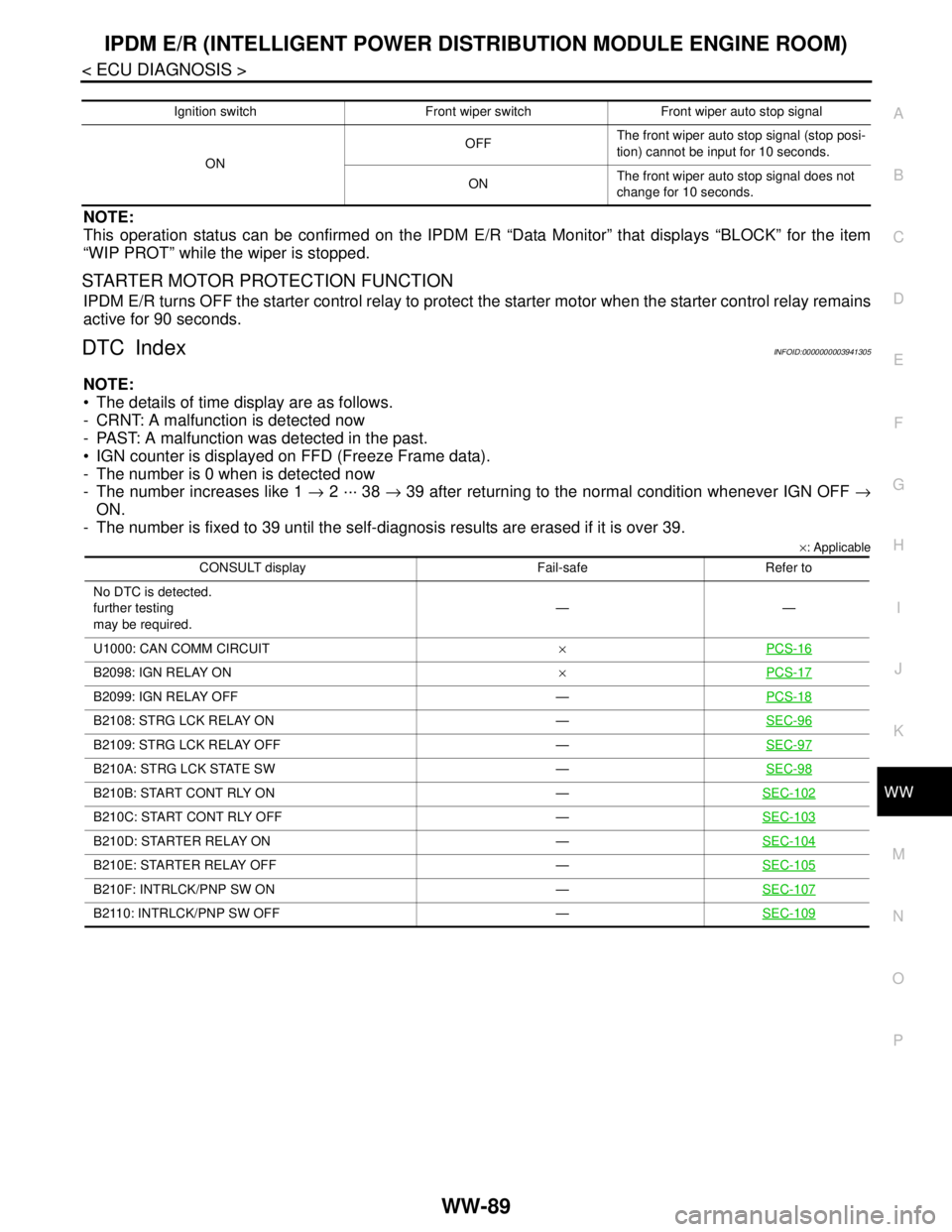
DTC IndexINFOID:0000000003941305
NOTE:
The details of time display are as follows.
- CRNT: A malfunction is detected now
- PAST: A malfunction was detected in the past.
IGN counter is displayed on FFD (Freeze Frame data).
- The number is 0 when is detected now
- The number increases like 1 → 2 ··· 38 → 39 after returning to the normal condition whenever IGN OFF →
ON.
- The number is fixed to 39 until the self-diagnosis results are erased if it is over 39.
×: Applicable
Ignition switch Front wiper switch Front wiper auto stop signal
ONOFFThe front wiper auto stop signal (stop posi-
tion) cannot be input for 10 seconds.
ONThe front wiper auto stop signal does not
change for 10 seconds.
CONSULT display Fail-safe Refer to
No DTC is detected.
further testing
may be required.——
U1000: CAN COMM CIRCUIT×PCS-16
B2098: IGN RELAY ON×PCS-17
B2099: IGN RELAY OFF —PCS-18
B2108: STRG LCK RELAY ON —SEC-96
B2109: STRG LCK RELAY OFF —SEC-97
B210A: STRG LCK STATE SW —SEC-98
B210B: START CONT RLY ON —SEC-102
B210C: START CONT RLY OFF —SEC-103
B210D: STARTER RELAY ON —SEC-104
B210E: STARTER RELAY OFF —SEC-105
B210F: INTRLCK/PNP SW ON —SEC-107
B2110: INTRLCK/PNP SW OFF —SEC-109
Page 5104 of 5121

WW-92
< SYMPTOM DIAGNOSIS >
NORMAL OPERATING CONDITION
NORMAL OPERATING CONDITION
DescriptionINFOID:0000000003761617
FRONT WIPER MOTOR PROTECTION FUNCTION
IPDM E/R may stop the front wiper to protect the front wiper motor if any obstruction (operation resistance)
such as a large amount of snow is detected during the front wiper operation.
At that time turn OFF the front wiper and remove the foreign object. Then wait for approximately 20 seconds
or more and reactivate the front wiper. The wiper will operate normally.
Page 5105 of 5121
FRONT WIPER DOES NOT OPERATE
WW-93
< SYMPTOM DIAGNOSIS >
C
D
E
F
G
H
I
J
K
MA
B
WW
N
O
P
FRONT WIPER DOES NOT OPERATE
DescriptionINFOID:0000000003761613
The front wiper does not operate under any operating conditions.
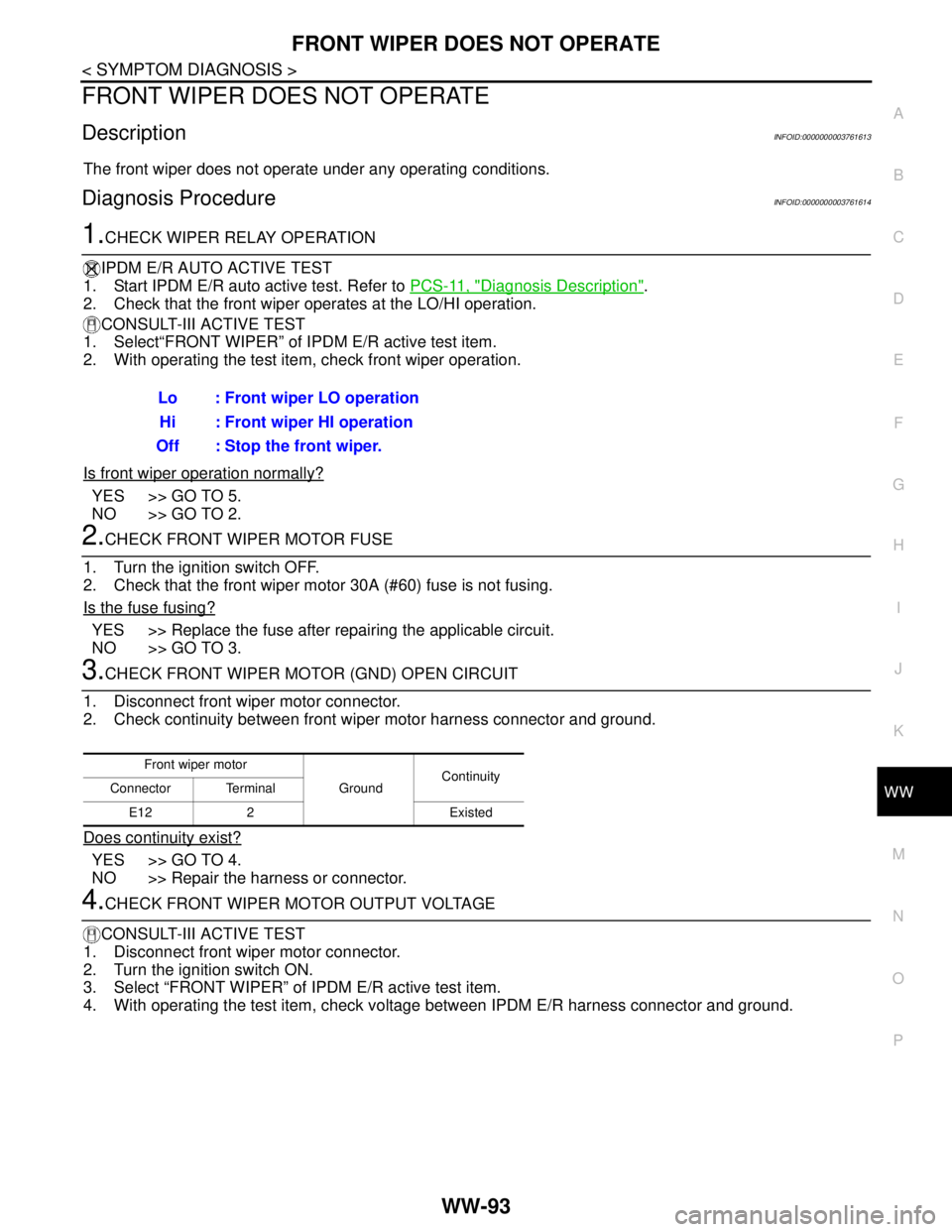
Diagnosis ProcedureINFOID:0000000003761614
1.CHECK WIPER RELAY OPERATION
IPDM E/R AUTO ACTIVE TEST
1. Start IPDM E/R auto active test. Refer to PCS-11, "
Diagnosis Description".
2. Check that the front wiper operates at the LO/HI operation.
CONSULT-III ACTIVE TEST
1. Select“FRONT WIPER” of IPDM E/R active test item.
2. With operating the test item, check front wiper operation.
Is front wiper operation normally?
YES >> GO TO 5.
NO >> GO TO 2.
2.CHECK FRONT WIPER MOTOR FUSE
1. Turn the ignition switch OFF.
2. Check that the front wiper motor 30A (#60) fuse is not fusing.
Is the fuse fusing?
YES >> Replace the fuse after repairing the applicable circuit.
NO >> GO TO 3.
3.CHECK FRONT WIPER MOTOR (GND) OPEN CIRCUIT
1. Disconnect front wiper motor connector.
2. Check continuity between front wiper motor harness connector and ground.
Does continuity exist?
YES >> GO TO 4.
NO >> Repair the harness or connector.
4.CHECK FRONT WIPER MOTOR OUTPUT VOLTAGE
CONSULT-III ACTIVE TEST
1. Disconnect front wiper motor connector.
2. Turn the ignition switch ON.
3. Select “FRONT WIPER” of IPDM E/R active test item.
4. With operating the test item, check voltage between IPDM E/R harness connector and ground. Lo : Front wiper LO operation
Hi : Front wiper HI operation
Off : Stop the front wiper.
Front wiper motor
GroundContinuity
Connector Terminal
E12 2 Existed
Page 5106 of 5121

WW-94
< SYMPTOM DIAGNOSIS >
FRONT WIPER DOES NOT OPERATE
Is the measurement normal?
YES >> Replace front wiper motor.
NO >> Replace IPDM E/R.
5.CHECK FRONT WIPER REQUEST SIGNAL INPUT
CONSULT-III DATA MONITOR
1. Select “FR WIP REQ” of IPDM E/R data monitor item.
2. Switch the front wiper switch to HI and LO.
3. With operating the front wiper switch, check the monitor status.
Is the status of item normal?
YES >> Replace IPDM E/R.
NO >> GO TO 6.
6.CHECK COMBINATION SWITCH
Perform the inspection of the combination switch. Refer to BCS-76, "
Symptom Table".
Is combination switch normal?
YES >> Replace BCM. Refer to BCS-78, "Exploded View".
NO >> Repair or replace the applicable parts.
Te r m i n a l s
Te s t i t e m
Voltage (Approx.) (+) (−)
IPDM E/R
GroundFRONT WIPER
Connector Terminal
E104Lo Battery voltage
Off 0 V
5Hi Battery voltage
Off 0 V
Monitor item Condition Monitor status
FR WIPER REQFront wiper switch HION Hi
OFF Stop
Front wiper switch LOON Low
OFF Stop
Page 5107 of 5121
HEADLAMP WASHER DOES NOT OPERATE
WW-95
< SYMPTOM DIAGNOSIS >
C
D
E
F
G
H
I
J
K
MA
B
WW
N
O
P
HEADLAMP WASHER DOES NOT OPERATE
DescriptionINFOID:0000000003774630
Headlamp washer does not operate linked to front washer operation.
Diagnosis ProcedureINFOID:0000000003774631
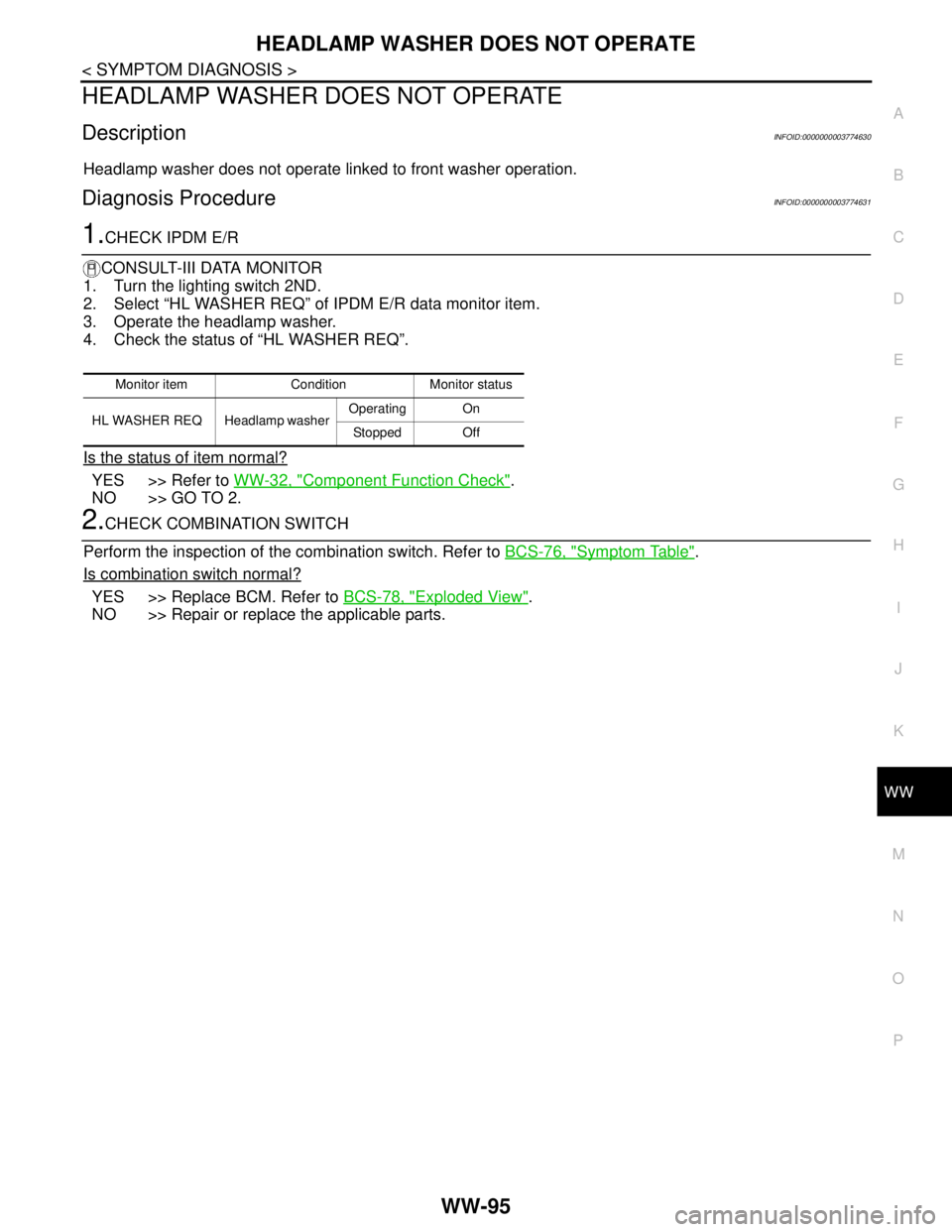
1.CHECK IPDM E/R
CONSULT-III DATA MONITOR
1. Turn the lighting switch 2ND.
2. Select “HL WASHER REQ” of IPDM E/R data monitor item.
3. Operate the headlamp washer.
4. Check the status of “HL WASHER REQ”.
Is the status of item normal?
YES >> Refer to WW-32, "Component Function Check".
NO >> GO TO 2.
2.CHECK COMBINATION SWITCH
Perform the inspection of the combination switch. Refer to BCS-76, "
Symptom Table".
Is combination switch normal?
YES >> Replace BCM. Refer to BCS-78, "Exploded View".
NO >> Repair or replace the applicable parts.
Monitor item Condition Monitor status
HL WASHER REQ Headlamp washer Operating On
Stopped Off
Page 5120 of 5121

WW-108
< ON-VEHICLE REPAIR >
FRONT WIPER DRIVE ASSEMBLY
4. Disconnect the front wiper motor connector.
5. Remove the front wiper drive assembly from the vehicle.
INSTALLATION
1. Install the front wiper drive assembly to the vehicle.
2. Connect the front wiper motor connector.
3. Operate the front wiper to move it to the auto stop position.
4. Install the cowl top cover. Refer to EXT-20, "
Exploded View".
5. Install the wiper arms. Refer to WW-105, "
Exploded View".
Disassembly and AssemblyINFOID:0000000003761640
DISASSEMBLY
1. Remove the wiper linkage 1 and 2 from the front wiper drive assembly.
CAUTION:
Do not bend the linkage or damage the plastic part of the ball joint when removing the wiper link-
age.
2. Remove the front wiper motor mounting bolts, and then remove the front wiper motor from the wiper
frame.
ASSEMBLY
1. Connect the front wiper motor connector.
2. Operate the front wiper to move it to the auto stop position.
3. Disconnect the front wiper motor connector.
4. Install the front wiper motor to wiper frame.
5. Install the wiper linkage 2 to the wiper motor and the wiper frame.
6. Install the wiper linkage 1 to the wiper frame.
CAUTION:
Do not drop front wiper motor or cause it to come into contact with other parts.
Be careful for the grease condition at the wiper motor and wiper linkage joint (retainer). Apply
Multi−purpose grease or an equivalent if necessary.