alternator NISSAN TEANA 2008 User Guide
[x] Cancel search | Manufacturer: NISSAN, Model Year: 2008, Model line: TEANA, Model: NISSAN TEANA 2008Pages: 5121, PDF Size: 69.03 MB
Page 1111 of 5121
CHG
S TERMINAL CIRCUIT
CHG-13
< COMPONENT DIAGNOSIS >
C
D
E
F
G
H
I
J
K
L B A
O
P N
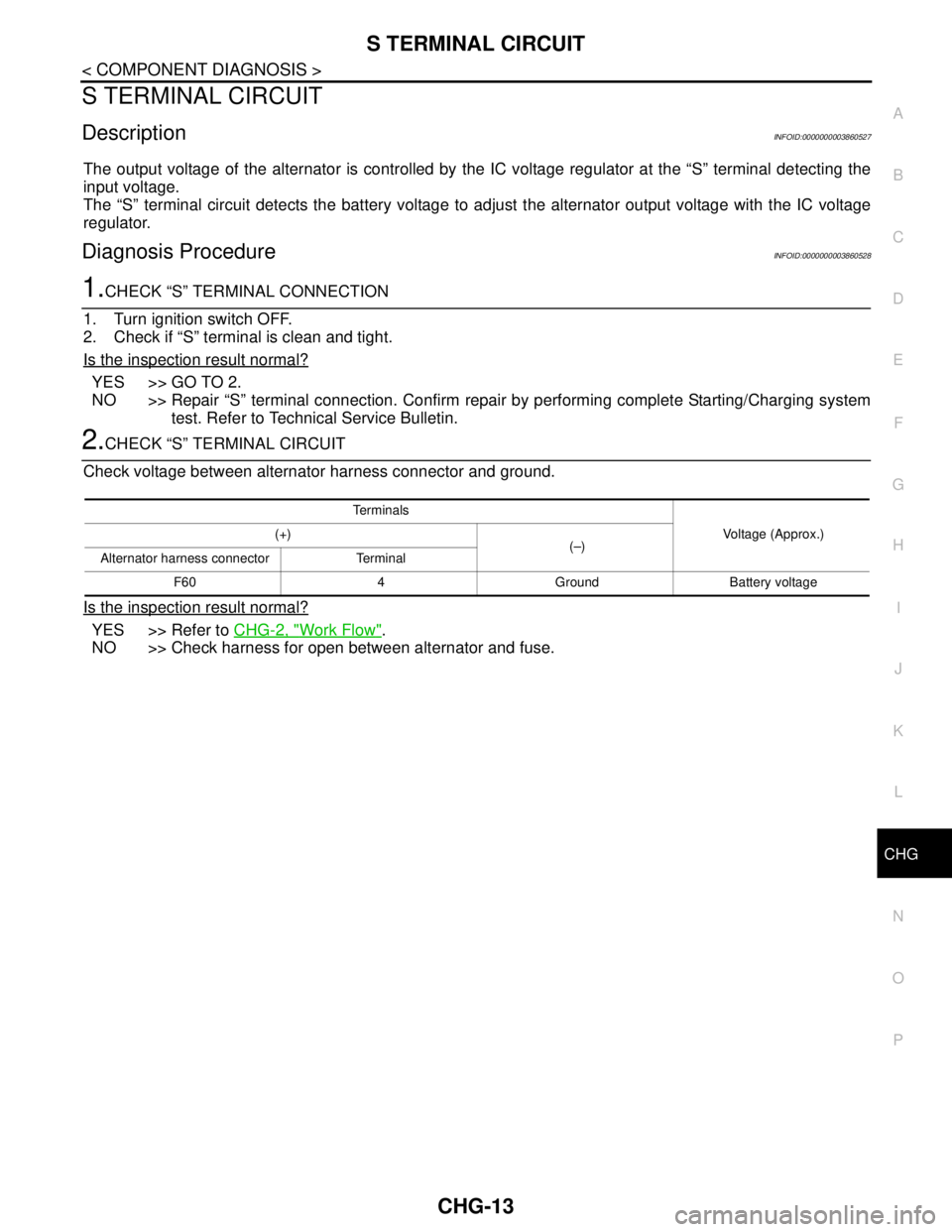
S TERMINAL CIRCUIT
DescriptionINFOID:0000000003860527
The output voltage of the alternator is controlled by the IC voltage regulator at the “S” terminal detecting the
input voltage.
The “S” terminal circuit detects the battery voltage to adjust the alternator output voltage with the IC voltage
regulator.
Diagnosis ProcedureINFOID:0000000003860528
1.CHECK “S” TERMINAL CONNECTION
1. Turn ignition switch OFF.
2. Check if “S” terminal is clean and tight.
Is the inspection result normal?
YES >> GO TO 2.
NO >> Repair “S” terminal connection. Confirm repair by performing complete Starting/Charging system
test. Refer to Technical Service Bulletin.
2.CHECK “S” TERMINAL CIRCUIT
Check voltage between alternator harness connector and ground.
Is the inspection result normal?
YES >> Refer to CHG-2, "Work Flow".
NO >> Check harness for open between alternator and fuse.
Te r m i n a l s
Voltage (Approx.) (+)
(–)
Alternator harness connector Terminal
F60 4 Ground Battery voltage
Page 1117 of 5121
CHG
PREPARATION
CHG-19
< PREPARATION >
C
D
E
F
G
H
I
J
K
L B A
O
P N
PREPARATION
PREPARATION
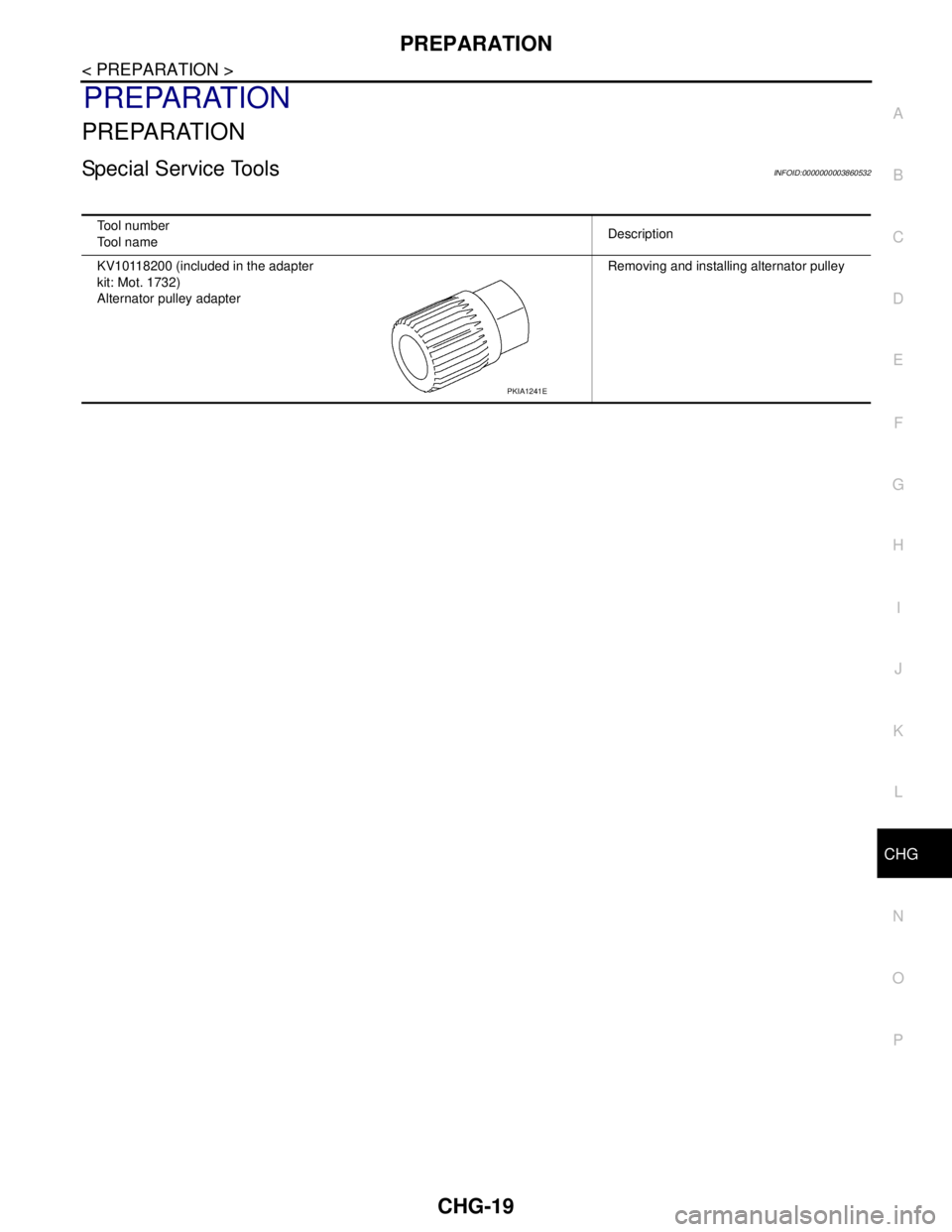
Special Service ToolsINFOID:0000000003860532
Tool number
Tool nameDescription
KV10118200 (included in the adapter
kit: Mot. 1732)
Alternator pulley adapterRemoving and installing alternator pulley
PKIA1241E
Page 1118 of 5121
CHG-20
< ON-VEHICLE MAINTENANCE >
CHARGING SYSTEM PRELIMINARY INSPECTION
ON-VEHICLE MAINTENANCE
CHARGING SYSTEM PRELIMINARY INSPECTION
Inspection ProcedureINFOID:0000000003860533
1.CHECK BATTERY TERMINALS CONNECTION
Check if battery terminals are clean and tight.
Is the inspection result normal?
YES >> GO TO 2.
NO >> Repair battery terminals connection.
2.CHECK FUSE
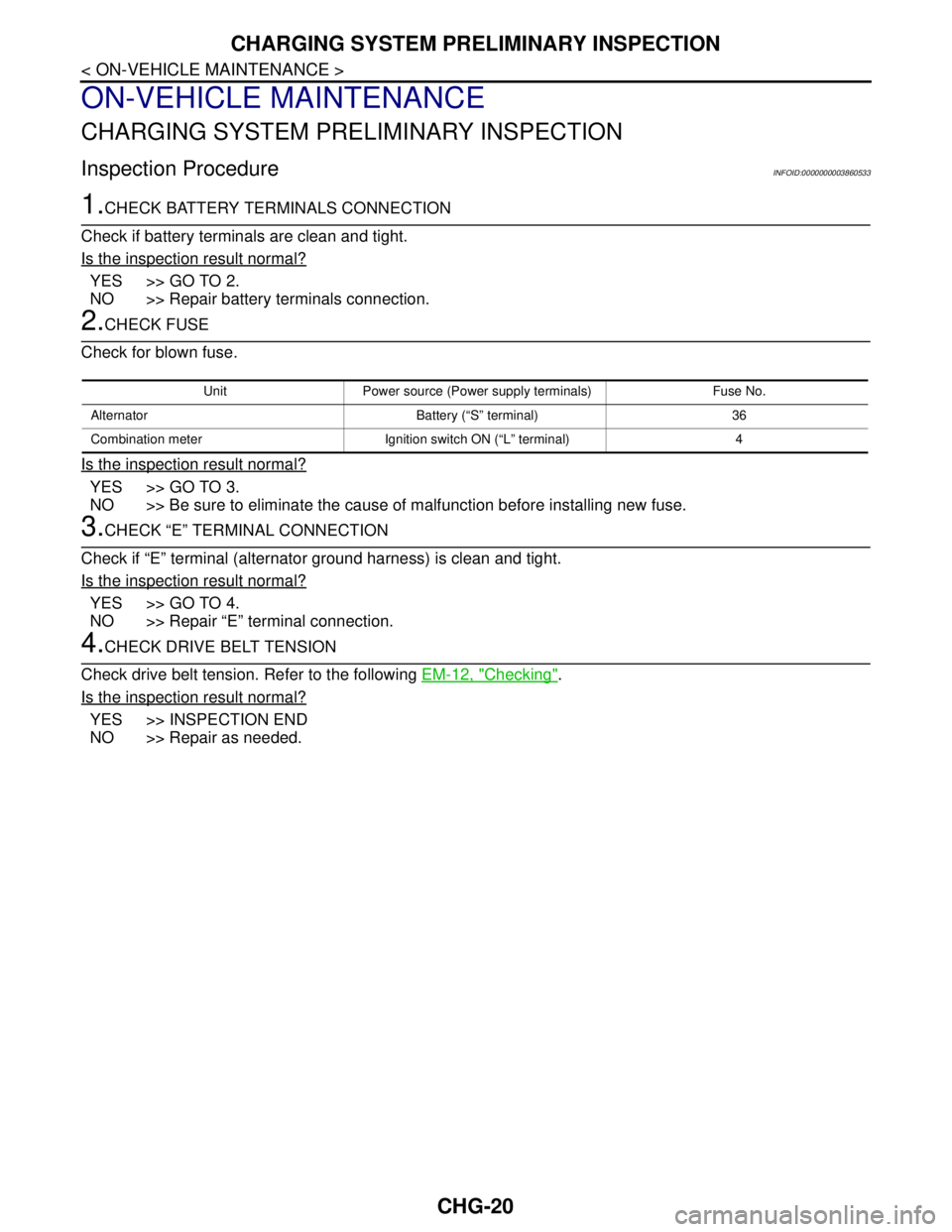
Check for blown fuse.
Is the inspection result normal?
YES >> GO TO 3.
NO >> Be sure to eliminate the cause of malfunction before installing new fuse.
3.CHECK “E” TERMINAL CONNECTION
Check if “E” terminal (alternator ground harness) is clean and tight.
Is the inspection result normal?
YES >> GO TO 4.
NO >> Repair “E” terminal connection.
4.CHECK DRIVE BELT TENSION
Check drive belt tension. Refer to the following EM-12, "
Checking".
Is the inspection result normal?
YES >> INSPECTION END
NO >> Repair as needed.
Unit Power source (Power supply terminals) Fuse No.
Alternator Battery (“S” terminal) 36
Combination meter Ignition switch ON (“L” terminal) 4
Page 1119 of 5121
CHG
ALTERNATOR
CHG-21
< ON-VEHICLE REPAIR >
C
D
E
F
G
H
I
J
K
L B A
O
P N
ON-VEHICLE REPAIR
ALTERNATOR
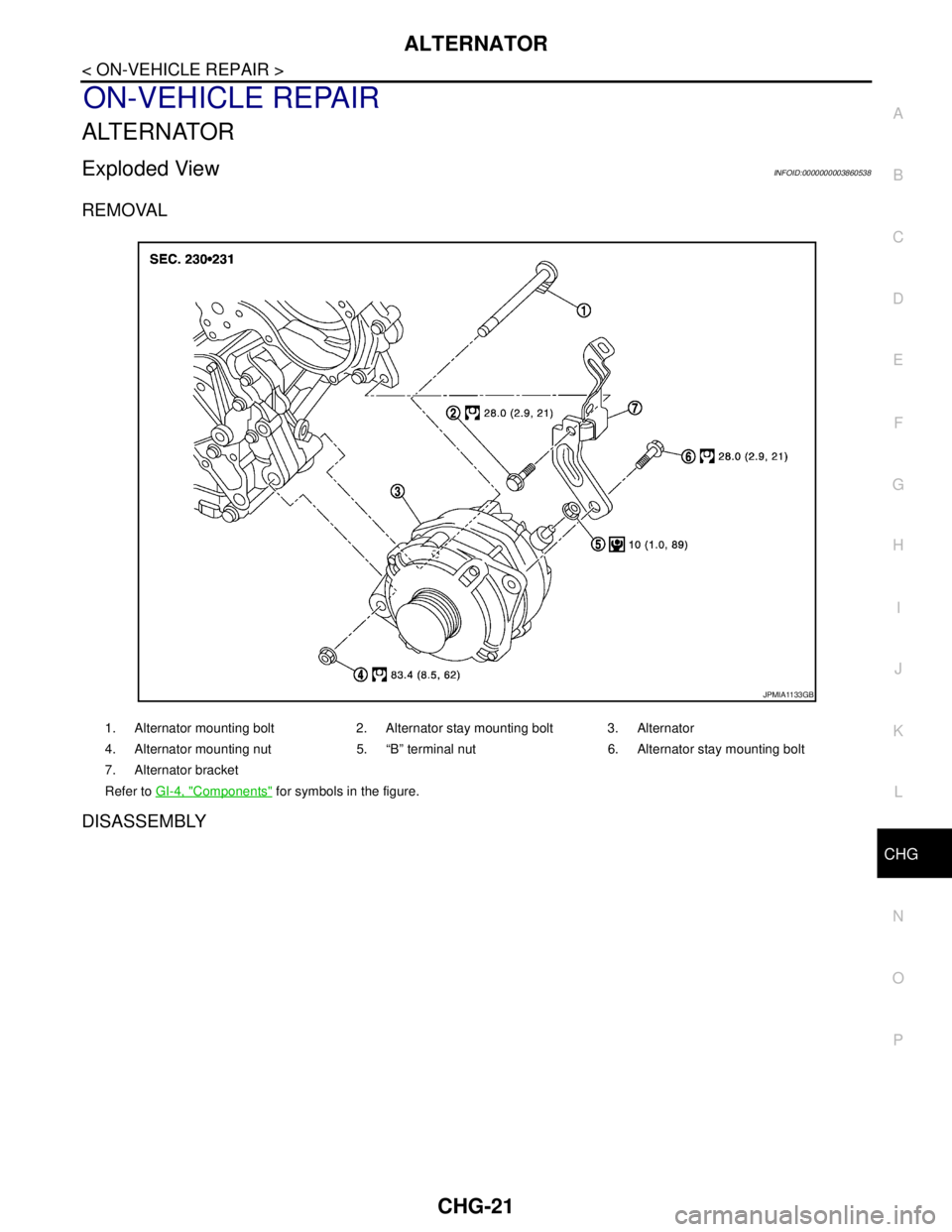
Exploded ViewINFOID:0000000003860538
REMOVAL
DISASSEMBLY
1. Alternator mounting bolt 2. Alternator stay mounting bolt 3. Alternator
4. Alternator mounting nut 5. “B” terminal nut 6. Alternator stay mounting bolt
7. Alternator bracket
Refer to GI-4, "
Components" for symbols in the figure.
JPMIA1133GB
Page 1120 of 5121
CHG-22
< ON-VEHICLE REPAIR >
ALTERNATOR
Type: A003TJ1791
Removal and InstallationINFOID:0000000003860539
REMOVAL
1. Disconnect the negative battery terminal.
2. Remove engine cover.
3. Remove front wheel and tire (RH).
4. Remove splash guard (RH) Refer to EXT-22, "
FENDER PROTECTOR : Exploded View".
5. Remove air cleaner and air duct assembly. Refer to EM-26, "
Removal and Installation".
6. Remove drive belt. Refer to EM-25, "
Removal and Installation".
7. Remove A/C compressor. Refer to HA-36, "
Removal and Installation".
8. Remove idler pulley.
9. Disconnect the oil pressure switch.
10. Disconnect the alternator harness connectors.
11. Remove the alternator bolt and nuts.
12. Slide the alternator out and remove.
INSTALLATION
Installation is in the reverse order of removal.
CAUTION:
JPMIA0859GB
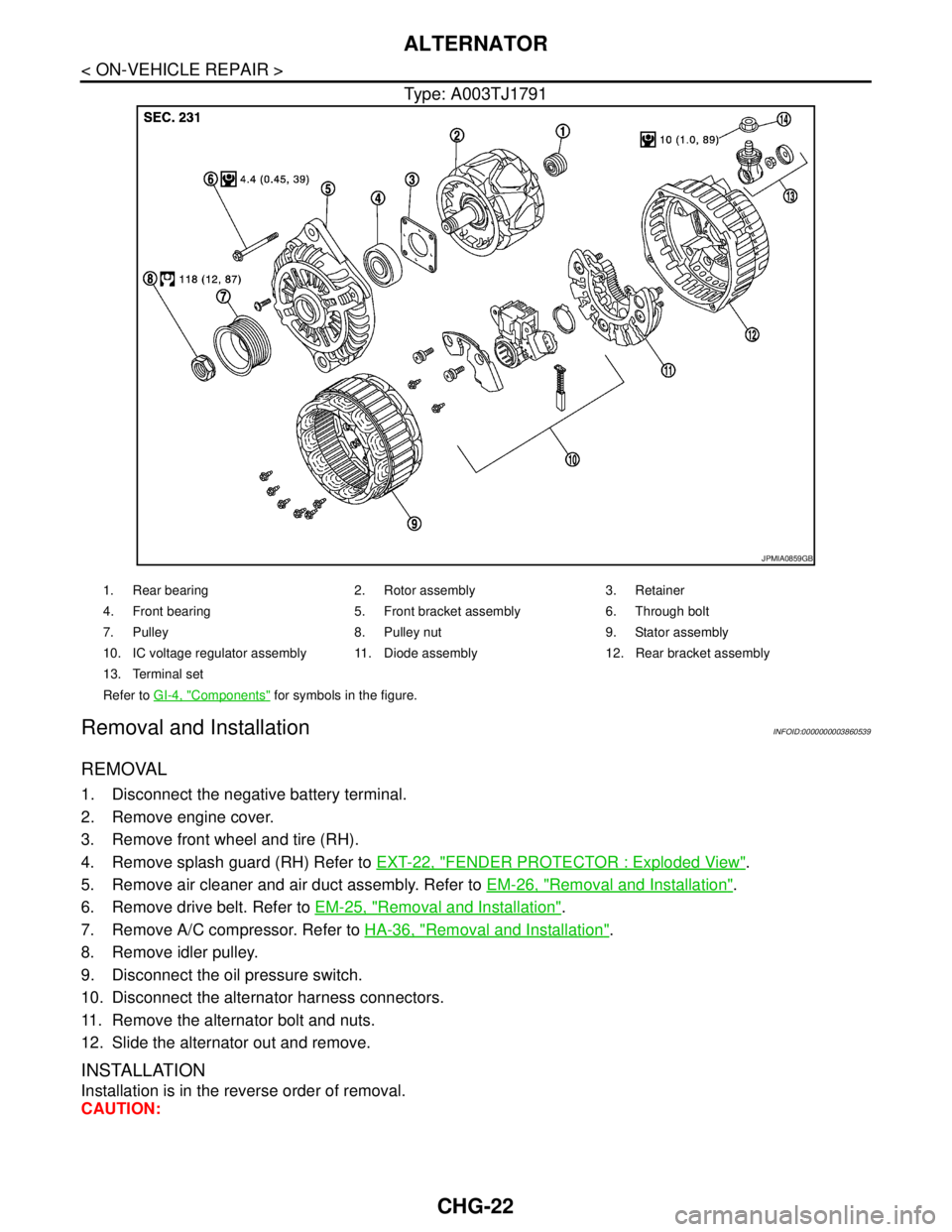
1. Rear bearing 2. Rotor assembly 3. Retainer
4. Front bearing 5. Front bracket assembly 6. Through bolt
7. Pulley 8. Pulley nut 9. Stator assembly
10. IC voltage regulator assembly 11. Diode assembly 12. Rear bracket assembly
13. Terminal set
Refer to GI-4, "
Components" for symbols in the figure.
Page 1121 of 5121
CHG
ALTERNATOR
CHG-23
< ON-VEHICLE REPAIR >
C
D
E
F
G
H
I
J
K
L B A
O
P N
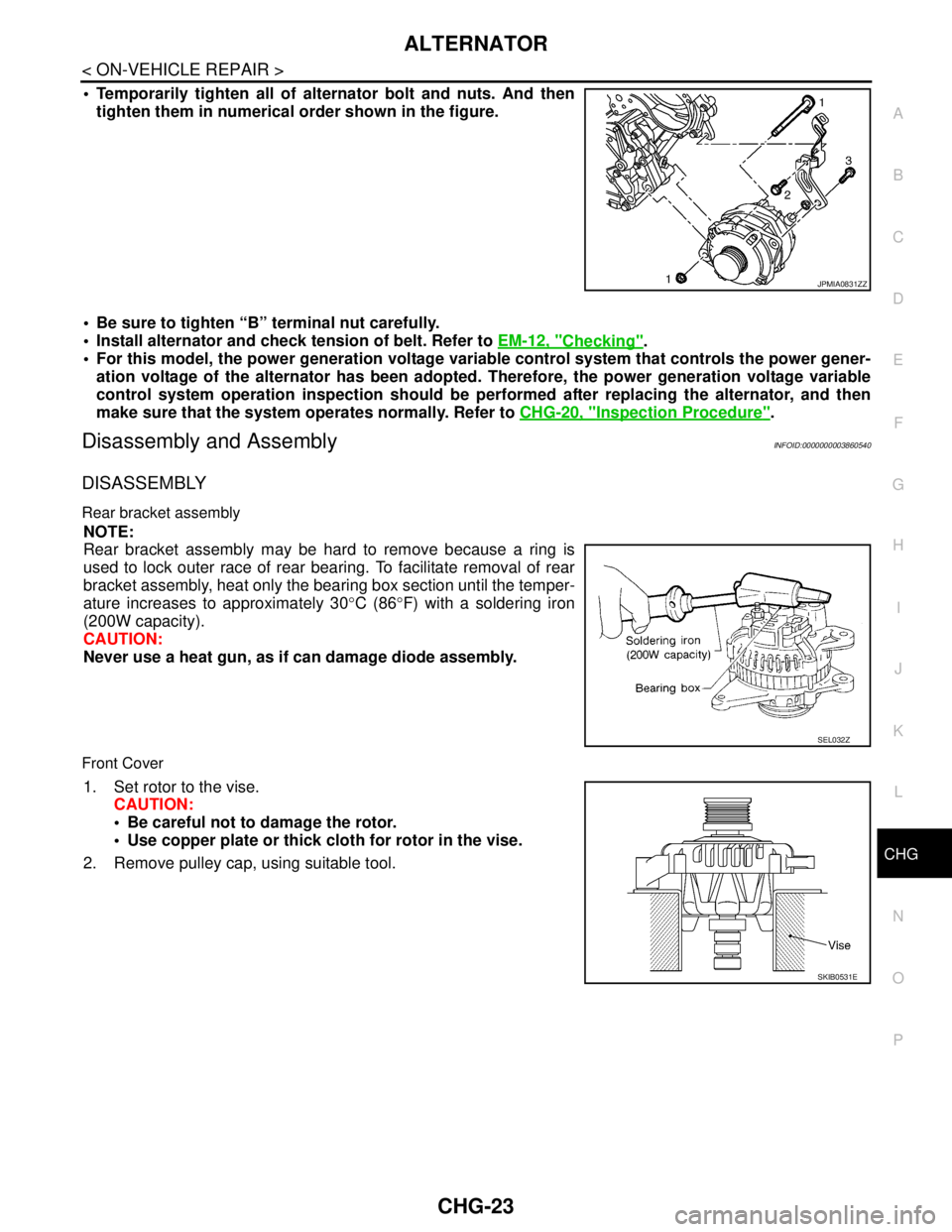
Temporarily tighten all of alternator bolt and nuts. And then
tighten them in numerical order shown in the figure.
Be sure to tighten “B” terminal nut carefully.
Install alternator and check tension of belt. Refer to EM-12, "
Checking".
For this model, the power generation voltage variable control system that controls the power gener-
ation voltage of the alternator has been adopted. Therefore, the power generation voltage variable
control system operation inspection should be performed after replacing the alternator, and then
make sure that the system operates normally. Refer to CHG-20, "
Inspection Procedure".
Disassembly and AssemblyINFOID:0000000003860540
DISASSEMBLY
Rear bracket assembly
NOTE:
Rear bracket assembly may be hard to remove because a ring is
used to lock outer race of rear bearing. To facilitate removal of rear
bracket assembly, heat only the bearing box section until the temper-
ature increases to approximately 30°C (86°F) with a soldering iron
(200W capacity).
CAUTION:
Never use a heat gun, as if can damage diode assembly.
Front Cover
1. Set rotor to the vise.
CAUTION:
Be careful not to damage the rotor.
Use copper plate or thick cloth for rotor in the vise.
2. Remove pulley cap, using suitable tool.
JPMIA0831ZZ
SEL032Z
SKIB0531E
Page 1122 of 5121
![NISSAN TEANA 2008 User Guide CHG-24
< ON-VEHICLE REPAIR >
ALTERNATOR
3. Remove alternator pulley, using alternator pulley adaptor (A)
[SST:KV10118200].
ASSEMBLY
Rear Bearing
CAUTION:
Never reuse rear bearing. Replace with a new](/img/5/57391/w960_57391-1121.png "NISSAN TEANA 2008 User Guide CHG-24
< ON-VEHICLE REPAIR >
ALTERNATOR
3. Remove alternator pulley, using alternator pulley adaptor (A)
[SST:KV10118200].
ASSEMBLY
Rear Bearing
CAUTION:
Never reuse rear bearing. Replace with a new")
CHG-24
< ON-VEHICLE REPAIR >
ALTERNATOR
3. Remove alternator pulley, using alternator pulley adaptor (A)
[SST:KV10118200].
ASSEMBLY
Rear Bearing
CAUTION:
Never reuse rear bearing. Replace with a new one.
Never lubricate rear bearing outer race.
Rear bracket assembly Installation
1. Fit brush assembly, diode assembly, regulator assembly and
stator.
2. Push brushed up with fingers and install them to rotor.
NOTE:
Take care not damage slip ring sliding surface.
InspectionINFOID:0000000003860541
ALTERNATOR PULLEY INSPECTION
Perform the following.
Make sure that alternator pulley does not rattle.
Make sure that alternator pulley nut is tight.
JSMIA0063ZZ
SKIB4529E
SKIB4530E
Page 1123 of 5121
CHG
SERVICE DATA AND SPECIFICATIONS (SDS)
CHG-25
< SERVICE DATA AND SPECIFICATIONS (SDS)
C
D
E
F
G
H
I
J
K
L B A
O
P N
SERVICE DATA AND SPECIFICATIONS (SDS)
SERVICE DATA AND SPECIFICATIONS (SDS)
AlternatorINFOID:0000000003860542
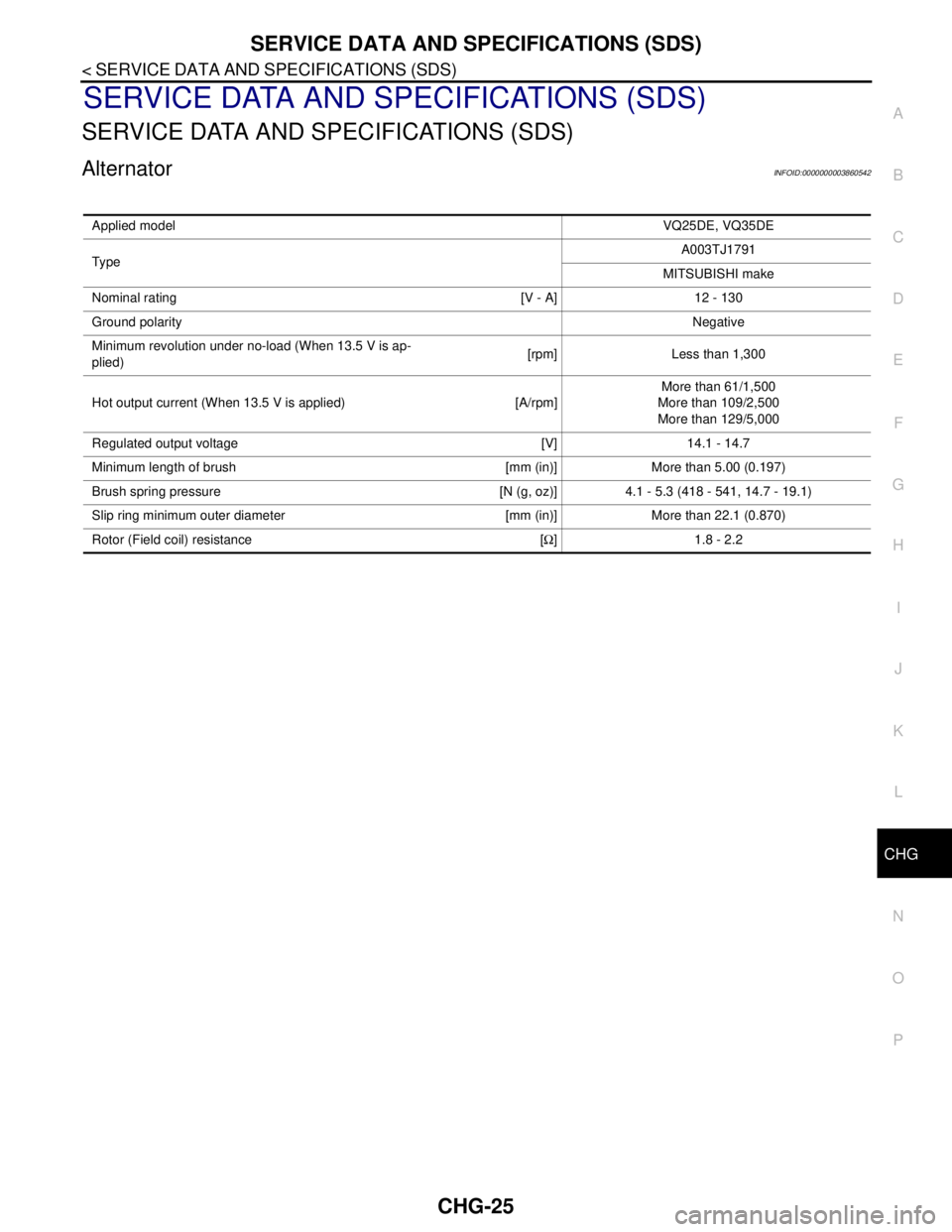
Applied modelVQ25DE, VQ35DE
Typ eA003TJ1791
MITSUBISHI make
Nominal rating [V - A] 12 - 130
Ground polarityNegative
Minimum revolution under no-load (When 13.5 V is ap-
plied)[rpm] Less than 1,300
Hot output current (When 13.5 V is applied) [A/rpm]More than 61/1,500
More than 109/2,500
More than 129/5,000
Regulated output voltage [V] 14.1 - 14.7
Minimum length of brush [mm (in)] More than 5.00 (0.197)
Brush spring pressure [N (g, oz)] 4.1 - 5.3 (418 - 541, 14.7 - 19.1)
Slip ring minimum outer diameter [mm (in)] More than 22.1 (0.870)
Rotor (Field coil) resistance [Ω] 1.8 - 2.2
Page 1132 of 5121
ENGINE COOLANT
CO-9
< ON-VEHICLE MAINTENANCE >
C
D
E
F
G
H
I
J
K
L
MA
CO
N
P O
4. Check drained engine coolant for contaminants such as rust, corrosion or discoloration.
If contaminated, flush the engine cooling system. Refer to CO-10, "
Flushing".
RefillingINFOID:0000000003793168
1. Install reservoir tank if removed, and radiator drain plug.
CAUTION:
Be sure to clean drain plug and install with new O-ring.
If water drain plugs on cylinder block are removed, close and tighten them. Refer to EM-110, "
Dis-
assembly and Assembly".
2. Check that each hose clamp has been firmly tightened.
3. Remove air duct assembly and air cleaner cases (upper and lower) assembly. Refer to EM-26, "
Exploded
View".
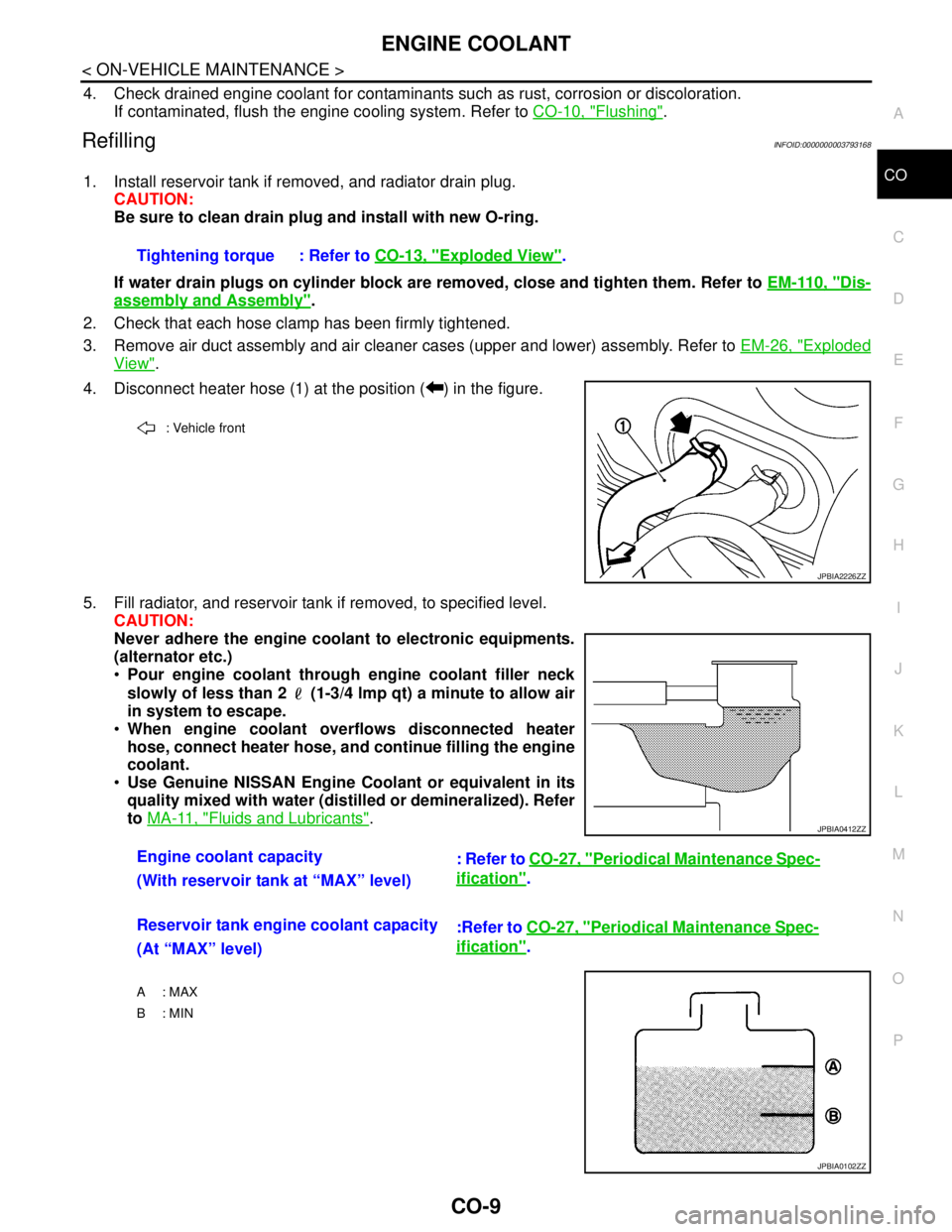
4. Disconnect heater hose (1) at the position ( ) in the figure.
5. Fill radiator, and reservoir tank if removed, to specified level.
CAUTION:
Never adhere the engine coolant to electronic equipments.
(alternator etc.)
Pour engine coolant through engine coolant filler neck
slowly of less than 2 (1-3/4 lmp qt) a minute to allow air
in system to escape.
When engine coolant overflows disconnected heater
hose, connect heater hose, and continue filling the engine
coolant.
Use Genuine NISSAN Engine Coolant or equivalent in its
quality mixed with water (distilled or demineralized). Refer
to MA-11, "
Fluids and Lubricants". Tightening torque : Refer to CO-13, "
Exploded View".
: Vehicle front
JPBIA2226ZZ
Engine coolant capacity
: Refer to CO-27, "Periodical Maintenance Spec-
ification".
(With reservoir tank at “MAX” level)
Reservoir tank engine coolant capacity
:Refer to CO-27, "
Periodical Maintenance Spec-
ification".
(At “MAX” level)
A : MAX
B: MIN
JPBIA0412ZZ
JPBIA0102ZZ
Page 1133 of 5121
CO-10
< ON-VEHICLE MAINTENANCE >
ENGINE COOLANT
6. Install air duct assembly and air cleaner cases (upper and lower) assembly. Refer to EM-26, "Exploded
View".
7. Install radiator cap.
8. Warm up engine until opening thermostat. Standard for warming-up time is approximately 10 minutes at
3,000 rpm.
Check thermostat opening condition by touching radiator hose (lower) to see a flow of warm water.
CAUTION:
Watch water temperature gauge so as not to overheat engine.
9. Stop the engine and cool down to less than approximately 50°C (122°F).
Cool down using fan to reduce the time.
If necessary, refill radiator up to filler neck with engine coolant.
CAUTION:
Never adhere the engine coolant to electronic equipments. (alternator etc.)
10. Refill reservoir tank to “MAX” level line with engine coolant.
11. Repeat steps 7 through 10 two or more times with radiator cap installed until engine coolant level no
longer drops.
12. Check cooling system for leakage with engine running.
13. Warm up the engine, and check for sound of engine coolant flow while running engine from idle up to
3,000 rpm with heater temperature controller set at several position between “COOL” and “WARM”.
Sound may be noticeable at heater unit.
14. Repeat step 13 three times.
15. If sound is heard, bleed air from cooling system by repeating step 5, and steps from 7 to 14 until engine
coolant level no longer drops.
FlushingINFOID:0000000003793169
1. Install reservoir tank if removed, and radiator drain plug.
CAUTION:
Be sure to clean drain plug and install with new O-ring.
If water drain plugs on cylinder block are removed, close and tighten them. Refer to EM-110, "
Dis-
assembly and Assembly".
2. Remove air duct assembly and air cleaner cases (upper and lower) assembly. Refer to EM-26, "
Exploded
View".
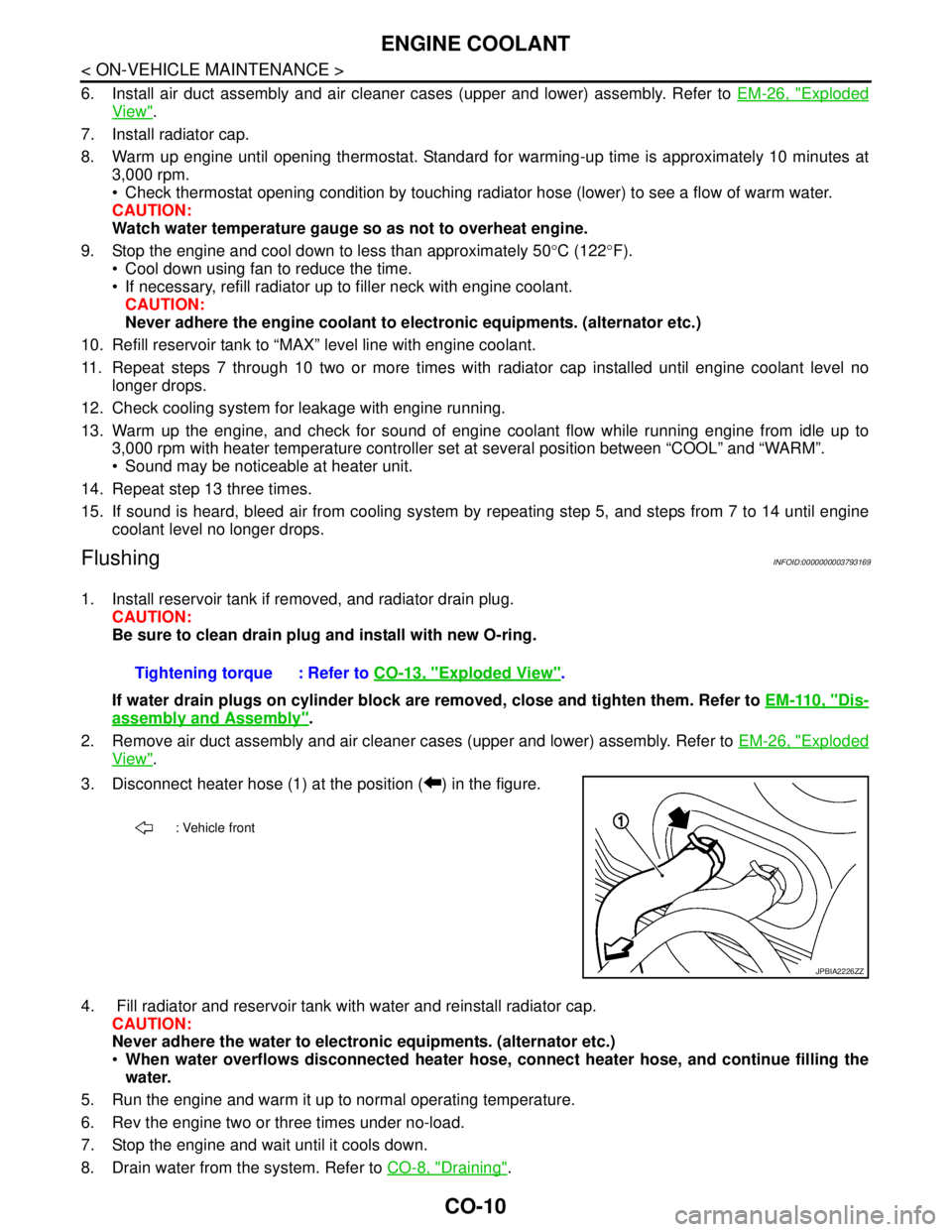
3. Disconnect heater hose (1) at the position ( ) in the figure.
4. Fill radiator and reservoir tank with water and reinstall radiator cap.
CAUTION:
Never adhere the water to electronic equipments. (alternator etc.)
When water overflows disconnected heater hose, connect heater hose, and continue filling the
water.
5. Run the engine and warm it up to normal operating temperature.
6. Rev the engine two or three times under no-load.
7. Stop the engine and wait until it cools down.
8. Drain water from the system. Refer to CO-8, "
Draining". Tightening torque : Refer to CO-13, "
Exploded View".
: Vehicle front
JPBIA2226ZZ