key NISSAN TEANA 2008 Service Manual
[x] Cancel search | Manufacturer: NISSAN, Model Year: 2008, Model line: TEANA, Model: NISSAN TEANA 2008Pages: 5121, PDF Size: 69.03 MB
Page 3499 of 5121
![NISSAN TEANA 2008 Service Manual PCS-108
< ECU DIAGNOSIS >[POWER DISTRIBUTION SYSTEM]
IPDM E/R (INTELLIGENT POWER DISTRIBUTION MODULE ENGINE ROOM)
ST/INHI RLYIgnition switch ON Off
At engine cranking INHI → ST
The status of starte](/img/5/57391/w960_57391-3498.png "NISSAN TEANA 2008 Service Manual PCS-108
< ECU DIAGNOSIS >[POWER DISTRIBUTION SYSTEM]
IPDM E/R (INTELLIGENT POWER DISTRIBUTION MODULE ENGINE ROOM)
ST/INHI RLYIgnition switch ON Off
At engine cranking INHI → ST
The status of starte")
PCS-108
< ECU DIAGNOSIS >[POWER DISTRIBUTION SYSTEM]
IPDM E/R (INTELLIGENT POWER DISTRIBUTION MODULE ENGINE ROOM)
ST/INHI RLYIgnition switch ON Off
At engine cranking INHI → ST
The status of starter relay or starter control relay cannot be recognized by
the battery voltage malfunction, etc. when the starter relay is ON and the
starter control relay is OFFUNKWN
DETENT SWIgnition switch ON Press the selector button with se-
lector lever in P position
Selector lever in any position oth-
er than POff
Release the selector button with selector lever in P position On
S/L RLY -REQNone of the conditions below are present Off
Open the driver door after the ignition switch is turned OFF (for a few
seconds)
Press the push-button ignition switch when the steering lock is activat-
edOn
S/L STATESteering lock is activated LOCK
Steering lock is deactivated UNLOCK
[DTC: B210A] is detected UNKWN
DTRL REQNOTE:
The item is indicated, but not monitored.Off
OIL P SWIgnition switch OFF, ACC or engine running Open
Ignition switch ON Close
HOOD SWClose the hood Off
Open the hood On
HL WASHER REQNot operating Off
Headlamp washer operating On
THFT HRN REQNot operating Off
Horn is activated with vehicle security (theft warning) system On
HORN CHIRPNot operating Off
Door locking with Intelligent Key (horn chirp mode)
Door locking with key fob (horn chirp mode)On
CRNRNG LMP REQNOTE:
The item is indicated, but not monitored.Off Monitor Item Condition Value/Status
Page 3513 of 5121
![NISSAN TEANA 2008 Service Manual PCS-122
< SYMPTOM DIAGNOSIS >[POWER DISTRIBUTION SYSTEM]
POWER DISTRIBUTION SYSTEM
SYMPTOM DIAGNOSIS
POWER DISTRIBUTION SYSTEM
Symptom TableINFOID:0000000003805778
The engine start function, door lock](/img/5/57391/w960_57391-3512.png "NISSAN TEANA 2008 Service Manual PCS-122
< SYMPTOM DIAGNOSIS >[POWER DISTRIBUTION SYSTEM]
POWER DISTRIBUTION SYSTEM
SYMPTOM DIAGNOSIS
POWER DISTRIBUTION SYSTEM
Symptom TableINFOID:0000000003805778
The engine start function, door lock")
PCS-122
< SYMPTOM DIAGNOSIS >[POWER DISTRIBUTION SYSTEM]
POWER DISTRIBUTION SYSTEM
SYMPTOM DIAGNOSIS
POWER DISTRIBUTION SYSTEM
Symptom TableINFOID:0000000003805778
The engine start function, door lock function, power distribution system and NATS-IVIS/NVIS in the Intelligent
Key system are closely related to each other regarding control. Narrow down the functional area in question
by checking the following table to identify which function is malfunctioning. The vehicle security function can
operate only when the door lock and power distribution system are operating normally. Therefore, it is easy to
identify any factor unique to the vehicle security system by checking the following table.
Use the chart below to help you find the cause of the symptom. The numbers indicate the order of the inspec-
tion.
NOTE:
Before starting vehicle security system operation check, the following conditions must be met.
Open front windows
Turn ignition switch OFF
Pull out Intelligent Key from key slot.
NO. Function Operation condition Symptom Diagnostic ItemReference
page
1INTELLIGENT
KEY SYSTEM/
DOOR LOCK
FUNCTIONLock/unlock door with door re-
quest switch.
(Intelligent Key is in the inside
key antenna detection area)Door does not lock/unlock —DLK-158
2POWER DIS-
TRIBUTION
FUNCTIONPress push-button ignition
switch under the following con-
ditions.
Selector lever position is in
the P or N position
Do not depress brake pedalPush-button ignition switch
does not operate—PCS-124
3INTELLIGENT
KEY SYSTEM/
ENGINE START
FUNCTIONStart engine with Intelligent Key
into the vehicle (Intelligent Key
is in the inside key antenna de-
tection area)Engine can not start with Intel-
ligent Key—SEC-193
4Open the door after the ignition
switch is turned ON to OFFSteering is not locked —SEC-194
5
NISSAN VEHI-
CLE IMMOBI-
LIZER
SYSTEM-NATS
FUNCTIONStart engine with Intelligent Key
in the key slotEngine can not start —SEC-195
6Open the door after the ignition
switch is turned ON to OFFSteering is not locked —SEC-194
7Insert Intelligent Key in the key
slotKey slot indicator does not illu-
minate—SEC-196
Page 3514 of 5121
![NISSAN TEANA 2008 Service Manual PCS
POWER DISTRIBUTION SYSTEM
PCS-123
< SYMPTOM DIAGNOSIS >[POWER DISTRIBUTION SYSTEM]
C
D
E
F
G
H
I
J
K
L B A
O
P N8VEHICLE SE-
CURITY SYS-
TEMLock all doors with Intelligent
Key
Vehicle security sy](/img/5/57391/w960_57391-3513.png "NISSAN TEANA 2008 Service Manual PCS
POWER DISTRIBUTION SYSTEM
PCS-123
< SYMPTOM DIAGNOSIS >[POWER DISTRIBUTION SYSTEM]
C
D
E
F
G
H
I
J
K
L B A
O
P N8VEHICLE SE-
CURITY SYS-
TEMLock all doors with Intelligent
Key
Vehicle security sy")
PCS
POWER DISTRIBUTION SYSTEM
PCS-123
< SYMPTOM DIAGNOSIS >[POWER DISTRIBUTION SYSTEM]
C
D
E
F
G
H
I
J
K
L B A
O
P N8VEHICLE SE-
CURITY SYS-
TEMLock all doors with Intelligent
Key
Vehicle security system can
not be set—SEC-197
Lock all doors with door request
switch—SEC-197
Lock all doors with Intelligent
Key or door request switch Security indicator lamp does
not turn ON—SEC-196
In the armed phase, open the
doorVehicle security alarm does
not activateHorn
SEC-199
Hazard warning lamp
When alarm sounds, press In-
telligent Key button
Vehicle security system can
not be canceled—SEC-200
When alarm sounds, press door
request switch—SEC-200
9POWER DIS-
TRIBUTION
FUNCTIONPress push-button ignition
switch under the following con-
ditions.
Selector lever position is in
the P or N position
Do not depress brake pedalPush-button ignition switch
position indicator does not illu-
minate—PCS-125
NO. Function Operation condition Symptom Diagnostic ItemReference
page
Page 3515 of 5121
![NISSAN TEANA 2008 Service Manual PCS-124
< SYMPTOM DIAGNOSIS >[POWER DISTRIBUTION SYSTEM]
PUSH-BUTTON IGNITION SWITCH DOES NOT OPERATE
PUSH-BUTTON IGNITION SWITCH DOES NOT OPERATE
DescriptionINFOID:0000000003805779
Before performin](/img/5/57391/w960_57391-3514.png "NISSAN TEANA 2008 Service Manual PCS-124
< SYMPTOM DIAGNOSIS >[POWER DISTRIBUTION SYSTEM]
PUSH-BUTTON IGNITION SWITCH DOES NOT OPERATE
PUSH-BUTTON IGNITION SWITCH DOES NOT OPERATE
DescriptionINFOID:0000000003805779
Before performin")
PCS-124
< SYMPTOM DIAGNOSIS >[POWER DISTRIBUTION SYSTEM]
PUSH-BUTTON IGNITION SWITCH DOES NOT OPERATE
PUSH-BUTTON IGNITION SWITCH DOES NOT OPERATE
DescriptionINFOID:0000000003805779
Before performing the diagnosis in the following table, check “Work Flow”. Refer to PCS-35, "Work Flow".
Check that vehicle is under the condition shown in “Conditions of vehicle” before starting diagnosis, and
check each symptom.
Conditions of Vehicle (Operating Conditions)
“ENGINE START BY I-KEY” in “WORK SUPPORT” is ON when setting on CONSULT-III.
One or more of Intelligent Keys with registered Intelligent Key ID is in the vehicle.
Diagnosis ProcedureINFOID:0000000003805780
1.CHECK PUSH-BUTTON IGNITION SWITCH
Check push-button ignition switch.
Refer to PCS-63, "
ComponentFunctionCheck".
Is the inspection normal?
YES >> GO TO 2.
NO >> Repair or replace malfunctioning parts.
2.CONFIRM THE OPERATION
Confirm the operation again.
Is the inspection normal?
YES >> Check intermittent incident. Refer to GI-35, "Intermittent Incident".
NO >> GO TO 1.
Page 3516 of 5121
![NISSAN TEANA 2008 Service Manual PCS
PUSH-BUTTON IGNITION SWITCH POSITION INDICATOR DOES NOT ILLUMI-
NATE
PCS-125
< SYMPTOM DIAGNOSIS >[POWER DISTRIBUTION SYSTEM]
C
D
E
F
G
H
I
J
K
L B A
O
P N
PUSH-BUTTON IGNITION SWITCH POSITION IND](/img/5/57391/w960_57391-3515.png "NISSAN TEANA 2008 Service Manual PCS
PUSH-BUTTON IGNITION SWITCH POSITION INDICATOR DOES NOT ILLUMI-
NATE
PCS-125
< SYMPTOM DIAGNOSIS >[POWER DISTRIBUTION SYSTEM]
C
D
E
F
G
H
I
J
K
L B A
O
P N
PUSH-BUTTON IGNITION SWITCH POSITION IND")
PCS
PUSH-BUTTON IGNITION SWITCH POSITION INDICATOR DOES NOT ILLUMI-
NATE
PCS-125
< SYMPTOM DIAGNOSIS >[POWER DISTRIBUTION SYSTEM]
C
D
E
F
G
H
I
J
K
L B A
O
P N
PUSH-BUTTON IGNITION SWITCH POSITION INDICATOR DOES NOT IL-
LUMINATE
DescriptionINFOID:0000000003805781
Before performing the diagnosis in the following table, check “Work Flow”. Refer to PCS-35, "Work Flow".
Check that vehicle is under the condition shown in “Conditions of vehicle” before starting diagnosis, and
check each symptom.
Conditions of Vehicle (Operating Conditions)
“ENGINE START BY I-KEY” in “WORK SUPPORT” is ON when setting on CONSULT-III.
One or more of Intelligent Keys with registered Intelligent Key ID is in the vehicle.
Diagnosis ProcedureINFOID:0000000003805782
1.CHECK PUSH-BUTTON IGNITION SWITCH INDICATOR
Check push-button ignition switch indicator.
Refer to PCS-66, "
ComponentFunctionCheck".
Is the inspection result normal?
YES >> GO TO 2.
NO >> Repair or replace the malfunctioning parts.
2.CONFIRM THE OPERATION
Confirm the operation again.
Is the result normal?
YES >> Check intermittent incident. Refer to GI-35, "Intermittent Incident".
NO >> GO TO 1.
Page 3640 of 5121

PWC-10
< FUNCTION DIAGNOSIS >
DIAGNOSIS SYSTEM (BCM)
DIAGNOSIS SYSTEM (BCM)
COMMON ITEM
COMMON ITEM : CONSULT-III Function (BCM - COMMON ITEM)INFOID:0000000003825997
APPLICATION ITEM
CONSULT-III performs the following functions via CAN communication with BCM.
SYSTEM APPLICATION
BCM can perform the following functions for each system.
NOTE:
It can perform the diagnosis modes except the following for all sub system selection items.
×: Applicable item
NOTE:
*: This item is displayed, but is not used.
FREEZE FRAME DATA (FFD) AND IGN COUNTER
Freeze Frame Data
Diagnosis mode Function Description
Work Support Changes the setting for each system function.
Self Diagnostic Result Displays the diagnosis results judged by BCM.
CAN Diag Support MonitorMonitors the reception status of CAN communication viewed from BCM. Refer to CONSULT-III opera-
tion manual.
Data Monitor The BCM input/output signals are displayed.
Active Test The signals used to activate each device are forcibly supplied from BCM.
Ecu Identification The BCM part number is displayed.
Configuration Read and save the vehicle specification.
Write the vehicle specification when replacing BCM.
System Sub system selection itemDiagnosis mode
Work Support Data Monitor Active Test
Door lock DOOR LOCK×××
Rear window defogger REAR DEFOGGER××
Warning chime BUZZER××
Interior room lamp timer INT LAMP×××
Exterior lamp HEAD LAMP×××
Wiper and washer WIPER××
Turn signal and hazard warning lamps FLASHER×××
— AIR CONDITONER*
Intelligent Key system
Engine start systemINTELLIGENT KEY×××
Combination switch COMB SW×
Body control system BCM×
IVIS - NATS IMMU××
Interior room lamp battery saver BATTERY SAVER×××
Back door open TRUNK××
Vehicle security system THEFT ALM×××
— RETAINED PWR*×
Signal buffer system SIGNAL BUFFER××
— TPMS (AIR PRESSURE MONITOR)*×××
Page 3663 of 5121

BCM (BODY CONTROL MODULE)
PWC-33
< ECU DIAGNOSIS >
C
D
E
F
G
H
I
J
L
MA
B
PWC
N
O
P
DOOR SW-RLRear LH door closed Off
Rear LH door opened On
DOOR SW-BKNOTE:
The item is indicated, but not monitored. Off
CDL LOCK SWOther than power door lock switch LOCK Off
Power door lock switch LOCK On
CDL UNLOCK SWOther than power door lock switch UNLOCK Off
Power door lock switch UNLOCK On
KEY CYL LK-SWNOTE:
The item is indicated, but not monitored. Off
KEY CYL UN-SWNOTE:
The item is indicated, but not monitored. Off
KEY CYL SW-TRNOTE:
The item is indicated, but not monitored. Off
HAZARD SWHazard switch is OFF Off
Hazard switch is ON On
REAR DEF SW
NOTE:
At model with BOSE au-
dio system this item is in-
dicated, but is not
monitored.Rear window defogger switch is OFF Off
Rear window defogger switch is ON On
TR CANCEL SWNOTE:
The item is indicated, but not monitored. Off
TR/BD OPEN SWTrunk lid opener switch OFF Off
While the trunk lid opener switch is turned ON On
TRNK/HAT MNTRTrunk lid closed Off
Trunk lid opened On
RKE-LOCKLOCK button of the key is not pressed Off
LOCK button of the key is pressed On
RKE-UNLOCKUNLOCK button of the key is not pressed Off
UNLOCK button of the key is pressed On
RKE-TR/BDTRUNK OPEN button of the key is not pressed Off
TRUNK OPEN button of the key is pressed On
RKE-PANICNOTE:
The item is indicated, but not monitored. Off
RKE-P/W OPENNOTE:
The item is indicated, but not monitored. Off
RKE-MODE CHGLOCK/UNLOCK button of the key is not pressed and held simulta-
neouslyOff
LOCK/UNLOCK button of the key is pressed and held simulta-
neouslyOn
OPTICAL SENSORBright outside of the vehicle Close to 5 V
Dark outside of the vehicle Close to 0 V
REQ SW -DRDriver door request switch is not pressed Off
Driver door request switch is pressed On
REQ SW -ASPassenger door request switch is not pressed Off
Passenger door request switch is pressed On Monitor Item Condition Value/Status
Page 3665 of 5121

BCM (BODY CONTROL MODULE)
PWC-35
< ECU DIAGNOSIS >
C
D
E
F
G
H
I
J
L
MA
B
PWC
N
O
P
S/L UNLK-IPDMSteering is unlocked Off
Steering is locked On
S/L RELAY-REQIgnition switch in OFF or ACC position Off
Ignition switch in ON position On
VEH SPEED 1 While driving Equivalent to speedometer reading
VEH SPEED 2 While driving Equivalent to speedometer reading
DOOR STAT-DRDriver door is locked LOCK
Wait with selective UNLOCK operation (5 seconds) READY
Driver door is unlocked UNLOCK
DOOR STAT-ASPassenger door is locked LOCK
Wait with selective UNLOCK operation (5 seconds) READY
Passenger door is unlocked UNLOCK
ID OK FLAGIgnition switch in ACC or ON position Reset
Ignition switch in OFF position Set
PRMT ENG STRTThe engine start is prohibited Reset
The engine start is permitted Set
PRMT RKE STRTNOTE:
The item is indicated, but not monitored. Reset
KEY SW -SLOTThe key is not inserted into key slot Off
The key is inserted into key slot On
RKE OPE COUN1 During the operation of the key Operation frequency of the key
RKE OPE COUN2NOTE:
The item is indicated, but not monitored. —
CONFRM ID ALLThe key ID that the key slot receives does not accord with any key
ID registered to BCM.Ye t
The key ID that the key slot receives accords with any key ID regis-
tered to BCM.Done
CONFIRM ID4The key ID that the key slot receives does not accord with the fourth
key ID registered to BCM.Ye t
The key ID that the key slot receives accords with the fourth key ID
registered to BCM.Done
CONFIRM ID3The key ID that the key slot receives does not accord with the third
key ID registered to BCM.Ye t
The key ID that the key slot receives accords with the third key ID
registered to BCM.Done
CONFIRM ID2The key ID that the key slot receives does not accord with the sec-
ond key ID registered to BCM.Ye t
The key ID that the key slot receives accords with the second key
ID registered to BCM.Done
CONFIRM ID1The key ID that the key slot receives does not accord with the first
key ID registered to BCM.Ye t
The key ID that the key slot receives accords with the first key ID
registered to BCM.Done
TP 4The ID of fourth key is not registered to BCM Yet
The ID of fourth key is registered to BCM Done
TP 3The ID of third key is not registered to BCM Yet
The ID of third key is registered to BCM Done Monitor Item Condition Value/Status
Page 3666 of 5121
PWC-36
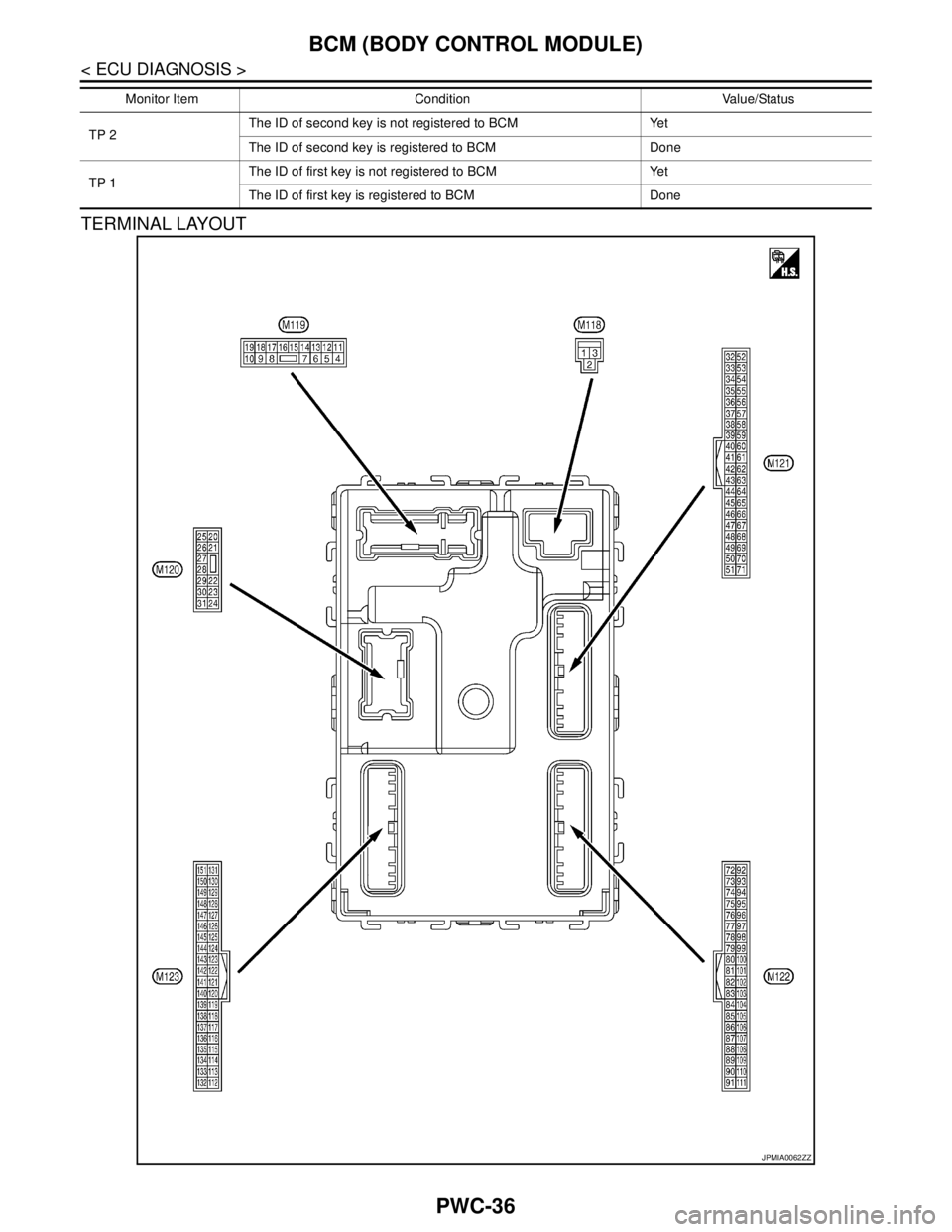
< ECU DIAGNOSIS >
BCM (BODY CONTROL MODULE)
TERMINAL LAYOUT
TP 2The ID of second key is not registered to BCM Yet
The ID of second key is registered to BCM Done
TP 1The ID of first key is not registered to BCM Yet
The ID of first key is registered to BCM Done Monitor Item Condition Value/Status
JPMIA0062ZZ
Page 3669 of 5121
BCM (BODY CONTROL MODULE)
PWC-39
< ECU DIAGNOSIS >
C
D
E
F
G
H
I
J
L
MA
B
PWC
N
O
P
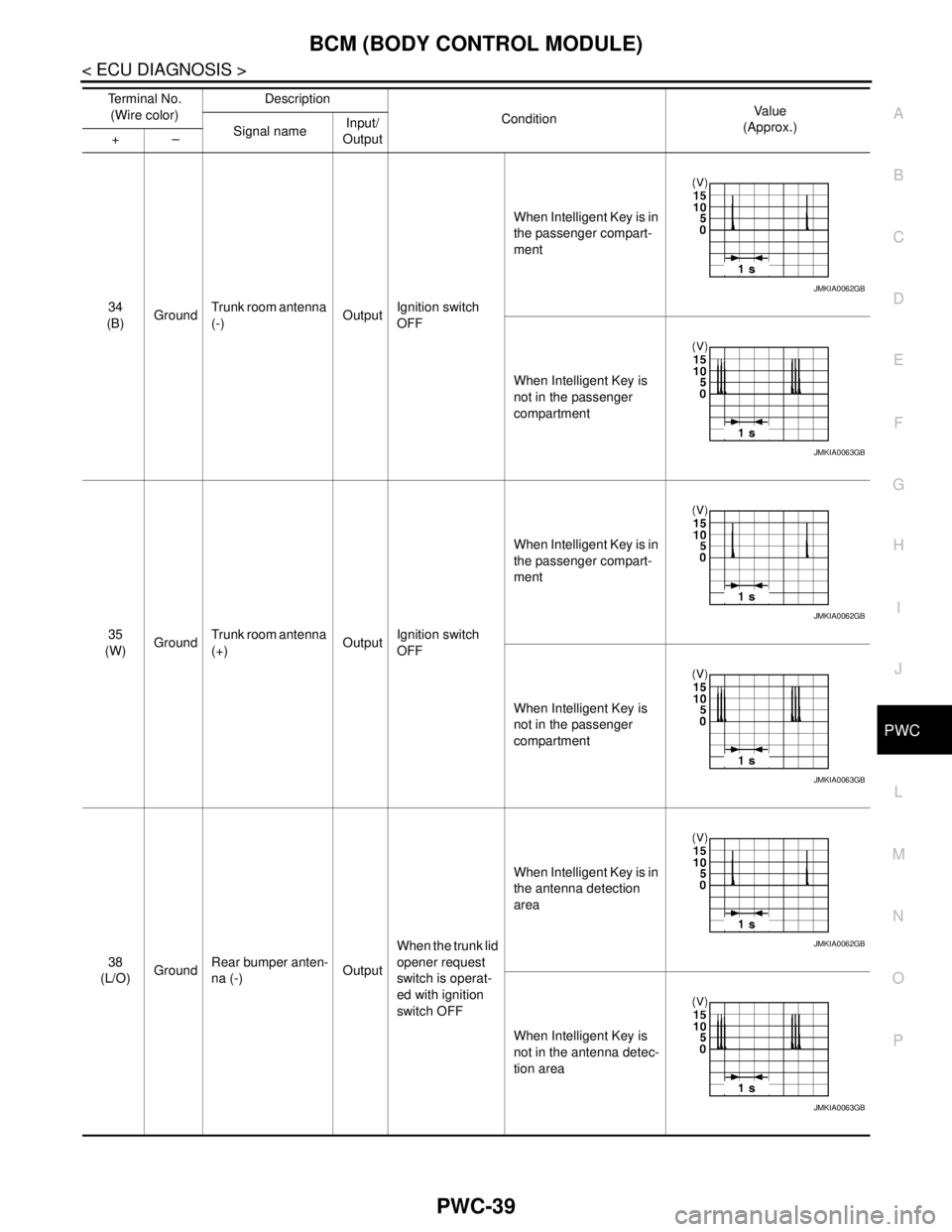
34
(B)GroundTrunk room antenna
(-)OutputIgnition switch
OFFWhen Intelligent Key is in
the passenger compart-
ment
When Intelligent Key is
not in the passenger
compartment
35
(W)GroundTrunk room antenna
(+)OutputIgnition switch
OFFWhen Intelligent Key is in
the passenger compart-
ment
When Intelligent Key is
not in the passenger
compartment
38
(L/O)GroundRear bumper anten-
na (-)OutputWhen the trunk lid
opener request
switch is operat-
ed with ignition
switch OFFWhen Intelligent Key is in
the antenna detection
area
When Intelligent Key is
not in the antenna detec-
tion area Te r m i n a l N o .
(Wire color)Description
ConditionVa l u e
(Approx.)
Signal nameInput/
Output +–
JMKIA0062GB
JMKIA0063GB
JMKIA0062GB
JMKIA0063GB
JMKIA0062GB
JMKIA0063GB