trunk NISSAN TEANA 2014 Owners Manual
[x] Cancel search | Manufacturer: NISSAN, Model Year: 2014, Model line: TEANA, Model: NISSAN TEANA 2014Pages: 4801, PDF Size: 51.2 MB
Page 983 of 4801
FUEL FILLER LID OPENERDLK-215
< REMOVAL AND INSTALLATION >
C
D E
F
G H
I
J
L
M A
B
DLK
N
O P
6. Remove trunk side finisher (LH). Refer to INT-34, "TRUNK SIDE FINISHER : Removal and Installation".
7. Remove fuel filler lid opener cable from fuel filler lid lock assembly. Refer to DLK-215, "FUEL FILLER LID
LOCK : Removal and Installation".
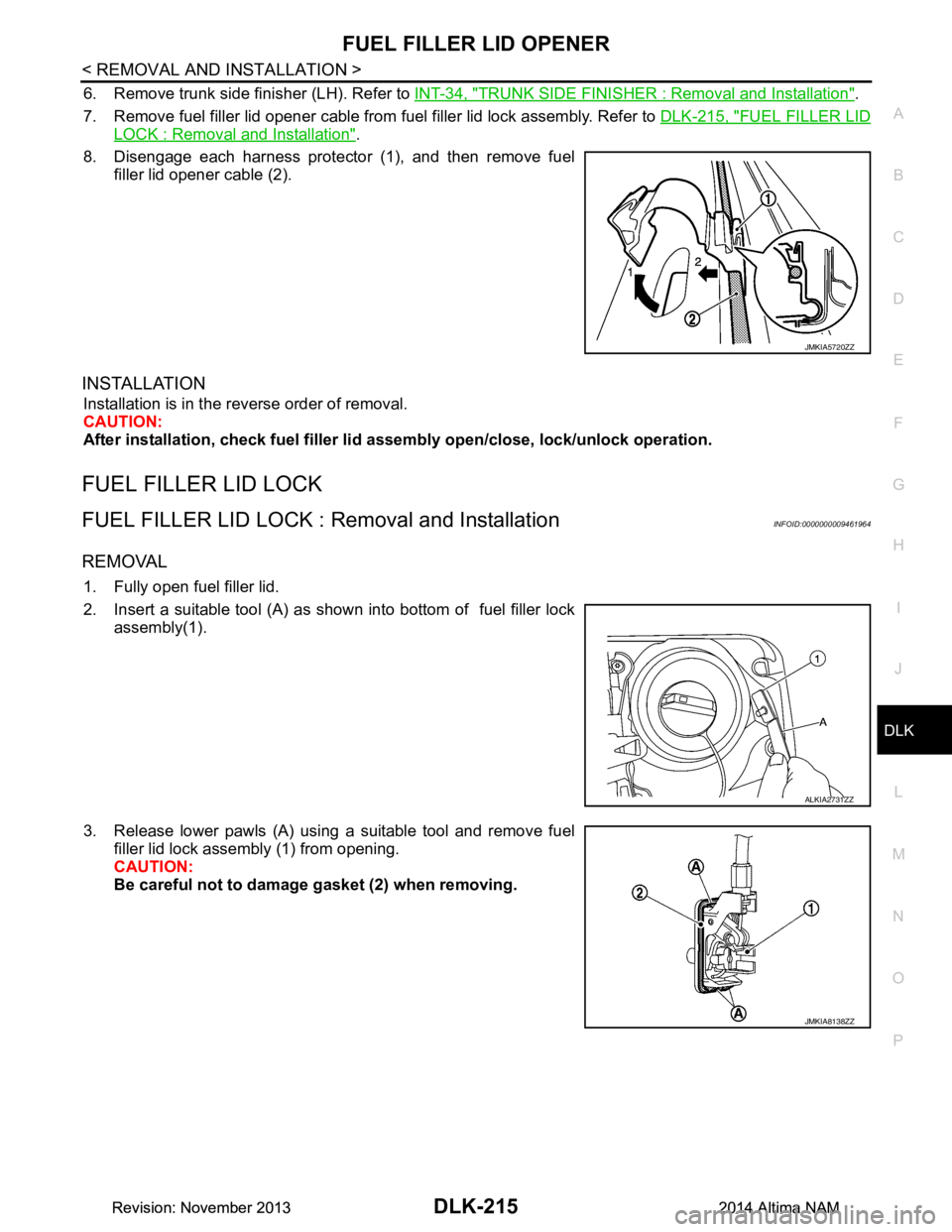
8. Disengage each harness protector (1), and then remove fuel filler lid opener cable (2).
INSTALLATION
Installation is in the reverse order of removal.
CAUTION:
After installation, check fuel filler li d assembly open/close, lock/unlock operation.
FUEL FILLER LID LOCK
FUEL FILLER LID LOCK : Removal and InstallationINFOID:0000000009461964
REMOVAL
1. Fully open fuel filler lid.
2. Insert a suitable tool (A) as shown into bottom of fuel filler lock assembly(1).
3. Release lower pawls (A) using a suitable tool and remove fuel filler lid lock assembly (1) from opening.
CAUTION:
Be careful not to damage gasket (2) when removing.
JMKIA5720ZZ
ALKIA2731ZZ
JMKIA8138ZZ
Revision: November 20132014 Altima NAMRevision: November 20132014 Altima NAM
Page 994 of 4801

DLK-226
< REMOVAL AND INSTALLATION >
TRUNK LID OPENER CANCEL SWITCH
TRUNK LID OPENER CANCEL SWITCH
Removal and InstallationINFOID:0000000009461978
REMOVAL
1. Remove the glove box assembly. Refer to IP-22, "Removal and Installation".
2. Release pawls and remove the trunk cancel switch.
INSTALLATION
Installation is in the reverse order of removal.
Revision: November 20132014 Altima NAMRevision: November 20132014 Altima NAM
Page 995 of 4801
TRUNK LID OPENER SWITCHDLK-227
< REMOVAL AND INSTALLATION >
C
D E
F
G H
I
J
L
M A
B
DLK
N
O P
TRUNK LID OPENER SWITCH
Removal and InstallationINFOID:0000000009461979
REMOVAL
1. Remove the instrument lower panel LH. Refer to IP-21, "Removal and Installation".
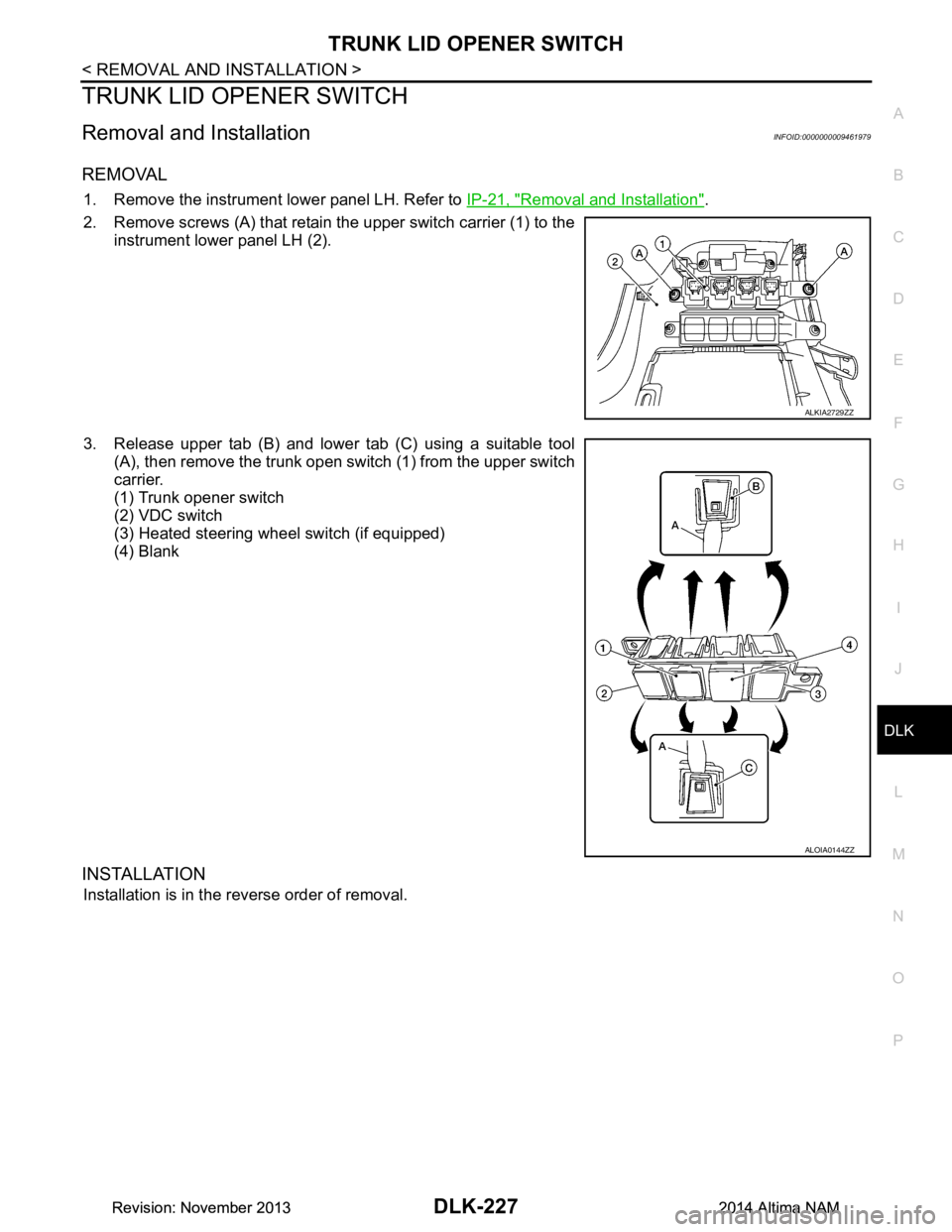
2. Remove screws (A) that retain the upper switch carrier (1) to the instrument lower panel LH (2).
3. Release upper tab (B) and lower tab (C) using a suitable tool (A), then remove the trunk open switch (1) from the upper switch
carrier.
(1) Trunk opener switch
(2) VDC switch
(3) Heated steering wheel switch (if equipped)
(4) Blank
INSTALLATION
Installation is in the reverse order of removal.
ALKIA2729ZZ
ALOIA0144ZZ
Revision: November 20132014 Altima NAMRevision: November 20132014 Altima NAM
Page 996 of 4801
DLK-228
< REMOVAL AND INSTALLATION >
TRUNK OPENER REQUEST SWITCH
TRUNK OPENER REQUEST SWITCH
Removal and InstallationINFOID:0000000009461980
REMOVAL
1. Remove the license plate lamp finisher. Refer to EXT-37, "Removal and Installation".
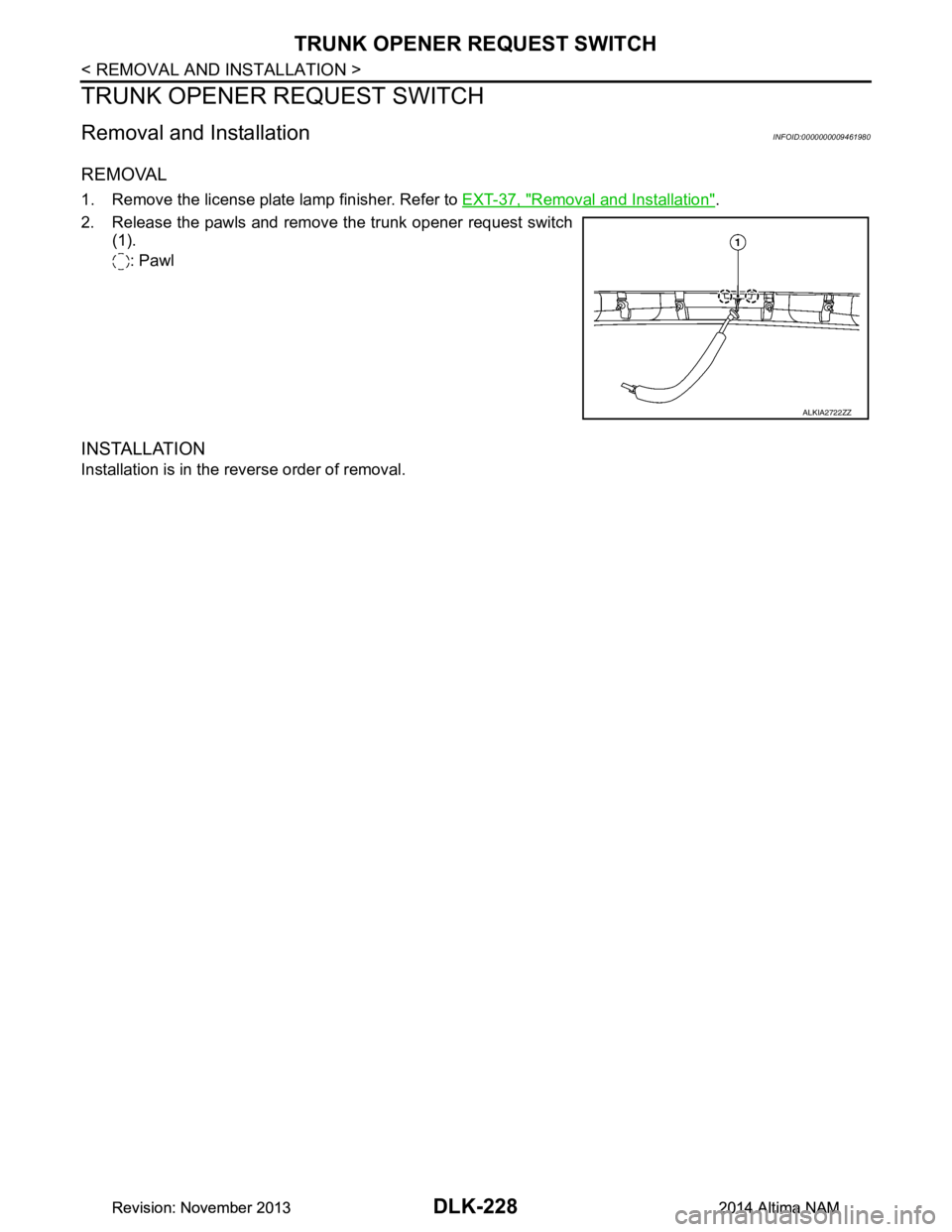
2. Release the pawls and remove the trunk opener request switch (1).
: Pawl
INSTALLATION
Installation is in the reverse order of removal.
ALKIA2722ZZ
Revision: November 20132014 Altima NAMRevision: November 20132014 Altima NAM
Page 2283 of 4801

DIAGNOSIS SYSTEM (BCM)EXL-17
< SYSTEM DESCRIPTION >
C
D E
F
G H
I
J
K
M A
B
EXL
N
O P
DIAGNOSIS SYSTEM (BCM)
COMMON ITEM
COMMON ITEM : CONSULT Function (BCM - COMMON ITEM)INFOID:0000000009956424
CAUTION:
After disconnecting the CONSULT vehicle interface (VI) from the data link connector, the ignition must
be cycled OFF → ON (for at least 5 seconds) → OFF. If this step is not performed, the BCM may not go
to ”sleep mode”, potentiall y causing a discharged battery and a no-start condition.
APPLICATION ITEM
CONSULT performs the following functions via CAN communication with BCM.
SYSTEM APPLICATION
BCM can perform the following functions.
Direct Diagnostic Mode Description
Ecu Identification The BCM part number is displayed.
Self Diagnostic Result The BCM self diagnostic results are displayed.
Data Monitor The BCM input/output data is displayed in real time.
Active Test The BCM activates outputs to test components.
Work support The settings for BCM functions can be changed.
Configuration • The vehicle specification can be read and saved.
• The vehicle specification can be written when replacing BCM.
CAN Diag Support Mntr The result of transmit/receive diagnosis of CAN communication is displayed.
System Sub System Direct Diagnostic Mode
Ecu Identification
Self Diagnostic Result
Data Monitor
Active Test
Work support
Configuration
CAN Diag Su pport Mntr
Door lock DOOR LOCK ××××
Rear window defogger REAR DEFOGGER ×××
Warning chime BUZZER ××
Interior room lamp timer INT LAMP ×××
Remote keyless entry system MULTI REMOTE ENT ×××
Exterior lamp HEADLAMP ×××
Wiper and washer WIPER ×××
Turn signal and hazard warning lamps FLASHER ××
Air conditioner AIR CONDITIONER ×
Intelligent Key system INTELLIGENT KEY ××××
Combination switch COMB SW ×
BCM BCM × × ×××
Immobilizer IMMU ×××
Interior room lamp battery saver BATTERY SAVER ××
Trunk open TRUNK ×
Vehicle security system THEFT ALM ×××
Revision: November 20132014 Altima NAMRevision: November 20132014 Altima NAM
Page 2284 of 4801

EXL-18
< SYSTEM DESCRIPTION >
DIAGNOSIS SYSTEM (BCM)
HEADLAMP
HEADLAMP : CONSULT Function (BCM - HEADLAMP)INFOID:0000000009956425
CAUTION:
After disconnecting the CONSULT vehicle interface (VI) from the data link connector, the ignition must
be cycled OFF → ON (for at least 5 seconds) → OFF. If this step is not performed, the BCM may not go
to ”sleep mode”, potentially causing a di scharged battery and a no-start condition.
DATA MONITOR
ACTIVE TEST
RAP system RETAINED PWR ×
Signal buffer system SIGNAL BUFFER ×
TPMS AIR PRESSURE MONITOR ××××
System Sub System
Direct Diagnostic Mode
Ecu Identification
Self Diagnostic Result
Data Monitor
Active Test
Work support
Configuration
CAN Diag Support Mntr
Monitor Item [Unit] Description
PUSH SW [On/Off] Indicates condition of push-button ignition switch.
ENGINE STATE [STOP/STALL/CRANK/RUN] Indicates engine st atus received from ECM on CAN communication line.
VEH SPEED 1 [km/h] Indicates vehicle speed signal received from ABS on CAN communication line.
TURN SIGNAL R [On/Off]
Indicates condition of combination switch.
TURN SIGNAL L [On/Off]
TAIL LAMP SW [On/Off]
HI BEAM SW [On/Off]
HEAD LAMP SW 1 [On/Off]
HEAD LAMP SW 2 [On/Off]
PASSING SW [On/Off]
AUTO LIGHT SW [On/Off]
FR FOG SW [On/Off]
DOOR SW-DR [On/Off] Indicates condition of front door switch LH.
DOOR SW-AS [On/Off] Indicates condition of front door switch RH.
DOOR SW-RR [On/Off] Indicates condition of rear door switch RH.
DOOR SW-RL [On/Off] Indicates condition of rear door switch LH.
DOOR SW-BK [On/Off] Indicates condition of trunk switch.
OPTI SEN (DTCT) [V] Indicates outside brightness voltage signal from optical sensor.
OPTI SEN (FILT) [V] Indicates outside brightness voltage signal from optical sensor filtered by BCM.
Test Item Description
FR FOG LAMP This test is able to check front fog lamp operation [On/Off].
DAYTIME RUNNING LIGHT This test is able to check daytime running la mp operation [On/Off].
ILL DIM SIGNAL This test is able to check head lamp illumination dimming operation [On/Off].
Revision: November 20132014 Altima NAMRevision: November 20132014 Altima NAM
Page 2286 of 4801

EXL-20
< SYSTEM DESCRIPTION >
DIAGNOSIS SYSTEM (BCM)
COMB SW
COMB SW : CONSULT Function (BCM - COMB SW)INFOID:0000000009956484
CAUTION:
After disconnecting the CONSULT vehicle interface (VI) from the data link connector, the ignition must
be cycled OFF → ON (for at least 5 seconds) → OFF. If this step is not performed, the BCM may not go
to ”sleep mode”, potentially causing a di scharged battery and a no-start condition.
DATA MONITOR
BATTERY SAVER
BATTERY SAVER : CONSULT Function (BCM - BATTERY SAVER)INFOID:0000000009956486
CAUTION:
After disconnecting the CONSULT vehicle interface (VI) from the data link connector, the ignition must
be cycled OFF → ON (for at least 5 seconds) → OFF. If this step is not performed, the BCM may not go
to ”sleep mode”, potentially causing a di scharged battery and a no-start condition.
DATA MONITOR
Monitor Item [Unit] Description
FR WIPER HI [On/Off]
Indicates condition of wiper operation of combination switch.
FR WIPER LOW [On/Off]
FR WASHER SW [On/Off]
FR WIPER INT [On/Off]
INT VOLUME [1 - 7] Indicates condition of intermittent wiper operation of combination switch.
TURN SIGNAL R [On/Off] Indicates condition of right turn signal operation of combination switch.
TURN SIGNAL L [On/Off] Indicates condition of left turn signal operation of combination switch.
TAIL LAMP SW [On/Off] Indicates condition of tail lamp switch operation of combination switch.
HI BEAM SW [On/Off] Indicates condition of Hi beam switch operation of combination switch.
HEAD LAMP SW 1 [On/Off] Indicates condition of head lamp switch 1 operation of combination switch.
HEAD LAMP SW 2 [On/Off] Indicates condition of head lamp switch 2 operation of combination switch.
PASSING SW [On/Off] Indicates condition of pass ing switch operation of combination switch.
AUTO LIGHT SW [On/Off] Indicates condition of auto light switch operation of combination switch.
FR FOG SW [On/Off] Indicates condition of front fog lamp switch operation of combination switch.
Monitor Item [Unit] Description
REQ SW -DR [On/Off] Indicates condition of door request switch LH.
REQ SW -AS [On/Off] Indicates condition of door request switch RH.
PUSH SW [On/Off] Indicates condition push-button ignition switch.
UNLK SEN -DR [On/Off] Indicates condition of door unlock sensor.
DOOR SW-DR [On/Off] Indicates condition of front door switch LH.
DOOR SW-AS [On/Off] Indicates condition of front door switch RH.
DOOR SW-RR [On/Off] Indicates condition of rear door switch RH.
DOOR SW-RL [On/Off] Indicates condition of rear door switch LH.
DOOR SW-BK [On/Off] Indicates condition of trunk switch.
CDL LOCK SW [On/Off] Indicates condition of lock signal from door lock and unlock switch.
CDL UNLOCK SW [On/Off] Indicates condition of unlock signal from door lock and unlock switch.
KEY CYL LK-SW [On/Off] Indicates condition of lo ck signal from door key cylinder switch.
Revision: November 20132014 Altima NAMRevision: November 20132014 Altima NAM
Page 2287 of 4801
![NISSAN TEANA 2014 Owners Manual
DIAGNOSIS SYSTEM (BCM)EXL-21
< SYSTEM DESCRIPTION >
C
D E
F
G H
I
J
K
M A
B
EXL
N
O P
ACTIVE TEST
KEY CYL UN-SW [On/Off] Indicates condition of unl ock signal from door key cylinder switch.
TRNK/HA](/img/5/57390/w960_57390-2286.png "NISSAN TEANA 2014 Owners Manual
DIAGNOSIS SYSTEM (BCM)EXL-21
< SYSTEM DESCRIPTION >
C
D E
F
G H
I
J
K
M A
B
EXL
N
O P
ACTIVE TEST
KEY CYL UN-SW [On/Off] Indicates condition of unl ock signal from door key cylinder switch.
TRNK/HA")
DIAGNOSIS SYSTEM (BCM)EXL-21
< SYSTEM DESCRIPTION >
C
D E
F
G H
I
J
K
M A
B
EXL
N
O P
ACTIVE TEST
KEY CYL UN-SW [On/Off] Indicates condition of unl ock signal from door key cylinder switch.
TRNK/HAT MNTR [On/Off] Indicates condition of trunk room lamp switch.
RKE-LOCK [On/Off] Indicates condition of lock signal from Intelligent Key.
RKE-UNLOCK [On/Off] Indicates condition of unlock signal from Intelligent Key. Monitor Item [Unit] Description
Test item Description
BATTERY SAVER This test is able to check battery saver operation [On/Off].
Revision: November 20132014 Altima NAMRevision: November 20132014 Altima NAM
Page 2401 of 4801
LICENSE PLATE LAMPEXL-135
< REMOVAL AND INSTALLATION >
C
D E
F
G H
I
J
K
M A
B
EXL
N
O P
LICENSE PLATE LAMP
Removal and InstallationINFOID:0000000009463633
REMOVAL
1. Remove the license lamp finisher. Refer to EXT-37, "Removal and Installation".
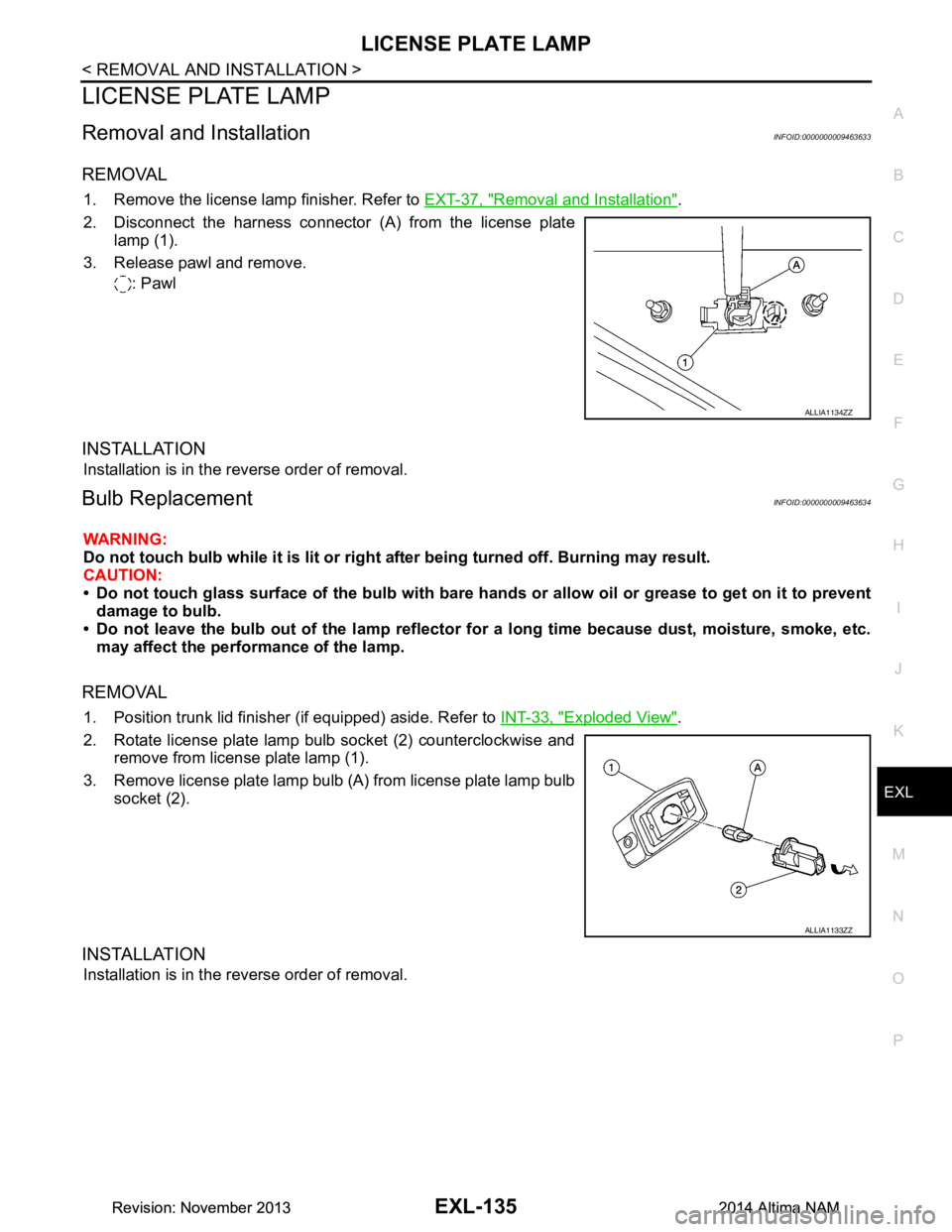
2. Disconnect the harness connector (A) from the license plate lamp (1).
3. Release pawl and remove. : Pawl
INSTALLATION
Installation is in the reverse order of removal.
Bulb ReplacementINFOID:0000000009463634
WARNING:
Do not touch bulb while it is lit or right after being turned off. Burning may result.
CAUTION:
• Do not touch glass surface of the bulb with bare hand s or allow oil or grease to get on it to prevent
damage to bulb.
• Do not leave the bulb out of the lamp reflector fo r a long time because dust, moisture, smoke, etc.
may affect the performance of the lamp.
REMOVAL
1. Position trunk lid finisher (if equipped) aside. Refer to INT-33, "Exploded View".
2. Rotate license plate lamp bulb socket (2) counterclockwise and remove from license plate lamp (1).
3. Remove license plate lamp bulb (A) from license plate lamp bulb socket (2).
INSTALLATION
Installation is in the reverse order of removal.
ALLIA1134ZZ
ALLIA1133ZZ
Revision: November 20132014 Altima NAMRevision: November 20132014 Altima NAM
Page 2403 of 4801
REAR COMBINATION LAMPEXL-137
< REMOVAL AND INSTALLATION >
C
D E
F
G H
I
J
K
M A
B
EXL
N
O P
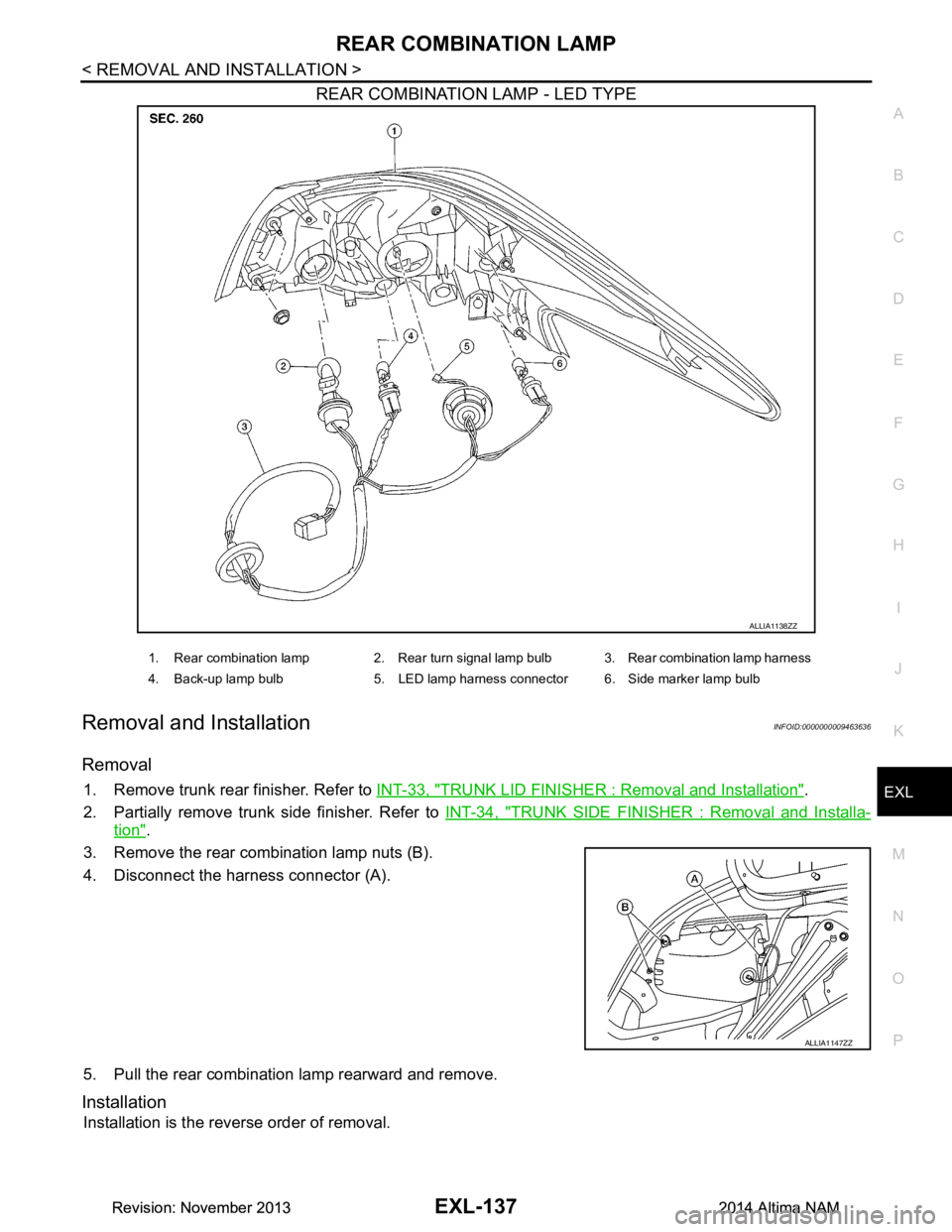
REAR COMBINATION LAMP - LED TYPE
Removal and InstallationINFOID:0000000009463636
Removal
1. Remove trunk rear finisher. Refer to INT-33, "TRUNK LID FINISHER : Removal and Installation".
2. Partially remove trunk side finisher. Refer to INT-34, "TRUNK SIDE FINISHER : Removal and Installa-
tion".
3. Remove the rear combination lamp nuts (B).
4. Disconnect the harness connector (A).
5. Pull the rear combination lamp rearward and remove.
Installation
Installation is the reverse order of removal.
ALLIA1138ZZ
1. Rear combination lamp 2. Rear turn signal lamp bulb 3. Rear combination lamp harness
4. Back-up lamp bulb 5. LED lamp harness connector 6. Side marker lamp bulb
ALLIA1147ZZ
Revision: November 20132014 Altima NAMRevision: November 20132014 Altima NAM