SEC NISSAN TEANA 2014 Service Manual
[x] Cancel search | Manufacturer: NISSAN, Model Year: 2014, Model line: TEANA, Model: NISSAN TEANA 2014Pages: 4801, PDF Size: 51.2 MB
Page 722 of 4801
![NISSAN TEANA 2014 Service Manual
DAS
MOD SYSTEM SETTINGS CANNOT BE TURNED ON/OFF IN VEHICLE INFOR-
MATION DISPLAY
DAS-289
< SYMPTOM DIAGNOSIS > [MOD]
C
D E
F
G H
I
J
K L
M B
N P
A
MOD SYSTEM SETTINGS CANNOT BE TURNED ON/OFF IN VEH](/img/5/57390/w960_57390-721.png "NISSAN TEANA 2014 Service Manual
DAS
MOD SYSTEM SETTINGS CANNOT BE TURNED ON/OFF IN VEHICLE INFOR-
MATION DISPLAY
DAS-289
< SYMPTOM DIAGNOSIS > [MOD]
C
D E
F
G H
I
J
K L
M B
N P
A
MOD SYSTEM SETTINGS CANNOT BE TURNED ON/OFF IN VEH")
DAS
MOD SYSTEM SETTINGS CANNOT BE TURNED ON/OFF IN VEHICLE INFOR-
MATION DISPLAY
DAS-289
< SYMPTOM DIAGNOSIS > [MOD]
C
D E
F
G H
I
J
K L
M B
N P
A
MOD SYSTEM SETTINGS CANNOT BE TURNED ON/OFF IN VEHICLE IN-
FORMATION DISPLAY
DescriptionINFOID:0000000009464954
• Moving Object Detection system setting is not selectable on the vehicle information display screen.
NOTE:
When the ignition switch is in ACC position, Movi ng Object Detection system settings cannot be changed.
- “Moving Object Detection” is not indica ted on the vehicle information display screen.
- The switching between ON and OFF cannot be performed by operating the vehicle information display set-
ting system selection.
- The item “Moving Object Detection” on the vehi cle information display screen is not active.
• The Moving Object Detection system setting diff ers from the one set at the previous driving.
NOTE:
Turn OFF the ignition switch and wait for 5 seconds or more.
Diagnosis ProcedureINFOID:0000000009464955
1.CHECK MOVING OBJECT DE TECTION SYSTEM SETTING
1. Start the engine.
2. Check that the Moving Object Detection system sett ings is selectable on the vehicle information display
screen.
Is the inspection result normal?
YES >> GO TO 3.
NO >> GO TO 2.
2.PERFORM THE SELF-DIAGNOSIS
1. Perform self-diagnosis with CONSULT.
2. Check if the DTC is detected in self-diagnosis re sults of “AVM”, “MULTI AV” and “METER/M&A”. Refer to
the following.
-AVM: DAS-239, "DTC Index"
- MULTI AV (with BOSE): AV-328, "DTC Index"
- MULTI AV (without BOSE): AV-231, "DTC Index"
- METER/M&A: MWI-27, "DTC Index"
Is any DTC detected?
YES >> Repair or replace malfunctioning parts.
NO >> Inspection End.
3.CHECK DATA MONITOR OF ITS CONTROL UNIT
Check that “MOD SELECT” operates normally in “DATA MONITOR” of “AVM” with CONSULT.
Is the inspection result normal?
YES >> Refer to DAS-233, "CONSULT Function (AVM)".
NO >> GO TO 4.
4.CHECK MULTIFUNCTION SWITCH
Operate the multifunction switch to check that the audio, navigation system, and air conditioner operate prop-
erly.
Is the inspection result normal?
YES >> Replace the ITS control unit. Refer to DAS-68, "Removal and Installation".
NO >> Repair or replace malfunctioning parts.
Revision: November 20132014 Altima NAMRevision: November 20132014 Altima NAM
Page 726 of 4801

DEF-1
DRIVER CONTROLS
C
D E
F
G H
I
J
K
M
SECTION DEF
A
B
DEF
N
O P
CONTENTS
DEFOGGER
PRECAUTION ................ ...............................3
PRECAUTIONS .............................................. .....3
Precaution for Supplemental Restraint System
(SRS) "AIR BAG" and "SEAT BELT PRE-TEN-
SIONER" ............................................................. ......
3
Precaution for Work ..................................................3
PREPARATION ............................................4
PREPARATION .............................................. .....4
Special Service Tool ........................................... ......4
SYSTEM DESCRIPTION ..............................5
COMPONENT PARTS ................................... .....5
Component Parts Location .................................. ......5
Component Description .............................................6
SYSTEM ..............................................................7
System Diagram .................................................. ......7
System Description ...................................................7
DIAGNOSIS SYSTEM (BCM) .............................8
COMMON ITEM ..................................................... ......8
COMMON ITEM : CONSULT Function (BCM -
COMMON ITEM) ................................................. ......
8
REAR DEFOGGER ............................................... ......9
REAR DEFOGGER : CONSULT Function (BCM -
REAR DEFOGGER) ........................................... ......
9
ECU DIAGNOSIS INFORMATION ..............10
BCM (BODY CONTROL MODULE) ............... ....10
List of ECU Reference ........................................ ....10
WIRING DIAGRAM ......................................11
REAR WINDOW DEFOGGER SYSTEM ........ ....11
Wiring Diagram ................................................... ....11
BASIC INSPECTION ...................................16
DIAGNOSIS AND REPAIR WORKFLOW ........16
Work Flow ............................................................ ....16
DTC/CIRCUIT DIAGNOSIS .........................19
REAR WINDOW DEFOGGER SWITCH ...........19
WITH MANUAL A/C ............................................... ....19
WITH MANUAL A/C : Description ...........................19
WITH MANUAL A/C : Component Function Check
....
19
WITH MANUAL A/C : Diagnosis Procedure ............19
WITH AUTO A/C .................................................... ....22
WITH AUTO A/C : Description ................................22
WITH AUTO A/C : Component Function Check ......22
WITH AUTO A/C : Diagnosis Procedure ............. ....22
REAR WINDOW DEFOGGER RELAY .............26
Description ...............................................................26
Component Function Check ....................................26
Diagnosis Procedure ...............................................26
Component Inspection .............................................27
REAR WINDOW DEFOGGER POWER SUP-
PLY AND GROUND CIRCUIT ..........................
28
Description ........................................................... ....28
Component Function Check ....................................28
Diagnosis Procedure ...............................................28
Component Inspection .............................................29
DRIVER SIDE DOOR MIRROR DEFOGGER ...30
Description ...............................................................30
Component Function Check ....................................30
Diagnosis Procedure ...............................................30
Component Inspection .............................................31
PASSENGER SIDE DOOR MIRROR DEFOG-
GER ...................................................................
32
Description ........................................................... ....32
Revision: November 20132014 Altima NAMRevision: November 20132014 Altima NAM
Page 728 of 4801

PRECAUTIONSDEF-3
< PRECAUTION >
C
D E
F
G H
I
J
K
M A
B
DEF
N
O P
PRECAUTION
PRECAUTIONS
Precaution for Supplemental Restraint System (SRS) "AIR BAG" and "SEAT BELT
PRE-TENSIONER"
INFOID:0000000009951577
The Supplemental Restraint System such as “A IR BAG” and “SEAT BELT PRE-TENSIONER”, used along
with a front seat belt, helps to reduce the risk or severi ty of injury to the driver and front passenger for certain
types of collision. Information necessary to service t he system safely is included in the SR and SB section of
this Service Manual.
WARNING:
• To avoid rendering the SRS inoper ative, which could increase the risk of personal injury or death in
the event of a collision which would result in air bag inflation, all maintenance must be performed by
an authorized NISSAN/INFINITI dealer.
• Improper maintenance, including in correct removal and installation of the SRS, can lead to personal
injury caused by unintentional act ivation of the system. For removal of Spiral Cable and Air Bag
Module, see the SR section.
• Do not use electrical test equipm ent on any circuit related to the SRS unless instructed to in this
Service Manual. SRS wiring harnesses can be identi fied by yellow and/or orange harnesses or har-
ness connectors.
PRECAUTIONS WHEN USING POWER TOOLS (AIR OR ELECTRIC) AND HAMMERS
WARNING:
• When working near the Airbag Diagnosis Sensor Un it or other Airbag System sensors with the Igni-
tion ON or engine running, DO NOT use air or el ectric power tools or strike near the sensor(s) with a
hammer. Heavy vibration could activate the sensor( s) and deploy the air bag(s), possibly causing
serious injury.
• When using air or electric power tools or hammers , always switch the Ignition OFF, disconnect the
battery and wait at least three mi nutes before performing any service.
Precaution for WorkINFOID:0000000009463020
• When removing or disassembling each component, be ca reful not to damage or deform it. If a component
may be subject to interference, be sure to protect it with a shop cloth.
• When removing (disengaging) components with a screwdriver or similar tool, be sure to wrap the component with a shop cloth or vinyl tape to protect it.
• Protect the removed parts with a shop cloth and prevent them from being dropped.
• Replace a deformed or damaged clip.
• If a part is specified as a non-reusabl e part, always replace it with a new one.
• Be sure to tighten bolts and nuts securely to the specified torque.
• After installation is complete, be sure to check that each part works properly.
• Follow the steps below to clean components:
- Water soluble dirt:
• Dip a soft cloth into lukewarm water, wring the water out of the cloth and wipe the dirty area.
• Then rub with a soft, dry cloth.
-Oily dirt:
• Dip a soft cloth into lukewarm water with mild detergent (concentration: within 2 to 3%) and wipe the dirty area.
• Then dip a cloth into fresh water, wring the water out of the cloth and wipe the detergent off.
• Then rub with a soft, dry cloth.
- Do not use organic solvent such as thinner, benzene, alcohol or gasoline.
- For genuine leather seats, use a genuine leather seat cleaner.
Revision: November 20132014 Altima NAMRevision: November 20132014 Altima NAM
Page 733 of 4801

DEF-8
< SYSTEM DESCRIPTION >
DIAGNOSIS SYSTEM (BCM)
DIAGNOSIS SYSTEM (BCM)
COMMON ITEM
COMMON ITEM : CONSULT Function (BCM - COMMON ITEM)INFOID:0000000009956271
CAUTION:
After disconnecting the CONSULT vehicle interface (VI) from the data link connector, the ignition must
be cycled OFF → ON (for at least 5 seconds) → OFF. If this step is not performed, the BCM may not go
to ”sleep mode”, potentially causing a di scharged battery and a no-start condition.
APPLICATION ITEM
CONSULT performs the following functions via CAN communication with BCM.
SYSTEM APPLICATION
BCM can perform the following functions.
Direct Diagnostic Mode Description
Ecu Identification The BCM part number is displayed.
Self Diagnostic Result The BCM self diagnostic results are displayed.
Data Monitor The BCM input/output data is displayed in real time.
Active Test The BCM activates outputs to test components.
Work support The settings for BCM functions can be changed.
Configuration • The vehicle specification can be read and saved.
• The vehicle specification can be written when replacing BCM.
CAN Diag Support Mntr The result of transmit/receive diagnosis of CAN communication is displayed.
System Sub System Direct Diagnostic Mode
Ecu Identification
Self Diagnostic Result
Data Monitor
Active Test
Work support
Configuration
CAN Diag Su pport Mntr
Door lock DOOR LOCK ××××
Rear window defogger REAR DEFOGGER ×××
Warning chime BUZZER ××
Interior room lamp timer INT LAMP ×××
Remote keyless entry system MULTI REMOTE ENT ×××
Exterior lamp HEADLAMP ×××
Wiper and washer WIPER ×××
Turn signal and hazard warning lamps FLASHER ××
Air conditioner AIR CONDITIONER ×
Intelligent Key system INTELLIGENT KEY ××××
Combination switch COMB SW ×
BCM BCM × × ×××
Immobilizer IMMU ×××
Interior room lamp battery saver BATTERY SAVER ××
Trunk open TRUNK ×
Vehicle security system THEFT ALM ×××
Revision: November 20132014 Altima NAMRevision: November 20132014 Altima NAM
Page 734 of 4801

DIAGNOSIS SYSTEM (BCM)DEF-9
< SYSTEM DESCRIPTION >
C
D E
F
G H
I
J
K
M A
B
DEF
N
O P
REAR DEFOGGER
REAR DEFOGGER : CONSULT Func tion (BCM - REAR DEFOGGER)INFOID:0000000009956272
CAUTION:
After disconnecting the CONSULT vehicle interface (VI) from the data link connector, the ignition must
be cycled OFF → ON (for at least 5 seconds) → OFF. If this step is not performed, the BCM may not go
to ”sleep mode”, potentiall y causing a discharged battery and a no-start condition.
DATA MONITOR
ACTIVE TEST
WORK SUPPORT
* : Initial setting RAP system RETAINED PWR
×
Signal buffer system SIGNAL BUFFER ×
TPMS AIR PRESSURE MONITOR ××××
System Sub System
Direct Diagnostic Mode
Ecu Identification
Self Diagnostic Result
Data Monitor
Active Test
Work support
Configuration
CAN Diag Support Mntr
Monitor Item [Unit] Description
PUSH SW [On/Off] Indicates condition of push-button ignition switch.
REAR DEF SW [On/Off] Indicates condition of rear window defogger switch.
Test Item Description
REAR DEFOGGER This test is able to check rear window defogger operation [Off/On].
Support Item Setting Description
SET R-DEF TIMER MODE3 Rear defogger turns OFF after 1 minute.
MODE2 Rear defogger remains ON until turned OFF.
MODE1* Rear defogger turns OFF after 15 minutes.
Revision: November 20132014 Altima NAMRevision: November 20132014 Altima NAM
Page 743 of 4801

DEF-18
< BASIC INSPECTION >
DIAGNOSIS AND REPAIR WORKFLOW
8. DETECT MALFUNCTIONING PART BY DIAGNOSTIC PROCEDURE
Inspect according to Diagnostic Procedure of the system.
NOTE:
The Diagnostic Procedure described based on open circuit inspection. A short circuit inspection is also
required for the circuit check in the Diagnostic Procedure.
Is malfunctioning part detected?
YES >> GO TO 9.
NO >> Check voltage of related BCM terminals using CONSULT.
9. REPAIR OR REPLACE THE MALFUNCTIONING PART
1. Repair or replace the malfunctioning part.
2. Reconnect parts or connectors disconnected during Diagnostic Procedure again after repair and replace- ment.
3. Check DTC. If DTC is displayed, erase it.
>> GO TO 10.
10. FINAL CHECK
When DTC was detected in step 2, perform DTC C onfirmation Procedure or Component Function Check
again, and then check that the malfunction have been repaired securely.
When symptom was described from the customer, refer to confirmed symptom in step 3 or 4, and check that
the symptom is not detected.
Does the symptom reappear?
YES (DTC is detected)>>GO TO 8.
YES (Symptom remains)>>GO TO 6.
NO >> Inspection End.
Revision: November 20132014 Altima NAMRevision: November 20132014 Altima NAM
Page 769 of 4801

DLK-1
BODY EXTERIOR, DOORS, ROOF & VEHICLE SECURITY
C
D E
F
G H
I
J
L
M
SECTION DLK
A
B
DLK
N
O P
CONTENTS
DOOR & LOCK
PRECAUTION ................ ...............................6
PRECAUTIONS .............................................. .....6
Precaution for Supplemental Restraint System
(SRS) "AIR BAG" and "SEAT BELT PRE-TEN-
SIONER" ............................................................. ......
6
Precaution for Procedure without Cowl Top Cover ......6
Precaution for Servicing Doors and Locks .......... ......6
PREPARATION ............................................8
PREPARATION .............................................. .....8
Special Service Tools .......................................... ......8
Commercial Service Tools ........................................9
CLIP LIST ...........................................................10
Descriptions for Clips .......................................... ....10
SYSTEM DESCRIPTION .............................14
COMPONENT PARTS ................................... ....14
POWER DOOR LOCK SYSTEM ........................... ....14
POWER DOOR LOCK SYSTEM :
Component Parts Location ................................ ....
14
POWER DOOR LOCK SYSTEM :
Component Description ...................................... ....
15
INTELLIGENT KEY SYSTEM ...................................15
INTELLIGENT KEY SYSTEM : Component Parts
Location ............................................................... ....
16
INTELLIGENT KEY SYSTEM :
Component Description ...................................... ....
19
INTEGRATED HOMELINK TRANSMITTER ......... ....19
INTEGRATED HOMELINK TRANSMITTER :
Component Parts Location .................................. ....
19
INTEGRATED HOMELINK TRANSMITTER :
Component Description ....................................... ....
19
TRUNK LID OPENER SYSTEM ............................ ....19
TRUNK LID OPENER SYSTEM :
Component Parts Location ................................ ....
20
TRUNK LID OPENER SYSTEM :
Component Description ...................................... ....
20
SYSTEM (POWER DOOR LOCK SYSTEM) ....21
System Diagram .................................................. ....21
System Description ..................................................21
SYSTEM (INTELLIGENT KEY SYSTEM) .........23
INTELLIGENT KEY SYSTEM ......................... ...........23
INTELLIGENT KEY SYSTEM : System Diagram ....23
INTELLIGENT KEY SYSTEM : System Descrip-
tion ....................................................................... ....
23
DOOR LOCK FUNCTION ...................................... ....24
DOOR LOCK FUNCTION : System Diagram ..........24
DOOR LOCK FUNCTION : System Description . ....24
REMOTE KEYLESS ENTRY FUNCTION ..................26
REMOTE KEYLESS ENTRY FUNCTION : Sys-
tem Diagram ........................................................ ....
27
REMOTE KEYLESS ENTRY FUNCTION : Sys-
tem Description .................................................... ....
27
KEY REMINDER FUNCTION ................................ ....29
KEY REMINDER FUNCTION : System Diagram ....29
KEY REMINDER FUNCTION : System Descrip-
tion ....................................................................... ....
29
REMOTE ENGINE START FUNCTION ................. ....30
REMOTE ENGINE START FUNCTION : System
Diagram ............................................................... ....
30
REMOTE ENGINE START FUNCTION : System
Description ........................................................... ....
30
WELCOME LIGHT FUNCTION ............................. ....32
WELCOME LIGHT FUNCTION : System Diagram
....
32
WELCOME LIGHT FUNCTION : System Descrip-
tion ....................................................................... ....
32
WARNING FUNCTION .......................................... ....33
WARNING FUNCTION : System Description ..........33
Revision: November 20132014 Altima NAMRevision: November 20132014 Altima NAM
Page 774 of 4801
DLK-6
< PRECAUTION >
PRECAUTIONS
PRECAUTION
PRECAUTIONS
Precaution for Supplemental Restraint System (SRS) "AIR BAG" and "SEAT BELT
PRE-TENSIONER"
INFOID:0000000009951560
The Supplemental Restraint System such as “A IR BAG” and “SEAT BELT PRE-TENSIONER”, used along
with a front seat belt, helps to reduce the risk or severi ty of injury to the driver and front passenger for certain
types of collision. Information necessary to service the system safely is included in the SR and SB section of
this Service Manual.
WARNING:
• To avoid rendering the SRS inopera tive, which could increase the risk of personal injury or death in
the event of a collision which would result in air bag inflation, all maintenance must be performed by
an authorized NISS AN/INFINITI dealer.
• Improper maintenance, including in correct removal and installation of the SRS, can lead to personal
injury caused by unintent ional activation of the system. For re moval of Spiral Cable and Air Bag
Module, see the SR section.
• Do not use electrical test equipmen t on any circuit related to the SRS unless instructed to in this
Service Manual. SRS wiring harn esses can be identified by yellow and/or orange harnesses or har-
ness connectors.
PRECAUTIONS WHEN USING POWER TOOLS (AIR OR ELECTRIC) AND HAMMERS
WARNING:
• When working near the Airbag Diagnosis Sensor Unit or other Airbag System sensors with the Igni-
tion ON or engine running, DO NOT use air or electri c power tools or strike near the sensor(s) with a
hammer. Heavy vibration could activate the sensor( s) and deploy the air bag(s), possibly causing
serious injury.
• When using air or electric power tools or hammers , always switch the Ignition OFF, disconnect the
battery and wait at least three minutes before performing any service.
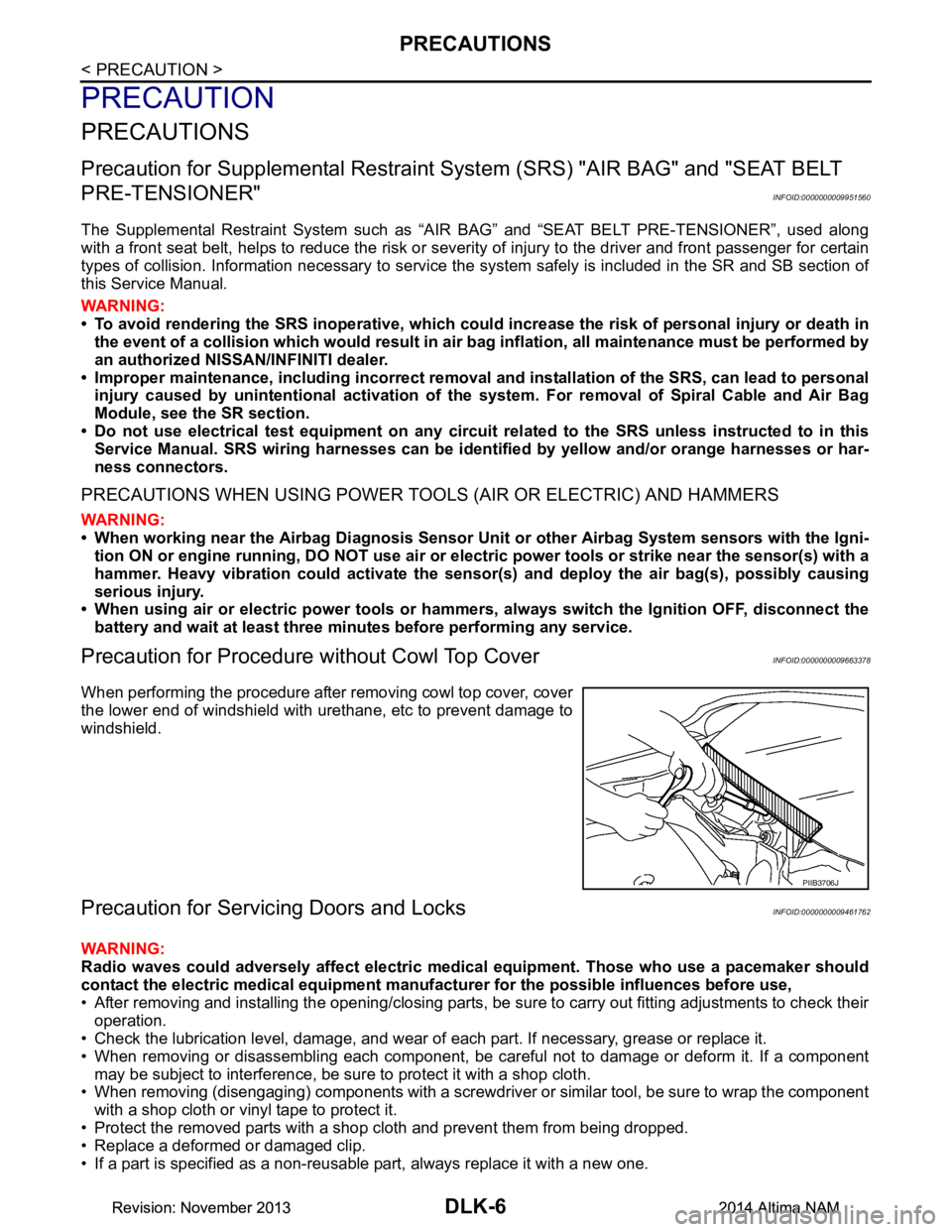
Precaution for Procedure without Cowl Top CoverINFOID:0000000009663378
When performing the procedure after removing cowl top cover, cover
the lower end of windshield with urethane, etc to prevent damage to
windshield.
Precaution for Servicing Doors and LocksINFOID:0000000009461762
WARNING:
Radio waves could adversely affect electric medical equipment. Those who use a pacemaker should
contact the electric medical eq uipment manufacturer for the possible influences before use,
• After removing and installing the opening/closing parts, be sure to carry out fitting adjustments to check their
operation.
• Check the lubrication level, damage, and wear of each part. If necessary, grease or replace it.
• When removing or disassembling each component, be careful not to damage or deform it. If a component may be subject to interference, be sure to protect it with a shop cloth.
• When removing (disengaging) components with a screwdriver or similar tool, be sure to wrap the component
with a shop cloth or vinyl tape to protect it.
• Protect the removed parts with a s hop cloth and prevent them from being dropped.
• Replace a deformed or damaged clip.
• If a part is specified as a non-reusable part, always replace it with a new one.
PIIB3706J
Revision: November 20132014 Altima NAMRevision: November 20132014 Altima NAM
Page 775 of 4801

PRECAUTIONSDLK-7
< PRECAUTION >
C
D E
F
G H
I
J
L
M A
B
DLK
N
O P
• Be sure to tighten bolts and nuts securely to the specified torque.
• After installation is complete, be sure to check that each part works properly.
• Follow the steps below to clean components:
- Water soluble dirt:
• Dip a soft cloth into lukewarm water, wring the water out of the cloth and wipe the dirty area.
• Then rub with a soft, dry cloth.
-Oily dirt:
• Dip a soft cloth into lukewarm water with mild detergent (concentration: within 2 to 3%) and wipe the dirty area.
• Then dip a cloth into fresh water, wring the water out of the cloth and wipe the detergent off.
• Then rub with a soft, dry cloth.
- Do not use organic solvent such as thinner, benzene, alcohol or gasoline.
- For genuine leather seats, use a genuine leather seat cleaner.
Revision: November 20132014 Altima NAMRevision: November 20132014 Altima NAM
Page 789 of 4801
SYSTEM (POWER DOOR LOCK SYSTEM)DLK-21
< SYSTEM DESCRIPTION >
C
D E
F
G H
I
J
L
M A
B
DLK
N
O P
SYSTEM (POWER DOOR LOCK SYSTEM)
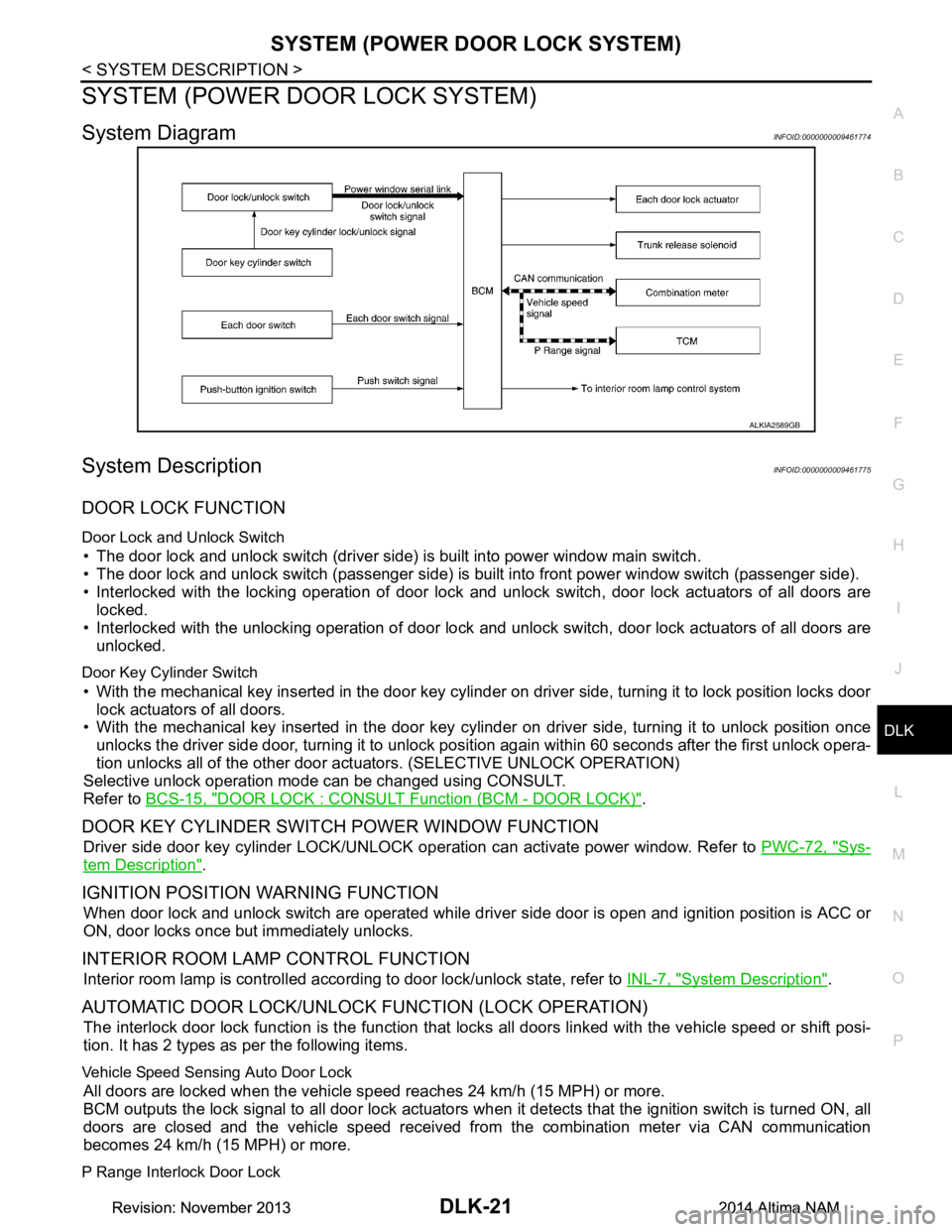
System DiagramINFOID:0000000009461774
System DescriptionINFOID:0000000009461775
DOOR LOCK FUNCTION
Door Lock and Unlock Switch
• The door lock and unlock switch (driver side) is built into power window main switch.
• The door lock and unlock switch (passenger side) is built into front power window switch (passenger side).
• Interlocked with the locking operation of door lock and unlock switch, door lock actuators of all doors are
locked.
• Interlocked with the unlocking operation of door lock and unlock switch, door lock actuators of all doors are
unlocked.
Door Key Cylinder Switch
• With the mechanical key inserted in the door key cylinder on driver side, turning it to lock position locks door
lock actuators of all doors.
• With the mechanical key inserted in the door key cylinder on driver side, turning it to unlock position once
unlocks the driver side door, turning it to unlock pos ition again within 60 seconds after the first unlock opera-
tion unlocks all of the other door act uators. (SELECTIVE UNLOCK OPERATION)
Selective unlock operation mode can be changed using CONSULT.
Refer to BCS-15, "DOOR LOCK : CONSULT Function (BCM - DOOR LOCK)"
.
DOOR KEY CYLINDER SWIT CH POWER WINDOW FUNCTION
Driver side door key cylinder LOCK/UNLOCK operat ion can activate power window. Refer to PWC-72, "Sys-
tem Description".
IGNITION POSITION WARNING FUNCTION
When door lock and unlock switch are operated while driv er side door is open and ignition position is ACC or
ON, door locks once but immediately unlocks.
INTERIOR ROOM LAMP CONTROL FUNCTION
Interior room lamp is controlled according to door lock/unlock state, refer to INL-7, "System Description".
AUTOMATIC DOOR LOCK/UNLOCK FUNCTION (LOCK OPERATION)
The interlock door lock function is the function that locks all doors linked with the vehicle speed or shift posi-
tion. It has 2 types as per the following items.
Vehicle Speed Sensing Auto Door Lock
All doors are locked when the vehicle speed reaches 24 km/h (15 MPH) or more.
BCM outputs the lock signal to all door lock actuators when it detects that the ignition switch is turned ON, all
doors are closed and the vehicle speed received from the combination meter via CAN communication
becomes 24 km/h (15 MPH) or more.
P Range Interlock Door Lock
ALKIA2589GB
Revision: November 20132014 Altima NAMRevision: November 20132014 Altima NAM