engine NISSAN TEANA 2014 Service Manual
[x] Cancel search | Manufacturer: NISSAN, Model Year: 2014, Model line: TEANA, Model: NISSAN TEANA 2014Pages: 4801, PDF Size: 51.2 MB
Page 774 of 4801
DLK-6
< PRECAUTION >
PRECAUTIONS
PRECAUTION
PRECAUTIONS
Precaution for Supplemental Restraint System (SRS) "AIR BAG" and "SEAT BELT
PRE-TENSIONER"
INFOID:0000000009951560
The Supplemental Restraint System such as “A IR BAG” and “SEAT BELT PRE-TENSIONER”, used along
with a front seat belt, helps to reduce the risk or severi ty of injury to the driver and front passenger for certain
types of collision. Information necessary to service the system safely is included in the SR and SB section of
this Service Manual.
WARNING:
• To avoid rendering the SRS inopera tive, which could increase the risk of personal injury or death in
the event of a collision which would result in air bag inflation, all maintenance must be performed by
an authorized NISS AN/INFINITI dealer.
• Improper maintenance, including in correct removal and installation of the SRS, can lead to personal
injury caused by unintent ional activation of the system. For re moval of Spiral Cable and Air Bag
Module, see the SR section.
• Do not use electrical test equipmen t on any circuit related to the SRS unless instructed to in this
Service Manual. SRS wiring harn esses can be identified by yellow and/or orange harnesses or har-
ness connectors.
PRECAUTIONS WHEN USING POWER TOOLS (AIR OR ELECTRIC) AND HAMMERS
WARNING:
• When working near the Airbag Diagnosis Sensor Unit or other Airbag System sensors with the Igni-
tion ON or engine running, DO NOT use air or electri c power tools or strike near the sensor(s) with a
hammer. Heavy vibration could activate the sensor( s) and deploy the air bag(s), possibly causing
serious injury.
• When using air or electric power tools or hammers , always switch the Ignition OFF, disconnect the
battery and wait at least three minutes before performing any service.
Precaution for Procedure without Cowl Top CoverINFOID:0000000009663378
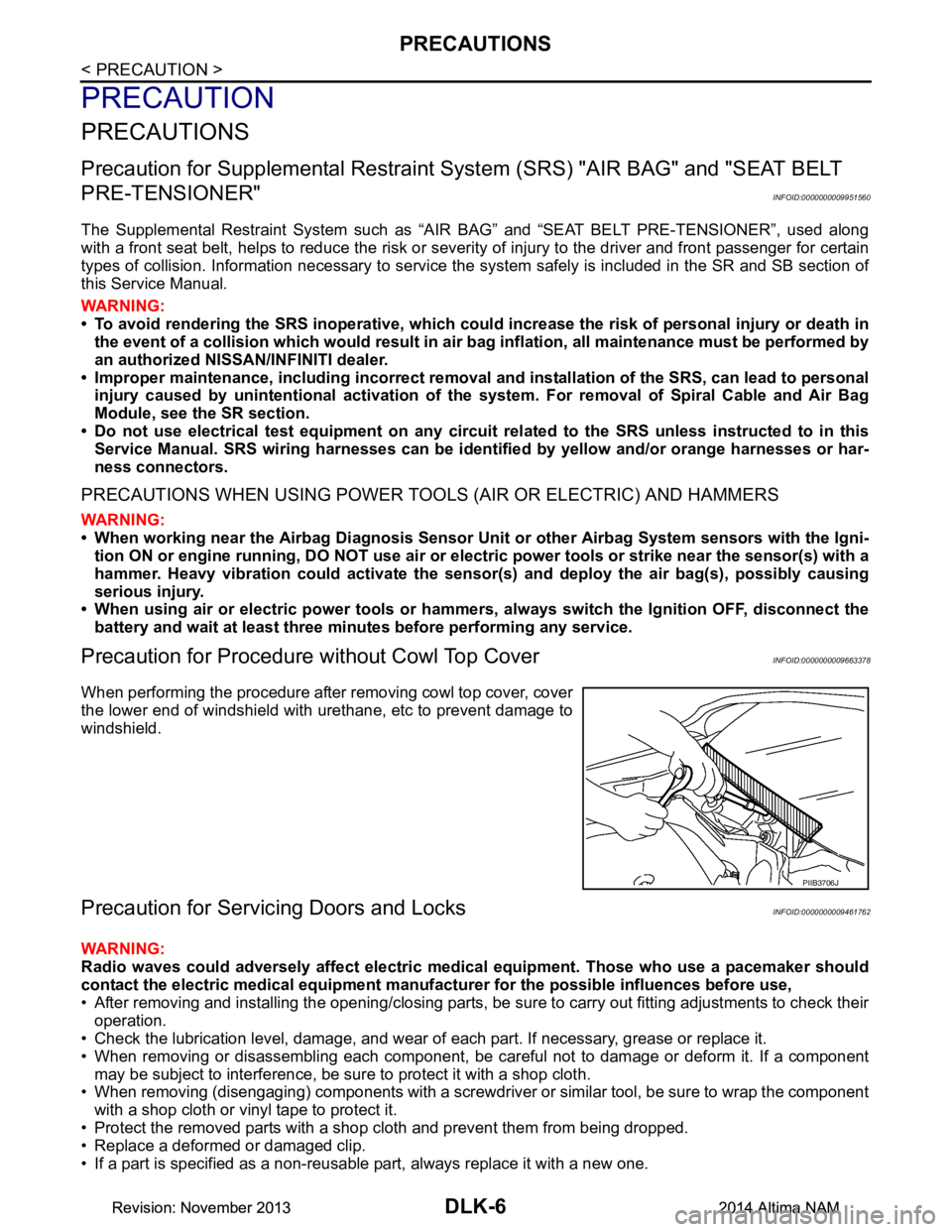
When performing the procedure after removing cowl top cover, cover
the lower end of windshield with urethane, etc to prevent damage to
windshield.
Precaution for Servicing Doors and LocksINFOID:0000000009461762
WARNING:
Radio waves could adversely affect electric medical equipment. Those who use a pacemaker should
contact the electric medical eq uipment manufacturer for the possible influences before use,
• After removing and installing the opening/closing parts, be sure to carry out fitting adjustments to check their
operation.
• Check the lubrication level, damage, and wear of each part. If necessary, grease or replace it.
• When removing or disassembling each component, be careful not to damage or deform it. If a component may be subject to interference, be sure to protect it with a shop cloth.
• When removing (disengaging) components with a screwdriver or similar tool, be sure to wrap the component
with a shop cloth or vinyl tape to protect it.
• Protect the removed parts with a s hop cloth and prevent them from being dropped.
• Replace a deformed or damaged clip.
• If a part is specified as a non-reusable part, always replace it with a new one.
PIIB3706J
Revision: November 20132014 Altima NAMRevision: November 20132014 Altima NAM
Page 777 of 4801
PREPARATIONDLK-9
< PREPARATION >
C
D E
F
G H
I
J
L
M A
B
DLK
N
O P
Commercial Service ToolsINFOID:0000000009461764
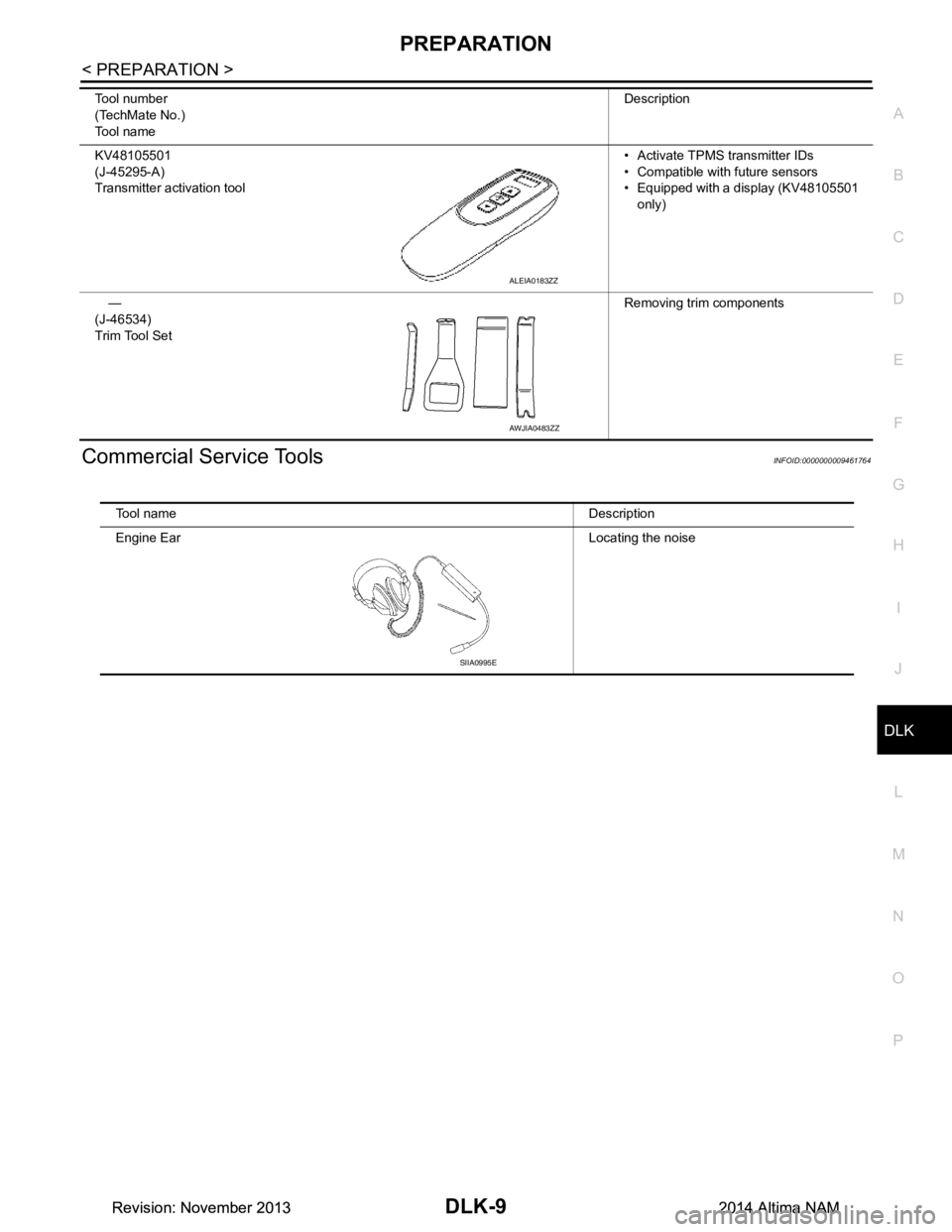
KV48105501
(J-45295-A)
Transmitter activation tool • Activate TPMS transmitter IDs
• Compatible with future sensors
• Equipped with a display (KV48105501
only)
—
(J-46534)
Trim Tool Set Removing trim components
Tool number
(TechMate No.)
Tool name Description
ALEIA0183ZZ
AWJIA0483ZZ
Tool name Description
Engine Ear Locating the noise
SIIA0995E
Revision: November 20132014 Altima NAMRevision: November 20132014 Altima NAM
Page 792 of 4801
DLK-24
< SYSTEM DESCRIPTION >
SYSTEM (INTELLIGENT KEY SYSTEM)
DOOR LOCK FUNCTION
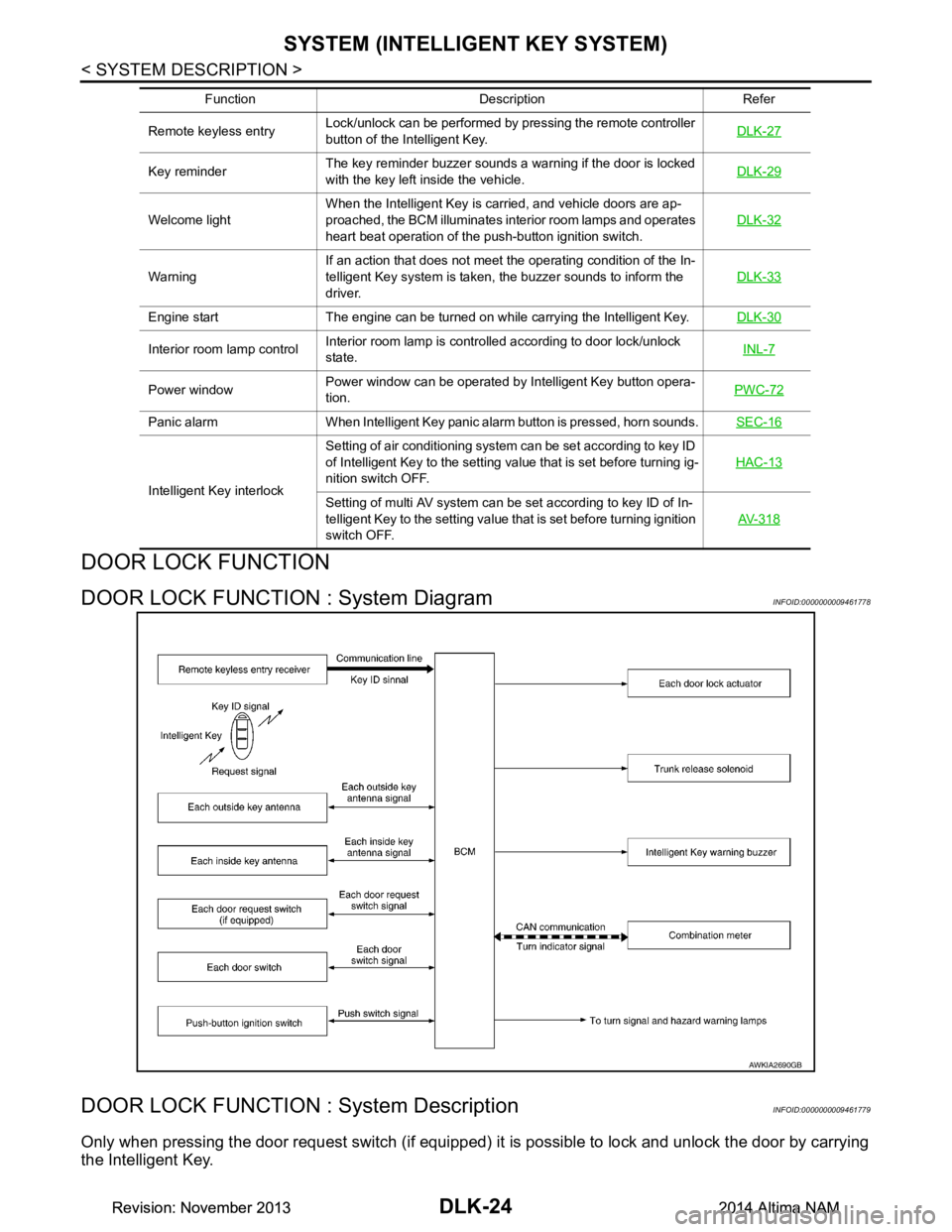
DOOR LOCK FUNCTION : System DiagramINFOID:0000000009461778
DOOR LOCK FUNCTION : System DescriptionINFOID:0000000009461779
Only when pressing the door request switch (if equipped) it is possible to lock and unlock the door by carrying
the Intelligent Key.
Remote keyless entry Lock/unlock can be performed by pressing the remote controller
button of the Intelligent Key. DLK-27
Key reminderThe key reminder buzzer sounds a warning if the door is locked
with the key left inside the vehicle. DLK-29
Welcome lightWhen the Intelligent Key is carried, and vehicle doors are ap-
proached, the BCM illuminates interior room lamps and operates
heart beat operation of the push-button ignition switch. DLK-32
WarningIf an action that does not meet the operating condition of the In-
telligent Key system is taken, the buzzer sounds to inform the
driver. DLK-33
Engine start The engine can be turned on while carrying the Intelligent Key.
DLK-30
Interior room lamp controlInterior room lamp is controlled according to door lock/unlock
state. INL-7
Power windowPower window can be operated by Intelligent Key button opera-
tion. PWC-72
Panic alarm When Intelligent Key panic alarm button is pressed, horn sounds.
SEC-16
Intelligent Key interlockSetting of air conditioning system can be set according to key ID
of Intelligent Key to the setting value that is set before turning ig-
nition switch OFF. HAC-13Setting of multi AV system can be set according to key ID of In-
telligent Key to the setting value that is set before turning ignition
switch OFF. AV- 3 1 8
Function Description Refer
AWKIA2690GB
Revision: November 20132014 Altima NAMRevision: November 20132014 Altima NAM
Page 795 of 4801
SYSTEM (INTELLIGENT KEY SYSTEM)DLK-27
< SYSTEM DESCRIPTION >
C
D E
F
G H
I
J
L
M A
B
DLK
N
O P
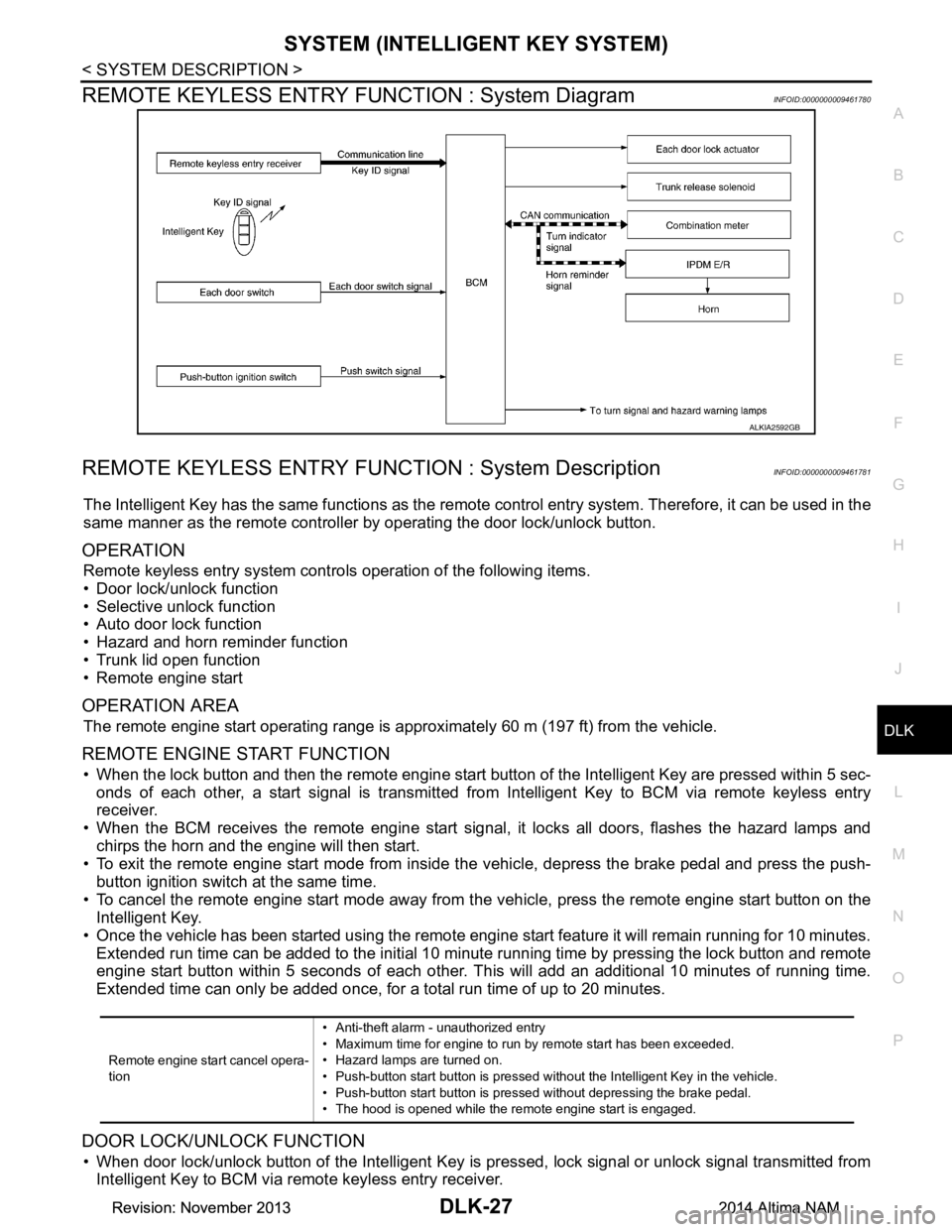
REMOTE KEYLESS ENTRY F UNCTION : System DiagramINFOID:0000000009461780
REMOTE KEYLESS ENTRY FUNCT ION : System DescriptionINFOID:0000000009461781
The Intelligent Key has the same functions as the remote control entry system. Therefore, it can be used in the
same manner as the remote controller by operating the door lock/unlock button.
OPERATION
Remote keyless entry system controls operation of the following items.
• Door lock/unlock function
• Selective unlock function
• Auto door lock function
• Hazard and horn reminder function
• Trunk lid open function
• Remote engine start
OPERATION AREA
The remote engine start operating range is appr oximately 60 m (197 ft) from the vehicle.
REMOTE ENGINE START FUNCTION
• When the lock button and then the remote engine start butt on of the Intelligent Key are pressed within 5 sec-
onds of each other, a start signal is transmitted from Intelligent Key to BCM via remote keyless entry
receiver.
• When the BCM receives the remote engine start signal , it locks all doors, flashes the hazard lamps and
chirps the horn and the engine will then start.
• To exit the remote engine start mode from inside t he vehicle, depress the brake pedal and press the push-
button ignition switch at the same time.
• To cancel the remote engine start mode away from t he vehicle, press the remote engine start button on the
Intelligent Key.
• Once the vehicle has been started using the remote engi ne start feature it will remain running for 10 minutes.
Extended run time can be added to the initial 10 minute running time by pressing the lock button and remote
engine start button within 5 seconds of each other. Th is will add an additional 10 minutes of running time.
Extended time can only be added once, for a total run time of up to 20 minutes.
DOOR LOCK/UNLOCK FUNCTION
• When door lock/unlock button of the Intelligent Key is pr essed, lock signal or unlock signal transmitted from
Intelligent Key to BCM via remote keyless entry receiver.
ALKIA2592GB
Remote engine start cancel opera-
tion • Anti-theft alarm - unauthorized entry
• Maximum time for engine to run by remote start has been exceeded.
• Hazard lamps are turned on.
• Push-button start button is pressed without the Intelligent Key in the vehicle.
• Push-button start button is pressed without depressing the brake pedal.
• The hood is opened while the remote engine start is engaged.
Revision: November 20132014 Altima NAMRevision: November 20132014 Altima NAM
Page 797 of 4801
SYSTEM (INTELLIGENT KEY SYSTEM)DLK-29
< SYSTEM DESCRIPTION >
C
D E
F
G H
I
J
L
M A
B
DLK
N
O P
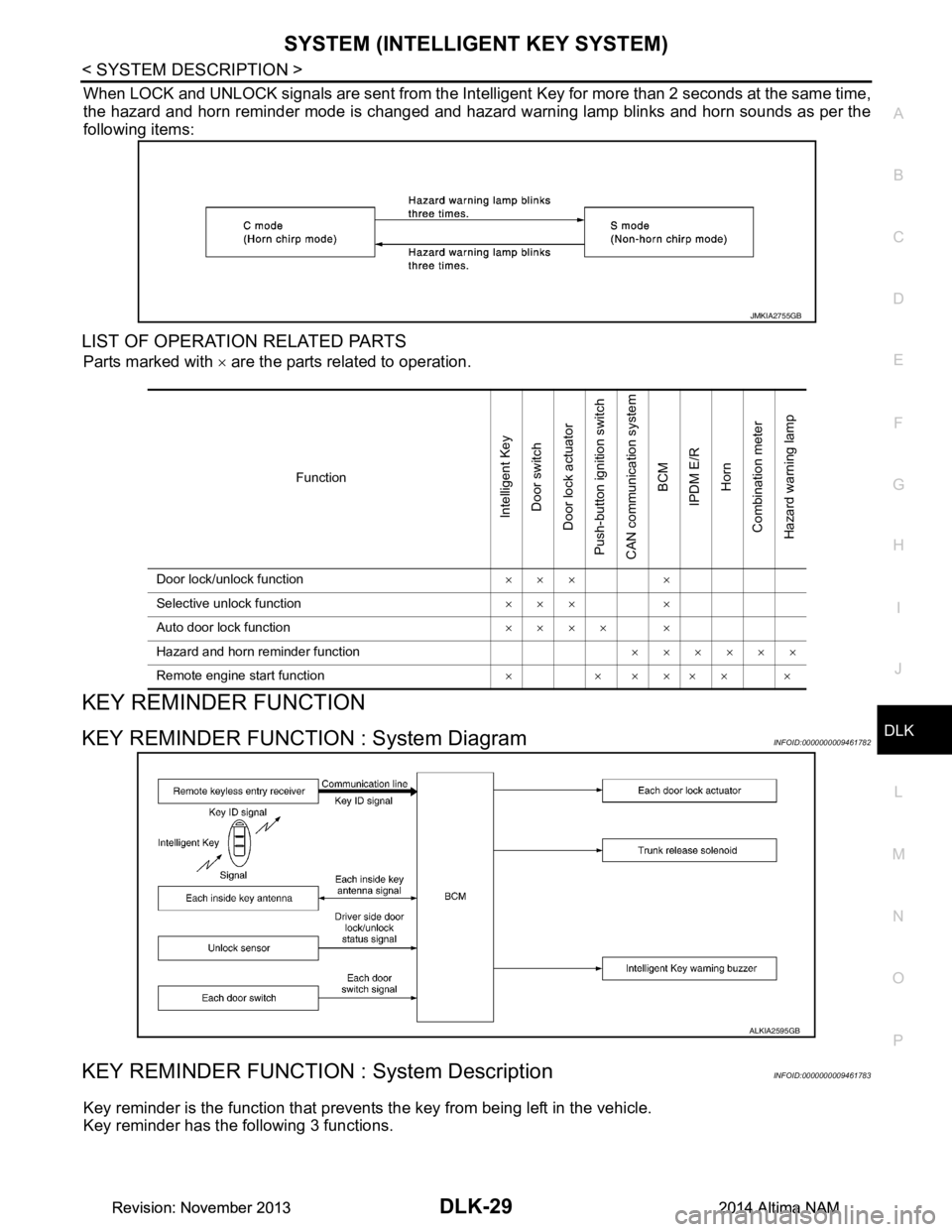
When LOCK and UNLOCK signals are sent from the Intelligent Key for more than 2 seconds at the same time,
the hazard and horn reminder mode is changed and hazard warning lamp blinks and horn sounds as per the
following items:
LIST OF OPERATION RELATED PARTS
Parts marked with × are the parts related to operation.
KEY REMINDER FUNCTION
KEY REMINDER FUNCTION : System DiagramINFOID:0000000009461782
KEY REMINDER FUNCTION : System DescriptionINFOID:0000000009461783
Key reminder is the function that prevents the key from being left in the vehicle.
Key reminder has the following 3 functions.
JMKIA2755GB
Function
Intelligent Key
Door switch
Door lock actuator
Push-button ignition switch
CAN communication system BCM
IPDM E/R Horn
Combination meter
Hazard warning lamp
Door lock/unlock function ××× ×
Selective unlock function ××× ×
Auto door lock function ×××× ×
Hazard and horn reminder function ××××××
Remote engine start function × × ×××× ×
ALKIA2595GB
Revision: November 20132014 Altima NAMRevision: November 20132014 Altima NAM
Page 798 of 4801
DLK-30
< SYSTEM DESCRIPTION >
SYSTEM (INTELLIGENT KEY SYSTEM)
*: If the door closing impact shocks the door lock knob or contacts against baggage with the door lock knob might activate the door locks
accidentally but unlock operation is performed in these cases.
CAUTION:
• The above function operates when the Intelligent Key is inside the vehicle. However, there may be
times when the Intelligent Key can not be detected. This function does not operate when the Intelli-
gent Key is on the instrument panel, rear parcel shelf or in the glove box. Also, this system some-
times does not operate if the Intelligent Key is in the door pocket for the open door.
REMOTE ENGINE START FUNCTION
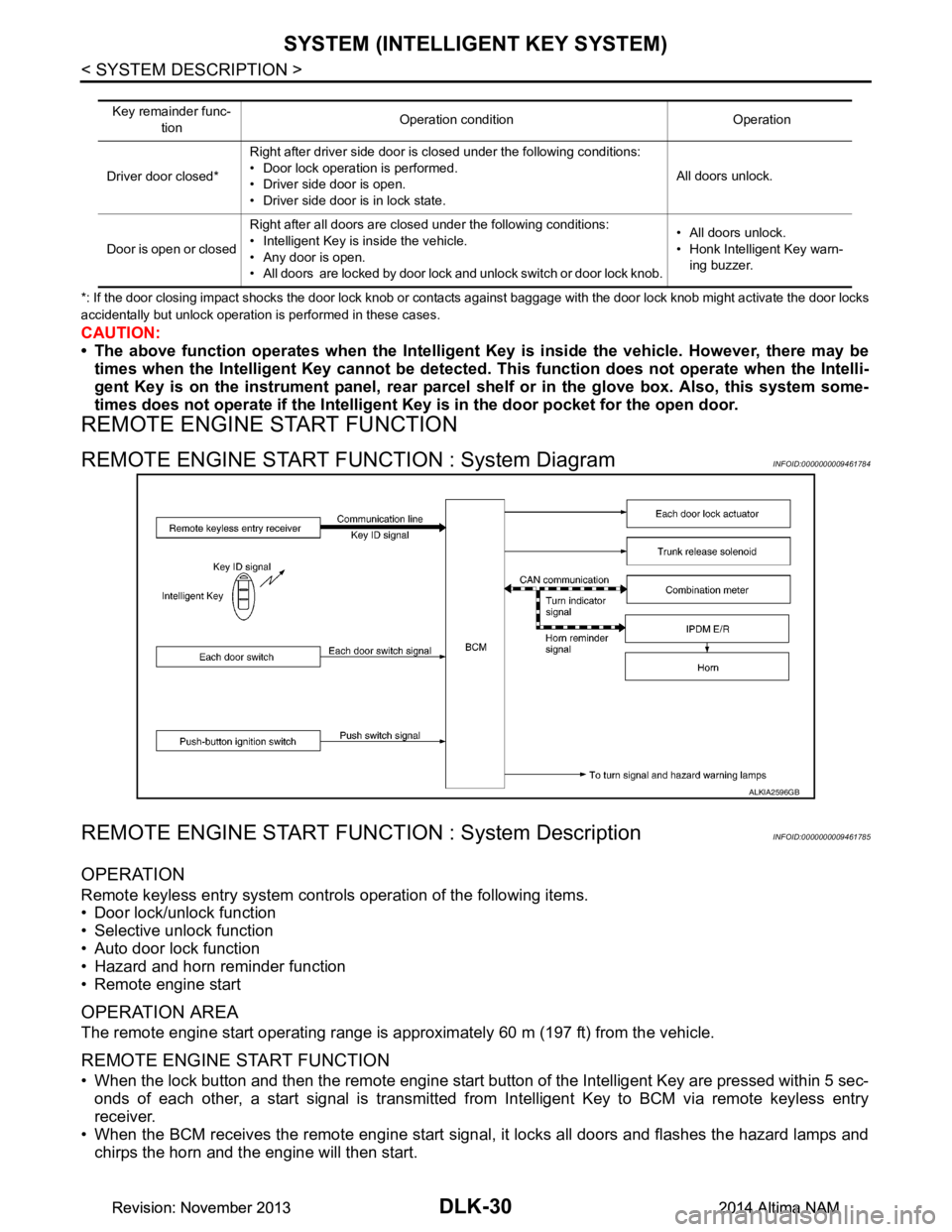
REMOTE ENGINE START FUNCTION : System DiagramINFOID:0000000009461784
REMOTE ENGINE START FUNCTION : System DescriptionINFOID:0000000009461785
OPERATION
Remote keyless entry system controls operation of the following items.
• Door lock/unlock function
• Selective unlock function
• Auto door lock function
• Hazard and horn reminder function
• Remote engine start
OPERATION AREA
The remote engine start operating range is approximately 60 m (197 ft) from the vehicle.
REMOTE ENGINE START FUNCTION
• When the lock button and then the remote engine start button of the Intelligent Key are pressed within 5 sec-
onds of each other, a start signal is transmitted from Intelligent Key to BCM via remote keyless entry
receiver.
• When the BCM receives the remote engine start signal , it locks all doors and flashes the hazard lamps and
chirps the horn and the engine will then start.
Key remainder func-
tion Operation condition Operation
Driver door closed* Right after driver side door is closed under the following conditions:
• Door lock operation is performed.
• Driver side door is open.
• Driver side door is in lock state. All doors unlock.
Door is open or closed Right after all doors are closed under the following conditions:
• Intelligent Key is inside the vehicle.
• Any door is open.
• All doors are locked by door lock and unlock switch or door lock knob. • All doors unlock.
• Honk Intelligent Key warn- ing buzzer.
ALKIA2596GB
Revision: November 20132014 Altima NAMRevision: November 20132014 Altima NAM
Page 799 of 4801
SYSTEM (INTELLIGENT KEY SYSTEM)DLK-31
< SYSTEM DESCRIPTION >
C
D E
F
G H
I
J
L
M A
B
DLK
N
O P
• To exit the remote engine start mode from inside t he vehicle, depress the brake pedal and press the push-
button ignition switch at the same time.
• To cancel the remote engine start mode away from t he vehicle, press the remote engine start button on the
Intelligent Key.
• Once the vehicle has been started using the remote engi ne start feature it will remain running for 10 minutes.
Extended run time can be added to the initial 10 minute running time by pressing the lock button and remote
engine start button within 5 seconds of each other. Th is will add an additional 10 minutes of running time.
Extended time can only be added once, for a total run time of up to 20 minutes.
HAZARD AND HORN REMINDER FUNCTION
When remote engine start is initiated by Intelligent Key, BCM blinks hazard warning lamps as a reminder.
The hazard and horn reminder has a horn chirp m ode (C mode) and a non-horn chirp mode (S mode).
Operating Function of Hazard and Horn Reminder
Hazard and horn reminder does not operate in the following conditions.
• Ignition switch position is ON.
• Door is open (only lock operation)
How to Change Hazard and Horn Reminder Mode
With CONSULT
Hazard and horn reminder operation mode can be changed using CONSULT.
Refer to BCS-22, "INTELLIGENT KEY : CONSUL T Function (BCM - INTELLIGENT KEY)"
.
Without CONSULT
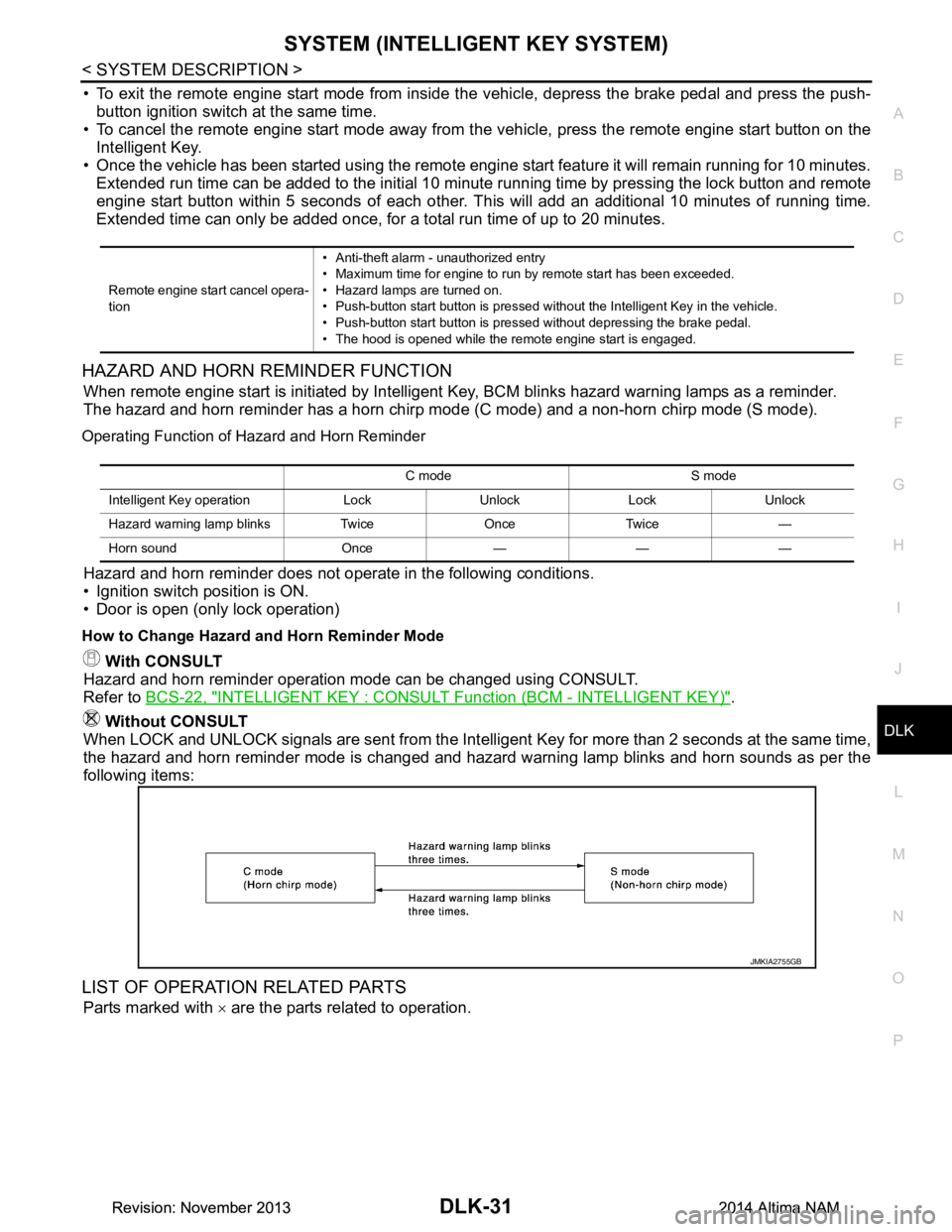
When LOCK and UNLOCK signals are sent from the Intelligent Key for more than 2 seconds at the same time,
the hazard and horn reminder mode is changed and hazard warning lamp blinks and horn sounds as per the
following items:
LIST OF OPERATION RELATED PARTS
Parts marked with × are the parts related to operation.
Remote engine start cancel opera-
tion • Anti-theft alarm - unauthorized entry
• Maximum time for engine to run by remote start has been exceeded.
• Hazard lamps are turned on.
• Push-button start button is pressed without the Intelligent Key in the vehicle.
• Push-button start button is pressed without depressing the brake pedal.
• The hood is opened while the remote engine start is engaged.
C mode S mode
Intelligent Key operation Lock Unlock Lock Unlock
Hazard warning lamp blinks Twice Once Twice —
Horn sound Once — — —
JMKIA2755GB
Revision: November 20132014 Altima NAMRevision: November 20132014 Altima NAM
Page 800 of 4801
DLK-32
< SYSTEM DESCRIPTION >
SYSTEM (INTELLIGENT KEY SYSTEM)
WELCOME LIGHT FUNCTION
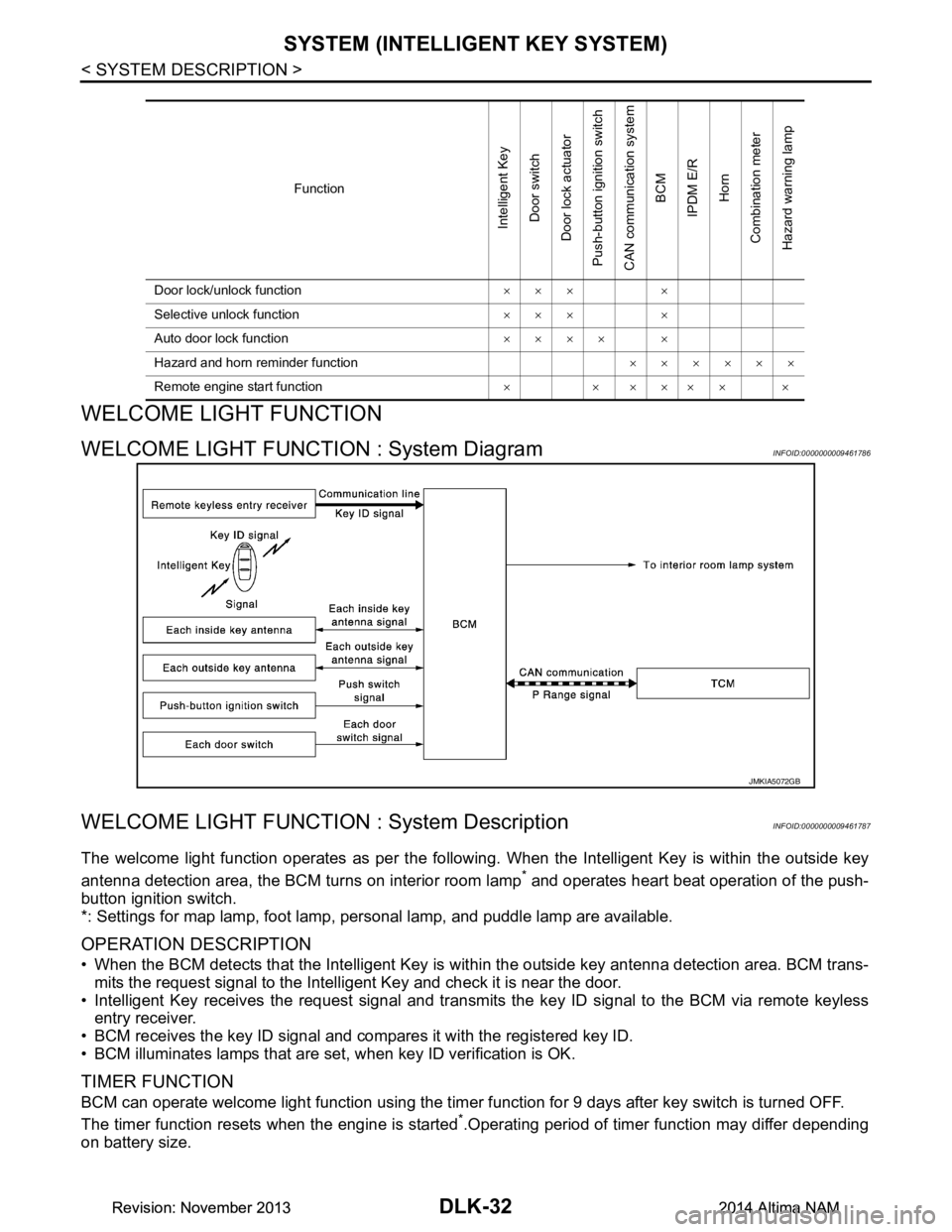
WELCOME LIGHT FUNCTION : System DiagramINFOID:0000000009461786
WELCOME LIGHT FUNCTION : System DescriptionINFOID:0000000009461787
The welcome light function operates as per the following. When the Intelligent Key is within the outside key
antenna detection area, the BCM turns on interior room lamp
* and operates heart beat operation of the push-
button ignition switch.
*: Settings for map lamp, foot lamp, personal lamp, and puddle lamp are available.
OPERATION DESCRIPTION
• When the BCM detects that the Intelligent Key is within the outside key antenna detection area. BCM trans-
mits the request signal to the Intelli gent Key and check it is near the door.
• Intelligent Key receives the request signal and transmits the key ID signal to the BCM via remote keyless entry receiver.
• BCM receives the key ID signal and compares it with the registered key ID.
• BCM illuminates lamps that are set, when key ID verification is OK.
TIMER FUNCTION
BCM can operate welcome light function using the timer function for 9 days after key switch is turned OFF.
The timer function resets when the engine is started
*.Operating period of timer function may differ depending
on battery size.
Function
Intelligent Key
Door switch
Door lock actuator
Push-button ignition switch
CAN communication system
BCM
IPDM E/R
Horn
Combination meter
Hazard warning lamp
Door lock/unlock function ××× ×
Selective unlock function ××× ×
Auto door lock function ×××× ×
Hazard and horn reminder function ××××××
Remote engine start function ×××××××
JMKIA5072GB
Revision: November 20132014 Altima NAMRevision: November 20132014 Altima NAM
Page 801 of 4801
SYSTEM (INTELLIGENT KEY SYSTEM)DLK-33
< SYSTEM DESCRIPTION >
C
D E
F
G H
I
J
L
M A
B
DLK
N
O P
*: Timer function does not stop if another Intelligent Key that has a different key ID is detected within the inte-
rior antenna detection area when starting the engine.
OPERATION CONDITION
If the following condition are satisfi ed, welcome light function is operated.
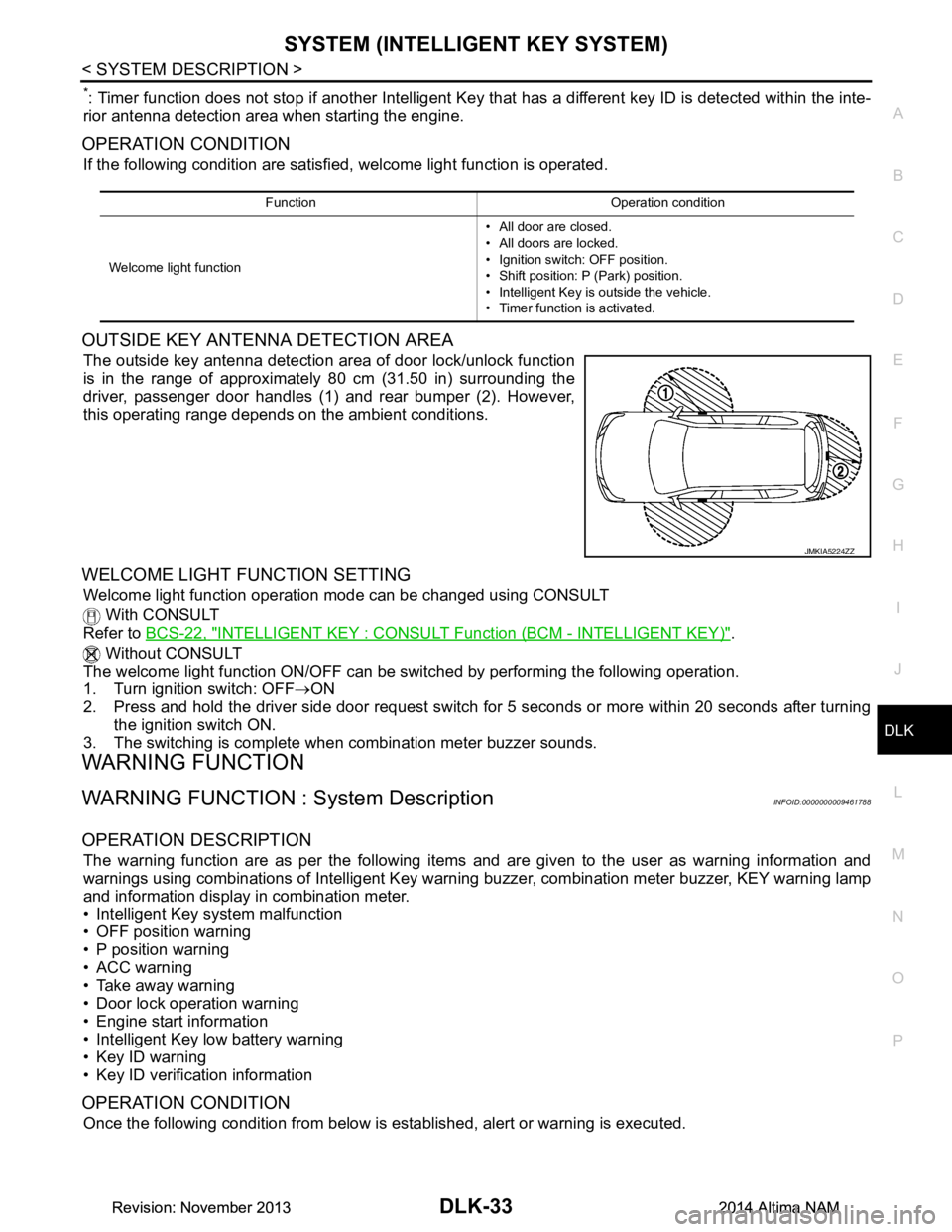
OUTSIDE KEY ANTENNA DETECTION AREA
The outside key antenna detection area of door lock/unlock function
is in the range of approximately 80 cm (31.50 in) surrounding the
driver, passenger door handles (1) and rear bumper (2). However,
this operating range depends on the ambient conditions.
WELCOME LIGHT FUNCTION SETTING
Welcome light function operation mode can be changed using CONSULT
With CONSULT
Refer to BCS-22, "INTELLIGENT KEY : CONSUL T Function (BCM - INTELLIGENT KEY)"
.
Without CONSULT
The welcome light function ON/OFF can be s witched by performing the following operation.
1. Turn ignition switch: OFF →ON
2. Press and hold the driver side door request switch for 5 seconds or more within 20 seconds after turning
the ignition switch ON.
3. The switching is complete when combination meter buzzer sounds.
WARNING FUNCTION
WARNING FUNCTION : System DescriptionINFOID:0000000009461788
OPERATION DESCRIPTION
The warning function are as per the following items and are given to the user as warning information and
warnings using combinations of Intelligent Key warning buzzer, combination meter buzzer, KEY warning lamp
and information display in combination meter.
• Intelligent Key system malfunction
• OFF position warning
• P position warning
• ACC warning
• Take away warning
• Door lock operation warning
• Engine start information
• Intelligent Key low battery warning
• Key ID warning
• Key ID verification information
OPERATION CONDITION
Once the following condition from below is established, alert or warning is executed.
Function Operation condition
Welcome light function • All door are closed.
• All doors are locked.
• Ignition switch: OFF position.
• Shift position: P (Park) position.
• Intelligent Key is outside the vehicle.
• Timer function is activated.
JMKIA5224ZZ
Revision: November 20132014 Altima NAMRevision: November 20132014 Altima NAM
Page 802 of 4801

DLK-34
< SYSTEM DESCRIPTION >
SYSTEM (INTELLIGENT KEY SYSTEM)
WARNING METHOD
The following table shows the alarm or warning methods with chime.
Warning/Information functions Operation procedure
Intelligent Key system malfunction When a malfun ction is detected on BCM, “KEY” warning lamp illuminates.
OFF position warning For internalWhen condition A, B or condition C is satisfied
• Condition A
- Ignition switch: ACC position
- Door switch (driver side ): ON (Door is open)
• Condition B
- Turn ignition switch from ON to OFF while door is open
• Condition C
- Intelligent Key backside is contacted to ignition switch while brake pedal is depressed and ignition switch is LOCK or OFF (When the Intelligent
Key battery is discharged)
- Door switch (driver side ): ON (Door is open)
For external OFF position warning (For internal) is in active mode, driver side door is
closed.
NOTE:
OFF position (For external) active only when each of the sequence occurs
as below: P position warning → ACC warning → OFF position warning (For
internal) → OFF position warning (For internal)
P position warning For internal
• Shift position: Except P (Park) position
• Engine is running to stopped (ignition switch is ON to OFF)
For external Warning is activated when driver door is closed from the open position
while the P (Park) position warning (for inside vehicle) is ON.
ACC warning • When P (Park) position warning is in active mode, shift position changes
P (Park) position
• Ignition switch: ACC position
Ta k e a w a y w a r n i n g Door is open to close
• Ignition switch: Except Lock position
• Door switch: ON to OFF (Door is open to close)
• Intelligent Key cannot be detected inside the vehicle
Door is open • Ignition switch: Except Lock position
• Door switch: ON (Door is open)
• Key ID verification every 5 seconds when registered Intelligent Key can-
not be detected inside the vehicle
Push-button ignition
switch operation • Ignition switch: Except Lock position
• Press push-button ignition switch
• Intelligent Key cannot be detected inside the vehicle
Door lock operation warning When door lock operation is requested while door lock operating condition
of door request switch (if equipped) or Intelligent Key are not satisfied
Engine start information Ignition switch is ON po-
sition • Ignition switch: ON position
• Shift position: P (Park) position*
• Engine is stopped
Ignition switch is except
ON position • Ignition switch: Except ON position
• Shift position: P (Park) position*
• Intelligent Key is inserted in key slot or Intelligent Key can be detected inside the vehicle
Intelligent Key low battery warning When Intelligent Key is low battery, BCM is detected after ignition switch is
turned ON
Key ID warning When registered Intelligent Key cannot be detected inside the vehicle after
ignition switch is turned ON
Key ID verification information • When registered Intelligent Key cannot be detected inside the vehicle
• Intelligent Key battery is discharged
• When NATS antenna amp cannot be detected NATS ID
Revision: November 20132014 Altima NAMRevision: November 20132014 Altima NAM