engine NISSAN TEANA 2014 Service Manual
[x] Cancel search | Manufacturer: NISSAN, Model Year: 2014, Model line: TEANA, Model: NISSAN TEANA 2014Pages: 4801, PDF Size: 51.2 MB
Page 803 of 4801
SYSTEM (INTELLIGENT KEY SYSTEM)DLK-35
< SYSTEM DESCRIPTION >
C
D E
F
G H
I
J
L
M A
B
DLK
N
O P
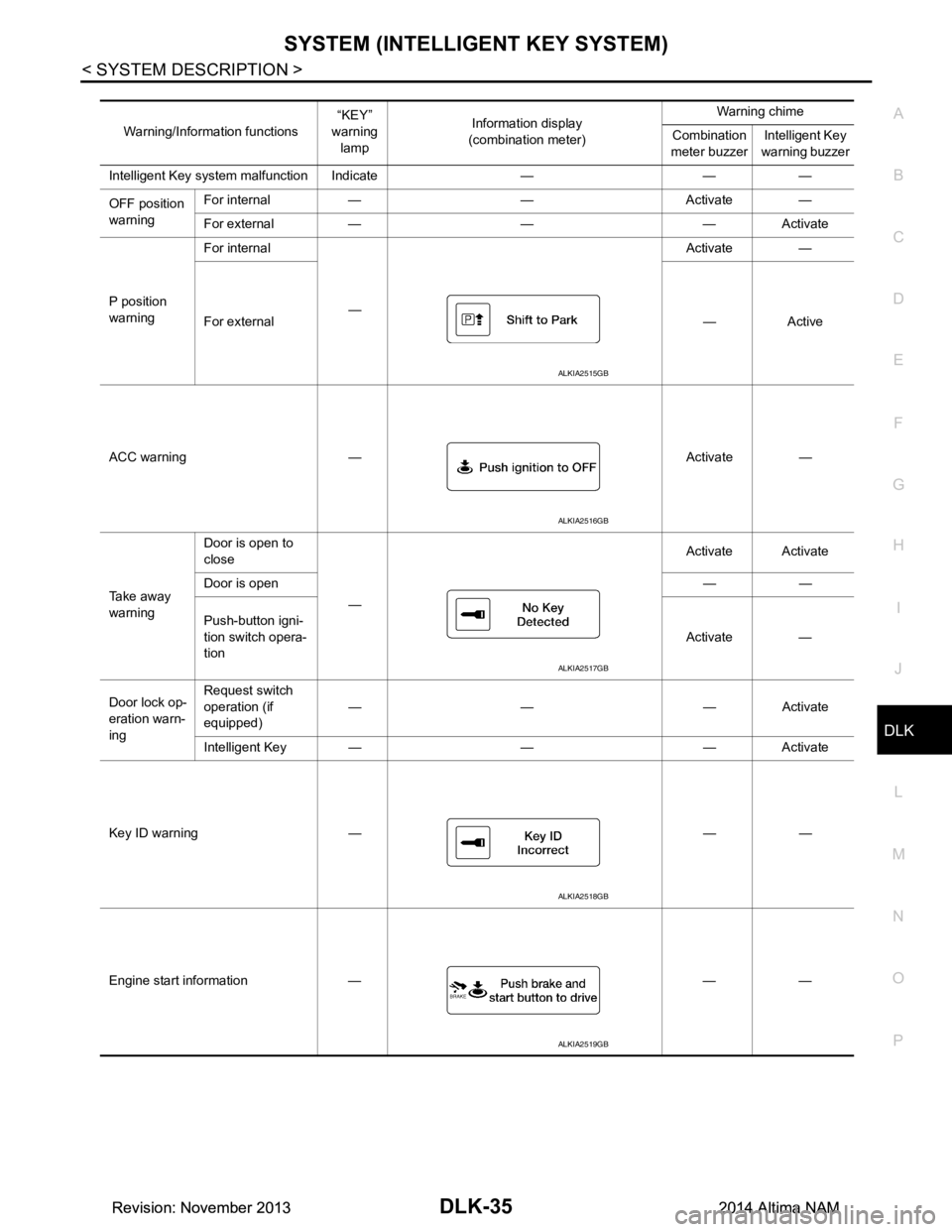
Warning/Information functions “KEY”
warning
lamp Information display
(combination meter) Warning chime
Combination
meter buzzer Intelligent Key
warning buzzer
Intelligent Key system malfunction Indicate — — —
OFF position
warning For internal — — Activate —
For external — — — Activate
P position
warning For internal
— Activate —
For external —Active
ACC warning — Activate —
Ta k e a w a y
warning Door is open to
close
— Activate Activate
Door is open ——
Push-button igni-
tion switch opera-
tion Activate —
Door lock op-
eration warn-
ing Request switch
operation (if
equipped) —— —Activate
Intelligent Key — — — Activate
Key ID warning — — —
Engine start information — — —
ALKIA2515GB
ALKIA2516GB
ALKIA2517GB
ALKIA2518GB
ALKIA2519GB
Revision: November 20132014 Altima NAMRevision: November 20132014 Altima NAM
Page 804 of 4801
DLK-36
< SYSTEM DESCRIPTION >
SYSTEM (INTELLIGENT KEY SYSTEM)
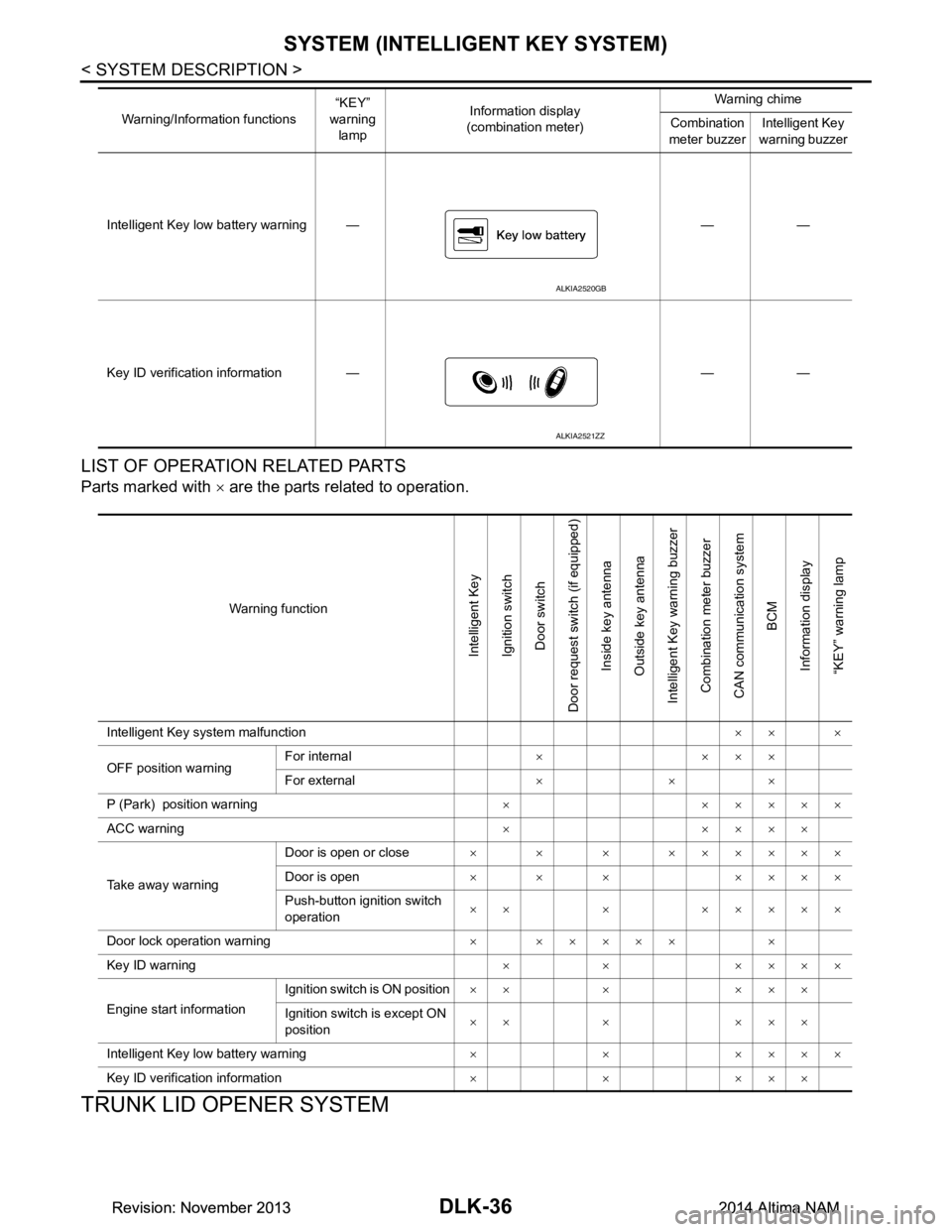
LIST OF OPERATION RELATED PARTS
Parts marked with × are the parts related to operation.
TRUNK LID OPENER SYSTEM
Intelligent Key low battery warning — — —
Key ID verification information — — — Warning/Information functions
“KEY”
warning lamp Information display
(combination meter) Warning chime
Combination
meter buzzer Intelligent Key
warning buzzer
ALKIA2520GB
ALKIA2521ZZ
Warning function
Intelligent Key
Ignition switch Door switch
Door request switch (if equipped) Inside key antenna
Outside key antenna
Intelligent Key warning buzzer Combination meter buzzer
CAN communication system BCM
Information display
“KEY” warning lamp
Intelligent Key system malfunction ×× ×
OFF position warning For internal
××××
For external ×××
P (Park) position warning × ×××××
ACC warning ×××××
Take away warning Door is open or close
× × × ××××××
Door is open × × × ××××
Push-button ignition switch
operation ×× × ×××××
Door lock operation warning × ××××× ×
Key ID warning × × ××××
Engine start information Ignition switch is ON position
×× × ×××
Ignition switch is except ON
position ×× × ×××
Intelligent Key low battery warning × × ××××
Key ID verification information ×××××
Revision: November 20132014 Altima NAMRevision: November 20132014 Altima NAM
Page 812 of 4801

DLK-44
< SYSTEM DESCRIPTION >
DIAGNOSIS SYSTEM (BCM)
* : Initial setting
INTELLIGENT KEY
INTELLIGENT KEY : CONSULT Function (BCM - INTELLIGENT KEY)INFOID:0000000009952502
CAUTION:
After disconnecting the CONSULT vehicle interface (VI) from the data link connector, the ignition must
be cycled OFF → ON (for at least 5 seconds) → OFF. If this step is not performed, the BCM may not go
to ”sleep mode”, potentially causing a di scharged battery and a no-start condition.
SELF DIAGNOSTIC RESULT
Refer to BCS-52, "DTC Index".
DATA MONITOR
AUTO LOCK FUNCTION MODE3 This mode is not used.
MODE2 Doors lock automatically when shifted out of P (park).
MODE1* Doors lock automatically when vehicle speed reaches 24 km/h (15 mph).
Off —
AUTO UNLOCK FUNCTION MODE3 This mode is not used.
MODE2 Doors unlock automatically when shifted into P (park).
MODE1* Doors unlock automatically when ignition is switched from ON to OFF.
Off —
Support Item Setting Description
Monitor Item [Unit] Main Description
REQ SW -DR [On/Off] ×Indicates condition of door request switch LH.
REQ SW -AS [On/Off] ×Indicates condition of door request switch RH.
REQ SW -BD/TR [On/Off] ×Indicates condition of trunk opener request switch.
PUSH SW [On/Off] Indicates condition of push-button ignition switch.
SHFTLCK SLNID PER SPLY [On/Off] ×Indicates condition of power supply to shiftlock solenoid.
BRAKE SW 1 [On/Off] ×Indicates condition of brake switch.
BRAKE SW 2 [On/Off] Indicates condition of brake switch.
DETE/CANCL SW [On/Off] ×Indicates condition of P (park) position.
SFT PN/N SW [On/Off] ×Indicates condition of P (park) or N (neutral) position.
UNLK SEN -DR [On/Off] ×Indicates condition of door unlock sensor.
PUSH SW -IPDM [On/Off] Indicates condition of push-button ignition switch received from IPDM E/R
on CAN communication line.
IGN RLY1 -F/B [On/Off] Indicates condition of ignition relay 1 received from IPDM E/R on CAN
communication line.
DETE SW -IPDM [On/Off] Indicates condition of detent switch received from TCM on CAN communi-
cation line.
SFT PN -IPDM [On/Off] Indicates condition of P (park) or N (neutral) position from TCM on CAN
communication line.
SFT P -MET [On/Off] Indicates condition of P (park) position from TCM on CAN communication
line.
SFT N -MET [On/Off] Indicates condition of N (neutral) position from IPDM E/R on CAN commu-
nication line.
ENGINE STATE [STOP/START/CRANK/RUN] ×Indicates condition of engine state from ECM on CAN communication line.
VEH SPEED 1 [mph/km/h] ×Indicates condition of vehicle speed signal received from ABS on CAN
communication line.
Revision: November 20132014 Altima NAMRevision: November 20132014 Altima NAM
Page 813 of 4801
![NISSAN TEANA 2014 Service Manual
DIAGNOSIS SYSTEM (BCM)DLK-45
< SYSTEM DESCRIPTION >
C
D E
F
G H
I
J
L
M A
B
DLK
N
O P
ACTIVE TEST
VEH SPEED 2 [mph/km/h] ×Indicates condition of vehicle speed signal received from combination
me](/img/5/57390/w960_57390-812.png "NISSAN TEANA 2014 Service Manual
DIAGNOSIS SYSTEM (BCM)DLK-45
< SYSTEM DESCRIPTION >
C
D E
F
G H
I
J
L
M A
B
DLK
N
O P
ACTIVE TEST
VEH SPEED 2 [mph/km/h] ×Indicates condition of vehicle speed signal received from combination
me")
DIAGNOSIS SYSTEM (BCM)DLK-45
< SYSTEM DESCRIPTION >
C
D E
F
G H
I
J
L
M A
B
DLK
N
O P
ACTIVE TEST
VEH SPEED 2 [mph/km/h] ×Indicates condition of vehicle speed signal received from combination
meter on CAN communication line.
DOOR STAT -DR [LOCK/READY/UNLK] ×Indicates condition of driver side door status.
DOOR STAT -AS [LOCK/READY/UNLK] ×Indicates condition of passenger side door status.
DOOR STAT -RR [LOCK/READY/UNLK] ×Indicates condition of rear right side door status.
DOOR STAT -RL [LOCK/READY/UNLK] ×Indicates condition of rear left side door status.
ID OK FLAG [Set/Reset] Indicates condition of Intelligent Key ID.
PRMT ENG STRT [Set/Reset] Indicates condition of engine start possibility.
PRMT RKE STRT [Set/Reset] Indicates condition of engine start possibility from Intelligent Key.
I-KEY OK FLAG [Key ON/Key OFF] ×Indicates condition of Intelligent Key OK flag.
PRBT ENG STRT [Set/Reset] Indicates condition of engine start prohibit.
ID AUTHENT CANCEL TIMER [STOP] Indicates condition of Intelligent Key ID authentication.
ACC BATTERY SAVER [STOP] Indicate s condition of battery saver.
CRNK PRBT TMR [On/Off] In dicates condition of crank prohibit timer.
AUT CRNK TMR [On/Off] Indicates condition of automatic engine crank timer from Intelligent Key.
CRNK PRBT TME [sec] I ndicates condition of engine crank prohibit time.
AUTO CRNK TME [sec] Indicates co ndition of automatic engine crank time from Intelligent Key.
CRANKING TME [sec] Indicates condition of engine cranking time from Intelligent Key.
DETE SW PWR [On/Off] Indicates condition of detent switch voltage.
ACC RLY -REQ [On/Off] Indicates condition of accessory relay control request.
RKE OPE COUN1 [0-19] ×When remote keyless entry receiver receives the signal transmitted while
operating on Intelligent Key, the numerical value start changing.
RKE OPE COUN2 [0-19] ×When remote keyless entry receiver receives the signal transmitted while
operating on Intelligent Key, the numerical value start changing.
TRNK/HAT MNTR [On/Off] Indicates condition of trunk room lamp switch.
RKE-LOCK [On/Off] Indicates condition of lock signal from Intelligent Key.
RKE-UNLOCK [On/Off] Indicates condition of unlock signal from Intelligent Key.
RKE-TR/BD [On/Off] Indicates condition of trunk open signal from Intelligent Key.
RKE-PANIC [On/Off] Indicates condition of panic signal from Intelligent Key.
RKE-MODE CHG [On/Off] Indicates condition of mode change signal from Intelligent Key. Monitor Item [Unit] Main Description
Test Item Description
INTELLIGENT KEY LINK (CAN) This test is able to check Intelligent Key iden
tification number [Off/ID No1/ID N02/ID No3/ID
No4/ID No5].
INT LAMP This test is able to check interior room lamp operation [On/Off].
FLASHER This test is able to check hazard lamp operation [LH/RH/Off].
HORN This test is able to check horn operation [On].
BATTERY SAVER This test is able to check battery saver operation [On/Off].
TRUNK/BACK DOOR This test is able to check trunk actuator operation [Open].
OUTSIDE BUZZER This test is able to check In telligent Key warning buzzer operation [On/Off].
INSIDE BUZZER This test is able to check combination meter warning chime operation [Take Out/Knob/Key/
Off].
INDICATOR This test is able to check combination meter warning lamp operation [KEY ON/KEY IND/Off].
IGN CONT2 This test is able to check ignition relay-2 control operation [On/Off].
ENGINE SW ILLUMI This test is able to check push-bu tton ignition switch START indicator operation [On/Off].
Revision: November 20132014 Altima NAMRevision: November 20132014 Altima NAM
Page 814 of 4801
![NISSAN TEANA 2014 Service Manual
DLK-46
< SYSTEM DESCRIPTION >
DIAGNOSIS SYSTEM (BCM)
WORK SUPPORT
PUSH SWITCH INDICATOR This test is able to check push-button ignition switch indicator operation [On/Off].
ACC CONT This test is abl](/img/5/57390/w960_57390-813.png "NISSAN TEANA 2014 Service Manual
DLK-46
< SYSTEM DESCRIPTION >
DIAGNOSIS SYSTEM (BCM)
WORK SUPPORT
PUSH SWITCH INDICATOR This test is able to check push-button ignition switch indicator operation [On/Off].
ACC CONT This test is abl")
DLK-46
< SYSTEM DESCRIPTION >
DIAGNOSIS SYSTEM (BCM)
WORK SUPPORT
PUSH SWITCH INDICATOR This test is able to check push-button ignition switch indicator operation [On/Off].
ACC CONT This test is able to check accessory relay control operation [On/Off].
IGN CONT1 This test is able to check ignition relay-1 control operation [On/Off].
ST CONT LOW This test is able to check starter control relay operation [On/Off].
IGNITION RELAY This test is able to ignition relay operation [On/Off].
REVERSE LAMP TEST This test is able to check reverse lamp illumination operation [On/Off].
TRUNK/LUGGAGE LAMP TEST This test is able to check cargo lamp illumination operation [On/Off].
KEYFOB PW TEST This test is able to check power wind ow operation using the Intelligent Key [Off/DOWN/UP].
SHIFTLOCK SOLENOID TEST This test is able to check shift lock solenoid operation [On/Off]. Test Item Description
Support Item Setting Description
IGN/ACC BATTERY SAVER On* Battery saver function ON.
Off Battery saver function OFF.
REMOTE ENGINE STARTER On* Remote engine start function ON.
Off Remote engine start function OFF.
ANSWERBACK I-KEY LOCK UNLOCK BUZZER Buzzer reminder function by door lock/unlock request switch ON.
HORN Horn chirp reminder function by door lock request switch ON.
Off* No reminder function by door lock/unlock request switch.
INVALID This mode is not used.
ANSWERBACK KEYLESS LOCK UN-
LOCK On
Buzzer or horn chirp reminder when doors are locked/unlocked with
Intelligent Key.
Off* No buzzer or horn chirp reminder when doors are locked/unlocked
with Intelligent Key.
ANSWER BACK On* Horn chirp reminder when doors are locked with Intelligent Key.
Off No horn chirp reminder when doors are locked with Intelligent Key.
RETRACTABLE MIRROR SET On Retractable mirror set ON.
Off* Retractable mirror set OFF.
CONFIRM KEY FOB ID — Intelligent Key ID code can check.
LOCK/UNLOCK BY I-KEY On* Door lock/unlock function from Intelligent Key ON.
Off Door lock/unlock function from Intelligent Key OFF.
ENGINE START BY I-KEY On* Engine start function from Intelligent Key ON.
Off Engine start function from Intelligent Key OFF.
TRUNK/GLASS HATCH OPEN On* Buzzer reminder function by trunk opener request switch ON.
Off Buzzer reminder function by trunk opener request switch OFF.
INTELLIGENT KEY LINK SET On Intelligent Key link set ON.
Off* Intelligent Key link set OFF.
SHORT CRANKING OUTPUT Start70 msec
Starter motor operation duration times.
100 msec
200 msec
End —
INSIDE ANT DIAGNOSIS — This function allows inside key antenna self-diagnosis.
Revision: November 20132014 Altima NAMRevision: November 20132014 Altima NAM
Page 855 of 4801
B261B REMOTE ENGINE STARTDLK-87
< DTC/CIRCUIT DIAGNOSIS >
C
D E
F
G H
I
J
L
M A
B
DLK
N
O P
B261B REMOTE ENGINE START
DTC LogicINFOID:0000000009461812
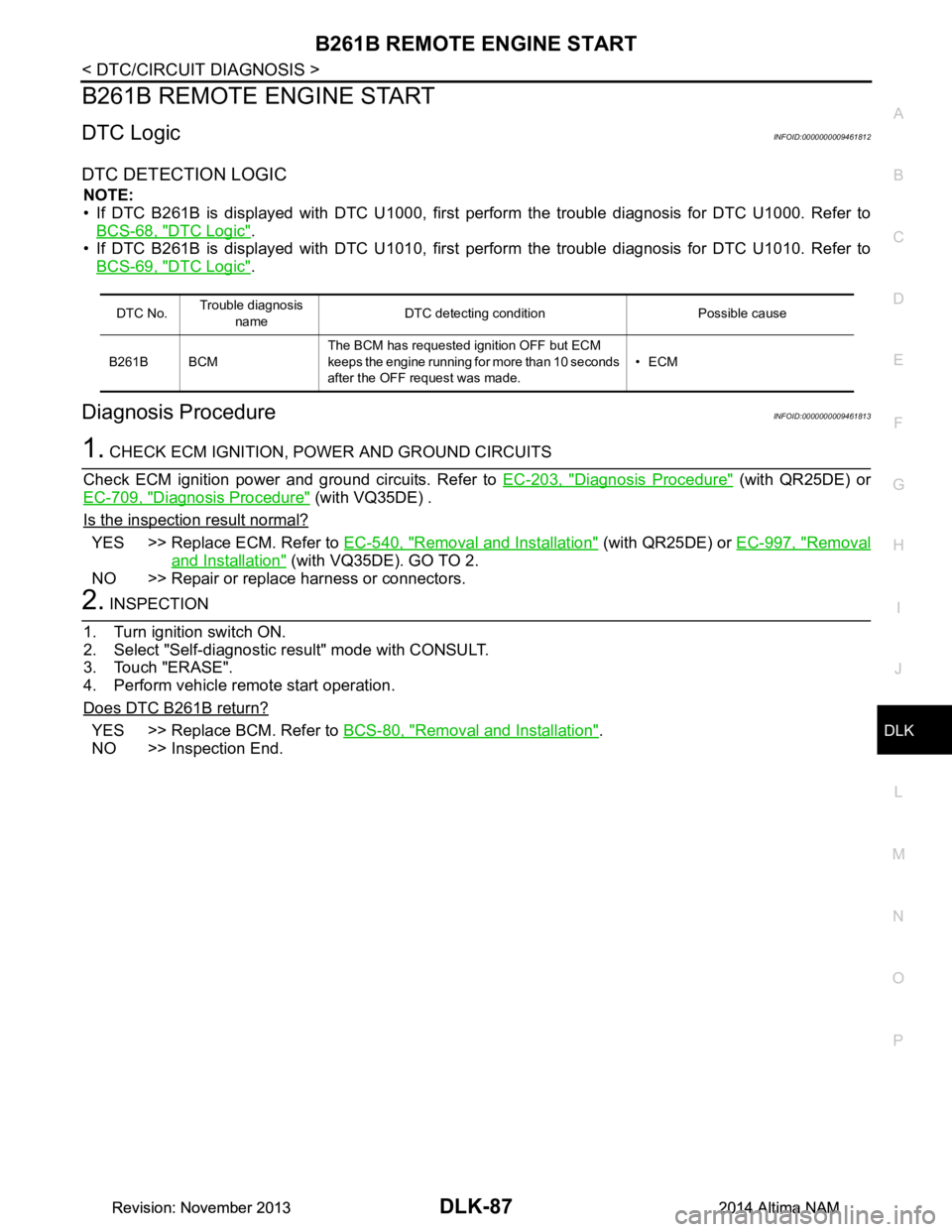
DTC DETECTION LOGIC
NOTE:
• If DTC B261B is displayed with DTC U1000, first perform the trouble diagnosis for DTC U1000. Refer to
BCS-68, "DTC Logic"
.
• If DTC B261B is displayed with DTC U1010, first perform the trouble diagnosis for DTC U1010. Refer to
BCS-69, "DTC Logic"
.
Diagnosis ProcedureINFOID:0000000009461813
1. CHECK ECM IGNITION, POWER AND GROUND CIRCUITS
Check ECM ignition power and ground circuits. Refer to EC-203, "Diagnosis Procedure"
(with QR25DE) or
EC-709, "Diagnosis Procedure"
(with VQ35DE) .
Is the inspection result normal?
YES >> Replace ECM. Refer to EC-540, "Removal and Installation" (with QR25DE) or EC-997, "Removal
and Installation" (with VQ35DE). GO TO 2.
NO >> Repair or replace harness or connectors.
2. INSPECTION
1. Turn ignition switch ON.
2. Select "Self-diagnostic result" mode with CONSULT.
3. Touch "ERASE".
4. Perform vehicle remote start operation.
Does DTC B261B return?
YES >> Replace BCM. Refer to BCS-80, "Removal and Installation".
NO >> Inspection End.
DTC No. Trouble diagnosis
name DTC detecting condition Possible cause
B261B BCM The BCM has requested ignition OFF but ECM
keeps the engine running for more than 10 seconds
after the OFF request was made. •ECM
Revision: November 20132014 Altima NAMRevision: November 20132014 Altima NAM
Page 910 of 4801
DLK-142
< DTC/CIRCUIT DIAGNOSIS >
INTELLIGENT KEY WARNING BUZZER
INTELLIGENT KEY WARNING BUZZER
DescriptionINFOID:0000000009461888
Answers back and warns for an inappropriate operation.
Component Function CheckINFOID:0000000009461889
1.CHECK FUNCTION
With CONSULT
Check Intelligent Key warning buzzer OUTSIDE BUZZER in Active Test mode.
Is the inspection result normal?
YES >> Intelligent Key warning buzzer (engine room) is OK.
NO >> Refer to DLK-142, "Diagnosis Procedure"
.
Diagnosis ProcedureINFOID:0000000009461890
Regarding Wiring Diagram information, refer to DLK-61, "Wiring Diagram".
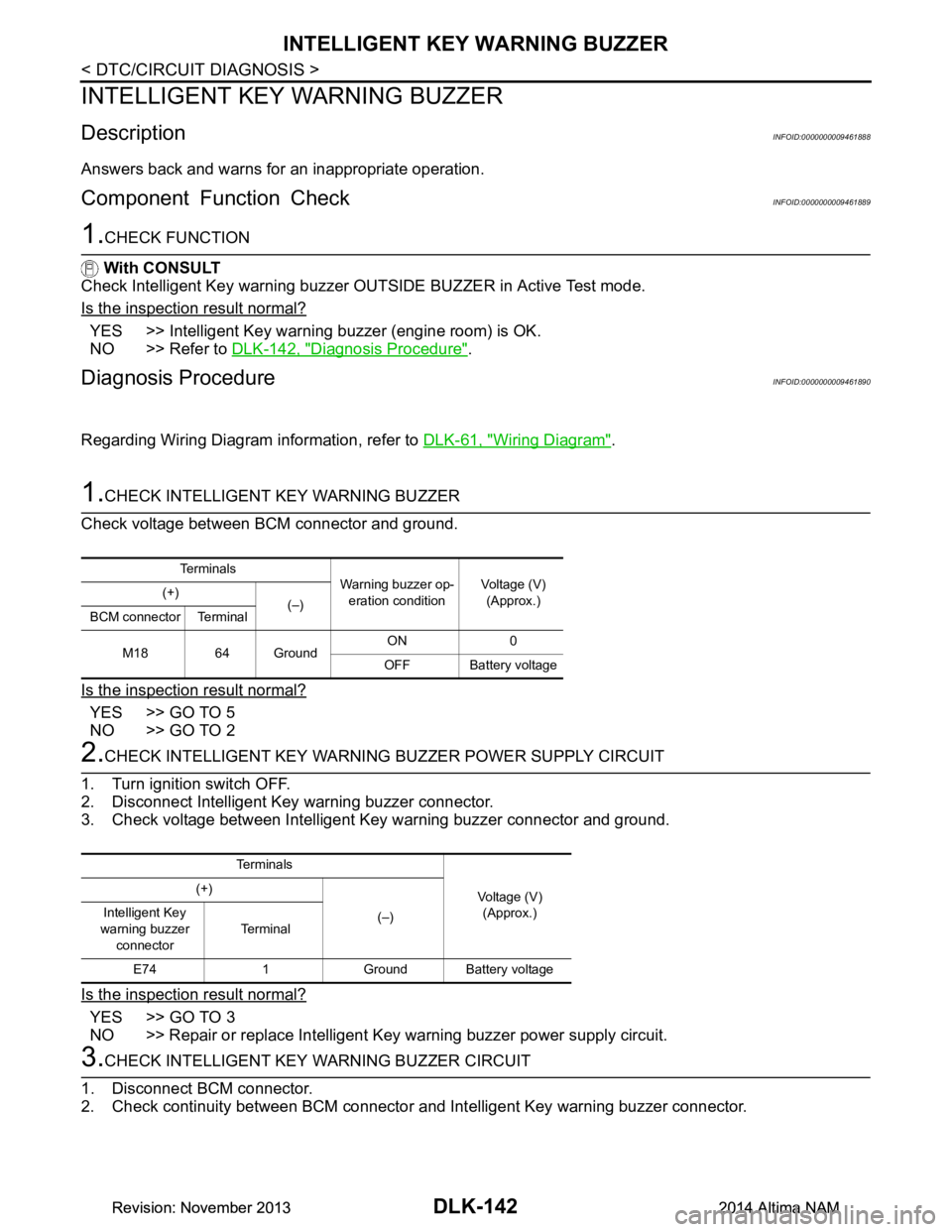
1.CHECK INTELLIGENT KEY WARNING BUZZER
Check voltage between BCM connector and ground.
Is the inspection result normal?
YES >> GO TO 5
NO >> GO TO 2
2.CHECK INTELLIGENT KEY WARNING BUZZER POWER SUPPLY CIRCUIT
1. Turn ignition switch OFF.
2. Disconnect Intelligent Key warning buzzer connector.
3. Check voltage between Intelligent Key warning buzzer connector and ground.
Is the inspection result normal?
YES >> GO TO 3
NO >> Repair or replace Intelligent Key warning buzzer power supply circuit.
3.CHECK INTELLIGENT KEY WARNING BUZZER CIRCUIT
1. Disconnect BCM connector.
2. Check continuity between BCM connector and Intelligent Key warning buzzer connector.
Te r m i n a l s
Warning buzzer op-
eration condition Voltage (V)
(Approx.)
(+)
(–)
BCM connector Terminal
M18 64 Ground ON 0
OFF Battery voltage
Te r m i n a l s
Voltage (V)(Approx.)
(+)
(–)
Intelligent Key
warning buzzer connector Te r m i n a l
E74 1 Ground Battery voltage
Revision: November 20132014 Altima NAMRevision: November 20132014 Altima NAM
Page 920 of 4801
DLK-152
< SYMPTOM DIAGNOSIS >
INTELLIGENT KEY SYSTEM SYMPTOMS
SYMPTOM DIAGNOSIS
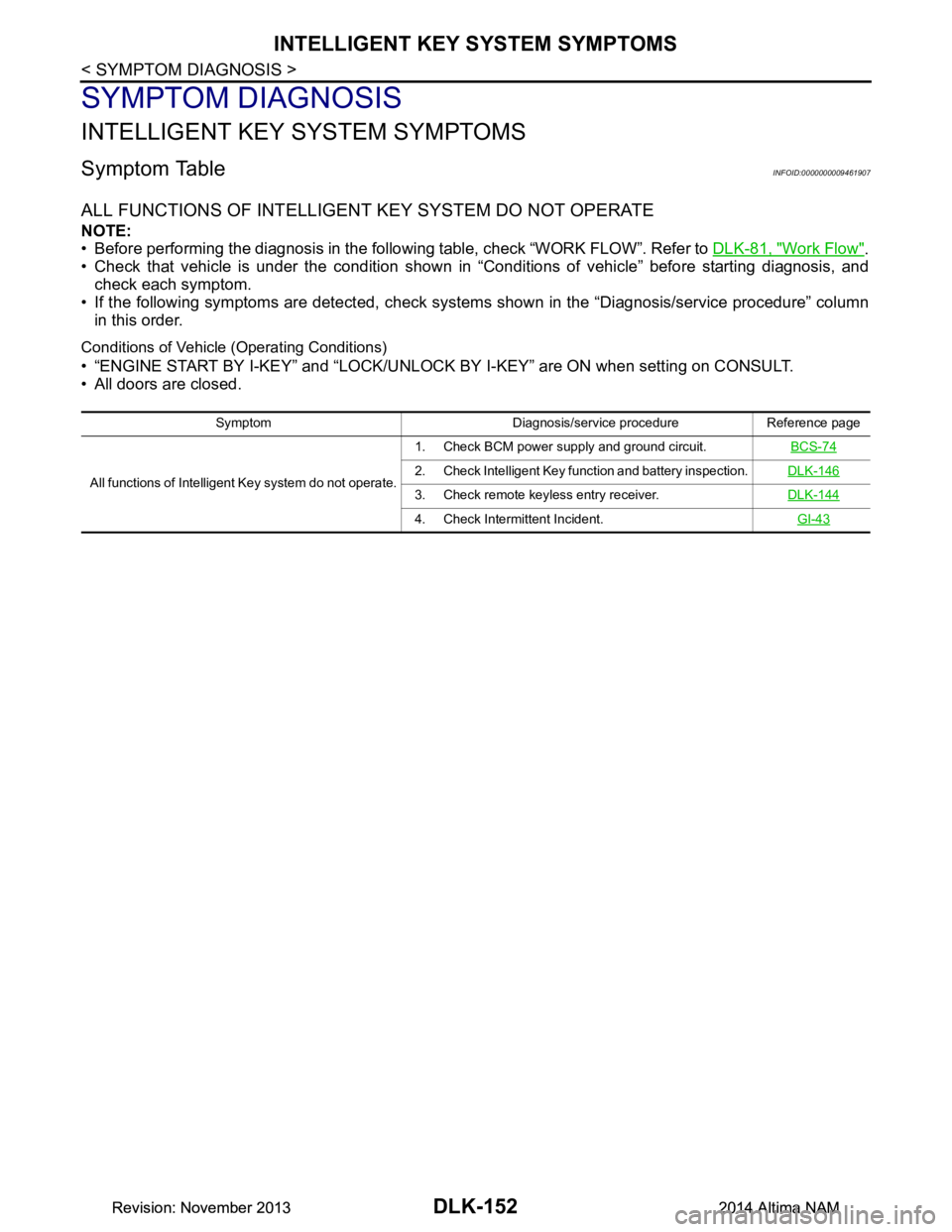
INTELLIGENT KEY SYSTEM SYMPTOMS
Symptom TableINFOID:0000000009461907
ALL FUNCTIONS OF INTELLIGENT KEY SYSTEM DO NOT OPERATE
NOTE:
• Before performing the diagnosis in the following table, check “WORK FLOW”. Refer to DLK-81, "Work Flow"
.
• Check that vehicle is under the condition shown in “Conditions of vehicle” before starting diagnosis, and
check each symptom.
• If the following symptoms are detected, check syst ems shown in the “Diagnosis/service procedure” column
in this order.
Conditions of Vehicle (Operating Conditions)
• “ENGINE START BY I-KEY” and “LOCK/UNLOCK BY I-KEY” are ON when setting on CONSULT.
• All doors are closed.
Symptom Diagnosis/service procedure Reference page
All functions of Intelligent Key system do not operate. 1. Check BCM power supply and ground circuit.
BCS-74
2. Check Intelligent Key function and battery inspection.DLK-146
3. Check remote keyless entry receiver.DLK-144
4. Check Intermittent Incident. GI-43
Revision: November 20132014 Altima NAMRevision: November 20132014 Altima NAM
Page 933 of 4801
SQUEAK AND RATTLE TROUBLE DIAGNOSESDLK-165
< SYMPTOM DIAGNOSIS >
C
D E
F
G H
I
J
L
M A
B
DLK
N
O P
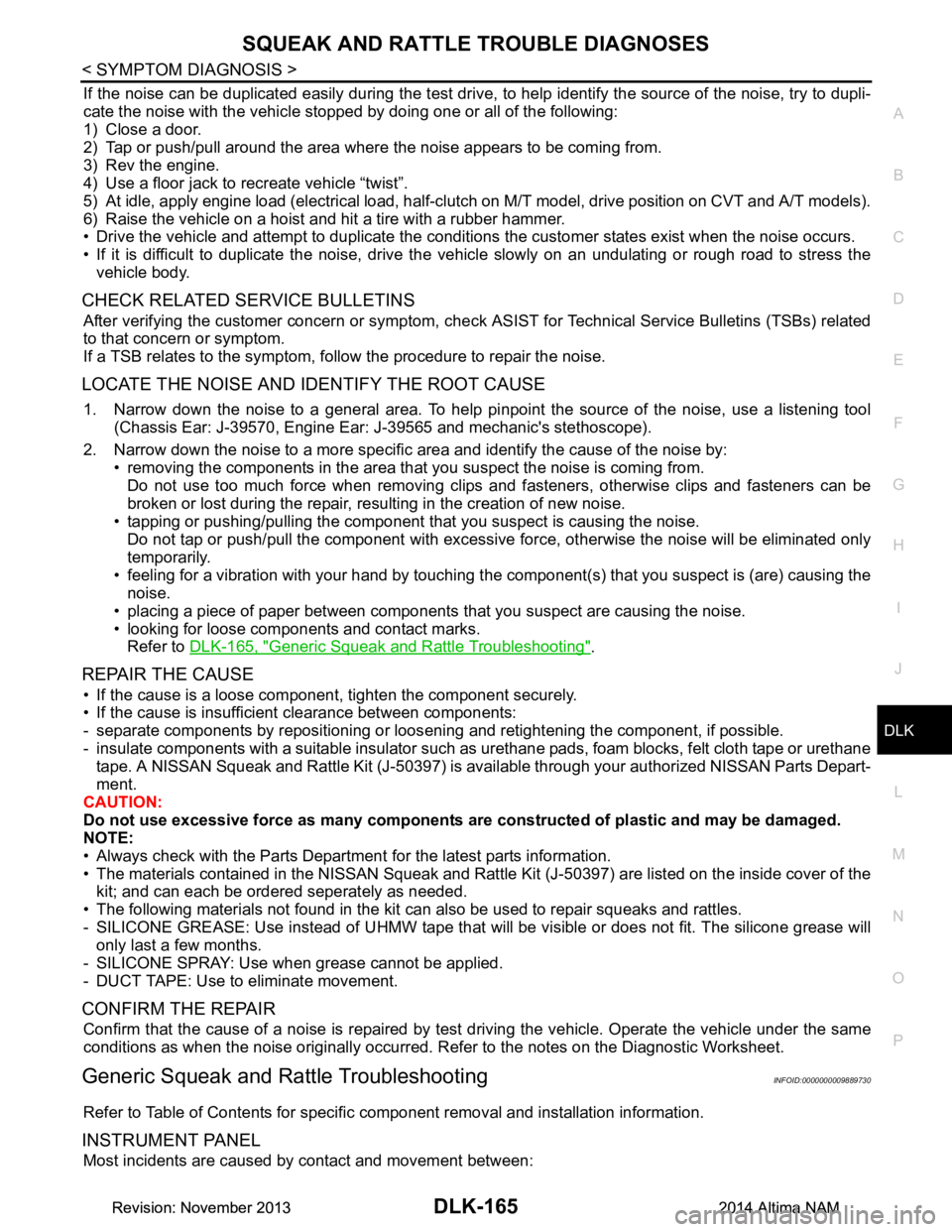
If the noise can be duplicated easily during the test drive, to help identify the source of the noise, try to dupli-
cate the noise with the vehicle stopped by doing one or all of the following:
1) Close a door.
2) Tap or push/pull around the area where the noise appears to be coming from.
3) Rev the engine.
4) Use a floor jack to recreate vehicle “twist”.
5) At idle, apply engine load (electrical load, half-clutch on M/T model, drive position on CVT and A/T models).
6) Raise the vehicle on a hoist and hit a tire with a rubber hammer.
• Drive the vehicle and attempt to duplicate the conditions the customer states exist when the noise occurs.
• If it is difficult to duplicate the noise, drive the vehicle slowly on an undulating or rough road to stress the vehicle body.
CHECK RELATED SERVICE BULLETINS
After verifying the customer concern or symptom, che ck ASIST for Technical Service Bulletins (TSBs) related
to that concern or symptom.
If a TSB relates to the symptom, follow the procedure to repair the noise.
LOCATE THE NOISE AND IDENTIFY THE ROOT CAUSE
1. Narrow down the noise to a general area. To help pi npoint the source of the noise, use a listening tool
(Chassis Ear: J-39570, Engine Ear: J-39565 and mechanic's stethoscope).
2. Narrow down the noise to a more specific area and identify the cause of the noise by: • removing the components in the area that you suspect the noise is coming from.
Do not use too much force when removing clips and fasteners, otherwise clips and fasteners can be
broken or lost during the repair, resulting in the creation of new noise.
• tapping or pushing/pulling the component that you suspect is causing the noise.
Do not tap or push/pull the component with excessive force, otherwise the noise will be eliminated only
temporarily.
• feeling for a vibration with your hand by touching the component(s) that you suspect is (are) causing the
noise.
• placing a piece of paper between components that you suspect are causing the noise.
• looking for loose components and contact marks. Refer to DLK-165, "Generic Squeak and Rattle Troubleshooting"
.
REPAIR THE CAUSE
• If the cause is a loose component, tighten the component securely.
• If the cause is insufficient clearance between components:
- separate components by repositioning or loos ening and retightening the component, if possible.
- insulate components with a suitable insulator such as urethane pads, foam blocks, felt cloth tape or urethane tape. A NISSAN Squeak and Rattle Kit (J-50397) is av ailable through your authorized NISSAN Parts Depart-
ment.
CAUTION:
Do not use excessive force as many components are constructed of plastic and may be damaged.
NOTE:
• Always check with the Parts Department for the latest parts information.
• The materials contained in the NISSAN Squeak and Rattle Kit (J-50397) are listed on the inside cover of the
kit; and can each be ordered seperately as needed.
• The following materials not found in the kit can also be used to repair squeaks and rattles.
- SILICONE GREASE: Use instead of UHMW tape that will be visible or does not fit. The silicone grease will
only last a few months.
- SILICONE SPRAY: Use when grease cannot be applied.
- DUCT TAPE: Use to eliminate movement.
CONFIRM THE REPAIR
Confirm that the cause of a noise is repaired by test driving the vehicle. Operate the vehicle under the same
conditions as when the noise originally occurred. Refer to the notes on the Diagnostic Worksheet.
Generic Squeak and Rattle TroubleshootingINFOID:0000000009889730
Refer to Table of Contents for specific component removal and installation information.
INSTRUMENT PANEL
Most incidents are caused by contact and movement between:
Revision: November 20132014 Altima NAMRevision: November 20132014 Altima NAM
Page 935 of 4801

SQUEAK AND RATTLE TROUBLE DIAGNOSESDLK-167
< SYMPTOM DIAGNOSIS >
C
D E
F
G H
I
J
L
M A
B
DLK
N
O P
3. Loose screws at console attachment points.
SEATS
When isolating seat noise it's important to note the pos ition the seat is in and the load placed on the seat when
the noise is present. These conditions should be duplic ated when verifying and isolating the cause of the
noise.
Cause of seat noise include:
1. Headrest rods and holder
2. A squeak between the seat pad cushion and frame
3. The rear seatback lock and bracket
These noises can be isolated by moving or pressing on the suspected components while duplicating the con-
ditions under which the noise occurs. Most of thes e incidents can be repaired by repositioning the component
or applying urethane tape to the contact area.
UNDERHOOD
Some interior noise may be caused by components under the hood or on the engine wall. The noise is then
transmitted into the passenger compartment.
Causes of transmitted underhood noise include:
1. Any component installed to the engine wall
2. Components that pass through the engine wall
3. Engine wall mounts and connectors
4. Loose radiator installation pins
5. Hood bumpers out of adjustment
6. Hood striker out of adjustment
These noises can be difficult to isolate since they cannot be reached from the interior of the vehicle. The best
method is to secure, move or insulate one component at a time and test drive the vehicle. Also, engine rpm or
load can be changed to isolate the noise. Repairs can usually be made by moving, adjusting, securing, or
insulating the component causing the noise.
Revision: November 20132014 Altima NAMRevision: November 20132014 Altima NAM