suspension NISSAN TEANA 2014 User Guide
[x] Cancel search | Manufacturer: NISSAN, Model Year: 2014, Model line: TEANA, Model: NISSAN TEANA 2014Pages: 4801, PDF Size: 51.2 MB
Page 649 of 4801
![NISSAN TEANA 2014 User Guide
DAS-216
< SYMPTOM DIAGNOSIS >[BSW]
NORMAL OPERATING CONDITION
NORMAL OPERATING CONDITION
DescriptionINFOID:0000000009464875
PRECAUTIONS FOR BLIND SPOT WARNING (BSW)
• The Blind Spot Warning system](/img/5/57390/w960_57390-648.png "NISSAN TEANA 2014 User Guide
DAS-216
< SYMPTOM DIAGNOSIS >[BSW]
NORMAL OPERATING CONDITION
NORMAL OPERATING CONDITION
DescriptionINFOID:0000000009464875
PRECAUTIONS FOR BLIND SPOT WARNING (BSW)
• The Blind Spot Warning system")
DAS-216
< SYMPTOM DIAGNOSIS >[BSW]
NORMAL OPERATING CONDITION
NORMAL OPERATING CONDITION
DescriptionINFOID:0000000009464875
PRECAUTIONS FOR BLIND SPOT WARNING (BSW)
• The Blind Spot Warning system is not a replacem
ent for proper driving procedure and are not designed to
prevent contact with vehicles or objects. When c hanging lanes, always use the side and rear mirrors and
turn and look in the direction driver will move to ensure it is safe to change lanes. Never rely solely on the
Blind Spot Warning system.
• The Blind Spot Warning system may not provide a warn ing for vehicles that pass through the detection zone
quickly.
• Do not use the Blind Spot Warning system when towing a trailer.
• Excessive noise (e.g., audio system volume, open v ehicle window) will interfere with the chime sound, and it
may not be heard.
• The rear view camera may not be able to detect and activate Blind Spot Warning when certain objects are present such as:
- Pedestrians, bicycles, animals.
- Several types of vehicles such as motorcycles.
- Oncoming vehicles.
- Vehicles remaining in the detection zone when driver accelerates from a stop.
- A vehicle merging into an adjacent lane at a speed approximately the same as vehicle.
- A vehicle approaching rapidly from behind.
- Another vehicle which overtakes this vehicle rapidly.
• Severe weather or road spray conditions may reduce the abi lity of the rear view camera to detect other vehi-
cles.
• The rear view camera detection zone is designed based on a standard lane width. When driving in a wider
lane, the rear view camera may not detect vehicles in an adjacent lane. When driving in a narrow lane, the
rear view camera may detect vehicles driving two lanes away.
• The rear view camera is designed to ignore most stationary objects, however objects such as guardrails,
walls, foliage and parked vehicles may occasionally be detected. This is a normal operating condition.
PRECAUTIONS FOR BLIND SPOT WARNING
• Do not use the Blind Spot Warning system under the following conditions because the system may not func-
tion properly:
- During bad weather (e.g., rain, fog, snow, wind, etc.)
- When driving on slippery roads, such as on ice or snow, etc.
- When driving on winding or uneven roads.
- When there is a lane closure due to road repairs.
- When driving in a makeshift lane.
- When driving on roads where the lane width is too narrow.
- When driving with a tire that is not within normal tire c onditions (e.g., tire wear, low tire pressure, installation
of spare tire, tire chains, non-standard wheels).
- When the vehicle is equipped with non-original brake parts or suspension parts.
• The rear view camera may not detect lane markers in the following situations and the Blind Spot Warning
system may not operate properly:
- On roads where there are multiple parallel lane marker s; lane markers that are faded or not painted clearly;
yellow painted lane markers; nonstandard lane markers; lane markers covered with water, dirt, snow, etc.
- On roads where discontinued lane markers are still detectable.
- On roads where there are sharp curves.
- On roads where there are sharply c ontrasting objects, such as shadows, snow, water, wheel ruts, seams or
lines remaining after road repairs.
- On roads where the traveling lane merges or separates.
- When the vehicle traveling direction does not align with the lane markers.
- When rain, snow or dirt adheres to the lens of a the rear view camera unit.
- When a sudden change in brightness occurs. (e.g., when the vehicle enters or exits a tunnel or under a
bridge.)
- When steering quickly.
- When the hazard warning flashers are operated.
- When driving on a curve at a high speed.
Revision: November 20132014 Altima NAMRevision: November 20132014 Altima NAM
Page 663 of 4801
![NISSAN TEANA 2014 User Guide
DAS-230
< SYSTEM DESCRIPTION >[MOD]
SYSTEM
• Moving Object Detection braking will not operate or
will stop operating and only a warning chime will sound
under the following conditions:
- When driv](/img/5/57390/w960_57390-662.png "NISSAN TEANA 2014 User Guide
DAS-230
< SYSTEM DESCRIPTION >[MOD]
SYSTEM
• Moving Object Detection braking will not operate or
will stop operating and only a warning chime will sound
under the following conditions:
- When driv")
DAS-230
< SYSTEM DESCRIPTION >[MOD]
SYSTEM
• Moving Object Detection braking will not operate or
will stop operating and only a warning chime will sound
under the following conditions:
- When driving with a tire that is not within normal tire conditions (pressure, wear, chain, spare, etc.)
- When the vehicle is equipped with non-original brake parts or suspension parts.
• Do not use the MOD system when towing a trailer.
• Excessive noise such as the audio system will inte rfere with the chime sound, and it may not be heard.
Revision: November 20132014 Altima NAMRevision: November 20132014 Altima NAM
Page 665 of 4801
![NISSAN TEANA 2014 User Guide
DAS-232
< SYSTEM DESCRIPTION >[MOD]
HANDLING PRECAUTION
HANDLING PRECAUTION
Precautions for Moving Objects DetectionINFOID:0000000009464892
REAR VIEW CAMERA HANDLING
• The rear view camera which is](/img/5/57390/w960_57390-664.png "NISSAN TEANA 2014 User Guide
DAS-232
< SYSTEM DESCRIPTION >[MOD]
HANDLING PRECAUTION
HANDLING PRECAUTION
Precautions for Moving Objects DetectionINFOID:0000000009464892
REAR VIEW CAMERA HANDLING
• The rear view camera which is")
DAS-232
< SYSTEM DESCRIPTION >[MOD]
HANDLING PRECAUTION
HANDLING PRECAUTION
Precautions for Moving Objects DetectionINFOID:0000000009464892
REAR VIEW CAMERA HANDLING
• The rear view camera which is located on the back
of the trunk performs the Moving Object Detection sys-
tem.
• Always keep the rear view camera lens clean.
• Do not attach a sticker (including transparent material ), install an accessory or paint work over the camera
lens.
• Do not strike or scratch the lens causing physical damage to the camera or the surrounding area.
MOVING OBJECT DETECTION
• The Moving Object Detection system is not a repl acement for proper driving procedure and is not designed
to prevent contact with vehicles or objects. When backing up, always look in the direction driver will move to
ensure it is safe to proceed. Never rely solely on the Moving Object Detection system.
• Using the Moving Object Detection system under some road or weather conditions could lead to improper
system operation. Always rely on driver's own steering and braking operation to avoid accidents.
• The Moving Object Detection system may not provide a warning for vehicles that pass through the detection
zone quickly.
• Do not use the Moving Object Detection system when towing a trailer.
• Excessive noise (e.g., audio system volume, open v ehicle window) will interfere with the chime sound, and it
may not be heard.
• The rear view camera may not be able to detect and activate Moving Object Detection when certain objects are present such as:
- Pedestrians, bicycles, animals.
- A vehicle passing at a speed greater than approximately 15 MPH (24km/h).
• Severe weather or road spray conditions may reduce the ability of the radar to detect other vehicles.
• Do not use the MOD system under the following condi tions because the system may not function properly:
- When driving with a tire that is not within normal tire condition (example: tire wear, low pressure, spare tire, chain, non-standard wheels).
- When the vehicle is equipped with non-original brake parts or suspension parts.
Revision: November 20132014 Altima NAMRevision: November 20132014 Altima NAM
Page 692 of 4801
![NISSAN TEANA 2014 User Guide
DAS
REAR VIEW CAMERA CALIBRATIONDAS-259
< BASIC INSPECTION > [MOD]
C
D E
F
G H
I
J
K L
M B
N P
A
NOTE:
Replace camera unit if “00H Routine not activated” or “10H Writing error” are repeat](/img/5/57390/w960_57390-691.png "NISSAN TEANA 2014 User Guide
DAS
REAR VIEW CAMERA CALIBRATIONDAS-259
< BASIC INSPECTION > [MOD]
C
D E
F
G H
I
J
K L
M B
N P
A
NOTE:
Replace camera unit if “00H Routine not activated” or “10H Writing error” are repeat")
DAS
REAR VIEW CAMERA CALIBRATIONDAS-259
< BASIC INSPECTION > [MOD]
C
D E
F
G H
I
J
K L
M B
N P
A
NOTE:
Replace camera unit if “00H Routine not activated” or “10H Writing error” are repeatedly indicated during the
above two services are performed.
9. Confirm that “Completed” is displayed and then select “End” to close the calibration procedure.
>> GO TO 3.
3.PERFORM SELF-DIAGNOSIS
Perform self-diagnosis of IT S control unit with CONSULT.
Is any DTC detected?
YES >> Perform diagnosis on the detected DTC and repa ir or replace the applicable item. Refer to DAS-
239, "DTC Index".
NO >> GO TO 4.
4.ACTION TEST
Test the system operation by action test. Refer to DAS-254, "Description"
.
>> Work End.
Displayed item Possible cause Service procedure
SUSPENSION —
Temporary malfunction in internal processing of the rear
view camera. Go back to Step 1
00H Routine not ac-
tivated Rear view camera unit malfunction.
Position the target appro-
priately again. Perform
the aiming again. Refer
to DAS-257, "Work Pro-
cedure (Target Setting)".
10H Writing error • Temporary malfunction in internal processing of the
rear view camera.
• Rear view camera malfunction.
X AIMING NG Y
(X: 0 - 7, Y: 1 - 8) —• A target is not-yet-placed.
(The rear view camera cannot detect a target.)
• The position of the rear view camera is not correct.
• Inappropriate work environment.
• Inappropriate vehicle condition. Position the target appro-
priately again. Perform
the aiming again. Refer
to DAS-256, "Work Pro-
cedure (Preparation)".
ABNORMALLY COM-
PLETED —
Revision: November 20132014 Altima NAMRevision: November 20132014 Altima NAM
Page 723 of 4801
![NISSAN TEANA 2014 User Guide
DAS-290
< SYMPTOM DIAGNOSIS >[MOD]
NORMAL OPERATING CONDITION
NORMAL OPERATING CONDITION
DescriptionINFOID:0000000009464956
MOVING OBJECT DETECTION
• The Moving Object Detection system is not a rep](/img/5/57390/w960_57390-722.png "NISSAN TEANA 2014 User Guide
DAS-290
< SYMPTOM DIAGNOSIS >[MOD]
NORMAL OPERATING CONDITION
NORMAL OPERATING CONDITION
DescriptionINFOID:0000000009464956
MOVING OBJECT DETECTION
• The Moving Object Detection system is not a rep")
DAS-290
< SYMPTOM DIAGNOSIS >[MOD]
NORMAL OPERATING CONDITION
NORMAL OPERATING CONDITION
DescriptionINFOID:0000000009464956
MOVING OBJECT DETECTION
• The Moving Object Detection system is not a repl
acement for proper driving procedure and is not designed
to prevent contact with vehicles or objects. When backing up. always look in the direction driver will move to
ensure it is safe to proceed. Never rely solely on the Moving Object Detection system.
• Using the Moving Object Detection system under some road or weather condition could lead to improper
system operation. Always rely on driver's own steering and braking operation to avoid accidents.
• The Moving Object Detection system may not provide a warning for vehicles that pass through the detection
zone quickly.
• Do not use the Moving Object Detection system when towing a trailer.
• Excessive noise (e.g., audio system volume, open v ehicle window) will interfere with the chime sound, and it
may not be heard.
- Pedestrians, bicycles, animals.
- A vehicle passing at a speed greater than approximately 24km/h (15 MPH ).
• A rear view camera may not detect approaching vehicles in certain situations:
- When the vehicle parked aside obstruct the beam of the rear view camera.
- When the vehicle is parked in an angled parking space.
- When the vehicle is parked on an inclined ground.
- When the vehicle turns around into your vehicle’s aisle.
- When the angle formed by your vehicle and approaching vehicle is small.
• Severe weather or road spray conditions may reduce the ability of the radar to detect other vehicles.
• The rear view camera system may not detect:
- Small or moving object.
- Wedge-shaped objects.
- Object closer to the bumper than 30 cm (10 inch).
- Thin objects such as rope, wire, chain, etc.
• Do not use the MOD system under the following condi tions because the system may not function properly:
- When driving with a tire that is not the within normal tire condition (example: tire wear, low pressure, spare
tire, chain, non-standard wheels).
- When the vehicle is equipped with non-original brake parts or suspension parts.
Revision: November 20132014 Altima NAMRevision: November 20132014 Altima NAM
Page 2035 of 4801
![NISSAN TEANA 2014 User Guide
OIL PAN AND OIL STRAINEREM-37
< REMOVAL AND INSTALLATION > [QR25DE]
C
D E
F
G H
I
J
K L
M A
EM
NP
O
3. Remove the front exhaust tube and gaskets. Refer to
EX-5, "Exploded View".
4. Remove the fende](/img/5/57390/w960_57390-2034.png "NISSAN TEANA 2014 User Guide
OIL PAN AND OIL STRAINEREM-37
< REMOVAL AND INSTALLATION > [QR25DE]
C
D E
F
G H
I
J
K L
M A
EM
NP
O
3. Remove the front exhaust tube and gaskets. Refer to
EX-5, \"Exploded View\".
4. Remove the fende")
OIL PAN AND OIL STRAINEREM-37
< REMOVAL AND INSTALLATION > [QR25DE]
C
D E
F
G H
I
J
K L
M A
EM
NP
O
3. Remove the front exhaust tube and gaskets. Refer to
EX-5, "Exploded View".
4. Remove the fender protector side cover (RH). Refer to EXT-26, "FENDER PROTECTOR : Removal and
Installation".
5. Remove oil level gauge (1), oil level gauge guide (2), and O-ring (3).
CAUTION:
Do not reuse O-ring.
6. Disconnect the air fuel ratio sensor 1 electrical harness connector.
7. Remove the front driveshaft (LH) and front driveshaft (RH). Refer to FAX-10, "Removal and Installation
(LH)" and FAX-12, "Removal and Installation (RH)".
8. Remove the connecting rod (LH) and the connecting rod (RH). Refer to FSU-19, "Exploded View"
.
9. Remove the tie rod end from the steering knuckle ( RH) and the tie rod end from the steering knuckle (LH).
Refer to ST-36, "Exploded View"
.
10. Remove the power steering gear bolts and support the power steering gear. Refer to ST-36, "Removal
and Installation".
11. Remove the rear engine mount torque rod bracket. Refer to EM-84, "Removal and Installation"
.
12. Remove the front suspension member for clearance to remove the oil pan. Refer to FSU-20, "Removal
and Installation".
13. Disconnect the A/C compressor electrical harness connector.
14. Remove the drive belt. Refer to EM-19, "Removal and Installation"
.
15. Remove the A/C compressor bolts, position the A/C compressor aside and support. Refer to HA-30,
"COMPRESSOR : Removal and Installation".
16. Remove the lower oil pan bolts in the reverse order as shown, using power tool.
17. Remove the lower oil pan using Tool (A). CAUTION:
Be careful not to damage the mating surfaces.
NOTE:
In areas where the cutter is difficult to use, use a plastic hammer
to lightly tap (1) the cutter where the liquid gasket is applied. Use
a plastic hammer to slide (2) the cutter by tapping on the side.
ALBIA0910GB
ALBIA0830GB
Tool number : KV10111100 (J-37228)
AWBIA1249GB
Revision: November 20132014 Altima NAM
Page 2083 of 4801
![NISSAN TEANA 2014 User Guide
ENGINE ASSEMBLYEM-85
< UNIT REMOVAL AND INSTALLATION > [QR25DE]
C
D E
F
G H
I
J
K L
M A
EM
NP
O
27. Remove the LH and RH drive shafts. Refer to
FAX-10, "Removal and Installation (LH)", FAX-12, "Rem](/img/5/57390/w960_57390-2082.png "NISSAN TEANA 2014 User Guide
ENGINE ASSEMBLYEM-85
< UNIT REMOVAL AND INSTALLATION > [QR25DE]
C
D E
F
G H
I
J
K L
M A
EM
NP
O
27. Remove the LH and RH drive shafts. Refer to
FAX-10, \"Removal and Installation (LH)\", FAX-12, \"Rem")
ENGINE ASSEMBLYEM-85
< UNIT REMOVAL AND INSTALLATION > [QR25DE]
C
D E
F
G H
I
J
K L
M A
EM
NP
O
27. Remove the LH and RH drive shafts. Refer to
FAX-10, "Removal and Installation (LH)", FAX-12, "Removal
and Installation (RH)".
28. Remove the drive belt. Refer to EM-19, "Removal and Installation"
.
29. Remove the front suspension member. Refer to FSU-20, "Removal and Installation"
.
30. Remove the A/C compressor with piping connected and support using suitable wire.
31. Disconnect the transaxle shift controls. Refer to TM-407, "Removal and Installation"
.
32. Install engine slingers into the rear of the cylinder head (A) and front engine mounting bracket holes (B).
• Use engine mounting bolt holes for front slinger.
• Use the holes in the rear of the cylinder head for the rear
slinger.
33. Support engine and transaxle assembly with engine lifti ng equipment from the top with the vehicle raised
on a hoist.
34. Remove the RH engine mount torque rod, RH engine support bracket and RH engine mounting insulator and bracket.
35. Remove LH transaxle mounting insulator through-bolts.
36. Lower the engine and transaxle assembly from the engine compartment using suitable tool.
CAUTION:
• Before and during this procedure, alw ays check if any harnesses are left connected.
• Avoid any damage to, or any oil/grease smearing or spills onto the engine mounting insulators.
37. Remove the starter motor. Refer to STR-22, "QR25DE : Removal and Installation"
.
38. Remove engine and transaxle harness.
39. Separate engine and transaxle. Refer to TM-206, "Exploded View"
.
INSTALLATION
Installation is in the reverse order of removal.
NOTE:
Tighten the transmission bolts to specification. Refer to TM-407, "Removal and Installation"
.
• Do not allow oil to get on mounting insulators. Be careful not to damage mounting insulators.
• If parts have a direction mark (arrow) this indicates front of the vehicle, and the parts must be installed
according to the identification mark.
• Install the RH engine mounting bracket bolts in the following steps:
- First install bolts (A) and (B) loosely.
- Install and tighten the five RH engine mounting bracket bolts to specification in the order as shown.
- : Front
INSPECTION AFTER INSTALLATION
• Before starting engine, check oil/fluid levels incl uding engine coolant and engine oil. If less than required
quantity, fill to the specified level. Refer to MA-11, "FOR USA AND CANADA : Fluids and Lubricants"
.
• Use procedure below to check for fuel leakage.
• Turn ignition switch ON (with engine stopped). With fuel pressure applied to fuel piping, check for fuel leak- age at connection points.
• Start engine. With engine speed increased, check again for fuel leakage at connection points.
• Run engine to check for unusual noise and vibration. Slinger bolts (A) : 28 N·m (2.8 kg-m, 21 ft-lb)
Slinger bolts (B) : 48 N·m (4.9 kg-m, 35 ft-lb))
AWBIA1363ZZ
RH engine mounting bracket bolt : 48.2 N·m (4.9 kg-m, 36 ft-lb)
ALBIA0541ZZ
Revision: November 20132014 Altima NAM
Page 2220 of 4801
![NISSAN TEANA 2014 User Guide
EM-222
< UNIT REMOVAL AND INSTALLATION >[VQ35DE]
ENGINE ASSEMBLY
• (B): LH cylinder head
25. Remove rear cover plate.
26. Remove the torque converter nuts.
27. Remove nuts of stabilizer connectin](/img/5/57390/w960_57390-2219.png "NISSAN TEANA 2014 User Guide
EM-222
< UNIT REMOVAL AND INSTALLATION >[VQ35DE]
ENGINE ASSEMBLY
• (B): LH cylinder head
25. Remove rear cover plate.
26. Remove the torque converter nuts.
27. Remove nuts of stabilizer connectin")
EM-222
< UNIT REMOVAL AND INSTALLATION >[VQ35DE]
ENGINE ASSEMBLY
• (B): LH cylinder head
25. Remove rear cover plate.
26. Remove the torque converter nuts.
27. Remove nuts of stabilizer connecting rods from struts. Refer to FSU-19, "Exploded View"
.
28. Remove front wheel speed sensors and position aside. Refer to BRC-124, "Removal and Installation -
Front Wheel Sensor".
29. Remove front brake rotors. Refer to BR-36, "BRAKE CALIPER ASSEMBLY : Removal and Installation"
.
30. Remove piston rod nut. Refer to FSU-19, "Exploded View"
.
31. Remove front drive shaft (LH/RH). Refer to FAX-10, "Removal and Installation (LH)"
and FAX-12,
"Removal and Installation (RH)".
32. Remove RH drive shaft center bearing bracket.
33. Remove lower steering column pinch bolt. Refer to ST-33, "Exploded View"
.
34. Remove three way catalyst (manifold) (bank 1) heat shield.
35. Disconnect front and rear engine mounting insulator vacuum hoses.
36. Remove front and rear engine mounting insulator nut.
37. Position a suitable support table under suspension member and engine assembly. TM-206, "Removal and
Installation"
38. Disconnect the engine mounting insulator (LH), upper torque rod, and engine mounting insulator (RH).
39. For additional safety, secure the engine in position with suitable tool.
40. Remove suspension member bolts. Refer to FSU-19, "Exploded View"
.
41. Carefully lower the engine, transaxle assembly and suspension member using Tool, avoiding interference
with the vehicle body.
CAUTION:
• Before and during this procedure, alw ays check if any harnesses are left connected.
• Avoid any damage to, or any oil/grease smearin g or spilling onto the engine mounting insula-
tors.
42. Remove the starter motor. Refer to STR-23, "VQ35DE : Removal and Installation"
.
43. Remove the crankshaft position sensor (POS).
44. Remove engine and transaxle harness.
45. Separate the engine and transaxle and mount the engine on a suitable engine stand.
INSTALLATION
Installation is in the reverse order of removal.
NOTE:
Tighten transmission bolts to specification. Refer to TM-206, "Removal and Installation"
.
INSPECTION AFTER INSTALLATION
• Before starting engine, check oil/fluid levels including engine coolant and engine oil. If less than required
quantity, fill to the specified level. Refer to MA-11, "FOR USA AND CANADA : Fluids and Lubricants"
.
• Use procedure below to check for fuel leakage.
• Turn ignition switch ON (with engine stopped). With fuel pressure applied to fuel piping, check for fuel leak-
age at connection points.
ALBIA0263GB
Tool number : KV101J0010 (J-47242)
Revision: November 20132014 Altima NAM
Page 2388 of 4801
EXL-122
< PERIODIC MAINTENANCE >
HEADLAMP
PERIODIC MAINTENANCE
HEADLAMP
Aiming AdjustmentINFOID:0000000009463617
PREPARATION BEFORE ADJUSTING
Before performing aiming adjustment, check the following:
• Ensure all tires are inflated to correct pressure.
• Place vehicle and screen on level surface.
• Ensure there is no load in vehicle other than the driver (or equivalent weight placed in driver's position).
• Coolant and engine oil filled to correct level, and fuel tank full.
• Remove cargo and/or luggage to maintain an unloaded vehicle condition.
• Confirm spare tire, jack and tools are properly stowed.
• Carefully wipe off any dirt from headlamp lens. CAUTION:
Do not use organic solvent (thinner, gasoline etc.)
• Place a driver or equivalent weight of 68.5 kg (150 lb) on the driver seat.
• By hand, bounce the front and rear of the vehicle to settle the suspension and eliminate any static load.
• Place the front tires in the straight ahead position.
• Aim each headlamp individually and ensure other headlamp beam pattern is blocked from screen.
NOTE:
• For headlamp aiming details, refer to regulations in your area.
• By regulation, no means for horizontal aim adjustment is provided from the factory; only vertical aim is
adjustable.
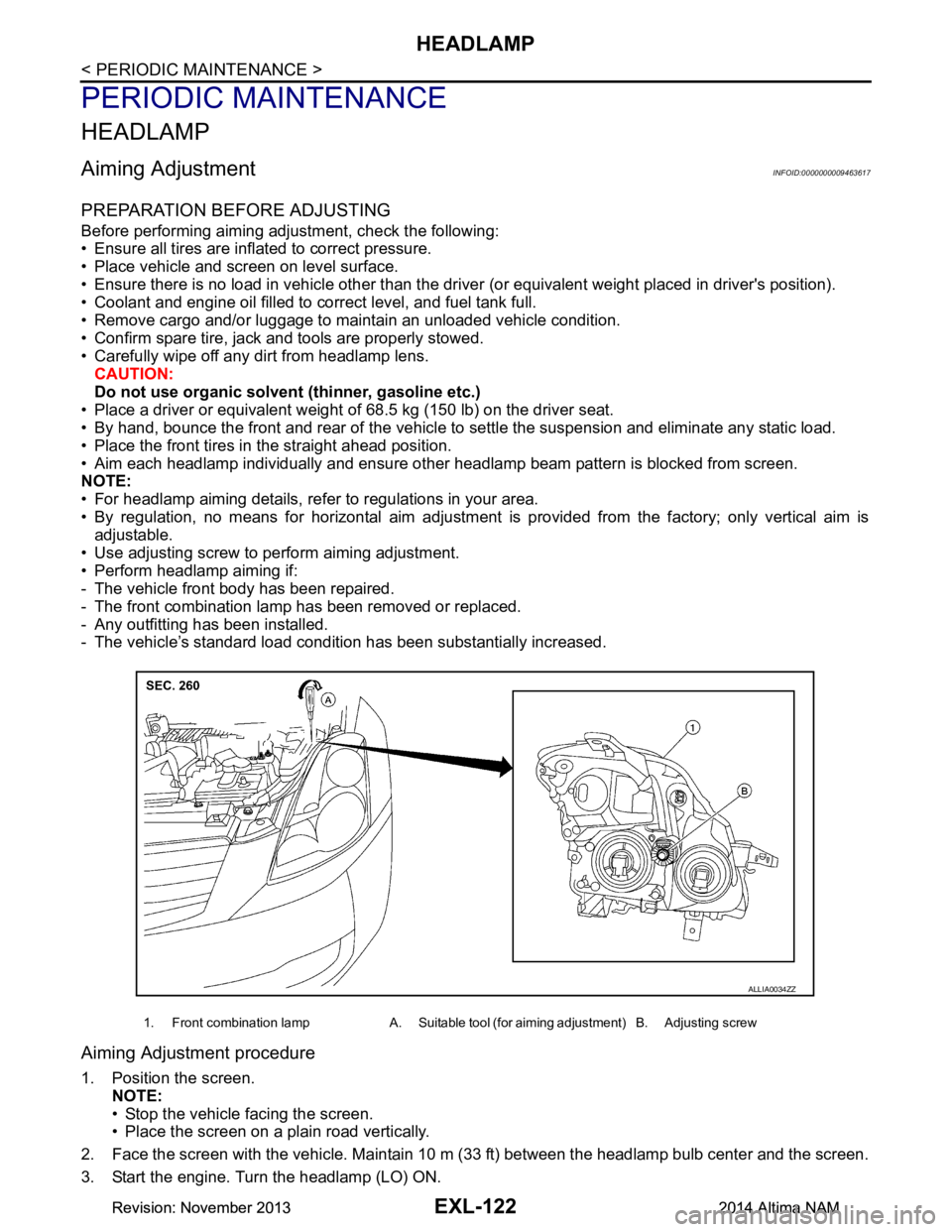
• Use adjusting screw to perform aiming adjustment.
• Perform headlamp aiming if:
- The vehicle front body has been repaired.
- The front combination lamp has been removed or replaced.
- Any outfitting has been installed.
- The vehicle’s standard load condition has been substantially increased.
Aiming Adjustment procedure
1. Position the screen.
NOTE:
• Stop the vehicle facing the screen.
• Place the screen on a plain road vertically.
2. Face the screen with the vehicle. Maintain 10 m (33 ft) between the headlamp bulb center and the screen.
3. Start the engine. Turn the headlamp (LO) ON.
1. Front combination lamp A. Suitable tool (for aiming adjustment) B. Adjusting screw
ALLIA0034ZZ
Revision: November 20132014 Altima NAMRevision: November 20132014 Altima NAM
Page 2390 of 4801
EXL-124
< PERIODIC MAINTENANCE >
FRONT FOG LAMP
FRONT FOG LAMP
Aiming AdjustmentINFOID:0000000009463618
PREPARATION BEFORE ADJUSTING
The fog lamp is a semi-sealed beam type which uses a replaceable halogen bulb. Before performing aiming
adjustment procedure, check the following:
• Ensure all tires are inflated to correct pressure.
• Place vehicle and screen on level surface.
• Ensure there is no load in vehicle other than the driver (or equivalent weight placed in driver's position).
• Coolant and engine oil filled to correct level, and fuel tank full.
• Remove cargo and/or luggage to maintain an unloaded vehicle condition.
• Confirm spare tire, jack and tools are properly stowed.
• Carefully wipe off any dirt from headlamp lens. CAUTION:
Do not use organic solvent (thinner, gasoline etc.)
• Place a driver or equivalent weight of 68.5 kg (150 lb) on the driver seat.
• By hand, bounce the front and rear of the vehicle to settle the suspension and eliminate any static load.
• Place the front tires in the straight ahead position.
• Aim each headlamp individually and ensure other headlamp beam pattern is blocked from screen.
NOTE:
• For headlamp aiming details, refer to regulations in your area.
• By regulation, no means for horizontal aim adjustment is provided from the factory; only vertical aim is
adjustable.
• Use adjusting screw to perform aiming adjustment.
• Perform headlamp aiming if:
- The vehicle front body has been repaired.
- The front combination lamp has been removed or replaced.
- Any outfitting has been installed.
- The vehicle’s standard load condition has been substantially increased.
Aiming Adjustment Procedure
1. Place the screen. NOTE:
• Stop the vehicle facing the wall.
• Place the board on a plain road vertically.
2. Face the vehicle with the screen. Maintain 7.62 m (25.0 ft) between the front fog lamp center and the
screen.
3. Start the engine. Turn the front fog lamp ON. NOTE:
Shut off the headlamp light with the board to prevent from illuminating the adjustment screen.
CAUTION:
Do not cover the lens surface with a tape etc. The lens is made of resin.
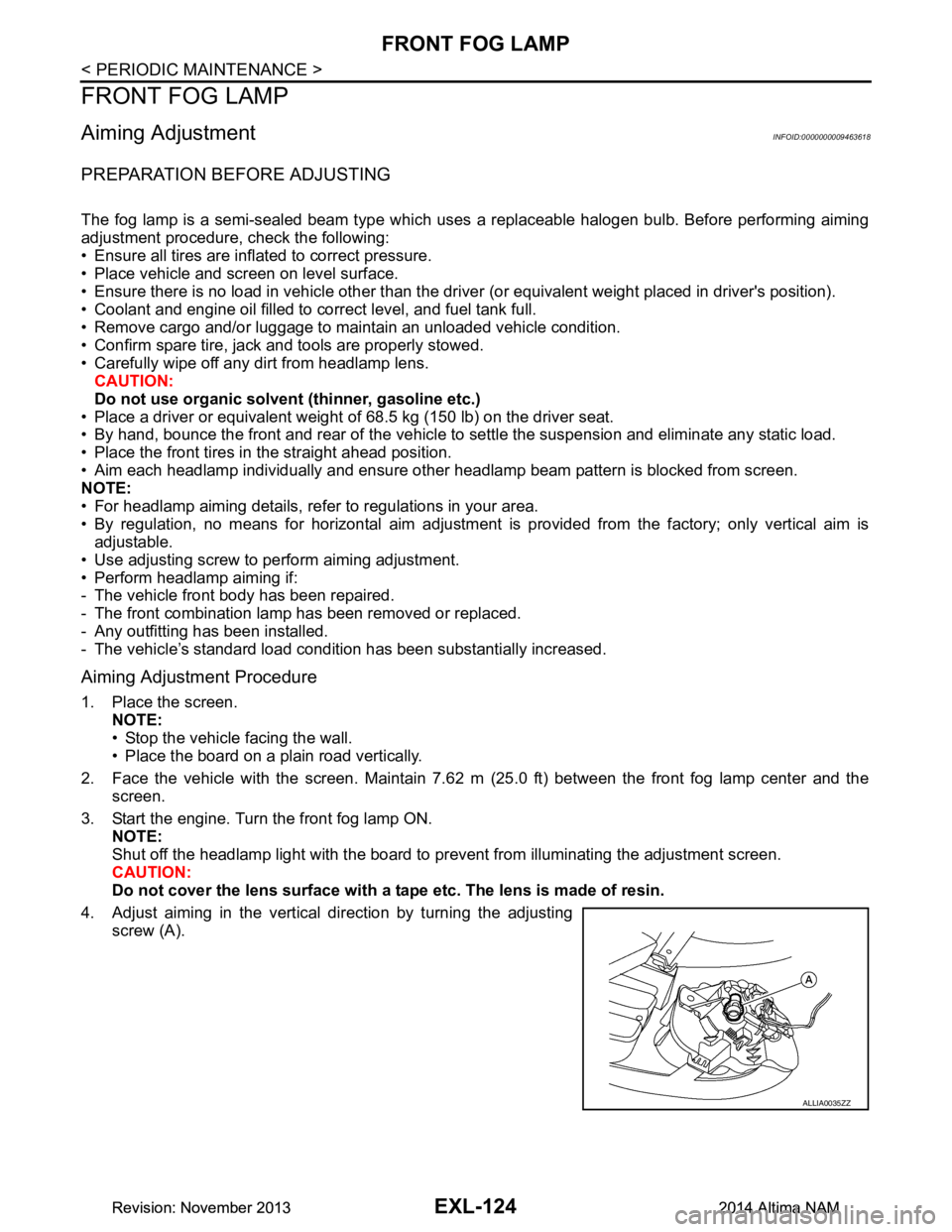
4. Adjust aiming in the vertical direction by turning the adjusting screw (A).
ALLIA0035ZZ
Revision: November 20132014 Altima NAMRevision: November 20132014 Altima NAM