warning NISSAN TEANA 2014 Service Manual
[x] Cancel search | Manufacturer: NISSAN, Model Year: 2014, Model line: TEANA, Model: NISSAN TEANA 2014Pages: 4801, PDF Size: 51.2 MB
Page 810 of 4801

DLK-42
< SYSTEM DESCRIPTION >
DIAGNOSIS SYSTEM (BCM)
DIAGNOSIS SYSTEM (BCM)
COMMON ITEM
COMMON ITEM : CONSULT Function (BCM - COMMON ITEM)INFOID:0000000009952500
CAUTION:
After disconnecting the CONSULT vehicle interface (VI) from the data link connector, the ignition must
be cycled OFF → ON (for at least 5 seconds) → OFF. If this step is not performed, the BCM may not go
to ”sleep mode”, potentially causing a di scharged battery and a no-start condition.
APPLICATION ITEM
CONSULT performs the following functions via CAN communication with BCM.
SYSTEM APPLICATION
BCM can perform the following functions.
Direct Diagnostic Mode Description
Ecu Identification The BCM part number is displayed.
Self Diagnostic Result The BCM self diagnostic results are displayed.
Data Monitor The BCM input/output data is displayed in real time.
Active Test The BCM activates outputs to test components.
Work support The settings for BCM functions can be changed.
Configuration • The vehicle specification can be read and saved.
• The vehicle specification can be written when replacing BCM.
CAN Diag Support Mntr The result of transmit/receive diagnosis of CAN communication is displayed.
System Sub System Direct Diagnostic Mode
Ecu Identification
Self Diagnostic Result
Data Monitor
Active Test
Work support
Configuration
CAN Diag Su pport Mntr
Door lock DOOR LOCK ××××
Rear window defogger REAR DEFOGGER ×××
Warning chime BUZZER ××
Interior room lamp timer INT LAMP ×××
Remote keyless entry system MULTI REMOTE ENT ×××
Exterior lamp HEADLAMP ×××
Wiper and washer WIPER ×××
Turn signal and hazard warning lamps FLASHER ××
Air conditioner AIR CONDITIONER ×
Intelligent Key system INTELLIGENT KEY ××××
Combination switch COMB SW ×
BCM BCM × × ×××
Immobilizer IMMU ×××
Interior room lamp battery saver BATTERY SAVER ××
Trunk open TRUNK ×
Vehicle security system THEFT ALM ×××
Revision: November 20132014 Altima NAMRevision: November 20132014 Altima NAM
Page 813 of 4801
![NISSAN TEANA 2014 Service Manual
DIAGNOSIS SYSTEM (BCM)DLK-45
< SYSTEM DESCRIPTION >
C
D E
F
G H
I
J
L
M A
B
DLK
N
O P
ACTIVE TEST
VEH SPEED 2 [mph/km/h] ×Indicates condition of vehicle speed signal received from combination
me](/img/5/57390/w960_57390-812.png "NISSAN TEANA 2014 Service Manual
DIAGNOSIS SYSTEM (BCM)DLK-45
< SYSTEM DESCRIPTION >
C
D E
F
G H
I
J
L
M A
B
DLK
N
O P
ACTIVE TEST
VEH SPEED 2 [mph/km/h] ×Indicates condition of vehicle speed signal received from combination
me")
DIAGNOSIS SYSTEM (BCM)DLK-45
< SYSTEM DESCRIPTION >
C
D E
F
G H
I
J
L
M A
B
DLK
N
O P
ACTIVE TEST
VEH SPEED 2 [mph/km/h] ×Indicates condition of vehicle speed signal received from combination
meter on CAN communication line.
DOOR STAT -DR [LOCK/READY/UNLK] ×Indicates condition of driver side door status.
DOOR STAT -AS [LOCK/READY/UNLK] ×Indicates condition of passenger side door status.
DOOR STAT -RR [LOCK/READY/UNLK] ×Indicates condition of rear right side door status.
DOOR STAT -RL [LOCK/READY/UNLK] ×Indicates condition of rear left side door status.
ID OK FLAG [Set/Reset] Indicates condition of Intelligent Key ID.
PRMT ENG STRT [Set/Reset] Indicates condition of engine start possibility.
PRMT RKE STRT [Set/Reset] Indicates condition of engine start possibility from Intelligent Key.
I-KEY OK FLAG [Key ON/Key OFF] ×Indicates condition of Intelligent Key OK flag.
PRBT ENG STRT [Set/Reset] Indicates condition of engine start prohibit.
ID AUTHENT CANCEL TIMER [STOP] Indicates condition of Intelligent Key ID authentication.
ACC BATTERY SAVER [STOP] Indicate s condition of battery saver.
CRNK PRBT TMR [On/Off] In dicates condition of crank prohibit timer.
AUT CRNK TMR [On/Off] Indicates condition of automatic engine crank timer from Intelligent Key.
CRNK PRBT TME [sec] I ndicates condition of engine crank prohibit time.
AUTO CRNK TME [sec] Indicates co ndition of automatic engine crank time from Intelligent Key.
CRANKING TME [sec] Indicates condition of engine cranking time from Intelligent Key.
DETE SW PWR [On/Off] Indicates condition of detent switch voltage.
ACC RLY -REQ [On/Off] Indicates condition of accessory relay control request.
RKE OPE COUN1 [0-19] ×When remote keyless entry receiver receives the signal transmitted while
operating on Intelligent Key, the numerical value start changing.
RKE OPE COUN2 [0-19] ×When remote keyless entry receiver receives the signal transmitted while
operating on Intelligent Key, the numerical value start changing.
TRNK/HAT MNTR [On/Off] Indicates condition of trunk room lamp switch.
RKE-LOCK [On/Off] Indicates condition of lock signal from Intelligent Key.
RKE-UNLOCK [On/Off] Indicates condition of unlock signal from Intelligent Key.
RKE-TR/BD [On/Off] Indicates condition of trunk open signal from Intelligent Key.
RKE-PANIC [On/Off] Indicates condition of panic signal from Intelligent Key.
RKE-MODE CHG [On/Off] Indicates condition of mode change signal from Intelligent Key. Monitor Item [Unit] Main Description
Test Item Description
INTELLIGENT KEY LINK (CAN) This test is able to check Intelligent Key iden
tification number [Off/ID No1/ID N02/ID No3/ID
No4/ID No5].
INT LAMP This test is able to check interior room lamp operation [On/Off].
FLASHER This test is able to check hazard lamp operation [LH/RH/Off].
HORN This test is able to check horn operation [On].
BATTERY SAVER This test is able to check battery saver operation [On/Off].
TRUNK/BACK DOOR This test is able to check trunk actuator operation [Open].
OUTSIDE BUZZER This test is able to check In telligent Key warning buzzer operation [On/Off].
INSIDE BUZZER This test is able to check combination meter warning chime operation [Take Out/Knob/Key/
Off].
INDICATOR This test is able to check combination meter warning lamp operation [KEY ON/KEY IND/Off].
IGN CONT2 This test is able to check ignition relay-2 control operation [On/Off].
ENGINE SW ILLUMI This test is able to check push-bu tton ignition switch START indicator operation [On/Off].
Revision: November 20132014 Altima NAMRevision: November 20132014 Altima NAM
Page 910 of 4801
DLK-142
< DTC/CIRCUIT DIAGNOSIS >
INTELLIGENT KEY WARNING BUZZER
INTELLIGENT KEY WARNING BUZZER
DescriptionINFOID:0000000009461888
Answers back and warns for an inappropriate operation.
Component Function CheckINFOID:0000000009461889
1.CHECK FUNCTION
With CONSULT
Check Intelligent Key warning buzzer OUTSIDE BUZZER in Active Test mode.
Is the inspection result normal?
YES >> Intelligent Key warning buzzer (engine room) is OK.
NO >> Refer to DLK-142, "Diagnosis Procedure"
.
Diagnosis ProcedureINFOID:0000000009461890
Regarding Wiring Diagram information, refer to DLK-61, "Wiring Diagram".
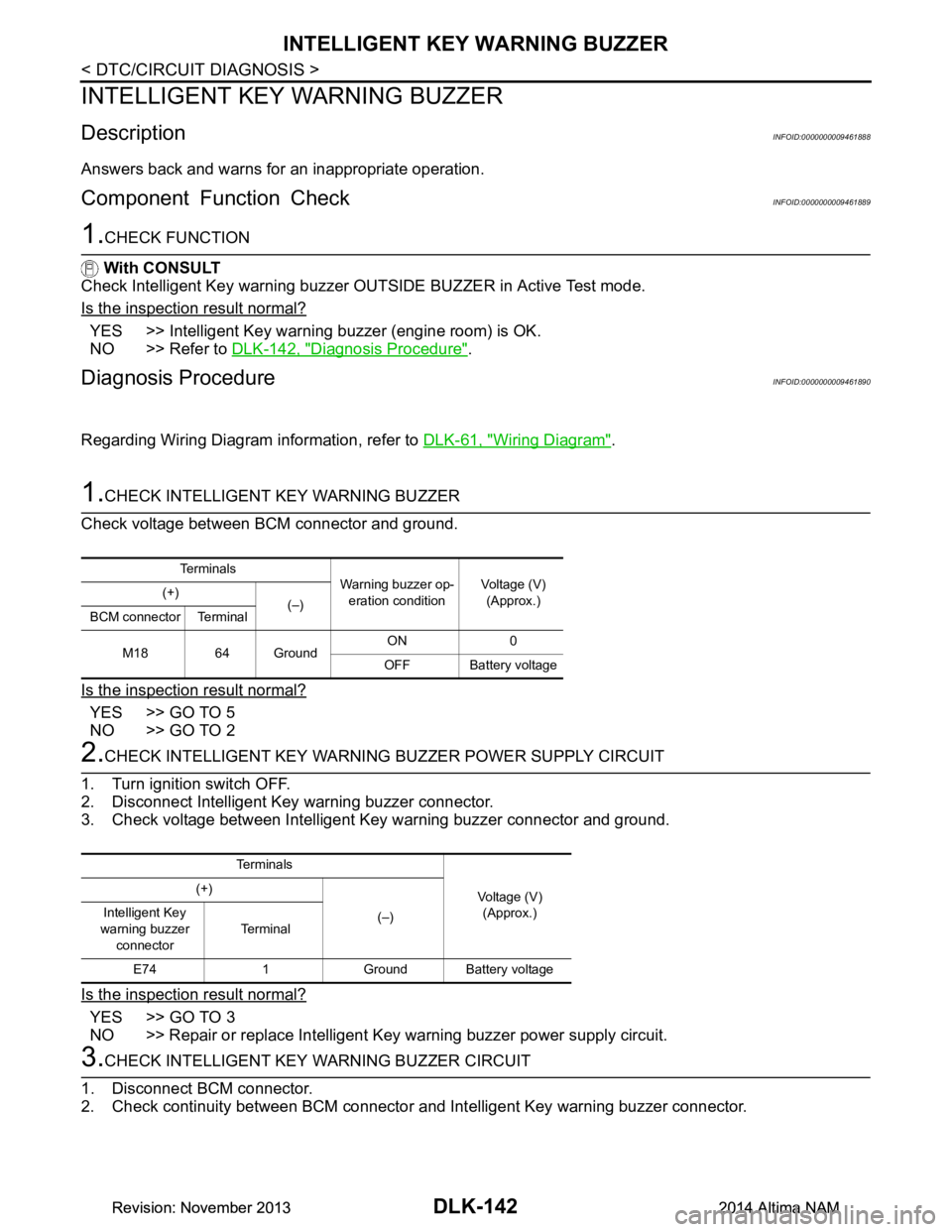
1.CHECK INTELLIGENT KEY WARNING BUZZER
Check voltage between BCM connector and ground.
Is the inspection result normal?
YES >> GO TO 5
NO >> GO TO 2
2.CHECK INTELLIGENT KEY WARNING BUZZER POWER SUPPLY CIRCUIT
1. Turn ignition switch OFF.
2. Disconnect Intelligent Key warning buzzer connector.
3. Check voltage between Intelligent Key warning buzzer connector and ground.
Is the inspection result normal?
YES >> GO TO 3
NO >> Repair or replace Intelligent Key warning buzzer power supply circuit.
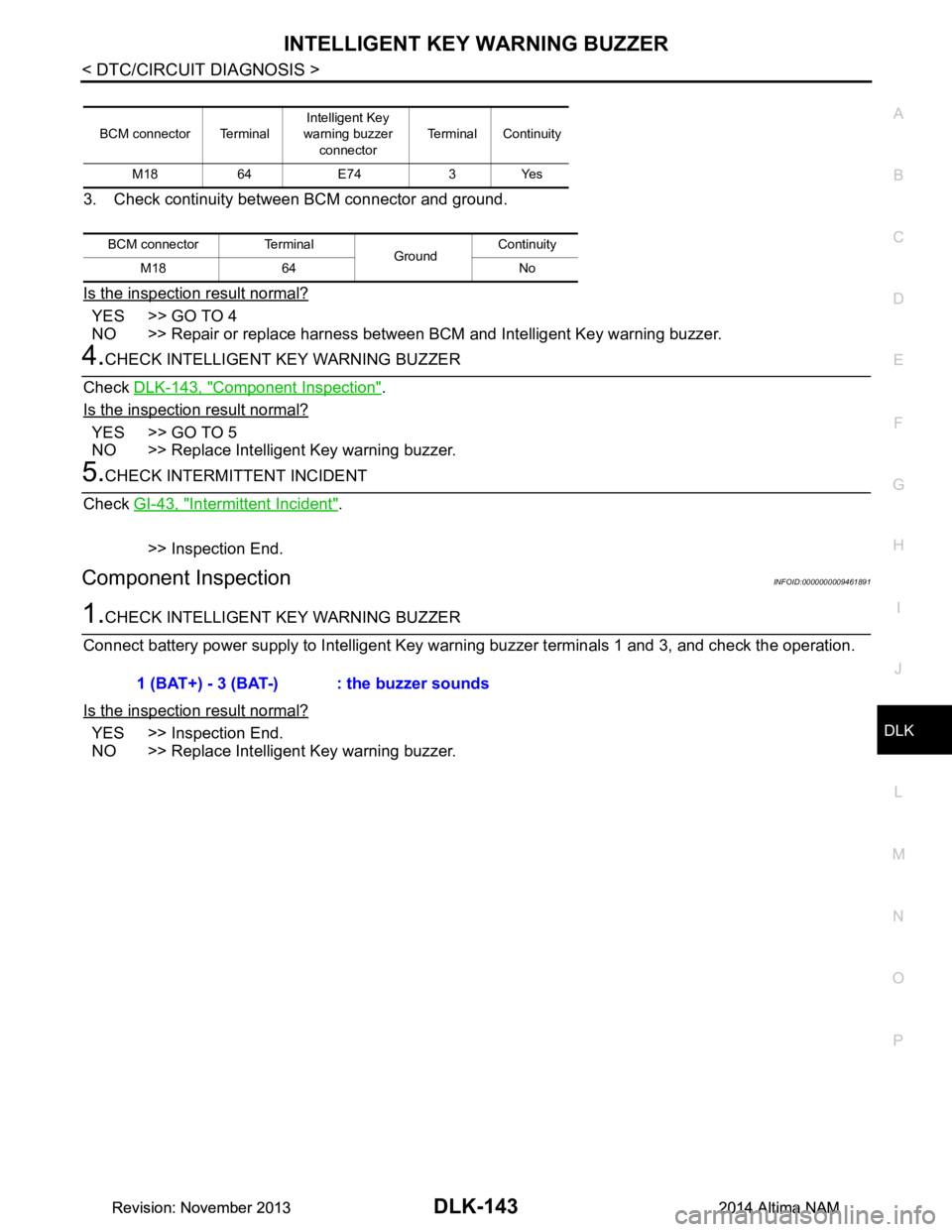
3.CHECK INTELLIGENT KEY WARNING BUZZER CIRCUIT
1. Disconnect BCM connector.
2. Check continuity between BCM connector and Intelligent Key warning buzzer connector.
Te r m i n a l s
Warning buzzer op-
eration condition Voltage (V)
(Approx.)
(+)
(–)
BCM connector Terminal
M18 64 Ground ON 0
OFF Battery voltage
Te r m i n a l s
Voltage (V)(Approx.)
(+)
(–)
Intelligent Key
warning buzzer connector Te r m i n a l
E74 1 Ground Battery voltage
Revision: November 20132014 Altima NAMRevision: November 20132014 Altima NAM
Page 911 of 4801
INTELLIGENT KEY WARNING BUZZERDLK-143
< DTC/CIRCUIT DIAGNOSIS >
C
D E
F
G H
I
J
L
M A
B
DLK
N
O P
3. Check continuity between BCM connector and ground.
Is the inspection result normal?
YES >> GO TO 4
NO >> Repair or replace harness between BCM and Intelligent Key warning buzzer.
4.CHECK INTELLIGENT KEY WARNING BUZZER
Check DLK-143, "Component Inspection"
.
Is the inspection result normal?
YES >> GO TO 5
NO >> Replace Intelligent Key warning buzzer.
5.CHECK INTERMITTENT INCIDENT
Check GI-43, "Intermittent Incident"
.
>> Inspection End.
Component InspectionINFOID:0000000009461891
1.CHECK INTELLIGENT KEY WARNING BUZZER
Connect battery power supply to Intelligent Key wa rning buzzer terminals 1 and 3, and check the operation.
Is the inspection result normal?
YES >> Inspection End.
NO >> Replace Intelligent Key warning buzzer.
BCM connector Terminal Intelligent Key
warning buzzer
connector Terminal Continuity
M18 64 E74 3 Yes
BCM connector Terminal GroundContinuity
M18 64 No
1 (BAT+) - 3 (BAT-) : the buzzer sounds
Revision: November 20132014 Altima NAMRevision: November 20132014 Altima NAM
Page 916 of 4801
DLK-148
< DTC/CIRCUIT DIAGNOSIS >
WARNING CHIME FUNCTION
WARNING CHIME FUNCTION
DescriptionINFOID:0000000009461898
Performs operation method guide and warning with buzzer.
Component Function CheckINFOID:0000000009461899
1.CHECK FUNCTION
With CONSULT
1. Check the operation with “INSIDE BUZZER” in the Active Test.
2. Touch “TAKE OUT”, “KNOB”or “KEY”on screen.
Is the inspection result normal?
YES >> Warning buzzer into combination meter is OK.
NO >> Refer to DLK-148, "Diagnosis Procedure"
.
Diagnosis ProcedureINFOID:0000000009461900
1.CHECK METER BUZZER CIRCUIT
Operate the hazard lights by turni ng ON the hazard warning switch.
Is the inspection result normal?
YES >> GO TO 2
NO >> Replace combination meter. Refer to MWI-82, "Removal and Installation"
.
2.CHECK INTERMITTENT INCIDENT
Refer to GI-43, "Intermittent Incident"
.
>> Inspection End.
Revision: November 20132014 Altima NAMRevision: November 20132014 Altima NAM
Page 917 of 4801
HAZARD FUNCTIONDLK-149
< DTC/CIRCUIT DIAGNOSIS >
C
D E
F
G H
I
J
L
M A
B
DLK
N
O P
HAZARD FUNCTION
DescriptionINFOID:0000000009461901
Perform answer-back for each oper ation with number of blinks.
Component Function CheckINFOID:0000000009461902
1.CHECK FUNCTION
Check hazard warning lamp (“FLASHER”) in Active Test.
Is the inspection result normal?
YES >> Hazard warning lamp circuit is OK.
NO >> Refer to EXL-60, "Wiring Diagram"
.
Diagnosis ProcedureINFOID:0000000009461903
1.CHECK HAZARD SWITCH CIRCUIT
Operate the hazard lights by turni ng ON the hazard warning switch.
Is the inspection result normal?
YES >> GO TO 2
NO >> Repair or replace hazard warning switch circuit. Refer to EXL-86, "Work Flow"
.
2.CHECK INTERMITTENT INCIDENT
Refer to GI-43, "Intermittent Incident"
.
>> Inspection End.
Revision: November 20132014 Altima NAMRevision: November 20132014 Altima NAM
Page 926 of 4801
DLK-158
< SYMPTOM DIAGNOSIS >
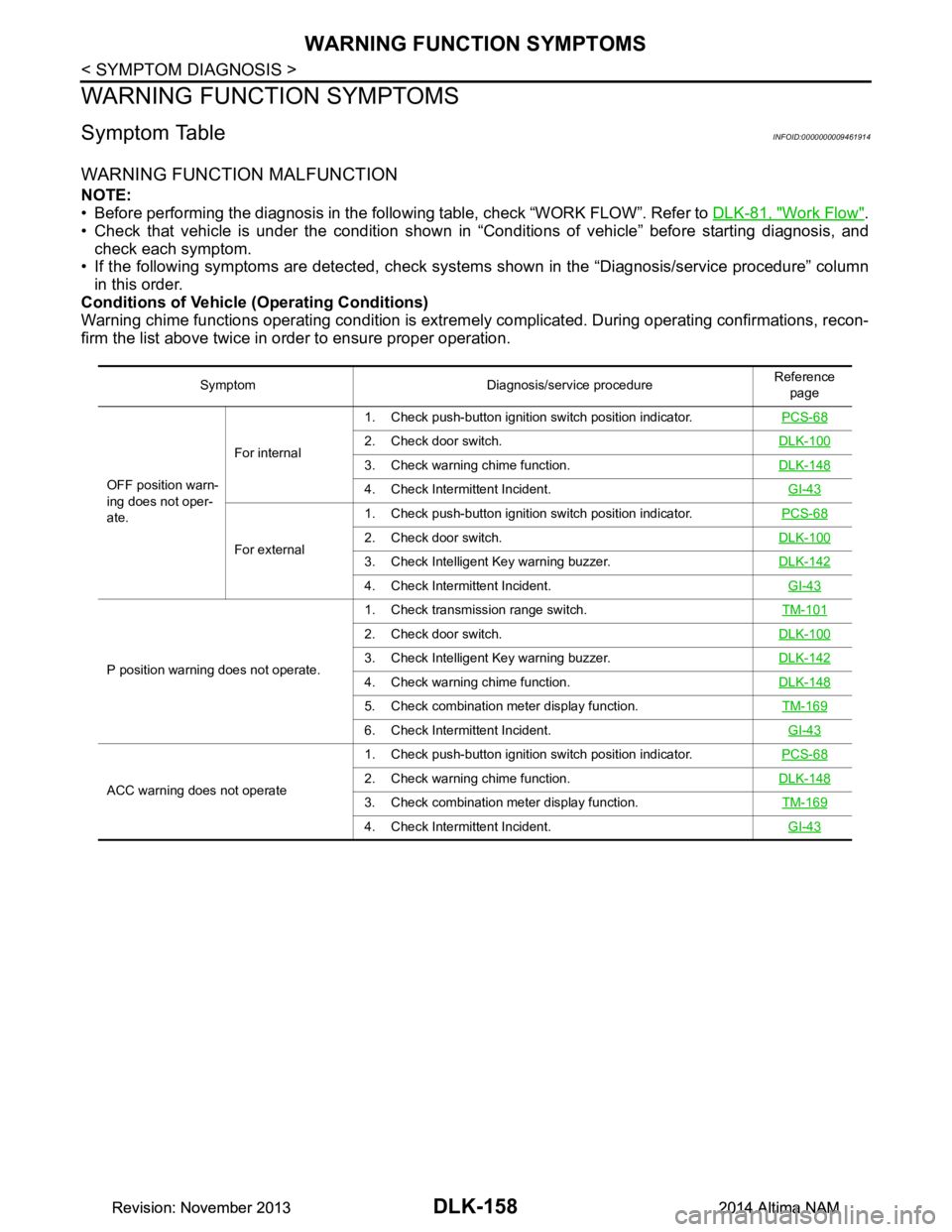
WARNING FUNCTION SYMPTOMS
WARNING FUNCTION SYMPTOMS
Symptom TableINFOID:0000000009461914
WARNING FUNCTION MALFUNCTION
NOTE:
• Before performing the diagnosis in the following table, check “WORK FLOW”. Refer to DLK-81, "Work Flow"
.
• Check that vehicle is under the condition shown in “Conditions of vehicle” before starting diagnosis, and
check each symptom.
• If the following symptoms are detected, check syst ems shown in the “Diagnosis/service procedure” column
in this order.
Conditions of Vehicle (Operating Conditions)
Warning chime functions operating condition is extrem ely complicated. During operating confirmations, recon-
firm the list above twice in order to ensure proper operation.
Symptom Diagnosis/service procedure Reference
page
OFF position warn-
ing does not oper-
ate. For internal
1. Check push-button ignition switch position indicator.
PCS-68
2. Check door switch.DLK-100
3. Check warning chime function.DLK-148
4. Check Intermittent Incident. GI-43
For external1. Check push-button ignition switch position indicator.
PCS-682. Check door switch.DLK-100
3. Check Intelligent Key warning buzzer.DLK-142
4. Check Intermittent Incident. GI-43
P position warning does not operate.1. Check transmission range switch.
TM-101
2. Check door switch.DLK-100
3. Check Intelligent Key warning buzzer.DLK-142
4. Check warning chime function.DLK-148
5. Check combination meter display function. TM-169
6. Check Intermittent Incident. GI-43
ACC warning does not operate1. Check push-button ignition switch position indicator.
PCS-682. Check warning chime function.DLK-148
3. Check combination meter display function. TM-169
4. Check Intermittent Incident. GI-43
Revision: November 20132014 Altima NAMRevision: November 20132014 Altima NAM
Page 927 of 4801
WARNING FUNCTION SYMPTOMSDLK-159
< SYMPTOM DIAGNOSIS >
C
D E
F
G H
I
J
L
M A
B
DLK
N
O P
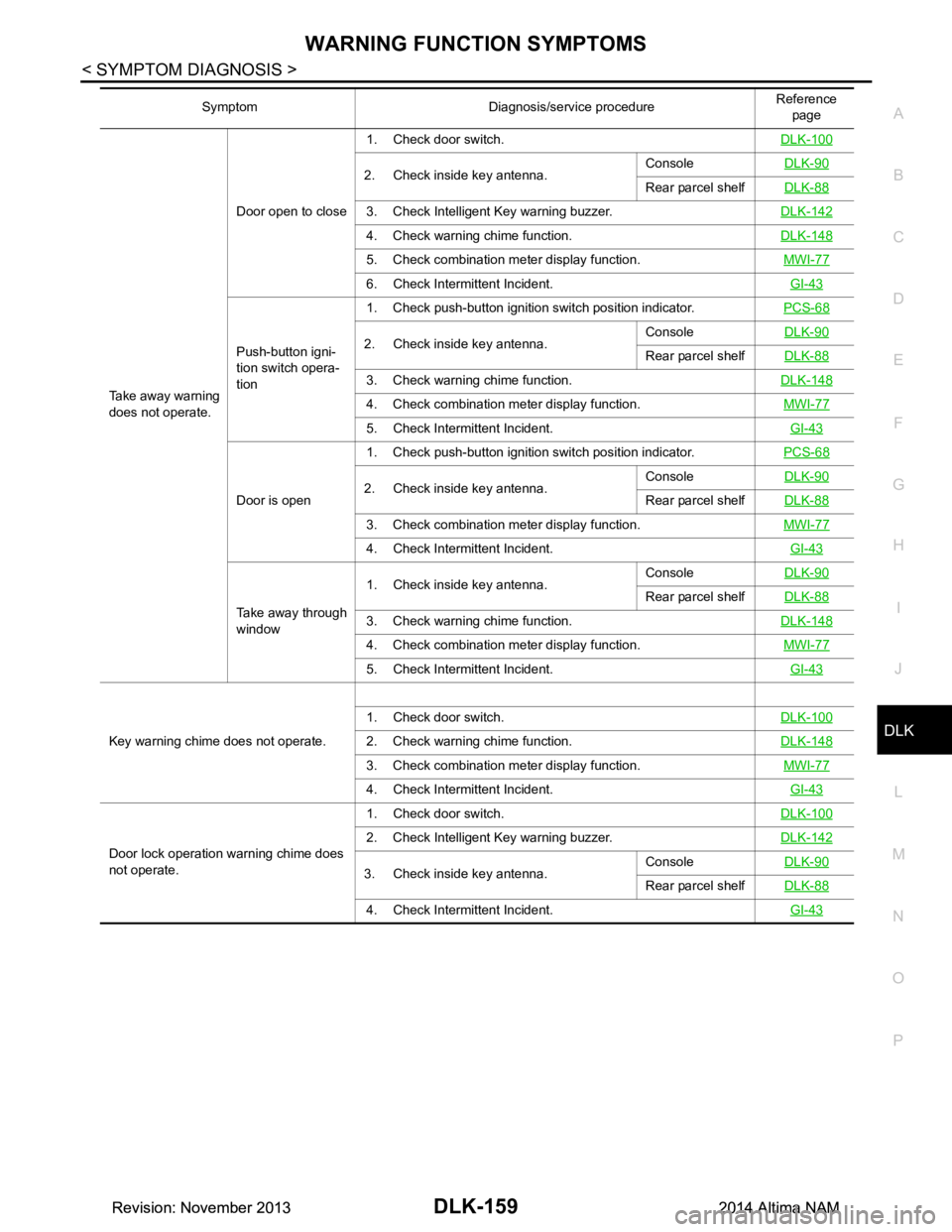
Take away warning
does not operate. Door open to close
1. Check door switch.
DLK-100
2. Check inside key antenna.Console
DLK-90Rear parcel shelfDLK-88
3. Check Intelligent Key warning buzzer. DLK-142
4. Check warning chime function.DLK-148
5. Check combination meter display function. MWI-77
6. Check Intermittent Incident. GI-43
Push-button igni-
tion switch opera-
tion 1. Check push-button ignition switch position indicator.
PCS-682. Check inside key antenna.Console
DLK-90Rear parcel shelfDLK-88
3. Check warning chime function. DLK-148
4. Check combination meter display function. MWI-77
5. Check Intermittent Incident. GI-43
Door is open1. Check push-button ignition switch position indicator.
PCS-682. Check inside key antenna.Console
DLK-90Rear parcel shelfDLK-88
3. Check combination meter display function. MWI-77
4. Check Intermittent Incident. GI-43
Take away through
window 1. Check inside key antenna.
Console
DLK-90
Rear parcel shelfDLK-88
3. Check warning chime function. DLK-148
4. Check combination meter display function. MWI-77
5. Check Intermittent Incident. GI-43
Key warning chime does not operate.1. Check door switch.
DLK-1002. Check warning chime function.DLK-148
3. Check combination meter display function. MWI-77
4. Check Intermittent Incident. GI-43
Door lock operation warning chime does
not operate. 1. Check door switch.
DLK-100
2. Check Intelligent Key warning buzzer.DLK-142
3. Check inside key antenna.Console
DLK-90Rear parcel shelfDLK-88
4. Check Intermittent Incident. GI-43
Symptom Diagnosis/service procedure Reference
page
Revision: November 20132014 Altima NAMRevision: November 20132014 Altima NAM
Page 929 of 4801
HAZARD FUNCTIONDLK-161
< SYMPTOM DIAGNOSIS >
C
D E
F
G H
I
J
L
M A
B
DLK
N
O P
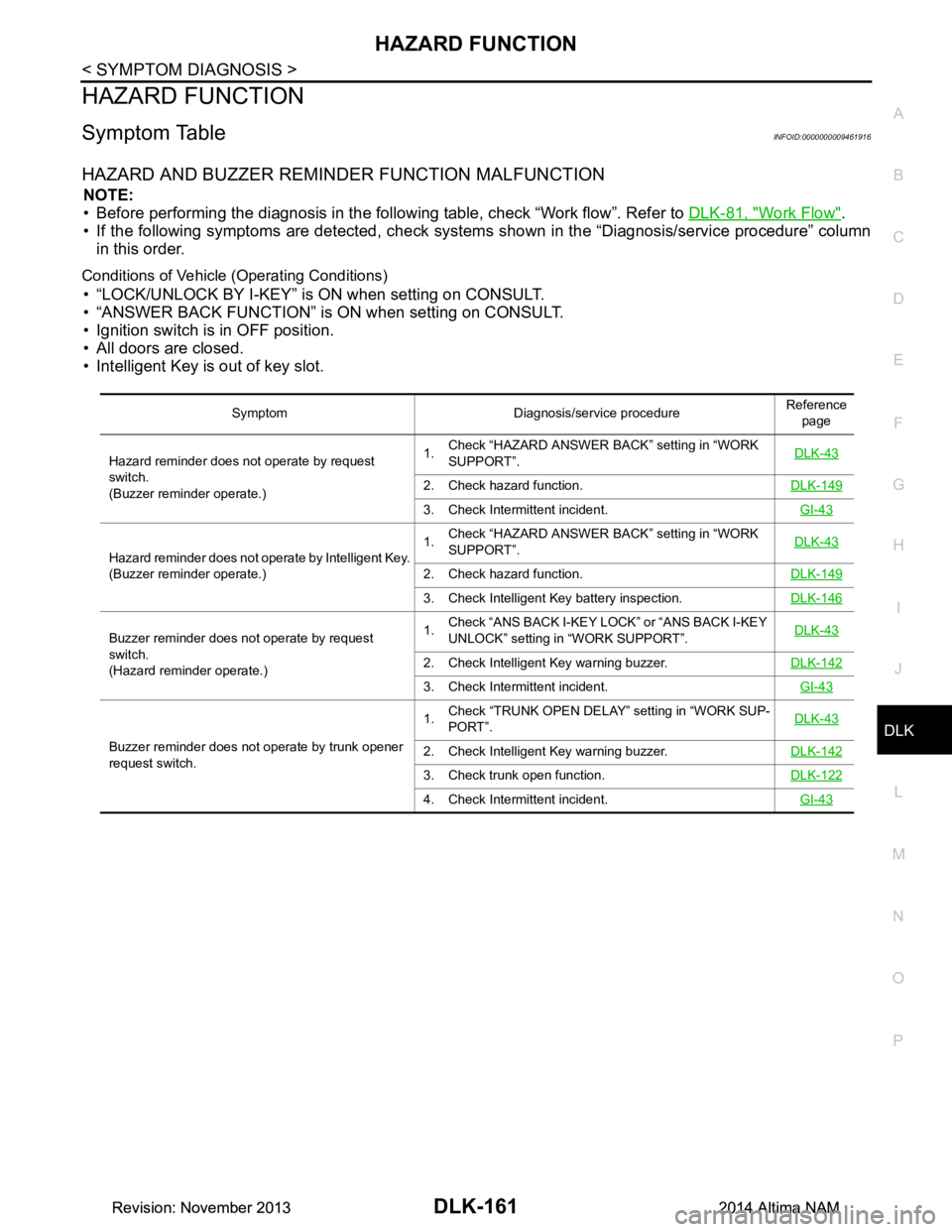
HAZARD FUNCTION
Symptom TableINFOID:0000000009461916
HAZARD AND BUZZER REMINDER FUNCTION MALFUNCTION
NOTE:
• Before performing the diagnosis in the following table, check “Work flow”. Refer to DLK-81, "Work Flow"
.
• If the following symptoms are detec ted, check systems shown in the “Diagnosis/service procedure” column
in this order.
Conditions of Vehicle (Operating Conditions)
• “LOCK/UNLOCK BY I-KEY” is ON when setting on CONSULT.
• “ANSWER BACK FUNCTION” is ON when setting on CONSULT.
• Ignition switch is in OFF position.
• All doors are closed.
• Intelligent Key is out of key slot.
Symptom Diagnosis/service procedure Reference
page
Hazard reminder does not operate by request
switch.
(Buzzer reminder operate.) 1.
Check “HAZARD ANSWER BACK” setting in “WORK
SUPPORT”. DLK-43
2. Check hazard function.
DLK-149
3. Check Intermittent incident. GI-43
Hazard reminder does not operate by Intelligent Key.
(Buzzer reminder operate.) 1.
Check “HAZARD ANSWER BACK” setting in “WORK
SUPPORT”. DLK-43
2. Check hazard function.
DLK-149
3. Check Intelligent Key battery inspection.DLK-146
Buzzer reminder does not operate by request
switch.
(Hazard reminder operate.) 1.
Check “ANS BACK I-KEY LOCK” or “ANS BACK I-KEY
UNLOCK” setting in “WORK SUPPORT”. DLK-43
2. Check Intelligent Key warning buzzer.
DLK-142
3. Check Intermittent incident. GI-43
Buzzer reminder does not operate by trunk opener
request switch. 1.
Check “TRUNK OPEN DELAY” setting in “WORK SUP-
PORT”. DLK-432. Check Intelligent Key warning buzzer.
DLK-142
3. Check trunk open function.DLK-122
4. Check Intermittent incident. GI-43
Revision: November 20132014 Altima NAMRevision: November 20132014 Altima NAM
Page 930 of 4801

DLK-162
< SYMPTOM DIAGNOSIS >
HORN FUNCTION
HORN FUNCTION
Symptom TableINFOID:0000000009461917
HAZARD AND HORN REMINDER FUNCTION MALFUNCTION
NOTE:
• Before performing the diagnosis in the follo wing table, check “Work flow”. Refer to DLK-81, "Work Flow"
.
• If the following symptoms are detected, check syst ems shown in the “Diagnosis/service procedure” column
in this order.
Conditions of Vehicle (Operating Conditions)
• “ANSWER BACK FUNCTION” is ON when setting on CONSULT.
• Ignition switch is in OFF position.
• All doors are closed.
Symptom Diagnosis/service procedure Reference
page
Hazard reminder does not operate by request
switch.
(Horn reminder operate.) 1.
Check “HAZARD ANSWER BACK” setting in “WORK
SUPPORT”. DLK-43
2. Check hazard function.
DLK-149
3. Check Intermittent Incident. GI-43
Hazard reminder does not operate by Intelligent Key.
(Horn reminder operate.) 1.
Check “HAZARD ANSWER BACK” setting in “WORK
SUPPORT”. DLK-43
2. Check hazard function.
DLK-149
3. Check Intelligent Key battery inspection.DLK-146
Horn reminder does not operate by request switch.
(Hazard reminder operate.) 1.
Check “ANSWER BACK WITH I-KEY LOCK” or “AN-
SWER BACK WITH I-KEY UNLOCK” setting in “WORK
SUPPORT”. DLK-43
2. Check Intelligent Key warning buzzer.
DLK-142
3. Check Intermittent Incident. GI-43
Horn reminder does not operate by Intelligent Key.
(Hazard reminder operate.) 1.
Check “HORN WITH KEYLESS LOCK” setting in
“WORK SUPPORT”. DLK-43
2. Check horn function.
HRN-3
3. Check Intermittent Incident. GI-43
Revision: November 20132014 Altima NAMRevision: November 20132014 Altima NAM