clutch NISSAN TEANA 2014 Owner's Manual
[x] Cancel search | Manufacturer: NISSAN, Model Year: 2014, Model line: TEANA, Model: NISSAN TEANA 2014Pages: 4801, PDF Size: 51.2 MB
Page 2745 of 4801
![NISSAN TEANA 2014 Owners Manual
HAC-96
< SYMPTOM DIAGNOSIS >[AUTOMATIC AIR CONDITIONER]
INSUFFICIENT COOLING
INSUFFICIENT COOLING
DescriptionINFOID:0000000009463167
Symptom
• Insufficient cooling
• No cool air comes out. (Air](/img/5/57390/w960_57390-2744.png "NISSAN TEANA 2014 Owners Manual
HAC-96
< SYMPTOM DIAGNOSIS >[AUTOMATIC AIR CONDITIONER]
INSUFFICIENT COOLING
INSUFFICIENT COOLING
DescriptionINFOID:0000000009463167
Symptom
• Insufficient cooling
• No cool air comes out. (Air")
HAC-96
< SYMPTOM DIAGNOSIS >[AUTOMATIC AIR CONDITIONER]
INSUFFICIENT COOLING
INSUFFICIENT COOLING
DescriptionINFOID:0000000009463167
Symptom
• Insufficient cooling
• No cool air comes out. (Air flow volume is normal.)
Diagnosis ProcedureINFOID:0000000009463168
NOTE:
Perform self-diagnoses with CONSULT before performi ng symptom diagnosis. If any DTC is detected, per-
form the corresponding diagnosis.
1.CHECK MAGNET CLUTCH OPERATION
1. Turn ignition switch ON.
2. Operate fan switch.
3. Press A/C switch.
4. Check that A/C indicator turns ON. Check visually and by sound that compressor operates.
5. Press A/C switch again.
6. Check that A/C indicator turns OFF. Check that compressor stops.
Is the inspection result normal?
YES >> GO TO 2.
NO >> Perform diagnosis of “COMPRESSOR DOES NOT OPERATE” in “SYMPTOM DIAGNOSIS”.
Refer to HAC-99, "Diagnosis Procedure"
.
2.CHECK DRIVE BELT
Check tension of drive belt. Refer to EM-19, "Checking Drive Belts"
(QR25DE) or EM-134, "Checking Drive
Belts" (VQ35DE).
Is the inspection result normal?
YES >> GO TO 3.
NO >> Adjust or replace drive belt depending on the inspection results.
3.CHECK REFRIGERANT CYCLE
Connect recovery/recycling recharging equipment to the vehicle and perform pressure inspection with gauge.
Refer to HA-18, "Symptom Table"
.
Is the inspection result normal?
YES >> GO TO 4.
NO >> Repair or replace parts depending on the inspection results.
4.CHECK AIR LEAKAGE FROM EACH DUCT
Check duct and nozzle, etc. of the fr ont air conditioning system for leakage.
Is the inspection result normal?
YES >> GO TO 5.
NO >> Repair or replace parts depending on the inspection results.
5.CHECK AMBIENT TEMPERATURE DISPLAY
Check that there is not much difference between act ual ambient temperature and indicated temperature on
information display in combination meter.
Is the inspection result normal?
YES >> GO TO 6.
NO >> Perform diagnosis for the A/C auto amp. connection recognition signal circuit. Refer to HAC-60,
"Diagnosis Procedure".
6.CHECK SETTING OF TEMPERATURE SETTING TRIMMER (FRONT)
1. Check setting value of temperature setting trimmer (front). Refer to HAC-50, "Temperature Setting Trim-
mer".
2. Check that temperature setting trimme r (front) is set to “+ direction”.
Revision: November 20132014 Altima NAMRevision: November 20132014 Altima NAM
Page 2748 of 4801
![NISSAN TEANA 2014 Owners Manual
COMPRESSOR DOES NOT OPERATEHAC-99
< SYMPTOM DIAGNOSIS > [AUTOMATIC AIR CONDITIONER]
C
D E
F
G H
J
K L
M A
B
HAC
N
O P
COMPRESSOR DOES NOT OPERATE
DescriptionINFOID:0000000009463171
Symptom: Compres](/img/5/57390/w960_57390-2747.png "NISSAN TEANA 2014 Owners Manual
COMPRESSOR DOES NOT OPERATEHAC-99
< SYMPTOM DIAGNOSIS > [AUTOMATIC AIR CONDITIONER]
C
D E
F
G H
J
K L
M A
B
HAC
N
O P
COMPRESSOR DOES NOT OPERATE
DescriptionINFOID:0000000009463171
Symptom: Compres")
COMPRESSOR DOES NOT OPERATEHAC-99
< SYMPTOM DIAGNOSIS > [AUTOMATIC AIR CONDITIONER]
C
D E
F
G H
J
K L
M A
B
HAC
N
O P
COMPRESSOR DOES NOT OPERATE
DescriptionINFOID:0000000009463171
Symptom: Compressor does not operate.
Diagnosis ProcedureINFOID:0000000009463172
NOTE:
• Perform self-diagnoses with CONSULT before perform ing symptom diagnosis. If DTC is detected, perform
the corresponding diagnosis.
• Check that refrigerant system is properly charged. If refrigerant amount is below the proper amount, perform
inspection of refrigerant leakage.
1.CHECK MAGNET CLUTCH OPERATION
Check magnet clutch. Refer to HAC-87, "Component Function Check"
.
Does it operate normally?
YES >> GO TO 2.
NO >> Repair or replace malfunctioning parts.
2.CHECK REFRIGERANT PRESSURE SENSOR
Check refrigerant pressure sensor. Refer to EC-523, "Component Function Check"
(QR25DE) or EC-979,
"Component Function Check" (VQ35DE).
Is the inspection result normal?
YES >> GO TO 3.
NO >> Repair or replace malfunctioning parts.
3.CHECK A/C AUTO AMP. OUTPUT SIGNAL
With CONSULT
Check “COMP REQ SIG” and “FAN REQ SIG” in “D ATA MONITOR” mode of “HVAC” using CONSULT.
Is the inspection result normal?
YES >> GO TO 4.
NO >> Replace A/C auto amp. Refer to HAC-102, "Removal and Installation"
.
4.CHECK ECM INPUT SIGNAL
With CONSULT
Check “AIR COND SIG” and “HEATER FAN SW” in “DATA MONITOR” mode of “ECM” using CONSULT.
Is the inspection result normal?
YES >> GO TO 5.
NO >> Check CAN communication system. Refer to LAN-18, "Trouble Diagnosis Flow Chart"
.
5.CHECK IPDM E/R INPUT SIGNAL
With CONSULT
Monitor item Condition Status
COMP REQ SIG A/C switch ON On
OFF Off
FAN REQ SIG Blower motor ON On
OFF Off
Monitor item Condition Status
AIR COND SIG A/C switch ON On
OFF Off
HEATER FAN SW Blower motor ON On
OFF Off
Revision: November 20132014 Altima NAMRevision: November 20132014 Altima NAM
Page 2789 of 4801
![NISSAN TEANA 2014 Owners Manual
HAC-140
< BASIC INSPECTION >[MANUAL AIR CONDITIONER]
OPERATION INSPECTION
OPERATION INSPECTION
Work ProcedureINFOID:0000000009463210
DESCRIPTION
The purpose of the operational check is to che
ck that](/img/5/57390/w960_57390-2788.png "NISSAN TEANA 2014 Owners Manual
HAC-140
< BASIC INSPECTION >[MANUAL AIR CONDITIONER]
OPERATION INSPECTION
OPERATION INSPECTION
Work ProcedureINFOID:0000000009463210
DESCRIPTION
The purpose of the operational check is to che
ck that")
HAC-140
< BASIC INSPECTION >[MANUAL AIR CONDITIONER]
OPERATION INSPECTION
OPERATION INSPECTION
Work ProcedureINFOID:0000000009463210
DESCRIPTION
The purpose of the operational check is to che
ck that the individual system operates normally.
OPERATION INSPECTION
1.CHECK BLOWER
1. Rotate the blower control dial clockwise one detent. Blower should operate on low speed.
2. Rotate the blower control dial one detent at a time, and continue checking blower speed until all speeds
are checked.
3. Leave blower on maximum speed.
Is the test result normal?
YES >> GO TO 2.
NO >> Refer to HAC-148, "Diagnosis Procedure"
.
2.CHECK A/C SWITCH LED
1. Press A/C switch.
2. A/C switch indicator should turn ON.
Is the test result normal?
YES >> GO TO 3.
NO >> Refer to HAC-152, "Diagnosis Procedure"
.
3.CHECK A/C SWITCH
Confirm that the compressor clutch engages (sound or visual inspection).
Is the test result normal?
YES >> GO TO 4.
NO >> Refer to HAC-151, "Diagnosis Procedure"
.
4.CHECK FRONT AIR CONTROL MODE LEDS
1. Press D/F ( ), FOOT ( ), B/L , and VENT , MAX A/C, and DEF ( ).
2. Each button indicator should illuminate.
Is the test result normal?
YES >> GO TO 5.
NO >> Refer to HAC-152, "Diagnosis Procedure"
.
5.CHECK DISCHARGE AIR
1. Press D/F ( ), FOOT ( ), B/L , and VENT and DEF ( ).
2. Confirm that discharge air comes out accordi ng to the air distribution table. Refer to HAC-119, "Door Con-
trol".
Is the test result normal?
YES >> GO TO 6.
NO >> Refer to HAC-154, "Symptom Table"
.
6.CHECK REC LED
1. Press DEF ( ) and make sure LED is off.
2. Make sure VENT ( ) or B/L ( ) is selected.
3. Press REC ( ) switch one time. REC indicator should illuminate. Check condition : Engine running
at normal operating temperature.
Check condition : Blower cont rol dial in OFF position.
Check condition : REC o ff (LED extinguished).
Check condition : VENT select ed (LED illuminated).
Check condition : DEF off (LED extinguished).
Revision: November 20132014 Altima NAMRevision: November 20132014 Altima NAM
Page 2800 of 4801
![NISSAN TEANA 2014 Owners Manual
MAGNET CLUTCHHAC-151
< DTC/CIRCUIT DIAGNOSIS > [MANUAL AIR CONDITIONER]
C
D E
F
G H
J
K L
M A
B
HAC
N
O P
MAGNET CLUTCH
Component Function CheckINFOID:0000000009463217
1.CHECK MAGNET CLUTCH OPERATI](/img/5/57390/w960_57390-2799.png "NISSAN TEANA 2014 Owners Manual
MAGNET CLUTCHHAC-151
< DTC/CIRCUIT DIAGNOSIS > [MANUAL AIR CONDITIONER]
C
D E
F
G H
J
K L
M A
B
HAC
N
O P
MAGNET CLUTCH
Component Function CheckINFOID:0000000009463217
1.CHECK MAGNET CLUTCH OPERATI")
MAGNET CLUTCHHAC-151
< DTC/CIRCUIT DIAGNOSIS > [MANUAL AIR CONDITIONER]
C
D E
F
G H
J
K L
M A
B
HAC
N
O P
MAGNET CLUTCH
Component Function CheckINFOID:0000000009463217
1.CHECK MAGNET CLUTCH OPERATION
Perform auto active test of IPDM E/R. Refer to PCS-8, "Diagnosis Description"
.
Does it operate normally?
YES >> Inspection End.
NO >> Refer to HAC-151, "Diagnosis Procedure"
.
Diagnosis ProcedureINFOID:0000000009463218
Regarding Wiring Diagram information, refer to HAC-130, "Wiring Diagram".
1.CHECK FUSE
1. Turn ignition switch OFF.
2. Check 10A fuse (No. 53, located in IPDM E/R).
NOTE:
Refer to PG-72, "Fuse, Connector and Terminal Arrangement"
.
Is the inspection result normal?
YES >> GO TO 2.
NO >> Replace the blown fuse after repairing the affected circuit.
2.CHECK MAGNET CLUTCH POWER SUPPLY CIRCUIT
1. Disconnect compressor connec tor and IPDM E/R connector.
2. Check continuity between compressor har ness connector and IPDM E/R harness connector.
Is the inspection result normal?
YES >> GO TO 3.
NO >> Repair harness or connector.
3.CHECK MAGNET CLUTCH GROUND CIRCUIT
1. Disconnect compressor connector.
2. Check continuity between comp ressor harness connector and ground.
Is the inspection result normal?
YES >> GO TO 4.
NO >> Repair harness or connector.
4.CHECK MAGNET CLUTCH
Directly apply battery voltage to the magnet cl utch. Check operation visually and by sound.
Does it operate normally?
YES >> Replace IPDM E/R. Refer to PCS-32, "Removal and Installation".
NO >> Replace magnet clutch. Refer to HA-31, "MAGNET CLUTCH : Removal and Installation"
.
Compressor IPDM E/R
Continuity
Connector Terminal Connector Terminal
F3 1 F83 56 Yes
Compressor —Continuity
Connector Terminal
F3 2 Ground Yes
Revision: November 20132014 Altima NAMRevision: November 20132014 Altima NAM
Page 2803 of 4801
![NISSAN TEANA 2014 Owners Manual
HAC-154
< SYMPTOM DIAGNOSIS >[MANUAL AIR CONDITIONER]
HEATER AND AIR CONDITIONING
SYSTEM CONTROL SYMPTOMS
SYMPTOM DIAGNOSIS
HEATER AND AIR CONDITIONING SYSTEM CONTROL SYMPTOMS
Symptom TableINFOID:00](/img/5/57390/w960_57390-2802.png "NISSAN TEANA 2014 Owners Manual
HAC-154
< SYMPTOM DIAGNOSIS >[MANUAL AIR CONDITIONER]
HEATER AND AIR CONDITIONING
SYSTEM CONTROL SYMPTOMS
SYMPTOM DIAGNOSIS
HEATER AND AIR CONDITIONING SYSTEM CONTROL SYMPTOMS
Symptom TableINFOID:00")
HAC-154
< SYMPTOM DIAGNOSIS >[MANUAL AIR CONDITIONER]
HEATER AND AIR CONDITIONING
SYSTEM CONTROL SYMPTOMS
SYMPTOM DIAGNOSIS
HEATER AND AIR CONDITIONING SYSTEM CONTROL SYMPTOMS
Symptom TableINFOID:0000000009463222
SYMPTOM TABLE
Symptom Reference Page
A/C system does not come on. Go to Trouble Diagnosis Procedure for A/C System. HAC-152, "Diagno-
sis Procedure"
Air outlet does not change.
Go to Trouble Diagnosis Procedure for Mode Door Motor. (LIN) HAC-142, "Diagno-
sis Procedure"Mode door motor does not operate normally.
Discharge air temperature does not change. Go to Trouble Diagnosis Procedure for Air Mix Door Motor. (LIN) HAC-144, "Diagno-
sis Procedure"Air mix door motor does not operate normal-
ly.
Intake door does not change. Go to Trouble Diagnosis Procedure for Intake Door Motor. (LIN) HAC-146, "Diagno-
sis Procedure"Intake door motor does not operate normally.
Blower motor operation is malfunctioning. Go to Trouble Diagnosis Procedure for Blower Motor. HAC-148, "Diagno-
sis Procedure"
Magnet clutch does not engage. Go to Trouble Diagnosis Procedure for Magnet Clutch.HAC-151, "Diagno-sis Procedure"
Insufficient cooling Go to Trouble Diagnosis Procedure for Insufficient Cooling.HAC-155, "Compo-nent Function
Check"
Insufficient heating Go to Trouble Diagnosis Procedure for Insufficient Heating.HAC-157, "Compo-nent Function
Check"
Noise Go to Trouble Diagnosis Procedure for Noise.
HA-20, "Symptom Table"
Revision: November 20132014 Altima NAMRevision: November 20132014 Altima NAM
Page 2808 of 4801
![NISSAN TEANA 2014 Owners Manual
COMPRESSOR DOES NOT OPERATEHAC-159
< SYMPTOM DIAGNOSIS > [MANUAL AIR CONDITIONER]
C
D E
F
G H
J
K L
M A
B
HAC
N
O P
COMPRESSOR DOES NOT OPERATE
DescriptionINFOID:0000000009463225
Symptom: Compresso](/img/5/57390/w960_57390-2807.png "NISSAN TEANA 2014 Owners Manual
COMPRESSOR DOES NOT OPERATEHAC-159
< SYMPTOM DIAGNOSIS > [MANUAL AIR CONDITIONER]
C
D E
F
G H
J
K L
M A
B
HAC
N
O P
COMPRESSOR DOES NOT OPERATE
DescriptionINFOID:0000000009463225
Symptom: Compresso")
COMPRESSOR DOES NOT OPERATEHAC-159
< SYMPTOM DIAGNOSIS > [MANUAL AIR CONDITIONER]
C
D E
F
G H
J
K L
M A
B
HAC
N
O P
COMPRESSOR DOES NOT OPERATE
DescriptionINFOID:0000000009463225
Symptom: Compressor does not operate.
Diagnosis ProcedureINFOID:0000000009463226
NOTE:
• Perform self-diagnoses with CONSULT before perform ing symptom diagnosis. If DTC is detected, perform
the corresponding diagnosis.
• Check that refrigerant system is properly charged. If refrigerant amount is below the proper amount, perform
inspection of refrigerant leakage.
1.CHECK MAGNET CLUTCH OPERATION
Check magnet clutch. Refer to HAC-87, "Component Function Check"
.
Does it operate normally?
YES >> GO TO 2.
NO >> Repair or replace malfunctioning parts.
2.CHECK REFRIGERANT PRESSURE SENSOR
Check refrigerant pressure sensor. Refer to EC-523, "Component Function Check"
(QR25DE) or EC-979,
"Component Function Check" (VQ35DE).
Is the inspection result normal?
YES >> GO TO 3.
NO >> Repair or replace malfunctioning parts.
3.CHECK FRONT AIR CONTROL OUTPUT SIGNAL
With CONSULT
Check “FAN ON” and “” in “DATA MONI TOR” mode of “” using CONSULT.
Is the inspection result normal?
YES >> GO TO 4.
NO >> Replace front air control. Refer to HAC-161, "Removal and Installation"
.
4.CHECK ECM INPUT SIGNAL
With CONSULT
Check “AIR COND SIG” and “HEATER FAN SW” in “DATA MONITOR” mode of “ECM” using CONSULT.
Is the inspection result normal?
YES >> GO TO 5.
NO >> Check CAN communication system. Refer to LAN-18, "Trouble Diagnosis Flow Chart"
.
5.CHECK IPDM E/R INPUT SIGNAL
With CONSULT
Monitor item Condition Status
AIR COND SW A/C switch ON On
OFF Off
FAN ON Blower motor ON On
OFF Off
Monitor item Condition Status
AIR COND SIG A/C switch ON On
OFF Off
HEATER FAN SW Blower motor ON On
OFF Off
Revision: November 20132014 Altima NAMRevision: November 20132014 Altima NAM
Page 2901 of 4801

INT-10
< SYMPTOM DIAGNOSIS >
SQUEAK AND RATTLE TROUBLE DIAGNOSES
If possible, drive the vehicle with the customer until the noise is duplicated. Note any additional information on
the Diagnostic Worksheet regarding the conditions or lo cation of the noise. This information can be used to
duplicate the same conditions when you confirm the repair.
If the noise can be duplicated easily during the test drive, to help identify the source of the noise, try to dupli-
cate the noise with the vehicle stopped by doing one or all of the following:
1) Close a door.
2) Tap or push/pull around the area where the noise appears to be coming from.
3) Rev the engine.
4) Use a floor jack to recreate vehicle “twist”.
5) At idle, apply engine load (electrical load, half-clutch on M/T model, drive position on CVT and A/T models).
6) Raise the vehicle on a hoist and hit a tire with a rubber hammer.
• Drive the vehicle and attempt to duplicate the conditions the customer states exist when the noise occurs.
• If it is difficult to duplicate the noise, drive the v ehicle slowly on an undulating or rough road to stress the
vehicle body.
CHECK RELATED SERVICE BULLETINS
After verifying the customer concern or symptom, chec k ASIST for Technical Service Bulletins (TSBs) related
to that concern or symptom.
If a TSB relates to the symptom, follo w the procedure to repair the noise.
LOCATE THE NOISE AND IDENTIFY THE ROOT CAUSE
1. Narrow down the noise to a general area. To help pi npoint the source of the noise, use a listening tool
(Chassis Ear: J-39570, Engine Ear: J-39565 and mechanic's stethoscope).
2. Narrow down the noise to a more specific area and identify the cause of the noise by:
• removing the components in the area that you suspect the noise is coming from. Do not use too much force when removing clips and fasteners, otherwise clips and fasteners can be
broken or lost during the repair, resulting in the creation of new noise.
• tapping or pushing/pulling the component that you suspect is causing the noise.
Do not tap or push/pull the component with excessive force, otherwise the noise will be eliminated only
temporarily.
• feeling for a vibration with your hand by touching the component(s) that you suspect is (are) causing the
noise.
• placing a piece of paper between components that you suspect are causing the noise.
• looking for loose components and contact marks. Refer to INT-10, "Generic Squeak and Rattle Troubleshooting"
.
REPAIR THE CAUSE
• If the cause is a loose component, tighten the component securely.
• If the cause is insufficient clearance between components:
- separate components by repositioning or loos ening and retightening the component, if possible.
- insulate components with a suitable insulator such as urethane pads, foam blocks, felt cloth tape or urethane
tape. A NISSAN Squeak and Rattle Kit (J-50397) is av ailable through your authorized NISSAN Parts Depart-
ment.
CAUTION:
Do not use excessive force as many components are constructed of plastic and may be damaged.
NOTE:
• Always check with the Parts Department for the latest parts information.
• The materials contained in the NISSAN Squeak and Rattle Kit (J-50397) are listed on the inside cover of the
kit; and can each be ordered seperately as needed.
• The following materials not found in the kit can also be used to repair squeaks and rattles.
- SILICONE GREASE: Use instead of UHMW tape that will be visible or does not fit. The silicone grease will
only last a few months.
- SILICONE SPRAY: Use when grease cannot be applied.
- DUCT TAPE: Use to eliminate movement.
CONFIRM THE REPAIR
Confirm that the cause of a noise is repaired by test driving the vehicle. Operate the vehicle under the same
conditions as when the noise originally occurred. Refer to the notes on the Diagnostic Worksheet.
Generic Squeak and Rattle TroubleshootingINFOID:0000000009889898
Refer to Table of Contents for specific component removal and installation information.
Revision: November 20132014 Altima NAM
Page 2935 of 4801
SQUEAK AND RATTLE TROUBLE DIAGNOSESIP-9
< SYMPTOM DIAGNOSIS >
C
D E
F
G H
I
K L
M A
B
IP
N
O P
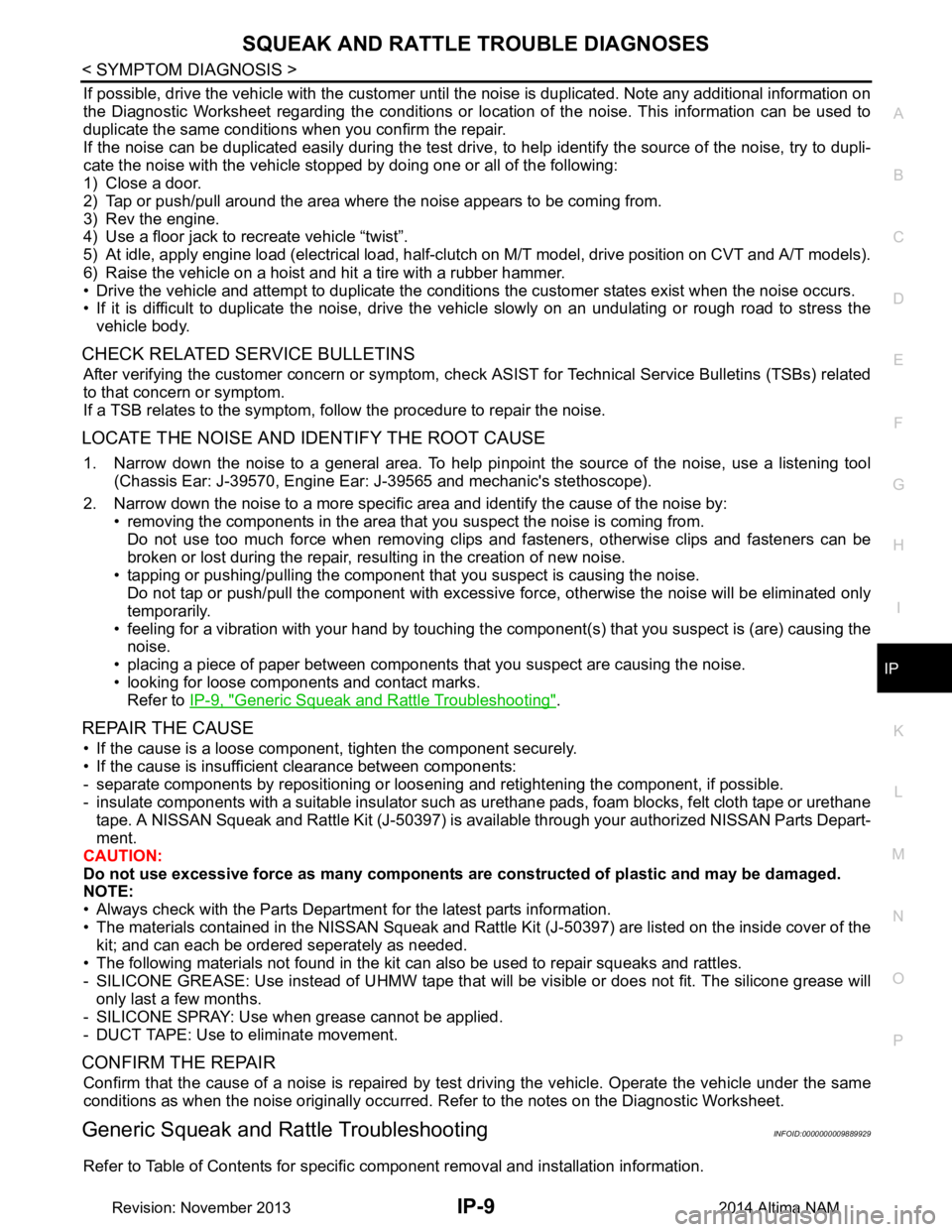
If possible, drive the vehicle with the customer until the noise is duplicated. Note any additional information on
the Diagnostic Worksheet regarding the conditions or lo cation of the noise. This information can be used to
duplicate the same conditions when you confirm the repair.
If the noise can be duplicated easily during the test drive, to help identify the source of the noise, try to dupli-
cate the noise with the vehicle stopped by doing one or all of the following:
1) Close a door.
2) Tap or push/pull around the area where the noise appears to be coming from.
3) Rev the engine.
4) Use a floor jack to recreate vehicle “twist”.
5) At idle, apply engine load (electrical load, half-clutch on M/T model, drive position on CVT and A/T models).
6) Raise the vehicle on a hoist and hit a tire with a rubber hammer.
• Drive the vehicle and attempt to duplicate the conditions the customer states exist when the noise occurs.
• If it is difficult to duplicate the noise, drive the vehicle slowly on an undulating or rough road to stress the
vehicle body.
CHECK RELATED SERVICE BULLETINS
After verifying the customer concern or symptom, che ck ASIST for Technical Service Bulletins (TSBs) related
to that concern or symptom.
If a TSB relates to the symptom, follow the procedure to repair the noise.
LOCATE THE NOISE AND IDENTIFY THE ROOT CAUSE
1. Narrow down the noise to a general area. To help pi npoint the source of the noise, use a listening tool
(Chassis Ear: J-39570, Engine Ear: J-39565 and mechanic's stethoscope).
2. Narrow down the noise to a more specific area and identify the cause of the noise by: • removing the components in the area that you suspect the noise is coming from.Do not use too much force when removing clips and fasteners, otherwise clips and fasteners can be
broken or lost during the repair, resulting in the creation of new noise.
• tapping or pushing/pulling the component that you suspect is causing the noise.
Do not tap or push/pull the component with excessive force, otherwise the noise will be eliminated only
temporarily.
• feeling for a vibration with your hand by touching the component(s) that you suspect is (are) causing the
noise.
• placing a piece of paper between components that you suspect are causing the noise.
• looking for loose components and contact marks. Refer to IP-9, "Generic Squeak and Rattle Troubleshooting"
.
REPAIR THE CAUSE
• If the cause is a loose component, tighten the component securely.
• If the cause is insufficient clearance between components:
- separate components by repositioning or loos ening and retightening the component, if possible.
- insulate components with a suitable insulator such as urethane pads, foam blocks, felt cloth tape or urethane
tape. A NISSAN Squeak and Rattle Kit (J-50397) is av ailable through your authorized NISSAN Parts Depart-
ment.
CAUTION:
Do not use excessive force as many components are constructed of plastic and may be damaged.
NOTE:
• Always check with the Parts Department for the latest parts information.
• The materials contained in the NISSAN Squeak and Rattle Kit (J-50397) are listed on the inside cover of the
kit; and can each be ordered seperately as needed.
• The following materials not found in the kit can also be used to repair squeaks and rattles.
- SILICONE GREASE: Use instead of UHMW tape that will be visible or does not fit. The silicone grease will
only last a few months.
- SILICONE SPRAY: Use when grease cannot be applied.
- DUCT TAPE: Use to eliminate movement.
CONFIRM THE REPAIR
Confirm that the cause of a noise is repaired by test driving the vehicle. Operate the vehicle under the same
conditions as when the noise originally occurred. Refer to the notes on the Diagnostic Worksheet.
Generic Squeak and Rattle TroubleshootingINFOID:0000000009889929
Refer to Table of Contents for specific component removal and installation information.
Revision: November 20132014 Altima NAM
Page 3190 of 4801
MA-6
< PERIODIC MAINTENANCE >
GENERAL MAINTENANCE
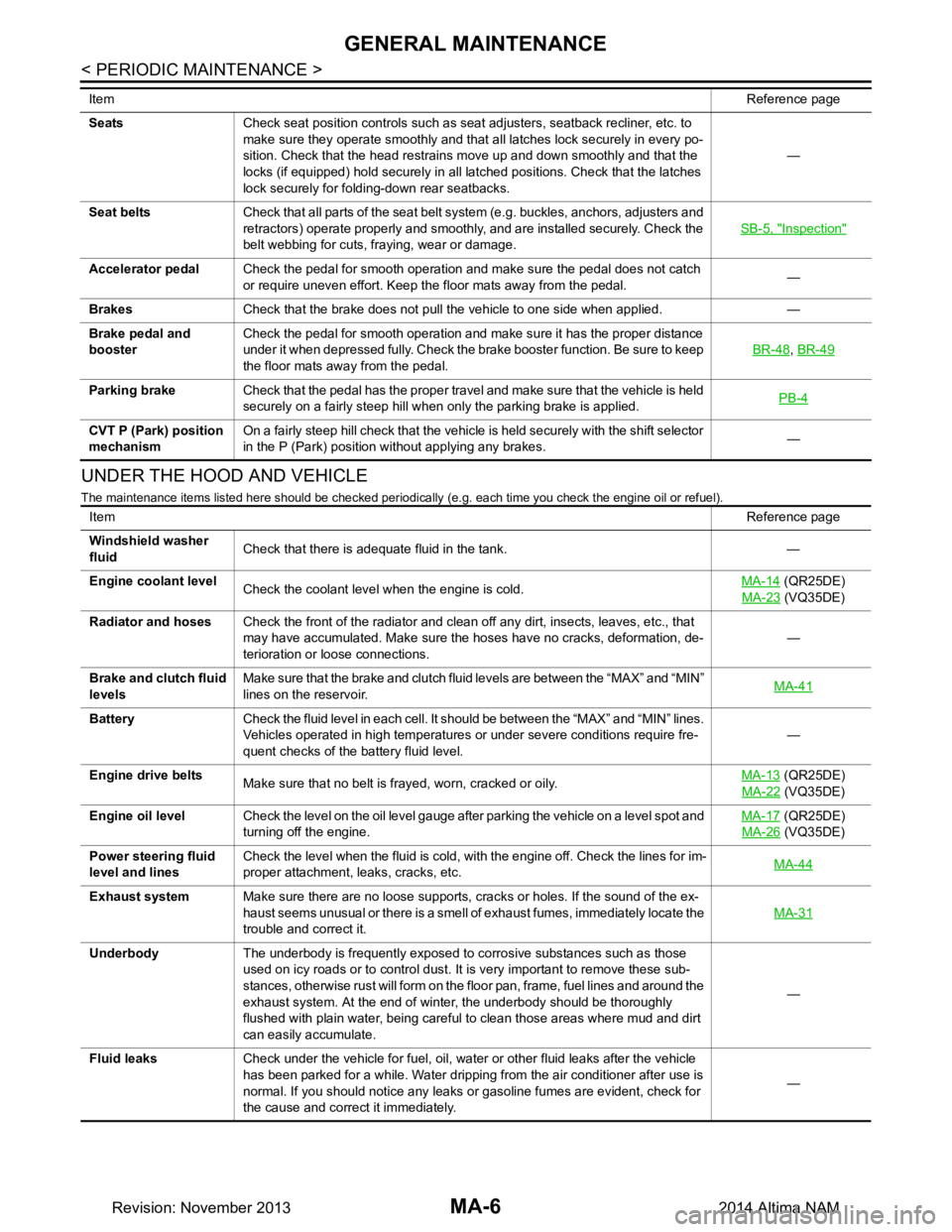
UNDER THE HOOD AND VEHICLE
The maintenance items listed here should be checked periodically (e.g. each time you check the engine oil or refuel).
SeatsCheck seat position controls such as seat adjusters, seatback recliner, etc. to
make sure they operate smoothly and that all latches lock securely in every po-
sition. Check that the head restrains move up and down smoothly and that the
locks (if equipped) hold securely in all latched positions. Check that the latches
lock securely for folding-down rear seatbacks. —
Seat belts Check that all parts of the seat belt system (e.g. buckles, anchors, adjusters and
retractors) operate properly and smoothly, and are installed securely. Check the
belt webbing for cuts, fraying, wear or damage. SB-5, "Inspection"
Accelerator pedal
Check the pedal for smooth operation and make sure the pedal does not catch
or require uneven effort. Keep the floor mats away from the pedal. —
Brakes Check that the brake does not pull the vehicle to one side when applied. —
Brake pedal and
booster Check the pedal for smooth operation and make sure it has the proper distance
under it when depressed fully. Check the brake booster function. Be sure to keep
the floor mats away from the pedal. BR-48
,
BR-49
Parking brake Check that the pedal has the proper travel and make sure that the vehicle is held
securely on a fairly steep hill when only the parking brake is applied. PB-4
CVT P (Park) position
mechanism On a fairly steep hill check that the vehicle is held securely with the shift selector
in the P (Park) position without applying any brakes. —
Item
Reference page
ItemReference page
Windshield washer
fluid Check that there is adequate fluid in the tank. —
Engine coolant level Check the coolant level when the engine is cold. MA-14
(QR25DE)
MA-23
(VQ35DE)
Radiator and hoses Check the front of the radiator and clean off any dirt, insects, leaves, etc., that
may have accumulated. Make sure the hoses have no cracks, deformation, de-
terioration or loose connections. —
Brake and clutch fluid
levels Make sure that the brake and clutch fluid levels are between the “MAX” and “MIN”
lines on the reservoir. MA-41
Battery
Check the fluid level in each cell. It should be between the “MAX” and “MIN” lines.
Vehicles operated in high temperatures or under severe conditions require fre-
quent checks of the battery fluid level. —
Engine drive belts Make sure that no belt is frayed, worn, cracked or oily. MA-13
(QR25DE)
MA-22
(VQ35DE)
Engine oil level Check the level on the oil level gauge after parking the vehicle on a level spot and
turning off the engine. MA-17
(QR25DE)
MA-26
(VQ35DE)
Power steering fluid
level and lines Check the level when the fluid is cold, with the engine off. Check the lines for im-
proper attachment, leaks, cracks, etc. MA-44
Exhaust system
Make sure there are no loose supports, cracks or holes. If the sound of the ex-
haust seems unusual or there is a smell of exhaust fumes, immediately locate the
trouble and correct it. MA-31
Underbody
The underbody is frequently exposed to corrosive substances such as those
used on icy roads or to control dust. It is very important to remove these sub-
stances, otherwise rust will form on the floor pan, frame, fuel lines and around the
exhaust system. At the end of winter, the underbody should be thoroughly
flushed with plain water, being careful to clean those areas where mud and dirt
can easily accumulate. —
Fluid leaks Check under the vehicle for fuel, oil, water or other fluid leaks after the vehicle
has been parked for a while. Water dripping from the air conditioner after use is
normal. If you should notice any leaks or gasoline fumes are evident, check for
the cause and correct it immediately. —
Revision: November 20132014 Altima NAM
Page 3244 of 4801

MIR-14
< SYMPTOM DIAGNOSIS >
SQUEAK AND RATTLE TROUBLE DIAGNOSES
If possible, drive the vehicle with the customer until the noise is duplicated. Note any additional information on
the Diagnostic Worksheet regarding the conditions or lo cation of the noise. This information can be used to
duplicate the same conditions when you confirm the repair.
If the noise can be duplicated easily during the test drive, to help identify the source of the noise, try to dupli-
cate the noise with the vehicle stopped by doing one or all of the following:
1) Close a door.
2) Tap or push/pull around the area where the noise appears to be coming from.
3) Rev the engine.
4) Use a floor jack to recreate vehicle “twist”.
5) At idle, apply engine load (electrical load, half-clutch on M/T model, drive position on CVT and A/T models).
6) Raise the vehicle on a hoist and hit a tire with a rubber hammer.
• Drive the vehicle and attempt to duplicate the conditions the customer states exist when the noise occurs.
• If it is difficult to duplicate the noise, drive the v ehicle slowly on an undulating or rough road to stress the
vehicle body.
CHECK RELATED SERVICE BULLETINS
After verifying the customer concern or symptom, chec k ASIST for Technical Service Bulletins (TSBs) related
to that concern or symptom.
If a TSB relates to the symptom, follo w the procedure to repair the noise.
LOCATE THE NOISE AND IDENTIFY THE ROOT CAUSE
1. Narrow down the noise to a general area. To help pi npoint the source of the noise, use a listening tool
(Chassis Ear: J-39570, Engine Ear: J-39565 and mechanic's stethoscope).
2. Narrow down the noise to a more specific area and identify the cause of the noise by:
• removing the components in the area that you suspect the noise is coming from. Do not use too much force when removing clips and fasteners, otherwise clips and fasteners can be
broken or lost during the repair, resulting in the creation of new noise.
• tapping or pushing/pulling the component that you suspect is causing the noise.
Do not tap or push/pull the component with excessive force, otherwise the noise will be eliminated only
temporarily.
• feeling for a vibration with your hand by touching the component(s) that you suspect is (are) causing the
noise.
• placing a piece of paper between components that you suspect are causing the noise.
• looking for loose components and contact marks. Refer to MIR-14, "Generic Squeak and Rattle Troubleshooting"
.
REPAIR THE CAUSE
• If the cause is a loose component, tighten the component securely.
• If the cause is insufficient clearance between components:
- separate components by repositioning or loos ening and retightening the component, if possible.
- insulate components with a suitable insulator such as urethane pads, foam blocks, felt cloth tape or urethane
tape. A NISSAN Squeak and Rattle Kit (J-50397) is av ailable through your authorized NISSAN Parts Depart-
ment.
CAUTION:
Do not use excessive force as many components are constructed of plastic and may be damaged.
NOTE:
• Always check with the Parts Department for the latest parts information.
• The materials contained in the NISSAN Squeak and Rattle Kit (J-50397) are listed on the inside cover of the
kit; and can each be ordered separately as needed.
• The following materials not found in the kit can also be used to repair squeaks and rattles.
- SILICONE GREASE: Use instead of UHMW tape that will be visible or does not fit. The silicone grease will
only last a few months.
- SILICONE SPRAY: Use when grease cannot be applied.
- DUCT TAPE: Use to eliminate movement.
CONFIRM THE REPAIR
Confirm that the cause of a noise is repaired by test driving the vehicle. Operate the vehicle under the same
conditions as when the noise originally occurred. Refer to the notes on the Diagnostic Worksheet.
Generic Squeak and Rattle TroubleshootingINFOID:0000000009895303
Refer to Table of Contents for specific component removal and installation information.
Revision: November 20132014 Altima NAMRevision: November 20132014 Altima NAM