window NISSAN TEANA 2014 Owner's Manual
[x] Cancel search | Manufacturer: NISSAN, Model Year: 2014, Model line: TEANA, Model: NISSAN TEANA 2014Pages: 4801, PDF Size: 51.2 MB
Page 723 of 4801
![NISSAN TEANA 2014 Owners Manual
DAS-290
< SYMPTOM DIAGNOSIS >[MOD]
NORMAL OPERATING CONDITION
NORMAL OPERATING CONDITION
DescriptionINFOID:0000000009464956
MOVING OBJECT DETECTION
• The Moving Object Detection system is not a rep](/img/5/57390/w960_57390-722.png "NISSAN TEANA 2014 Owners Manual
DAS-290
< SYMPTOM DIAGNOSIS >[MOD]
NORMAL OPERATING CONDITION
NORMAL OPERATING CONDITION
DescriptionINFOID:0000000009464956
MOVING OBJECT DETECTION
• The Moving Object Detection system is not a rep")
DAS-290
< SYMPTOM DIAGNOSIS >[MOD]
NORMAL OPERATING CONDITION
NORMAL OPERATING CONDITION
DescriptionINFOID:0000000009464956
MOVING OBJECT DETECTION
• The Moving Object Detection system is not a repl
acement for proper driving procedure and is not designed
to prevent contact with vehicles or objects. When backing up. always look in the direction driver will move to
ensure it is safe to proceed. Never rely solely on the Moving Object Detection system.
• Using the Moving Object Detection system under some road or weather condition could lead to improper
system operation. Always rely on driver's own steering and braking operation to avoid accidents.
• The Moving Object Detection system may not provide a warning for vehicles that pass through the detection
zone quickly.
• Do not use the Moving Object Detection system when towing a trailer.
• Excessive noise (e.g., audio system volume, open v ehicle window) will interfere with the chime sound, and it
may not be heard.
- Pedestrians, bicycles, animals.
- A vehicle passing at a speed greater than approximately 24km/h (15 MPH ).
• A rear view camera may not detect approaching vehicles in certain situations:
- When the vehicle parked aside obstruct the beam of the rear view camera.
- When the vehicle is parked in an angled parking space.
- When the vehicle is parked on an inclined ground.
- When the vehicle turns around into your vehicle’s aisle.
- When the angle formed by your vehicle and approaching vehicle is small.
• Severe weather or road spray conditions may reduce the ability of the radar to detect other vehicles.
• The rear view camera system may not detect:
- Small or moving object.
- Wedge-shaped objects.
- Object closer to the bumper than 30 cm (10 inch).
- Thin objects such as rope, wire, chain, etc.
• Do not use the MOD system under the following condi tions because the system may not function properly:
- When driving with a tire that is not the within normal tire condition (example: tire wear, low pressure, spare
tire, chain, non-standard wheels).
- When the vehicle is equipped with non-original brake parts or suspension parts.
Revision: November 20132014 Altima NAMRevision: November 20132014 Altima NAM
Page 726 of 4801

DEF-1
DRIVER CONTROLS
C
D E
F
G H
I
J
K
M
SECTION DEF
A
B
DEF
N
O P
CONTENTS
DEFOGGER
PRECAUTION ................ ...............................3
PRECAUTIONS .............................................. .....3
Precaution for Supplemental Restraint System
(SRS) "AIR BAG" and "SEAT BELT PRE-TEN-
SIONER" ............................................................. ......
3
Precaution for Work ..................................................3
PREPARATION ............................................4
PREPARATION .............................................. .....4
Special Service Tool ........................................... ......4
SYSTEM DESCRIPTION ..............................5
COMPONENT PARTS ................................... .....5
Component Parts Location .................................. ......5
Component Description .............................................6
SYSTEM ..............................................................7
System Diagram .................................................. ......7
System Description ...................................................7
DIAGNOSIS SYSTEM (BCM) .............................8
COMMON ITEM ..................................................... ......8
COMMON ITEM : CONSULT Function (BCM -
COMMON ITEM) ................................................. ......
8
REAR DEFOGGER ............................................... ......9
REAR DEFOGGER : CONSULT Function (BCM -
REAR DEFOGGER) ........................................... ......
9
ECU DIAGNOSIS INFORMATION ..............10
BCM (BODY CONTROL MODULE) ............... ....10
List of ECU Reference ........................................ ....10
WIRING DIAGRAM ......................................11
REAR WINDOW DEFOGGER SYSTEM ........ ....11
Wiring Diagram ................................................... ....11
BASIC INSPECTION ...................................16
DIAGNOSIS AND REPAIR WORKFLOW ........16
Work Flow ............................................................ ....16
DTC/CIRCUIT DIAGNOSIS .........................19
REAR WINDOW DEFOGGER SWITCH ...........19
WITH MANUAL A/C ............................................... ....19
WITH MANUAL A/C : Description ...........................19
WITH MANUAL A/C : Component Function Check
....
19
WITH MANUAL A/C : Diagnosis Procedure ............19
WITH AUTO A/C .................................................... ....22
WITH AUTO A/C : Description ................................22
WITH AUTO A/C : Component Function Check ......22
WITH AUTO A/C : Diagnosis Procedure ............. ....22
REAR WINDOW DEFOGGER RELAY .............26
Description ...............................................................26
Component Function Check ....................................26
Diagnosis Procedure ...............................................26
Component Inspection .............................................27
REAR WINDOW DEFOGGER POWER SUP-
PLY AND GROUND CIRCUIT ..........................
28
Description ........................................................... ....28
Component Function Check ....................................28
Diagnosis Procedure ...............................................28
Component Inspection .............................................29
DRIVER SIDE DOOR MIRROR DEFOGGER ...30
Description ...............................................................30
Component Function Check ....................................30
Diagnosis Procedure ...............................................30
Component Inspection .............................................31
PASSENGER SIDE DOOR MIRROR DEFOG-
GER ...................................................................
32
Description ........................................................... ....32
Revision: November 20132014 Altima NAMRevision: November 20132014 Altima NAM
Page 727 of 4801

DEF-2
Component Function Check ...................................32
Diagnosis Procedure ..............................................32
Component Inspection ............................................33
SYMPTOM DIAGNOSIS .............................34
DEFOGGER SYSTEM SYMPTOMS .............. ...34
Symptom Table ................................................... ...34
REAR WINDOW DEFOGGER AND DOOR
MIRROR DEFOGGER DO NOT OPERATE. .. ...
35
Diagnosis Procedure ........................................... ...35
REAR WINDOW DEFOGGER DOES NOT
OPERATE BUT BOTH OF DOOR MIRROR
DEFOGGER OPERATE. ................................ ...
36
Diagnosis Procedure ........................................... ...36
BOTH DOORS MIRROR DEFOGGER DON’T
OPERATE BUT REAR WINDOW DEFOG-
GER OPERATES ............................................ ...
37
Diagnosis Procedure ........................................... ...37
DRIVER SIDE DOOR MIRROR DEFOGGER
DOES NOT OPERATE. .................................. ...
38
Diagnosis Procedure ............................................ ...38
PASSENGER SIDE DOOR MIRROR DEFOG-
GER DOES NOT OPERATE. ......................... ...
39
Diagnosis Procedure ............................................ ...39
REAR WINDOW DEFOGGER SWITCH DOES
NOT LIGHT, BUT REAR WINDOW DEFOG-
GER OPERATES ............................................ ...
40
Diagnosis Procedure ............................................ ...40
REMOVAL AND INSTALLATION ..............41
FILAMENT ...................................................... ...41
Inspection and Repair .......................................... ...41
CONDENSER ....................................................43
Removal and Installation .........................................43
Revision: November 20132014 Altima NAMRevision: November 20132014 Altima NAM
Page 730 of 4801
COMPONENT PARTSDEF-5
< SYSTEM DESCRIPTION >
C
D E
F
G H
I
J
K
M A
B
DEF
N
O P
SYSTEM DESCRIPTION
COMPONENT PARTS
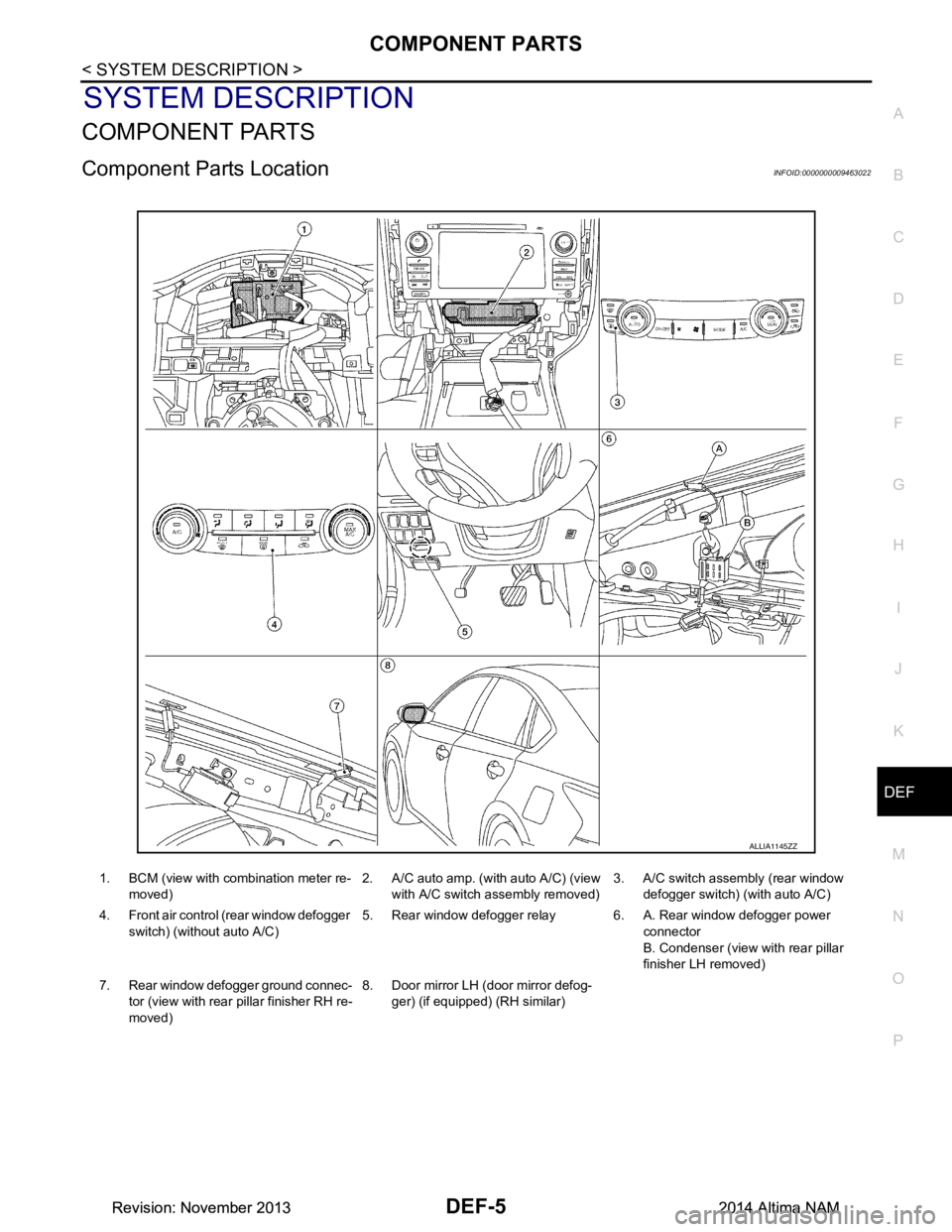
Component Parts LocationINFOID:0000000009463022
ALLIA1145ZZ
1. BCM (view with co mbination meter re-
moved) 2. A/C auto amp. (with auto A/C) (view
with A/C switch assembly removed) 3. A/C switch assembly (rear window
defogger switch) (with auto A/C)
4. Front air control (rear window defogger switch) (without auto A/C) 5. Rear window defogger relay 6. A. Rear window defogger power
connector
B. Condenser (view with rear pillar
finisher LH removed)
7. Rear window defogger ground connec- tor (view with rear pillar finisher RH re-
moved) 8. Door mirror LH (door mirror defog-
ger) (if equipped) (RH similar)
Revision: November 20132014 Altima NAMRevision: November 20132014 Altima NAM
Page 731 of 4801

DEF-6
< SYSTEM DESCRIPTION >
COMPONENT PARTS
Component Description
INFOID:0000000009463023
1: With auto A/C
2: With manual A/C
3: With heated mirrors Component Description
BCM • Operates the rear window defogger with the operation of rear window defogger switch.
• Performs the timer control of rear window defogger.
Rear window defogger relay • Operates the rear window defogger and the door mirror defogger with the control signal from
BCM.
A/C auto amp
1• Displays the rear window defogger ON to the display when detecting the operation of the rear window defogger.
A/C switch assembly
1 (rear
window defogger switch) • The rear window defogger switch is turned ON.
Front air control
2 (rear window
defogger switch) • The rear window defogger switch is turned ON.
• Turns the indicator lamp ON when detecting the operation of rear window defogger.
Rear window defogger • Heats the heating wire with the power supply from the rear window defogger relay to prevent
the rear window from fogging up.
Door mirror defogger
3• Heats the heating wire with the power supply from the rear window defogger relay to prevent the door mirror from fogging up.
Revision: November 20132014 Altima NAMRevision: November 20132014 Altima NAM
Page 732 of 4801
SYSTEMDEF-7
< SYSTEM DESCRIPTION >
C
D E
F
G H
I
J
K
M A
B
DEF
N
O P
SYSTEM
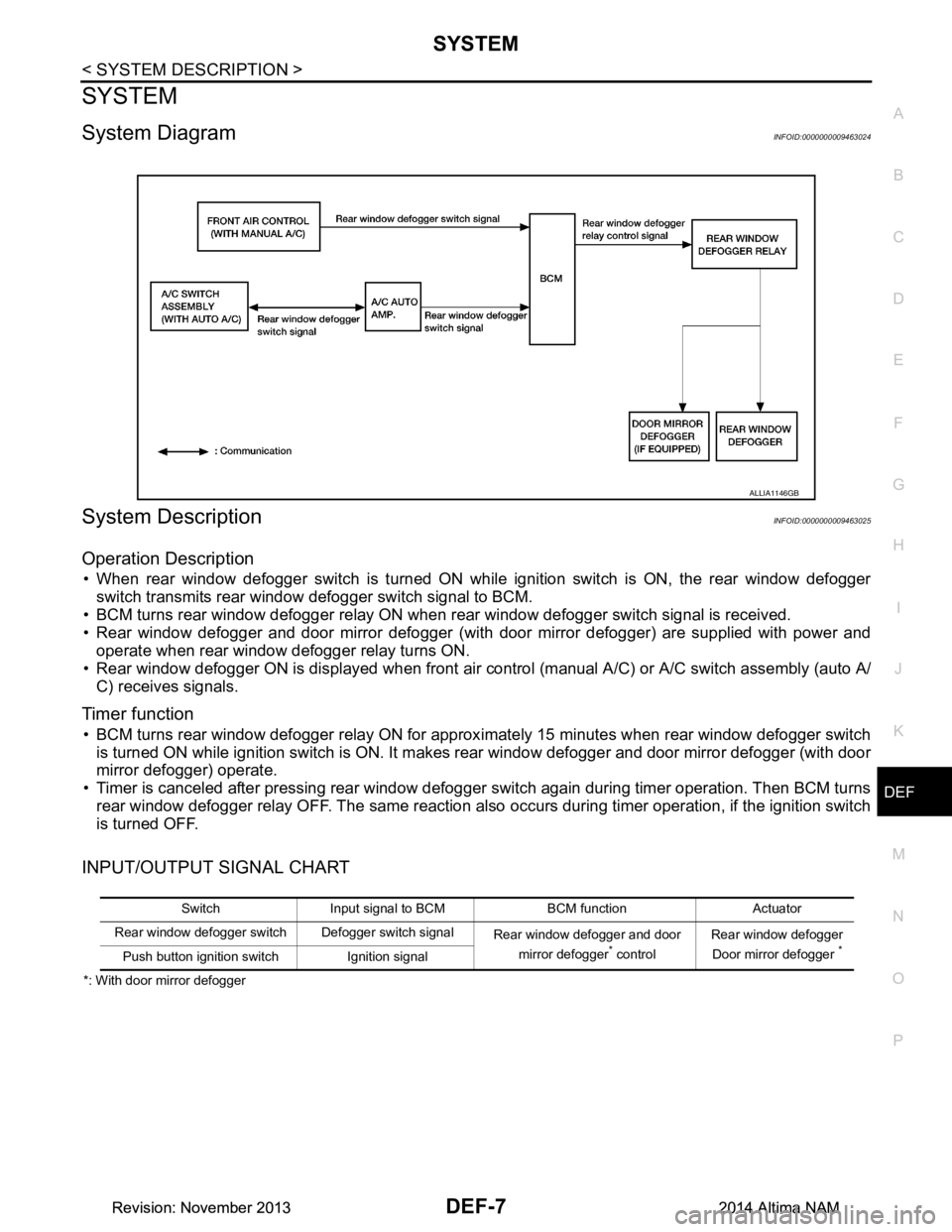
System DiagramINFOID:0000000009463024
System DescriptionINFOID:0000000009463025
Operation Description
• When rear window defogger switch is turned ON while ignition switch is ON, the rear window defogger switch transmits rear window defogger switch signal to BCM.
• BCM turns rear window defogger relay ON when rear window defogger switch signal is received.
• Rear window defogger and door mirror defogger (with door mirror defogger) are supplied with power and
operate when rear window defogger relay turns ON.
• Rear window defogger ON is displayed when front air c ontrol (manual A/C) or A/C switch assembly (auto A/
C) receives signals.
Timer function
• BCM turns rear window defogger relay ON for approx imately 15 minutes when rear window defogger switch
is turned ON while ignition switch is ON. It makes rear window defogger and door mirror defogger (with door
mirror defogger) operate.
• Timer is canceled after pressing rear window defogger switch again during timer operation. Then BCM turns
rear window defogger relay OFF. The same reaction also occurs during timer operation, if the ignition switch
is turned OFF.
INPUT/OUTPUT SIGNAL CHART
*: With door mirror defogger
ALLIA1146GB
Switch Input signal to BCM BCM function Actuator
Rear window defogger switch Defogger switch signal Rear window defogger and door
mirror defogger
* control Rear window defogger
Door mirror defogger *Push button ignition switch Ignition signal
Revision: November 20132014 Altima NAMRevision: November 20132014 Altima NAM
Page 733 of 4801

DEF-8
< SYSTEM DESCRIPTION >
DIAGNOSIS SYSTEM (BCM)
DIAGNOSIS SYSTEM (BCM)
COMMON ITEM
COMMON ITEM : CONSULT Function (BCM - COMMON ITEM)INFOID:0000000009956271
CAUTION:
After disconnecting the CONSULT vehicle interface (VI) from the data link connector, the ignition must
be cycled OFF → ON (for at least 5 seconds) → OFF. If this step is not performed, the BCM may not go
to ”sleep mode”, potentially causing a di scharged battery and a no-start condition.
APPLICATION ITEM
CONSULT performs the following functions via CAN communication with BCM.
SYSTEM APPLICATION
BCM can perform the following functions.
Direct Diagnostic Mode Description
Ecu Identification The BCM part number is displayed.
Self Diagnostic Result The BCM self diagnostic results are displayed.
Data Monitor The BCM input/output data is displayed in real time.
Active Test The BCM activates outputs to test components.
Work support The settings for BCM functions can be changed.
Configuration • The vehicle specification can be read and saved.
• The vehicle specification can be written when replacing BCM.
CAN Diag Support Mntr The result of transmit/receive diagnosis of CAN communication is displayed.
System Sub System Direct Diagnostic Mode
Ecu Identification
Self Diagnostic Result
Data Monitor
Active Test
Work support
Configuration
CAN Diag Su pport Mntr
Door lock DOOR LOCK ××××
Rear window defogger REAR DEFOGGER ×××
Warning chime BUZZER ××
Interior room lamp timer INT LAMP ×××
Remote keyless entry system MULTI REMOTE ENT ×××
Exterior lamp HEADLAMP ×××
Wiper and washer WIPER ×××
Turn signal and hazard warning lamps FLASHER ××
Air conditioner AIR CONDITIONER ×
Intelligent Key system INTELLIGENT KEY ××××
Combination switch COMB SW ×
BCM BCM × × ×××
Immobilizer IMMU ×××
Interior room lamp battery saver BATTERY SAVER ××
Trunk open TRUNK ×
Vehicle security system THEFT ALM ×××
Revision: November 20132014 Altima NAMRevision: November 20132014 Altima NAM
Page 734 of 4801

DIAGNOSIS SYSTEM (BCM)DEF-9
< SYSTEM DESCRIPTION >
C
D E
F
G H
I
J
K
M A
B
DEF
N
O P
REAR DEFOGGER
REAR DEFOGGER : CONSULT Func tion (BCM - REAR DEFOGGER)INFOID:0000000009956272
CAUTION:
After disconnecting the CONSULT vehicle interface (VI) from the data link connector, the ignition must
be cycled OFF → ON (for at least 5 seconds) → OFF. If this step is not performed, the BCM may not go
to ”sleep mode”, potentiall y causing a discharged battery and a no-start condition.
DATA MONITOR
ACTIVE TEST
WORK SUPPORT
* : Initial setting RAP system RETAINED PWR
×
Signal buffer system SIGNAL BUFFER ×
TPMS AIR PRESSURE MONITOR ××××
System Sub System
Direct Diagnostic Mode
Ecu Identification
Self Diagnostic Result
Data Monitor
Active Test
Work support
Configuration
CAN Diag Support Mntr
Monitor Item [Unit] Description
PUSH SW [On/Off] Indicates condition of push-button ignition switch.
REAR DEF SW [On/Off] Indicates condition of rear window defogger switch.
Test Item Description
REAR DEFOGGER This test is able to check rear window defogger operation [Off/On].
Support Item Setting Description
SET R-DEF TIMER MODE3 Rear defogger turns OFF after 1 minute.
MODE2 Rear defogger remains ON until turned OFF.
MODE1* Rear defogger turns OFF after 15 minutes.
Revision: November 20132014 Altima NAMRevision: November 20132014 Altima NAM
Page 736 of 4801
REAR WINDOW DEFOGGER SYSTEMDEF-11
< WIRING DIAGRAM >
C
D E
F
G H
I
J
K
M A
B
DEF
N
O P
WIRING DIAGRAM
REAR WINDOW DEFOGGER SYSTEM
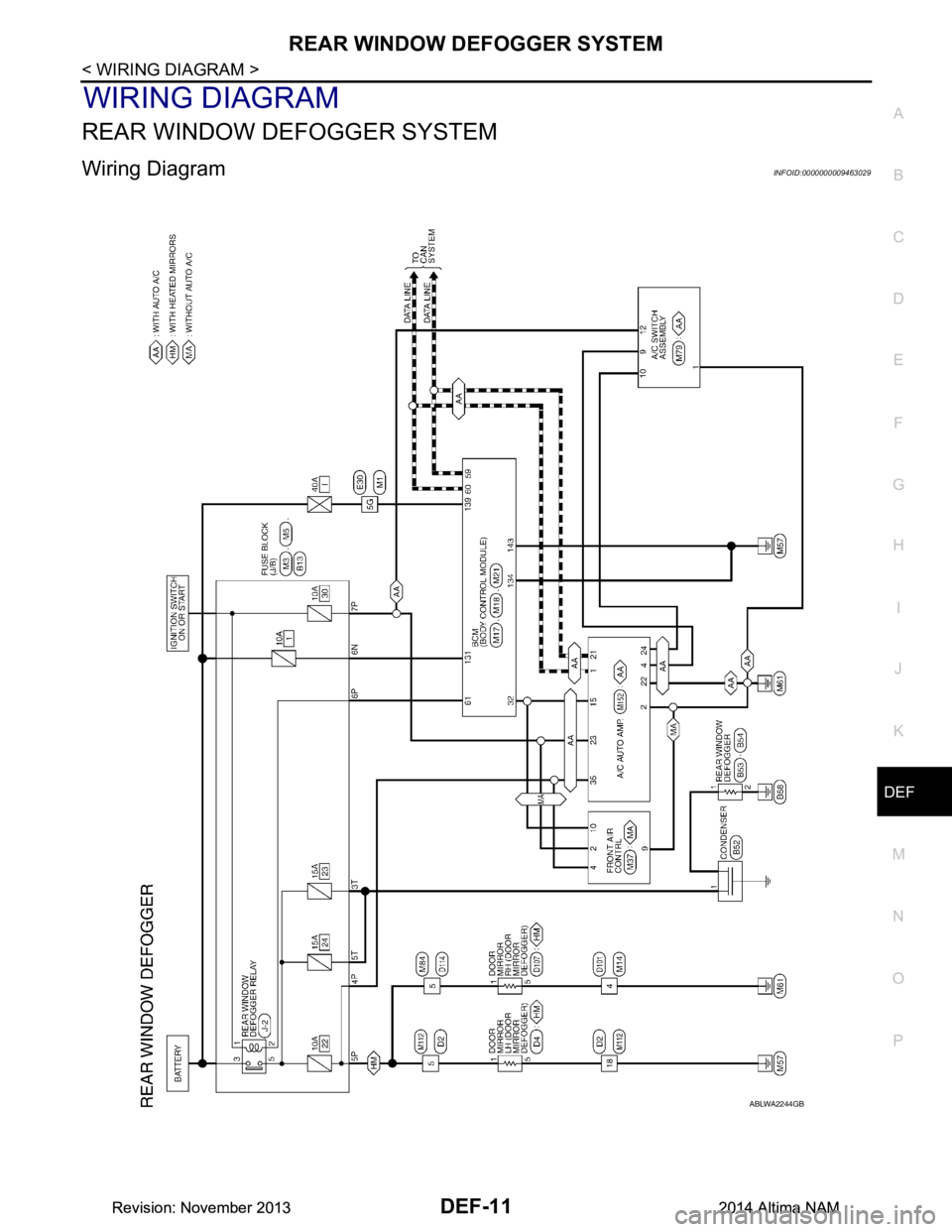
Wiring DiagramINFOID:0000000009463029
ABLWA2244GB
Revision: November 20132014 Altima NAMRevision: November 20132014 Altima NAM
Page 737 of 4801
DEF-12
< WIRING DIAGRAM >
REAR WINDOW DEFOGGER SYSTEM
ABLIA5200GB
Revision: November 20132014 Altima NAMRevision: November 20132014 Altima NAM