Its control NISSAN TEANA 2014 Service Manual
[x] Cancel search | Manufacturer: NISSAN, Model Year: 2014, Model line: TEANA, Model: NISSAN TEANA 2014Pages: 4801, PDF Size: 51.2 MB
Page 4510 of 4801
![NISSAN TEANA 2014 Service Manual
U0300 CAN COMMUNICATION DATATM-295
< DTC/CIRCUIT DIAGNOSIS > [CVT: RE0F10E]
C
EF
G H
I
J
K L
M A
B
TM
N
O P
U0300 CAN COMMUNICATION DATA
DTC LogicINFOID:0000000009464246
DTC DETECTION LOGIC
DTC CON](/img/5/57390/w960_57390-4509.png "NISSAN TEANA 2014 Service Manual
U0300 CAN COMMUNICATION DATATM-295
< DTC/CIRCUIT DIAGNOSIS > [CVT: RE0F10E]
C
EF
G H
I
J
K L
M A
B
TM
N
O P
U0300 CAN COMMUNICATION DATA
DTC LogicINFOID:0000000009464246
DTC DETECTION LOGIC
DTC CON")
U0300 CAN COMMUNICATION DATATM-295
< DTC/CIRCUIT DIAGNOSIS > [CVT: RE0F10E]
C
EF
G H
I
J
K L
M A
B
TM
N
O P
U0300 CAN COMMUNICATION DATA
DTC LogicINFOID:0000000009464246
DTC DETECTION LOGIC
DTC CONFIRMATION PROCEDURE
1.PREPARATION BEFORE WORK
If another “DTC CONFIRMATION PROC EDURE” occurs just before, turn ignition switch OFF and wait for at
least 10 seconds, then perform the next test.
>> GO TO 2.
2.CHECK DTC DETECTION
With CONSULT
1. Start the engine and wait for 5 seconds or more.
2. Check the DTC.
Is
“U0300” detected?
YES >> Go to TM-295, "Diagnosis Procedure".
NO >> INSPECTION END
Diagnosis ProcedureINFOID:0000000009464247
1.CONTROL UNIT CHECK
Check the number of control units replaced before “U0300” is detected.
Is one control unit replaced?
YES >> The specification of the control unit replac ed may be incorrect. Check the part number and the
specification.
NO >> GO TO 2.
2.CONTROL UNIT CHECK
With CONSULT
1. Remove one of the control unit replaced.
2. Assemble the old control unit before replacement.
3. Turn ignition switch ON, and wait for 2 seconds or more.
4. Select “Self Diagnostic Results” in “TRANSMISSION”.
Is
“U0300”detected?
YES >> Turn OFF the ignition switch and check other control units in the same manner.
NO >> The specification of the control unit remov ed may be incorrect. Check the part number and the
specification.
DTC CONSULT screen terms
(Trouble diagnosis content) DTC detection condition Possible causes
U0300 CAN COMM DATA
(Internal Control Module Soft-
ware Incompatibility) When the ignition switch is ON, the data length
transmitted from each control unit is shorter
than the specified length and the status contin-
ues for 2 seconds or more. Control unit other than TCM
Revision: November 20132014 Altima NAMRevision: November 20132014 Altima NAM
Page 4511 of 4801
![NISSAN TEANA 2014 Service Manual
TM-296
< DTC/CIRCUIT DIAGNOSIS >[CVT: RE0F10E]
U1000 CAN COMM CIRCUIT
U1000 CAN COMM CIRCUIT
DescriptionINFOID:0000000009464248
CAN (Controller Area Network) is a serial communication
line for real-](/img/5/57390/w960_57390-4510.png "NISSAN TEANA 2014 Service Manual
TM-296
< DTC/CIRCUIT DIAGNOSIS >[CVT: RE0F10E]
U1000 CAN COMM CIRCUIT
U1000 CAN COMM CIRCUIT
DescriptionINFOID:0000000009464248
CAN (Controller Area Network) is a serial communication
line for real-")
TM-296
< DTC/CIRCUIT DIAGNOSIS >[CVT: RE0F10E]
U1000 CAN COMM CIRCUIT
U1000 CAN COMM CIRCUIT
DescriptionINFOID:0000000009464248
CAN (Controller Area Network) is a serial communication
line for real-time application. It is an on-vehicle mul-
tiplex communication line with high data communication speed and excellent malfunction detection ability.
Many electronic control units are equipped onto a vehi cle, and each control unit shares information and links
with other control units during operation (not independently ). In CAN communication, control units are con-
nected with 2 communication lines (CAN-H line, CAN-L li ne) allowing a high rate of information transmission
with less wiring. Each control unit transmits/recei ves data but selectively reads required data only.
DTC LogicINFOID:0000000009464249
DTC DETECTION LOGIC
DTC CONFIRMATION PROCEDURE
1.PREPARATION BEFORE WORK
If another “DTC CONFIRMATION PROCEDURE” occurs just before, turn ignition switch OFF and wait for at
least 10 seconds, then perform the next test.
>> GO TO 2.
2.CHECK DTC DETECTION
With CONSULT
1. Start the engine and wait for at least 5 seconds.
2. Check the DTC.
Is
“U1000” detected?
YES >> Go to TM-296, "Diagnosis Procedure".
NO >> INSPECTION END
Diagnosis ProcedureINFOID:0000000009464250
For the diagnosis procedure, refer to LAN-18, "Trouble Diagnosis Flow Chart".
DTCCONSULT screen terms
(Trouble diagnosis content) DTC detection condition Possible causes
U1000 CAN COMM CIRCUIT
(CAN Communication Line) When the ignition switch is ON, TCM cannot
send the CAN communication signal continu-
ously for 2 seconds or more. Harness or connector
(CAN communication line is open or
shorted)
Revision: November 20132014 Altima NAMRevision: November 20132014 Altima NAM
Page 4595 of 4801
![NISSAN TEANA 2014 Service Manual
TM-380
< REMOVAL AND INSTALLATION >[CVT: RE0F10E]
CONTROL CABLE
CONTROL CABLE
Exploded ViewINFOID:0000000009464335
Removal and InstallationINFOID:0000000009464336
CAUTION:
Always apply the parking b](/img/5/57390/w960_57390-4594.png "NISSAN TEANA 2014 Service Manual
TM-380
< REMOVAL AND INSTALLATION >[CVT: RE0F10E]
CONTROL CABLE
CONTROL CABLE
Exploded ViewINFOID:0000000009464335
Removal and InstallationINFOID:0000000009464336
CAUTION:
Always apply the parking b")
TM-380
< REMOVAL AND INSTALLATION >[CVT: RE0F10E]
CONTROL CABLE
CONTROL CABLE
Exploded ViewINFOID:0000000009464335
Removal and InstallationINFOID:0000000009464336
CAUTION:
Always apply the parking brake before pe rforming removal and installation.
INSTALLATION
1. Apply the parking brake.
CAUTION:
Make sure the vehicle cannot move with the parking brake applied.
2. Remove the front air duct and air cleaner case assembly. Refer to EM-29, "Removal and Installation"
.
3. Remove the control cable nut ( ), using suitable tool.
4. Remove control cable (2) from manual lever (A).
5. Remove the lock plate (3) from control cable (2).
6. Remove control cable (2) from bracket (1).
7. Remove center console. Refer to IP-18, "Removal and Installation"
.
8. Disconnect the ITS control unit harness connectors and remove the ITS control unit (if equipped). Refer to
AV-436, "Removal and Installation"
.
1. Lock plate 2. Transaxle assembly 3. Bracket
4. Control cable 5. CVT shift selector assembly A. Manual lever
B. Retainer grommet
ALDIA0352GB
ALDIA0360ZZ
Revision: November 20132014 Altima NAMRevision: November 20132014 Altima NAM
Page 4606 of 4801
![NISSAN TEANA 2014 Service Manual
CONTROL VALVETM-391
< REMOVAL AND INSTALLATION > [CVT: RE0F10E]
C
EF
G H
I
J
K L
M A
B
TM
N
O P
5. Connect the control valve harness connectors (A).
CAUTION:
• Do not pinch the harness be tween t](/img/5/57390/w960_57390-4605.png "NISSAN TEANA 2014 Service Manual
CONTROL VALVETM-391
< REMOVAL AND INSTALLATION > [CVT: RE0F10E]
C
EF
G H
I
J
K L
M A
B
TM
N
O P
5. Connect the control valve harness connectors (A).
CAUTION:
• Do not pinch the harness be tween t")
CONTROL VALVETM-391
< REMOVAL AND INSTALLATION > [CVT: RE0F10E]
C
EF
G H
I
J
K L
M A
B
TM
N
O P
5. Connect the control valve harness connectors (A).
CAUTION:
• Do not pinch the harness be tween the control valve and
the transaxle case.
• Securely insert the harness connector until it clicks and
locks.
6. Install CVT fluid temperature sensor bracket (1).
7. Install the bracket (1).
8. Install O-ring to oil strainer assembly. CAUTION:
• Do not reuse O-ring.
• Apply CVT fluid NS-3 to O-ring.
9. Install the oil strainer assembly (1) using the oil strainer assem- bly bolts (A) and (B).
NOTE:
Remove the bracket and adjust the position again if the bolt hole
positions are not aligned.
10. Install the manual plate (1) while aligning with the groove (A) of the manual valve.
CAUTION:
Assemble the manual plate whil e aligning its end with the
cutout ( ) of the manual valve.
11. Install the spring washer (2) and the lock-nut (3), and then tighten to the specified torque.
: Front
: Bolt
JSDIA3686ZZ
: Bolt
: Front
JPDIA0658ZZ
: Front
Bolt Bolt length (mm) Number of bolts A12 2
B44 1
(A) : Manual shaft : Front
JPDIA0657ZZ
JPDIA0962ZZ
Revision: November 20132014 Altima NAMRevision: November 20132014 Altima NAM
Page 4646 of 4801
WCS-4
< SYSTEM DESCRIPTION >
COMPONENT PARTS
SYSTEM DESCRIPTION
COMPONENT PARTS
Component Parts LocationINFOID:0000000009462877
Component DescriptionINFOID:0000000009462878
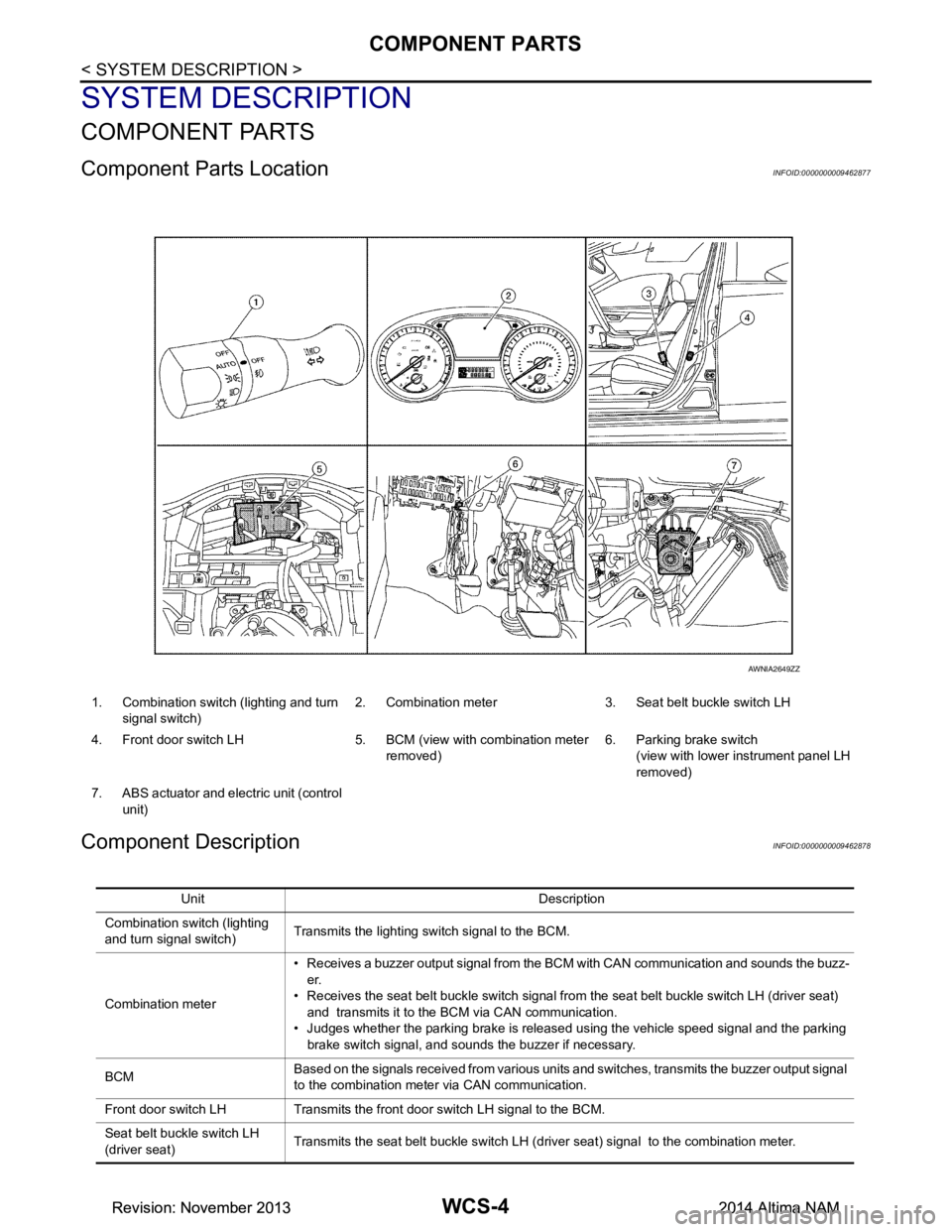
1. Combination switch (lighting and turn signal switch) 2. Combination meter 3. Seat belt buckle switch LH
4. Front door switch LH 5. BCM (view with combination meter removed)6. Parking brake switch
(view with lower in strument panel LH
removed)
7. ABS actuator and electric unit (control unit)
AWNIA2649ZZ
Unit Description
Combination switch (lighting
and turn signal switch) Transmits the lighting switch signal to the BCM.
Combination meter • Receives a buzzer output signal from the BCM with CAN communication and sounds the buzz-
er.
• Receives the seat belt buckle switch signal from the seat belt buckle switch LH (driver seat) and transmits it to the BCM via CAN communication.
• Judges whether the parking brake is released using the vehicle speed signal and the parking brake switch signal, and sounds the buzzer if necessary.
BCM Based on the signals received from various units and switches, transmits the buzzer output signal
to the combination meter via CAN communication.
Front door switch LH Transmits the front door switch LH signal to the BCM.
Seat belt buckle switch LH
(driver seat) Transmits the seat belt buckle switch LH (driver seat) signal to the combination meter.
Revision: November 20132014 Altima NAMRevision: November 20132014 Altima NAM
Page 4647 of 4801

WCS
COMPONENT PARTSWCS-5
< SYSTEM DESCRIPTION >
C
D E
F
G H
I
J
K L
M B
A
O P
Parking brake switch Transmits the parking brake switch signal to the combination meter.
ABS actuator and electric unit
(control unit) Transmits the vehicle speed signal to the combination meter via CAN communication.
Unit Description
Revision: November 20132014 Altima NAMRevision: November 20132014 Altima NAM
Page 4651 of 4801
WCS
DIAGNOSIS SYSTEM (METER)WCS-9
< SYSTEM DESCRIPTION >
C
D E
F
G H
I
J
K L
M B
A
O P
DIAGNOSIS SYSTEM (METER)
DescriptionINFOID:0000000009941189
COMBINATION METER SE LF-DIAGNOSIS MODE
The following meter functions can be checked during Combination Meter Self-Diagnosis Mode:
• Pointer sweep of speedometer, tachometer and gauges.
• Illumination of all LCD segments and color patterns for meter displays.
• Illumination of all lamps/LEDs that are controlled by the combination meter (regardless of switch status).
STARTING COMBINATION METER SELF-DIAGNOSIS MODE
NOTE:
• Check combination meter power supply and ground circuits if self-diagnosis mode does not start. Refer to
MWI-58, "COMBINATION METER : Diagnosis Procedure"
. Replace combination meter if power supply and
ground circuits are found to be normal and self-diagnosis mode does not start. Refer to MWI-82, "Removal
and Installation".
• Combination meter self-diagnosis mode will function with the ignition switch in ON. Combination meter self-
diagnosis mode will exit upon turning the ignition switch to OFF.
How to Initiate Se lf-Diagnosis Mode
1. Press and hold the trip reset switch while turning the ignition switch ON. After 2 seconds release trip reset
switch, then press the trip reset switch 3 times withi n 7 seconds after the ignition switch is turned ON.
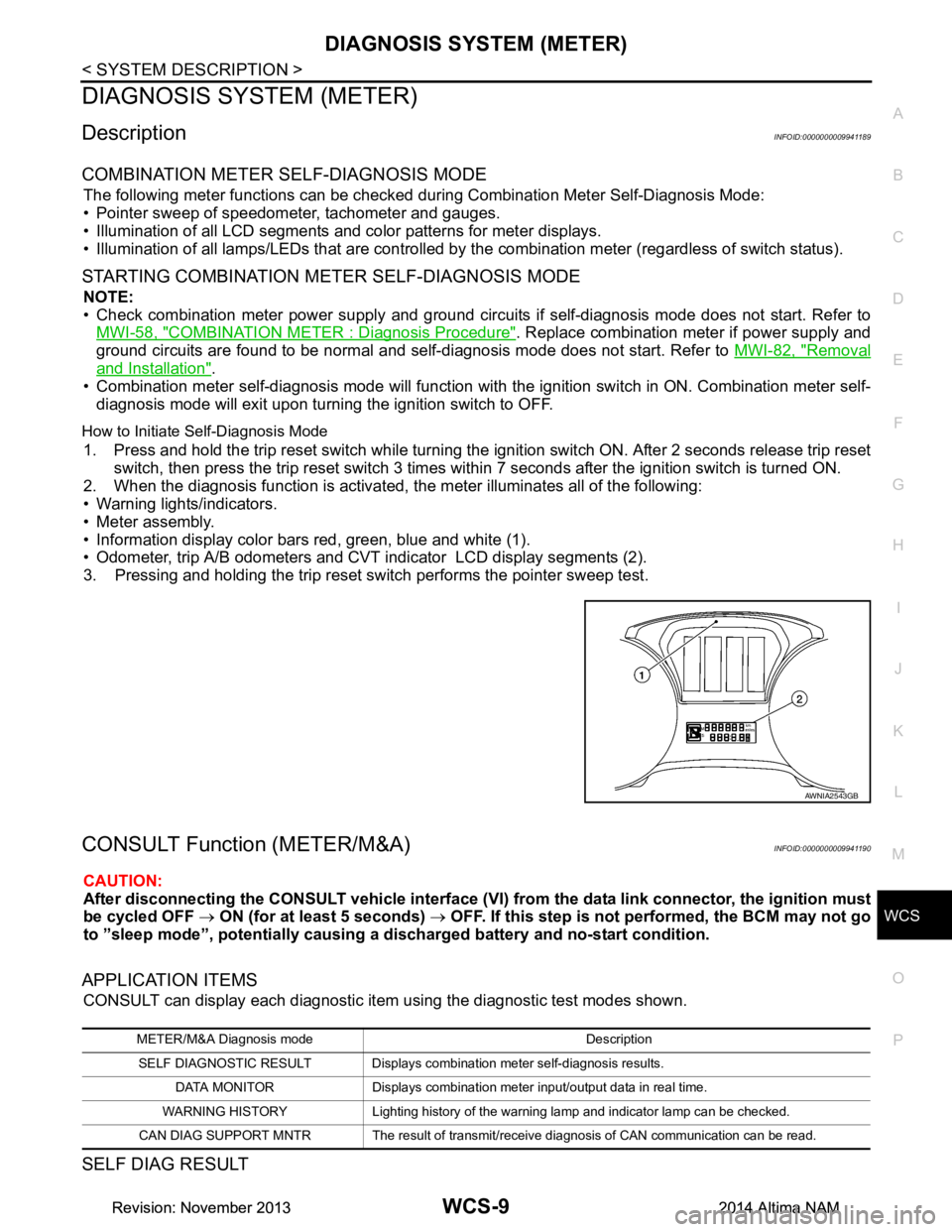
2. When the diagnosis function is activated, the meter illuminates all of the following:
• Warning lights/indicators.
• Meter assembly.
• Information display color bars red, green, blue and white (1).
• Odometer, trip A/B odometers and CVT indicator LCD display segments (2).
3. Pressing and holding the trip reset switch performs the pointer sweep test.
CONSULT Function (METER/M&A)INFOID:0000000009941190
CAUTION:
After disconnecting the CONSULT vehicle interface (VI) from the data link connector, the ignition must
be cycled OFF → ON (for at least 5 seconds) → OFF. If this step is not performed, the BCM may not go
to ”sleep mode”, potentiall y causing a discharged battery and no-start condition.
APPLICATION ITEMS
CONSULT can display each diagnostic item using the diagnostic test modes shown.
SELF DIAG RESULT
AWNIA2543GB
METER/M&A Diagnosis mode Description
SELF DIAGNOSTIC RESULT Displays combination meter self-diagnosis results. DATA MONITOR Displays combination meter input/output data in real time.
WARNING HISTORY Lighting history of the warning lamp and indicator lamp can be checked.
CAN DIAG SUPPORT MNTR The result of transmit/receive diagnosis of CAN communication can be read.
Revision: November 20132014 Altima NAMRevision: November 20132014 Altima NAM
Page 4740 of 4801
FRONT WIPER AND WASHER SYSTEMWW-5
< SYSTEM DESCRIPTION >
C
D E
F
G H
I
J
K
M A
B
WW
N
O P
*: For models with rear camera washer system
Component DescriptionINFOID:0000000009464600
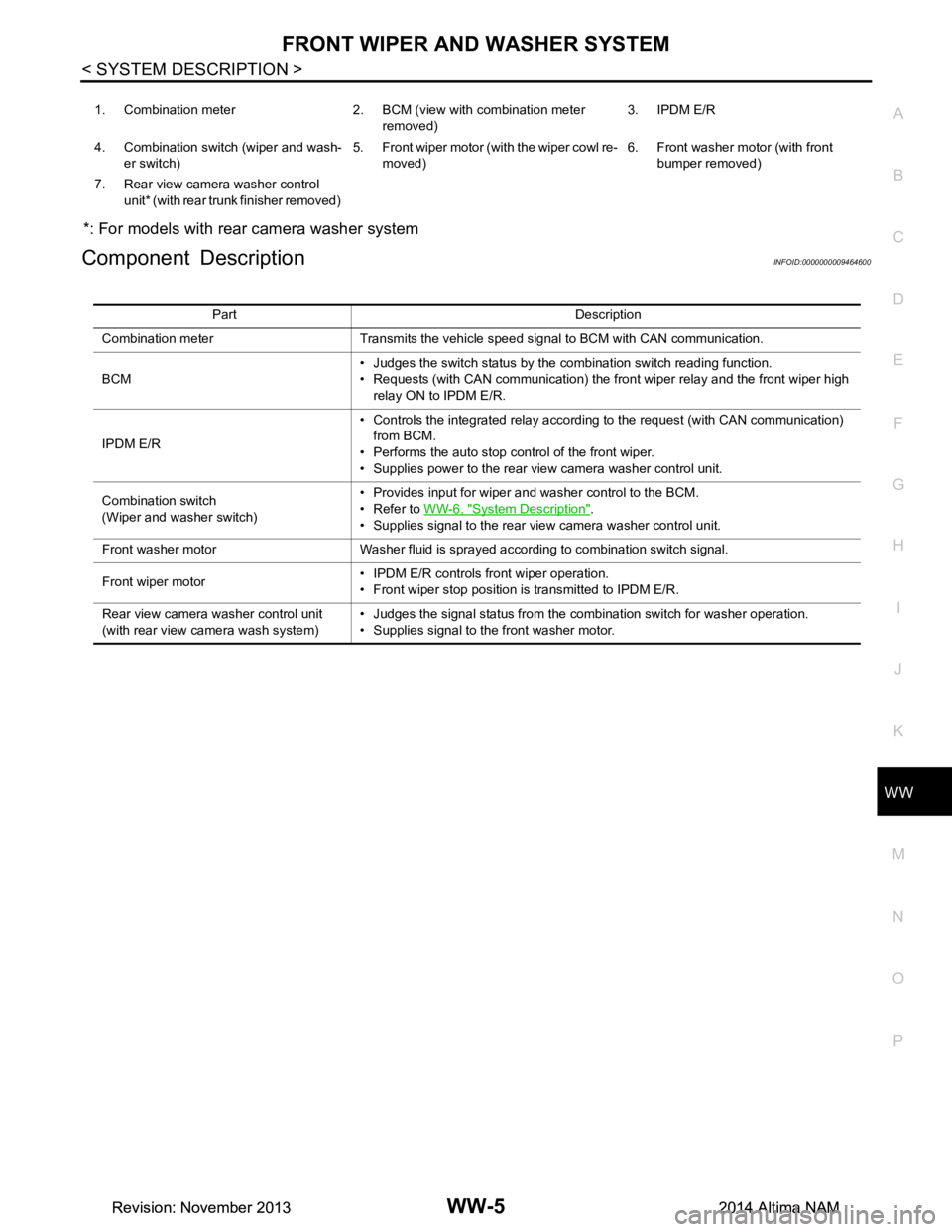
1. Combination meter 2. BCM (v iew with combination meter
removed) 3. IPDM E/R
4. Combination switch (wiper and wash- er switch) 5. Front wiper motor (with the wiper cowl re-
moved) 6. Front washer motor (with front
bumper removed)
7. Rear view camera washer control unit* (with rear trunk finisher removed)
Part Description
Combination meter Transmits the vehicle speed signal to BCM with CAN communication.
BCM • Judges the switch status by the combination switch reading function.
• Requests (with CAN communication) the front wiper relay and the front wiper high
relay ON to IPDM E/R.
IPDM E/R • Controls the integrated relay according to the request (with CAN communication)
from BCM.
• Performs the auto stop control of the front wiper.
• Supplies power to the rear view camera washer control unit.
Combination switch
(Wiper and washer switch) • Provides input for wiper and washer control to the BCM.
• Refer to WW-6, "System Description"
.
• Supplies signal to the rear view camera washer control unit.
Front washer motor Washer fluid is sprayed according to combination switch signal.
Front wiper motor • IPDM E/R controls front wiper operation.
• Front wiper stop position is transmitted to IPDM E/R.
Rear view camera washer control unit
(with rear view ca mera wash system) • Judges the signal status from the combination switch for washer operation.
• Supplies signal to the front washer motor.
Revision: November 20132014 Altima NAMRevision: November 20132014 Altima NAM
Page 4741 of 4801
WW-6
< SYSTEM DESCRIPTION >
SYSTEM
SYSTEM
System DiagramINFOID:0000000009464601
SYSTEM WITH REAR VIEW CAMERA WASH
SYSTEM WITHOUT REAR VIEW CAMERA WASH
System DescriptionINFOID:0000000009464602
OUTLINE
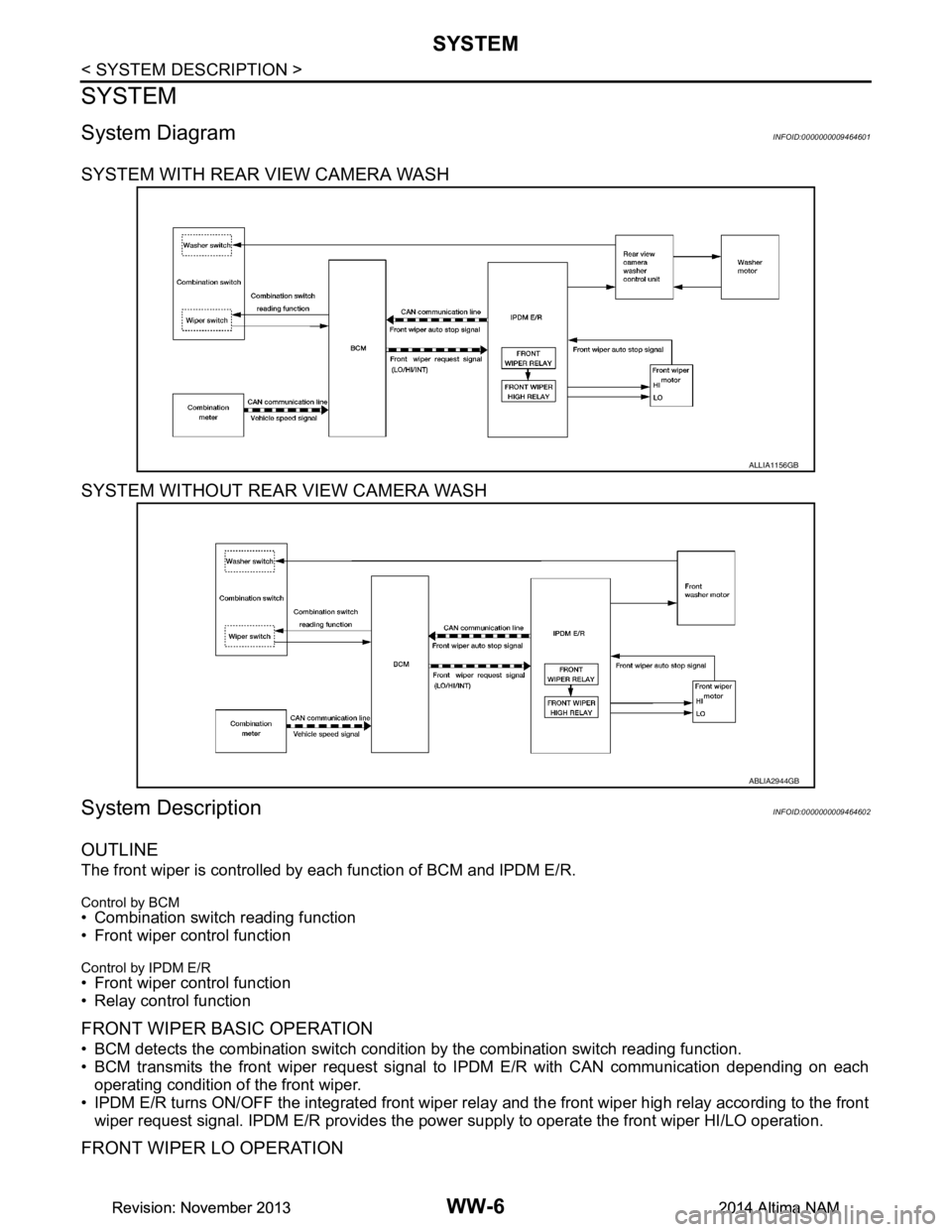
The front wiper is controlled by each function of BCM and IPDM E/R.
Control by BCM
• Combination switch reading function
• Front wiper control function
Control by IPDM E/R
• Front wiper control function
• Relay control function
FRONT WIPER BASIC OPERATION
• BCM detects the combination switch conditi on by the combination switch reading function.
• BCM transmits the front wiper request signal to IPDM E/R with CAN communication depending on each
operating condition of the front wiper.
• IPDM E/R turns ON/OFF the integrated front wiper rela y and the front wiper high relay according to the front
wiper request signal. IPDM E/R provides the power supply to operate the front wiper HI/LO operation.
FRONT WIPER LO OPERATION
ALLIA1156GB
ABLIA2944GB
Revision: November 20132014 Altima NAMRevision: November 20132014 Altima NAM
Page 4743 of 4801
WW-8
< SYSTEM DESCRIPTION >
SYSTEM
*: When without vehicle speed setting
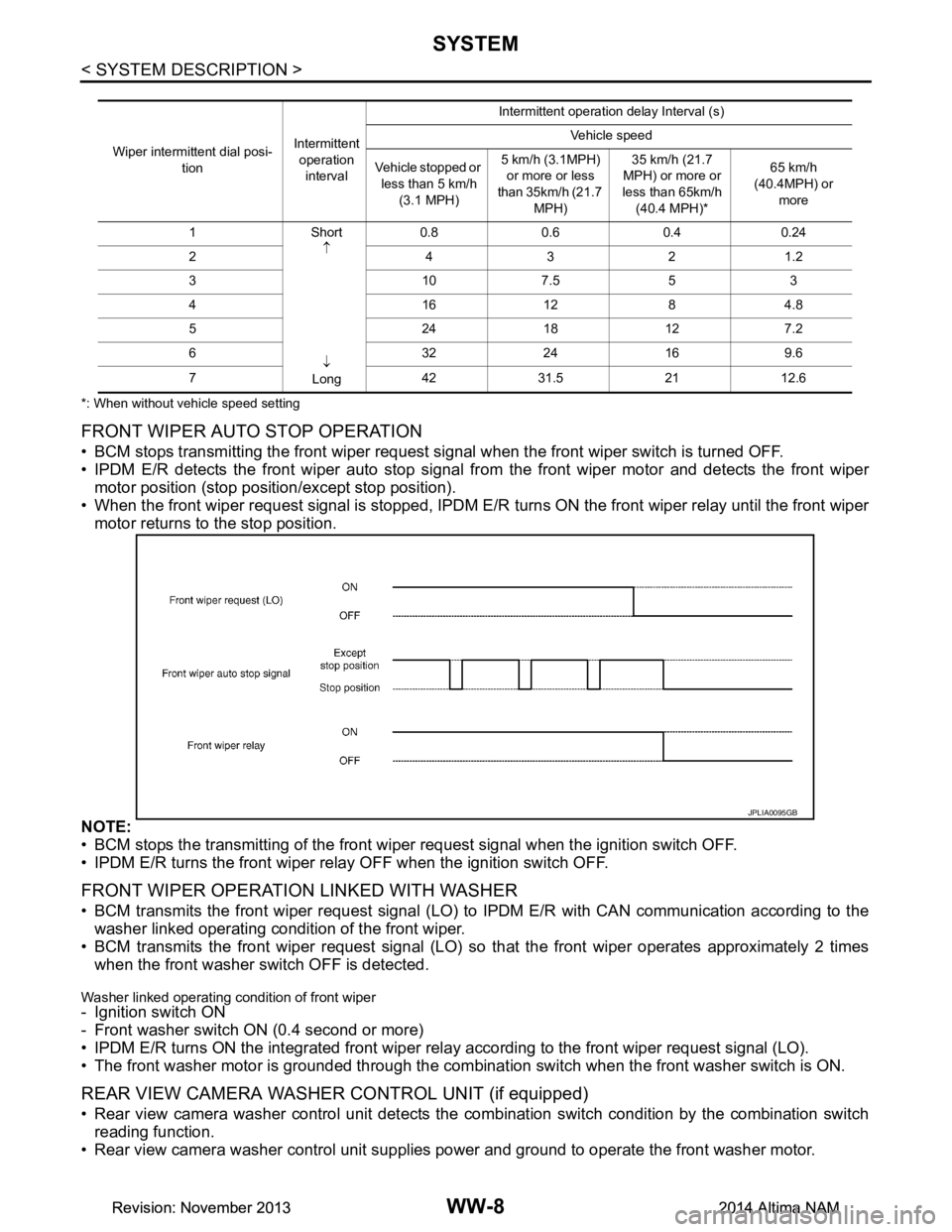
FRONT WIPER AUTO STOP OPERATION
• BCM stops transmitting the front wiper request signal when the front wiper switch is turned OFF.
• IPDM E/R detects the front wiper auto stop signal fr om the front wiper motor and detects the front wiper
motor position (stop position/except stop position).
• When the front wiper request signal is stopped, IPDM E/R turns ON the front wiper relay until the front wiper
motor returns to the stop position.
NOTE:
• BCM stops the transmitting of the front wi per request signal when the ignition switch OFF.
• IPDM E/R turns the front wiper rela y OFF when the ignition switch OFF.
FRONT WIPER OPERATION LINKED WITH WASHER
• BCM transmits the front wiper request signal (LO) to IPDM E/R with CAN communication according to the
washer linked operating condition of the front wiper.
• BCM transmits the front wiper request signal (LO) so that the front wiper operates approximately 2 times
when the front washer s witch OFF is detected.
Washer linked operating condition of front wiper- Ignition switch ON
- Front washer switch ON (0.4 second or more)
• IPDM E/R turns ON the integrated front wiper rela y according to the front wiper request signal (LO).
• The front washer motor is grounded through the combinat ion switch when the front washer switch is ON.
REAR VIEW CAMERA WASHER CONTROL UNIT (if equipped)
• Rear view camera washer control unit detects the co mbination switch condition by the combination switch
reading function.
• Rear view camera washer control unit supplies power and ground to operate the front washer motor.
Wiper intermittent dial posi-
tion Intermittent
operation interval Intermittent operation delay Interval (s)
Vehicle speed
Vehicle stopped or less than 5 km/h (3.1 MPH) 5 km/h (3.1MPH)
or more or less
than 35km/h (21.7
MPH) 35 km/h (21.7
MPH) or more or
less than 65km/h
(40.4 MPH)* 65 km/h
(40.4MPH) or more
1Short ↑
↓
Long 0.8 0.6 0.4 0.24
2 4321.2
3107.553
4161284.8
52418127.2
63224169.6
7 4231.52112.6
JPLIA0095GB
Revision: November 20132014 Altima NAMRevision: November 20132014 Altima NAM