Pressure NISSAN TEANA 2014 Workshop Manual
[x] Cancel search | Manufacturer: NISSAN, Model Year: 2014, Model line: TEANA, Model: NISSAN TEANA 2014Pages: 4801, PDF Size: 51.2 MB
Page 214 of 4801
![NISSAN TEANA 2014 Workshop Manual
BRC-68
< DTC/CIRCUIT DIAGNOSIS >[VDC/TCS/ABS]
C1105, C1106, C1107,
C1108 WHEEL SENSOR
C1105, C1106, C1107, C1108 WHEEL SENSOR
DTC LogicINFOID:0000000009463772
DTC DETECTION LOGIC
DTC CONFIRMATION P](/img/5/57390/w960_57390-213.png "NISSAN TEANA 2014 Workshop Manual
BRC-68
< DTC/CIRCUIT DIAGNOSIS >[VDC/TCS/ABS]
C1105, C1106, C1107,
C1108 WHEEL SENSOR
C1105, C1106, C1107, C1108 WHEEL SENSOR
DTC LogicINFOID:0000000009463772
DTC DETECTION LOGIC
DTC CONFIRMATION P")
BRC-68
< DTC/CIRCUIT DIAGNOSIS >[VDC/TCS/ABS]
C1105, C1106, C1107,
C1108 WHEEL SENSOR
C1105, C1106, C1107, C1108 WHEEL SENSOR
DTC LogicINFOID:0000000009463772
DTC DETECTION LOGIC
DTC CONFIRMATION PROCEDURE
1.CHECK SELF DIAGNOSTIC RESULT
With CONSULT.
1. Start engine and drive vehicle at approximately 21 km/h (13 MPH) or more for approximately 5 minutes.
2. Perform self diagnostic result.
Is DTC C1105, C1106, C1107 or C1108 detected?
YES >> Proceed to diagnosis procedure. Refer to BRC-68, "Diagnosis Procedure".
NO >> Inspection End.
Diagnosis ProcedureINFOID:0000000009463773
Regarding Wiring Diagram information, refer to BRC-47, "Wiring Diagram".
CAUTION:
Do not check between wheel sensor terminals.
1.CONFIRM DTC
With CONSULT
1. Perform self-diagnostic result of ABS and record all active DTCs.
2. Clear all DTCs.
3. Perform DTC confirmation procedure. Refer to BRC-68, "DTC Logic"
.
Does DTC C1105, C1106, C1107 or C1108 reset?
YES >> GO TO 2.
NO >> Refer to GI-43, "Intermittent Incident"
.
2.CHECK TIRE PRESSURE AND TIRE WEAR
Check tires for excessive wear and proper inflation. Refer to WT-53, "Inspection"
.
Is the inspection result normal?
YES >> GO TO 3.
NO >> Repair or replace as necessary.
3.CHECK WHEEL SENSOR
DTC Display Item Malfunction detected condition Possible causes
C1105 RR RH SENSOR-2 • When distance between rear wheel sensor RH and
rear wheel sensor RH rotor is large.
• When installation of rear wheel sensor RH or rear wheel sensor RH rotor is not normal.
• Wheel sensor
• ABS actuator and electric unit
(control unit)
• Sensor rotor
C1106 RR LH SENSOR-2
• When distance between rear wheel sensor LH and
rear wheel sensor LH rotor is large.
• When installation of rear wheel sensor LH or rear wheel sensor LH rotor is not normal.
C1107 FR RH SENSOR-2 • When distance between front wheel sensor RH
and front wheel sensor RH rotor is large.
• When installation of front wheel sensor RH or front wheel sensor RH rotor is not normal.
C1108 FR LH SENSOR-2 • When distance between front wheel sensor LH and
front wheel sensor LH rotor is large.
• When installation of front wheel sensor LH or front wheel sensor LH rotor is not normal.
Revision: November 20132014 Altima NAMRevision: November 20132014 Altima NAM
Page 218 of 4801
![NISSAN TEANA 2014 Workshop Manual
BRC-72
< DTC/CIRCUIT DIAGNOSIS >[VDC/TCS/ABS]
C1110, C1153, C1170 ABS ACTUATOR
AND ELECTRIC UNIT (CONTROL UNIT)
C1110, C1153, C1170 ABS ACTUATOR AND ELECTRIC UNIT (CONTROL
UNIT)
DTC LogicINFOID:0000](/img/5/57390/w960_57390-217.png "NISSAN TEANA 2014 Workshop Manual
BRC-72
< DTC/CIRCUIT DIAGNOSIS >[VDC/TCS/ABS]
C1110, C1153, C1170 ABS ACTUATOR
AND ELECTRIC UNIT (CONTROL UNIT)
C1110, C1153, C1170 ABS ACTUATOR AND ELECTRIC UNIT (CONTROL
UNIT)
DTC LogicINFOID:0000")
BRC-72
< DTC/CIRCUIT DIAGNOSIS >[VDC/TCS/ABS]
C1110, C1153, C1170 ABS ACTUATOR
AND ELECTRIC UNIT (CONTROL UNIT)
C1110, C1153, C1170 ABS ACTUATOR AND ELECTRIC UNIT (CONTROL
UNIT)
DTC LogicINFOID:0000000009463776
DTC DETECTION LOGIC
DTC CONFIRMATION PROCEDURE
1.CHECK SELF-DIAGNOSIS RESULTS
Check the self-diagnosis results.
Is above displayed on the self-diagnosis display?
YES >> Proceed to diagnosis procedure. Refer to BRC-72, "Diagnosis Procedure".
NO >> Inspection End.
Diagnosis ProcedureINFOID:0000000009463777
1.REPLACE ABS ACTUATOR AND ELECTRIC UNIT (CONTROL UNIT)
CAUTION:
Replace ABS actuator and electric unit (control uni t) when self diagnostic result shows items other
than those applicable.
>> Replace ABS actuator and electr ic unit (control unit). Refer to BRC-128, "Removal and Installa-
tion".
DTC Display item Malfunction detected condition Possible cause
C1110 CONTROLLER FAILURE When there is an internal malfunction in the ABS actuator
and electric unit (control unit). • ABS actuator and electric unit
(control unit)
C1153 EMERGENCY BRAKE When ABS actuator and electric unit (control unit) is mal-
functioning. (Pressure increase is too much or too little)
C1170 VARIANT CODING In a case wh ere VARIANT CODING is different.
Self-diagnosis results
CONTROLLER FAILURE EMERGENCY BRAKE VARIANT CODING
Revision: November 20132014 Altima NAMRevision: November 20132014 Altima NAM
Page 219 of 4801
![NISSAN TEANA 2014 Workshop Manual
C1111 PUMP MOTORBRC-73
< DTC/CIRCUIT DIAGNOSIS > [VDC/TCS/ABS]
C
D E
G H
I
J
K L
M A
B
BRC
N
O P
C1111 PUMP MOTOR
DTC LogicINFOID:0000000009463778
DTC DETECTION LOGIC
DTC CONFIRMATION PROCEDURE
1.](/img/5/57390/w960_57390-218.png "NISSAN TEANA 2014 Workshop Manual
C1111 PUMP MOTORBRC-73
< DTC/CIRCUIT DIAGNOSIS > [VDC/TCS/ABS]
C
D E
G H
I
J
K L
M A
B
BRC
N
O P
C1111 PUMP MOTOR
DTC LogicINFOID:0000000009463778
DTC DETECTION LOGIC
DTC CONFIRMATION PROCEDURE
1.")
C1111 PUMP MOTORBRC-73
< DTC/CIRCUIT DIAGNOSIS > [VDC/TCS/ABS]
C
D E
G H
I
J
K L
M A
B
BRC
N
O P
C1111 PUMP MOTOR
DTC LogicINFOID:0000000009463778
DTC DETECTION LOGIC
DTC CONFIRMATION PROCEDURE
1.CHECK SELF DIAGNOSTIC RESULT
With CONSULT.
1. Turn ignition switch OFF.
2. Depress brake pedal 20 times or more.
3. Start the engine and wait for 3 minutes or more.
4. Perform self diagnostic result.
I s D T C C 1111 d e t e c t e d ?
YES >> Proceed to diagnosis procedure. Refer to BRC-73, "Diagnosis Procedure".
NO >> Inspection End.
Diagnosis ProcedureINFOID:0000000009463779
Regarding Wiring Diagram information, refer to BRC-47, "Wiring Diagram".
1.CONNECTOR INSPECTION
1. Turn ignition switch OFF.
2. Disconnect ABS actuator and electric unit (control unit) connectors.
3. Check connectors and terminals for deformation, disconnection, looseness or damage.
Is the inspection result normal?
YES >> GO TO 2.
NO >> Repair or replace as necessary.
2.CHECK ABS MOTOR AND MOTOR RELAY BATTERY POWER SUPPLY
Check voltage between ABS actuator and electric uni t (control unit) connector E54 terminal 1 and ground.
Is the inspection result normal?
YES >> GO TO 3.
NO >> Repair or replace malfunctioning components.
3.CHECK ABS ACTUATOR AND ELECTRIC UNIT (CONTROL UNIT) GROUND CIRCUIT
Check continuity between ABS actuator and electric unit (contro l unit) connector E54 terminals 13, 38 and
ground.
DTC Display Item Malfunction detected condition Possible causes
C 1111 P U M P M O T O R • When a malfunction is detected in motor or motor
relay.
• When a low pressure malfunction is detected in ac- cumulator.
• When a malfunction is detected in accumulator
pressure sensor. • Harness or connector
• ABS actuator and electric unit
(control unit)
• Fusible link
• Battery power supply system
• Motor/accumulator assembly
ABS actuator and electric unit (control unit) —Voltage
Connector Terminal
E54 1 Ground Battery voltage
Revision: November 20132014 Altima NAMRevision: November 20132014 Altima NAM
Page 222 of 4801
![NISSAN TEANA 2014 Workshop Manual
BRC-76
< DTC/CIRCUIT DIAGNOSIS >[VDC/TCS/ABS]
C1115 ABS SENSOR
[ABNORMAL SIGNAL]
C1115 ABS SENSOR [ABNORMAL SIGNAL]
DTC LogicINFOID:0000000009463782
DTC DETECTION LOGIC
DTC CONFIRMATION PROCEDURE
1](/img/5/57390/w960_57390-221.png "NISSAN TEANA 2014 Workshop Manual
BRC-76
< DTC/CIRCUIT DIAGNOSIS >[VDC/TCS/ABS]
C1115 ABS SENSOR
[ABNORMAL SIGNAL]
C1115 ABS SENSOR [ABNORMAL SIGNAL]
DTC LogicINFOID:0000000009463782
DTC DETECTION LOGIC
DTC CONFIRMATION PROCEDURE
1")
BRC-76
< DTC/CIRCUIT DIAGNOSIS >[VDC/TCS/ABS]
C1115 ABS SENSOR
[ABNORMAL SIGNAL]
C1115 ABS SENSOR [ABNORMAL SIGNAL]
DTC LogicINFOID:0000000009463782
DTC DETECTION LOGIC
DTC CONFIRMATION PROCEDURE
1.CHECK SELF DIAGNOSTIC RESULT
With CONSULT.
1. Start engine and drive vehicle at approximately 30 km /h (19 MPH) or more for approximately 1 minute.
2. Perform self diagnostic result.
Is DTC C1115 detected?
YES >> Proceed to diagnosis procedure. Refer to BRC-76, "Diagnosis Procedure".
NO >> Inspection End.
Diagnosis ProcedureINFOID:0000000009463783
Regarding Wiring Diagram information, refer to BRC-47, "Wiring Diagram".
CAUTION:
Do not check between wheel sensor terminals.
1.CONNECTOR INSPECTION
1. Disconnect ABS actuator and electric unit (contro l unit) connector E54 and wheel sensor connector of
wheel with DTC.
2. Check terminals for deformation, disconnection, looseness or damage.
Is the inspection result normal?
YES >> GO TO 2.
NO >> Repair or replace as necessary.
2.CHECK WHEEL SENSOR OUTPUT SIGNAL
1. Connect ABS active wheel sensor tester (J- 45741) to wheel sensor using appropriate adapter.
2. Turn on the ABS active wheel sensor tester power switch. NOTE:
The green POWER indicator should illuminate. If the POWER indicator does not illuminate, replace the
battery in the ABS active wheel sensor tester before proceeding.
3. Spin the wheel of the vehicle by hand and observe the red SENSOR indicator on the ABS active wheel
sensor tester. The red SENSOR indicator should flash on and off to indicate an output signal.
NOTE:
If the red SENSOR indicator illuminates but does not flash, reverse the polarity of the tester leads and
retest.
Does the ABS active wheel sensor tester detect a signal?
YES >> GO TO 3.
NO >> Replace the wheel sensor. Refer to BRC-124, "Removal and Installation - Front Wheel Sensor"
or
BRC-125, "Removal and Installation - Rear Wheel Sensor"
.
3.CHECK TIRES
Check the inflation pressure, wear and size of each tire.
Is the inspection result normal?
DTC Display Item Malfunction detected condition Possible causes
C 111 5 ABS SENSOR
[ABNORMAL SIGNAL] When difference in wheel speed between any wheel
and others is detected while the vehicle is driven, be-
cause of installation of tires other than specified. • Harness or connector
• Wheel sensor
• Sensor rotor
• ABS actuator and electric unit (control unit)
Revision: November 20132014 Altima NAMRevision: November 20132014 Altima NAM
Page 223 of 4801
![NISSAN TEANA 2014 Workshop Manual
C1115 ABS SENSOR [ABNORMAL SIGNAL]BRC-77
< DTC/CIRCUIT DIAGNOSIS > [VDC/TCS/ABS]
C
D E
G H
I
J
K L
M A
B
BRC
N
O P
YES >> GO TO 4.
NO >> Adjust tire pressure, or replace tire(s).
4.CHECK WIRING H](/img/5/57390/w960_57390-222.png "NISSAN TEANA 2014 Workshop Manual
C1115 ABS SENSOR [ABNORMAL SIGNAL]BRC-77
< DTC/CIRCUIT DIAGNOSIS > [VDC/TCS/ABS]
C
D E
G H
I
J
K L
M A
B
BRC
N
O P
YES >> GO TO 4.
NO >> Adjust tire pressure, or replace tire(s).
4.CHECK WIRING H")
C1115 ABS SENSOR [ABNORMAL SIGNAL]BRC-77
< DTC/CIRCUIT DIAGNOSIS > [VDC/TCS/ABS]
C
D E
G H
I
J
K L
M A
B
BRC
N
O P
YES >> GO TO 4.
NO >> Adjust tire pressure, or replace tire(s).
4.CHECK WIRING HARNESS FOR SHORT CIRCUIT
Check continuity between wheel sensor c onnector terminals and ground of wheel with DTC.
Is the inspection result normal?
YES >> GO TO 5.
NO >> Repair the circuit.
5.CHECK WIRING HARNESS FOR OPEN CIRCUIT
Check continuity between ABS actuat or and electric unit (control unit) connector E54 and wheel sensor con-
nector of wheel with DTC.
Is the inspection result normal?
YES >> Replace the ABS actuator and elec tric unit (control unit). Refer to BRC-128, "Removal and Instal-
lation".
NO >> Repair the circuit.
Wheel Sensor Ground Continuity
Wheel Connector Terminal
Front LH E19 1
—No
2
Front RH E41 1
2
Rear LH C2 1
2
Rear RH C3 1
2
Wheel sensor ABS actuator and electric
unit (control unit) W heel sensor Continuity
Connector Terminal Connector Terminal
Ye s
Front LH
E548
E19 2
19 1
Front RH 4
E41 2
16 1
Rear LH 18
C2 2
31 1
Rear RH 29
C3 2
17 1
Revision: November 20132014 Altima NAMRevision: November 20132014 Altima NAM
Page 233 of 4801
![NISSAN TEANA 2014 Workshop Manual
C1142 PRESS SENSORBRC-87
< DTC/CIRCUIT DIAGNOSIS > [VDC/TCS/ABS]
C
D E
G H
I
J
K L
M A
B
BRC
N
O P
C1142 PRESS SENSOR
DTC LogicINFOID:0000000009463794
DTC DETECTION LOGIC
DTC CONFIRMATION PROCEDUR](/img/5/57390/w960_57390-232.png "NISSAN TEANA 2014 Workshop Manual
C1142 PRESS SENSORBRC-87
< DTC/CIRCUIT DIAGNOSIS > [VDC/TCS/ABS]
C
D E
G H
I
J
K L
M A
B
BRC
N
O P
C1142 PRESS SENSOR
DTC LogicINFOID:0000000009463794
DTC DETECTION LOGIC
DTC CONFIRMATION PROCEDUR")
C1142 PRESS SENSORBRC-87
< DTC/CIRCUIT DIAGNOSIS > [VDC/TCS/ABS]
C
D E
G H
I
J
K L
M A
B
BRC
N
O P
C1142 PRESS SENSOR
DTC LogicINFOID:0000000009463794
DTC DETECTION LOGIC
DTC CONFIRMATION PROCEDURE
1.CHECK SELF DIAGNOSTIC RESULT
With CONSULT.
1. Turn ignition switch ON.
2. Perform self diagnostic result.
Is DTC C1142 detected?
YES >> Proceed to diagnosis procedure. Refer to BRC-87, "Diagnosis Procedure".
NO >> Inspection End.
Diagnosis ProcedureINFOID:0000000009463795
1.CHECK STOP LAMP SWITCH SYSTEM
Check stop lamp switch system. Refer to BRC-78, "Diagnosis Procedure"
.
Is the inspection result normal?
YES >> GO TO 2.
NO >> Repair or replace malfunctioning components.
2.CHECK BRAKE FLUID LEAKAGE
Check brake fluid leakage. Refer to BR-8, "Inspection"
.
Is the inspection result normal?
YES >> GO TO 3.
NO >> Repair or replace malfunctioning components.
3.CHECK BRAKE PEDAL
Check brake pedal. Refer to BR-13, "Inspection and Adjustment"
.
Is the inspection result normal?
YES >> GO TO 4.
NO >> Repair or replace malfunctioning components.
4.CHECK SELF DIAGNOSTIC RESULT
With CONSULT.
1. Turn ignition switch ON.
2. Perform self diagnostic result.
3. Erase DTCs.
4. Start engine and drive vehicle for a short period of time.
5. Turn ignition switch ON.
6. Perform self diagnostic result.
Is DTC C1142 detected?
YES >> Replace ABS actuator and electric unit (control unit). Refer to BRC-128, "Removal and Installa-
tion".
NO >> Inspection End.
DTC Display Item Malfunction detected condition Possible causes
C1142 PRESS SEN CIRCUIT When a malfunction is detected in master cylinder
pressure sensor. • Stop lamp switch system
• ABS actuator and electric unit
(control unit)
• Brake system
Revision: November 20132014 Altima NAMRevision: November 20132014 Altima NAM
Page 269 of 4801
![NISSAN TEANA 2014 Workshop Manual
NORMAL OPERATING CONDITIONBRC-123
< SYMPTOM DIAGNOSIS > [VDC/TCS/ABS]
C
D E
G H
I
J
K L
M A
B
BRC
N
O P
NORMAL OPERATING CONDITION
DescriptionINFOID:0000000009463845
Symptom Result
Slight vibration](/img/5/57390/w960_57390-268.png "NISSAN TEANA 2014 Workshop Manual
NORMAL OPERATING CONDITIONBRC-123
< SYMPTOM DIAGNOSIS > [VDC/TCS/ABS]
C
D E
G H
I
J
K L
M A
B
BRC
N
O P
NORMAL OPERATING CONDITION
DescriptionINFOID:0000000009463845
Symptom Result
Slight vibration")
NORMAL OPERATING CONDITIONBRC-123
< SYMPTOM DIAGNOSIS > [VDC/TCS/ABS]
C
D E
G H
I
J
K L
M A
B
BRC
N
O P
NORMAL OPERATING CONDITION
DescriptionINFOID:0000000009463845
Symptom Result
Slight vibrations are felt on the brake pedal and operation noises occur when VDC, TCS or ABS is activated. This is a normal condi-
tion due to the VDC,
TCS or ABS activation.
Stopping distance is longer than that of vehicles without ABS when the vehicle drives on rough, gravel, or
snow-covered (fresh, deep snow) roads.
The brake pedal moves and generates noises when TCS or VDC is activated due to rapid acceleration or
sharp turn.
The brake pedal vibrates and motor operation noises occur from the engine room after the engine starts and
just after the vehicle starts. This is normal, and it is
caused by the ABS op-
eration check.
Depending on the road conditions, the driver may experience a sluggish feel in the brake pedal. This is normal, because TCS places the highest
priority on the optimum
traction (stability).
TCS may activate momentarily if wheel speed changes when driving where road friction coefficient varies,
when downshifting, or when fully depressing accelerator pedal.
The ABS warning lamp and SLIP indicator lamp may turn ON when the vehicle is subject to strong shaking
or large vibration, such as when the vehicle is rotating on a turntable or located on a ship while the engine
is running. In this case, restart the
engine on a normal
road. If the normal con-
dition is restored, there
is no malfunction. At
that time, erase the self-
diagnosis memory.
VDC may not operate normally or th
e ABS warning lamp, and SLIP indicato r lamp may illuminate when driv-
ing on a road that is extremely slanted (e.g., bank in a circuit course).
A malfunction may occur in the yaw rate/side/decel G sensor system when the vehicle turns sharply, such
as during a spin turn, axle turn, or drift driving, while the VDC function is OFF (VDC OFF indicator lamp illu-
minated).
The vehicle speed will not increase even though the accelerator pedal is depressed, when inspecting the
speedometer on a 2-wheel chassis dynamometer. Normal (Deactivate the
VDC/TCS function be-
fore performing an in-
spection on a chassis
dynamometer.)
SLIP indicator lamp may simultaneously turn ON when low tire pressure warning lamp turns ON. This is not a VDC sys-
tem error but results
from characteristic
change of tire.
Revision: November 20132014 Altima NAMRevision: November 20132014 Altima NAM
Page 378 of 4801
CHG
GENERATORCHG-33
< REMOVAL AND INSTALLATION >
C
D E
F
G H
I
J
K L
B
A
O P
N
• This model is equipped with a power generation voltage
variable control system. Therefore, perform an
inspection of the power generation voltage variable c ontrol system operation after replacing the generator.
Refer to CHG-10, "System Description"
.
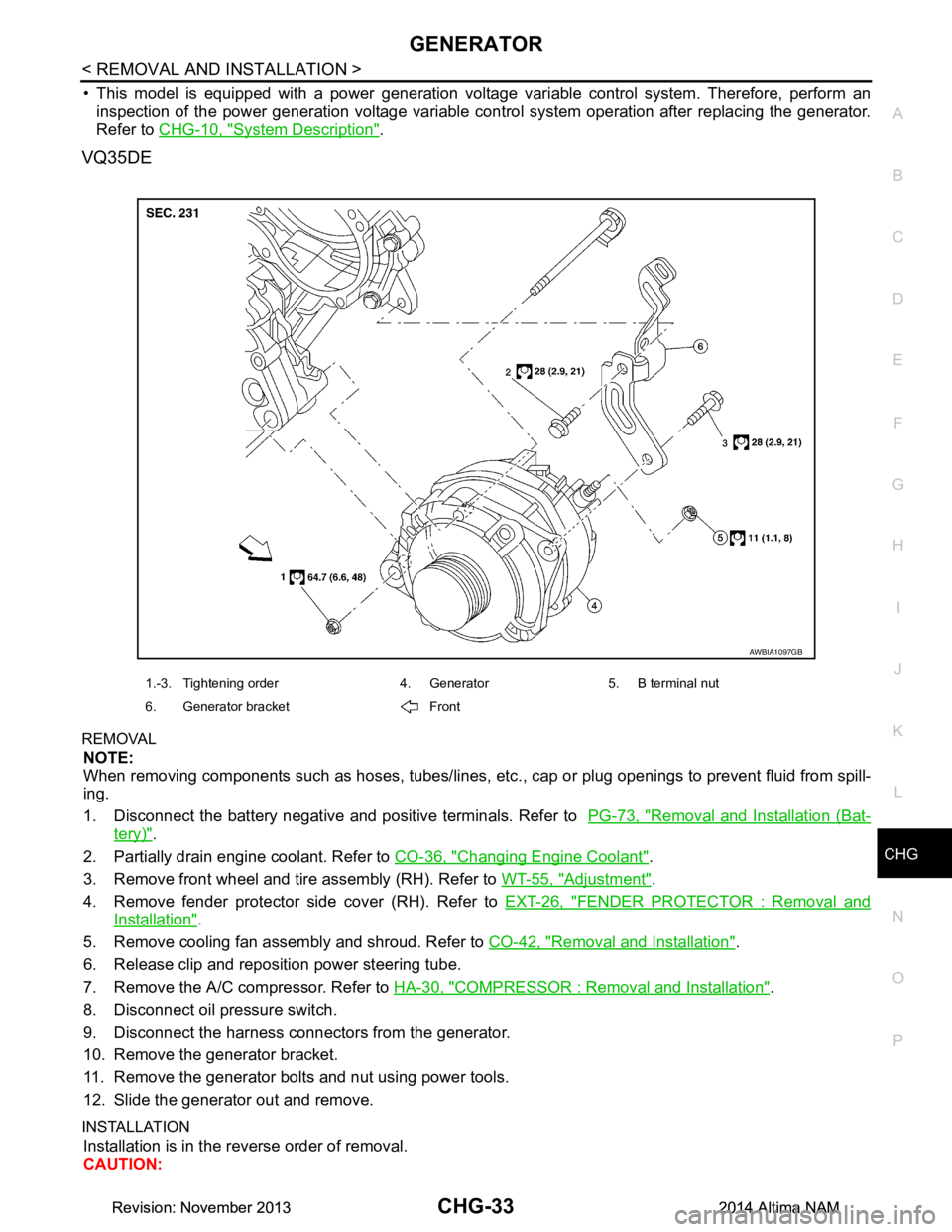
VQ35DE
REMOVAL
NOTE:
When removing components such as hoses, tubes/lines, etc. , cap or plug openings to prevent fluid from spill-
ing.
1. Disconnect the battery negative and positive terminals. Refer to PG-73, "Removal and Installation (Bat-
tery)".
2. Partially drain engine coolant. Refer to CO-36, "Changing Engine Coolant"
.
3. Remove front wheel and tire assembly (RH). Refer to WT-55, "Adjustment"
.
4. Remove fender protector side cover (RH). Refer to EXT-26, "FENDER PROTECTOR : Removal and
Installation".
5. Remove cooling fan assembly and shroud. Refer to CO-42, "Removal and Installation"
.
6. Release clip and reposition power steering tube.
7. Remove the A/C compressor. Refer to HA-30, "COMPRESSOR : Removal and Installation"
.
8. Disconnect oil pressure switch.
9. Disconnect the harness connectors from the generator.
10. Remove the generator bracket.
11. Remove the generator bolts and nut using power tools.
12. Slide the generator out and remove.
INSTALLATION
Installation is in the reverse order of removal.
CAUTION:
AWBIA1097GB
1.-3. Tightening order 4. Generator 5. B terminal nut
6. Generator bracket Front
Revision: November 20132014 Altima NAMRevision: November 20132014 Altima NAM
Page 391 of 4801
![NISSAN TEANA 2014 Workshop Manual
ENGINE COOLANTCO-11
< PERIODIC MAINTENANCE > [QR25DE]
C
D E
F
G H
I
J
K L
M A
CO
NP
O
PERIODIC MAINTENANCE
ENGINE COOLANT
System InspectionINFOID:0000000009460390
WARNING:
Do not remove the radiato](/img/5/57390/w960_57390-390.png "NISSAN TEANA 2014 Workshop Manual
ENGINE COOLANTCO-11
< PERIODIC MAINTENANCE > [QR25DE]
C
D E
F
G H
I
J
K L
M A
CO
NP
O
PERIODIC MAINTENANCE
ENGINE COOLANT
System InspectionINFOID:0000000009460390
WARNING:
Do not remove the radiato")
ENGINE COOLANTCO-11
< PERIODIC MAINTENANCE > [QR25DE]
C
D E
F
G H
I
J
K L
M A
CO
NP
O
PERIODIC MAINTENANCE
ENGINE COOLANT
System InspectionINFOID:0000000009460390
WARNING:
Do not remove the radiator cap when the engine is hot. Serious burns could occur from high-pressure
engine coolant escaping from the radiator. Wrap a thick cloth around the cap. Slowly push down and
turn it a quarter turn to allow built-up pressure to escape. Carefully remove the cap by pushing it down
and turning it all the way.
CHECKING COOLING SYSTEM HOSES
Check hoses for the following:
• Improper attachment
• Leaks
•Cracks
• Damage
• Loose connections
• Chafing
• Deterioration
CHECKING RESERVOIR LEVEL
• Check if the reservoir tank coolant level is within MIN to MAX when
the engine is cool.
• Adjust coolant level if it is too much or too little.
CHECKING COOLING SYSTEM FOR LEAKS
To check for leakage, apply pressure to the cooling system using
suitable tool (A) and Tool (B).
WARNING:
Do not remove the radiator cap wh en the engine is hot. Serious
burns could occur from high pressure coolant escaping from
the radiator.
CAUTION:
Higher pressure than specified may cause radiator damage.
CHECKING RADIATOR CAP
1. Inspect the radiator cap. • Replace the cap if the metal plunger cannot be seen around the edge of the black rubber gasket.
• Replace the cap if deposits of waxy residue or other foreign material are on the black rubber gasket or
the metal retainer.
NOTE:
Thoroughly wipe out the radiator filler neck to remove any waxy residue or foreign material.
SMA412B
Tool number : EG17650301 (J-33984-A)
Testing pressure : Refer to CO-26, "Radiator"
.
AWBIA0740ZZ
Revision: November 20132014 Altima NAM
Page 392 of 4801
![NISSAN TEANA 2014 Workshop Manual
CO-12
< PERIODIC MAINTENANCE >[QR25DE]
ENGINE COOLANT
2. Pull the negative-pressure valve to open it and check that it
closes completely when released.
• Check that there is no dirt or damage on](/img/5/57390/w960_57390-391.png "NISSAN TEANA 2014 Workshop Manual
CO-12
< PERIODIC MAINTENANCE >[QR25DE]
ENGINE COOLANT
2. Pull the negative-pressure valve to open it and check that it
closes completely when released.
• Check that there is no dirt or damage on")
CO-12
< PERIODIC MAINTENANCE >[QR25DE]
ENGINE COOLANT
2. Pull the negative-pressure valve to open it and check that it
closes completely when released.
• Check that there is no dirt or damage on the valve seat of the
radiator cap negative-pressure valve.
• Check that there are no abnormalities in the opening and clos- ing conditions of the negative-pressure valve.
3. Check radiator cap relief pressure using suitable tool and Tool. • When connecting the radiator cap to the tester, apply water orcoolant to the cap seal surface.
• Replace the radiator cap if there is an abnormality in the nega-
tive-pressure valve, or if the open-valve pressure is outside of
the standard values.
CHECKING RADIATOR
Check radiator for mud or clogging. If necessary, clean radiator as follows.
CAUTION:
• Be careful not to bend or damage the radiator fins.
• When radiator is cleaned on-vehicle, remove surr ounding parts in order to access the radiator core.
Tape the harness and electrical connectors to prevent water from entering.
1. Spray water to the back side of the radiator co re using a side to side motion from the top down.
2. Stop spraying when debris no longer flows from radiator core.
3. Blow air into the back side of radiator core using a side to side motion from the top down.
• Use compressed air lower than 490 kPa (5 kg/cm
2, 71 psi) and keep distance more than 30 cm (11.8 in).
4. Continue to blow air until no water sprays out.
5. Check for coolant leaks. Repair as necessary.
Changing Engine CoolantINFOID:0000000009460391
WARNING:
Do not remove the radiator cap when the engine is hot. Serious burns could occur from high-pressure
engine coolant escaping from the radiator. Wrap a th ick cloth around the cap. Slowly push down and
turn it a quarter turn to allow built-up pressure to escape. Carefully remove the cap by pushing it down
and turning it all the way.
DRAINING ENGINE COOLANT
1. Remove the engine under cover. Refer to EXT-17, "Removal and Installation".
2. Open the radiator drain plug at the bottom of the radi ator and remove the radiator filler cap. This is the
only step required when partially draining the cooling system (radiator only).
CAUTION:
• Do not allow the coolant to contact the drive belt.
• Perform this step when engine is cold.
3. Follow this step for heater core removal/replac ement only. Disconnect the upper heater hose at the
engine side and apply moderate air pressure [103.46 kPa (1.055 kg/cm
2, 15 psi) maximum air pressure]
into the hose for 30 seconds to blow t he excess coolant out of the heater core.
4. When draining all of the coolant in the system, re move the reservoir tank and drain the coolant, then clean
the reservoir tank before installation.
SMA967B
Tool number : EG17650301 (J-33984-A)
Standard: Refer to CO-26, "Radiator"
.
WBIA0570E
Revision: November 20132014 Altima NAM