battery NISSAN TEANA 2014 Service Manual
[x] Cancel search | Manufacturer: NISSAN, Model Year: 2014, Model line: TEANA, Model: NISSAN TEANA 2014Pages: 4801, PDF Size: 51.2 MB
Page 3903 of 4801
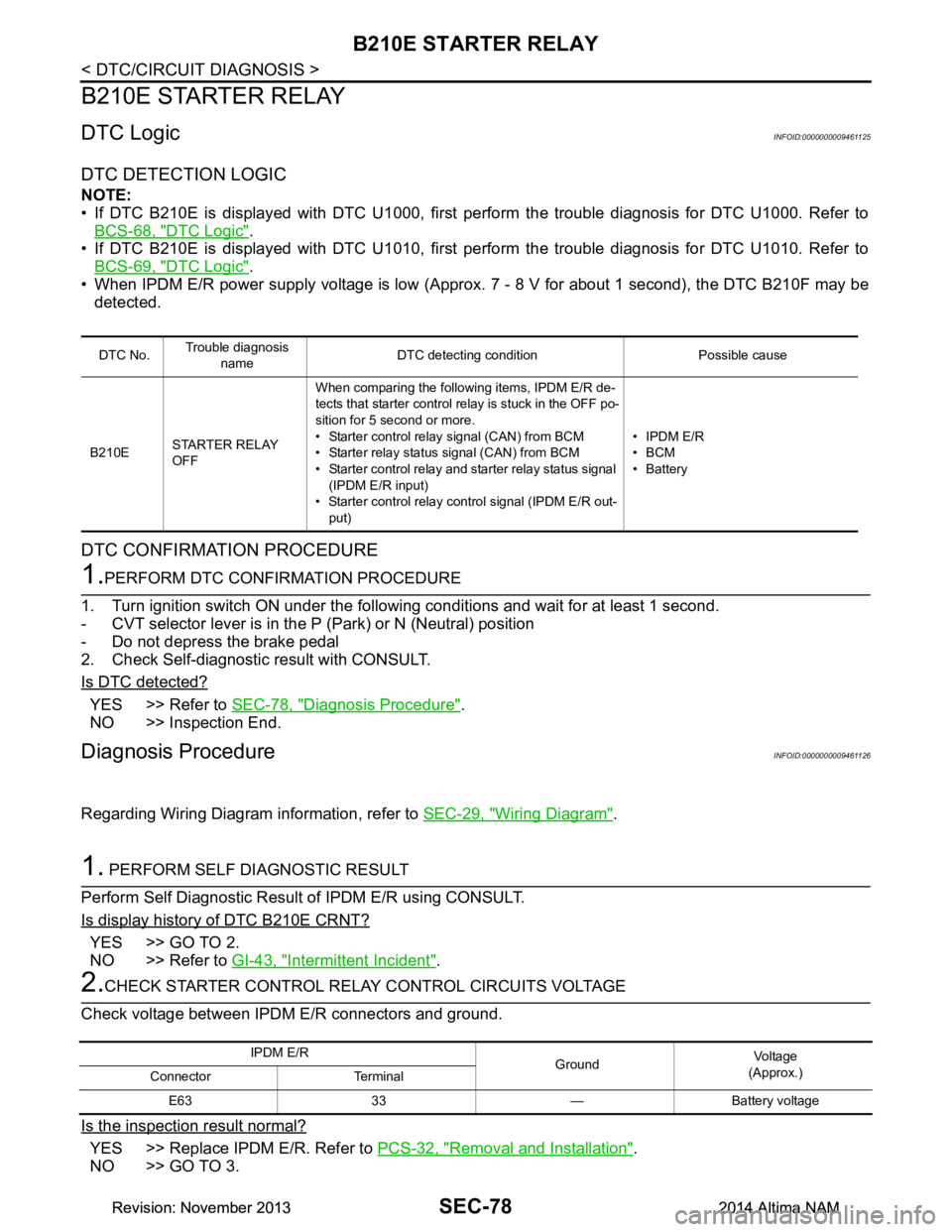
SEC-78
< DTC/CIRCUIT DIAGNOSIS >
B210E STARTER RELAY
B210E STARTER RELAY
DTC LogicINFOID:0000000009461125
DTC DETECTION LOGIC
NOTE:
• If DTC B210E is displayed with DTC U1000, first perform the trouble diagnosis for DTC U1000. Refer to
BCS-68, "DTC Logic"
.
• If DTC B210E is displayed with DTC U1010, first perform the trouble diagnosis for DTC U1010. Refer to
BCS-69, "DTC Logic"
.
• When IPDM E/R power supply voltage is low (Approx. 7 - 8 V for about 1 second), the DTC B210F may be
detected.
DTC CONFIRMATION PROCEDURE
1.PERFORM DTC CONFIRMATION PROCEDURE
1. Turn ignition switch ON under the following conditions and wait for at least 1 second.
- CVT selector lever is in the P (Park) or N (Neutral) position
- Do not depress the brake pedal
2. Check Self-diagnostic result with CONSULT.
Is DTC detected?
YES >> Refer to SEC-78, "Diagnosis Procedure".
NO >> Inspection End.
Diagnosis ProcedureINFOID:0000000009461126
Regarding Wiring Diagram information, refer to SEC-29, "Wiring Diagram".
1. PERFORM SELF DIAGNOSTIC RESULT
Perform Self Diagnostic Result of IPDM E/R using CONSULT.
Is display history of DTC B210E CRNT?
YES >> GO TO 2.
NO >> Refer to GI-43, "Intermittent Incident"
.
2.CHECK STARTER CONTROL RELA Y CONTROL CIRCUITS VOLTAGE
Check voltage between IPDM E/R connectors and ground.
Is the inspection result normal?
YES >> Replace IPDM E/R. Refer to PCS-32, "Removal and Installation".
NO >> GO TO 3.
DTC No. Trouble diagnosis
name DTC detecting condition Possible cause
B210E STARTER RELAY
OFF When comparing the following items, IPDM E/R de-
tects that starter control relay is stuck in the OFF po-
sition for 5 second or more.
• Starter control relay signal (CAN) from BCM
• Starter relay status signal (CAN) from BCM
• Starter control relay and st arter relay status signal
(IPDM E/R input)
• Starter control relay cont rol signal (IPDM E/R out-
put) • IPDM E/R
•BCM
•Battery
IPDM E/R GroundVo l ta g e
(Approx.)
Connector Terminal
E63 33 — Battery voltage
Revision: November 20132014 Altima NAMRevision: November 20132014 Altima NAM
Page 3906 of 4801
B210F TRANSMISSION RANGE SWITCHSEC-81
< DTC/CIRCUIT DIAGNOSIS >
C
D E
F
G H
I
J
L
M A
B
SEC
N
O P
Is the inspection result normal?
YES >> Replace IPDM E/R. Refer to PCS-32, "Removal and Installation".
NO >> GO TO 3.
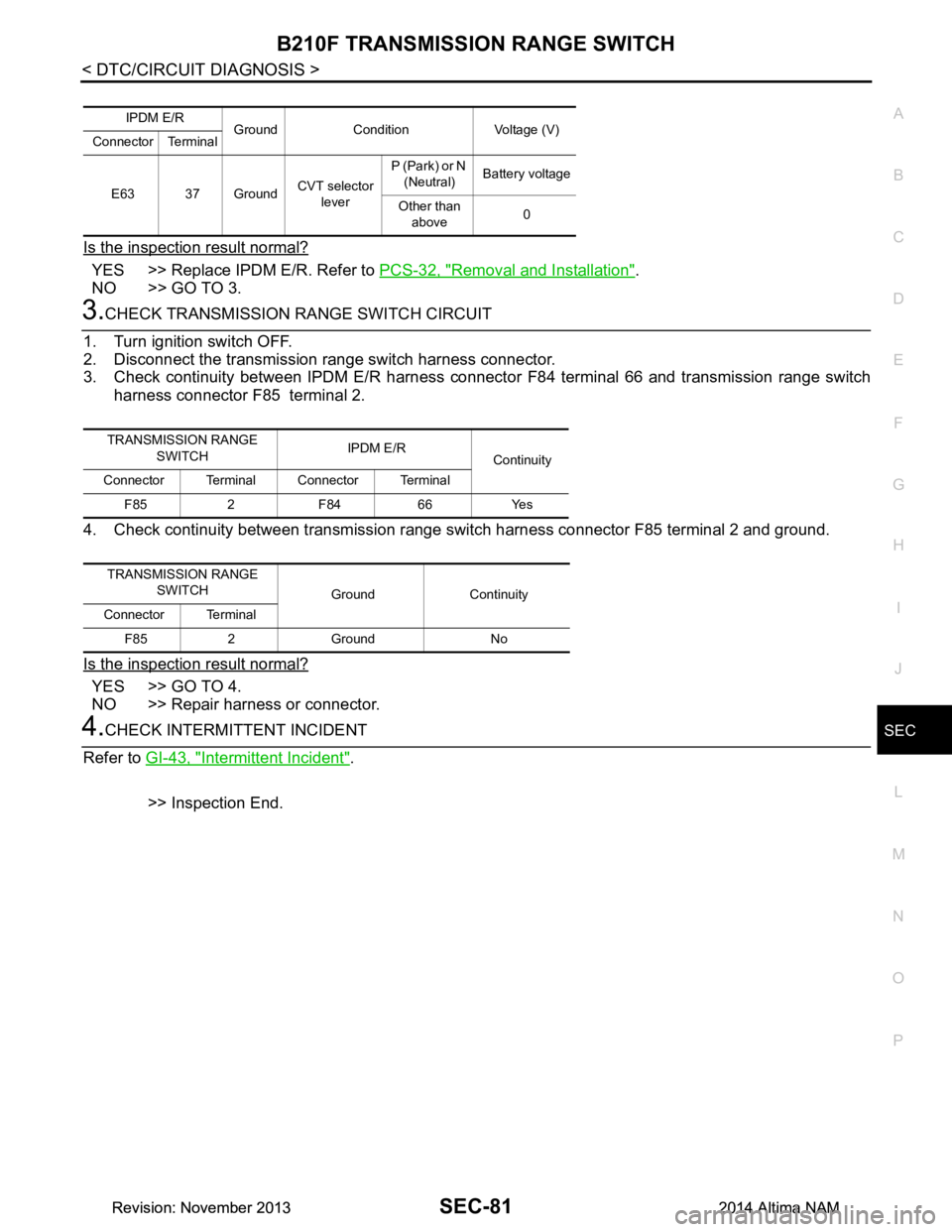
3.CHECK TRANSMISSION RANGE SWITCH CIRCUIT
1. Turn ignition switch OFF.
2. Disconnect the transmission range switch harness connector.
3. Check continuity between IPDM E/R harness connec tor F84 terminal 66 and transmission range switch
harness connector F85 terminal 2.
4. Check continuity between transmission range s witch harness connector F85 terminal 2 and ground.
Is the inspection result normal?
YES >> GO TO 4.
NO >> Repair harness or connector.
4.CHECK INTERMITTENT INCIDENT
Refer to GI-43, "Intermittent Incident"
.
>> Inspection End.
IPDM E/R Ground Condition Voltage (V)
Connector Terminal
E63 37 Ground CVT selector
lever P (Park) or N
(Neutral) Battery voltage
Other than above 0
TRANSMISSION RANGE
SWITCH IPDM E/R
Continuity
Connector Terminal Connector Terminal
F85 2 F84 66 Yes
TRANSMISSION RANGE SWITCH Ground Continuity
Connector Terminal
F85 2 Ground No
Revision: November 20132014 Altima NAMRevision: November 20132014 Altima NAM
Page 3908 of 4801
B2110 TRANSMISSION RANGE SWITCHSEC-83
< DTC/CIRCUIT DIAGNOSIS >
C
D E
F
G H
I
J
L
M A
B
SEC
N
O P
Is the inspection result normal?
YES >> Replace IPDM E/R. Refer to PCS-32, "Removal and Installation".
NO >> GO TO 3.
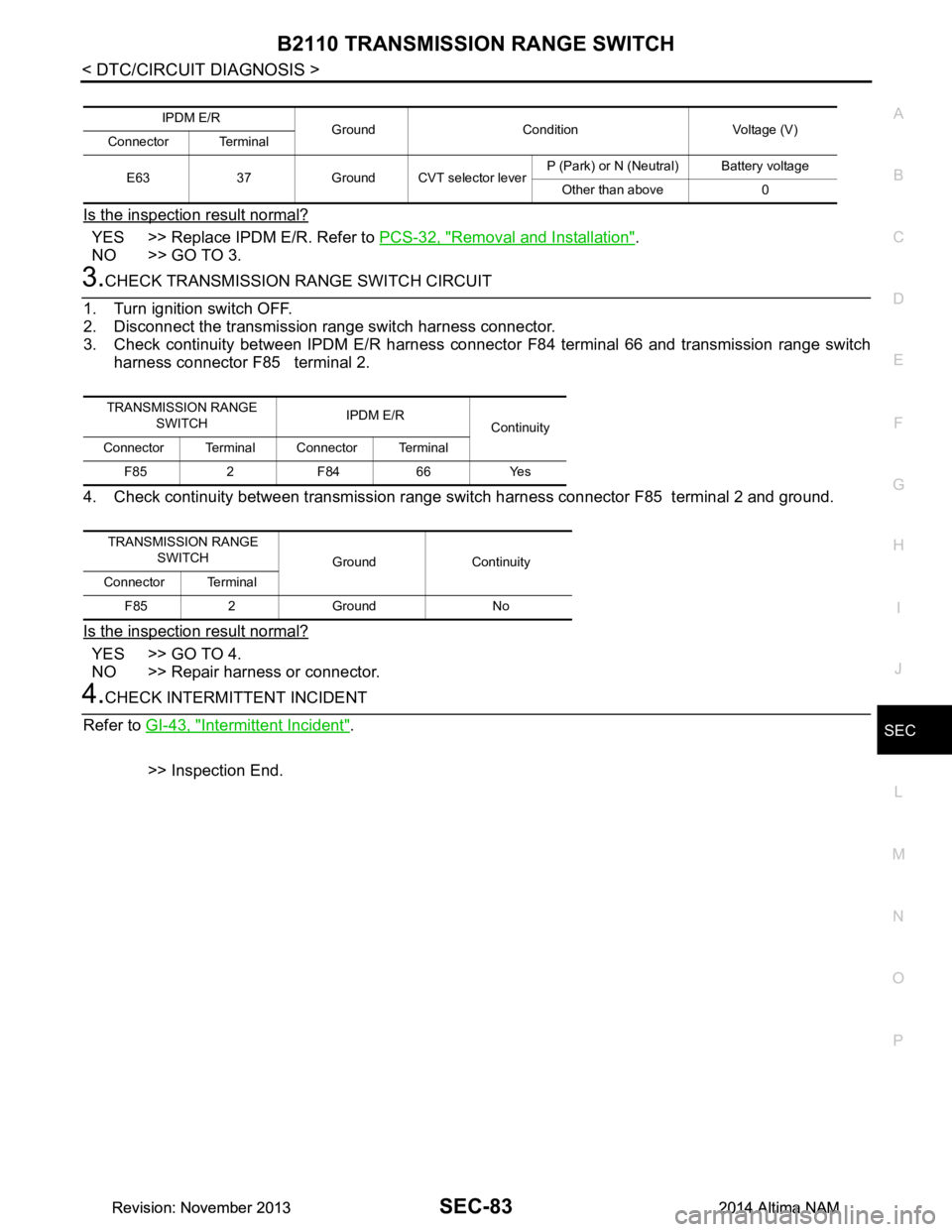
3.CHECK TRANSMISSION RANGE SWITCH CIRCUIT
1. Turn ignition switch OFF.
2. Disconnect the transmission range switch harness connector.
3. Check continuity between IPDM E/R harness connec tor F84 terminal 66 and transmission range switch
harness connector F85 terminal 2.
4. Check continuity between transmission range s witch harness connector F85 terminal 2 and ground.
Is the inspection result normal?
YES >> GO TO 4.
NO >> Repair harness or connector.
4.CHECK INTERMITTENT INCIDENT
Refer to GI-43, "Intermittent Incident"
.
>> Inspection End.
IPDM E/R Ground Condition Voltage (V)
Connector Terminal
E63 37 Ground CVT selector lever P (Park) or N (Neutral) Battery voltage
Other than above 0
TRANSMISSION RANGE SWITCH IPDM E/R
Continuity
Connector Terminal Connector Terminal
F85 2 F84 66 Yes
TRANSMISSION RANGE SWITCH Ground Continuity
Connector Terminal
F85 2 Ground No
Revision: November 20132014 Altima NAMRevision: November 20132014 Altima NAM
Page 3919 of 4801
SEC-94
< DTC/CIRCUIT DIAGNOSIS >
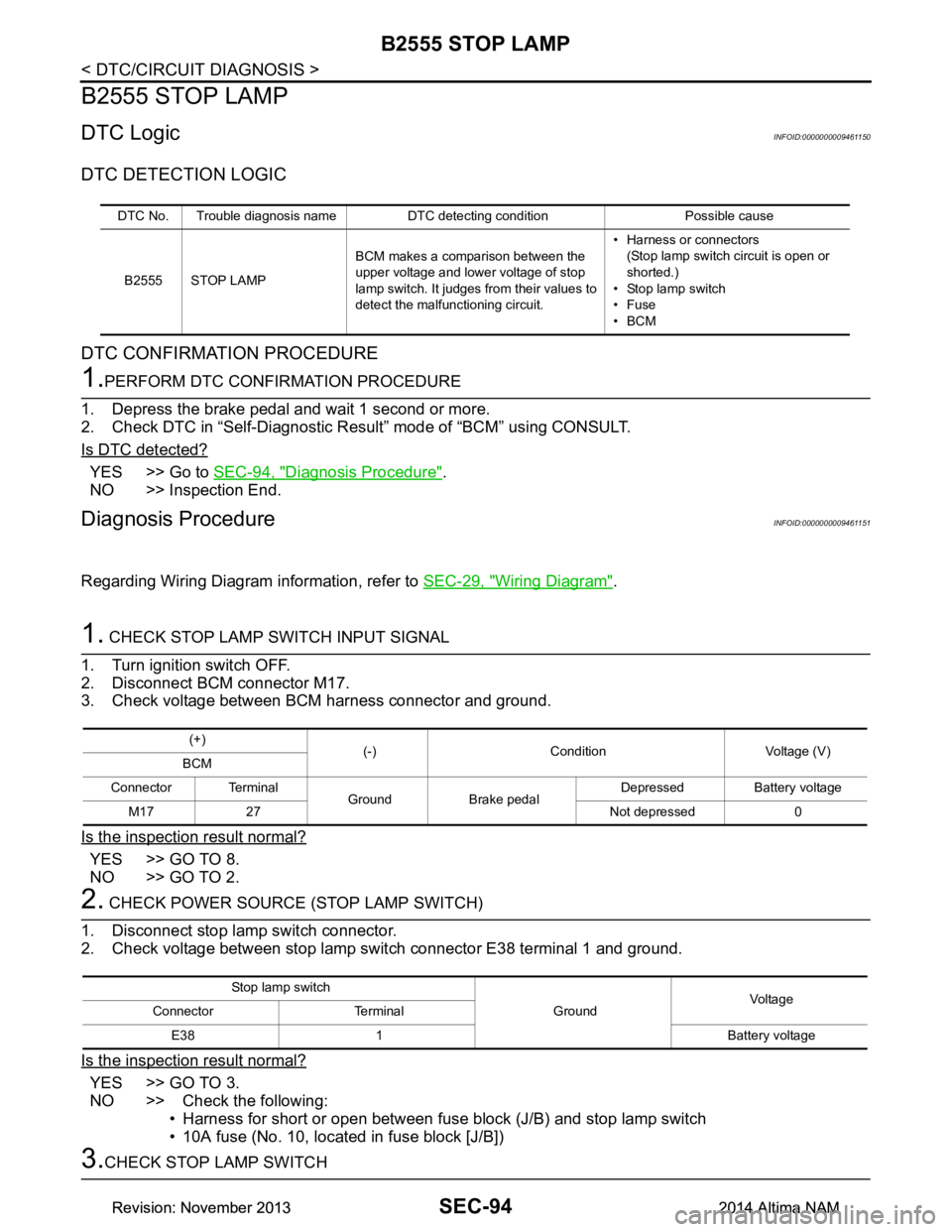
B2555 STOP LAMP
B2555 STOP LAMP
DTC LogicINFOID:0000000009461150
DTC DETECTION LOGIC
DTC CONFIRMATION PROCEDURE
1.PERFORM DTC CONFIRMATION PROCEDURE
1. Depress the brake pedal and wait 1 second or more.
2. Check DTC in “Self-Diagnostic Result” mode of “BCM” using CONSULT.
Is DTC detected?
YES >> Go to SEC-94, "Diagnosis Procedure".
NO >> Inspection End.
Diagnosis ProcedureINFOID:0000000009461151
Regarding Wiring Diagram information, refer to SEC-29, "Wiring Diagram".
1. CHECK STOP LAMP SWITCH INPUT SIGNAL
1. Turn ignition switch OFF.
2. Disconnect BCM connector M17.
3. Check voltage between BCM harness connector and ground.
Is the inspection result normal?
YES >> GO TO 8.
NO >> GO TO 2.
2. CHECK POWER SOURCE (STOP LAMP SWITCH)
1. Disconnect stop lamp switch connector.
2. Check voltage between stop lamp switch connector E38 terminal 1 and ground.
Is the inspection result normal?
YES >> GO TO 3.
NO >> Check the following: • Harness for short or open between fuse block (J/B) and stop lamp switch
• 10A fuse (No. 10, located in fuse block [J/B])
3.CHECK STOP LAMP SWITCH
DTC No. Trouble diagnosis name DTC detecting condition Possible cause
B2555 STOP LAMP BCM makes a comparison between the
upper voltage and lower voltage of stop
lamp switch. It judges from their values to
detect the malfunctioning circuit. • Harness or connectors
(Stop lamp switch circuit is open or
shorted.)
• Stop lamp switch
•Fuse
•BCM
(+) (-) Condition Voltage (V)
BCM
Connector Terminal Ground Brake pedal Depressed Battery voltage
M17 27 Not depressed 0
Stop lamp switch GroundVoltage
Connector Terminal
E38 1 Battery voltage
Revision: November 20132014 Altima NAMRevision: November 20132014 Altima NAM
Page 3920 of 4801
B2555 STOP LAMPSEC-95
< DTC/CIRCUIT DIAGNOSIS >
C
D E
F
G H
I
J
L
M A
B
SEC
N
O P
Check stop lamp switch. Refer to TM-173, "Component Inspection (Stop Lamp Switch)".
Is the inspection result normal?
YES >> GO TO 4.
NO >> Replace stop lamp switch. Refer to BR-18, "Exploded View"
.
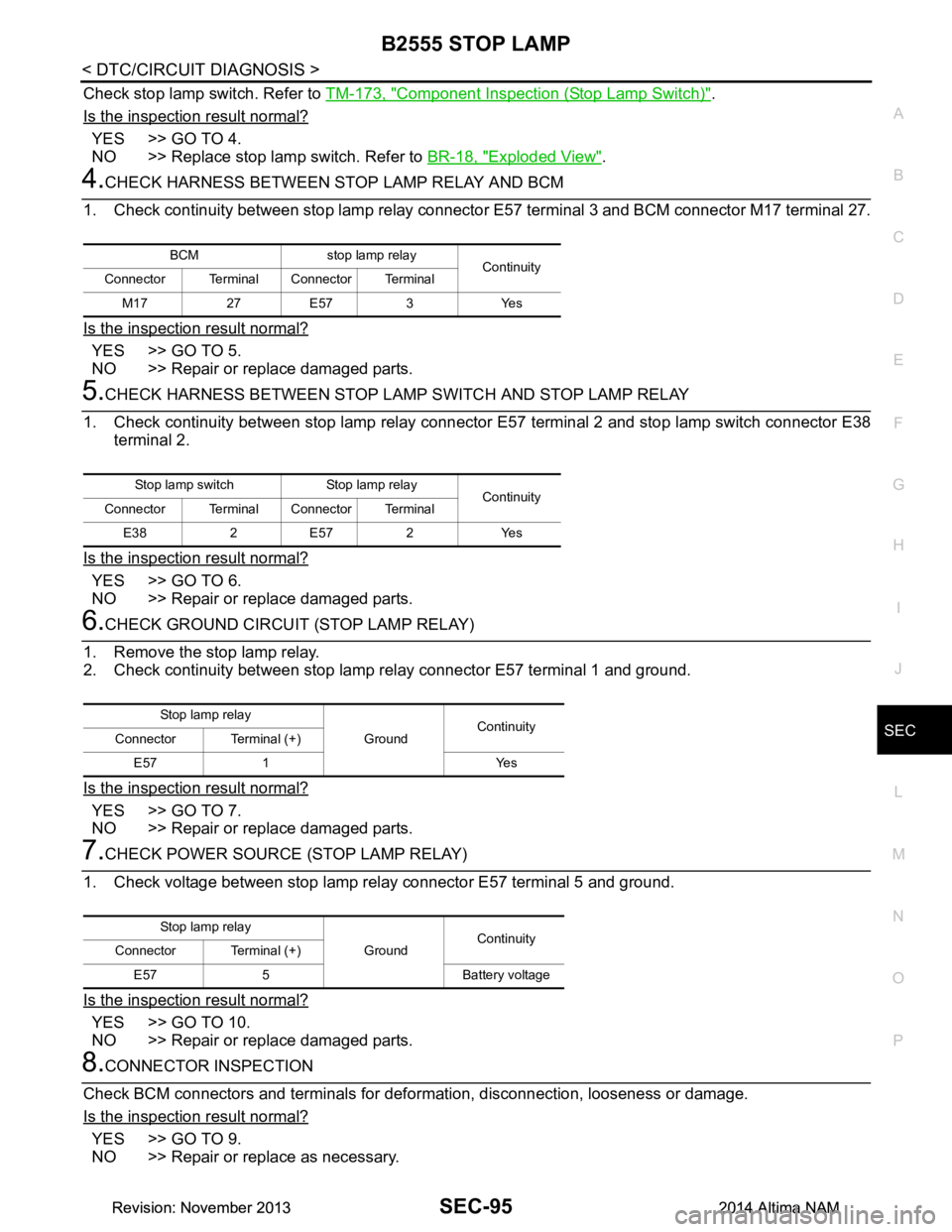
4.CHECK HARNESS BETWEEN STOP LAMP RELAY AND BCM
1. Check continuity between stop lamp relay connecto r E57 terminal 3 and BCM connector M17 terminal 27.
Is the inspection result normal?
YES >> GO TO 5.
NO >> Repair or replace damaged parts.
5.CHECK HARNESS BETWEEN STOP LAMP SWITCH AND STOP LAMP RELAY
1. Check continuity between stop lamp relay connector E57 terminal 2 and stop lamp switch connector E38
terminal 2.
Is the inspection result normal?
YES >> GO TO 6.
NO >> Repair or replace damaged parts.
6.CHECK GROUND CIRCUIT (STOP LAMP RELAY)
1. Remove the stop lamp relay.
2. Check continuity between stop lamp relay connector E57 terminal 1 and ground.
Is the inspection result normal?
YES >> GO TO 7.
NO >> Repair or replace damaged parts.
7.CHECK POWER SOURCE (STOP LAMP RELAY)
1. Check voltage between stop lamp relay connector E57 terminal 5 and ground.
Is the inspection result normal?
YES >> GO TO 10.
NO >> Repair or replace damaged parts.
8.CONNECTOR INSPECTION
Check BCM connectors and terminals for def ormation, disconnection, looseness or damage.
Is the inspection result normal?
YES >> GO TO 9.
NO >> Repair or replace as necessary.
BCM stop lamp relay Continuity
Connector Terminal Connector Terminal
M17 27 E57 3 Yes
Stop lamp switch Stop lamp relay Continuity
Connector Terminal Connector Terminal
E38 2 E57 2 Yes
St op la mp rel ay GroundContinuity
Connector Terminal (+)
E57 1 Yes
St op la mp rel ay GroundContinuity
Connector Terminal (+)
E57 5 Battery voltage
Revision: November 20132014 Altima NAMRevision: November 20132014 Altima NAM
Page 3943 of 4801
SEC-118
< DTC/CIRCUIT DIAGNOSIS >
B2617 STARTER RELAY CIRCUIT
B2617 STARTER RELAY CIRCUIT
DescriptionINFOID:0000000009461176
Located in IPDM E/R, it runs the starter motor. The starter relay is turned ON by the BCM when the ignition
switch is in START position. IPDM E/R transmits t he starter relay ON signal to BCM via CAN communication.
DTC LogicINFOID:0000000009461177
DTC DETECTION LOGIC
NOTE:
• If DTC B2617 is displayed with DTC U1000, first perform the trouble diagnosis for DTC U1000. Refer to
BCS-68, "DTC Logic"
.
• If DTC B2617 is displayed with DTC U1010, first perform the trouble diagnosis for DTC U1010. Refer to BCS-69, "DTC Logic"
.
DTC CONFIRMATION PROCEDURE
1.PERFORM DTC CONFIRMATION PROCEDURE
1. Turn ignition switch ON under the following conditions and wait for at least 1 second.
- CVT selector lever is in the P (Park) position.
- Do not depress the brake pedal.
2. Check Self-Diagnostic Result with CONSULT.
Is DTC detected?
YES >> Refer to SEC-118, "Diagnosis Procedure".
NO >> Inspection End.
Diagnosis ProcedureINFOID:0000000009461178
Regarding Wiring Diagram information, refer to SEC-29, "Wiring Diagram".
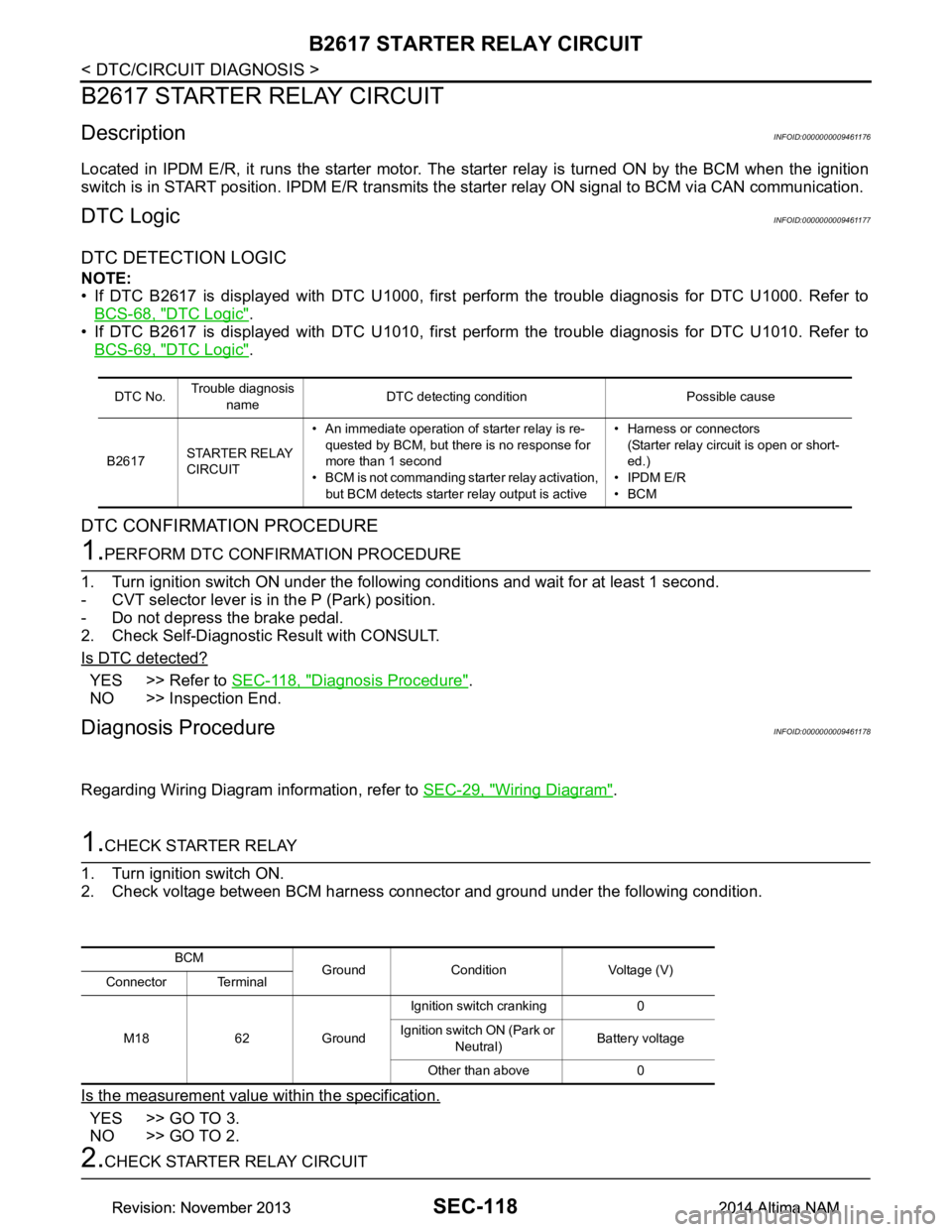
1.CHECK STARTER RELAY
1. Turn ignition switch ON.
2. Check voltage between BCM harness connector and ground under the following condition.
Is the measurement value within the specification.
YES >> GO TO 3.
NO >> GO TO 2.
2.CHECK STARTER RELAY CIRCUIT
DTC No. Trouble diagnosis
name DTC detecting condition Possible cause
B2617 STARTER RELAY
CIRCUIT • An immediate operation of starter relay is re-
quested by BCM, but there is no response for
more than 1 second
• BCM is not commanding starter relay activation, but BCM detects starter relay output is active • Harness or connectors
(Starter relay circuit is open or short-
ed.)
• IPDM E/R
•BCM
BCM Ground Condition Voltage (V)
Connector Terminal
M18 62 Ground Ignition switch cranking 0
Ignition switch ON (Park or Neutral) Battery voltage
Other than above 0
Revision: November 20132014 Altima NAMRevision: November 20132014 Altima NAM
Page 3947 of 4801

SEC-122
< DTC/CIRCUIT DIAGNOSIS >
POWER SUPPLY AND GROUND CIRCUIT
POWER SUPPLY AND GROUND CIRCUIT
Diagnosis ProcedureINFOID:0000000009956232
Regarding Wiring Diagram information, refer to BCS-55, "Wiring Diagram".
1. CHECK FUSE AND FUSIBLE LINK
Check that the following fuse and fusible link are not blown.
Is the fuse or fusible link blown?
YES >> Replace the blown fuse or fusible link after repairing the affected circuit.
NO >> GO TO 2
2. CHECK POWER SUPPLY CIRCUIT
1. Disconnect BCM connector M21.
2. Check voltage between BCM connector M21 terminals 131, 139 and ground.
Is the inspection result normal?
YES >> GO TO 3
NO >> Repair or replace harness or connectors.
3. CHECK GROUND CIRCUIT
Check continuity between BCM connector M21 terminals 134, 143 and ground.
Is the inspection result normal?
YES >> Inspection End.
NO >> Repair or replace harness or connectors.
Terminal No. Signal name Fuse and fusible link No.
139 Fusible link battery power I (40A)
131 BCM battery fuse 1 (10A)
BCM GroundVo l ta g e
(Approx.)
Connector Terminal
M21 131
— Battery voltage
139
BCM Ground Continuity
Connector Terminal
M21 134
—Yes
143
Revision: November 20132014 Altima NAMRevision: November 20132014 Altima NAM
Page 3948 of 4801
POWER SUPPLY AND GROUND CIRCUITSEC-123
< DTC/CIRCUIT DIAGNOSIS >
C
D E
F
G H
I
J
L
M A
B
SEC
N
O P
POWER SUPPLY AND GROUND CIRCUIT
Diagnosis ProcedureINFOID:0000000009956233
Regarding Wiring Diagram information, refer to PCS-21, "Wiring Diagram".
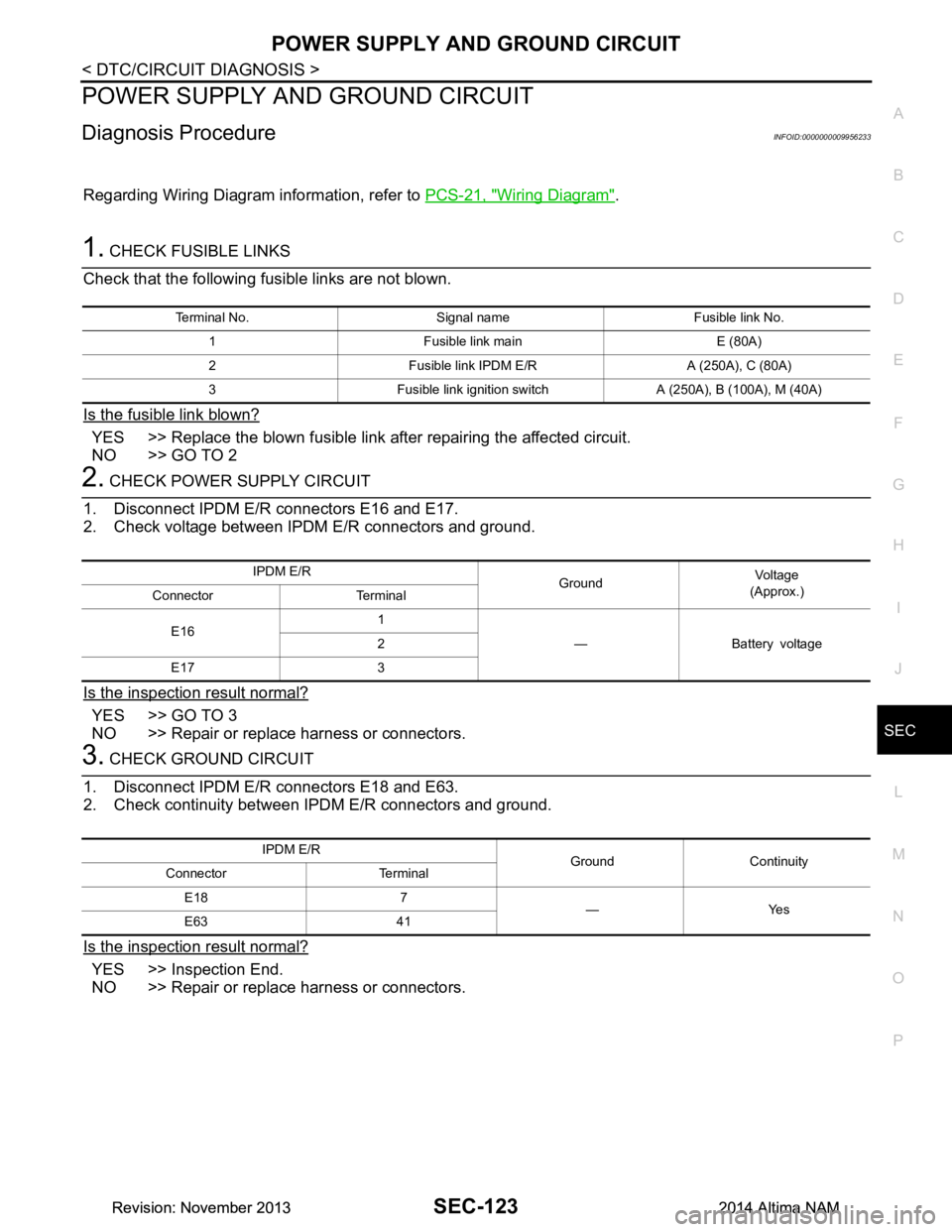
1. CHECK FUSIBLE LINKS
Check that the following fusible links are not blown.
Is the fusible link blown?
YES >> Replace the blown fusible link after repairing the affected circuit.
NO >> GO TO 2
2. CHECK POWER SUPPLY CIRCUIT
1. Disconnect IPDM E/R connectors E16 and E17.
2. Check voltage between IPDM E/R connectors and ground.
Is the inspection result normal?
YES >> GO TO 3
NO >> Repair or replace harness or connectors.
3. CHECK GROUND CIRCUIT
1. Disconnect IPDM E/R connectors E18 and E63.
2. Check continuity between IPDM E/R connectors and ground.
Is the inspection result normal?
YES >> Inspection End.
NO >> Repair or replace harness or connectors.
Terminal No. Signal name Fusible link No.
1 Fusible link main E (80A)
2 Fusible link IPDM E/R A (250A), C (80A)
3 Fusible link ignition switch A (250A), B (100A), M (40A)
IPDM E/R GroundVol tag e
(Approx.)
Connector Terminal
E16 1
— Battery voltage
2
E17 3
IPDM E/R Ground Continuity
Connector Terminal
E18 7 —Yes
E63 41
Revision: November 20132014 Altima NAMRevision: November 20132014 Altima NAM
Page 3950 of 4801
HOOD SWITCHSEC-125
< DTC/CIRCUIT DIAGNOSIS >
C
D E
F
G H
I
J
L
M A
B
SEC
N
O P
HOOD SWITCH
Component Function CheckINFOID:0000000009461186
1.CHECK FUNCTION
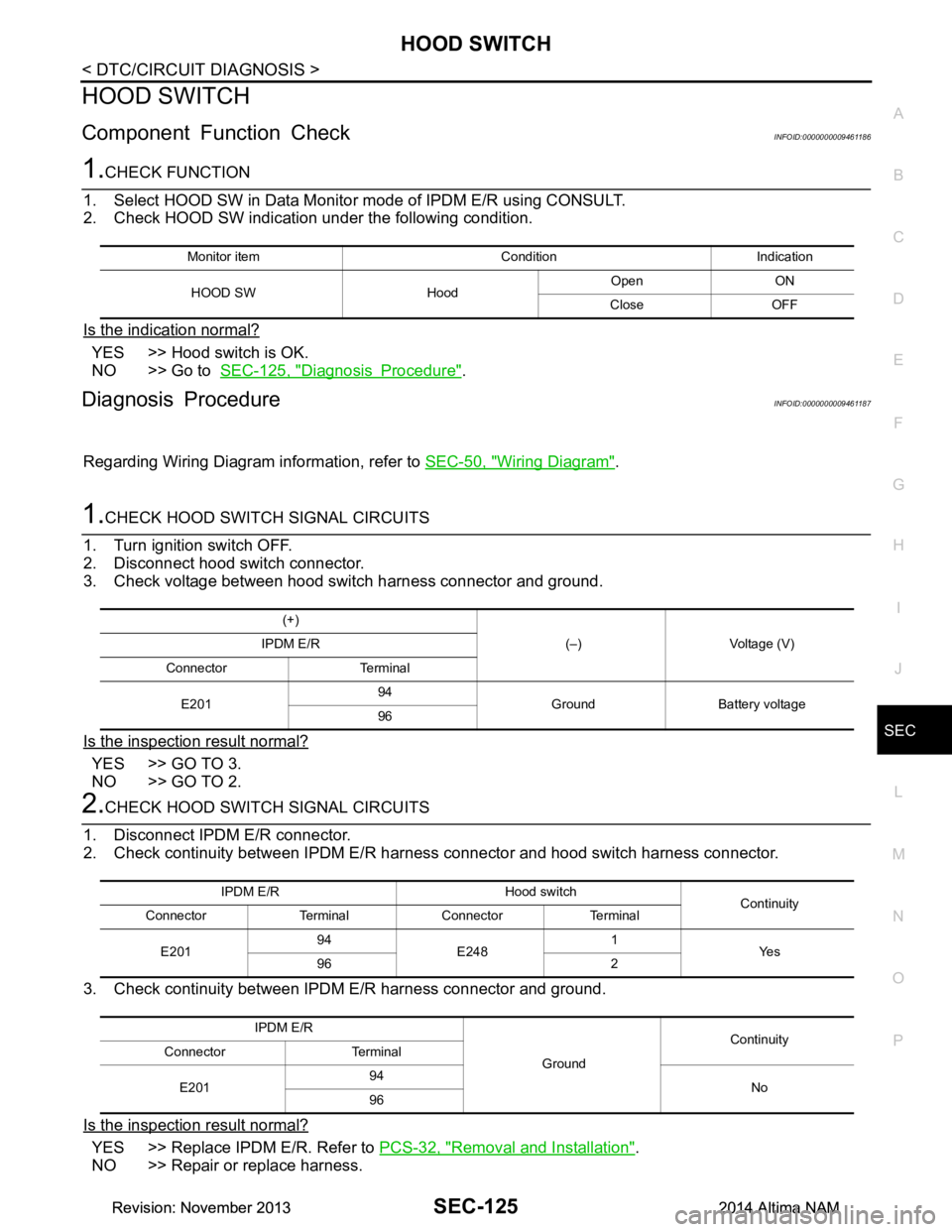
1. Select HOOD SW in Data Monito r mode of IPDM E/R using CONSULT.
2. Check HOOD SW indication under the following condition.
Is the indication normal?
YES >> Hood switch is OK.
NO >> Go to SEC-125, "Diagnosis Procedure"
.
Diagnosis ProcedureINFOID:0000000009461187
Regarding Wiring Diagram information, refer to SEC-50, "Wiring Diagram".
1.CHECK HOOD SWITCH SIGNAL CIRCUITS
1. Turn ignition switch OFF.
2. Disconnect hood switch connector.
3. Check voltage between hood switch harness connector and ground.
Is the inspection result normal?
YES >> GO TO 3.
NO >> GO TO 2.
2.CHECK HOOD SWITCH SIGNAL CIRCUITS
1. Disconnect IPDM E/R connector.
2. Check continuity between IPDM E/R har ness connector and hood switch harness connector.
3. Check continuity between IPDM E/R harness connector and ground.
Is the inspection result normal?
YES >> Replace IPDM E/R. Refer to PCS-32, "Removal and Installation".
NO >> Repair or replace harness.
Monitor item Condition Indication
HOOD SW Hood Open ON
Close OFF
(+) (–) Voltage (V)
IPDM E/R
Connector Terminal
E201 94
Ground Battery voltage
96
IPDM E/R Hood switch Continuity
Connector Terminal Connector Terminal
E201 94
E248 1
Ye s
96 2
IPDM E/R GroundContinuity
Connector Terminal
E201 94
No
96
Revision: November 20132014 Altima NAMRevision: November 20132014 Altima NAM
Page 3952 of 4801
SECURITY INDICATOR LAMPSEC-127
< DTC/CIRCUIT DIAGNOSIS >
C
D E
F
G H
I
J
L
M A
B
SEC
N
O P
SECURITY INDICATOR LAMP
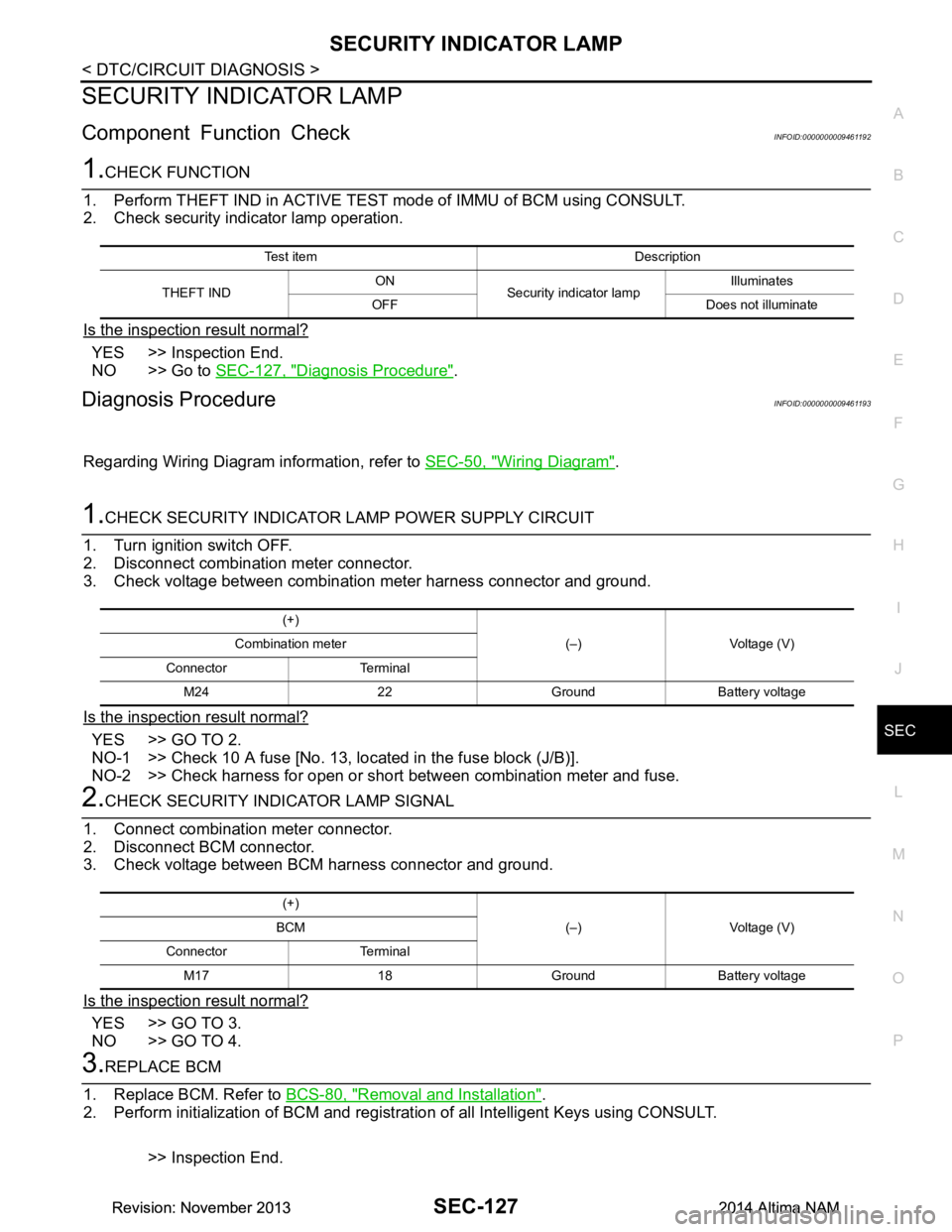
Component Function CheckINFOID:0000000009461192
1.CHECK FUNCTION
1. Perform THEFT IND in ACTIVE TEST mode of IMMU of BCM using CONSULT.
2. Check security indicator lamp operation.
Is the inspection result normal?
YES >> Inspection End.
NO >> Go to SEC-127, "Diagnosis Procedure"
.
Diagnosis ProcedureINFOID:0000000009461193
Regarding Wiring Diagram information, refer to SEC-50, "Wiring Diagram".
1.CHECK SECURITY INDICATOR LAMP POWER SUPPLY CIRCUIT
1. Turn ignition switch OFF.
2. Disconnect combination meter connector.
3. Check voltage between combination meter harness connector and ground.
Is the inspection result normal?
YES >> GO TO 2.
NO-1 >> Check 10 A fuse [No. 13, lo cated in the fuse block (J/B)].
NO-2 >> Check harness for open or short between combination meter and fuse.
2.CHECK SECURITY INDICATOR LAMP SIGNAL
1. Connect combination meter connector.
2. Disconnect BCM connector.
3. Check voltage between BCM harness connector and ground.
Is the inspection result normal?
YES >> GO TO 3.
NO >> GO TO 4.
3.REPLACE BCM
1. Replace BCM. Refer to BCS-80, "Removal and Installation"
.
2. Perform initialization of BCM and registration of all Intelligent Keys using CONSULT.
>> Inspection End.
Test item Description
THEFT IND ON
Security indicator lamp Illuminates
OFF Does not illuminate
(+) (–) Voltage (V)
Combination meter
Connector Terminal M24 22 Ground Battery voltage
(+) (–) Voltage (V)
BCM
Connector Terminal M17 18 Ground Battery voltage
Revision: November 20132014 Altima NAMRevision: November 20132014 Altima NAM