Dlk 184 NISSAN TEANA 2014 Service Manual
[x] Cancel search | Manufacturer: NISSAN, Model Year: 2014, Model line: TEANA, Model: NISSAN TEANA 2014Pages: 4801, PDF Size: 51.2 MB
Page 772 of 4801

DLK-4
INTELLIGENT KEY SYSTEM SYMPTOMS ....152
Symptom Table ................................................... ..152
DOOR LOCK FUNCTION SYMPTOMS ..........153
DOOR LOCK AND UNLOCK SWITCH ................. ..153
DOOR LOCK AND UNLOCK SWITCH : Symptom
Table .................................................................... ..
153
DOOR REQUEST SWITCH ................................... ..153
DOOR REQUEST SWITCH : Symptom Table ......153
INTELLIGENT KEY ................................................ ..154
INTELLIGENT KEY : Symptom Table ...................154
TRUNK OPEN FUNCTION SYMPTOMS ....... .156
TRUNK LID OPENER SWITCH ............................. ..156
TRUNK LID OPENER SWITCH : Symptom Table ..156
TRUNK REQUEST SWITCH .................................. ..156
TRUNK REQUEST SWITCH : Symptom Table .....156
INTELLIGENT KEY ................................................ ..156
INTELLIGENT KEY : Symptom Table ...................156
WARNING FUNCTION SYMPTOMS .............. .158
Symptom Table ................................................... ..158
KEY REMINDER FUNCTION SYMPTOMS .....160
Symptom Table ................................................... ..160
HAZARD FUNCTION .......................................161
Symptom Table ................................................... ..161
HORN FUNCTION ...........................................162
Symptom Table ................................................... ..162
INTEGRATED HOMELINK TRANSMITTER ...163
Symptom Table ................................................... ..163
SQUEAK AND RATTLE TROUBLE DIAG-
NOSES ......................... ....................................
164
Work Flow ............................................................ ..164
Generic Squeak and Rattle Troubleshooting .........165
Diagnostic Worksheet ............................................168
REMOVAL AND INSTALLATION ..............170
HOOD .............................................................. .170
HOOD ASSEMBLY ................................................ ..170
HOOD ASSEMBLY : Exploded View ................... ..170
HOOD ASSEMBLY : Removal and Installation .....170
HOOD ASSEMBLY : Adjustme nt ........................ ..172
HOOD HINGE ......................................................... ..174
HOOD HINGE : Removal and Installation .............174
HOOD SUPPORT ROD .......................................... ..175
HOOD SUPPORT ROD : Removal and Installa-
tion ....................................................................... ..
175
HOOD LOCK CONTROL ....................................... ..175
HOOD LOCK CONTROL : Component Parts Lo-
cation ................................................................... .
175
HOOD LOCK CONTROL : Removal and Installa-
tion ....................................................................... .
176
RADIATOR CORE SUPPORT .........................179
Removal and Installation .......................................179
FRONT FENDER ............................................ ..181
Exploded View ..................................................... .181
Removal and Installation .......................................181
Adjustment ........................................................... .182
FRONT DOOR ..................................................184
DOOR ASSEMBLY .................................................184
DOOR ASSEMBLY : Removal and Installation ....184
DOOR ASSEMBLY : Adjustme nt ..........................186
DOOR STRIKER .................................................... .188
DOOR STRIKER : Removal and Installation ........188
DOOR HINGE ......................................................... .188
DOOR HINGE : Removal and Installation ............188
DOOR CHECK LINK .............................................. .189
DOOR CHECK LINK : Removal and Installation ..189
REAR DOOR ....................................................190
DOOR ASSEMBLY .................................................190
DOOR ASSEMBLY : Removal and Installation ....190
DOOR ASSEMBLY : Adjustme nt ..........................191
DOOR STRIKER .................................................... .194
DOOR STRIKER : Removal and Installation ........194
DOOR HINGE ......................................................... .194
DOOR HINGE : Removal and Installation ............194
DOOR CHECK LINK .............................................. .195
DOOR CHECK LINK : Removal and Installation ..195
DOOR HANDLE ...............................................197
FRONT DOOR HANDLE ........................................ .197
FRONT DOOR HANDLE : Exploded View ...........197
FRONT DOOR HANDLE : Removal and Installa-
tion - Inside Handle .............................................. .
197
FRONT DOOR HANDLE : Removal and Installa-
tion - Outside Handle ........................................... .
198
REAR DOOR HANDLE .......................................... .200
REAR DOOR HANDLE : Exploded View ..............200
REAR DOOR HANDLE : Removal and Installation
- Inside Handle ..................................................... .
200
REAR DOOR HANDLE : Removal and Installation
- Outside Handle .................................................. .
201
DOOR LOCK ....................................................203
FRONT DOOR LOCK ............................................. .203
FRONT DOOR LOCK : Exploded View ................203
FRONT DOOR LOCK : Removal and Installation .203
Revision: November 20132014 Altima NAMRevision: November 20132014 Altima NAM
Page 879 of 4801
OUTSIDE KEY ANTENNA (DRIVER SIDE)DLK-111
< DTC/CIRCUIT DIAGNOSIS >
C
D E
F
G H
I
J
L
M A
B
DLK
N
O P
OUTSIDE KEY ANTENN A (DRIVER SIDE)
Component Function CheckINFOID:0000000009461840
1.CHECK OUTSIDE KEY ANTENNA (LH)
1. Place the Intelligent Key into the detection area of the outside key antenna (LH).
2. Press the door request switch (LH).
Does the door unlock?
YES >> Inspection End.
NO >> Refer to DLK-111, "Diagnosis Procedure"
.
Diagnosis ProcedureINFOID:0000000009461841
Regarding Wiring Diagram information, refer to DLK-61, "Wiring Diagram".
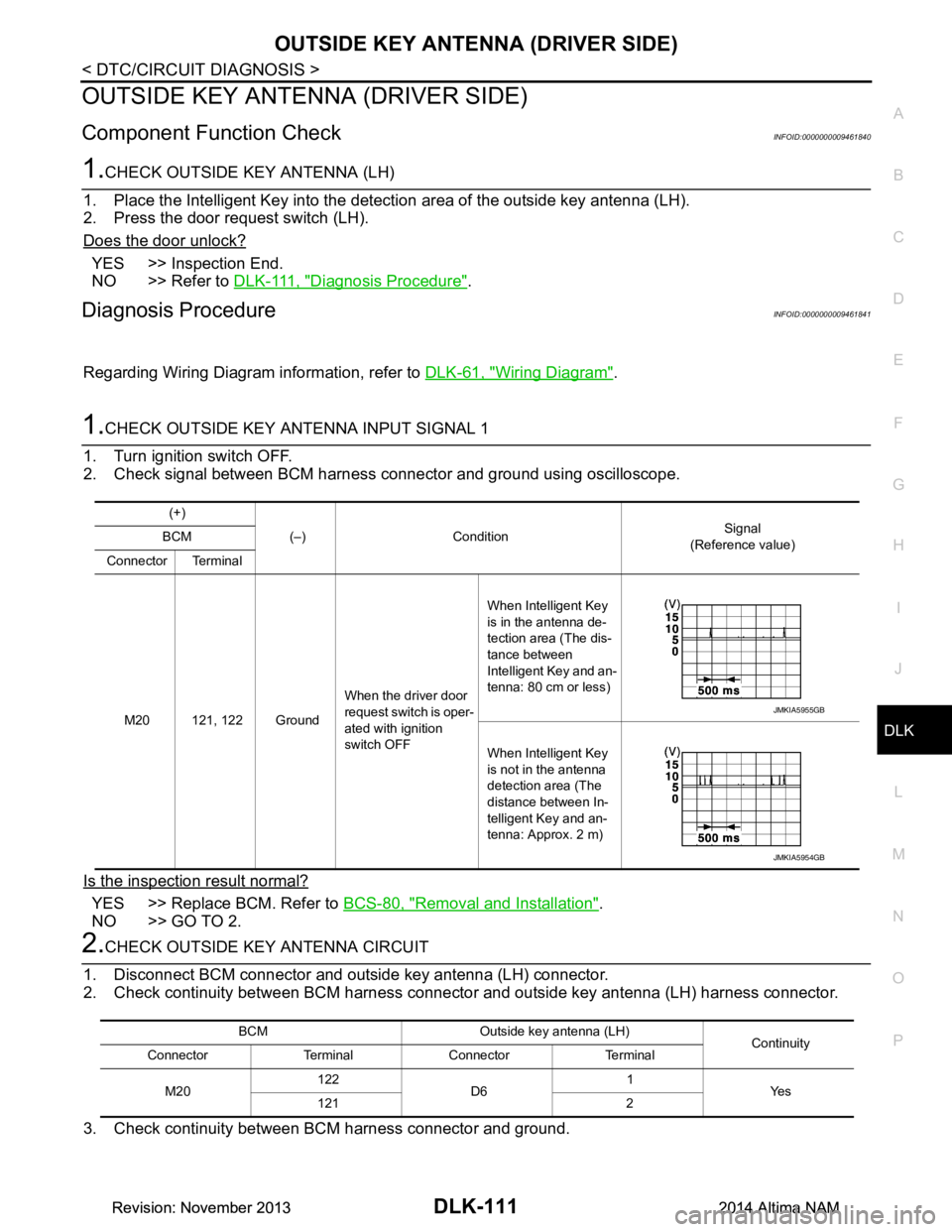
1.CHECK OUTSIDE KEY ANTENNA INPUT SIGNAL 1
1. Turn ignition switch OFF.
2. Check signal between BCM harness connector and ground using oscilloscope.
Is the inspection result normal?
YES >> Replace BCM. Refer to BCS-80, "Removal and Installation".
NO >> GO TO 2.
2.CHECK OUTSIDE KEY ANTENNA CIRCUIT
1. Disconnect BCM connector and outside key antenna (LH) connector.
2. Check continuity between BCM harness connector and outside key antenna (LH) harness connector.
3. Check continuity between BCM harness connector and ground.
(+)
(–) Condition Signal
(Reference value)
BCM
Connector Terminal
M20 121, 122 Ground When the driver door
request switch is oper-
ated with ignition
switch OFF When Intelligent Key
is in the antenna de-
tection area (The dis-
tance between
Intelligent Key and an-
tenna: 80 cm or less)
When Intelligent Key
is not in the antenna
detection area (The
distance between In-
telligent Key and an-
tenna: Approx. 2 m)
JMKIA5955GB
JMKIA5954GB
BCM Outside key antenna (LH) Continuity
Connector Terminal Connector Terminal
M20 122
D6 1
Ye s
121 2
Revision: November 20132014 Altima NAMRevision: November 20132014 Altima NAM
Page 881 of 4801
OUTSIDE KEY ANTENNA (REAR BUMPER)DLK-113
< DTC/CIRCUIT DIAGNOSIS >
C
D E
F
G H
I
J
L
M A
B
DLK
N
O P
OUTSIDE KEY ANTENN A (REAR BUMPER)
Component Function CheckINFOID:0000000009461842
1.CHECK OUTSIDE KEY ANTENNA (REAR BUMPER)
1. Place the Intelligent Key into the detection area of the outside key antenna (rear bumper).
2. Press the door request switch (trunk).
Does the door unlock?
YES >> Inspection End.
NO >> Refer to DLK-113, "Diagnosis Procedure"
.
Diagnosis ProcedureINFOID:0000000009461843
Regarding Wiring Diagram information, refer to DLK-61, "Wiring Diagram".
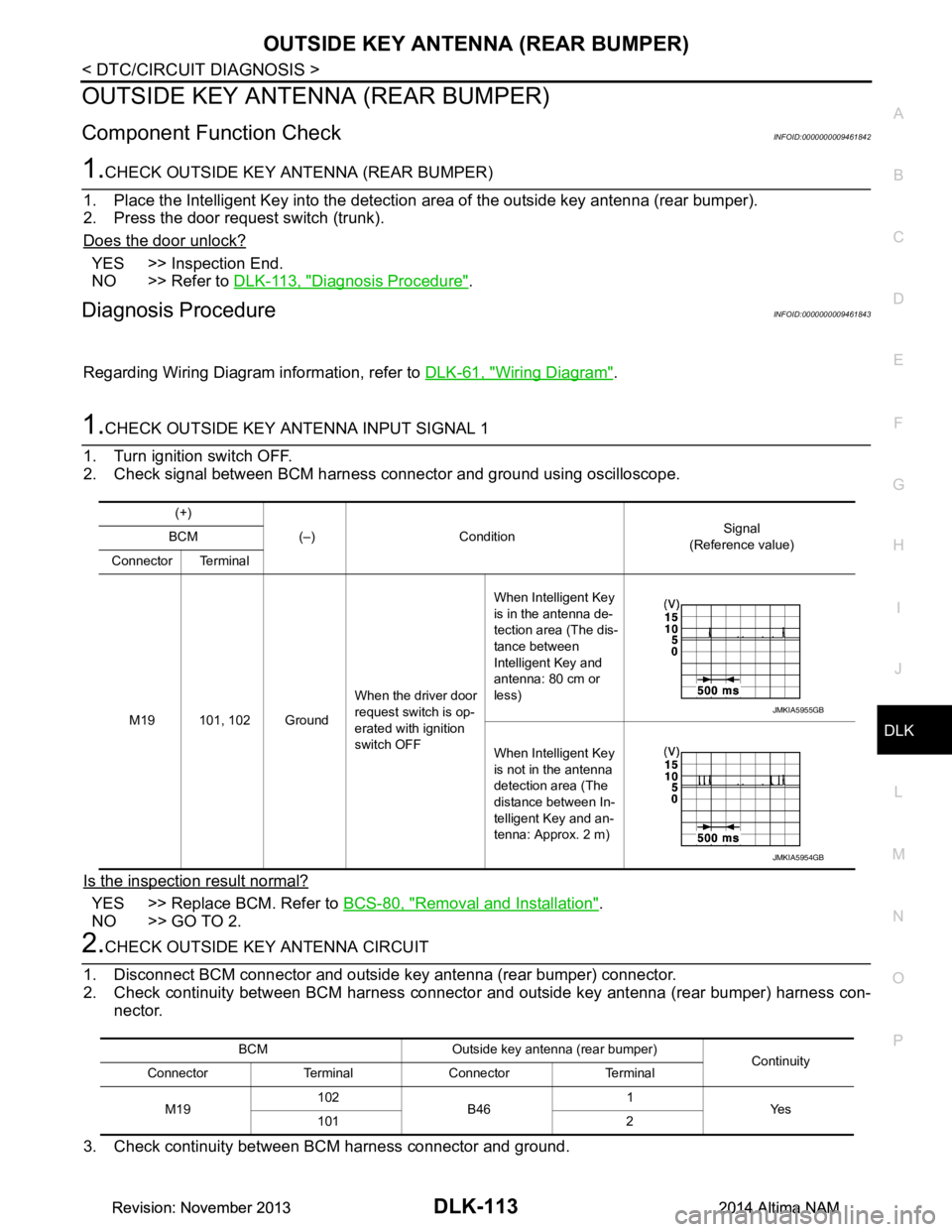
1.CHECK OUTSIDE KEY ANTENNA INPUT SIGNAL 1
1. Turn ignition switch OFF.
2. Check signal between BCM harness connector and ground using oscilloscope.
Is the inspection result normal?
YES >> Replace BCM. Refer to BCS-80, "Removal and Installation".
NO >> GO TO 2.
2.CHECK OUTSIDE KEY ANTENNA CIRCUIT
1. Disconnect BCM connector and outside key antenna (rear bumper) connector.
2. Check continuity between BCM harness connecto r and outside key antenna (rear bumper) harness con-
nector.
3. Check continuity between BCM harness connector and ground.
(+) (–) Condition Signal
(Reference value)
BCM
Connector Terminal
M19 101, 102 Ground When the driver door
request switch is op-
erated with ignition
switch OFF When Intelligent Key
is in the antenna de-
tection area (The dis-
tance between
Intelligent Key and
antenna: 80 cm or
less)
When Intelligent Key
is not in the antenna
detection area (The
distance between In-
telligent Key and an-
tenna: Approx. 2 m)
JMKIA5955GB
JMKIA5954GB
BCM Outside key antenna (rear bumper) Continuity
Connector Terminal Connector Terminal
M19 102
B46 1
Ye s
101 2
Revision: November 20132014 Altima NAMRevision: November 20132014 Altima NAM
Page 883 of 4801
KEY CYLINDER SWITCHDLK-115
< DTC/CIRCUIT DIAGNOSIS >
C
D E
F
G H
I
J
L
M A
B
DLK
N
O P
KEY CYLINDER SWITCH
DescriptionINFOID:0000000009461844
For vehicles equipped with LH and RH anti-pinch system, the main power window and door lock/unlock switch
detects condition of the door key cylinder switch and transmits to BCM as the LOCK or UNLOCK signal.
For vehicles equipped with LH anti-pinch system only, t he front door lock assembly LH (key cylinder switch)
transmits the LOCK or UNLOCK signal directly to the BCM.
Component Function CheckINFOID:0000000009461845
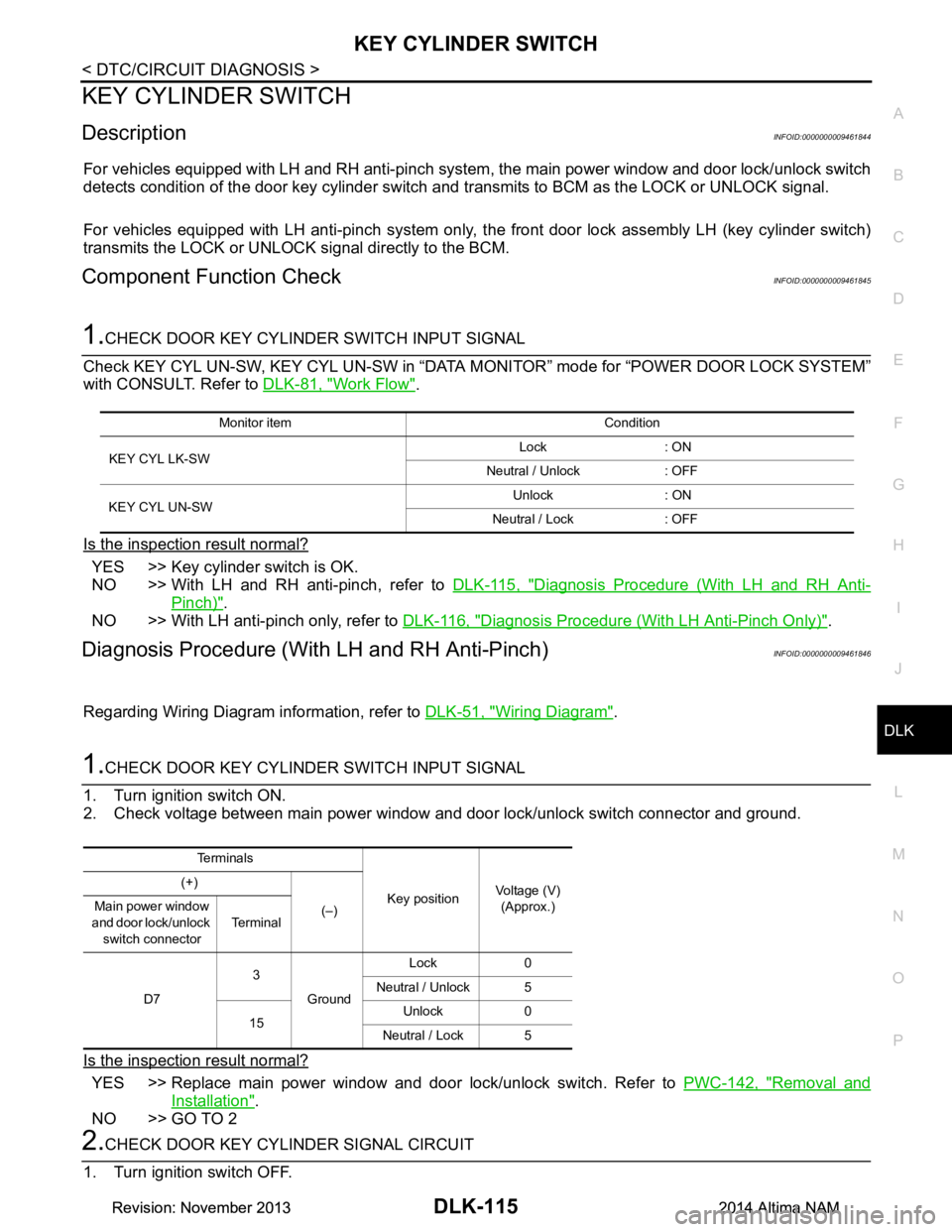
1.CHECK DOOR KEY CYLINDER SWITCH INPUT SIGNAL
Check KEY CYL UN-SW, KEY CYL UN-SW in “DATA MO NITOR” mode for “POWER DOOR LOCK SYSTEM”
with CONSULT. Refer to DLK-81, "Work Flow"
.
Is the inspection result normal?
YES >> Key cylinder switch is OK.
NO >> With LH and RH anti-pinch, refer to DLK-115, "Diagnosis Procedure (With LH and RH Anti-
Pinch)".
NO >> With LH anti-pinch only, refer to DLK-116, "Diagnosis Procedure (With LH Anti-Pinch Only)"
.
Diagnosis Procedure (With LH and RH Anti-Pinch)INFOID:0000000009461846
Regarding Wiring Diagram information, refer to DLK-51, "Wiring Diagram".
1.CHECK DOOR KEY CYLINDER SWITCH INPUT SIGNAL
1. Turn ignition switch ON.
2. Check voltage between main power window and door lock/unlock switch connector and ground.
Is the inspection result normal?
YES >> Replace main power window and door lock/unlock switch. Refer to PWC-142, "Removal and
Installation".
NO >> GO TO 2
2.CHECK DOOR KEY CYLINDER SIGNAL CIRCUIT
1. Turn ignition switch OFF.
Monitor item Condition
KEY CYL LK-SW Lock : ON
Neutral / Unlock : OFF
KEY CYL UN-SW Unlock : ON
Neutral / Lock : OFF
Te r m i n a l s
Key positionVoltage (V)
(Approx.)
(+)
(–)
Main power window
and door lock/unlock switch connector Te r m i n a l
D7 3
Ground Lock 0
Neutral / Unlock 5
15 Unlock 0
Neutral / Lock 5
Revision: November 20132014 Altima NAMRevision: November 20132014 Altima NAM
Page 884 of 4801
DLK-116
< DTC/CIRCUIT DIAGNOSIS >
KEY CYLINDER SWITCH
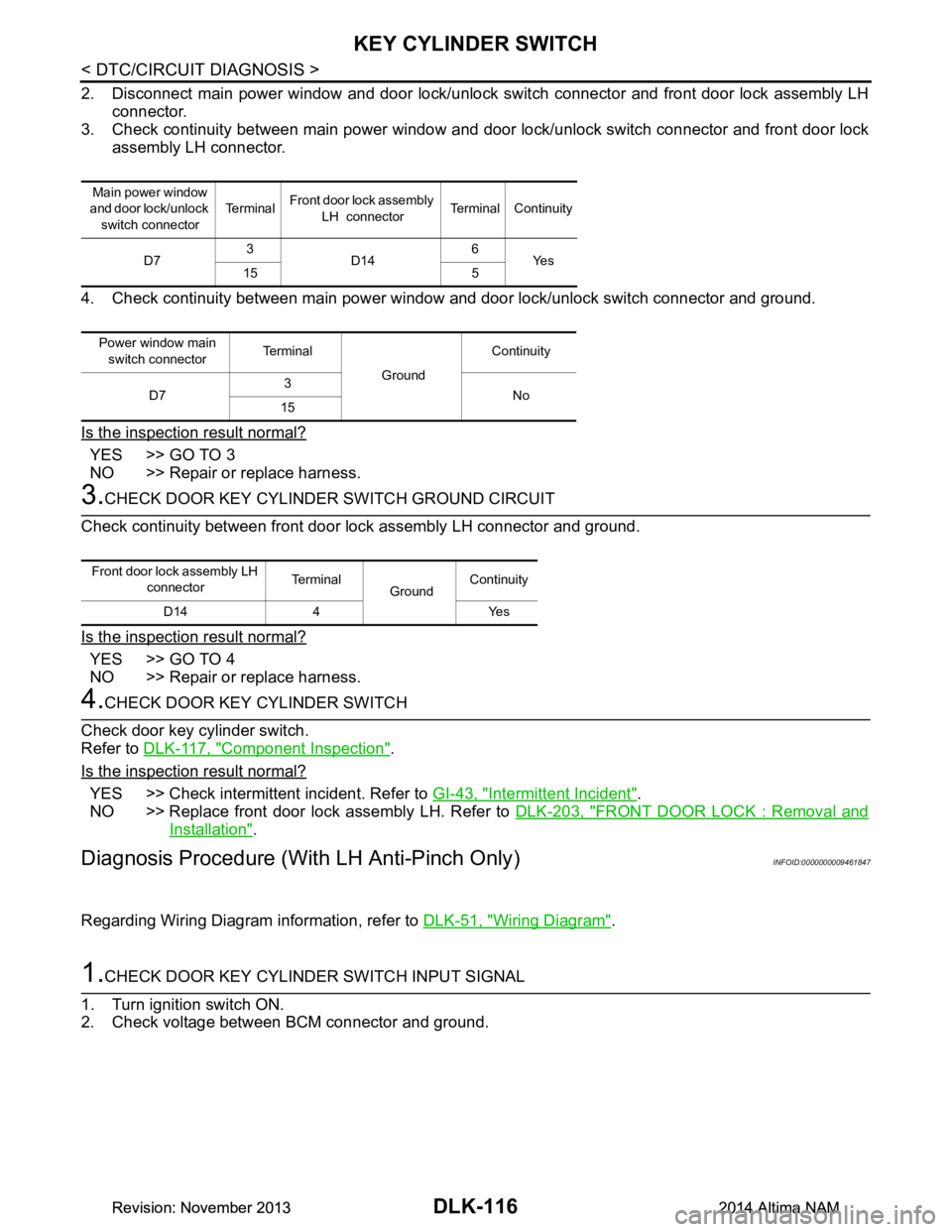
2. Disconnect main power window and door lock/unlock switch connector and front door lock assembly LHconnector.
3. Check continuity between main power window and door lock/unlock switch connector and front door lock
assembly LH connector.
4. Check continuity between main power window and door lock/unlock switch connector and ground.
Is the inspection result normal?
YES >> GO TO 3
NO >> Repair or replace harness.
3.CHECK DOOR KEY CYLINDER SWITCH GROUND CIRCUIT
Check continuity between front door lock assembly LH connector and ground.
Is the inspection result normal?
YES >> GO TO 4
NO >> Repair or replace harness.
4.CHECK DOOR KEY CYLINDER SWITCH
Check door key cylinder switch.
Refer to DLK-117, "Component Inspection"
.
Is the inspection result normal?
YES >> Check intermittent incident. Refer to GI-43, "Intermittent Incident".
NO >> Replace front door lock assembly LH. Refer to DLK-203, "FRONT DOOR LOCK : Removal and
Installation".
Diagnosis Procedure (With LH Anti-Pinch Only)INFOID:0000000009461847
Regarding Wiring Diagram information, refer to DLK-51, "Wiring Diagram".
1.CHECK DOOR KEY CYLINDER SWITCH INPUT SIGNAL
1. Turn ignition switch ON.
2. Check voltage between BCM connector and ground.
Main power window
and door lock/unlock
switch connector Te r m i n a l
Front door lock assembly
LH connector Terminal Continuity
D7 3
D14 6
Ye s
15 5
Power window main switch connector Terminal
GroundContinuity
D7 3
No
15
Front door lock assembly LH
connector Terminal
GroundContinuity
D14 4 Yes
Revision: November 20132014 Altima NAMRevision: November 20132014 Altima NAM
Page 885 of 4801
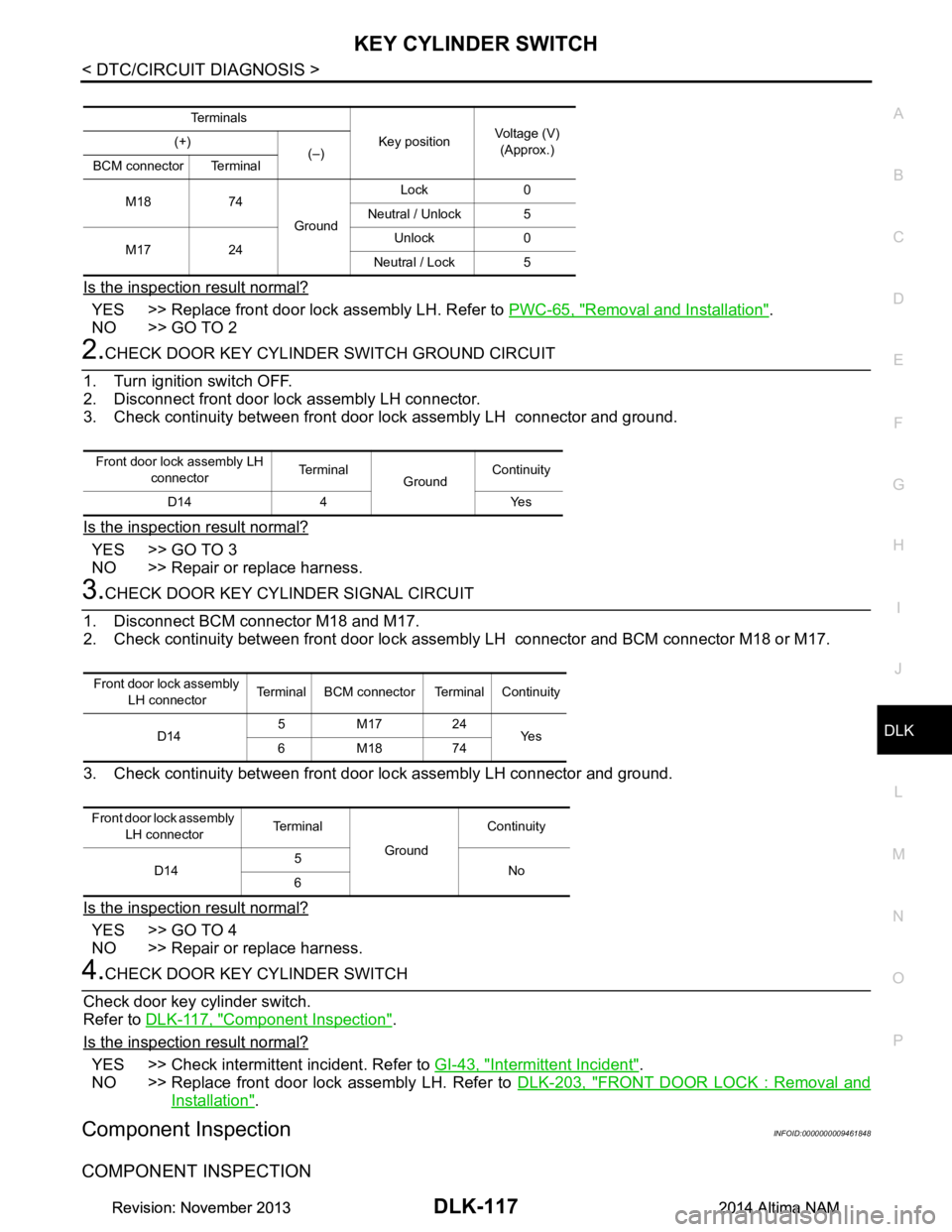
KEY CYLINDER SWITCHDLK-117
< DTC/CIRCUIT DIAGNOSIS >
C
D E
F
G H
I
J
L
M A
B
DLK
N
O P
Is the inspection result normal?
YES >> Replace front door lock assembly LH. Refer to PWC-65, "Removal and Installation".
NO >> GO TO 2
2.CHECK DOOR KEY CYLINDE R SWITCH GROUND CIRCUIT
1. Turn ignition switch OFF.
2. Disconnect front door lock assembly LH connector.
3. Check continuity between front door lock assembly LH connector and ground.
Is the inspection result normal?
YES >> GO TO 3
NO >> Repair or replace harness.
3.CHECK DOOR KEY CYLINDER SIGNAL CIRCUIT
1. Disconnect BCM connector M18 and M17.
2. Check continuity between front door lock assembly LH connector and BCM connector M18 or M17.
3. Check continuity between front door lock assembly LH connector and ground.
Is the inspection result normal?
YES >> GO TO 4
NO >> Repair or replace harness.
4.CHECK DOOR KEY CYLINDER SWITCH
Check door key cylinder switch.
Refer to DLK-117, "Component Inspection"
.
Is the inspection result normal?
YES >> Check intermittent incident. Refer to GI-43, "Intermittent Incident".
NO >> Replace front door lock assembly LH. Refer to DLK-203, "FRONT DOOR LOCK : Removal and
Installation".
Component InspectionINFOID:0000000009461848
COMPONENT INSPECTION
Te r m i n a l s
Key positionVoltage (V)
(Approx.)
(+)
(–)
BCM connector Terminal
M18 74 GroundLock 0
Neutral / Unlock 5
M17 24 Unlock 0
Neutral / Lock 5
Front door lock assembly LH connector Terminal
GroundContinuity
D14 4 Yes
Front door lock assembly LH connector Terminal BCM connector Terminal Continuity
D14 5M1724
Ye s
6M1874
Front door lock assembly LH connector Te r m i n a l
GroundContinuity
D14 5
No
6
Revision: November 20132014 Altima NAMRevision: November 20132014 Altima NAM
Page 887 of 4801
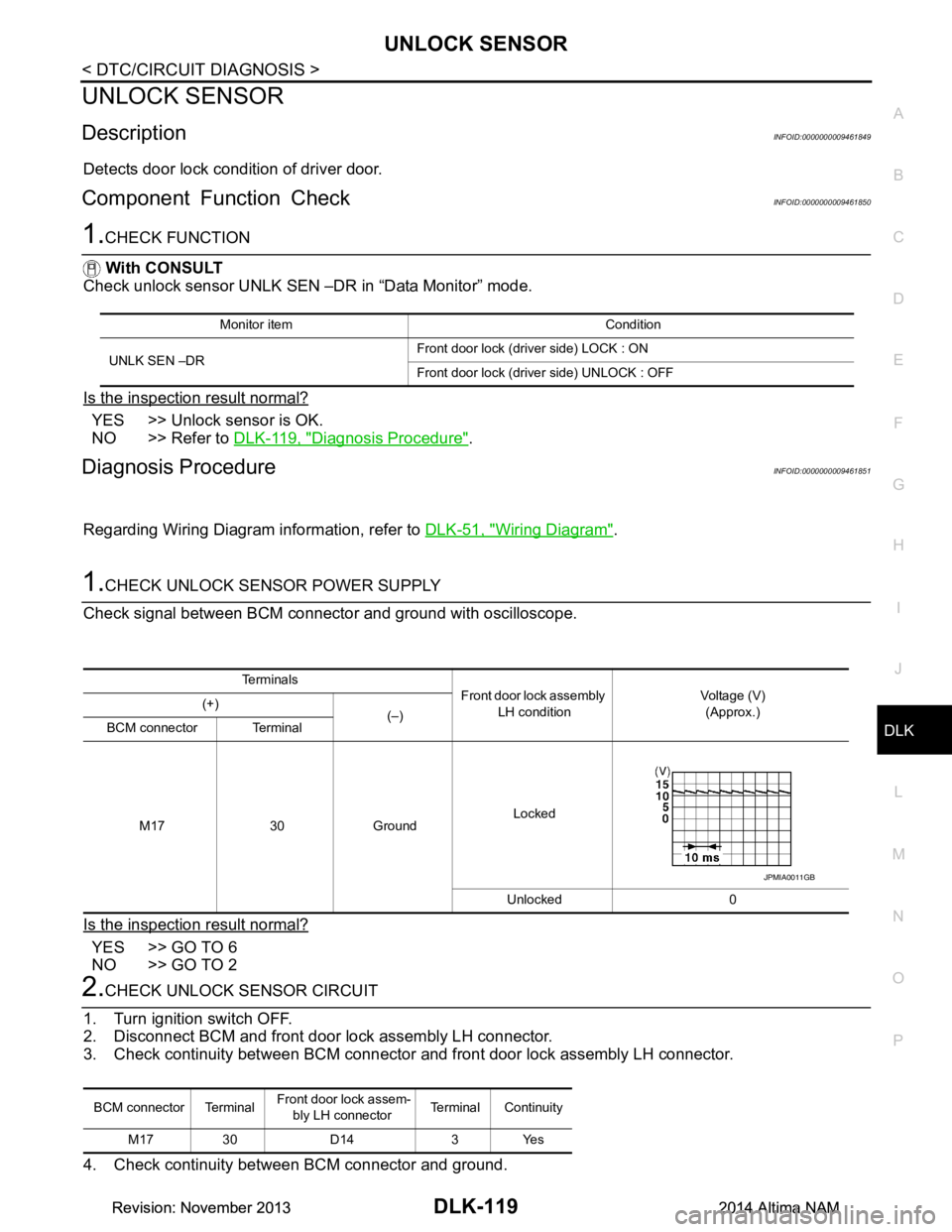
UNLOCK SENSORDLK-119
< DTC/CIRCUIT DIAGNOSIS >
C
D E
F
G H
I
J
L
M A
B
DLK
N
O P
UNLOCK SENSOR
DescriptionINFOID:0000000009461849
Detects door lock condition of driver door.
Component Function CheckINFOID:0000000009461850
1.CHECK FUNCTION
With CONSULT
Check unlock sensor UNLK SEN –DR in “Data Monitor” mode.
Is the inspection result normal?
YES >> Unlock sensor is OK.
NO >> Refer to DLK-119, "Diagnosis Procedure"
.
Diagnosis ProcedureINFOID:0000000009461851
Regarding Wiring Diagram information, refer to DLK-51, "Wiring Diagram".
1.CHECK UNLOCK SENSOR POWER SUPPLY
Check signal between BCM connector and ground with oscilloscope.
Is the inspection result normal?
YES >> GO TO 6
NO >> GO TO 2
2.CHECK UNLOCK SENSOR CIRCUIT
1. Turn ignition switch OFF.
2. Disconnect BCM and front door lock assembly LH connector.
3. Check continuity between BCM connector and front door lock assembly LH connector.
4. Check continuity between BCM connector and ground.
Monitor item Condition
UNLK SEN –DR Front door lock (driver side) LOCK : ON
Front door lock (dri ver side) UNLOCK : OFF
Te r m i n a l s
Front door lock assembly
LH condition Voltage (V)
(Approx.)
(+)
(–)
BCM connector Terminal
M17 30 Ground Locked
Unlocked 0
JPMIA0011GB
BCM connector Terminal Front door lock assem-
bly LH connector Terminal Continuity
M17 30 D14 3 Yes
Revision: November 20132014 Altima NAMRevision: November 20132014 Altima NAM
Page 952 of 4801
DLK-184
< REMOVAL AND INSTALLATION >
FRONT DOOR
FRONT DOOR
DOOR ASSEMBLY
DOOR ASSEMBLY : Removal and InstallationINFOID:0000000009461933
CAUTION:
• Use two people when removing or installing the front door assembly due to its heavy weight.
• When removing and installing front door assembl y, support front door with a suitable tool.
• Do not use air tools or el ectric tools for servicing.
• Before servicing, turn ignition sw itch OFF, disconnect both battery terminals and wait at least three
minutes.
NOTE:
LH side shown; RH side similar.
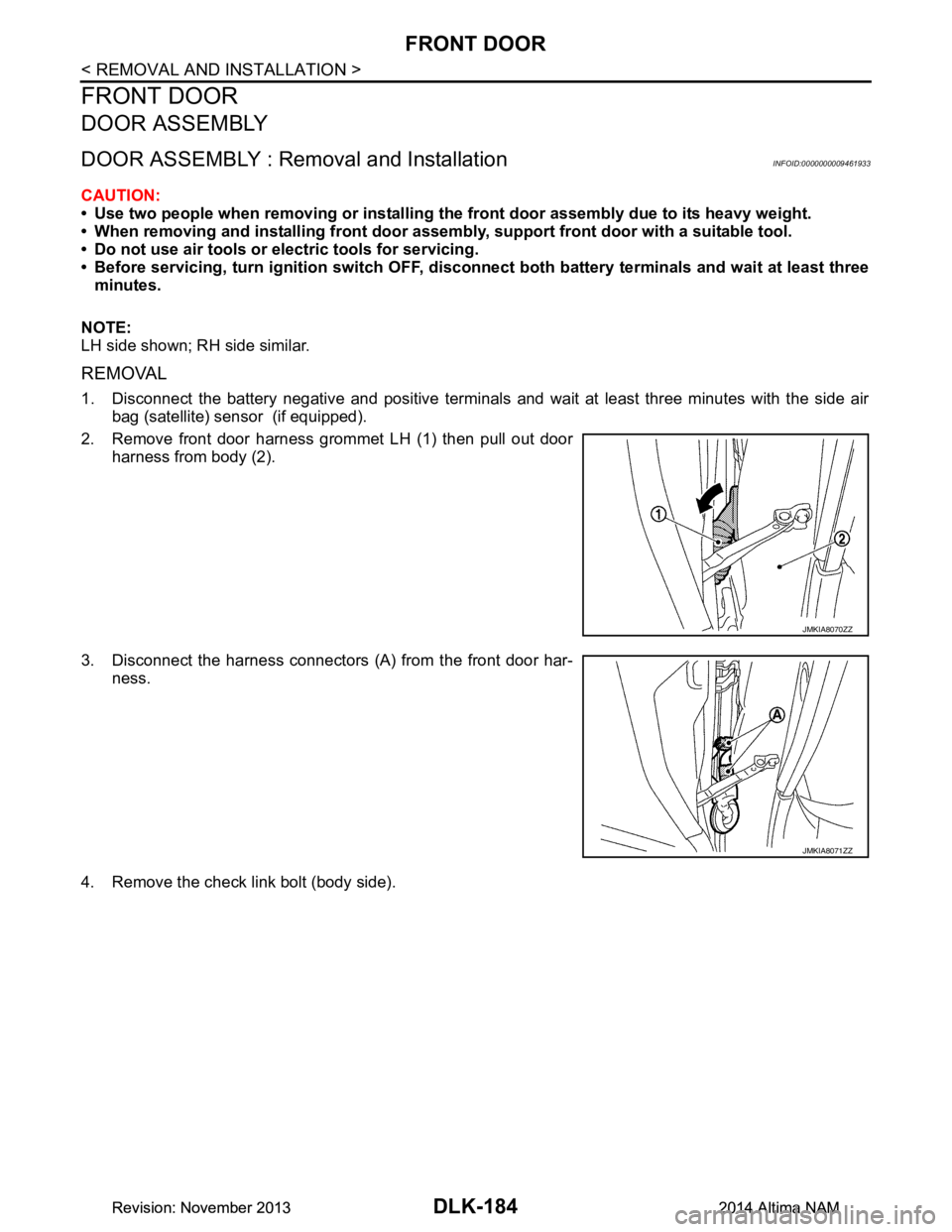
REMOVAL
1. Disconnect the battery negative and positive terminals and wait at least three minutes with the side air bag (satellite) sensor (if equipped).
2. Remove front door harness grommet LH (1) then pull out door harness from body (2).
3. Disconnect the harness connectors (A) from the front door har- ness.
4. Remove the check link bolt (body side).
JMKIA8070ZZ
JMKIA8071ZZ
Revision: November 20132014 Altima NAMRevision: November 20132014 Altima NAM
Page 956 of 4801
DLK-188
< REMOVAL AND INSTALLATION >
FRONT DOOR
DOOR STRIKER ADJUSTMENT
Adjust front door striker so that it becomes parallel with door lock insertion direction.
DOOR STRIKER
DOOR STRIKER : Removal and InstallationINFOID:0000000009461935
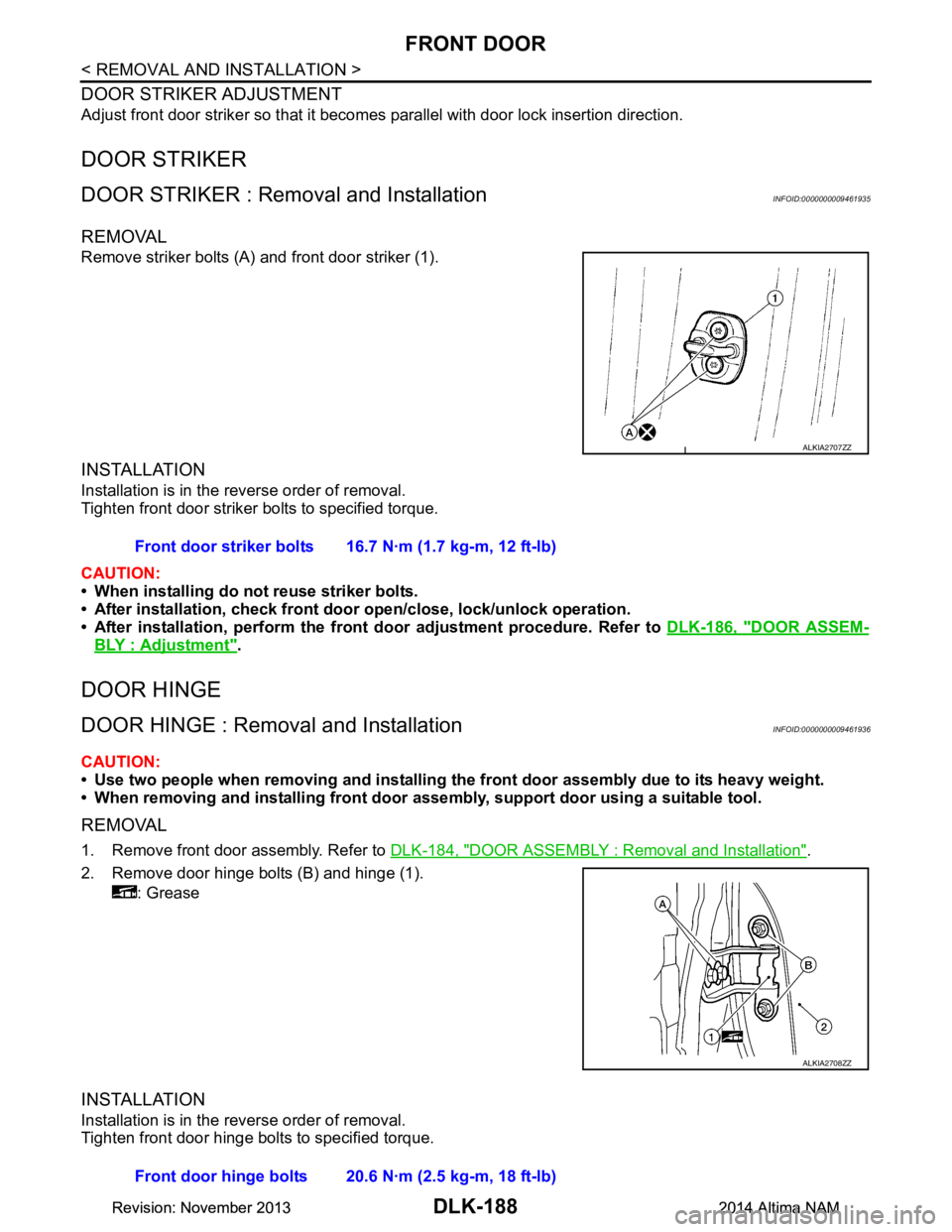
REMOVAL
Remove striker bolts (A) and front door striker (1).
INSTALLATION
Installation is in the reverse order of removal.
Tighten front door striker bolts to specified torque.
CAUTION:
• When installing do not reuse striker bolts.
• After installation, check front doo r open/close, lock/unlock operation.
• After installation, perform the front door adjustment procedure. Refer to DLK-186, "DOOR ASSEM-
BLY : Adjustment".
DOOR HINGE
DOOR HINGE : Removal and InstallationINFOID:0000000009461936
CAUTION:
• Use two people when removing and installing the front door assembly due to its heavy weight.
• When removing and installing front door assembly, support door using a suitable tool.
REMOVAL
1. Remove front door assembly. Refer to DLK-184, "DOOR ASSEMBLY : Removal and Installation".
2. Remove door hinge bolts (B) and hinge (1). : Grease
INSTALLATION
Installation is in the reverse order of removal.
Tighten front door hinge bolts to specified torque.
ALKIA2707ZZ
Front door striker bolts 16.7 N·m (1.7 kg-m, 12 ft-lb)
ALKIA2708ZZ
Front door hinge bolts 20.6 N·m (2.5 kg-m, 18 ft-lb)
Revision: November 20132014 Altima NAMRevision: November 20132014 Altima NAM
Page 997 of 4801
FRONT DOORDLK-229
< UNIT DISASSEMBLY AND ASSEMBLY >
C
D E
F
G H
I
J
L
M A
B
DLK
N
O P
UNIT DISASSEMBLY AND ASSEMBLY
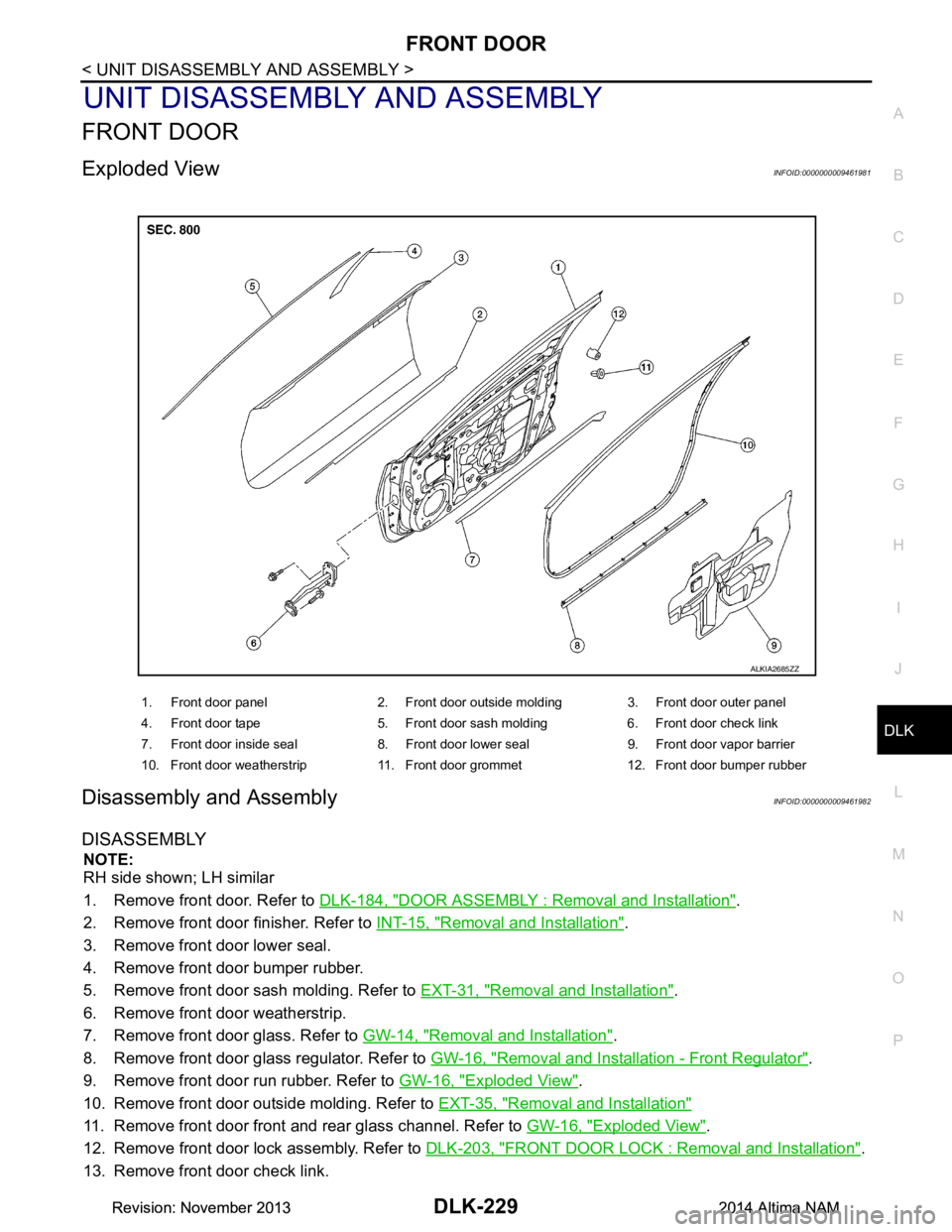
FRONT DOOR
Exploded ViewINFOID:0000000009461981
Disassembly and AssemblyINFOID:0000000009461982
DISASSEMBLY
NOTE:
RH side shown; LH similar
1. Remove front door. Refer to DLK-184, "DOOR ASSEMBLY : Removal and Installation"
.
2. Remove front door finisher. Refer to INT-15, "Removal and Installation"
.
3. Remove front door lower seal.
4. Remove front door bumper rubber.
5. Remove front door sash molding. Refer to EXT-31, "Removal and Installation"
.
6. Remove front door weatherstrip.
7. Remove front door glass. Refer to GW-14, "Removal and Installation"
.
8. Remove front door glass regulator. Refer to GW-16, "Removal and Installation - Front Regulator"
.
9. Remove front door run rubber. Refer to GW-16, "Exploded View"
.
10. Remove front door outside molding. Refer to EXT-35, "Removal and Installation"
11. Remove front door front and rear glass channel. Refer to GW-16, "Exploded View".
12. Remove front door lock assembly. Refer to DLK-203, "FRONT DOOR LOCK : Removal and Installation"
.
13. Remove front door check link.
1. Front door panel 2. Front door outside molding 3. Front door outer panel
4. Front door tape 5. Front door sash molding 6. Front door check link
7. Front door inside seal 8. Front door lower seal 9. Front door vapor barrier
10. Front door weatherstrip 11. Front door grommet 12. Front door bumper rubber
ALKIA2685ZZ
Revision: November 20132014 Altima NAMRevision: November 20132014 Altima NAM