service reset NISSAN TEANA 2014 Service Manual
[x] Cancel search | Manufacturer: NISSAN, Model Year: 2014, Model line: TEANA, Model: NISSAN TEANA 2014Pages: 4801, PDF Size: 51.2 MB
Page 96 of 4801
![NISSAN TEANA 2014 Service Manual
BCS
COMBINATION SWITCHBCS-81
< REMOVAL AND INSTALLATION > [BCM]
C
D E
F
G H
I
J
K L
B
A
O P
N
COMBINATION SWITCH
Exploded ViewINFOID:0000000009462045
NOTE:
Shown with the steering wheel removed fo](/img/5/57390/w960_57390-95.png "NISSAN TEANA 2014 Service Manual
BCS
COMBINATION SWITCHBCS-81
< REMOVAL AND INSTALLATION > [BCM]
C
D E
F
G H
I
J
K L
B
A
O P
N
COMBINATION SWITCH
Exploded ViewINFOID:0000000009462045
NOTE:
Shown with the steering wheel removed fo")
BCS
COMBINATION SWITCHBCS-81
< REMOVAL AND INSTALLATION > [BCM]
C
D E
F
G H
I
J
K L
B
A
O P
N
COMBINATION SWITCH
Exploded ViewINFOID:0000000009462045
NOTE:
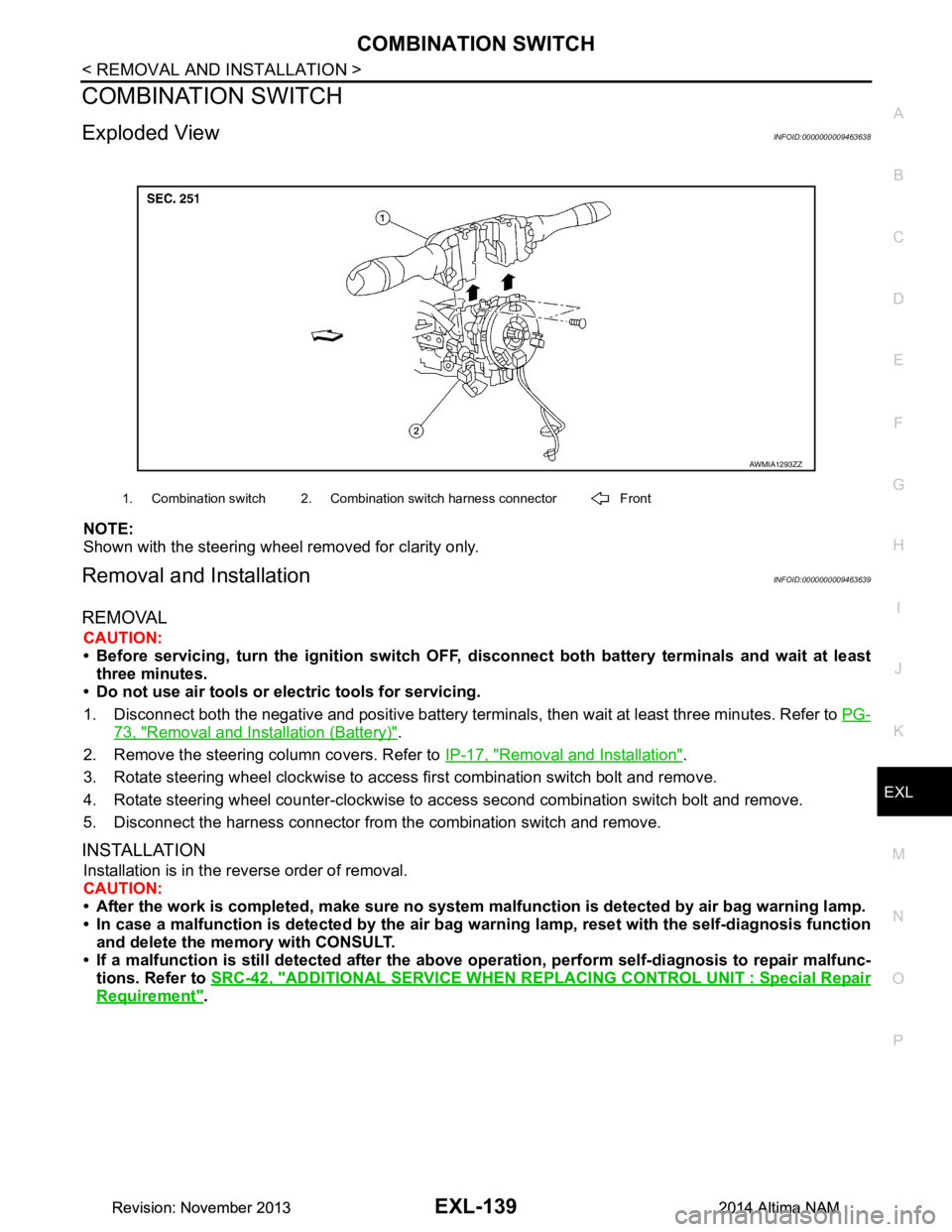
Shown with the steering wheel removed for clarity only.
Removal and InstallationINFOID:0000000009462046
REMOVAL
CAUTION:
• Before servicing, turn the ignition switch OFF, disconnect both battery terminals and wait at least
three minutes.
• Do not use air tools or electric tools for servicing.
1. Disconnect both the negative and positive battery terminal s, then wait at least three minutes. Refer to PG-
73, "Removal and Installation (Battery)".
2. Remove the steering column covers. Refer to IP-17, "Removal and Installation"
.
3. Rotate steering wheel clockwise to access first combination switch bolt and remove.
4. Rotate steering wheel counter-clockwise to access second combination switch bolt and remove.
5. Disconnect the harness connector from the combination switch and remove.
INSTALLATION
Installation is in the reverse order of removal.
CAUTION:
• After the work is completed, make sure no system malfunction is detected by air bag warning lamp.
• In case a malfunction is detected by the air bag wa rning lamp, reset with the self-diagnosis function
and delete the memory with CONSULT.
• If a malfunction is still detected after the above operation, perform self-diagnosis to repair malfunc-
tions. Refer to SRC-42, "ADDITIONAL SERVICE WHEN RE PLACING CONTROL UNIT : Special Repair
Requirement".
AWMIA1293ZZ
1. Combination switch 2. Combination switch harness connector Front
Revision: November 20132014 Altima NAMRevision: November 20132014 Altima NAM
Page 1072 of 4801
![NISSAN TEANA 2014 Service Manual
EC-72
< SYSTEM DESCRIPTION >[QR25DE]
DIAGNOSIS SYSTEM (ECM)
Calculated load value: (Calculated load value in the freeze frame data) x (1
±0.1) [%]
Engine coolant temperature condition:
• When the](/img/5/57390/w960_57390-1071.png "NISSAN TEANA 2014 Service Manual
EC-72
< SYSTEM DESCRIPTION >[QR25DE]
DIAGNOSIS SYSTEM (ECM)
Calculated load value: (Calculated load value in the freeze frame data) x (1
±0.1) [%]
Engine coolant temperature condition:
• When the")
EC-72
< SYSTEM DESCRIPTION >[QR25DE]
DIAGNOSIS SYSTEM (ECM)
Calculated load value: (Calculated load value in the freeze frame data) x (1
±0.1) [%]
Engine coolant temperature condition:
• When the freeze frame data shows lower than 70 °C (158 °F), engine coolant temperature should be lower
than 70 °C (158 °F).
• When the freeze frame data shows higher than or equal to 70 °C (158 °F), engine coolant temperature should
be higher than or equal to 70 °C (158 °F).
NOTE:
• When the same malfunction is detected regardless of t he above vehicle conditions, reset the counter of driv-
ing pattern C.
• When the above conditions are satisfied without detecting t he same malfunction, reset the counter of driving
pattern C.
• The 1st trip DTC will be cleared when C counter is c ounted once without the same malfunction after DTC is
stored in ECM.
DRIVING PATTERN D
Driving pattern D means a trip satisfying the following conditions.
• The state of driving at 40 km/h (25 MPH) reaches 300 seconds or more in total.
• Idle speed lasts 30 seconds or more.
• A lapse of 600 seconds or more after engine start.
NOTE:
• When the same malfunction is detected regardless of driv ing conditions, reset the counter of driving pattern
D.
• When the above conditions are satisfied without detecting t he same malfunction, reset the counter of driving
pattern D.
DIAGNOSIS DESCRIPTION : System Readiness Test (SRT) CodeINFOID:0000000009462116
System Readiness Test (SRT) code is spec ified in Service $01 of SAE J1979/ISO 15031-5.
As part of an enhanced emissions test for Inspection & Ma intenance (I/M), certain states require the status of
SRT be used to indicate whether the ECM has completed self-diagnosis of major emission systems and com-
ponents. Completion must be verified in order for the emissions inspection to proceed.
If a vehicle is rejected for a State emissions inspec tion due to one or more SRT items indicating “INCMP”, use
the information in this Service Manual to set the SRT to “CMPLT”.
In most cases the ECM will automatically complete its self-diagnosis cycle during normal usage, and the SRT
status will indicate “CMPLT” for each application system . Once set as “CMPLT”, the SRT status remains
“CMPLT” until the self-diagnosis memory is erased.
Occasionally, certain portions of the self-diagnostic test may not be completed as a result of the customer's
normal driving pattern; the SRT will indicate “INCMP” for these items.
NOTE:
The SRT will also indicate “INCMP” if the self-diagnosis memory is erased for any reason or if the ECM mem-
ory power supply is interrupted for several hours.
If, during the state emissions inspection, the SRT indica tes “CMPLT” for all test items, the inspector will con-
tinue with the emissions test. However, if the SRT indi cates “INCMP” for one or more of the SRT items the
vehicle is returned to the customer untested.
NOTE:
If permanent DTC is stored or MIL illuminates during t he state emissions inspection, the vehicle is also
returned to the customer untested even though the SRT indi cates “CMPLT” for all test items. therefore, it is
important to check SRT (“CMPLT”), DTC (No DTCs) and permanent DTC (No permanent DTC) before the
inspection.
SRT SET TIMING
SRT is set as “CMPLT” after self-diagnosis has been performed one or more times. Completion of SRT is
done regardless of whether the result is OK or NG. T he set timing is different between OK and NG results and
is shown in the table below.
Revision: November 20132014 Altima NAMRevision: November 20132014 Altima NAM
Page 1193 of 4801
![NISSAN TEANA 2014 Service Manual
HOW TO ERASE PERMANENT DTCEC-193
< BASIC INSPECTION > [QR25DE]
C
D E
F
G H
I
J
K L
M A
EC
NP
O
4. Turn ignition switch ON.
5. Select Service $0A with GST.
Is any permanent DTC detected?
YES >> GO](/img/5/57390/w960_57390-1192.png "NISSAN TEANA 2014 Service Manual
HOW TO ERASE PERMANENT DTCEC-193
< BASIC INSPECTION > [QR25DE]
C
D E
F
G H
I
J
K L
M A
EC
NP
O
4. Turn ignition switch ON.
5. Select Service $0A with GST.
Is any permanent DTC detected?
YES >> GO")
HOW TO ERASE PERMANENT DTCEC-193
< BASIC INSPECTION > [QR25DE]
C
D E
F
G H
I
J
K L
M A
EC
NP
O
4. Turn ignition switch ON.
5. Select Service $0A with GST.
Is any permanent DTC detected?
YES >> GO TO 3.
NO >> END
3.DRIVE DRIVING PATTERN B
CAUTION:
• Always drive at a safe speed.
• Never erase self-diagnosis results.
• If self-diagnosis results are erased during the trip of driving pattern B or D, the counter of driving
pattern B and D is reset.
With CONSULT
1. Start engine and warm it up to normal operating temperature.
2. Use “PERMANENT DTC WORK SUPPORT” mode with CONS ULT to drive the vehicle according to driv-
ing pattern B. Refer to EC-77, "CONSULT Function"
, EC-71, "DIAGNOSIS DESCRIPTION : Driving Pat-
tern".
With GST
1. Start engine and warm it up to normal operating temperature.
2. Drive the vehicle according to driving pattern B. Refer to EC-71, "DIAGNOSIS DESCRIPTION : Driving
Pattern".
>> GO TO 4.
4.CHECK PERMANENT DTC
With CONSULT
1. Turn ignition switch OFF and wait at least 10 seconds.
2. Turn ignition switch ON.
3. Turn ignition switch OFF and wait at least 10 seconds.
4. Turn ignition switch ON.
5. Select “PERMANENT DTC STATUS” mode with CONSULT.
With GST
1. Turn ignition switch OFF and wait at least 10 seconds.
2. Turn ignition switch ON.
3. Turn ignition switch OFF and wait at least 10 seconds.
4. Turn ignition switch ON.
5. Select Service $0A with GST.
Is any permanent DTC detected?
YES >> GO TO 5.
NO >> END
5.DRIVE DRIVING PATTERN D
CAUTION:
• Always drive at a safe speed.
• Never erase self-diagnosis results.
• If self-diagnosis results are erased during the trip of driving pattern B or D, the counter of driving
pattern B and D is reset.
Drive the vehicle according to driving pattern D. Refer to EC-71, "DIAGNOSIS DESCRIPTION : Driving Pat-
tern".
>> GO TO 6.
6.CHECK PERMANENT DTC
With CONSULT
1. Turn ignition switch OFF and wait at least 10 seconds.
2. Turn ignition switch ON.
3. Turn ignition switch OFF and wait at least 10 seconds.
4. Turn ignition switch ON.
Revision: November 20132014 Altima NAMRevision: November 20132014 Altima NAM
Page 1596 of 4801
![NISSAN TEANA 2014 Service Manual
EC-596
< SYSTEM DESCRIPTION >[VQ35DE]
DIAGNOSIS SYSTEM (ECM)
Calculated load value: (Calculated load value in the freeze frame data) x (1
±0.1) [%]
Engine coolant temperature condition:
• When th](/img/5/57390/w960_57390-1595.png "NISSAN TEANA 2014 Service Manual
EC-596
< SYSTEM DESCRIPTION >[VQ35DE]
DIAGNOSIS SYSTEM (ECM)
Calculated load value: (Calculated load value in the freeze frame data) x (1
±0.1) [%]
Engine coolant temperature condition:
• When th")
EC-596
< SYSTEM DESCRIPTION >[VQ35DE]
DIAGNOSIS SYSTEM (ECM)
Calculated load value: (Calculated load value in the freeze frame data) x (1
±0.1) [%]
Engine coolant temperature condition:
• When the freeze frame data shows lower than 70 °C (158 °F), engine coolant temperature should be lower
than 70 °C (158 °F).
• When the freeze frame data shows higher than or equal to 70 °C (158 °F), engine coolant temperature should
be higher than or equal to 70 °C (158 °F).
NOTE:
• When the same malfunction is detected regardless of t he above vehicle conditions, reset the counter of driv-
ing pattern C.
• When the above conditions are satisfied without detecting t he same malfunction, reset the counter of driving
pattern C.
• The 1st trip DTC will be cleared when C counter is c ounted once without the same malfunction after DTC is
stored in ECM.
DRIVING PATTERN D
Driving pattern D means a trip satisfying the following conditions.
• The state of driving at 40 km/h (25 MPH) reaches 300 seconds or more in total.
• Idle speed lasts 30 seconds or more.
• A lapse of 600 seconds or more after engine start.
NOTE:
• When the same malfunction is detected regardless of driv ing conditions, reset the counter of driving pattern
D.
• When the above conditions are satisfied without detecting t he same malfunction, reset the counter of driving
pattern D.
DIAGNOSIS DESCRIPTION : System Readiness Test (SRT) CodeINFOID:0000000009462537
System Readiness Test (SRT) code is spec ified in Service $01 of SAE J1979/ISO 15031-5.
As part of an enhanced emissions test for Inspection & Ma intenance (I/M), certain states require the status of
SRT be used to indicate whether the ECM has completed self-diagnosis of major emission systems and com-
ponents. Completion must be verified in order for the emissions inspection to proceed.
If a vehicle is rejected for a State emissions inspec tion due to one or more SRT items indicating “INCMP”, use
the information in this Service Manual to set the SRT to “CMPLT”.
In most cases the ECM will automatically complete its self-diagnosis cycle during normal usage, and the SRT
status will indicate “CMPLT” for each application system . Once set as “CMPLT”, the SRT status remains
“CMPLT” until the self-diagnosis memory is erased.
Occasionally, certain portions of the self-diagnostic test may not be completed as a result of the customer's
normal driving pattern; the SRT will indicate “INCMP” for these items.
NOTE:
The SRT will also indicate “INCMP” if the self-diagnosis memory is erased for any reason or if the ECM mem-
ory power supply is interrupted for several hours.
If, during the state emissions inspection, the SRT indica tes “CMPLT” for all test items, the inspector will con-
tinue with the emissions test. However, if the SRT indi cates “INCMP” for one or more of the SRT items the
vehicle is returned to the customer untested.
NOTE:
If permanent DTC is stored or MIL illuminates during t he state emissions inspection, the vehicle is alsore-
turned to the customer untested even though the SRT indicate s “CMPLT” for all test items. Therefore, it isim-
portant to check SRT (“CMPLT”), DTC (No DT Cs) and permanent DTC (NO permanent DTCs) before
theinspection.
SRT SET TIMING
SRT is set as “CMPLT” after self-diagnosis has been performed one or more times. Completion of SRT is
done regardless of whether the result is OK or NG. T he set timing is different between OK and NG results and
is shown in the table below.
Revision: November 20132014 Altima NAMRevision: November 20132014 Altima NAM
Page 1699 of 4801
![NISSAN TEANA 2014 Service Manual
HOW TO ERASE PERMANENT DTCEC-699
< BASIC INSPECTION > [VQ35DE]
C
D E
F
G H
I
J
K L
M A
EC
NP
O
4. Turn ignition switch ON.
5. Select Service $0A with GST.
Is any permanent DTC detected?
YES >> GO](/img/5/57390/w960_57390-1698.png "NISSAN TEANA 2014 Service Manual
HOW TO ERASE PERMANENT DTCEC-699
< BASIC INSPECTION > [VQ35DE]
C
D E
F
G H
I
J
K L
M A
EC
NP
O
4. Turn ignition switch ON.
5. Select Service $0A with GST.
Is any permanent DTC detected?
YES >> GO")
HOW TO ERASE PERMANENT DTCEC-699
< BASIC INSPECTION > [VQ35DE]
C
D E
F
G H
I
J
K L
M A
EC
NP
O
4. Turn ignition switch ON.
5. Select Service $0A with GST.
Is any permanent DTC detected?
YES >> GO TO 3.
NO >> END
3.DRIVE DRIVING PATTERN B
CAUTION:
• Always drive at a safe speed.
• Never erase self-diagnosis results.
• If self-diagnosis results are erased during the trip of driving pattern B or D, the counter of driving
pattern B and D is reset.
With CONSULT
1. Start engine and warm it up to normal operating temperature.
2. Use “PERMANENT DTC WORK SUPPORT” mode with CONS ULT to drive the vehicle according to driv-
ing pattern B. Refer to EC-601, "CONSULT Function"
, EC-595, "DIAGNOSIS DESCRIPTION : Driving
Pattern".
With GST
1. Start engine and warm it up to normal operating temperature.
2. Drive the vehicle according to driving pattern B. Refer to EC-595, "DIAGNOSIS DESCRIPTION : Driving
Pattern".
>> GO TO 4.
4.CHECK PERMANENT DTC
With CONSULT
1. Turn ignition switch OFF and wait at least 10 seconds.
2. Turn ignition switch ON.
3. Turn ignition switch OFF and wait at least 10 seconds.
4. Turn ignition switch ON.
5. Select “PERMANENT DTC STATUS” mode with CONSULT.
With GST
1. Turn ignition switch OFF and wait at least 10 seconds.
2. Turn ignition switch ON.
3. Turn ignition switch OFF and wait at least 10 seconds.
4. Turn ignition switch ON.
5. Select Service $0A with GST.
Is any permanent DTC detected?
YES >> GO TO 5.
NO >> END
5.DRIVE DRIVING PATTERN D
CAUTION:
• Always drive at a safe speed.
• Never erase self-diagnosis results.
• If self-diagnosis results are erased during the trip of driving pattern B or D, the counter of driving
pattern B and D is reset.
1. Drive the vehicle according to driving pattern D. Refer to EC-595, "DIAGNOSIS DESCRIPTION : Driving
Pattern".
>> GO TO 6.
6.CHECK PERMANENT DTC
With CONSULT
1. Turn ignition switch OFF and wait at least 10 seconds.
2. Turn ignition switch ON.
3. Turn ignition switch OFF and wait at least 10 seconds.
4. Turn ignition switch ON.
Revision: November 20132014 Altima NAMRevision: November 20132014 Altima NAM
Page 2405 of 4801
COMBINATION SWITCHEXL-139
< REMOVAL AND INSTALLATION >
C
D E
F
G H
I
J
K
M A
B
EXL
N
O P
COMBINATION SWITCH
Exploded ViewINFOID:0000000009463638
NOTE:
Shown with the steering wheel removed for clarity only.
Removal and InstallationINFOID:0000000009463639
REMOVAL
CAUTION:
• Before servicing, turn the ignition switch OFF, disconnect both battery terminals and wait at least
three minutes.
• Do not use air tools or electric tools for servicing.
1. Disconnect both the negative and positive battery terminal s, then wait at least three minutes. Refer to PG-
73, "Removal and Installation (Battery)".
2. Remove the steering column covers. Refer to IP-17, "Removal and Installation"
.
3. Rotate steering wheel clockwise to access first combination switch bolt and remove.
4. Rotate steering wheel counter-clockwise to access second combination switch bolt and remove.
5. Disconnect the harness connector from the combination switch and remove.
INSTALLATION
Installation is in the reverse order of removal.
CAUTION:
• After the work is completed, make sure no system malfunction is detected by air bag warning lamp.
• In case a malfunction is detected by the air bag wa rning lamp, reset with the self-diagnosis function
and delete the memory with CONSULT.
• If a malfunction is still detected after the above operation, perform self-diagnosis to repair malfunc-
tions. Refer to SRC-42, "ADDITIONAL SERVICE WHEN RE PLACING CONTROL UNIT : Special Repair
Requirement".
AWMIA1293ZZ
1. Combination switch 2. Combination switch harness connector Front
Revision: November 20132014 Altima NAMRevision: November 20132014 Altima NAM
Page 3439 of 4801
PG
INSPECTION AND ADJUSTMENTPG-7
< BASIC INSPECTION >
C
D E
F
G H
I
J
K L
B
A
O P
N
INSPECTION AND ADJUSTMENT
ADDITIONAL SERVICE WHEN REMOVI
NG BATTERY NEGATIVE TERMINAL
ADDITIONAL SERVICE WHEN REMOVING BATTERY NEGATIVE TERMINAL : Spe-
cial Repair Requirement
INFOID:0000000009460434
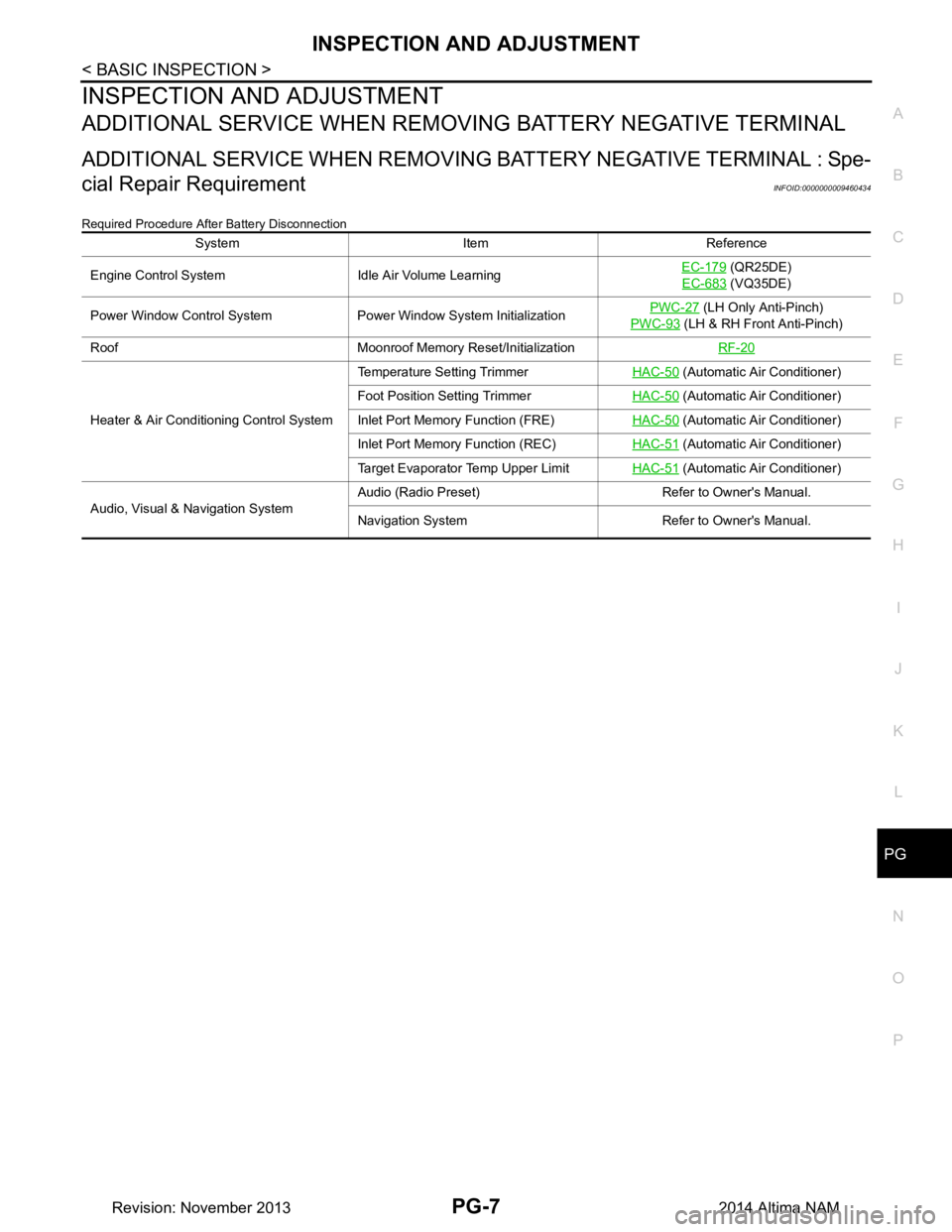
Required Procedure After Battery Disconnection
System Item Reference
Engine Control System Idle Air Volume Learning EC-179
(QR25DE)
EC-683
(VQ35DE)
Power Window Control System Power Window System Initialization PWC-27
(LH Only Anti-Pinch)
PWC-93
(LH & RH Front Anti-Pinch)
Roof Moonroof Memory Reset/Initialization RF-20
Heater & Air Conditioning Control SystemTemperature Setting Trimmer
HAC-50
(Automatic Air Conditioner)
Foot Position Setting Trimmer HAC-50
(Automatic Air Conditioner)
Inlet Port Memory Function (FRE) HAC-50
(Automatic Air Conditioner)
Inlet Port Memory Function (REC) HAC-51
(Automatic Air Conditioner)
Target Evaporator Temp Upper Limit HAC-51
(Automatic Air Conditioner)
Audio, Visual & Navigation System Audio (Radio Preset) Refer to Owner's Manual.
Navigation System Refer to Owner's Manual.
Revision: November 20132014 Altima NAM
Page 3506 of 4801
PG-74
< REMOVAL AND INSTALLATION >
BATTERY
Reset electronic systems as necessary. Refer to PG-7, "ADDITIONAL SERVICE WHEN REMOVING BAT-
TERY NEGATIVE TERMINAL : Special Repair Requirement".
Removal and Installation (Battery Tray)INFOID:0000000009460450
REMOVAL
1. Remove battery and battery tray liner. Refer to PG-73, "Removal and Installation (Battery)".
2. Remove front air duct and air cleaner case assembly. Refer to EM-29, "Removal and Installation"
(QR25DE models) or EM-144, "Removal and Installation" (VQ35DE models).
3. Disconnect transmission control module (TCM). Refer to TM-183, "Exploded View"
(RE0F10D) TM-384,
"Exploded View"or (RE0F10E).
4. Remove the ECM bracket.
5. Remove the battery tray bolts and battery tray.
6. Remove the battery tray support bolts and battery tray support.
INSTALLATION
Installation is in the reverse order of removal.
Reset electronic systems as necessary. Refer to PG-7, "ADDITIONAL SERVICE WHEN REMOVING BAT-
TERY NEGATIVE TERMINAL : Special Repair Requirement".
Revision: November 20132014 Altima NAM
Page 3685 of 4801

RF-20
< BASIC INSPECTION >
INSPECTION AND ADJUSTMENT
INSPECTION AND ADJUSTMENT
ADDITIONAL SERVICE WHEN REPLACING CONTROL UNIT
ADDITIONAL SERVICE WHEN REPL ACING CONTROL UNIT : Description
INFOID:0000000009461301
MEMORY RESET PROCEDURE
1. Please observe the following instructi ons at confirming the moonroof operation.
NOTE:
Do not disconnect the electronic power while the moonroof is operating or within 5 seconds after the
moonroof stops. (to wipe-out the memory of lid position and operating friction.)
2. Initialization of system should be conducted after the following conditions. • When the moonroof motor is changed.
• When the moonroof does not operate normally. (Incomplete initialization conditions)
ADDITIONAL SERVICE WHEN REPLACING CONTROL UNIT : Special Repair Re-
quirement
INFOID:0000000009461302
INITIALIZATION PROCEDURE
If the moonroof does not open or clos e automatically, use the following procedure to return moonroof opera-
tion to normal.
NOTE:
If the moonroof switch is released at any time duri ng step 4, the procedure must be started over again. Leave
the ignition switch ON for at least 2 seconds after this procedure.
1. Push the ignition switch to the ON position.
2. Hold the moonroof switch in the tilt up position. Release the switch when the moonroof has reached the
full tilt up position.
3. Hold the moonroof switch in the tilt up position agai n. After a delay, the moonroof will backup. Release the
switch.
4. Within 4 seconds of releasing the switch in step 3, hold the moonroof switch in the tilt up position again.
The moonroof will move from the full tilt-up → slide-close → slide-open → slide-close → tilt-up → slide-
close. Release the switch, initialization is complete if the moonroof operates normally.
ANTI-PINCH FUNCTION
1. Fully open the moonroof to the full open position.
2. Place a piece of wood at the fully closed position.
3. Close the moonroof completely with auto-slide close function.
4. Moonroof should make contact and then tilt up in reverse for 100mm (3.94 in.) (approx.).
CAUTION:
• Do not test the anti-pinch functi on with your hands or other part of body parts because they may be
pinched.
• Depending on environment and drivin g conditions, if a similar impact or load is applied to the moon-
roof it may lower.
• Test the auto-slide operation before inspectio n when the system initialization is performed.
• Perform the initialization proced ure when the auto-slide operation or anti-pinch function does not
operate normally.
Revision: November 20132014 Altima NAMRevision: November 20132014 Altima NAM
Page 3779 of 4801
SE-30
< REMOVAL AND INSTALLATION >
FRONT SEAT
PASSENGER SIDE : Removal and Installation - Seat Assembly
INFOID:0000000009462938
REMOVAL
WARNING:
Do not leave any objects (screwdriver s, tools, etc.) on the seat during seat repair. It can lead to per-
sonal injury if the side air bag module should accidentally deploy.
CAUTION:
• When removing or installing the seat trim, handle it carefully to keep dirt out and to avoid damage.
• When checking the power seat circuit for continuity using a circuit tester, do not confuse its connec-
tor with the side air bag module connector. Such an error may cau se the air bag module to deploy.
• Do not drop, tilt, or bump the si de air bag module while installing the seat. Always handle it with
care.
• After front side air bag module inflates, the front seatback assembly must be replaced.
• When removing and installing the seat, use shop cloths to protect components from damage.
• Before removing the front seat, turn the ignition switch OFF, disconnect both battery cables and wait
at least three minutes.
1. Disconnect the negative and positive battery terminal s and wait at least three minutes. Refer to PG-73,
"Removal and Installation (Battery)".
2. Remove the headrest.
3. Slide the seat to the full rearward position.
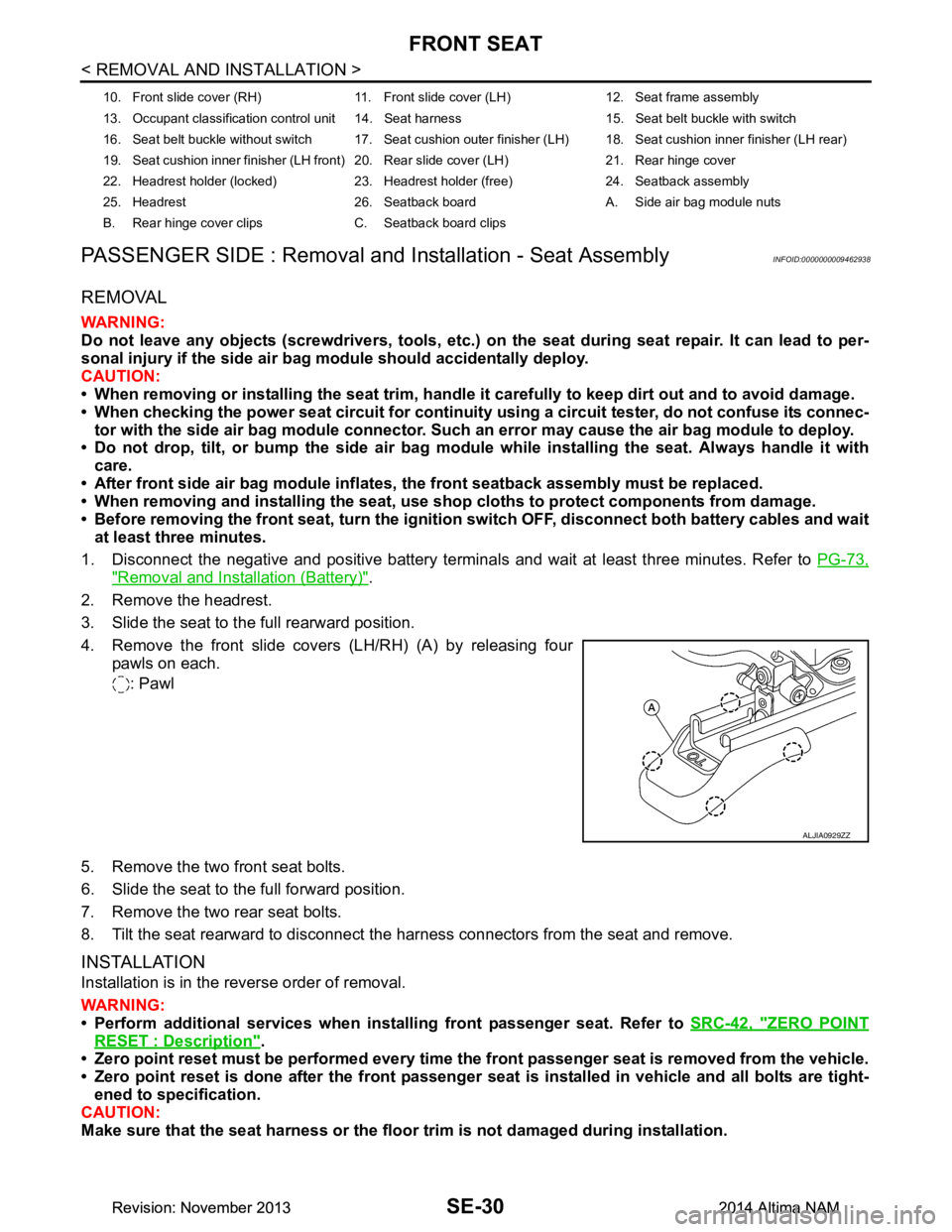
4. Remove the front slide covers (LH/RH) (A) by releasing four pawls on each.
: Pawl
5. Remove the two front seat bolts.
6. Slide the seat to the full forward position.
7. Remove the two rear seat bolts.
8. Tilt the seat rearward to disconnect the harness connectors from the seat and remove.
INSTALLATION
Installation is in the reverse order of removal.
WARNING:
• Perform additional services when instal ling front passenger seat. Refer to SRC-42, "ZERO POINT
RESET : Description".
• Zero point reset must be performed every time th e front passenger seat is removed from the vehicle.
• Zero point reset is done after the front passenger seat is installed in vehicle and all bolts are tight-
ened to specification.
CAUTION:
Make sure that the seat harness or the floor trim is not damaged during installation.
10. Front slide cover (RH) 11. Front sl ide cover (LH) 12. Seat frame assembly
13. Occupant classification control unit 14. Seat harness 15. Seat belt buckle with switch
16. Seat belt buckle without switch 17. Seat cushion outer finisher (LH) 18. Seat cushion inner finisher (LH rear)
19. Seat cushion inner finisher (LH front) 20. Rear slide cover (LH) 21. Rear hinge cover
22. Headrest holder (locked) 23. Headrest holder (free) 24. Seatback assembly
25. Headrest 26. Seatback board A. Side air bag module nuts
B. Rear hinge cover clips C. Seatback board clips
ALJIA0929ZZ
Revision: November 20132014 Altima NAMRevision: November 20132014 Altima NAM