trunk NISSAN TIIDA 2009 Service Owner's Manual
[x] Cancel search | Manufacturer: NISSAN, Model Year: 2009, Model line: TIIDA, Model: NISSAN TIIDA 2009Pages: 4331, PDF Size: 58.04 MB
Page 586 of 4331
BL
N
O P
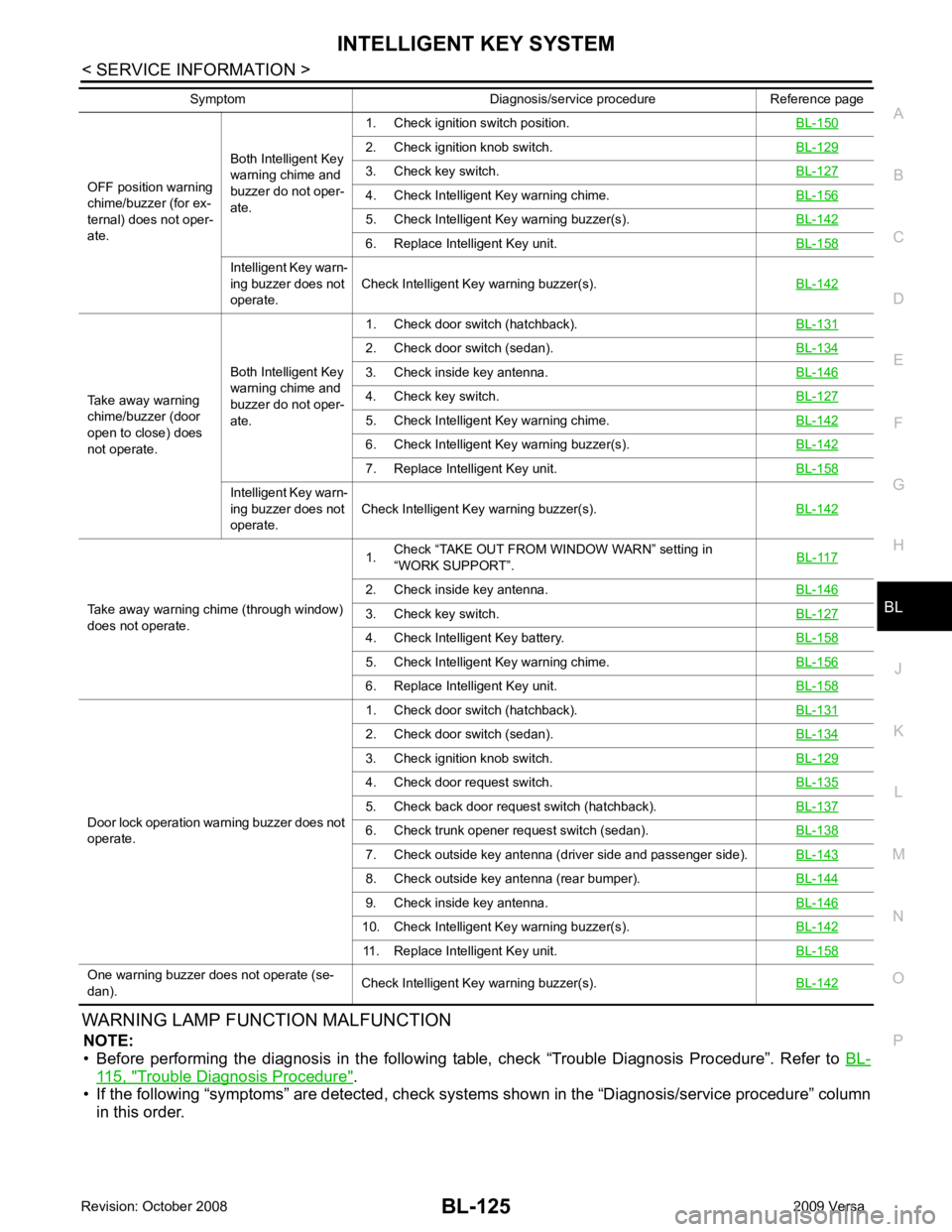
WARNING LAMP FUNCTION MALFUNCTION
NOTE:
• Before performing the diagnosis in the following table, check “Trouble Diagnosis Procedure”. Refer to BL-115, " Trouble Diagnosis Procedure " .
• If the following “symptoms” are detected, check syst ems shown in the “Diagnosis/service procedure” column
in this order.
OFF position warning
chime/buzzer (for ex-
ternal) does not oper-
ate. Both Intelligent Key
warning chime and
buzzer do not oper-
ate. 1. Check ignition switch position.
BL-1502. Check ignition knob switch.
BL-1293. Check key switch.
BL-1274. Check Intelligent Key warning chime.
BL-1565. Check Intelligent Ke
y warning buzzer(s). BL-142 6. Replace Intelligent Key unit.
BL-158Intelligent Key warn-
ing buzzer does not
operate. Check Intelligent Key warning buzzer(s).
BL-142Take away warning
chime/buzzer (door
open to close) does
not operate. Both Intelligent Key
warning chime and
buzzer do not oper-
ate. 1. Check door switch (hatchback).
BL-1312. Check door switch (sedan).
BL-1343. Check inside key antenna.
BL-1464. Check key switch.
BL-1275. Check Intelligent Key warning chime.
BL-1426. Check Intelligent Ke
y warning buzzer(s). BL-142 7. Replace Intelligent Key unit.
BL-158Intelligent Key warn-
ing buzzer does not
operate. Check Intelligent Key warning buzzer(s).
BL-142Take away warning chime (through window)
does not operate. 1.
Check “TAKE OUT FROM WINDOW WARN” setting in
“WORK SUPPORT”. BL-1172. Check inside key antenna.
BL-1463. Check key switch.
BL-1274. Check Intelligent Key battery.
BL-1585. Check Intelligent Key warning chime.
BL-1566. Replace Intelligent Key unit.
BL-158Door lock operation warning buzzer does not
operate. 1. Check door switch (hatchback).
BL-1312. Check door switch (sedan).
BL-1343. Check ignition knob switch.
BL-1294. Check door request switch.
BL-1355. Check back door request switch (hatchback).
BL-1376. Check trunk opener request switch (sedan).
BL-1387. Check outside key antenna (driver side and passenger side).
BL-1438. Check outside key antenna (rear bumper).
BL-1449. Check inside key antenna.
BL-14610. Check Intelligent Key warning buzzer(s).
BL-14211. Replace Intelligent Key unit.
BL-158One warning buzzer does not operate (se-
dan). Check Intelligent Key warning buzzer(s).
BL-142Symptom Diagnosis/service procedure Reference page
Page 599 of 4331
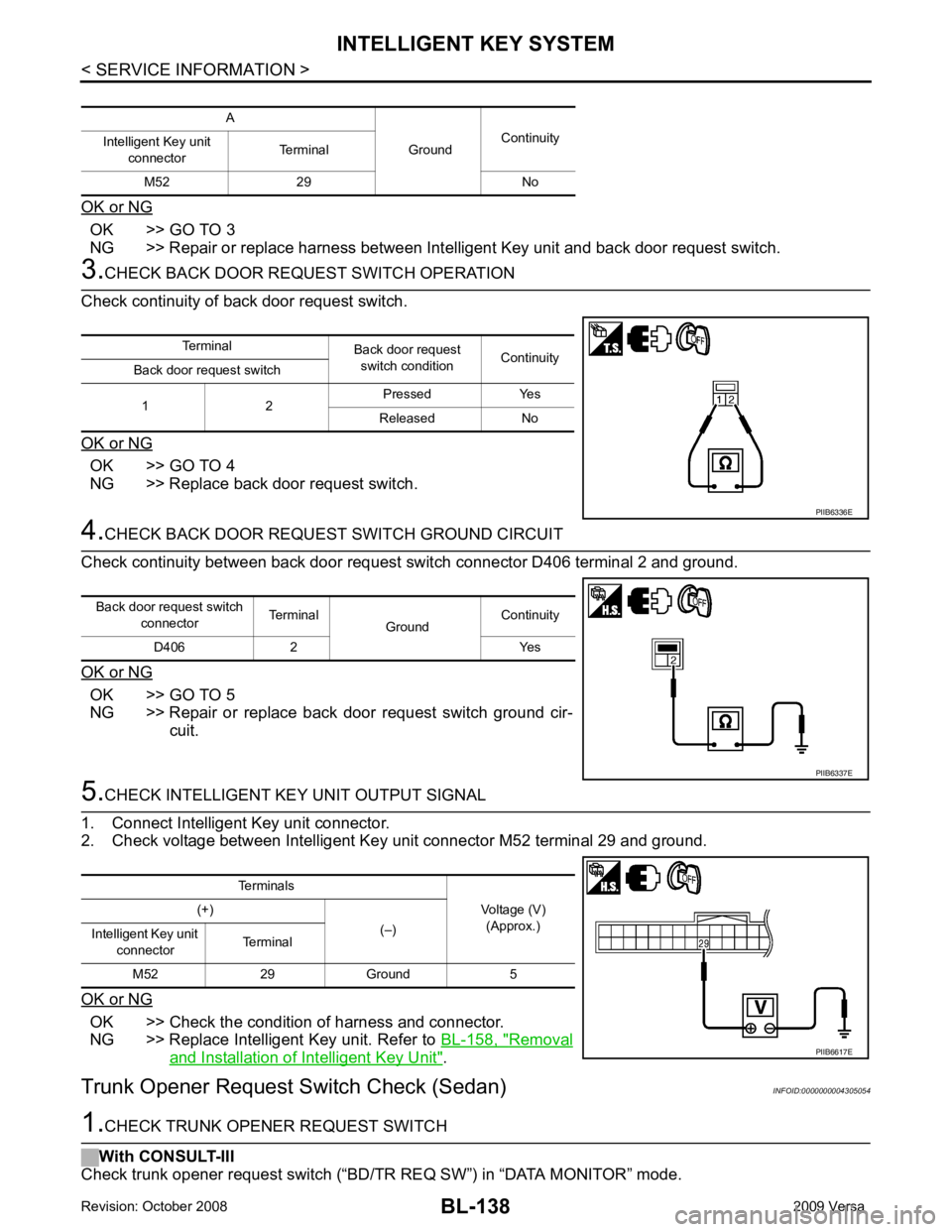
OK >> GO TO 3
NG >> Repair or replace harness between Intelligent Key unit and back door request switch. OK >> GO TO 4
NG >> Replace back door request switch. OK >> GO TO 5
NG >> Repair or replace back door request switch ground cir- cuit. OK >> Check the condition of harness and connector.
NG >> Replace Intelligent Key unit. Refer to BL-158, " Removal
and Installation of Intelligent Key Unit " .
Trunk Opener Request Switch Check (Sedan) INFOID:0000000004305054Terminal
Back door request
switch condition Continuity
Back door request switch
1 2 Pressed Yes
Released No
Page 600 of 4331
INTELLIGENT KEY SYSTEM
BL-139
< SERVICE INFORMATION >
C
D E
F
G H
J
K L
M A
B BL
N
O P
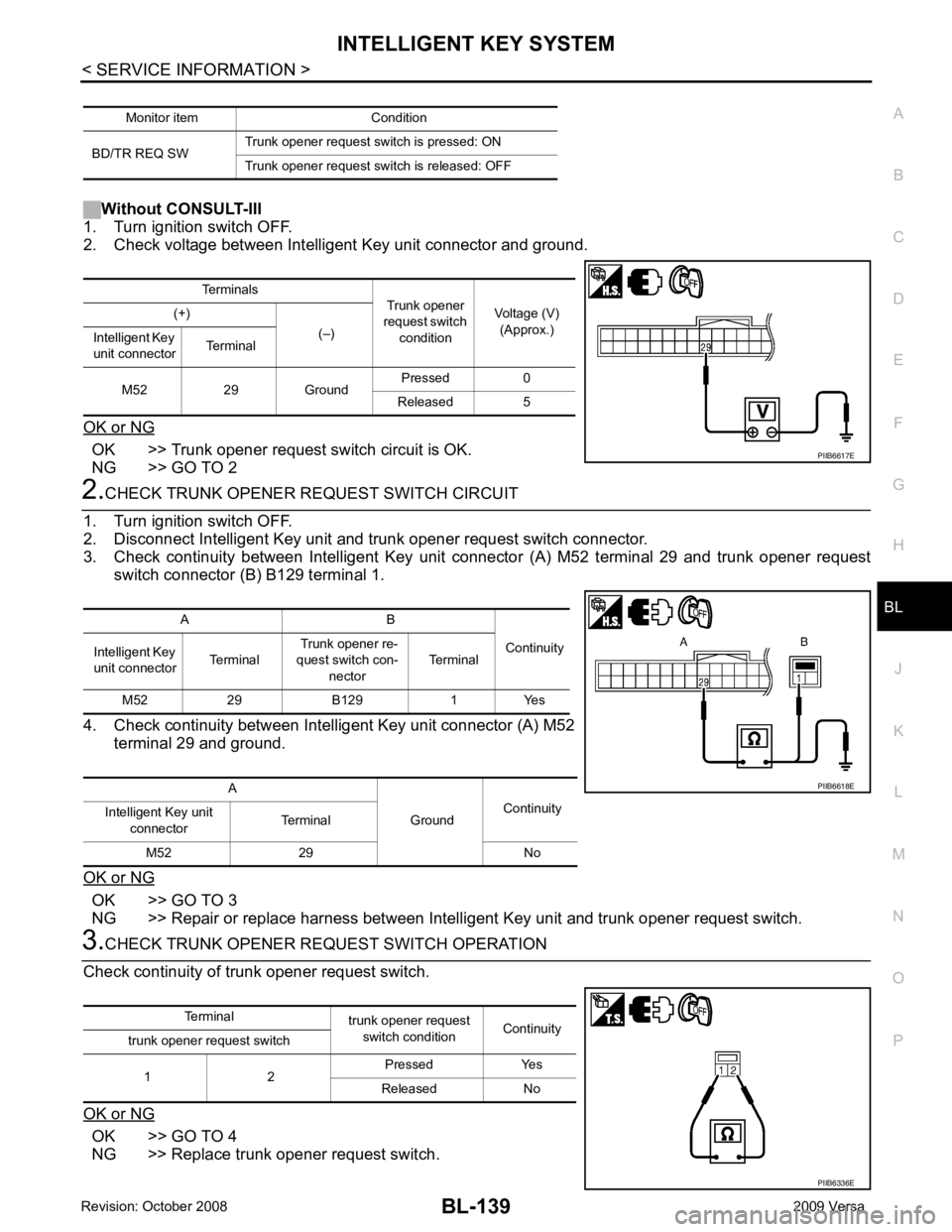
Without CONSULT-III
1. Turn ignition switch OFF.
2. Check voltage between Intelligent Key unit connector and ground.
OK or NG OK >> Trunk opener request switch circuit is OK.
NG >> GO TO 2 2.
CHECK TRUNK OPENER REQUEST SWITCH CIRCUIT
1. Turn ignition switch OFF.
2. Disconnect Intelligent Key unit and trunk opener request switch connector.
3. Check continuity between Intelligent Key unit connector (A) M52 terminal 29 and trunk opener request switch connector (B) B129 terminal 1.
4. Check continuity between Intelligent Key unit connector (A) M52 terminal 29 and ground.
OK or NG OK >> GO TO 3
NG >> Repair or replace harness between Intelligent Key unit and trunk opener request switch. 3.
CHECK TRUNK OPENER REQUEST SWITCH OPERATION
Check continuity of trunk opener request switch.
OK or NG OK >> GO TO 4
NG >> Replace trunk opener request switch. Monitor item Condition
BD/TR REQ SW Trunk opener request switch is pressed: ON
Trunk opener request switch is released: OFF Terminals
Trunk opener
request switch condition Voltage (V)
(Approx.)
(+)
(–)
Intelligent Key
unit connector Terminal
M52 29 Ground Pressed 0
Released 5 PIIB6617E
A B
Continuity
Intelligent Key
unit connector Terminal Trunk opener re-
quest switch con-
nector Terminal
M52 29 B129 1 Yes
A GroundContinuity
Intelligent Key unit
connector Terminal
M52 29 No PIIB6618E
Terminal
trunk opener request
switch condition Continuity
trunk opener request switch
1 2 Pressed Yes
Released No PIIB6336E
Page 601 of 4331
BL-140< SERVICE INFORMATION >
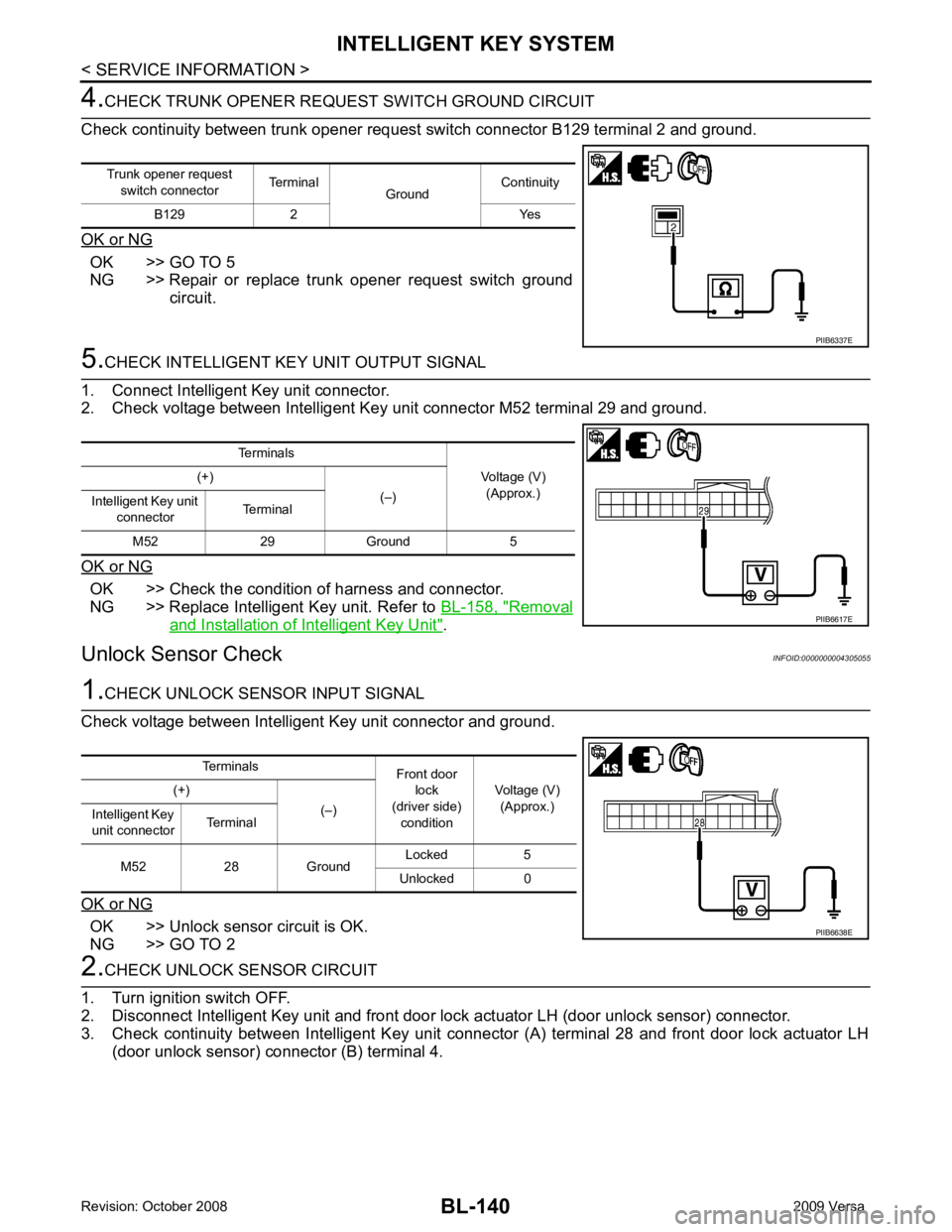
INTELLIGENT KEY SYSTEM4.
CHECK TRUNK OPENER REQU EST SWITCH GROUND CIRCUIT
Check continuity between trunk opener request switch connector B129 terminal 2 and ground.
OK or NG OK >> GO TO 5
NG >> Repair or replace trunk opener request switch ground
circuit. 5.
CHECK INTELLIGENT KEY UNIT OUTPUT SIGNAL
1. Connect Intelligent Key unit connector.
2. Check voltage between Intelligent Key unit connector M52 terminal 29 and ground.
OK or NG OK >> Check the condition of harness and connector.
NG >> Replace Intelligent Key unit. Refer to BL-158, " Removal
and Installation of Intelligent Key Unit " .
Unlock Sensor Check INFOID:00000000043050551.
CHECK UNLOCK SENSOR INPUT SIGNAL
Check voltage between Intelligent Key unit connector and ground.
OK or NG OK >> Unlock sensor circuit is OK.
NG >> GO TO 2 2.
CHECK UNLOCK SENSOR CIRCUIT
1. Turn ignition switch OFF.
2. Disconnect Intelligent Key unit and front door lock actuator LH (door unlock sensor) connector.
3. Check continuity between Intelligent Key unit connec tor (A) terminal 28 and front door lock actuator LH
(door unlock sensor) connector (B) terminal 4.
Trunk opener request
switch connector Terminal
GroundContinuity
B129 2 Yes PIIB6337E
Terminals
Voltage (V)(Approx.)
(+)
(–)
Intelligent Key unit
connector Terminal
M52 29 Ground 5 PIIB6617E
Terminals
Front door
lock
(driver side) condition Voltage (V)
(Approx.)
(+)
(–)
Intelligent Key
unit connector Terminal
M52 28 Ground Locked 5
Unlocked 0 PIIB6638E
Page 603 of 4331
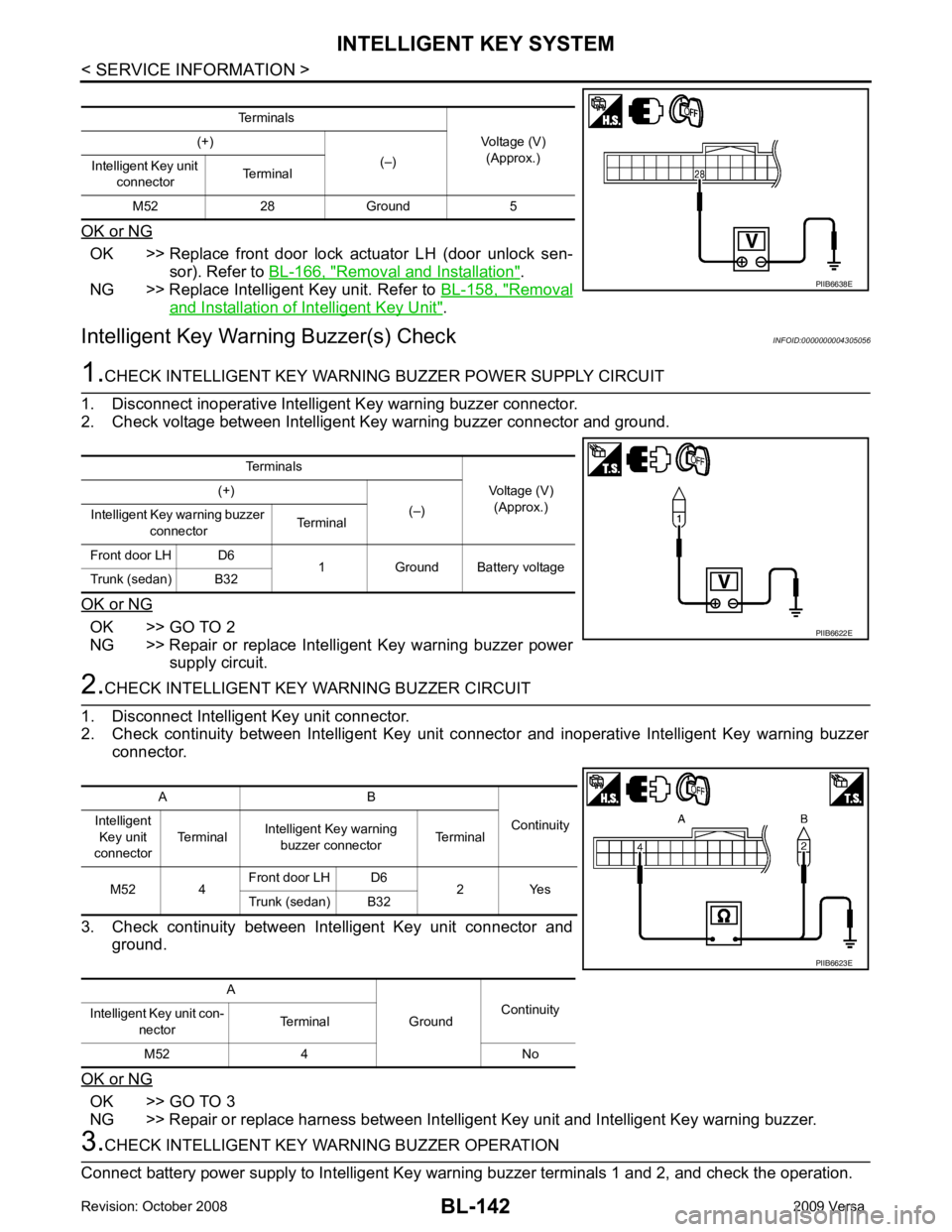
BL-142< SERVICE INFORMATION >
INTELLIGENT KEY SYSTEM
OK or NG OK >> Replace front door lock actuator LH (door unlock sen-
sor). Refer to BL-166, " Removal and Installation " .
NG >> Replace Intelligent Key unit. Refer to BL-158, " Removal
and Installation of Intelligent Key Unit " .
Intelligent Key Warning Buzzer(s) Check INFOID:00000000043050561.
CHECK INTELLIGENT KEY WARNING BUZZER POWER SUPPLY CIRCUIT
1. Disconnect inoperative Intelligent Key warning buzzer connector.
2. Check voltage between Intelligent Key warning buzzer connector and ground.
OK or NG OK >> GO TO 2
NG >> Repair or replace Intelligent Key warning buzzer power supply circuit. 2.
CHECK INTELLIGENT KEY WARNING BUZZER CIRCUIT
1. Disconnect Intelligent Key unit connector.
2. Check continuity between Intelligent Key unit c onnector and inoperative Intelligent Key warning buzzer
connector.
3. Check continuity between Intelligent Key unit connector and ground.
OK or NG OK >> GO TO 3
NG >> Repair or replace harness between Intelligent Key unit and Intelligent Key warning buzzer. 3.
CHECK INTELLIGENT KEY WA RNING BUZZER OPERATION
Connect battery power supply to Intelligent Key warning buzzer terminals 1 and 2, and check the operation. Terminals
Voltage (V)(Approx.)
(+)
(–)
Intelligent Key unit
connector Terminal
M52 28 Ground 5 PIIB6638E
Terminals
Voltage (V)(Approx.)
(+)
(–)
Intelligent Key warning buzzer
connector Terminal
Front door LH D6 1 Ground Battery voltage
Trunk (sedan) B32 PIIB6622E
A B
Continuity
Intelligent
Key unit
connector Terminal
Intelligent Key warning
buzzer connector Terminal
M52 4 Front door LH D6
2 Yes
Trunk (sedan) B32
A GroundContinuity
Intelligent Key unit con-
nector Terminal
M52 4 No PIIB6623E
Page 638 of 4331
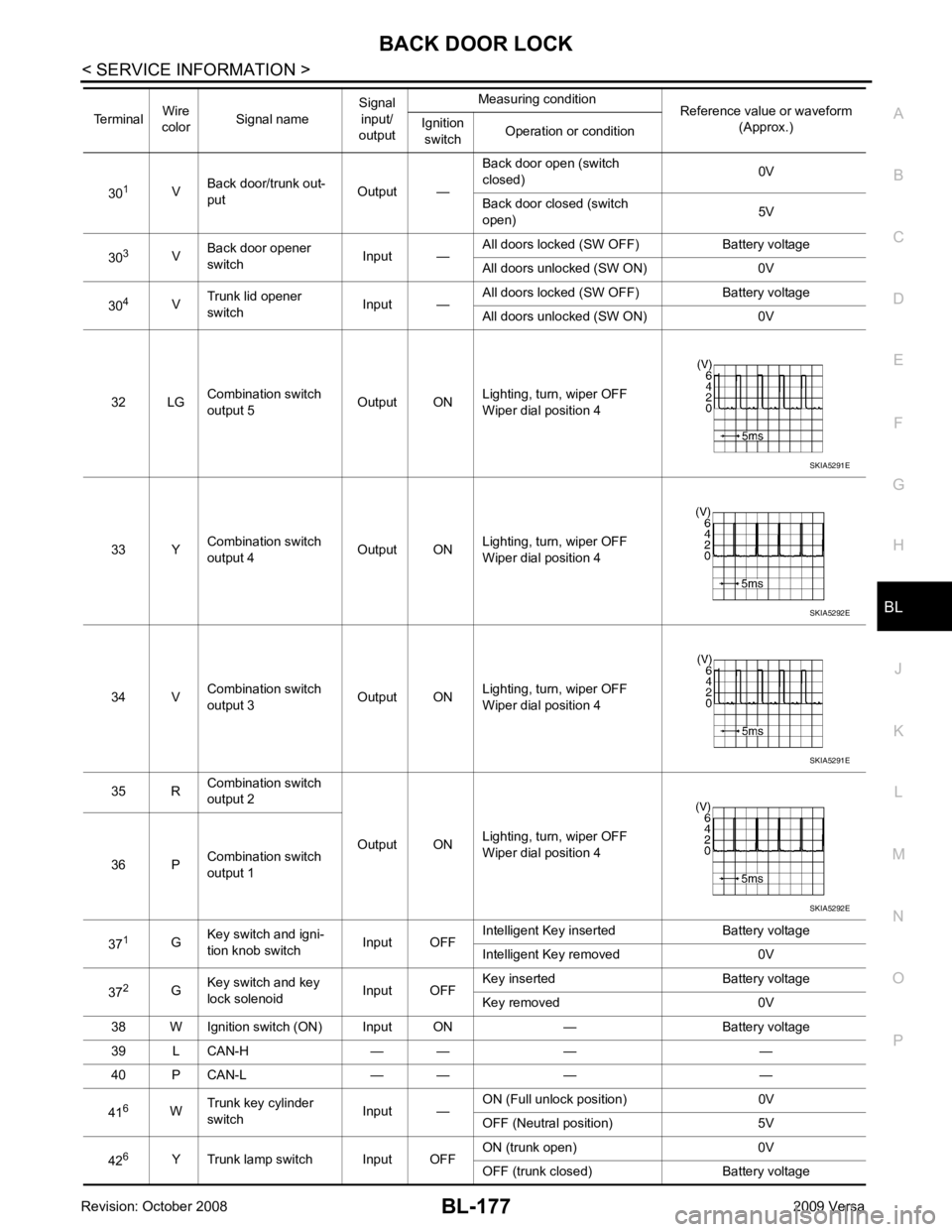
BACK DOOR LOCK
BL-177
< SERVICE INFORMATION >
C
D E
F
G H
J
K L
M A
B BL
N
O P
30
1
VBack door/trunk out-
put Output —Back door open (switch
closed) 0V
Back door closed (switch
open) 5V
30 3
VBack door opener
switch Input —All doors locked (SW OFF) Battery voltage
All doors unlocked (SW ON) 0V
30 4
VTrunk lid opener
switch Input —All doors locked (SW OFF) Battery voltage
All doors unlocked (SW ON) 0V
32 LG Combination switch
output 5 Output ONLighting, turn, wiper OFF
Wiper dial position 4
33 Y Combination switch
output 4 Output ON
Lighting, turn, wiper OFF
Wiper dial position 4
34 V Combination switch
output 3 Output ONLighting, turn, wiper OFF
Wiper dial position 4
35 R Combination switch
output 2
Output ONLighting, turn, wiper OFF
Wiper dial position 4
36 P Combination switch
output 1
37 1
GKey switch and igni-
tion knob switch Input OFFIntelligent Key inserted Battery voltage
Intelligent Key removed 0V
37 2
GKey switch and key
lock solenoid Input OFFKey inserted Battery voltage
Key removed 0V
38 W Ignition switch (ON) Input ON — Battery voltage
39 L CAN-H — — — —
40 P CAN-L — — — —
41 6
WTrunk key cylinder
switch Input —ON (Full unlock position) 0V
OFF (Neutral position) 5V
42 6
Y Trunk lamp switch Input OFF ON (trunk open) 0V
OFF (trunk closed) Battery voltage
Terminal
Wire
color Signal name Signal
input/
output Measuring condition
Reference value or waveform
(Approx.)
Ignition
switch Operation or condition SKIA5291E
SKIA5292E
SKIA5291E
SKIA5292E
Page 639 of 4331
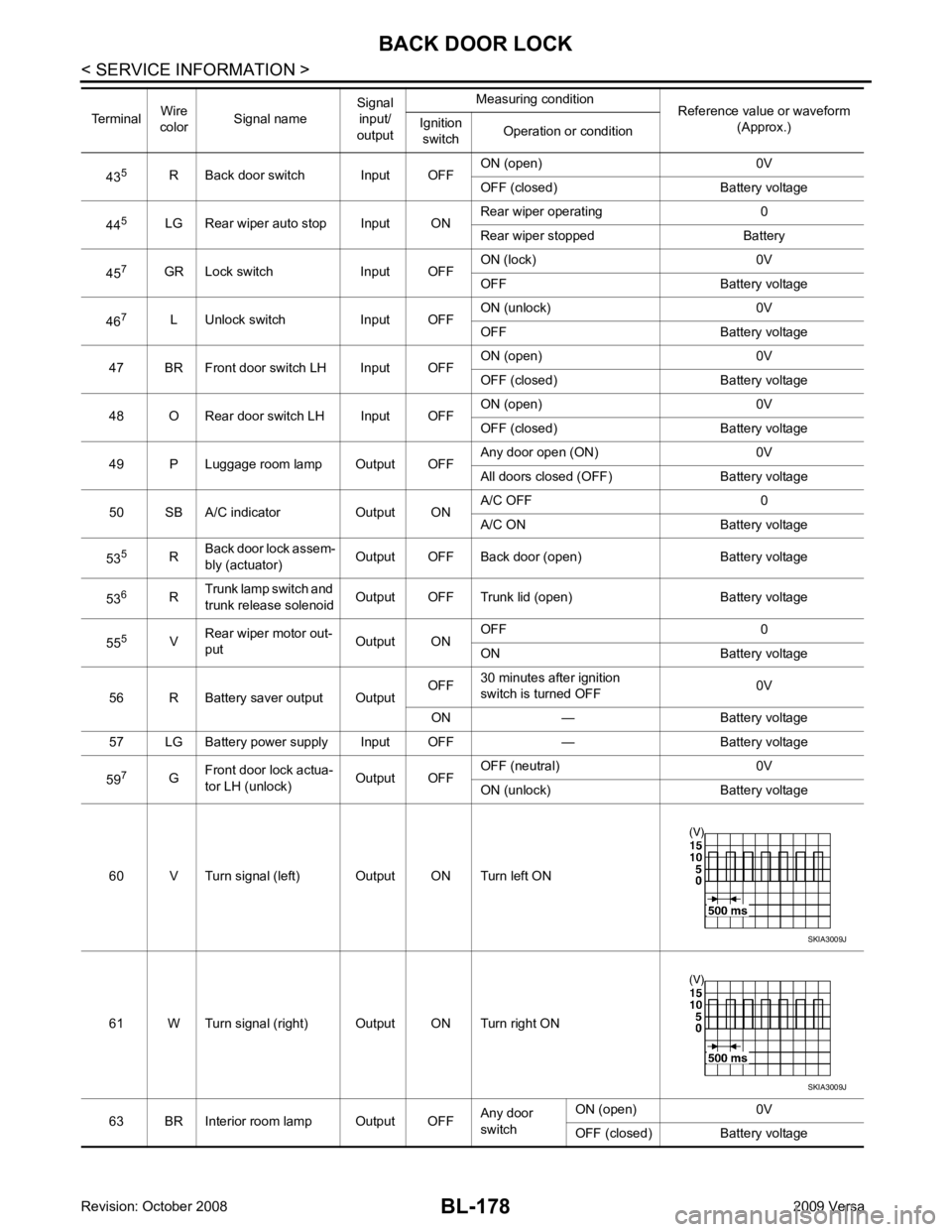
BL-178< SERVICE INFORMATION >
BACK DOOR LOCK
43 5
R Back door switch Input OFF ON (open) 0V
OFF (closed) Ba ttery voltage
44 5
LG Rear wiper auto stop Input ON Rear wiper operating 0
Rear wiper stopped Battery
45 7
GR Lock switch Input OFF ON (lock) 0V
OFF Battery voltage
46 7
L Unlock switch Input OFF ON (unlock) 0V
OFF Battery voltage
47 BR Front door switch LH Input OFF ON (open) 0V
OFF (closed) Ba ttery voltage
48 O Rear door switch LH Input OFF ON (open) 0V
OFF (closed) Ba ttery voltage
49 P Luggage room lamp Output OFF Any door open (ON) 0V
All doors closed (OFF) Battery voltage
50 SB A/C indicator Output ON A/C OFF 0
A/C ON Battery voltage
53 5
RBack door lock assem-
bly (actuator) Output OFF Back door (open) Battery voltage
53 6
RTrunk lamp switch and
trunk release solenoid Output OFF Trunk lid (open) Battery voltage
55 5
VRear wiper motor out-
put Output ONOFF 0
ON Battery voltage
56 R Battery saver output Output OFF
30 minutes after ignition
switch is turned OFF 0V
ON — Battery voltage
57 LG Battery power supply Input OFF — Battery voltage
59 7
GFront door lock actua-
tor LH (unlock) Output OFFOFF (neutral) 0V
ON (unlock) Battery voltage
60 V Turn signal (left) Output ON Turn left ON
61 W Turn signal (right) Output ON Turn right ON
63 BR Interior room lamp Output OFF Any door
switch ON (open) 0V
OFF (closed) Battery voltage
Terminal
Wire
color Signal name Signal
input/
output Measuring condition
Reference value or waveform
(Approx.)
Ignition
switch Operation or condition SKIA3009J
SKIA3009J
Page 642 of 4331
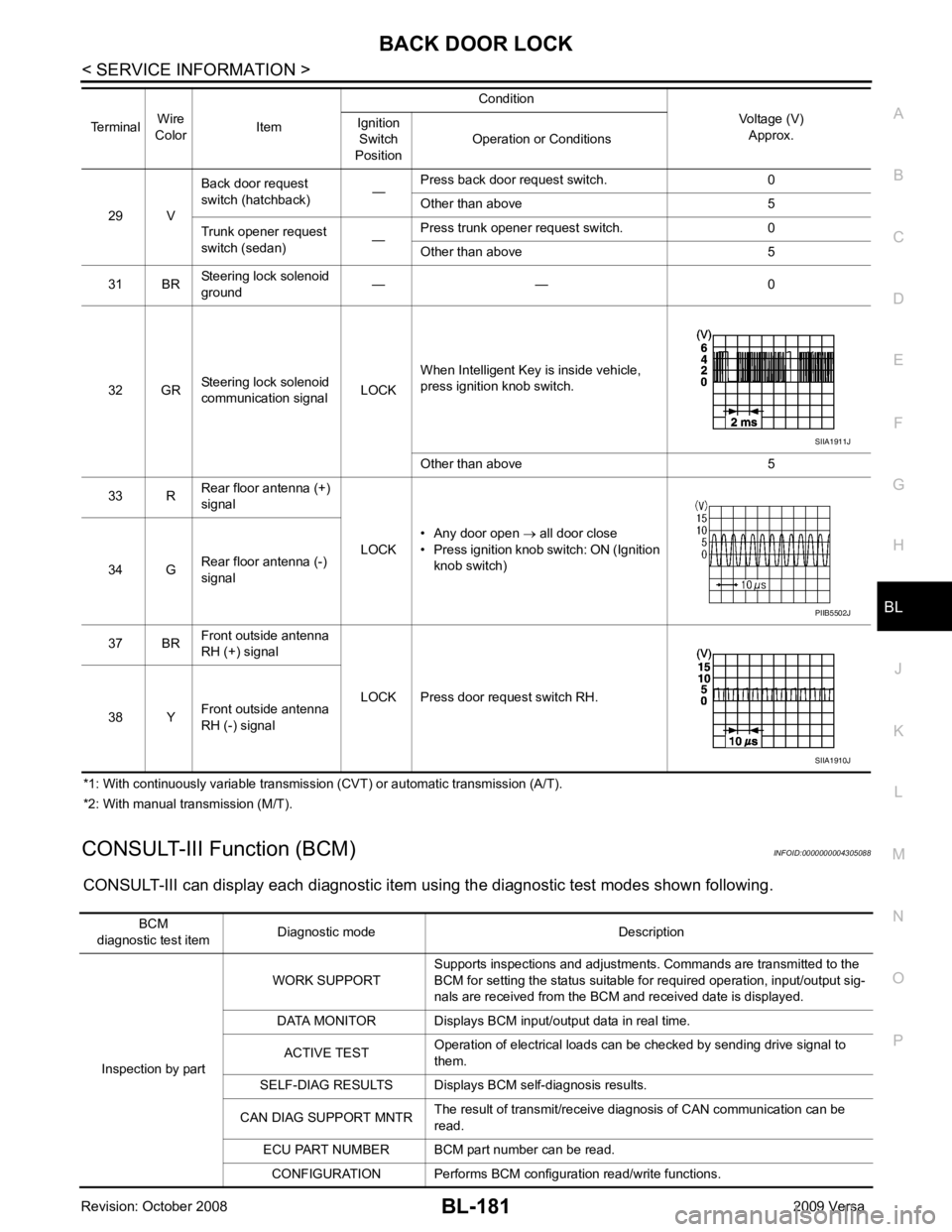
BACK DOOR LOCK
BL-181
< SERVICE INFORMATION >
C
D E
F
G H
J
K L
M A
B BL
N
O P
*1: With continuously variable transmission (CVT) or automatic transmission (A/T).
*2: With manual transmission (M/T).
CONSULT-III Function (BCM) INFOID:0000000004305088
CONSULT-III can display each diagnostic item using the diagnostic test modes shown following. 29 V
Back door request
switch (hatchback) —Press back door request switch. 0
Other than above 5
Trunk opener request
switch (sedan) —Press trunk opener request switch. 0
Other than above 5
31 BR Steering lock solenoid
ground — — 0
32 GR Steering lock solenoid
communication signal LOCKWhen Intelligent Key is inside vehicle,
press ignition knob switch.
Other than above 5
33 R Rear floor antenna (+)
signal
LOCK• Any door open
→ all door close
• Press ignition knob switch: ON (Ignition
knob switch)
34 G Rear floor antenna (-)
signal
37 BR Front outside antenna
RH (+) signal
LOCK Press door request switch RH.
38 Y Front outside antenna
RH (-) signal
Terminal
Wire
Color Item Condition
Voltage (V)Approx.
Ignition
Switch
Position Operation or Conditions SIIA1911J
PIIB5502J
SIIA1910J
BCM
diagnostic test item Diagnostic mode Description
Inspection by part WORK SUPPORT
Supports inspections and adjustments. Commands are transmitted to the
BCM for setting the status suitable for required operation, input/output sig-
nals are received from the BCM and received date is displayed.
DATA MONITOR Displays BCM input/output data in real time.
ACTIVE TEST Operation of electrical loads can be checked by sending drive signal to
them.
SELF-DIAG RESULTS Displays BC M self-diagnosis results.
CAN DIAG SUPPORT MNTR The result of transmit/receive diagnosis of CAN communication can be
read.
ECU PART NUMBER BCM part number can be read.
CONFIGURATION Performs BCM configuration read/write functions.
Page 643 of 4331
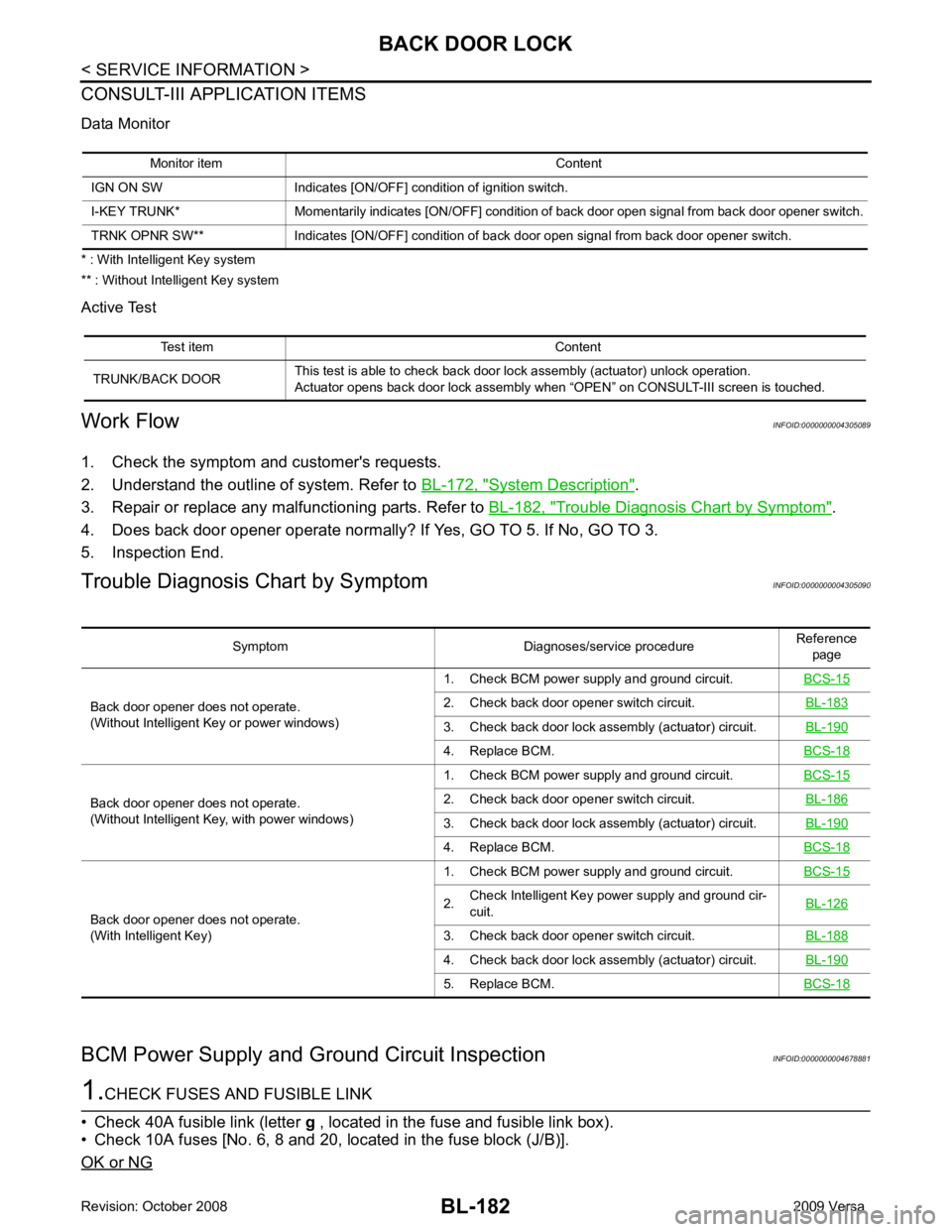
System Description " .
3. Repair or replace any malfunctioning parts. Refer to BL-182, " Trouble Diagnosis Chart by Symptom " .
4. Does back door opener operate normally? If Yes, GO TO 5. If No, GO TO 3.
5. Inspection End.
Trouble Diagnosis Chart by Symptom INFOID:0000000004305090
BCM Power Supply and Gr ound Circuit Inspection INFOID:0000000004678881Test item Content
TRUNK/BACK DOOR This test is able to check back door lock assembly (actuator) unlock operation.
Actuator opens back door lock assembly when “OPEN” on CONSULT-III screen is touched. Symptom Diagnoses/service procedure
Reference
page
Back door opener does not operate.
(Without Intelligent Key or power windows) 1. Check BCM power supply and ground circuit.
BCS-15 2. Check back door opener switch circuit.
BL-183 3. Check back door lock assembly (actuator) circuit.
BL-190 4. Replace BCM.
BCS-18Back door opener does not operate.
(Without Intelligent Key, with power windows) 1. Check BCM power supply and ground circuit.
BCS-15 2. Check back door opener switch circuit.
BL-186 3. Check back door lock assembly (actuator) circuit.
BL-190 4. Replace BCM.
BCS-18Back door opener does not operate.
(With Intelligent Key) 1. Check BCM power supply and ground circuit.
BCS-15 2.
Check Intelligent Key power supply and ground cir-
cuit. BL-126 3. Check back door opener switch circuit.
BL-188 4. Check back door lock assembly (actuator) circuit.
BL-190 5. Replace BCM.
BCS-18
Page 651 of 4331
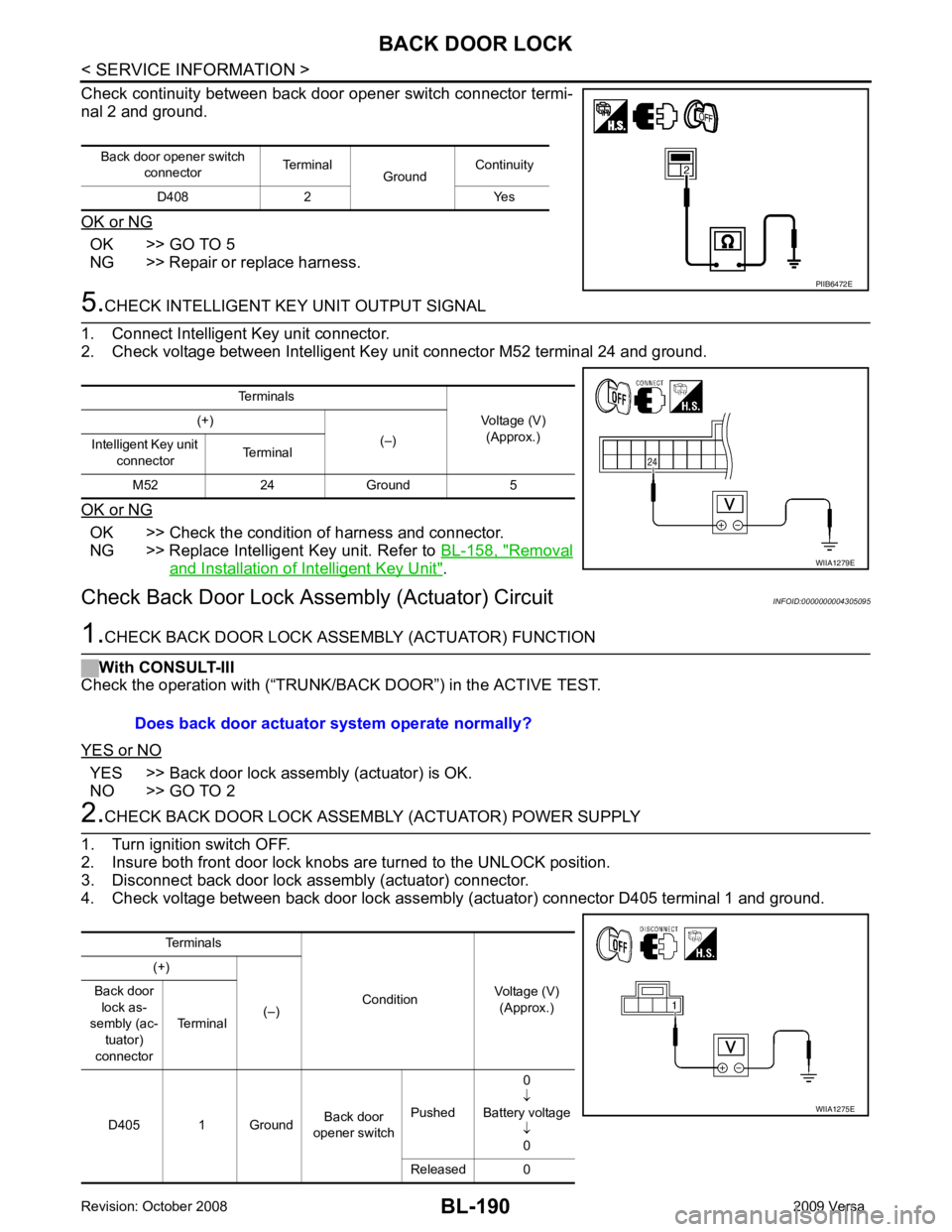
BL-190< SERVICE INFORMATION >
BACK DOOR LOCK
Check continuity between back door opener switch connector termi-
nal 2 and ground.
OK or NG OK >> GO TO 5
NG >> Repair or replace harness. 5.
CHECK INTELLIGENT KEY UNIT OUTPUT SIGNAL
1. Connect Intelligent Key unit connector.
2. Check voltage between Intelligent Key unit connector M52 terminal 24 and ground.
OK or NG OK >> Check the condition of harness and connector.
NG >> Replace Intelligent Key unit. Refer to BL-158, " Removal
and Installation of Intelligent Key Unit " .
Check Back Door Lock Asse mbly (Actuator) Circuit INFOID:00000000043050951.
CHECK BACK DOOR LOCK ASSE MBLY (ACTUATOR) FUNCTION
With CONSULT-III
Check the operation with (“TRUNK/BACK DOOR”) in the ACTIVE TEST.
YES or NO YES >> Back door lock assembly (actuator) is OK.
NO >> GO TO 2 2.
CHECK BACK DOOR LOCK ASSEMB LY (ACTUATOR) POWER SUPPLY
1. Turn ignition switch OFF.
2. Insure both front door lock knobs are turned to the UNLOCK position.
3. Disconnect back door lock assembly (actuator) connector.
4. Check voltage between back door lock assembly (actuator) connector D405 terminal 1 and ground. Back door opener switch
connector Terminal
GroundContinuity
D408 2 Yes PIIB6472E
Terminals
Voltage (V)(Approx.)
(+)
(–)
Intelligent Key unit
connector Terminal
M52 24 Ground 5 WIIA1279E
Does back door actuator system operate normally?
Terminals
ConditionVoltage (V)
(Approx.)
(+)
(–)
Back door
lock as-
sembly (ac-
tuator)
connector Terminal
D405 1 Ground Back door
opener switch Pushed 0
↓
Battery voltage ↓0
Released 0 WIIA1275E