PN switch NISSAN TIIDA 2009 Service Service Manual
[x] Cancel search | Manufacturer: NISSAN, Model Year: 2009, Model line: TIIDA, Model: NISSAN TIIDA 2009Pages: 4331, PDF Size: 58.04 MB
Page 162 of 4331
AT
N
O P
DTC BATT/FLUID TEMP SEN (A/T FL
UID TEMP SENSOR CIRCUIT AND
TCM POWER SOURCE)
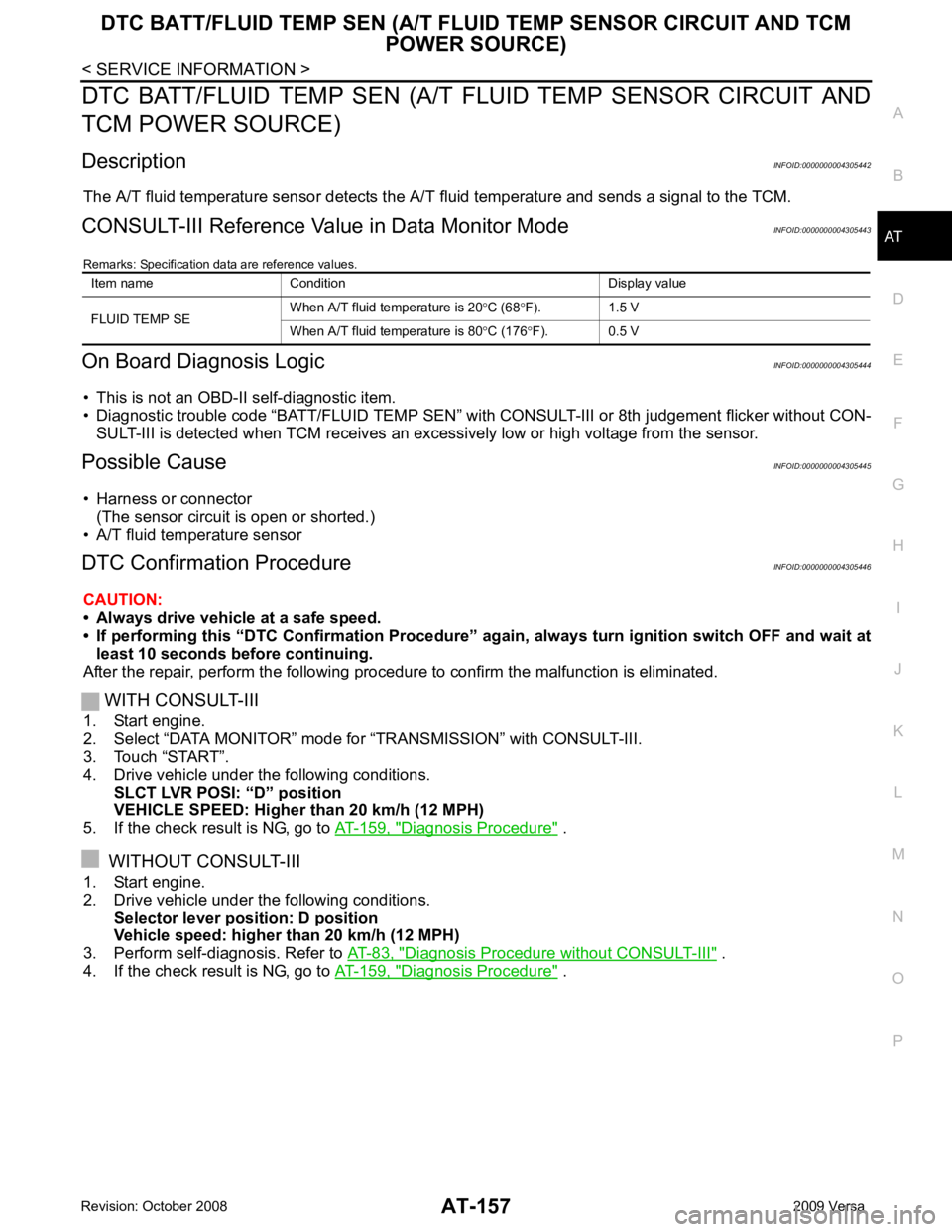
Description INFOID:0000000004305442
The A/T fluid temperature sensor detects the A/ T fluid temperature and sends a signal to the TCM.
CONSULT-III Reference Val ue in Data Monitor Mode INFOID:0000000004305443
Remarks: Specification data are reference values.
On Board Diagnosis Logic INFOID:0000000004305444
• This is not an OBD-II self-diagnostic item.
• Diagnostic trouble code “BATT/FLUID TEMP SEN” with CONSULT-III or 8th judgement flicker without CON-
SULT-III is detected when TCM receives an exce ssively low or high voltage from the sensor.
Possible Cause INFOID:0000000004305445
• Harness or connector (The sensor circuit is open or shorted.)
• A/T fluid temperature sensor
DTC Confirmation Procedure INFOID:0000000004305446
CAUTION:
• Always drive vehicle at a safe speed.
• If performing this “DTC Confirmation Procedure” again, always turn ignition switch OFF and wait at
least 10 seconds before continuing.
After the repair, perform the following procedure to confirm the malfunction is eliminated.
WITH CONSULT-III
1. Start engine.
2. Select “DATA MONITOR” mode for “TRANSMISSION” with CONSULT-III.
3. Touch “START”.
4. Drive vehicle under the following conditions. SLCT LVR POSI: “D” position
VEHICLE SPEED: Higher than 20 km/h (12 MPH)
5. If the check result is NG, go to AT-159, " Diagnosis Procedure " .
WITHOUT CONSULT-III
1. Start engine.
2. Drive vehicle under the following conditions. Selector lever position: D position
Vehicle speed: higher than 20 km/h (12 MPH)
3. Perform self-diagnosis. Refer to AT-83, " Diagnosis Procedure without CONSULT-III " .
4. If the check result is NG, go to AT-159, " Diagnosis Procedure " .
Item name Condition Display value
FLUID TEMP SE When A/T fluid temperature is 20
°C (68 °F). 1.5 V
When A/T fluid temperature is 80 °C (176 °F). 0.5 V
Page 165 of 4331
AT-160< SERVICE INFORMATION >
DTC BATT/FLUID TEMP SEN (A/T FLU
ID TEMP SENSOR CIRCUIT AND TCM
POWER SOURCE)
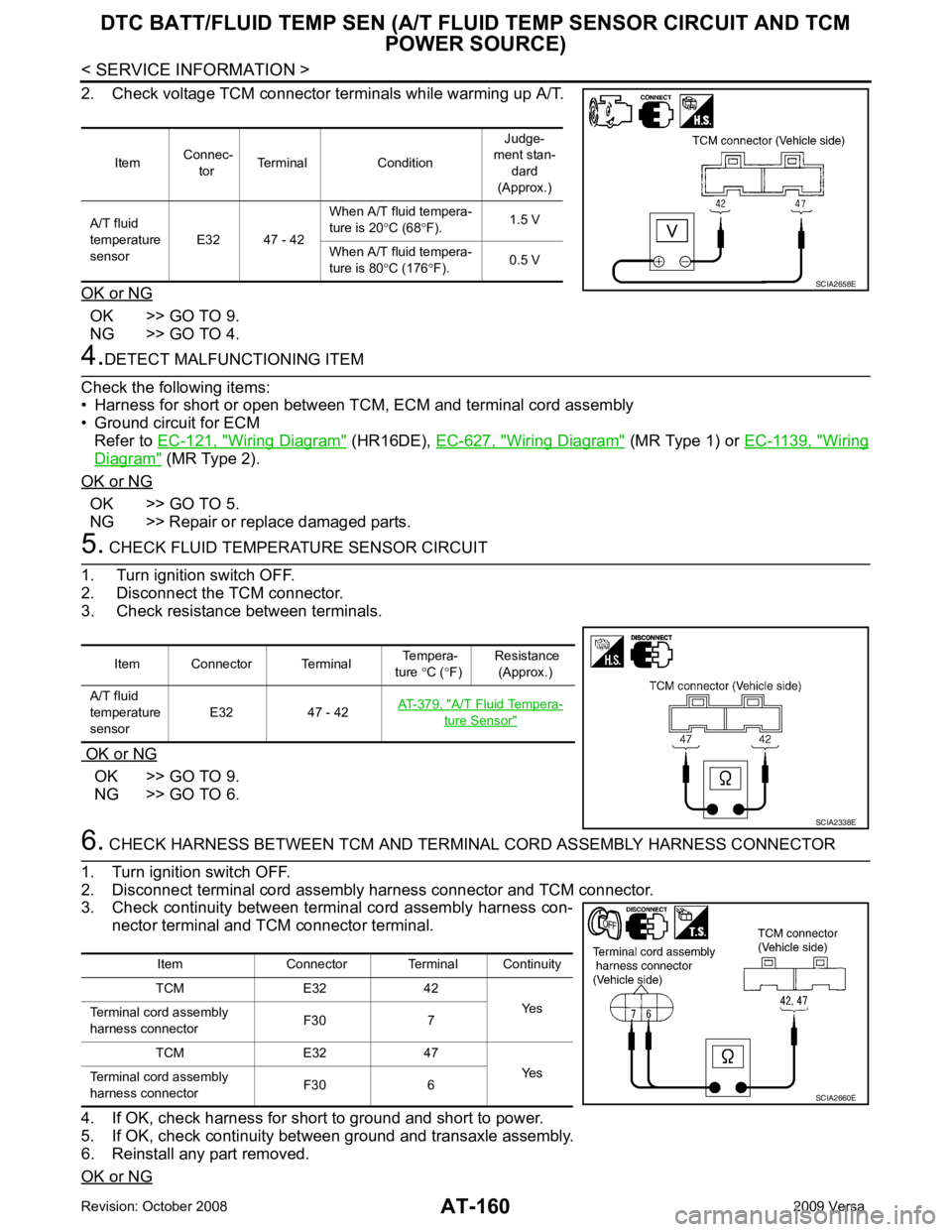
2. Check voltage TCM connector terminals while warming up A/T.
OK or NG OK >> GO TO 9.
NG >> GO TO 4. 4.
DETECT MALFUNCTIONING ITEM
Check the following items:
• Harness for short or open between TCM, ECM and terminal cord assembly
• Ground circuit for ECM
Refer to EC-121, " Wiring Diagram " (HR16DE),
EC-627, " Wiring Diagram " (MR Type 1) or
EC-1139, " Wiring
Diagram " (MR Type 2).
OK or NG OK >> GO TO 5.
NG >> Repair or replace damaged parts. 5.
CHECK FLUID TEMPERATURE SENSOR CIRCUIT
1. Turn ignition switch OFF.
2. Disconnect the TCM connector.
3. Check resistance between terminals.
OK or NG OK >> GO TO 9.
NG >> GO TO 6. 6.
CHECK HARNESS BETWEEN TCM AND TERM INAL CORD ASSEMBLY HARNESS CONNECTOR
1. Turn ignition switch OFF.
2. Disconnect terminal cord assembly harness connector and TCM connector.
3. Check continuity between terminal cord assembly harness con-
nector terminal and TCM connector terminal.
4. If OK, check harness for short to ground and short to power.
5. If OK, check continuity bet ween ground and transaxle assembly.
6. Reinstall any part removed.
OK or NG Item
Connec-
tor Terminal Condition Judge-
ment stan-
dard
(Approx.)
A/T fluid
temperature
sensor E32 47 - 42 When A/T fluid tempera-
ture is 20 °C (68 °F). 1.5 V
When A/T fluid tempera-
ture is 80 °C (176 °F). 0.5 V SCIA2658E
Item Connector Terminal
Tempera-
ture °C ( °F) Resistance
(Approx.)
A/T fluid
temperature
sensor E32 47 - 42
AT-379, " A/T Fluid Tempera-
ture Sensor "
SCIA2338E
Item Connector Terminal Continuity
TCM E32 42 Yes
Terminal cord assembly
harness connector F30 7
TCM E32 47 Yes
Terminal cord assembly
harness connector F30 6 SCIA2660E
Page 166 of 4331
DTC BATT/FLUID TEMP SEN (A/T FLU
ID TEMP SENSOR CIRCUIT AND TCM
POWER SOURCE)
AT-161
< SERVICE INFORMATION >
D
E
F
G H
I
J
K L
M A
B AT
N
O P
OK >> GO TO 7.
NG >> Repair open circuit or short to ground or short to power in harness or connectors. 7.
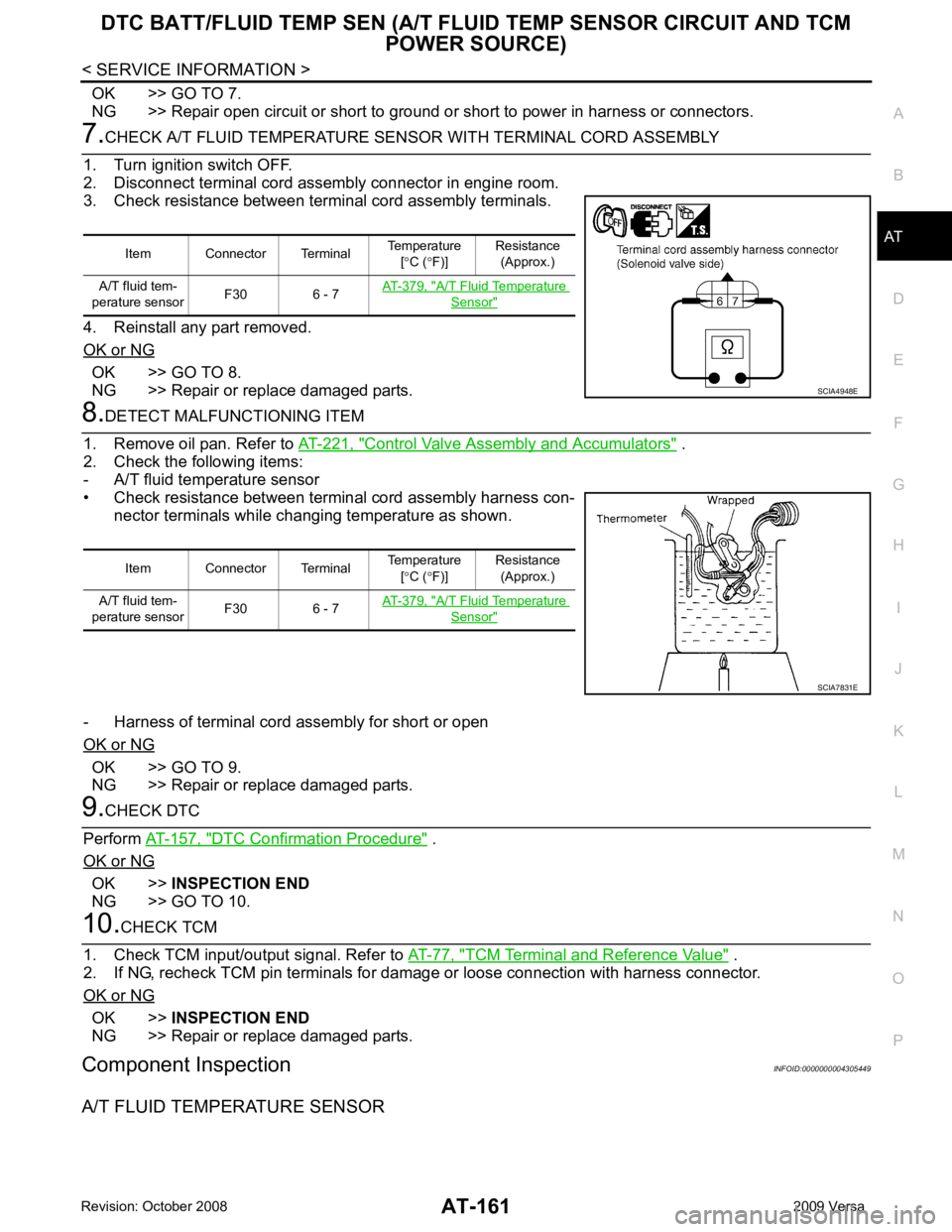
CHECK A/T FLUID TEMPERATURE SENSOR WITH TERMINAL CORD ASSEMBLY
1. Turn ignition switch OFF.
2. Disconnect terminal cord assembly connector in engine room.
3. Check resistance between terminal cord assembly terminals.
4. Reinstall any part removed.
OK or NG OK >> GO TO 8.
NG >> Repair or replace damaged parts. 8.
DETECT MALFUNCTIONING ITEM
1. Remove oil pan. Refer to AT-221, " Control Valve Assembly and Accumulators " .
2. Check the following items:
- A/T fluid temperature sensor
• Check resistance between terminal cord assembly harness con- nector terminals while changing temperature as shown.
- Harness of terminal cord assembly for short or open
OK or NG OK >> GO TO 9.
NG >> Repair or replace damaged parts. 9.
CHECK DTC
Perform AT-157, " DTC Confirmation Procedure " .
OK or NG OK >>
INSPECTION END
NG >> GO TO 10. 10.
CHECK TCM
1. Check TCM input/output signal. Refer to AT-77, " TCM Terminal and Reference Value " .
2. If NG, recheck TCM pin terminals for dam age or loose connection with harness connector.
OK or NG OK >>
INSPECTION END
NG >> Repair or replace damaged parts.
Component Inspection INFOID:0000000004305449
A/T FLUID TEMPERATURE SENSOR Item Connector Terminal
Temperature
[° C ( °F)] Resistance
(Approx.)
A/T fluid tem-
perature sensor F30 6 - 7 AT-379, " A/T Fluid Temperature
Sensor "
SCIA4948E
Item Connector Terminal
Temperature
[° C ( °F)] Resistance
(Approx.)
A/T fluid tem-
perature sensor F30 6 - 7 AT-379, " A/T Fluid Temperature
Sensor "
SCIA7831E
Page 168 of 4331
AT
N
O P
DTC TURBINE REVOLUTION SENSOR
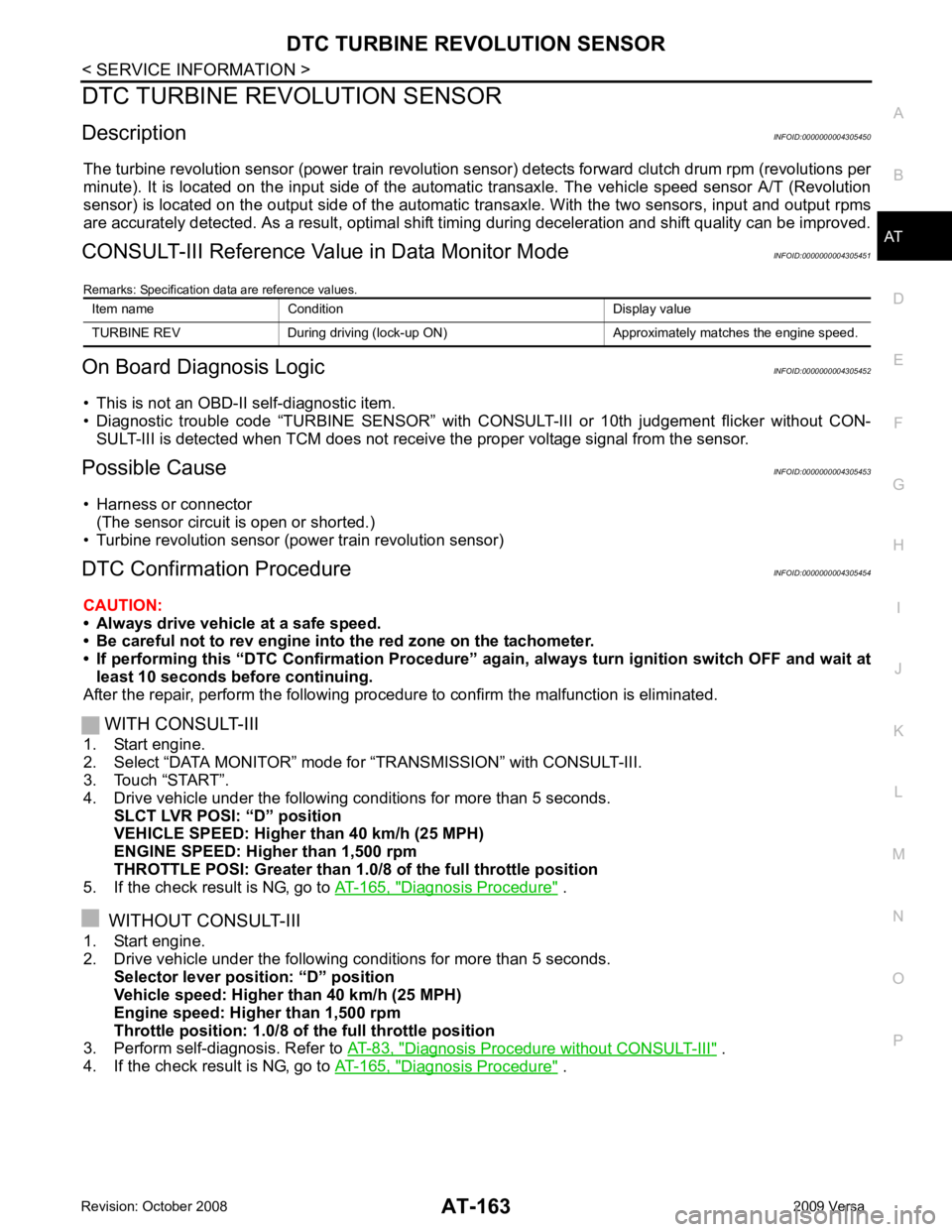
Description INFOID:0000000004305450
The turbine revolution sensor (power train revolution s ensor) detects forward clutch drum rpm (revolutions per
minute). It is located on the input side of the automat ic transaxle. The vehicle speed sensor A/T (Revolution
sensor) is located on the output side of the automatic transaxle. With the two sensors, input and output rpms
are accurately detected. As a resu lt, optimal shift timing during deceleration and shift quality can be improved.
CONSULT-III Reference Val ue in Data Monitor Mode INFOID:0000000004305451
Remarks: Specification data are reference values.
On Board Diagnosis Logic INFOID:0000000004305452
• This is not an OBD-II self-diagnostic item.
• Diagnostic trouble code “TURBINE SENSOR” with CO NSULT-III or 10th judgement flicker without CON-
SULT-III is detected when TCM does not receiv e the proper voltage signal from the sensor.
Possible Cause INFOID:0000000004305453
• Harness or connector (The sensor circuit is open or shorted.)
• Turbine revolution sensor (power train revolution sensor)
DTC Confirmation Procedure INFOID:0000000004305454
CAUTION:
• Always drive vehicle at a safe speed.
• Be careful not to rev engine into the red zone on the tachometer.
• If performing this “DTC Confirmation Procedure” again, always turn ignition switch OFF and wait at
least 10 seconds before continuing.
After the repair, perform the following procedure to confirm the malfunction is eliminated.
WITH CONSULT-III
1. Start engine.
2. Select “DATA MONITOR” mode for “TRANSMISSION” with CONSULT-III.
3. Touch “START”.
4. Drive vehicle under the following conditions for more than 5 seconds. SLCT LVR POSI: “D” position
VEHICLE SPEED: Higher than 40 km/h (25 MPH)
ENGINE SPEED: Higher than 1,500 rpm
THROTTLE POSI: Greater than 1.0/ 8 of the full throttle position
5. If the check result is NG, go to AT-165, " Diagnosis Procedure " .
WITHOUT CONSULT-III
1. Start engine.
2. Drive vehicle under the following conditions for more than 5 seconds. Selector lever posi tion: “D” position
Vehicle speed: Higher than 40 km/h (25 MPH)
Engine speed: Higher than 1,500 rpm
Throttle position: 1.0/8 of the full throttle position
3. Perform self-diagnosis. Refer to AT-83, " Diagnosis Procedure without CONSULT-III " .
4. If the check result is NG, go to AT-165, " Diagnosis Procedure " .
Item name Condition Display value
TURBINE REV During driving (lock-up ON) Approximately matches the engine speed.
Page 172 of 4331
AT
N
O P
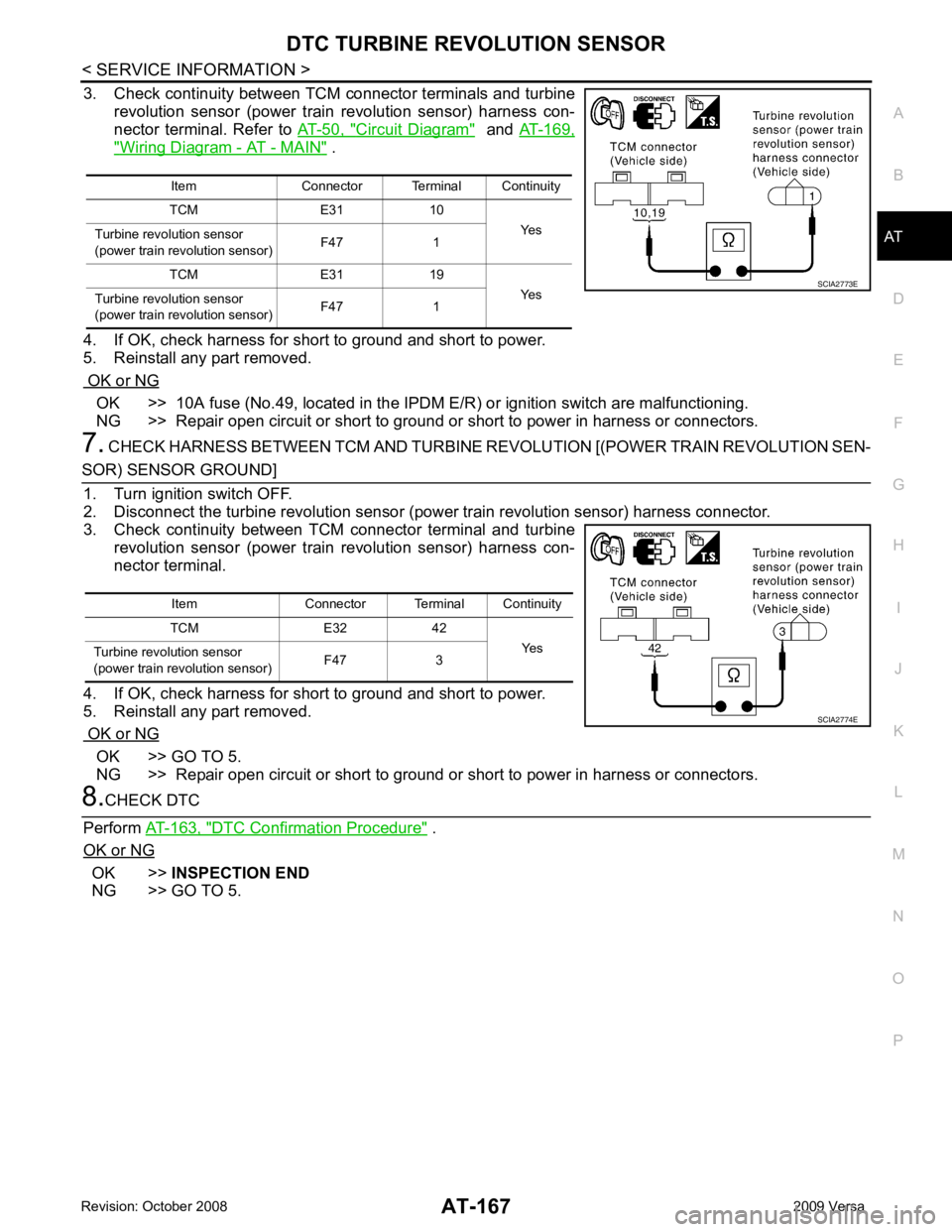
3. Check continuity between TCM connector terminals and turbine
revolution sensor (power train revolution sensor) harness con-
nector terminal. Refer to AT-50, " Circuit Diagram " and
AT-169, " Wiring Diagram - AT - MAIN " .
4. If OK, check harness for short to ground and short to power.
5. Reinstall any part removed.
OK or NG OK >> 10A fuse (No.49, located in the IPDM
E/R) or ignition switch are malfunctioning.
NG >> Repair open circuit or short to ground or short to power in harness or connectors.
7. CHECK HARNESS BETWEEN TCM AND TURBINE R EVOLUTION [(POWER TRAIN REVOLUTION SEN- OK >> GO TO 5.
NG >> Repair open circuit or short to ground or short to power in harness or connectors. DTC Confirmation Procedure " .
OK or NG OK >>
INSPECTION END
NG >> GO TO 5. Item Connector Terminal Continuity
TCM E31 10 Yes
Turbine revolu tion sensor
(power train revolution sensor) F47 1
TCM E31 19 Yes
Turbine revolu tion sensor
(power train revolution sensor) F47 1
Page 175 of 4331
AT-170< SERVICE INFORMATION >
MAIN POWER SUPPLY AND GROUND CIRCUIT
Diagnosis Procedure INFOID:00000000043054631.
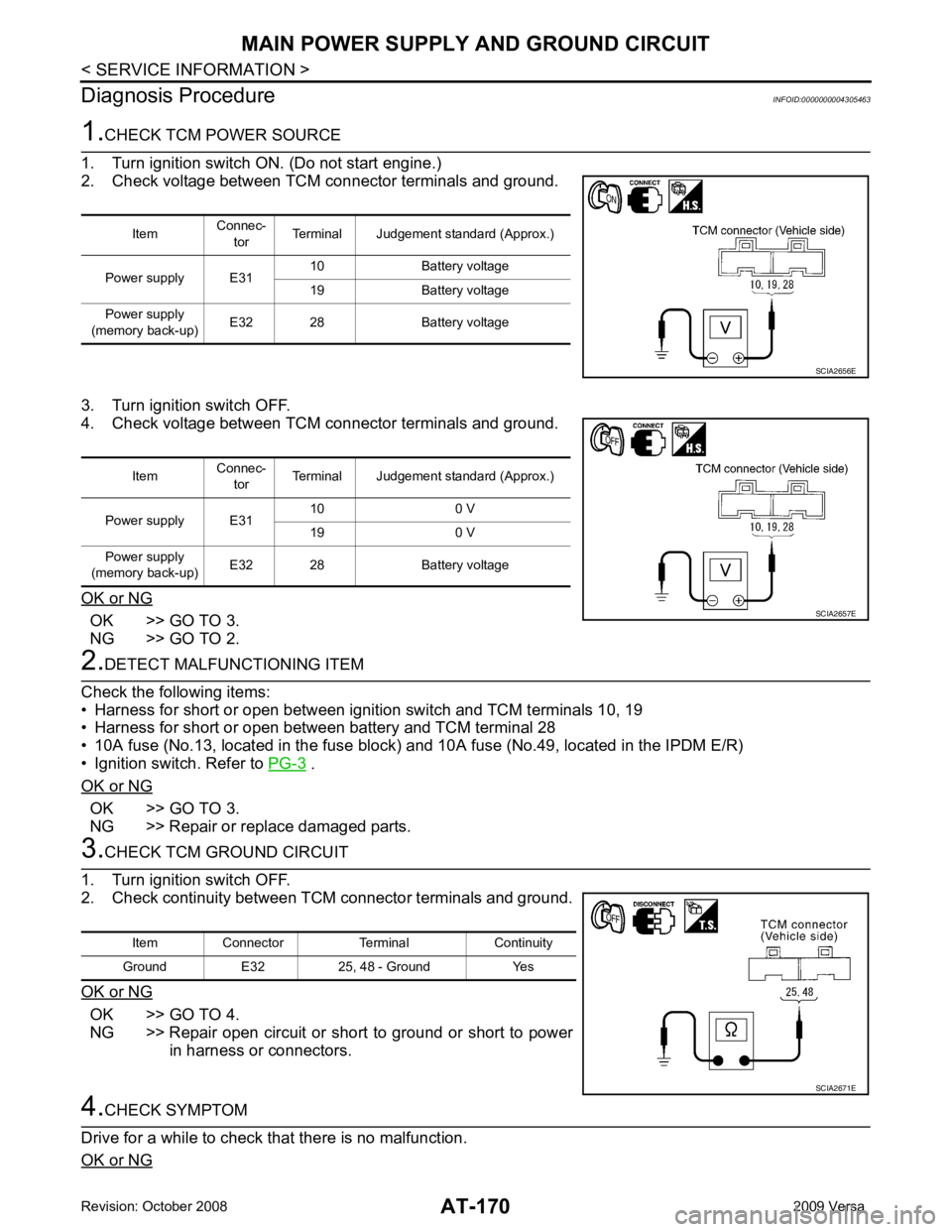
CHECK TCM POWER SOURCE
1. Turn ignition switch ON. (Do not start engine.)
2. Check voltage between TCM connector terminals and ground.
3. Turn ignition switch OFF.
4. Check voltage between TCM connector terminals and ground.
OK or NG OK >> GO TO 3.
NG >> GO TO 2. 2.
DETECT MALFUNCTIONING ITEM
Check the following items:
• Harness for short or open between ignition switch and TCM terminals 10, 19
• Harness for short or open between battery and TCM terminal 28
• 10A fuse (No.13, located in the fuse block) and 10A fuse (No.49, located in the IPDM E/R)
• Ignition switch. Refer to PG-3 .
OK or NG OK >> GO TO 3.
NG >> Repair or replace damaged parts. 3.
CHECK TCM GROUND CIRCUIT
1. Turn ignition switch OFF.
2. Check continuity between TCM connector terminals and ground.
OK or NG OK >> GO TO 4.
NG >> Repair open circuit or short to ground or short to power in harness or connectors. 4.
CHECK SYMPTOM
Drive for a while to check that there is no malfunction.
OK or NG Item
Connec-
tor Terminal Judgement standard (Approx.)
Power supply E31 10 Battery voltage
19 Battery voltage
Power supply
(memory back-up) E32 28 Battery voltage SCIA2656E
Item
Connec-
tor Terminal Judgement standard (Approx.)
Power supply E31 10 0 V
19 0 V
Power supply
(memory back-up) E32 28 Battery voltage SCIA2657E
Item Connector Terminal Continuity
Ground E32 25, 48 - Ground Yes SCIA2671E
Page 177 of 4331

CONSULT-III Function (TRANSMISSION) " .
Is a malfunction in the CAN communication indicated in the results? YES >> Check CAN communication line. Refer to
AT-88 .
NO (With CONSULT-III) >>GO TO 2.
NO (Without CONSULT-III) >>GO TO 3. Item name Condition Display value
PN POSI SW When setting selector lever
to “N” or “P” position. ON
When setting selector lever to other positions. OFF
R POSITION SW When setting selector lever to “R” position. ON
When setting selector lever to other positions. OFF
D POSITION SW When setting selector lever to “D” position. ON
When setting selector lever to other positions. OFF
2 POSITION SW When setting selector lever to “2” position. ON
When setting selector lever to other positions. OFF
1 POSITION SW When setting selector lever to “1” position. ON
When setting selector lever to other positions. OFF
OVERDRIVE SW When overdrive control switch is depressed. ON
When overdrive control switch is released. OFF
CLOSED THL/SW Released accelerator pedal. ON
Depressed accelerator pedal. OFF
W/O THRL/P-SW Fully depressed accelerator pedal. ON
Released accelerator pedal. OFF Terminal Wire color Item Condition
Judgement standard
(Approx.)
26 Y PNP switch “1” posi-
tion
andWhen setting selector lever to “1” position. Battery voltage
When setting selector lever to other positions. 0 V
27 G PNP switch “2” posi-
tion When setting selector lever to “2” position. Battery voltage
When setting selector lever to other positions. 0 V
34 LG PNP switch “D” posi-
tion When setting selector lever to “D” position. Battery voltage
When setting selector lever to other positions. 0 V
35 SB PNP switch “R” posi-
tion When setting selector lever to “R” position. Battery voltage
When setting selector lever to other positions. 0 V
36 R PNP switch “N” or “P”
position When setting selector le
ver to “N” or “P” posi-
tions. Battery voltage
When setting selector lever to other positions. 0 V
Page 178 of 4331
PNP, OD SWITCH AND CLOSED THRO
TTLE, WIDE OPEN THROTTLE POSI-
TION SIGNAL CIRCUIT
AT-173
< SERVICE INFORMATION >
D
E
F
G H
I
J
K L
M A
B AT
N
O P 2.
CHECK PNP SWITCH CIRCUIT
With CONSULT-III
1. Turn ignition switch ON. (Do not start engine.)
2. Select “TCM INPUT SIGNALS” in “DATA MONI TOR” mode for “TRANSMISSION” with CONSULT-III.
3. Read out “P·N”, “R”, “D”, “2” and “1” position switches moving selector lever to each position.
OK or NG OK >> GO TO 4.
NG >> Check PNP switch circuit. Refer to AT-91 .
3.
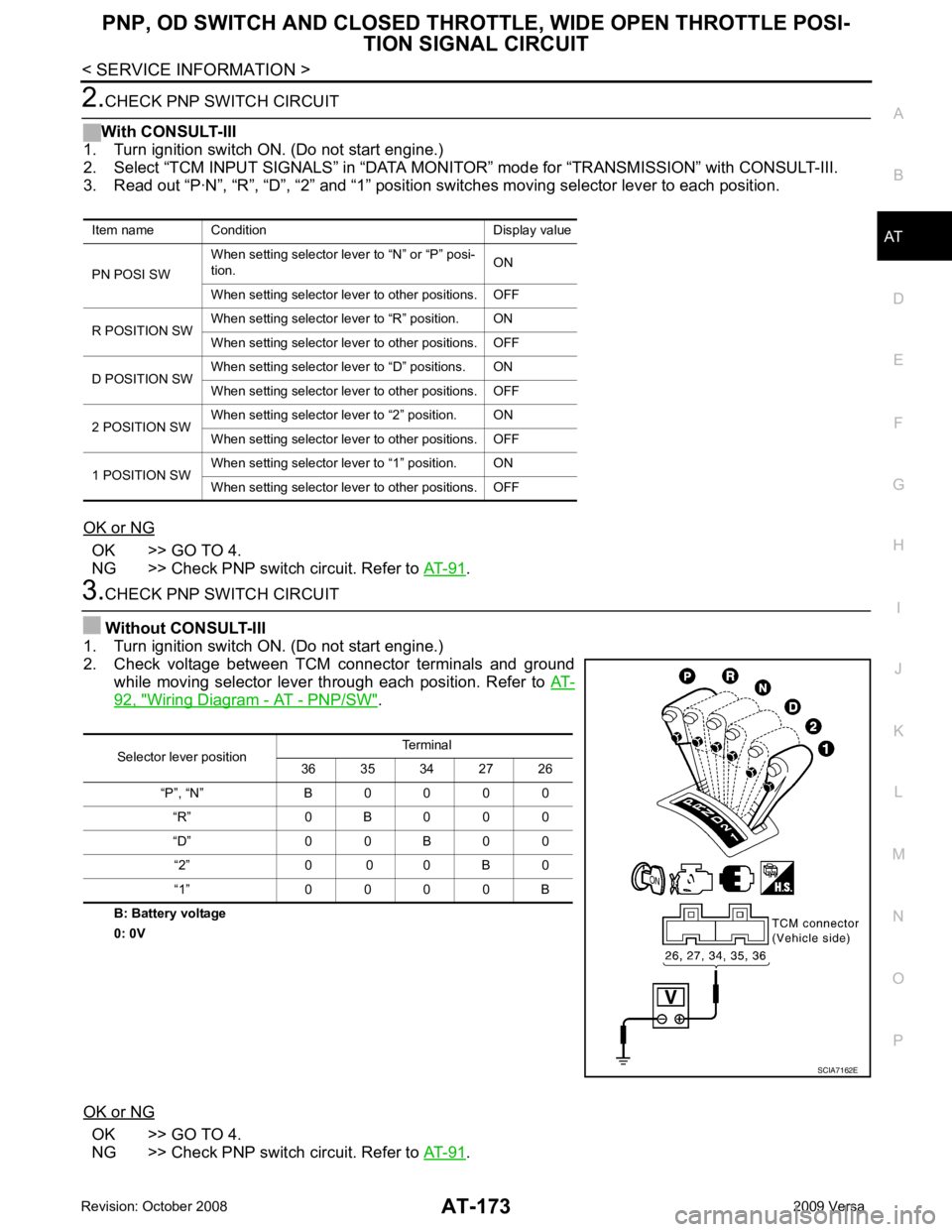
CHECK PNP SWITCH CIRCUIT
Without CONSULT-III
1. Turn ignition switch ON. (Do not start engine.)
2. Check voltage between TCM connector terminals and ground while moving selector lever through each position. Refer to AT-92, " Wiring Diagram - AT - PNP/SW " .
B: Battery voltage
0: 0V
OK or NG OK >> GO TO 4.
NG >> Check PNP switch circuit. Refer to AT-91 .
Item name Condition Display value
PN POSI SW When setting selector le
ver to “N” or “P” posi-
tion. ON
When setting selector lever to other positions. OFF
R POSITION SW When setting selector lever to “R” position. ON
When setting selector lever to other positions. OFF
D POSITION SW When setting selector lever to “D” positions. ON
When setting selector lever to other positions. OFF
2 POSITION SW When setting selector lever to “2” position. ON
When setting selector lever to other positions. OFF
1 POSITION SW When setting selector lever to “1” position. ON
When setting selector lever to other positions. OFF Selector lever position
Terminal
36 35 34 27 26
“P”, “N” B 0 0 0 0 “R” 0 B 0 0 0
“D” 0 0 B 0 0 “2” 0 0 0 B 0
“1” 0 0 0 0 B SCIA7162E
Page 179 of 4331
AT-174< SERVICE INFORMATION >
PNP, OD SWITCH AND CLOSED THRO
TTLE, WIDE OPEN THROTTLE POSI-
TION SIGNAL CIRCUIT 4.
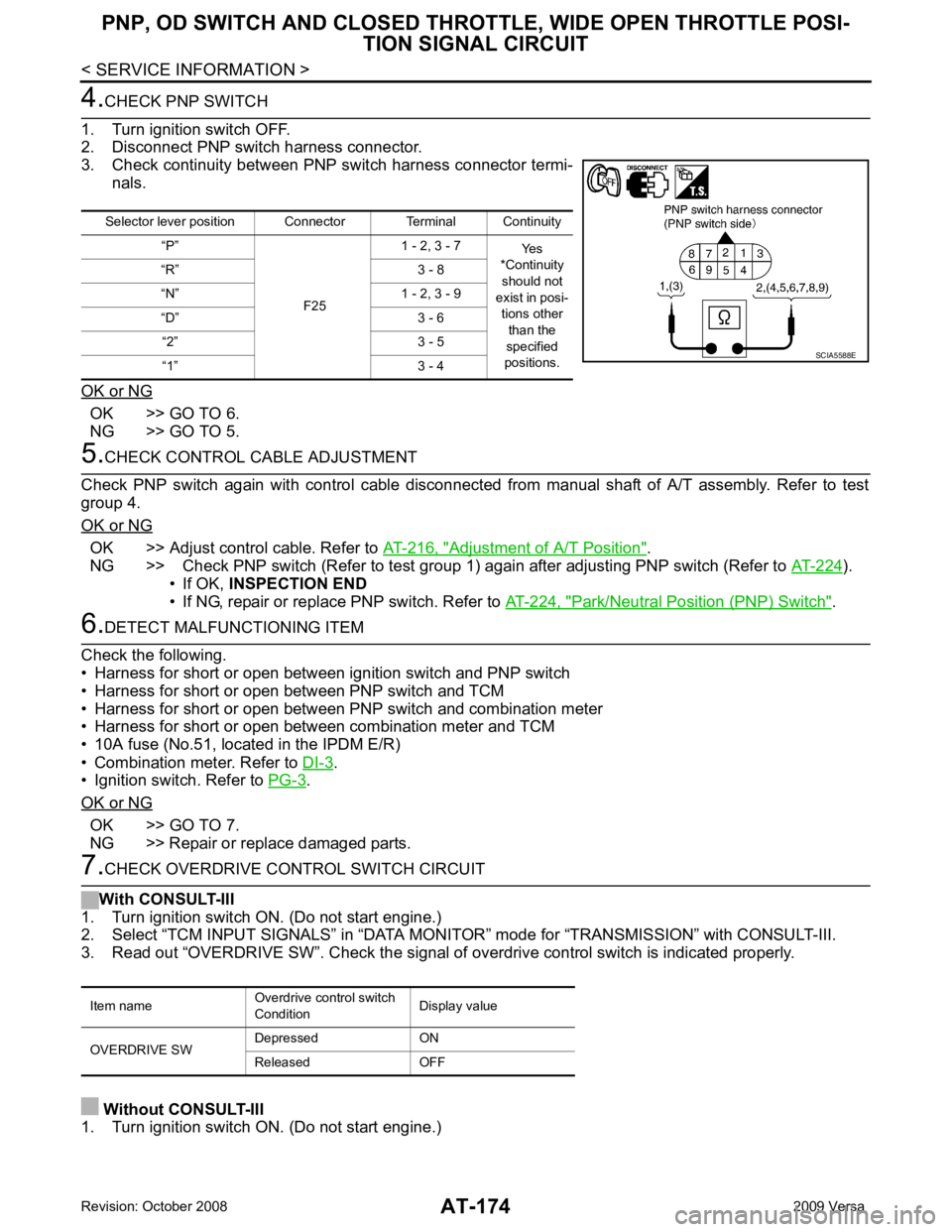
CHECK PNP SWITCH
1. Turn ignition switch OFF.
2. Disconnect PNP switch harness connector.
3. Check continuity between PNP switch harness connector termi- nals.
OK or NG OK >> GO TO 6.
NG >> GO TO 5. 5.
CHECK CONTROL CABLE ADJUSTMENT
Check PNP switch again with control cable disconnected from manual shaft of A/T assembly. Refer to test
group 4.
OK or NG OK >> Adjust control cable. Refer to
AT-216, " Adjustment of A/T Position " .
NG >> Check PNP switch (Refer to test group 1) again after adjusting PNP switch (Refer to AT-224 ).
• If OK, INSPECTION END
• If NG, repair or replace PNP switch. Refer to AT-224, " Park/Neutral Position (PNP) Switch " .
6.
DETECT MALFUNCTIONING ITEM
Check the following.
• Harness for short or open between ignition switch and PNP switch
• Harness for short or open between PNP switch and TCM
• Harness for short or open between PNP switch and combination meter
• Harness for short or open between combination meter and TCM
• 10A fuse (No.51, located in the IPDM E/R)
• Combination meter. Refer to DI-3 .
• Ignition switch. Refer to PG-3 .
OK or NG OK >> GO TO 7.
NG >> Repair or replace damaged parts. 7.
CHECK OVERDRIVE CONTROL SWITCH CIRCUIT
With CONSULT-III
1. Turn ignition switch ON. (Do not start engine.)
2. Select “TCM INPUT SIGNALS” in “DATA MONITO R” mode for “TRANSMISSION” with CONSULT-III.
3. Read out “OVERDRIVE SW”. Check the signal of ov erdrive control switch is indicated properly.
Without CONSULT-III
1. Turn ignition switch ON. (Do not start engine.) Selector lever position Connector Terminal Continuity
“P”
F251 - 2, 3 - 7
Yes
*Continuity
should not
exist in posi-
tions other than the
specified
positions.
“R” 3 - 8
“N” 1 - 2, 3 - 9
“D” 3 - 6 “2” 3 - 5
“1” 3 - 4 SCIA5588E
Item name
Overdrive control switch
Condition Display value
OVERDRIVE SW Depressed ON
Released OFF
Page 180 of 4331
AT
N
O P
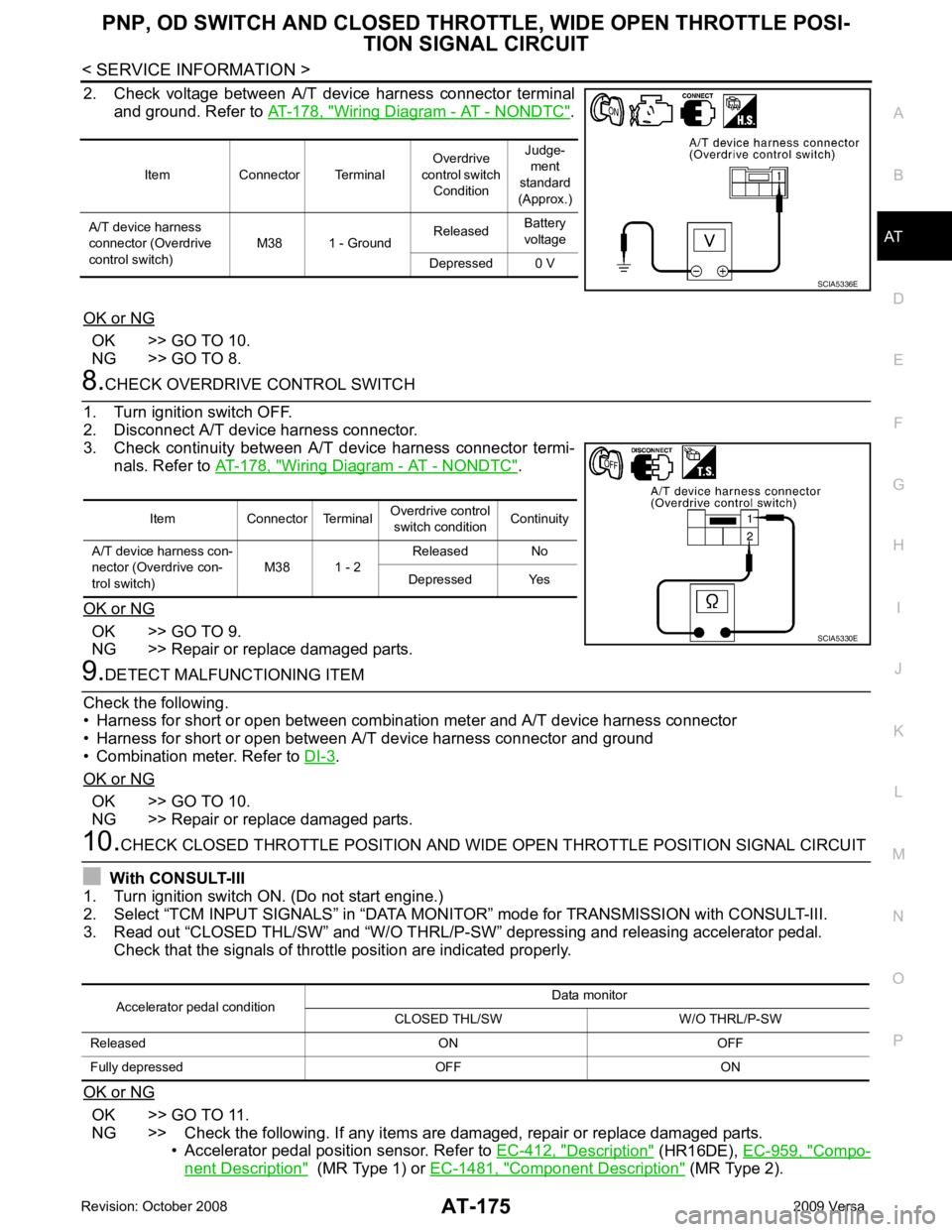
2. Check voltage between A/T device harness connector terminal
and ground. Refer to AT-178, " Wiring Diagram - AT - NONDTC " .
OK or NG OK >> GO TO 10.
NG >> GO TO 8. Wiring Diagram - AT - NONDTC " .
OK or NG OK >> GO TO 9.
NG >> Repair or replace damaged parts. .
OK or NG OK >> GO TO 10.
NG >> Repair or replace damaged parts. OK >> GO TO 11.
NG >> Check the following. If any items are damaged, repair or replace damaged parts. • Accelerator pedal position sensor. Refer to EC-412, " Description " (HR16DE),
EC-959, " Compo-
nent Description " (MR Type 1) or
EC-1481, " Component Description " (MR Type 2).
Item Connector Terminal
Overdrive
control switch Condition Judge-
ment
standard
(Approx.)
A/T device harness
connector (Overdrive
control switch) M38 1 - Ground
Released
Battery
voltage
Depressed 0 V