display NISSAN TIIDA 2009 Service Workshop Manual
[x] Cancel search | Manufacturer: NISSAN, Model Year: 2009, Model line: TIIDA, Model: NISSAN TIIDA 2009Pages: 4331, PDF Size: 58.04 MB
Page 694 of 4331
VEHICLE SECURITY (THEFT WARNING) SYSTEM
BL-233
< SERVICE INFORMATION >
C
D E
F
G H
J
K L
M A
B BL
N
O P
*1: With continuously variable transmission (CVT) or automatic transmission (A/T).
*2: With manual transmission (M/T).
CONSULT-III Function (BCM) INFOID:0000000004305122
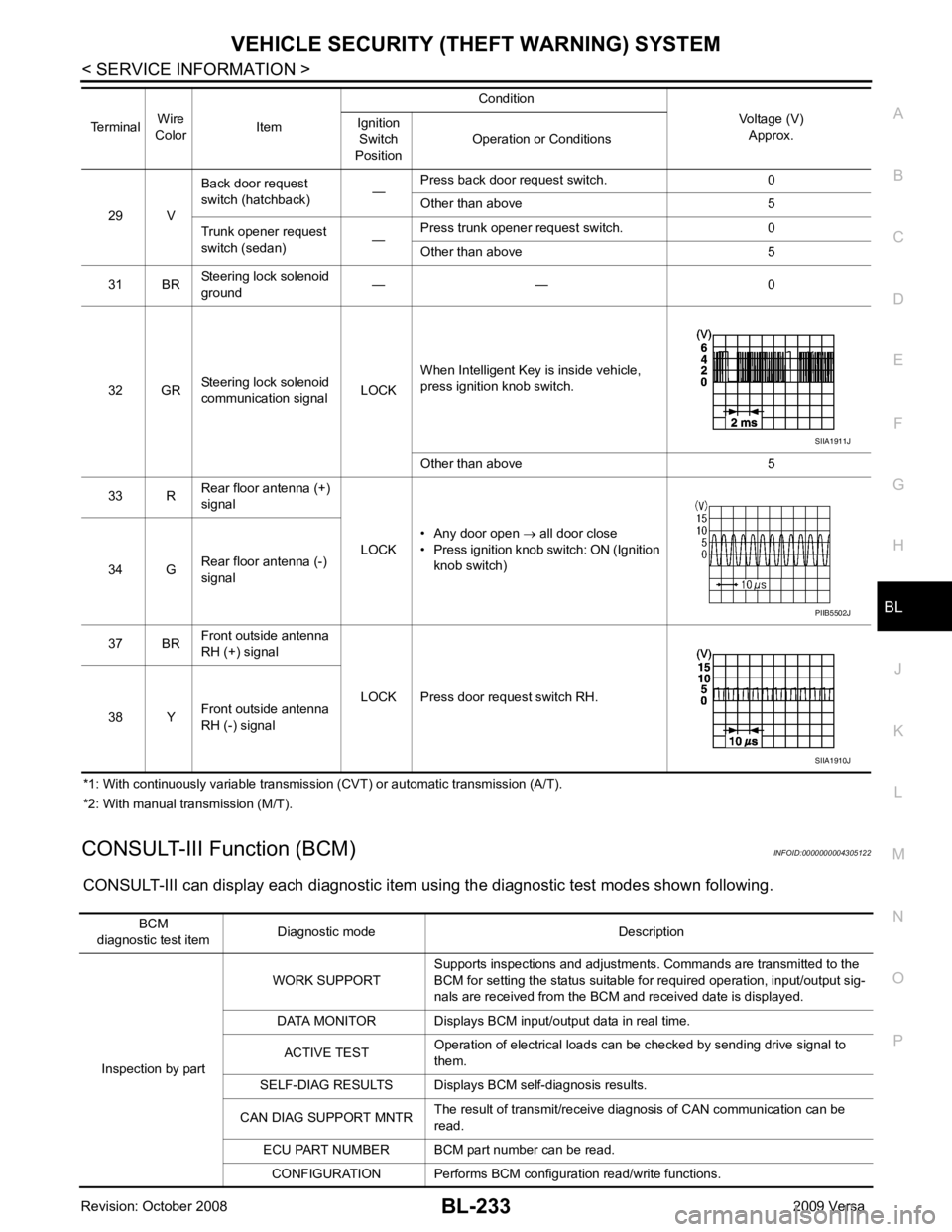
CONSULT-III can display each diagnostic item using the diagnostic test modes shown following. 29 V
Back door request
switch (hatchback) —Press back door request switch. 0
Other than above 5
Trunk opener request
switch (sedan) —Press trunk opener request switch. 0
Other than above 5
31 BR Steering lock solenoid
ground — — 0
32 GR Steering lock solenoid
communication signal LOCKWhen Intelligent Key is inside vehicle,
press ignition knob switch.
Other than above 5
33 R Rear floor antenna (+)
signal
LOCK• Any door open
→ all door close
• Press ignition knob switch: ON (Ignition
knob switch)
34 G Rear floor antenna (-)
signal
37 BR Front outside antenna
RH (+) signal
LOCK Press door request switch RH.
38 Y Front outside antenna
RH (-) signal
Terminal
Wire
Color Item Condition
Voltage (V)Approx.
Ignition
Switch
Position Operation or Conditions SIIA1911J
PIIB5502J
SIIA1910J
BCM
diagnostic test item Diagnostic mode Description
Inspection by part WORK SUPPORT
Supports inspections and adjustments. Commands are transmitted to the
BCM for setting the status suitable for required operation, input/output sig-
nals are received from the BCM and received date is displayed.
DATA MONITOR Displays BCM input/output data in real time.
ACTIVE TEST Operation of electrical loads can be checked by sending drive signal to
them.
SELF-DIAG RESULTS Displays BC M self-diagnosis results.
CAN DIAG SUPPORT MNTR The result of transmit/receive diagnosis of CAN communication can be
read.
ECU PART NUMBER BCM part number can be read.
CONFIGURATION Performs BCM configuration read/write functions.
Page 710 of 4331
BL
N
O P
- BCM
- Mechanical key
• NATS trouble diagnoses, system initialization and additional registration of other NATS mechanical key IDs
must be carried out using CONSULT-III hardware and CO NSULT-III NATS software. When NATS initializa-
tion has been completed, the ID of the inserted mechanical key can be displayed.
Regarding the procedures of NATS initialization and mec hanical key ID registration, refer to CONSULT-III
operation manual NATS.
SECURITY INDICATOR • Forewarns that the vehicle is equipped with NATS.
• Security indicator will not blink while the ignition knob is in ON or START state. NOTE:
Because security indicator is highly efficient, the battery is barely affected.
Condition of Secu rity Indicator
• When operating the ignition switch with Intelligent Key, se curity indicator lamp will turn off at once if ignition
switch is pressed and blinks when ignition switch is released.
• When operating the ignition switch with mechanical key security indicator will turn off at once if mechanical key is inserted into key cylinder and blinks when mechanical key is removed.
(Once the mechanical key is inserted into key cylinder, BCM will only perform the key ID verification with
mechanical key)
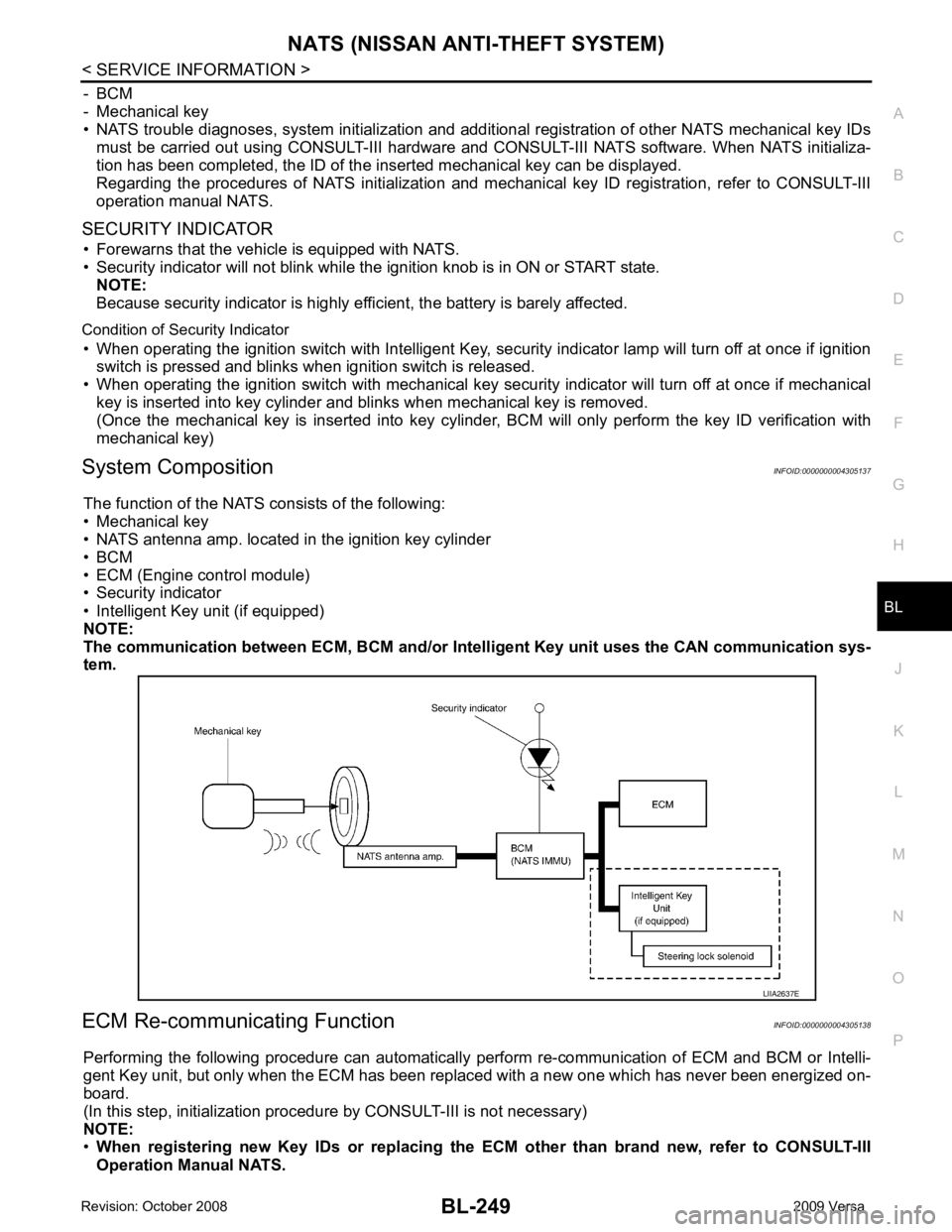
System Composition INFOID:0000000004305137
The function of the NATS consists of the following:
• Mechanical key
• NATS antenna amp. located in the ignition key cylinder
• BCM
• ECM (Engine control module)
• Security indicator
• Intelligent Key unit (if equipped)
NOTE:
The communication between ECM, BCM and/or Intelligent K ey unit uses the CAN communication sys-
tem.
ECM Re-communicating Function INFOID:0000000004305138
Performing the following procedure can automatically perform re-communication of ECM and BCM or Intelli-
gent Key unit, but only when the ECM has been replaced with a new one which has never been energized on-
board.
(In this step, initialization procedur e by CONSULT-III is not necessary)
NOTE:
• When registering new Key IDs or replacing the ECM other than brand new, refer to CONSULT-III
Operation Manual NATS.
Page 720 of 4331
BL
N
O P
This indication means that malfunction have been
detected in NATS and engine control system.
>> GO TO 8 U1000-U1010 " (MR type 1) or
EC-1015, " U0101-
U1001 " (MR type 2).
Without engine diagnostic codes present, refer to EC-577, " Trouble Diagnosis Introduction " (MR type 1) or
EC-1089, " Trouble Diagnosis Introduction " (MR type 2).
NOTE:
If only “NATS MALFUNCTION” is display ed, erase the self-diagnosis results.
>> GO TO 11
Page 721 of 4331
CAN Com-
munication Inspection Using CONSULT-III (Self-Diagnosis) " .
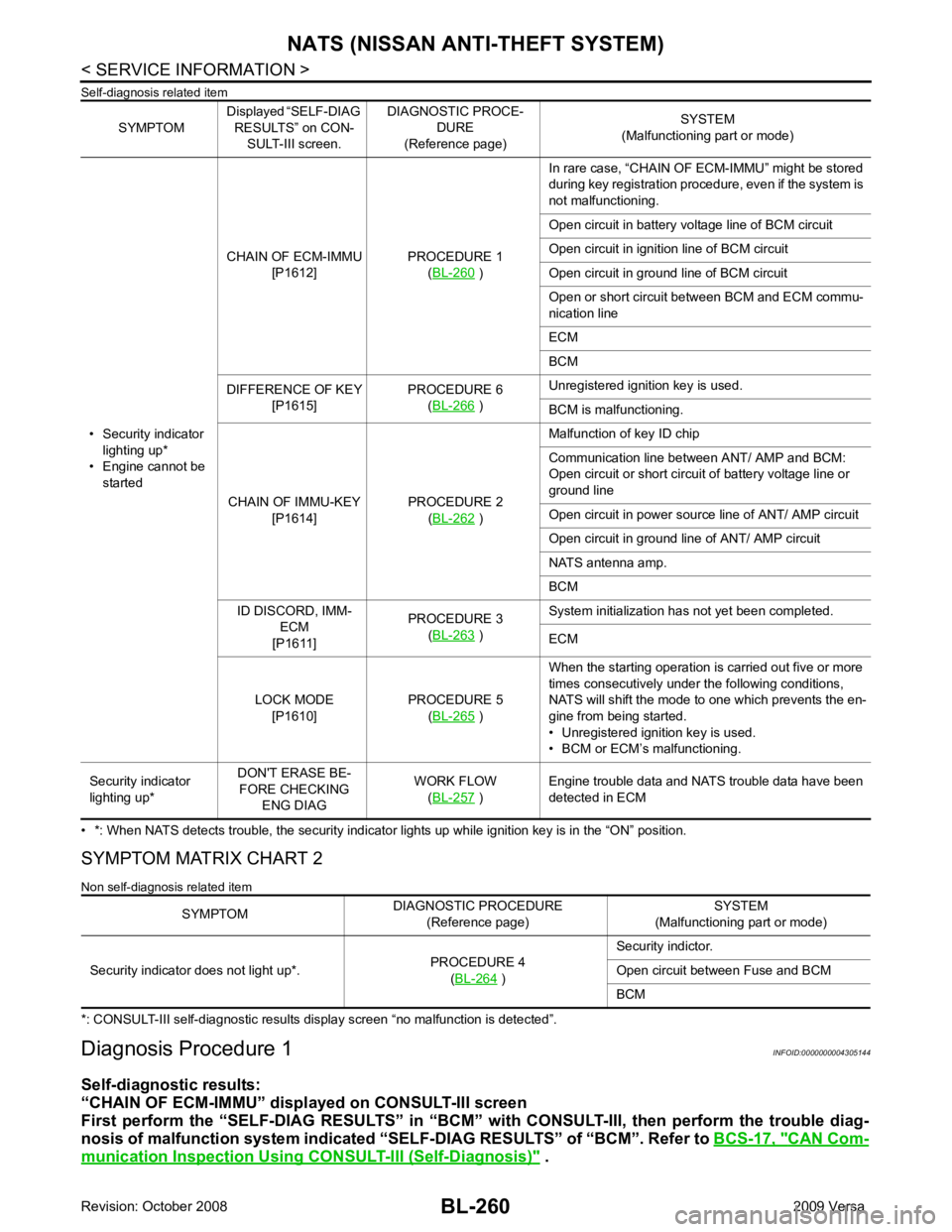
SYMPTOM
Displayed “SELF-DIAG
RESULTS” on CON- SULT-III screen. DIAGNOSTIC PROCE-
DURE
(Reference page) SYSTEM
(Malfunctioning part or mode)
• Security indicator lighting up*
• Engine cannot be started CHAIN OF ECM-IMMU
[P1612] PROCEDURE 1
(BL-260 )
In rare case, “CHAIN OF ECM-IMMU” might be stored
during key registration procedure, even if the system is
not malfunctioning.
Open circuit in battery voltage line of BCM circuit
Open circuit in ignition line of BCM circuit
Open circuit in ground line of BCM circuit
Open or short circuit between BCM and ECM commu-
nication line
ECM
BCM
DIFFERENCE OF KEY [P1615] PROCEDURE 6
(BL-266 )
Unregistered ignition key is used.
BCM is malfunctioning.
CHAIN OF IMMU-KEY [P1614] PROCEDURE 2
(BL-262 )
Malfunction of key ID chip
Communication line between ANT/ AMP and BCM:
Open circuit or short circuit of battery voltage line or
ground line
Open circuit in power source line of ANT/ AMP circuit
Open circuit in ground line of ANT/ AMP circuit
NATS antenna amp.
BCM
ID DISCORD, IMM- ECM
[P1611] PROCEDURE 3
(BL-263 )
System initialization has not yet been completed.
ECM
LOCK MODE [P1610] PROCEDURE 5
(BL-265 )
When the starting operation is carried out five or more
times consecutively under the following conditions,
NATS will shift the mode to one which prevents the en-
gine from being started.
• Unregistered ignition key is used.
• BCM or ECM’s malfunctioning.
Security indicator
lighting up* DON'T ERASE BE-
FORE CHECKING ENG DIAG WORK FLOW
(BL-257 )
Engine trouble data and NATS trouble data have been
detected in ECM SYMPTOM
DIAGNOSTIC PROCEDURE
(Reference page) SYSTEM
(Malfunctioning part or mode)
Security indicator does not light up*. PROCEDURE 4
(BL-264 )
Security indictor.
Open circuit between Fuse and BCM
BCM
Page 722 of 4331
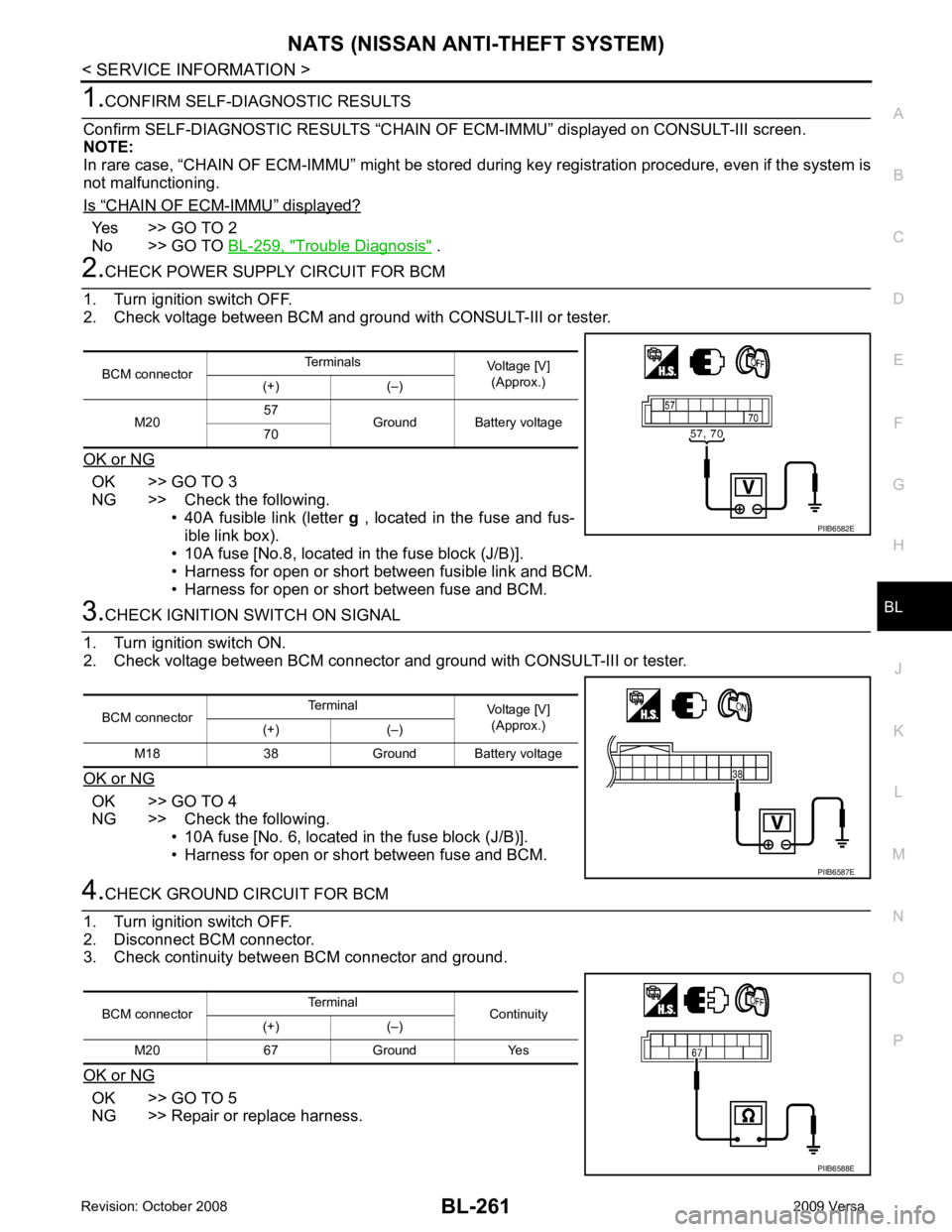
BL
N
O P “ CHAIN OF ECM-IMMU ” displayed?
Yes >> GO TO 2
No >> GO TO BL-259, " Trouble Diagnosis " .
OK >> GO TO 3
NG >> Check the following. • 40A fusible link (letter g , located in the fuse and fus-
ible link box).
• 10A fuse [No.8, located in the fuse block (J/B)].
• Harness for open or short between fusible link and BCM.
• Harness for open or short between fuse and BCM. OK >> GO TO 4
NG >> Check the following. • 10A fuse [No. 6, located in the fuse block (J/B)].
• Harness for open or short between fuse and BCM. OK >> GO TO 5
NG >> Repair or replace harness. BCM connector
Terminals
Voltage [V]
(Approx.)
(+) (–)
M20 57
Ground Battery voltage
70
Page 723 of 4331
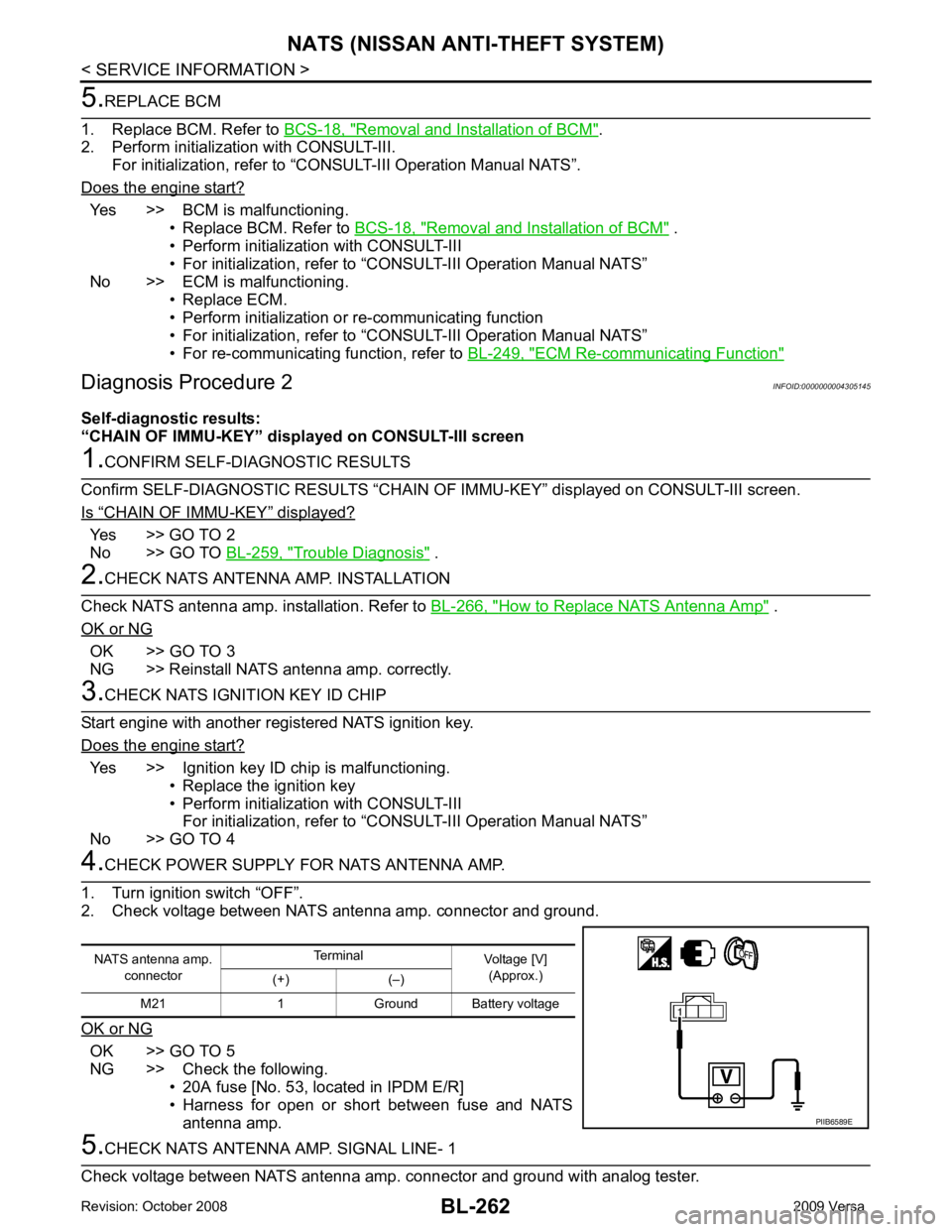
Removal and Installation of BCM " .
2. Perform initialization with CONSULT-III.
For initialization, refer to “CONSULT-III Operation Manual NATS”.
Does the engine start? Yes >> BCM is malfunctioning.
• Replace BCM. Refer to BCS-18, " Removal and Installation of BCM " .
• Perform initialization with CONSULT-III
• For initialization, refer to “CONSULT-III Operation Manual NATS”
No >> ECM is malfunctioning. • Replace ECM.
• Perform initialization or re-communicating function
• For initialization, refer to “CONSULT-III Operation Manual NATS”
• For re-communicating function, refer to BL-249, " ECM Re-communicating Function "
“ CHAIN OF IMMU-KEY ” displayed?
Yes >> GO TO 2
No >> GO TO BL-259, " Trouble Diagnosis " .
How to Replace NATS Antenna Amp " .
OK or NG OK >> GO TO 3
NG >> Reinstall NATS antenna amp. correctly. Yes >> Ignition key ID chip is malfunctioning.
• Replace the ignition key
• Perform initialization with CONSULT-III For initialization, refer to “CONSULT-III Operation Manual NATS”
No >> GO TO 4 OK >> GO TO 5
NG >> Check the following. • 20A fuse [No. 53, located in IPDM E/R]
• Harness for open or short between fuse and NATS
antenna amp.
Page 725 of 4331
“ ID DISCORD IMM-ECM ” displayed?
Yes >> GO TO 2
No >> GO TO BL-259, " Trouble Diagnosis " .
Yes >> • Start engine. (END)
• (System initialization had not been completed.)
No >> ECM is malfunctioning. • Replace ECM.
• Perform initialization with CONSULT-III For initialization, refer to “CONSULT-III Operation Manual NATS”
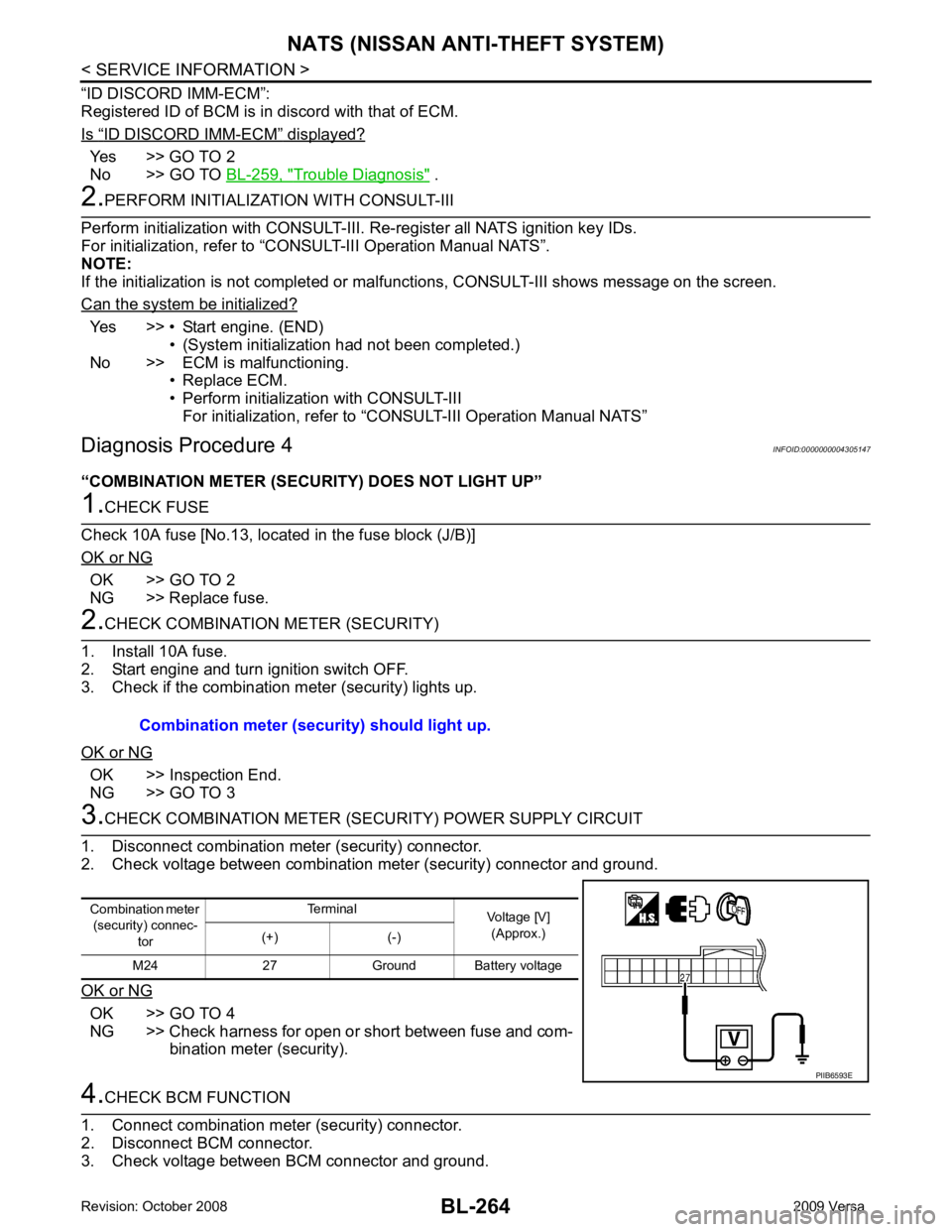
Diagnosis Procedure 4 INFOID:0000000004305147
“COMBINATION METER (SECURITY) DOES NOT LIGHT UP” OK >> GO TO 2
NG >> Replace fuse. OK >> Inspection End.
NG >> GO TO 3 OK >> GO TO 4
NG >> Check harness for open or short between fuse and com- bination meter (security).
Page 726 of 4331
BL
N
O P
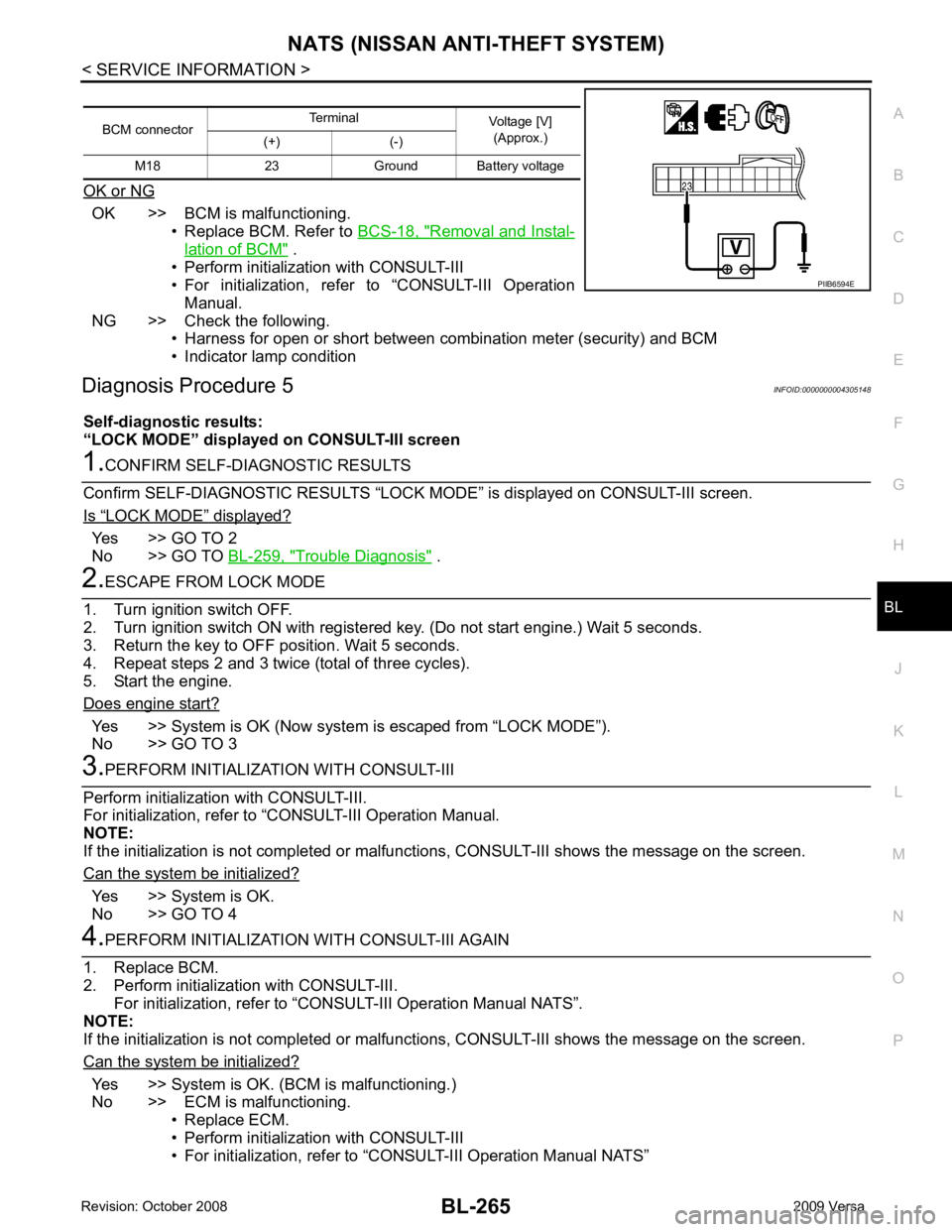
OK or NG OK >> BCM is malfunctioning.
• Replace BCM. Refer to BCS-18, " Removal and Instal-
lation of BCM " .
• Perform initialization with CONSULT-III
• For initialization, refer to “CONSULT-III Operation
Manual.
NG >> Check the following. • Harness for open or short between combination meter (security) and BCM
• Indicator lamp condition
Diagnosis Procedure 5 INFOID:0000000004305148
Self-diagnostic results:
“LOCK MODE” displayed on CONSULT-III screen“ LOCK MODE ” displayed?
Yes >> GO TO 2
No >> GO TO BL-259, " Trouble Diagnosis " .
Yes >> System is OK (Now system
is escaped from “LOCK MODE”).
No >> GO TO 3 Yes >> System is OK.
No >> GO TO 4 Yes >> System is OK. (BCM is malfunctioning.)
No >> ECM is malfunctioning. • Replace ECM.
• Perform initialization with CONSULT-III
• For initialization, refer to “CONSULT-III Operation Manual NATS”
BCM connector
Terminal
Voltage [V]
(Approx.)
(+) (-)
M18 23 Ground Battery voltage
Page 727 of 4331
“ DIFFERENCE OF KEY ” displayed?
YES >> GO TO 2
NO >> GO TO BL-259, " Trouble Diagnosis " .
YES >> • Ignition key ID was unregistered.
NO >> • BCM is malfunctioning.
• Replace BCM. Refer to BCS-18, " Removal and Installation of BCM " .
• Perform initialization with CONSULT-III.
• For initialization, refer to CONSULT-III Operation Manual.
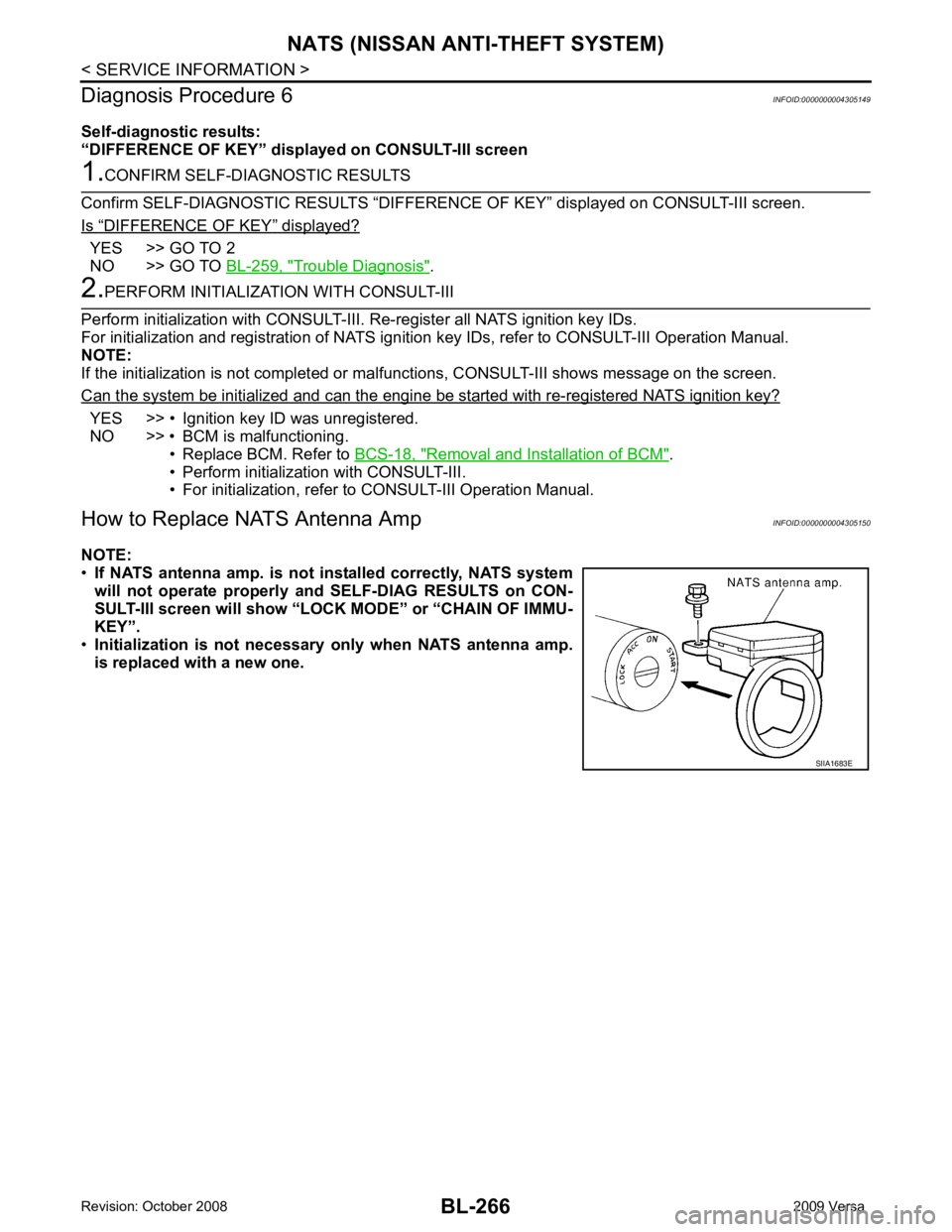
How to Replace NATS Antenna Amp INFOID:0000000004305150
NOTE:
• If NATS antenna amp. is not installed correctly, NATS system
will not operate properly and SELF-DIAG RESULTS on CON-
SULT-III screen will show “LOCK MODE” or “CHAIN OF IMMU-
KEY”.
• Initialization is not necessary only when NATS antenna amp.
is replaced with a new one.
Page 857 of 4331
BRC
N
O P
• If ABS actuator and electric unit (control unit) connec
tion is loose, tighten the piping to the specified
torque and recheck for leaks.
• If there is damage to the connection flare nut or A BS actuator and electric unit (control unit) threads,
replace the damaged part and recheck for leaks.
• When there is fluid leaking or seeping from a fluid connection, use a clean cloth to wipe off the fluid and recheck for leaks. If fluid is still seeping out, repl ace the damaged part. If the fluid is leaking at the ABS
actuator and electric unit (control unit), replace the ABS actuator and electric unit (control unit) assem-
bly.
CAUTION:
The ABS actuator and electric unit (control un it) cannot be disassembled and must be replaced
as an assembly.
3. Check the brake pads for excessive wear.
POWER SYSTEM TERMINAL LOOSENESS AND BATTERY INSPECTION Make sure the battery positive cable, negative cabl e and ground connection are not loose. In addition, make
sure the battery is sufficiently charged.
ABS WARNING LAMP INSPECTION 1. Make sure ABS warning lamp turns on for approximately 2 seconds when the ignition switch is turned ON. If it does not, check CAN communications. If ther e are no errors with the CAN communication system,
replace the combination meter. Refer to IP-12, " Removal and Installation " .
2. Make sure the lamp turns off approximately 2 seconds after the ignition switch is turned ON. If the lamp does not turn off, conduct self-diagnosis of ABS act uator and electric unit (control unit). If no malfunctions
are detected in self-diagnosis, replace combination meter. Refer to IP-12, " Removal and Installation " .
3. After conducting the self-diagnosis, be sure to erase the error memory. Refer to BRC-18, " CONSULT-III
Function (ABS) " .
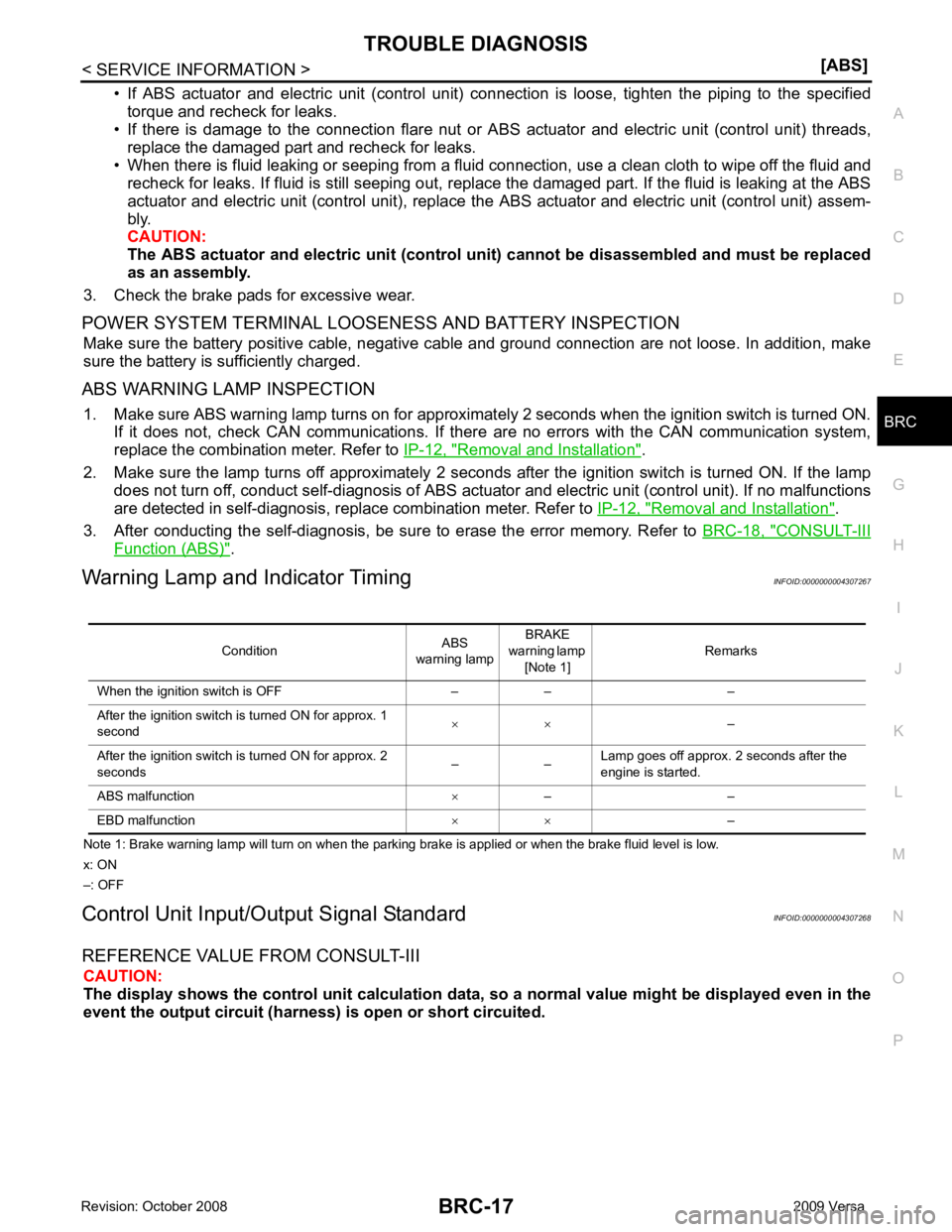
Warning Lamp and Indicator Timing INFOID:0000000004307267
Note 1: Brake warning lamp will turn on when the parking brake is applied or when the brake fluid level is low.
x: ON
–: OFF
Control Unit Input/Out put Signal Standard INFOID:0000000004307268
REFERENCE VALUE FROM CONSULT-III CAUTION:
The display shows the control unit calculation data, so a normal value might be displayed even in the
event the output circuit (harness) is open or short circuited.
Condition
ABS
warning lamp BRAKE
warning lamp [Note 1] Remarks
When the ignition switch is OFF – – –
After the ignition switch is turned ON for approx. 1
second × ×
–
After the ignition switch is turned ON for approx. 2
seconds – –Lamp goes off approx. 2 seconds after the
engine is started.
ABS malfunction ×– –
EBD malfunction × ×–