check engine NISSAN TIIDA 2010 Service Repair Manual
[x] Cancel search | Manufacturer: NISSAN, Model Year: 2010, Model line: TIIDA, Model: NISSAN TIIDA 2010Pages: 3745, PDF Size: 73.67 MB
Page 1179 of 3745
![NISSAN TIIDA 2010 Service Repair Manual CVT-146
< SERVICE INFORMATION >[RE0F08B]
TROUBLE DIAGNOSIS FOR SYMPTOMS
OK or NG
OK >>
INSPECTION END
NG >> Replace the transaxle assembly. Refer to CVT-173, "
Removal and Installation".
In "N" Posit](/img/5/57397/w960_57397-1178.png "NISSAN TIIDA 2010 Service Repair Manual CVT-146
< SERVICE INFORMATION >[RE0F08B]
TROUBLE DIAGNOSIS FOR SYMPTOMS
OK or NG
OK >>
INSPECTION END
NG >> Replace the transaxle assembly. Refer to CVT-173, \"
Removal and Installation\".
In \"N\" Posit")
CVT-146
< SERVICE INFORMATION >[RE0F08B]
TROUBLE DIAGNOSIS FOR SYMPTOMS
OK or NG
OK >>
INSPECTION END
NG >> Replace the transaxle assembly. Refer to CVT-173, "
Removal and Installation".
In "N" Position, Vehicle MovesINFOID:0000000005397986
SYMPTOM:
Vehicle moves forward or backward when selecting “N” position.
DIAGNOSTIC PROCEDURE
1.CHECK SELF-DIAGNOSTIC RESULTS
Perform self-diagnosis check. Refer to CVT-48, "
CONSULT-III Function (TRANSMISSION)".
Do the self-diagnostic results indicate transmission range switch circuit?
YES >> Check transmission range switch circuit. Refer to CVT-62.
NO >> GO TO 2.
2.CHECK CVT POSITION
Check CVT position. Refer to CVT-164, "
Checking of CVT Position"
OK or NG
OK >> GO TO 3.
NG >> Adjust CVT position. Refer to CVT-164, "
Adjustment of CVT Position".
3.CHECK CVT FLUID LEVEL
Check CVT fluid level. Refer to CVT-14, "
Checking CVT Fluid".
OK or NG
OK >> GO TO 4.
NG >> Refill CVT fluid.
4.CHECK SYMPTOM
Check again. Refer to CVT-42, "
Check at Idle".
OK or NG
OK >> INSPECTION END
NG >> GO TO 5.
5.CHECK TCM
1. Check TCM input/output signals. Refer to CVT-46, "
TCM Terminal and Reference Value".
2. If NG, re-check TCM pin terminals for damage or loose connection with harness connector.
OK or NG
OK >> Replace the transaxle assembly. Refer to CVT-173, "Removal and Installation".
NG >> Repair or replace damaged parts.
Large Shock "N" → "R" PositionINFOID:0000000005397987
SYMPTOM:
There is large shock when shifting from “N” to “R” position.
DIAGNOSTIC PROCEDURE
1.CHECK SELF-DIAGNOSTIC RESULTS
Perform self-diagnosis check. Refer to CVT-48, "
CONSULT-III Function (TRANSMISSION)".
Is any malfunction detec ted by self-diagnosis?
YES >> Check the malfunctioning system. Refer to CVT-48, "CONSULT-III Function (TRANSMISSION)".
NO >> GO TO 2.
2.CHECK ENGINE IDLE SPEED
Check the engine idle speed. Refer to EC-578, "
Idle Speed and Ignition Timing Check".
OK or NG
Revision: January 20102010 Versa
Page 1184 of 3745
![NISSAN TIIDA 2010 Service Repair Manual TROUBLE DIAGNOSIS FOR SYMPTOMSCVT-151
< SERVICE INFORMATION > [RE0F08B]
D
E
F
G H
I
J
K L
M A
B
CVT
N
O P
Vehicle Speed Does Not Change in "D" PositionINFOID:0000000005397992
SYMPTOM:
Vehicle speed d](/img/5/57397/w960_57397-1183.png "NISSAN TIIDA 2010 Service Repair Manual TROUBLE DIAGNOSIS FOR SYMPTOMSCVT-151
< SERVICE INFORMATION > [RE0F08B]
D
E
F
G H
I
J
K L
M A
B
CVT
N
O P
Vehicle Speed Does Not Change in \"D\" PositionINFOID:0000000005397992
SYMPTOM:
Vehicle speed d")
TROUBLE DIAGNOSIS FOR SYMPTOMSCVT-151
< SERVICE INFORMATION > [RE0F08B]
D
E
F
G H
I
J
K L
M A
B
CVT
N
O P
Vehicle Speed Does Not Change in "D" PositionINFOID:0000000005397992
SYMPTOM:
Vehicle speed does not change in “D” position while the cruise test.
DIAGNOSTIC PROCEDURE
1.CHECK SELF-DIAGNOSTIC RESULTS
Perform self-diagnosis check. Refer to CVT-48, "
CONSULT-III Function (TRANSMISSION)" .
Is any malfunction detected by self-diagnosis?
YES >> Check the malfunctioning system. Refer to CVT-48, "CONSULT-III Function (TRANSMISSION)" .
NO >> GO TO 2.
2.CHECK CVT POSITION
Check CVT position. Refer to CVT-164, "
Checking of CVT Position"
OK or NG
OK >> GO TO 3.
NG >> Adjust CVT position. Refer to CVT-164, "
Adjustment of CVT Position" .
3.CHECK CVT FLUID LEVEL
Check CVT fluid level. Refer to CVT-14, "
Checking CVT Fluid" .
OK or NG
OK >> GO TO 4.
NG >> Refill CVT fluid.
4.CHECK LINE PRESSURE
Check line pressure at idle. Refer to CVT-37, "
Inspections before Trouble Diagnosis" .
OK or NG
OK >> GO TO 5.
NG >> Check the malfunctioning item. Refer to CVT-37, "
Inspections before Trouble Diagnosis" .
5.CHECK STALL REVOLUTION
Check stall revolution. Refer to CVT-37, "
Inspections before Trouble Diagnosis" .
OK or NG
OK >> GO TO 6.
NG >> Check the malfunctioning item. Refer to CVT-37, "
Inspections before Trouble Diagnosis" .
6.CHECK SYMPTOM
Check again. Refer to CVT-43, "
Cruise Test" .
OK or NG
OK >> INSPECTION END
NG >> GO TO 7.
7.CHECK TCM
1. Check TCM input/output signals. Refer to CVT-46, "
TCM Terminal and Reference Value" .
2. If NG, re-check TCM pin terminals for dam age or loose connection with harness connector.
OK or NG
OK >> Replace the transaxle assembly. Refer to CVT-173, "Removal and Installation" .
NG >> Repair or replace damaged parts.
Vehicle Does Not Decelerate by Engine BrakeINFOID:0000000005397993
SYMPTOM:
Engine brake does not operate when releasing the accelerator pedal while the cruise test.
DIAGNOSTIC PROCEDURE
1.CHECK SELF-DIAGNOSTIC RESULTS
Revision: January 20102010 Versa
Page 1189 of 3745
![NISSAN TIIDA 2010 Service Repair Manual CVT-156
< SERVICE INFORMATION >[RE0F08B]
CVT SHIFT LOCK SYSTEM
•
Selector lever can be moved from “P” position with ignition key in ON position and brake pedal
released.
• Selector lever can](/img/5/57397/w960_57397-1188.png "NISSAN TIIDA 2010 Service Repair Manual CVT-156
< SERVICE INFORMATION >[RE0F08B]
CVT SHIFT LOCK SYSTEM
•
Selector lever can be moved from “P” position with ignition key in ON position and brake pedal
released.
• Selector lever can")
CVT-156
< SERVICE INFORMATION >[RE0F08B]
CVT SHIFT LOCK SYSTEM
•
Selector lever can be moved from “P” position with ignition key in ON position and brake pedal
released.
• Selector lever can be moved from “P” position when ignition switch is removed from key cylinder.
SYMPTOM 2:
• Ignition key cannot be removed when sel ector lever is set to “P” position.
• Ignition key can be removed when selector lever is set to any position except “P” position.
1.CHECK KEY INTERLOCK CABLE
Check key interlock cable for damage.
OK or NG
OK >> GO TO 2.
NG >> Repair key interlock cable. Refer to AT-219, "
Removal and Installation".
2.CHECK CVT POSITION
Check CVT position. Refer to CVT-164, "
Checking of CVT Position".
OK or NG
OK >> GO TO 3.
NG >> Adjust control cable. Refer to CVT-164, "
Adjustment of CVT Position".
3.CHECK SHIFT LOCK SOLENOID AND PARK POSITION SWITCH
1. Turn ignition switch ON. (Do not start engine.)
2. Selector lever is set in “P” position.
3. Check operation sound.
OK or NG
OK >> INSPECTION END
NG - 1 >> With intelligent key: GO TO 4.
NG - 2 >> Without intelligent key: GO TO 5.
4.CHECK POWER SOURCE
1. Turn ignition switch ON. (Do not start engine.)
2. Check voltage between CVT shift selector harness connector terminal 5 and ground.
OK or NG
OK >> GO TO 8.
NG >> GO TO 6.
5.CHECK POWER SOURCE
1. Turn ignition switch ON. (Do not start engine.)
Condition Brake pedalOperation sound
When ignition switch is turned to ON position and selector lever is set in
“P” position. Depressed
Yes
Released No
Voltage:
Brake pedal depressed: Battery voltage
Brake pedal released: 0V
SCIA7934E
Revision: January 20102010 Versa
Page 1197 of 3745
![NISSAN TIIDA 2010 Service Repair Manual CVT-164
< SERVICE INFORMATION >[RE0F08B]
SHIFT CONTROL SYSTEM
1. Set shift lever handle (1) in “N” position.
2. Slide shift lever handle cover (2) downward.
3. Pull out shift lever handle clip (3)](/img/5/57397/w960_57397-1196.png "NISSAN TIIDA 2010 Service Repair Manual CVT-164
< SERVICE INFORMATION >[RE0F08B]
SHIFT CONTROL SYSTEM
1. Set shift lever handle (1) in “N” position.
2. Slide shift lever handle cover (2) downward.
3. Pull out shift lever handle clip (3)")
CVT-164
< SERVICE INFORMATION >[RE0F08B]
SHIFT CONTROL SYSTEM
1. Set shift lever handle (1) in “N” position.
2. Slide shift lever handle cover (2) downward.
3. Pull out shift lever handle clip (3) from shift lever handle (1).
4. Remove shift lever handle (1) and shift lever handle cover (2) as
a set from shift lever.
CAUTION:
Do not push shift lever button.
INSTALLATION
1. Insert shift lever handle clip (1) to shift lever handle (2).
2. Install shift lever handle cover (3) to shift lever handle (2).
3. Set shift lever in “N” position.
4. Install shift lever handle onto shift lever until a click is felt.CAUTION:
• Do not tilt shift lever handle when installing. Install it
straight, and do not tap or apply any shock to install it.
• Do not push shift lever button.
Adjustment of CVT PositionINFOID:0000000005398002
CAUTION:
Make sure that parking brake is applied before adjustment.
1. Loosen the control cable nut (A) and place the manual lever (1) in “P” position.
2. Place shift lever in “P” position.
3. Push the control cable (2) in with a load of 9.8 N (approximately 1 kg, 2.2 lb). Release the control cable and temporarily tighten
the control cable nut.
NOTE:
Do not move the manual lever. Make sure the manual lever
stays in the “P” position.
4. Tighten the control cable nut. CAUTION:
Secure the manual lever when tightening nut.
5. Check the operation of the CVT. Refer to CVT-164, "
Checking of CVT Position".
Checking of CVT PositionINFOID:0000000005398003
1. Place shift lever in “P” position, and turn ignition switch ON. (Do not start engine.)
2. Make sure shift lever can be shifted to other than “P” position when brake pedal is depressed. Also make
sure shift lever can be shifted from “P” position only when brake pedal is depressed.
3. Move the shift lever and check for excessive effort, sticking, noise or rattle.
4. Confirm the shift lever stops at each position with the feel of engagement when it is moved through all the
positions. Check that the actual position of the shift lever matches the position shown by the position indi-
cator and the manual lever on the transaxle.
SCIA6971E
SCIA6972E
Control cable nut: Refer to CVT-160, "Removal
and Installation".
WCIA0608E
Revision: January 20102010 Versa
Page 1207 of 3745
![NISSAN TIIDA 2010 Service Repair Manual CVT-174
< SERVICE INFORMATION >[RE0F08B]
TRANSAXLE ASSEMBLY
2. Disconnect the primary speed sensor (A) and the secondary
speed sensor connector (B) and CVT unit connector (C). Refer
to CVT-9, "
Remova](/img/5/57397/w960_57397-1206.png "NISSAN TIIDA 2010 Service Repair Manual CVT-174
< SERVICE INFORMATION >[RE0F08B]
TRANSAXLE ASSEMBLY
2. Disconnect the primary speed sensor (A) and the secondary
speed sensor connector (B) and CVT unit connector (C). Refer
to CVT-9, \"
Remova")
CVT-174
< SERVICE INFORMATION >[RE0F08B]
TRANSAXLE ASSEMBLY
2. Disconnect the primary speed sensor (A) and the secondary
speed sensor connector (B) and CVT unit connector (C). Refer
to CVT-9, "
Removal and Installation Procedure for CVT Unit
Connector".
3. Remove the harness from the transaxle.
4. Remove the four drive plate to torque converter nuts. NOTE:
Rotate the crankshaft clockwise as viewed from front of engine
for access to drive plate to torque converter nuts.
5. Put matching marks on the drive plate and torque converter alignment stud. CAUTION:
For matching marks, use paint. Never dama ge the drive plate or torque converter.
6. Remove the transaxle to engine and engine to transaxle bolts.
7. Separate the transaxle from the engine.
8. If necessary, remove the following from the transaxle: • CVT fluid charging pipe
• Engine mounting bracket (LH)
• Fluid cooler tubes
• Air breather hose
• Any necessary brackets
INSTALLATION
Installation is in the reverse order of removal.
CAUTION:
• When replacing an engine or transmission you must make sure any dowels are installed correctly
during re-assembly.
• Improper alignment caused by missing dowels m ay cause vibration, oil leaks or breakage of drive
train components.
• Do not reuse O-rings and copper washers.
• When turning crankshaft, turn it clockwi se as viewed from the front of the engine.
• When tightening the nuts for the torque converte r while securing the crankshaft pulley bolt, be sure
to confirm the tightening torque of the crankshaft pulley bolt. Refer to EM-156
.
• After converter is installed to drive plate, ro tate crankshaft several turns to check that transaxle
rotates freely without binding.
AWDIA0661GB
WCIA0616E
Revision: January 20102010 Versa
Page 1208 of 3745
![NISSAN TIIDA 2010 Service Repair Manual TRANSAXLE ASSEMBLYCVT-175
< SERVICE INFORMATION > [RE0F08B]
D
E
F
G H
I
J
K L
M A
B
CVT
N
O P
• When installing the torque converter to the transaxle measure dis- tance A.
• When installing the co](/img/5/57397/w960_57397-1207.png "NISSAN TIIDA 2010 Service Repair Manual TRANSAXLE ASSEMBLYCVT-175
< SERVICE INFORMATION > [RE0F08B]
D
E
F
G H
I
J
K L
M A
B
CVT
N
O P
• When installing the torque converter to the transaxle measure dis- tance A.
• When installing the co")
TRANSAXLE ASSEMBLYCVT-175
< SERVICE INFORMATION > [RE0F08B]
D
E
F
G H
I
J
K L
M A
B
CVT
N
O P
• When installing the torque converter to the transaxle measure dis- tance A.
• When installing the cooler outlet tube (1) to the transaxle assembly (2), align the cooler tube bracket (A) against the transaxle as
shown.
• When installing the transaxle to the engine, align the matching mark on the drive plate with the matching mark on the torque converter alignment stud.
• When securing the transaxle to the engine, attach the bolts in accordance with the following standard.
• When installing the drive plate to torque converter nuts, tighten them temporarily. Then tighten the nuts to the specified torque.
• After completing installation check for fluid level, fluid leakage, and the positions of CVT. Refer to CVT-14,
"Checking CVT Fluid", CVT-164, "Adjustment of CVT Position" and CVT-164, "Checking of CVT Position".
• When replacing the CVT assembly, erase EEP ROM in TCM. Refer to CVT-8, "
Service After Replacing TCM
and Transaxle Assembly".
Distance A: 14.4 mm (0.57 in) or more
WCIA0617E
WCIA0618E
Bolt No.
1 (Transaxle to engine) 2 (Engine to transaxle)
Number of bolts 27
Bolt length
“A” mm (in) 55 (2.17)
50 (1.97)
Tightening torque
N·m (kg-m, ft-lb) 62 (6.3, 46)
WCIA0619E
Converter nuts: : 51 N·m (5.2 kg-m, 38 ft-lb)
WCIA0616E
Revision: January 20102010 Versa
Page 1221 of 3745
COMBINATION METERSDI-11
< SERVICE INFORMATION >
C
DE
F
G H
I
J
L
M A
B
DI
N
O P
Self-Diagnosis Mode of Combination MeterINFOID:0000000005395014
SELF-DIAGNOSIS MODE FUNCTION
• Self-diagnosis can check for continuity between meter control circuit and each meter (speedometer, tachom- eter and fuel gauge).
• Self-diagnosis can check for odo/trip meter and A/T indi cator (with A/T) or CVT indicator (with CVT) seg-
ment, low-fuel level warning lamp, low water temperature indicator lamp, and high water temperature warn-
ing lamp.
OPERATION PROCEDURE
1. Turn the ignition switch ON, and switch the odo/trip meter to “trip A” or “trip B”. NOTE:
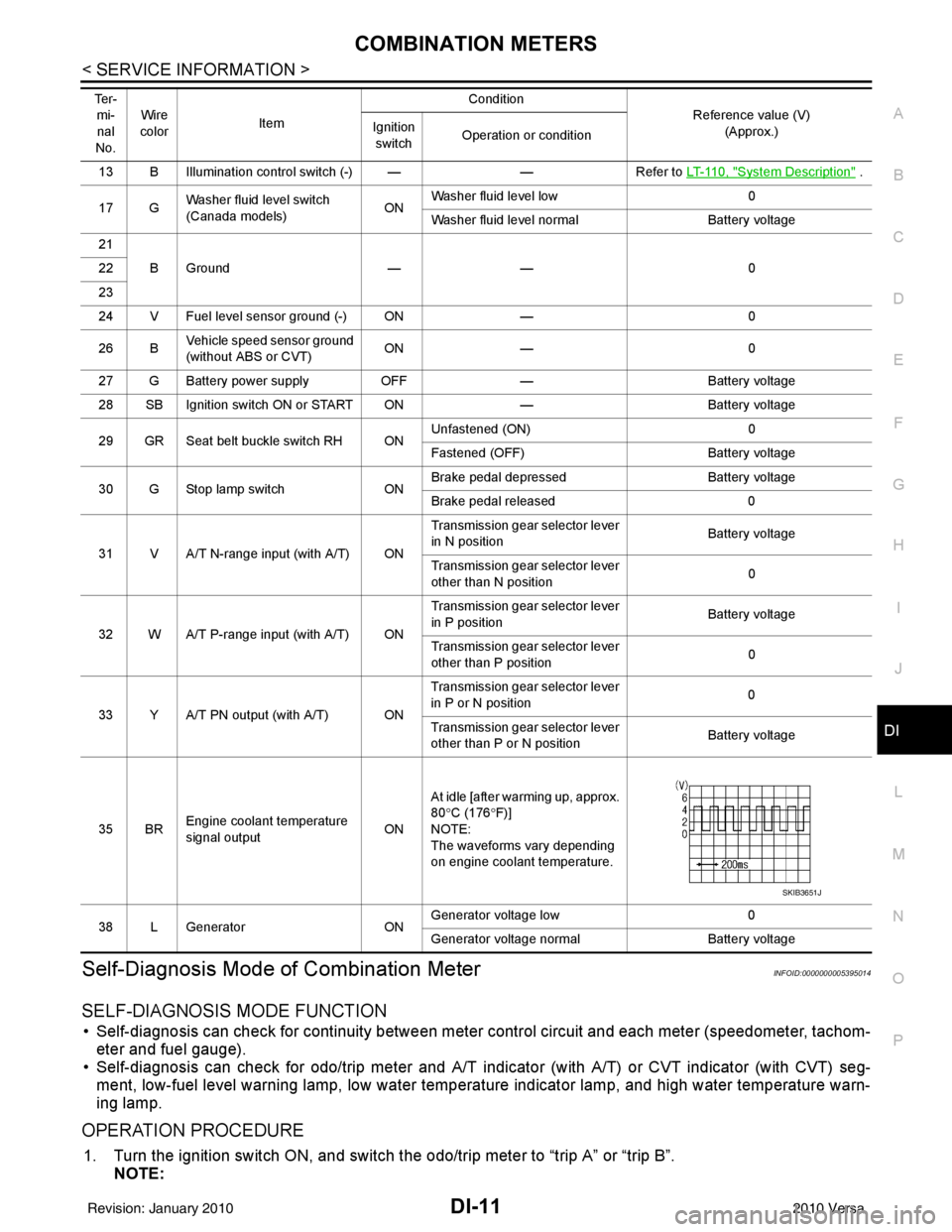
13 B Illumination control switch (-) — —Refer to LT-110, "System Description" .
17 G Washer fluid level switch
(Canada models)
ONWasher fluid level low
0
Washer fluid level normal Battery voltage
21 BGround —— 0
22
23
24 V Fuel level sensor ground (-) ON —0
26 B Vehicle speed sensor ground
(without ABS or CVT) ON
— 0
27 G Battery power supply OFF— Battery voltage
28 SB Ignition switch ON or START ON —Battery voltage
29 GR Seat belt buckle switch RH ON Unfastened (ON)
0
Fastened (OFF) Battery voltage
30 G Stop lamp switch ONBrake pedal depressed
Battery voltage
Brake pedal released 0
31 V A/T N-range input (with A/T) ON Transmission gear selector lever
in N position
Battery voltage
Transmission gear selector lever
other than N position 0
32 W A/T P-range input (with A/T) ON Transmission gear selector lever
in P position
Battery voltage
Transmission gear selector lever
other than P position 0
33 Y A/T PN output (with A/T) ON Transmission gear selector lever
in P or N position
0
Transmission gear selector lever
other than P or N position Battery voltage
35 BR Engine coolant temperature
signal output
ONAt idle [after warming up, approx.
80
°C (176 °F)]
NOTE:
The waveforms vary depending
on engine coolant temperature.
38 L Generator ONGenerator voltage low
0
Generator voltage no rmal Battery voltage
Te r -
mi-
nal
No. Wire
color Item Condition
Reference value (V)
(Approx.)
Ignition
switch Operation or condition
SKIB3651J
Revision: January 20102010 Versa
Page 1225 of 3745
COMBINATION METERSDI-15
< SERVICE INFORMATION >
C
DE
F
G H
I
J
L
M A
B
DI
N
O P
YES >> GO TO 2.
NO >> Check power supply and ground circuit of combination meter. Refer to DI-15, "
Power Supply and
Ground Circuit Inspection" .
2.CHECK COMBINATION METER (CONSULT-III)
Select “METER/M&A” on CONSULT-II I and perform self-diagnosis of combination meter. Refer to DI-13,
"CONSULT-III Function (METER/M&A)" .
Self
-diagnostic results content
No malfunction detected>> Refer to DI-15, "Symptom Chart" .
Malfunction detected>> Refer to DI-13, "
CONSULT-III Function (METER/M&A)" .
Symptom ChartINFOID:0000000005395017
Power Supply and Gro und Circuit InspectionINFOID:0000000005395018
1.CHECK FUSE
Check for blown combination meter fuses.
OK or NG
OK >> GO TO 2.
NG >> Be sure to eliminate cause of malfunction before installing new fuse. Refer to PG-4
.
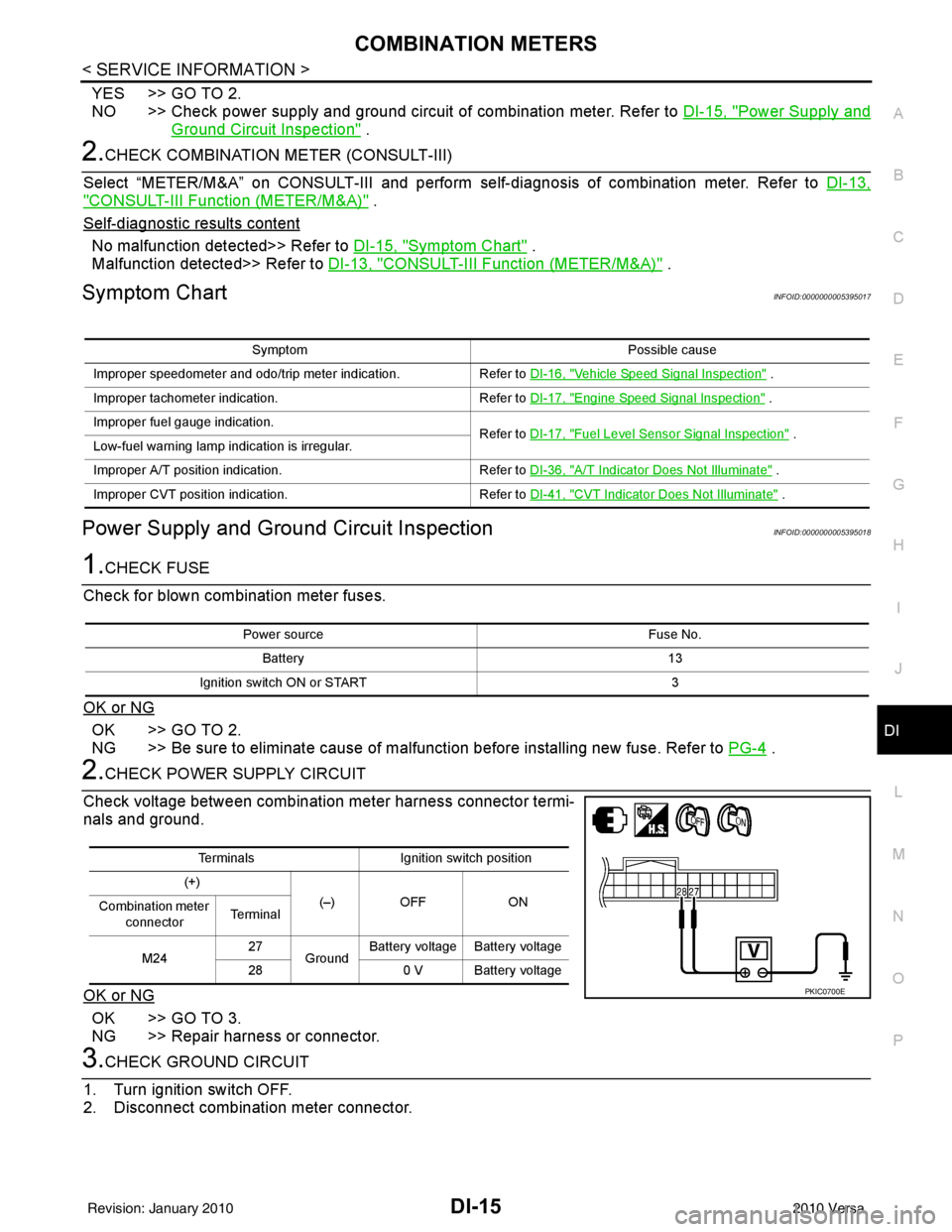
2.CHECK POWER SUPPLY CIRCUIT
Check voltage between combination meter harness connector termi-
nals and ground.
OK or NG
OK >> GO TO 3.
NG >> Repair harness or connector.
3.CHECK GROUND CIRCUIT
1. Turn ignition switch OFF.
2. Disconnect combination meter connector.
Symptom Possible cause
Improper speedometer and odo/trip meter indication. Refer to DI-16, "
Vehicle Speed Signal Inspection" .
Improper tachometer indication. Refer to DI-17, "
Engine Speed Signal Inspection" .
Improper fuel gauge indication. Refer to DI-17, "
Fuel Level Sensor Signal Inspection" .
Low-fuel warning lamp indication is irregular.
Improper A/T position indication. Refer to DI-36, "
A/T Indicator Does Not Illuminate" .
Improper CVT position indication. Refer to DI-41, "
CVT Indicator Does Not Illuminate" .
Power source Fuse No.
Battery 13
Ignition switch ON or START 3
TerminalsIgnition switch position
(+) (–) OFF ON
Combination meter
connector Te r m i n a l
M24 27
Ground Battery voltage Battery voltage
28 0 V Battery voltage
PKIC0700E
Revision: January 20102010 Versa
Page 1226 of 3745
DI-16
< SERVICE INFORMATION >
COMBINATION METERS
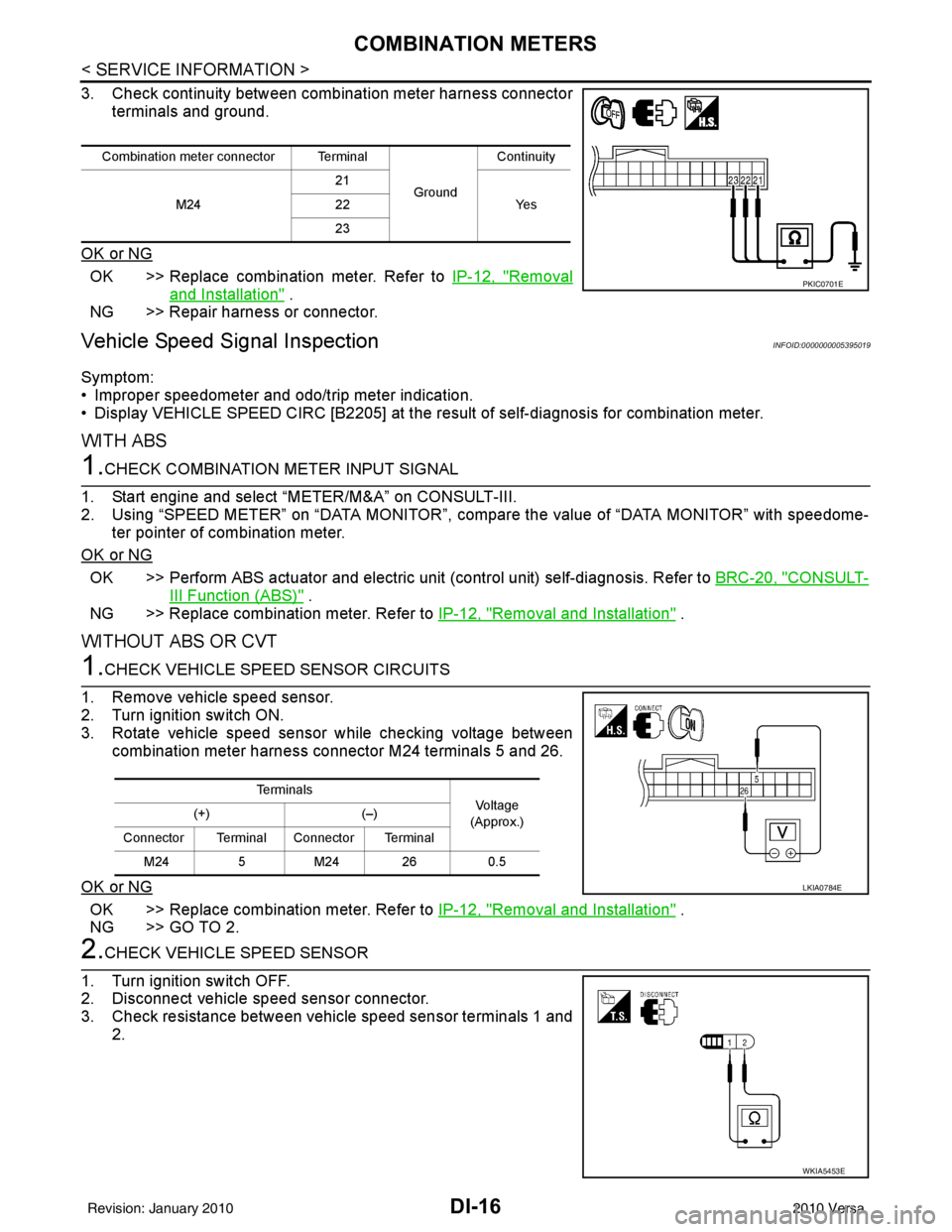
3. Check continuity between combination meter harness connectorterminals and ground.
OK or NG
OK >> Replace combination meter. Refer to IP-12, "Removal
and Installation" .
NG >> Repair harness or connector.
Vehicle Speed Signal InspectionINFOID:0000000005395019
Symptom:
• Improper speedometer and odo/trip meter indication.
• Display VEHICLE SPEED CIRC [B2205] at the result of self-diagnosis for combination meter.
WITH ABS
1.CHECK COMBINATION METER INPUT SIGNAL
1. Start engine and select “METER/M&A” on CONSULT-III.
2. Using “SPEED METER” on “DATA MONITOR”, comp are the value of “DATA MONITOR” with speedome-
ter pointer of combination meter.
OK or NG
OK >> Perform ABS actuator and electric uni t (control unit) self-diagnosis. Refer to BRC-20, "CONSULT-
III Function (ABS)" .
NG >> Replace combination meter. Refer to IP-12, "
Removal and Installation" .
WITHOUT ABS OR CVT
1.CHECK VEHICLE SPEED SENSOR CIRCUITS
1. Remove vehicle speed sensor.
2. Turn ignition switch ON.
3. Rotate vehicle speed sensor while checking voltage between combination meter harness connector M24 terminals 5 and 26.
OK or NG
OK >> Replace combination meter. Refer to IP-12, "Removal and Installation" .
NG >> GO TO 2.
2.CHECK VEHICLE SPEED SENSOR
1. Turn ignition switch OFF.
2. Disconnect vehicle speed sensor connector.
3. Check resistance between vehicle speed sensor terminals 1 and 2.
Combination meter connector Terminal
GroundContinuity
M24 21
Ye s
22
23
PKIC0701E
Te r m i n a l s
Voltag e
(Approx.)
(+)
(–)
Connector Terminal Connector Terminal M24 5M24 26 0.5
LKIA0784E
WKIA5453E
Revision: January 20102010 Versa
Page 1227 of 3745
COMBINATION METERSDI-17
< SERVICE INFORMATION >
C
DE
F
G H
I
J
L
M A
B
DI
N
O P
OK or NG
OK >> Check harness or connector between combination meter and vehicle speed sensor.
NG >> Replace vehicle speed sensor.
WITH CVT, WITHOUT ABS
1.CHECK COMBINATION METER INPUT SIGNAL
1. Start engine and select “M ETER/M&A” on CONSULT-III.
2. Using “SPEED METER” on “DATA MONITOR”, comp are the value of “DATA MONITOR” with speedome-
ter pointer of combination meter.
OK or NG
OK >> Perform TCM self-diagnosis. Refer to CVT-48, "CONSULT-III Function (TRANSMISSION)" .
NG >> Replace combination meter. Refer to IP-12, "
Removal and Installation" .
Engine Speed Signal InspectionINFOID:0000000005395020
Symptom: Improper tachometer indication.
1.CHECK COMBINATION METER INPUT SIGNAL
1. Start engine and select “M ETER/M&A” on CONSULT-III.
2. Using “TACHO METER” on “DATA MONITOR”, compare the value of “DATA MONITOR” with tachometer pointer of combination meter.
OK or NG
OK >> Perform ECM self-diagnosis. Refer to EC-612, "CONSULT-III Function (ENGINE)" (MR18DE) or
EC-98, "
CONSULT-III Function" (HR16DE).
NG >> Replace combination meter. Refer to IP-12, "
Removal and Installation" .
Fuel Level Sensor Signal InspectionINFOID:0000000005395021
Symptom:• Improper fuel gauge indication.
• Low-fuel warning lamp indication is irregular.
NOTE:
The following symptoms do not indicate a malfunction.
• Depending on vehicle position or driving circumstance, the fuel level in the tank shifts and the indication may fluctuate.
• If the vehicle is fueled with the ignition switch ON, the indication will update slowly.
• If the vehicle is tilted when the ignition switch is turned ON, fuel in the tank may flow to one direction result-
ing in a change of reading.
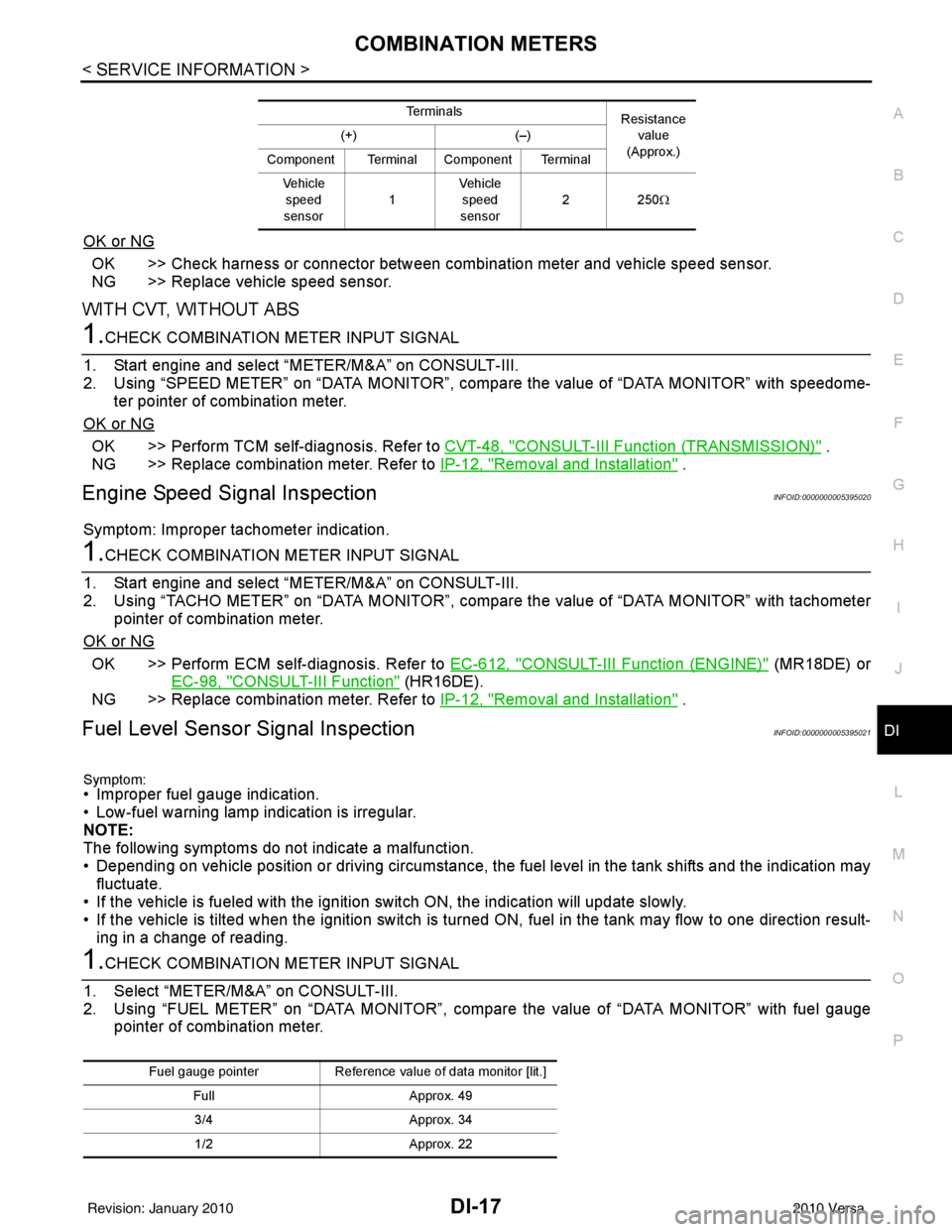
1.CHECK COMBINATION METER INPUT SIGNAL
1. Select “METER/M&A” on CONSULT-III.
2. Using “FUEL METER” on “DATA MONITOR”, compare the value of “DATA MONITOR” with fuel gauge pointer of combination meter.
Te r m i n a l s Resistance
value
(Approx.)
(+)
(–)
Component Terminal Component Terminal Ve h i c l e speed
sensor 1Vehicle
speed
sensor 22
50Ω
Fuel gauge pointer Reference value of data monitor [lit.]
Full Approx. 49
3/4 Approx. 34
1/2 Approx. 22
Revision: January 20102010 Versa