change time NISSAN TIIDA 2010 Service Owner's Manual
[x] Cancel search | Manufacturer: NISSAN, Model Year: 2010, Model line: TIIDA, Model: NISSAN TIIDA 2010Pages: 3745, PDF Size: 73.67 MB
Page 626 of 3745
INTELLIGENT KEY SYSTEMBL-117
< SERVICE INFORMATION >
C
DE
F
G H
J
K L
M A
B
BL
N
O P
• Intelligent Key button
OK or NG
OK >> GO TO 6
NG >> Refer to BL-119, "
Trouble Diagnosis Symptom Chart".
6.CHECK WARNING CHIME FUNCTION
Check if warning chime function operates normally according to system description. Refer to BL-88, "
System
Description".
OK or NG
OK >> GO TO 7
NG >> Refer to BL-119, "
Trouble Diagnosis Symptom Chart".
7.CHECK WARNING LAMP FUNCTION
Check if warning lamp could be turn on normally according to system description. Refer to BL-88, "
System
Description".
OK or NG
OK >> Inspection End.
NG >> Refer to BL-119, "
Trouble Diagnosis Symptom Chart".
CONSULT-III Functions (INTELLIGENT KEY)INFOID:0000000005396609
CONSULT-III can display each diagnostic item using the diagnostic test modes as shown below.
CONSULT-III Application ItemINFOID:0000000005396610
SELF-DIAGNOSTIC RESULTS
DATA MONITOR
Diagnostic mode Description
WORK SUPPORT Changes settings for each function.
SELF DIAGNOSTIC RESULT Intelligent Key unit performs CAN communication diagnosis. DATA MONITOR Displays Intelligent Key unit input data in real time.
CAN DIAG SUPPORT MNTR The results of transmit/receive diagnosis of CAN Communication can be read. ACTIVE TEST Operation of electrical loads can be checked by sending driving signal to them.
ECU IDENTIFICATION Displays In telligent Key unit part No.
Self-diag resultsDescription Diagnosis procedureReference page
CAN COMM Malfunction is detected in CAN co mmunication. Check CAN communication system. BL-126
CAN COMM2 Intelligent Key unit internal malfunction Check CAN communication system.BL-126
STRG COMMMalfunction is detected in communication of Intelli-
gent Key unit and steering lock solenoid.
Check steering lock solenoid.
BL-147
I-KEY C/UIntelligent Key unit internal ma lfunctionReplace Intelligent Key unit. BL-158
IMMUNATS malfunction Check NATS.BL-248
Monitor item Content
PUSH SW Indicates [ON/OFF] condition of ignition knob switch.
KEY SW Indicates [ON/OFF] condition of key switch.
DR REQ SW Indicates [ON/OFF] condition of door request switch (driver side).
AS REQ SW Indicates [ON/OFF] condition of door request switch (passenger side).
BD/TR REQ SW Indicates [ON/OFF] condition of back door request switch.
IGN SW Indicates [ON/OFF] condition of ignition switch in ON position.
ACC SW Indicates [ON/OFF] condition of ignition switch in ACC position.
Revision: January 20102010 Versa
Page 628 of 3745

INTELLIGENT KEY SYSTEMBL-119
< SERVICE INFORMATION >
C
DE
F
G H
J
K L
M A
B
BL
N
O P
Trouble Diagnosis Symptom ChartINFOID:0000000005396611
KEY WARNING LAMP (GREEN) ILLUMINATES
NOTE:
• Before performing the diagnosis in the following table, check “Trouble Diagnosis Procedure”. Refer to BL-
115, "Trouble Diagnosis Procedure".
• Make sure that vehicle is under the condition shown in “Conditions of vehicle” before starting diagnosis, and
check each symptom.
• If the following “symptoms” are detected, check syst ems shown in the “Diagnoses/service procedure” col-
umn in this order.
LOW BAT OF KEY FOB WARN Intelligent Key low battery warning mode can be changed to operate (ON) or not operate (OFF)
with this mode. The operation mode will be changed when “CHANGE
SETT” on CONSULT-III
screen is touched.
ANSWER BACK FUNCTION Buzzer reminder function mode by Intelligent button can be changed to operate (ON) or not oper-
ate (OFF) with this mode. The operation mode will be changed when “CHANGE SETT” on CON-
SULT-III screen is touched.
SELECTIVE UNLOCK FUNC-
TION Selective unlock function mode can be changed to operate (ON) or not operate (OFF) with this
mode. The operation mode will be changed when “CHANGE SETT” on CONSULT-III screen is
touched.
ANTI KEY LOCK IN FUNCTION Key reminder function mode can be changed to operate (ON) or not operate (OFF) with this mode.
The operation mode will be changed when “CHANGE SETT” on CONSULT-III screen is touched.
HORN WITH KEYLESS LOCK Horn reminder function mode by Intelligent Key remote control button can be changed to operate
(ON) or not operate (OFF) with this mode. The operation mode will be changed when “CHANGE
SETT” on CONSULT-III screen is touched.
HAZARD ANSWER BACK Hazard reminder function mode can be selected from the following with this mode. The operation
mode will be changed when “CHANGE SE
TT” on CONSULT-III screen is touched.
• LOCK ONLY: Door lock operation only
• UNLOCK ONLY: Door unlock operation only
• LOCK/UNLOCK: Lock/Unlock operation
• OFF: Non-operation
ANSWER BACK WITH I-KEY
LOCK Buzzer reminder function (lock operation) mode by door request switch (driver side, passenger
side and back door side) can be selected from the following with this mode. The operation mode
will be changed when “
CHANGE SETT” on CONSULT- III screen is touched.
• BUZZER: Sound buzzer
• OFF: Non-operation
ANSWER BACK WITH I-KEY UN-
LOCK Buzzer reminder function (unlock operation) mode by door request switch can be changed to op-
erate (ON) or not operate (OFF) with this mode.
AUTO RELOCK TIMER Auto door lock timer mode can select the following with this mode.
• 1 minute
• OFF: Non-operation
PANIC ALARM DELAY Panic alarm button's pressing time on Intelligent Key remote control button can be selected from
the following with this mode. The operation mode will be changed when “CHANGE SETT” on
CONSULT-III screen is touched.
• 0.5 second
• 1.5 second
• OFF: Non-operation
P/W DOWN DELAY Unlock button's pressing time on Intelligent Key remote control button can be selected from the
following with this mode. The operation mode will be changed when “CHANGE SETT” on CON-
SULT-III screen is touched.
• 3 seconds
• 5 seconds
• OFF: Non-operation
ENGINE START BY I-KEY Engine start function mode can be changed to operate (ON) or not operate (OFF) with this mode.
The operation mode will be changed when “CHANGE SETT” on CONSULT-III screen is touched.
LOCK/UNLOCK BY I-KEY Door lock/unlock function by door request switch (driver side, passenger side and back door side)
mode can be changed to operate (ON) or not operate (OFF) with this mode. The operation mode
will be changed when “
CHANGE SETT” on CONSULT- III screen is touched.
Monitor item
Description
Revision: January 20102010 Versa
Page 868 of 3745
BR-20
< SERVICE INFORMATION >
BRAKE BOOSTER
BRAKE BOOSTER
On Board InspectionINFOID:0000000005396992
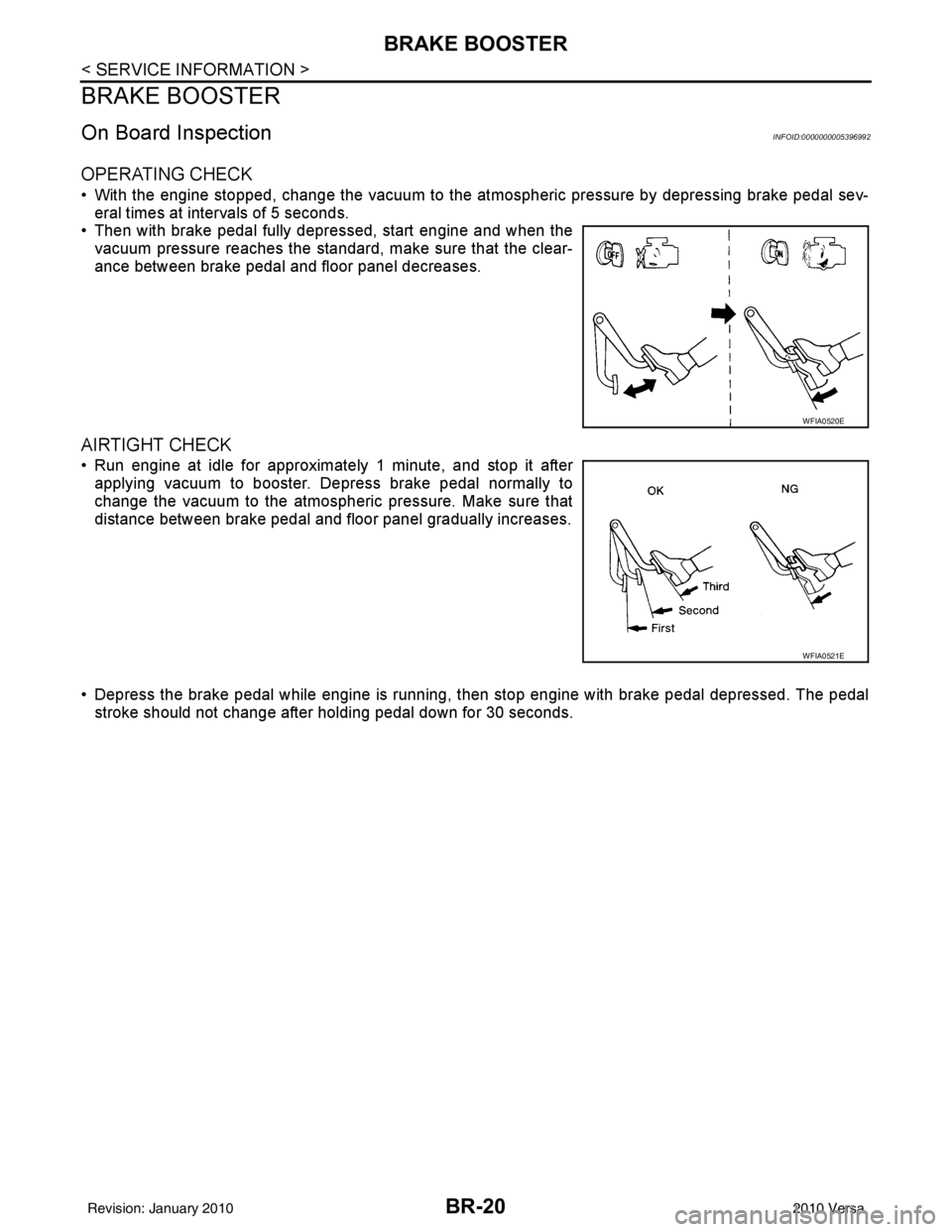
OPERATING CHECK
• With the engine stopped, change the vacuum to the atmospheric pressure by depressing brake pedal sev-
eral times at intervals of 5 seconds.
• Then with brake pedal fully depressed, start engine and when the vacuum pressure reaches the standard, make sure that the clear-
ance between brake pedal and floor panel decreases.
AIRTIGHT CHECK
• Run engine at idle for approximately 1 minute, and stop it afterapplying vacuum to booster. Depress brake pedal normally to
change the vacuum to the atmospheric pressure. Make sure that
distance between brake pedal and floor panel gradually increases.
• Depress the brake pedal while engine is running, then stop engine with brake pedal depressed. The pedal
stroke should not change after holding pedal down for 30 seconds.
WFIA0520E
WFIA0521E
Revision: January 20102010 Versa
Page 950 of 3745
![NISSAN TIIDA 2010 Service Owners Manual BRC-60
< SERVICE INFORMATION >[VDC/TCS/ABS]
TROUBLE DIAGNOSIS
Note 1: Confirm tire pressure is normal.
Note 2: On and Off timing for warning lamp and indicator lamp.
CONSULT-III Function (ABS)INFOID:0](/img/5/57397/w960_57397-949.png "NISSAN TIIDA 2010 Service Owners Manual BRC-60
< SERVICE INFORMATION >[VDC/TCS/ABS]
TROUBLE DIAGNOSIS
Note 1: Confirm tire pressure is normal.
Note 2: On and Off timing for warning lamp and indicator lamp.
CONSULT-III Function (ABS)INFOID:0")
BRC-60
< SERVICE INFORMATION >[VDC/TCS/ABS]
TROUBLE DIAGNOSIS
Note 1: Confirm tire pressure is normal.
Note 2: On and Off timing for warning lamp and indicator lamp.
CONSULT-III Function (ABS)INFOID:0000000005612158
CONSULT-III can display each diagnostic item us
ing the diagnostic test modes shown following.
SELF-DIAGNOSIS
Description
If an error is detected in the system, the ABS warning lamp will turn on. In this case, perform self-diagnosis as
follows:
Operation Procedure
1. Turn ignition switch OFF.
2. Connect CONSULT-III To the data link connector.
3. Turn ignition switch ON.
4. Start engine and drive at approximately 30 km/h (19 MPH) for approximately 1 minute.
5. After stopping the vehicle, with the engine running, t ouch “ABS”, “SELF-DIAG RESULTS” in order on the
CONSULT-III screen.
USV[FL-RR]
USV[FR-RL]
HSV[FL-RR]
HSV[FR-RL] VDC switch-over valve
statusWhen actuator (switch-over
valve) is active (“ACTIVE
TEST” with CONSULT-III) or
actuator relay is inactive (when
in fail-safe mode).
On
BRC-72, "
Solenoid and
VDC Change-Over Valve
System Inspection"
When actuator (switch-over
valve) is not active and actua-
tor relay is active (ignition
switch ON). Off
V/R OUPUT Solenoid valve relay
activatedWhen solenoid valve relay is
active (ignition switch OFF)
On
When solenoid valve relay is
not active (in fail-safe mode) Off
M/R OUTPUT Actuator motor and mo-
tor relay activatedWhen actuator motor and mo-
tor relay are active (“ACTIVE
TEST” with CONSULT-III)
On
BRC-73, "
Actuator Motor,
Motor Relay, and Circuit
Inspection"When actuator motor and mo-
tor relay are inactive Off
ENGINE RPM With engine running With engine stopped
0 rpm
BRC-68, "
Engine System
Inspection"Engine running Almost in accor-
dance with ta-
chometer display
Monitor item
Display content Data monitor
Note: Error inspection
checklist
Condition Reference value in
normal operation
ABS diagnostic mo de Description
WORK SUPPORT Supports inspection and adjustment
s. Commands are transmitted to the ABS actuator and electric unit
(control unit) for setting the status suitable for required operation, input/output signals are received from
the ABS actuator and electric unit (control unit) and received data is displayed.
SELF DIAGNOSTIC RESULT Displays ABS ac tuator and electric unit (control unit) self-diagnosis results.
DATA MONITOR Displays ABS actuator and electric unit (control unit) input/output data in real time.
CAN DIAG SUPPORT MNTR The result of transmit/receive diagnosis of CAN communication can be read. ACTIVE TEST Operation of electrical loads can be checked by sending drive signal to them.
FUNCTION TEST Conducted by CONS ULT-III instead of a technician to determine whether each system is "OK" or "NG".
ECU IDENTIFICATION ABS actuator and electric unit (control unit) part number can be read.
Revision: January 20102010 Versa
Page 1063 of 3745
![NISSAN TIIDA 2010 Service Owners Manual CVT-30
< SERVICE INFORMATION >[RE0F08B]
TROUBLE DIAGNOSIS
TROUBLE DIAGNOSIS
DTC Inspection Priority ChartINFOID:0000000005397785
If some DTCs are displayed at the same time, perform inspections one by](/img/5/57397/w960_57397-1062.png "NISSAN TIIDA 2010 Service Owners Manual CVT-30
< SERVICE INFORMATION >[RE0F08B]
TROUBLE DIAGNOSIS
TROUBLE DIAGNOSIS
DTC Inspection Priority ChartINFOID:0000000005397785
If some DTCs are displayed at the same time, perform inspections one by")
CVT-30
< SERVICE INFORMATION >[RE0F08B]
TROUBLE DIAGNOSIS
TROUBLE DIAGNOSIS
DTC Inspection Priority ChartINFOID:0000000005397785
If some DTCs are displayed at the same time, perform inspections one by one based on the following priority
chart.
NOTE:
If DTC “U1000” is displayed with other DTCs, first perform the trouble diagnosis for DTC “U1000”.
Refer to
CVT-56
.
Fail-SafeINFOID:0000000005397786
The TCM has an electrical fail-safe mode. This mode make s it possible to operate even if there is an error in a
main electronic control input/output signal circuit.
FAIL-SAFE FUNCTION
If any malfunction occurs in a sensor or solenoid, this function controls the CVT to make driving possible.
Secondary Speed Sensor
The shift pattern is changed in accordance with thrott le position when an unexpected signal is sent from the
secondary speed sensor to the TCM. T he overdrive-off mode is inhibited, and the transaxle is put in “D”.
Primary Speed Sensor
The shift pattern is changed in accordance with thro ttle position and secondary speed (vehicle speed) when
an unexpected signal is sent from the primary speed sensor to the TCM. The overdrive-off mode is inhibited,
and the transaxle is put in “D”.
Transmission Range Switch
If an unexpected signal is sent from the transmission range switch to the TCM, the transaxle is put in “D”.
CVT Fluid Temperature Sensor
If an unexpected signal is sent from the CVT fluid temperature sensor to the TCM, the gear ratio in use before
receiving the unexpected signal is maintained or t he gear ratio is controlled to keep engine speed under 3500
rpm.
Secondary Pressure Sensor
• If an unexpected signal is sent from the secondary pressure sensor to the TCM, the secondary pressure
feedback control is stopped and the offset value obtai ned before the non-standard condition occurs is used
to control line pressure.
• If secondary pressure sensor error signal is input to TCM, secondary pressure feedback control stops, but line pressure is controlled normally.
Line Pressure Solenoid
If an unexpected signal is sent from the solenoid to the TCM, the line pressure solenoid is turned OFF to
achieve the maximum fluid pressure.
Secondary Pressure Solenoid
If an unexpected signal is sent from the solenoid to t he TCM, the secondary pressure solenoid is turned OFF
to achieve the maximum fluid pressure.
Torque Converter Clutch Solenoid
If an unexpected signal is sent from the solenoid to t he TCM, the torque converter clutch solenoid is turned
OFF to cancel the lock-up.
Step Motor
If an unexpected signal is sent from the step motor to the TCM, the step motor coil phases “A” through “D” are
all turned OFF to hold the gear ratio used right before the non-standard condition occurred.
CVT Lock-up Select Solenoid
If an unexpected signal is sent from the solenoid to the TCM, the CVT lock-up select solenoid is turned OFF to
cancel the lock-up.
Priority Detected items (DTC)
1 U1000
2 Except above
Revision: January 20102010 Versa
Page 1085 of 3745
![NISSAN TIIDA 2010 Service Owners Manual CVT-52
< SERVICE INFORMATION >[RE0F08B]
TROUBLE DIAGNOSIS
*1: Refer to CVT-28, "Malfunction Indicator Lamp (MIL)" .
*2: Models without ABS does not indicate.
DATA MONITOR MODE
Display Items List
X:](/img/5/57397/w960_57397-1084.png "NISSAN TIIDA 2010 Service Owners Manual CVT-52
< SERVICE INFORMATION >[RE0F08B]
TROUBLE DIAGNOSIS
*1: Refer to CVT-28, \"Malfunction Indicator Lamp (MIL)\" .
*2: Models without ABS does not indicate.
DATA MONITOR MODE
Display Items List
X:")
CVT-52
< SERVICE INFORMATION >[RE0F08B]
TROUBLE DIAGNOSIS
*1: Refer to CVT-28, "Malfunction Indicator Lamp (MIL)" .
*2: Models without ABS does not indicate.
DATA MONITOR MODE
Display Items List
X: Standard, —: Not applicable, : Option
VEHICLE
SPEED*2• CAN communication with the
ABS actuator and the electric
unit (control unit) is malfunctioning
• There is a great difference between the vehicle speed sig-
nal from the ABS actuator and the electric unit (control
unit), and the vehicle speed sensor signal P1722
—CVT-119
SPEED SENSOR A rotation sensor error is detected because the gear does not
change in accordance with the position of the stepping motor
CAUTION:
One of the “P0720”, the “P0715” or the “P0725“ is dis-
played with the DTC at the same time P1723
—CVT-121
THROTTLE CON-
TROL SIG The electronically controlled throttle for ECM is malfunction-
ing
P1726
—CVT-123
SLCT SOLENOID • Normal voltage not applied to solenoid due to cut line,
short, or the like
• TCM detects as irregular by comparing target value with
monitor value P1740 P1740
CVT-124
LINE PRESS
CONTROLTCM detects the unexpected line pressure
P1745—CVT-128
STEP MOTOR Each coil of the step motor is not energized properly due to
an open or a short P1777 P1777
CVT-129
STEP MOTORThere is a great difference between the number of steps for
the stepping motor and for the actual gear ratio
P1778 P1778
CVT-133
NO DTC IS DE-
TECTED: FUR-
THER TESTING
MAY BE RE-
QUIREDNo NG item has been detected
XX —
Items (CONSULT-
III screen terms)
Malfunction is detected when... TCM self-di-
agnosis OBD-III (DTC)
Reference page
“TRANSMIS-
SION” with
CONSULT-III MIL indicator
lamp*1, “EN-
GINE” with
CONSULT-III
or GST
Monitored item (Unit) Monitor item selection
Remarks
ECU IN-
PUT SIG-
NALS MAIN SIG-
NALS SELEC-
TION
FROM
MENU
VSP SENSOR (km/h or mph) X—
ESTM VSP SIG (km/h or mph) X— Models without ABS does not indicate.
PRI SPEED SEN (rpm) X—
ENG SPEED SIG (rpm) X—
SEC HYDR SEN (V) X—
PRI HYDR SEN (V) X—
ATF TEMP SEN (V) X— CVT fluid temperature sensor
VIGN SEN (V) X—
Revision: January 20102010 Versa
Page 1229 of 3745
COMBINATION METERSDI-19
< SERVICE INFORMATION >
C
DE
F
G H
I
J
L
M A
B
DI
N
O P
5.CHECK FUEL LEVEL SENSOR UNIT
Check fuel level sensor unit. Refer to DI-20, "
Electrical Component Inspection" .
OK or NG
OK >> Check fuel level sensor unit installation, and c heck whether the float arm interferes or binds with
any of the internal components in the fuel tank. Repair or replace malfunctioning part, if neces-
sary.
NG >> Replace fuel level sensor unit.
Fuel Gauge Fluctuates, Indica tes Wrong Value, or VariesINFOID:0000000005395022
1.CHECK FUEL GAUGE FLUCTUATION
Test drive vehicle to see if gauge fluctuates onl y during driving or at the instant of stopping.
Does the indication value vary only during dr iving or at the at the instant of stopping?
YES >> The pointer fluctuation may be caused by fuel level change in the fuel tank. Condition is normal.
NO >> Ask the customer about the situation when the symptom occurs in detail, and perform the trouble diagnosis.
Fuel Gauge Does Not Move to Full-positionINFOID:0000000005395023
1.OBSERVE FUEL GAUGE
Does it take a long time for the pointer to move to FULL position?
YES or NO
YES >> GO TO 2.
NO >> GO TO 3.
2.IDENTIFY FUELING CONDITION
Was the vehicle fueled with the ignition switch ON?
YES or NO
YES >> Be sure to fuel the vehicle with the ignition swit ch OFF. Otherwise, it will take a long time to move
to FULL position because of the c haracteristic of the fuel gauge.
NO >> GO TO 3.
3.OBSERVE VEHICLE POSITION
Is the vehicle parked on an incline?
YES or NO
YES >> Check the fuel level indicati on with vehicle on a level surface.
NO >> GO TO 4.
4.OBSERVE FUEL GAUGE POINTER
During driving, does the fuel gauge pointer move gradually toward EMPTY position?
YES or NO
YES >> Check the components. Refer to DI-20, "Electrical Component Inspection" .
NO >> The float arm may interfere or bind with any of the components in the fuel tank.
DTC [U1000] CAN Communication CircuitINFOID:0000000005395024
Symptom: Display CAN COMM CIRC [U1000] at the re sult of self-diagnosis for combination meter.
1.CHECK CAN COMMUNICATION
1. Select "SELF-DIAG RESULTS" mode for "METER/M&A" with CONSULT-III.
2. Print out CONSULT-III screen.
>> Go to "CAN SYSTEM". Refer to LAN-17, "
Trouble Diagnosis Flow Chart".
Revision: January 20102010 Versa
Page 1302 of 3745
![NISSAN TIIDA 2010 Service Owners Manual MULTIPORT FUEL INJECTION SYSTEMEC-37
< FUNCTION DIAGNOSIS > [HR16DE]
C
D
E
F
G H
I
J
K L
M A
EC
NP
O
*2: This signal is sent to the ECM via the CAN communication line.
*3: ECM determines the start sig](/img/5/57397/w960_57397-1301.png "NISSAN TIIDA 2010 Service Owners Manual MULTIPORT FUEL INJECTION SYSTEMEC-37
< FUNCTION DIAGNOSIS > [HR16DE]
C
D
E
F
G H
I
J
K L
M A
EC
NP
O
*2: This signal is sent to the ECM via the CAN communication line.
*3: ECM determines the start sig")
MULTIPORT FUEL INJECTION SYSTEMEC-37
< FUNCTION DIAGNOSIS > [HR16DE]
C
D
E
F
G H
I
J
K L
M A
EC
NP
O
*2: This signal is sent to the ECM via the CAN communication line.
*3: ECM determines the start signal status by the signals of engine speed and battery voltage.
SYSTEM DESCRIPTION
The amount of fuel injected from the fuel injector is
determined by the ECM. The ECM controls the length of
time the valve remains open (injection pulse duration). T he amount of fuel injected is a program value in the
ECM memory. The program value is preset by engine operating conditions. These conditions are determined
by input signals (for engine speed and intake air) from t he crankshaft position sensor (POS), camshaft position
sensor (PHASE) and the mass air flow sensor.
VARIOUS FUEL INJECTION INCREASE/DECREASE COMPENSATION
In addition, the amount of fuel injected is compensated to improve engine performance under various operat-
ing conditions as listed below.
• During warm-up
• When starting the engine
• During acceleration
• Hot-engine operation
• When selector lever is changed from N to D (A/T models)
• High-load, high-speed operation
• During deceleration
• During high engine speed operation
MIXTURE RATIO FEEDBACK CONTROL (CLOSED LOOP CONTROL)
The mixture ratio feedback system prov ides the best air-fuel mixture ratio for driveability and emission control.
The three way catalyst (manifold) can better reduce CO, HC and NOx emissions. This system uses A/F sen-
sor 1 in the exhaust manifold to monitor whether the engine operation is rich or lean. The ECM adjusts the
injection pulse width according to the sensor voltage si gnal. For more information about A/F sensor 1, refer to
EC-176, "
Description". This maintains the mixture ratio within t he range of stoichiometric (ideal air-fuel mix-
ture).
This stage is referred to as the closed loop control condition.
Heated oxygen sensor 2 is located downstream of the th ree way catalyst (manifold). Even if the switching
characteristics of A/F sensor 1 shift, the air-fuel rati o is controlled to stoichiometric by the signal from heated
oxygen sensor 2.
• Open Loop Control
The open loop system condition refers to when the EC M detects any of the following conditions. Feedback
control stops in order to maintain stabilized fuel combustion.
- Deceleration and acceleration
- High-load, high-speed operation
- Malfunction of A/F sensor 1 or its circuit
- Insufficient activation of A/F sensor 1 at low engine coolant temperature
- High engine coolant temperature
- During warm-up
- After shifting from N to D (A/T models)
- When starting the engine
MIXTURE RATIO SELF-LEARNING CONTROL
The mixture ratio feedback control system monitors the mixture ratio signal transmitted from A/F sensor 1.
This feedback signal is then sent to the ECM. The ECM controls the basic mixture ratio as close to the theoret-
ical mixture ratio as possible. However, the basic mi xture ratio is not necessarily controlled as originally
PBIB2793E
Revision: January 20102010 Versa
Page 1303 of 3745
![NISSAN TIIDA 2010 Service Owners Manual EC-38
< FUNCTION DIAGNOSIS >[HR16DE]
MULTIPORT FUEL INJECTION SYSTEM
designed. Both manufacturing differences (i.e., mass ai
r flow sensor hot wire) and characteristic changes dur-
ing operation (i.e.](/img/5/57397/w960_57397-1302.png "NISSAN TIIDA 2010 Service Owners Manual EC-38
< FUNCTION DIAGNOSIS >[HR16DE]
MULTIPORT FUEL INJECTION SYSTEM
designed. Both manufacturing differences (i.e., mass ai
r flow sensor hot wire) and characteristic changes dur-
ing operation (i.e.")
EC-38
< FUNCTION DIAGNOSIS >[HR16DE]
MULTIPORT FUEL INJECTION SYSTEM
designed. Both manufacturing differences (i.e., mass ai
r flow sensor hot wire) and characteristic changes dur-
ing operation (i.e., fuel injector clogging) directly affect mixture ratio.
Accordingly, the difference between the basic and theoretical mixture ratios is monitored in this system. This is
then computed in terms of “injection pulse duration” to automatically compensate for the difference between
the two ratios.
“Fuel trim” refers to the feedback compensation value co mpared against the basic injection duration. Fuel trim
includes short-term fuel trim and long-term fuel trim.
“Short-term fuel trim” is the short-term fuel compensation used to maintain the mixture ratio at its theoretical
value. The signal from A/F sensor 1 indicates whether the mixture ratio is RICH or LEAN compared to the the-
oretical value. The signal then triggers a reduction in fuel volume if the mixture ratio is rich, and an increase in
fuel volume if it is lean.
“Long-term fuel trim” is overall fuel compensation carri ed out over time to compensate for continual deviation
of the short-term fuel trim from the central value. Continual deviation will occur due to individual engine differ-
ences, wear over time and changes in the usage environment.
FUEL INJECTION TIMING
Two types of systems are used.
• Sequential Multiport Fuel Injection System Fuel is injected into each cylinder during each engine cy cle according to the ignition order. This system is
used when the engine is running.
• Simultaneous Multiport Fuel Injection System Fuel is injected simultaneously into all four cylinder s twice each engine cycle. In other words, pulse signals
of the same width are simultaneously transmitted from the ECM.
The four injectors will then receive the signals two times for each engine cycle.
This system is used when the engine is being started and/ or if the fail-safe system (CPU) is operating.
FUEL SHUT-OFF
Fuel to each cylinder is cut off during deceleration, operation of the engine at excessively high speeds or oper-
ation of the vehicle at excessively high speeds.
SEF337W
Revision: January 20102010 Versa
Page 1350 of 3745
![NISSAN TIIDA 2010 Service Owners Manual ON BOARD DIAGNOSTIC (OBD) SYSTEMEC-85
< FUNCTION DIAGNOSIS > [HR16DE]
C
D
E
F
G H
I
J
K L
M A
EC
NP
O
DTC and 1st Trip DTC
The 1st trip DTC (whose number is the same as the DTC number) is displayed fo](/img/5/57397/w960_57397-1349.png "NISSAN TIIDA 2010 Service Owners Manual ON BOARD DIAGNOSTIC (OBD) SYSTEMEC-85
< FUNCTION DIAGNOSIS > [HR16DE]
C
D
E
F
G H
I
J
K L
M A
EC
NP
O
DTC and 1st Trip DTC
The 1st trip DTC (whose number is the same as the DTC number) is displayed fo")
ON BOARD DIAGNOSTIC (OBD) SYSTEMEC-85
< FUNCTION DIAGNOSIS > [HR16DE]
C
D
E
F
G H
I
J
K L
M A
EC
NP
O
DTC and 1st Trip DTC
The 1st trip DTC (whose number is the same as the DTC number) is displayed for the latest self-diagnostic
result obtained. If the ECM memory was cleared previously
, and the 1st trip DTC did not recur, the 1st trip DTC
will not be displayed.
If a malfunction is detected during the 1st trip, the 1st trip DTC is stored in the ECM memory. The MIL will not
light up (two trip detection logic). If the same malfunc tion is not detected in the 2nd trip (meeting the required
driving pattern), the 1st trip DTC is cleared from the ECM memory. If the same malfunction is detected in the
2nd trip, both the 1st trip DTC and DTC are stored in t he ECM memory and the MIL lights up. In other words,
the DTC is stored in the ECM memory and the MIL lights up when the same malfunction occurs in two consec-
utive trips. If a 1st trip DTC is stored and a non-diagnostic operation is performed between the 1st and 2nd
trips, only the 1st trip DTC will continue to be stored. Fo r malfunctions that blink or light up the MIL during the
1st trip, the DTC and 1st trip DTC are stored in the ECM memory.
Procedures for clearing the DTC and the 1st trip DTC fr om the ECM memory are described in “How to Erase
DTC and 1st Trip DTC”.
For malfunctions in which 1st trip DTCs are displayed, refer to EC-468, "
DTCIndex". These items are
required by legal regulations to c ontinuously monitor the system/component . In addition, the items monitored
non-continuously are also displayed on CONSULT-III.
1st trip DTC is specified in Service $07 of SAE J1979/ISO 15031-5. 1st trip DTC detection occurs without light-
ing up the MIL and therefore does not warn the driver of a malfunction. However, 1st trip DTC detection will not
prevent the vehicle from being tested, for ex ample during Inspection/Maintenance (I/M) tests.
When a 1st trip DTC is detected, check, print out or write down and erase (1st trip) DTC and Freeze Frame
data as specified in Work Flow procedure Step 2, refer to EC-15, "
Work Flow". Then perform DTC CONFIR-
MATION PROCEDURE or Component Function Check to try to duplicate the malfunction. If the malfunction is
duplicated, the item requires repair.
Freeze Frame Data and 1st Trip Freeze Frame Data
The ECM records the driving conditions such as fuel system status, calculated load value, engine coolant tem-
perature, short-term fuel trim, long-term fuel trim, engi ne speed, vehicle speed, absolute throttle position, base
fuel schedule and intake air temperature at the moment a malfunction is detected.
Data which are stored in the ECM memory, along with the 1st trip DTC, are called 1st trip freeze frame data.
The data, stored together with the DTC data, are ca lled freeze frame data and displayed on CONSULT-III or
GST. The 1st trip freeze frame data can only be displayed on the CONSULT-III screen, not on the GST.
Only one set of freeze frame data (either 1st trip freez e frame data or freeze frame data) can be stored in the
ECM. 1st trip freeze frame data is stored in the ECM me mory along with the 1st trip DTC. There is no priority
for 1st trip freeze frame data and it is updated each time a different 1st trip DTC is detected. However, once
freeze frame data (2nd trip detection/MIL on) is stored in the ECM memory, 1st trip freeze frame data is no
longer stored. Remember, only one set of freeze frame data can be stored in the ECM. The ECM has the fol-
lowing priorities to update the data.
For example, the EGR malfunction (Priority: 2) was detected and the fr eeze frame data was stored in the 2nd
trip. After that when the misfire (Priority: 1) is detected in another trip, the freeze frame data will be updated
from the EGR malfunction to the misfire. The 1st trip freeze frame data is updated each time a different mal-
function is detected. There is no priority for 1st tr ip freeze frame data. However, once freeze frame data is
stored in the ECM memory, 1st trip freeze data is no longer stored (because only one freeze frame data or 1st
trip freeze frame data can be stored in the ECM). If freeze frame data is stored in the ECM memory and freeze
frame data with the same priority occurs later, the first (original) freeze frame data remains unchanged in the
ECM memory.
Both 1st trip freeze frame data and freeze frame dat a (along with the DTCs) are cleared when the ECM mem-
ory is erased. Procedures for clearing the ECM memory are described in “How to Erase DTC and 1st Trip
DTC”.
How to Read DTC and 1st Trip DTC
DTC and 1st trip DTC can be read by the following methods.
With CONSULT-III
CONSULT-III displays the DTC in “SELF DIAGNOSTIC RESULT” mode.
Priority Items
1 Freeze frame data Misfire — DTC: P0300 - P0304
Fuel Injection System Function — DTC: P0171, P0172
2 Except the above items (Includes A/T related items)
3 1st trip freeze frame data
Revision: January 20102010 Versa