display NISSAN TIIDA 2010 Service Workshop Manual
[x] Cancel search | Manufacturer: NISSAN, Model Year: 2010, Model line: TIIDA, Model: NISSAN TIIDA 2010Pages: 3745, PDF Size: 73.67 MB
Page 450 of 3745
![NISSAN TIIDA 2010 Service Workshop Manual AUDIOAV-53
< SERVICE INFORMATION > [AUDIO WITH NAVIGATION]
C
D
E
F
G H
I
J
L
M A
B
AV
N
O P
System DescriptionINFOID:0000000005988543
AUDIO SYSTEM
Refer to Owners Manual for audio system operating in](/img/5/57397/w960_57397-449.png "NISSAN TIIDA 2010 Service Workshop Manual AUDIOAV-53
< SERVICE INFORMATION > [AUDIO WITH NAVIGATION]
C
D
E
F
G H
I
J
L
M A
B
AV
N
O P
System DescriptionINFOID:0000000005988543
AUDIO SYSTEM
Refer to Owners Manual for audio system operating in")
AUDIOAV-53
< SERVICE INFORMATION > [AUDIO WITH NAVIGATION]
C
D
E
F
G H
I
J
L
M A
B
AV
N
O P
System DescriptionINFOID:0000000005988543
AUDIO SYSTEM
Refer to Owner's Manual for audio system operating instructions.
Navigation is built into AV control unit.
This navigation has the following functions.
• Full support for playback of music from iPod
® and USB device.
• High resolution full color touch panel 5 “WQVGA” display.
• FM/AM twin digital tuner.
• USB mass storage.
• XM traffic.
• POI Support is included. User POI download.
Power is supplied at all times
• through 20A fuse (No. 27, located in the fuse and fusible link box)
• to AV control unit terminal 19.
With the ignition switch in the ACC or ON position, power is supplied
• through 10A fuse [No. 20, located in the fuse block (J/B)]
• to AV control unit terminal 7.
Ground is supplied to
• to AV control unit terminals 20 and 32
• through grounds M57 and M61.
Then audio signals are supplied
• through AV control unit terminals 2, 3, 4, 5, 11, 12, 13 and 14
• to terminals + and - of front door speaker LH and RH
• to terminals + and - of front tweeter LH and RH and
• to terminals + and - of rear door speaker LH and RH.
STEERING WHEEL AUDIO CONTROL SWITCHES
When one of steering wheel audio control switches is pus hed, the resistance in steering switch circuit changes
depending on which button is pushed.
AWNIA2215GB
Revision: January 20102010 Versa
Page 459 of 3745
![NISSAN TIIDA 2010 Service Workshop Manual AV-62
< SERVICE INFORMATION >[AUDIO WITH NAVIGATION]
AUDIO
On-Board Diagnosis
INFOID:0000000005988546
METHOD OF STARTING
1. Start the engine.
2. Turn OFF audio.
3. While pressing the “SET UP” s wi](/img/5/57397/w960_57397-458.png "NISSAN TIIDA 2010 Service Workshop Manual AV-62
< SERVICE INFORMATION >[AUDIO WITH NAVIGATION]
AUDIO
On-Board Diagnosis
INFOID:0000000005988546
METHOD OF STARTING
1. Start the engine.
2. Turn OFF audio.
3. While pressing the “SET UP” s wi")
AV-62
< SERVICE INFORMATION >[AUDIO WITH NAVIGATION]
AUDIO
On-Board Diagnosis
INFOID:0000000005988546
METHOD OF STARTING
1. Start the engine.
2. Turn OFF audio.
3. While pressing the “SET UP” s witch, turn the MENU dial coun-
terclockwise 3 clicks or more first, then clockwise and counter-
clockwise 3 clicks or more, respectively. (After the diagnosis
mode starts, the initial screen of the diagnosis mode appears.)
• On-board diagnosis can be performed in the service test mode.
• On-board diagnosis checks that the system can be operated normally.
Service test mode
46 (L) — AUX sound
signal LH—— —
——
47 (W) — USB D- — — —— —
48 (GR) — AUX sound
signal RH—— —
——
49 (G) — USB D+ — — —— —
50 (BR) — AUX sound
signal
ground—— —
——
51 (R) — USB V BUS
signal—— —
——
53 (GR) — SHIELD — — —— —
54 — Satellite an-
tenna signal
—— —
——
55 — GPS anten-
na signal—— —
——
56 — SHIELD — — —— —
57 — Antenna on
signal—— —
——
58 — Main anten-
na signal
—— —
——
Te r m i n a l
(Wire color) ItemSignal
input/
output Condition
Reference value
(Approx.) Example of symp-
tom
+– Ignition
switch Operation
JSNIA2456ZZ
Mode
ItemContent
Service version —The version data of the parts is shown
displayed.
Revision: January 20102010 Versa
Page 460 of 3745
![NISSAN TIIDA 2010 Service Workshop Manual AUDIOAV-63
< SERVICE INFORMATION > [AUDIO WITH NAVIGATION]
C
D
E
F
G H
I
J
L
M A
B
AV
N
O P
Radio FM monitor — The Change Mediator monitors the dy-
namic values of the current tuner. If the
band is](/img/5/57397/w960_57397-459.png "NISSAN TIIDA 2010 Service Workshop Manual AUDIOAV-63
< SERVICE INFORMATION > [AUDIO WITH NAVIGATION]
C
D
E
F
G H
I
J
L
M A
B
AV
N
O P
Radio FM monitor — The Change Mediator monitors the dy-
namic values of the current tuner. If the
band is")
AUDIOAV-63
< SERVICE INFORMATION > [AUDIO WITH NAVIGATION]
C
D
E
F
G H
I
J
L
M A
B
AV
N
O P
Radio FM monitor — The Change Mediator monitors the dy-
namic values of the current tuner. If the
band is switched within the radio mon-
itor context, the active monitor is
switched as well.
AM monitor
—
XM monitor —The version data is displayed.
XM functions • Clear XM Chipset NVM
• Reset all XM settings
• XM CBM debug mode ON/OFF
• External Diag mode ON/OFF The current system status is dis-
played.
User Configuration Touch Display Calibration —The function allows connection of the
position detection accuracy of the
touch panel.
Mode
ItemContent
Revision: January 20102010 Versa
Page 461 of 3745
![NISSAN TIIDA 2010 Service Workshop Manual AV-64
< SERVICE INFORMATION >[AUDIO WITH NAVIGATION]
AUDIO
System stateRunning system status
• SD card slot Access
• Power Supply
• Speed Signal
• Direction Signal
• Illumination Signal
•](/img/5/57397/w960_57397-460.png "NISSAN TIIDA 2010 Service Workshop Manual AV-64
< SERVICE INFORMATION >[AUDIO WITH NAVIGATION]
AUDIO
System stateRunning system status
• SD card slot Access
• Power Supply
• Speed Signal
• Direction Signal
• Illumination Signal
•")
AV-64
< SERVICE INFORMATION >[AUDIO WITH NAVIGATION]
AUDIO
System stateRunning system status
• SD card slot Access
• Power Supply
• Speed Signal
• Direction Signal
• Illumination Signal
• GPS Antenna
• EXT. Phone Sig
• Microphone Current
• Radio Antenna
• USB Device
•iPod
® firmware version
• Steering wheel X11C The current system status is dis-
played.
System history •Bluetooth
® Module - Sub-Unit
Connection Malfunction
• SD-card Slot - Sub-Unit Connec- tion Malfunction
• Programming Error
• Radio-Antenna Circuit Malfunc- tion
• FM-Antenna 1 Connection Mal- function
• Satellite Antenna Connection
Failure
• GPS Antenna Circuit Malfunc- tion
• CD-Drive Mechanical Malfunc- tion
• CD Read Malfunction
• Power Supply voltage: Lower
Limit Exceeded
• Power Supply voltage: Upper
Limit Exceeded
• Reduced system Functionality due to over temperature
• Display switched OFF due to over temperature
• SD card removed without being de-mounted
• Code plug missing The history of the system status is re-
ported in the report memory, dis-
played.
Speaker test 100Hz —This activates a sequence of test tone
outputs to the four speaker lines one
after the other for 1 second.
The frequency can be chosen by user
selection (100Hz and 4KHz).
Speaker test 4KHz
Display test —This provides a test sequence where
test displays (plain colored display:
e.g. white, black, red, blue, green) are
shown one after the other.
The respective color is shown for an
indicated period of time (parameter).
After the display test, the design of the
display previously available is stored.
While the screen shows a plain col-
ored display, a pixel malfunction may
be detected.
Mode
ItemContent
Revision: January 20102010 Versa
Page 462 of 3745
![NISSAN TIIDA 2010 Service Workshop Manual AUDIOAV-65
< SERVICE INFORMATION > [AUDIO WITH NAVIGATION]
C
D
E
F
G H
I
J
L
M A
B
AV
N
O P
END ON-BOARD DIAGNOSIS
Turn OFF ignition switch.
Symptom ChartINFOID:0000000005988547
MALFUNCTION WITH NAVIG](/img/5/57397/w960_57397-461.png "NISSAN TIIDA 2010 Service Workshop Manual AUDIOAV-65
< SERVICE INFORMATION > [AUDIO WITH NAVIGATION]
C
D
E
F
G H
I
J
L
M A
B
AV
N
O P
END ON-BOARD DIAGNOSIS
Turn OFF ignition switch.
Symptom ChartINFOID:0000000005988547
MALFUNCTION WITH NAVIG")
AUDIOAV-65
< SERVICE INFORMATION > [AUDIO WITH NAVIGATION]
C
D
E
F
G H
I
J
L
M A
B
AV
N
O P
END ON-BOARD DIAGNOSIS
Turn OFF ignition switch.
Symptom ChartINFOID:0000000005988547
MALFUNCTION WITH NAVIGATION
MALFUNCTION WITH AUDIO
System configuration • 8 pulses speed
• Clock ON/OFF
• Equalizer setup X11C
• RF tuning
• Antenna type
• Sound system
• Sub Out: Code
• Steering wheel The device is configured by a connect-
ed hardware circui
t. The parameter is
influenced.
Self test •Bluetooth
® module Access Mal-
function
• SD-card Access Malfunction
• Radio-Antenna Circuit Malfunc-
tion
• GPS Antenna Circuit Malfunc-
tion
• Microphone Circuit Malfunction A system self test is executed: the re-
sult is stored into the error memory
which is shown afterwards as a list of
codes of the detected malfunctions.
Mode
ItemContent
Symptoms Check itemsProbable malfunction location / Action to
take
Display does not turn ON. All switches cannot be operated.
AV control unit power supply and ground
circuit. Refer to
AV- 6 7
.
All switches can be operated. AV control unit. Refer to AV- 6 7
.
All switches cannot be operated. Display does not turn ON.
AV control unit power supply and ground
circuit. Refer to
AV- 6 7
.
Display turn ON. AV control unit. Refer to AV- 6 7
.
Only specified switch cannot be
operated. –
AV control unit. Refer to AV- 6 7
.
Voice guidance is not heard. Audio sound is normal. AV control unit. Refer to AV- 6 7
.
Display does not dim. Check “Illumination
Signal” in “SERVICE
SYSTEM STATUS”,
“SERVICE MENU”. “Illumination Signal” reaches
100% when the lighting
switch is ON.
AV control unit. Refer to
AV- 6 7
.
“Illumination Signal” does not
reach 100% when the lighting
switch is ON. Illumination signal circuit. Refer to
LT-
11 3.
Vehicle icon does not move. Check “Speed Signal”
in “SERVICE SYSTEM
STATUS”, “SERVICE
MENU”. A value of “Speed Signal”
changes according to vehicle
speeds.
AV control unit. Refer to
AV- 6 7
.
A value of “Speed Signal”
does not change according to
vehicle speeds. Vehicle speed signal circuit. Refer to
DI-
16.
Map matching is not complete
GPS icon is not displayed Check “GPS Antenna”
in “SERVICE SYSTEM
SELF TEST”, “SER-
VICE MENU”. “Connected” is displayed for
“GPS Antenna”.
AV control unit. Refer to
AV- 6 7
.
“Connected” is not displayed
for “GPS Antenna”. GPS antenna. Refer to
AV- 9 2
.
Traffic information (XM Traffic) is
not received. Radio broadcasts are received.
AV control unit. Refer to AV- 6 7
.
Radio broadcasts are not received. • Radio antenna. Refer to
AV- 9 0
.
• Antenna feeder. Refer to AV- 9 0
.
Revision: January 20102010 Versa
Page 464 of 3745
![NISSAN TIIDA 2010 Service Workshop Manual AUDIOAV-67
< SERVICE INFORMATION > [AUDIO WITH NAVIGATION]
C
D
E
F
G H
I
J
L
M A
B
AV
N
O P
MALFUNCTION WITH AUXILIARY INPUT
NOTE:
Check that there is no malfunction of AUX equipment main body before](/img/5/57397/w960_57397-463.png "NISSAN TIIDA 2010 Service Workshop Manual AUDIOAV-67
< SERVICE INFORMATION > [AUDIO WITH NAVIGATION]
C
D
E
F
G H
I
J
L
M A
B
AV
N
O P
MALFUNCTION WITH AUXILIARY INPUT
NOTE:
Check that there is no malfunction of AUX equipment main body before")
AUDIOAV-67
< SERVICE INFORMATION > [AUDIO WITH NAVIGATION]
C
D
E
F
G H
I
J
L
M A
B
AV
N
O P
MALFUNCTION WITH AUXILIARY INPUT
NOTE:
Check that there is no malfunction of AUX equipment main body before performing a diagnosis.
MALFUNCTION WITH STEERING SWITCH
AV Control Unit Power and Ground Supply Circuit InspectionINFOID:0000000005988548
1.CHECK FUSE
Check that the following fuses of the AV control unit are not blown.
OK or NG
OK >> GO TO 2.
NG >> If fuse is blown, be sure to eliminate cause of malfunction before installing new fuse. Refer to AV-
54.
2.AV CONTROL UNIT POWER SUPPLY CIRCUIT CHECK
1. Disconnect AV control unit connector.
2. Check voltage between the AV control unit connector and ground.
Symptoms Check itemsProbable malfunction location / Action to
take
iPod
® or USB memory can not be
recognized. With iPod
® or USB
memory Connected,
check “USB Device” in
“SERVICE STATUS”,
“SERVICE MENU”. iPod
® or USB memory
name is displayed for
“USB Device”. • USB interface and AUX jack harness
• USB interface and AUX jack. Refer to
AV- 8 9
.
• AV control unit. Refer to AV- 7 2
.
“Removed” is displayed
for “USB Device”. • USB interface and AUX jack harness
• USB interface and AUX jack. Refer to
AV- 8 9
.
—— Generation of iPod
® not supported
SymptomsCheck items Probable malfunction location
No voice sound is heard when
AUX mode is selected. Voice sound is heard when other modes
are selected. • USB interface and AUX jack harness
• USB interface and AUX jack. Refer to AV- 8 9
.
Symptoms
Possible malfunction location / Action to take
All steering switches are not operated.
Steering switch. Refer to AV- 6 8
.
Only specified switch cannot be operated.
“SEEK UP”, “VOL UP” and “SOURCE” switches are not
operated.
“SOURCE”, “SEEK DOWN” and “VOL DOWN” switches
are not operated.
Unit
Terminals Signal name Fuse No.
AV control unit 19
Battery power 27
7 Ignition switch ACC or ON 20
Revision: January 20102010 Versa
Page 506 of 3745
BCM (BODY CONTROL MODULE)BCS-17
< SERVICE INFORMATION >
C
DE
F
G H
I
J
L
M A
B
BCS
N
O P
OK or NG
OK >> GO TO 3.
NG >> Repair or replace the harness.
3.CHECK GROUND CIRCUIT
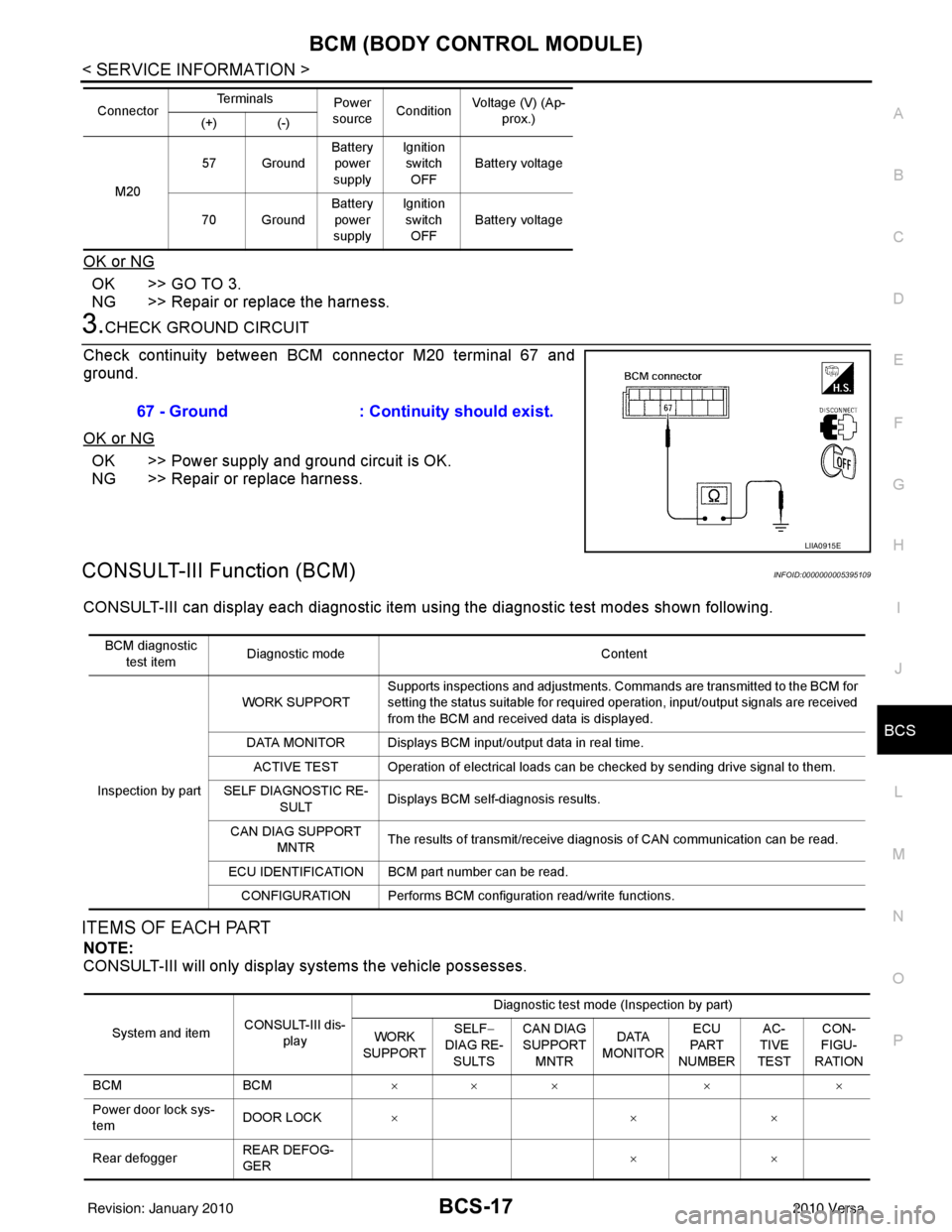
Check continuity between BCM connector M20 terminal 67 and
ground.
OK or NG
OK >> Power supply and ground circuit is OK.
NG >> Repair or replace harness.
CONSULT-III Function (BCM)INFOID:0000000005395109
CONSULT-III can display each diagnostic item using the diagnostic test modes shown following.
ITEMS OF EACH PART
NOTE:
CONSULT-III will only display systems the vehicle possesses.
M20 57 Ground
Battery
power
supply Ignition
switch
OFF Battery voltage
70 Ground Battery
power
supply Ignition
switch OFF Battery voltage
Connector
Te r m i n a l s
Power
source Condition Voltage (V) (Ap-
prox.)
(+) (-)
67 - Ground : Continuity should exist.
LIIA0915E
BCM diagnostic
test item Diagnostic mode
Content
Inspection by part WORK SUPPORT
Supports inspections and adjustments. Commands are transmitted to the BCM for
setting the status suitable for required operation, input/output signals are received
from the BCM and received data is displayed.
DATA MONITOR Displays BCM input/output data in real time. ACTIVE TEST Operation of electrical loads can be checked by sending drive signal to them.
SELF DIAGNOSTIC RE- SULT Displays BCM self-diagnosis results.
CAN DIAG SUPPORT MNTR The results of transmit/receive diagnosis of CAN communication can be read.
ECU IDENTIFICATION BCM part number can be read. CONFIGURATION Performs BCM configuration read/write functions.
System and item CONSULT-III dis-
play Diagnostic test mode (Inspection by part)
WORK
SUPPORT SELF
−
DIAG RE-
SULTS CAN DIAG
SUPPORT
MNTR DATA
MONITOR ECU
PA R T
NUMBER AC-
TIVE
TEST CON-
FIGU-
RATION
BCM BCM××× × ×
Power door lock sys-
tem DOOR LOCK
×× ×
Rear defogger REAR DEFOG-
GER ××
Revision: January 20102010 Versa
Page 507 of 3745

BCS-18
< SERVICE INFORMATION >
BCM (BODY CONTROL MODULE)
WORK SUPPORT
Display Item List
CAN Communication Inspection Using CONSULT-III (Self-Diagnosis)INFOID:0000000005395110
1.SELF-DIAGNOSTIC RESULT CHECK
1. Connect CONSULT–III and select “BCM” on “SELECT SYSTEM” screen.
2. Select “BCM” on “SELECT TEST ITEM” screen, and select “SELF-DIAG RESULTS”.
3. Check display content in self-diagnostic results.
Warning chime BUZZER ××
Room lamp timer INT LAMP ×× ×
Remote keyless entry
system MULTI REMOTE
ENT
××
×
Headlamp HEAD LAMP×× ×
Wiper WIPER×× ×
Turn signal lamp
Hazard lamp FLASHER
××
Blower fan switch sig-
nal
Air conditioner switch
signal AIR CONDITION-
ER
××
Intelligent Key INTELLIGENT
KEY
×
Combination switch COMB SW ×
NVIS (NATS) IMMU ××
Interior lamp battery
saver BATTERY SAV-
ER
××
×
Back door/Trunk TRUNK ××
Theft alarm THEFT ALARM×× ×
Retained accessory
power control RETAINED PWR
×× ×
Oil pressure swit ch SIGNAL BUFFER ××
Low tire pressure moni-
tor AIR PRESSURE
MONITOR
××
× ×
Panic alarm PANIC ALARM ×
System and item
CONSULT-III dis-
play Diagnostic test mode (Inspection by part)
WORK
SUPPORT SELF
−
DIAG RE-
SULTS CAN DIAG
SUPPORT
MNTR DATA
MONITOR ECU
PA R T
NUMBER AC-
TIVE
TEST CON-
FIGU-
RATION
Item Description
RESET SETTING VALUE Return a value set with WORK SUPPORT of each system to a default value in factory shipment.
CONSULT-III display code Diagnosis item
U1000 INITIAL DIAG
TRANSMIT DIAG ECM
IPDM E/R
METER/M&A I-KEY
Revision: January 20102010 Versa
Page 508 of 3745
BCM (BODY CONTROL MODULE)BCS-19
< SERVICE INFORMATION >
C
DE
F
G H
I
J
L
M A
B
BCS
N
O P
Contents displayed
No malfunction>>Inspection End
Malfunction in CAN communication system>>After printing the monitor items, go to “CAN System”. Refer to
LAN-17, "
Trouble Diagnosis Flow Chart".
ConfigurationINFOID:0000000005395111
DESCRIPTION
CONFIGURATION has three functions as follows:
• READ CONFIGURATION is the function to read (e xtract) vehicle configuration of current BCM.
• WRITE CONFIGURATION-Manual selection is the functi on to select and write vehicle configuration on BCM
manually.
• WRITE CONFIGURATION-Config file is the function to write vehicle configuration with the data extracted
from current BCM.
• For READ CONFIGURATION and WRITE CONFIGURATION -Config file, refer to CONSULT-III Operation
Manual.
• For WRITE CONFIGURATION-Manual selection using the following flow chart, identify the correct model
and configuration list. Confirm and/or change setting val ue for each item according to the configuration list.
Depending on CONSULT-III software version being used, some or all of the write configuration items shown
in the following configuration lists may be display ed. If an item does not appear on the CONSULT-III WRITE
CONFIGURATION-Manual selection screen(s), then it is an auto setting item and it cannot be manually set
or changed.
NOTE:
Confirm vehicle model on IDENTIFICATION PLATE. Refer to GI-43, "
Model Variation".
CAUTION:
• When replacing BCM, you must perform WRITE CONFIGURATION with CONSULT-III.
• Complete the procedure of WRITE CONFIGURATION in order.
• If you set incorrect WRITE CONF IGURATION, incidents will occur.
• Configuration is different for each vehicle model. Confirm conf iguration of each vehicle model.
Removal and Installation of BCMINFOID:0000000005395112
REMOVAL
CAUTION:
Before replacing BCM, perform “READ CONFIGURATI ON" to save or print current vehicle specifica-
tion. Refer to BCS-19, "
Configuration".
1. Disconnect the battery negative terminal.
2. Remove the glove box. Refer to IP-12, "
Removal and Installation".
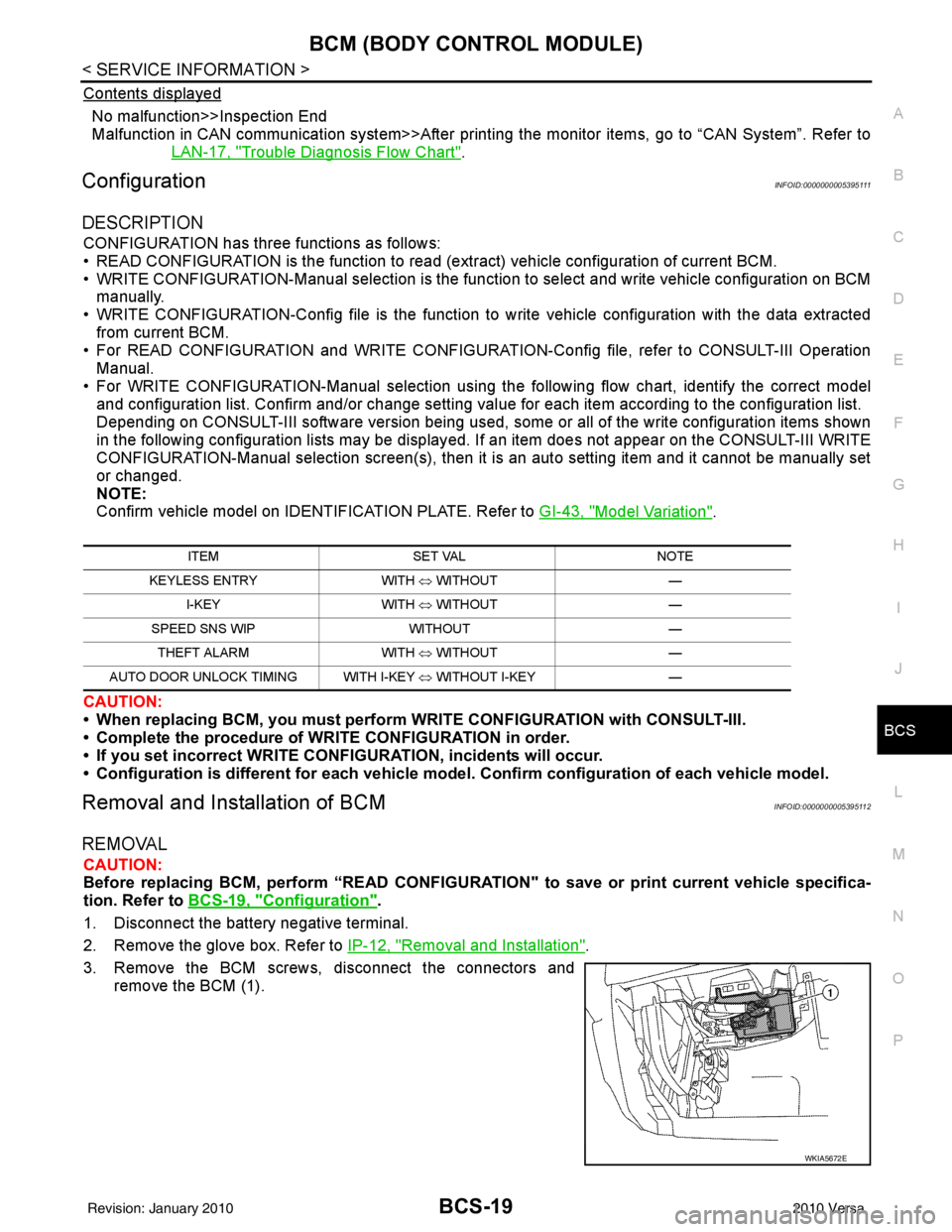
3. Remove the BCM screws, disconnect the connectors and remove the BCM (1).
ITEM SET VAL NOTE
KEYLESS ENTRY WITH ⇔ WITHOUT —
I-KEY WITH ⇔ WITHOUT —
SPEED SNS WIP WITHOUT —
THEFT ALARM WITH ⇔ WITHOUT —
AUTO DOOR UNLOCK TIMING WITH I-KEY ⇔ WITHOUT I-KEY —
WKIA5672E
Revision: January 20102010 Versa
Page 550 of 3745

POWER DOOR LOCK SYSTEMBL-41
< SERVICE INFORMATION >
C
DE
F
G H
J
K L
M A
B
BL
N
O P
1: With Intelligent Key
2: Without Intelligent Key
3: Hatchback without Intelligent Key
4: Sedan without Intelligent Key
5: Hatchback
6: Sedan
7: With power door locks
8: With power windows
Work FlowINFOID:0000000005396561
1. Check the symptom and customer's requests.
2. Understand the outline of system. Refer to BL-23, "
System Description" .
3. According to the trouble diagnosis chart, repair or replace the cause of the malfunction. Refer to BL-119,
"Trouble Diagnosis Symptom Chart" .
4. Does power door lock system operate normally? OK: GO TO 5, NG: GO TO 3.
5. Inspection End.
CONSULT-III Function (BCM)INFOID:0000000005396562
CONSULT-III can display each diagnostic item using the diagnostic test modes shown following.
WORK SUPPORT
657SB All door lock actuators
(lock) Output OFFOFF (neutral)
0V
ON (lock) Battery voltage
66
7G Front door lock actua-
tor RH, rear door lock
actuators LH/RH (un-
lock) Output OFFOFF (neutral)
0V
ON (unlock) Battery voltage
67 B Ground Input ON—0V
68
8L Power window power
supply (RAP)
Output —Ignition switch ON
Battery voltage
Within 45 seconds after igni-
tion switch OFF Battery voltage
More than 45 seconds after ig-
nition switch OFF 0V
When front door LH or RH is
open or power window timer
operates 0V
69
8P Battery power supply OutputOFF
— Battery voltage
70 Y Battery power supply Input OFF —Battery voltage
Te r m i n a l
Wire
color Signal name Signal
input/
output Measuring condition
Reference value or waveform
(Approx.)
Ignition
switch Operation or condition
Diagnostic mode
Description
WORK SUPPORT Supports inspections and adjustments. Commands are transmitted to the BCM for setting the status
suitable for required operation, input/output signals are received from the BCM and received date
is displayed.
DATA MONITOR Displays BCM input/output data in real time. ACTIVE TEST Operation of electrical loads can be checked by sending drive signal to them.
SELF DIAGNOSTIC RESULT Displays BCM self-diagnosis results.
CAN DIAG SUPPORT MNTR The result of transmit/receive diagnosis of CAN communication can be read. ECU IDENTIFICATION BCM part number can be read.CONFIGURATION Performs BCM configuration read/write functions.
Revision: January 20102010 Versa