engine control NISSAN TIIDA 2011 Service Repair Manual
[x] Cancel search | Manufacturer: NISSAN, Model Year: 2011, Model line: TIIDA, Model: NISSAN TIIDA 2011Pages: 3787, PDF Size: 78.35 MB
Page 1183 of 3787
![NISSAN TIIDA 2011 Service Repair Manual CVT-128
< SERVICE INFORMATION >[RE0F08B]
P1745 LINE PRESSURE CONTROL
P1745 LINE PRESSURE CONTROL
DescriptionINFOID:0000000005928918
The line pressure solenoid valve regulates the oil pump discharge pr](/img/5/57396/w960_57396-1182.png "NISSAN TIIDA 2011 Service Repair Manual CVT-128
< SERVICE INFORMATION >[RE0F08B]
P1745 LINE PRESSURE CONTROL
P1745 LINE PRESSURE CONTROL
DescriptionINFOID:0000000005928918
The line pressure solenoid valve regulates the oil pump discharge pr")
CVT-128
< SERVICE INFORMATION >[RE0F08B]
P1745 LINE PRESSURE CONTROL
P1745 LINE PRESSURE CONTROL
DescriptionINFOID:0000000005928918
The line pressure solenoid valve regulates the oil pump discharge pressure to suit the driving condition in
response to a signal sent from the TCM.
On Board Diagn
osis LogicINFOID:0000000005928919
• This is not an OBD-II self-diagnostic item.
• Diagnostic trouble code “P1745” with CONSULT-III is detected when TCM detects the unexpected line pres-
sure.
Possible CauseINFOID:0000000005928920
TCM
DTC Confirmation ProcedureINFOID:0000000005928921
NOTE:
If “DTC Confirmation Procedure” has been previously performed, alw ays turn ignition switch OFF and
wait at least 10 seconds before performing the next test.
After the repair, touch “ERASE” on “SELF-DIAG RESULTS” and then perform the following procedure to con-
firm the malfunction is eliminated.
WITH CONSULT-III
1. Turn ignition switch ON and select “DATA MONI TOR” mode for “TRANSMISSION” with CONSULT-III.
2. Make sure that output voltage of CVT fluid temperature sensor is within the range below.
ATF TEMP SEN: 1.0 - 2.0 V
If out of range, drive the vehicle to decrease the voltage (warm up the fluid) or stop engine to
increase the voltage (cool down the fluid)
3. If DTC is detected, go to CVT-128, "
Diagnosis Procedure" .
Diagnosis ProcedureINFOID:0000000005928922
1.CHECK DTC
1. Turn ignition switch ON. (Do not start engine.)
2. Select “SELF-DIAG RESULTS” mode fo r “TRANSMISSION” with CONSULT-III.
3. Erase self-diagnostic results. Refer to CVT-27, "
OBD-II Diagnostic Trouble Code (DTC)".
4. Turn ignition switch OFF, and wait for 10 seconds or more.
5. Start engine.
6. Confirm self-diagnostic results again. Refer to CVT-48, "
CONSULT-III Function (TRANSMISSION)" .
Is the
“P1745” displayed?
YES >> Replace TCM. Refer to CVT-159, "Removal and Installation" .
NO >> INSPECTION END
Revision: May 2010 2011 Versa
Page 1188 of 3787
![NISSAN TIIDA 2011 Service Repair Manual P1778 STEP MOTORCVT-133
< SERVICE INFORMATION > [RE0F08B]
D
E
F
G H
I
J
K L
M A
B
CVT
N
O P
P1778 STEP MOTOR
DescriptionINFOID:0000000005928931
• The step motor is included in the control valve asse](/img/5/57396/w960_57396-1187.png "NISSAN TIIDA 2011 Service Repair Manual P1778 STEP MOTORCVT-133
< SERVICE INFORMATION > [RE0F08B]
D
E
F
G H
I
J
K L
M A
B
CVT
N
O P
P1778 STEP MOTOR
DescriptionINFOID:0000000005928931
• The step motor is included in the control valve asse")
P1778 STEP MOTORCVT-133
< SERVICE INFORMATION > [RE0F08B]
D
E
F
G H
I
J
K L
M A
B
CVT
N
O P
P1778 STEP MOTOR
DescriptionINFOID:0000000005928931
• The step motor is included in the control valve assembly.
• The step motor's 4 aspects of ON/OFF change according to the signal from TCM. As a result, the flow of line pressure to primary pulley is changed and pulley ratio is controlled.
• This diagnosis item is detected when electrical system is OK, but mechanical system is NG.
• This diagnosis item is detected when the state of the changing the speed mechanism in unit does not oper- ate normally.
CONSULT-III Reference Val ue in Data Monitor ModeINFOID:0000000005928932
Remarks: Specification data are reference values.
On Board Diagnosis LogicINFOID:0000000005928933
• This is an OBD-II self-diagnostic item.
• Diagnostic trouble code “P1778” with CONSULT-III is detected under the following conditions.
- When not changing the pulley ratio according to the instruction of TCM.
Possible CauseINFOID:0000000005928934
Step motor
DTC Confirmation ProcedureINFOID:0000000005928935
CAUTION:
• Always drive vehicle at a safe speed.
• Before starting “DTC Confirmation Procedure”, confirm “Hi” or “Mid” or “Low” fixation by “PRI
SPEED” and “VEHICLE SPEED” on “DATA MONITOR MODE”.
• If hi-geared fixation occurred, go to CVT-134, "
Diagnosis Procedure".
NOTE:
If “DTC Confirmation Procedure” has been previously performed, always turn ignition switch OFF and
wait at least 10 seconds before performing the next test.
After the repair, touch “ERASE” on “SELF-DIAG RESULTS” and then perform the following procedure to con-
firm the malfunction is eliminated.
WITH CONSULT-III
1. Turn ignition switch ON and select “DATA MO NITOR” mode for “TRANSMISSION” with CONSULT-III.
2. Make sure that output voltage of CVT fluid temperature sensor is within the range below.
ATF TEMP SEN: 1.0 - 2.0 V
If out of range, drive the vehicle to decrease the voltage (warm up the fluid) or stop engine to
increase the voltage (c ool down the fluid)
3. Select “DATA MONITOR” mode for “TRANSMISSION” with CONSULT-III.
4. Start engine and maintain the following conditions for at least 30 consecutive seconds. TEST START FROM 0 km/h (0 MPH)
CONSTANT ACCELERATION: Keep 30 sec or more
VEHICLE SPEED: 10 km/h (6 MPH) or more
ACC PEDAL OPEN: More than 1.0/8
RANGE: “D” position
ENG SPEED: 450 rpm or more
5. If DTC is detected, go to CVT-134, "
Diagnosis Procedure".
WITH GST
Follow the procedure “WITH CONSULT-III”.
Item name Condition Display value (Approx.)
STM STEP During driving(−
20) - (+180) step
GEAR RATIO 2.56 - 0.43
Revision: May 2010 2011 Versa
Page 1211 of 3787
![NISSAN TIIDA 2011 Service Repair Manual CVT-156
< SERVICE INFORMATION >[RE0F08B]
CVT SHIFT LOCK SYSTEM
•
Selector lever can be moved from “P” position with ignition key in ON position and brake pedal
released.
• Selector lever can](/img/5/57396/w960_57396-1210.png "NISSAN TIIDA 2011 Service Repair Manual CVT-156
< SERVICE INFORMATION >[RE0F08B]
CVT SHIFT LOCK SYSTEM
•
Selector lever can be moved from “P” position with ignition key in ON position and brake pedal
released.
• Selector lever can")
CVT-156
< SERVICE INFORMATION >[RE0F08B]
CVT SHIFT LOCK SYSTEM
•
Selector lever can be moved from “P” position with ignition key in ON position and brake pedal
released.
• Selector lever can be moved from “P” position when ignition switch is removed from key cylinder.
SYMPTOM 2:
• Ignition key cannot be removed when sel ector lever is set to “P” position.
• Ignition key can be removed when selector lever is set to any position except “P” position.
1.CHECK KEY INTERLOCK CABLE
Check key interlock cable for damage.
OK or NG
OK >> GO TO 2.
NG >> Repair key interlock cable. Refer to AT-219, "
Removal and Installation".
2.CHECK CVT POSITION
Check CVT position. Refer to CVT-164, "
Checking of CVT Position".
OK or NG
OK >> GO TO 3.
NG >> Adjust control cable. Refer to CVT-164, "
Adjustment of CVT Position".
3.CHECK SHIFT LOCK SOLENOID AND PARK POSITION SWITCH
1. Turn ignition switch ON. (Do not start engine.)
2. Selector lever is set in “P” position.
3. Check operation sound.
OK or NG
OK >> INSPECTION END
NG - 1 >> With intelligent key: GO TO 4.
NG - 2 >> Without intelligent key: GO TO 5.
4.CHECK POWER SOURCE
1. Turn ignition switch ON. (Do not start engine.)
2. Check voltage between CVT shift selector harness connector terminal 5 and ground.
OK or NG
OK >> GO TO 8.
NG >> GO TO 6.
5.CHECK POWER SOURCE
1. Turn ignition switch ON. (Do not start engine.)
Condition Brake pedalOperation sound
When ignition switch is turned to ON position and selector lever is set in
“P” position. Depressed
Ye s
Released
Voltage:
Brake pedal depressed: Battery voltage
Brake pedal released: 0V
SCIA7934E
Revision: May 2010 2011 Versa
Page 1219 of 3787
![NISSAN TIIDA 2011 Service Repair Manual CVT-164
< SERVICE INFORMATION >[RE0F08B]
SHIFT CONTROL SYSTEM
1. Set shift selector handle (1) in “N” position.
2. Slide shift selector handle cover (2) downward.
3. Pull out shift selector handle](/img/5/57396/w960_57396-1218.png "NISSAN TIIDA 2011 Service Repair Manual CVT-164
< SERVICE INFORMATION >[RE0F08B]
SHIFT CONTROL SYSTEM
1. Set shift selector handle (1) in “N” position.
2. Slide shift selector handle cover (2) downward.
3. Pull out shift selector handle")
CVT-164
< SERVICE INFORMATION >[RE0F08B]
SHIFT CONTROL SYSTEM
1. Set shift selector handle (1) in “N” position.
2. Slide shift selector handle cover (2) downward.
3. Pull out shift selector handle clip (3) from shift selector handle
(1).
4. Remove shift selector handle (1) and shift selector handle cover (2) as a set from shift selector.
CAUTION:
Do not push shift selector button.
INSTALLATION
1. Insert shift selector handle clip (1) to shift selector handle (2).
2. Install shift selector handle cover (3) to shift selector handle (2).
3. Set shift selector in “N” position.
4. Install shift selector handle onto shift selector until a click is felt.
CAUTION:
• Do not tilt shift selector hand le when installing. Install it
straight, and do not tap or apply any shock to install it.
• Do not push shift selector handle button.
Adjustment of CVT PositionINFOID:0000000005928965
CAUTION:
Make sure that parking brake is applied before adjustment.
1. Loosen the shift selector control cable nut (A) and place the manual lever (1) in “P” position.
2. Place shift selector in “P” position.
3. Push the control cable (2) in with a load of 9.8 N (approximately 1 kg, 2.2 lb). Release the shift selector control cable and tempo-
rarily tighten the shift selector control cable nut.
NOTE:
Do not move the manual lever. Make sure the manual lever
stays in the “P” position.
4. Tighten the shift selector control cable nut. CAUTION:
Secure the manual lever when tighteningshift selector con-
trol cable nut.
5. Check the operation of the CVT. Refer to CVT-164, "
Checking of CVT Position".
Checking of CVT PositionINFOID:0000000005928966
1. Place shift selector in “P” position, and turn ignition switch ON. (Do not start engine.)
2. Make sure shift selector can be shifted to other than “P” position when brake pedal is depressed. Also
make sure shift selector can be shifted from “P” position only when brake pedal is depressed.
3. Move the shift selector and check for excessive effort, sticking, noise or rattle.
4. Confirm the shift selector stops at each position with the feel of engagement when it is moved through all
the positions. Check that the actual position of the shift selector matches the position shown by the posi-
tion indicator and the manual lever on the transaxle.
SCIA6971E
SCIA6972E
Shift selector con-
trol cable nut: Refer to
CVT-160, "Removal
and Installation".
WCIA0608E
Revision: May 2010 2011 Versa
Page 1220 of 3787
![NISSAN TIIDA 2011 Service Repair Manual SHIFT CONTROL SYSTEMCVT-165
< SERVICE INFORMATION > [RE0F08B]
D
E
F
G H
I
J
K L
M A
B
CVT
N
O P
5. The method of operating the shift selector to individual positions correctly should be as shown.
•](/img/5/57396/w960_57396-1219.png "NISSAN TIIDA 2011 Service Repair Manual SHIFT CONTROL SYSTEMCVT-165
< SERVICE INFORMATION > [RE0F08B]
D
E
F
G H
I
J
K L
M A
B
CVT
N
O P
5. The method of operating the shift selector to individual positions correctly should be as shown.
•")
SHIFT CONTROL SYSTEMCVT-165
< SERVICE INFORMATION > [RE0F08B]
D
E
F
G H
I
J
K L
M A
B
CVT
N
O P
5. The method of operating the shift selector to individual positions correctly should be as shown.
• (A): Press shift selector handle button to operate shift selector,while depressing the brake pedal.
• (B): Press shift selector handle button to operate shift selector.
• (C): Shift selector can be operated without pressing shift selector handle button.
6. Confirm the back-up lamps illuminate only when shift selector is placed in the “R” position. Confirm the back-up lamps do not illu-
minate when the shift selector is pushed toward the “R” position
side with the gear position remained in the “P” or “N” position.
7. Confirm the engine can only be started with the shift selector in the “P” and “N” positions.
8. Make sure transaxle is locked completely in “P” position.
WCIA0620E
Revision: May 2010 2011 Versa
Page 1241 of 3787

DI-2
< SERVICE INFORMATION >
PRECAUTION
SERVICE INFORMATION
PRECAUTION
Precaution for Supplemental Restraint System (SRS) "AIR BAG" and "SEAT BELT
PRE-TENSIONER"
INFOID:0000000006412029
The Supplemental Restraint System such as “A IR BAG” and “SEAT BELT PRE-TENSIONER”, used along
with a front seat belt, helps to reduce the risk or severity of injury to the driver and front passenger for certain
types of collision. This system includes seat belt switch inputs and dual stage front air bag modules. The SRS
system uses the seat belt switches to determine the front air bag deployment, and may only deploy one front
air bag, depending on the severity of a collision and w hether the front occupants are belted or unbelted.
Information necessary to service the system safely is included in the SRS and SB section of this Service Man-
ual.
WARNING:
• To avoid rendering the SRS inopera tive, which could increase the risk of personal injury or death in
the event of a collision which would result in air bag inflation, all maintenance must be performed by
an authorized NISSAN/INFINITI dealer.
• Improper maintenance, including in correct removal and installation of the SRS, can lead to personal
injury caused by unintent ional activation of the system. For re moval of Spiral Cable and Air Bag
Module, see the SRS section.
• Do not use electrical test equipmen t on any circuit related to the SRS unless instructed to in this
Service Manual. SRS wiring harn esses can be identified by yellow and/or orange harnesses or har-
ness connectors.
PRECAUTIONS WHEN USING POWER TOOLS (AIR OR ELECTRIC) AND HAMMERS
WARNING:
• When working near the Airbag Diagnosis Sensor Unit or other Airbag System sensors with the Igni-
tion ON or engine running, DO NOT use air or electri c power tools or strike near the sensor(s) with a
hammer. Heavy vibration could activate the sensor( s) and deploy the air bag(s), possibly causing
serious injury.
• When using air or electric power tools or hammers , always switch the Ignition OFF, disconnect the
battery, and wait at least 3 minu tes before performing any service.
Precaution Necessary for Steering W heel Rotation After Battery Disconnect
INFOID:0000000006412030
NOTE:
• This Procedure is applied only to models with Intelligent Key system and NATS (NISSAN ANTI-THEFT SYS-
TEM).
• Remove and install all control units after disconnecting both battery cables with the ignition knob in the
″LOCK ″ position.
• Always use CONSULT-III to perform self-diagnosis as a part of each function inspection after finishing work.
If DTC is detected, perform trouble diagnosis according to self-diagnostic results.
For models equipped with the Intelligent Key system and NATS, an electrically controlled steering lock mech-
anism is adopted on the key cylinder.
For this reason, if the battery is disconnected or if the battery is discharged, the steering wheel will lock and
steering wheel rotation will become impossible.
If steering wheel rotation is required when battery pow er is interrupted, follow the procedure below before
starting the repair operation.
OPERATION PROCEDURE
1. Connect both battery cables. NOTE:
Supply power using jumper cables if battery is discharged.
2. Use the Intelligent Key or mechanical key to turn the ignition switch to the ″ACC ″ position. At this time, the
steering lock will be released.
3. Disconnect both battery cables. The steering lock will remain released and the steering wheel can be rotated.
4. Perform the necessary repair operation.
Revision: May 2010 2011 Versa
Page 1244 of 3787
COMBINATION METERSDI-5
< SERVICE INFORMATION >
C
DE
F
G H
I
J
L
M A
B
DI
N
O P
SPEEDOMETER
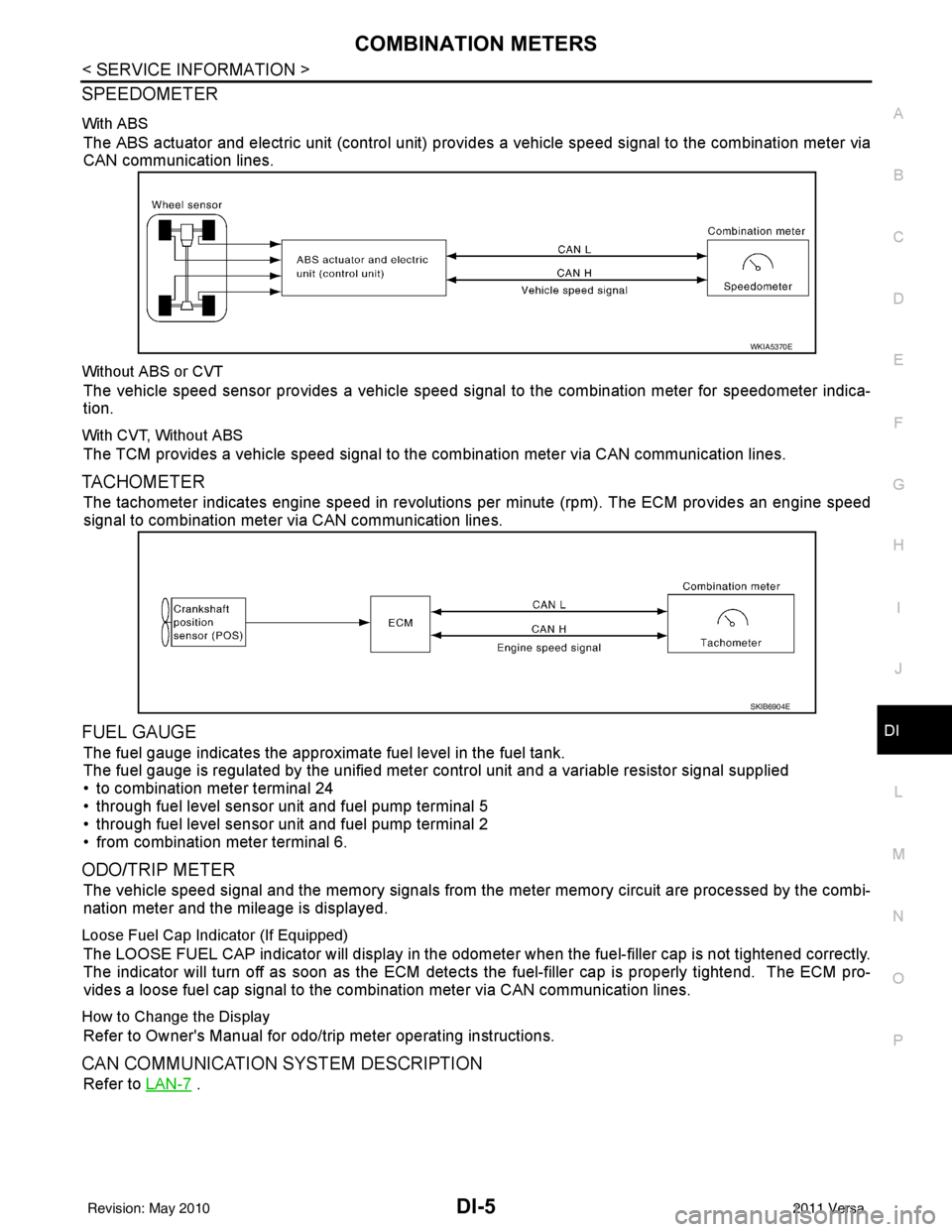
With ABS
The ABS actuator and electric unit (control unit) provi des a vehicle speed signal to the combination meter via
CAN communication lines.
Without ABS or CVT
The vehicle speed sensor provides a vehicle speed signal to the combination meter for speedometer indica-
tion.
With CVT, Without ABS
The TCM provides a vehicle speed signal to the combination meter via CAN communication lines.
TACHOMETER
The tachometer indicates engine speed in revolutions per minute (rpm). The ECM provides an engine speed
signal to combination meter via CAN communication lines.
FUEL GAUGE
The fuel gauge indicates the approximate fuel level in the fuel tank.
The fuel gauge is regulated by the unified meter control unit and a variable resistor signal supplied
• to combination meter terminal 24
• through fuel level sensor unit and fuel pump terminal 5
• through fuel level sensor unit and fuel pump terminal 2
• from combination meter terminal 6.
ODO/TRIP METER
The vehicle speed signal and the memory signals from the meter memory circuit are processed by the combi-
nation meter and the mileage is displayed.
Loose Fuel Cap Indicator (If Equipped)
The LOOSE FUEL CAP indicator will display in the odomet er when the fuel-filler cap is not tightened correctly.
The indicator will turn off as soon as the ECM detects the fuel-filler cap is properly tightend. The ECM pro-
vides a loose fuel cap signal to the combination meter via CAN communication lines.
How to Change the Display
Refer to Owner's Manual for odo/trip meter operating instructions.
CAN COMMUNICATION SYSTEM DESCRIPTION
Refer to LAN-7 .
WKIA5370E
SKIB6904E
Revision: May 2010 2011 Versa
Page 1250 of 3787
COMBINATION METERSDI-11
< SERVICE INFORMATION >
C
DE
F
G H
I
J
L
M A
B
DI
N
O P
Self-Diagnosis Mode of Combination MeterINFOID:0000000005929166
SELF-DIAGNOSIS MODE FUNCTION
• Self-diagnosis can check for continuity between meter control circuit and each meter (speedometer, tachom- eter and fuel gauge).
• Self-diagnosis can check for odo/trip meter and A/T indi cator (with A/T) or CVT indicator (with CVT) seg-
ment, low-fuel level warning lamp, low water temperature indicator lamp, and high water temperature warn-
ing lamp.
OPERATION PROCEDURE
1. Turn the ignition switch ON, and switch the odo/trip meter to “trip A” or “trip B”. NOTE:
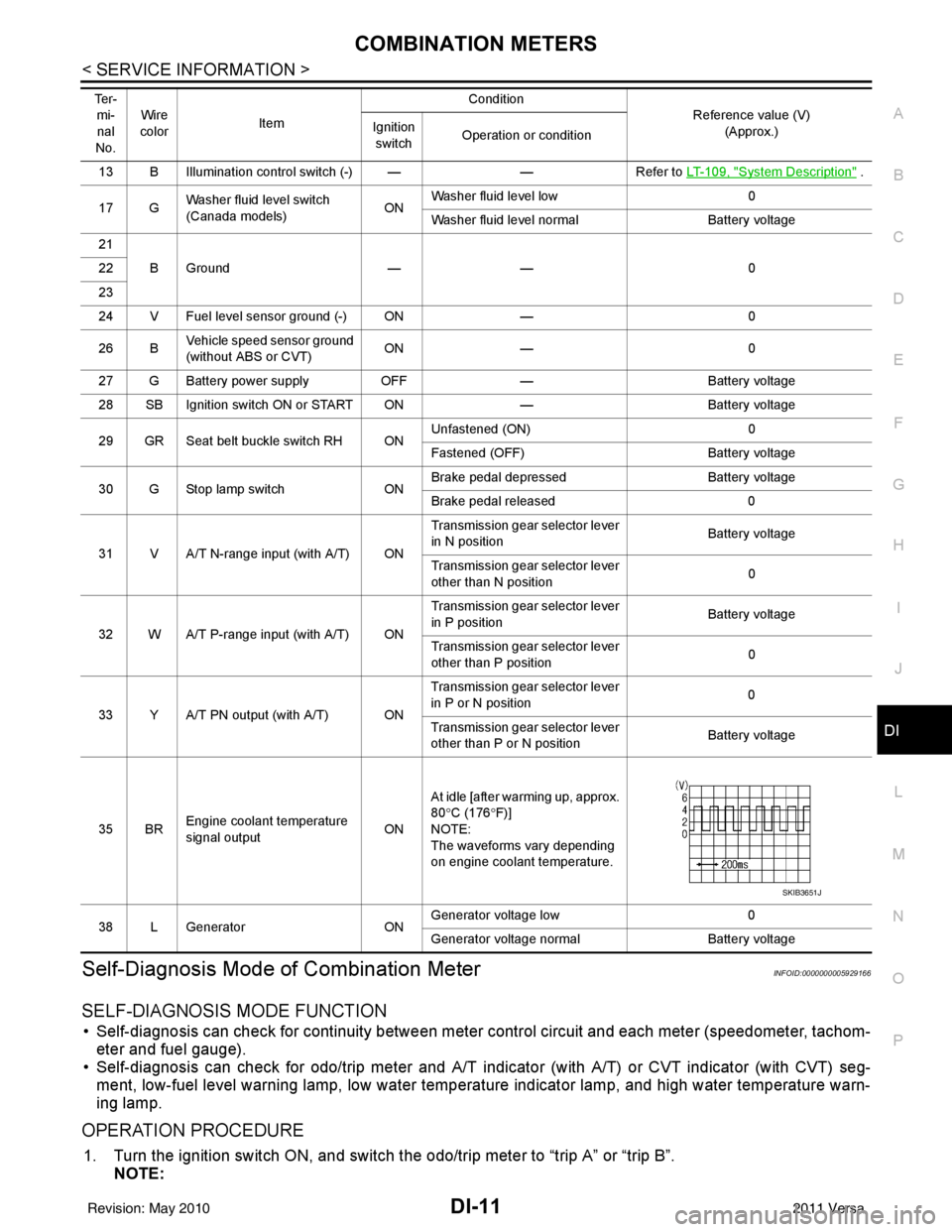
13 B Illumination control switch (-) — —Refer to LT- 1 0 9 , "System Description" .
17 G Washer fluid level switch
(Canada models)
ONWasher fluid level low
0
Washer fluid level normal Battery voltage
21 BGround —— 0
22
23
24 V Fuel level sensor ground (-) ON —0
26 B Vehicle speed sensor ground
(without ABS or CVT) ON
— 0
27 G Battery power supply OFF— Battery voltage
28 SB Ignition switch ON or START ON —Battery voltage
29 GR Seat belt buckle switch RH ON Unfastened (ON)
0
Fastened (OFF) Battery voltage
30 G Stop lamp switch ONBrake pedal depressed
Battery voltage
Brake pedal released 0
31 V A/T N-range input (with A/T) ON Transmission gear selector lever
in N position
Battery voltage
Transmission gear selector lever
other than N position 0
32 W A/T P-range input (with A/T) ON Transmission gear selector lever
in P position
Battery voltage
Transmission gear selector lever
other than P position 0
33 Y A/T PN output (with A/T) ON Transmission gear selector lever
in P or N position
0
Transmission gear selector lever
other than P or N position Battery voltage
35 BR Engine coolant temperature
signal output
ONAt idle [after warming up, approx.
80
°C (176 °F)]
NOTE:
The waveforms vary depending
on engine coolant temperature.
38 L Generator ONGenerator voltage low
0
Generator voltage no rmal Battery voltage
Te r -
mi-
nal
No. Wire
color Item Condition
Reference value (V)
(Approx.)
Ignition
switch Operation or condition
SKIB3651J
Revision: May 2010
2011 Versa
Page 1252 of 3787

COMBINATION METERSDI-13
< SERVICE INFORMATION >
C
DE
F
G H
I
J
L
M A
B
DI
N
O P
CONSULT-III Function (METER/M&A)INFOID:0000000005929167
CONSULT-III can display each diagnostic item us ing the diagnostic test modes shown following.
SELF-DIAGNOSTIC RESULTS
Display Item List
NOTE:
“TIME” indicates the following.
• 0: Indicates that a malfunction is detected at present.
• 1-63: Indicates that a malfunction was detected in the past. (Displays number of ignition switch OFF → ON
cycles after malfunction is detected. Self-di agnostic result is erased when “63” is exceeded.)
DATA MONITOR
Display Item List
METER diagnosis mode Description
SELF-DIAG RESULTS Displays combination meter self-diagnosis results. DATA MONITOR Displays combination meter input/output data in real time.
CAN DIAG SUPPORT MNTR The result of transmit/receive diagnosis of CAN communication can be read.
CONSULT-III display MalfunctionReference page
CAN COMM CIRC [U1000] Malfunction is detected in CAN communication lines.
CAUTION:
Even when there is no malfuncti
on on CAN communication system, mal-
function may be misinterpreted when battery has low voltage (when main-
taining 7 - 8 V for about 2 seconds) or 10A fuse [No. 14, located in the fuse
block (J/B)] is removed. DI-19
VEHICLE SPEED CIRC [B2205]
Malfunction is detected when an erroneous speed signal is input.
CAUTION:
Even when there is no malfunction
on speed signal system, malfunctions
may be misinterpreted when battery has low voltage (when maintaining 7
- 8 V for about 2 seconds). DI-16
Display item [Unit]
MAIN
SIGNALS SELECTION
FROM MENU Contents
SPEED METER [km/h] XXThe value of vehicle speed signa
l, which is input from ABS ac-
tuator and electric unit (control unit).
SPEED OUTPUT [km/h] XXThe value of vehicle speed signal, which is transmitted to each
unit with CAN communication.
TACHO METER [rpm] XX The value of engine speed signal, which is input from ECM.
W TEMP METER [ °C] X XThe value of engine coolant temperature signal, which is input
from ECM.
FUEL METER [lit.] XXThe value, which processes a resistance signal from fuel
gauge.
DISTANCE [km] XXThe value, which is calculated by vehicle speed signal from
ABS actuator and electric unit (control unit), fuel gauge and fuel
consumption signal from ECM.
FUEL W/L [ON/OFF] XX Indicates [ON/OFF] condition of low-fuel warning lamp.
C-ENG W/L [ON/OFF] XIndicates [ON/OFF] condition of malfunction indicator lamp
(MIL).
AIR PRES W/L X Indicates [ON/OFF] condition of low tire pressure warning lamp.
SEAT BELT W/L X Indicates [ON/OFF] condition of seat belt warning lamp.
BUZZER [ON/OFF] XX Indicates [ON/OFF] condition of buzzer.
DOOR W/L [ON/OFF] X Indicates [ON/OFF] condition of door warning lamp.
HI-BEAM IND [ON/OFF] X Indicates [ON/OFF] condition of high beam indicator lamp.
Revision: May 2010 2011 Versa
Page 1255 of 3787
DI-16
< SERVICE INFORMATION >
COMBINATION METERS
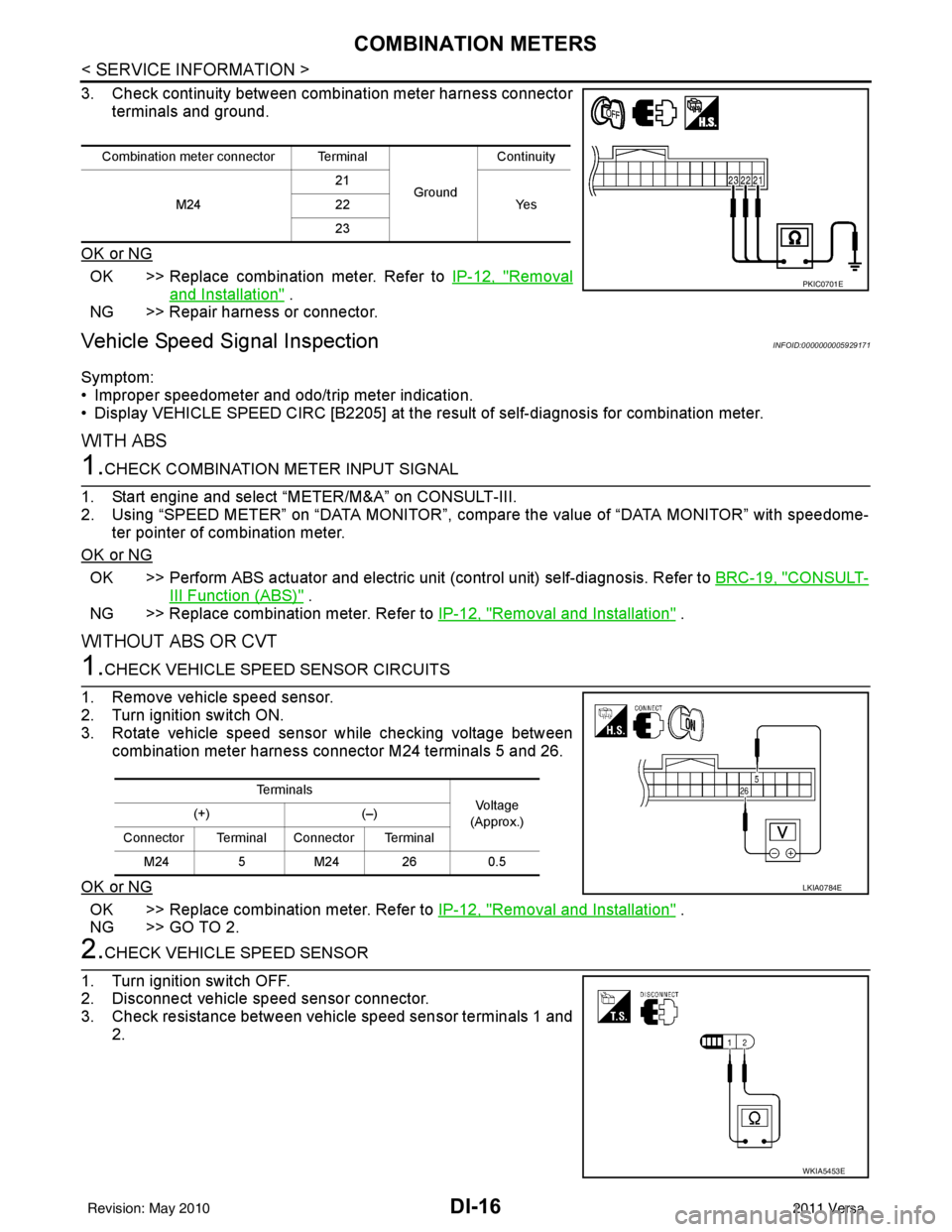
3. Check continuity between combination meter harness connectorterminals and ground.
OK or NG
OK >> Replace combination meter. Refer to IP-12, "Removal
and Installation" .
NG >> Repair harness or connector.
Vehicle Speed Signal InspectionINFOID:0000000005929171
Symptom:
• Improper speedometer and odo/trip meter indication.
• Display VEHICLE SPEED CIRC [B2205] at the result of self-diagnosis for combination meter.
WITH ABS
1.CHECK COMBINATION METER INPUT SIGNAL
1. Start engine and select “METER/M&A” on CONSULT-III.
2. Using “SPEED METER” on “DATA MONITOR”, comp are the value of “DATA MONITOR” with speedome-
ter pointer of combination meter.
OK or NG
OK >> Perform ABS actuator and electric uni t (control unit) self-diagnosis. Refer to BRC-19, "CONSULT-
III Function (ABS)" .
NG >> Replace combination meter. Refer to IP-12, "
Removal and Installation" .
WITHOUT ABS OR CVT
1.CHECK VEHICLE SPEED SENSOR CIRCUITS
1. Remove vehicle speed sensor.
2. Turn ignition switch ON.
3. Rotate vehicle speed sensor while checking voltage between combination meter harness connector M24 terminals 5 and 26.
OK or NG
OK >> Replace combination meter. Refer to IP-12, "Removal and Installation" .
NG >> GO TO 2.
2.CHECK VEHICLE SPEED SENSOR
1. Turn ignition switch OFF.
2. Disconnect vehicle speed sensor connector.
3. Check resistance between vehicle speed sensor terminals 1 and 2.
Combination meter connector Terminal
GroundContinuity
M24 21
Ye s
22
23
PKIC0701E
Te r m i n a l s
Voltag e
(Approx.)
(+)
(–)
Connector Terminal Connector Terminal M24 5M24 26 0.5
LKIA0784E
WKIA5453E
Revision: May 2010 2011 Versa