BL-1 NISSAN TIIDA 2011 Service User Guide
[x] Cancel search | Manufacturer: NISSAN, Model Year: 2011, Model line: TIIDA, Model: NISSAN TIIDA 2011Pages: 3787, PDF Size: 78.35 MB
Page 528 of 3787
BL-18
< SERVICE INFORMATION >
HOOD
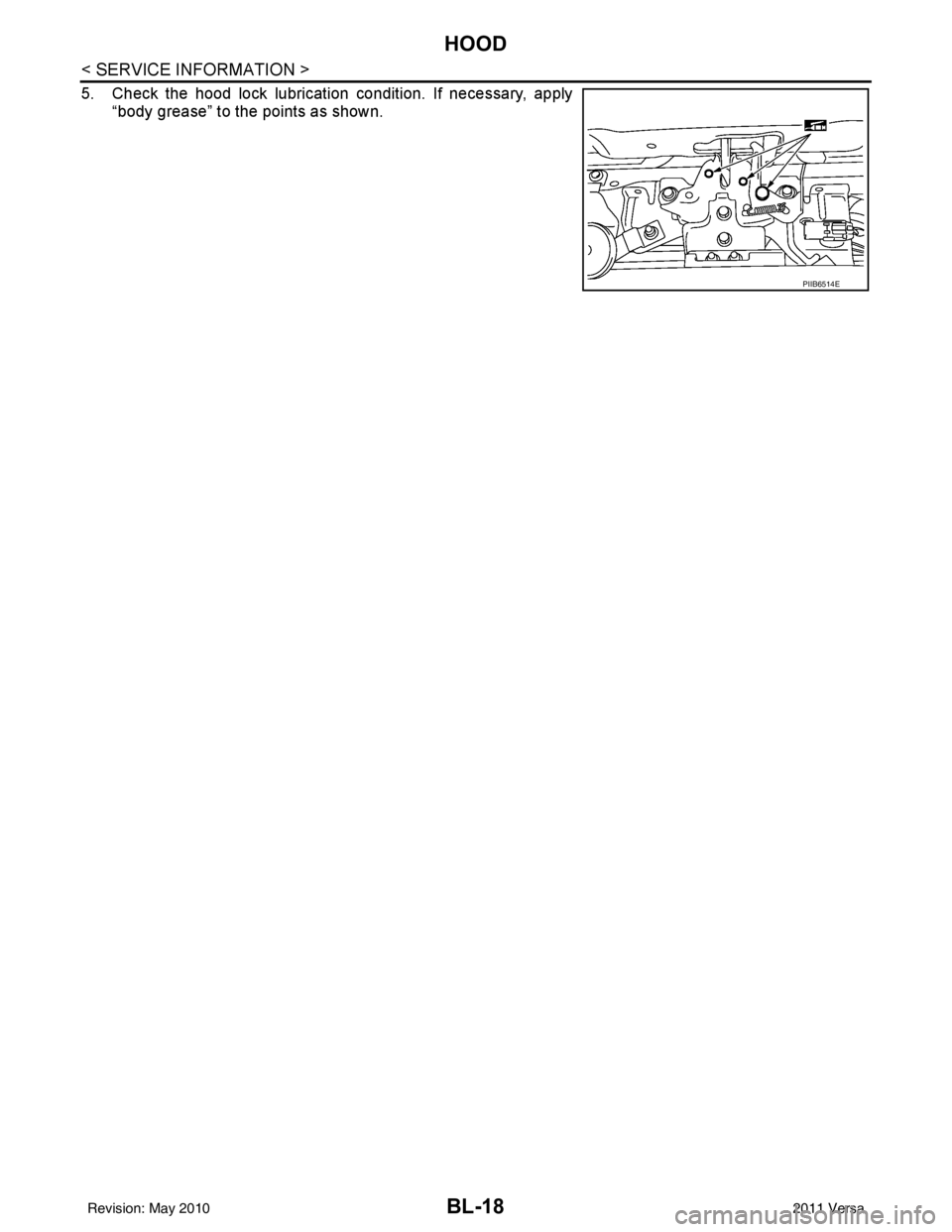
5. Check the hood lock lubrication condition. If necessary, apply“body grease” to the points as shown.
PIIB6514E
Revision: May 2010 2011 Versa
Page 529 of 3787
RADIATOR CORE SUPPORTBL-19
< SERVICE INFORMATION >
C
DE
F
G H
J
K L
M A
B
BL
N
O P
RADIATOR CORE SUPPORT
Removal and InstallationINFOID:0000000005929280
REMOVAL
Radiator Core Support Upper
1. Remove the air duct. Refer to EM-135, "Removal and Installation" .
2. Remove the headlamp (LH/RH). Refer to LT-25, "
Removal and Installation" .
3. Remove the hood lock assembly, and remove hood lock cable. Refer to BL-15
.
4. Remove the air guide and hood lock cable clip.
5. Remove the washer tank inlet. Refer to WW-25, "
Removal and Installation of Washer Tank" .
6. Remove the radiator core support upper.
Radiator Core Support Lower
1. Remove the air duct. Refer to EM-135, "Removal and Installation" .
2. Remove the front bumper. Refer to EI-15, "
Removal and Installation" .
3. Remove the headlamp (LH/RH). Refer to LT-25, "
Removal and Installation" .
4. Remove the hood lock assembly, and remove hood lock cable. Refer to BL-15
.
5. Remove the air guide and hood lock cable mounting clip.
6. Remove the front bumper reinforcement. Refer to EI-15, "
Removal and Installation" .
7. Remove the radiator core lower stay.
8. Remove the undercover.
PIIB6515E
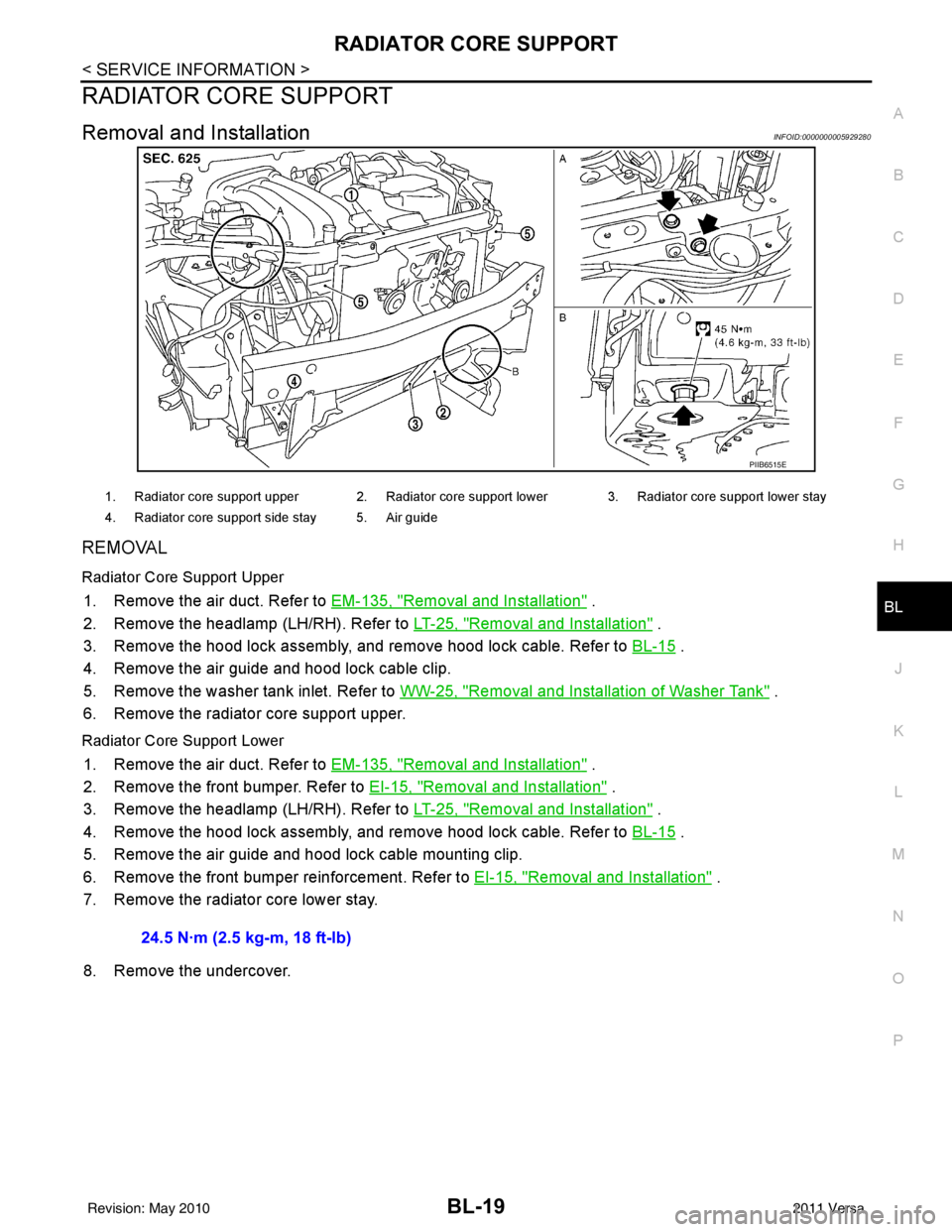
1. Radiator core support upper 2. Radiator core support lower 3. Radiator core support lower stay
4. Radiator core support side stay 5. Air guide
24.5 N·m (2.5 kg-m, 18 ft-lb)
Revision: May 2010 2011 Versa
Page 531 of 3787
FRONT FENDERBL-21
< SERVICE INFORMATION >
C
DE
F
G H
J
K L
M A
B
BL
N
O P
FRONT FENDER
Removal and InstallationINFOID:0000000005929281
REMOVAL
1. Remove the headlamp assemblies. Refer to LT-25, "Removal and Installation".
2. Remove the cowl top cover (LH/RH). Refer to EI-24, "
Removal and Installation".
3. Remove the front fender protector. Refer to EI-26, "
Component".
4. Remove the bolt and the front fender.
CAUTION:
While removing use a shop cloth to pr otect the vechicle body from damage.
INSTALLATION
Installation is in the reverse order of removal.
CAUTION:
• After installing, apply touch-up paint on to the head of the front fender bolts.
• After installing, check front fender adjustment. Refer to BL-13, "
Fitting Adjustment" and BL-160, "Fit-
ting Adjustment".
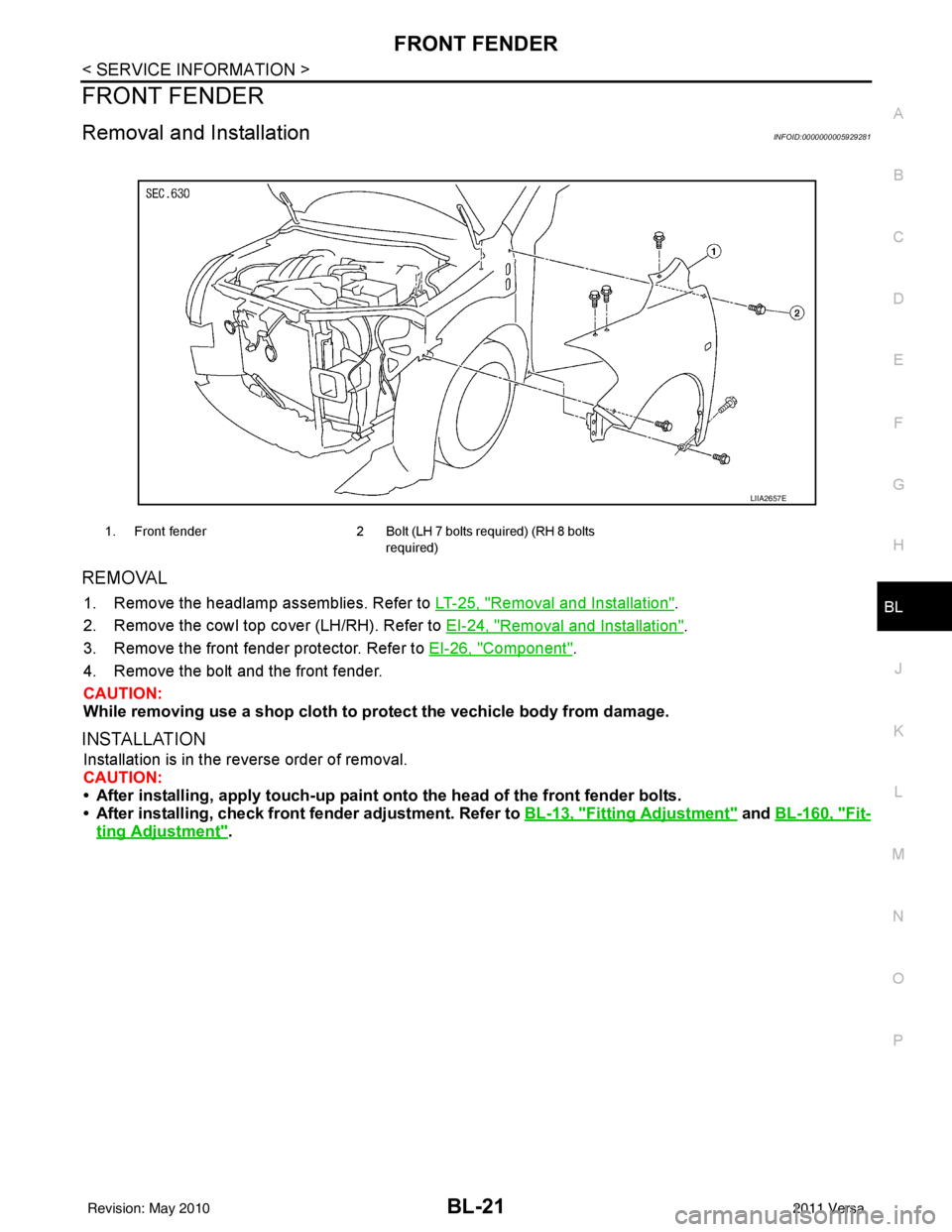
1. Front fender 2 Bolt (LH 7 bolts required) (RH 8 bolts
required)
LIIA2657E
Revision: May 2010 2011 Versa
Page 551 of 3787

POWER DOOR LOCK SYSTEMBL-41
< SERVICE INFORMATION >
C
DE
F
G H
J
K L
M A
B
BL
N
O P
1: With Intelligent Key
2: Without Intelligent Key
3: Hatchback without Intelligent Key
4: Sedan without Intelligent Key
5: Hatchback
6: Sedan
7: With power door locks
8: With power windows
Work FlowINFOID:0000000005929290
1. Check the symptom and customer's requests.
2. Understand the outline of system. Refer to BL-23, "
System Description" .
3. According to the trouble diagnosis chart, repair or replace the cause of the malfunction. Refer to BL-119,
"Trouble Diagnosis Symptom Chart" .
4. Does power door lock system operate normally? OK: GO TO 5, NG: GO TO 3.
5. Inspection End.
CONSULT-III Function (BCM)INFOID:0000000005929291
CONSULT-III can display each diagnostic item using the diagnostic test modes shown following.
63 BR Interior room lamp Output OFF Any door
switchON (open)
0V
OFF (closed) Battery voltage
65
7SB All door lock actuators
(lock) Output OFFOFF (neutral)
0V
ON (lock) Battery voltage
66
7G Front door lock actua-
tor RH, rear door lock
actuators LH/RH (un-
lock) Output OFFOFF (neutral)
0V
ON (unlock) Battery voltage
67 B Ground Input ON—0V
68
8L Power window power
supply (RAP)
Output —Ignition switch ON
Battery voltage
Within 45 seconds after igni-
tion switch OFF Battery voltage
More than 45 seconds after ig-
nition switch OFF 0V
When front door LH or RH is
open or power window timer
operates 0V
69
8P Battery power supply OutputOFF
— Battery voltage
70 Y Battery power supply Input OFF —Battery voltage
Te r m i n a l
Wire
color Signal name Signal
input/
output Measuring condition
Reference value or waveform
(Approx.)
Ignition
switch Operation or condition
Diagnostic mode
Description
WORK SUPPORT Supports inspections and adjustments. Commands are transmitted to the BCM for setting the status
suitable for required operation, input/output signals are received from the BCM and received date
is displayed.
DATA MONITOR Displays BCM input/output data in real time. ACTIVE TEST Operation of electrical loads can be checked by sending drive signal to them.
SELF DIAGNOSTIC RESULT Displays BCM self-diagnosis results.
CAN DIAG SUPPORT MNTR The result of transmit/receive diagnosis of CAN communication can be read.
Revision: May 2010 2011 Versa
Page 563 of 3787
POWER DOOR LOCK SYSTEMBL-53
< SERVICE INFORMATION >
C
DE
F
G H
J
K L
M A
B
BL
N
O P
1. Reconnect BCM.
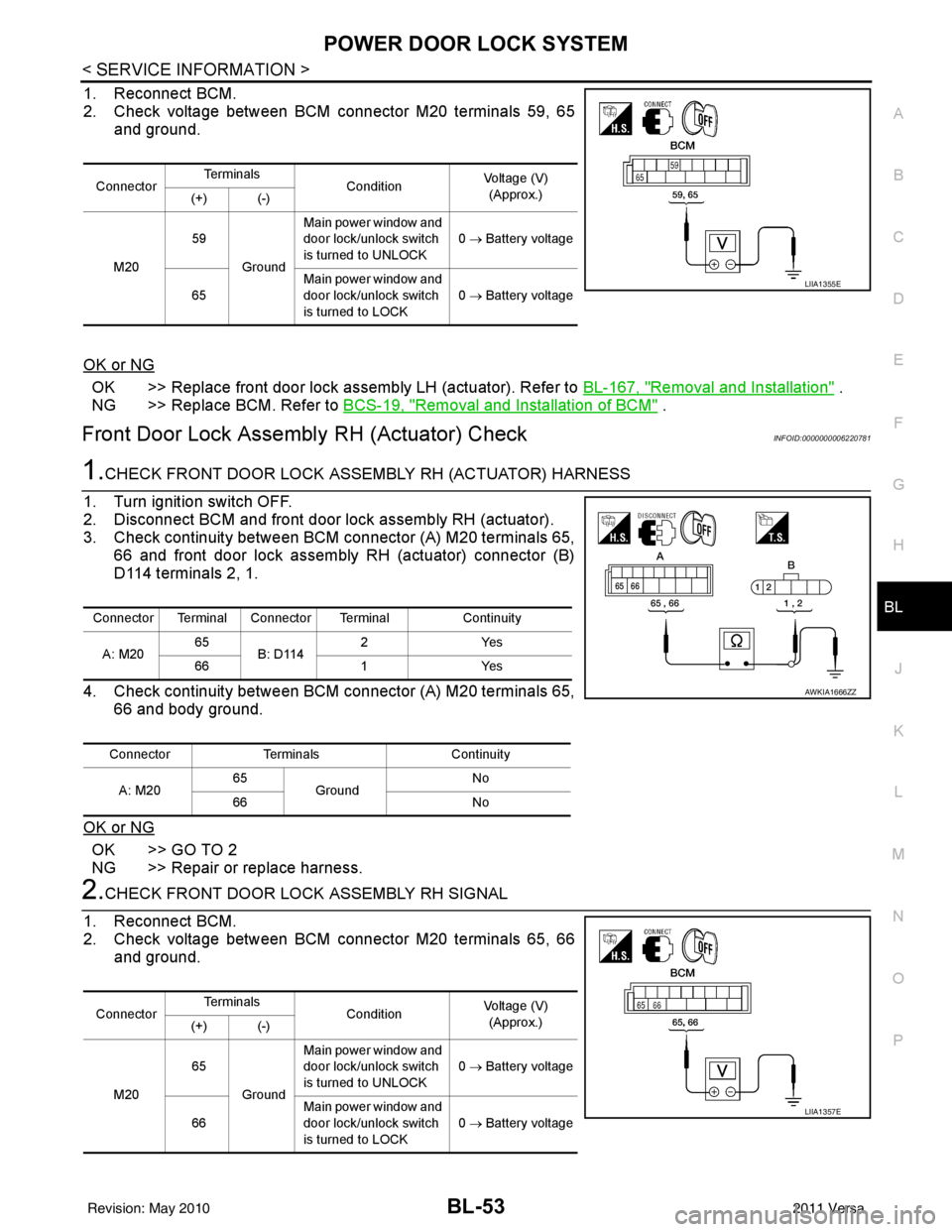
2. Check voltage between BCM connector M20 terminals 59, 65 and ground.
OK or NG
OK >> Replace front door lock assembly LH (actuator). Refer to BL-167, "Removal and Installation" .
NG >> Replace BCM. Refer to BCS-19, "
Removal and Installation of BCM" .
Front Door Lock Assembly RH (Actuator) CheckINFOID:0000000006220781
1.CHECK FRONT DOOR LOCK ASSEMBLY RH (ACTUATOR) HARNESS
1. Turn ignition switch OFF.
2. Disconnect BCM and front door lock assembly RH (actuator).
3. Check continuity between BCM connector (A) M20 terminals 65, 66 and front door lock assembly RH (actuator) connector (B)
D114 terminals 2, 1.
4. Check continuity between BCM connector (A) M20 terminals 65, 66 and body ground.
OK or NG
OK >> GO TO 2
NG >> Repair or replace harness.
2.CHECK FRONT DOOR LOCK ASSEMBLY RH SIGNAL
1. Reconnect BCM.
2. Check voltage between BCM connector M20 terminals 65, 66 and ground.
Connector Te r m i n a l s
ConditionVoltage (V)
(Approx.)
(+) (-)
M20 59
Ground Main power window and
door lock/unlock switch
is turned to UNLOCK
0
→ Battery voltage
65 Main power window and
door lock/unlock switch
is turned to LOCK 0
→ Battery voltage
LIIA1355E
Connector Terminal Connector Terminal Continuity
A: M20 65
B: D114 2Y
es
66 1Yes
Connector Terminals Continuity
A: M20 65
Ground No
66 No
AWKIA1666ZZ
ConnectorTe r m i n a l s
ConditionVoltage (V)
(Approx.)
(+) (-)
M20 65
Ground Main power window and
door lock/unlock switch
is turned to UNLOCK
0
→ Battery voltage
66 Main power window and
door lock/unlock switch
is turned to LOCK
0
→ Battery voltage
LIIA1357E
Revision: May 2010 2011 Versa
Page 564 of 3787
BL-54
< SERVICE INFORMATION >
POWER DOOR LOCK SYSTEM
OK or NG
OK >> Replace front door lock assembly RH (actuator). Refer to BL-167, "Removal and Installation" .
NG >> Replace BCM. Refer to BCS-19, "
Removal and Installation of BCM" .
Rear Door Lock Actuator LH/RH CheckINFOID:0000000005929299
1.CHECK DOOR LOCK ACTUATOR HARNESS
NOTE:
For models with Intelligent Key, insure that passenger select unlock relay remains connected during this test.
1. Turn ignition switch OFF.
2. Disconnect BCM and each door lock actuator.
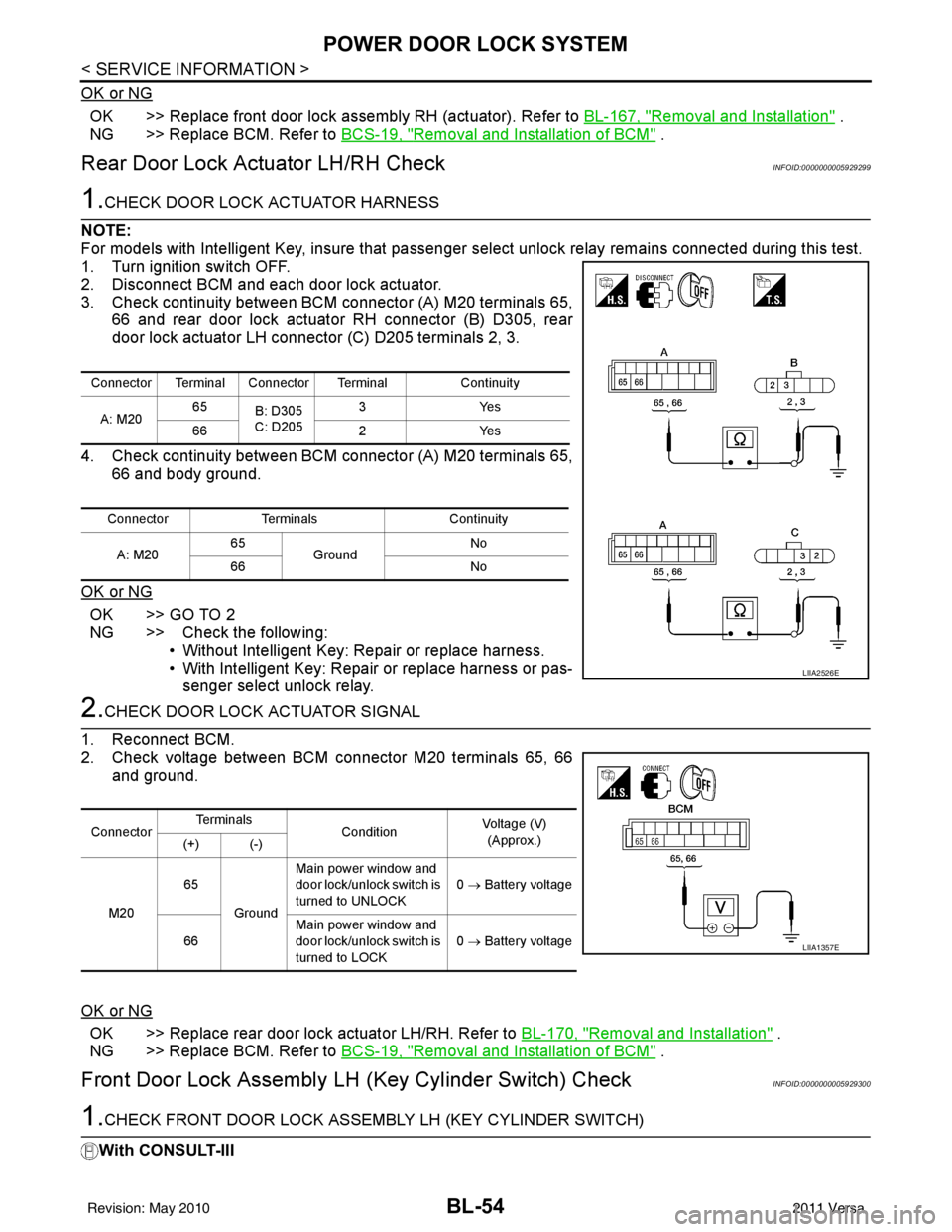
3. Check continuity between BCM connector (A) M20 terminals 65, 66 and rear door lock actuator RH connector (B) D305, rear
door lock actuator LH connector (C) D205 terminals 2, 3.
4. Check continuity between BCM connector (A) M20 terminals 65, 66 and body ground.
OK or NG
OK >> GO TO 2
NG >> Check the following: • Without Intelligent Key: Repair or replace harness.
• With Intelligent Key: Repair or replace harness or pas-senger select unlock relay.
2.CHECK DOOR LOCK ACTUATOR SIGNAL
1. Reconnect BCM.
2. Check voltage between BCM connector M20 terminals 65, 66 and ground.
OK or NG
OK >> Replace rear door lock actuator LH/RH. Refer to BL-170, "Removal and Installation" .
NG >> Replace BCM. Refer to BCS-19, "
Removal and Installation of BCM" .
Front Door Lock Assembly LH (Key Cylinder Switch) CheckINFOID:0000000005929300
1.CHECK FRONT DOOR LOCK ASSEMB LY LH (KEY CYLINDER SWITCH)
With CONSULT-III
Connector Terminal Connector Terminal Continuity
A: M20 65
B: D305
C: D205 3Y
es
66 2Yes
Connector Terminals Continuity
A: M20 65
Ground No
66 No
LIIA2526E
ConnectorTe r m i n a l s
ConditionVoltage (V)
(Approx.)
(+) (-)
M20 65
Ground Main power window and
door lock/unlock switch is
turned to UNLOCK
0
→ Battery voltage
66 Main power window and
door lock/unlock switch is
turned to LOCK 0
→ Battery voltage
LIIA1357E
Revision: May 2010 2011 Versa
Page 565 of 3787
POWER DOOR LOCK SYSTEMBL-55
< SERVICE INFORMATION >
C
DE
F
G H
J
K L
M A
B
BL
N
O P
Check front door key cylinder switch ("KEY CYL LK -SW") and ("KEY CYL UN-SW) in DATA MONITOR mode
in CONSULT–III. Refer to BL-41, "
CONSULT-III Function (BCM)" .
• When key inserted in front key cylinder is turned to LOCK:
• When key inserted in front key cylinder is turned to UNLOCK:
Without CONSULT-III
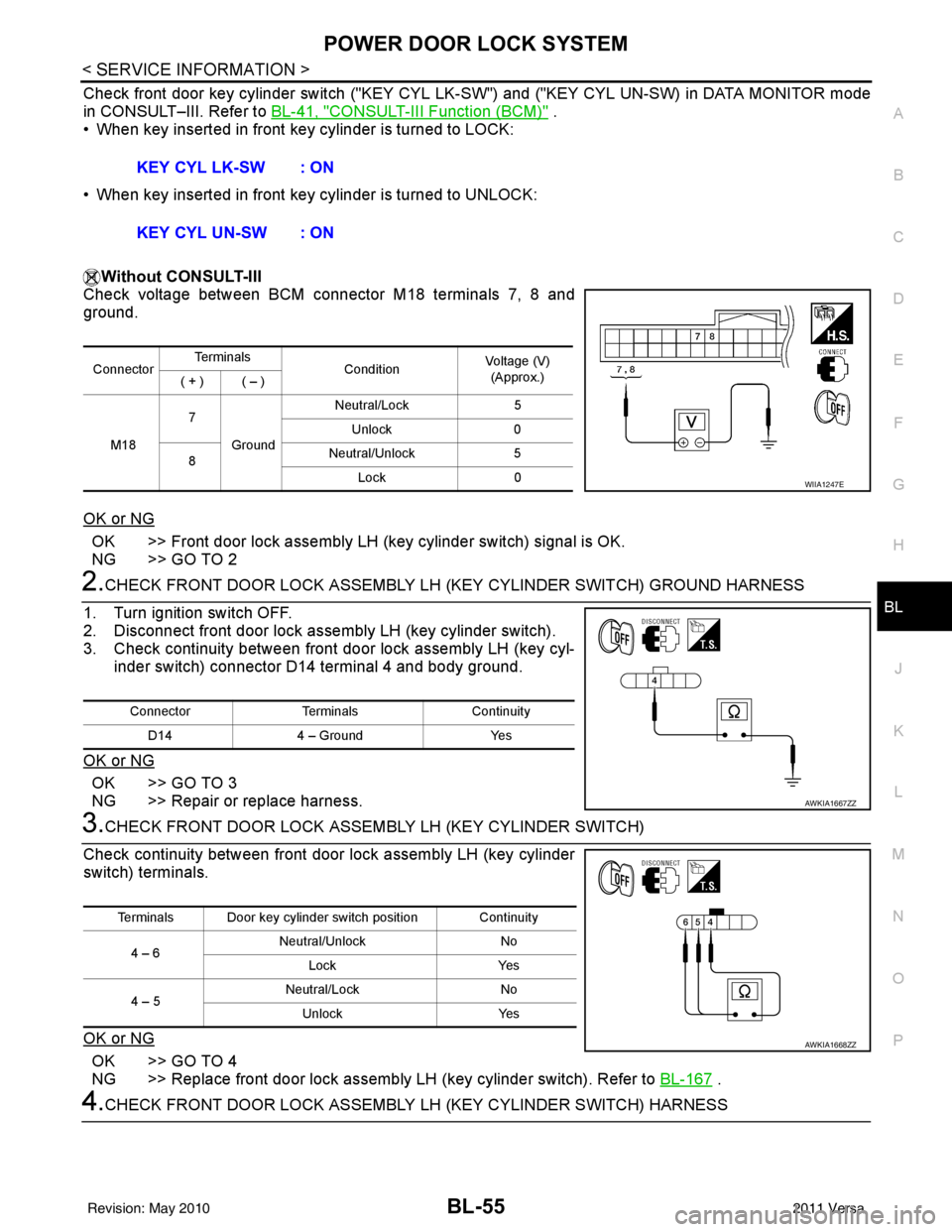
Check voltage between BCM connector M18 terminals 7, 8 and
ground.
OK or NG
OK >> Front door lock assembly LH (key cylinder switch) signal is OK.
NG >> GO TO 2
2.CHECK FRONT DOOR LOCK ASSEMBLY LH (KEY CYLINDER SWITCH) GROUND HARNESS
1. Turn ignition switch OFF.
2. Disconnect front door lock assembly LH (key cylinder switch).
3. Check continuity between front door lock assembly LH (key cyl- inder switch) connector D14 terminal 4 and body ground.
OK or NG
OK >> GO TO 3
NG >> Repair or replace harness.
3.CHECK FRONT DOOR LOCK ASSEM BLY LH (KEY CYLINDER SWITCH)
Check continuity between front door lock assembly LH (key cylinder
switch) terminals.
OK or NG
OK >> GO TO 4
NG >> Replace front door lock assembly LH (key cylinder switch). Refer to BL-167
.
4.CHECK FRONT DOOR LOCK ASSEMBLY LH (KEY CYLINDER SWITCH) HARNESS
KEY CYL LK-SW : ON
KEY CYL UN-SW : ON
Connector
Te r m i n a l s
ConditionVoltage (V)
(Approx.)
( + ) ( – )
M18 7
Ground Neutral/Lock
5
Unlock 0
8 Neutral/Unlock
5
Lock 0
WIIA1247E
Connector TerminalsContinuity
D14 4 – Ground Yes
AWKIA1667ZZ
Terminals Door key cylinder switch position Continuity
4 – 6 Neutral/Unlock
No
Lock Yes
4 – 5 Neutral/Lock
No
Unlock Yes
AWKIA1668ZZ
Revision: May 2010 2011 Versa
Page 567 of 3787
POWER DOOR LOCK SYSTEMBL-57
< SERVICE INFORMATION >
C
DE
F
G H
J
K L
M A
B
BL
N
O P
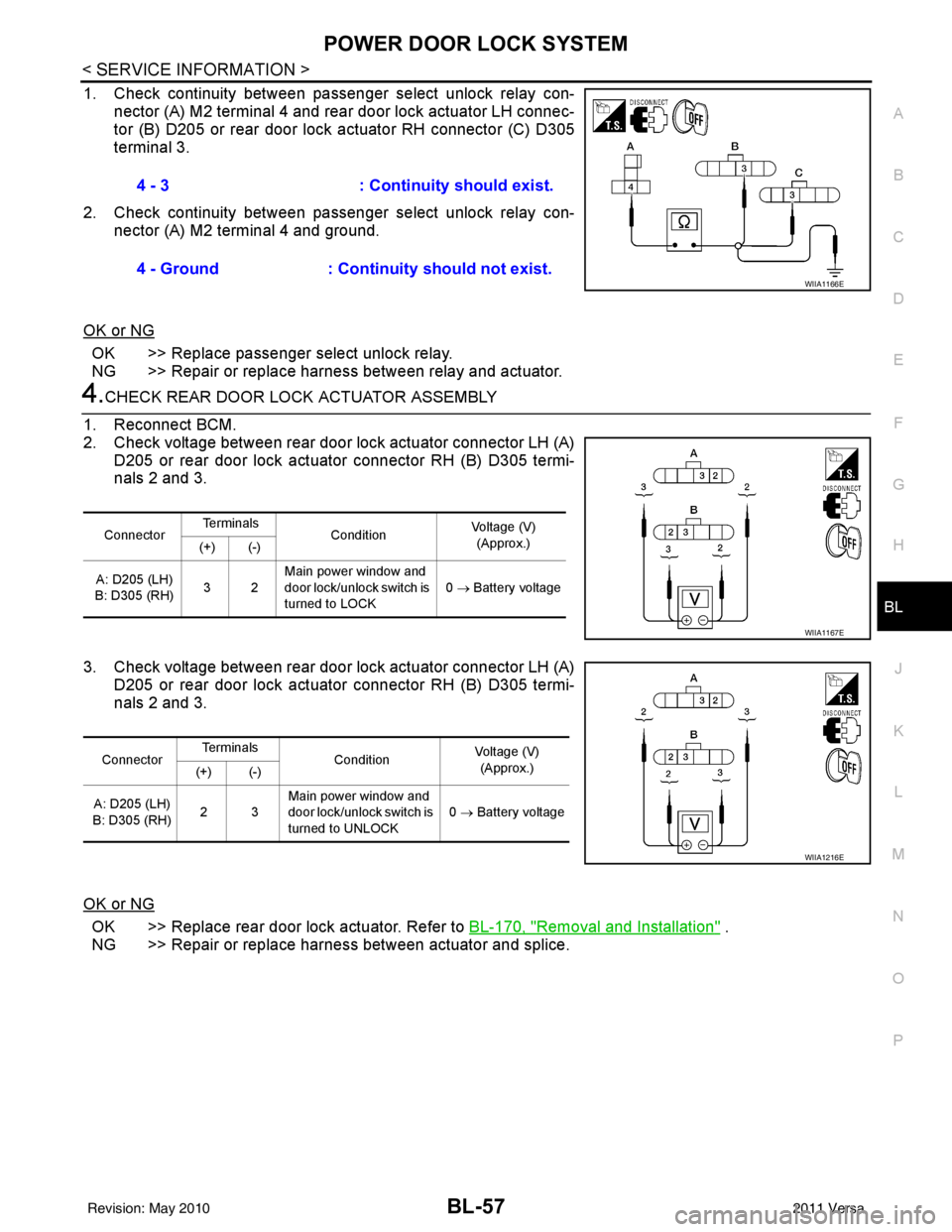
1. Check continuity between passenger select unlock relay con- nector (A) M2 terminal 4 and rear door lock actuator LH connec-
tor (B) D205 or rear door lock actuator RH connector (C) D305
terminal 3.
2. Check continuity between passenger select unlock relay con- nector (A) M2 terminal 4 and ground.
OK or NG
OK >> Replace passenger select unlock relay.
NG >> Repair or replace harness between relay and actuator.
4.CHECK REAR DOOR LOCK ACTUATOR ASSEMBLY
1. Reconnect BCM.
2. Check voltage between rear door lock actuator connector LH (A) D205 or rear door lock actuator connector RH (B) D305 termi-
nals 2 and 3.
3. Check voltage between rear door lock actuator connector LH (A) D205 or rear door lock actuator connector RH (B) D305 termi-
nals 2 and 3.
OK or NG
OK >> Replace rear door lock actuator. Refer to BL-170, "Removal and Installation" .
NG >> Repair or replace harness between actuator and splice. 4 - 3
: Continuity should exist.
4 - Ground : Continuity should not exist.
WIIA1166E
ConnectorTe r m i n a l s
Condition Voltage (V)
(Approx.)
(+) (-)
A: D205 (LH)
B: D305 (RH) 32Main power window and
door lock/unlock switch is
turned to LOCK 0
→ Battery voltage
WIIA1167E
Connector Te r m i n a l s
Condition Voltage (V)
(Approx.)
(+) (-)
A: D205 (LH)
B: D305 (RH) 23Main power window and
door lock/unlock switch is
turned to UNLOCK 0
→ Battery voltage
WIIA1216E
Revision: May 2010 2011 Versa
Page 602 of 3787

BL-92
< SERVICE INFORMATION >
INTELLIGENT KEY SYSTEM
The headlamp flashes and the horn sounds intermittently.
The alarm automatically turns off:
• After 25 seconds
• When Intelligent Key unit receives any signal from remote controller of Intelligent Key
• When door request switch is pressed (Intelligent Key is outside vehicle)
Panic alarm function's press and holding time value can be changed in “PANIC ALARM DELAY” mode in
“WORK SUPPORT”. Refer to BL-117, "
CONSULT-III Application Item".
List of Operation Related Parts
Parts marked with × are the parts related to operation.
ENGINE START FUNCTION
When the registered Intelligent Key is carried, the engine can be started without inserting the key.
When ignition knob switch is ON (press ignition switch ), Intelligent Key unit searches Intelligent Key in the
vehicle using inside key antenna.
Then Intelligent Key is inside the vehicle, it performs the following operation.
• Illuminate green “KEY” warning lamp in combination meter.
• Released steering lock and ignition switch can be turned from OFF to ACC, ON or START position.
NOTE:
If Intelligent Key is not registered, “KEY” warning lamp in combination meter illuminates red.
• Intelligent Key sends engine start signal to BCM via CAN communication line.
When ignition switch turns to START position, BCM sends starter request signal to IPDM E/R. Then, engine
starts.
Remote keyless entry functions
Intelligent Key
Key switch
Ignition knob switch
Door request switch
Door switch
Back door lock assembly (back door switch)
Door lock actuator
Intelligent Key warning buzzer
Intelligent Key unit
CAN communication system
BCM
Hazard warning lamp
Horn
IPDM E/R
Head lamp
Door lock/unlock function by Intelligent Key button × ××× ×××
Hazard and buzzer reminder function ×××××
Auto door lock function ×× ××× ×××
Panic alarm function ×××× ××× ×××
WIIA1282E
Revision: May 2010 2011 Versa
Page 605 of 3787

INTELLIGENT KEY SYSTEMBL-95
< SERVICE INFORMATION >
C
DE
F
G H
J
K L
M A
B
BL
N
O P
CHANGE SETTINGS FUNCTION
The settings for each function c an be changed with the CONSULT-III.
Changing Settings Using CONSULT-III
The settings for the Intelligent Key system func tions can be changed using CONSULT-III (WORK SUPPORT).
Refer to BL-117, "
CONSULT-III Application Item".
NOTE:
Once a function setting is changed, it will remain effective even if the battery is disconnected.
INTELLIGENT KEY REGISTRATION
Intelligent Key-ID registration is performed using the CONSULT-III.
CAUTION:
• After a new Intelligent Key-ID is registered, be sure to check the function.
• When registering an additional Intelligent Key-ID , take any Intelligent Keys already registered and
Intelligent Keys for any other vehicles out of the vehicle before starting.
CONSULT-III can be used to check and delete Intelligent Key-IDs.
For further information, see the CONS ULT-III Operation Manual NATS.
STEERING LOCK SOLENOID REGISTRATION
Steering Lock Solenoid ID Registration
CAUTION:
• The method for registering a steering lock solenoid ID depends on the status of the steering lock
solenoid and Intelligent Key unit (new or old unit).
• After registration is completed, press ignition switch with an Intelligent Key in the vehicle so that it can be turned, and confirm that it cannot be turned even when ignition sw itch is pressed without an
Intelligent Key in the vehicle.
For further information, see the CONSULT-III Operation Manual NATS-IVIS/NVIS.
CAN Communication System DescriptionINFOID:0000000005929329
Refer to LAN-7.
Warning and alarm functions
Intelligent Key
Key switch
Ignition knob switch
Ignition switch ACC position input signal
Ignition switch ON position input signal
Door switch
Door request switch
Inside key antenna
Outside key antenna (Driver, Passenger)
Outside key antenna (rear bumper)
Intelligent Key warning buzzer(s)
Intelligent Key unit
CAN communication system
BCM
Warning lamp
Warning chime (combination meter)
Ignition switch warning chime × ××××× ×
Ignition key warning chime
(When mechanical key used) ×××
×××
OFF position warning chime For internal
××× ××××××
For external ×××× ×××××
Take away warning chime Right after door is
closed
××× × × ×××××
Any door is open ××× × × ××××
Take away from
window ××× × × ××××××
Door lock operation warning chime ×××××××××
Intelligent Key low battery warning ×××× ××
Revision: May 2010 2011 Versa