system NISSAN TIIDA 2011 Service Repair Manual
[x] Cancel search | Manufacturer: NISSAN, Model Year: 2011, Model line: TIIDA, Model: NISSAN TIIDA 2011Pages: 3787, PDF Size: 78.35 MB
Page 637 of 3787
INTELLIGENT KEY SYSTEMBL-127
< SERVICE INFORMATION >
C
DE
F
G H
J
K L
M A
B
BL
N
O P
OK or NG
OK >> GO TO 2
NG >> Repair or replace Intelligent Key power supply circuit.
2.CHECK GROUND CIRCUIT
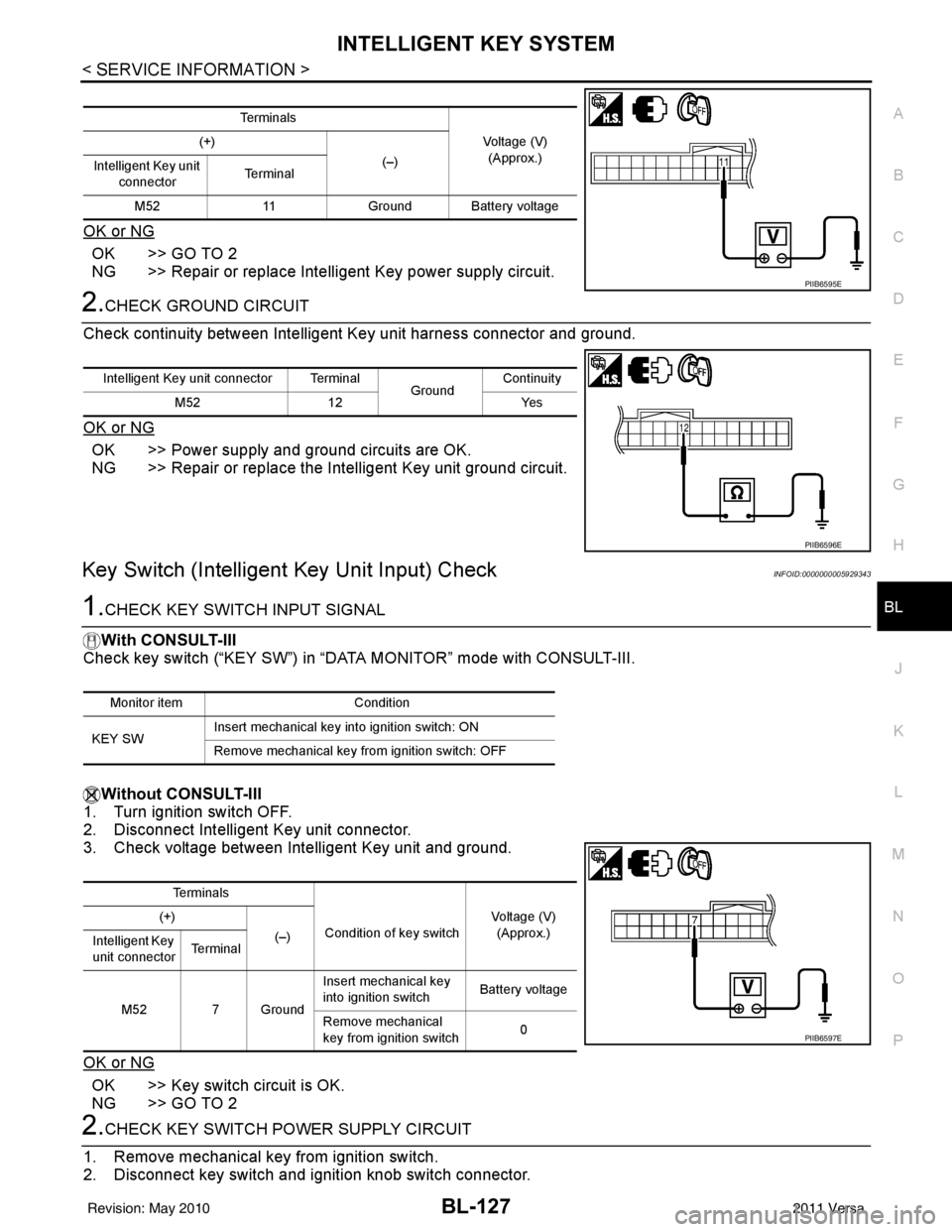
Check continuity between Intelligent Key unit harness connector and ground.
OK or NG
OK >> Power supply and ground circuits are OK.
NG >> Repair or replace the Intelligent Key unit ground circuit.
Key Switch (Intelligent Key Unit Input) CheckINFOID:0000000005929343
1.CHECK KEY SWITCH INPUT SIGNAL
With CONSULT-III
Check key switch (“KEY SW”) in “DATA MONITOR” mode with CONSULT-III.
Without CONSULT-III
1. Turn ignition switch OFF.
2. Disconnect Intelligent Key unit connector.
3. Check voltage between Intelligent Key unit and ground.
OK or NG
OK >> Key switch circuit is OK.
NG >> GO TO 2
2.CHECK KEY SWITCH POWER SUPPLY CIRCUIT
1. Remove mechanical key from ignition switch.
2. Disconnect key switch and i gnition knob switch connector.
Te r m i n a l s
Voltage (V)(Approx.)
(+)
(–)
Intelligent Key unit
connector Te r m i n a l
M52 11Ground Battery voltage
PIIB6595E
Intelligent Key unit connector Terminal
GroundContinuity
M52 12 Yes
PIIB6596E
Monitor item Condition
KEY SW Insert mechanical key into ignition switch: ON
Remove mechanical key from ignition switch: OFF
Te r m i n a l s
Condition of key switch Voltage (V)
(Approx.)
(+)
(–)
Intelligent Key
unit connector Te r m i n a l
M52 7 Ground Insert mechanical key
into ignition switch
Battery voltage
Remove mechanical
key from ignition switch 0
PIIB6597E
Revision: May 2010
2011 Versa
Page 638 of 3787
BL-128
< SERVICE INFORMATION >
INTELLIGENT KEY SYSTEM
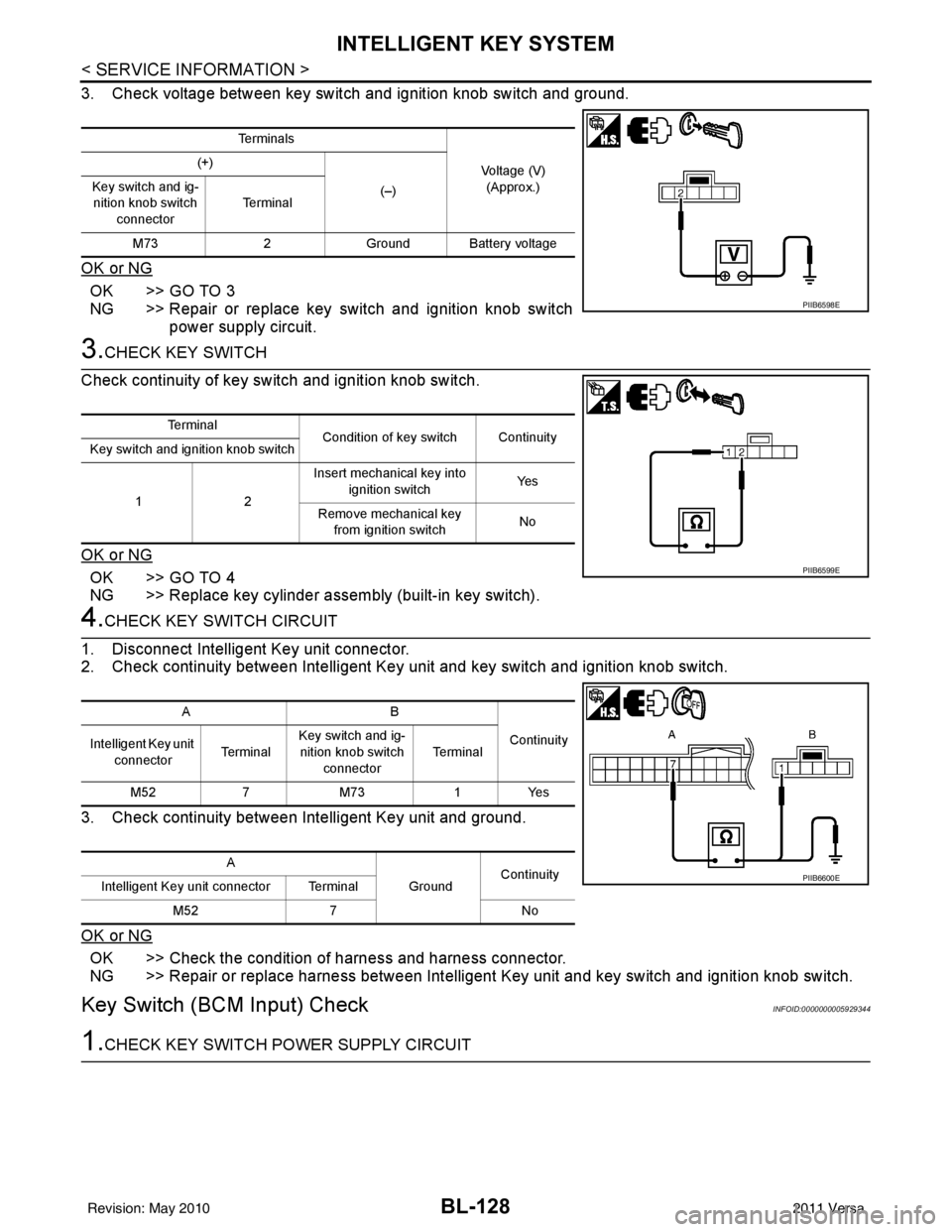
3. Check voltage between key switch and ignition knob switch and ground.
OK or NG
OK >> GO TO 3
NG >> Repair or replace key switch and ignition knob switchpower supply circuit.
3.CHECK KEY SWITCH
Check continuity of key switch and ignition knob switch.
OK or NG
OK >> GO TO 4
NG >> Replace key cylinder assembly (built-in key switch).
4.CHECK KEY SWITCH CIRCUIT
1. Disconnect Intelligent Key unit connector.
2. Check continuity between Intelligent Key unit and key switch and ignition knob switch.
3. Check continuity between Intelligent Key unit and ground.
OK or NG
OK >> Check the condition of harness and harness connector.
NG >> Repair or replace harness between Intelligent Key unit and key switch and ignition knob switch.
Key Switch (BCM Input) CheckINFOID:0000000005929344
1.CHECK KEY SWITCH PO WER SUPPLY CIRCUIT
Te r m i n a l s
Voltage (V)(Approx.)
(+)
(–)
Key switch and ig-
nition knob switch
connector Te r m i n a l
M73 2Ground Battery voltage
PIIB6598E
Te r m i n a l
Condition of key switch Continuity
Key switch and ignition knob switch
12 Insert mechanical key into
ignition switch Ye s
Remove mechanical key from ignition switch No
PIIB6599E
AB
Continuity
Intelligent Key unit
connector Te r m i n a lKey switch and ig-
nition knob switch connector Te r m i n a l
M52 7M73 1Yes
A GroundContinuity
Intelligent Key unit connector Terminal
M52 7 No
PIIB6600E
Revision: May 2010 2011 Versa
Page 639 of 3787
INTELLIGENT KEY SYSTEMBL-129
< SERVICE INFORMATION >
C
DE
F
G H
J
K L
M A
B
BL
N
O P
1. Remove mechanical key from ignition switch.
2. Disconnect key switch and i gnition knob switch connector.
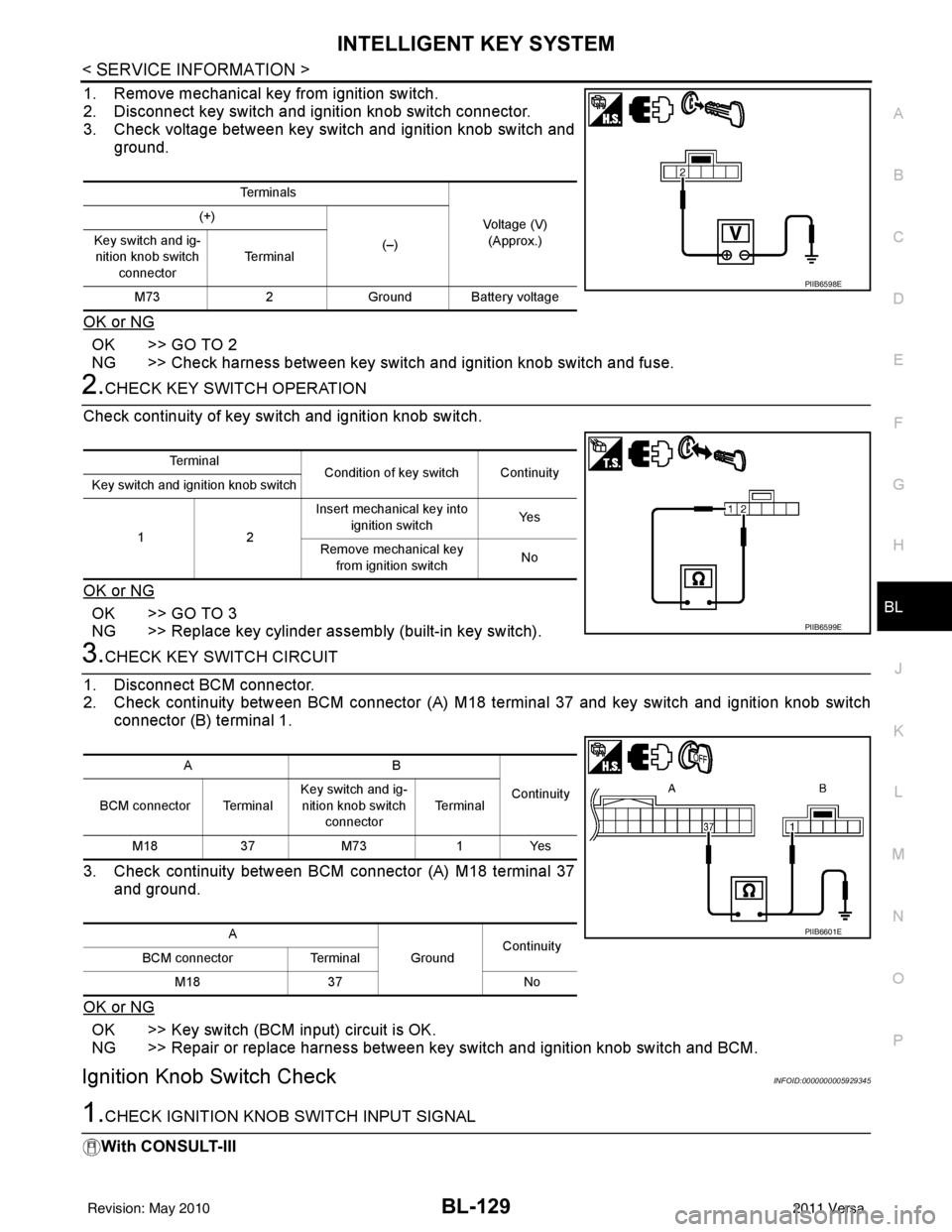
3. Check voltage between key switch and ignition knob switch and
ground.
OK or NG
OK >> GO TO 2
NG >> Check harness between key switch and ignition knob switch and fuse.
2.CHECK KEY SWITCH OPERATION
Check continuity of key switch and ignition knob switch.
OK or NG
OK >> GO TO 3
NG >> Replace key cylinder assembly (built-in key switch).
3.CHECK KEY SWITCH CIRCUIT
1. Disconnect BCM connector.
2. Check continuity between BCM connector (A) M18 terminal 37 and key switch and ignition knob switch
connector (B) terminal 1.
3. Check continuity between BCM connector (A) M18 terminal 37 and ground.
OK or NG
OK >> Key switch (BCM input) circuit is OK.
NG >> Repair or replace harness between key switch and ignition knob switch and BCM.
Ignition Knob Switch CheckINFOID:0000000005929345
1.CHECK IGNITION KNOB SWITCH INPUT SIGNAL
With CONSULT-III
Te r m i n a l s
Voltage (V)(Approx.)
(+)
(–)
Key switch and ig-
nition knob switch
connector Te r m i n a l
M73 2Ground Battery voltage
PIIB6598E
Te r m i n a l
Condition of key switch Continuity
Key switch and ignition knob switch
12 Insert mechanical key into
ignition switch Ye s
Remove mechanical key from ignition switch No
PIIB6599E
AB
Continuity
BCM connector Terminal Key switch and ig-
nition knob switch connector Te r m i n a l
M18 37M73 1Yes
A GroundContinuity
BCM connector Terminal
M18 37 No
PIIB6601E
Revision: May 2010 2011 Versa
Page 640 of 3787
BL-130
< SERVICE INFORMATION >
INTELLIGENT KEY SYSTEM
Display “PUSH SW” on DATA MONITOR screen, and check if ON/OFF display is linked to ignition switch oper-
ation.Without CONSULT-III
1. Turn ignition switch OFF.
2. Disconnect Intelligent Key unit connector.
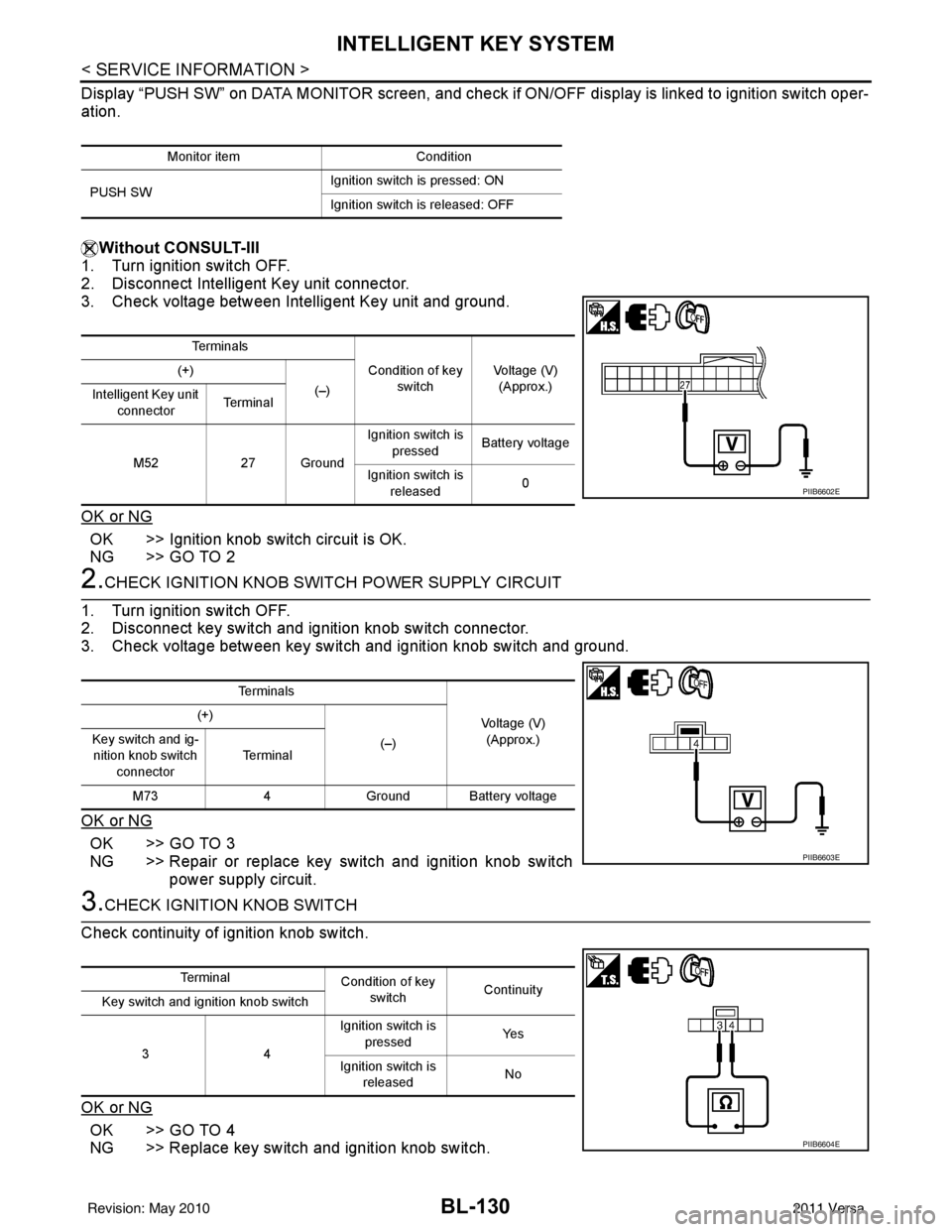
3. Check voltage between Intelligent Key unit and ground.
OK or NG
OK >> Ignition knob switch circuit is OK.
NG >> GO TO 2
2.CHECK IGNITION KNOB SWITCH POWER SUPPLY CIRCUIT
1. Turn ignition switch OFF.
2. Disconnect key switch and ignition knob switch connector.
3. Check voltage between key switch and ignition knob switch and ground.
OK or NG
OK >> GO TO 3
NG >> Repair or replace key switch and ignition knob switch power supply circuit.
3.CHECK IGNITION KNOB SWITCH
Check continuity of ignition knob switch.
OK or NG
OK >> GO TO 4
NG >> Replace key switch and ignition knob switch.
Monitor item Condition
PUSH SW Ignition switch is pressed: ON
Ignition switch is released: OFF
Te r m i n a l s
Condition of key switch Voltage (V)
(Approx.)
(+)
(–)
Intelligent Key unit
connector Te r m i n a l
M52 27 Ground Ignition switch is
pressed Battery voltage
Ignition switch is released 0
PIIB6602E
Te r m i n a l s
Voltage (V)(Approx.)
(+)
(–)
Key switch and ig-
nition knob switch
connector Te r m i n a l
M73 4Ground Battery voltage
PIIB6603E
Te r m i n a l
Condition of key
switch Continuity
Key switch and ignition knob switch
34 Ignition switch is
pressed Ye s
Ignition switch is released No
PIIB6604E
Revision: May 2010
2011 Versa
Page 641 of 3787
INTELLIGENT KEY SYSTEMBL-131
< SERVICE INFORMATION >
C
DE
F
G H
J
K L
M A
B
BL
N
O P
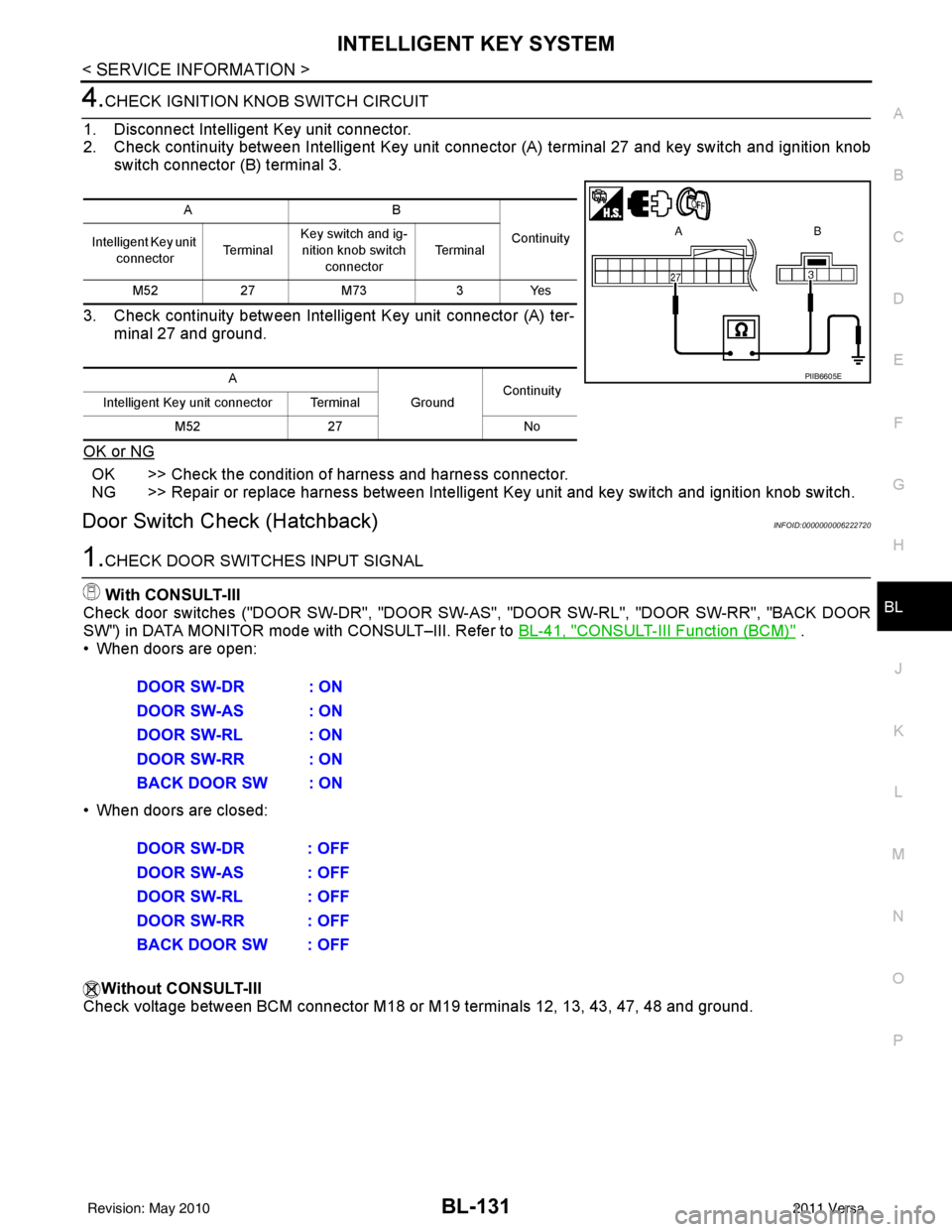
4.CHECK IGNITION KN OB SWITCH CIRCUIT
1. Disconnect Intelligent Key unit connector.
2. Check continuity between Intelligent Key unit c onnector (A) terminal 27 and key switch and ignition knob
switch connector (B) terminal 3.
3. Check continuity between Intelligent Key unit connector (A) ter- minal 27 and ground.
OK or NG
OK >> Check the condition of harness and harness connector.
NG >> Repair or replace harness between Intelligent Key unit and key switch and ignition knob switch.
Door Switch Check (Hatchback)INFOID:0000000006222720
1.CHECK DOOR SWITCHES INPUT SIGNAL
With CONSULT-III
Check door switches ("DOOR SW-DR", "DOOR SW-AS", "DOOR SW-RL", "DOOR SW-RR", "BACK DOOR
SW") in DATA MONITOR mode with CONSULT–III. Refer to BL-41, "
CONSULT-III Function (BCM)" .
• When doors are open:
• When doors are closed:
Without CONSULT-III
Check voltage between BCM connector M18 or M19 terminals 12, 13, 43, 47, 48 and ground.
AB
Continuity
Intelligent Key unit
connector Te r m i n a lKey switch and ig-
nition knob switch
connector Te r m i n a l
M52 27M73 3Yes
A GroundContinuity
Intelligent Key unit connector Terminal
M52 27 No
PIIB6605E
DOOR SW-DR : ON
DOOR SW-AS : ON
DOOR SW-RL : ON
DOOR SW-RR : ON
BACK DOOR SW : ON
DOOR SW-DR : OFF
DOOR SW-AS : OFF
DOOR SW-RL : OFF
DOOR SW-RR : OFF
BACK DOOR SW : OFF
Revision: May 2010 2011 Versa
Page 642 of 3787
BL-132
< SERVICE INFORMATION >
INTELLIGENT KEY SYSTEM
OK or NG
OK >> Door switch circuit is OK.
NG >> GO TO 2
2.CHECK DOOR SWITCH CIRCUIT
1. Turn ignition switch OFF.
2. Disconnect door switch and BCM.
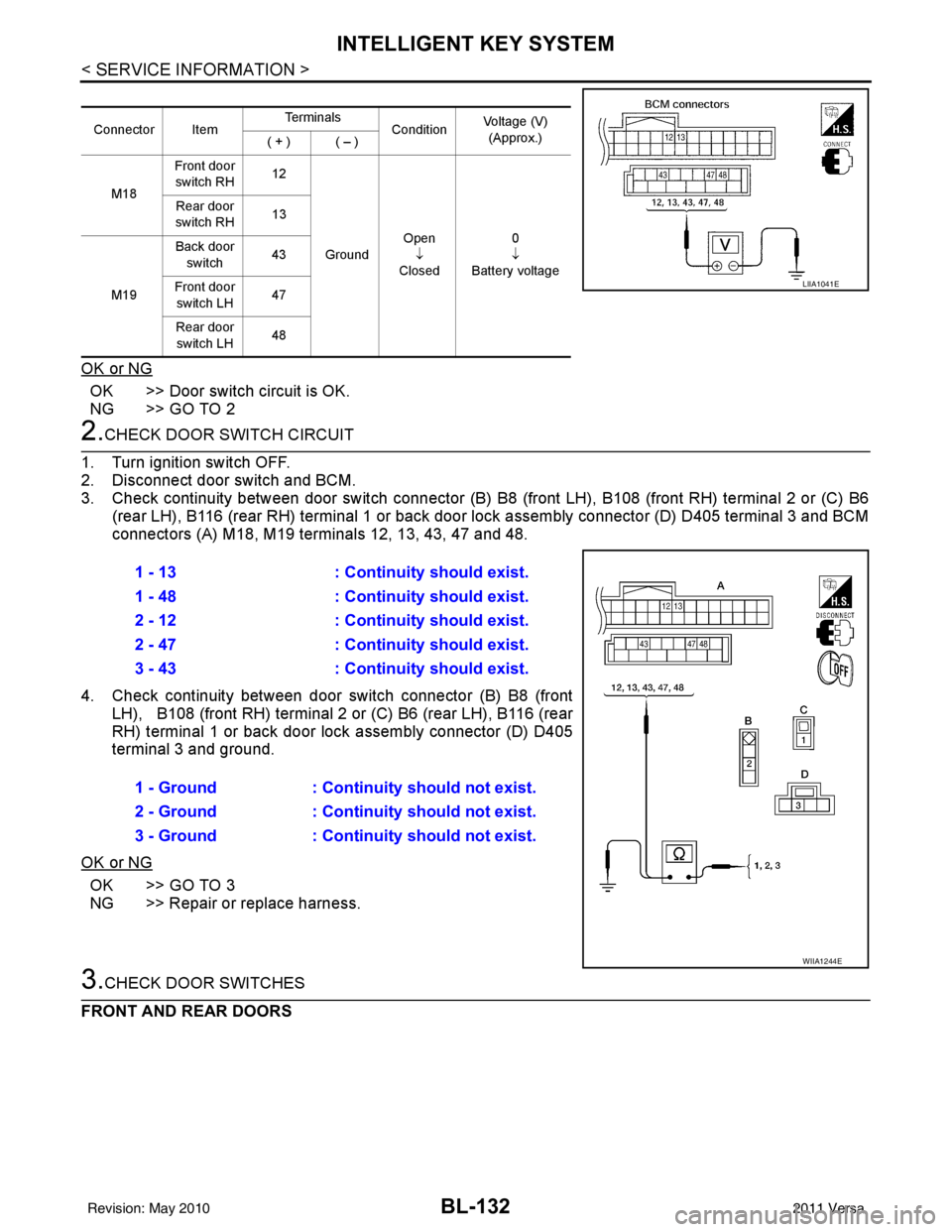
3. Check continuity between door switch connector (B) B8 (front LH), B108 (front RH) terminal 2 or (C) B6
(rear LH), B116 (rear RH) terminal 1 or back door lock assembly connector (D) D405 terminal 3 and BCM
connectors (A) M18, M19 terminals 12, 13, 43, 47 and 48.
4. Check continuity between door switch connector (B) B8 (front
LH), B108 (front RH) terminal 2 or (C) B6 (rear LH), B116 (rear
RH) terminal 1 or back door lock assembly connector (D) D405
terminal 3 and ground.
OK or NG
OK >> GO TO 3
NG >> Repair or replace harness.
3.CHECK DOOR SWITCHES
FRONT AND REAR DOORS
Connector Item Te r m i n a l s
ConditionVoltage (V)
(Approx.)
( + ) ( – )
M18 Front door
switch RH 12
Ground Open
↓
Closed 0
↓
Battery voltage
Rear door
switch RH 13
M19 Back door
switch 43
Front door switch LH 47
Rear door switch LH 48
LIIA1041E
1 - 13
: Continuity should exist.
1 - 48 : Continuity should exist.
2 - 12 : Continuity should exist.
2 - 47 : Continuity should exist.
3 - 43 : Continuity should exist.
1 - Ground : Continuity should not exist.
2 - Ground : Continuity should not exist.
3 - Ground : Continuity should not exist.
WIIA1244E
Revision: May 2010 2011 Versa
Page 643 of 3787
INTELLIGENT KEY SYSTEMBL-133
< SERVICE INFORMATION >
C
DE
F
G H
J
K L
M A
B
BL
N
O P
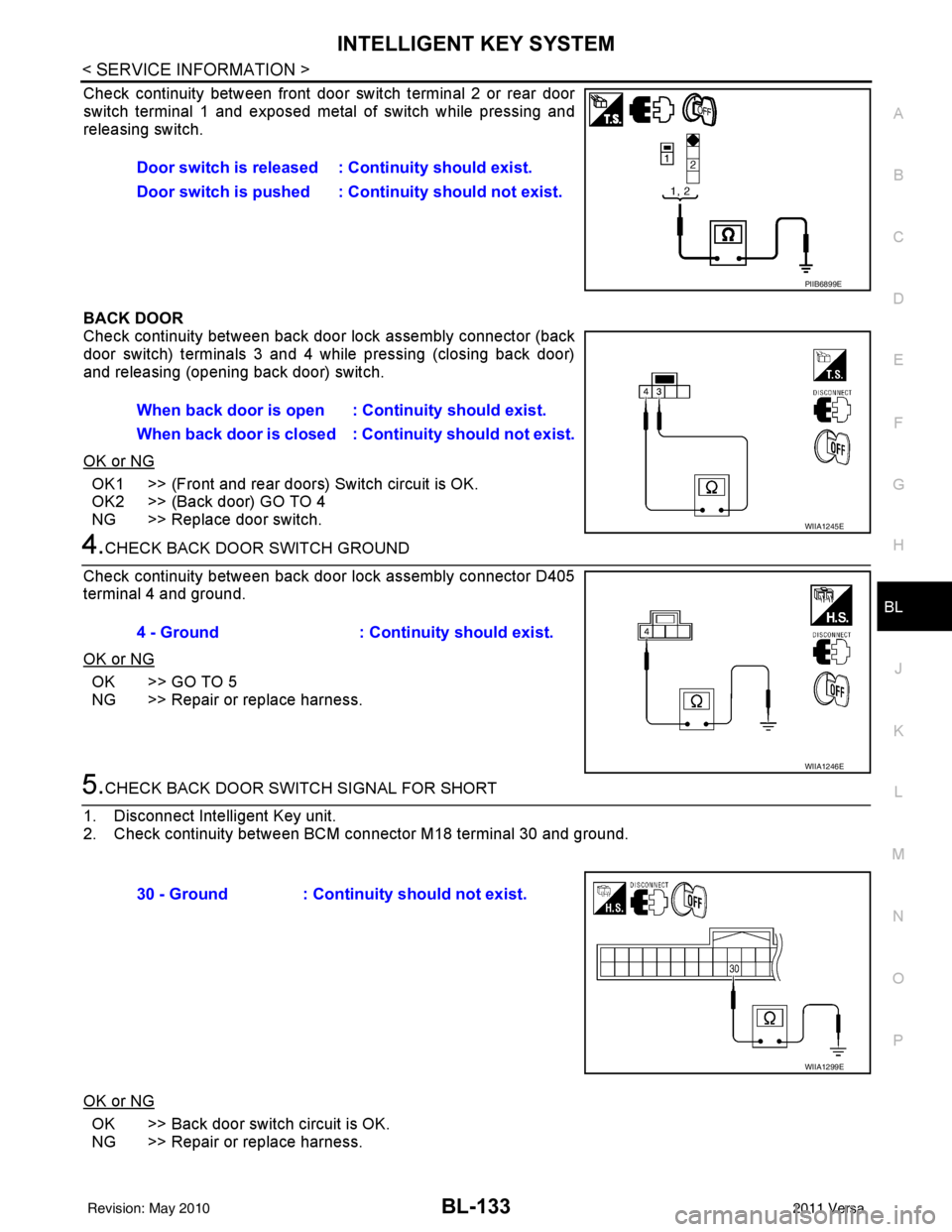
Check continuity between front door switch terminal 2 or rear door
switch terminal 1 and exposed metal of switch while pressing and
releasing switch.
BACK DOOR
Check continuity between back door lock assembly connector (back
door switch) terminals 3 and 4 while pressing (closing back door)
and releasing (opening back door) switch.
OK or NG
OK1 >> (Front and rear doors) Switch circuit is OK.
OK2 >> (Back door) GO TO 4
NG >> Replace door switch.
4.CHECK BACK DOOR SWITCH GROUND
Check continuity between back door lock assembly connector D405
terminal 4 and ground.
OK or NG
OK >> GO TO 5
NG >> Repair or replace harness.
5.CHECK BACK DOOR SWITCH SIGNAL FOR SHORT
1. Disconnect Intelligent Key unit.
2. Check continuity between BCM connector M18 terminal 30 and ground.
OK or NG
OK >> Back door switch circuit is OK.
NG >> Repair or replace harness. Door switch is released : Continuity should exist.
Door switch is pushed : Continuity should not exist.
PIIB6899E
When back door is open : Continuity should exist.
When back door is closed : Continuity shou
ld not exist.
WIIA1245E
4 - Ground: Continuity should exist.
WIIA1246E
30 - Ground : Continuity should not exist.
WIIA1299E
Revision: May 2010 2011 Versa
Page 644 of 3787
BL-134
< SERVICE INFORMATION >
INTELLIGENT KEY SYSTEM
Door Switch Check (Sedan)
INFOID:0000000006222721
1.CHECK DOOR SWITCHES INPUT SIGNAL
With CONSULT-III
Check door switches ("DOOR SW-DR", "DOOR SW-AS" , "DOOR SW-RL", "DOOR SW-RR") in DATA MONI-
TOR mode with CONSULT–III. Refer to BL-41, "
CONSULT-III Function (BCM)" .
• When doors are open:
• When doors are closed:
Without CONSULT-III
Check voltage between BCM connector M18 or M19 terminals 12, 13, 47, 48 and ground.
OK or NG
OK >> Door switch circuit is OK.
NG >> GO TO 2
2.CHECK DOOR SWITCH CIRCUIT
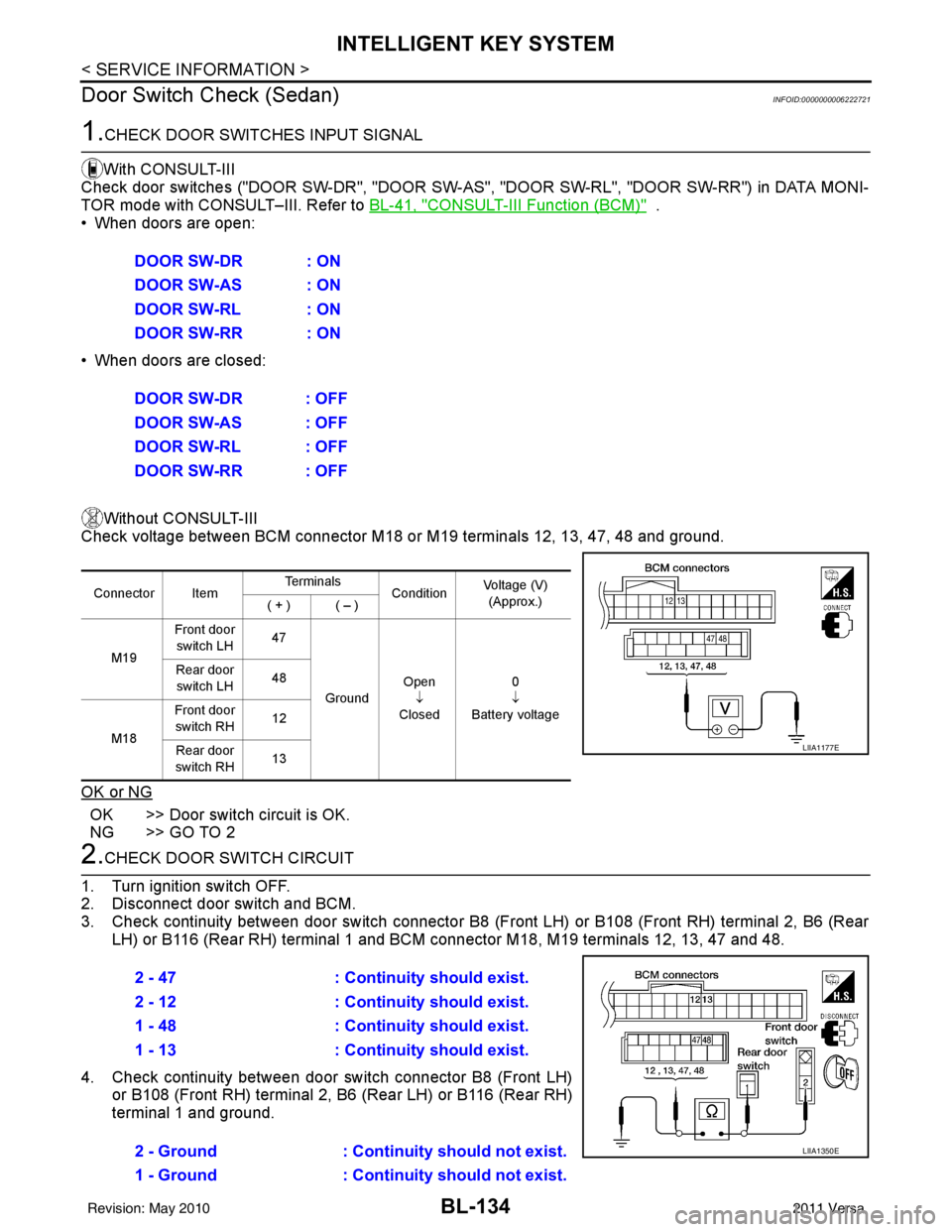
1. Turn ignition switch OFF.
2. Disconnect door switch and BCM.
3. Check continuity between door switch connector B8 (F ront LH) or B108 (Front RH) terminal 2, B6 (Rear
LH) or B116 (Rear RH) terminal 1 and BCM connector M18, M19 terminals 12, 13, 47 and 48.
4. Check continuity between door switch connector B8 (Front LH) or B108 (Front RH) terminal 2, B6 (Rear LH) or B116 (Rear RH)
terminal 1 and ground.DOOR SW-DR : ON
DOOR SW-AS : ON
DOOR SW-RL : ON
DOOR SW-RR : ON
DOOR SW-DR : OFF
DOOR SW-AS : OFF
DOOR SW-RL : OFF
DOOR SW-RR : OFF
Connector Item
Te r m i n a l s
ConditionVoltage (V)
(Approx.)
( + ) ( – )
M19 Front door
switch LH 47
Ground Open
↓
Closed 0
↓
Battery voltage
Rear door
switch LH 48
M18 Front door
switch RH 12
Rear door
switch RH 13
LIIA1177E
2 - 47
: Continuity should exist.
2 - 12 : Continuity should exist.
1 - 48 : Continuity should exist.
1 - 13 : Continuity should exist.
2 - Ground : Continuity should not exist.
1 - Ground : Continuity should not exist.
LIIA1350E
Revision: May 2010 2011 Versa
Page 645 of 3787
INTELLIGENT KEY SYSTEMBL-135
< SERVICE INFORMATION >
C
DE
F
G H
J
K L
M A
B
BL
N
O P
OK or NG
OK >> GO TO 3
NG >> Repair or replace harness.
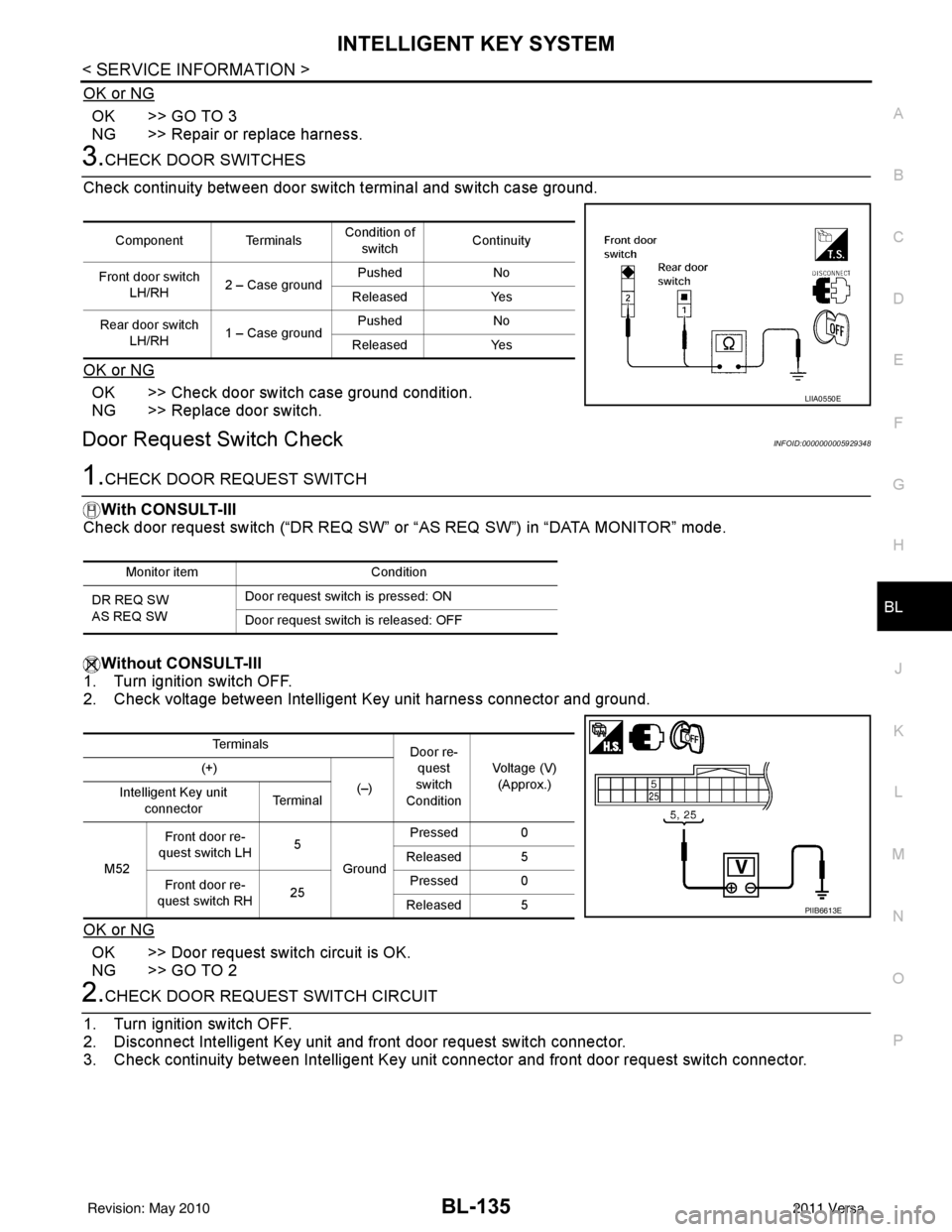
3.CHECK DOOR SWITCHES
Check continuity between door switch terminal and switch case ground.
OK or NG
OK >> Check door switch case ground condition.
NG >> Replace door switch.
Door Request Switch CheckINFOID:0000000005929348
1.CHECK DOOR REQUEST SWITCH
With CONSULT-III
Check door request switch (“DR REQ SW” or “AS REQ SW”) in “DATA MONITOR” mode.
Without CONSULT-III
1. Turn ignition switch OFF.
2. Check voltage between Intelligent Key unit harness connector and ground.
OK or NG
OK >> Door request switch circuit is OK.
NG >> GO TO 2
2.CHECK DOOR REQUEST SWITCH CIRCUIT
1. Turn ignition switch OFF.
2. Disconnect Intelligent Key unit and front door request switch connector.
3. Check continuity between Intelligent Key uni t connector and front door request switch connector.
Component TerminalsCondition of
switch Continuity
Front door switch LH/RH 2 – Case ground Pushed
No
Released Yes
Rear door switch LH/RH 1 – Case ground Pushed
No
Released Yes
LIIA0550E
Monitor item Condition
DR REQ SW
AS REQ SW Door request switch is pressed: ON
Door request switch is released: OFF
Te r m i n a l s
Door re-
quest
switch
Condition Voltage (V)
(Approx.)
(+)
(–)
Intelligent Key unit
connector Te r m i n a l
M52 Front door re-
quest switch LH 5
Ground Pressed 0
Released 5
Front door re-
quest switch RH 25Pressed 0
Released 5
PIIB6613E
Revision: May 2010 2011 Versa
Page 646 of 3787
BL-136
< SERVICE INFORMATION >
INTELLIGENT KEY SYSTEM
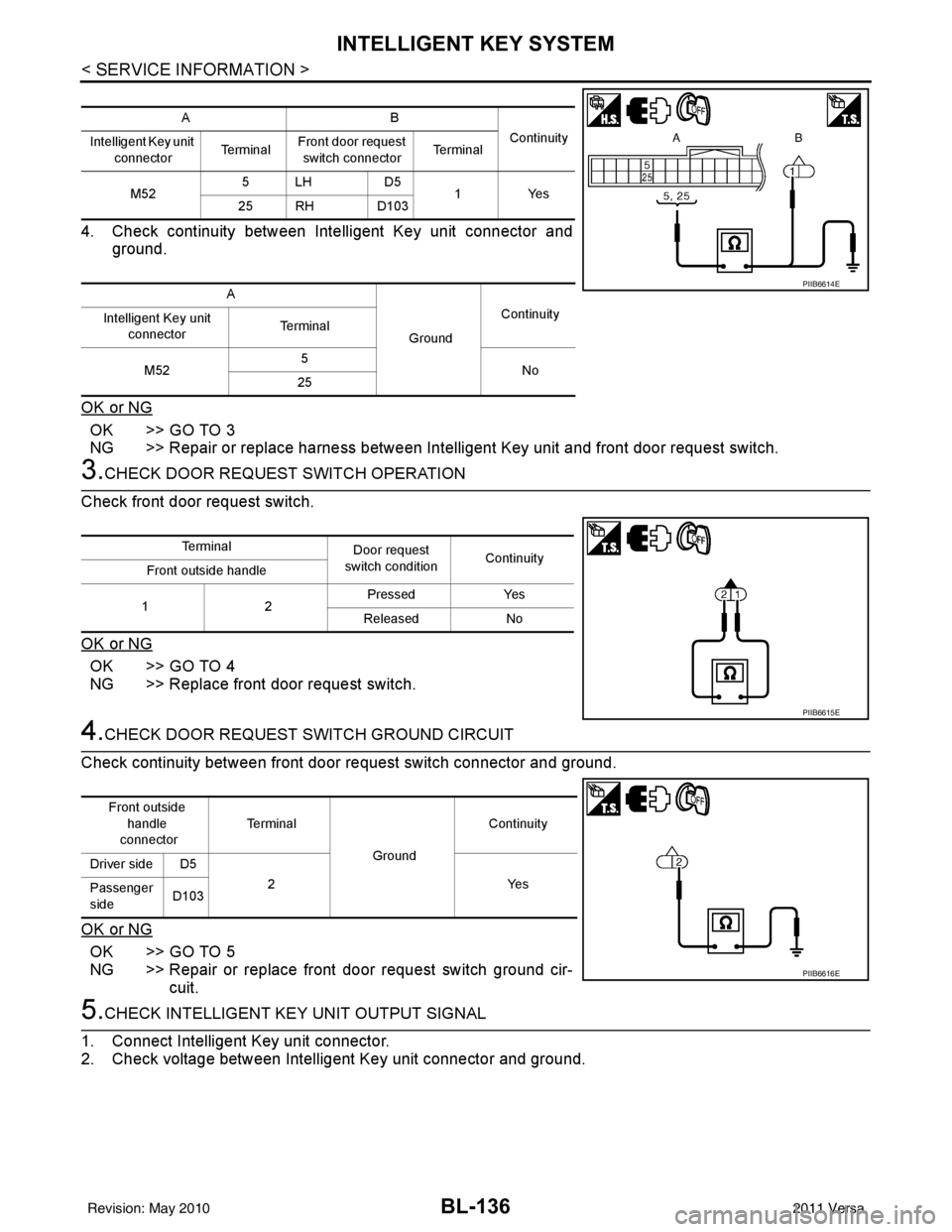
4. Check continuity between Intelligent Key unit connector andground.
OK or NG
OK >> GO TO 3
NG >> Repair or replace harness between Intelligent Key unit and front door request switch.
3.CHECK DOOR REQUEST SWITCH OPERATION
Check front door request switch.
OK or NG
OK >> GO TO 4
NG >> Replace front door request switch.
4.CHECK DOOR REQUEST SWITCH GROUND CIRCUIT
Check continuity between front door request switch connector and ground.
OK or NG
OK >> GO TO 5
NG >> Repair or replace front door request switch ground cir- cuit.
5.CHECK INTELLIGENT KEY UNIT OUTPUT SIGNAL
1. Connect Intelligent Key unit connector.
2. Check voltage between Intelligent Key unit connector and ground.
AB Continuity
Intelligent Key unit
connector Te r m i n a lFront door request
switch connector Te r m i n a l
M52 5LH D5
1Yes
25 RH D103
A GroundContinuity
Intelligent Key unit
connector Terminal
M52 5
No
25
PIIB6614E
Te r m i n a l Door request
switch condition Continuity
Front outside handle
12 Pressed
Yes
Released No
PIIB6615E
Front outside
handle
connector Te r m i n a l
GroundContinuity
Driver side D5 2Y es
Passenger
side D103
PIIB6616E
Revision: May 2010
2011 Versa