Remove NISSAN TIIDA 2011 Service Repair Manual
[x] Cancel search | Manufacturer: NISSAN, Model Year: 2011, Model line: TIIDA, Model: NISSAN TIIDA 2011Pages: 3787, PDF Size: 78.35 MB
Page 3496 of 3787
PS-2
< SERVICE INFORMATION >
PRECAUTIONS
SERVICE INFORMATION
PRECAUTIONS
Precaution for Supplemental Restraint System (SRS) "AIR BAG" and "SEAT BELT
PRE-TENSIONER"
INFOID:0000000006409484
The Supplemental Restraint System such as “A IR BAG” and “SEAT BELT PRE-TENSIONER”, used along
with a front seat belt, helps to reduce the risk or severity of injury to the driver and front passenger for certain
types of collision. This system includes seat belt switch inputs and dual stage front air bag modules. The SRS
system uses the seat belt switches to determine the front air bag deployment, and may only deploy one front
air bag, depending on the severity of a collision and w hether the front occupants are belted or unbelted.
Information necessary to service the system safely is included in the SRS and SB section of this Service Man-
ual.
WARNING:
• To avoid rendering the SRS inopera tive, which could increase the risk of personal injury or death in
the event of a collision which would result in air bag inflation, all maintenance must be performed by
an authorized NISSAN/INFINITI dealer.
• Improper maintenance, including incorrect removal and installation of the SRS can lead to personal
injury caused by unintent ional activation of the system. For re moval of Spiral Cable and Air Bag
Module, see the SRS section.
• Do not use electrical test equipmen t on any circuit related to the SRS unless instructed to in this
Service Manual. SRS wiring harn esses can be identified by yellow and/or orange harnesses or har-
ness connectors.
PRECAUTIONS WHEN USING POWER TOOLS (AIR OR ELECTRIC) AND HAMMERS
WARNING:
• When working near the Airbag Diagnosis Sensor Unit or other Airbag System sensors with the Igni-
tion ON or engine running, DO NOT use air or electri c power tools or strike near the sensor(s) with a
hammer. Heavy vibration could activate the sensor( s) and deploy the air bag(s), possibly causing
serious injury.
• When using air or electric power tools or hammers , always switch the Ignition OFF, disconnect the
battery, and wait at least 3 minu tes before performing any service.
Precaution Necessary for Steering W heel Rotation After Battery Disconnect
INFOID:0000000005929628
NOTE:
• This procedure is applied only to models with Intel ligent Key system and NATS (NISSAN ANTI-THEFT SYS-
TEM).
• Remove and install all control units after disconnecting both battery cables with the ignition switch in the
″ LOCK ″ position.
• Always use CONSULT-III to perform self-diagnosis as a part of each function inspection after finishing work.
If DTC is detected, perform trouble diagnosis according to self-diagnostic results.
For models equipped with the Intelligent Key system and NATS, an electrically controlled steering lock mech-
anism is adopted on the key cylinder.
For this reason, if the battery is disconnected or if the battery is discharged, the steering wheel will lock and
steering wheel rotation will become impossible.
If steering wheel rotation is required when battery pow er is interrupted, follow the procedure below before
starting the repair operation.
OPERATION PROCEDURE
1. Connect both battery cables. NOTE:
Supply power using jumper cables if battery is discharged.
2. Use the Intelligent Key or mechanical key to turn the ignition switch to the ″ACC ″ position. At this time, the
steering lock will be released.
3. Disconnect both battery cables. The steering lock will remain released and the steering wheel can be rotated.
4. Perform the necessary repair operation.
Revision: May 2010 2011 Versa
Page 3502 of 3787
PS-8
< SERVICE INFORMATION >
STEERING WHEEL
CAUTION:
• After installing steering wheel, perform wheel alignment. Refer to FSU-7, "
Wheel Alignment Inspec-
tion".
REMOVAL
NOTE:
When reconnecting spiral cable, secure cable with a tape so that case and rotating part keep aligned. This will
omit neutral position alignment procedure during spiral cable installation.
1. Set vehicle to the straight-ahead position.
2. Remove driver air bag module. Refer to SRS-34, "
Removal and Installation".
3. Remove steering wheel lock nut after steering is locked.
4. Remove steering wheel.
INSTALLATION
Installation is in the reverse order of removal.
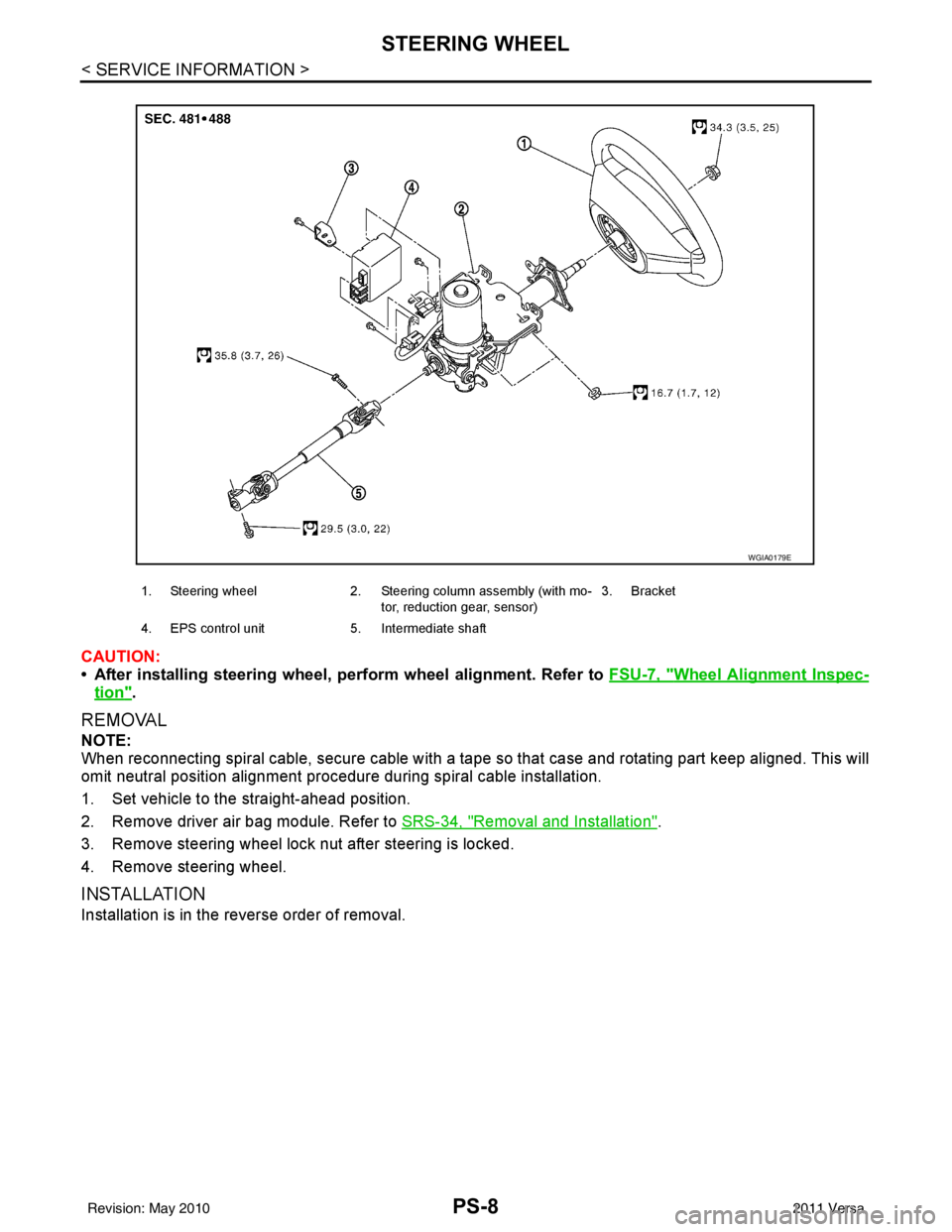
1. Steering wheel 2. Steering column assembly (with mo-
tor, reduction gear, sensor) 3. Bracket
4. EPS control unit 5. Intermediate shaft
WGIA0179E
Revision: May 2010 2011 Versa
Page 3504 of 3787
PS-10
< SERVICE INFORMATION >
STEERING COLUMN
STEERING COLUMN
Removal and InstallationINFOID:0000000006416716
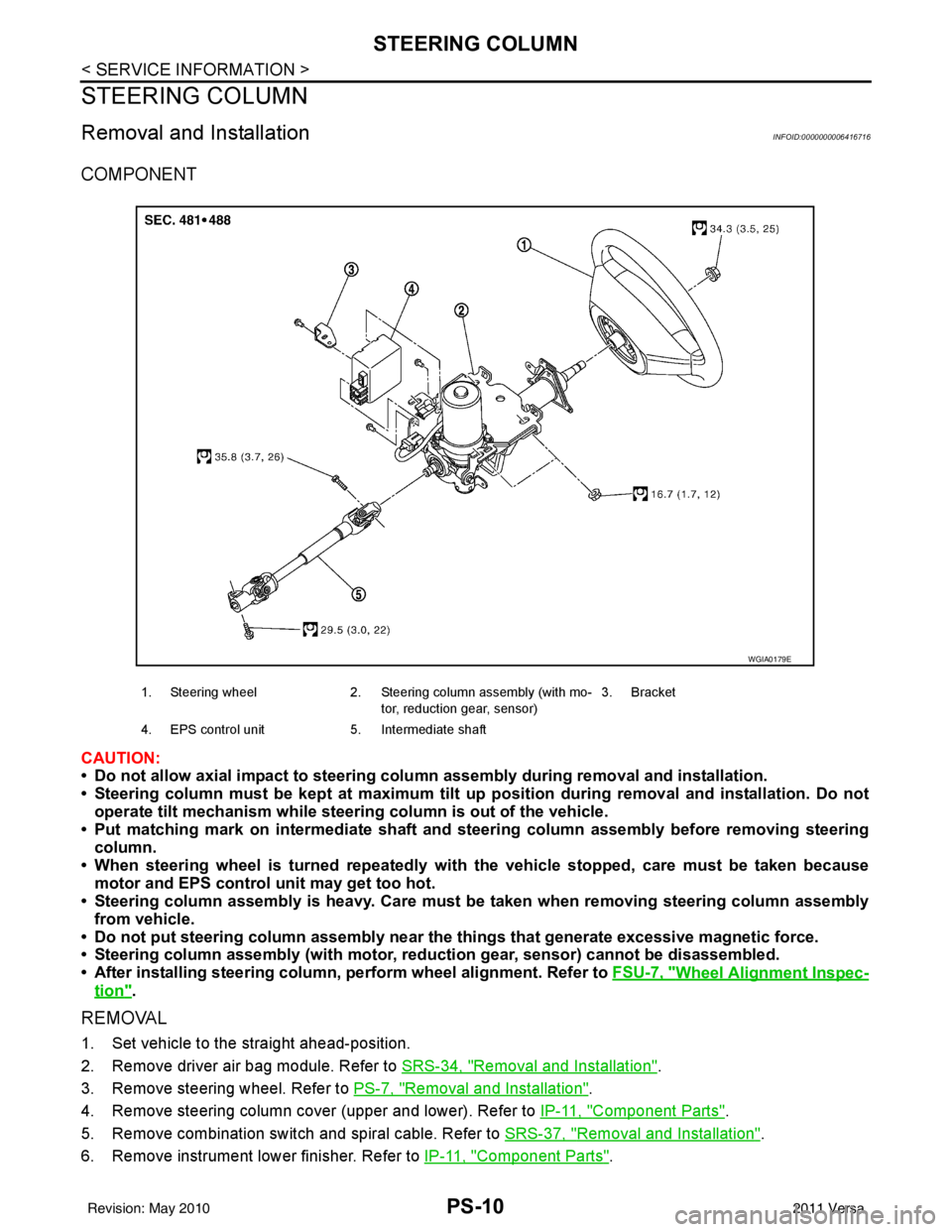
COMPONENT
CAUTION:
• Do not allow axial impact to steering column assembly during removal and installation.
• Steering column must be kept at maximum tilt up position during removal and installation. Do not
operate tilt mechanism while steerin g column is out of the vehicle.
• Put matching mark on intermediate shaft and steering column assembly before removing steering column.
• When steering wheel is turned repeatedly with the vehicle stopped, care must be taken because
motor and EPS control unit may get too hot.
• Steering column assembly is heavy. Care must be taken when removing steering column assembly
from vehicle.
• Do not put steering column assem bly near the things that generate excessive magnetic force.
• Steering column assembly (with motor, redu ction gear, sensor) cannot be disassembled.
• After installing steering column, perform wheel alignment. Refer to FSU-7, "
Wheel Alignment Inspec-
tion".
REMOVAL
1. Set vehicle to the straight ahead-position.
2. Remove driver air bag module. Refer to SRS-34, "
Removal and Installation".
3. Remove steering wheel. Refer to PS-7, "
Removal and Installation".
4. Remove steering column cover (upper and lower). Refer to IP-11, "
Component Parts".
5. Remove combination switch and spiral cable. Refer to SRS-37, "
Removal and Installation".
6. Remove instrument lower finisher. Refer to IP-11, "
Component Parts".
1. Steering wheel2. Steering column assembly (with mo-
tor, reduction gear, sensor) 3. Bracket
4. EPS control unit 5. Intermediate shaft
WGIA0179E
Revision: May 2010 2011 Versa
Page 3505 of 3787
STEERING COLUMNPS-11
< SERVICE INFORMATION >
C
DE
F
H I
J
K L
M A
B
PS
N
O P
7. Disconnect each switch connector installed to steering column assembly, and then disconnect harness from steering column assembly.
8. Remove bolt of intermediate shaft (upper side), and then remove intermediate shaft from steering column assembly.
9. Remove steering column assembly nuts, and then remove steering column assembly from vehicle.
10. Remove screws of bracket and EPS control unit, and then remove bracket and EPS control unit from
steering column assembly.
INSPECTION AFTER REMOVAL
• Check each part of steering column assembly, EPS control unit and intermediate shaft for damage and.
replace as necessary.
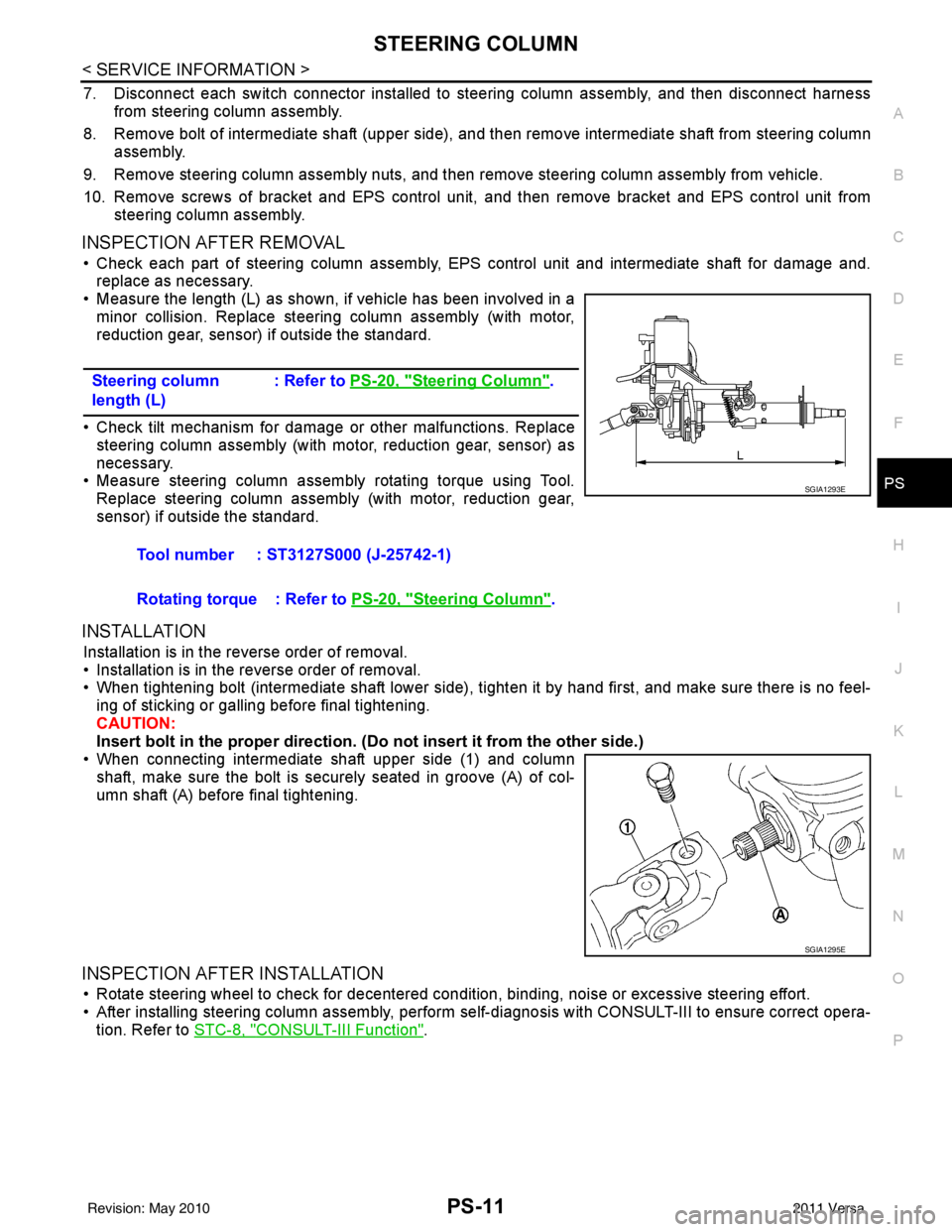
• Measure the length (L) as shown, if vehicle has been involved in a minor collision. Replace steering column assembly (with motor,
reduction gear, sensor) if outside the standard.
• Check tilt mechanism for damage or other malfunctions. Replace steering column assembly (with motor, reduction gear, sensor) as
necessary.
• Measure steering column assembly rotating torque using Tool.
Replace steering column assembly (with motor, reduction gear,
sensor) if outside the standard.
INSTALLATION
Installation is in the reverse order of removal.
• Installation is in the reverse order of removal.
• When tightening bolt (intermediate shaft lower side), tight en it by hand first, and make sure there is no feel-
ing of sticking or galling before final tightening.
CAUTION:
Insert bolt in the proper direction. (D o not insert it from the other side.)
• When connecting intermediate shaft upper side (1) and column shaft, make sure the bolt is securely seated in groove (A) of col-
umn shaft (A) before final tightening.
INSPECTION AFTER INSTALLATION
• Rotate steering wheel to check for decentered condition, binding, noise or excessive steering effort.
• After installing steering column assembly, perform self-diagnosis with CONSULT-III to ensure correct opera-
tion. Refer to STC-8, "
CONSULT-III Function".
Steering column
length (L)
: Refer to
PS-20, "
Steering Column".
Tool number : ST3127S000 (J-25742-1)
Rotating torque : Refer to PS-20, "
Steering Column".
SGIA1293E
SGIA1295E
Revision: May 2010 2011 Versa
Page 3507 of 3787
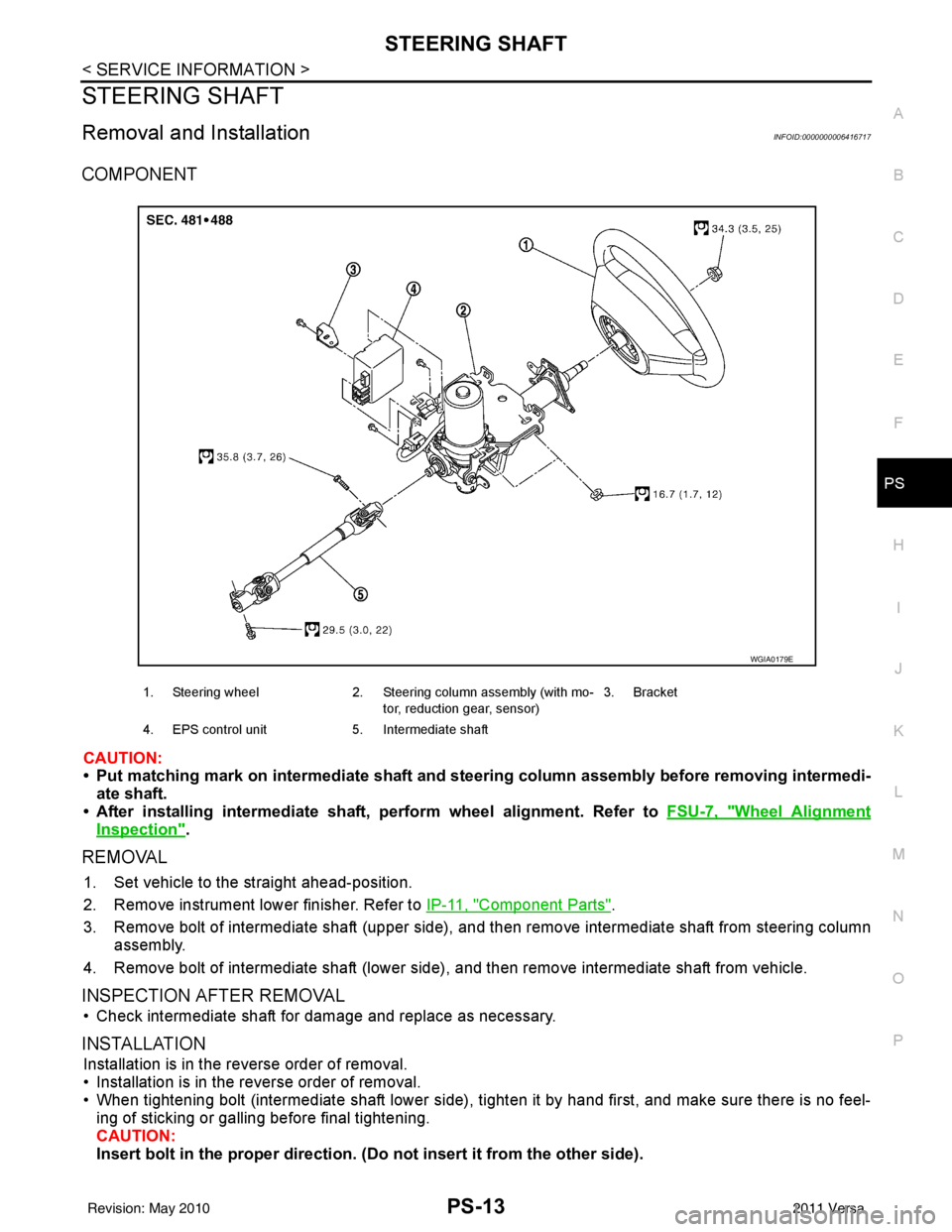
STEERING SHAFTPS-13
< SERVICE INFORMATION >
C
DE
F
H I
J
K L
M A
B
PS
N
O P
STEERING SHAFT
Removal and InstallationINFOID:0000000006416717
COMPONENT
CAUTION:
• Put matching mark on intermediate shaft and st eering column assembly before removing intermedi-
ate shaft.
• After installing intermediate shaft, perform wheel alignment. Refer to FSU-7, "
Wheel Alignment
Inspection".
REMOVAL
1. Set vehicle to the straight ahead-position.
2. Remove instrument lower finisher. Refer to IP-11, "
Component Parts".
3. Remove bolt of intermediate shaft (upper side), and then remove intermediate shaft from steering column assembly.
4. Remove bolt of intermediate shaft (lower side) , and then remove intermediate shaft from vehicle.
INSPECTION AFTER REMOVAL
• Check intermediate shaft for damage and replace as necessary.
INSTALLATION
Installation is in the reverse order of removal.
• Installation is in the reverse order of removal.
• When tightening bolt (intermediate shaft lower side), tight en it by hand first, and make sure there is no feel-
ing of sticking or galling before final tightening.
CAUTION:
Insert bolt in the proper direction. (D o not insert it from the other side).
1. Steering wheel2. Steering column assembly (with mo-
tor, reduction gear, sensor) 3. Bracket
4. EPS control unit 5. Intermediate shaft
WGIA0179E
Revision: May 2010 2011 Versa
Page 3509 of 3787
POWER STEERING GEARPS-15
< SERVICE INFORMATION >
C
DE
F
H I
J
K L
M A
B
PS
N
O P
POWER STEERING GEAR
Removal and InstallationINFOID:0000000005929636
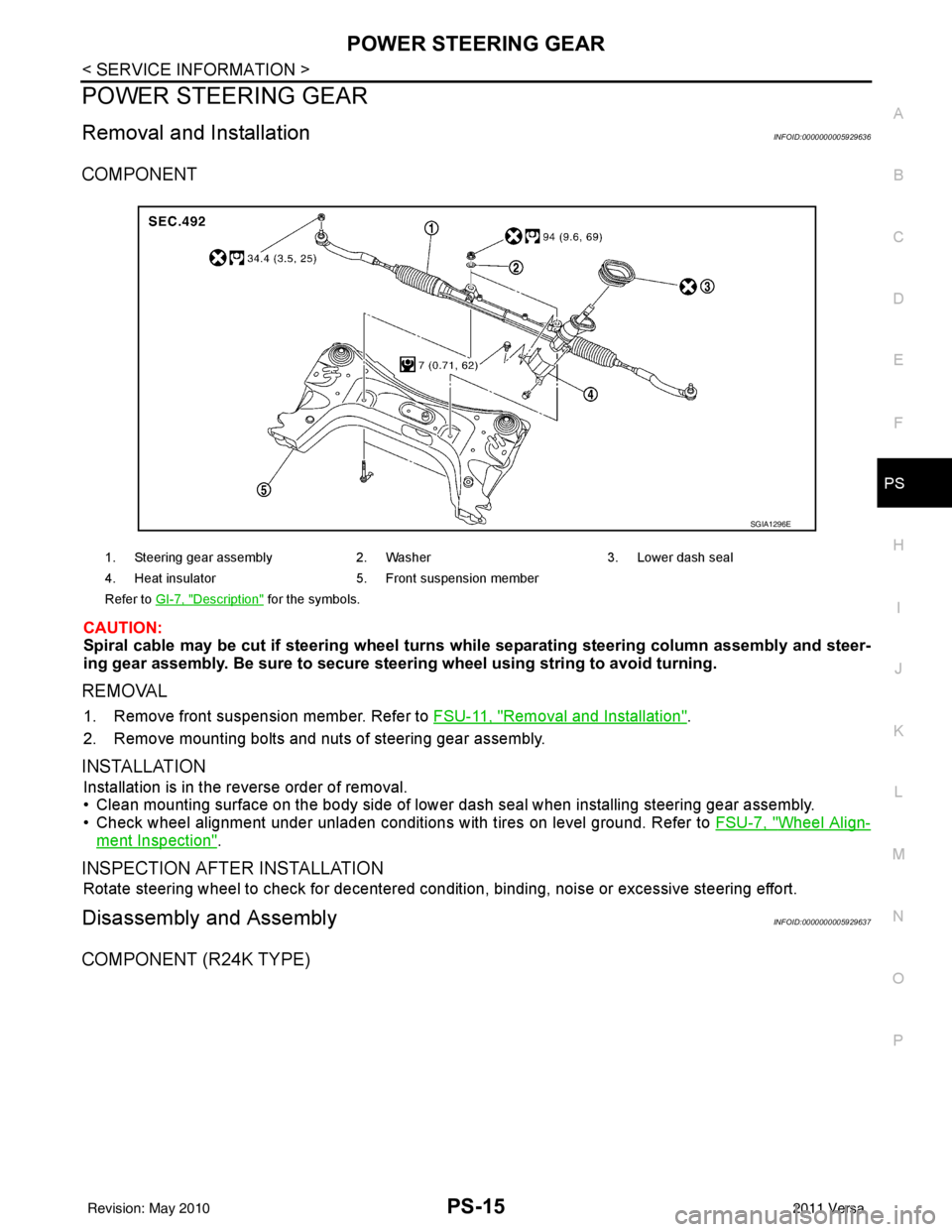
COMPONENT
CAUTION:
Spiral cable may be cut if steering wheel turns while separating steering column assembly and steer-
ing gear assembly. Be sure to secure steering wheel using stri ng to avoid turning.
REMOVAL
1. Remove front suspension member. Refer to FSU-11, "Removal and Installation".
2. Remove mounting bolts and nuts of steering gear assembly.
INSTALLATION
Installation is in the reverse order of removal.
• Clean mounting surface on the body side of lower dash seal when installing steering gear assembly.
• Check wheel alignment under unladen conditions with tires on level ground. Refer to FSU-7, "
Wheel Align-
ment Inspection".
INSPECTION AFTER INSTALLATION
Rotate steering wheel to check for decentered condition, binding, noise or excessive steering effort.
Disassembly and AssemblyINFOID:0000000005929637
COMPONENT (R24K TYPE)
1. Steering gear assembly2. Washer 3. Lower dash seal
4. Heat insulator 5. Front suspension member
Refer to GI-7, "
Description" for the symbols.
SGIA1296E
Revision: May 2010 2011 Versa
Page 3510 of 3787
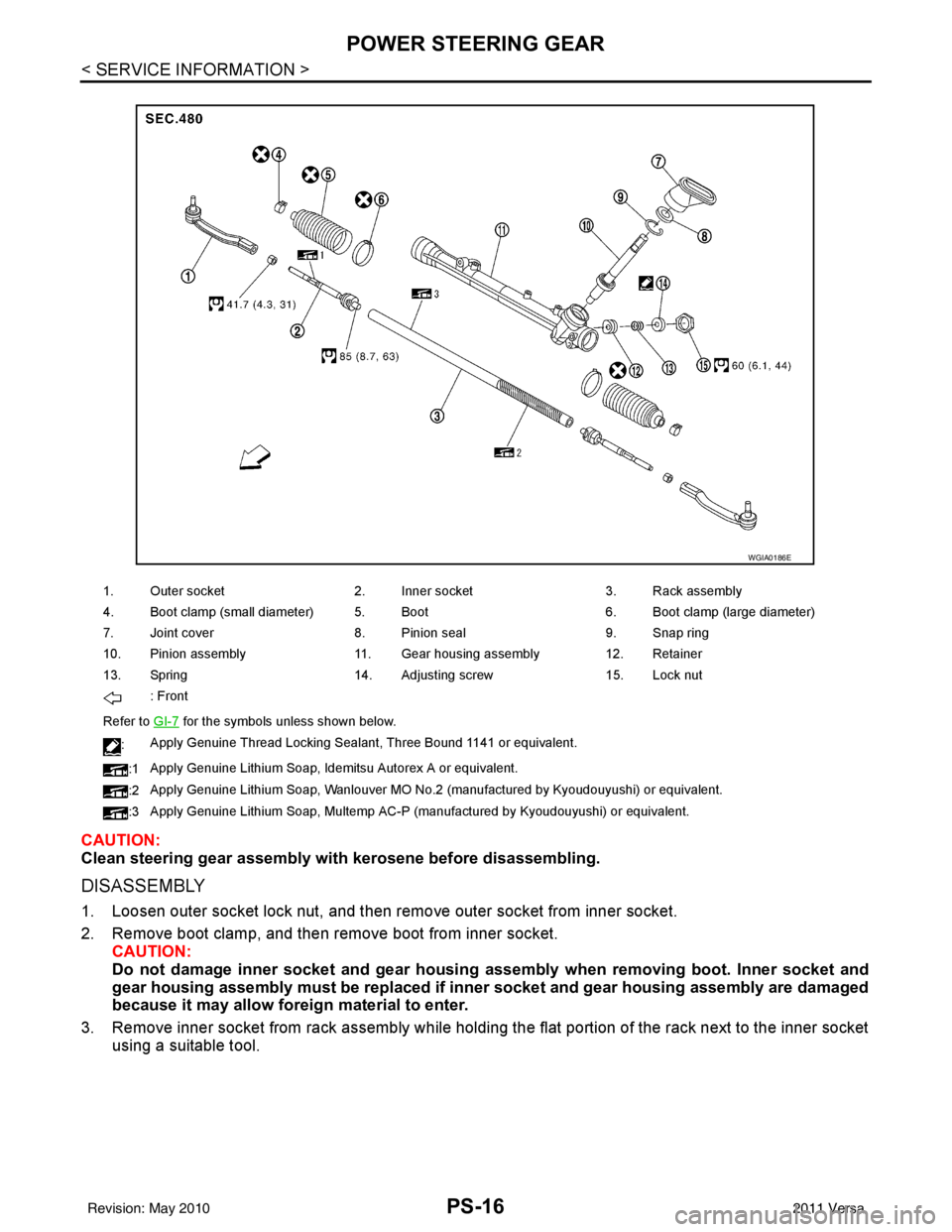
PS-16
< SERVICE INFORMATION >
POWER STEERING GEAR
CAUTION:
Clean steering gear assembly with kerosene before disassembling.
DISASSEMBLY
1. Loosen outer socket lock nut, and then remove outer socket from inner socket.
2. Remove boot clamp, and then remove boot from inner socket.
CAUTION:
Do not damage inner socket and gear housin g assembly when removing boot. Inner socket and
gear housing assembly must be replaced if inne r socket and gear housing assembly are damaged
because it may allow foreign material to enter.
3. Remove inner socket from rack assembly while holding the flat portion of the rack next to the inner socket using a suitable tool.
1. Outer socket 2. Inner socket3. Rack assembly
4. Boot clamp (small diameter) 5. Boot 6. Boot clamp (large diameter)
7. Joint cover 8. Pinion seal9. Snap ring
10. Pinion assembly 11. Gear housing assembly 12. Retainer
13. Spring 14. Adjusting screw15. Lock nut
: Front
Refer to GI-7
for the symbols unless shown below.
: Apply Genuine Thread Locking Sealant, Three Bound 1141 or equivalent.
:1 Apply Genuine Lithium Soap, Idemitsu Autorex A or equivalent.
:2 Apply Genuine Lithium Soap, Wanlouver MO No.2 (manufactured by Kyoudouyushi) or equivalent.
:3 Apply Genuine Lithium Soap, Multemp AC-P (manufactured by Kyoudouyushi) or equivalent.
WGIA0186E
Revision: May 2010
2011 Versa
Page 3511 of 3787
POWER STEERING GEARPS-17
< SERVICE INFORMATION >
C
DE
F
H I
J
K L
M A
B
PS
N
O P
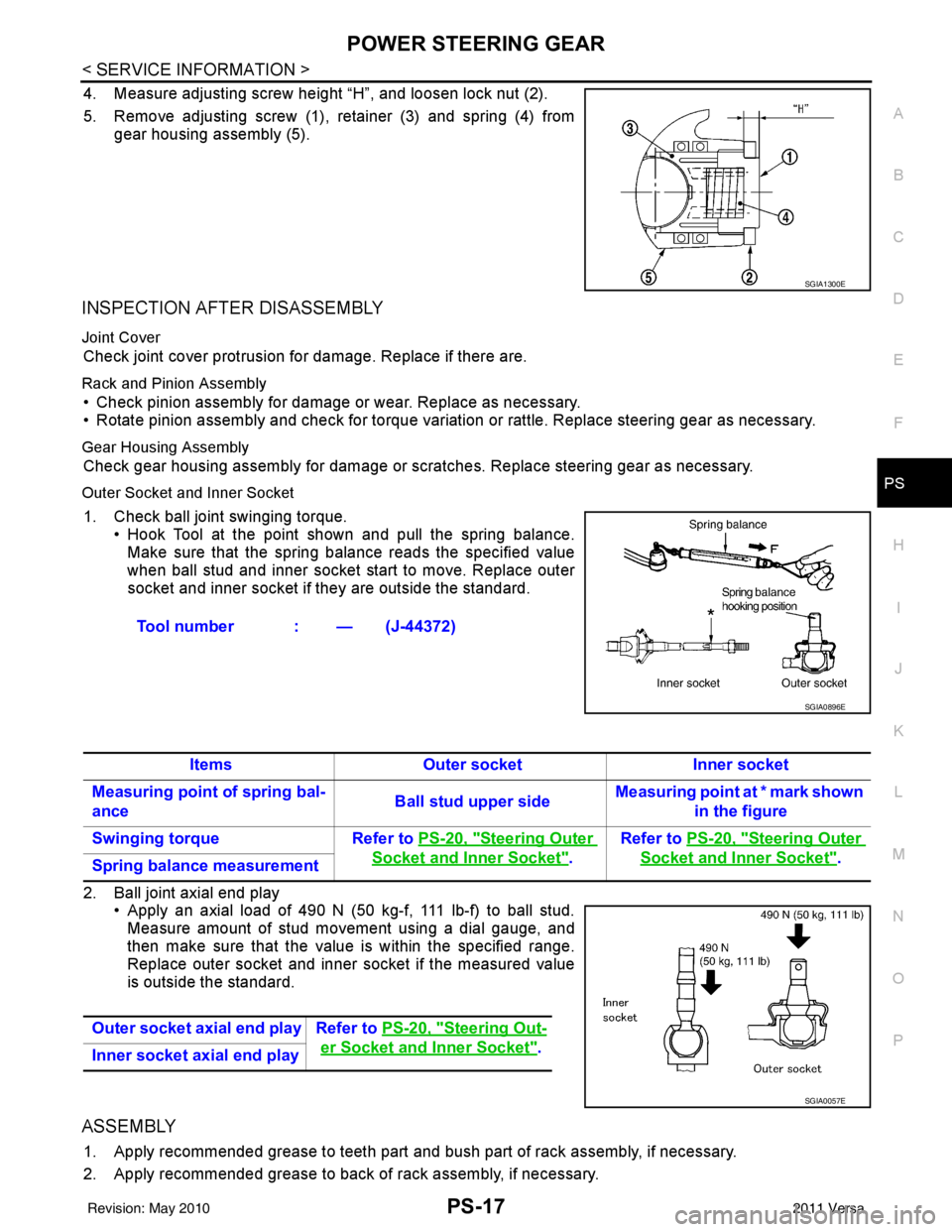
4. Measure adjusting screw height “H”, and loosen lock nut (2).
5. Remove adjusting screw (1), retainer (3) and spring (4) from gear housing assembly (5).
INSPECTION AFTER DISASSEMBLY
Joint Cover
Check joint cover protrusion for damage. Replace if there are.
Rack and Pinion Assembly
• Check pinion assembly for damage or wear. Replace as necessary.
• Rotate pinion assembly and check for torque variation or rattle. Replace steering gear as necessary.
Gear Housing Assembly
Check gear housing assembly for damage or scra tches. Replace steering gear as necessary.
Outer Socket and Inner Socket
1. Check ball joint swinging torque.
• Hook Tool at the point shown and pull the spring balance.
Make sure that the spring balance reads the specified value
when ball stud and inner socket start to move. Replace outer
socket and inner socket if they are outside the standard.
2. Ball joint axial end play • Apply an axial load of 490 N (50 kg-f, 111 lb-f) to ball stud.
Measure amount of stud movement using a dial gauge, and
then make sure that the value is within the specified range.
Replace outer socket and inner socket if the measured value
is outside the standard.
ASSEMBLY
1. Apply recommended grease to teeth part and bush part of rack assembly, if necessary.
2. Apply recommended grease to back of rack assembly, if necessary.
SGIA1300E
Tool number : — (J-44372)
SGIA0896E
ItemsOuter socket Inner socket
Measuring point of spring bal-
ance Ball stud upper sideMeasuring point at * mark shown
in the figure
Swinging torque Refer to PS-20, "
Steering Outer
Socket and Inner Socket".Refer to
PS-20, "
Steering Outer
Socket and Inner Socket".
Spring balance measurement
Outer socket axial end play Refer to PS-20, "
Steering Out-
er Socket and Inner Socket".
Inner socket axial end play
SGIA0057E
Revision: May 2010 2011 Versa
Page 3517 of 3787
RAX-2
< SERVICE INFORMATION >
PRECAUTIONS
SERVICE INFORMATION
PRECAUTIONS
Precaution for Supplemental Restraint System (SRS) "AIR BAG" and "SEAT BELT
PRE-TENSIONER"
INFOID:0000000005928711
The Supplemental Restraint System such as “A IR BAG” and “SEAT BELT PRE-TENSIONER”, used along
with a front seat belt, helps to reduce the risk or severity of injury to the driver and front passenger for certain
types of collision. This system includes seat belt switch inputs and dual stage front air bag modules. The SRS
system uses the seat belt switches to determine the front air bag deployment, and may only deploy one front
air bag, depending on the severity of a collision and w hether the front occupants are belted or unbelted.
Information necessary to service the system safely is included in the SRS and SB section of this Service Man-
ual.
WARNING:
• To avoid rendering the SRS inopera tive, which could increase the risk of personal injury or death in
the event of a collision which would result in air bag inflation, all maintenance must be performed by
an authorized NISSAN/INFINITI dealer.
• Improper maintenance, including incorrect removal and installation of the SRS can lead to personal
injury caused by unintent ional activation of the system. For re moval of Spiral Cable and Air Bag
Module, see the SRS section.
• Do not use electrical test equipmen t on any circuit related to the SRS unless instructed to in this
Service Manual. SRS wiring harn esses can be identified by yellow and/or orange harnesses or har-
ness connectors.
PRECAUTIONS WHEN USING POWER TOOLS (AIR OR ELECTRIC) AND HAMMERS
WARNING:
• When working near the Airbag Diagnosis Sensor Unit or other Airbag System sensors with the Igni-
tion ON or engine running, DO NOT use air or electri c power tools or strike near the sensor(s) with a
hammer. Heavy vibration could activate the sensor( s) and deploy the air bag(s), possibly causing
serious injury.
• When using air or electric power tools or hammers , always switch the Ignition OFF, disconnect the
battery, and wait at least 3 minu tes before performing any service.
Precaution Necessary for Steering W heel Rotation After Battery Disconnect
INFOID:0000000005928712
NOTE:
• This Procedure is applied only to models with Intelligent Key system and NATS (NISSAN ANTI-THEFT SYS-
TEM).
• Remove and install all control units after disconnecting both battery cables with the ignition knob in the
″LOCK ″ position.
• Always use CONSULT-III to perform self-diagnosis as a part of each function inspection after finishing work.
If DTC is detected, perform trouble diagnosis according to self-diagnostic results.
For models equipped with the Intelligent Key system and NATS, an electrically controlled steering lock mech-
anism is adopted on the key cylinder.
For this reason, if the battery is disconnected or if the battery is discharged, the steering wheel will lock and
steering wheel rotation will become impossible.
If steering wheel rotation is required when battery pow er is interrupted, follow the procedure below before
starting the repair operation.
OPERATION PROCEDURE
1. Connect both battery cables. NOTE:
Supply power using jumper cables if battery is discharged.
2. Use the Intelligent Key or mechanical key to turn the ignition switch to the ″ACC ″ position. At this time, the
steering lock will be released.
3. Disconnect both battery cables. The steering lock will remain released and the steering wheel can be rotated.
4. Perform the necessary repair operation.
Revision: May 2010 2011 Versa
Page 3521 of 3787
RAX-6
< SERVICE INFORMATION >
WHEEL HUB
WHEEL HUB
On-Vehicle Inspection and ServiceINFOID:0000000005928715
• Check the axle and suspension parts for excessive play, wear, or damage.
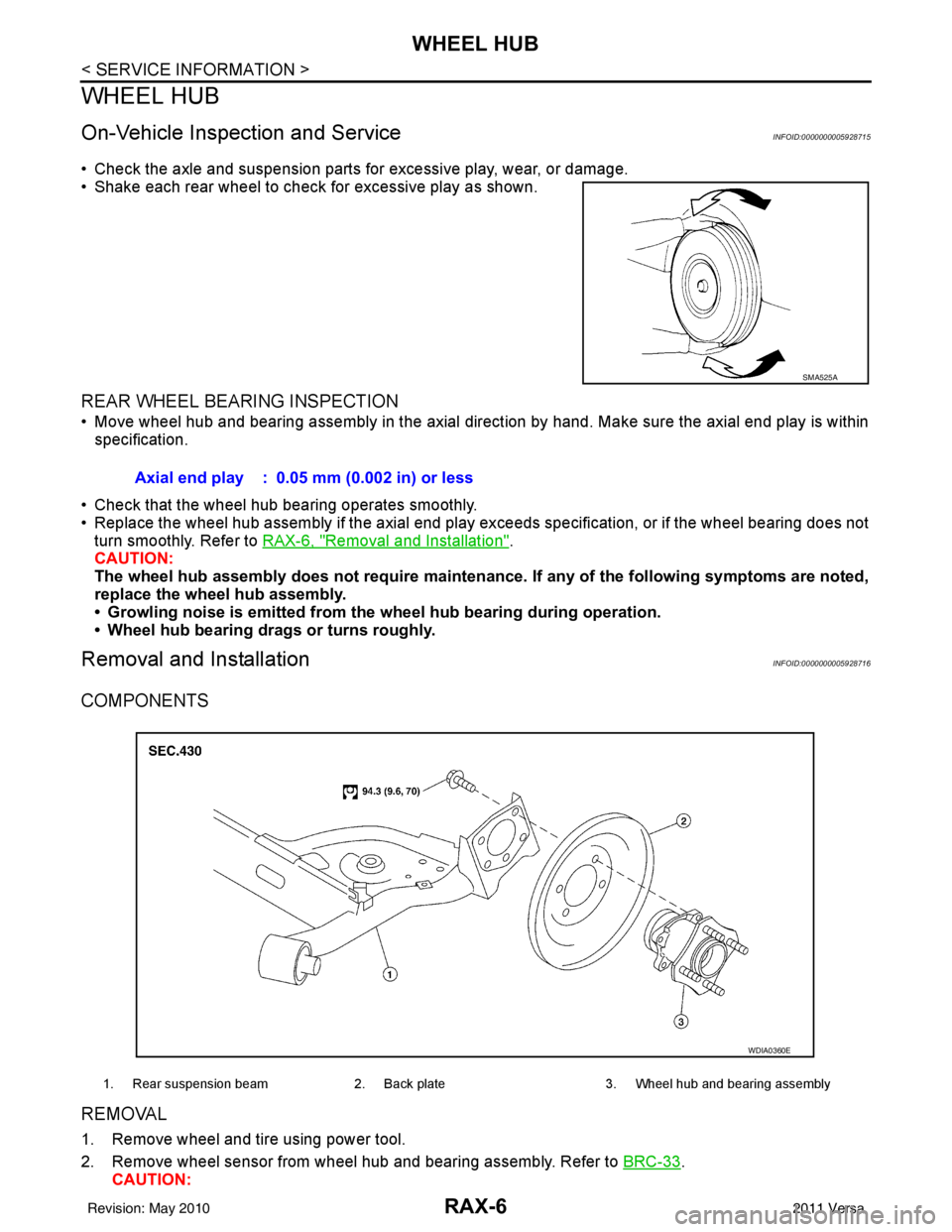
• Shake each rear wheel to check for excessive play as shown.
REAR WHEEL BEARING INSPECTION
• Move wheel hub and bearing assembly in the axial direction by hand. Make sure the axial end play is within
specification.
• Check that the wheel hub bearing operates smoothly.
• Replace the wheel hub assembly if the axial end play exceeds specification, or if the wheel bearing does not turn smoothly. Refer to RAX-6, "
Removal and Installation".
CAUTION:
The wheel hub assembly does not requ ire maintenance. If any of the following symptoms are noted,
replace the wheel hub assembly.
• Growling noise is emitted from the wheel hub bearing during operation.
• Wheel hub bearing drags or turns roughly.
Removal and InstallationINFOID:0000000005928716
COMPONENTS
REMOVAL
1. Remove wheel and tire using power tool.
2. Remove wheel sensor from wheel hub and bearing assembly. Refer to BRC-33
.
CAUTION:
SMA525A
Axial end play : 0.05 mm (0.002 in) or less
1. Rear suspension beam 2. Back plate 3. Wheel hub and bearing assembly
WDIA0360E
Revision: May 2010 2011 Versa