NISSAN TITAN 2006 1.G Navigation Manual
TITAN 2006 1.G
NISSAN
NISSAN
https://www.carmanualsonline.info/img/5/699/w960_699-0.png
NISSAN TITAN 2006 1.G Navigation Manual
Page 205 of 272
.Guidance Volume:
Adjust the volume level of voice guidance by
tilting the joystick in the direction of [+] or
[].DISPLAY SETTINGSThis menu allows you to turn on and off the
display and adjust the image quality.Basic operation1. Highlight [Display] and push .
2. Highlight the preferred adjustment item and push .
3. Use the joystick to adjust to the preferred setting.
4. After setting, push or
/
to apply the setting.
5. Push /
to return to the
previous screen. Push
Page 206 of 272
NAV2998
Display offTo turn off the display, pushand turn
the [Display off] indicator on.
NAV2999
When any button is pushed with the display off,
the display turns on. The display will automati-
cally turn off 5 seconds after the operation is
finished.
To return to the previous screen, push
, highlight [Display] and push
to turn off the indicator.
NAV3000
BrightnessAdjust the display brightness by tilting the
joystick in the direction of [+] or [ ].
INFO:
The preview of the map screen is displayed on
the upper portion of the screen, if the previous
screen showed a map.
8-4
Other settings
Page 208 of 272
SYSTEM SETTINGS SCREENAllows you to set system settings such as
language/measurement unit setting.Basic operation1. Highlight [System Settings] and push .
2. Highlight the preferred adjustment item and push .
3. Push /
to return to the
previous screen. Push
Page 209 of 272
LANGUAGE AND UNIT SETTINGSThis allows you to change the language and
measurement unit used in the system.
NAV3031
Language settings1. Highlight [Language/Units] and push .
NAV3032
2. Highlight the preferred setting item and
push . The indicator light of the
selected item illuminates.
Available languages
— English
— Franc¸ ais
Other settings
8-7
Page 210 of 272
NAV3033
3. A message is displayed. Confirm the con-tents of the message.
After confirming the message, highlight [Yes]
and push .
NAV3034
4. The program loading screen is displayed,
and the system initiates language setting.
Upon completion, the start-up screen is
automatically displayed.
CAUTION
Do not change the ignition switch posi-
tion while changing the language. Doing
so may cause a system malfunction.
8-8
Other settings
Page 211 of 272
NAV3031
Unit settings1. Highlight [Language/Units] and push .
NAV3035
2. Highlight [Unit] and tilt the joystick to the
right or left or push to highlight
the preferred unit.
The indicator of the selected unit illuminates.
Available units
— US: mile, MPH, 8F, MPG
— Metric: km, km/h, 8C, L/100 km
3. Push /
to return to the
previous screen.
Push
Page 212 of 272
CLOCK SETTINGSThis allows you to change the clock settings.Basic operation1. Highlight [Clock] and push.
2. Highlight the preferred adjustment item.
3. Use the joystick to adjust to the preferred setting.
4. After setting, push or
/
to apply the setting.
5. Push /
to return to the
previous screen. Push
Page 214 of 272
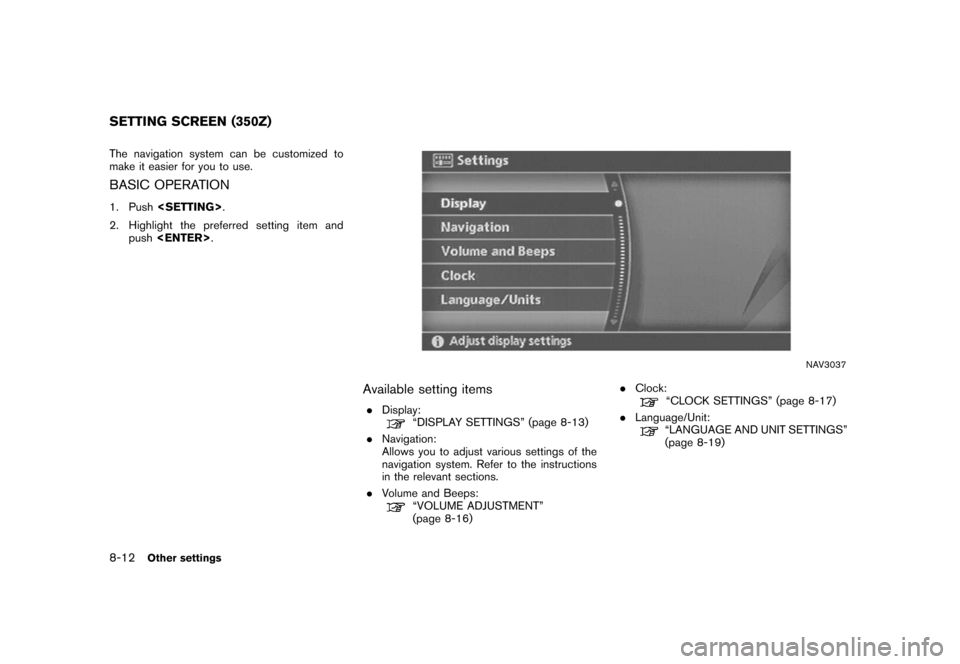
The navigation system can be customized to
make it easier for you to use.BASIC OPERATION1. Push .
2. Highlight the preferred setting item and push .
NAV3037
Available setting items.
Display:
“DISPLAY SETTINGS” (page 8-13)
. Navigation:
Allows you to adjust various settings of the
navigation system. Refer to the instructions
in the relevant sections.
. Volume and Beeps:“VOLUME ADJUSTMENT”
(page 8-16) .
Clock:
“CLOCK SETTINGS” (page 8-17)
. Language/Unit:“LANGUAGE AND UNIT SETTINGS”
(page 8-19)
SETTING SCREEN (350Z)8-12
Other settings
Page 215 of 272
DISPLAY SETTINGSThis menu allows you to turn on and off the
display and adjust the image quality.Basic operation1. Highlight [Display] and push.
2. Highlight the preferred adjustment item and push .
3. Use the main directional buttons or the center dial to adjust to the preferred setting.
4. After setting, push or
to apply the setting.
5. Push to return to the previous
screen. Push
Page 218 of 272
![NISSAN TITAN 2006 1.G Navigation Manual
VOLUME ADJUSTMENTThis allows you to turn on and off, as well as
adjust, the voice guide function and the beep
function.Basic operation1. Highlight [Volume and Beeps] and push<ENTER> .
2. Highlight th](/img/5/699/w960_699-217.png "NISSAN TITAN 2006 1.G Navigation Manual
VOLUME ADJUSTMENTThis allows you to turn on and off, as well as
adjust, the voice guide function and the beep
function.Basic operation1. Highlight [Volume and Beeps] and push<ENTER> .
2. Highlight th")
VOLUME ADJUSTMENTThis allows you to turn on and off, as well as
adjust, the voice guide function and the beep
function.Basic operation1. Highlight [Volume and Beeps] and push .
2. Highlight the preferred adjustment item and push .
3. Use the joystick to adjust the volume. Push to set ON/OFF.
4. After setting, push or
to apply the setting.
5. Push to return to the previous
screen. Push
![NISSAN TITAN 2006 1.G Navigation Manual
.Guidance Volume:
Adjust the volume level of voice guidance by
tilting the joystick in the direction of [+] or
[].DISPLAY SETTINGSThis menu allows you to turn on and off the
display and adjust the i](/img/5/699/w960_699-204.png "NISSAN TITAN 2006 1.G Navigation Manual
.Guidance Volume:
Adjust the volume level of voice guidance by
tilting the joystick in the direction of [+] or
[].DISPLAY SETTINGSThis menu allows you to turn on and off the
display and adjust the i")
![NISSAN TITAN 2006 1.G Navigation Manual
NAV2998
Display offTo turn off the display, push<ENTER>and turn
the [Display off] indicator on.
NAV2999
When any button is pushed with the display off,
the display turns on. The display will automati](/img/5/699/w960_699-205.png "NISSAN TITAN 2006 1.G Navigation Manual
NAV2998
Display offTo turn off the display, push<ENTER>and turn
the [Display off] indicator on.
NAV2999
When any button is pushed with the display off,
the display turns on. The display will automati")
![NISSAN TITAN 2006 1.G Navigation Manual
SYSTEM SETTINGS SCREENAllows you to set system settings such as
language/measurement unit setting.Basic operation1. Highlight [System Settings] and push<ENTER> .
2. Highlight the preferred adjustment](/img/5/699/w960_699-207.png "NISSAN TITAN 2006 1.G Navigation Manual
SYSTEM SETTINGS SCREENAllows you to set system settings such as
language/measurement unit setting.Basic operation1. Highlight [System Settings] and push<ENTER> .
2. Highlight the preferred adjustment")
![NISSAN TITAN 2006 1.G Navigation Manual
LANGUAGE AND UNIT SETTINGSThis allows you to change the language and
measurement unit used in the system.
NAV3031
Language settings1. Highlight [Language/Units] and push<ENTER> .
NAV3032
2. Highlight](/img/5/699/w960_699-208.png "NISSAN TITAN 2006 1.G Navigation Manual
LANGUAGE AND UNIT SETTINGSThis allows you to change the language and
measurement unit used in the system.
NAV3031
Language settings1. Highlight [Language/Units] and push<ENTER> .
NAV3032
2. Highlight")
![NISSAN TITAN 2006 1.G Navigation Manual
NAV3033
3. A message is displayed. Confirm the con-tents of the message.
After confirming the message, highlight [Yes]
and push <ENTER> .
NAV3034
4. The program loading screen is displayed,
and the s](/img/5/699/w960_699-209.png "NISSAN TITAN 2006 1.G Navigation Manual
NAV3033
3. A message is displayed. Confirm the con-tents of the message.
After confirming the message, highlight [Yes]
and push <ENTER> .
NAV3034
4. The program loading screen is displayed,
and the s")
![NISSAN TITAN 2006 1.G Navigation Manual
NAV3031
Unit settings1. Highlight [Language/Units] and push<ENTER> .
NAV3035
2. Highlight [Unit] and tilt the joystick to the
right or left or push <ENTER>to highlight
the preferred unit.
The indicat](/img/5/699/w960_699-210.png "NISSAN TITAN 2006 1.G Navigation Manual
NAV3031
Unit settings1. Highlight [Language/Units] and push<ENTER> .
NAV3035
2. Highlight [Unit] and tilt the joystick to the
right or left or push <ENTER>to highlight
the preferred unit.
The indicat")
![NISSAN TITAN 2006 1.G Navigation Manual
CLOCK SETTINGSThis allows you to change the clock settings.Basic operation1. Highlight [Clock] and push<ENTER>.
2. Highlight the preferred adjustment item.
3. Use the joystick to adjust to the prefer](/img/5/699/w960_699-211.png "NISSAN TITAN 2006 1.G Navigation Manual
CLOCK SETTINGSThis allows you to change the clock settings.Basic operation1. Highlight [Clock] and push<ENTER>.
2. Highlight the preferred adjustment item.
3. Use the joystick to adjust to the prefer")
![NISSAN TITAN 2006 1.G Navigation Manual
DISPLAY SETTINGSThis menu allows you to turn on and off the
display and adjust the image quality.Basic operation1. Highlight [Display] and push<ENTER>.
2. Highlight the preferred adjustment item and](/img/5/699/w960_699-214.png "NISSAN TITAN 2006 1.G Navigation Manual
DISPLAY SETTINGSThis menu allows you to turn on and off the
display and adjust the image quality.Basic operation1. Highlight [Display] and push<ENTER>.
2. Highlight the preferred adjustment item and")