differential NISSAN TITAN 2008 1.G Owners Manual
[x] Cancel search | Manufacturer: NISSAN, Model Year: 2008, Model line: TITAN, Model: NISSAN TITAN 2008 1.GPages: 408, PDF Size: 5.58 MB
Page 13 of 408

17. Power outlet/Cigarette lighter
(accessory) (P. 2-39/P. 2-41)
18. Heated seat switch (if so equipped)
(P. 2-36)
19. Storage compartment (P. 2-42)
20. Vehicle dynamic control (VDC) off
switch (if so equipped) (P. 2-37)
21. Tow mode switch (P. 2-39)
22. Electronic locking rear differential
(E-Lock) system switch (if so
equipped) (P.2-37)
23. Shift selector lever (console)
(if so equipped) (P. 5-11)
24. Hazard warning flasher switch (P. 2-35)
25. Front passenger air bag status light
(P. 1-54)
26. Power outlet (P. 2-39)
27. 4WD shift switch (if so equipped)
(P. 5-24)
28. Shift selector lever (column)
(if so equipped) (P. 5-11)
29. Tilt steering wheel control (P. 3-12)
30. Cargo lamp switch (P. 2-36)
31. Rear sonar system off switch
(if so equipped) (P. 2-38)
32. Pedal position adjustment switch
(if so equipped) (P. 3-12)33. Rear power window switch
(if so equipped) (P. 2-53)
*: Refer to the separate Navigation System Own-
er’s Manual (if so equipped) .
See the page number indicated in paren-
theses for operating details.
Illustrated table of contents0-7
ZREVIEW COPYÐ2008 Titan(tzw)
Owners ManualÐUSA_English(nna)
03/06/07Ðtbrooks
X
Page 15 of 408
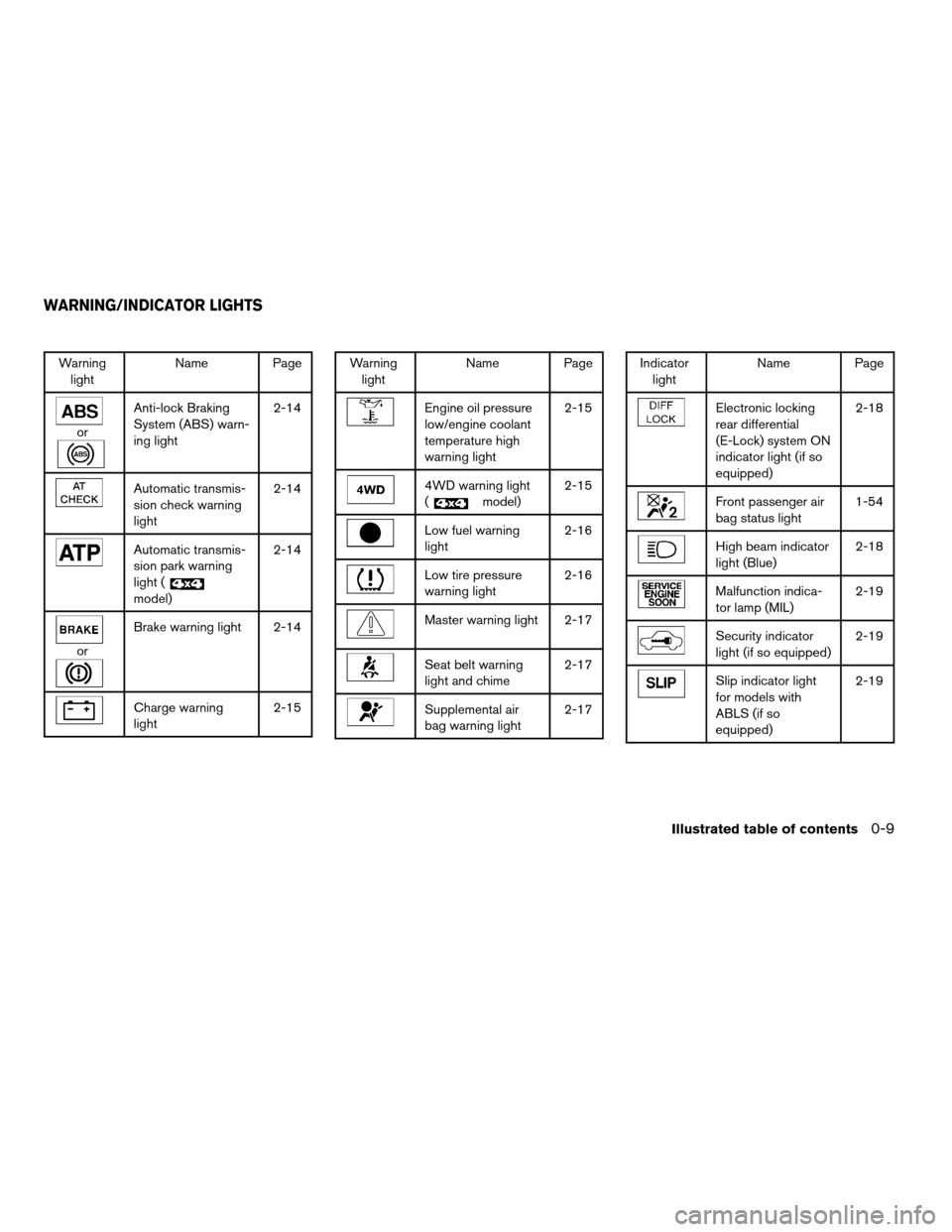
Warning
lightName Page
or
Anti-lock Braking
System (ABS) warn-
ing light2-14
Automatic transmis-
sion check warning
light2-14
Automatic transmis-
sion park warning
light (
model)2-14
or
Brake warning light 2-14
Charge warning
light2-15
Warning
lightName Page
Engine oil pressure
low/engine coolant
temperature high
warning light2-15
4WD warning light
(
model)2-15
Low fuel warning
light2-16
Low tire pressure
warning light2-16
Master warning light 2-17
Seat belt warning
light and chime2-17
Supplemental air
bag warning light2-17
Indicator
lightName Page
Electronic locking
rear differential
(E-Lock) system ON
indicator light (if so
equipped)2-18
Front passenger air
bag status light1-54
High beam indicator
light (Blue)2-18
Malfunction indica-
tor lamp (MIL)2-19
Security indicator
light (if so equipped)2-19
Slip indicator light
for models with
ABLS (if so
equipped)2-19
WARNING/INDICATOR LIGHTS
Illustrated table of contents0-9
ZREVIEW COPYÐ2008 Titan(tzw)
Owners ManualÐUSA_English(nna)
03/06/07Ðtbrooks
X
Page 80 of 408

2 Instruments and controls
Instrument panel...................................2-2
Meters and gauges................................2-4
Speedometer and odometer.....................2-5
Tachometer....................................2-6
Engine coolant temperature gauge...............2-6
Fuel gauge....................................2-7
Engine oil pressure gauge.......................2-7
Voltmeter......................................2-8
Automatic transmission fluid temperature
gauge (if so equipped)..........................2-8
Compass and outside temperature display
(if so equipped)...................................2-9
Outside temperature display.....................2-9
Compass display..............................2-10
Warning/indicator lights and audible reminders......2-13
Checking bulbs...............................2-13
Warning lights................................2-13
Indicator lights................................2-18
Audible reminders.............................2-20
Vehicle Information Display........................2-21
How to use the Vehicle Information Display.......2-21
Security systems (if so equipped)..................2-27
Vehicle security system.........................2-27NISSAN vehicle immobilizer system.............2-28
Windshield wiper and washer switch...............2-29
Switch operation..............................2-29
Rear window and outside mirror defroster switch
(if so equipped)..................................2-30
Headlight and turn signal switch....................2-31
Headlight control switch........................2-31
Daytime running light system (Canada only)......2-33
Instrument brightness control...................2-34
Turn signal switch.............................2-34
Fog light switch (if so equipped)................2-35
Hazard warning flasher switch.....................2-35
Cargo lamp switch...............................2-36
Horn............................................2-36
Heated seat (if so equipped).......................2-36
Vehicle dynamic control (VDC) off switch
(if so equipped)..................................2-37
Electronic locking rear differential (E-Lock) system
switch (if so equipped)............................2-37
Rear sonar system off switch (if so equipped)........2-38
Tow mode switch.................................2-39
Power outlet.....................................2-39
Cigarette lighter..................................2-41
ZREVIEW COPYÐ2008 Titan(tzw)
Owners ManualÐUSA_English(nna)
03/06/07Ðtbrooks
X
Page 83 of 408

17. Power outlet/Cigarette lighter
(accessory) (P. 2-39/P. 2-41)
18. Heated seat switch (if so equipped)
(P. 2-36)
19. Storage compartment (P. 2-42)
20. Vehicle dynamic control (VDC) off
switch (if so equipped) (P. 2-37)
21. Tow mode switch (P. 2-39)
22. Electronic locking rear differential
(E-Lock) system switch (if so
equipped) (P.2-37)
23. Shift selector lever (console)
(if so equipped) (P. 5-11)
24. Hazard warning flasher switch (P. 2-35)
25. Front passenger air bag status light
(P. 1-54)
26. Power outlet (P. 2-39)
27. 4WD shift switch (if so equipped)
(P. 5-24)
28. Shift selector lever (column)
(if so equipped) (P. 5-11)
29. Tilt steering wheel control (P. 3-12)
30. Cargo lamp switch (P. 2-36)
31. Rear sonar system off switch
(if so equipped) (P. 2-38)
32. Pedal position adjustment switch
(if so equipped) (P. 3-12)33. Rear power window switch
(if so equipped) (P. 2-53)
*: Refer to the separate Navigation System Own-
er’s Manual (if so equipped) .
See the page number indicated in paren-
theses for operating details.
Instruments and controls2-3
ZREVIEW COPYÐ2008 Titan(tzw)
Owners ManualÐUSA_English(nna)
03/06/07Ðtbrooks
X
Page 93 of 408

orAnti-lock Braking System (ABS)
warning lightLow fuel warning lightHigh beam indicator light (Blue)
Automatic transmission check warning lightLow tire pressure warning lightMalfunction indicator light (MIL)
Automatic transmission park warning light
(model)Master warning lightSecurity indicator light (if so equipped)
orBrake warning lightSeat belt warning light and chimeSlip indicator light for models with ABLS (if so
equipped)
Charge warning lightSupplemental air bag warning lightSlip indicator light for models with VDC (if so
equipped)
Engine oil pressure low/engine coolant tem-
perature high warning lightElectronic locking rear differential (E-Lock)
system on indicator light (if so equipped)Turn signal/hazard indicator lights
4WD warning light (model)Front passenger air bag status lightVehicle dynamic control off indicator light (if so
equipped)
CHECKING BULBS
With all doors closed, apply the parking brake
and turn the ignition key to the ON position
without starting the engine. The following lights
will come on:
,or,,,,
The following lights come on briefly and then go
off:
or,,,,,
If any light fails to come on, it may indicate
a burned-out bulb or an open circuit in the
electrical system. Have the system repaired
promptly.
WARNING LIGHTS
For additional information on warnings and indi-
cators, see “Vehicle information display” later in
this section.
WARNING/INDICATOR LIGHTS AND
AUDIBLE REMINDERS
Instruments and controls2-13
ZREVIEW COPYÐ2008 Titan(tzw)
Owners ManualÐUSA_English(nna)
03/05/07Ðtbrooks
X
Page 98 of 408
equipped) , roof-mounted curtain side-impact
and rollover supplemental air bags (if so
equipped) , and seat belt with pretensioner sys-
tems need servicing and your vehicle must be
taken to a NISSAN dealer:
cThe supplemental air bag warning light re-
mains on after approximately 7 seconds.
cThe supplemental air bag warning light
flashes intermittently.
cThe supplemental air bag warning light does
not come on at all.
Unless checked and repaired, the supplemental
restraint system (air bag system) and/or the seat
belts with pretensioner system may not function
properly. For additional details see “Supplemen-
tal restraint system” in the “Safety—Seats, seat
belts and supplemental restraint system” section
of this manual.WARNING
If the supplemental air bag warning light
is on, it could mean that the supplemental
front air bag, front seat-mounted side-
impact supplemental air bags (if so
equipped) , roof-mounted curtain side-
impact and rollover supplemental air bags
(if so equipped) and/or seat belts with
pretensioner systems will not operate in
an accident. To help avoid injury to your-
self or others, have your vehicle checked
by a NISSAN dealer as soon as possible.
INDICATOR LIGHTS
For additional information on warnings and indi-
cators, see “Vehicle information display” later in
this section.
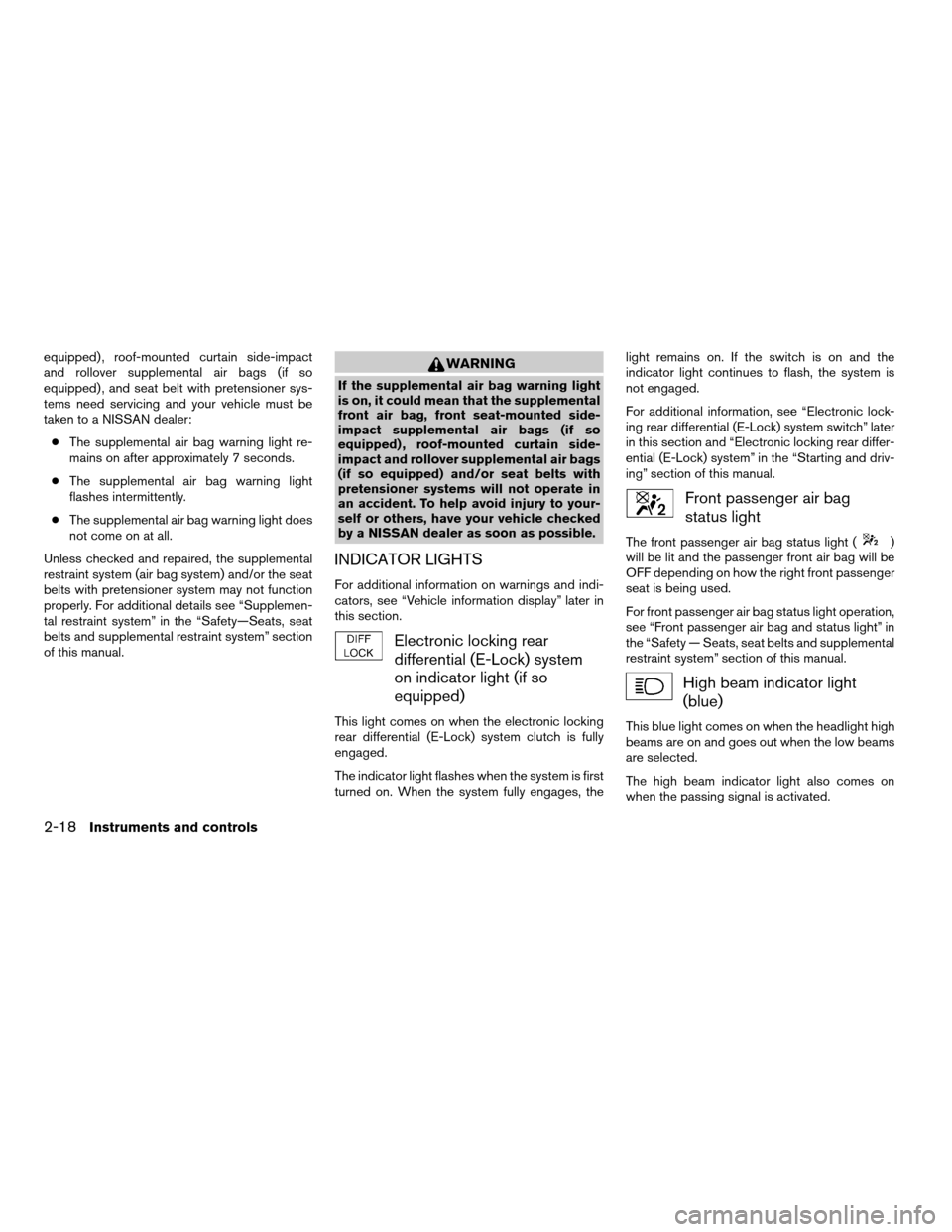
Electronic locking rear
differential (E-Lock) system
on indicator light (if so
equipped)
This light comes on when the electronic locking
rear differential (E-Lock) system clutch is fully
engaged.
The indicator light flashes when the system is first
turned on. When the system fully engages, thelight remains on. If the switch is on and the
indicator light continues to flash, the system is
not engaged.
For additional information, see “Electronic lock-
ing rear differential (E-Lock) system switch” later
in this section and “Electronic locking rear differ-
ential (E-Lock) system” in the “Starting and driv-
ing” section of this manual.
Front passenger air bag
status light
The front passenger air bag status light ()
will be lit and the passenger front air bag will be
OFF depending on how the right front passenger
seat is being used.
For front passenger air bag status light operation,
see “Front passenger air bag and status light” in
the “Safety — Seats, seat belts and supplemental
restraint system” section of this manual.
High beam indicator light
(blue)
This blue light comes on when the headlight high
beams are on and goes out when the low beams
are selected.
The high beam indicator light also comes on
when the passing signal is activated.
2-18Instruments and controls
ZREVIEW COPYÐ2008 Titan(tzw)
Owners ManualÐUSA_English(nna)
03/05/07Ðtbrooks
X
Page 100 of 408

spin. Slippery road conditions may exist if the slip
indicator blinks on. If this happens, adjust your
driving accordingly.
The slip indicator light also comes on when you
turn the ignition key to the ON position. The light
will turn off after about 2 seconds if the system is
operational. If the light does not come on or does
not go off, have the VDC system checked by a
NISSAN dealer.
Turn signal/hazard indicator
lights
The appropriate light flashes when the turn signal
switch is activated.
Both lights flash when the hazard switch is turned
on.
Vehicle dynamic control off
indicator light (if so equipped)
This indicator light comes on when the vehicle
dynamic control off switch is pushed to OFF, the
transfer case is in the 4LO position (
model) , or when the vehicle dynamic control sys-
tem is not functioning properly. This indicates the
vehicle dynamic control system is not operating.
Push the vehicle dynamic control off switch again
or restart the engine and the system will operatenormally. See “Vehicle dynamic control (VDC)
system” in the “Starting and driving” section of
this manual.
The vehicle dynamic control light also comes on
when you turn the ignition key to the ON position.
The light will turn off after about 2 seconds if the
system is operational. If the light stays on or
comes on along with the SLIP indicator light
while you are driving, have the vehicle dynamic
control system checked by a NISSAN dealer.
While the vehicle dynamic control system is op-
erating, you might feel slight vibration or hear the
system working when starting the vehicle or ac-
celerating, but this is normal.
The VDC system will be disabled and the VDC
light will illuminate when the electronic locking
rear differential (E-lock) system switch (if so
equipped) is turned on and the E-lock system is
engaged. If the E-lock system disengages or the
switch is turned off, the VDC system will be
enabled and the VDC light will turn off.AUDIBLE REMINDERS
Brake pad wear warning
The disc brake pads have audible wear warnings.
When a disc brake pad requires replacement, it
makes a high pitched scraping sound when the
vehicle is in motion, whether or not the brakepedal is depressed. Have the brakes checked as
soon as possible if the warning sound is heard.
Key reminder chime
A chime sounds if the driver’s door is opened
while the key is left in the ignition switch. Remove
the key and take it with you when leaving the
vehicle.
Light reminder chime
With the ignition switch in the OFF position, a
chime sounds when the driver’s door is opened if
the headlights or parking lights are on.
Turn the headlight control switch off before leav-
ing the vehicle.
2-20Instruments and controls
ZREVIEW COPYÐ2008 Titan(tzw)
Owners ManualÐUSA_English(nna)
03/05/07Ðtbrooks
X
Page 117 of 408
CAUTION
cDo not use the seat heater for extended
periods or when no one is using the
seat.
cDo not put anything on the seat which
insulates heat, such as a blanket, cush-
ion, seat cover, etc. Otherwise, the seat
may become overheated.
cDo not place anything hard or heavy on
the seat or pierce it with a pin or similar
object. This may result in damage to the
heater.
cAny liquid spilled on the heated seat
should be removed immediately with a
dry cloth.
cWhen cleaning the seat, never use
gasoline, benzine, thinner, or any simi-
lar materials.
cIf any abnormalities are found or the
heated seat does not operate, turn the
switch off and have the system checked
by your NISSAN dealer.
cThe battery could run down if the seat
heater is operated while the engine is
not running.The vehicle should be driven with the Vehicle
Dynamic Control (VDC) system on for most driv-
ing conditions.
If the vehicle is stuck in mud or snow, the VDC
system reduces the engine output to reduce
wheel spin. The engine speed will be reduced
even if the accelerator is depressed to the floor. If
maximum engine power is needed to free a stuck
vehicle, turn the VDC system off.
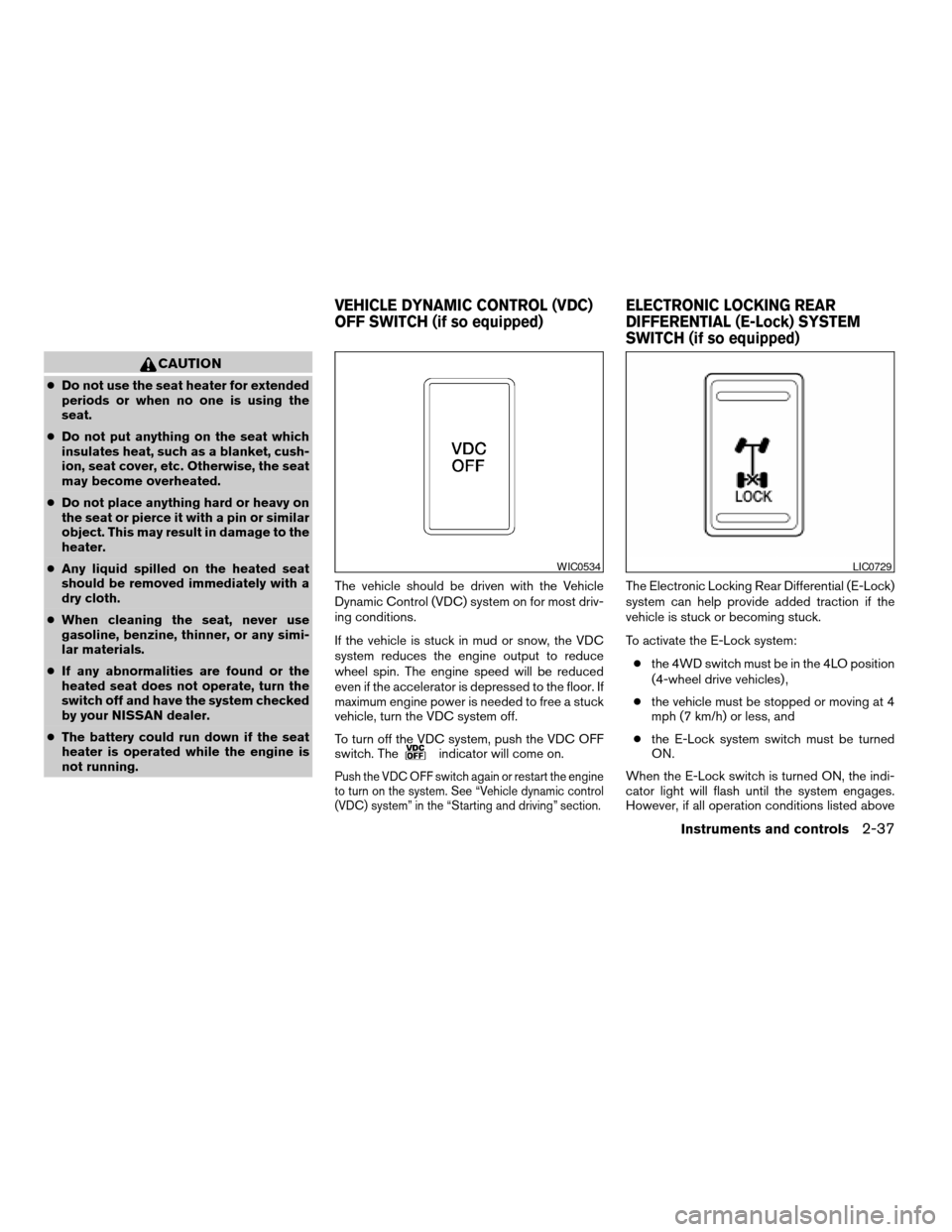
To turn off the VDC system, push the VDC OFF
switch. The
indicator will come on.
Push the VDC OFF switch again or restart the engine
to turn on the system. See “Vehicle dynamic control
(VDC) system” in the “Starting and driving” section.
The Electronic Locking Rear Differential (E-Lock)
system can help provide added traction if the
vehicle is stuck or becoming stuck.
To activate the E-Lock system:
cthe 4WD switch must be in the 4LO position
(4-wheel drive vehicles) ,
cthe vehicle must be stopped or moving at 4
mph (7 km/h) or less, and
cthe E-Lock system switch must be turned
ON.
When the E-Lock switch is turned ON, the indi-
cator light will flash until the system engages.
However, if all operation conditions listed above
WIC0534LIC0729
VEHICLE DYNAMIC CONTROL (VDC)
OFF SWITCH (if so equipped)ELECTRONIC LOCKING REAR
DIFFERENTIAL (E-Lock) SYSTEM
SWITCH (if so equipped)
Instruments and controls2-37
ZREVIEW COPYÐ2008 Titan(tzw)
Owners ManualÐUSA_English(nna)
03/05/07Ðtbrooks
X
Page 118 of 408

are not met or the system becomes disengaged,
the indicator light will continue to flash.
The Anti-Lock Brake (ABS) system is disabled
and the ABS light illuminates when the E-Lock
system is ON. Also, the Vehicle Dynamic Control
(VDC) system is disabled and the VDC light
illuminates when the E-Lock system is ON.
See “Electronic locking rear differential (E-Lock)
system” in the “Starting and Driving” section for
further explanation and system limitations.
WARNING
cNever leave the E-Lock system ON
when driving on paved or hard-surfaced
roads. Turning the vehicle may result in
the rear wheels slipping and result in an
accident and personal injury. After us-
ing the E-Lock system to free the ve-
hicle, turn the system OFF.cUse the E-Lock system only when free-
ing a stuck vehicle. Try the 4LO position
before using the E-Lock system. Never
use the E-Lock system on a slippery
road surface such as snow or ice sur-
face. Using the E-Lock system when
driving in these road conditions may
cause unexpected movement of the ve-
hicle during engine braking, accelerat-
ing or turning, which may result in an
accident and serious personal injury.
CAUTION
cAfter using the E-Lock system, turn the
switch OFF to prevent possible damage
to driveline components from extended
use.
cDo not drive over 12 MPH (20 km/h)
when the system is engaged. Doing so
could result in possible damage to the
driveline.
cDo not turn on the E-lock system while
the tires are spinning. Doing so could
damage drivetrain components.
WARNING
The rear sonar system is a convenience
but it is not a substitute for proper back-
ing. Always turn and check that it is safe to
do so before backing up. Always back up
slowly.
The rear sonar system is active when the ignition
is in the ON position and the shift selector lever is
in R (Reverse) .
When sensors detect obstacles within 6 ft (1.8
m) of the rear bumper, a beeping tone is emitted.
The rear sonar system can be disabled by push-
ing the OFF switch. When the system is disabled,
LIC0471
REAR SONAR SYSTEM OFF SWITCH
(if so equipped)
2-38Instruments and controls
ZREVIEW COPYÐ2008 Titan(tzw)
Owners ManualÐUSA_English(nna)
03/05/07Ðtbrooks
X
Page 252 of 408

5 Starting and driving
Precautions when starting and driving................5-2
Exhaust gas (carbon monoxide)..................5-2
Three-way catalyst..............................5-2
On-pavement and off-road driving
precautions....................................5-3
Tire Pressure Monitoring System (TPMS)..........5-3
Avoiding collision and rollover....................5-5
Drinking alcohol/drugs and driving................5-6
Driving safety precautions.......................5-6
Ignition switch.....................................5-8
Automatic transmission..........................5-8
Key positions..................................5-9
Nissan Vehicle Immobilizer System
(if so equipped)................................5-9
Before starting the engine.........................5-10
Starting the engine...............................5-10
Driving the vehicle................................5-11
Engine protection mode........................5-11
Automatic transmission.........................5-12
Parking brake....................................5-18
Cruise control....................................5-18
Precautions on cruise control...................5-18
Cruise control operations.......................5-19Break-in schedule................................5-20
Increasing fuel economy...........................5-20
Using four wheel drive (4WD)
(if so equipped)..................................5-21
Transfer case shifting procedures...............5-21
Electronic locking rear differential (E-Lock) system
(if so equipped)..................................5-26
Parking/parking on hills............................5-27
Power steering...................................5-28
Brake system....................................5-28
Brake precautions.............................5-28
Anti-lock Braking System (ABS).................5-29
Active brake limited slip (ABLS) system
(if so equipped)..................................5-30
Vehicle dynamic control (VDC) system
(if so equipped)..................................5-31
Rear sonar system (if so equipped).................5-32
Cold weather driving..............................5-33
Freeing a frozen door lock......................5-33
Anti-freeze....................................5-33
Battery.......................................5-33
Draining of coolant water.......................5-33
Tire equipment................................5-33
ZREVIEW COPYÐ2008 Titan(tzw)
Owners ManualÐUSA_English(nna)
03/06/07Ðtbrooks
X