light NISSAN TITAN 2008 1.G Quick Reference Guide
[x] Cancel search | Manufacturer: NISSAN, Model Year: 2008, Model line: TITAN, Model: NISSAN TITAN 2008 1.GPages: 36, PDF Size: 2.4 MB
Page 16 of 36
14
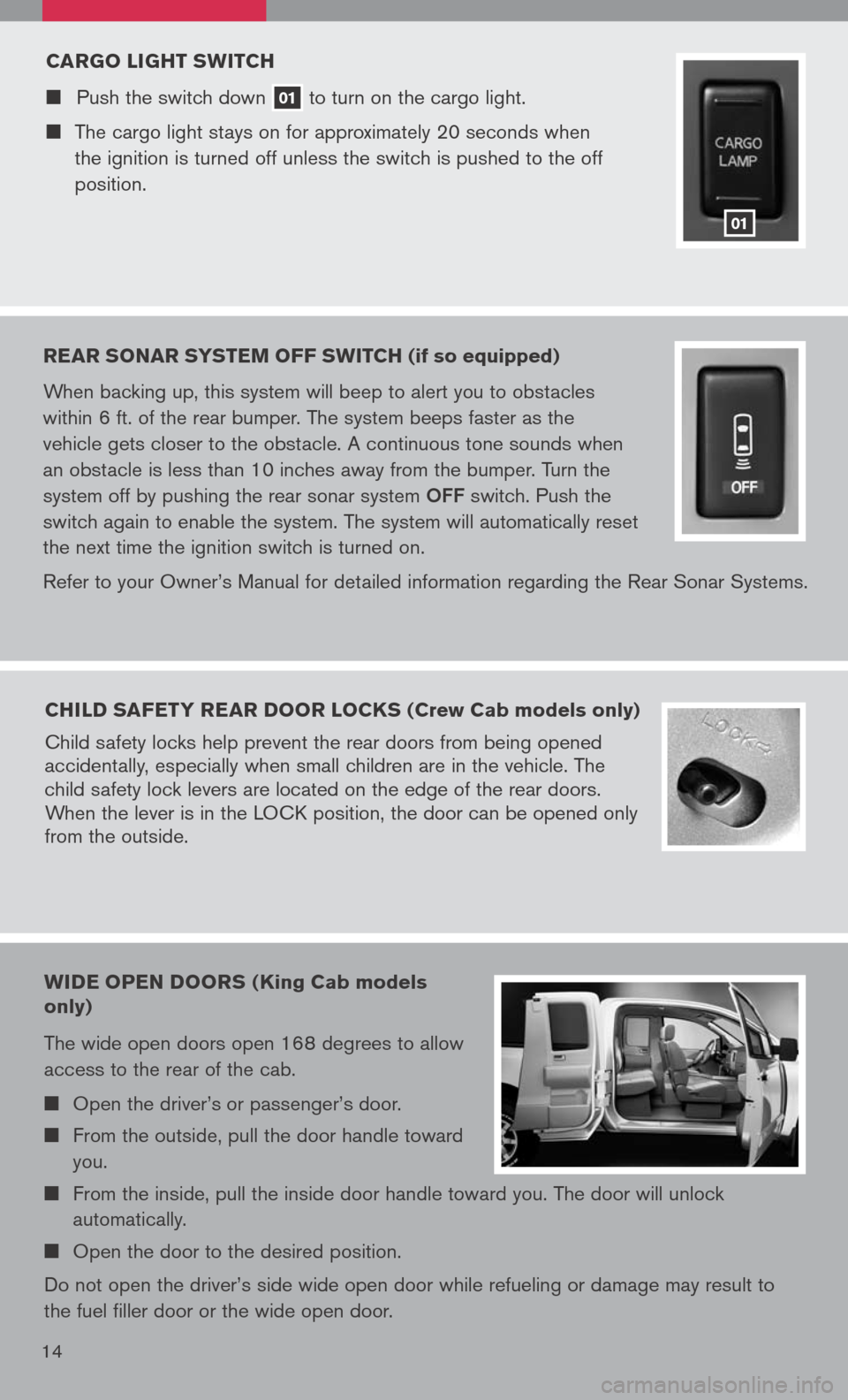
CARgO LI gHT sw ITCH
Push the switch down 01 to
turn on the cargo light.
The cargo light stays on for approximately 20 seconds when
the ignition is turned off unless the switch is pushed to the off
position.
01
REAR sONAR sY s TEM OFF swITCH (if so equipped)
When backing up, this system will beep to alert you to obstacles
within 6 ft. of the rear bumper. The system beeps faster as the
vehicle gets closer to the obstacle. A continuous tone sounds when
an obstacle is less than 10 inches away from the bumper. Turn the
system off by pushing the rear sonar system
OFF switch. Push the
switch again to enable the system. The system will automatically reset
the next time the ignition switch is turned on.
Refer to your Owner’s Manual for detailed information regarding the Rear Sonar Systems.
CHILD sAFETY REAR DOOR LOCK s (Crew Cab models only)
Child safety locks help prevent the rear doors from being opened
accidentally, especially when small children are in the vehicle. The
child safety lock levers are located on the edge of the rear doors.
When the lever is in the LOCK position, the door can be opened only
from the outside.
wIDE OPEN DOOR s (King Cab models
only)
The wide open doors open 168 degrees to allow
access to the rear of the cab.
Open the driver’s or passenger’s door.
From the outside, pull the door handle toward
you.
From the inside, pull the inside door handle toward you. The door will unlock
automatically.
Open the door to the desired position.
Do not open the driver’s side wide open door while refueling or damage may result to
the fuel filler door or the wide open door.
Page 19 of 36
To program your HomeLink® Transceiver to operate a garage door, gate, or entry door
opener, home or office lighting, you need to be at the same location as the device.
NOTe: garage door openers (manufactured after 1996) have “rolling code
protection”. To program a garage door opener equipped with “rolling code protection”, you will need to use a ladder to get up to the garage door opener motor to be able to access the “smart or learn” program button.
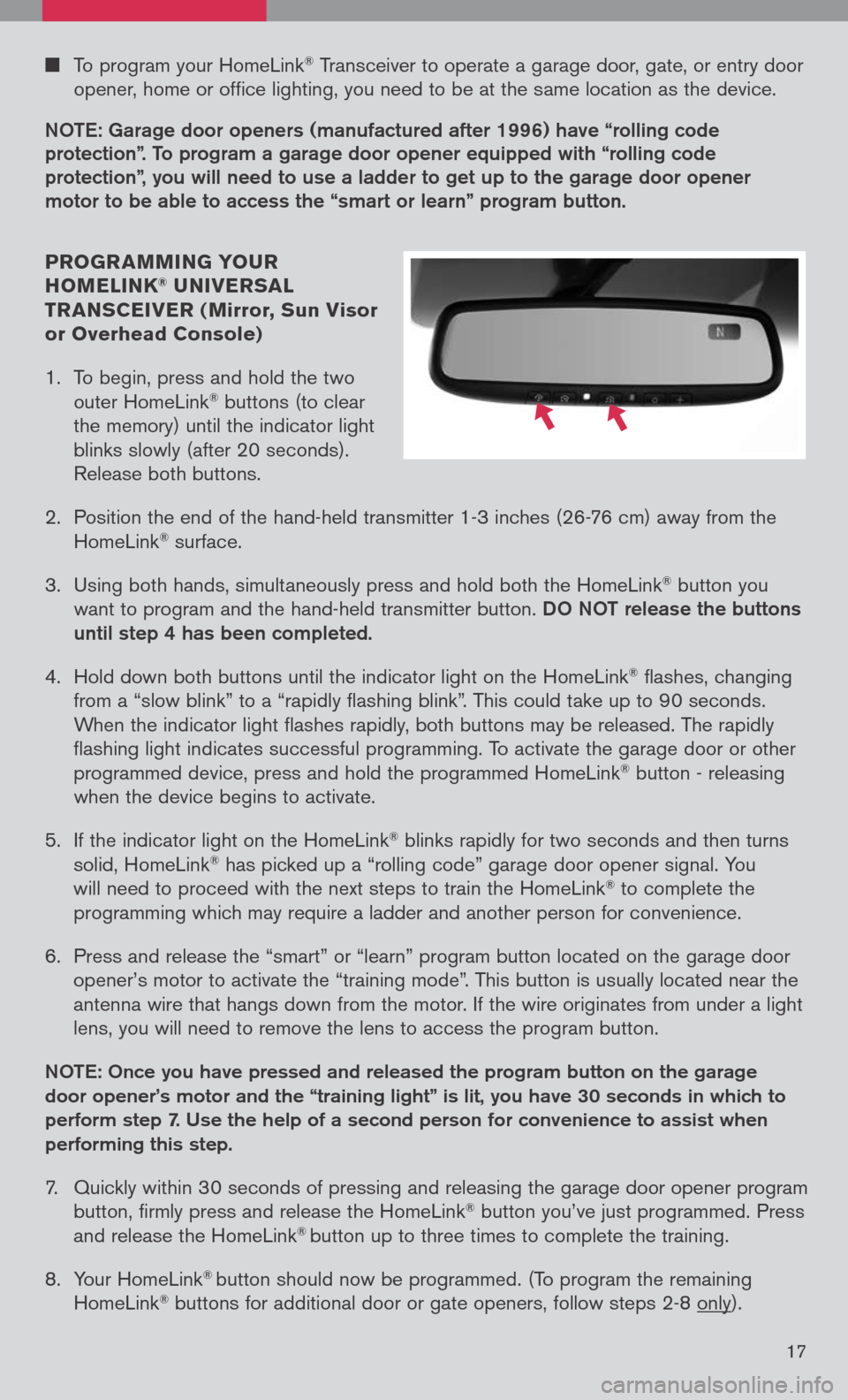
PROgR AMMIN g YO uR
HOMELINK® u NIVER sAL
TR AN sCEIVER ( Mirror, sun Visor
or Overhead Console)
1. To begin, press and hold the two
outer HomeLink
® buttons (to clear
the memory) until the indicator light
blinks slowly (after 20 seconds).
Release both buttons.
2. Position the end of the hand-held transmitter 1-3 inches (26-76 cm) away from the
HomeLink® surface.
3. Using both hands, simultaneously press and hold both the HomeLink
® button you
want to program and the hand-held transmitter button.
DO NOT release the buttons
until step 4 has been completed.
4. Hold down both buttons until the indicator light on the HomeLink
® flashes, changing
from a “slow blink” to a “rapidly flashing blink”. This could take up to 90 seconds.
When the indicator light flashes rapidly, both buttons may be released. The rapidly
flashing light indicates successful programming. To activate the garage door or other
programmed device, press and hold the programmed HomeLink
® button - releasing
when the device begins to activate.
5. If the indicator light on the HomeLink
® blinks rapidly for two seconds and then turns
solid, HomeLink® has picked up a “rolling code” garage door opener signal. You
will need to proceed with the next steps to train the HomeLink® to complete the
programming which may require a ladder and another person for convenience.
6. Press and release the “smart” or “learn” program button located on the garage door
opener’s motor to activate the “training mode”. This button is usually located near the
antenna wire that hangs down from the motor. If the wire originates from under a light
lens, you will need to remove the lens to access the program button.
NOTe: Once you have pressed and released the program button on the garage
door opener’s motor and the “training light” is lit, you have 30 seconds in which to
perform step 7. Use the help of a second person for convenience to assist when
performing this step.
7. Quickly within 30 seconds of pressing and releasing the garage door opener program
button, firmly press and release the HomeLink® button you’ve just programmed. Press
and release the HomeLink® button up to three times to complete the training.
8. Your HomeLink
® button should now be programmed. (To program the remaining
HomeLink® buttons for additional door or gate openers, follow steps 2-8 only).
17
Page 25 of 36
23
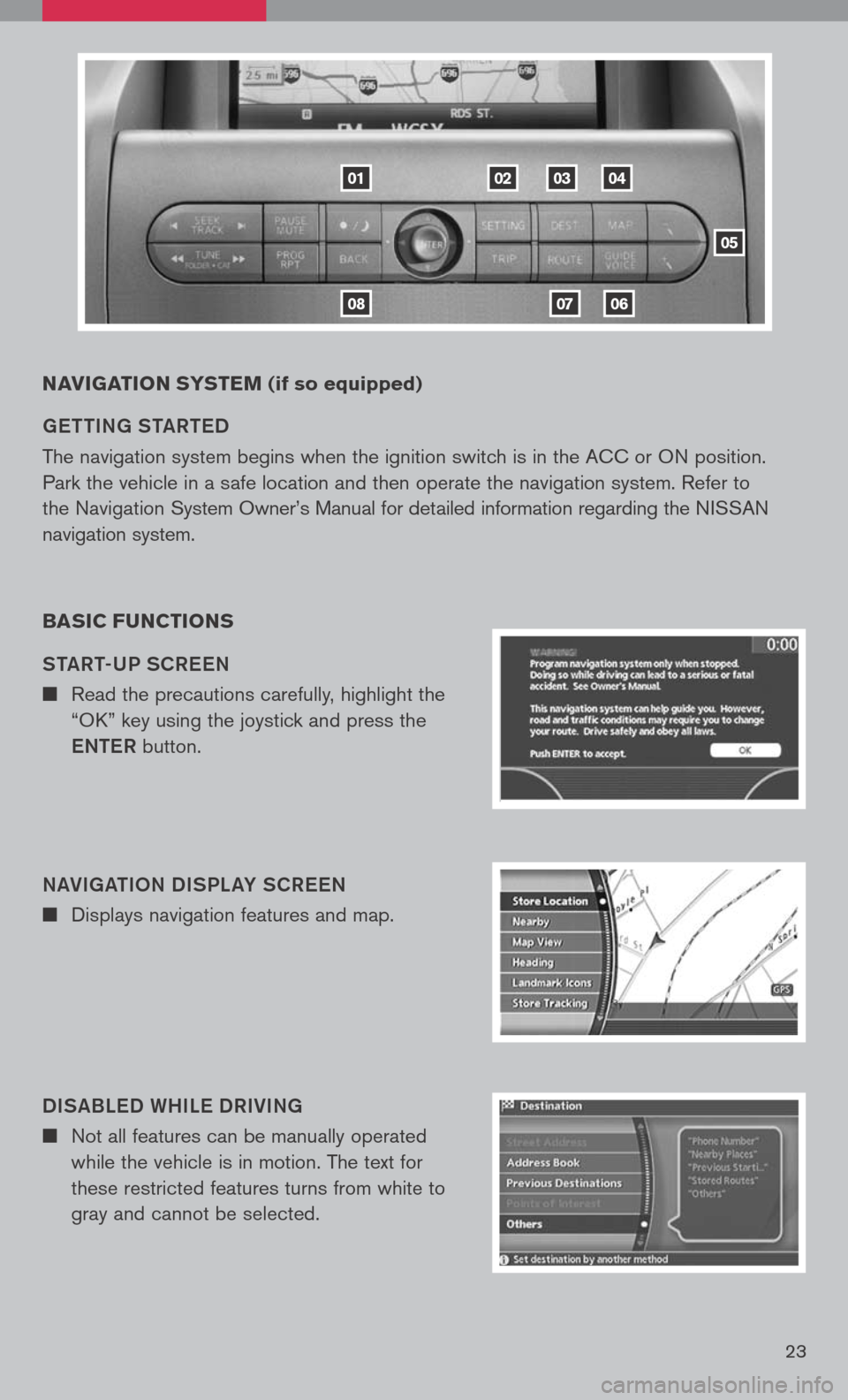
NAVIgATION sY s TEM (if so equipped)
ge TTIN g ST aRT eD
The navigation system begins when the ignition switch is in the ACC or ON position.
Park the vehicle in a safe location and then operate the navigation system. Refer to
the Navigation System Owner’s Manual for detailed information regarding the NISSAN
navigation system.
BA sIC F uNCTION s
ST aRT-UP SCR eeN
n Read the precautions carefully, highlight the
“OK” key using the joystick and press the
e NTe R button.
N aVI ga TION DISPL aY SCR eeN
n Displays navigation features and map.
DIS aBL eD WHIL e DRIVIN g
n Not all features can be manually operated
while the vehicle is in motion. The text for
these restricted features turns from white to
gray and cannot be selected.
01
0806
020304
05
07
Page 27 of 36
25
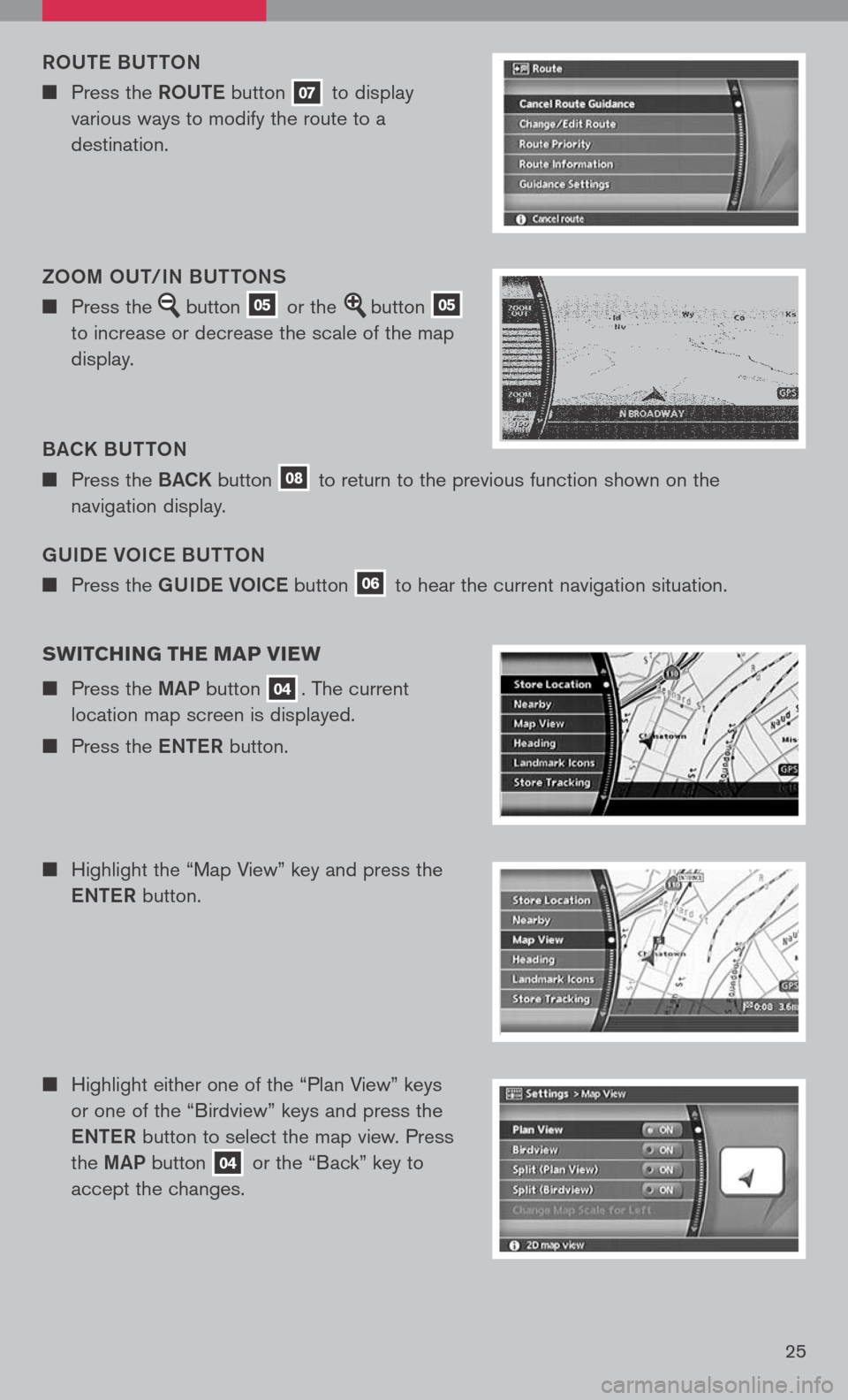
gUIDe VOIC e BUTTON
n Press the gUIDe VOICe button 06 to hear the current navigation situation.
ROUT
e B UTTON
n Press the ROUTe button 07 to display
various ways to modify the route to a
destination.
B aCK B UTTON
n Press the BaCK button 08 to return to the previous function shown on the
navigation display.
ZOOM OUT/IN BUTTONS
n Press the button 05 or the button 05
to increase or decrease the scale of the map
display.
sw ITCHIN g THE MAP VIEw
n Press the MaP button 04. The current
location map screen is displayed.
n Press the eNTe R button.
n Highlight the “Map View” key and press the
e NTe R button.
n Highlight either one of the “Plan View” keys
or one of the “Birdview” keys and press the
e NTe R button to select the map view. Press
the MaP button
04 or the “Back” key to
accept the changes.
Page 28 of 36
26
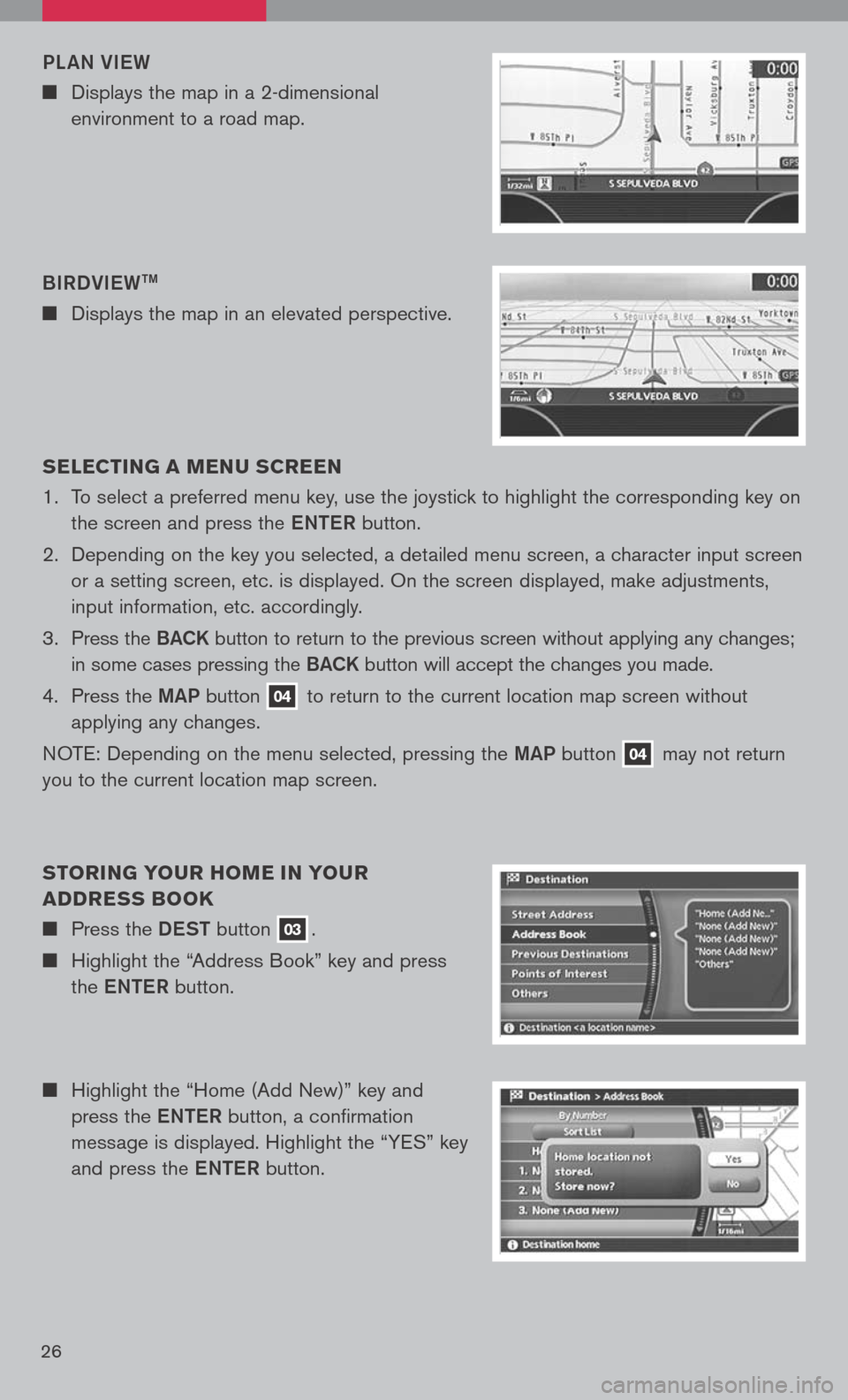
n Highlight the “Home (Add New)” key and
press the eNTe R button, a confirmation
message is displayed. Highlight the “YES” key
and press the eNTe R button.
s
ELEC TIN g A MEN u s CREEN
1. To select a preferred menu key, use the joystick to highlight the corresponding key on
the screen and press the eNTe R button.
2. Depending on the key you selected, a detailed menu screen, a character input screen
or a setting screen, etc. is displayed. On the screen displayed, make adjustments,
input information, etc. accordingly.
3. Press the B aCK button to return to the previous screen without applying any changes;
in some cases pressing the B aCK button will accept the changes you made.
4. Press the MaP button
04 to return to the current location map screen without
applying any changes.
NOTE: Depending on the menu selected, pressing the MaP button
04 may
not return
you to the current location map screen.
s TORIN g YO uR HOME IN YO uR
ADDRE ss BOOK
n Press the DeST button 03.
n Highlight the “Address Book” key and press
the eNTe R button.
BIRDVI
eW
TM
n Displays the map in an elevated perspective.
PL
aN VI eW
n Displays the map in a 2-dimensional
environment to a road map.
Page 29 of 36
27
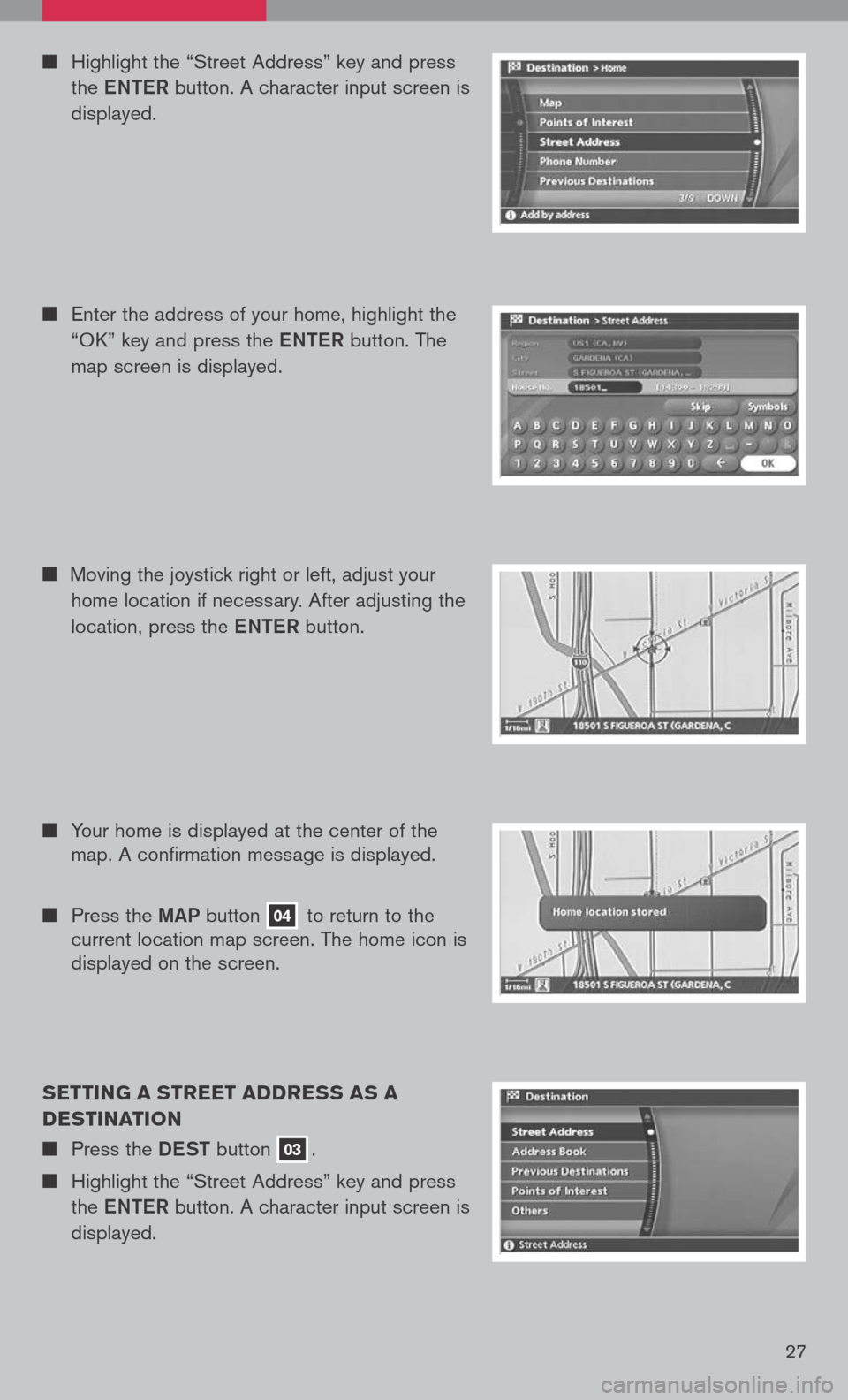
sETTIN g A sTREET ADDRE ss As A
DE sTINATION
n Press the DeST button 03.
n Highlight the “Street Address” key and press
the eNTe R button. A character input screen is
displayed.
n Highlight the “Street Address” key and press
the eNTe R button. A character input screen is
displayed.
n Enter the address of your home, highlight the
“OK” key and press the eNTe R button. The
map screen is displayed.
n Your home is displayed at the center of the
map. A confirmation message is displayed.
n Press the MaP button 04 to return to the
current location map screen. The home icon is
displayed on the screen.
n
Moving the joystick right or left, adjust your
home location if necessary. After adjusting the
location, press the eNTe R button.
Page 30 of 36
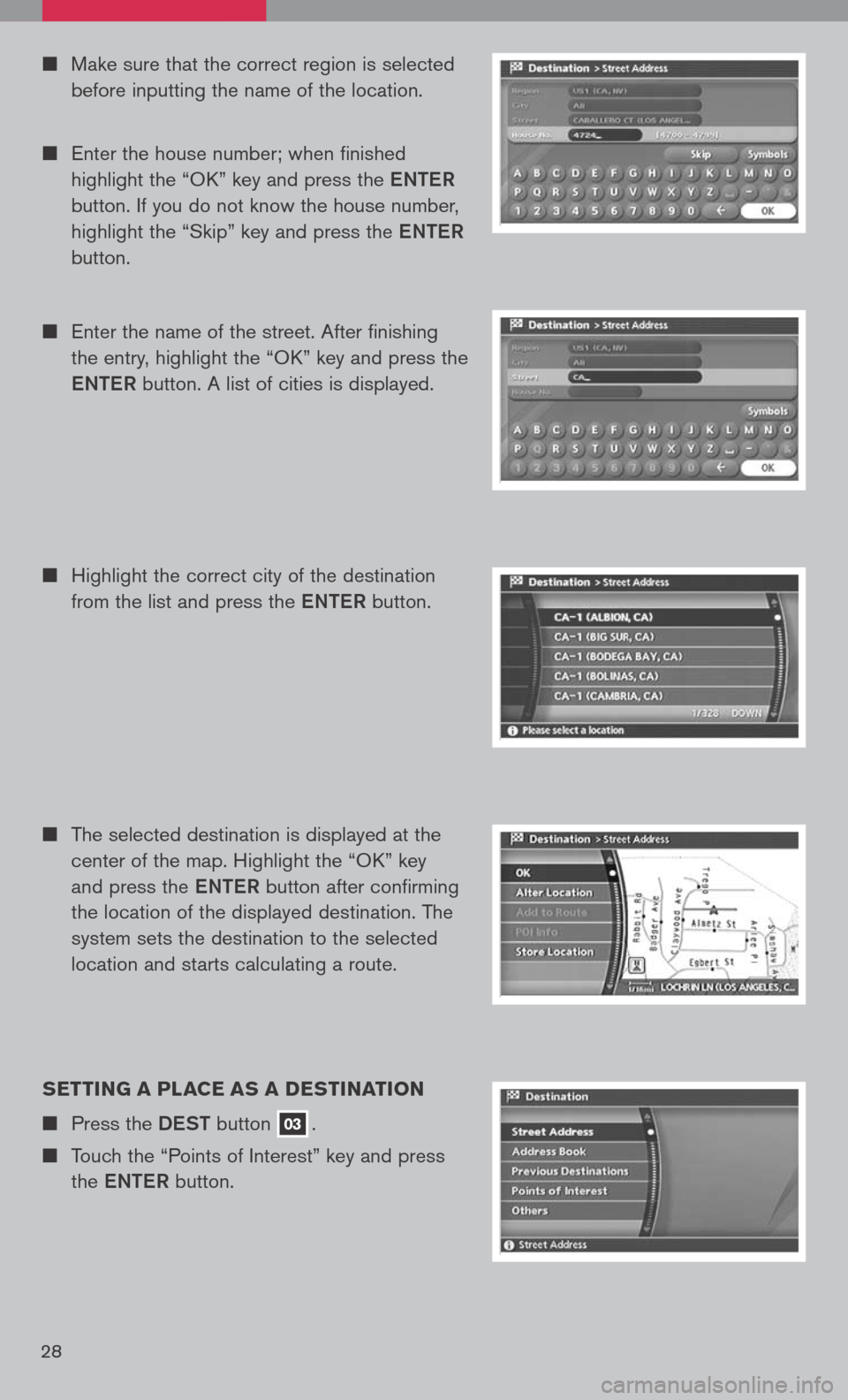
n Make sure that the correct region is selected
before inputting the name of the location.
n Enter the house number; when finished
highlight the “OK” key and press the eNTe R
button. If you do not know the house number,
highlight the “Skip” key and press the eNTe R
button.
n Enter the name of the street. After finishing
the entry, highlight the “OK” key and press the
e NTe R button. A list of cities is displayed.
n Highlight the correct city of the destination
from the list and press the eNTe R button.
s ETTIN g A PLACE As A DE sTINATION
n Press the DeST button 03.
n Touch the “Points of Interest” key and press
the eNTe R button.
n The selected destination is displayed at the
center of the map. Highlight the “OK” key
and press the eNTe R button after confirming
the location of the displayed destination. The
system sets the destination to the selected
location and starts calculating a route.
28
Page 31 of 36
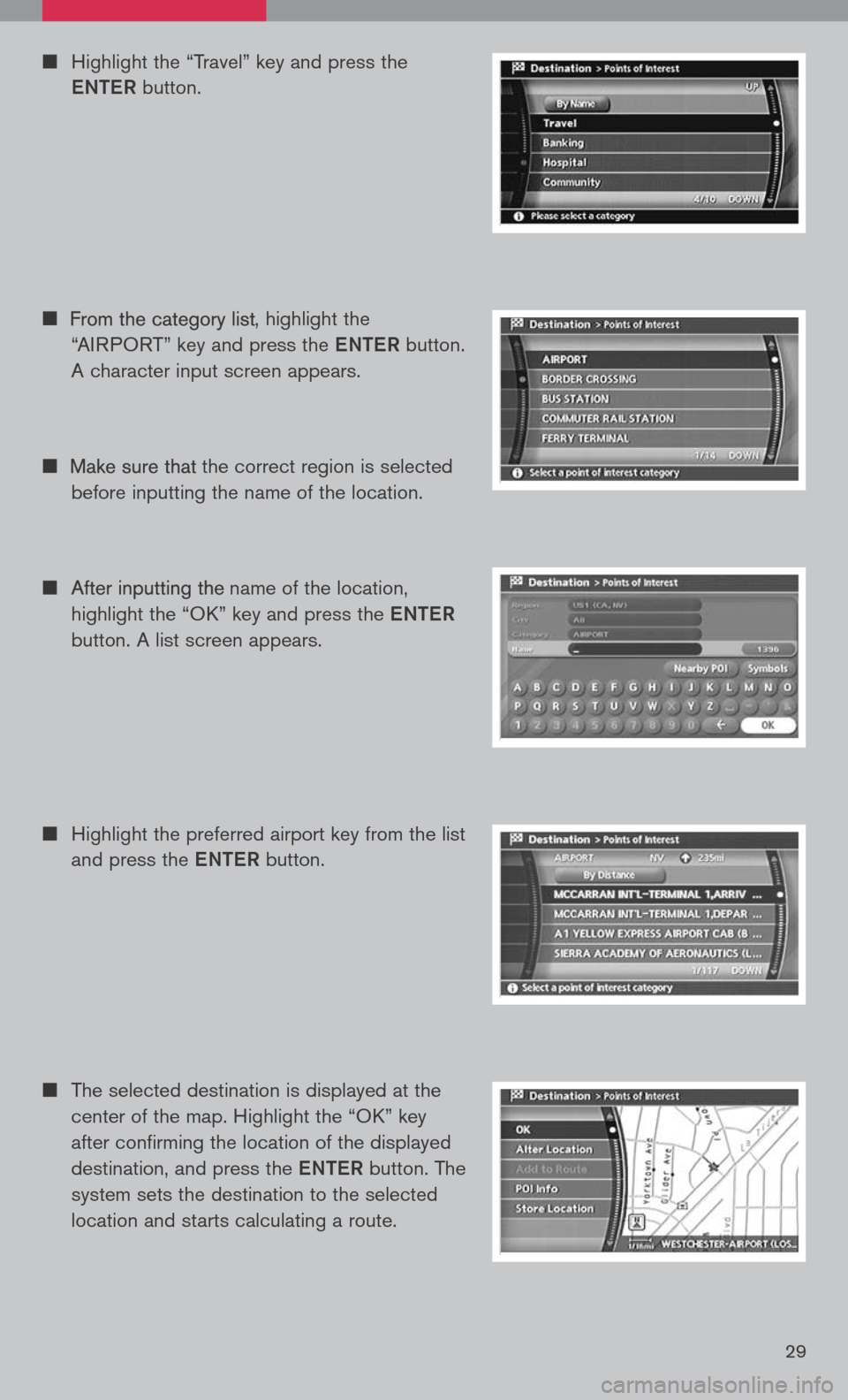
n
The selected destination is displayed at the
center of the map. Highlight the “OK” key
after confirming the location of the displayed
destination, and press the eNTe R button. The
system sets the destination to the selected
location and starts calculating a route.
n Highlight the preferred airport key from the list
and press the eNTe R button.
n Highlight the “Travel” key and press the
e NTe R button.
n
, highlight the
“AIRPORT” key and press the eNTe R button.
A character input screen appears.
n
the correct region is selected
before inputting the name of the location.
n
name of the location,
highlight the “OK” key and press the eNTe R
button. A list screen appears.
29