radio controls NISSAN TITAN 2008 Owners Manual
[x] Cancel search | Manufacturer: NISSAN, Model Year: 2008, Model line: TITAN, Model: NISSAN TITAN 2008Pages: 408, PDF Size: 6.08 MB
Page 137 of 408
The HomeLinkTUniversal Transceiver provides a
convenient way to consolidate the functions of up
to three individual hand-held transmitters into
one built-in device.
HomeLinkTUniversal Transceiver:
cWill operate most Radio Frequency (RF)
devices such as garage doors, gates, home
and office lighting, entry door locks and se-
curity systems.
cIs powered by your vehicle’s battery. No
separate batteries are required. If the vehi-
cle’s battery is discharged or is discon-
nected, HomeLinkTwill retain all program-
ming.
Once the HomeLinkTUniversal Transceiver
is programmed, retain the original trans-
mitter for future programming procedures
(Example: new vehicle purchases) . Upon
sale of the vehicle, the programmed
HomeLinkTUniversal Transceiver buttons
should be erased for security purposes. For
additional information refer to “Program-
ming HomeLinkT” later in this section.WARNING
cDo not use the HomeLinkTUniversal
Transceiver with any garage door
opener that lacks safety stop and re-
verse features as required by federal
safety standards. (These standards be-
came effective for opener models
manufactured after April 1, 1982) . A ga-
rage door opener which cannot detect
an object in the path of a closing garage
door and then automatically stop and
reverse, does not meet current federal
safety standards. Using a garage door
opener without these features in-
creases the risk of serious injury or
death.
cDuring the programming procedure
your garage door or security gate will
open and close (if the transmitter is
within range) . Make sure that people or
objects are clear of the garage door,
gate, etc. that you are programming.
cYour vehicle’s engine should be turned
off while programming the HomeLinkT
Universal Transceiver.
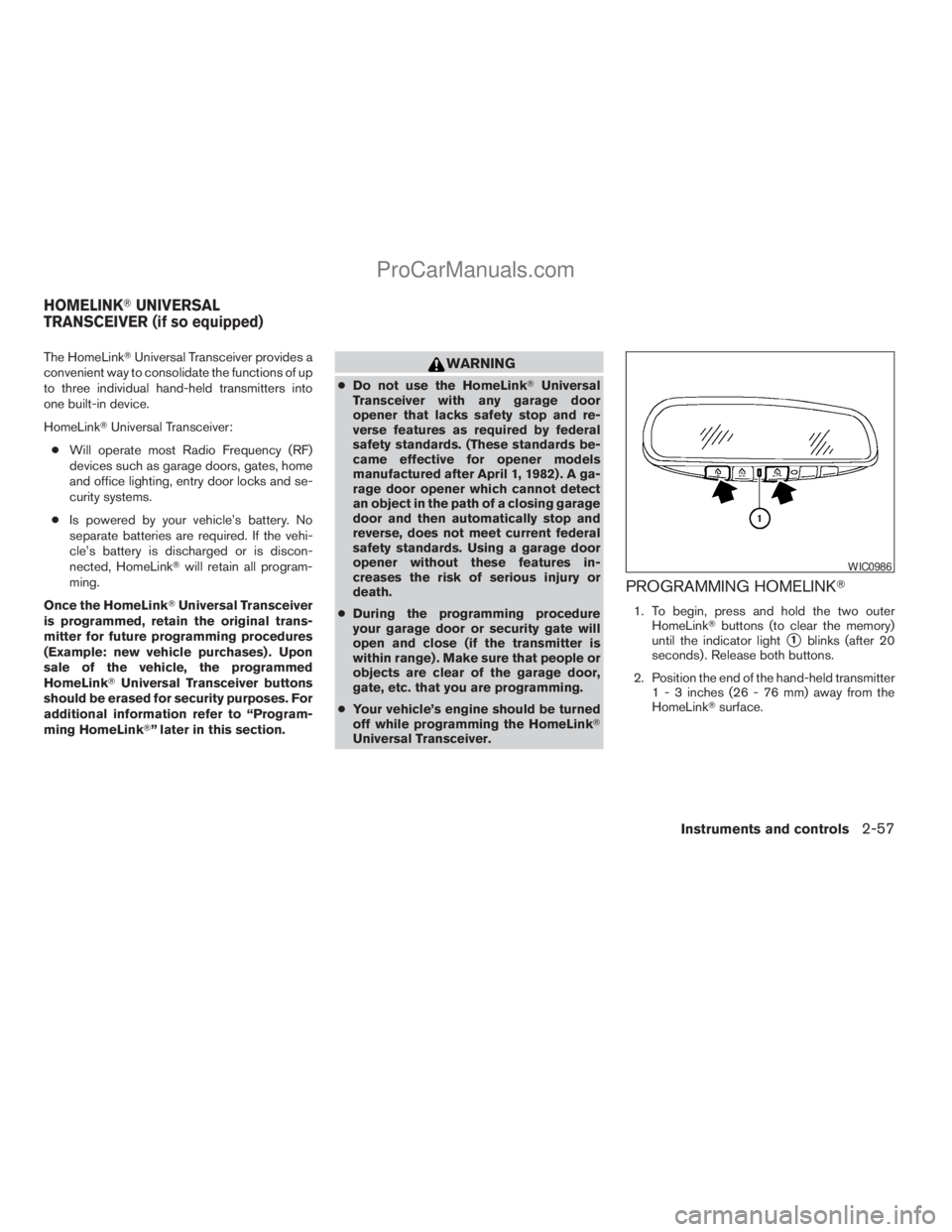
PROGRAMMING HOMELINKT
1. To begin, press and hold the two outer
HomeLinkTbuttons (to clear the memory)
until the indicator light
s1blinks (after 20
seconds) . Release both buttons.
2. Position the end of the hand-held transmitter
1 - 3 inches (26 - 76 mm) away from the
HomeLinkTsurface.
WIC0986
HOMELINKTUNIVERSAL
TRANSCEIVER (if so equipped)
Instruments and controls2-57
ZREVIEW COPYÐ2008 Titan(tzw)
Owners ManualÐUSA_English(nna)
10/11/07Ðdebbie
X
ProCarManuals.com
Page 164 of 408
4 Display screen, heater, air conditioner,
audio and phone systems
Control panel buttons (if so equipped)...............4-2
How to use the joystick and ENTER button........4-3
How to use the BACK button....................4-3
Setting up the start-up screen...................4-3
How to use the TRIP button.....................4-3
How to use the SETTING button.................4-7
button..................................4-12
Ventilators.......................................4-13
Heater and air conditioner (manual).................4-13
Controls......................................4-14
Heater operation..............................4-15
Air conditioner operation.......................4-16
Air flow charts.................................4-17
Heater and air conditioner (manual).................4-21
Heater operation..............................4-22
Air conditioner operation.......................4-23
Air flow charts.................................4-24
Heater and air conditioner (manual).................4-28
Controls......................................4-28
Heater operation..............................4-29
Air conditioner operation.......................4-31Air flow charts.................................4-31
Heater and air conditioner (automatic)
(if so equipped)..................................4-35
Automatic operation...........................4-35
Manual operation..............................4-36
Operating tips.................................4-36
Servicing air conditioner...........................4-37
Audio system....................................4-37
Radio........................................4-37
FM radio reception............................4-38
AM radio reception............................4-38
Satellite radio reception (if so equipped).........4-38
Audio operation precautions....................4-39
FM/AM radio with compact disc (CD) player
(if so equipped)...............................4-44
FM/AM/SAT radio with compact disc (CD)
changer (Type A, B, C and D)
(if so equipped)...............................4-52
CD care and cleaning..........................4-57
Steering wheel switch for audio control..........4-58
Rear audio controls (if so equipped).............4-60
ZREVIEW COPYÐ2008 Titan(tzw)
Owners ManualÐUSA_English(nna)
10/12/07Ðdebbie
X
ProCarManuals.com
Page 165 of 408
Antenna......................................4-60
NISSAN mobile entertainment system (MES)
(if so equipped)..................................4-61
Digital video disc (DVD) player controls..........4-62
Remote control................................4-63
Flip-down screen..............................4-63
Playing a digital video disc (DVD)...............4-64
Care and maintenance.........................4-67
How to handle the DVD........................4-68
Car phone or CB radio............................4-71BluetoothTHands-Free Phone System
(if so equipped)..................................4-71
Regulatory Information.........................4-73
Using the system..............................4-73
Control buttons...............................4-75
Getting started................................4-76
List of voice commands........................4-78
Speaker adaptation (SA) mode..................4-83
Troubleshooting guide.........................4-85
ZREVIEW COPYÐ2008 Titan(tzw)
Owners ManualÐUSA_English(nna)
10/11/07Ðdebbie
X
ProCarManuals.com
Page 222 of 408
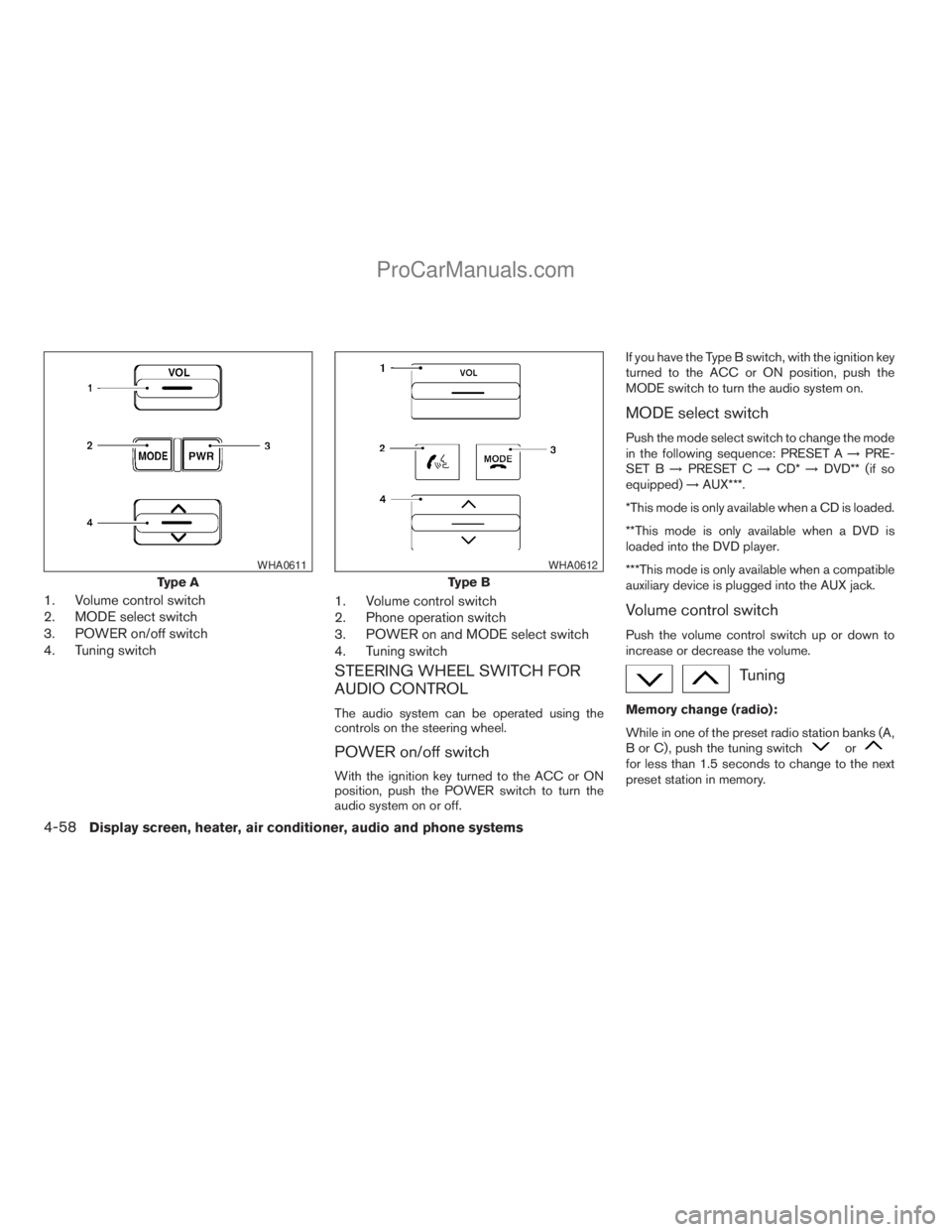
1. Volume control switch
2. MODE select switch
3. POWER on/off switch
4. Tuning switch1. Volume control switch
2. Phone operation switch
3. POWER on and MODE select switch
4. Tuning switch
STEERING WHEEL SWITCH FOR
AUDIO CONTROL
The audio system can be operated using the
controls on the steering wheel.
POWER on/off switch
With the ignition key turned to the ACC or ON
position, push the POWER switch to turn the
audio system on or off.If you have the Type B switch, with the ignition key
turned to the ACC or ON position, push the
MODE switch to turn the audio system on.
MODE select switch
Push the mode select switch to change the mode
in the following sequence: PRESET A!PRE-
SET B!PRESET C!CD*!DVD** (if so
equipped)!AUX***.
*This mode is only available when a CD is loaded.
**This mode is only available when a DVD is
loaded into the DVD player.
***This mode is only available when a compatible
auxiliary device is plugged into the AUX jack.
Volume control switch
Push the volume control switch up or down to
increase or decrease the volume.
Tuning
Memory change (radio):
While in one of the preset radio station banks (A,
B or C) , push the tuning switch
orfor less than 1.5 seconds to change to the next
preset station in memory.
Type A
WHA0611
Type B
WHA0612
4-58Display screen, heater, air conditioner, audio and phone systems
ZREVIEW COPYÐ2008 Titan(tzw)
Owners ManualÐUSA_English(nna)
10/12/07Ðdebbie
X
ProCarManuals.com
Page 224 of 408
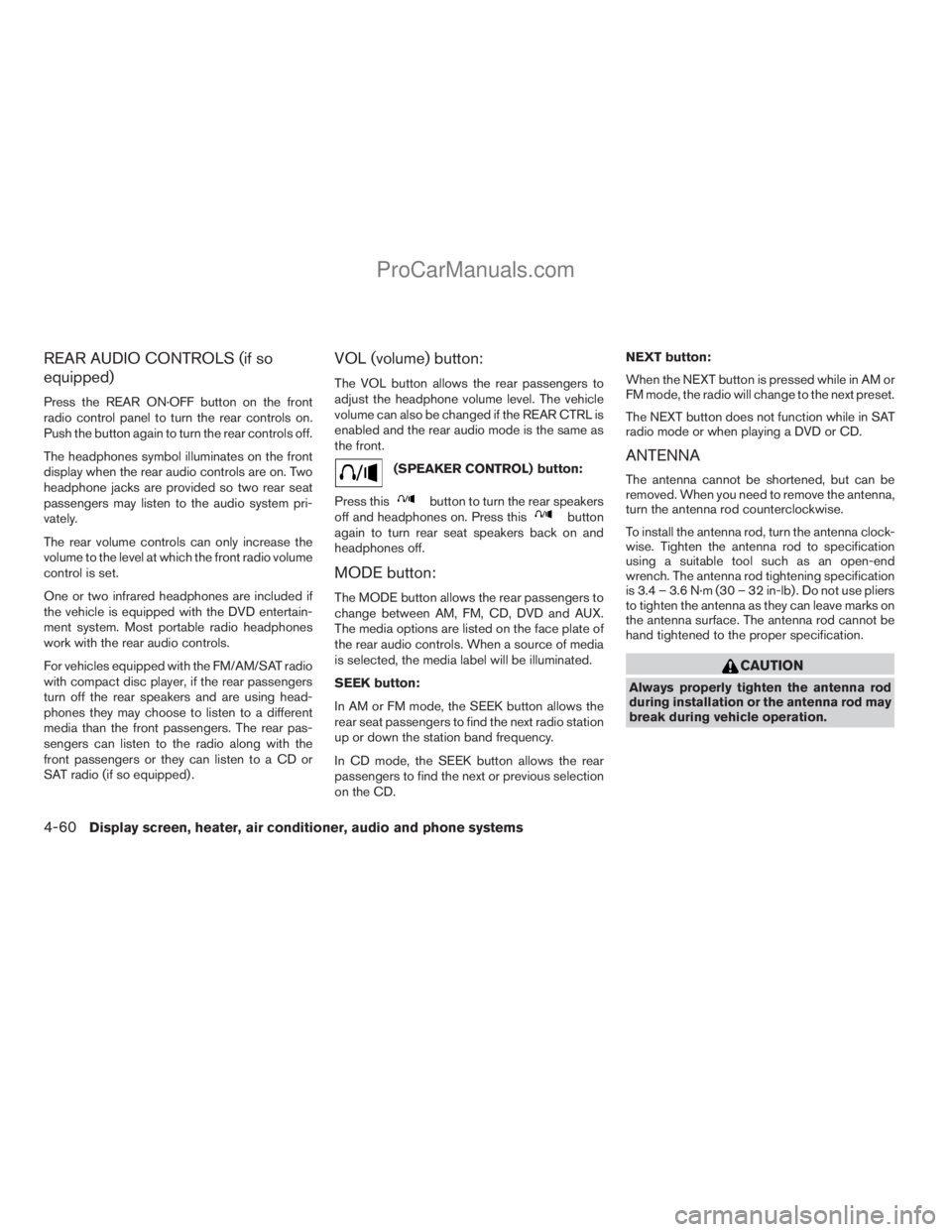
REAR AUDIO CONTROLS (if so
equipped)
Press the REAR ON·OFF button on the front
radio control panel to turn the rear controls on.
Push the button again to turn the rear controls off.
The headphones symbol illuminates on the front
display when the rear audio controls are on. Two
headphone jacks are provided so two rear seat
passengers may listen to the audio system pri-
vately.
The rear volume controls can only increase the
volume to the level at which the front radio volume
control is set.
One or two infrared headphones are included if
the vehicle is equipped with the DVD entertain-
ment system. Most portable radio headphones
work with the rear audio controls.
For vehicles equipped with the FM/AM/SAT radio
with compact disc player, if the rear passengers
turn off the rear speakers and are using head-
phones they may choose to listen to a different
media than the front passengers. The rear pas-
sengers can listen to the radio along with the
front passengers or they can listen to a CD or
SAT radio (if so equipped) .
VOL (volume) button:
The VOL button allows the rear passengers to
adjust the headphone volume level. The vehicle
volume can also be changed if the REAR CTRL is
enabled and the rear audio mode is the same as
the front.
(SPEAKER CONTROL) button:
Press this
button to turn the rear speakers
off and headphones on. Press thisbutton
again to turn rear seat speakers back on and
headphones off.
MODE button:
The MODE button allows the rear passengers to
change between AM, FM, CD, DVD and AUX.
The media options are listed on the face plate of
the rear audio controls. When a source of media
is selected, the media label will be illuminated.
SEEK button:
In AM or FM mode, the SEEK button allows the
rear seat passengers to find the next radio station
up or down the station band frequency.
In CD mode, the SEEK button allows the rear
passengers to find the next or previous selection
on the CD.NEXT button:
When the NEXT button is pressed while in AM or
FM mode, the radio will change to the next preset.
The NEXT button does not function while in SAT
radio mode or when playing a DVD or CD.
ANTENNA
The antenna cannot be shortened, but can be
removed. When you need to remove the antenna,
turn the antenna rod counterclockwise.
To install the antenna rod, turn the antenna clock-
wise. Tighten the antenna rod to specification
using a suitable tool such as an open-end
wrench. The antenna rod tightening specification
is 3.4 – 3.6 N·m (30 – 32 in-lb) . Do not use pliers
to tighten the antenna as they can leave marks on
the antenna surface. The antenna rod cannot be
hand tightened to the proper specification.
CAUTION
Always properly tighten the antenna rod
during installation or the antenna rod may
break during vehicle operation.
4-60Display screen, heater, air conditioner, audio and phone systems
ZREVIEW COPYÐ2008 Titan(tzw)
Owners ManualÐUSA_English(nna)
10/12/07Ðdebbie
X
ProCarManuals.com
Page 395 of 408
10 Index
4WD warning light...............2-15
A
Active brake limited slip (ABLS) system
(if so equipped).................5-30
Active Head Restraint..............1-7
Adjusting pedal position............3-12
Air bag (See supplemental restraint
system).....................1-46
Air bag system
Front (See supplemental front impact air
bag system).................1-54
Air bag warning labels.............1-61
Air bag warning light...........1-61, 2-17
Air cleaner housing filter............8-17
Air conditioner
Air conditioner operation . . .4-16, 4-23, 4-31
Air conditioner service...........4-37
Air conditioner specification label.....9-12
Air conditioner system refrigerant and
oil recommendations.............9-7
Heater and air conditioner controls. . . .4-13,
4-21, 4-28, 4-35
Servicing air conditioner..........4-37
Air flow charts...........4-17, 4-24, 4-31
Alarm system
(See vehicle security system).........2-27
Anchor point locations.............1-27
Antenna.....................4-60
Anti-lock brake warning light......2-13, 2-14Anti-lock Braking System (ABS)........5-29
Audible reminders................2-20
Audio system..................4-37
Compact Disc (CD) changer.......4-55
Compact disc (CD) player.........4-46
FM/AM radio with compact disc (CD)
player....................4-44
FM/AM/SAT radio with compact disc (CD)
changer...................4-52
Radio....................4-37
Rear audio controls.............4-60
Audio System
Settings...................4-52
Audio system
Steering wheel audio control switch. . . .4-58
Autolight switch.................2-32
Automatic
Automatic drive positioner.........3-21
Automatic power window switch.....2-51
Automatic transmission position indicator
light.....................2-26
Driving with automatic transmission. . . .5-12
Transmission selector lever lock
release....................5-16
Automatic transmission fluid temperature
gauge.......................2-8
AUX jack.....................4-57
B
Back button....................4-3Battery......................8-13
Charge warning light............2-15
Before starting the engine...........5-10
Belt (See drive belt)..............8-15
Block heater
Engine....................5-34
BluetoothThands-free phone system.....4-71
Booster seats..................1-41
Brake
Anti-lock Braking System (ABS)......5-29
Brake fluid..................8-12
Brake light (See stop light).........8-27
Brake system................5-28
Brake warning light.............2-14
Brake wear indicators........2-20, 8-20
Parking brake operation..........5-18
Self-adjusting brakes............8-20
Brakes......................8-20
Break-in schedule................5-20
Brightness control
Instrument panel..............2-34
Brightness/contrast button...........4-12
Bulb check/instrument panel..........2-13
Bulb replacement................8-27
C
Capacities and recommended
fuel/lubricants...................9-2
Car phone or CB radio.............4-71
Cargo light switch...............2-35
ZREVIEW COPYÐ2008 Titan(tzw)
Owners ManualÐUSA_English(nna)
10/12/07Ðdebbie
X
ProCarManuals.com
Page 399 of 408
P
Parking
Parking brake operation..........5-18
Parking/parking on hills...........5-27
Pedal position adjustment...........3-12
Personal lights.................2-56
Phone, BluetoothThands-free system. . . .4-71
Power
Front seat adjustment............1-5
Power door locks...............3-4
Power outlet.................2-39
Power rear windows............2-51
Power steering fluid.............8-11
Power steering system...........5-28
Power windows...............2-50
Rear power windows............2-51
Precautions
Maintenance precautions..........8-5
On-pavement and off-road driving
precautions..................5-3
Precautions on child
restraints............1-23, 1-32, 1-41
Precautions on seat belt usage......1-13
Precautions on supplemental restraint
system....................1-46
Precautions when starting and driving . . .5-2
Pre-tensioner seat belt system.........1-59
Programmable features.............4-7
Push starting..................6-10R
Radio
Car phone or CB radio...........4-71
Compact Disc (CD) changer.......4-55
FM/AM radio with compact disc (CD)
player....................4-44
FM/AM/SAT radio with compact disc
(CD) changer................4-52
Rear audio controls.............4-60
Steering wheel audio control switch. . . .4-58
Readiness for inspection maintenance
(I/M) test.....................9-43
Rear audio controls...............4-60
Rear power windows..............2-51
Rear sliding window..............2-52
Rear sonar system...............5-32
Rear sonar system off switch.........2-38
Rear window and outside mirror defroster
switch......................2-30
Recorders
Event data..................9-44
Refrigerant recommendation..........9-7
Registering your vehicle in another country . .9-10
Remote controller (See NISSAN mobile
entertainment system).............4-63
Remote keyless entry system..........3-7
Reporting safety defects (US only)......9-43
Resetting the fuel economy...........4-4
Resetting trip 1 and trip 2............4-4S
Safety
Child safety rear door lock..........3-6
Child seat belts........1-23, 1-32, 1-41
Reporting safety defects (US only). . . .9-43
Screen (See NISSAN mobile entertainment
system).....................4-63
Seat adjustment
Front manual seat adjustment.....1-2, 1-3
Front power seat adjustment........1-5
Seat belt
Child safety.................1-15
Infants and small children.........1-16
Injured Person................1-17
Larger children...............1-16
Precautions on seat belt usage......1-13
Pregnant women..............1-17
Pre-tensioner seat belt system.......1-59
Seat belt extenders.............1-22
Seat belt maintenance...........1-22
Seat belts..................1-13
Shoulder belt height adjustment......1-20
Three-point type with retractor.......1-17
Two-point type without retractor
(rear center lap belt)............1-20
Seat belt warning light.............2-17
Seatback pockets................2-45
Seats
Adjustment..................1-2
Automatic drive positioner.........3-21
Front seats..................1-2
Heated seats................2-36
Manual front seat adjustment.....1-2, 1-3
Security indicator light.............2-19
10-5
ZREVIEW COPYÐ2008 Titan(tzw)
Owners ManualÐUSA_English(nna)
10/12/07Ðdebbie
X
ProCarManuals.com