sensor NISSAN TITAN 2017 2.G User Guide
[x] Cancel search | Manufacturer: NISSAN, Model Year: 2017, Model line: TITAN, Model: NISSAN TITAN 2017 2.GPages: 671, PDF Size: 7.96 MB
Page 88 of 671
●Modifying or tampering with the front
passenger seat may result in serious
personal injury. For example, do not
change the front seats by placing mate-
rial on the seat cushion or by installing
additional trim material, such as seat
covers, on the seat that are not specifi-
cally designed to assure proper air bag
operation. Additionally, do not stow any
objects under the front passenger seat
or the seat cushion and seatback. Such
objects may interfere with the proper
operation of the occupant classification
sensor (weight sensor) .
● No unauthorized changes should be
made to any components or wiring of
the seat belt system. This may affect the
front air bag system. Tampering with
the seat belt system may result in seri-
ous personal injury. ●
It is recommended that you visit a
NISSAN dealer for work on and around
the front air bag. It is also recom-
mended that you visit a NISSAN dealer
for installation of electrical equipment.
The Supplemental Restraint System
(SRS) wiring harnesses* should not be
modified or disconnected. Unauthor-
ized electrical test equipment and prob-
ing devices should not be used on the
air bag system.
● A cracked windshield should be re-
placed immediately by a qualified repair
facility. A cracked windshield could af-
fect the function of the supplemental air
bag system.
*The SRS wiring harness connectors are
yellow and orange for easy identification.
When selling your vehicle, we request that you
inform the buyer about the front air bag system
and guide the buyer to the appropriate sections
in this Owner’s Manual.PRECAUTIONS ON SRS (without
NISSAN Advanced Air Bag System) (if
so equipped)
This SRS section contains important information
concerning the following systems: ● Driver and front passenger supplemental
front-impact air bag
● Front seat-mounted side-impact supple-
mental air bag
● Roof-mounted curtain side-impact and roll-
over supplemental air bag
● Seat belt with pretensioner(s) (front seats)
Supplemental front-impact air bag system
This system can help cushion the impact force to
the head and chest of the driver and right front
passenger in certain frontal collisions.
Front seat-mounted side-impact supple-
mental air bag system
This system can help cushion the impact force to
the chest area of the driver and right front pas-
senger in certain side impact collisions. The side
air bag is designed to inflate on the side where
the vehicle is impacted.
Safety—Seats, seat belts and supplemental restraint system1-65
Page 90 of 671
●The driver and front passenger seat belt
buckles are equipped with sensors that
detect if the seat belts are fastened. The
air bag system monitors the severity of
a collision and inflates the air bags as
needed. Failure to properly wear seat
belts can increase the risk or severity of
injury in an accident.
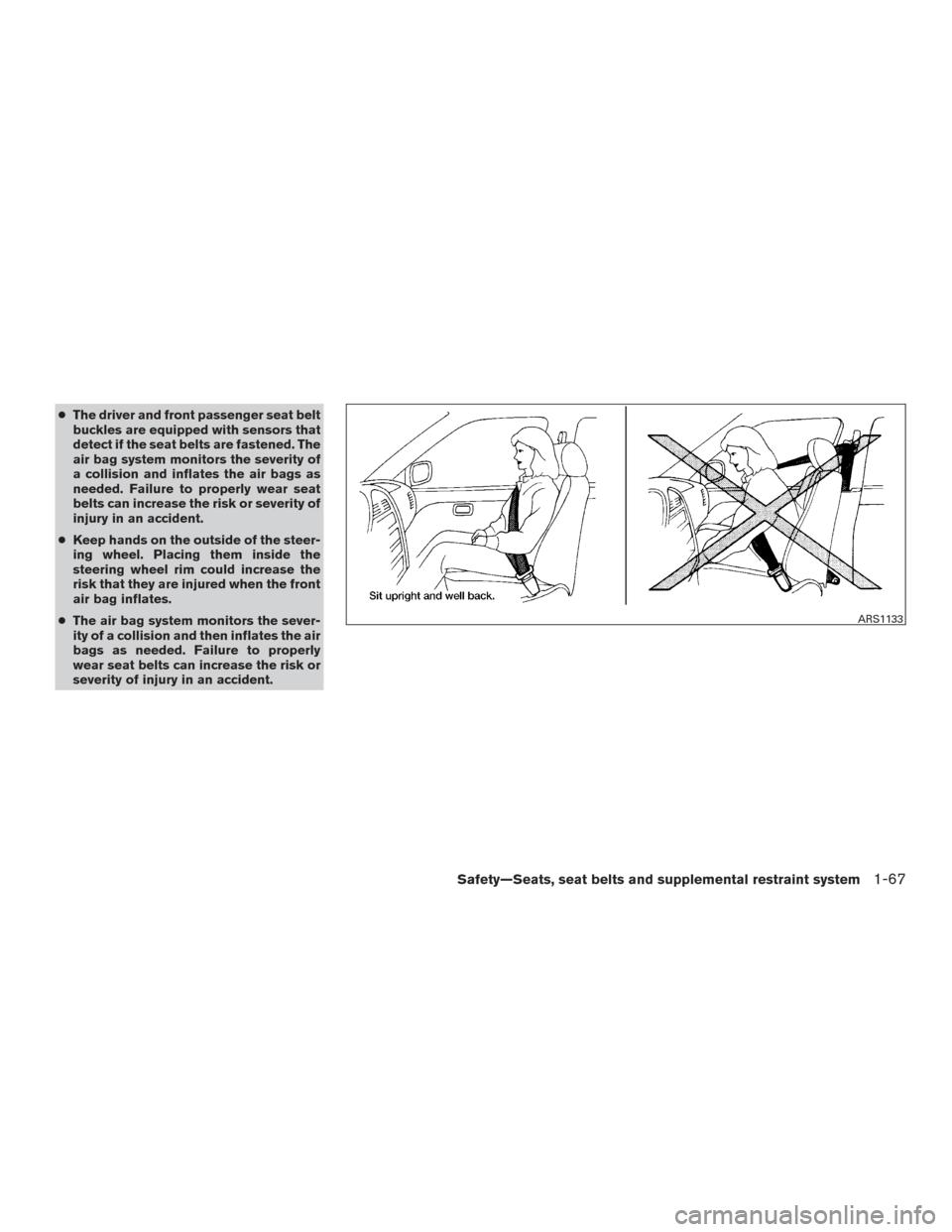
● Keep hands on the outside of the steer-
ing wheel. Placing them inside the
steering wheel rim could increase the
risk that they are injured when the front
air bag inflates.
● The air bag system monitors the sever-
ity of a collision and then inflates the air
bags as needed. Failure to properly
wear seat belts can increase the risk or
severity of injury in an accident.
ARS1133
Safety—Seats, seat belts and supplemental restraint system1-67
Page 95 of 671
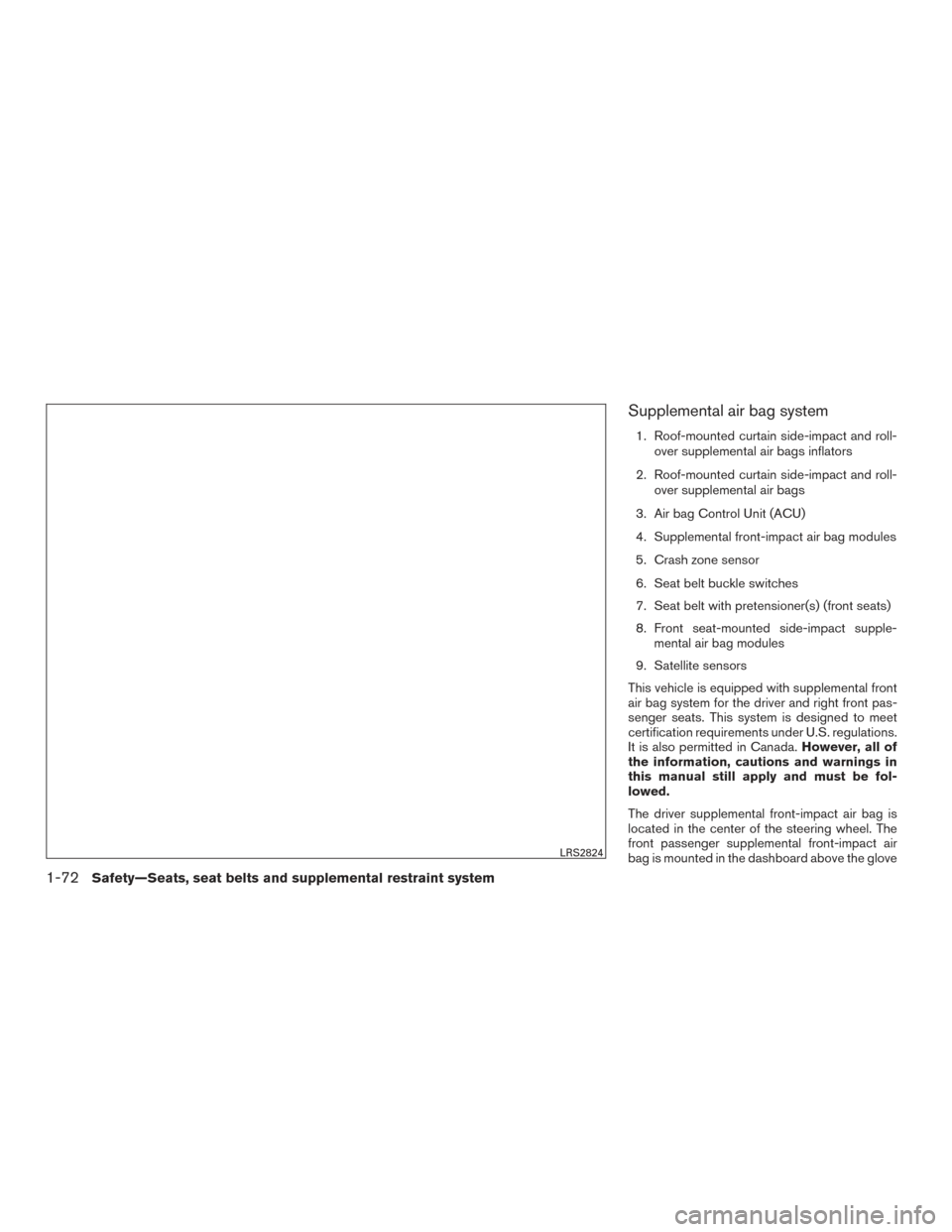
Supplemental air bag system
1. Roof-mounted curtain side-impact and roll-over supplemental air bags inflators
2. Roof-mounted curtain side-impact and roll- over supplemental air bags
3. Air bag Control Unit (ACU)
4. Supplemental front-impact air bag modules
5. Crash zone sensor
6. Seat belt buckle switches
7. Seat belt with pretensioner(s) (front seats)
8. Front seat-mounted side-impact supple- mental air bag modules
9. Satellite sensors
This vehicle is equipped with supplemental front
air bag system for the driver and right front pas-
senger seats. This system is designed to meet
certification requirements under U.S. regulations.
It is also permitted in Canada. However, all of
the information, cautions and warnings in
this manual still apply and must be fol-
lowed.
The driver supplemental front-impact air bag is
located in the center of the steering wheel. The
front passenger supplemental front-impact air
bag is mounted in the dashboard above the glove
LRS2824
1-72Safety—Seats, seat belts and supplemental restraint system
Page 96 of 671
box. The supplemental front air bags are de-
signed to inflate in higher severity frontal colli-
sions, although they may inflate if the forces in
another type of collision are similar to those of a
higher severity frontal impact. They may not in-
flate in certain frontal collisions. Vehicle damage
(or lack of it) is not always an indication of proper
front air bag system operation.
The supplemental air bag system monitors infor-
mation from the crash zone sensor, the Air bag
Control Unit (ACU) and seat belt buckle sensors
that detect if the seat belts are fastened. Inflator
operation is based on the severity of a collision
and whether the seat belts are being used. Only
one front air bag may inflate in a crash, depending
on the crash severity and whether the front occu-
pants are belted or unbelted. This does not indi-
cate improper performance of the system. If you
have any questions about the performance of
your air bag system, it is recommended that you
visit a NISSAN dealer to obtain information about
the system.
If you have any questions about your air bag
system, it is recommended that you visit a
NISSAN dealer to obtain information about the
system. If you are considering modification of
your vehicle due to a disability, you may also
contact NISSAN. Contact information is con-
tained in the beginning of this Owner’s Manual.When a front air bag inflates, a fairly loud noise
may be heard, followed by the release of smoke.
This smoke is not harmful and does not indicate a
fire. Care should be taken to not inhale it, as it may
cause irritation and choking. Those with a history
of a breathing condition should get fresh air
promptly.
Front air bags, along with the use of seat belts,
help to cushion the impact force on the face and
chest of the driver and right front passenger. They
can help save lives and reduce serious injuries.
However, an inflating front air bag may cause
facial abrasions or other injuries. Front air bags
do not provide restraint to the lower body.
Seat belts should be correctly worn and the
driver and passenger seated upright as far as
practical away from the steering wheel or instru-
ment panel. The front air bags inflate quickly in
order to help protect the front occupants. Be-
cause of this, the force of the front air bag inflating
can increase the risk of injury if the occupant is
too close to, or is against, the front air bag module
during inflation.
The front air bags deflate quickly after a collision.
The front air bags operate only when the
ignition switch is in the ON or START posi-
tion.
After turning the ignition key to the ON
position, the supplemental air bag warning
light illuminates. The supplemental air bag
warning light will turn off after about 7 sec-
onds if the system is operational.
WARNING
●
Do not place any objects on the steering
wheel pad or on the instrument panel.
Also, do not place any objects between
any occupant and the steering wheel or
instrument panel. Such objects may be-
come dangerous projectiles and cause
injury if the front air bag inflates.
● Immediately after inflation, several
front air bag system components will be
hot. Do not touch them; you may se-
verely burn yourself.
● No unauthorized changes should be
made to any components or wiring of
the supplemental air bag system. This is
to prevent accidental inflation of the
supplemental air bag or damage to the
supplemental air bag system.
● Do not make unauthorized changes to
your vehicle’s electrical system, sus-
pension system or front end structure.
This could affect proper operation of
the front air bag system.
Safety—Seats, seat belts and supplemental restraint system1-73
Page 102 of 671
WARNING
●Once a front air bag, side air bag, or
curtain air bag has inflated, the air bag
module will not function again and
must be replaced. Additionally, the acti-
vated pretensioner(s) must also be re-
placed. The air bag module and preten-
sioner(s) should be replaced. It is
recommended that you visit a NISSAN
dealer for this service. However, the air
bag module and pretensioner(s) cannot
be repaired.
● The front air bag, side air bag, curtain
air bag systems and the pretensioner
system should be inspected if there is
any damage to the front end or side
portion of the vehicle. It is recom-
mended that you visit a NISSAN dealer
for this service.
● If you need to dispose of the supple-
mental air bag or pretensioner systems
or scrap the vehicle, it is recommended
that you visit a NISSAN dealer. Incorrect
disposal procedures could cause per-
sonal injury. ●
If there is an impact to your vehicle from
any direction, your Occupant Classifica-
tion Sensor (OCS) (if so equipped)
should be checked to verify it is still
functioning correctly. It is recom-
mended that you visit a NISSAN dealer
for this service. The OCS (weight sen-
sor) should be checked even if no air
bags deploy as a result of the impact.
Failure to verify proper OCS (weight
sensor) function may result in an im-
proper air bag deployment resulting in
injury or death.
Safety—Seats, seat belts and supplemental restraint system1-79
Page 105 of 671
Heated rear seat switches (if so equipped)..........2-61
Heated steering wheel switch (if so equipped) .......2-62
Warning systems switch (if so equipped) ............2-63
Vehicle Dynamic Control (VDC) off switch . . .........2-63
Hill descent control switch (if so equipped) ..........2-64
Electronic locking rear differential (E-Lock) system
switch (if so equipped) ............................ 2-65
Power inverter switch (if so equipped) ..............2-67
Parking Sensor (sonar) System OFF Switch
(if so equipped) .................................. 2-67
Tow mode switch (if so equipped) . . ................2-68
E-call (SOS) switch (if so equipped) ................2-69
Trailer Brake Controller Unit (TBCU)
(if so equipped) .................................. 2-69
Power outlets .................................... 2-69
12v Outlets . . ................................. 2-69
120v outlets (if so equipped) ...................2-72
Extended storage switch .......................... 2-73
Storage ......................................... 2-74
Front-door pockets ............................ 2-74
Console side pockets .......................... 2-75
Seatback pockets (if so equipped) ..............2-75
Under-seat storage (if so equipped) .............2-76
Console box storage trays (if so equipped) .......2-77 Glove box
.................................... 2-77
Console box (if so equipped) ...................2-77
Center armrest storage (if so equipped) ..........2-78
Under front seat storage bin (if so equipped) .....2-79
Sunglasses holder (if so equipped) ..............2-79
Cup holders .................................. 2-80
Grocery hooks (if so equipped) .................2-82
Bed liner storage bins (if so equipped) ...........2-82
Windows ........................................ 2-83
Power windows ............................... 2-83
Rear power window switch (if so equipped) ......2-85
Rear sliding window (if so equipped) ............2-86
Interior
lights ..................................... 2-87
Console light (if so equipped) ...................2-88
Map lights (if so equipped) .....................2-88
Personal Lights (if so equipped) .................2-89
Homelink® Universal Transceiver (if so equipped) ....2-89
Programming HomeLink® ......................2-90
Programming HomeLink® for Canadian
customers and gate openers ....................2-91
Operating the HomeLink® Universal
Transceiver ................................... 2-92
Programming trouble-diagnosis .................2-92
Page 108 of 671
15. Heated steering wheel switch(if so equipped) (P. 2-62)
Warning Systems switch
(if so equipped) (P. 2-63)
16. Power outlet (P. 2-69)
17. Auxiliary jack (P. 4-46) USB port (P. 4-46)
18. Hazard warning flasher switch (P. 6-2)
19. Trailer Brake Controller Unit
(if so equipped) (P. 2-69)
20. Climate control seat switch
(if so equipped) (P. 2-58)
Heated front seat switches
(if so equipped) (P. 2-60)
21. Vehicle Dynamic Control (VDC) OFF
switch (P. 2-63)
Parking sensor (sonar) system OFF
switch (if so equipped) (P. 2-67)
22. 4WD shift switch (if so equipped)
(P. 5-44)
23. Push-button ignition switch (P. 5-10)
24. Tilt and telescopic steering wheel
control (P. 3-25)
25. Headlight aiming control
(if so equipped) (P. 2-53)
Power inverter switch (if so equipped)
(P. 2-67) Cargo lamp switch (P. 2-58)
Electronic locking rear differential
(E-Lock) system switch (if so
equipped) (P. 2-65)
Hill descent control system switch
(if so equipped) (P. 2-64)
26. Headlight switch (P. 2-53) Fog light switch (if so equipped)
(P. 2-57)
Instrument brightness control switches
(P. 2-53)
Trip reset switch (P. 2-6)
Refer to the page number indicated in pa-
renthesis for operating details.
Instruments and controls2-5
Page 137 of 671
Driver Assistance (if so equipped)
The driver assistance menu allows the user to
change the various driving and parking aids.
Menu itemResult
Driving Aids (if so equipped) Displays available driving aids. For additional information, refer to “Blind Spot Warning (BSW)” and “Rear Cross Traff ic Alert
(RCTA)” in the “Starting and driving” section of this manual.
Blind Spot (BSW) Allows user to turn the blind spot warning system on or off
Parking Aids (if so equipped) Displays available parking aids. For additional information, refer to “Front and rear sonar system” in the “Starting and driving” sec-
tion of this manual.
Moving Object (if so equipped) Allows user to turn the Moving Object Detection (MOD) on or off. For additional information, refer to “Moving Object Detection (MOD)” in the “Monitor, climate, audio, phone and voice recognition systems” section of this manual.
Sensor (if so equipped) Allows the user to turn the sensors on, off, or front only
Display Allows user to turn the display on or off in the vehicle information display
Volume Allows user to adjust the volume of warning chimes
Range Allows user to set a specific range for the sensors to engage
2-34Instruments and controls
Page 139 of 671
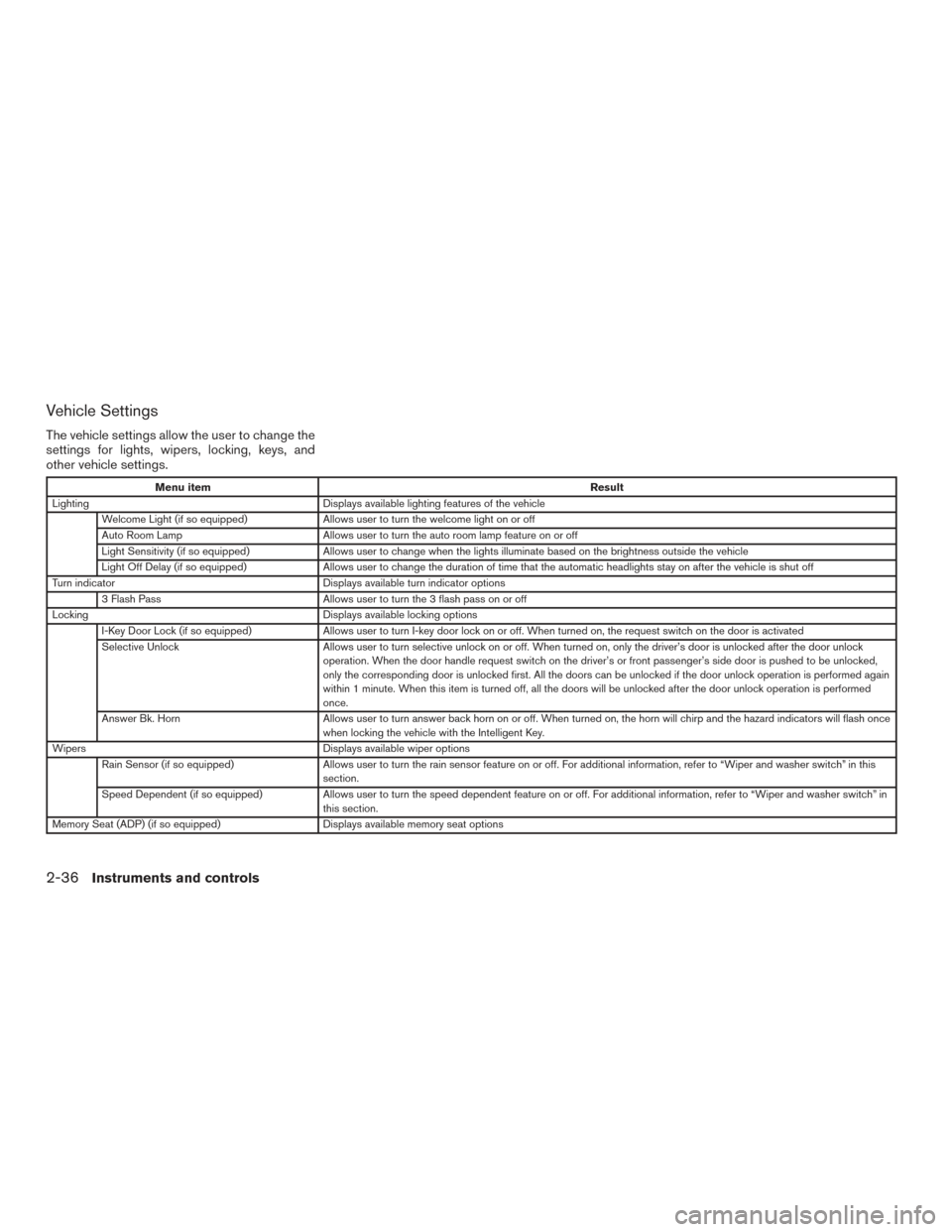
Vehicle Settings
The vehicle settings allow the user to change the
settings for lights, wipers, locking, keys, and
other vehicle settings.
Menu itemResult
Lighting Displays available lighting features of the vehicle
Welcome Light (if so equipped) Allows user to turn the welcome light on or off
Auto Room Lamp Allows user to turn the auto room lamp feature on or off
Light Sensitivity (if so equipped) Allows user to change when the lights illuminate based on the brightness outside the vehicle
Light Off Delay (if so equipped) Allows user to change the duration of time that the automatic headlights stay on after the vehicle is shut off
Turn indicator Displays available turn indicator options
3 Flash Pass Allows user to turn the 3 flash pass on or off
Locking Displays available locking options
I-Key Door Lock (if so equipped) Allows user to turn I-key door lock on or off. When turned on, the request switch on the door is activated
Selective Unlock Allows user to turn selective unlock on or off. When turned on, only the driver’s door is unlocked after the door unlock
operation. When the door handle request switch on the driver’s or front passenger’s side door is pushed to be unlocked,
only the corresponding door is unlocked first. All the doors can be unlocked if the door unlock operation is performed again
within 1 minute. When this item is turned off, all the doors will be unlocked after the door unlock operation is performed
once.
Answer Bk. Horn Allows user to turn answer back horn on or off. When turned on, the horn will chirp and the hazard indicators will flash once
when locking the vehicle with the Intelligent Key.
Wipers Displays available wiper options
Rain Sensor (if so equipped) Allows user to turn the rain sensor feature on or off. For additional information, refer to “Wiper and washer switch” in thi s
section.
Speed Dependent (if so equipped) Allows user to turn the speed dependent feature on or off. For additional information, refer to “Wiper and washer switch” in
this section.
Memory Seat (ADP) (if so equipped) Displays available memory seat options
2-36Instruments and controls
Page 144 of 671
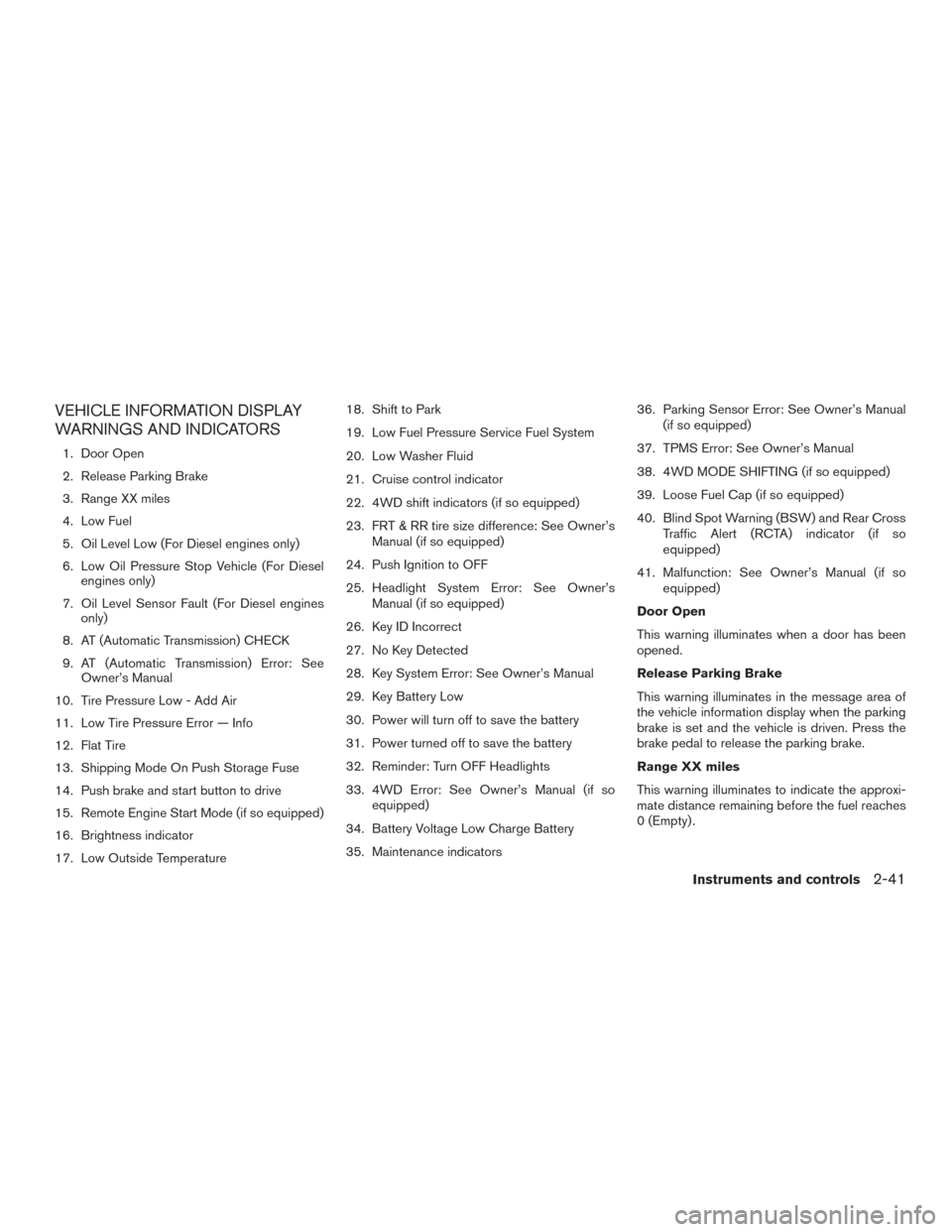
VEHICLE INFORMATION DISPLAY
WARNINGS AND INDICATORS
1. Door Open
2. Release Parking Brake
3. Range XX miles
4. Low Fuel
5. Oil Level Low (For Diesel engines only)
6. Low Oil Pressure Stop Vehicle (For Dieselengines only)
7. Oil Level Sensor Fault (For Diesel engines only)
8. AT (Automatic Transmission) CHECK
9. AT (Automatic Transmission) Error: See Owner’s Manual
10. Tire Pressure Low - Add Air
11. Low Tire Pressure Error — Info
12. Flat Tire
13. Shipping Mode On Push Storage Fuse
14. Push brake and start button to drive
15. Remote Engine Start Mode (if so equipped)
16. Brightness indicator
17. Low Outside Temperature 18. Shift to Park
19. Low Fuel Pressure Service Fuel System
20. Low Washer Fluid
21. Cruise control indicator
22. 4WD shift indicators (if so equipped)
23. FRT & RR tire size difference: See Owner’s
Manual (if so equipped)
24. Push Ignition to OFF
25. Headlight System Error: See Owner’s Manual (if so equipped)
26. Key ID Incorrect
27. No Key Detected
28. Key System Error: See Owner’s Manual
29. Key Battery Low
30. Power will turn off to save the battery
31. Power turned off to save the battery
32. Reminder: Turn OFF Headlights
33. 4WD Error: See Owner’s Manual (if so equipped)
34. Battery Voltage Low Charge Battery
35. Maintenance indicators 36. Parking Sensor Error: See Owner’s Manual
(if so equipped)
37. TPMS Error: See Owner’s Manual
38. 4WD MODE SHIFTING (if so equipped)
39. Loose Fuel Cap (if so equipped)
40. Blind Spot Warning (BSW) and Rear Cross Traffic Alert (RCTA) indicator (if so
equipped)
41. Malfunction: See Owner’s Manual (if so equipped)
Door Open
This warning illuminates when a door has been
opened.
Release Parking Brake
This warning illuminates in the message area of
the vehicle information display when the parking
brake is set and the vehicle is driven. Press the
brake pedal to release the parking brake.
Range XX miles
This warning illuminates to indicate the approxi-
mate distance remaining before the fuel reaches
0 (Empty) .
Instruments and controls2-41