CD player NISSAN TITAN 2018 Owner´s Manual
[x] Cancel search | Manufacturer: NISSAN, Model Year: 2018, Model line: TITAN, Model: NISSAN TITAN 2018Pages: 650, PDF Size: 7.54 MB
Page 315 of 650
1 Folder Repeat: the current folder will be
repeated.
OFF: No repeat play pattern is applied. The
indicator on the display will turn off.
The current play pattern of the CD is dis-
played on the screen unless no pattern is
applied.
RDM (random) button
When the RDM (random) button is pressed
while a compact disc is playing, the play
pattern can be changed as follows:
CD:
1 Disc Random←→OFF
CD with MP3 or WMA:
1 Disc Random →1 Folder Random →OFF
1 Disc Random: all tracks on the disc will be
played randomly.
1 Folder Random: all tracks in the current
folder will be played randomly.
OFF: No random play pattern is applied. The
indicator on the display will turn off.
The current play pattern of the CD is dis-
played on the screen unless no pattern is
applied.CD EJECT button
When the
CD EJECT button is pressed
with a compact disc loaded, the compact
disc will eject and the last source will be
played.
When the
CD EJECT button is pressed
twice with a compact disc loaded, the
compact disc will be ejected further for
easier CD removal. If the disc is not re-
moved within 20 seconds, the disc will re-
load.
Additional features
For additional information, refer to “iPod®
player operation without Navigation Sys-
tem” regarding the iPod® player available
with this system in this section.
For additional information, refer to “USB
(Universal Serial Bus) Connection Port
(models without Navigation System)” re-
garding the USB connection port available
with this system in this section.
For additional information, refer to
“Bluetooth® streaming audio without Navi-
gation System” about the Bluetooth® audio
interface available with this system in this
section.
4-66Monitor, climate, audio, phone and voice recognition systems
Page 316 of 650
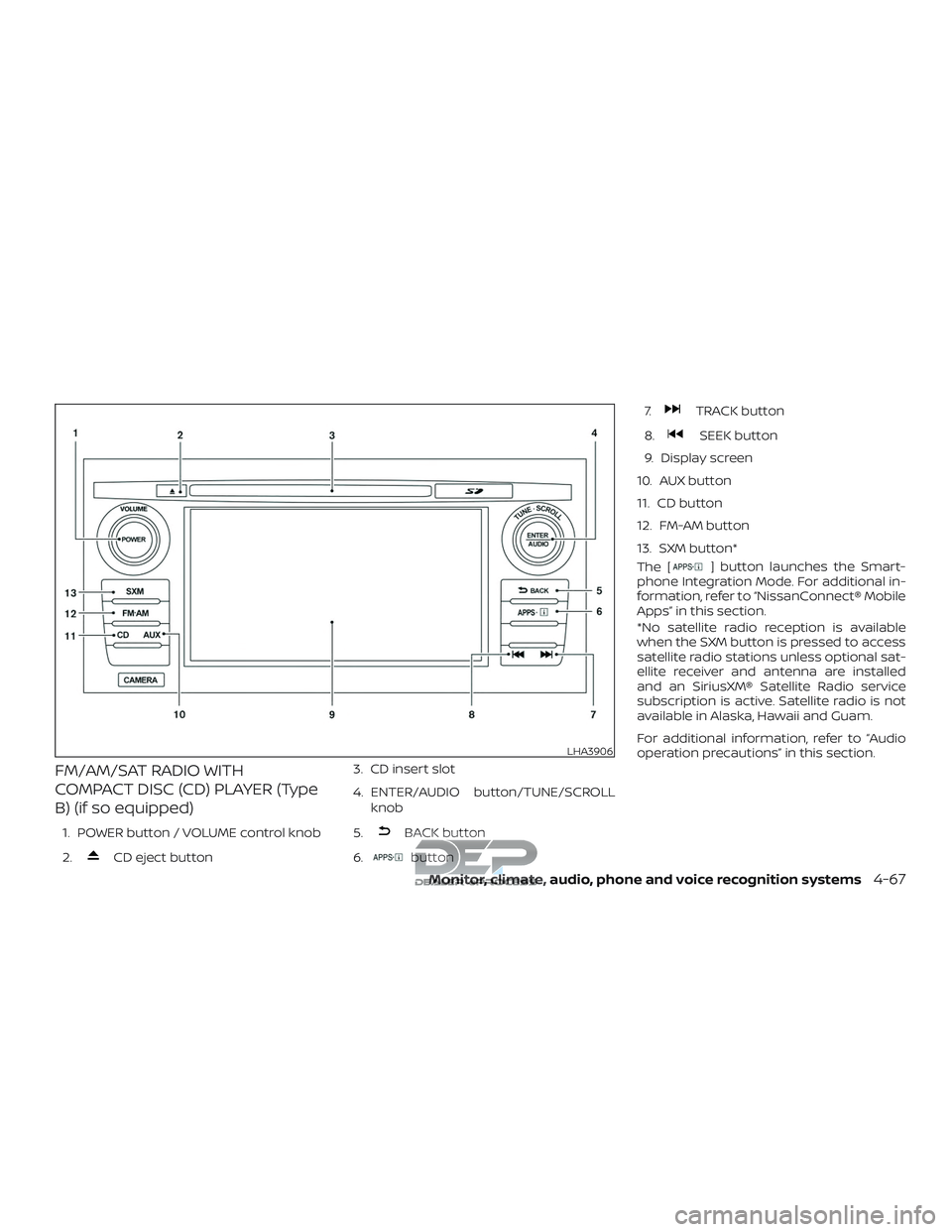
FM/AM/SAT RADIO WITH
COMPACT DISC (CD) PLAYER (Type
B) (if so equipped)
1. POWER button / VOLUME control knob
2.
CD eject button3. CD insert slot
4. ENTER/AUDIO button/TUNE/SCROLL
knob
5.
BACK button
6.
button 7.
TRACK button
8.
SEEK button
9. Display screen
10. AUX button
11. CD button
12. FM-AM button
13. SXM button*
The [
] button launches the Smart-
phone Integration Mode. For additional in-
formation, refer to “NissanConnect® Mobile
Apps” in this section.
*No satellite radio reception is available
when the SXM button is pressed to access
satellite radio stations unless optional sat-
ellite receiver and antenna are installed
and an SiriusXM® Satellite Radio service
subscription is active. Satellite radio is not
available in Alaska, Hawaii and Guam.
For additional information, refer to “Audio
operation precautions” in this section.
LHA3906
Monitor, climate, audio, phone and voice recognition systems4-67
Page 318 of 650
![NISSAN TITAN 2018 Owner´s Manual SXM settings
To view the SXM settings:1. Press the [
] button.
2. Touch the “Settings” key.
3. Touch the “SXM” key.
The signal strength, activation status and
other information are displayed o](/img/5/40372/w960_40372-317.png "NISSAN TITAN 2018 Owner´s Manual SXM settings
To view the SXM settings:1. Press the [
] button.
2. Touch the “Settings” key.
3. Touch the “SXM” key.
The signal strength, activation status and
other information are displayed o")
SXM settings
To view the SXM settings:1. Press the [
] button.
2. Touch the “Settings” key.
3. Touch the “SXM” key.
The signal strength, activation status and
other information are displayed on the
screen.
AUX button
The AUX IN audio input jack accepts any
standard analog audio input such as from
a portable cassette tape/CD player, MP3
player or a laptop computer. Press the AUX
button to play a compatible device
plugged into the AUX IN jack.
FM/AM/SAT radio operation
FM·AM button
Press the FM·AM button to change the
band as follows:
AM →FM1 →FM2 →AM
If another audio source is playing when the
FM·AM button is pressed, the audio source
playing will automatically be turned off and
the last radio station played will begin playing.
SXM band select
Pressing the SXM button will change the
band as follows:
SXM1* →SXM2*→ SXM3*→SXM1* (satellite, if
so equipped)
When the SXM button is pressed while the
ignition switch is in the ACC or ON position,
the radio will come on at the last station
played.
The last station played will also come on
when the VOL (volume) control knob is
pressed to turn the radio on.
*When the SXM button is pressed, the sat-
ellite radio mode will be skipped unless an
optional satellite receiver and antenna are
installed and a SiriusXM® Satellite Radio
service subscription is active. Satellite radio
is not available in Alaska, Hawaii and Guam.
If a compact disc is playing when the SXM
button is pressed, the compact disc will
automatically be turned off and the last
radio station played will come on.
While the radio is in SXM mode, the opera-
tion can be controlled through the touch-
screen. Touch the “Channels” key to display
a list of channels. Touch a channel dis-
played on the list to change to that chan- nel. Touch the “Categories” key to display a
list of categories. Touch a category dis-
played on the list to display options within
that category.
Tuning with the touch-screen
When in AM or FM mode, the radio can be
tuned using the touch-screen. To bring up
the visual tuner, touch the “Tune” key on the
lower right corner of the screen. A screen
appears with a bar running from low fre-
quencies on the lef t to high frequencies on
the right. Touch the screen at the location
of the frequency you wish to tune and the
station will change to that frequency. To
return to the regular radio display screen,
touch the “OK” key.
Tuning with the TUNE knob
The radio can also be manually tuned us-
ing the TUNE knob. When in FM or AM mode,
turn the TUNE knob to the lef t for lower
frequencies or to the right for higher fre-
quencies. When in SXM mode, turn the
TUNE knob to change the channel.
Monitor, climate, audio, phone and voice recognition systems4-69
Page 321 of 650
REPLAYTo replay a track from
the beginning, press
the
seek button.
The user can continue to
press the
seek but-
ton to replay previous
songs, but can only go
back as far as the sys-
tem permits. The system
will warn the user when
they cannot skip any fur-
ther back by displaying
“At the End” in the bot-
tom lef t corner of the
screen. SKIP
To skip a track, press
the
track button.
“Live” will appear in the
bottom lef t corner of the
screen indicating the dif-
ference from play time to
live audio.
PAUSE To pause a track, press
the
pause button.
REWIND/
FA ST
FORWARD To rewind/ fast forward a
track, hold the
orseek/track
button.
Compact disc (CD) player
operation
If the radio is already operating, it automati-
cally turns off and the compact disc begins
to play.
CD button
When the CD button is pressed with the
system off and the compact disc loaded,
the system will turn on and the compact
disc will start to play.
When the CD button is pressed with a com-
pact disc loaded and the radio playing, the
radio will automatically be turned off and
the compact disc will start to play.
4-72Monitor, climate, audio, phone and voice recognition systems
Page 323 of 650
SEEK/TRACK (Reverse orFast Forward) buttons
Press and hold the
SEEK button
or
TRACK button for 1.5 seconds while
the compact disc is playing to reverse or
fast forward the track being played. The
compact disc plays at an increased speed
while reversing or fast forwarding. When
the button is released, the compact disc
returns to normal play speed.
SEEK/TRACK buttons
Press the
SEEK button while a CD or
MP3/WMA CD is playing to return to the
beginning of the current track. Press
the
SEEK button several times to skip
backward several tracks.
Press the
TRACK button while a CD or
MP3/WMA CD is playing to advance one
track. Press the
TRACK button several
times to skip forward several tracks. If the
last track on a CD is skipped, the first track
on the disc is played. If the last track in a
folder of an MP3/WMA CD is skipped, the
first track of the next folder is played.
CD EJECT button
When the
CD eject button is pressed
with a compact disc loaded, the compact
disc will eject and the last source will be
played.
If the disc is not removed within 10 seconds,
the disc will reload.
Additional features
For additional information, refer to “iPod®
player operation with Navigation System”
in this section.
For additional information, refer to “USB
(Universal Serial Bus) connection port
(models with Navigation System)” in this
section.
For additional information, refer to
“Bluetooth® streaming audio with Naviga-
tion System” in this section.
USB (Universal Serial Bus)
CONNECTION PORT (models
without Navigation System) (if so
equipped)
Connecting a device to the USB
Connection Port
WARNING
Do not connect, disconnect, or operate
the USB device while driving. Doing so
can be a distraction. If distracted you
could lose control of your vehicle and
cause an accident or serious injury.
LHA3794
4-74Monitor, climate, audio, phone and voice recognition systems
Page 327 of 650
Press theSEEK/TRACK while an audio
file on the USB device is playing to advance
one track. Press the
SEEK/TRACK
several times to skip forward several
tracks. If the last track in a folder on the USB
device is skipped, the first track of the next
folder is played.
Random and repeat play mode
While files on a USB device are playing, the
play pattern can be altered so that songs
are repeated or played randomly.
Random
Touch the “Random” key to apply a random
play pattern to the USB device. When the
Random mode is active, the icon will illumi-
nate. By touching the “Random” key again,
the ”Random Folder” key appears. By
touching the “Random” key once more, the
“Random All” key appears. To cancel Ran-
dom mode, touch the “Random” key until
no icons are illuminated. Repeat
Touch the “Repeat” key to apply a repeat
play pattern to the USB device. When the
Repeat mode is active, the icon will illumi-
nate. By touching the “Repeat” key again,
the ”Repeat Track” key appears. By touching
the “Repeat” key once more, the “Repeat
Folder” key appears. . To cancel Repeat
mode, touch the “Repeat” key until no icons
are illuminated.
iPod®* PLAYER OPERATION
WITHOUT NAVIGATION SYSTEM (if
so equipped)
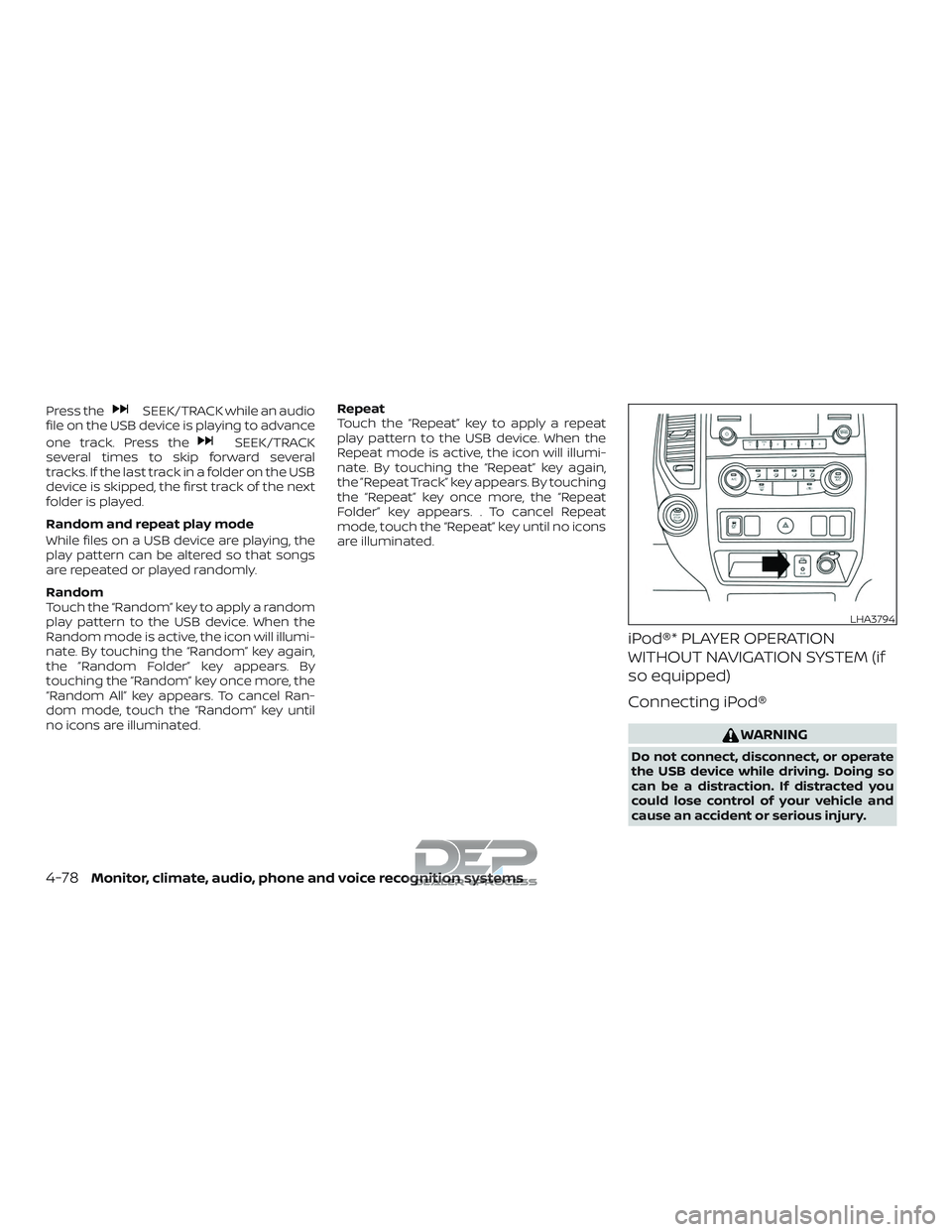
Connecting iPod®
WARNING
Do not connect, disconnect, or operate
the USB device while driving. Doing so
can be a distraction. If distracted you
could lose control of your vehicle and
cause an accident or serious injury.
LHA3794
4-78Monitor, climate, audio, phone and voice recognition systems
Page 330 of 650
iPod®* PLAYER OPERATION WITH
NAVIGATION SYSTEM (if so
equipped)
Connecting iPod®
WARNING
Do not connect, disconnect, or operate
the USB device while driving. Doing so
can be a distraction. If distracted you
could lose control of your vehicle and
cause an accident or serious injury.
CAUTION
∙ Do not force the USB device into theUSB port. Inserting the USB device
tilted or up-side-down into the port
may damage the port. Make sure that
the USB device is connected correctly
into the USB port.
∙ Do not grab the USB port cover (if so equipped) when pulling the USB de-
vice out of the port. This could dam-
age the port and the cover.
∙ Do not leave the USB cable in a place where it can be pulled unintentionally.
Pulling the cable may damage the
port.
For additional information, refer to your de-
vice manufacturer’s owner information re-
garding the proper use and care of the
device.
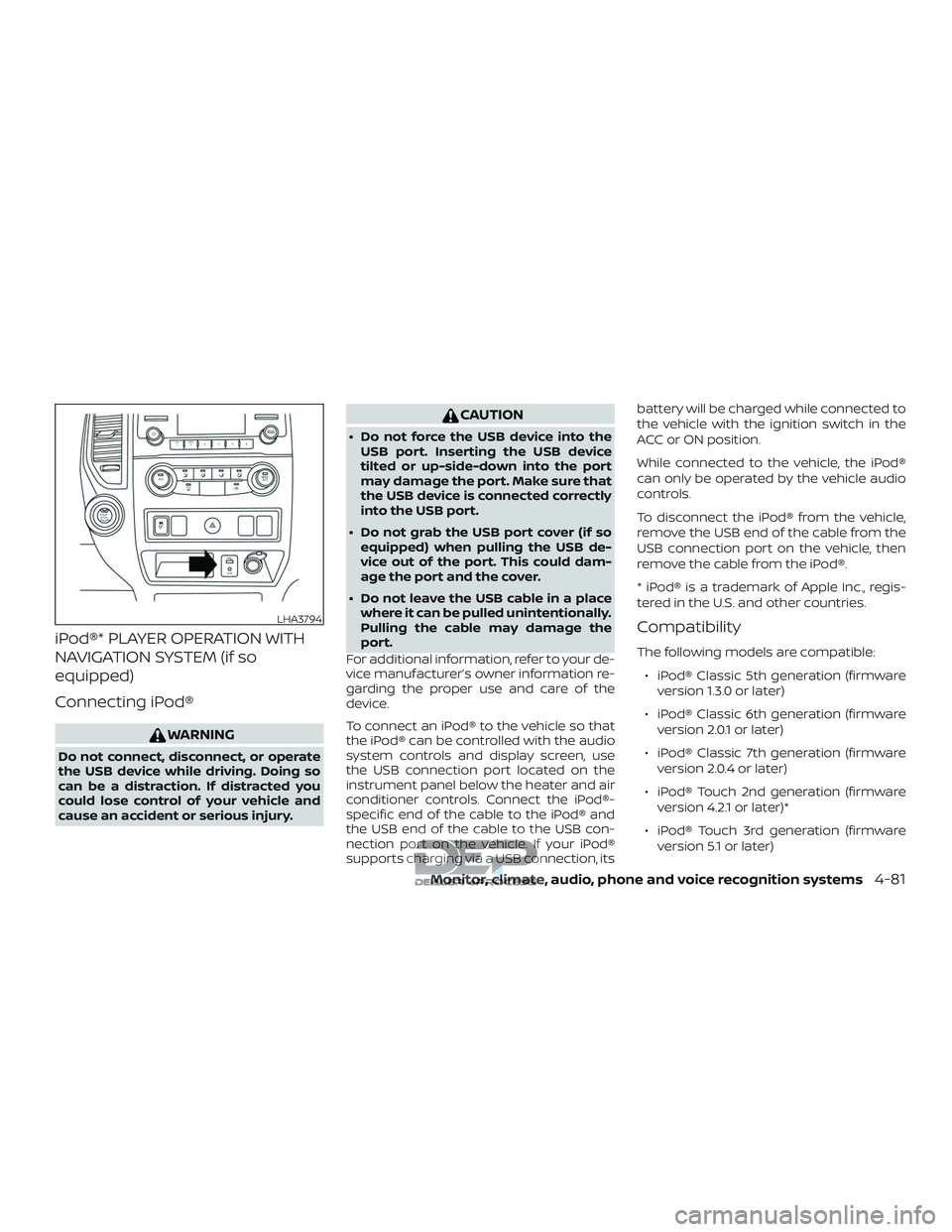
To connect an iPod® to the vehicle so that
the iPod® can be controlled with the audio
system controls and display screen, use
the USB connection port located on the
instrument panel below the heater and air
conditioner controls. Connect the iPod®-
specific end of the cable to the iPod® and
the USB end of the cable to the USB con-
nection port on the vehicle. If your iPod®
supports charging via a USB connection, its battery will be charged while connected to
the vehicle with the ignition switch in the
ACC or ON position.
While connected to the vehicle, the iPod®
can only be operated by the vehicle audio
controls.
To disconnect the iPod® from the vehicle,
remove the USB end of the cable from the
USB connection port on the vehicle, then
remove the cable from the iPod®.
* iPod® is a trademark of Apple Inc., regis-
tered in the U.S. and other countries.
Compatibility
The following models are compatible:
∙ iPod® Classic 5th generation (firmware version 1.3.0 or later)
∙ iPod® Classic 6th generation (firmware version 2.0.1 or later)
∙ iPod® Classic 7th generation (firmware version 2.0.4 or later)
∙ iPod® Touch 2nd generation (firmware version 4.2.1 or later)*
∙ iPod® Touch 3rd generation (firmware version 5.1 or later)
LHA3794
Monitor, climate, audio, phone and voice recognition systems4-81
Page 352 of 650
Regional coding
Both the DVD player and discs are coded by
region. These regional codes must match
in order for the disc to play. The system is
preset to the region code designated for
your area by the DVD Copy Control Asso-
ciation. Other regions may not be played in
this system.
Supported Disc Types∙ DVD-Video: DVD contains video
∙ DVD +/- R: DVD contains video
∙ CD-DA: CD contains audio
∙ CD-Video: CD contains video
∙ CD-R/+RW: CD contains audio
Unsupported Disc Types
Before you load a disc, make sure that it is
compatible with the player. Note that the
following disc CANNOT be used with this
system: Optical disc- CD-1, CD-ROM, and
DVD-ROM Mini disc- CDG (audio only, not
graphics), and Blu-ray (list is not all inclu-
sive).
Loading and Playing Discs
Press the POWER button to turn the moni-
tor on. Insert the disc about half way into the disc compartment slot, with the disc’s
label facing the rear of the vehicle. Do NOT
insert the disc at an angle. The Disc must
be inserted straight into the player.
The disc will load automatically and begin
to play. Some discs may start at the root
menu, where playback must be selected to
start a movie. Depending on the disc and
playback location on the disc, a “
”icon
may be displayed in the upper lef t-hand
corner of the screen indicating that play-
back is not possible during certain times.
Additional information on Media
Compatibility
This system is compatible with the follow-
ing media formats:
Format Extension
Audio MP3 .mp3
WMA .wma
Video AVI
.avi
MPEG-1 .mpg
MPEG-2 .mpg
Image JPEG .jpg
Due to ongoing technological advance-
ments, some USB flash drives may be in-
compatible with this system. ∙ The text information of some audio and
video files may not be correctly dis-
played.
∙ There may be a slight delay before play- back of files using a USB flash drive with
complex folder hierarchies.
∙ Some audio, video, and image files may be incompatible with this system due
to file characteristics, file format, record-
ing sof tware used, directory structure,
and/or the type of audio/video encod-
ing used.
HOW TO USE THE DVD OSD MENU
This section describes how to set and ad-
just settings using On-Screen Display
(OSD) Menu. You can use the OSD menu to
adjust all the settings. Follow the steps out-
lined below to select the desired function.
Monitor, climate, audio, phone and voice recognition systems4-103
Page 364 of 650
audio/video/image files is inserted, the file
list screen may appear first.
Selecting Files
1. To select files during the video play-back, press the MENU button on the
remote control to access the file list.
Press the
orbuttons
on the remote control to select the de-
sired file.
2. Once the desired file is highlighted, press the ENTER button on the remote
control to select it.
Selecting Folders
1. To select folders during video playback,press the MENU button on the remote
control to access the list.
2. Press the
button to access
the previous level (go up one level) or,
press the
button to access
the next level (go down one level).
3. Once the desired folder is highlighted, press the ENTER button on the remote
control to select it.
Skipping Files
Press the NEXT button on the remote con-
trol to select to the next file. Press the PREV
button one time to select the beginning of
the current file. Press the PREV button two
times to select the previous file.
Repeat Modes
To access the repeat mode options, press
the REPEAT button on the remote control.
The repeat mode options are as follows:
∙
REPEAT ALL: Repeat the entire
disc or USB device (default).
∙
REPEAT FOLDER: Repeat the cur-
rent folder
∙
REPEAT ONE: Repeat the current
file.
∙ REPEAT OFF: Playback stops af ter the disc or USB device is played in its en-
tirety.
Direct File Access
Press the number keys on the remote con-
trol (0–9) to access a file directly. For ex-
ample, to go to track 14, press “1”,”4”, then
ENTER on the remote control.
CHARGING A USB DEVICE
Plug the USB cable (not supplied) into the
USB connection port and then connect the
other end to the USB device.
NOTE:
Depending on the device, it may or may
not charge when connected to the USB
port. Not all devices are able to charge
when connected to the USB port.
CONNECTING AN EXTERNAL
AUXILIARY A/V SOURCE — INPUT
An external A/V source such as a media
player, video game, or other audio/video
device may be connected to the RCA type
jacks on the front of the monitor. Connect
the external audio/video source to the RCA
type input jacks on the front of the monitor
using RCA type connectors (sold sepa-
rately).
Yellow: Video input
Red: Audio-right channel input
White: Audio-lef t channel input
The system will automatically select the
auxiliary input mode when the RCA type
connectors are inserted into the input
Monitor, climate, audio, phone and voice recognition systems4-115
Page 366 of 650
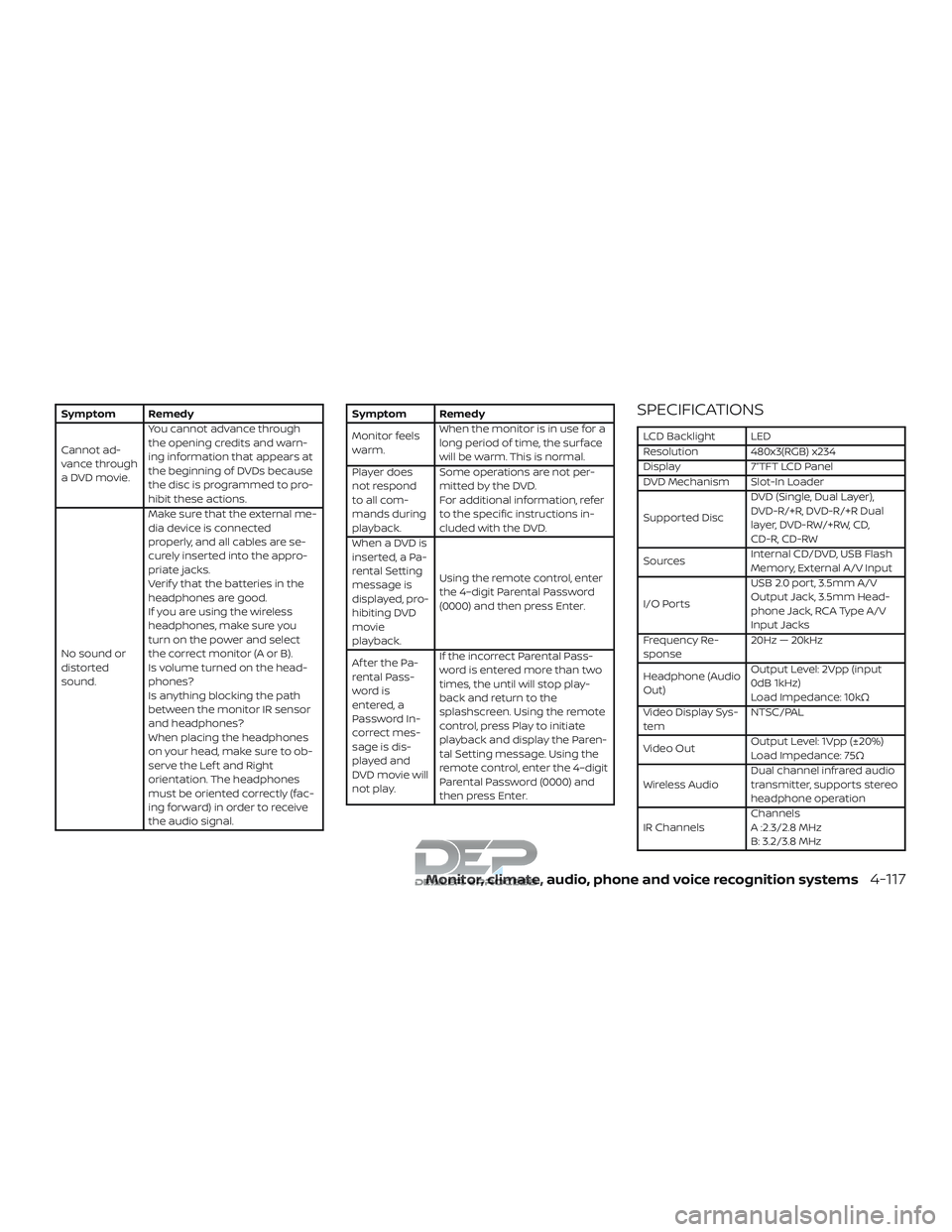
Symptom Remedy
Cannot ad-
vance through
a DVD movie.You cannot advance through
the opening credits and warn-
ing information that appears at
the beginning of DVDs because
the disc is programmed to pro-
hibit these actions.
No sound or
distorted
sound. Make sure that the external me-
dia device is connected
properly, and all cables are se-
curely inserted into the appro-
priate jacks.
Verif y that the batteries in the
headphones are good.
If you are using the wireless
headphones, make sure you
turn on the power and select
thecorrectmonitor(AorB).
Is volume turned on the head-
phones?
Is anything blocking the path
between the monitor IR sensor
and headphones?
When placing the headphones
on your head, make sure to ob-
serve the Lef t and Right
orientation. The headphones
must be oriented correctly (fac-
ing forward) in order to receive
the audio signal.Symptom Remedy
Monitor feels
warm.
When the monitor is in use for a
long period of time, the surface
will be warm. This is normal.
Player does
not respond
to all com-
mands during
playback. Some operations are not per-
mitted by the DVD.
For additional information, refer
to the specific instructions in-
cluded with the DVD.
When a DVD is
inserted, a Pa-
rental Setting
message is
displayed, pro-
hibiting DVD
movie
playback. Using the remote control, enter
the 4–digit Parental Password
(0000) and then press Enter.
Af ter the Pa-
rental Pass-
word is
entered, a
Password In-
correct mes-
sage is dis-
played and
DVD movie will
not play. If the incorrect Parental Pass-
word is entered more than two
times, the until will stop play-
back and return to the
splashscreen. Using the remote
control, press Play to initiate
playback and display the Paren-
tal Setting message. Using the
remote control, enter the 4–digit
Parental Password (0000) and
then press Enter.SPECIFICATIONS
LCD Backlight LED
Resolution 480x3(RGB) x234
Display 7”TFT LCD Panel
DVD Mechanism Slot-In Loader
Supported Disc
DVD (Single, Dual Layer),
DVD-R/+R, DVD-R/+R Dual
layer, DVD-RW/+RW, CD,
CD-R, CD-RW
Sources Internal CD/DVD, USB Flash
Memory, External A/V Input
I/O Ports USB 2.0 port, 3.5mm A/V
Output Jack, 3.5mm Head-
phone Jack, RCA Type A/V
Input Jacks
Frequency Re-
sponse 20Hz — 20kHz
Headphone (Audio
Out) Output Level: 2Vpp (input
0dB 1kHz)
Load Impedance: 10kΩ
Video Display Sys-
tem NTSC/PAL
Video Out Output Level: 1Vpp (±20%)
Load Impedance: 75Ω
Wireless Audio Dual channel infrared audio
transmitter, supports stereo
headphone operation
IR Channels Channels
A :2.3/2.8 MHz
B: 3.2/3.8 MHz
Monitor, climate, audio, phone and voice recognition systems4-117