tail lights NISSAN TITAN 2018 Owner´s Manual
[x] Cancel search | Manufacturer: NISSAN, Model Year: 2018, Model line: TITAN, Model: NISSAN TITAN 2018Pages: 650, PDF Size: 7.54 MB
Page 219 of 650
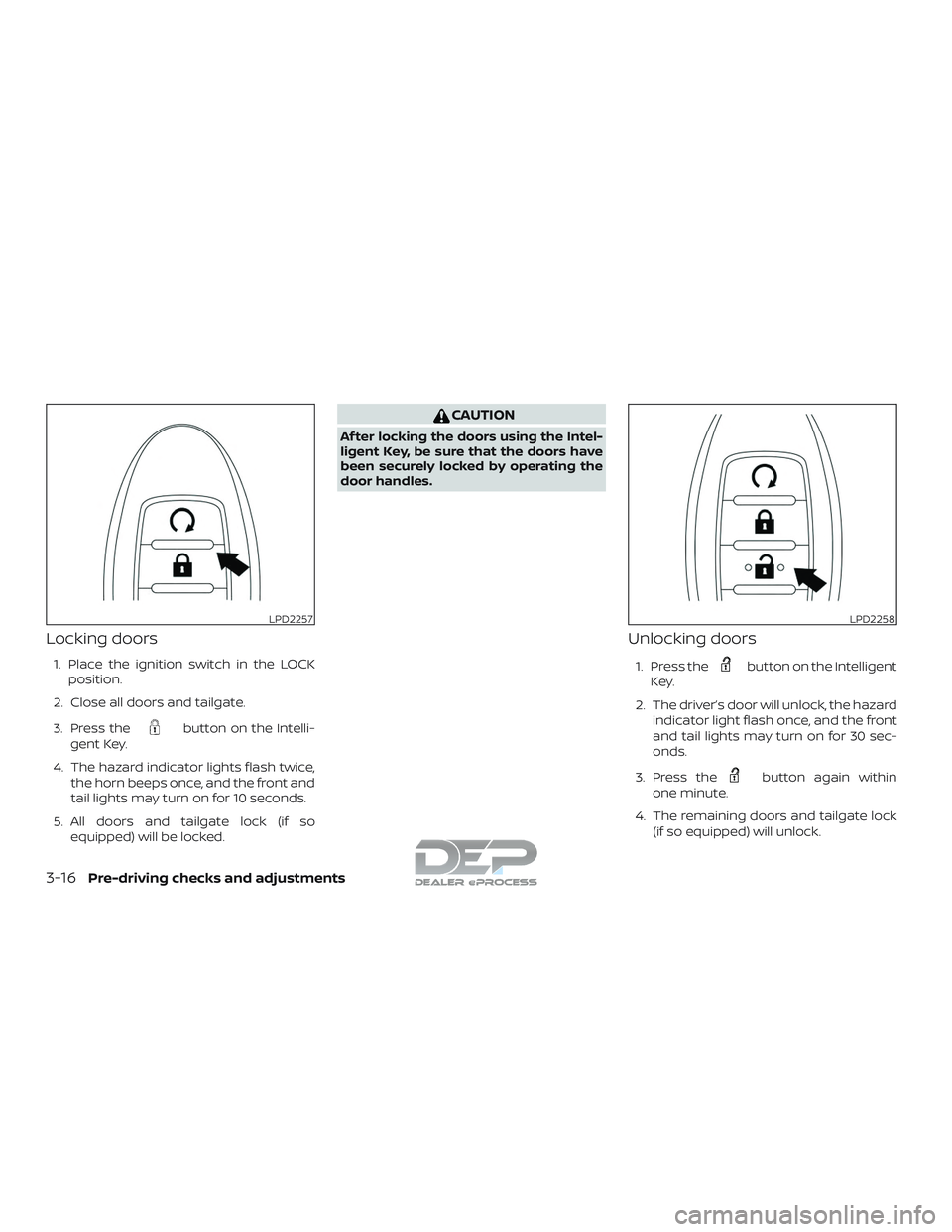
Locking doors
1. Place the ignition switch in the LOCKposition.
2. Close all doors and tailgate.
3. Press the
button on the Intelli-
gent Key.
4. The hazard indicator lights flash twice, the horn beeps once, and the front and
tail lights may turn on for 10 seconds.
5. All doors and tailgate lock (if so equipped) will be locked.
CAUTION
Af ter locking the doors using the Intel-
ligent Key, be sure that the doors have
been securely locked by operating the
door handles.
Unlocking doors
1. Press thebutton on the Intelligent
Key.
2. The driver’s door will unlock, the hazard indicator light flash once, and the front
and tail lights may turn on for 30 sec-
onds.
3. Press the
button again within
one minute.
4. The remaining doors and tailgate lock (if so equipped) will unlock.
LPD2257LPD2258
3-16Pre-driving checks and adjustments
Page 220 of 650
NOTE:
If Selective Unlock is turned off in the
Vehicle Settings, all doors and tailgate
lock (if so equipped) will unlock upon the
first
press of the Intelligent Key re-
mote. For additional information, refer to
“Vehicle information display ” in the “In-
struments and controls” section of this
manual.
All doors and tailgate lock (if so equipped)
will be locked automatically unless one of
the following operations is performed
within one minute af ter pressing the
button:
∙ Opening any doors.
∙ Pushing the ignition switch.
The interior light illuminates for a period of
time when a door is unlocked and the
room light switch is in the DOOR position.
The light can be turned off without waiting
by performing one of the following opera-
tions:
∙ Placing the ignition switch in the ON po- sition.
∙ Locking the doors with the Intelligent Key. ∙ Switching the room light switch to the
OFF position.
∙ Switching the Auto Room Lamp to the OFF position in Vehicle Settings of the
vehicle information display (if so
equipped). For additional information,
refer to “Vehicle information display” in
the “Instruments and controls” section
of this manual.
Opening windows (if so equipped)
The Intelligent Key allows you to simultane-
ously open windows equipped with auto-
matic operation.
∙ To open the windows, press the
button on the Intelligent Key for longer
than 3 seconds af ter all doors are un-
locked.
The door windows will open while pressing
the
button on the Intelligent Key.
The door windows cannot be closed by
using the Intelligent Key.
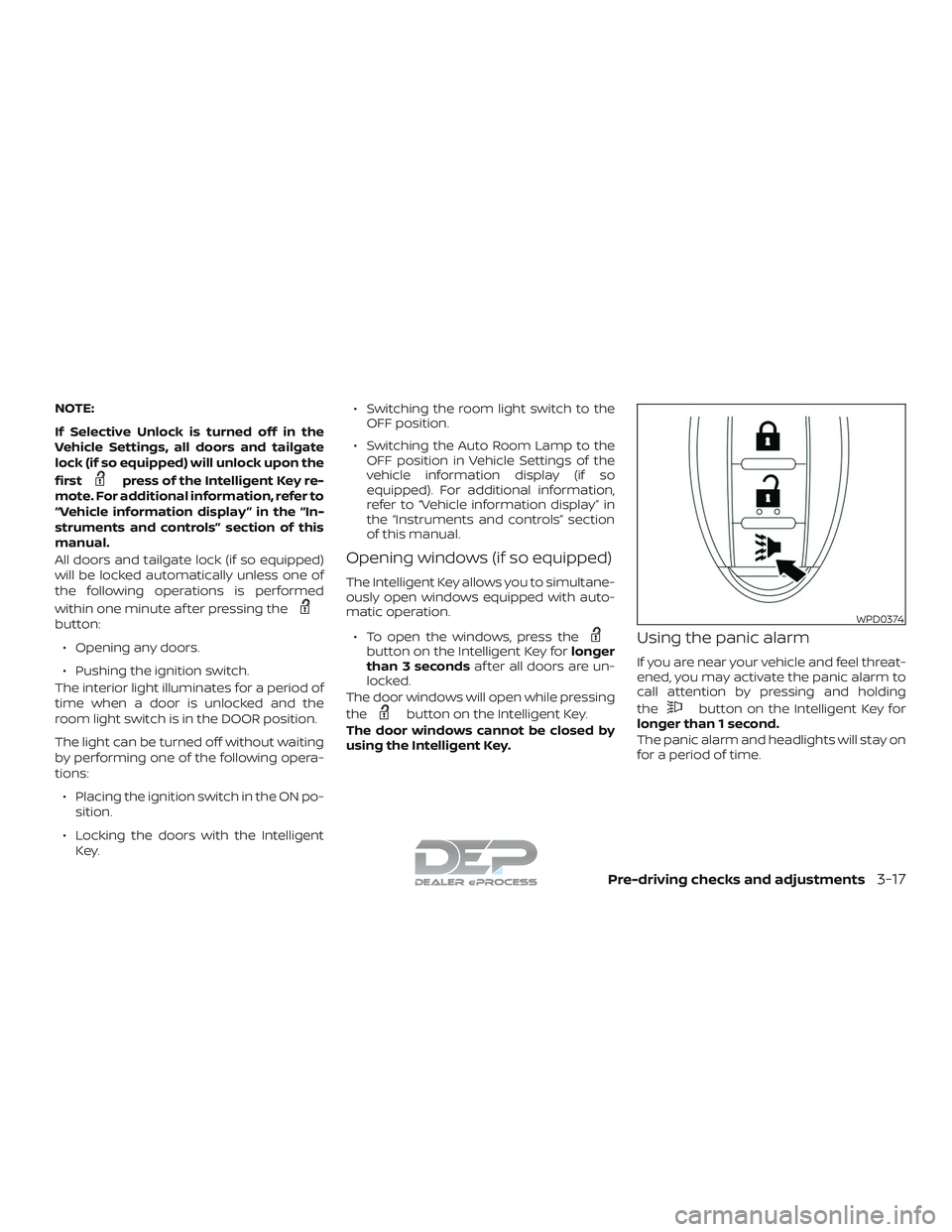
Using the panic alarm
If you are near your vehicle and feel threat-
ened, you may activate the panic alarm to
call attention by pressing and holding
the
button on the Intelligent Key for
longer than 1 second.
The panic alarm and headlights will stay on
for a period of time.
WPD0374
Pre-driving checks and adjustments3-17
Page 226 of 650
The Remote Engine Start operating range
is approximately 197 f t (60 m) from the ve-
hicle.
REMOTE STARTING THE VEHICLE
To use the Remote Engine Start feature to
start the engine perform the following:1. Aim the Intelligent Key at the vehicle.
2. Press the
button to lock all
doors.
3. Within 5 seconds press and hold the
button until the turn signal
lights flash and the tail lamps turn on. If
the vehicle is not within view press and
hold the
button for at least 2 sec-
onds.
The following events will occur when the
engine starts:
∙
The parking lights will turn on and remain
on as long as the engine is running.
∙ The doors will be locked and the climate control system may come on.
∙ The engine will continue to run for 10 minutes. Repeat the steps to extend
the time for an additional 10 minutes.
For additional information, refer to “Ex-
tending engine run time” in this section. Depress and hold the brake then push the
push-button ignition switch to the ON po-
sition before driving. For additional infor-
mation, refer to “Driving the vehicle” in the
“Starting and driving” section of this
manual.
EXTENDING ENGINE RUN TIME
The Remote Engine Start feature can be
extended one time by performing the
steps listed in “Remote starting the vehicle”
in this section. Run time will be calculated
as follows:
∙ The first 10 minute run time will start when the Remote Engine Start function
is performed.
∙ The second 10 minutes will start imme- diately when the Remote Engine Start
function is performed again. For ex-
ample, if the engine has been running
for 5 minutes, and 10 minutes are
added, the engine will run for a total of
15 minutes.
∙ Extending engine run time will count to- wards the two Remote Engine Start
limit. A maximum of two Remote Engine Starts,
or a single Remote Engine Start with an
extension, are allowed between ignition
cycles. The ignition switch must be cycled
to the ON position and then back to the
OFF position before the Remote Engine
Start procedure can be used again.CANCELING A REMOTE ENGINE
START
To cancel a Remote Engine Start, perform
one of the following:
∙ Aim the Intelligent Key at the vehicle and press
until the parking lights
turn off.
∙ Turn on the hazard warning flashers.
∙ Cycle the ignition switch ON and then OFF.
∙ The extended engine run time has ex- pired.
∙ The first 10 minute timer has expired.
∙ The engine hood has been opened.
∙ The shif t lever is moved out of park.
∙ The alarm sounds due to illegal entry into the vehicle.
Pre-driving checks and adjustments3-23
Page 530 of 650
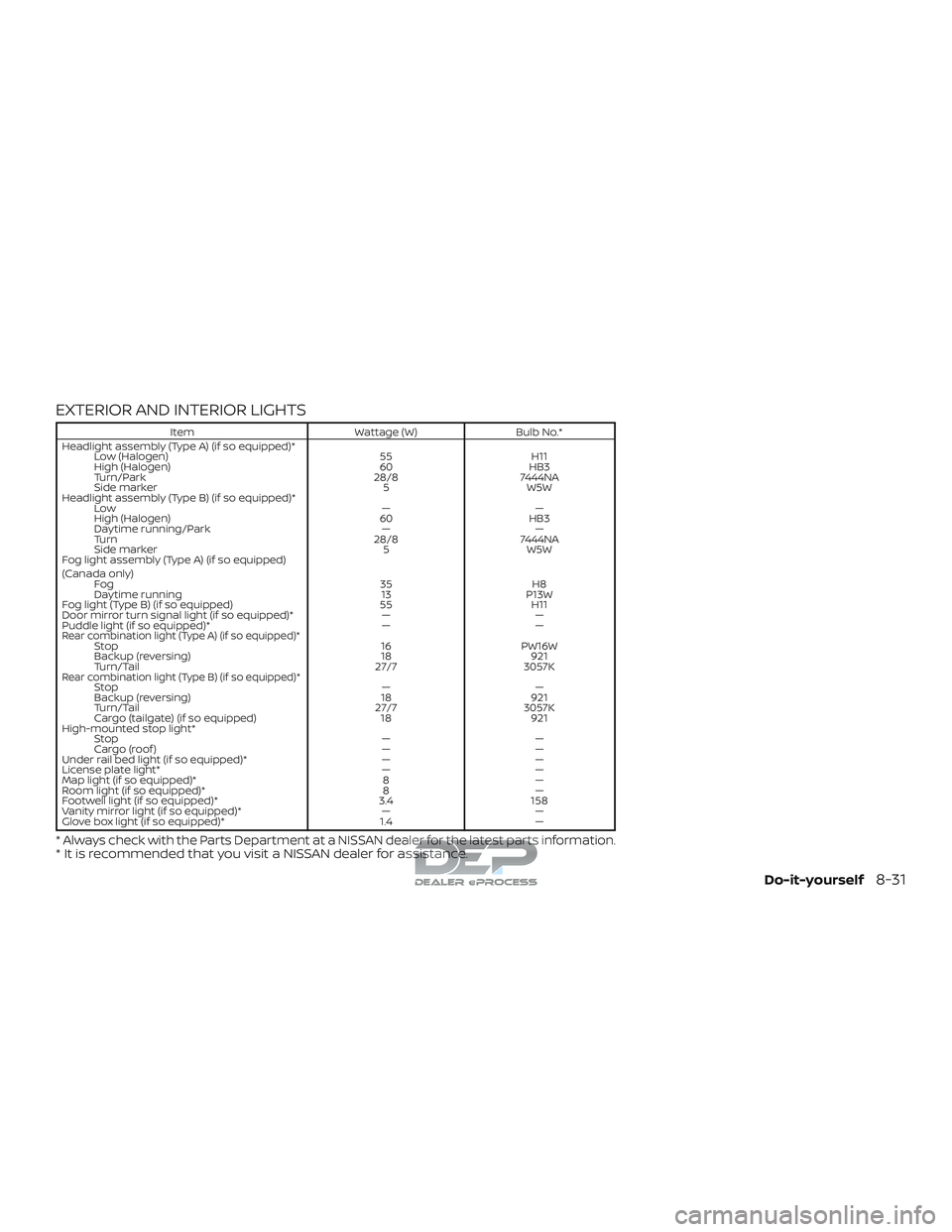
EXTERIOR AND INTERIOR LIGHTS
ItemWattage (W)Bulb No.*
Headlight assembly (Type A) (if so equipped)* Low (Halogen) 55H11
High (Halogen) 60HB3
Turn/Park 28/87444NA
Side marker 5W5W
Headlight assembly (Type B) (if so equipped)* Low ——
High (Halogen) 60HB3
Daytime running/Park ——
Turn 28/87444NA
Side marker 5W5W
Fog light assembly (Type A) (if so equipped)
(Canada only) Fog 35H8
Daytime running 13P13W
Fog light (Type B) (if so equipped) 55H11
Door mirror turn signal light (if so equipped)* ——
Puddle light (if so equipped)* ——
Rear combination light (Type A) (if so equipped)*Stop 16PW16W
Backup (reversing) 18921
Turn/Tail 27/73057K
Rear combination light (Type B) (if so equipped)*Stop ——
Backup (reversing) 18921
Turn/Tail 27/73057K
Cargo (tailgate) (if so equipped) 18921
High-mounted stop light* Stop ——
Cargo (roof ) ——
Under rail bed light (if so equipped)* ——
License plate light* ——
Map light (if so equipped)* 8—
Room light (if so equipped)* 8—
Footwell light (if so equipped)* 3.4158
Vanity mirror light (if so equipped)* ——
Glove box light (if so equipped)* 1.4—
* Always check with the Parts Department at a NISSAN dealer for the latest parts information.* It is recommended that you visit a NISSAN dealer for assistance.
Do-it-yourself8-31
Page 548 of 650
secondary latch keeps the hood from
opening when the primary latch is re-
leased.
When driving in areas using road salt or
other corrosive materials, check lubrica-
tion frequently.
Lights*:Clean the headlights on a regular
basis. Make sure that the headlights, stop
lights, tail lights, turn signal lights, and other
lights are all operating properly and in-
stalled securely. Also check headlight aim.
Road wheel nuts (lug nuts)*: When check-
ing the tires, make sure no wheel nuts are
missing, and check for any loose wheel
nuts. Tighten if necessary.
Tire rotation*: Tires should be rotated ev-
ery 5,000 miles (8,000 km).
Tires*: Check the pressure with a gauge
of ten and always prior to long distance
trips. If necessary, adjust the pressure in all
tires, including the spare, to the pressure
specified. Check carefully for damage, cuts
or excessive wear.
Tire Pressure Monitoring System (TPMS)
transmitter components: Replace the
TPMS transmitter grommet seal, valve core
and cap when the tires are replaced due to
wear or age. Wheel alignment and balance:
If the ve-
hicle should pull to either side while driving
on a straight and level road, or if you detect
uneven or abnormal tire wear, there may
be a need for wheel alignment. If the steer-
ing wheel or seat vibrates at normal high-
way speeds, wheel balancing may be
needed.
For additional information regarding tires,
refer to “Important Tire Safety Information”
(US) or “Tire Safety Information” (Canada) in
the Warranty Information Booklet.
Windshield: Clean the windshield on a
regular basis. Check the windshield at least
every six months for cracks or other dam-
age. Have a damaged windshield repaired
by a qualified repair facility.
Windshield wiper blades*: Check for
cracks or wear if they do not wipe properly.
Inside the vehicle
The maintenance items listed here should
be checked on a regular basis, such as
when performing scheduled maintenance,
cleaning the vehicle, etc.
Accelerator pedal: Check the pedal for
smooth operation and make sure the pedal does not bind or require uneven ef-
fort. Keep the floor mat away from the
pedal.
Automatic transmission P (Park) posi-
tion mechanism:
On a fairly steep hill
check that your vehicle is held securely
with the shif t lever in the P (Park) position
without applying any brakes.
Brake pedal: Check the pedal for smooth
operation. If the brake pedal suddenly goes
down further than normal, the pedal feels
spongy or the vehicle seems to take longer
to stop, have your vehicle checked imme-
diately. It is recommended that you visit a
NISSAN dealer for this service.
Brakes: Check that the brakes do not pull
the vehicle to one side when applied.
Parking brake: Check the parking brake
operation regularly. The vehicle should be
securely held on a fairly steep hill with only
the parking brake applied. If the parking
brake needs adjustment, it is recom-
mended that you visit a NISSAN dealer for
this service.
Seats: Check seat position controls such
as seat adjusters, seatback recliner, etc., to
ensure they operate smoothly and all
latches lock securely in every position.
Maintenance and schedules9-3
Page 619 of 650
Trailer lights
CAUTION
When splicing into the vehicle electrical
system, a commercially available
power-type module/converter must be
used to provide power for all trailer
lighting. This unit uses the vehicle bat-
tery as a direct power source for all
trailer lights while using the vehicle tail
light, stoplight and turn signal circuits
as a signal source. The
module/converter must draw no more
than 15 milliamps from the stop and tail
lamp circuits. Using a
module/converter that exceeds these
power requirements may damage the
vehicle’s electrical system. See a repu-
table trailer retailer to obtain the proper
equipment and to have it installed.
Trailer lights should comply with federal
and/or local regulations. For assistance in
hooking up trailer lights, it is recommended
that you contact a NISSAN dealer or repu-
table trailer retailer. Vehicles equipped with
the optional trailer tow package are
equipped with a 7-pin trailer harness con-
nector. If your trailer is equipped with a flat
4-pin connector, an adapter will be needed to connect the trailer lights to the vehicle.
Adapters are available at auto parts stores
and hitch retailers.Trailer brakes (if so equipped)
If your trailer is equipped with a braking
system, make sure it conforms to federal
and/or local regulations and that it is prop-
erly installed.
Vehicles equipped with a 7–pin trailer har-
ness connector are pre-wired for a trailer
brake controller. It is recommended that
you visit a NISSAN dealer for a trailer brake
adapter harness.
When towing a trailer load of 3,500 lbs.
(1587 kg) or more, trailers with a brake
system MUST be used.
However, most
states require a separate braking system
on trailers with a loaded weight above a
specific amount. Make sure the trailer
meets the local regulations and the regu-
lations where you plan to tow.
WARNING
The Gross Combined Weight Rating
(GCWR) must never exceed the vehicle
manufacturers recommendation.
Several types of braking systems are avail-
able. Surge Brakes -
The surge brake actuator is
mounted on the trailer tongue with a hy-
draulic line running to each trailer wheel.
Surge brakes are activated by the trailer
pushing against the hitch ball when the
tow vehicle is braking. Hydraulic surge
brakes are common on rental trailers and
some boat trailers. In this type of system,
there is no hydraulic or electric connection
for brake operation between the tow ve-
hicle and the trailer.
CAUTION
Your factory trailer brake control unit
will not activate surge-style trailer
brakes
Electric Trailer Brakes - Electric braking
systems are activated by an electronic sig-
nal sent from a trailer brake controller (spe-
cial brake-sensing module). If electric trailer
brakes are used, refer to “Electric trailer
brake controller" in this section.
Have a professional supplier of towing
equipment make sure the trailer brakes are
properly installed and demonstrate proper
brake function testing.
10-52Technical and consumer information
Page 627 of 650
NOTE:
Trailer Sway Assist cannot reduce trailer
sway in all situations.∙ Be careful when passing other vehicles. Passing while towing a trailer requires
considerably more distance than nor-
mal passing. Remember, the length of
the trailer must also pass the other ve-
hicle before you can safely change
lanes.
∙ Use the Tow Mode or downshif t the transmission to a lower gear for engine
braking when driving down steep or
long hills. This will help slow the vehicle
without applying the brakes.
∙ Avoid holding the brake pedal down too long or too frequently. This could cause
the brakes to overheat, resulting in re-
duced braking efficiency.
∙ Increase your following distance to al- low for greater stopping distances
while towing a trailer. Anticipate stops
and brake gradually.
∙ NISSAN recommends that the cruise control (if so equipped) not be used
while towing a trailer. ∙ Some states or provinces have specific
regulations and speed limits for ve-
hicles that are towing trailers. Obey the
local speed limits.
∙ Check your hitch, trailer wiring harness connections, and trailer wheel lug nuts
af ter 50 miles (80 km) of travel and at
every break.
∙ When launching a boat, don’t allow the water level to go over the exhaust tail
pipe or rear bumper.
∙ Make sure you disconnect the trailer lights before backing the trailer into the
water or the trailer lights may burn out.
When towing a trailer, final drive gear oil
should be replaced and transmission
oil/fluid should be changed more fre-
quently. For additional information, refer
to the “Do-it-yourself ” section in this
manual.
Tow mode
Using tow mode is recommended when
pulling a heavy trailer or hauling a heavy
load. Press the TOW MODE switch to acti-
vate tow mode. The indicator light on the
TOW MODE switch illuminates when tow
mode is selected. Press the TOW MODE
switch again to turn tow mode off. Tow mode is automatically canceled when the
ignition switch is turned off.
Tow mode includes the following features:
∙ Grade logic — Adjusts transmission shif ts when pulling a trailer or hauling a
load up a grade.
∙ Downhill Speed Control (DSC) — auto- matically downshif ts when driving
down a grade with a trailer or heavy
load to help control vehicle speed.
Driving the vehicle in the tow mode with no
trailer/load or light trailer/light load will not
cause any damage. However, fuel
economy may be reduced and the
transmission/engine driving characteris-
tics may feel unusual.
When towing a trailer, final drive gear oil
should be replaced and transmission
oil/fluid should be changed more fre-
quently. For additional information, refer
to the “Do-it-yourself ” section of this
manual.
10-60Technical and consumer information
Page 640 of 650
Precautions when starting and
driving..................5-2,5-9
Push starting................6-15
Starting the engine (diesel only) ......5-16
Starting the engine
(gasoline engine only) .............5-15
Steering Powersteeringfluid............8-12
Power steering system .........5-56
Steering wheel .................3-29
Steering wheel audio control switch . . .4-87
Stoplight ....................8-31
Storage .....................2-75
Storagetray...................2-79
Sunglasses case ................2-81
Sunglasses holder ...............2-81
Sunvisors....................3-30
Supplemental air bag warning labels . . .1-80
Supplemental air bag warning
light.....................1-81, 2-29
Supplemental front impact air bag
system ...................1-60, 1-75
Supplemental restraint system Information and warning labels . . . .1-80
Precautions on supplemental
restraint system ...........1-53, 1-68
Supplemental restraint system
(Supplemental air bag system) .......1-53
Switch Autolightswitch..............2-55
Automatic power window switch . . .2-89
Electronic locking rear differential (E-Lock)
system switch ...............2-67
Foglightswitch..............2-59
Hazard warning flasher switch ......6-2
Headlightaimingcontrol.........2-57 Headlight and turn signal switch
....2-54
Headlightcontrolswitch.........2-54
Hill descent control switch .......2-66
Instrument brightness control .....2-58
Power door lock switch ..........3-6
Powerinverterswitch ..........2-68
Rear sonar system off switch ......2-69
Tow mode switch .............2-70
Turn signal switch .............2-58
Vehicle dynamic control (VDC) off
switch....................2-65
T
Tachometer ...................2-9
Tailgate ................. .3-37, 3-37
Temperature gauge Engine coolant temperature gauge . .2-9
Thef t (NISSAN Vehicle Immobilizer System),
engine start ...............2-49,5-14
Three-waycatalyst...............5-2
Tie down hooks ................3-41
Tire Flattire....................6-3
Spare tire ..........6-4,6-6,6-7,8-46
Tire and Loading Information label . .10-20
Tire chains .................8-42
Tire pressure ................8-34
Tirerotation ................8-42
Tires of 4-wheel drive ...........8-45
Types of tires ................8-41
Uniform tire quality grading ......10-62
Wheels and tires ..........8-34,10-10
Wheel/tire size ...............10-10 Tire pressure
..................8-34
Lowtirepressurewarninglight.....2-26
Tire Pressure Monitoring System
(TPMS)....................5-3,6-3
Towing 2-wheel drive models ...........6-17
Flattowing.................10-61
Towing load/specification .......10-40
Trailertowing...............10-36
Towingatrailer................10-36
Towingyourvehicle..............6-16
Tow mode switch ...............2-70
Trailer Brake Controller Unit (TBCU) .....2-71
Transceiver HomeLink® Universal
Transceiver ..........2-93,2-94,2-95,
2-96, 2-96, 2-97
Transfer case ..................
5
-46
Transmission Driving with automatic
transmission................5-17
Travel (See registering a vehicle in another
country) .....................10-17
Trip computer .................2-13
Trip odometer ..................2-8
Troubleshooting guide
(NISSAN voice recognition system) ....4-147
Truckbox.................3-37, 3-37
Truck - camper loading ...........10-34
Turn signal switch ...............2-58
U
Under seat storage bin .........2-77,2-81
Uniform tire quality grading ........10-62
11-7