AUX NISSAN TITAN 2018 Owner´s Manual
[x] Cancel search | Manufacturer: NISSAN, Model Year: 2018, Model line: TITAN, Model: NISSAN TITAN 2018Pages: 650, PDF Size: 7.54 MB
Page 16 of 650
15. Heated steering wheel switch(if so equipped) (P. 2-64)
Warning Systems switch
(if so equipped) (P. 2-64)
16. Power outlet (P. 2-71)
17. Auxiliary jack (P. 4-48) USB port (P. 4-48)
18. Hazard warning flasher switch
(P. 6-2)
19. Trailer Brake Controller Unit (TBCU)
(if so equipped) (P. 2-71)
20. Climate control seat switch
(if so equipped) (P. 2-60)
Heated front seat switches
(if so equipped) (P. 2-61)
21. Vehicle Dynamic Control (VDC) OFF
switch (P. 2-65)
Front and rear sonar system OFF
switch (if so equipped) (P. 5-64)
22. 4WD shif t switch (if so equipped)
(P. 5-45)
23. Push-button ignition switch
(P. 5-11)
24. Tilt and telescopic steering wheel
control (P. 3-29) 25. Headlight aiming control
(if so equipped) (P. 2-54)
Power inverter switch
(if so equipped) (P. 2-68)
Cargo lamp switch (P. 2-60)
Electronic locking rear differential
(E-Lock) system switch
(if so equipped) (P. 2-67)
Hill descent control system switch
(if so equipped) (P. 2-66)
26. Headlight switch (P. 2-54) Fog light switch (if so equipped)
(P. 2-59)
Instrument brightness control
switches (P. 2-54)
Trip reset switch (P. 2-6)
Refer to the page number indicated in
parenthesis for operating details.
Illustrated table of contents0-7
Page 106 of 650
2 Instruments and controls
Instrument panel................................2-4
Meters and gauges ..............................2-6
Speedometer and odometer ................. 2-7
Tachometer ..................................2-9
Engine coolant temperature gauge ..........2-9
Fuel gauge .................................. 2-10
Auxiliary gauges (if so equipped) ..............2-11
Diesel Exhaust Fluid (DEF) Level
(if so equipped) .............................. 2-12
Off-road monitor (if so equipped) ............2-13
Trip computer (if so equipped) ...............2-13
Compass (if so equipped) ......................2-18
Warning lights, indicator lights and audible
reminders ...................................... 2-21
Checking lights .............................. 2-22
Warning lights ............................... 2-22
Indicator lights .............................. 2-29
Audible reminders ........................... 2-32
Vehicle information display (if so equipped) .....2-32
How to use the vehicle information
display ...................................... 2-33
Startup display .............................. 2-33
Settings ..................................... 2-34Vehicle information display warnings
and indicators
............................... 2-41
Diesel warnings and indicators
(if so equipped) ..............................2-47
Security systems ............................... 2-48
Vehicle security system .....................2-48
NISSAN Vehicle Immobilizer System .........2-49
Wiper and washer switch .......................2-51
Switch operation ............................ 2-51
Rain-sensing auto wiper system
(if so equipped) .............................. 2-52
Rear window and/or outside mirror defroster
switch (if so equipped) .......................... 2-53
Headlight switch ............................... 2-54
Headlight control switch .....................2-54
Daytime Running Lights (DRL) system
(Type A) (if so equipped) .....................2-57
LED Daytime Running Lights (DRL)
system (Type B) (if so equipped) .............2-57
Instrument brightness
control ............... 2-58
Turn signal switch ........................... 2-58
Fog light switch (if so equipped) ................2-59
Horn ........................................... 2-59
Page 110 of 650
15. Heated steering wheel switch(if so equipped) (P. 2-64)
Warning Systems switch
(if so equipped) (P. 2-64)
16. Power outlet (P. 2-71)
17. Auxiliary jack (P. 4-48) USB port (P. 4-48)
18. Hazard warning flasher switch
(P. 6-2)
19. Trailer Brake Controller Unit (TBCU)
(if so equipped) (P. 2-71)
20. Climate control seat switch
(if so equipped) (P. 2-60)
Heated front seat switches
(if so equipped) (P. 2-61)
21. Vehicle Dynamic Control (VDC) OFF
switch (P. 2-65)
Front and rear sonar system OFF
switch (if so equipped) (P. 5-64)
22. 4WD shif t switch (if so equipped)
(P. 5-45)
23. Push-button ignition switch
(P. 5-11)
24. Tilt and telescopic steering wheel
control (P. 3-29) 25. Headlight aiming control
(if so equipped) (P. 2-54)
Power inverter switch
(if so equipped) (P. 2-68)
Cargo lamp switch (P. 2-60)
Electronic locking rear differential
(E-Lock) system switch (if so
equipped) (P. 2-67)
Hill descent control system switch
(if so equipped) (P. 2-66)
26. Headlight switch (P. 2-54) Fog light switch (if so equipped)
(P. 2-59)
Instrument brightness control
switches (P. 2-54)
Trip reset switch (P. 2-6)
Refer to the page number indicated in
parenthesis for operating details.
Instruments and controls2-5
Page 116 of 650
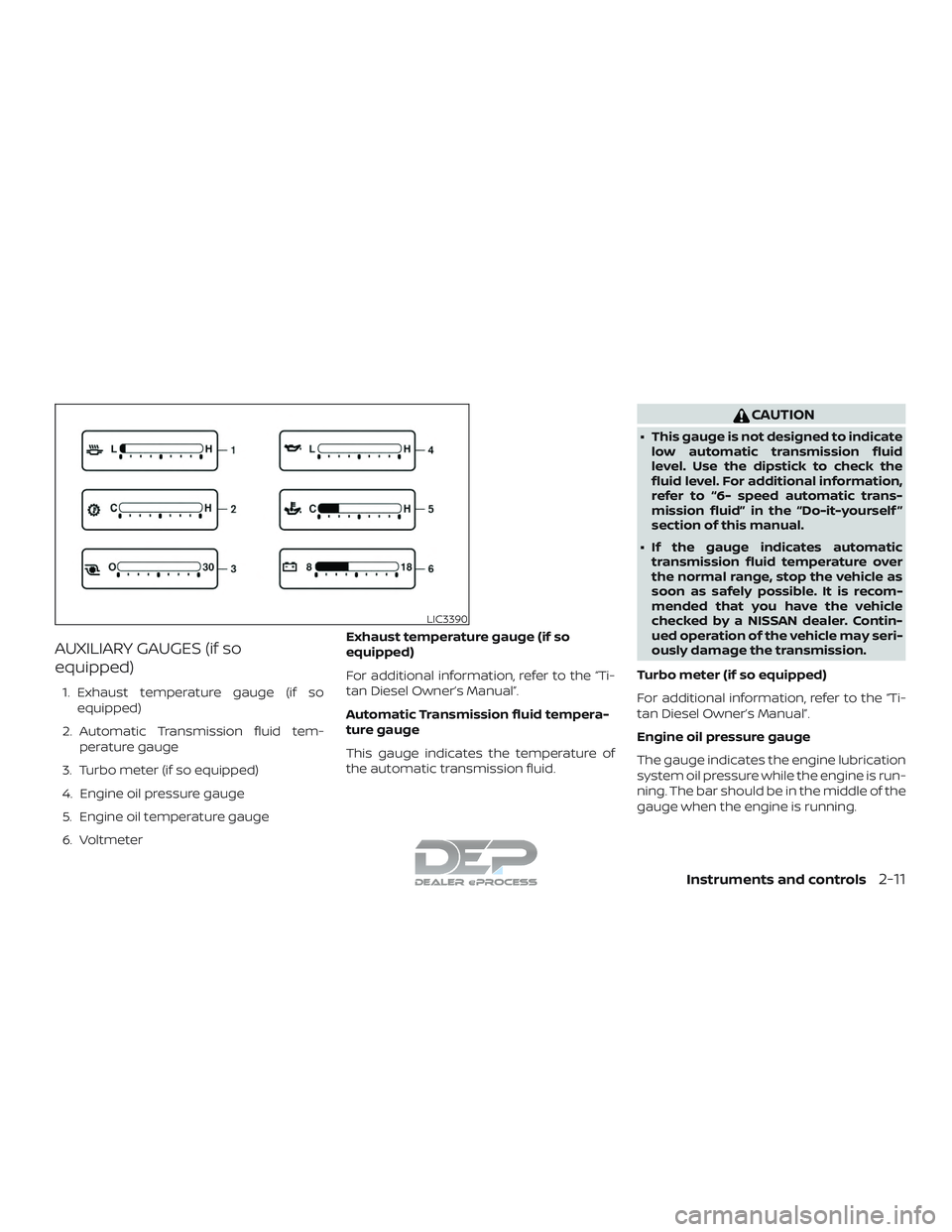
AUXILIARY GAUGES (if so
equipped)
1. Exhaust temperature gauge (if soequipped)
2. Automatic Transmission fluid tem- perature gauge
3. Turbo meter (if so equipped)
4. Engine oil pressure gauge
5. Engine oil temperature gauge
6. Voltmeter Exhaust temperature gauge (if so
equipped)
For additional information, refer to the “Ti-
tan Diesel Owner’s Manual”.
Automatic Transmission fluid tempera-
ture gauge
This gauge indicates the temperature of
the automatic transmission fluid.
CAUTION
∙ This gauge is not designed to indicate
low automatic transmission fluid
level. Use the dipstick to check the
fluid level. For additional information,
refer to “6- speed automatic trans-
mission fluid” in the “Do-it-yourself ”
section of this manual.
∙ If the gauge indicates automatic transmission fluid temperature over
the normal range, stop the vehicle as
soon as safely possible. It is recom-
mended that you have the vehicle
checked by a NISSAN dealer. Contin-
ued operation of the vehicle may seri-
ously damage the transmission.
Turbo meter (if so equipped)
For additional information, refer to the “Ti-
tan Diesel Owner’s Manual”.
Engine oil pressure gauge
The gauge indicates the engine lubrication
system oil pressure while the engine is run-
ning. The bar should be in the middle of the
gauge when the engine is running.
LIC3390
Instruments and controls2-11
Page 138 of 650
∙ NISSAN Intelligent Key® operation infor-mation
∙ Indicators and warnings
∙ Tire Pressure information
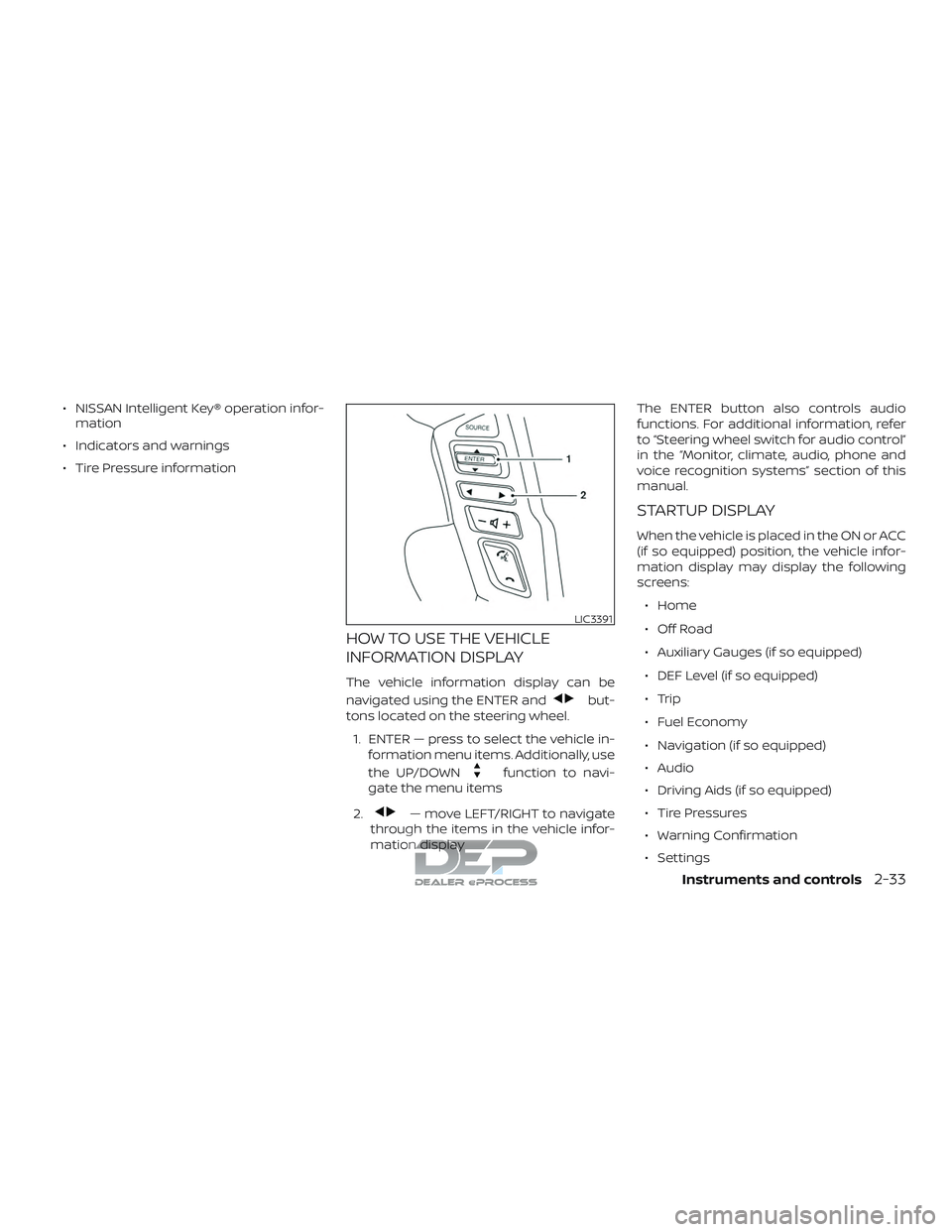
HOW TO USE THE VEHICLE
INFORMATION DISPLAY
The vehicle information display can be
navigated using the ENTER and
but-
tons located on the steering wheel.
1. ENTER — press to select the vehicle in- formation menu items. Additionally, use
the UP/DOWN
function to navi-
gate the menu items
2.
— move LEFT/RIGHT to navigate
through the items in the vehicle infor-
mation display The ENTER button also controls audio
functions. For additional information, refer
to “Steering wheel switch for audio control”
in the “Monitor, climate, audio, phone and
voice recognition systems” section of this
manual.
STARTUP DISPLAY
When the vehicle is placed in the ON or ACC
(if so equipped) position, the vehicle infor-
mation display may display the following
screens:
∙ Home
∙ Off Road
∙ Auxiliary Gauges (if so equipped)
∙ DEF Level (if so equipped)
∙ Trip
∙ Fuel Economy
∙ Navigation (if so equipped)
∙ Audio
∙ Driving Aids (if so equipped)
∙ Tire Pressures
∙ Warning Confirmation
∙ Settings
LIC3391
Instruments and controls2-33
Page 140 of 650
Meter Settings
The meter settings allow the user to
change the settings for the vehicle infor-
mation display.
Menu itemResult
Main Menu Selection Allows user to customize the screens shown in the vehicle information display.
Home Allows user to turn the home screen on or off in the vehicle information display.
Off Road Allows user to turn the off road monitor on or off in the vehicle information display. For additional
information, refer to “Off Road Monitor” in this section.
Auxiliary Gauges Allows user to turn the auxiliary gauges on or off in the vehicle information display. For additional
information, refer to “Auxiliary gauges” in this section.
DEF Level (if so equipped) Allows user to turn the DEF LEVEL meter on or off in the vehicle information display. For additional
information, refer to the separate “Titan Diesel Owner’s Manual”.
4x4–i (if so equipped) Allows user to turn the 4x4–i screen on or off in the vehicle information display. For additional information,
refer to “Using 4–wheel drive (4WD)” in the “Starting and driving” section of this manual.
Trip Allows user to turn the trip on or off in the vehicle information display.
Fuel Economy (if so equipped) Allows user to turn the fuel economy on or off in the vehicle information display.
Navigation (if so equipped) Allows user to turn the navigation on or off in the vehicle information display. For additional information, refer
to the separate “NissanConnect® Owner’s Manual”.
Audio Allows user to turn the audio screen on or off in the vehicle information display. For additional information,
refer to “Audio” in the “Monitor, climate, audio, phone and voice recognition systems” section of this manual.
Driving Aids (if so equipped) Allows user to turn the driving aids on or off in the vehicle information display.
Tire Pressures Allows user to turn the tire pressures screen on or off in the vehicle information display.
TPMS (if so equipped) Allows user to set tire pressure targets.
Body Color Allows user to change the color of the vehicle shown in the vehicle information display.
ECO Drive Report Allows user to access the ECO drive report.
Display Allows user to turn the ECO drive report on or off.
View History Allows user to view and reset ECO drive report history.
Welcome Effect Allows user to customize the available welcome effects.
Instruments and controls2-35
Page 251 of 650
Remote Control Buttons.....................4-99
General operating instructions .............4-102
How to use the DVD OSD Menu .............4-103
How to use the Monitor OSD Menu .........4-109
PlayingaCD................................. 4-111
Playing Audio Files .......................... 4-112
Playing Image Files ......................... 4-113
Playing Video Files .......................... 4-114
Charging a USB Device .....................4-115
Connecting an External Auxiliary A/V
Source — Input ............................. 4-115
Connecting an External A/V Monitor —
Output ..................................... 4-116
Selecting Monitor A or B as the Source .....4-116
Troubleshooting guide .....................4-116
Specifications .............................. 4-117
FCC Notice ................................. 4-118
FCC Warning ............................... 4-118
ITE Notice .................................. 4-118
WEEE Notice ................................ 4-119
Macrovision Notice ......................... 4-119
Dolby Digital ................................ 4-119
Car phone or CB radio ......................... 4-120Bluetooth® Hands-Free Phone System
without Navigation System (if so equipped)
....4-120
Regulatory information .....................4-122
Using the system ........................... 4-123
Control buttons ............................ 4-124
Connecting procedure .....................4-125
Voice commands .......................... 4-126
Making a call ............................... 4-127
Receiving a call ............................. 4-128
During a call ................................ 4-128
Ending a call ................................ 4-128
Text messaging ............................ 4-128
Bluetooth® settings ........................ 4-130
Manual control ............................. 4-132
T r
oubleshooting guide .....................4-132
Bluetooth® Hands-Free Phone System with
Navigation System (if so equipped) ............4-133
Regulatory information .....................4-135
Voice commands .......................... 4-135
Connecting procedure .....................4-136
Vehicle phonebook ......................... 4-136
Making a call ............................... 4-136
Receiving a call ............................. 4-137
During a call ................................ 4-137
Page 306 of 650
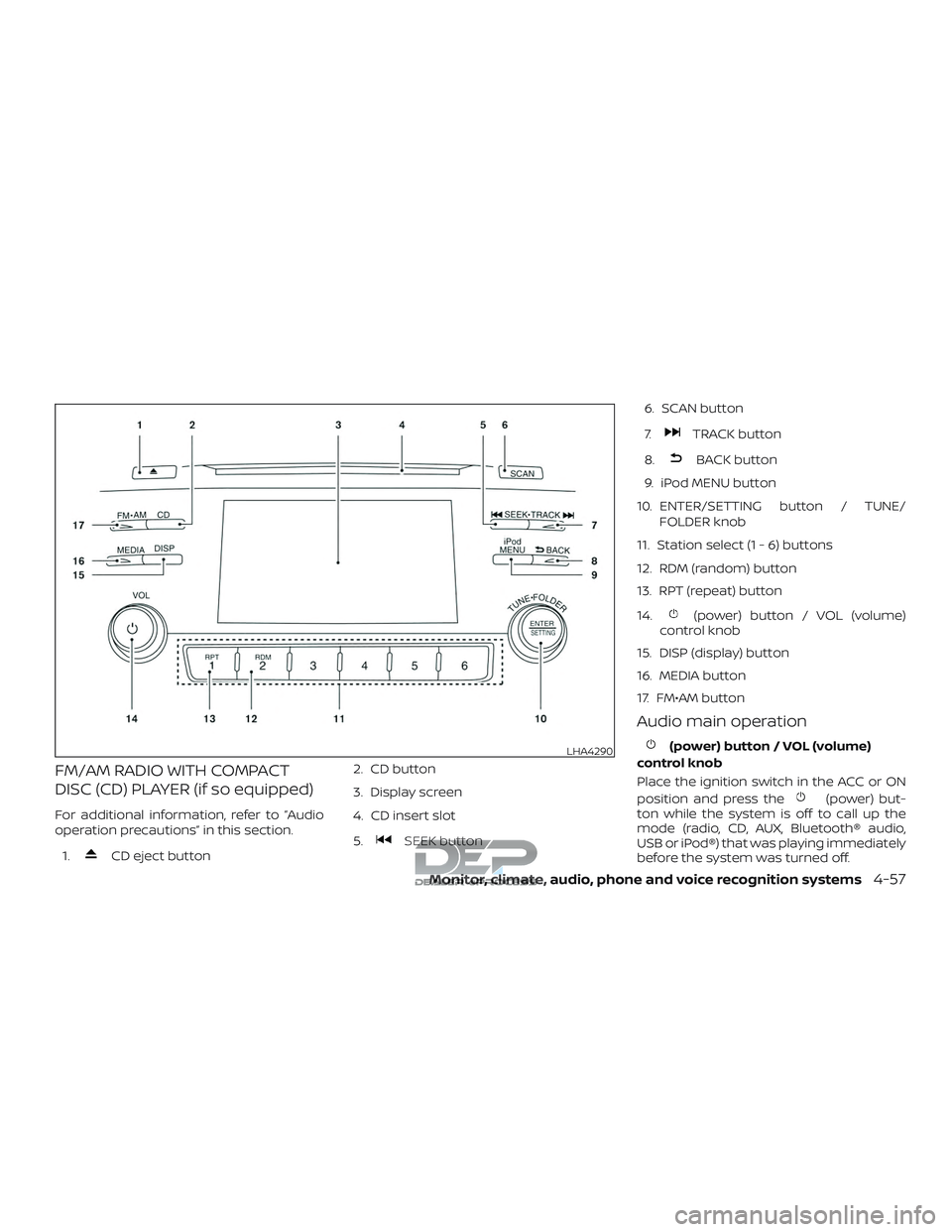
FM/AM RADIO WITH COMPACT
DISC (CD) PLAYER (if so equipped)
For additional information, refer to “Audio
operation precautions” in this section.1.
CD eject button 2. CD button
3. Display screen
4. CD insert slot
5.SEEK button6. SCAN button
7.
TRACK button
8.
BACK button
9. iPod MENU button
10. ENTER/SETTING button / TUNE/ FOLDER knob
11. Station select (1 - 6) buttons
12. RDM (random) button
13. RPT (repeat) button
14.
(power) button / VOL (volume)
control knob
15. DISP (display) button
16. MEDIA button
17. FM•AM button
Audio main operation
(power) button / VOL (volume)
control knob
Place the ignition switch in the ACC or ON
position and press the
(power) but-
ton while the system is off to call up the
mode (radio, CD, AUX, Bluetooth® audio,
USB or iPod®) that was playing immediately
before the system was turned off.
LHA4290
Monitor, climate, audio, phone and voice recognition systems4-57
Page 307 of 650
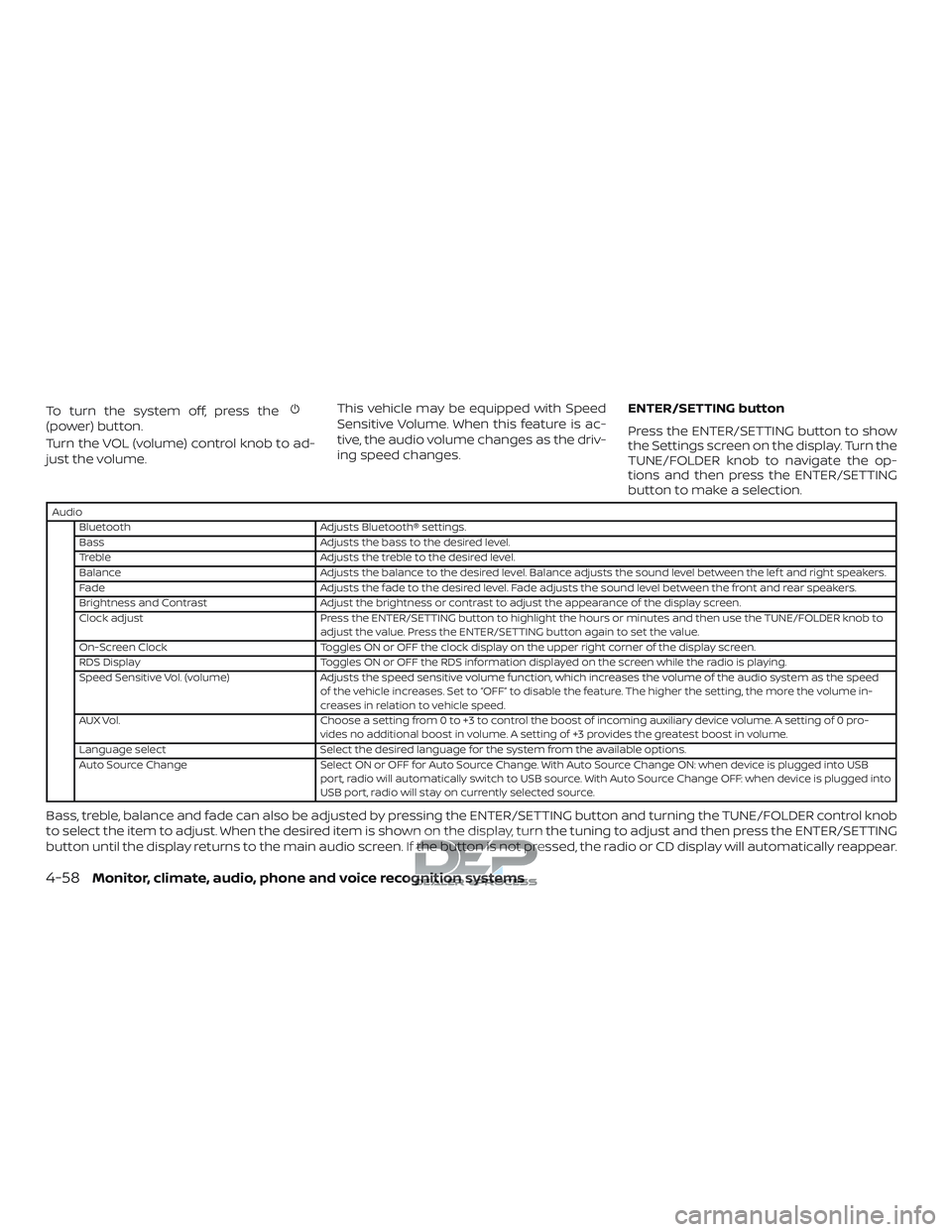
To turn the system off, press the(power) button.
Turn the VOL (volume) control knob to ad-
just the volume.This vehicle may be equipped with Speed
Sensitive Volume. When this feature is ac-
tive, the audio volume changes as the driv-
ing speed changes.
ENTER/SETTING button
Press the ENTER/SETTING button to show
the Settings screen on the display. Turn the
TUNE/FOLDER knob to navigate the op-
tions and then press the ENTER/SETTING
button to make a selection.
Audio
Bluetooth Adjusts Bluetooth® settings.
Bass Adjusts the bass to the desired level.
Treble Adjusts the treble to the desired level.
Balance Adjusts the balance to the desired level. Balance adjusts the sound level between the lef t and right speakers.
Fade Adjusts the fade to the desired level. Fade adjusts the sound level between the front and rear speakers.
Brightness and Contrast Adjust the brightness or contrast to adjust the appearance of the display screen.
Clock adjust Press the ENTER/SETTING button to highlight the hours or minutes and then use the TUNE/FOLDER knob to adjust the value. Press the ENTER/SETTING button again to set the value.
On-Screen Clock Toggles ON or OFF the clock display on the upper right corner of the display screen.
RDS Display Toggles ON or OFF the RDS information displayed on the screen while the radio is playing.
Speed Sensitive Vol. (volume) Adjusts the speed sensitive volume function, which increases the volume of the audio system as the speed of the vehicle increases. Set to “OFF” to disable the feature. The higher the setting, the more the volume in-
creases in relation to vehicle speed.
AUX Vol. Choose a setting from 0 to +3 to control the boost of incoming auxiliary device volume. A setting of 0 pro- vides no additional boost in volume. A setting of +3 provides the greatest boost in volume.
Language select Select the desired language for the system from the available options.
Auto Source Change Select ON or OFF for Auto Source Change. With Auto Source Change ON: when device is plugged into USB port, radio will automatically switch to USB source. With Auto Source Change OFF: when device is plugged into
USB port, radio will stay on currently selected source.
Bass, treble, balance and fade can also be adjusted by pressing the ENTER/SETTING button and turning the TUNE/FOLDER control knob
to select the item to adjust. When the desired item is shown on the display, turn the tuning to adjust and then press the ENTER/SETTING
button until the display returns to the main audio screen. If the button is not pressed, the radio or CD display will automatically reappear.
4-58Monitor, climate, audio, phone and voice recognition systems
Page 311 of 650
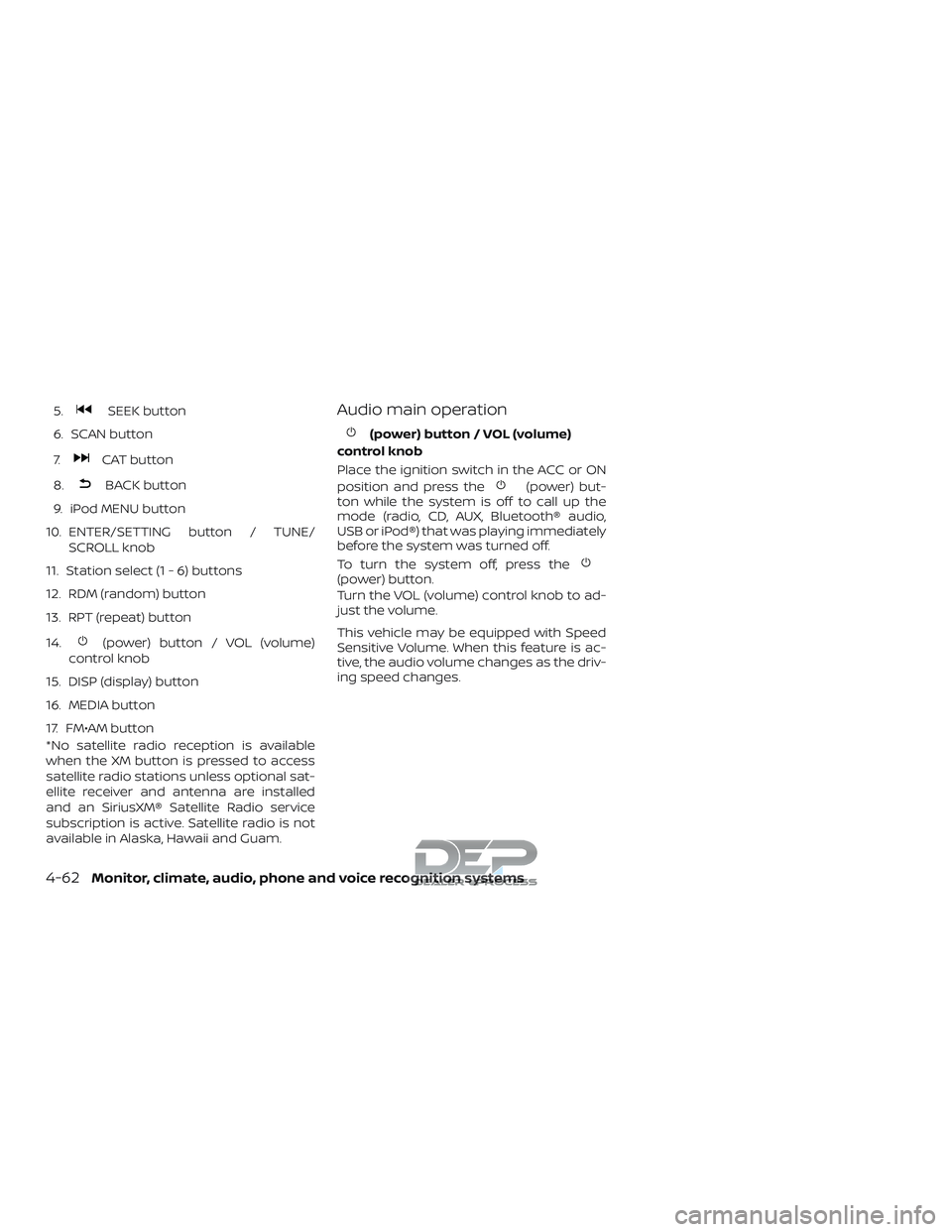
5.SEEK button
6. SCAN button
7.
CAT button
8.
BACK button
9. iPod MENU button
10. ENTER/SETTING button / TUNE/ SCROLL knob
11. Station select (1 - 6) buttons
12. RDM (random) button
13. RPT (repeat) button
14.
(power) button / VOL (volume)
control knob
15. DISP (display) button
16. MEDIA button
17. FM•AM button
*No satellite radio reception is available
when the XM button is pressed to access
satellite radio stations unless optional sat-
ellite receiver and antenna are installed
and an SiriusXM® Satellite Radio service
subscription is active. Satellite radio is not
available in Alaska, Hawaii and Guam.
Audio main operation
(power) button / VOL (volume)
control knob
Place the ignition switch in the ACC or ON
position and press the
(power) but-
ton while the system is off to call up the
mode (radio, CD, AUX, Bluetooth® audio,
USB or iPod®) that was playing immediately
before the system was turned off.
To turn the system off, press the
(power) button.
Turn the VOL (volume) control knob to ad-
just the volume.
This vehicle may be equipped with Speed
Sensitive Volume. When this feature is ac-
tive, the audio volume changes as the driv-
ing speed changes.
4-62Monitor, climate, audio, phone and voice recognition systems