brake fluid NISSAN TITAN 2018 Owner´s Manual
[x] Cancel search | Manufacturer: NISSAN, Model Year: 2018, Model line: TITAN, Model: NISSAN TITAN 2018Pages: 650, PDF Size: 7.54 MB
Page 17 of 650
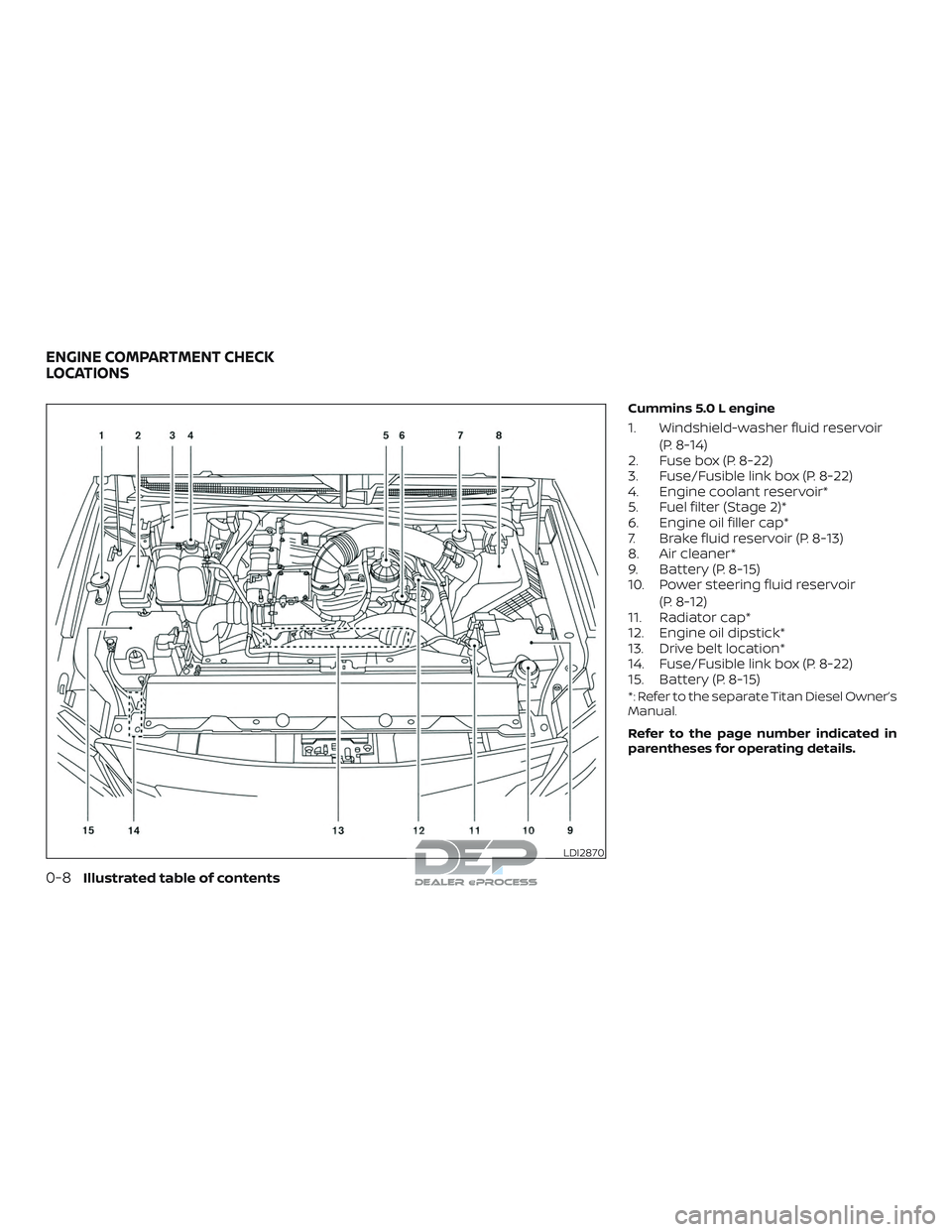
Cummins 5.0 L engine
1. Windshield-washer fluid reservoir(P. 8-14)
2. Fuse box (P. 8-22)
3. Fuse/Fusible link box (P. 8-22)
4. Engine coolant reservoir*
5. Fuel filter (Stage 2)*
6. Engine oil filler cap*
7. Brake fluid reservoir (P. 8-13)
8. Air cleaner*
9. Battery (P. 8-15)
10. Power steering fluid reservoir
(P. 8-12)
11. Radiator cap*
12. Engine oil dipstick*
13. Drive belt location*
14. Fuse/Fusible link box (P. 8-22)
15. Battery (P. 8-15)
*: Refer to the separate Titan Diesel Owner’s
Manual.
Refer to the page number indicated in
parentheses for operating details.
LDI2870
ENGINE COMPARTMENT CHECK
LOCATIONS
0-8Illustrated table of contents
Page 18 of 650
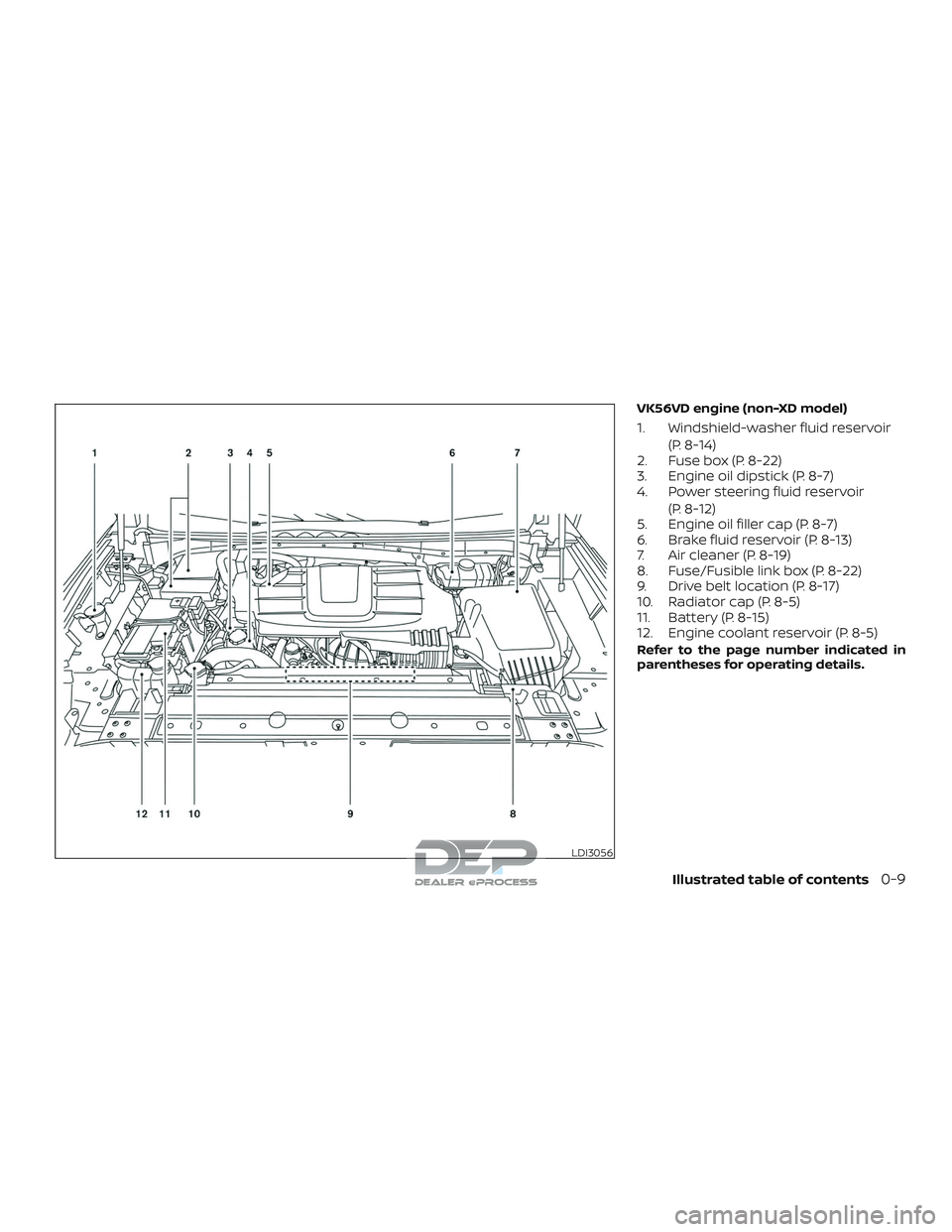
VK56VD engine (non-XD model)
1. Windshield-washer fluid reservoir(P. 8-14)
2. Fuse box (P. 8-22)
3. Engine oil dipstick (P. 8-7)
4. Power steering fluid reservoir
(P. 8-12)
5. Engine oil filler cap (P. 8-7)
6. Brake fluid reservoir (P. 8-13)
7. Air cleaner (P. 8-19)
8. Fuse/Fusible link box (P. 8-22)
9. Drive belt location (P. 8-17)
10. Radiator cap (P. 8-5)
11. Battery (P. 8-15)
12. Engine coolant reservoir (P. 8-5)
Refer to the page number indicated in
parentheses for operating details.
LDI3056
Illustrated table of contents0-9
Page 19 of 650
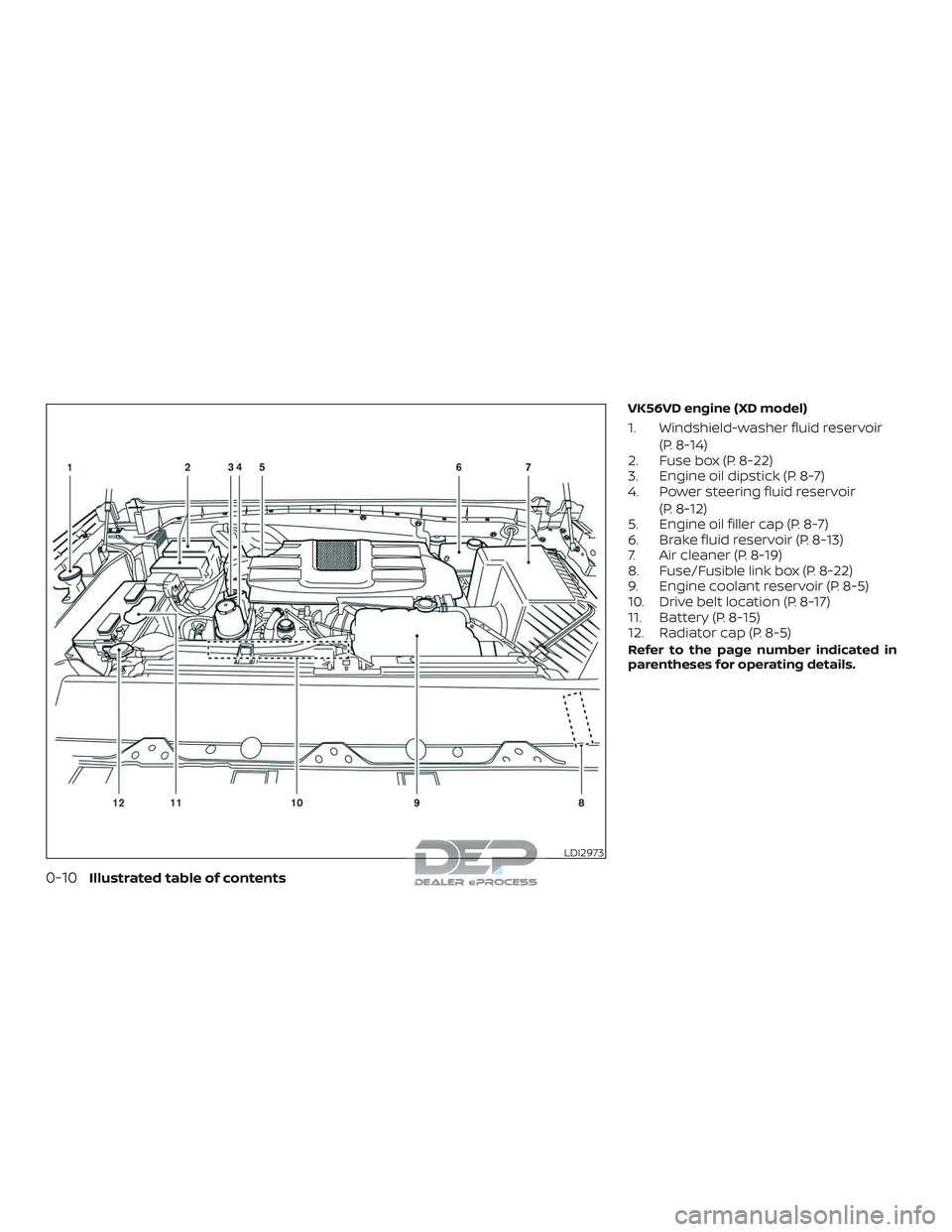
VK56VD engine (XD model)
1. Windshield-washer fluid reservoir(P. 8-14)
2. Fuse box (P. 8-22)
3. Engine oil dipstick (P. 8-7)
4. Power steering fluid reservoir
(P. 8-12)
5. Engine oil filler cap (P. 8-7)
6. Brake fluid reservoir (P. 8-13)
7. Air cleaner (P. 8-19)
8. Fuse/Fusible link box (P. 8-22)
9. Engine coolant reservoir (P. 8-5)
10. Drive belt location (P. 8-17)
11. Battery (P. 8-15)
12. Radiator cap (P. 8-5)
Refer to the page number indicated in
parentheses for operating details.
LDI2973
0-10Illustrated table of contents
Page 20 of 650
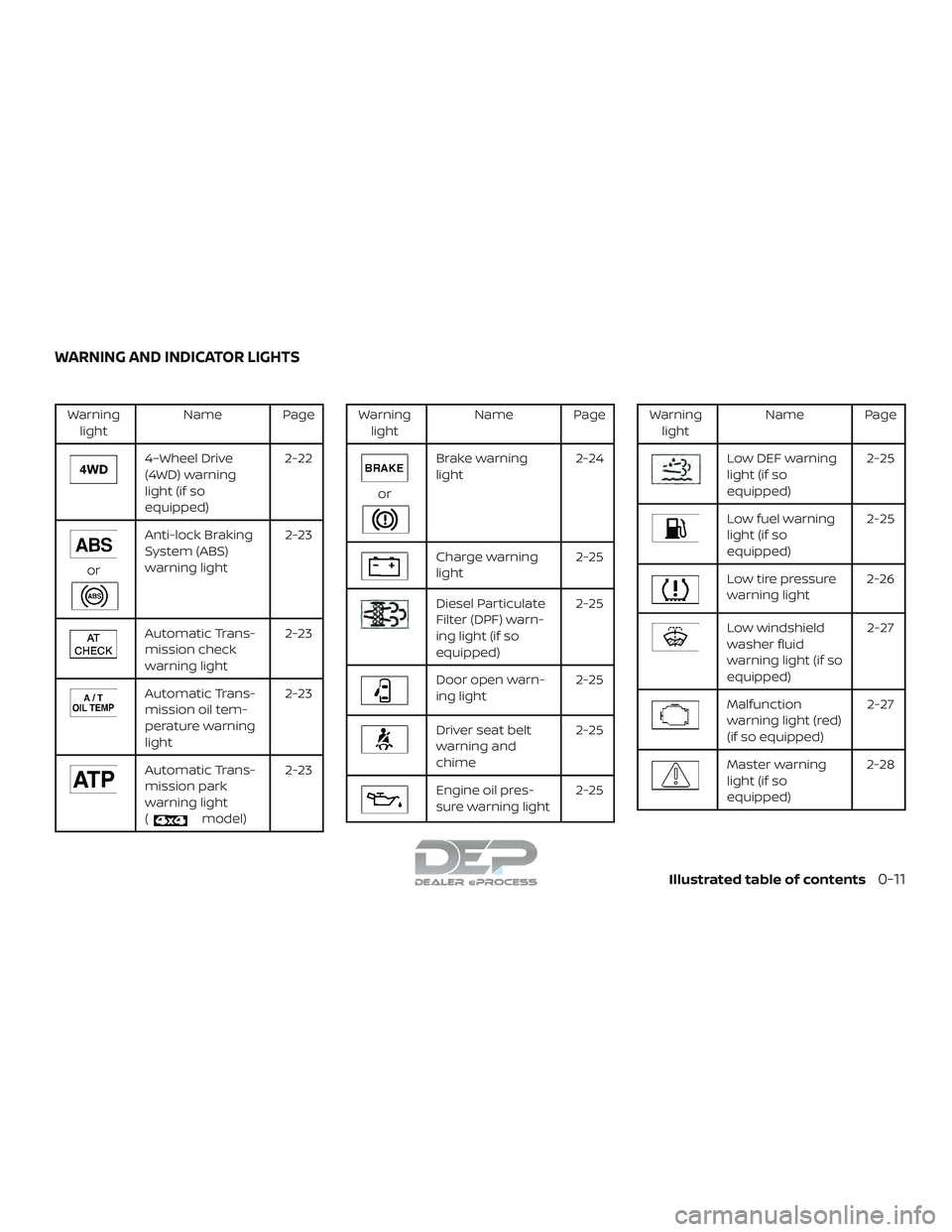
Warninglight Name Page
4–Wheel Drive
(4WD) warning
light (if so
equipped) 2-22
or
Anti-lock Braking
System (ABS)
warning light
2-23
Automatic Trans-
mission check
warning light2-23
Automatic Trans-
mission oil tem-
perature warning
light2-23
Automatic Trans-
mission park
warning light
(
model)2-23
Warning
light Name Page
or
Brake warning
light 2-24
Charge warning
light 2-25
Diesel Particulate
Filter (DPF) warn-
ing light (if so
equipped)2-25
Door open warn-
ing light
2-25
Driver seat belt
warning and
chime2-25
Engine oil pres-
sure warning light
2-25
Warning
light Name Page
Low DEF warning
light (if so
equipped) 2-25
Low fuel warning
light (if so
equipped)2-25
Low tire pressure
warning light
2-26
Low windshield
washer fluid
warning light (if so
equipped) 2-27
Malfunction
warning light (red)
(if so equipped)
2-27
Master warning
light (if so
equipped)2-28
WARNING AND INDICATOR LIGHTS
Illustrated table of contents0-11
Page 126 of 650
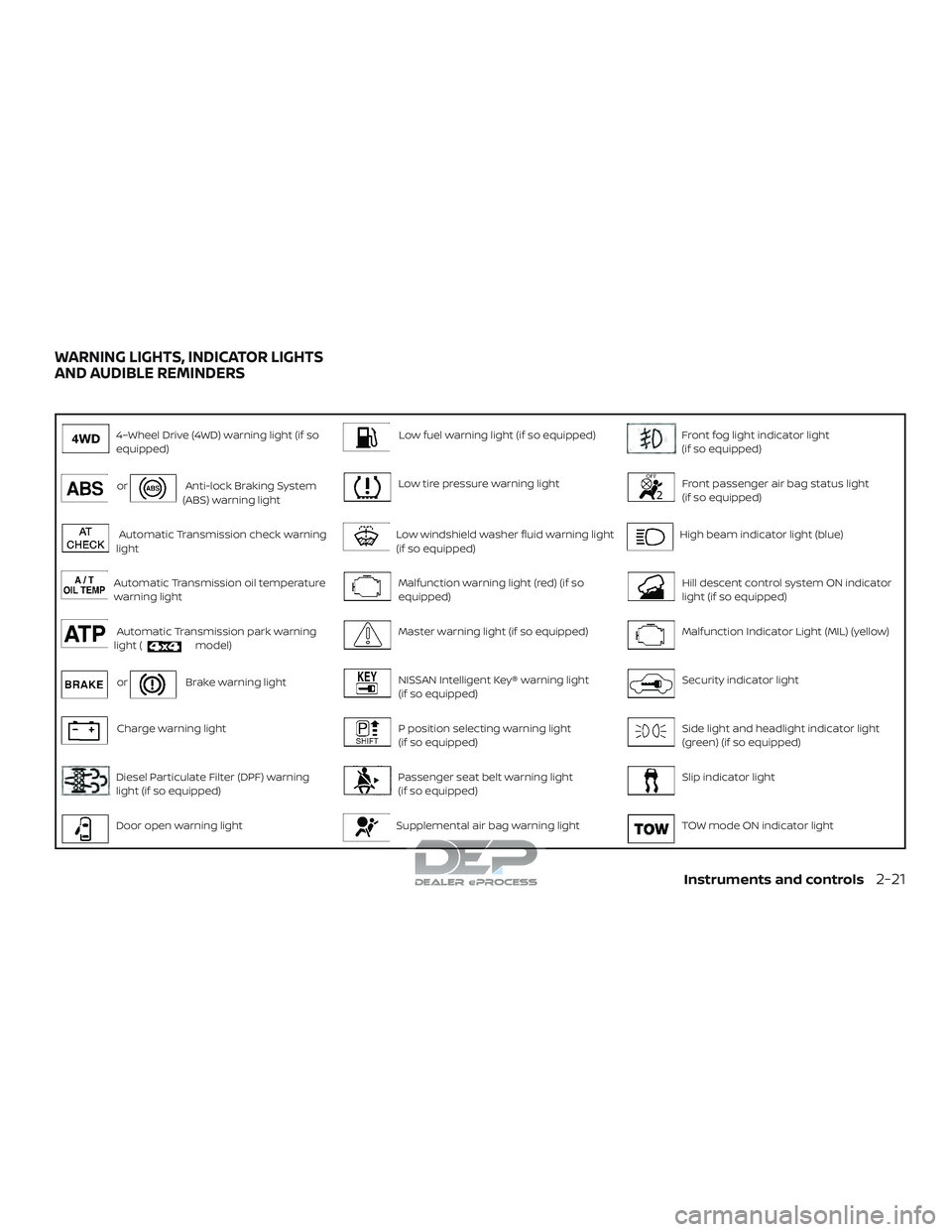
4–Wheel Drive (4WD) warning light (if so
equipped)Low fuel warning light (if so equipped)Front fog light indicator light
(if so equipped)
orAnti-lock Braking System
(ABS) warning lightLow tire pressure warning lightFront passenger air bag status light
(if so equipped)
Automatic Transmission check warning
lightLow windshield washer fluid warning light
(if so equipped)High beam indicator light (blue)
Automatic Transmission oil temperature
warning lightMalfunction warning light (red) (if so
equipped)Hill descent control system ON indicator
light (if so equipped)
Automatic Transmission park warning
light (model)Master warning light (if so equipped)Malfunction Indicator Light (MIL) (yellow)
orBrake warning lightNISSAN Intelligent Key® warning light
(if so equipped)Security indicator light
Charge warning lightP position selecting warning light
(if so equipped)Side light and headlight indicator light
(green) (if so equipped)
Diesel Particulate Filter (DPF) warning
light (if so equipped)Passenger seat belt warning light
(if so equipped)Slip indicator light
Door open warning lightSupplemental air bag warning lightTOW mode ON indicator light
WARNING LIGHTS, INDICATOR LIGHTS
AND AUDIBLE REMINDERS
Instruments and controls2-21
Page 129 of 650
∙ Shif t the 4WD switch into the 2WD, 4Hor 4LO position again to turn off the
ATP warning light when the shif t lever
is in the P position and the ATP warn-
ing light is on. (Before shif ting the
4WD switch into the 4LO position,
move the shif t lever to the N position
once, shif t the shif t lever into P again
and make sure the ATP warning light
is off.)
This light indicates that the automatic
transmission parking function is not en-
gaged. If the transfer control is not secured
in any drive position while the shif t lever is
in the P (Park) position, the transmission will
disengage and the drive wheels will not
lock.
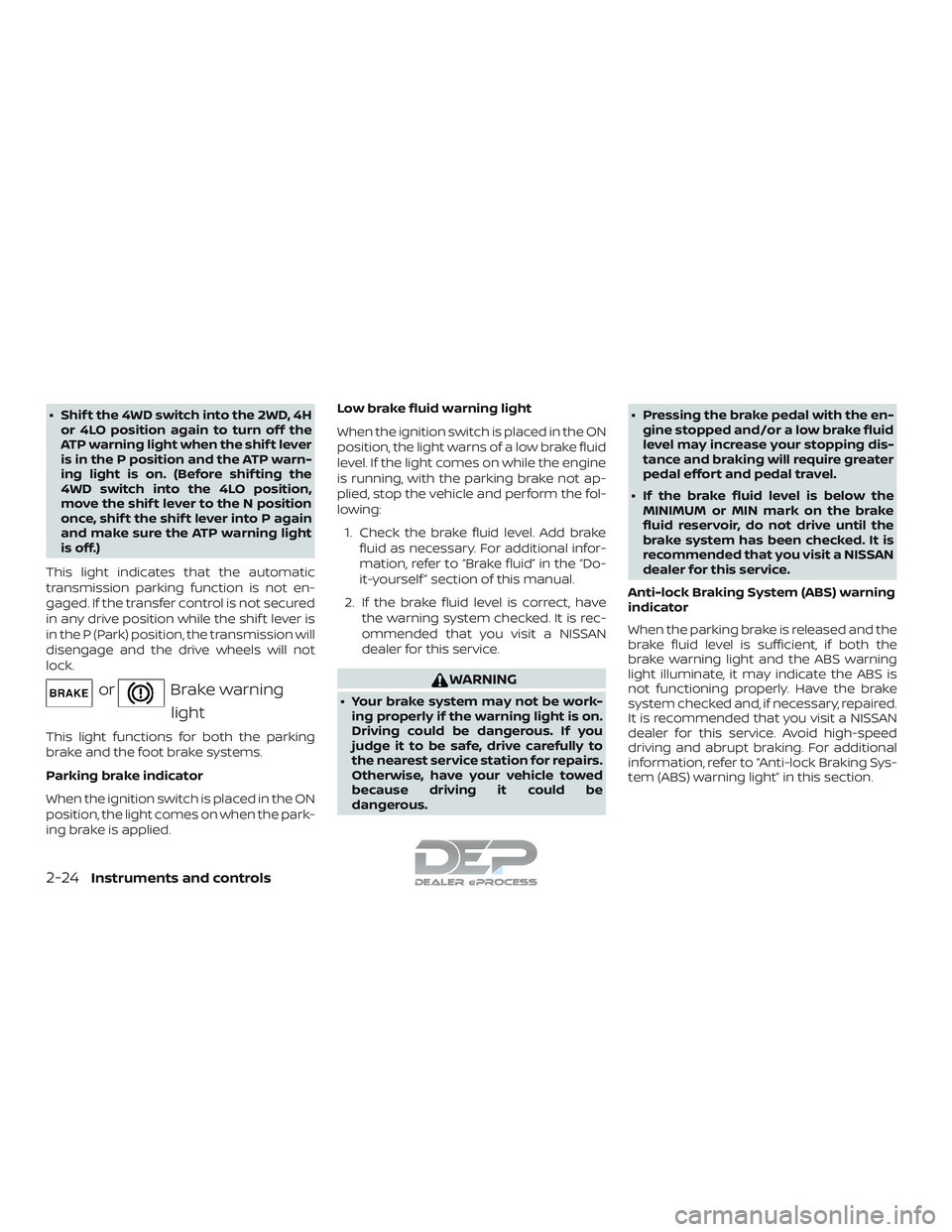
orBrake warning light
This light functions for both the parking
brake and the foot brake systems.
Parking brake indicator
When the ignition switch is placed in the ON
position, the light comes on when the park-
ing brake is applied. Low brake fluid warning light
When the ignition switch is placed in the ON
position, the light warns of a low brake fluid
level. If the light comes on while the engine
is running, with the parking brake not ap-
plied, stop the vehicle and perform the fol-
lowing:
1. Check the brake fluid level. Add brake fluid as necessary. For additional infor-
mation, refer to “Brake fluid” in the “Do-
it-yourself ” section of this manual.
2. If the brake fluid level is correct, have the warning system checked. It is rec-
ommended that you visit a NISSAN
dealer for this service.
WARNING
∙ Your brake system may not be work-ing properly if the warning light is on.
Driving could be dangerous. If you
judge it to be safe, drive carefully to
the nearest service station for repairs.
Otherwise, have your vehicle towed
because driving it could be
dangerous. ∙ Pressing the brake pedal with the en-
gine stopped and/or a low brake fluid
level may increase your stopping dis-
tance and braking will require greater
pedal effort and pedal travel.
∙ If the brake fluid level is below the MINIMUM or MIN mark on the brake
fluid reservoir, do not drive until the
brake system has been checked. It is
recommended that you visit a NISSAN
dealer for this service.
Anti-lock Braking System (ABS) warning
indicator
When the parking brake is released and the
brake fluid level is sufficient, if both the
brake warning light and the ABS warning
light illuminate, it may indicate the ABS is
not functioning properly. Have the brake
system checked and, if necessary, repaired.
It is recommended that you visit a NISSAN
dealer for this service. Avoid high-speed
driving and abrupt braking. For additional
information, refer to “Anti-lock Braking Sys-
tem (ABS) warning light” in this section.
2-24Instruments and controls
Page 133 of 650
CAUTION
∙ Continuing vehicle operation withoutproper servicing of the engine control
system could lead to poor driveability,
reduced fuel economy, and damage
to the engine control system, which
may affect the vehicle’s warranty
coverage.
∙ Failure to drain the water from the fuel filter can cause serious damage
to the engine. It is recommended that
you contact a NISSAN dealer as soon
as possible.
Master warning light (if so
equipped)
This light comes on when various vehicle
information display warnings appear.
∙ No key warning
∙ Low fuel warning
∙ Low windshield-washer fluid warning
∙ Parking brake release warning
∙ Door open warning
∙ Loose fuel cap warning
∙ Check tire pressure warning ∙ 4WD error (if so equipped)
∙ Front & rear tire size differences (if so
equipped)
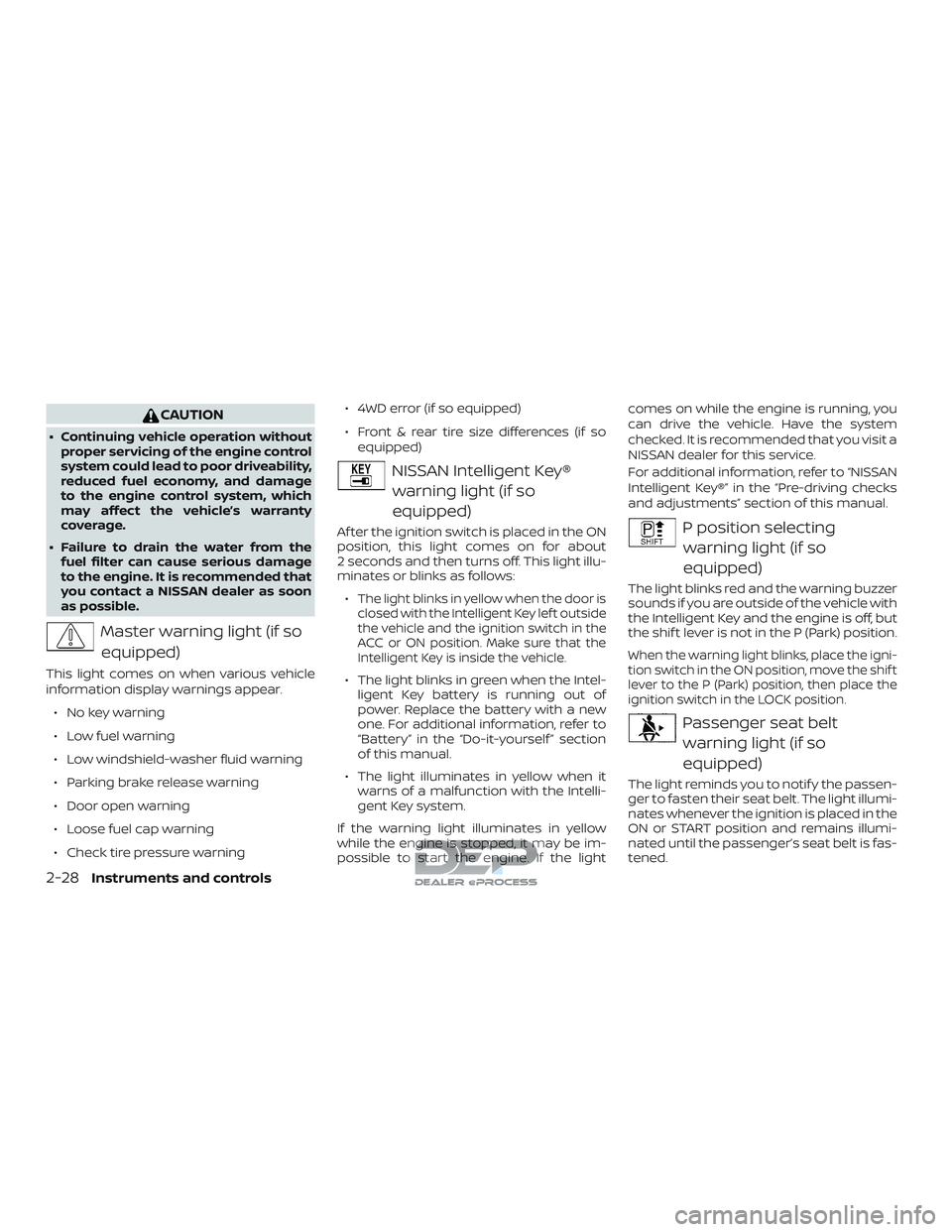
NISSAN Intelligent Key®
warning light (if so
equipped)
Af ter the ignition switch is placed in the ON
position, this light comes on for about
2 seconds and then turns off. This light illu-
minates or blinks as follows:
∙
The light blinks in yellow when the door is
closed with the Intelligent Key lef t outside
the vehicle and the ignition switch in the
ACC or ON position. Make sure that the
Intelligent Key is inside the vehicle.
∙ The light blinks in green when the Intel- ligent Key battery is running out of
power. Replace the battery with a new
one. For additional information, refer to
“Battery” in the “Do-it-yourself ” section
of this manual.
∙ The light illuminates in yellow when it warns of a malfunction with the Intelli-
gent Key system.
If the warning light illuminates in yellow
while the engine is stopped, it may be im-
possible to start the engine. If the light comes on while the engine is running, you
can drive the vehicle. Have the system
checked. It is recommended that you visit a
NISSAN dealer for this service.
For additional information, refer to “NISSAN
Intelligent Key®” in the “Pre-driving checks
and adjustments” section of this manual.
P position selecting
warning light (if so
equipped)
The light blinks red and the warning buzzer
sounds if you are outside of the vehicle with
the Intelligent Key and the engine is off, but
the shif t lever is not in the P (Park) position.
When the warning light blinks, place the igni-
tion switch in the ON position, move the shif t
lever to the P (Park) position, then place the
ignition switch in the LOCK position.
Passenger seat beltwarning light (if so
equipped)
The light reminds you to notif y the passen-
ger to fasten their seat belt. The light illumi-
nates whenever the ignition is placed in the
ON or START position and remains illumi-
nated until the passenger’s seat belt is fas-
tened.
2-28Instruments and controls
Page 143 of 650
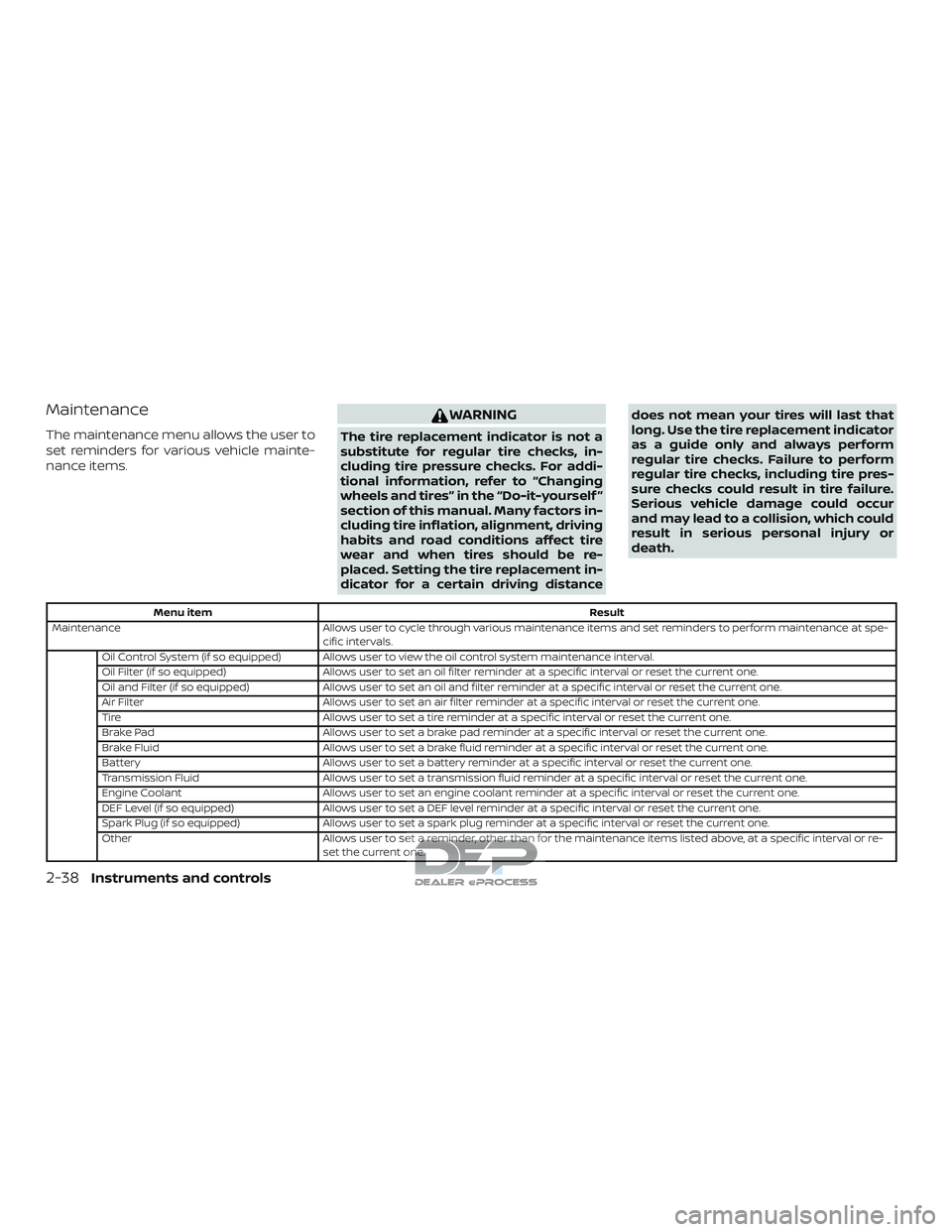
Maintenance
The maintenance menu allows the user to
set reminders for various vehicle mainte-
nance items.
WARNING
The tire replacement indicator is not a
substitute for regular tire checks, in-
cluding tire pressure checks. For addi-
tional information, refer to “Changing
wheels and tires” in the “Do-it-yourself ”
section of this manual. Many factors in-
cluding tire inflation, alignment, driving
habits and road conditions affect tire
wear and when tires should be re-
placed. Setting the tire replacement in-
dicator for a certain driving distancedoes not mean your tires will last that
long. Use the tire replacement indicator
as a guide only and always perform
regular tire checks. Failure to perform
regular tire checks, including tire pres-
sure checks could result in tire failure.
Serious vehicle damage could occur
and may lead to a collision, which could
result in serious personal injury or
death.
Menu item
Result
Maintenance Allows user to cycle through various maintenance items and set reminders to perform maintenance at spe-
cific intervals.
Oil Control System (if so equipped) Allows user to view the oil control system maintenance interval.
Oil Filter (if so equipped) Allows user to set an oil filter reminder at a specific interval or reset the current one.
Oil and Filter (if so equipped) Allows user to set an oil and filter reminder at a specific interval or reset the current one.
Air Filter Allows user to set an air filter reminder at a specific interval or reset the current one.
Tire Allows user to set a tire reminder at a specific interval or reset the current one.
Brake Pad Allows user to set a brake pad reminder at a specific interval or reset the current one.
Brake Fluid Allows user to set a brake fluid reminder at a specific interval or reset the current one.
Battery Allows user to set a battery reminder at a specific interval or reset the current one.
Transmission Fluid Allows user to set a transmission fluid reminder at a specific interval or reset the current one.
Engine Coolant Allows user to set an engine coolant reminder at a specific interval or reset the current one.
DEF Level (if so equipped) Allows user to set a DEF level reminder at a specific interval or reset the current one.
Spark Plug (if so equipped) Allows user to set a spark plug reminder at a specific interval or reset the current one.
Other Allows user to set a reminder, other than for the maintenance items listed above, at a specific interval or re-
set the current one.
2-38Instruments and controls
Page 146 of 650
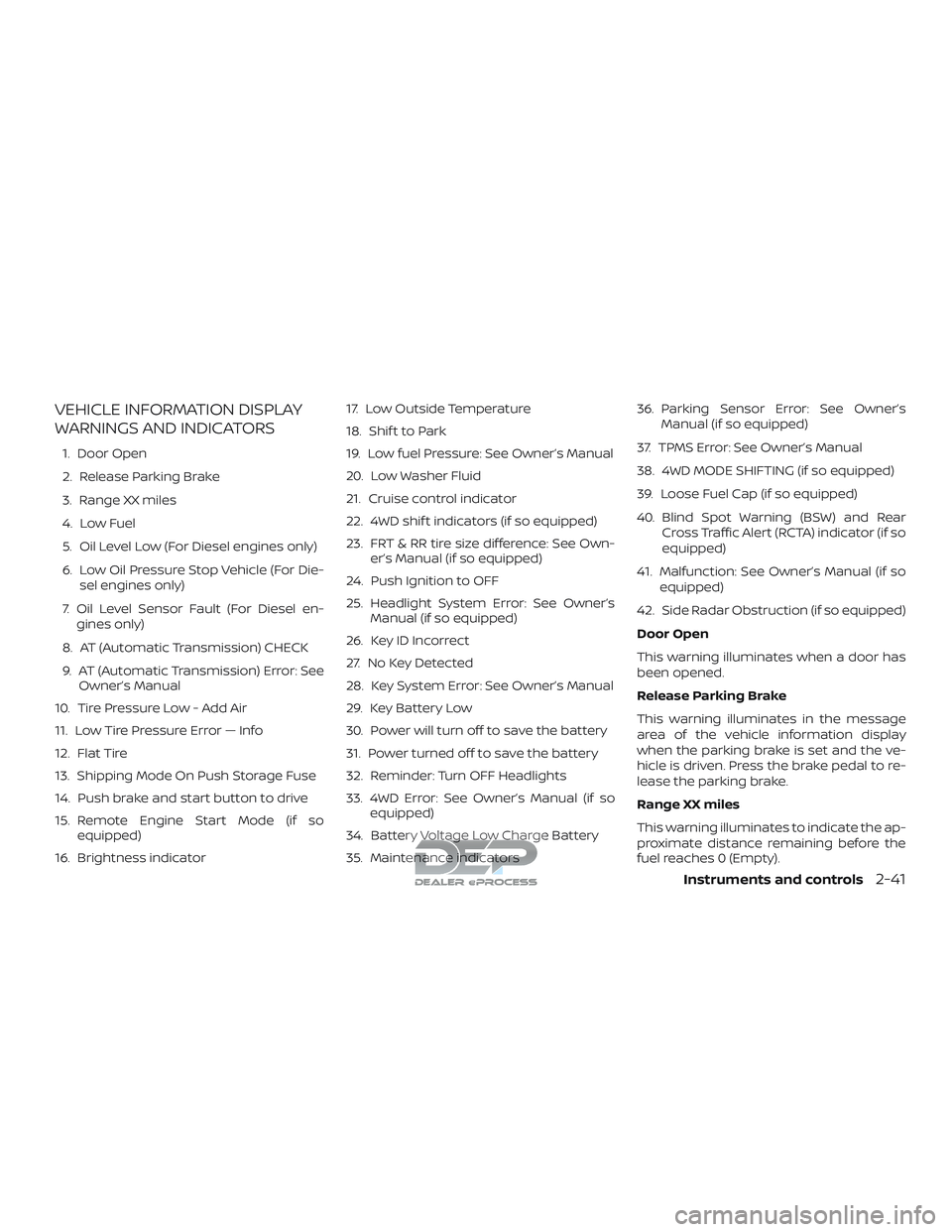
VEHICLE INFORMATION DISPLAY
WARNINGS AND INDICATORS
1. Door Open
2. Release Parking Brake
3. Range XX miles
4. Low Fuel
5. Oil Level Low (For Diesel engines only)
6. Low Oil Pressure Stop Vehicle (For Die-sel engines only)
7. Oil Level Sensor Fault (For Diesel en- gines only)
8. AT (Automatic Transmission) CHECK
9. AT (Automatic Transmission) Error: See Owner’s Manual
10. Tire Pressure Low - Add Air
11. Low Tire Pressure Error — Info
12. Flat Tire
13. Shipping Mode On Push Storage Fuse
14. Push brake and start button to drive
15. Remote Engine Start Mode (if so equipped)
16. Brightness indicator 17. Low Outside Temperature
18. Shif t to Park
19. Low fuel Pressure: See Owner’s Manual
20. Low Washer Fluid
21. Cruise control indicator
22. 4WD shif t indicators (if so equipped)
23. FRT & RR tire size difference: See Own-
er’s Manual (if so equipped)
24. Push Ignition to OFF
25. Headlight System Error: See Owner’s Manual (if so equipped)
26. Key ID Incorrect
27. No Key Detected
28. Key System Error: See Owner’s Manual
29. Key Battery Low
30. Power will turn off to save the battery
31. Power turned off to save the battery
32. Reminder: Turn OFF Headlights
33. 4WD Error: See Owner’s Manual (if so equipped)
34. Battery Voltage Low Charge Battery
35. Maintenance indicators 36. Parking Sensor Error: See Owner’s
Manual (if so equipped)
37. TPMS Error: See Owner’s Manual
38. 4WD MODE SHIFTING (if so equipped)
39. Loose Fuel Cap (if so equipped)
40. Blind Spot Warning (BSW) and Rear Cross Traffic Alert (RCTA) indicator (if so
equipped)
41. Malfunction: See Owner’s Manual (if so equipped)
42. Side Radar Obstruction (if so equipped)
Door Open
This warning illuminates when a door has
been opened.
Release Parking Brake
This warning illuminates in the message
area of the vehicle information display
when the parking brake is set and the ve-
hicle is driven. Press the brake pedal to re-
lease the parking brake.
Range XX miles
This warning illuminates to indicate the ap-
proximate distance remaining before the
fuel reaches 0 (Empty).
Instruments and controls2-41
Page 148 of 650
Flat Tire
This warning appears when the low tire
pressure warning light in the meter illumi-
nates and one or more flat tires are de-
tected while driving.
Shipping Mode On Push Storage Fuse
This warning may appear if the extended
storage switch is not pushed in. When this
warning appears, push in the extended
storage switch to turn off the warning. For
additional information, refer to “Extended
storage switch” in this section.
Push brake and start button to drive
This indicator appears when the shif t lever
is in the P (Park) position.
This indicator means that the engine will
start by pushing the ignition switch with
the brake pedal depressed. You can start
the engine from any position of the ignition
switch.
Remote Engine Start Mode (if so
equipped)
This warning appears in the vehicle infor-
mation display when the vehicle has been
started using the remote start function. To
start the vehicle, apply the brake and place
the ignition switch in the ON position.Brightness indicator
This indicator appears when the vehicle
information display screen brightness is
being adjusted.
Low Outside Temperature
This warning appears if the outside tem-
perature is below 37°F (3°C). The tempera-
ture can be changed to display in Celsius or
Fahrenheit. For additional information, re-
fer to “Settings” in this section.
Shif t to Park
This warning illuminates when the ignition
switch is in the ACC or OFF position and the
shif t lever is not in the P (Park) position. Also,
a chime sounds when the ignition switch is
in the ACC or OFF position.
If this warning illuminates, move the shif t
lever to the P (Park) position and start the
engine.
Low fuel Pressure: See Owner’s Manual
This warning appears when the fuel pres-
sure is low. Check the fuel level and refuel if
needed. If the warning remains illuminated,
have the system checked. It is recom-
mended that you visit a NISSAN dealer for
this service. For additional information, re-fer to “Diesel fuel system” in the “Introduc-
tion” of the “Titan Diesel Owner’s Manual”.
CAUTION
Since the fuel pump is lubricated by the
fuel itself, prolonged driving with low
fuel levels may cause progressive dam-
age to the fuel pump. This may cause
the pump to fail.
Low Washer Fluid
This warning illuminates when the
windshield-washer fluid is at a low level.
Add windshield-washer fluid as necessary.
For additional information, refer to
“Windshield-washer fluid” in the “Do-it-
yourself ” section of this manual.
Cruise control indicator
This indicator shows the cruise control sys-
tem status.
For additional information, refer to “Cruise
control” in the “Starting and driving” section
of this manual.
4WD shif t indicators (if so equipped)
These indicators show which 4WD mode is
selected. For additional information, refer
to “Using 4–wheel drive (4WD)” in the “Start-
ing and driving” section of this manual.
Instruments and controls2-43