key NISSAN TITAN 2018 Owner´s Manual
[x] Cancel search | Manufacturer: NISSAN, Model Year: 2018, Model line: TITAN, Model: NISSAN TITAN 2018Pages: 650, PDF Size: 7.54 MB
Page 12 of 650
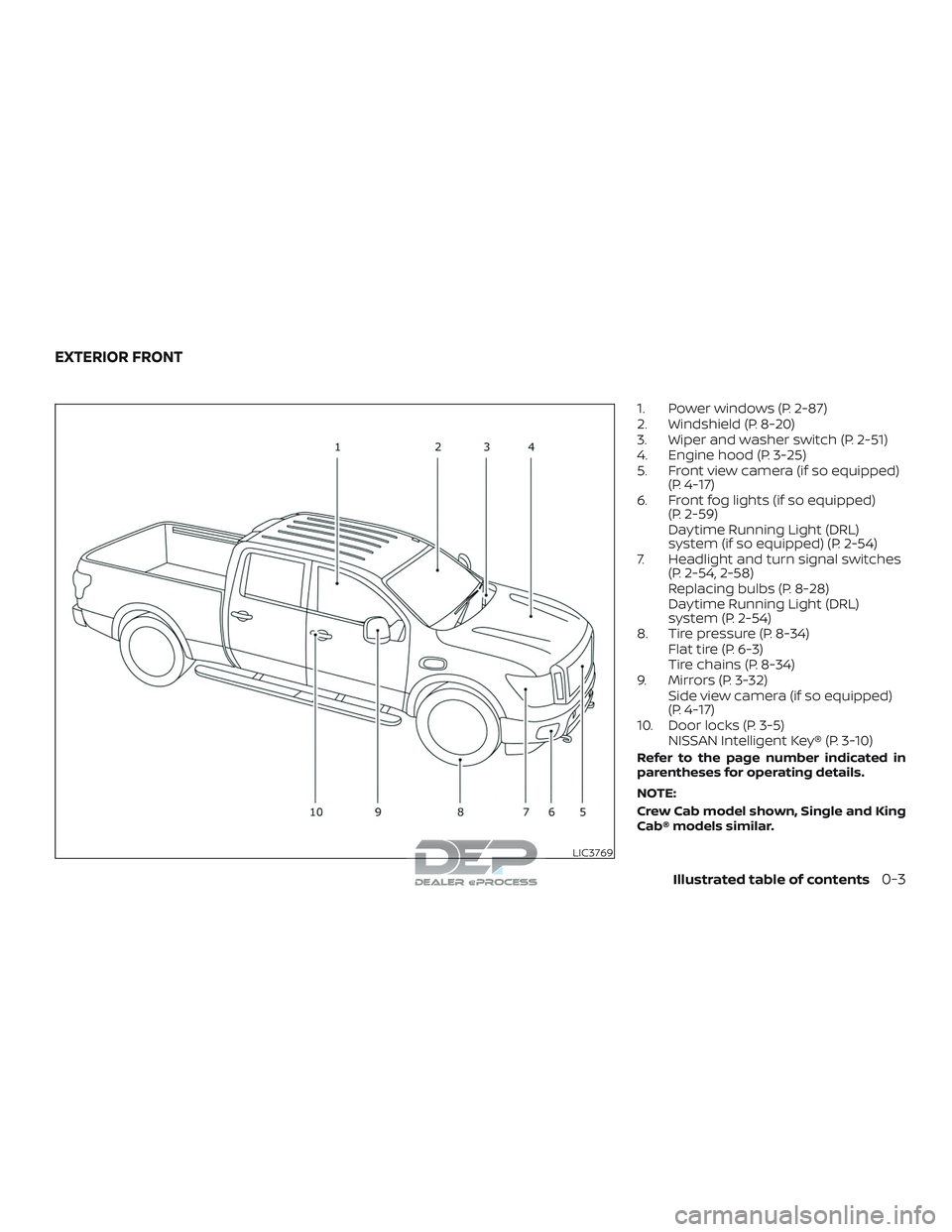
1. Power windows (P. 2-87)
2. Windshield (P. 8-20)
3. Wiper and washer switch (P. 2-51)
4. Engine hood (P. 3-25)
5. Front view camera (if so equipped)(P. 4-17)
6. Front fog lights (if so equipped) (P. 2-59)
Daytime Running Light (DRL)
system (if so equipped) (P. 2-54)
7. Headlight and turn signal switches (P. 2-54, 2-58)
Replacing bulbs (P. 8-28)
Daytime Running Light (DRL)
system (P. 2-54)
8. Tire pressure (P. 8-34) Flat tire (P. 6-3)
Tire chains (P. 8-34)
9. Mirrors (P. 3-32) Side view camera (if so equipped)
(P. 4-17)
10. Door locks (P. 3-5) NISSAN Intelligent Key® (P. 3-10)
Refer to the page number indicated in
parentheses for operating details.
NOTE:
Crew Cab model shown, Single and King
Cab® models similar.
LIC3769
EXTERIOR FRONT
Illustrated table of contents0-3
Page 21 of 650
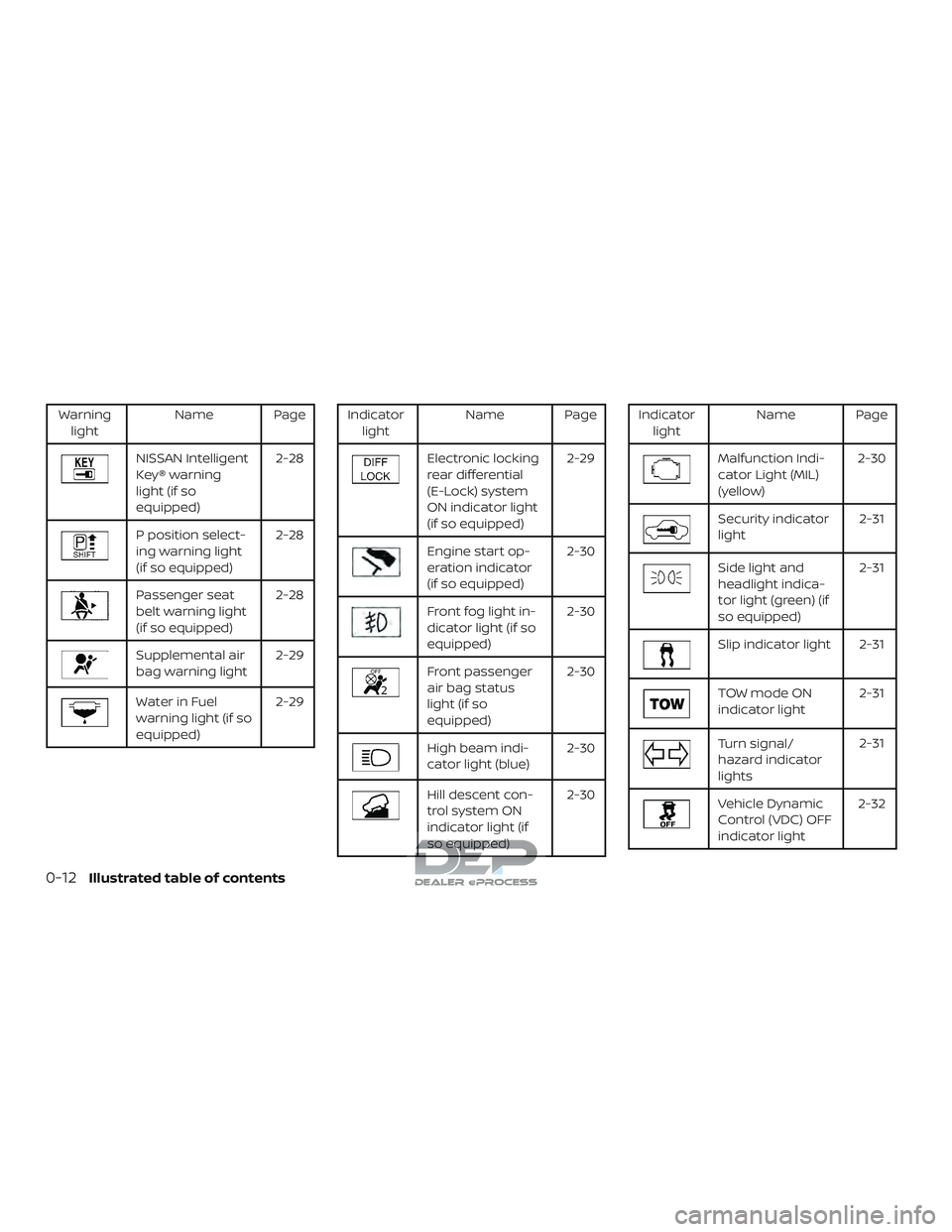
Warninglight Name Page
NISSAN Intelligent
Key® warning
light (if so
equipped) 2-28
P position select-
ing warning light
(if so equipped)
2-28
Passenger seat
belt warning light
(if so equipped)2-28
Supplemental air
bag warning light
2-29
Water in Fuel
warning light (if so
equipped)2-29
Indicator
light Name Page
Electronic locking
rear differential
(E-Lock) system
ON indicator light
(if so equipped) 2-29
Engine start op-
eration indicator
(if so equipped)
2-30
Front fog light in-
dicator light (if so
equipped)2-30
Front passenger
air bag status
light (if so
equipped)2-30
High beam indi-
cator light (blue)
2-30
Hill descent con-
trol system ON
indicator light (if
so equipped)2-30
Indicator
light Name Page
Malfunction Indi-
cator Light (MIL)
(yellow) 2-30
Security indicator
light
2-31
Side light and
headlight indica-
tor light (green) (if
so equipped)2-31
Slip indicator light 2-31
TOW mode ON
indicator light
2-31
Turn signal/
hazard indicator
lights2-31
Vehicle Dynamic
Control (VDC) OFF
indicator light2-32
0-12Illustrated table of contents
Page 76 of 650
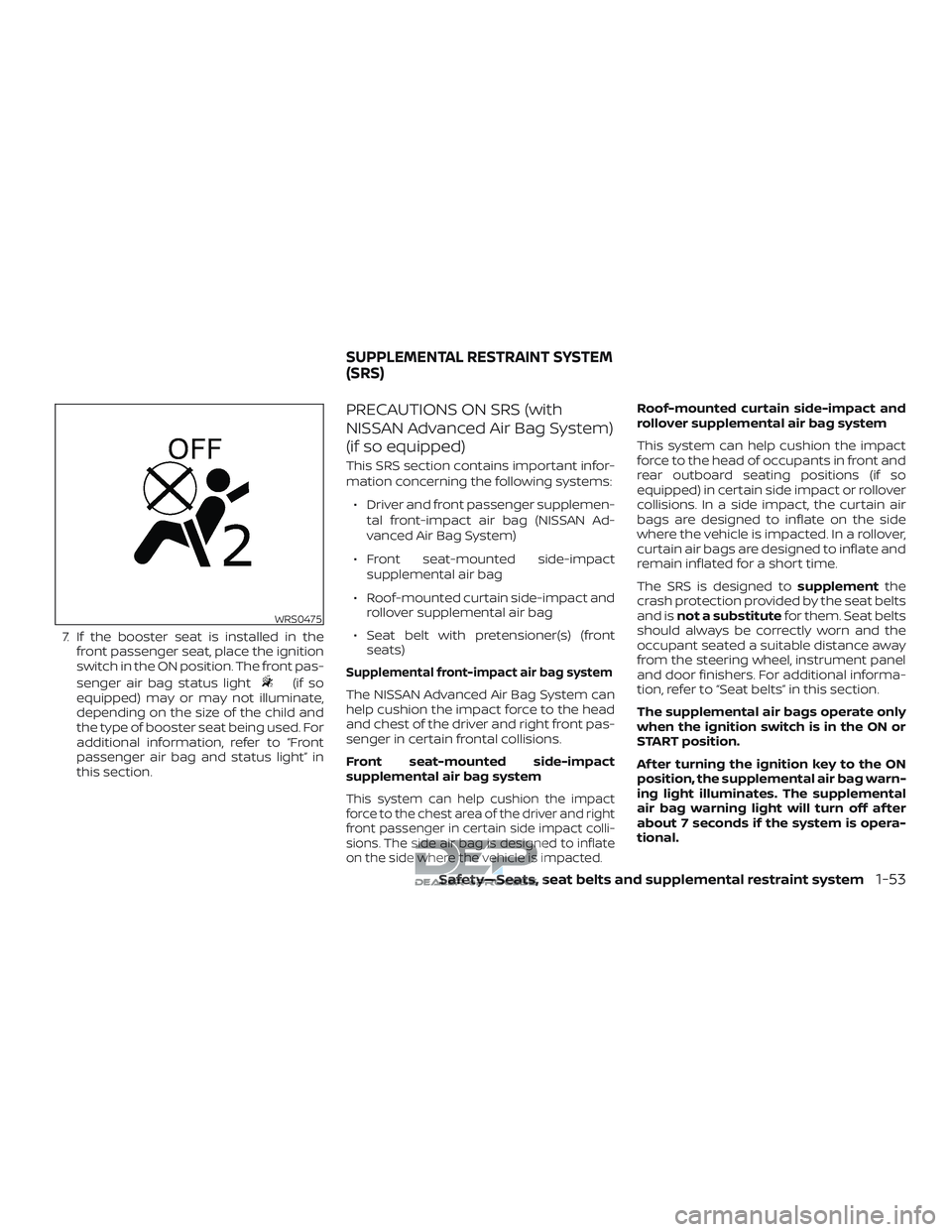
7. If the booster seat is installed in thefront passenger seat, place the ignition
switch in the ON position. The front pas-
senger air bag status light
(if so
equipped) may or may not illuminate,
depending on the size of the child and
the type of booster seat being used. For
additional information, refer to “Front
passenger air bag and status light” in
this section.
PRECAUTIONS ON SRS (with
NISSAN Advanced Air Bag System)
(if so equipped)
This SRS section contains important infor-
mation concerning the following systems:
∙ Driver and front passenger supplemen- tal front-impact air bag (NISSAN Ad-
vanced Air Bag System)
∙ Front seat-mounted side-impact supplemental air bag
∙ Roof-mounted curtain side-impact and rollover supplemental air bag
∙ Seat belt with pretensioner(s) (front seats)
Supplemental front-impact air bag system
The NISSAN Advanced Air Bag System can
help cushion the impact force to the head
and chest of the driver and right front pas-
senger in certain frontal collisions.
Front seat-mounted side-impact
supplemental air bag system
This system can help cushion the impact
force to the chest area of the driver and right
front passenger in certain side impact colli-
sions. The side air bag is designed to inflate
on the side where the vehicle is impacted.
Roof-mounted curtain side-impact and
rollover supplemental air bag system
This system can help cushion the impact
force to the head of occupants in front and
rear outboard seating positions (if so
equipped) in certain side impact or rollover
collisions. In a side impact, the curtain air
bags are designed to inflate on the side
where the vehicle is impacted. In a rollover,
curtain air bags are designed to inflate and
remain inflated for a short time.
The SRS is designed to supplementthe
crash protection provided by the seat belts
and is not a substitute for them. Seat belts
should always be correctly worn and the
occupant seated a suitable distance away
from the steering wheel, instrument panel
and door finishers. For additional informa-
tion, refer to “Seat belts” in this section.
The supplemental air bags operate only
when the ignition switch is in the ON or
START position.
Af ter turning the ignition key to the ON
position, the supplemental air bag warn-
ing light illuminates. The supplemental
air bag warning light will turn off af ter
about 7 seconds if the system is opera-
tional.
WRS0475
SUPPLEMENTAL RESTRAINT SYSTEM
(SRS)
Safety—Seats, seat belts and supplemental restraint system1-53
Page 91 of 650
∙ It is recommended that you visit aNISSAN dealer for work on and around
the front air bag. It is also recom-
mended that you visit a NISSAN dealer
for installation of electrical equip-
ment. The Supplemental Restraint
System (SRS) wiring harnesses*
should not be modified or discon-
nected. Unauthorized electrical test
equipment and probing devices
should not be used on the air bag
system.
∙ A cracked windshield should be re- placed immediately by a qualified re-
pair facility. A cracked windshield
could affect the function of the
supplemental air bag system.
*The SRS wiring harness connectors are
yellow and orange for easy identifica-
tion.
When selling your vehicle, we request that
you inform the buyer about the front air
bag system and guide the buyer to the
appropriate sections in this Owner’s
Manual.PRECAUTIONS ON SRS (without
NISSAN Advanced Air Bag System)
(if so equipped)
This SRS section contains important infor-
mation concerning the following systems: ∙ Driver and front passenger supplemen- tal front-impact air bag
∙ Front seat-mounted side-impact supplemental air bag
∙ Roof-mounted curtain side-impact and rollover supplemental air bag
∙ Seat belt with pretensioner(s) (front seats)
Supplemental front-impact air bag system
This system can help cushion the impact
force to the head and chest of the driver
and right front passenger in certain frontal
collisions.
Front seat-mounted side-impact
supplemental air bag system
This system can help cushion the impact
force to the chest area of the driver and
right front passenger in certain side impact
collisions. The side air bag is designed to
inflate on the side where the vehicle is im-
pacted. Roof-mounted curtain side-impact and
rollover supplemental air bag system
This system can help cushion the impact
force to the head of occupants in front and
rear outboard seating positions in certain
side impact or rollover collisions. In a side
impact, the curtain air bags are designed
to inflate on the side where the vehicle is
impacted. In a rollover, curtain air bags are
designed to inflate and remain inflated for
a short time.
The SRS is designed to
supplementthe
crash protection provided by the seat belts
and is not a substitute for them. Seat belts
should always be correctly worn and the
occupant seated a suitable distance away
from the steering wheel, instrument panel
and door finishers. For additional informa-
tion, refer to “Seat belts” in this section.
The supplemental air bags operate only
when the ignition switch is in the ON or
START position.
Af ter turning the ignition key to the ON
position, the supplemental air bag warn-
ing light illuminates. The supplemental
air bag warning light will turn off af ter
about 7 seconds if the system is opera-
tional.
1-68Safety—Seats, seat belts and supplemental restraint system
Page 99 of 650
The driver supplemental front-impact air
bag is located in the center of the steering
wheel. The front passenger supplemental
front-impact air bag is mounted in the
dashboard above the glove box. The
supplemental front air bags are designed
to inflate in higher severity frontal collisions,
although they may inflate if the forces in
another type of collision are similar to
those of a higher severity frontal impact.
They may not inflate in certain frontal colli-
sions. Vehicle damage (or lack of it) is not
always an indication of proper front air bag
system operation.
The supplemental air bag system moni-
tors information from the crash zone sen-
sor, the Air bag Control Unit (ACU) and seat
belt buckle sensors that detect if the seat
belts are fastened. Inflator operation is
based on the severity of a collision and
whether the seat belts are being used. Only
one front air bag may inflate in a crash,
depending on the crash severity and
whether the front occupants are belted or
unbelted. This does not indicate improper
performance of the system. If you have any
questions about the performance of your
air bag system, it is recommended that you
visit a NISSAN dealer to obtain information
about the system.If you have any questions about your air
bag system, it is recommended that you
visit a NISSAN dealer to obtain information
about the system. If you are considering
modification of your vehicle due to a dis-
ability, you may also contact NISSAN. Con-
tact information is contained in the begin-
ning of this Owner’s Manual.
When a front air bag inflates, a fairly loud
noise may be heard, followed by the re-
lease of smoke. This smoke is not harmful
and does not indicate a fire. Care should be
taken to not inhale it, as it may cause irrita-
tion and choking. Those with a history of a
breathing condition should get fresh air
promptly.
Front air bags, along with the use of seat
belts, help to cushion the impact force on
the face and chest of the driver and right
front passenger. They can help save lives
and reduce serious injuries. However, an
inflating front air bag may cause facial
abrasions or other injuries. Front air bags
do not provide restraint to the lower body.
Seat belts should be correctly worn and the
driver and passenger seated upright as far
as practical away from the steering wheel
or instrument panel. The front air bags in-
flate quickly in order to help protect thefront occupants. Because of this, the force
of the front air bag inflating can increase
the risk of injury if the occupant is too close
to, or is against, the front air bag module
during inflation.
The front air bags deflate quickly af ter a
collision.
The front air bags operate only when the
ignition switch is in the ON or START po-
sition.
Af ter turning the ignition key to the ON
position, the supplemental air bag warn-
ing light illuminates. The supplemental
air bag warning light will turn off af ter
about 7 seconds if the system is opera-
tional.
WARNING
∙ Do not place any objects on the steer-
ing wheel pad or on the instrument
panel. Also, do not place any objects
between any occupant and the steer-
ing wheel or instrument panel. Such
objects may become dangerous pro-
jectiles and cause injury if the front air
bag inflates.
1-76Safety—Seats, seat belts and supplemental restraint system
Page 115 of 650
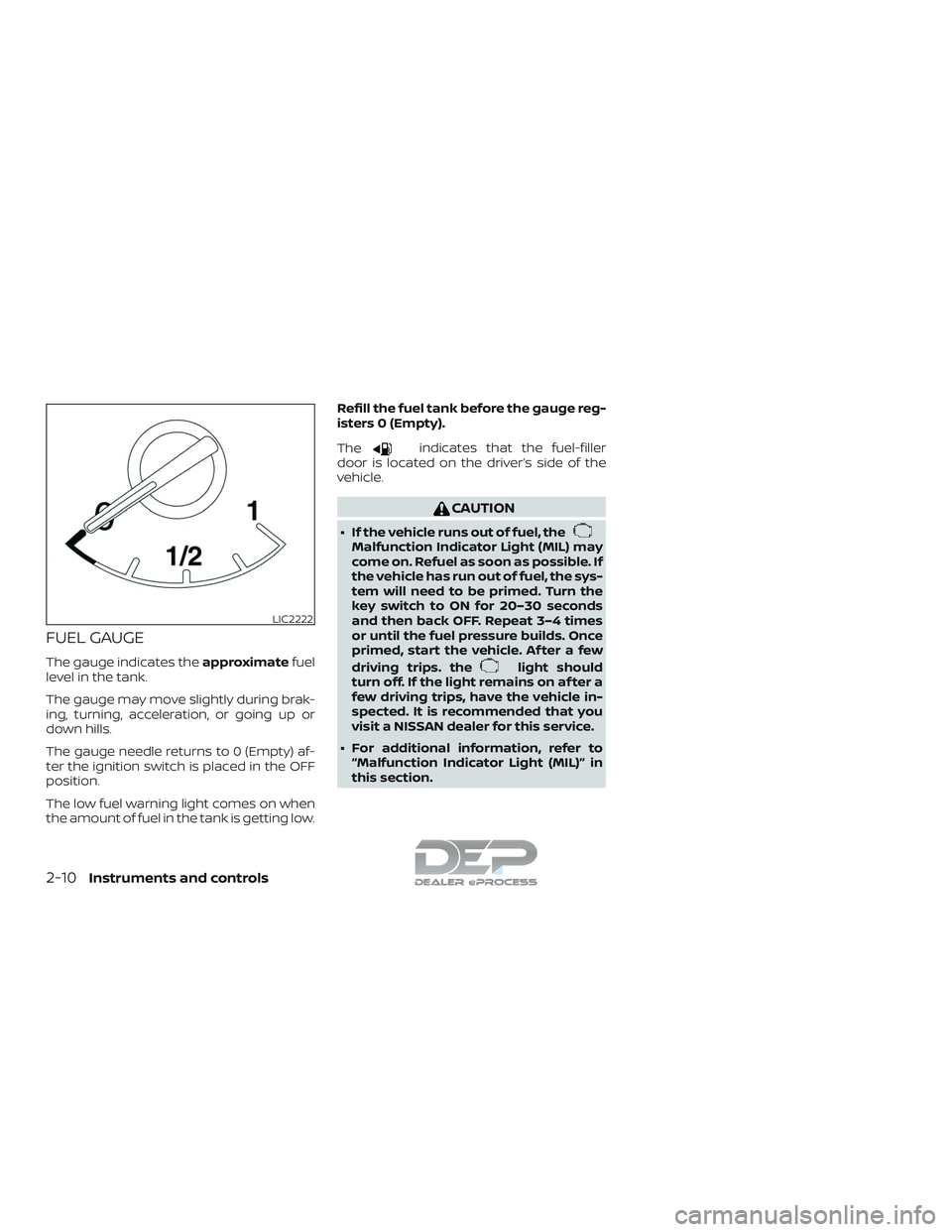
FUEL GAUGE
The gauge indicates theapproximatefuel
level in the tank.
The gauge may move slightly during brak-
ing, turning, acceleration, or going up or
down hills.
The gauge needle returns to 0 (Empty) af-
ter the ignition switch is placed in the OFF
position.
The low fuel warning light comes on when
the amount of fuel in the tank is getting low. Refill the fuel tank before the gauge reg-
isters 0 (Empty).
The
indicates that the fuel-filler
door is located on the driver’s side of the
vehicle.
CAUTION
∙ If the vehicle runs out of fuel, theMalfunction Indicator Light (MIL) may
come on. Refuel as soon as possible. If
the vehicle has run out of fuel, the sys-
tem will need to be primed. Turn the
key switch to ON for 20–30 seconds
and then back OFF. Repeat 3–4 times
or until the fuel pressure builds. Once
primed, start the vehicle. Af ter a few
driving trips. the
light should
turn off. If the light remains on af ter a
few driving trips, have the vehicle in-
spected. It is recommended that you
visit a NISSAN dealer for this service.
∙ For additional information, refer to “Malfunction Indicator Light (MIL)” in
this section.
LIC2222
2-10Instruments and controls
Page 126 of 650
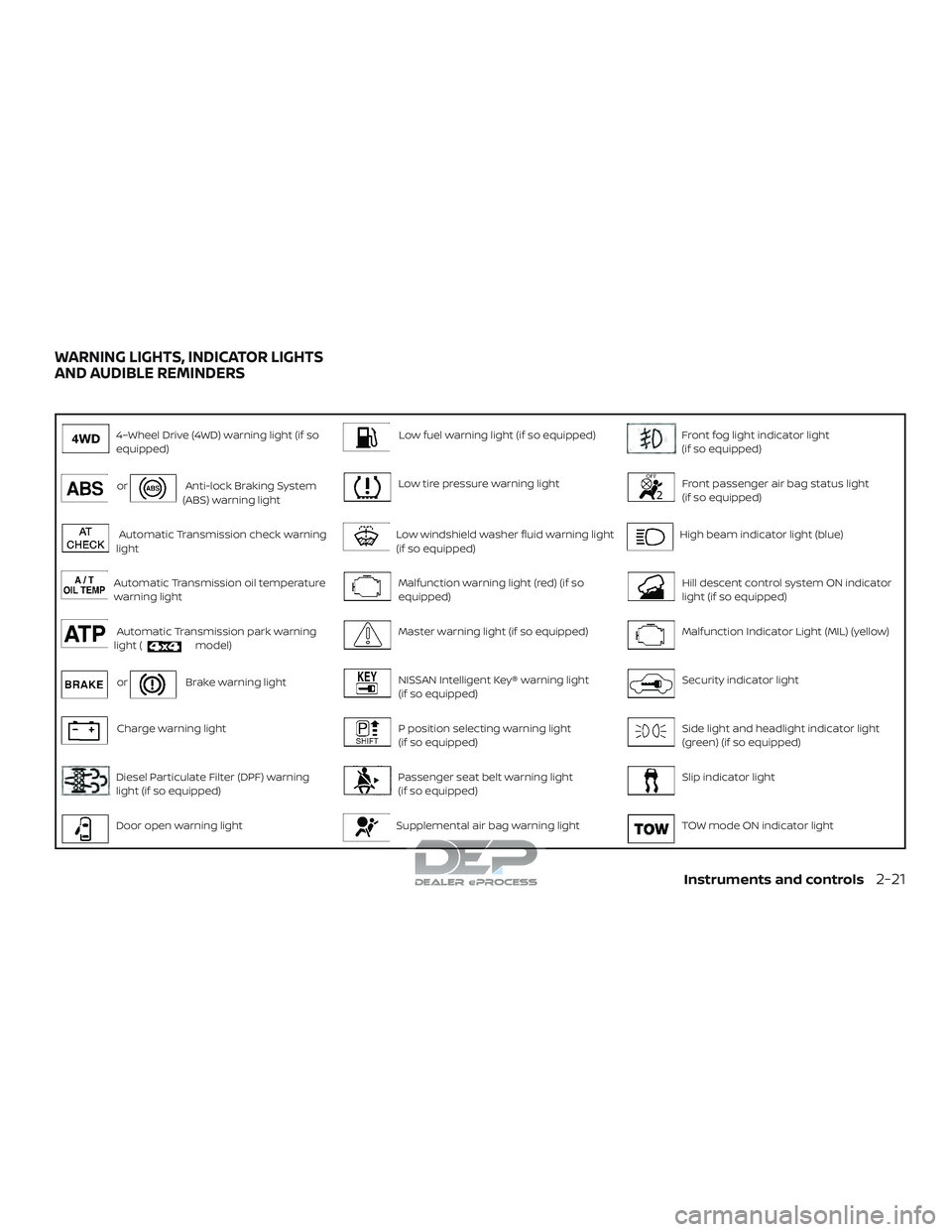
4–Wheel Drive (4WD) warning light (if so
equipped)Low fuel warning light (if so equipped)Front fog light indicator light
(if so equipped)
orAnti-lock Braking System
(ABS) warning lightLow tire pressure warning lightFront passenger air bag status light
(if so equipped)
Automatic Transmission check warning
lightLow windshield washer fluid warning light
(if so equipped)High beam indicator light (blue)
Automatic Transmission oil temperature
warning lightMalfunction warning light (red) (if so
equipped)Hill descent control system ON indicator
light (if so equipped)
Automatic Transmission park warning
light (model)Master warning light (if so equipped)Malfunction Indicator Light (MIL) (yellow)
orBrake warning lightNISSAN Intelligent Key® warning light
(if so equipped)Security indicator light
Charge warning lightP position selecting warning light
(if so equipped)Side light and headlight indicator light
(green) (if so equipped)
Diesel Particulate Filter (DPF) warning
light (if so equipped)Passenger seat belt warning light
(if so equipped)Slip indicator light
Door open warning lightSupplemental air bag warning lightTOW mode ON indicator light
WARNING LIGHTS, INDICATOR LIGHTS
AND AUDIBLE REMINDERS
Instruments and controls2-21
Page 127 of 650
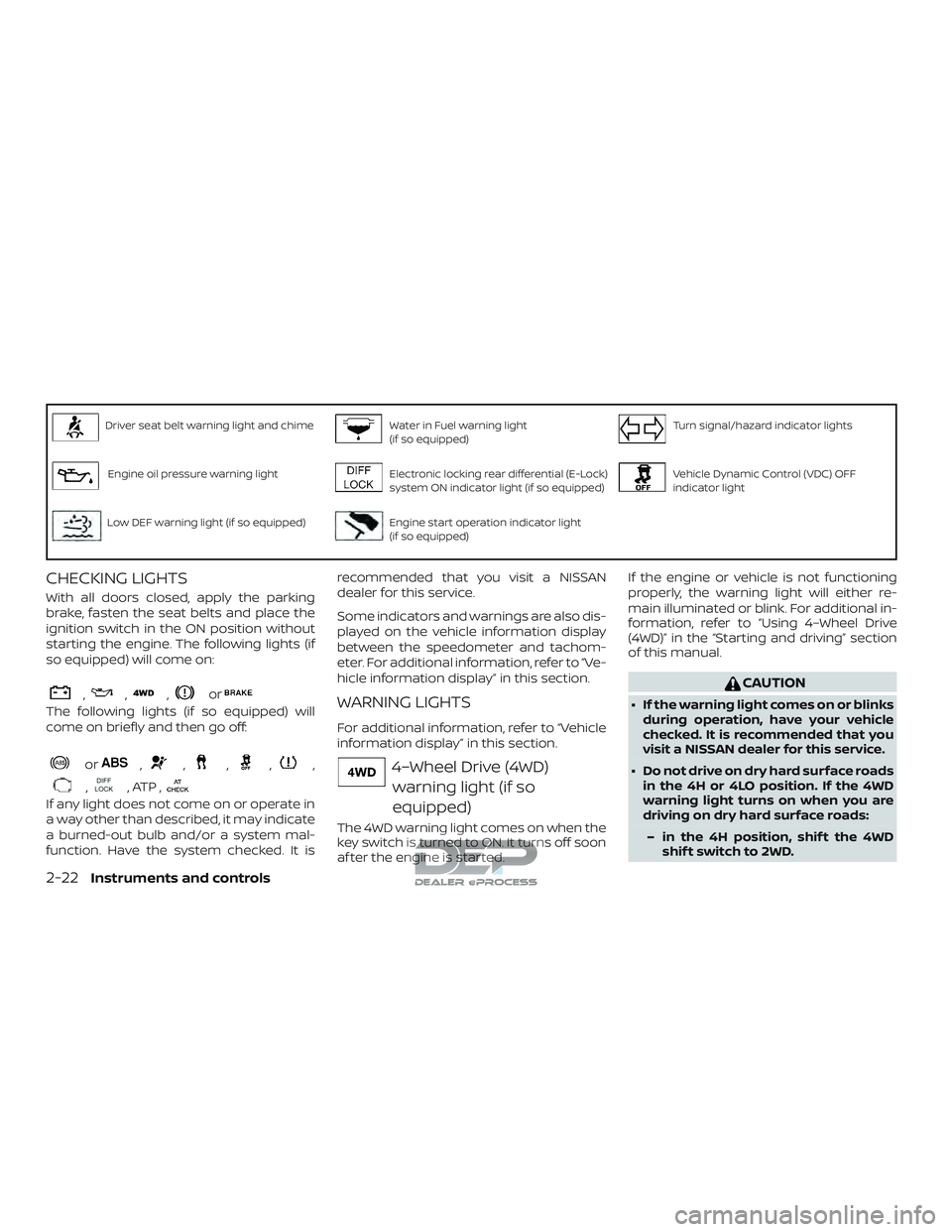
Driver seat belt warning light and chimeWater in Fuel warning light
(if so equipped)Turn signal/hazard indicator lights
Engine oil pressure warning lightElectronic locking rear differential (E-Lock)
system ON indicator light (if so equipped)Vehicle Dynamic Control (VDC) OFF
indicator light
Low DEF warning light (if so equipped)Engine start operation indicator light
(if so equipped)
CHECKING LIGHTS
With all doors closed, apply the parking
brake, fasten the seat belts and place the
ignition switch in the ON position without
starting the engine. The following lights (if
so equipped) will come on:
,,,or
The following lights (if so equipped) will
come on briefly and then go off:
or,,,,,
,, ATP ,
If any light does not come on or operate in
a way other than described, it may indicate
a burned-out bulb and/or a system mal-
function. Have the system checked. It isrecommended that you visit a NISSAN
dealer for this service.
Some indicators and warnings are also dis-
played on the vehicle information display
between the speedometer and tachom-
eter. For additional information, refer to “Ve-
hicle information display” in this section.
WARNING LIGHTS
For additional information, refer to “Vehicle
information display” in this section.
4–Wheel Drive (4WD)
warning light (if so
equipped)
The 4WD warning light comes on when the
key switch is turned to ON. It turns off soon
af ter the engine is started. If the engine or vehicle is not functioning
properly, the warning light will either re-
main illuminated or blink. For additional in-
formation, refer to “Using 4–Wheel Drive
(4WD)” in the “Starting and driving” section
of this manual.
CAUTION
∙ If the warning light comes on or blinks
during operation, have your vehicle
checked. It is recommended that you
visit a NISSAN dealer for this service.
∙ Do not drive on dry hard surface roads in the 4H or 4LO position. If the 4WD
warning light turns on when you are
driving on dry hard surface roads:
– in the 4H position, shif t the 4WD shif t switch to 2WD.
2-22Instruments and controls
Page 133 of 650
CAUTION
∙ Continuing vehicle operation withoutproper servicing of the engine control
system could lead to poor driveability,
reduced fuel economy, and damage
to the engine control system, which
may affect the vehicle’s warranty
coverage.
∙ Failure to drain the water from the fuel filter can cause serious damage
to the engine. It is recommended that
you contact a NISSAN dealer as soon
as possible.
Master warning light (if so
equipped)
This light comes on when various vehicle
information display warnings appear.
∙ No key warning
∙ Low fuel warning
∙ Low windshield-washer fluid warning
∙ Parking brake release warning
∙ Door open warning
∙ Loose fuel cap warning
∙ Check tire pressure warning ∙ 4WD error (if so equipped)
∙ Front & rear tire size differences (if so
equipped)
NISSAN Intelligent Key®
warning light (if so
equipped)
Af ter the ignition switch is placed in the ON
position, this light comes on for about
2 seconds and then turns off. This light illu-
minates or blinks as follows:
∙
The light blinks in yellow when the door is
closed with the Intelligent Key lef t outside
the vehicle and the ignition switch in the
ACC or ON position. Make sure that the
Intelligent Key is inside the vehicle.
∙ The light blinks in green when the Intel- ligent Key battery is running out of
power. Replace the battery with a new
one. For additional information, refer to
“Battery” in the “Do-it-yourself ” section
of this manual.
∙ The light illuminates in yellow when it warns of a malfunction with the Intelli-
gent Key system.
If the warning light illuminates in yellow
while the engine is stopped, it may be im-
possible to start the engine. If the light comes on while the engine is running, you
can drive the vehicle. Have the system
checked. It is recommended that you visit a
NISSAN dealer for this service.
For additional information, refer to “NISSAN
Intelligent Key®” in the “Pre-driving checks
and adjustments” section of this manual.
P position selecting
warning light (if so
equipped)
The light blinks red and the warning buzzer
sounds if you are outside of the vehicle with
the Intelligent Key and the engine is off, but
the shif t lever is not in the P (Park) position.
When the warning light blinks, place the igni-
tion switch in the ON position, move the shif t
lever to the P (Park) position, then place the
ignition switch in the LOCK position.
Passenger seat beltwarning light (if so
equipped)
The light reminds you to notif y the passen-
ger to fasten their seat belt. The light illumi-
nates whenever the ignition is placed in the
ON or START position and remains illumi-
nated until the passenger’s seat belt is fas-
tened.
2-28Instruments and controls
Page 137 of 650
Vehicle Dynamic Control(VDC) OFF indicator light
This indicator light comes on when the
VDC OFF switch is pushed to off. This indi-
cates the VDC system is not operating.
Push the VDC OFF switch again or restart
the engine and the system will operate
normally. For additional information, refer
to “Vehicle Dynamic Control (VDC) system”
in the “Starting and driving” section of this
manual.
The VDC light also comes on when you
place the ignition switch in the ON position.
The light will turn off af ter about 2 seconds
if the system is operational. If the light stays
on or comes on along with the
indi-
cator light while you are driving, have the
VDC system checked. It is recommended
that you visit a NISSAN dealer for this ser-
vice.
While the VDC system is operating, you
might feel a slight vibration or hear the sys-
tem working when starting the vehicle or
accelerating, but this is normal.
AUDIBLE REMINDERS
Brake pad wear warning
The disc brake pads have audible wear
warnings. When a disc brake pad requires
replacement, it makes a high pitched
scraping sound when the vehicle is in mo-
tion, whether or not the brake pedal is de-
pressed. Have the brakes checked as soon
as possible if the warning sound is heard.
Light reminder chime
With the ignition switch placed in the OFF
position, a chime sounds when the driver’s
door is opened if the headlights or parking
lights are on.
Turn the headlight control switch off before
leaving the vehicle.
NISSAN Intelligent Key® door
buzzer
The Intelligent Key door buzzer sounds if
the Intelligent Key is lef t inside the vehicle
when locking the doors. When the buzzer
sounds, be sure to check both the vehicle
and the Intelligent Key. For additional infor-
mation, refer to “NISSAN Intelligent Key®” in
the “Pre-driving checks and adjustments”
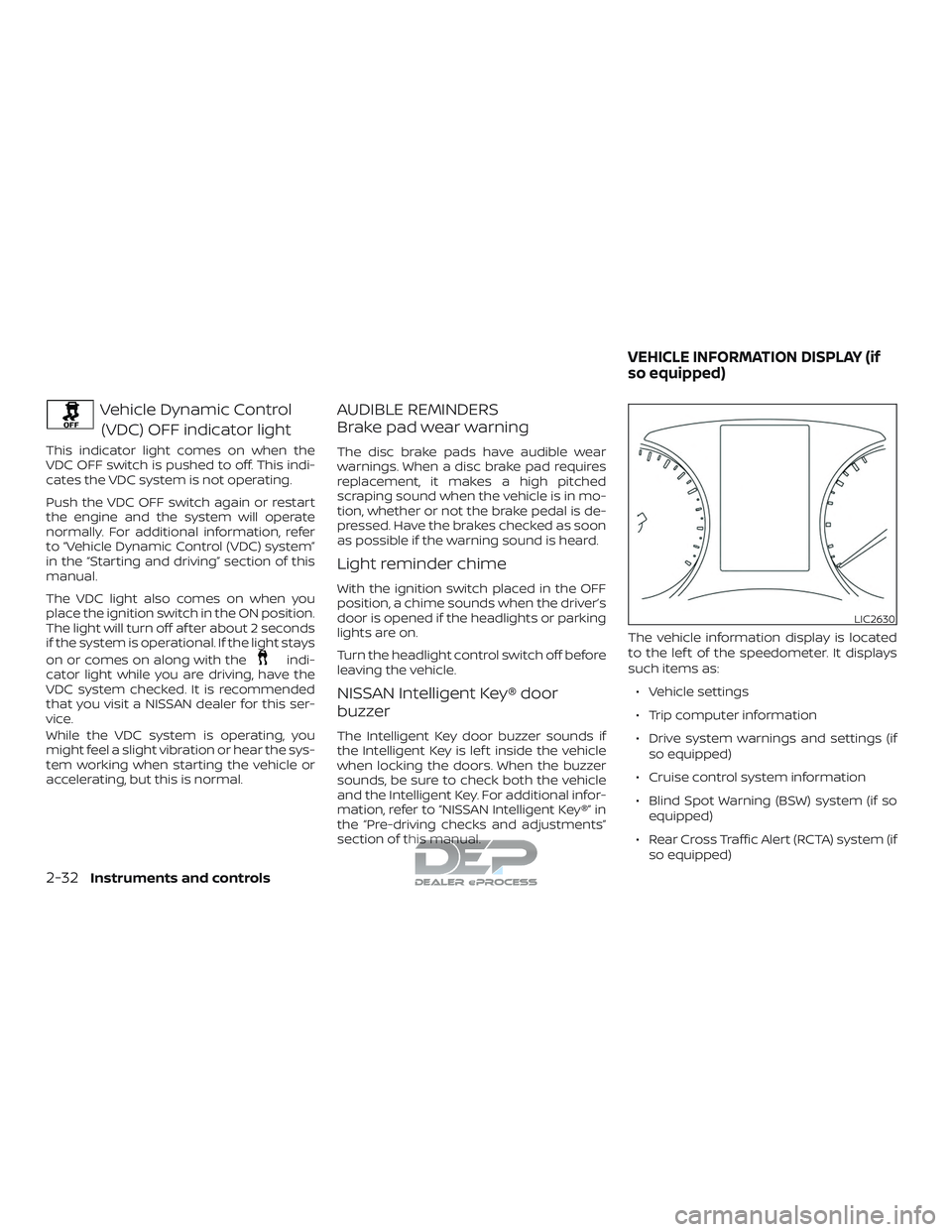
section of this manual. The vehicle information display is located
to the lef t of the speedometer. It displays
such items as:
∙ Vehicle settings
∙ Trip computer information
∙ Drive system warnings and settings (if so equipped)
∙ Cruise control system information
∙ Blind Spot Warning (BSW) system (if so equipped)
∙ Rear Cross Traffic Alert (RCTA) system (if so equipped)
LIC2630
VEHICLE INFORMATION DISPLAY (if
so equipped)
2-32Instruments and controls