radio antenna NISSAN TITAN 2018 Owner´s Manual
[x] Cancel search | Manufacturer: NISSAN, Model Year: 2018, Model line: TITAN, Model: NISSAN TITAN 2018Pages: 650, PDF Size: 7.54 MB
Page 250 of 650
Radio........................................ 4-48
FM radio reception .......................... 4-49
AM radio reception .......................... 4-49
Satellite radio reception (if so equipped) .....4-49
Audio operation precautions ................4-50
FM/AM radio with compact disc (CD)
player (if so equipped) .......................4-57
FM/AM/SAT radio with compact disc
(CD) player (Type A) (if so equipped) ..........4-61
FM/AM/SAT radio with compact disc
(CD) player (Type B) (if so equipped) ..........4-67
USB (Universal Serial Bus) Connection
Port (models without Navigation
System) (if so equipped) .....................4-74
USB (Universal Serial Bus) Connection
Port (models with Navigation System)
(if so equipped) .............................. 4-76
iPod®* player operation without
Navigation System (if so equipped) ..........4-78
iPod®* player operation with Navigation
System (if so equipped) ......................4-81
Bluetooth® streaming audio without
Navigation System (if so equipped) ..........4-84 Bluetooth® streaming audio with
Navigation System (if so equipped)
..........4-85
CD care and cleaning ........................ 4-86
Steering wheel switch for audio control ......4-87
Antenna ..................................... 4-88
NissanConnect® Mobile Apps (if so equipped). . . 4-88
NissanConnect® Services (if so equipped) ......4-89
Siri® Eyes Free .................................. 4-89
Requirements ............................... 4-89
Siri® Activation ............................... 4-90
Operating Siri® Eyes Free ....................4-90
Changing Siri® Eyes Free settings
(models without navigation system) .........4-91
Changing Siri® Eyes Free settings
(models with navigation system) ............4-91
Troubleshooting guide ......................4-92
NISSAN Mobile Entertainment System (MES)
(if so equipped) ................................. 4-93
Front panel buttons ......................... 4-94
Front panel buttons operation ...............4-96
Wireless Headphone Operation ..............4-97
Remote control operation ...................4-98
Page 298 of 650
Reception conditions will constantly
change because of vehicle movement.
Buildings, terrain, signal distance and inter-
ference from other vehicles can work
against ideal reception. Described below
are some of the factors that can affect your
radio reception.
Some cellular phones or other devices may
cause interference or a buzzing noise to
come from the audio system speakers.
Storing the device in a different location
may reduce or eliminate the noise.
FM RADIO RECEPTION
Range: FM range is normally limited to 25 –
30 mi (40 – 48 km), with monaural (single
channel) FM having slightly more range
than stereo FM. External influences may
sometimes interfere with FM station re-
ception even if the FM station is within 25
mi (40 km). The strength of the FM signal is
directly related to the distance between
the transmitter and receiver. FM signals fol-
low a line-of-sight path, exhibiting many of
the same characteristics as light. For ex-
ample, they will reflect off objects.
Fade and drif t: As your vehicle moves away
from a station transmitter, the signals will
tend to fade and/or drif t.Static and flutter: During signal interfer-
ence from buildings, large hills or due to
antenna position (usually in conjunction
with increased distance from the station
transmitter), static or flutter can be heard.
This can be reduced by adjusting the treble
control to reduce treble response.
Multipath reception: Because of the reflec-
tive characteristics of FM signals, direct and
reflected signals reach the receiver at the
same time. The signals may cancel each
other, resulting in momentary flutter or loss
of sound.AM RADIO RECEPTION
AM signals, because of their low frequency,
can bend around objects and skip along
the ground. In addition, the signals can be
bounced off the ionosphere and bent back
to earth. Because of these characteristics,
AM signals are also subject to interference
as they travel from transmitter to receiver.
Fading: Occurs while the vehicle is passing
through freeway underpasses or in areas
with many tall buildings. It can also occur
for several seconds during ionospheric tur-
bulence even in areas where no obstacles
exist.
Static: Caused by thunderstorms, electrical
power lines, electric signs and even traffic
lights.
SATELLITE RADIO RECEPTION (if so
equipped)
When the satellite radio is used for the first
time or the battery has been replaced, the
satellite radio may not work properly. This
is not a malfunction. Wait more than
10 minutes with satellite radio ON and the
vehicle outside of any metal or large build-
ing for satellite radio to receive all of the
necessary data.
No satellite radio reception is available and
“NO SAT” is displayed when the SAT band
option is selected unless optional satellite
receiver and antenna are installed and a
SiriusXM® Satellite Radio service subscrip-
tion is active. Satellite radio is not available
in Alaska, Hawaii and Guam.
Satellite radio performance may be af-
fected if cargo carried on the roof blocks
the satellite radio signal.
If possible, do not put cargo over the satel-
lite antenna.
Monitor, climate, audio, phone and voice recognition systems4-49
Page 311 of 650
5.SEEK button
6. SCAN button
7.
CAT button
8.
BACK button
9. iPod MENU button
10. ENTER/SETTING button / TUNE/ SCROLL knob
11. Station select (1 - 6) buttons
12. RDM (random) button
13. RPT (repeat) button
14.
(power) button / VOL (volume)
control knob
15. DISP (display) button
16. MEDIA button
17. FM•AM button
*No satellite radio reception is available
when the XM button is pressed to access
satellite radio stations unless optional sat-
ellite receiver and antenna are installed
and an SiriusXM® Satellite Radio service
subscription is active. Satellite radio is not
available in Alaska, Hawaii and Guam.
Audio main operation
(power) button / VOL (volume)
control knob
Place the ignition switch in the ACC or ON
position and press the
(power) but-
ton while the system is off to call up the
mode (radio, CD, AUX, Bluetooth® audio,
USB or iPod®) that was playing immediately
before the system was turned off.
To turn the system off, press the
(power) button.
Turn the VOL (volume) control knob to ad-
just the volume.
This vehicle may be equipped with Speed
Sensitive Volume. When this feature is ac-
tive, the audio volume changes as the driv-
ing speed changes.
4-62Monitor, climate, audio, phone and voice recognition systems
Page 316 of 650
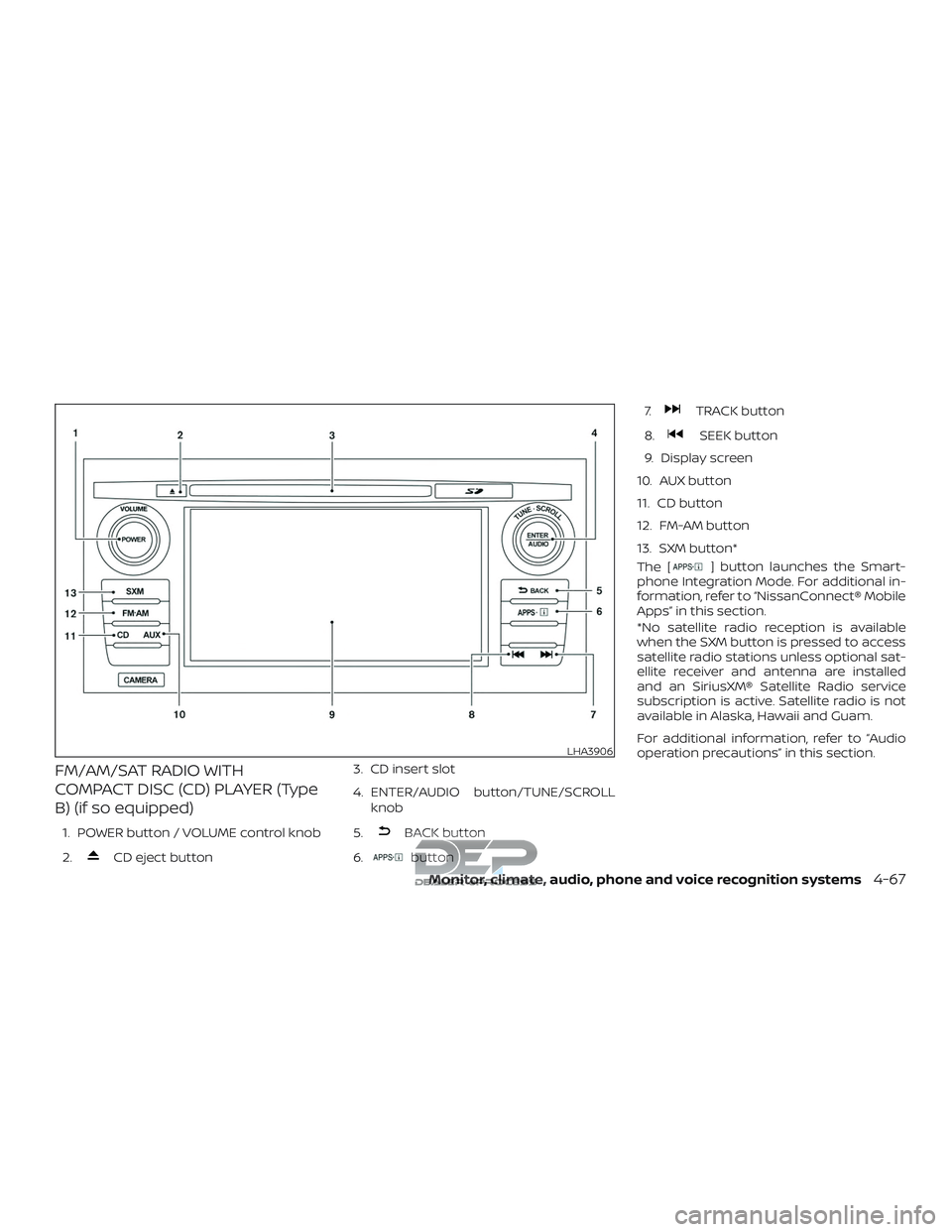
FM/AM/SAT RADIO WITH
COMPACT DISC (CD) PLAYER (Type
B) (if so equipped)
1. POWER button / VOLUME control knob
2.
CD eject button3. CD insert slot
4. ENTER/AUDIO button/TUNE/SCROLL
knob
5.
BACK button
6.
button 7.
TRACK button
8.
SEEK button
9. Display screen
10. AUX button
11. CD button
12. FM-AM button
13. SXM button*
The [
] button launches the Smart-
phone Integration Mode. For additional in-
formation, refer to “NissanConnect® Mobile
Apps” in this section.
*No satellite radio reception is available
when the SXM button is pressed to access
satellite radio stations unless optional sat-
ellite receiver and antenna are installed
and an SiriusXM® Satellite Radio service
subscription is active. Satellite radio is not
available in Alaska, Hawaii and Guam.
For additional information, refer to “Audio
operation precautions” in this section.
LHA3906
Monitor, climate, audio, phone and voice recognition systems4-67
Page 318 of 650
![NISSAN TITAN 2018 Owner´s Manual SXM settings
To view the SXM settings:1. Press the [
] button.
2. Touch the “Settings” key.
3. Touch the “SXM” key.
The signal strength, activation status and
other information are displayed o](/img/5/40372/w960_40372-317.png "NISSAN TITAN 2018 Owner´s Manual SXM settings
To view the SXM settings:1. Press the [
] button.
2. Touch the “Settings” key.
3. Touch the “SXM” key.
The signal strength, activation status and
other information are displayed o")
SXM settings
To view the SXM settings:1. Press the [
] button.
2. Touch the “Settings” key.
3. Touch the “SXM” key.
The signal strength, activation status and
other information are displayed on the
screen.
AUX button
The AUX IN audio input jack accepts any
standard analog audio input such as from
a portable cassette tape/CD player, MP3
player or a laptop computer. Press the AUX
button to play a compatible device
plugged into the AUX IN jack.
FM/AM/SAT radio operation
FM·AM button
Press the FM·AM button to change the
band as follows:
AM →FM1 →FM2 →AM
If another audio source is playing when the
FM·AM button is pressed, the audio source
playing will automatically be turned off and
the last radio station played will begin playing.
SXM band select
Pressing the SXM button will change the
band as follows:
SXM1* →SXM2*→ SXM3*→SXM1* (satellite, if
so equipped)
When the SXM button is pressed while the
ignition switch is in the ACC or ON position,
the radio will come on at the last station
played.
The last station played will also come on
when the VOL (volume) control knob is
pressed to turn the radio on.
*When the SXM button is pressed, the sat-
ellite radio mode will be skipped unless an
optional satellite receiver and antenna are
installed and a SiriusXM® Satellite Radio
service subscription is active. Satellite radio
is not available in Alaska, Hawaii and Guam.
If a compact disc is playing when the SXM
button is pressed, the compact disc will
automatically be turned off and the last
radio station played will come on.
While the radio is in SXM mode, the opera-
tion can be controlled through the touch-
screen. Touch the “Channels” key to display
a list of channels. Touch a channel dis-
played on the list to change to that chan- nel. Touch the “Categories” key to display a
list of categories. Touch a category dis-
played on the list to display options within
that category.
Tuning with the touch-screen
When in AM or FM mode, the radio can be
tuned using the touch-screen. To bring up
the visual tuner, touch the “Tune” key on the
lower right corner of the screen. A screen
appears with a bar running from low fre-
quencies on the lef t to high frequencies on
the right. Touch the screen at the location
of the frequency you wish to tune and the
station will change to that frequency. To
return to the regular radio display screen,
touch the “OK” key.
Tuning with the TUNE knob
The radio can also be manually tuned us-
ing the TUNE knob. When in FM or AM mode,
turn the TUNE knob to the lef t for lower
frequencies or to the right for higher fre-
quencies. When in SXM mode, turn the
TUNE knob to change the channel.
Monitor, climate, audio, phone and voice recognition systems4-69
Page 367 of 650
FCC NOTICE
This device has been tested and found to
comply with the limits for a Class B digital
device, pursuant to part 15 of the FCC Rules.
These limits are designed to provide rea-
sonable protection against harmful inter-
ference in a residential installation. This de-
vice generates, uses, and can radiate radio
frequency energy, and if not installed and
used in accordance with the instructions,
may cause harmful interference to radio
communications. However, there is no
guarantee that interference will not occur
in a particular installation. If this device
does cause unacceptable interference to
radio or television reception, which can be
determined by turning the device off and
on, the user is encouraged to try to correct
the interference by one or more of the fol-
lowing measures:∙ Reorient or relocate the receiving an- tenna.
∙ Increase the separation between the device and receiver.
∙ Connect the device into an outlet on a circuit different from that to which the
receiver is connected. ∙ Consult your dealer or an experienced
radio/TV technician for help.FCC WARNING
WARNING
∙ To assure continued FCC compliance,the user must use the provided
grounded power supply cord and the
shielded video interface cable with
bonded ferrite cores.
∙ Any unauthorized change or modifi- cations to this device would void the
user’s authority to operate this
device.
ITE NOTICE
This Class B digital apparatus complies
with Canadian ICES-003.
This device complies with Industry Canada
license-exempt RSS standard(s). Operation
is subject to the following two conditions:
(1) this device may not cause interference,
and (2) this device must accept any inter-
ference, including interference that may
cause undesired operation of the device. This device and its antenna(s) must not be
co-located or operation in conjunction
with any other antenna or transmitter.
Under Industry Canada regulations, this ra-
dio transmitter may only operate using an
antenna or a type and maximum (or lesser)
gain approved for the transmitter by Indus-
try Canada. To reduce potential radio inter-
ference to other users, the antenna type
and its gain should be so chosen that the
equivalent isotropically radiated power
(e.i.r.p) is not more than that necessary for
successful communication.
4-118Monitor, climate, audio, phone and voice recognition systems
Page 369 of 650
When installing a CB, ham radio or car
phone in your vehicle, be sure to observe
the following precautions; otherwise, the
new equipment may adversely affect the
engine control system and other electronic
parts.
WARNING
∙ A cellular phone should not be usedfor any purpose while driving so full
attention may be given to vehicle op-
eration. Some jurisdictions prohibit
the use of cellular phones while
driving.
∙ If you must make a call while your ve- hicle is in motion, the hands free cellu-
lar phone operational mode (if so
equipped) is highly recommended.
Exercise extreme caution at all times
so full attention may be given to ve-
hicle operation.
∙ If you are unable to devote full atten- tion to vehicle operation while talking
on the phone, pull off the road to a
safe location and stop your vehicle.
CAUTION
∙ Keep the antenna as far away as pos-sible from the electronic control
modules.
∙ Keep the antenna wire more than 8 in (20 cm) away from the electronic con-
trol system harnesses. Do not route
the antenna wire next to any harness.
∙ Adjust the antenna standing-wave ratio as recommended by the
manufacturer.
∙ Connect the ground wire from the CB radio chassis to the body.
∙ For additional information, it is rec- ommended that you visit a NISSAN
dealer for this service.
WARNING
∙ Use a phone af ter stopping your ve-hicle in a safe location. If you have to
use a phone while driving, exercise ex-
treme caution at all times so full at-
tention may be given to vehicle
operation.
∙ If you are unable to devote full atten- tion to vehicle operation while talking
on the phone, pull off the road to a
safe location and stop your vehicle.
CAUTION
To avoid discharging the vehicle bat-
tery, use a phone af ter starting the
engine.
CAR PHONE OR CB RADIO BLUETOOTH® HANDS-FREE PHONE
SYSTEM WITHOUT NAVIGATION
SYSTEM (if so equipped)
4-120Monitor, climate, audio, phone and voice recognition systems
Page 371 of 650
∙ Some Bluetooth® enabled cellularphones may not be recognized or work
properly. Please visit
www.nissanusa.com/bluetooth or
www.nissan.ca/bluetooth for a recom-
mended phone list and connecting in-
structions.
∙ You will not be able to use a hands-free phone under the following conditions:
– Your vehicle is outside of the cellular service area.
– Your vehicle is in an area where it is difficult to receive a cellular signal;
such as in a tunnel, in an under-
ground parking garage, near a tall
building or in a mountainous area.
– Your cellular phone is locked to pre- vent it from being dialed.
∙ When the radio wave condition is not ideal or ambient sound is too loud, it
may be difficult to hear the other per-
son’s voice during a call.
∙ Do not place the cellular phone in an area surrounded by metal or far away
from the in-vehicle phone module to
prevent tone quality degradation and
wireless connection disruption. ∙ While a cellular phone is connected
through the Bluetooth® wireless con-
nection, the battery power of the cellu-
lar phone may discharge quicker than
usual. The Bluetooth® Hands-Free
Phone System cannot charge cellular
phones.
∙ Some cellular phones or other devices may cause interference or a buzzing
noise to come from the audio system
speakers. Storing the device in a differ-
ent location may reduce or eliminate
the noise.
∙ For additional information, refer to the cellular phone Owner’s Manual regard-
ing the telephone charges, cellular
phone antenna and body, etc.
∙ For additional information, refer to “Troubleshooting guide” in this section.
You can also visit
www.nissanusa.com/bluetooth or
www.nissan.ca/bluetooth for trouble-
shooting help if the hands-free phone
system seems to be malfunctioning.REGULATORY INFORMATION
FCC Regulatory information
– CAUTION: To maintain compliance with FCC’s RF exposure guidelines, use only
the supplied antenna. Unauthorized an-
tenna, modification, or attachments
could damage the transmitter and may
violate FCC regulations.
– Operation is subject to the following two conditions:
1. This device may not cause interference and
2. this device must accept any interfer- ence, including interference that may
cause undesired operation of the de-
vice.
IC Regulatory information
– Operation is subject to the following two conditions: (1) this device may not cause
interference, and (2) this device must ac-
cept any interference, including interfer-
ence that may cause undesired opera-
tion of the device.
– This Class B digital apparatus meets all requirements of the Canadian
Interference-Causing Equipment Regu-
lations.
4-122Monitor, climate, audio, phone and voice recognition systems
Page 402 of 650
shown on the Tire and Loading Infor-
mation label to turn the low tire pres-
sure warning light off. If you have a flat
tire, replace it with a spare tire as soon
as possible. (For additional informa-
tion, refer to “Flat tire” in the “In case of
emergency ” section for changing a
flat tire.)
∙ When replacing a wheel without the TPMS such as the spare tire, when a
spare tire is mounted or a wheel is
replaced, tire pressure will not be indi-
cated, the TPMS will not function and
the low tire pressure warning light will
flash for approximately 1 minute. The
light will remain on af ter 1 minute.
Have your tires replaced and/or TPMS
system reset as soon as possible. It is
recommended that you visit a NISSAN
dealer for this service.
∙ Replacing tires with those not origi- nally specified by NISSAN could affect
the proper operation of the TPMS.
∙ Do not inject any tire liquid or aerosol tire sealant into the tires, as this may
cause a malfunction of the tire pres-
sure sensors.CAUTION
Do not place metalized film or any
metal parts (antenna, etc.) on the win-
dows. This may cause poor reception of
the signals from the tire pressure sen-
sors, and the TPMS will not function
properly.
Some devices and transmitters may tem-
porarily interfere with the operation of the
TPMS and cause the low tire pressure
warning light to illuminate.
Some examples are: ∙ Facilities or electric devices using simi- lar radio frequencies are near the ve-
hicle.
∙ If a transmitter set to similar frequen- cies is being used in or near the vehicle.
∙ If a computer (or similar equipment) or a DC/AC converter is being used in or
near the vehicle.
The low tire pressure warning light may
illuminate in the following cases: ∙ If the vehicle is equipped with a wheel and tire without TPMS.
∙ If the TPMS has been replaced and the ID has not been registered. ∙ If the wheel is not originally specified by
NISSAN.
FCC Notice:
For USA:
This device complies with Part 15 of the
FCC Rules. Operation is subject to the fol-
lowing two conditions: (1) This device
may not cause harmful interference, and
(2) this device must accept any interfer-
ence received, including interference
that may cause undesired operation.
NOTE:
Changes or modifications not expressly
approved by the party responsible for
compliance could void the user’s author-
ity to operate the equipment.
For Canada:
This device complies with Industry
Canada licence-exempt RSS standard(s).
Operation is subject to the following two
conditions: (1) this device may not cause
harmful interference, and (2) this device
must accept any interference received,
including interference that may cause
undesired operation of the device.
Starting and driving5-5
Page 634 of 650
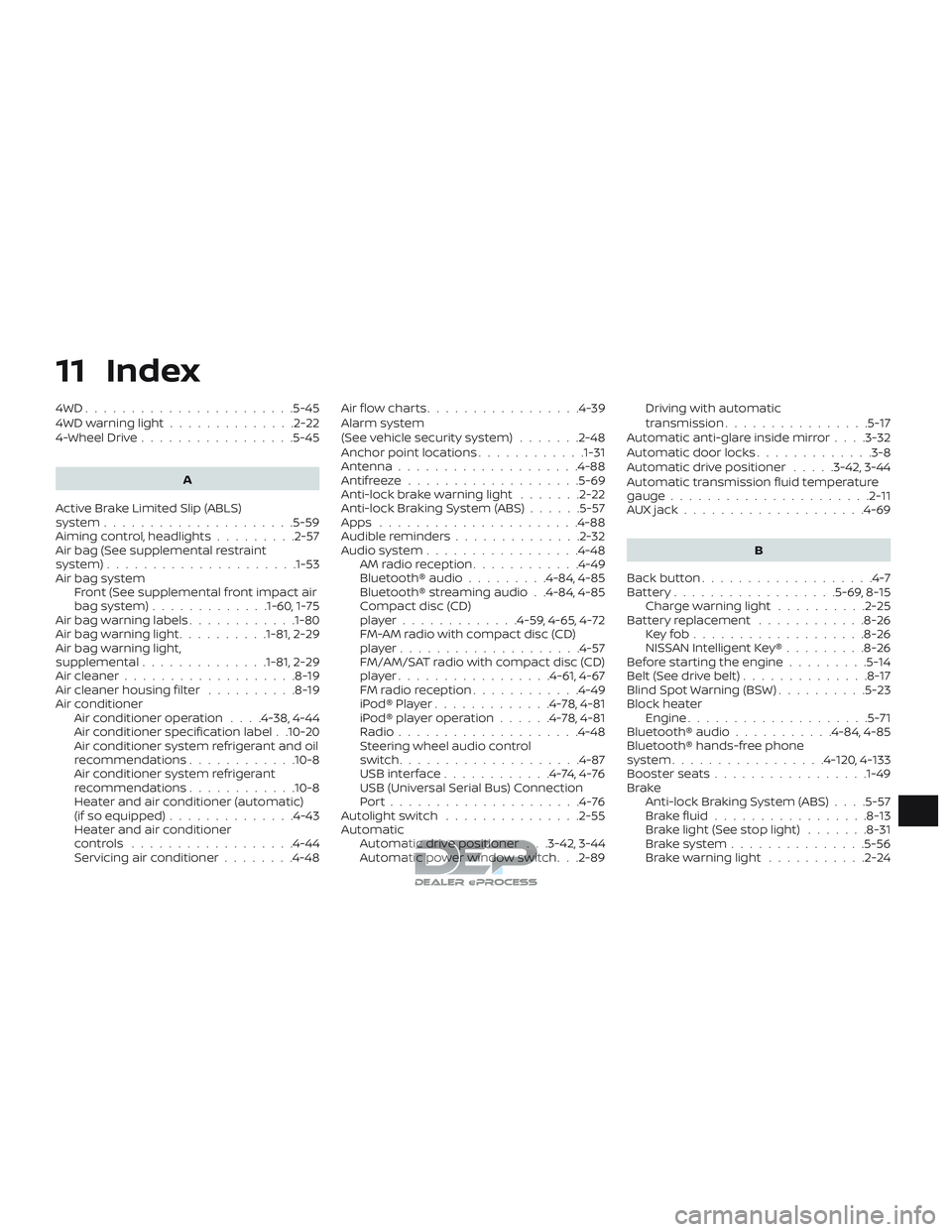
11 Index
4WD.......................5-45
4WDwarninglight..............2-22
4-Wheel Drive.................5-45
A
Active Brake Limited Slip (ABLS)
system .....................5-59
Aimingcontrol,headlights.........2-57
Air bag (See supplemental restraint
system) .................... .1-53
Air bag system Front (See supplemental front impact air
bagsystem).............1-60, 1-75
Air bag warning labels ............1-80
Airbagwarninglight..........1-81, 2-29
Air bag warning light,
supplemental ..............1-81, 2-29
Air cleaner ...................8-19
Air cleaner housing filter ..........8-19
Air conditioner Air conditioner operation ....4-38,4-44
Air conditioner specification label . .10-20
Air conditioner system refrigerant and oil
recommendations ............10-8
Air conditioner system refrigerant
recommendations ............10-8
Heater and air conditioner (automatic)
(if so equipped) ..............4-43
Heater and air conditioner
controls ..................4-44
Servicing air conditioner ........4-48Air flow charts
.................4-39
Alarm system
(See vehicle security system) .......2-48
Anchor point locations ............1-31
Antenna ....................4-88
Antifreeze ...................5-69
Anti-lock brake warning light .......2-22
Anti-lock Braking System (ABS) ......5-57
Apps ......................4-88
Audible reminders ..............2-32
Audiosystem.................4-48 AMradioreception............4-49
Bluetooth® audio .........4-84,4-85
Bluetooth® streaming audio . .4-84, 4-85
Compact disc (CD)
player.............4-59,4-65,4-72
FM-AM radio with compact disc (CD)
player....................4-57
FM/AM/SAT radio with compact disc (CD)
player.................4-61,4-67
FMradioreception............4-49
iPod®Player.............4-78,4-81
iPod® player operation ......4-78,4-81
Radio ....................4-48
Steering wheel audio control
switch....................4-87
USBinterface............4-74,4-76
USB (Universal Serial Bus) Connection
Port.....................4-76
Autolightswitch ...............2-55
Automatic Automatic drive positioner . . .3-42, 3-44
Automatic power window switch. . .2-89 Driving with automatic
transmission................5-17
Automatic anti-glare inside mirror ....3-32
Automatic door locks .............3-8
Automatic drive positioner .....3-42,3-44
Automatic transmission fluid temperature
gauge ......................2-11
AUXjack....................4-69
B
Back button ...................4-7
Battery..................5-69,8-15 Charge warning light ..........2-25
Battery replacement ............8-26
Keyfob...................8-26
NISSAN Intelligent Key® .........8-26
Before starting the engine .........5-14
Belt(Seedrivebelt)..............8-17
Blind Spot Warning (BSW) ..........5-23
Block heater Engine ....................5-71
Bluetooth® audio ...........4-84,4-85
Bluetooth® hands-free phone
system .................4-120,4-133
Booster seats .................1-49
Br ak
e
Anti-lock Braking System (ABS) ....5-57
Brakefluid.................8-13
Brakelight(Seestoplight) .......8-31
Brakesystem...............5-56
Brakewarninglight ...........2-24