fuel NISSAN TITAN 2019 Owner´s Manual
[x] Cancel search | Manufacturer: NISSAN, Model Year: 2019, Model line: TITAN, Model: NISSAN TITAN 2019Pages: 682, PDF Size: 7.99 MB
Page 147 of 682
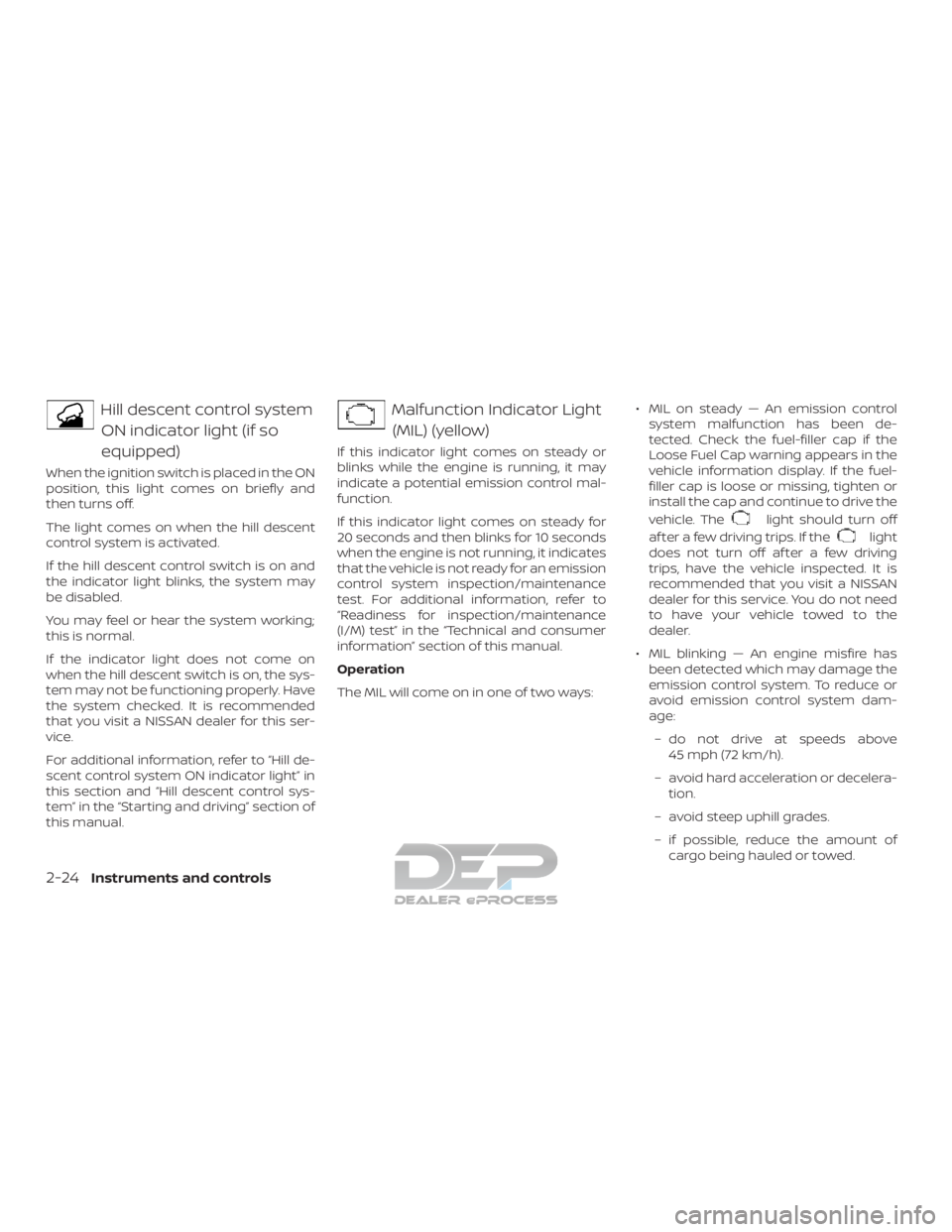
Hill descent control systemON indicator light (if so
equipped)
When the ignition switch is placed in the ON
position, this light comes on briefly and
then turns off.
The light comes on when the hill descent
control system is activated.
If the hill descent control switch is on and
the indicator light blinks, the system may
be disabled.
You may feel or hear the system working;
this is normal.
If the indicator light does not come on
when the hill descent switch is on, the sys-
tem may not be functioning properly. Have
the system checked. It is recommended
that you visit a NISSAN dealer for this ser-
vice.
For additional information, refer to “Hill de-
scent control system ON indicator light” in
this section and “Hill descent control sys-
tem” in the “Starting and driving” section of
this manual.
Malfunction Indicator Light(MIL) (yellow)
If this indicator light comes on steady or
blinks while the engine is running, it may
indicate a potential emission control mal-
function.
If this indicator light comes on steady for
20 seconds and then blinks for 10 seconds
when the engine is not running, it indicates
that the vehicle is not ready for an emission
control system inspection/maintenance
test. For additional information, refer to
“Readiness for inspection/maintenance
(I/M) test” in the “Technical and consumer
information” section of this manual.
Operation
The MIL will come on in one of two ways: ∙ MIL on steady — An emission control
system malfunction has been de-
tected. Check the fuel-filler cap if the
Loose Fuel Cap warning appears in the
vehicle information display. If the fuel-
filler cap is loose or missing, tighten or
install the cap and continue to drive the
vehicle. The
light should turn off
af ter a few driving trips. If the
light
does not turn off af ter a few driving
trips, have the vehicle inspected. It is
recommended that you visit a NISSAN
dealer for this service. You do not need
to have your vehicle towed to the
dealer.
∙ MIL blinking — An engine misfire has been detected which may damage the
emission control system. To reduce or
avoid emission control system dam-
age:
– do not drive at speeds above 45 mph (72 km/h).
– avoid hard acceleration or decelera- tion.
– avoid steep uphill grades.
– if possible, reduce the amount of cargo being hauled or towed.
2-24Instruments and controls
Page 148 of 682
The MIL may stop blinking and come on
steady. Have the vehicle inspected. It is rec-
ommended that you visit a NISSAN dealer
for this service. You do not need to have
your vehicle towed to the dealer.
CAUTION
Continued vehicle operation without
having the emission control system
checked and repaired as necessary
could lead to poor driveability, reduced
fuel economy, and possible damage to
the emission control system.
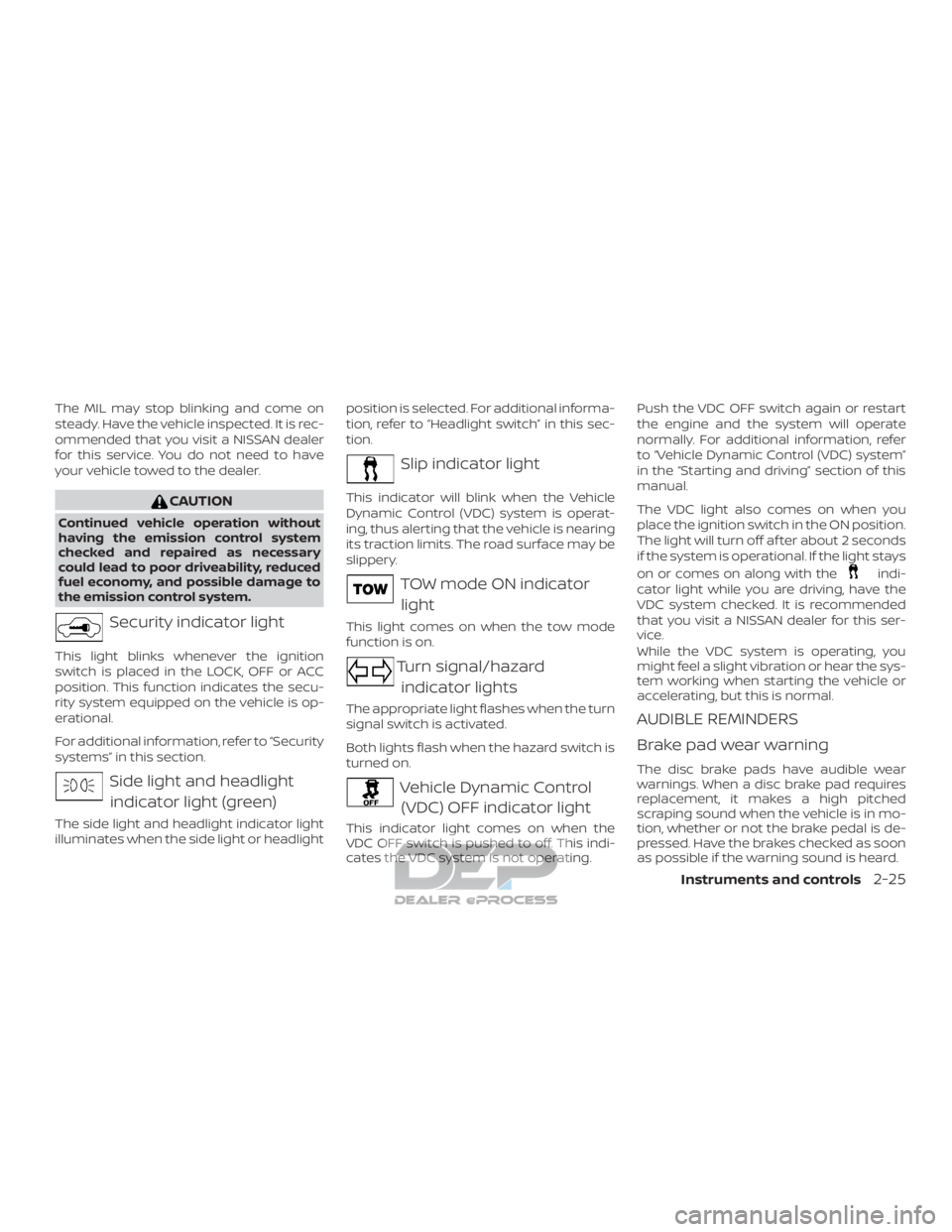
Security indicator light
This light blinks whenever the ignition
switch is placed in the LOCK, OFF or ACC
position. This function indicates the secu-
rity system equipped on the vehicle is op-
erational.
For additional information, refer to “Security
systems” in this section.
Side light and headlightindicator light (green)
The side light and headlight indicator light
illuminates when the side light or headlight position is selected. For additional informa-
tion, refer to “Headlight switch” in this sec-
tion.
Slip indicator light
This indicator will blink when the Vehicle
Dynamic Control (VDC) system is operat-
ing, thus alerting that the vehicle is nearing
its traction limits. The road surface may be
slippery.
TOW mode ON indicator
light
This light comes on when the tow mode
function is on.
Turn signal/hazard indicator lights
The appropriate light flashes when the turn
signal switch is activated.
Both lights flash when the hazard switch is
turned on.
Vehicle Dynamic Control(VDC) OFF indicator light
This indicator light comes on when the
VDC OFF switch is pushed to off. This indi-
cates the VDC system is not operating. Push the VDC OFF switch again or restart
the engine and the system will operate
normally. For additional information, refer
to “Vehicle Dynamic Control (VDC) system”
in the “Starting and driving” section of this
manual.
The VDC light also comes on when you
place the ignition switch in the ON position.
The light will turn off af ter about 2 seconds
if the system is operational. If the light stays
on or comes on along with the
indi-
cator light while you are driving, have the
VDC system checked. It is recommended
that you visit a NISSAN dealer for this ser-
vice.
While the VDC system is operating, you
might feel a slight vibration or hear the sys-
tem working when starting the vehicle or
accelerating, but this is normal.
AUDIBLE REMINDERS
Brake pad wear warning
The disc brake pads have audible wear
warnings. When a disc brake pad requires
replacement, it makes a high pitched
scraping sound when the vehicle is in mo-
tion, whether or not the brake pedal is de-
pressed. Have the brakes checked as soon
as possible if the warning sound is heard.
Instruments and controls2-25
Page 150 of 682
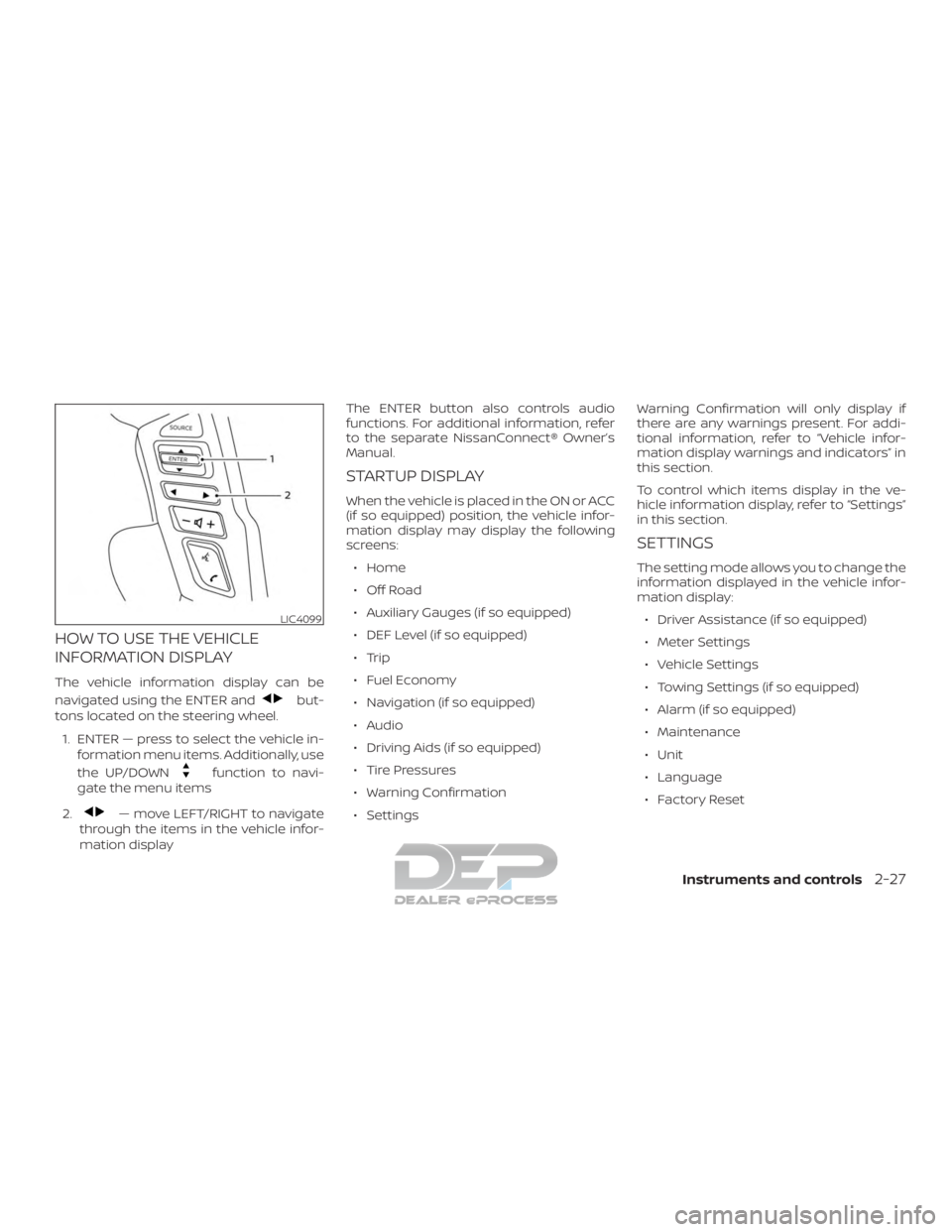
HOW TO USE THE VEHICLE
INFORMATION DISPLAY
The vehicle information display can be
navigated using the ENTER and
but-
tons located on the steering wheel.
1. ENTER — press to select the vehicle in- formation menu items. Additionally, use
the UP/DOWN
function to navi-
gate the menu items
2.
— move LEFT/RIGHT to navigate
through the items in the vehicle infor-
mation display The ENTER button also controls audio
functions. For additional information, refer
to the separate NissanConnect® Owner’s
Manual.
STARTUP DISPLAY
When the vehicle is placed in the ON or ACC
(if so equipped) position, the vehicle infor-
mation display may display the following
screens:
∙ Home
∙ Off Road
∙ Auxiliary Gauges (if so equipped)
∙ DEF Level (if so equipped)
∙ Trip
∙ Fuel Economy
∙ Navigation (if so equipped)
∙ Audio
∙ Driving Aids (if so equipped)
∙ Tire Pressures
∙ Warning Confirmation
∙ Settings Warning Confirmation will only display if
there are any warnings present. For addi-
tional information, refer to “Vehicle infor-
mation display warnings and indicators” in
this section.
To control which items display in the ve-
hicle information display, refer to “Settings”
in this section.
SETTINGS
The setting mode allows you to change the
information displayed in the vehicle infor-
mation display:
∙ Driver Assistance (if so equipped)
∙ Meter Settings
∙ Vehicle Settings
∙ Towing Settings (if so equipped)
∙ Alarm (if so equipped)
∙ Maintenance
∙ Unit
∙ Language
∙ Factory Reset
LIC4099
Instruments and controls2-27
Page 152 of 682
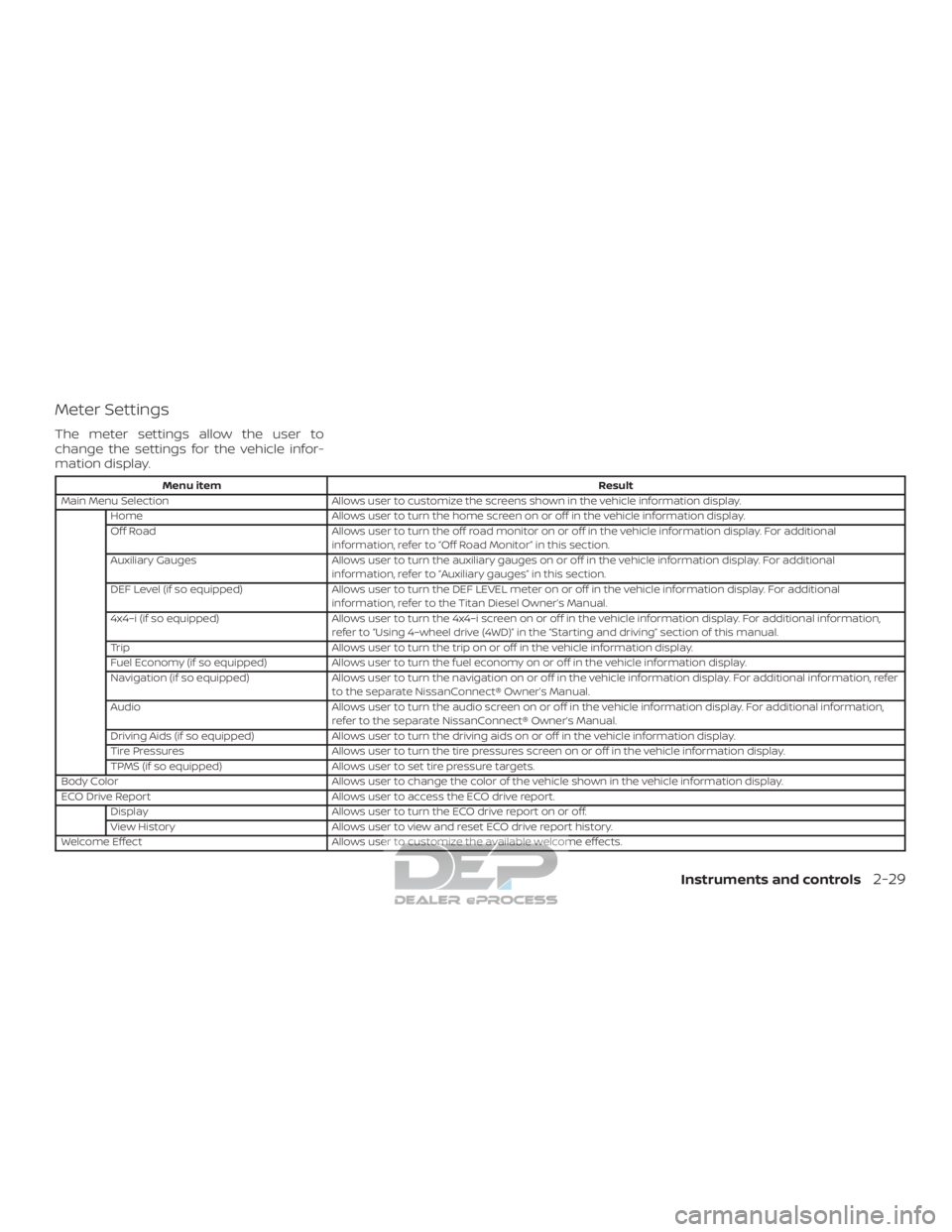
Meter Settings
The meter settings allow the user to
change the settings for the vehicle infor-
mation display.
Menu itemResult
Main Menu Selection Allows user to customize the screens shown in the vehicle information display.
Home Allows user to turn the home screen on or off in the vehicle information display.
Off Road Allows user to turn the off road monitor on or off in the vehicle information display. For additional
information, refer to “Off Road Monitor” in this section.
Auxiliary Gauges Allows user to turn the auxiliary gauges on or off in the vehicle information display. For additional
information, refer to “Auxiliary gauges” in this section.
DEF Level (if so equipped) Allows user to turn the DEF LEVEL meter on or off in the vehicle information display. For additional
information, refer to the Titan Diesel Owner’s Manual.
4x4–i (if so equipped) Allows user to turn the 4x4–i screen on or off in the vehicle information display. For additional information,
refer to “Using 4–wheel drive (4WD)” in the “Starting and driving” section of this manual.
Trip Allows user to turn the trip on or off in the vehicle information display.
Fuel Economy (if so equipped) Allows user to turn the fuel economy on or off in the vehicle information display.
Navigation (if so equipped) Allows user to turn the navigation on or off in the vehicle information display. For additional information, refer
to the separate NissanConnect® Owner’s Manual.
Audio Allows user to turn the audio screen on or off in the vehicle information display. For additional information,
refer to the separate NissanConnect® Owner’s Manual.
Driving Aids (if so equipped) Allows user to turn the driving aids on or off in the vehicle information display.
Tire Pressures Allows user to turn the tire pressures screen on or off in the vehicle information display.
TPMS (if so equipped) Allows user to set tire pressure targets.
Body Color Allows user to change the color of the vehicle shown in the vehicle information display.
ECO Drive Report Allows user to access the ECO drive report.
Display Allows user to turn the ECO drive report on or off.
View History Allows user to view and reset ECO drive report history.
Welcome Effect Allows user to customize the available welcome effects.
Instruments and controls2-29
Page 159 of 682
VEHICLE INFORMATION DISPLAY
WARNINGS AND INDICATORS
1. Door Open
2. Release Parking Brake
3. Range XX miles
4. Low Fuel
5. Oil Level Low (For Diesel engines only)
6. Low Oil Pressure Stop Vehicle (For Die-sel engines only)
7. Oil Level Sensor Fault (For Diesel en- gines only)
8. AT (Automatic Transmission) CHECK
9. AT (Automatic Transmission) Error: See Owner’s Manual
10. Tire Pressure Low - Add Air
11. Low Tire Pressure Error — Info
12. Flat Tire
13. Shipping Mode On Push Storage Fuse
14. Push brake and start button to drive
15. Remote Engine Start Mode (if so equipped)
16. Brightness indicator 17. Low Outside Temperature
18. Shif t to Park
19. Low fuel Pressure: See Owner’s Manual
20. Low Washer Fluid
21. Cruise control indicator
22. 4WD shif t indicators (if so equipped)
23. FRT & RR tire size difference: See Own-
er’s Manual (if so equipped)
24. Push Ignition to OFF
25. Headlight System Error: See Owner’s Manual (if so equipped)
26. Key ID Incorrect
27. No Key Detected
28. Key System Error: See Owner’s Manual
29. Key Battery Low
30. Power will turn off to save the battery
31. Power turned off to save the battery
32. Reminder: Turn OFF Headlights
33. 4WD Error: See Owner’s Manual (if so equipped)
34. Battery Voltage Low Charge Battery
35. Maintenance indicators 36. Parking Sensor Error: See Owner’s
Manual (if so equipped)
37. TPMS Error: See Owner’s Manual
38. 4WD MODE SHIFTING (if so equipped)
39. Loose Fuel Cap (if so equipped)
40. Blind Spot Warning (BSW) and Rear Cross Traffic Alert (RCTA) indicator (if so
equipped)
41. Malfunction: See Owner’s Manual (if so equipped)
42. Side Radar Obstruction (if so equipped)
43. Rear Door Alert is activated (if so equipped)
44. Check Rear Seat For All Articles (if so equipped)
Door Open
This warning illuminates when a door has
been opened.
Release Parking Brake
This warning illuminates in the message
area of the vehicle information display
when the parking brake is set and the ve-
hicle is driven. Press the brake pedal to re-
lease the parking brake.
2-36Instruments and controls
Page 160 of 682
Range XX miles
This warning illuminates to indicate the ap-
proximate distance remaining before the
fuel reaches 0 (Empty).
Low Fuel
This warning illuminates when the fuel level
in the fuel tank is getting low. Refuel as
soon as it is convenient, preferably before
the fuel gauge reaches 0 (Empty).There
will be a small reserve of fuel in the tank
when the fuel gauge needle reaches 0
(Empty).
Oil Level Low (For Diesel engines only)
If the Oil Level Low indicator is displayed,
the engine oil level is low. If the low level
reminder is displayed, check the level using
the engine oil dipstick.
CAUTION
The oil level should be checked regu-
larly using the engine oil dipstick. Oper-
ating with an insufficient amount of oil
can damage the engine and such dam-
age is not covered by the warranty. Low Oil Pressure Stop Vehicle (For Diesel
engines only)
This warning appears in the message area
of the vehicle information display if low oil
pressure is detected. This gauge is not de-
signed to indicate low oil level.
The low oil
pressure warning is not designed to indi-
cate a low oil level. Use the dipstick to
check the oil level. For additional informa-
tion, refer to “Engine oil” in the “Do-it-
yourself ” section of this manual.
Oil Level Sensor Fault (For Diesel en-
gines only)
This warning appears in the message area
of the vehicle information display if the oil
level sensor malfunctions. It is recom-
mended that you visit a NISSAN dealer to
have this system checked.
AT (Automatic Transmission) CHECK
If the AT Check warning appears while the
engine is running, or while driving, it may
indicate that the AT is not functioning prop-
erly and may need servicing. Have the sys-
tem checked, and if necessary, repaired
promptly. It is recommended that you visit
a NISSAN dealer for this service. AT (Automatic Transmission) Error: See
Owner’s Manual
If this message appears while the engine is
running, or while driving, it may indicate
that the AT is not functioning properly and
may need servicing. Have the system
checked, and if necessary, repaired
promptly. It is recommended that you visit
a NISSAN dealer for this service.
Tire Pressure Low - Add Air
This warning appears when the low tire
pressure warning light in the meter illumi-
nates and low tire pressure is detected. The
warning appears each time the ignition
switch is placed in the ON position as long
as the low tire pressure warning light re-
mains illuminated. If this warning appears,
stop the vehicle and adjust the tire pres-
sures of all four tires to the recommended
COLD tire pressure shown on the Tire and
Loading Information label. For additional
information, refer to “Low tire pressure
warning light” in this section and “Tire Pres-
sure Monitoring System (TPMS)” in the
“Starting and driving” section of this
manual.
Instruments and controls2-37
Page 161 of 682
Low Tire Pressure Error — Info
This warning appears when the low tire
pressure warning light in the meter illumi-
nates and low tire pressure is detected.
Press the ENTER button for information
about the low tire pressure. For additional
information, refer to “Low tire pressure
warning light” in this section and “Tire Pres-
sure Monitoring System (TPMS)” in the
“Starting and driving” section of this
manual.
Flat Tire
This warning appears when the low tire
pressure warning light in the meter illumi-
nates and one or more flat tires are de-
tected while driving.
Shipping Mode On Push Storage Fuse
This warning may appear if the extended
storage switch is not pushed in. When this
warning appears, push in the extended
storage switch to turn off the warning. For
additional information, refer to “Extended
storage switch” in this section.
Push brake and start button to drive
This indicator appears when the shif t lever
is in the P (Park) position.This indicator means that the engine will
start by pushing the ignition switch with
the brake pedal depressed. You can start
the engine from any position of the ignition
switch.
Remote Engine Start Mode (if so
equipped)
This warning appears in the vehicle infor-
mation display when the vehicle has been
started using the remote start function. To
start the vehicle, apply the brake and place
the ignition switch in the ON position.
Brightness indicator
This indicator appears when the vehicle
information display screen brightness is
being adjusted.
Low Outside Temperature
This warning appears if the outside tem-
perature is below 37°F (3°C). The tempera-
ture can be changed to display in Celsius or
Fahrenheit. For additional information, re-
fer to “Settings” in this section.
Shif t to Park
This warning illuminates when the ignition
switch is in the ACC or OFF position and the
shif t lever is not in the P (Park) position. Also,a chime sounds when the ignition switch is
in the ACC or OFF position.
If this warning illuminates, move the shif t
lever to the P (Park) position and start the
engine.
Low fuel Pressure: See Owner’s Manual
This warning appears when the fuel pres-
sure is low. Check the fuel level and refuel if
needed. If the warning remains illuminated,
have the system checked. It is recom-
mended that you visit a NISSAN dealer for
this service. For additional information, re-
fer to “Diesel fuel system” in the “Introduc-
tion” of the Titan Diesel Owner’s Manual.
CAUTION
Since the fuel pump is lubricated by the
fuel itself, prolonged driving with low
fuel levels may cause progressive dam-
age to the fuel pump. This may cause
the pump to fail.
Low Washer Fluid
This warning illuminates when the
windshield-washer fluid is at a low level.
Add windshield-washer fluid as necessary.
For additional information, refer to
“Windshield-washer fluid” in the “Do-it-
yourself ” section of this manual.
2-38Instruments and controls
Page 163 of 682
Power will turn off to save the battery
This message appears in the vehicle infor-
mation display af ter a period of time if the
ignition switch is in the ACC or the ON po-
sition and if the vehicle is in P (Park). For
additional information, refer to “Push-
button ignition switch positions” in the
“Starting and driving” section of this
manual.
Power turned off to save the battery
This warning appears af ter the ignition
switch is automatically turned off to save
the battery.
Reminder: Turn OFF Headlights
This warning appears when the headlights
are lef t in the ON position when exiting the
vehicle. Place the headlight switch in the
OFF or AUTO position. For additional infor-
mation, refer to “Headlight switch” in this
section.
4WD Error: See Owner’s Manual (if so
equipped)
This warning appears when the 4-wheel
drive system is not functioning properly
while the engine is running.Battery Voltage Low Charge Battery
This warning appears when the battery is
low and needs to be charged.
Maintenance indicators
When engine oil service is due, one or more
of these icons will appear automatically to
remind you. For additional information, re-
fer to “Engine oil” in the “Do-it-yourself ” sec-
tion of this manual.
These will also appear when the user-set
reminders are met. For additional informa-
tion, refer to “Vehicle information display” in
this section.
Parking Sensor Error: See Owner’s
Manual (if so equipped)
This warning illuminates when there is an
error with the system. For additional infor-
mation, refer to “Front and rear sonar sys-
tem” in the “Starting and driving” section of
this manual.
TPMS Error: See Owner’s Manual
This warning appears when there is an er-
ror with your TPMS. If this warning comes
on, have the system checked. It is recom-
mended that you visit a NISSAN dealer for
this service.4WD MODE SHIFTING (if so equipped)
This message appears when the vehicle is
shif ting into 4WD. For additional informa-
tion, refer to “Using 4–wheel drive (4WD)” in
the “Starting and driving” section of this
manual.
Loose Fuel Cap (if so equipped)
This warning appears when the fuel-filler
cap is not tightened correctly af ter the ve-
hicle has been refueled. For additional in-
formation, refer to “Fuel-filler door” in the
“Pre-driving checks and adjustments” sec-
tion of this manual.
Blind Spot Warning (BSW) and Rear
Cross Traffic Alert (RCTA) indicator (if so
equipped)
This indicator shows when the BSW and
RCTA systems are engaged.
For additional information, refer to “Blind
Spot Warning (BSW)” and “Rear Cross Traffic
Alert (RCTA)” in the “Starting and driving”
section of this manual.
Malfunction: See Owner’s Manual (if so
equipped)
This warning appears when one or more of
the following systems (if so equipped) is
not functioning properly:
2-40Instruments and controls
Page 188 of 682
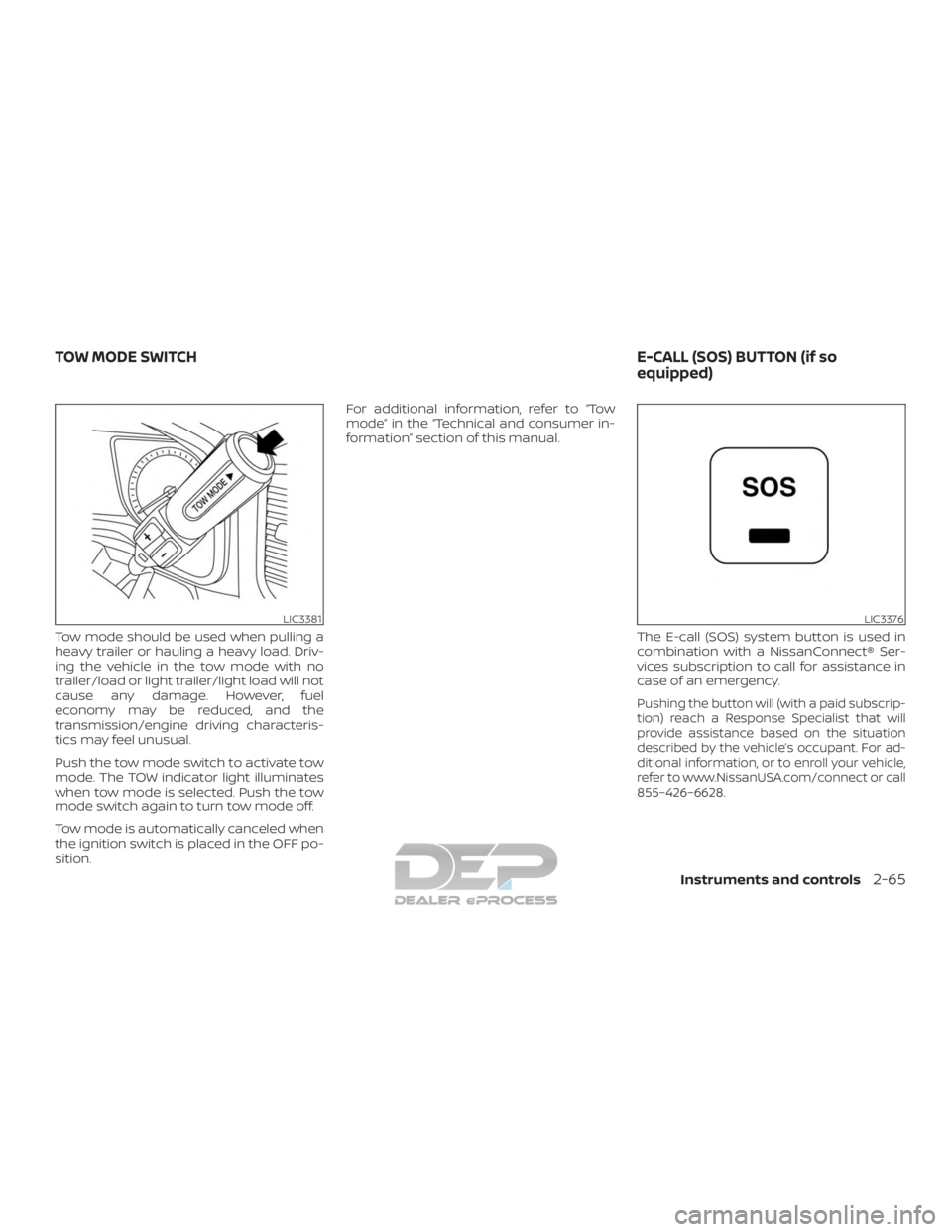
Tow mode should be used when pulling a
heavy trailer or hauling a heavy load. Driv-
ing the vehicle in the tow mode with no
trailer/load or light trailer/light load will not
cause any damage. However, fuel
economy may be reduced, and the
transmission/engine driving characteris-
tics may feel unusual.
Push the tow mode switch to activate tow
mode. The TOW indicator light illuminates
when tow mode is selected. Push the tow
mode switch again to turn tow mode off.
Tow mode is automatically canceled when
the ignition switch is placed in the OFF po-
sition.For additional information, refer to “Tow
mode” in the “Technical and consumer in-
formation” section of this manual.
The E-call (SOS) system button is used in
combination with a NissanConnect® Ser-
vices subscription to call for assistance in
case of an emergency.
Pushing the button will (with a paid subscrip-
tion) reach a Response Specialist that will
provide assistance based on the situation
described by the vehicle’s occupant. For ad-
ditional information, or to enroll your vehicle,
refer to www.NissanUSA.com/connect or call
855–426–6628.
LIC3381LIC3376
TOW MODE SWITCH E-CALL (SOS) BUTTON (if so
equipped)
Instruments and controls2-65
Page 217 of 682
3 Pre-driving checks and adjustments
Keys.............................................3-2NISSAN Intelligent Key® .......................3-2
NISSAN Vehicle Immobilizer System
keys..........................................3-4
Doors ...........................................3-5
Locking with key ..............................3-6
Locking with inside lock knob ................. 3-7
Locking with power door lock switch ......... 3-7
Rear doors (King Cab® models) ...............3-8
Automatic door locks (if so equipped) ........3-9
Child safety rear door lock
(if so equipped) .............................. 3-10
NISSAN Intelligent Key® ......................... 3-10
Operating range ............................. 3-12
Door locks/unlocks precaution ..............3-12
NISSAN Intelligent Key® Operation ...........3-13
How to use the remote keyless entry
function ..................................... 3-16
Warning signals ............................. 3-21
Troubleshooting guide ......................3-22
Remote Engine Start (if so equipped) ...........3-24
Remote Engine Start operating range .......3-24
Remote starting the vehicle .................3-25Extending engine run time
..................3-25
Canceling a Remote Engine Start ............3-25
Conditions the Remote Engine Start will
notwork .................................... 3-26
Hood ........................................... 3-27
Fuel-filler door .................................. 3-27
Diesel fuel engines .......................... 3-28
Gasoline fuel engines ........................ 3-28
Steering wheel ................................. 3-30
Manual operation (if so equipped) ...........3-31
Automatic operation (if so equipped) ........3-31
Sun visors ...................................... 3-32
Vanity mirrors (if so equipped) ...............3-33
Card holder (driver’s side only) ...............3-33
Mirrors ......................................... 3-33
Manual anti-glare rearview mirror
(if so equipped) .............................. 3-33
Automatic anti-glare rearview mirror
(if so equipped) .............................. 3-34
Outside mirror
s ............................. 3-35
Truck box ....................................... 3-39
Tailgate...................................... 3-39
Tie down hooks ............................. 3-43