light NISSAN TITAN 2019 Owner´s Manual
[x] Cancel search | Manufacturer: NISSAN, Model Year: 2019, Model line: TITAN, Model: NISSAN TITAN 2019Pages: 682, PDF Size: 7.99 MB
Page 149 of 682
Light reminder chime
With the ignition switch placed in the OFF
position, a chime sounds when the driver’s
door is opened if the headlights or parking
lights are on.
Turn the headlight control switch off before
leaving the vehicle.
NISSAN Intelligent Key® door
buzzer
The Intelligent Key door buzzer sounds if
the Intelligent Key is lef t inside the vehicle
when locking the doors. When the buzzer
sounds, be sure to check both the vehicle
and the Intelligent Key. For additional infor-
mation, refer to “NISSAN Intelligent Key®” in
the “Pre-driving checks and adjustments”
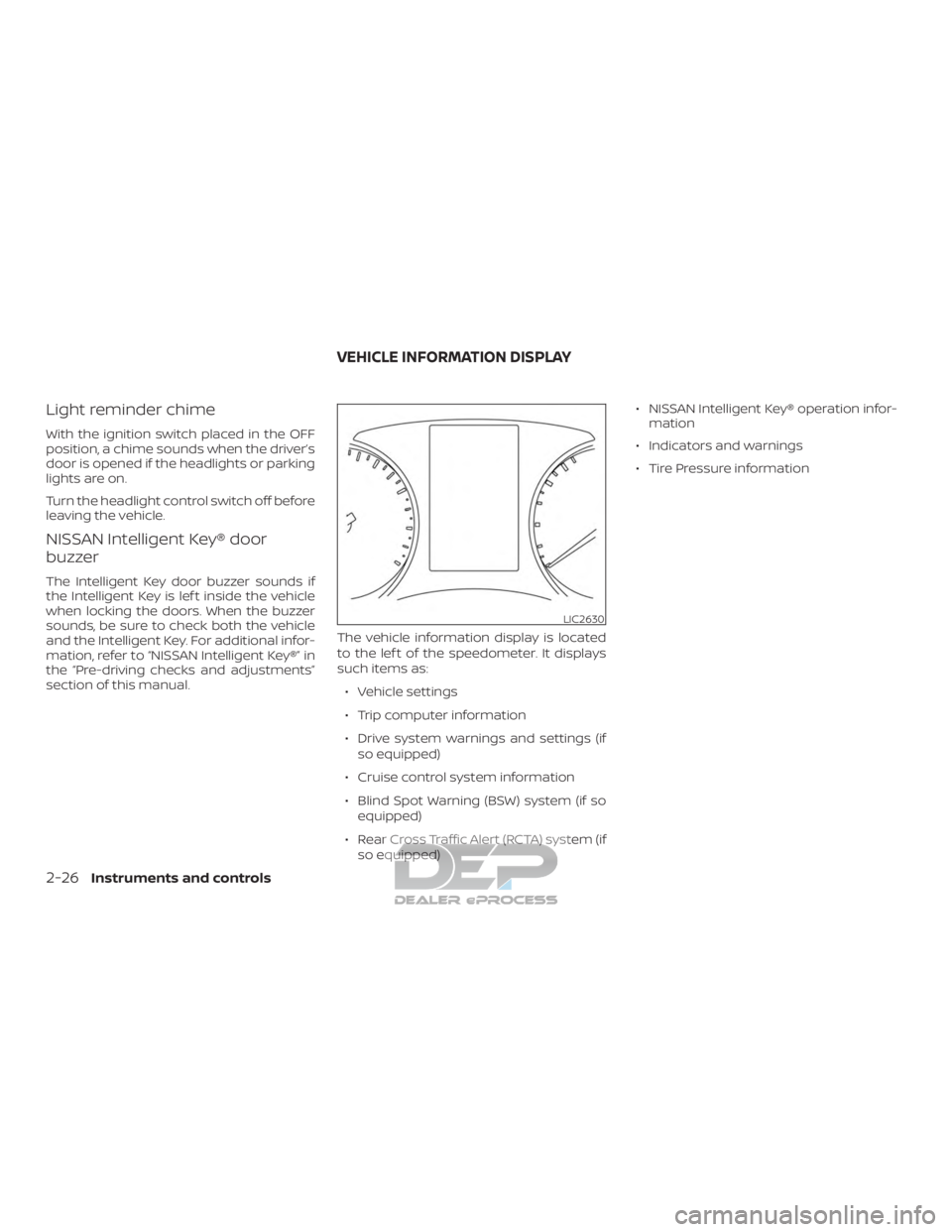
section of this manual.The vehicle information display is located
to the lef t of the speedometer. It displays
such items as:
∙ Vehicle settings
∙ Trip computer information
∙ Drive system warnings and settings (if so equipped)
∙ Cruise control system information
∙ Blind Spot Warning (BSW) system (if so equipped)
∙ Rear Cross Traffic Alert (RCTA) system (if so equipped) ∙ NISSAN Intelligent Key® operation infor-
mation
∙ Indicators and warnings
∙ Tire Pressure information
LIC2630
VEHICLE INFORMATION DISPLAY
2-26Instruments and controls
Page 153 of 682
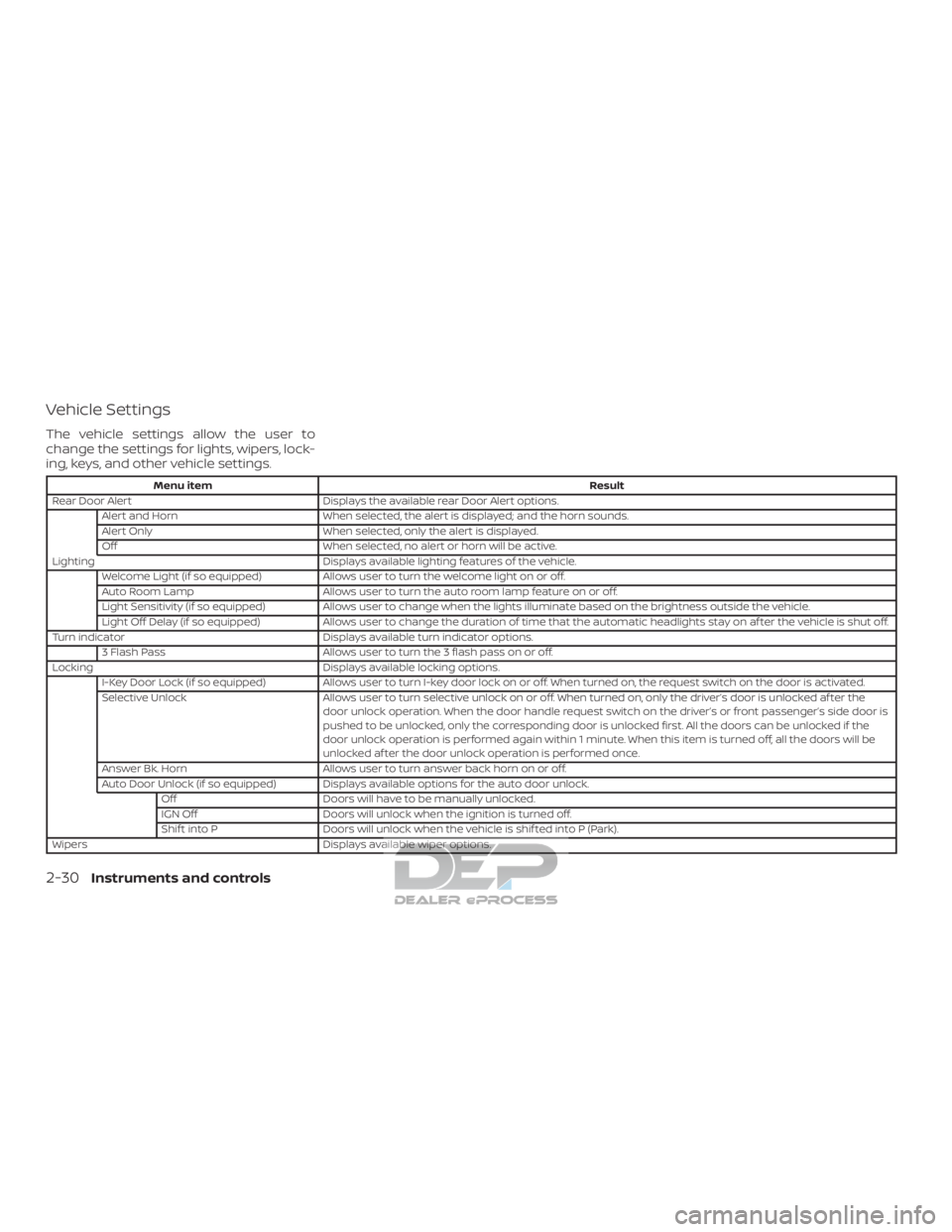
Vehicle Settings
The vehicle settings allow the user to
change the settings for lights, wipers, lock-
ing, keys, and other vehicle settings.
Menu itemResult
Rear Door Alert Displays the available rear Door Alert options.
Alert and Horn When selected, the alert is displayed; and the horn sounds.
Alert Only When selected, only the alert is displayed.
Off When selected, no alert or horn will be active.
Lighting Displays available lighting features of the vehicle.
Welcome Light (if so equipped) Allows user to turn the welcome light on or off.
Auto Room Lamp Allows user to turn the auto room lamp feature on or off.
Light Sensitivity (if so equipped) Allows user to change when the lights illuminate based on the brightness outside the vehicle.
Light Off Delay (if so equipped) Allows user to change the duration of time that the automatic headlights stay on af ter the vehicle is shut off.
Turn indicator Displays available turn indicator options.
3 Flash Pass Allows user to turn the 3 flash pass on or off.
Locking Displays available locking options.
I-Key Door Lock (if so equipped) Allows user to turn I-key door lock on or off. When turned on, the request switch on the door is activated.
Selective Unlock Allows user to turn selective unlock on or off. When turned on, only the driver’s door is unlocked af ter the
door unlock operation. When the door handle request switch on the driver’s or front passenger’s side door is
pushed to be unlocked, only the corresponding door is unlocked first. All the doors can be unlocked if the
door unlock operation is performed again within 1 minute. When this item is turned off, all the doors will be
unlocked af ter the door unlock operation is performed once.
Answer Bk. Horn Allows user to turn answer back horn on or off.
Auto Door Unlock (if so equipped) Displays available options for the auto door unlock. Off Doors will have to be manually unlocked.
IGN Off Doors will unlock when the ignition is turned off.
Shif t into P Doors will unlock when the vehicle is shif ted into P (Park).
Wipers Displays available wiper options.
2-30Instruments and controls
Page 154 of 682
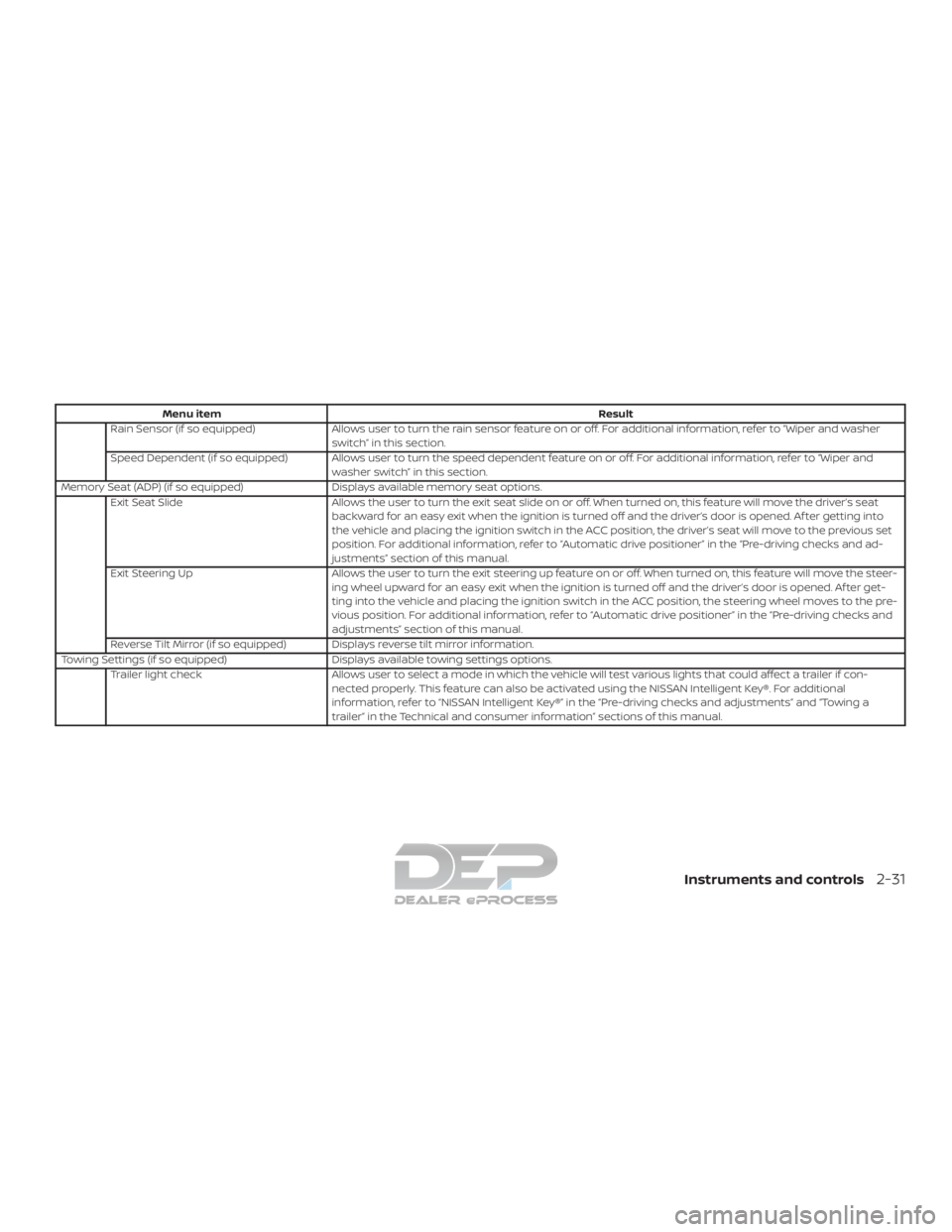
Menu itemResult
Rain Sensor (if so equipped) Allows user to turn the rain sensor feature on or off. For additional information, refer to “Wiper and washer
switch” in this section.
Speed Dependent (if so equipped) Allows user to turn the speed dependent feature on or off. For additional information, refer to “Wiper and washer switch” in this section.
Memory Seat (ADP) (if so equipped) Displays available memory seat options.
Exit Seat Slide Allows the user to turn the exit seat slide on or off. When turned on, this feature will move the driver’s seat
backward for an easy exit when the ignition is turned off and the driver’s door is opened. Af ter getting into
the vehicle and placing the ignition switch in the ACC position, the driver’s seat will move to the previous set
position. For additional information, refer to “Automatic drive positioner” in the “Pre-driving checks and ad-
justments” section of this manual.
Exit Steering Up Allows the user to turn the exit steering up feature on or off. When turned on, this feature will move the steer-
ing wheel upward for an easy exit when the ignition is turned off and the driver’s door is opened. Af ter get-
ting into the vehicle and placing the ignition switch in the ACC position, the steering wheel moves to the pre-
vious position. For additional information, refer to “Automatic drive positioner” in the “Pre-driving checks and
adjustments” section of this manual.
Reverse Tilt Mirror (if so equipped) Displays reverse tilt mirror information.
Towing Settings (if so equipped) Displays available towing settings options.
Trailer light check Allows user to select a mode in which the vehicle will test various lights that could affect a trailer if con-
nected properly. This feature can also be activated using the NISSAN Intelligent Key®. For additional
information, refer to “NISSAN Intelligent Key®” in the “Pre-driving checks and adjustments” and “Towing a
trailer” in the Technical and consumer information” sections of this manual.
Instruments and controls2-31
Page 159 of 682
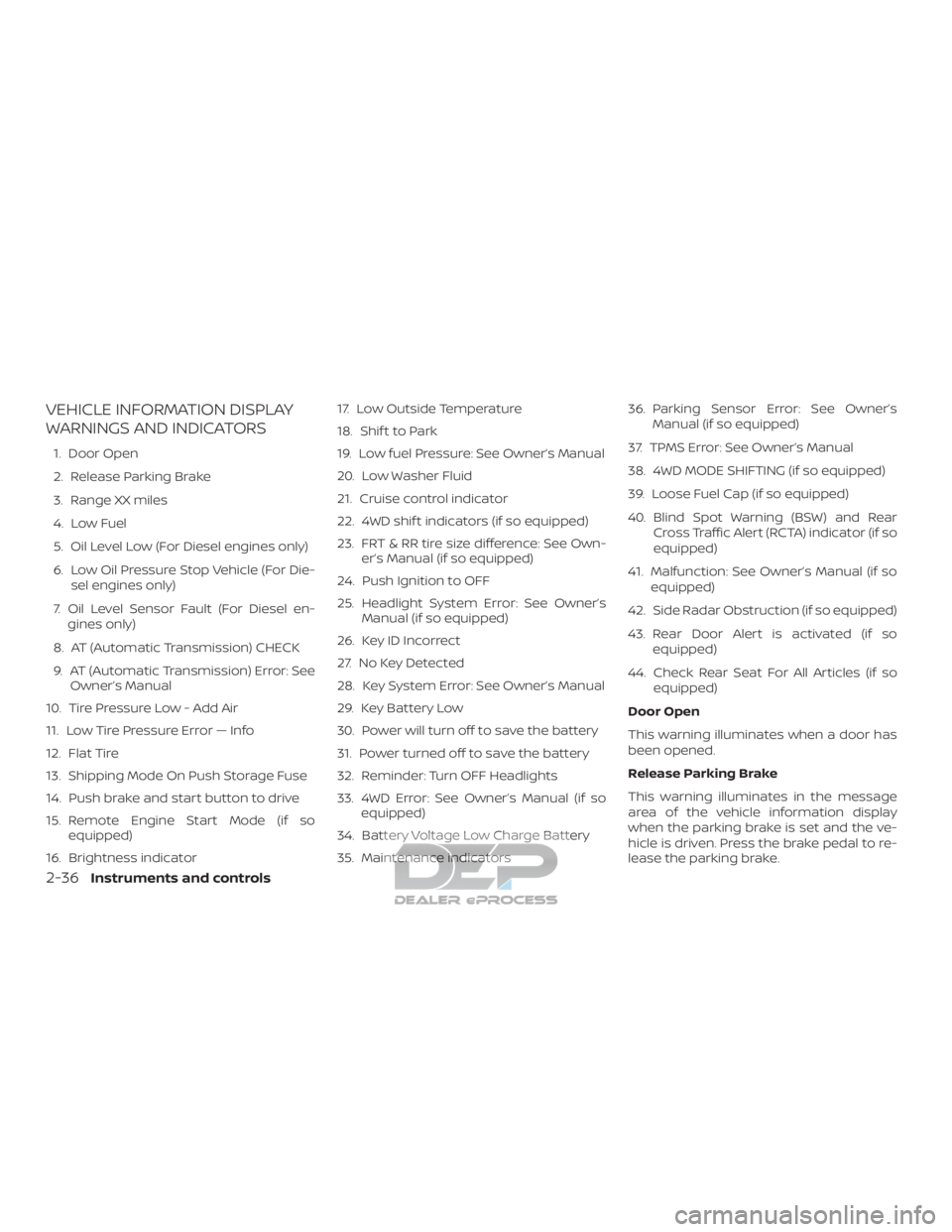
VEHICLE INFORMATION DISPLAY
WARNINGS AND INDICATORS
1. Door Open
2. Release Parking Brake
3. Range XX miles
4. Low Fuel
5. Oil Level Low (For Diesel engines only)
6. Low Oil Pressure Stop Vehicle (For Die-sel engines only)
7. Oil Level Sensor Fault (For Diesel en- gines only)
8. AT (Automatic Transmission) CHECK
9. AT (Automatic Transmission) Error: See Owner’s Manual
10. Tire Pressure Low - Add Air
11. Low Tire Pressure Error — Info
12. Flat Tire
13. Shipping Mode On Push Storage Fuse
14. Push brake and start button to drive
15. Remote Engine Start Mode (if so equipped)
16. Brightness indicator 17. Low Outside Temperature
18. Shif t to Park
19. Low fuel Pressure: See Owner’s Manual
20. Low Washer Fluid
21. Cruise control indicator
22. 4WD shif t indicators (if so equipped)
23. FRT & RR tire size difference: See Own-
er’s Manual (if so equipped)
24. Push Ignition to OFF
25. Headlight System Error: See Owner’s Manual (if so equipped)
26. Key ID Incorrect
27. No Key Detected
28. Key System Error: See Owner’s Manual
29. Key Battery Low
30. Power will turn off to save the battery
31. Power turned off to save the battery
32. Reminder: Turn OFF Headlights
33. 4WD Error: See Owner’s Manual (if so equipped)
34. Battery Voltage Low Charge Battery
35. Maintenance indicators 36. Parking Sensor Error: See Owner’s
Manual (if so equipped)
37. TPMS Error: See Owner’s Manual
38. 4WD MODE SHIFTING (if so equipped)
39. Loose Fuel Cap (if so equipped)
40. Blind Spot Warning (BSW) and Rear Cross Traffic Alert (RCTA) indicator (if so
equipped)
41. Malfunction: See Owner’s Manual (if so equipped)
42. Side Radar Obstruction (if so equipped)
43. Rear Door Alert is activated (if so equipped)
44. Check Rear Seat For All Articles (if so equipped)
Door Open
This warning illuminates when a door has
been opened.
Release Parking Brake
This warning illuminates in the message
area of the vehicle information display
when the parking brake is set and the ve-
hicle is driven. Press the brake pedal to re-
lease the parking brake.
2-36Instruments and controls
Page 160 of 682
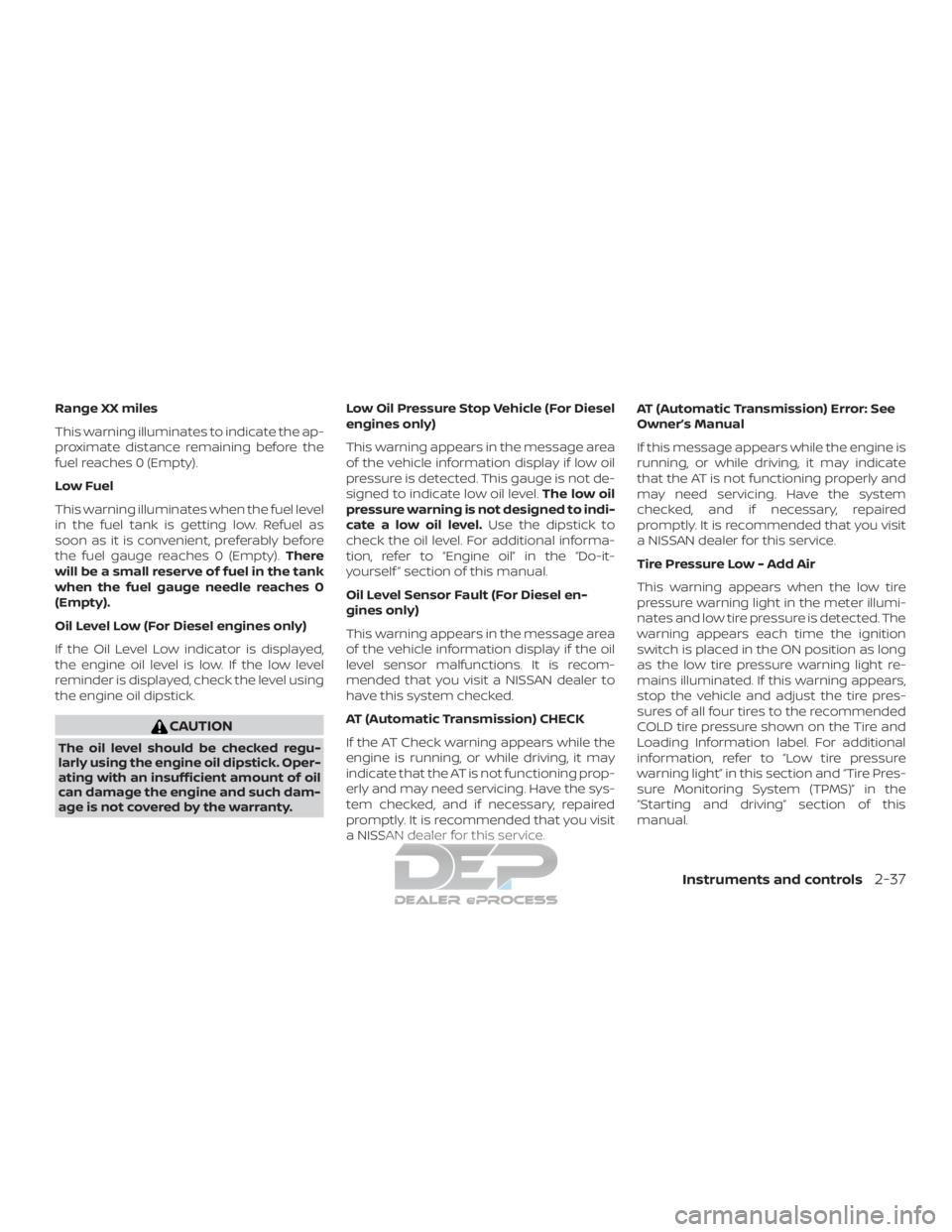
Range XX miles
This warning illuminates to indicate the ap-
proximate distance remaining before the
fuel reaches 0 (Empty).
Low Fuel
This warning illuminates when the fuel level
in the fuel tank is getting low. Refuel as
soon as it is convenient, preferably before
the fuel gauge reaches 0 (Empty).There
will be a small reserve of fuel in the tank
when the fuel gauge needle reaches 0
(Empty).
Oil Level Low (For Diesel engines only)
If the Oil Level Low indicator is displayed,
the engine oil level is low. If the low level
reminder is displayed, check the level using
the engine oil dipstick.
CAUTION
The oil level should be checked regu-
larly using the engine oil dipstick. Oper-
ating with an insufficient amount of oil
can damage the engine and such dam-
age is not covered by the warranty. Low Oil Pressure Stop Vehicle (For Diesel
engines only)
This warning appears in the message area
of the vehicle information display if low oil
pressure is detected. This gauge is not de-
signed to indicate low oil level.
The low oil
pressure warning is not designed to indi-
cate a low oil level. Use the dipstick to
check the oil level. For additional informa-
tion, refer to “Engine oil” in the “Do-it-
yourself ” section of this manual.
Oil Level Sensor Fault (For Diesel en-
gines only)
This warning appears in the message area
of the vehicle information display if the oil
level sensor malfunctions. It is recom-
mended that you visit a NISSAN dealer to
have this system checked.
AT (Automatic Transmission) CHECK
If the AT Check warning appears while the
engine is running, or while driving, it may
indicate that the AT is not functioning prop-
erly and may need servicing. Have the sys-
tem checked, and if necessary, repaired
promptly. It is recommended that you visit
a NISSAN dealer for this service. AT (Automatic Transmission) Error: See
Owner’s Manual
If this message appears while the engine is
running, or while driving, it may indicate
that the AT is not functioning properly and
may need servicing. Have the system
checked, and if necessary, repaired
promptly. It is recommended that you visit
a NISSAN dealer for this service.
Tire Pressure Low - Add Air
This warning appears when the low tire
pressure warning light in the meter illumi-
nates and low tire pressure is detected. The
warning appears each time the ignition
switch is placed in the ON position as long
as the low tire pressure warning light re-
mains illuminated. If this warning appears,
stop the vehicle and adjust the tire pres-
sures of all four tires to the recommended
COLD tire pressure shown on the Tire and
Loading Information label. For additional
information, refer to “Low tire pressure
warning light” in this section and “Tire Pres-
sure Monitoring System (TPMS)” in the
“Starting and driving” section of this
manual.
Instruments and controls2-37
Page 161 of 682
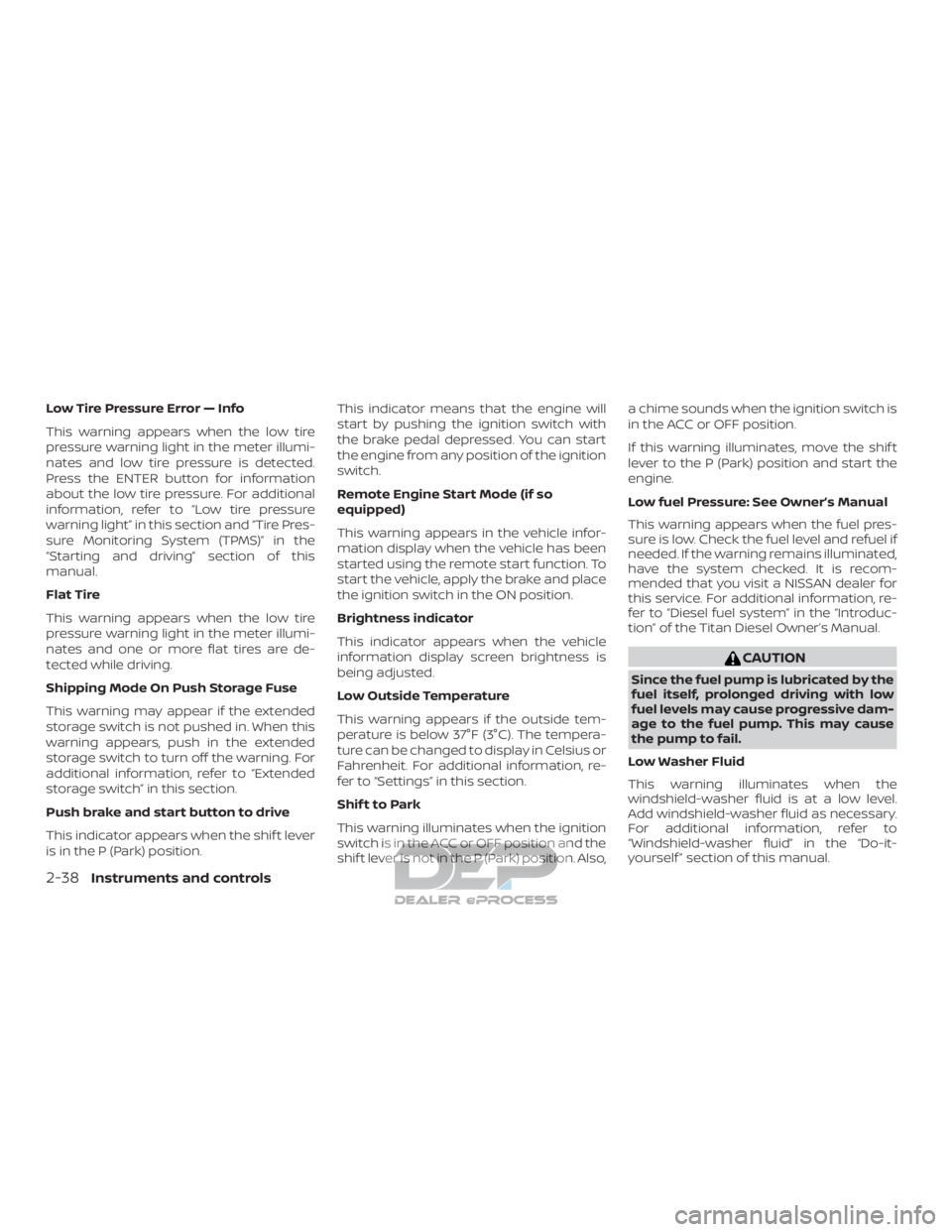
Low Tire Pressure Error — Info
This warning appears when the low tire
pressure warning light in the meter illumi-
nates and low tire pressure is detected.
Press the ENTER button for information
about the low tire pressure. For additional
information, refer to “Low tire pressure
warning light” in this section and “Tire Pres-
sure Monitoring System (TPMS)” in the
“Starting and driving” section of this
manual.
Flat Tire
This warning appears when the low tire
pressure warning light in the meter illumi-
nates and one or more flat tires are de-
tected while driving.
Shipping Mode On Push Storage Fuse
This warning may appear if the extended
storage switch is not pushed in. When this
warning appears, push in the extended
storage switch to turn off the warning. For
additional information, refer to “Extended
storage switch” in this section.
Push brake and start button to drive
This indicator appears when the shif t lever
is in the P (Park) position.This indicator means that the engine will
start by pushing the ignition switch with
the brake pedal depressed. You can start
the engine from any position of the ignition
switch.
Remote Engine Start Mode (if so
equipped)
This warning appears in the vehicle infor-
mation display when the vehicle has been
started using the remote start function. To
start the vehicle, apply the brake and place
the ignition switch in the ON position.
Brightness indicator
This indicator appears when the vehicle
information display screen brightness is
being adjusted.
Low Outside Temperature
This warning appears if the outside tem-
perature is below 37°F (3°C). The tempera-
ture can be changed to display in Celsius or
Fahrenheit. For additional information, re-
fer to “Settings” in this section.
Shif t to Park
This warning illuminates when the ignition
switch is in the ACC or OFF position and the
shif t lever is not in the P (Park) position. Also,a chime sounds when the ignition switch is
in the ACC or OFF position.
If this warning illuminates, move the shif t
lever to the P (Park) position and start the
engine.
Low fuel Pressure: See Owner’s Manual
This warning appears when the fuel pres-
sure is low. Check the fuel level and refuel if
needed. If the warning remains illuminated,
have the system checked. It is recom-
mended that you visit a NISSAN dealer for
this service. For additional information, re-
fer to “Diesel fuel system” in the “Introduc-
tion” of the Titan Diesel Owner’s Manual.
CAUTION
Since the fuel pump is lubricated by the
fuel itself, prolonged driving with low
fuel levels may cause progressive dam-
age to the fuel pump. This may cause
the pump to fail.
Low Washer Fluid
This warning illuminates when the
windshield-washer fluid is at a low level.
Add windshield-washer fluid as necessary.
For additional information, refer to
“Windshield-washer fluid” in the “Do-it-
yourself ” section of this manual.
2-38Instruments and controls
Page 162 of 682
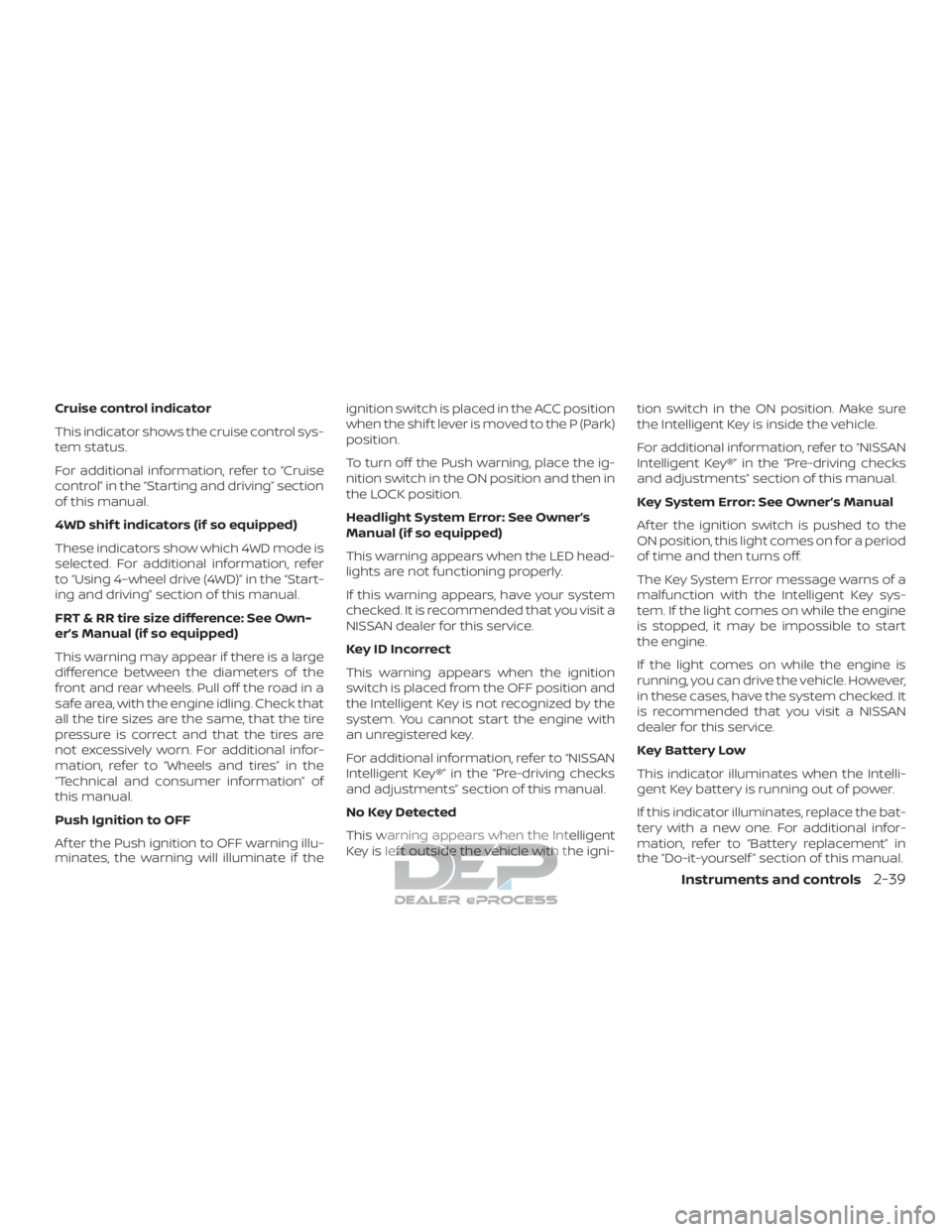
Cruise control indicator
This indicator shows the cruise control sys-
tem status.
For additional information, refer to “Cruise
control” in the “Starting and driving” section
of this manual.
4WD shif t indicators (if so equipped)
These indicators show which 4WD mode is
selected. For additional information, refer
to “Using 4–wheel drive (4WD)” in the “Start-
ing and driving” section of this manual.
FRT & RR tire size difference: See Own-
er’s Manual (if so equipped)
This warning may appear if there is a large
difference between the diameters of the
front and rear wheels. Pull off the road in a
safe area, with the engine idling. Check that
all the tire sizes are the same, that the tire
pressure is correct and that the tires are
not excessively worn. For additional infor-
mation, refer to “Wheels and tires” in the
“Technical and consumer information” of
this manual.
Push Ignition to OFF
Af ter the Push ignition to OFF warning illu-
minates, the warning will illuminate if theignition switch is placed in the ACC position
when the shif t lever is moved to the P (Park)
position.
To turn off the Push warning, place the ig-
nition switch in the ON position and then in
the LOCK position.
Headlight System Error: See Owner’s
Manual (if so equipped)
This warning appears when the LED head-
lights are not functioning properly.
If this warning appears, have your system
checked. It is recommended that you visit a
NISSAN dealer for this service.
Key ID Incorrect
This warning appears when the ignition
switch is placed from the OFF position and
the Intelligent Key is not recognized by the
system. You cannot start the engine with
an unregistered key.
For additional information, refer to “NISSAN
Intelligent Key®” in the “Pre-driving checks
and adjustments” section of this manual.
No Key Detected
This warning appears when the Intelligent
Key is lef t outside the vehicle with the igni-
tion switch in the ON position. Make sure
the Intelligent Key is inside the vehicle.
For additional information, refer to “NISSAN
Intelligent Key®” in the “Pre-driving checks
and adjustments” section of this manual.
Key System Error: See Owner’s Manual
Af ter the ignition switch is pushed to the
ON position, this light comes on for a period
of time and then turns off.
The Key System Error message warns of a
malfunction with the Intelligent Key sys-
tem. If the light comes on while the engine
is stopped, it may be impossible to start
the engine.
If the light comes on while the engine is
running, you can drive the vehicle. However,
in these cases, have the system checked. It
is recommended that you visit a NISSAN
dealer for this service.
Key Battery Low
This indicator illuminates when the Intelli-
gent Key battery is running out of power.
If this indicator illuminates, replace the bat-
tery with a new one. For additional infor-
mation, refer to “Battery replacement” in
the “Do-it-yourself ” section of this manual.
Instruments and controls2-39
Page 163 of 682
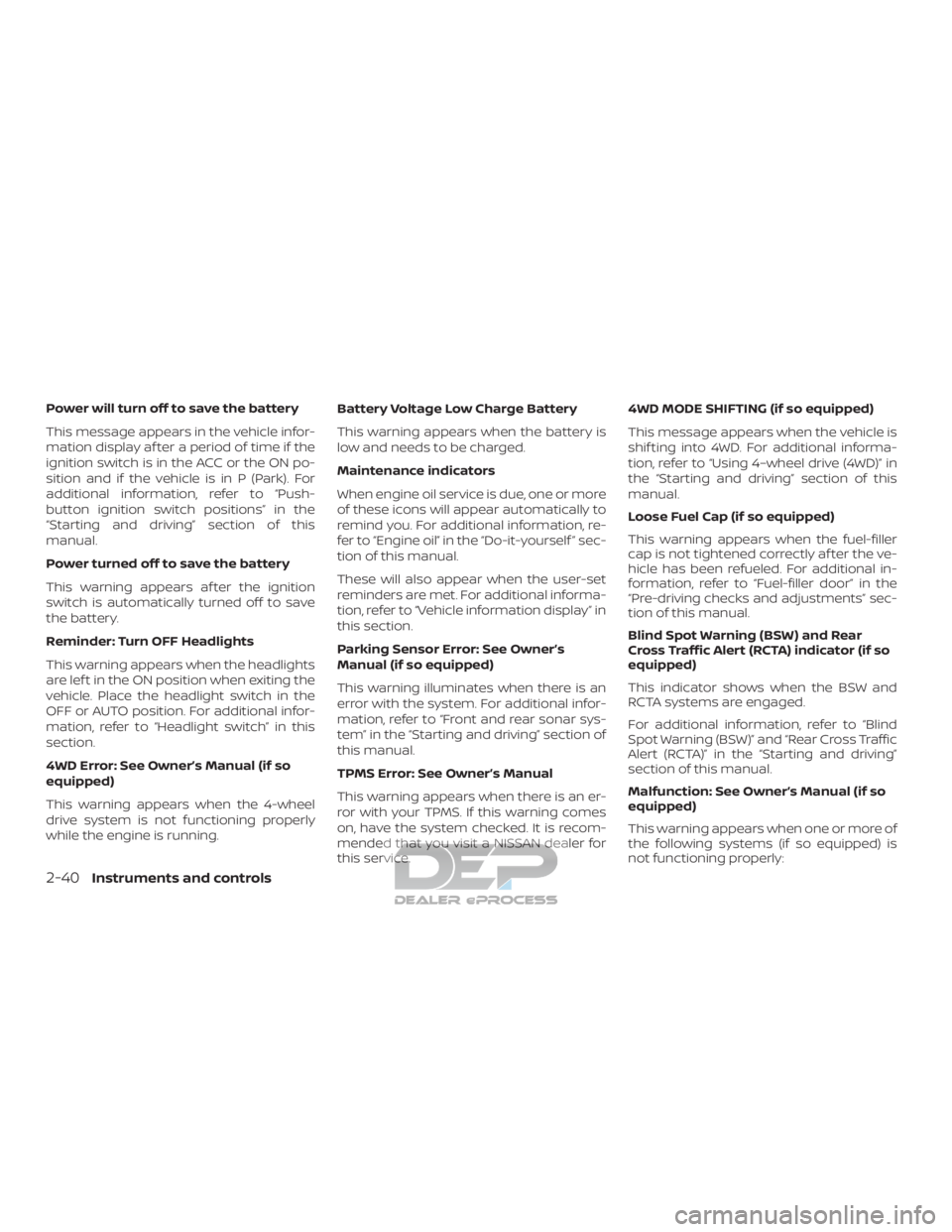
Power will turn off to save the battery
This message appears in the vehicle infor-
mation display af ter a period of time if the
ignition switch is in the ACC or the ON po-
sition and if the vehicle is in P (Park). For
additional information, refer to “Push-
button ignition switch positions” in the
“Starting and driving” section of this
manual.
Power turned off to save the battery
This warning appears af ter the ignition
switch is automatically turned off to save
the battery.
Reminder: Turn OFF Headlights
This warning appears when the headlights
are lef t in the ON position when exiting the
vehicle. Place the headlight switch in the
OFF or AUTO position. For additional infor-
mation, refer to “Headlight switch” in this
section.
4WD Error: See Owner’s Manual (if so
equipped)
This warning appears when the 4-wheel
drive system is not functioning properly
while the engine is running.Battery Voltage Low Charge Battery
This warning appears when the battery is
low and needs to be charged.
Maintenance indicators
When engine oil service is due, one or more
of these icons will appear automatically to
remind you. For additional information, re-
fer to “Engine oil” in the “Do-it-yourself ” sec-
tion of this manual.
These will also appear when the user-set
reminders are met. For additional informa-
tion, refer to “Vehicle information display” in
this section.
Parking Sensor Error: See Owner’s
Manual (if so equipped)
This warning illuminates when there is an
error with the system. For additional infor-
mation, refer to “Front and rear sonar sys-
tem” in the “Starting and driving” section of
this manual.
TPMS Error: See Owner’s Manual
This warning appears when there is an er-
ror with your TPMS. If this warning comes
on, have the system checked. It is recom-
mended that you visit a NISSAN dealer for
this service.4WD MODE SHIFTING (if so equipped)
This message appears when the vehicle is
shif ting into 4WD. For additional informa-
tion, refer to “Using 4–wheel drive (4WD)” in
the “Starting and driving” section of this
manual.
Loose Fuel Cap (if so equipped)
This warning appears when the fuel-filler
cap is not tightened correctly af ter the ve-
hicle has been refueled. For additional in-
formation, refer to “Fuel-filler door” in the
“Pre-driving checks and adjustments” sec-
tion of this manual.
Blind Spot Warning (BSW) and Rear
Cross Traffic Alert (RCTA) indicator (if so
equipped)
This indicator shows when the BSW and
RCTA systems are engaged.
For additional information, refer to “Blind
Spot Warning (BSW)” and “Rear Cross Traffic
Alert (RCTA)” in the “Starting and driving”
section of this manual.
Malfunction: See Owner’s Manual (if so
equipped)
This warning appears when one or more of
the following systems (if so equipped) is
not functioning properly:
2-40Instruments and controls
Page 166 of 682
Your vehicle has two types of security sys-
tems:∙ Vehicle security system
∙ NISSAN Vehicle Immobilizer System
VEHICLE SECURITY SYSTEM
The vehicle security system provides visual
and audible alarm signals if someone
opens the doors or hood when the system
is armed. It is not, however, a motion detec-
tion type system that activates when a ve-
hicle is moved or when a vibration occurs.
The system helps deter vehicle thef t but
cannot prevent it, nor can it prevent the thef t of interior or exterior vehicle compo-
nents in all situations. Always secure your
vehicle even if parking for a brief period.
Never leave your keys in the vehicle, and
always lock the vehicle when unattended.
Be aware of your surroundings, and park in
secure, well-lit areas whenever possible.
Many devices offering additional protec-
tion, such as component locks, identifica-
tion markers, and tracking systems, are
available at auto supply stores and spe-
cialty shops. A NISSAN dealer may also offer
such equipment. Check with your insur-
ance company to see if you may be eligible
for discounts for various thef t protection
features.
How to arm the vehicle security
system
1. Close all windows.
(The system can be
armed even if the windows are open.)
2. Remove the Intelligent Key from the ve- hicle.
3. Close all doors. Lock all doors. The doors can be locked with the Intelligent
Key, door handle request switch, or me-
chanical key (if so equipped). 4. Confirm that the
security indica-
tor light stays on for about 30 seconds.
The vehicle security system is now pre-
armed. The vehicle security system will
automatically shif t into the armed
phase. The
security light begins
to flash once every three seconds. If
during the pre-armed phase one of the
following occurs, the system will not
arm:
∙ Any door is unlocked with the mechani- cal key (if so equipped), the Intelligent
Key or door request switch.
∙ Ignition switch is placed in ACC or ON position.
∙ If the key is turned slowly when lock-
ing the door, the system may not arm.
Furthermore, if the key is turned be-
yond the vertical position toward the
unlock position to remove the key,
the system may be disarmed when
the key is removed. If the indicator
light fails to glow for a period of time,
unlock the door once and lock it
again.
LIC0359
SECURITY SYSTEMS
Instruments and controls2-43
Page 167 of 682
∙Even when the driver and/or passen-
gers are in the vehicle, the system will
activate with all the doors, hood and
locked with the ignition switch placed
in the LOCK position. When placing
the ignition switch in the ACC or ON
position, the system will be released.
∙ The lockable bedside storage com-
partment (if so equipped) is not pro-
tected by the vehicle security system.
Vehicle security system activation
The vehicle security system will give the
following alarm:
∙ The headlights blink and the horn sounds intermittently but synchro-
nously.
∙ The alarm automatically turns off af ter a period of time. However, the alarm
reactivates if the vehicle is tampered
with again.
The alarm is activated by: ∙ opening any door or hood without us- ing the key (if so equipped) or Intelligent
Key (even if the door is unlocked by re-
leasing the door inside lock knob).
How to stop an activated alarm
The alarm stops only by unlocking the driv-
er’s door with the key (if so equipped), the
key fob (if so equipped), or by pressing
the
button on the Intelligent Key (if so
equipped).
NISSAN VEHICLE IMMOBILIZER
SYSTEM
The NISSAN Vehicle Immobilizer System
will not allow the engine to start without
the use of a registered key.
If the engine fails to start using a registered
key (for example, when interference is
caused by another registered key, an auto-
mated toll road device or automatic pay-
ment device on the key ring), restart the
engine using the following procedures:
1. Leave the ignition switch placed in the ON position for approximately 5 sec-
onds.
2. Place the ignition switch in the OFF or LOCK position and wait approximately
10 seconds.
3. Repeat steps 1 and 2. 4. Restart the engine while holding the
device (which may have caused the in-
terference) separate from the regis-
tered key.
If the no start condition re-occurs, NISSAN
recommends placing the registered key on
a separate key ring to avoid interference
from other devices.
FCC Notice:
For USA:
This device complies with part 15 of the
FCC Rules. Operation is subject to the fol-
lowing two conditions: (1) This device
may not cause harmful interference, and
(2) this device must accept any interfer-
ence received, including interference
that may cause undesired operation.
NOTE:
Changes or modifications not expressly
approved by the party responsible for
compliance could void the user’s author-
ity to operate the equipment.
2-44Instruments and controls