brake NISSAN TITAN 2019 Owner´s Manual
[x] Cancel search | Manufacturer: NISSAN, Model Year: 2019, Model line: TITAN, Model: NISSAN TITAN 2019Pages: 682, PDF Size: 7.99 MB
Page 14 of 682
∙ If the wheels are changed for any rea-son, always replace with wheels
which have the same off-set dimen-
sion. Wheels of a different off-set
could cause premature tire wear, de-
grade vehicle handling characteris-
tics, affect the VDC system and/or in-
terference with the brake discs. Such
interference can lead to decreased
braking efficiency and/or early brake
pad wear. For additional information
on wheel off-set dimensions, refer to
“Wheels and tires” in the “Technical
and consumer information” section of
this manual.
∙ When replacing a wheel without the TPMS such as the spare tire, TPMS will
not function and the low tire pressure
warning light will flash for approxi-
mately 1 minute. The light will remain
on af ter 1 minute. Have your tires re-
placed and/or TPMS system reset as
soon as possible. It is recommended
that you visit a NISSAN dealer for this
service.
∙ Replacing tires with those not origi- nally specified by NISSAN could affect
the proper operation of the TPMS. ∙ The TPMS sensor may be damaged if
it is not handled correctly. Be careful
when handling the TPMS sensor.
∙ When replacing the TPMS sensor, the ID registration may be required. It is
recommended that you visit a NISSAN
dealer for ID registration.
∙ Do not use a valve stem cap that is not specified by NISSAN. The valve stem
cap may become stuck.
∙ Be sure that the valve stem caps are correctly fitted. Otherwise the valve
may be clogged up with dirt and
cause a malfunction or loss of
pressure.
∙ Do not install a damaged or deformed wheel or tire even if it has been re-
paired. Such wheels or tires could
have structural damage and could fail
without warning.
∙ The use of retread tires is not recommended.
∙ For additional information regarding tires, refer to “Important Tire Safety
Information” (US) or “Tire Safety Infor-
mation” (Canada) in the Warranty In-
formation Booklet.Four-wheel drive models
CAUTION
Always use tires of the same type, size,
brand, construction (bias, bias-belted
or radial), and tread pattern on all four
wheels. Failure to do so may result in a
circumference difference between tires
on the front and rear axles which will
cause excessive tire wear and may
damage the transmission, transfer case
and differential gears.
If excessive tire wear is found, it is recom-
mended that all four tires be replaced with
tires of the same size, brand, construction
and tread pattern. The tire pressure and
wheel alignment should also be checked
and corrected as necessary. It is recom-
mended that you visit a NISSAN dealer for
this service.
Wheel balance
Unbalanced wheels may affect vehicle
handling and tire life. Even with regular use,
wheels can get out of balance. Therefore,
they should be balanced as required.
Page 34 of 682
15. Heated steering wheel switch(if so equipped) (P. 2-59)
Warning systems switch
(if so equipped) (P. 2-59)
16. Auxiliary jack* USB port*
17. Hazard warning flasher switch
(P. 6-2)
18. Trailer Brake Controller Unit (TBCU)
(if so equipped) (P. 2-66)
19. Climate control seat switch
(if so equipped) (P. 2-55)
Heated front seat switches
(if so equipped) (P. 2-56)
20. Vehicle Dynamic Control (VDC) OFF
switch (P. 2-60)
Front and rear sonar system OFF
switch (if so equipped) (P. 2-64)
21. 4WD shif t switch (if so equipped)
(P. 5-45)
22. Push-button ignition switch
(P. 5-11)
23. Tilt and telescopic steering wheel
control (P. 3-30) 24. Headlight aiming control
(if so equipped) (P. 2-49)
Power inverter switch
(if so equipped) (P. 2-63)
Cargo lamp switch (P. 2-55)
Electronic locking rear differential
(E-Lock) system switch
(if so equipped) (P. 2-62)
Hill descent control system switch
(if so equipped) (P. 2-61)
25. Headlight switch (P. 2-49) Fog light switch (if so equipped)
(P. 2-54)
Instrument brightness control
switches (P. 2-49)
Trip reset switch (P. 2-6)
*Refer to the separate NissanConnect®
Owner’s Manual
Refer to the page number indicated in
parenthesis for operating details.
Illustrated table of contents0-9
Page 35 of 682
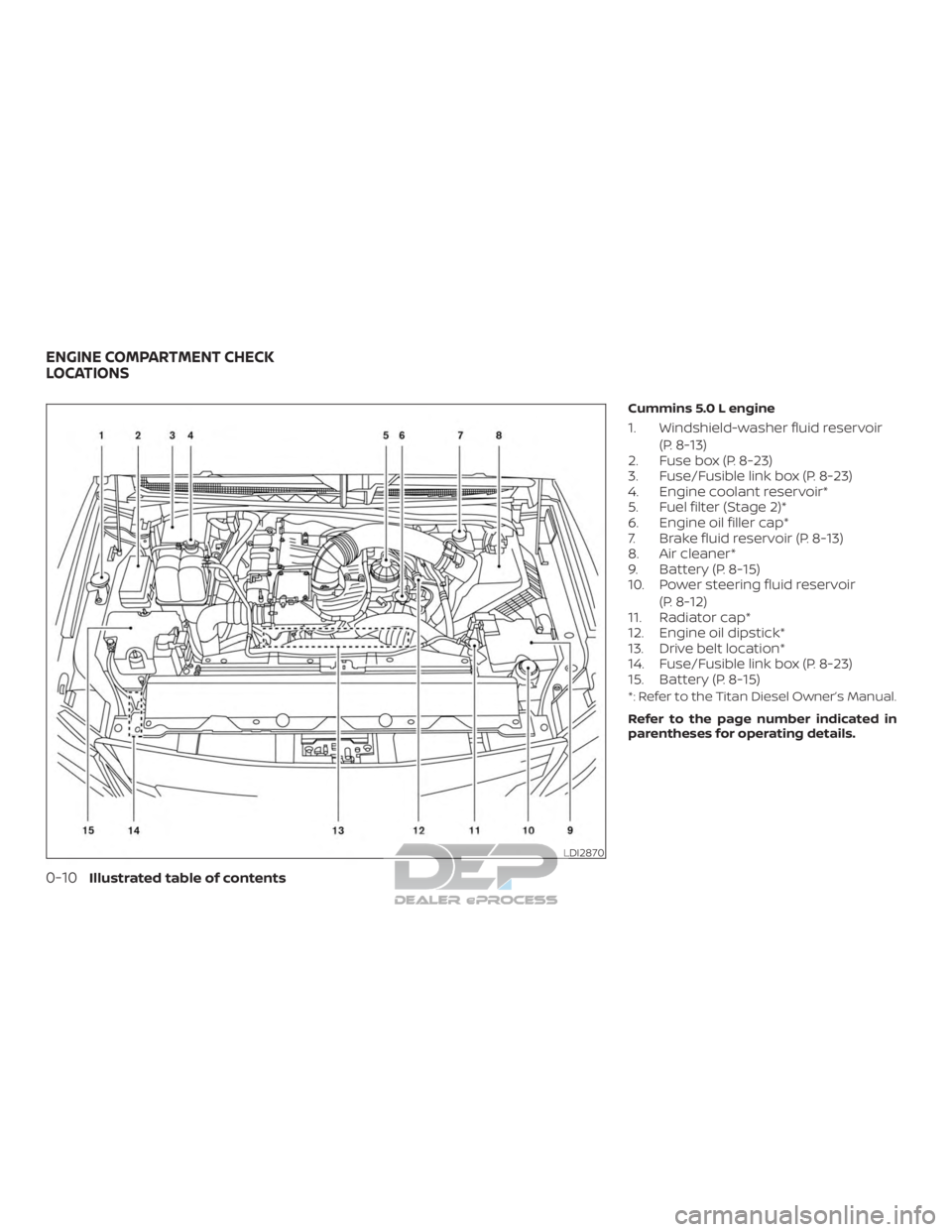
Cummins 5.0 L engine
1. Windshield-washer fluid reservoir(P. 8-13)
2. Fuse box (P. 8-23)
3. Fuse/Fusible link box (P. 8-23)
4. Engine coolant reservoir*
5. Fuel filter (Stage 2)*
6. Engine oil filler cap*
7. Brake fluid reservoir (P. 8-13)
8. Air cleaner*
9. Battery (P. 8-15)
10. Power steering fluid reservoir
(P. 8-12)
11. Radiator cap*
12. Engine oil dipstick*
13. Drive belt location*
14. Fuse/Fusible link box (P. 8-23)
15. Battery (P. 8-15)
*: Refer to the Titan Diesel Owner’s Manual.
Refer to the page number indicated in
parentheses for operating details.
LDI2870
ENGINE COMPARTMENT CHECK
LOCATIONS
0-10Illustrated table of contents
Page 36 of 682
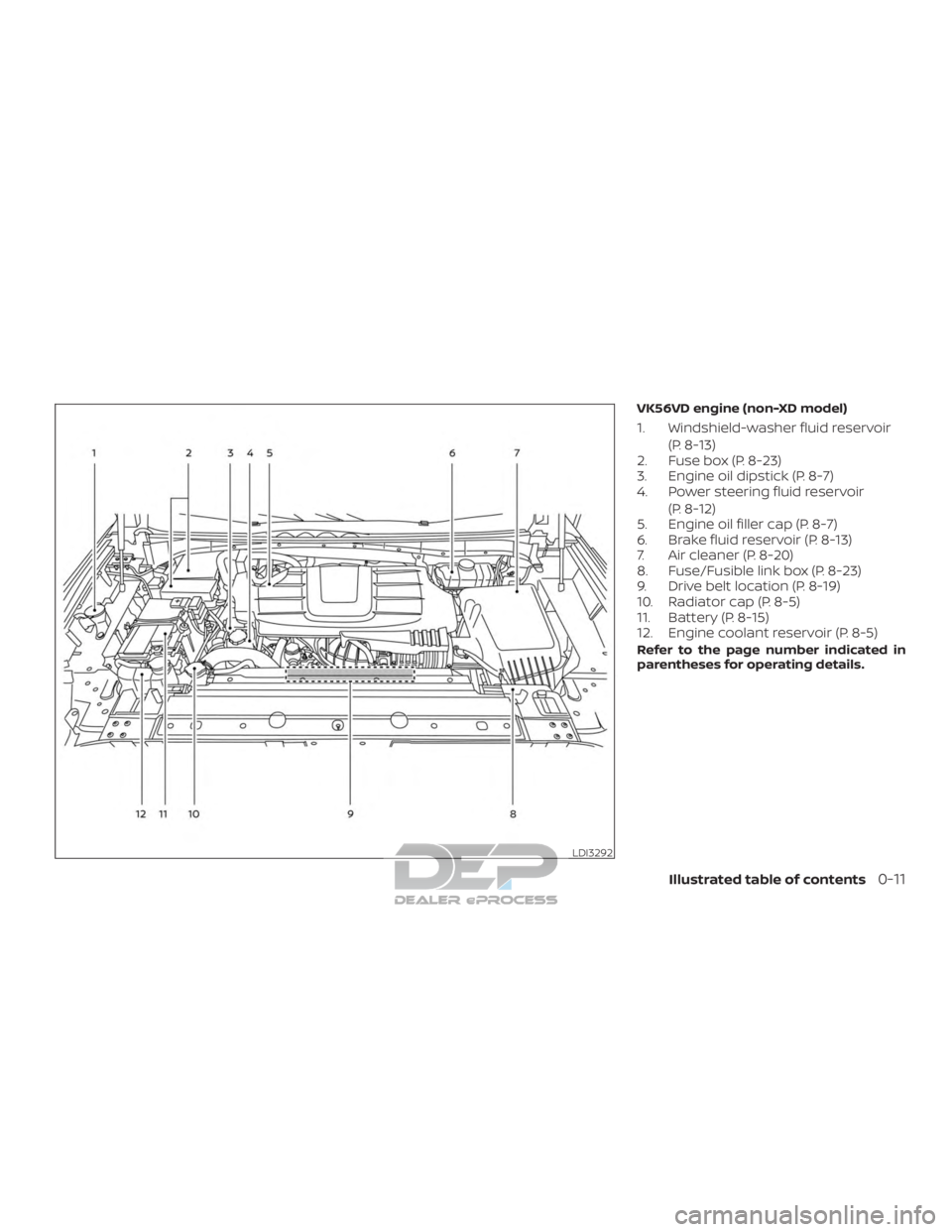
VK56VD engine (non-XD model)
1. Windshield-washer fluid reservoir(P. 8-13)
2. Fuse box (P. 8-23)
3. Engine oil dipstick (P. 8-7)
4. Power steering fluid reservoir
(P. 8-12)
5. Engine oil filler cap (P. 8-7)
6. Brake fluid reservoir (P. 8-13)
7. Air cleaner (P. 8-20)
8. Fuse/Fusible link box (P. 8-23)
9. Drive belt location (P. 8-19)
10. Radiator cap (P. 8-5)
11. Battery (P. 8-15)
12. Engine coolant reservoir (P. 8-5)
Refer to the page number indicated in
parentheses for operating details.
LDI3292
Illustrated table of contents0-11
Page 37 of 682
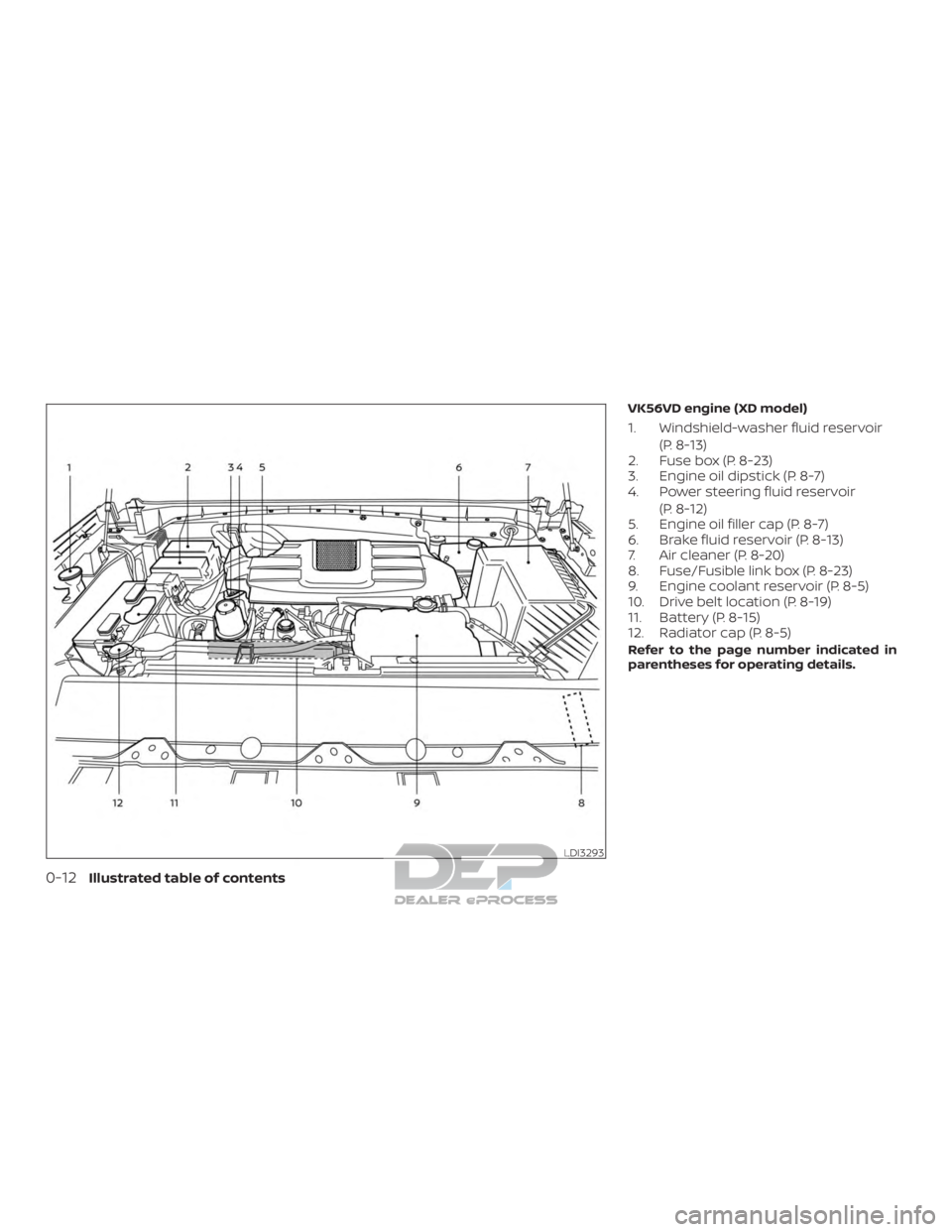
VK56VD engine (XD model)
1. Windshield-washer fluid reservoir(P. 8-13)
2. Fuse box (P. 8-23)
3. Engine oil dipstick (P. 8-7)
4. Power steering fluid reservoir
(P. 8-12)
5. Engine oil filler cap (P. 8-7)
6. Brake fluid reservoir (P. 8-13)
7. Air cleaner (P. 8-20)
8. Fuse/Fusible link box (P. 8-23)
9. Engine coolant reservoir (P. 8-5)
10. Drive belt location (P. 8-19)
11. Battery (P. 8-15)
12. Radiator cap (P. 8-5)
Refer to the page number indicated in
parentheses for operating details.
LDI3293
0-12Illustrated table of contents
Page 38 of 682
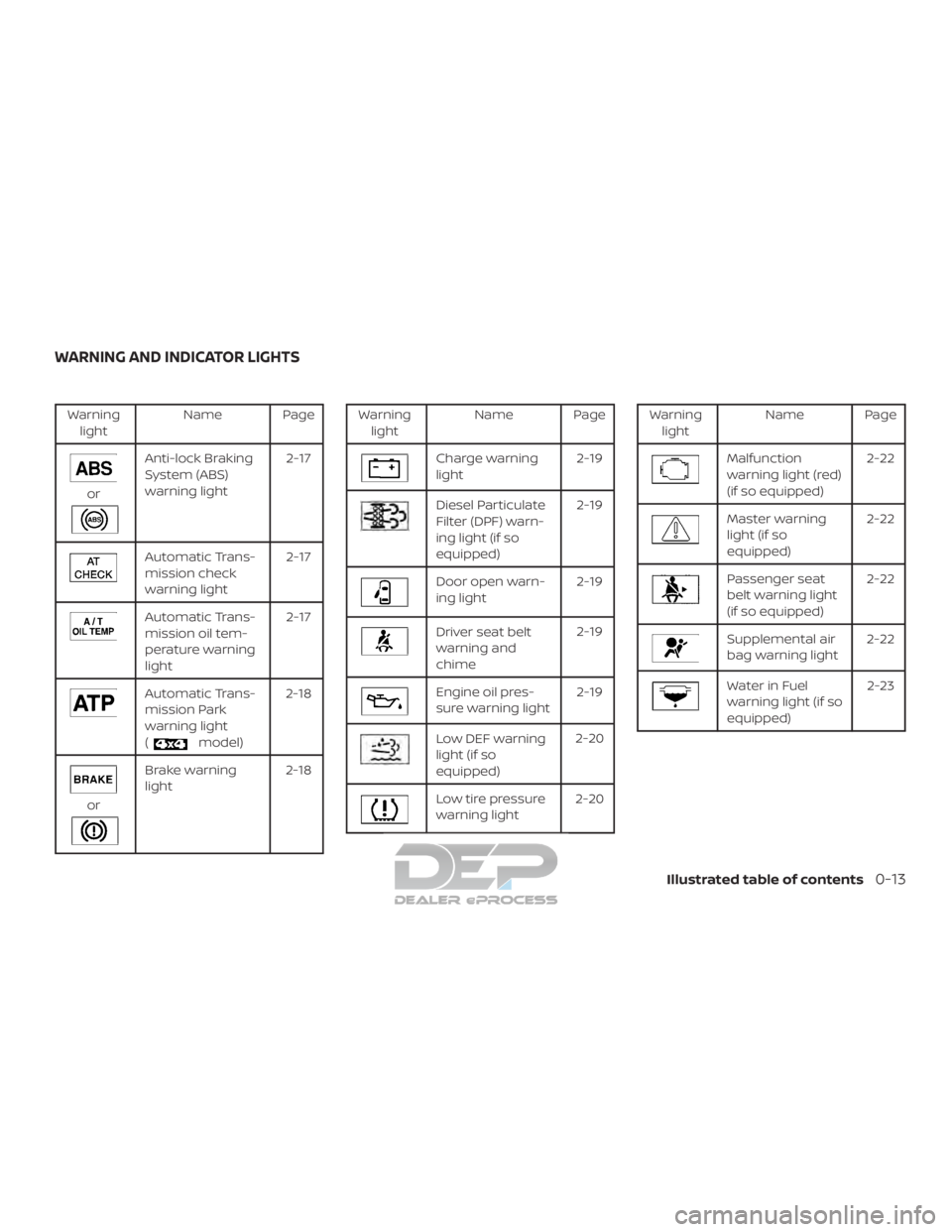
Warninglight Name Page
or
Anti-lock Braking
System (ABS)
warning light 2-17
Automatic Trans-
mission check
warning light2-17
Automatic Trans-
mission oil tem-
perature warning
light2-17
Automatic Trans-
mission Park
warning light
(
model)2-18
or
Brake warning
light
2-18
Warning
light Name Page
Charge warning
light 2-19
Diesel Particulate
Filter (DPF) warn-
ing light (if so
equipped)2-19
Door open warn-
ing light
2-19
Driver seat belt
warning and
chime2-19
Engine oil pres-
sure warning light
2-19
Low DEF warning
light (if so
equipped)2-20
Low tire pressure
warning light
2-20
Warning
light Name Page
Malfunction
warning light (red)
(if so equipped) 2-22
Master warning
light (if so
equipped)2-22
Passenger seat
belt warning light
(if so equipped)2-22
Supplemental air
bag warning light
2-22
Water in Fuel
warning light (if so
equipped) 2-23
WARNING AND INDICATOR LIGHTS
Illustrated table of contents0-13
Page 125 of 682
Heated seat switches (if so equipped)..........2-56
Heated rear seat switches (if so equipped) ......2-57
Heated steering wheel switch (if so equipped) . . 2-59
Warning systems switch (if so equipped) .......2-59
Vehicle Dynamic Control (VDC) OFF switch ......2-60
Hill descent control switch (if so equipped) ......2-61
Electronic locking rear differential (E-Lock)
system switch (if so equipped) ..................2-62
Power inverter switch (if so equipped) ..........2-63
Front and rear sonar system OFF switch
(if so equipped) ................................. 2-64
Tow mode switch .............................. 2-65
E-call (SOS) button (if so equipped) .............2-65
Trailer Brake Controller Unit (TBCU)
(if so equipped) ................................. 2-66
Rear Door Alert (if so equipped) .................2-66
Power outlets .................................. 2-67
12v Outlets .................................. 2-67
120v outlets (if so equipped) .................2-69
Extended storage switch .......................2-70
Storage ........................................ 2-71
Front-door pockets .......................... 2-71
Rear-door pockets (if so equipped) ..........2-72
Console side pockets (if so equipped) ........2-72 Seatback pockets (if so equipped)
...........2-72
Under-seat storage (if so equipped) .........2-73
Console box storage trays
(if so equipped) ..............................2-74
Glovebox.................................... 2-75
Console box (if so equipped) .................2-75
Center armrest storage (if so equipped) .....2-76
Under front seat storage bin
(if so equipped) .............................. 2-77
Overhead sunglasses storage
(if so equipped) .............................. 2-77
Cup holders ................................. 2-78
Grocery hooks (if so equipped) ...............2-81
Bed liner storage bins (if so equipped) .......2-81
Cargo hooks (if so equipped) ................2-82
C-Channel cargo hooks (if so equipped) .....2-82
Window s....................................... 2-83
P o
wer windows ............................. 2-83
Rear power window switch
(if so equipped) .............................. 2-85
Rear sliding window (if so equipped) .........2-86
Interior lights ................................... 2-87
Console light (if so equipped) ................2-88
Map lights (if so equipped) ...................2-88
Page 128 of 682
15. Heated steering wheel switch(if so equipped) (P. 2-59)
Warning systems switch
(if so equipped) (P. 2-59)
16. Auxiliary jack* USB port*
17. Hazard warning flasher switch
(P. 6-2)
18. Trailer Brake Controller Unit (TBCU)
(if so equipped) (P. 2-66)
19. Climate control seat switch
(if so equipped) (P. 2-55)
Heated front seat switches
(if so equipped) (P. 2-56)
20. Vehicle Dynamic Control (VDC) OFF
switch (P. 2-60)
Front and rear sonar system OFF
switch (if so equipped) (P. 2-64)
21. 4WD shif t switch (if so equipped)
(P. 5-45)
22. Push-button ignition switch
(P. 5-11)
23. Tilt and telescopic steering wheel
control (P. 3-30) 24. Headlight aiming control
(if so equipped) (P. 2-49)
Power inverter switch
(if so equipped) (P. 2-63)
Cargo lamp switch (P. 2-55)
Electronic locking rear differential
(E-Lock) system switch
(if so equipped) (P. 2-62)
Hill descent control system switch
(if so equipped) (P. 2-61)
25. Headlight switch (P. 2-49) Fog light switch (if so equipped)
(P. 2-54)
Instrument brightness control
switches (P. 2-49)
Trip reset switch (P. 2-6)
*Refer to the separate NissanConnect®
Owner’s Manual
Refer to the page number indicated in
parenthesis for operating details.
Instruments and controls2-5
Page 139 of 682
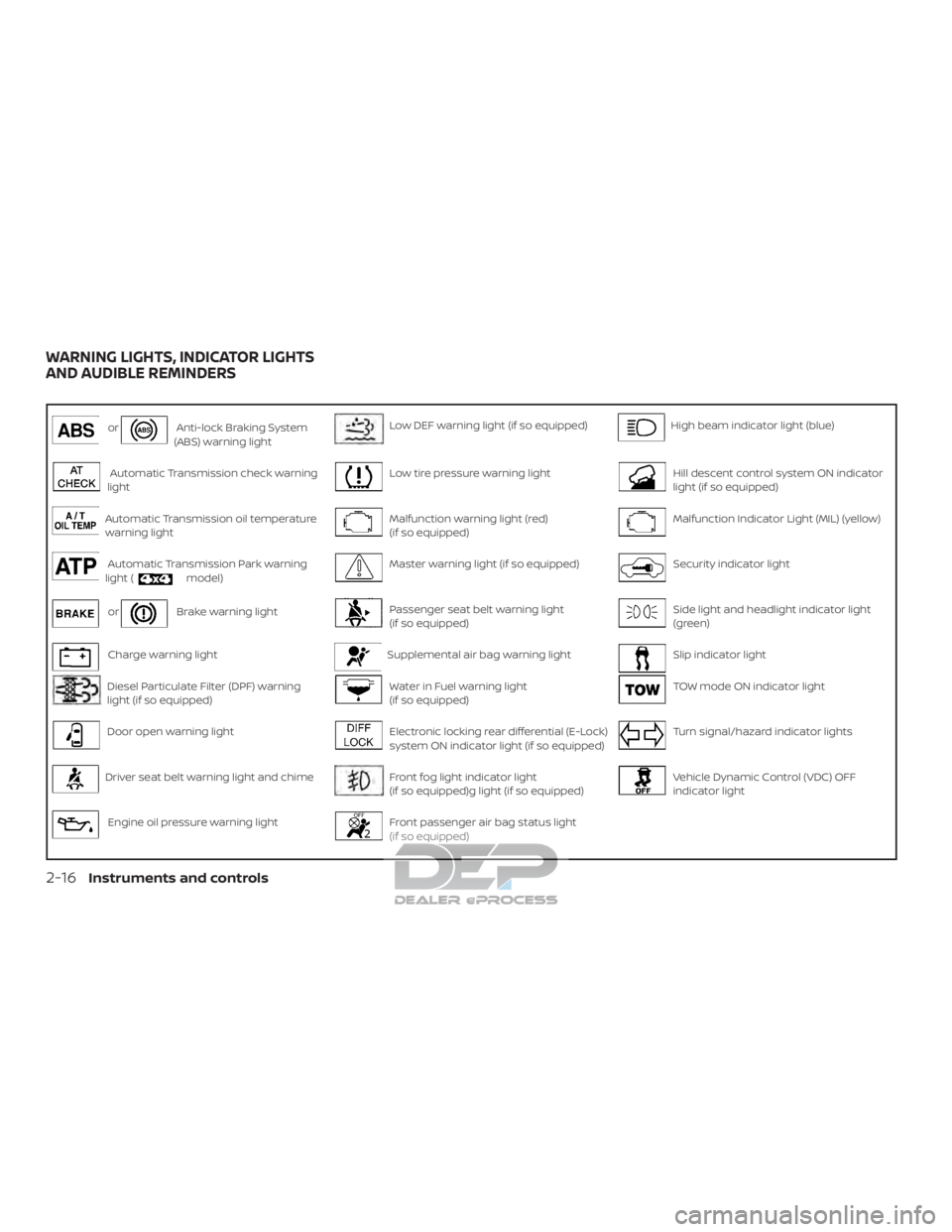
orAnti-lock Braking System
(ABS) warning lightLow DEF warning light (if so equipped)High beam indicator light (blue)
Automatic Transmission check warning
lightLow tire pressure warning lightHill descent control system ON indicator
light (if so equipped)
Automatic Transmission oil temperature
warning lightMalfunction warning light (red)
(if so equipped)Malfunction Indicator Light (MIL) (yellow)
Automatic Transmission Park warning
light (model)Master warning light (if so equipped)Security indicator light
orBrake warning lightPassenger seat belt warning light
(if so equipped)Side light and headlight indicator light
(green)
Charge warning lightSupplemental air bag warning lightSlip indicator light
Diesel Particulate Filter (DPF) warning
light (if so equipped)Water in Fuel warning light
(if so equipped)TOW mode ON indicator light
Door open warning lightElectronic locking rear differential (E-Lock)
system ON indicator light (if so equipped)Turn signal/hazard indicator lights
Driver seat belt warning light and chimeFront fog light indicator light
(if so equipped)g light (if so equipped)Vehicle Dynamic Control (VDC) OFF
indicator light
Engine oil pressure warning lightFront passenger air bag status light
(if so equipped)
WARNING LIGHTS, INDICATOR LIGHTS
AND AUDIBLE REMINDERS
2-16Instruments and controls
Page 140 of 682
CHECKING LIGHTS
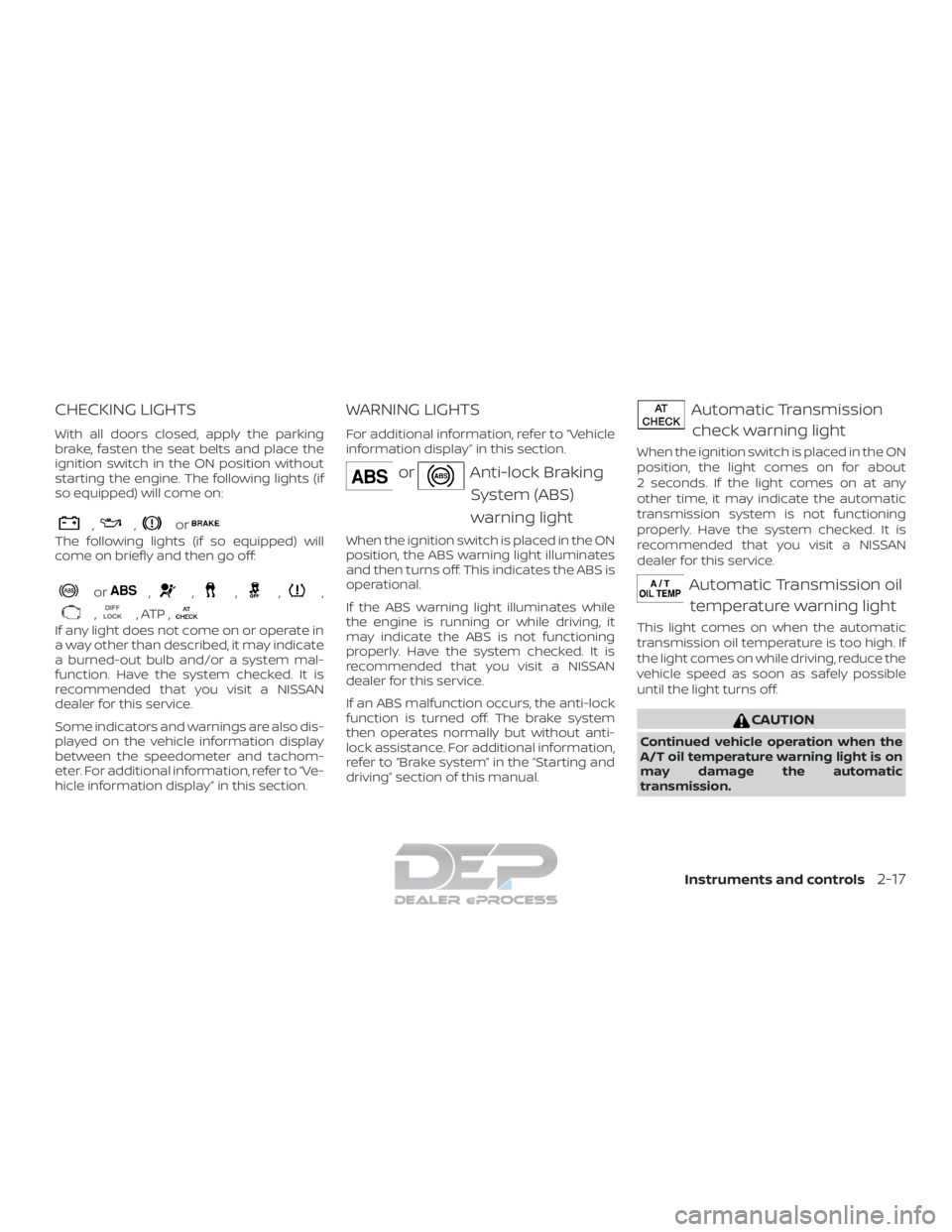
With all doors closed, apply the parking
brake, fasten the seat belts and place the
ignition switch in the ON position without
starting the engine. The following lights (if
so equipped) will come on:
,,or
The following lights (if so equipped) will
come on briefly and then go off:
or,,,,,
,, ATP ,
If any light does not come on or operate in
a way other than described, it may indicate
a burned-out bulb and/or a system mal-
function. Have the system checked. It is
recommended that you visit a NISSAN
dealer for this service.
Some indicators and warnings are also dis-
played on the vehicle information display
between the speedometer and tachom-
eter. For additional information, refer to “Ve-
hicle information display” in this section.
WARNING LIGHTS
For additional information, refer to “Vehicle
information display” in this section.
orAnti-lock BrakingSystem (ABS)
warning light
When the ignition switch is placed in the ON
position, the ABS warning light illuminates
and then turns off. This indicates the ABS is
operational.
If the ABS warning light illuminates while
the engine is running or while driving, it
may indicate the ABS is not functioning
properly. Have the system checked. It is
recommended that you visit a NISSAN
dealer for this service.
If an ABS malfunction occurs, the anti-lock
function is turned off. The brake system
then operates normally but without anti-
lock assistance. For additional information,
refer to “Brake system” in the “Starting and
driving” section of this manual.
Automatic Transmissioncheck warning light
When the ignition switch is placed in the ON
position, the light comes on for about
2 seconds. If the light comes on at any
other time, it may indicate the automatic
transmission system is not functioning
properly. Have the system checked. It is
recommended that you visit a NISSAN
dealer for this service.
Automatic Transmission oiltemperature warning light
This light comes on when the automatic
transmission oil temperature is too high. If
the light comes on while driving, reduce the
vehicle speed as soon as safely possible
until the light turns off.
CAUTION
Continued vehicle operation when the
A/T oil temperature warning light is on
may damage the automatic
transmission.
Instruments and controls2-17