ECU NISSAN TITAN 2020 Owner´s Manual
[x] Cancel search | Manufacturer: NISSAN, Model Year: 2020, Model line: TITAN, Model: NISSAN TITAN 2020Pages: 657, PDF Size: 5.1 MB
Page 190 of 657
WARNING
• Properly secure all cargo with ropes
or straps to help prevent it from slid-
ing or shif ting. Do not place cargo
higher than the seatbacks. In a sud-
den stop or collision, unsecured
cargo could cause personal injury.
• Use suitable ropes and hooks to se-
cure cargo.
• Never allow anyone to ride in the
cargo area. It is extremely dangerous
to ride in a cargo area inside of a ve-
hicle. In a collision, people riding in
these areas are more likely to be se-
riously injured or killed.
• Do not allow people to ride in any
area of your vehicle that is not
equipped with seats and seat belts.
• The child restraint top tether strap
may be damaged by contact with
items in the cargo area. Secure any
items in the cargo area. Your child
could be seriously injured or killed in
a collision if the top tether strap is
damaged.
• Be sure everyone in your vehicle is in
a seat and using a seat belt properly.POWER WINDOWS
WARNING
• Make sure that all passengers have
their hands, etc., inside the vehicle
while it is in motion and before clos-
ing the windows. Use the window
lock switch to prevent unexpected
use of the power windows.
• To help avoid risk of injury or death
through unintended operation of the
vehicle and/or its systems, including
entrapment in windows or inadver-
tent door lock activation, do not
leave children, people who require
the assistance of others or pets unat-
tended in your vehicle. Additionally,
the temperature inside a closed ve-
hicle on a warm day can quickly be-
come high enough to cause a signifi-
cant risk of injury or death to people
and pets. The power windows operate when the ig-
nition switch is placed in the ON position or
for a period of time af ter the ignition switch
is placed in the OFF position. If the driver's
or passenger's door is opened during this
period of time, the power to the windows is
canceled.
WINDOWS
Instruments and controls2-83
Page 199 of 657
The HomeLink® Universal Transceiver pro-
vides a convenient way to consolidate the
functions of up to three individual hand-
held transmitters into one built-in device.
HomeLink® Universal Transceiver:
• Will operate most radio frequency de-vices such as garage doors, gates, home
and office lighting, entry door locks and
security systems.
• Is powered by your vehicle's battery. No separate batteries are required. If the ve-
hicle's battery is discharged or is discon-
nected, HomeLink® will retain all pro-
gramming.
When the HomeLink® Universal Trans-
ceiver is programmed, retain the original
transmitter for future programming pro-
cedures (Example: new vehicle pur-
chases). Upon sale of the vehicle, the
programmed HomeLink® Universal
Transceiver buttons should be erased for
security purposes. For additional infor-
mation, refer to “Programming
HomeLink®” in this section.WARNING
• Your vehicle's engine should be
turned off while programming the
HomeLink® Universal Transceiver. For
additional information, refer to
“Push-button ignition switch” in the
“Starting and driving” section of this
manual. Do not breathe exhaust
gases; they contain colorless and
odorless carbon monoxide. Carbon
monoxide is dangerous. It can cause
unconsciousness or death.
• Do not use the HomeLink® Universal
Transceiver with any garage door
opener that lacks safety stop and re-
verse features as required by federal
safety standards. (These standards
became effective for opener models
manufactured af ter April 1, 1982.) A
garage door opener which cannot
detect an object in the path of a clos-
ing garage door and then automati-
cally stop and reverse does not meet
current federal safety standards. Us-
ing a garage door opener without
these features increases the risk of
serious injury or death. •
During the programming procedure
your garage door or security gate will
open and close (if the transmitter is
within range). Make sure that people
or objects are clear of the garage
door, gate, etc., that you are
programming.
PROGRAMMING HOMELINK®
If you have any questions or are having
difficulty programming your HomeLink®
buttons, refer to the HomeLink® web site at:
www.homelink.com or call 1-800-355-3515.
NOTE:
Place the ignition switch in the ON or ACC
position (without starting the engine)
when programming HomeLink®. It is also
recommended that a new battery be
placed in the hand-held transmitter of
the device being programmed to
HomeLink® for quicker programming
and accurate transmission of the radio
frequency.
HOMELINK® UNIVERSAL
TRANSCEIVER (if so equipped)
2-92Instruments and controls
Page 208 of 657
•To help avoid risk of injury or death
through unintended operation of the
vehicle and or its systems, including
entrapment in windows or inadver-
tent door lock activation, do not
leave children, people who require
the assistance of others or pets unat-
tended in your vehicle. Additionally,
the temperature inside a closed ve-
hicle on a warm day can quickly be-
come high enough to cause a signifi-
cant risk of injury or death to people
and pets.
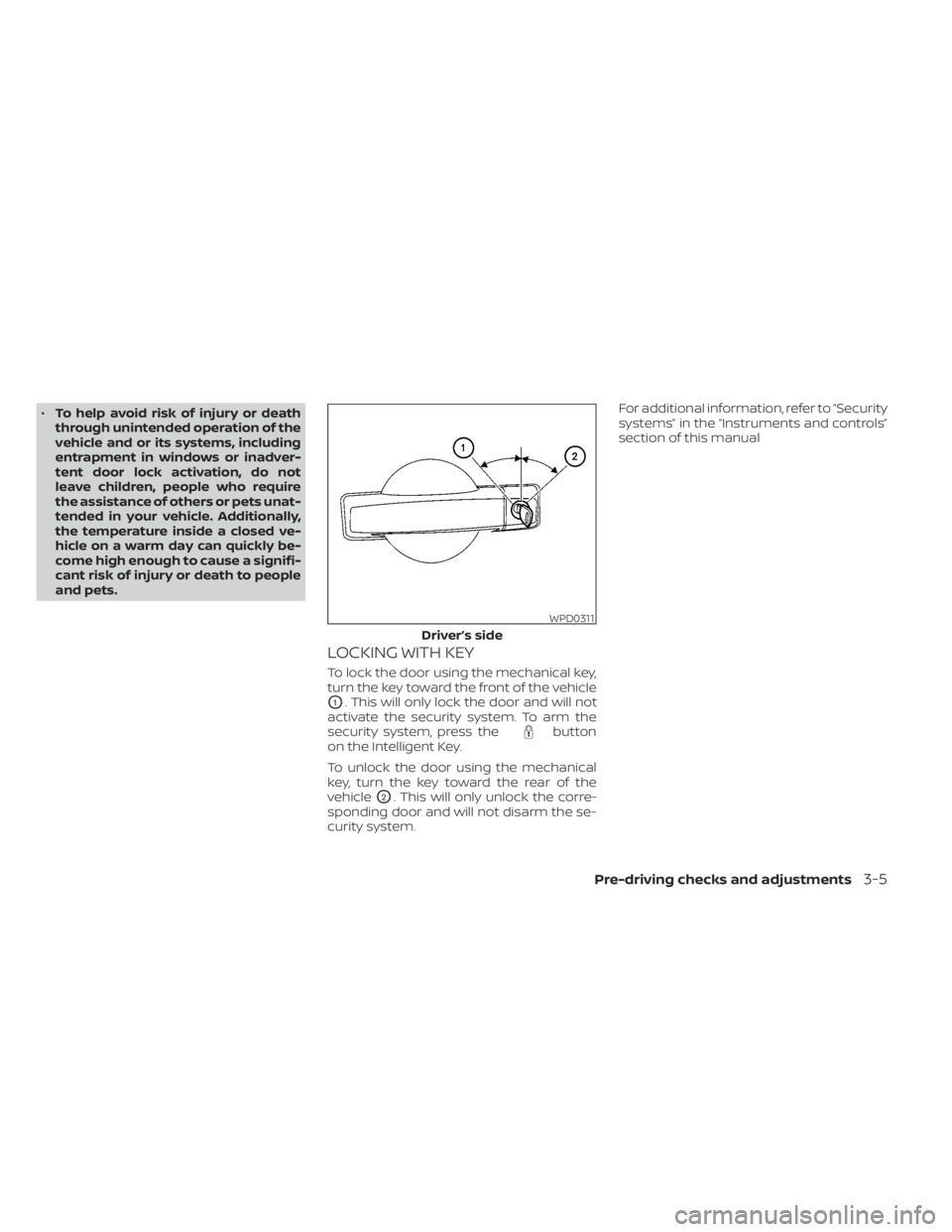
LOCKING WITH KEY
To lock the door using the mechanical key,
turn the key toward the front of the vehicle
O1. This will only lock the door and will not
activate the security system. To arm the
security system, press the
button
on the Intelligent Key.
To unlock the door using the mechanical
key, turn the key toward the rear of the
vehicle
O2. This will only unlock the corre-
sponding door and will not disarm the se-
curity system. For additional information, refer to “Security
systems” in the “Instruments and controls”
section of this manual
WPD0311
Driver’s side
Pre-driving checks and adjustments3-5
Page 214 of 657
OPERATING RANGE
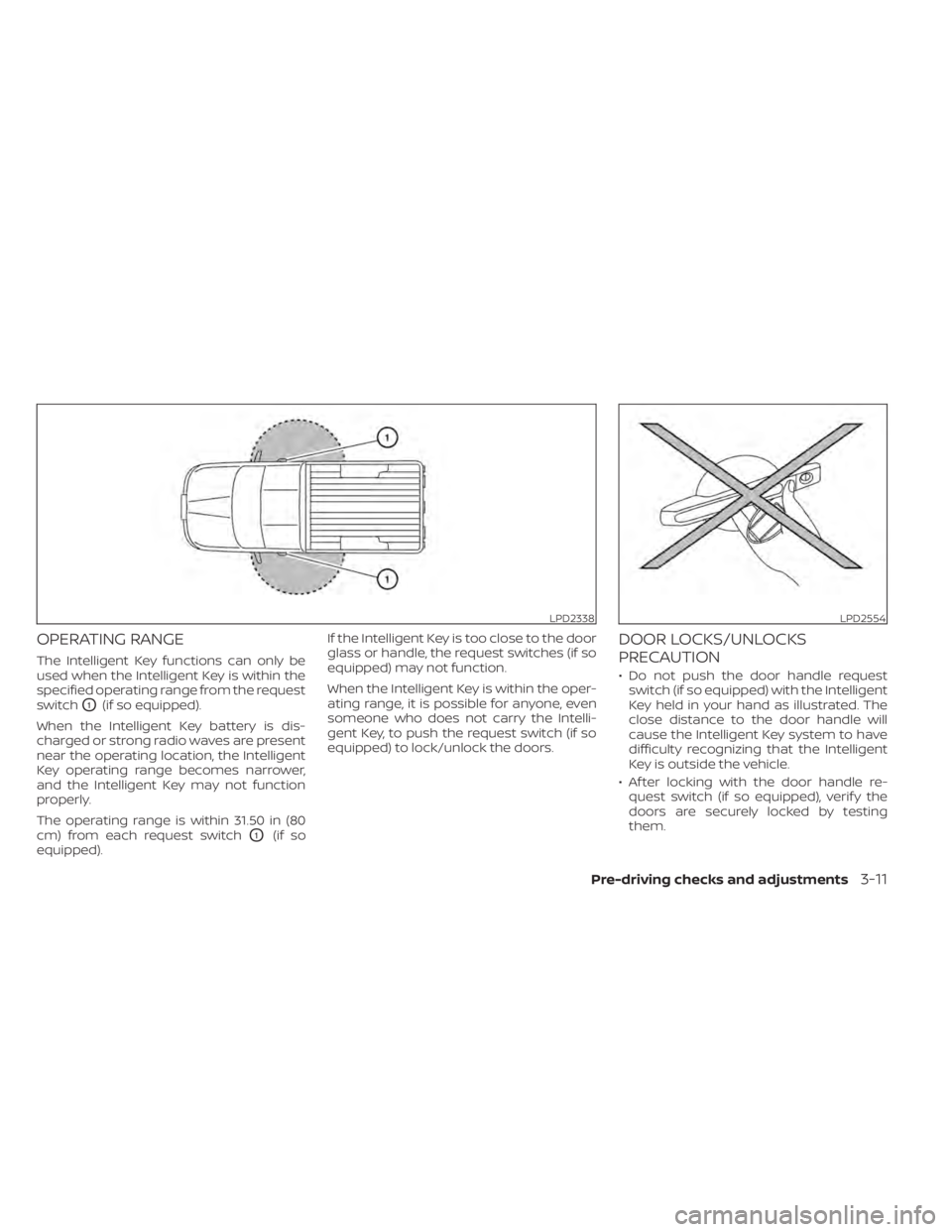
The Intelligent Key functions can only be
used when the Intelligent Key is within the
specified operating range from the request
switch
O1(if so equipped).
When the Intelligent Key battery is dis-
charged or strong radio waves are present
near the operating location, the Intelligent
Key operating range becomes narrower,
and the Intelligent Key may not function
properly.
The operating range is within 31.50 in (80
cm) from each request switch
O1(if so
equipped). If the Intelligent Key is too close to the door
glass or handle, the request switches (if so
equipped) may not function.
When the Intelligent Key is within the oper-
ating range, it is possible for anyone, even
someone who does not carry the Intelli-
gent Key, to push the request switch (if so
equipped) to lock/unlock the doors.
DOOR LOCKS/UNLOCKS
PRECAUTION
• Do not push the door handle request
switch (if so equipped) with the Intelligent
Key held in your hand as illustrated. The
close distance to the door handle will
cause the Intelligent Key system to have
difficulty recognizing that the Intelligent
Key is outside the vehicle.
• Af ter locking with the door handle re- quest switch (if so equipped), verif y the
doors are securely locked by testing
them.
LPD2338LPD2554
Pre-driving checks and adjustments3-11
Page 216 of 657
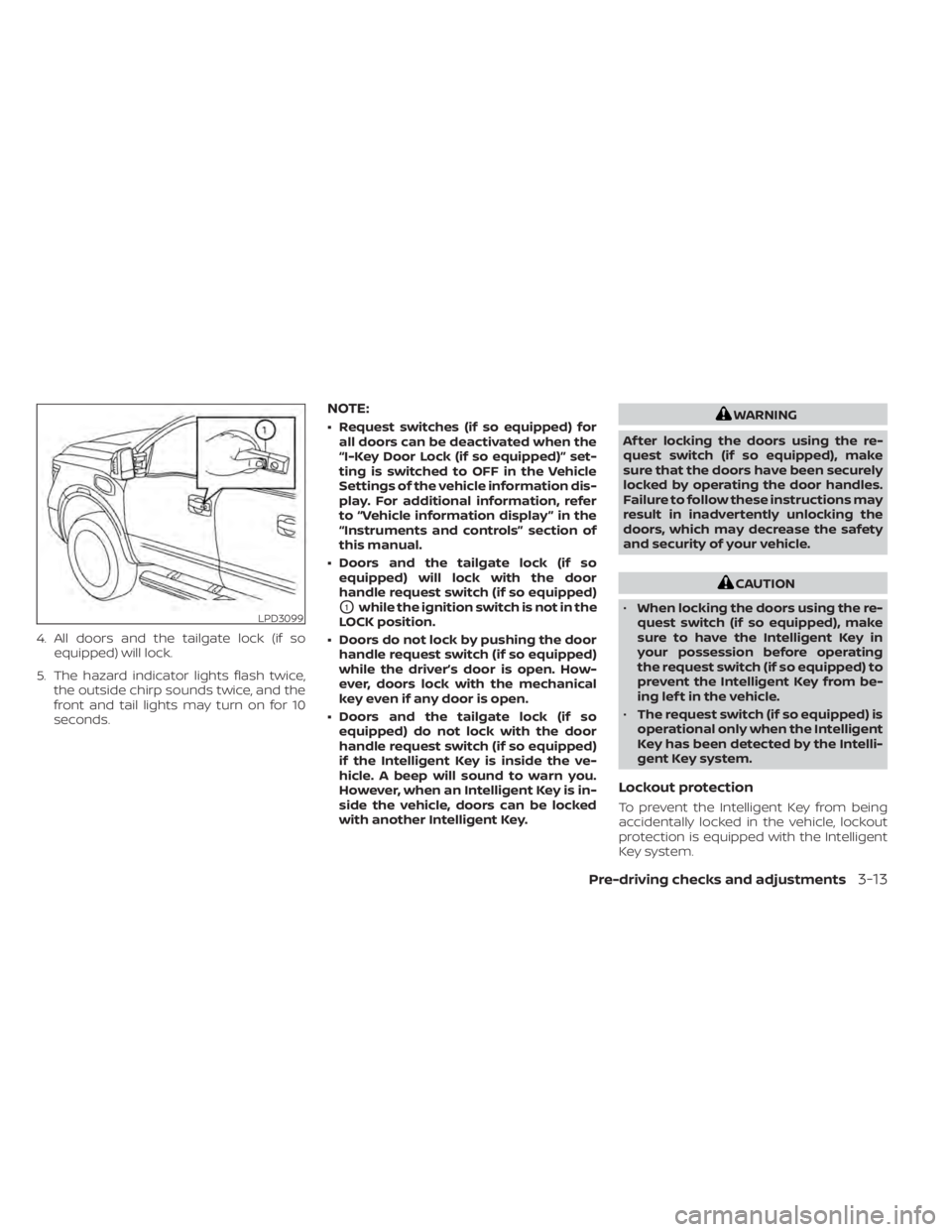
4. All doors and the tailgate lock (if soequipped) will lock.
5. The hazard indicator lights flash twice, the outside chirp sounds twice, and the
front and tail lights may turn on for 10
seconds.
NOTE:
• Request switches (if so equipped) forall doors can be deactivated when the
“I-Key Door Lock (if so equipped)” set-
ting is switched to OFF in the Vehicle
Settings of the vehicle information dis-
play. For additional information, refer
to “Vehicle information display ” in the
“Instruments and controls” section of
this manual.
• Doors and the tailgate lock (if so equipped) will lock with the door
handle request switch (if so equipped)
O1while the ignition switch is not in the
LOCK position.
• Doors do not lock by pushing the door handle request switch (if so equipped)
while the driver’s door is open. How-
ever, doors lock with the mechanical
key even if any door is open.
• Doors and the tailgate lock (if so equipped) do not lock with the door
handle request switch (if so equipped)
if the Intelligent Key is inside the ve-
hicle. A beep will sound to warn you.
However, when an Intelligent Key is in-
side the vehicle, doors can be locked
with another Intelligent Key.
WARNING
Af ter locking the doors using the re-
quest switch (if so equipped), make
sure that the doors have been securely
locked by operating the door handles.
Failure to follow these instructions may
result in inadvertently unlocking the
doors, which may decrease the safety
and security of your vehicle.
CAUTION
• When locking the doors using the re-
quest switch (if so equipped), make
sure to have the Intelligent Key in
your possession before operating
the request switch (if so equipped) to
prevent the Intelligent Key from be-
ing lef t in the vehicle.
• The request switch (if so equipped) is
operational only when the Intelligent
Key has been detected by the Intelli-
gent Key system.
Lockout protection
To prevent the Intelligent Key from being
accidentally locked in the vehicle, lockout
protection is equipped with the Intelligent
Key system.
LPD3099
Pre-driving checks and adjustments3-13
Page 218 of 657
If a door handle is pulled while unlocking
the doors, that door may not be unlocked.
Returning the door handle to its original
position will unlock the door. If the door
does not unlock af ter returning the door
handle, push the door handle request (if so
equipped) switch to unlock the door.
All doors will be locked automatically un-
less one of the following operations is per-
formed within one minute af ter pushing
the request switch (if so equipped).
• Opening any door.
• Pushing the ignition switch.
The interior light timer illuminates for a pe-
riod of time when a door is unlocked and
the interior light switch is in the ON posi-
tion.
The interior light can be turned off without
waiting by performing one of the following
operations.
• Placing the ignition switch in the ON po-sition.
• Locking the doors with the remote con- trol.
• Switching the interior light switch to the OFF position For additional information,
refer to “Interior lights” in the “Instruments
and controls” section on this manual.HOW TO USE THE REMOTE
KEYLESS ENTRY FUNCTION
The remote keyless entry function can op-
erate all door locks using the remote key-
less function of the Intelligent Key. The re-
mote keyless function can operate at a
distance of 33 f t (10 m) away from the ve-
hicle. The operating distance depends
upon the conditions around the vehicle.
The remote keyless entry function will not
function under the following conditions:
• When the Intelligent Key is not within theoperational range.
• When the Intelligent Key battery is dis- charged.
• When the doors are open or not closed securely.
• Switching the interior light switch to the OFF position. For additional information,
refer to “Interior lights” in the “Instruments
and controls” section of this manual.
CAUTION
When locking the doors using the Intel-
ligent Key, be sure not to leave the key
in the vehicle.
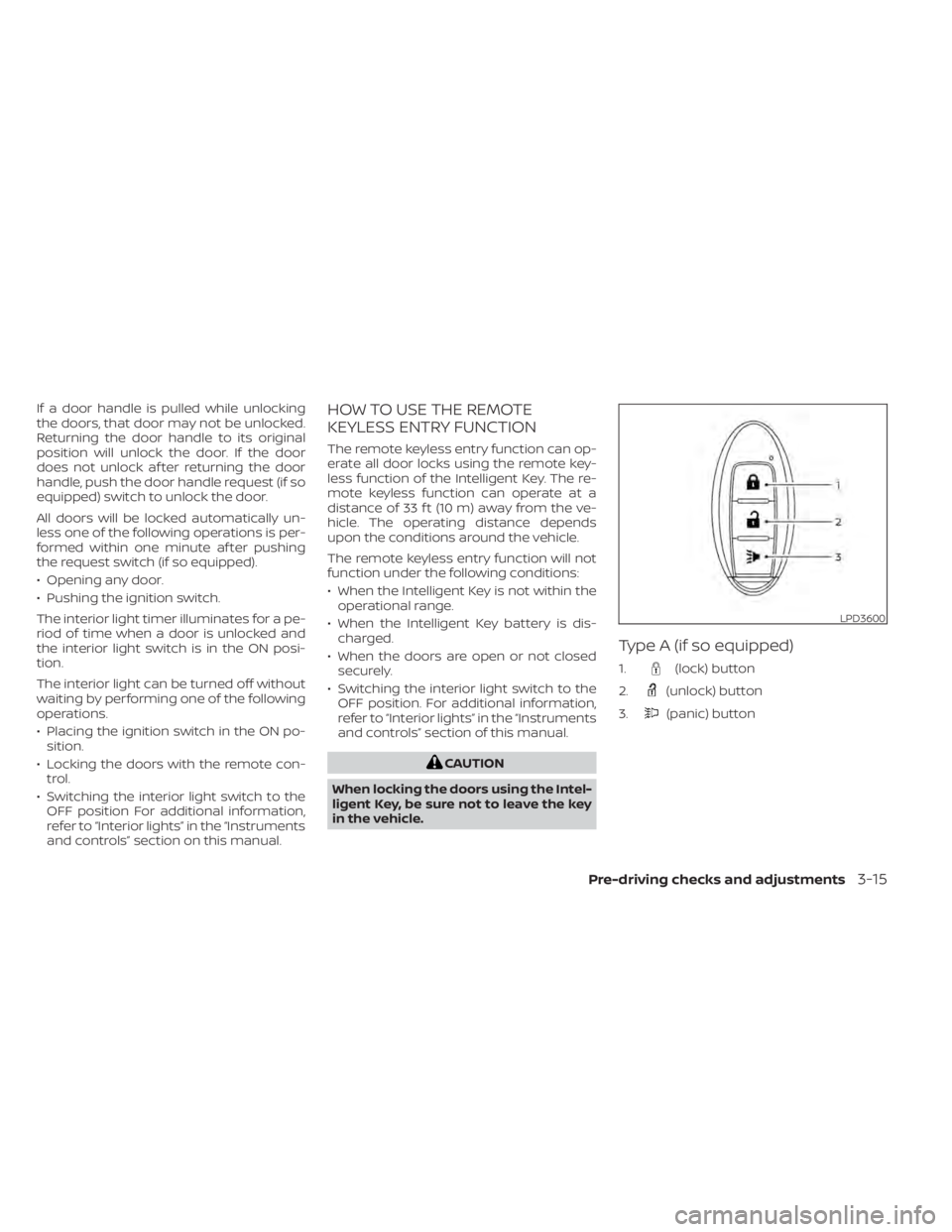
Type A (if so equipped)
1.(lock) button
2.
(unlock) button
3.
(panic) button
LPD3600
Pre-driving checks and adjustments3-15
Page 219 of 657
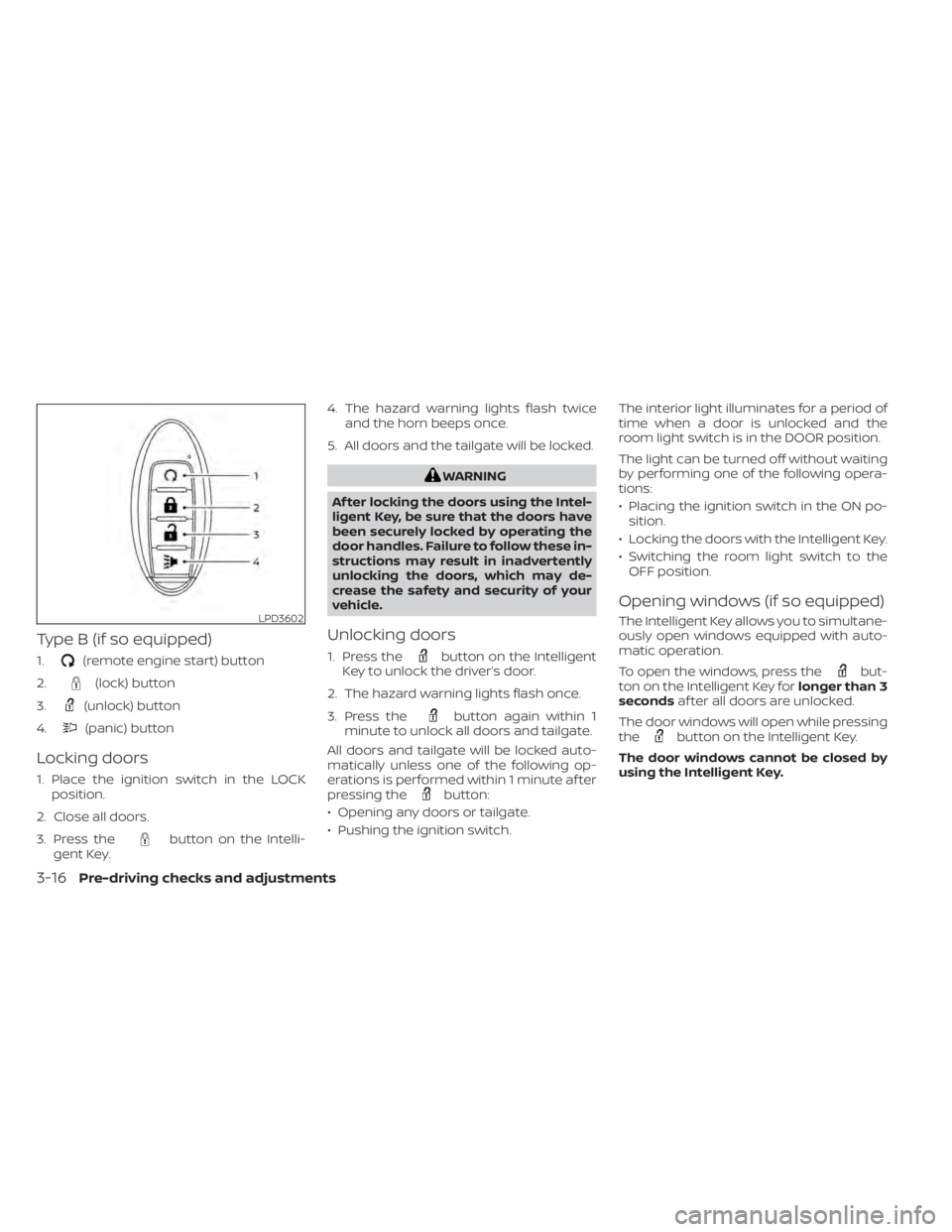
Type B (if so equipped)
1.(remote engine start) button
2.
(lock) button
3.
(unlock) button
4.
(panic) button
Locking doors
1. Place the ignition switch in the LOCK position.
2. Close all doors.
3. Press the
button on the Intelli-
gent Key. 4. The hazard warning lights flash twice
and the horn beeps once.
5. All doors and the tailgate will be locked.
WARNING
Af ter locking the doors using the Intel-
ligent Key, be sure that the doors have
been securely locked by operating the
door handles. Failure to follow these in-
structions may result in inadvertently
unlocking the doors, which may de-
crease the safety and security of your
vehicle.
Unlocking doors
1. Press thebutton on the Intelligent
Key to unlock the driver’s door.
2. The hazard warning lights flash once.
3. Press the
button again within 1
minute to unlock all doors and tailgate.
All doors and tailgate will be locked auto-
matically unless one of the following op-
erations is performed within 1 minute af ter
pressing the
button:
• Opening any doors or tailgate.
• Pushing the ignition switch. The interior light illuminates for a period of
time when a door is unlocked and the
room light switch is in the DOOR position.
The light can be turned off without waiting
by performing one of the following opera-
tions:
• Placing the ignition switch in the ON po-
sition.
• Locking the doors with the Intelligent Key.
• Switching the room light switch to the OFF position.
Opening windows (if so equipped)
The Intelligent Key allows you to simultane-
ously open windows equipped with auto-
matic operation.
To open the windows, press the
but-
ton on the Intelligent Key for longer than 3
seconds af ter all doors are unlocked.
The door windows will open while pressing
the
button on the Intelligent Key.
The door windows cannot be closed by
using the Intelligent Key.
LPD3602
3-16Pre-driving checks and adjustments
Page 225 of 657
The following events will occur when the
engine starts:
• The parking lights will turn on and remainon as long as the engine is running.
• The doors will be locked and the climate control system may come on.
• The engine will continue to run for 10 min- utes. Repeat the steps to extend the time
for an additional 10 minutes. For addi-
tional information, refer to “Extending en-
gine run time” in this section.
Depress and hold the brake then push the
push-button ignition switch to the ON po-
sition before driving. For additional infor-
mation, refer to “Driving the vehicle” in the
“Starting and driving” section of this
manual.
EXTENDING ENGINE RUN TIME
The Remote Engine Start feature can be
extended one time by performing the
steps listed in “Remote starting the vehicle”
in this section. Run time will be calculated
as follows:
• The first 10 minute run time will start when the Remote Engine Start function is
performed. • The second 10 minutes will start immedi-
ately when the Remote Engine Start
function is performed again. For example,
if the engine has been running for 5 min-
utes, and 10 minutes are added, the en-
gine will run for a total of 15 minutes.
• Extending engine run time will count to- wards the two Remote Engine Start limit.
A maximum of two Remote Engine Starts,
or a single Remote Engine Start with an
extension, are allowed between ignition
cycles. The ignition switch must be cycled
to the ON position and then back to the
OFF position before the Remote Engine
Start procedure can be used again.
CANCELING A REMOTE ENGINE
START
To cancel a Remote Engine Start, perform
one of the following:
• Aim the Intelligent Key at the vehicle and press
until the parking lights turn off.
• Turn on the hazard warning flashers.
• Cycle the ignition switch on and then off.
• The extended engine run time has ex- pired.
• The first 10 minute timer has expired.
• The engine hood has been opened.
• The shif t lever is moved out of park. • The alarm sounds due to illegal entry into
the vehicle.
• The ignition switch is pushed without an Intelligent Key in the vehicle.
• The ignition switch is pushed with an In- telligent Key in the vehicle but the brake
pedal is not depressed.
CONDITIONS THE REMOTE ENGINE
START WILL NOT WORK
The Remote Engine Start will not operate if
any of the following conditions are present:
• The ignition switch is placed in the ONposition.
• The hood is not securely closed.
• The hazard warning lights are on.
• The engine is still running. The engine must be completely stopped. Wait at
least 6 seconds if the engine goes from
running to off. This is not applicable when
extending engine run time.
• The
button is not pressed and held
for at least 2 seconds.
• The
button is not pressed and held
within 5 seconds of pressing the lock but-
ton.
• The brake is pressed.
• The doors are not closed and locked.
3-22Pre-driving checks and adjustments
Page 237 of 657
NOTE:
If the outside mirror control switch is in
the center position, the mirror surface
will NOT turn downward when the shif t
lever is moved to R (Reverse).
For additional information, refer to
“Memory Seat” in this section.
Automatic anti-glare outside
mirror (if so equipped)
The outside mirror will automatically dim
during nighttime conditions to reduce the
glare from the headlights of trailing ve-
hicles. The automatic anti-glare feature
operates only when the ignition switch is
placed in the ON position.
The automatic anti-glare feature will be on
when starting the vehicle. The indicator
light on the automatic anti-glare rearview
mirror will illuminate when the automatic
anti-glare feature is operating.
To turn off the anti-glare feature, press the
O button on the rearview mirror. The indi-
cator light will turn off.
To turn on the anti-glare feature again,
press the | button on the rearview mirror.
The indicator light will turn on.For additional information on the auto-
matic anti-glare rearview mirror, refer to
“Automatic anti-glare rearview mirror (if so
equipped)” in this section.
Heated mirrors (if so equipped)
Some outside mirrors can be heated to
defrost, defog, or de-ice for improved vis-
ibility. For additional information, refer to
“Rear window and/or outside mirror de-
froster switch” in the “Instruments and con-
trols” section of this manual.
TAILGATE
Opening the tailgate
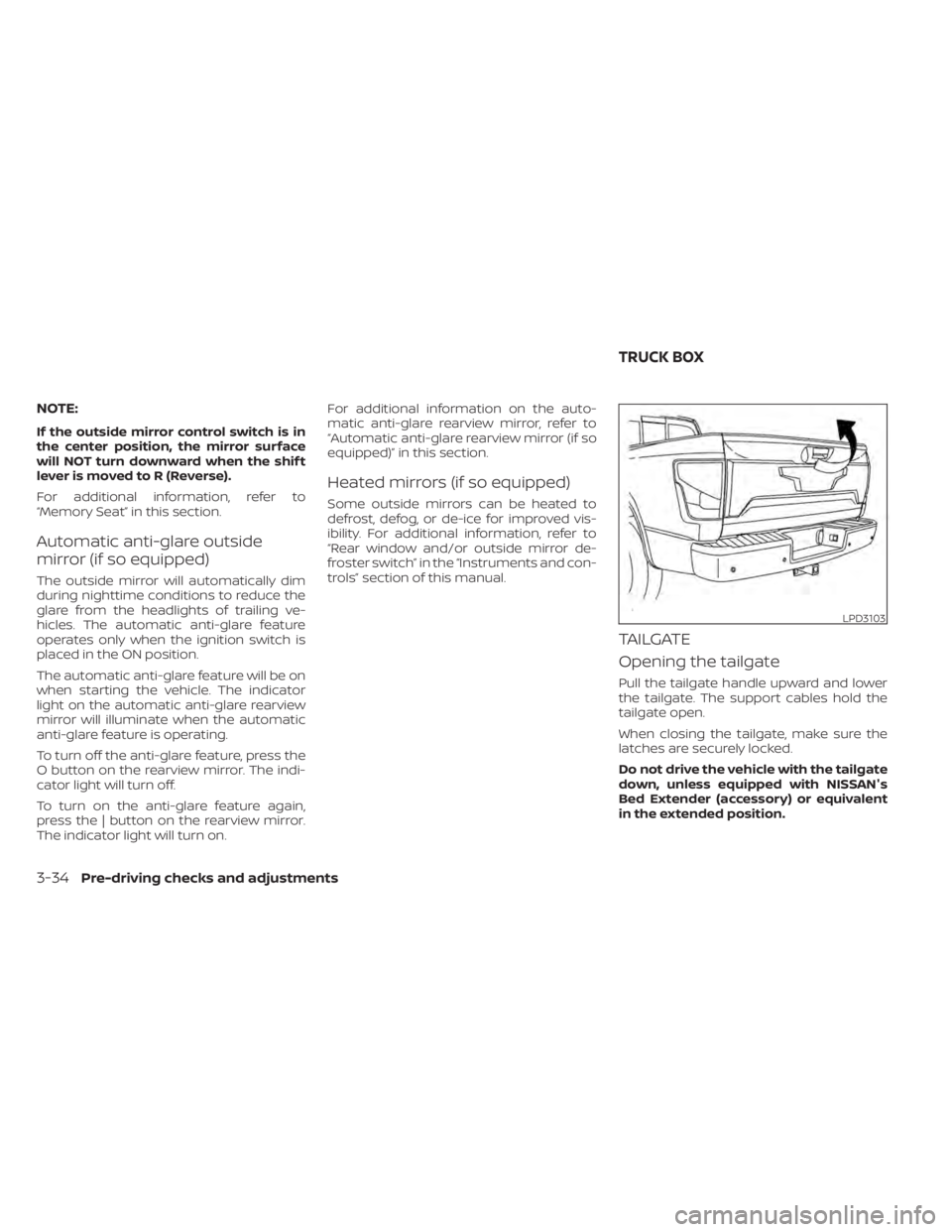
Pull the tailgate handle upward and lower
the tailgate. The support cables hold the
tailgate open.
When closing the tailgate, make sure the
latches are securely locked.
Do not drive the vehicle with the tailgate
down, unless equipped with NISSAN's
Bed Extender (accessory) or equivalent
in the extended position.
LPD3103
TRUCK BOX
3-34Pre-driving checks and adjustments
Page 239 of 657
6. Take the tailgate plug from the glove boxand connect it to the tailgate wiring har-
ness to avoid contamination which will
lead to malfunction of the rear camera.
7. Remove the tailgate. For additional infor- mation, refer to “Removing the tailgate”
in this section.
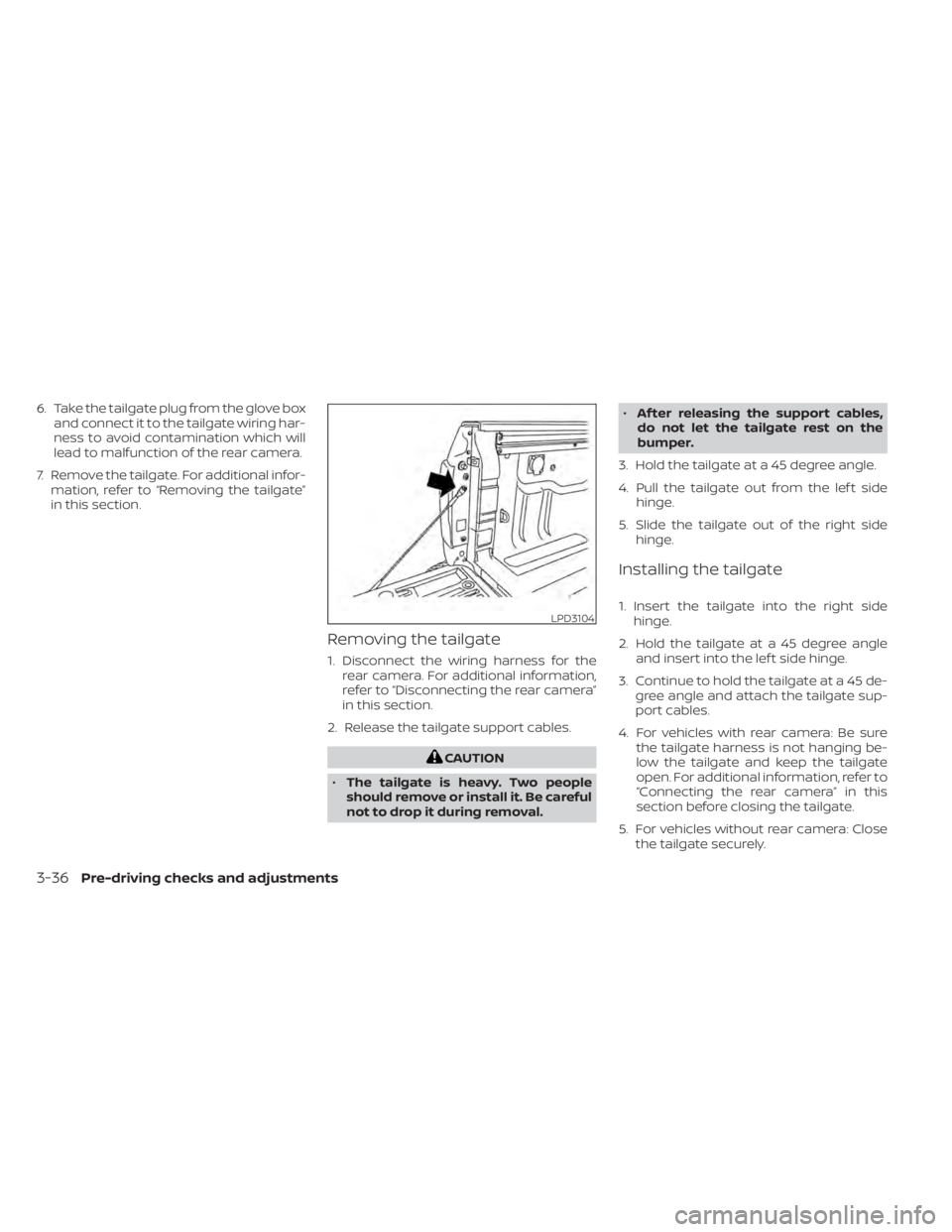
Removing the tailgate
1. Disconnect the wiring harness for the rear camera. For additional information,
refer to “Disconnecting the rear camera”
in this section.
2. Release the tailgate support cables.
CAUTION
• The tailgate is heavy. Two people
should remove or install it. Be careful
not to drop it during removal. •
Af ter releasing the support cables,
do not let the tailgate rest on the
bumper.
3. Hold the tailgate at a 45 degree angle.
4. Pull the tailgate out from the lef t side hinge.
5. Slide the tailgate out of the right side hinge.
Installing the tailgate
1. Insert the tailgate into the right sidehinge.
2. Hold the tailgate at a 45 degree angle and insert into the lef t side hinge.
3. Continue to hold the tailgate at a 45 de- gree angle and attach the tailgate sup-
port cables.
4. For vehicles with rear camera: Be sure the tailgate harness is not hanging be-
low the tailgate and keep the tailgate
open. For additional information, refer to
“Connecting the rear camera” in this
section before closing the tailgate.
5. For vehicles without rear camera: Close the tailgate securely.LPD3104
3-36Pre-driving checks and adjustments