length NISSAN TITAN 2020 Owner´s Manual
[x] Cancel search | Manufacturer: NISSAN, Model Year: 2020, Model line: TITAN, Model: NISSAN TITAN 2020Pages: 657, PDF Size: 5.1 MB
Page 47 of 657
WARNING
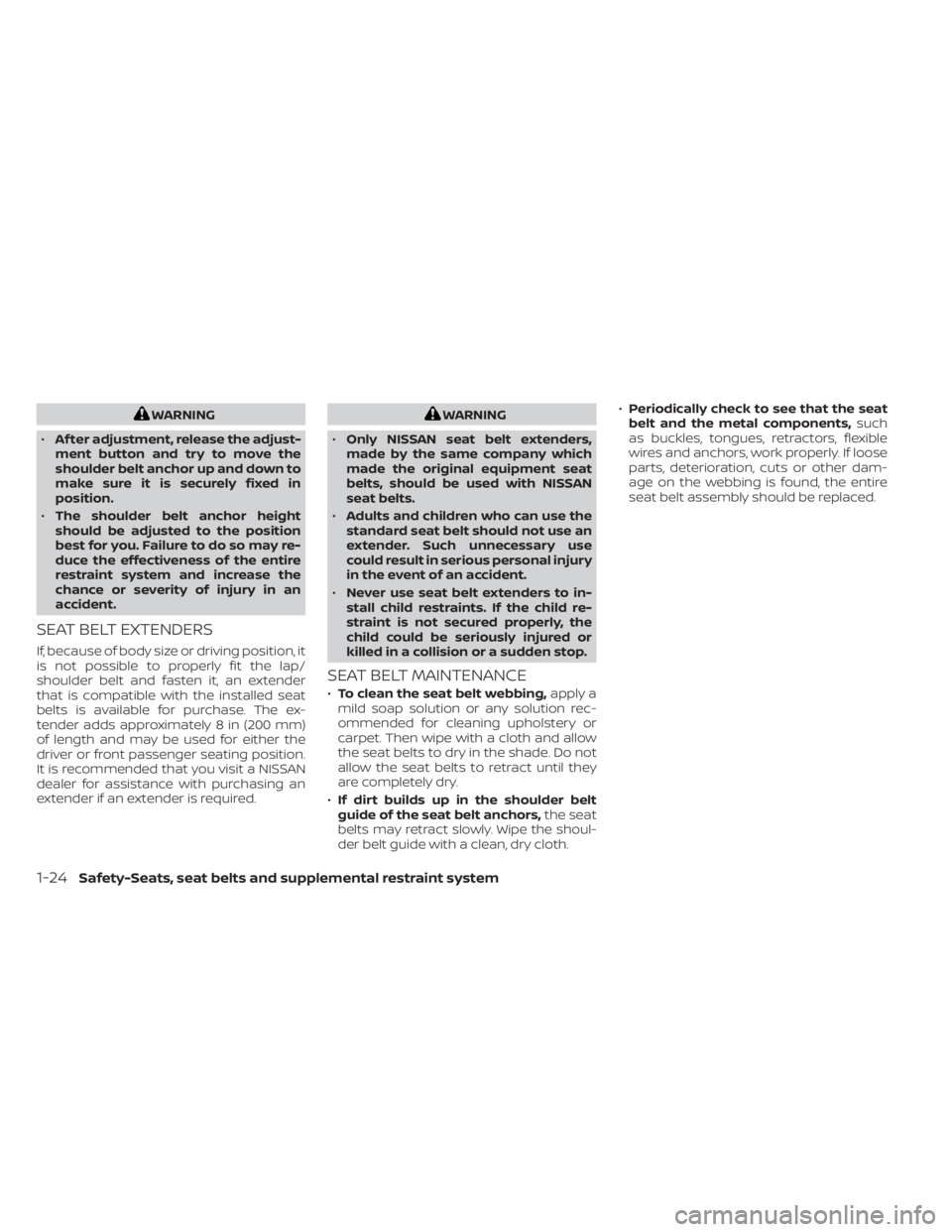
• Af ter adjustment, release the adjust-
ment button and try to move the
shoulder belt anchor up and down to
make sure it is securely fixed in
position.
• The shoulder belt anchor height
should be adjusted to the position
best for you. Failure to do so may re-
duce the effectiveness of the entire
restraint system and increase the
chance or severity of injury in an
accident.
SEAT BELT EXTENDERS
If, because of body size or driving position, it
is not possible to properly fit the lap/
shoulder belt and fasten it, an extender
that is compatible with the installed seat
belts is available for purchase. The ex-
tender adds approximately 8 in (200 mm)
of length and may be used for either the
driver or front passenger seating position.
It is recommended that you visit a NISSAN
dealer for assistance with purchasing an
extender if an extender is required.
WARNING
• Only NISSAN seat belt extenders,
made by the same company which
made the original equipment seat
belts, should be used with NISSAN
seat belts.
• Adults and children who can use the
standard seat belt should not use an
extender. Such unnecessary use
could result in serious personal injury
in the event of an accident.
• Never use seat belt extenders to in-
stall child restraints. If the child re-
straint is not secured properly, the
child could be seriously injured or
killed in a collision or a sudden stop.
SEAT BELT MAINTENANCE
• To clean the seat belt webbing, apply a
mild soap solution or any solution rec-
ommended for cleaning upholstery or
carpet. Then wipe with a cloth and allow
the seat belts to dry in the shade. Do not
allow the seat belts to retract until they
are completely dry.
• If dirt builds up in the shoulder belt
guide of the seat belt anchors, the seat
belts may retract slowly. Wipe the shoul-
der belt guide with a clean, dry cloth. •
Periodically check to see that the seat
belt and the metal components, such
as buckles, tongues, retractors, flexible
wires and anchors, work properly. If loose
parts, deterioration, cuts or other dam-
age on the webbing is found, the entire
seat belt assembly should be replaced.
1-24Safety-Seats, seat belts and supplemental restraint system
Page 291 of 657
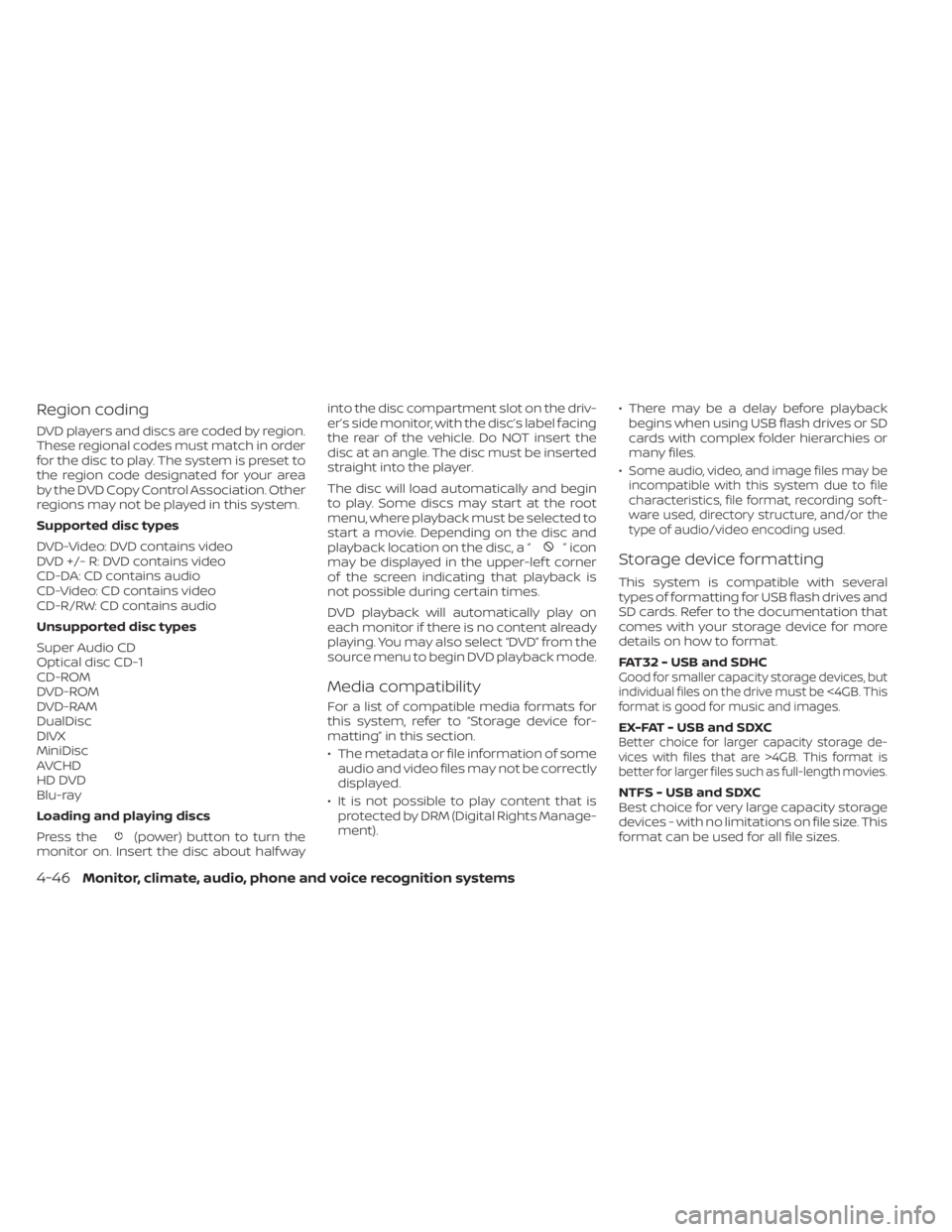
Region coding
DVD players and discs are coded by region.
These regional codes must match in order
for the disc to play. The system is preset to
the region code designated for your area
by the DVD Copy Control Association. Other
regions may not be played in this system.
Supported disc types
DVD-Video: DVD contains video
DVD +/- R: DVD contains video
CD-DA: CD contains audio
CD-Video: CD contains video
CD-R/RW: CD contains audio
Unsupported disc types
Super Audio CD
Optical disc CD-1
CD-ROM
DVD-ROM
DVD-RAM
DualDisc
DIVX
MiniDisc
AVCHD
HD DVD
Blu-ray
Loading and playing discs
Press the
(power) button to turn the
monitor on. Insert the disc about half way into the disc compartment slot on the driv-
er’s side monitor, with the disc’s label facing
the rear of the vehicle. Do NOT insert the
disc at an angle. The disc must be inserted
straight into the player.
The disc will load automatically and begin
to play. Some discs may start at the root
menu, where playback must be selected to
start a movie. Depending on the disc and
playback location on the disc, a “
”icon
may be displayed in the upper-lef t corner
of the screen indicating that playback is
not possible during certain times.
DVD playback will automatically play on
each monitor if there is no content already
playing. You may also select “DVD” from the
source menu to begin DVD playback mode.
Media compatibility
For a list of compatible media formats for
this system, refer to “Storage device for-
matting” in this section.
• The metadata or file information of some audio and video files may not be correctly
displayed.
• It is not possible to play content that is protected by DRM (Digital Rights Manage-
ment). • There may be a delay before playback
begins when using USB flash drives or SD
cards with complex folder hierarchies or
many files.
•
Some audio, video, and image files may be
incompatible with this system due to file
characteristics, file format, recording sof t-
ware used, directory structure, and/or the
type of audio/video encoding used.
Storage device formatting
This system is compatible with several
types of formatting for USB flash drives and
SD cards. Refer to the documentation that
comes with your storage device for more
details on how to format.
FAT32 - USB and SDHC
Good for smaller capacity storage devices, but
individual files on the drive must be <4GB. This
format is good for music and images.
EX-FAT - USB and SDXCBetter choice for larger capacity storage de-
vices with files that are >4GB. This format is
better for larger files such as full-length movies.
NTFS - USB and SDXC
Best choice for very large capacity storage
devices - with no limitations on file size. This
format can be used for all file sizes.
4-46Monitor, climate, audio, phone and voice recognition systems
Page 337 of 657
WARNING
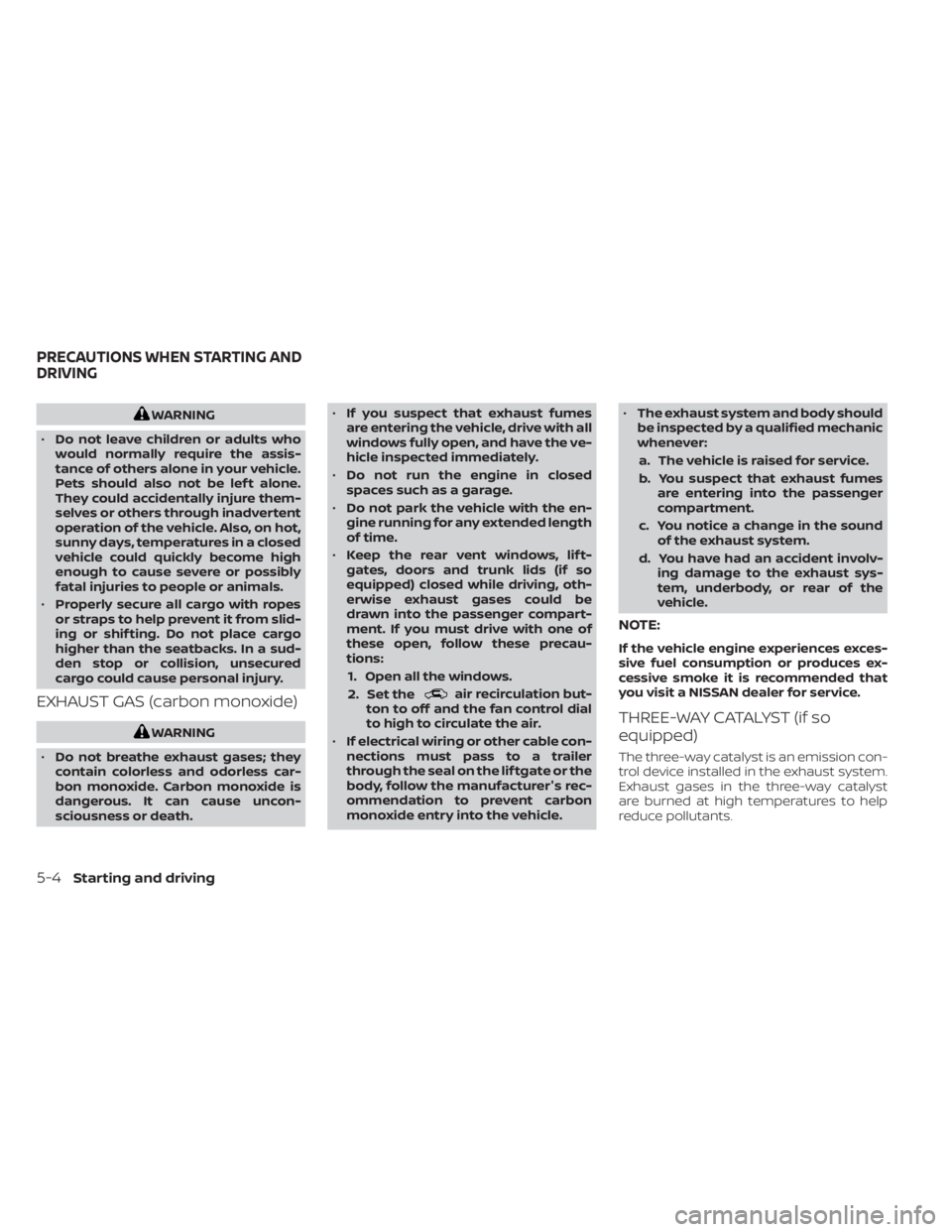
• Do not leave children or adults who
would normally require the assis-
tance of others alone in your vehicle.
Pets should also not be lef t alone.
They could accidentally injure them-
selves or others through inadvertent
operation of the vehicle. Also, on hot,
sunny days, temperatures in a closed
vehicle could quickly become high
enough to cause severe or possibly
fatal injuries to people or animals.
• Properly secure all cargo with ropes
or straps to help prevent it from slid-
ing or shif ting. Do not place cargo
higher than the seatbacks. In a sud-
den stop or collision, unsecured
cargo could cause personal injury.
EXHAUST GAS (carbon monoxide)
WARNING
• Do not breathe exhaust gases; they
contain colorless and odorless car-
bon monoxide. Carbon monoxide is
dangerous. It can cause uncon-
sciousness or death. •
If you suspect that exhaust fumes
are entering the vehicle, drive with all
windows fully open, and have the ve-
hicle inspected immediately.
• Do not run the engine in closed
spaces such as a garage.
• Do not park the vehicle with the en-
gine running for any extended length
of time.
• Keep the rear vent windows, lif t-
gates, doors and trunk lids (if so
equipped) closed while driving, oth-
erwise exhaust gases could be
drawn into the passenger compart-
ment. If you must drive with one of
these open, follow these precau-
tions:
1. Open all the windows.
2. Set the
air recirculation but-
ton to off and the fan control dial
to high to circulate the air.
• If electrical wiring or other cable con-
nections must pass to a trailer
through the seal on the lif tgate or the
body, follow the manufacturer's rec-
ommendation to prevent carbon
monoxide entry into the vehicle. •
The exhaust system and body should
be inspected by a qualified mechanic
whenever:
a. The vehicle is raised for service.
b. You suspect that exhaust fumes are entering into the passenger
compartment.
c. You notice a change in the sound of the exhaust system.
d. You have had an accident involv- ing damage to the exhaust sys-
tem, underbody, or rear of the
vehicle.
NOTE:
If the vehicle engine experiences exces-
sive fuel consumption or produces ex-
cessive smoke it is recommended that
you visit a NISSAN dealer for service.
THREE-WAY CATALYST (if so
equipped)
The three-way catalyst is an emission con-
trol device installed in the exhaust system.
Exhaust gases in the three-way catalyst
are burned at high temperatures to help
reduce pollutants.
PRECAUTIONS WHEN STARTING AND
DRIVING
5-4Starting and driving
Page 560 of 657
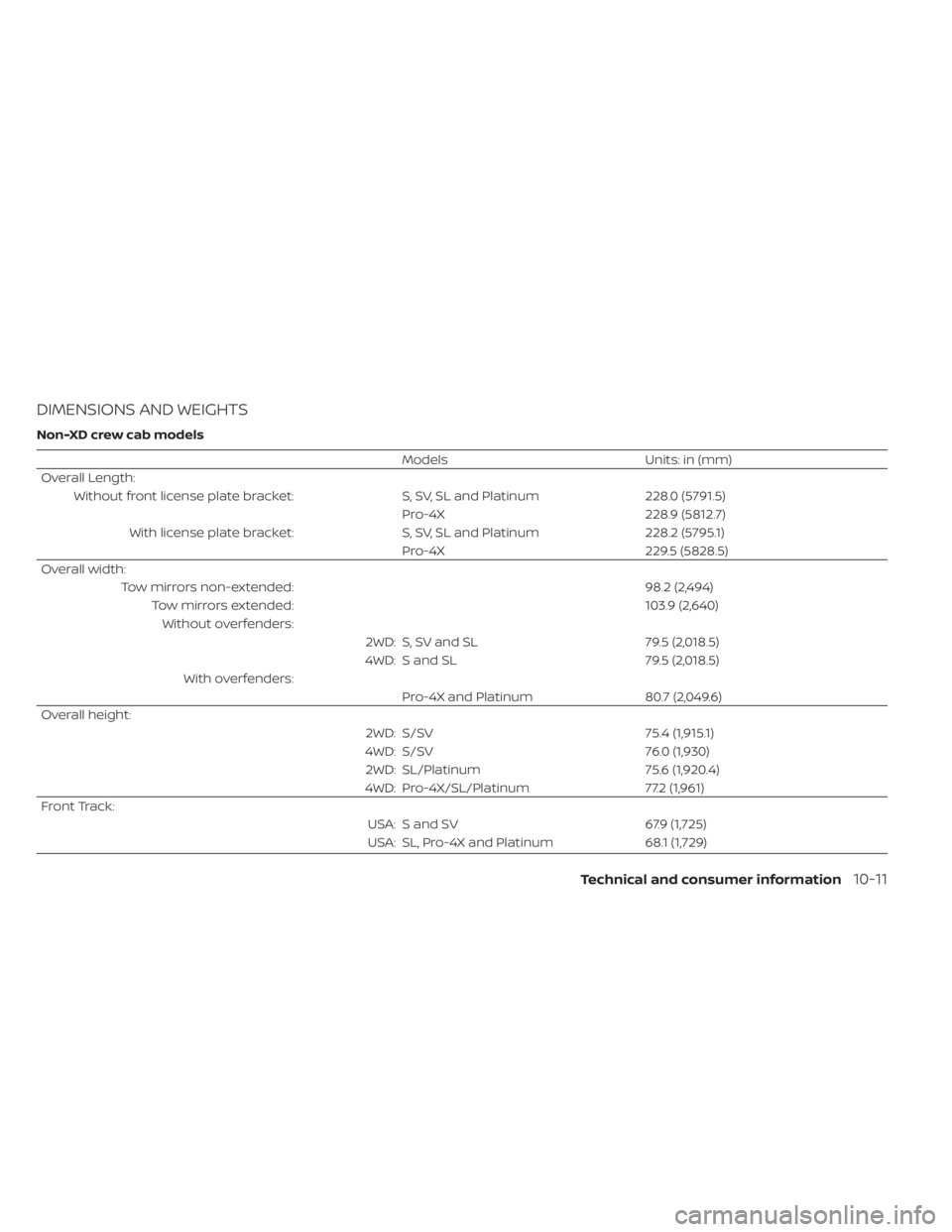
DIMENSIONS AND WEIGHTS
Non-XD crew cab models
ModelsUnits: in (mm)
Overall Length: Without front license plate bracket: S, SV, SL and Platinum228.0 (5791.5)
Pro-4X 228.9 (5812.7)
With license plate bracket: S, SV, SL and Platinum228.2 (5795.1)
Pro-4X 229.5 (5828.5)
Overall width: Tow mirrors non-extended: 98.2 (2,494)
Tow mirrors extended: 103.9 (2,640)
Without overfenders: 2WD: S, SV and SL 79.5 (2,018.5)
4WD: S and SL 79.5 (2,018.5)
With overfenders: Pro-4X and Platinum 80.7 (2,049.6)
Overall height: 2WD: S/SV75.4 (1,915.1)
4WD: S/SV 76.0 (1,930)
2WD: SL/Platinum 75.6 (1,920.4)
4WD: Pro-4X/SL/Platinum 77.2 (1,961)
Front Track: USA: S and SV67.9 (1,725)
USA: SL, Pro-4X and Platinum 68.1 (1,729)
Technical and consumer information10-11
Page 562 of 657
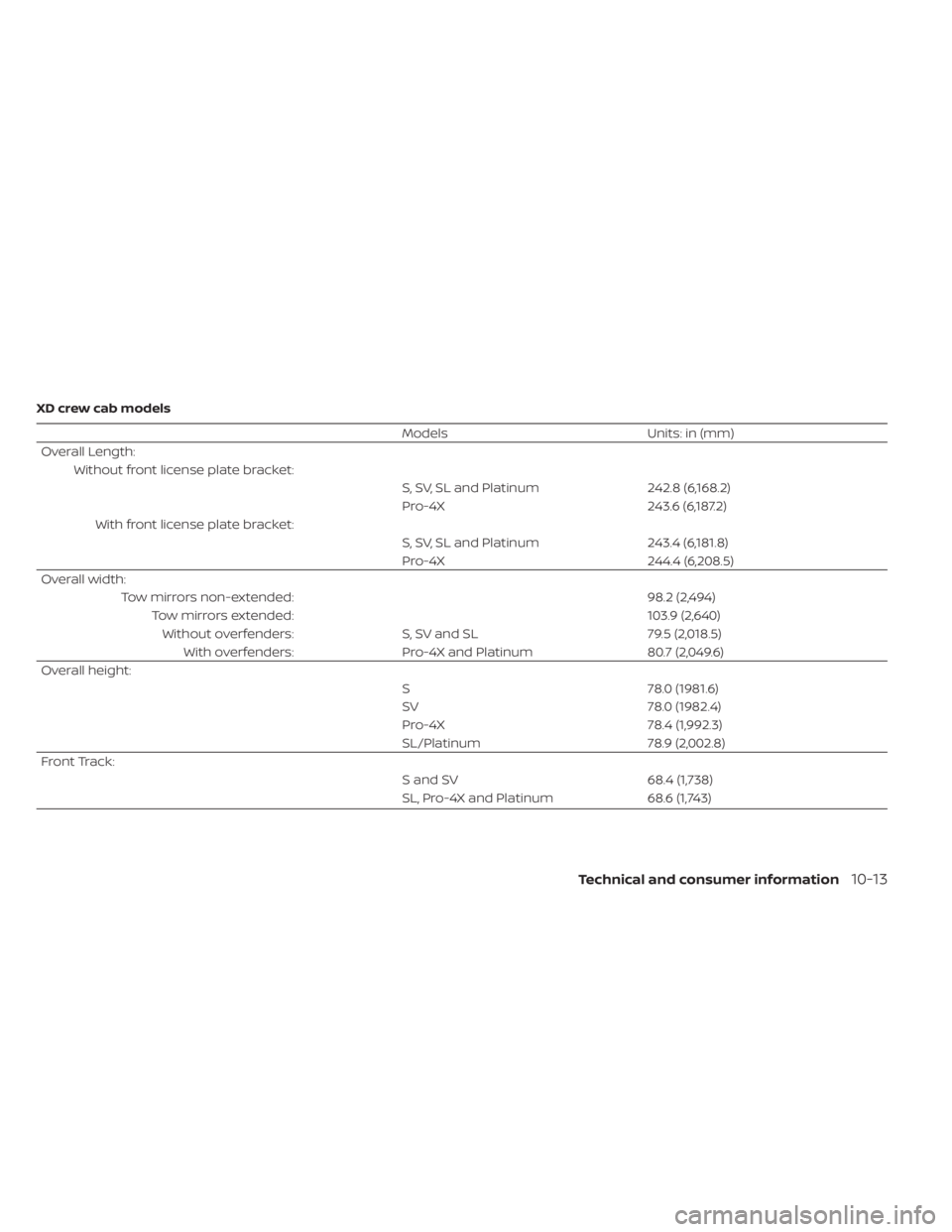
XD crew cab models
ModelsUnits: in (mm)
Overall Length: Without front license plate bracket: S, SV, SL and Platinum242.8 (6,168.2)
Pro-4X 243.6 (6,187.2)
With front license plate bracket: S, SV, SL and Platinum243.4 (6,181.8)
Pro-4X 244.4 (6,208.5)
Overall width: Tow mirrors non-extended: 98.2 (2,494)
Tow mirrors extended: 103.9 (2,640)
Without overfenders: S, SV and SL 79.5 (2,018.5)
With overfenders: Pro-4X and Platinum 80.7 (2,049.6)
Overall height: S78.0 (1981.6)
SV 78.0 (1982.4)
Pro-4X 78.4 (1,992.3)
SL/Platinum 78.9 (2,002.8)
Front Track: S and SV68.4 (1,738)
SL, Pro-4X and Platinum 68.6 (1,743)
Technical and consumer information10-13
Page 564 of 657
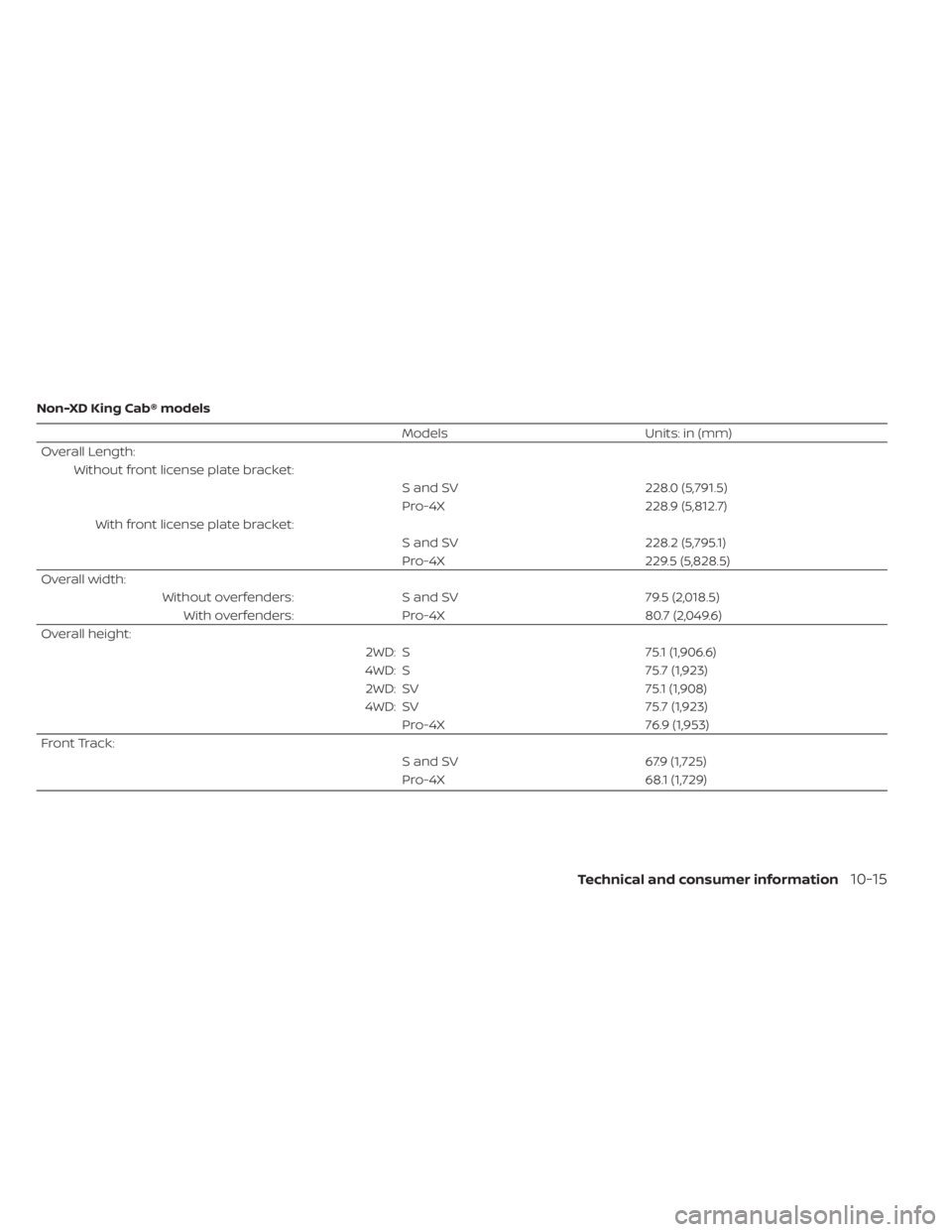
Non-XD King Cab® models
ModelsUnits: in (mm)
Overall Length: Without front license plate bracket: S and SV228.0 (5,791.5)
Pro-4X 228.9 (5,812.7)
With front license plate bracket: S and SV228.2 (5,795.1)
Pro-4X 229.5 (5,828.5)
Overall width: Without overfenders: S and SV 79.5 (2,018.5)
With overfenders: Pro-4X 80.7 (2,049.6)
Overall height: 2WD: S75.1 (1,906.6)
4WD: S 75.7 (1,923)
2WD: SV 75.1 (1,908)
4WD: SV 75.7 (1,923)
Pro-4X 76.9 (1,953)
Front Track: S and SV67.9 (1,725)
Pro-4X 68.1 (1,729)
Technical and consumer information10-15
Page 603 of 657
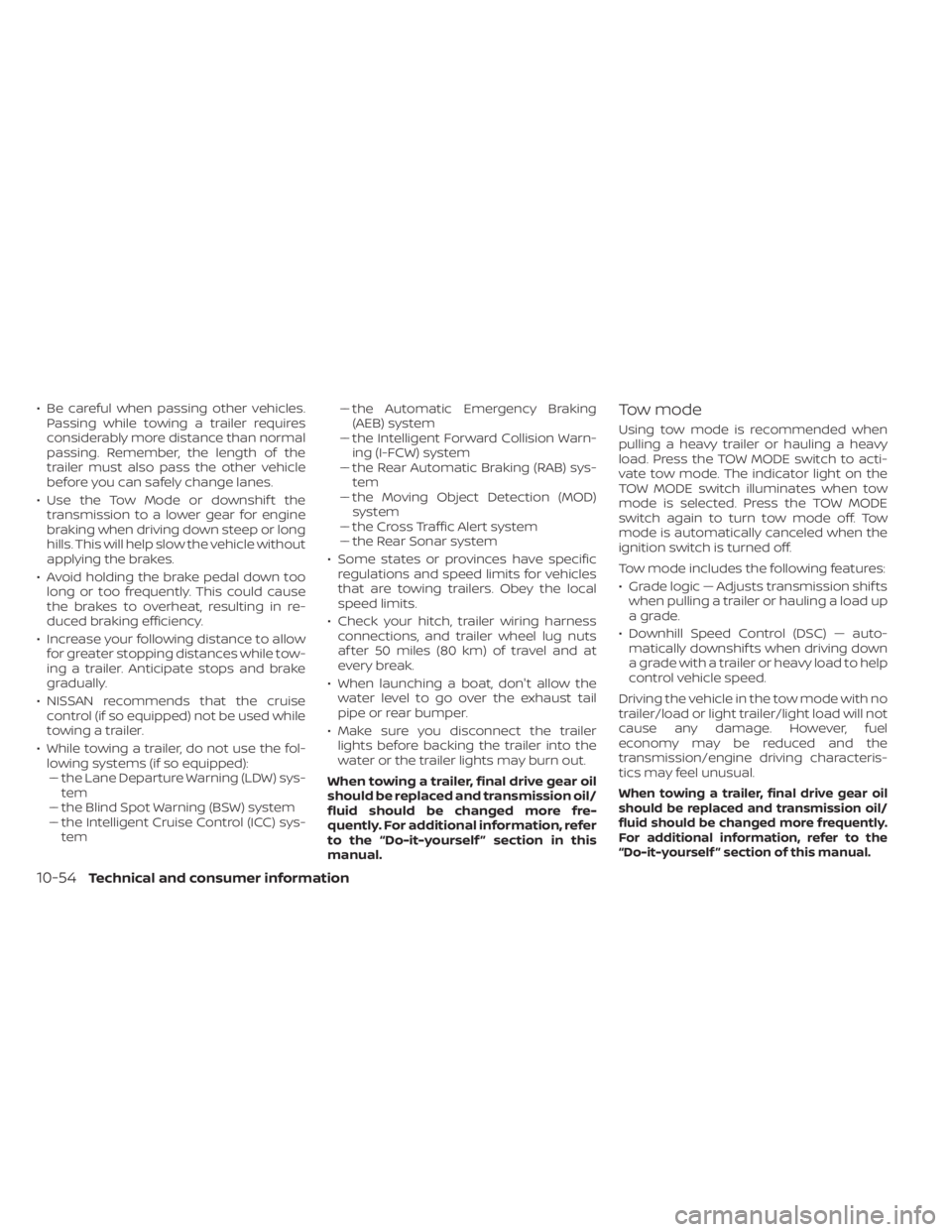
• Be careful when passing other vehicles.Passing while towing a trailer requires
considerably more distance than normal
passing. Remember, the length of the
trailer must also pass the other vehicle
before you can safely change lanes.
• Use the Tow Mode or downshif t the transmission to a lower gear for engine
braking when driving down steep or long
hills. This will help slow the vehicle without
applying the brakes.
• Avoid holding the brake pedal down too long or too frequently. This could cause
the brakes to overheat, resulting in re-
duced braking efficiency.
• Increase your following distance to allow for greater stopping distances while tow-
ing a trailer. Anticipate stops and brake
gradually.
• NISSAN recommends that the cruise control (if so equipped) not be used while
towing a trailer.
• While towing a trailer, do not use the fol- lowing systems (if so equipped):–– the Lane Departure Warning (LDW) sys- tem
–– the Blind Spot Warning (BSW) system
– – the Intelligent Cruise Control (ICC) sys-
tem –
– the Automatic Emergency Braking
(AEB) system
– – the Intelligent Forward Collision Warn-
ing (I-FCW) system
– – the Rear Automatic Braking (RAB) sys-
tem
– – the Moving Object Detection (MOD)
system
– – the Cross Traffic Alert system
–– the Rear Sonar system
• Some states or provinces have specific regulations and speed limits for vehicles
that are towing trailers. Obey the local
speed limits.
• Check your hitch, trailer wiring harness connections, and trailer wheel lug nuts
af ter 50 miles (80 km) of travel and at
every break.
• When launching a boat, don't allow the water level to go over the exhaust tail
pipe or rear bumper.
• Make sure you disconnect the trailer lights before backing the trailer into the
water or the trailer lights may burn out.
When towing a trailer, final drive gear oil
should be replaced and transmission oil/
fluid should be changed more fre-
quently. For additional information, refer
to the “Do-it-yourself ” section in this
manual.Tow mode
Using tow mode is recommended when
pulling a heavy trailer or hauling a heavy
load. Press the TOW MODE switch to acti-
vate tow mode. The indicator light on the
TOW MODE switch illuminates when tow
mode is selected. Press the TOW MODE
switch again to turn tow mode off. Tow
mode is automatically canceled when the
ignition switch is turned off.
Tow mode includes the following features:
• Grade logic — Adjusts transmission shif ts when pulling a trailer or hauling a load up
a grade.
• Downhill Speed Control (DSC) — auto- matically downshif ts when driving down
a grade with a trailer or heavy load to help
control vehicle speed.
Driving the vehicle in the tow mode with no
trailer/load or light trailer/light load will not
cause any damage. However, fuel
economy may be reduced and the
transmission/engine driving characteris-
tics may feel unusual.
When towing a trailer, final drive gear oil
should be replaced and transmission oil/
fluid should be changed more frequently.
For additional information, refer to the
“Do-it-yourself ” section of this manual.
10-54Technical and consumer information