battery NISSAN TITAN 2021 Owner´s Manual
[x] Cancel search | Manufacturer: NISSAN, Model Year: 2021, Model line: TITAN, Model: NISSAN TITAN 2021Pages: 638, PDF Size: 4.31 MB
Page 18 of 638
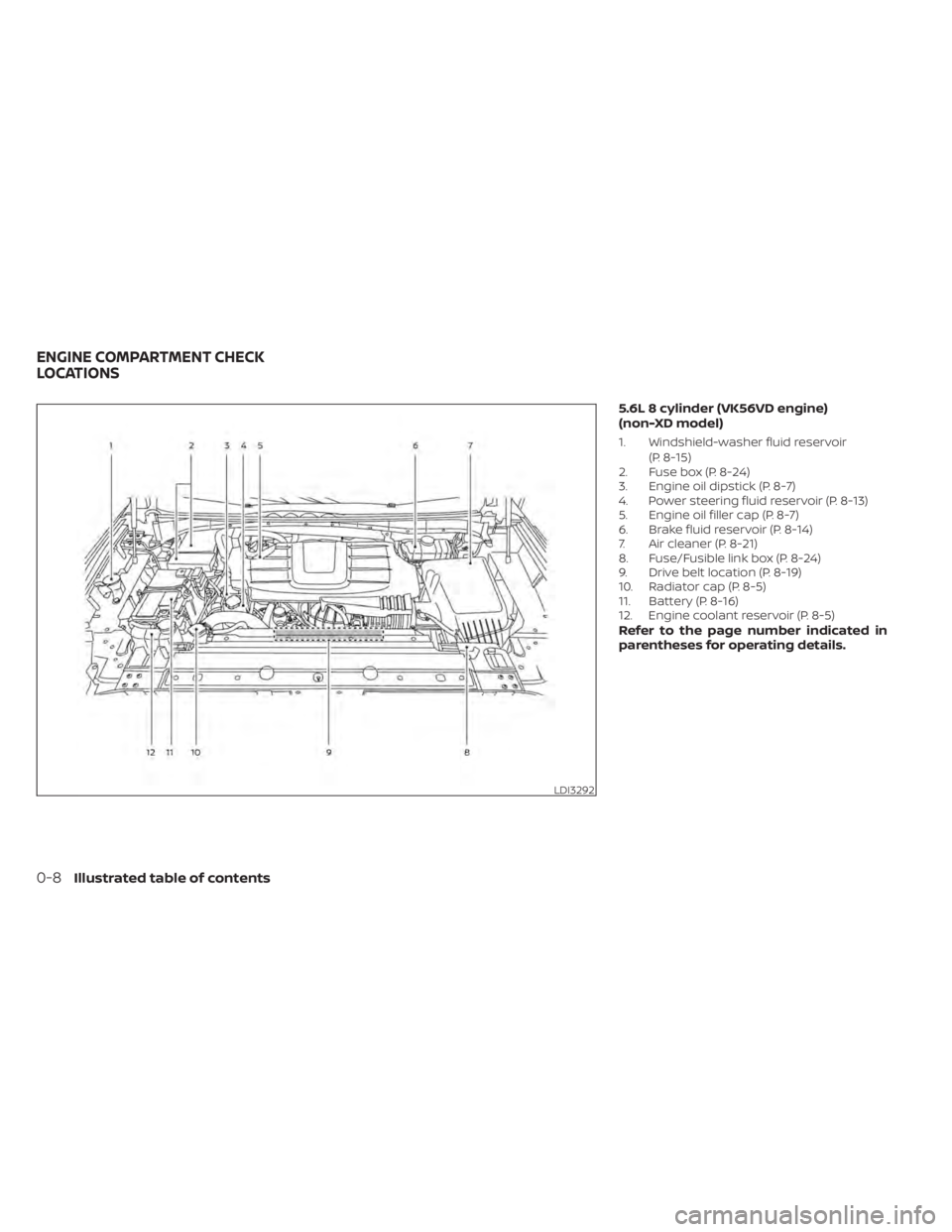
5.6L 8 cylinder (VK56VD engine)
(non-XD model)
1. Windshield-washer fluid reservoir(P. 8-15)
2. Fuse box (P. 8-24)
3. Engine oil dipstick (P. 8-7)
4. Power steering fluid reservoir (P. 8-13)
5. Engine oil filler cap (P. 8-7)
6. Brake fluid reservoir (P. 8-14)
7. Air cleaner (P. 8-21)
8. Fuse/Fusible link box (P. 8-24)
9. Drive belt location (P. 8-19)
10. Radiator cap (P. 8-5)
11. Battery (P. 8-16)
12. Engine coolant reservoir (P. 8-5)
Refer to the page number indicated in
parentheses for operating details.
LDI3292
ENGINE COMPARTMENT CHECK
LOCATIONS
0-8Illustrated table of contents
Page 19 of 638
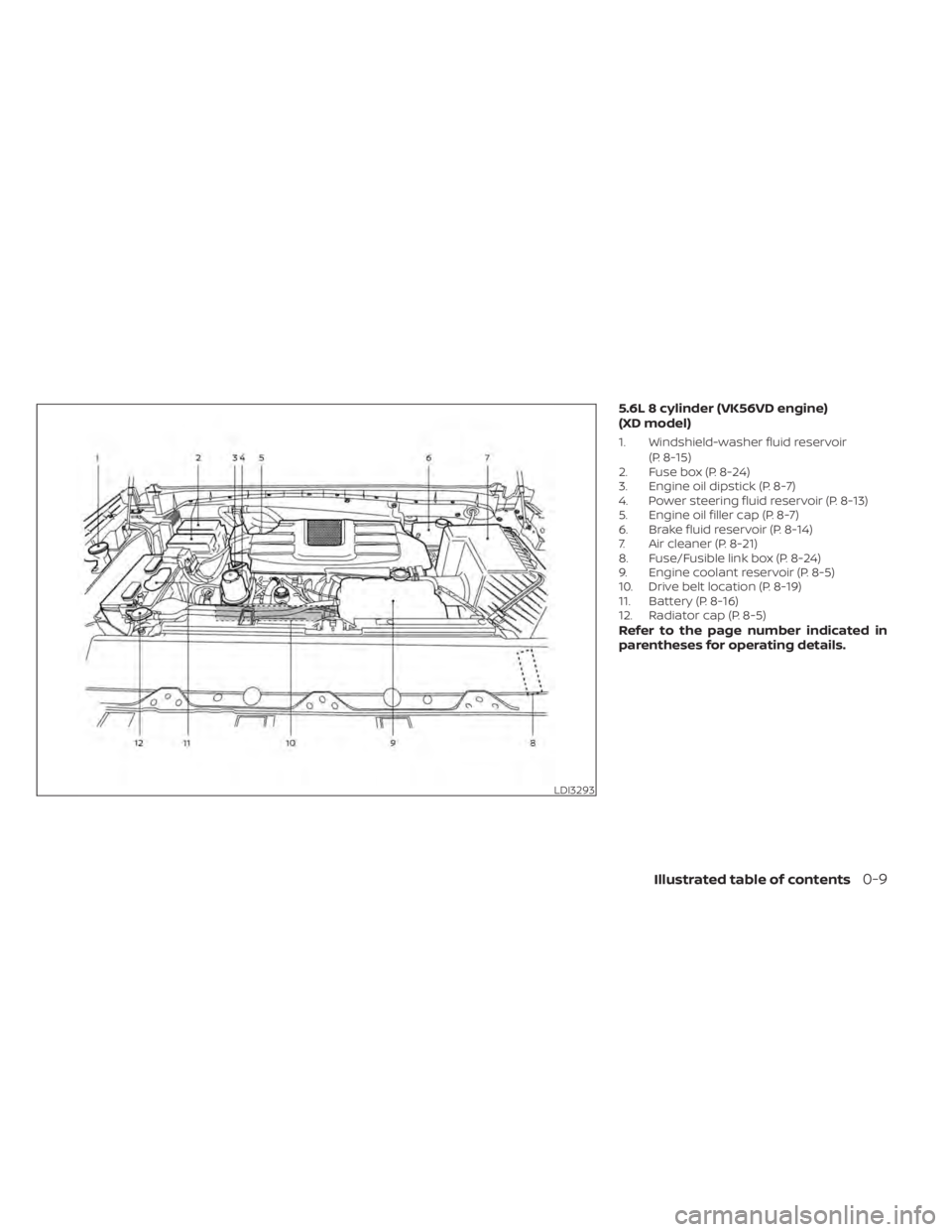
5.6L 8 cylinder (VK56VD engine)
(XD model)
1. Windshield-washer fluid reservoir(P. 8-15)
2. Fuse box (P. 8-24)
3. Engine oil dipstick (P. 8-7)
4. Power steering fluid reservoir (P. 8-13)
5. Engine oil filler cap (P. 8-7)
6. Brake fluid reservoir (P. 8-14)
7. Air cleaner (P. 8-21)
8. Fuse/Fusible link box (P. 8-24)
9. Engine coolant reservoir (P. 8-5)
10. Drive belt location (P. 8-19)
11. Battery (P. 8-16)
12. Radiator cap (P. 8-5)
Refer to the page number indicated in
parentheses for operating details.
LDI3293
Illustrated table of contents0-9
Page 28 of 638
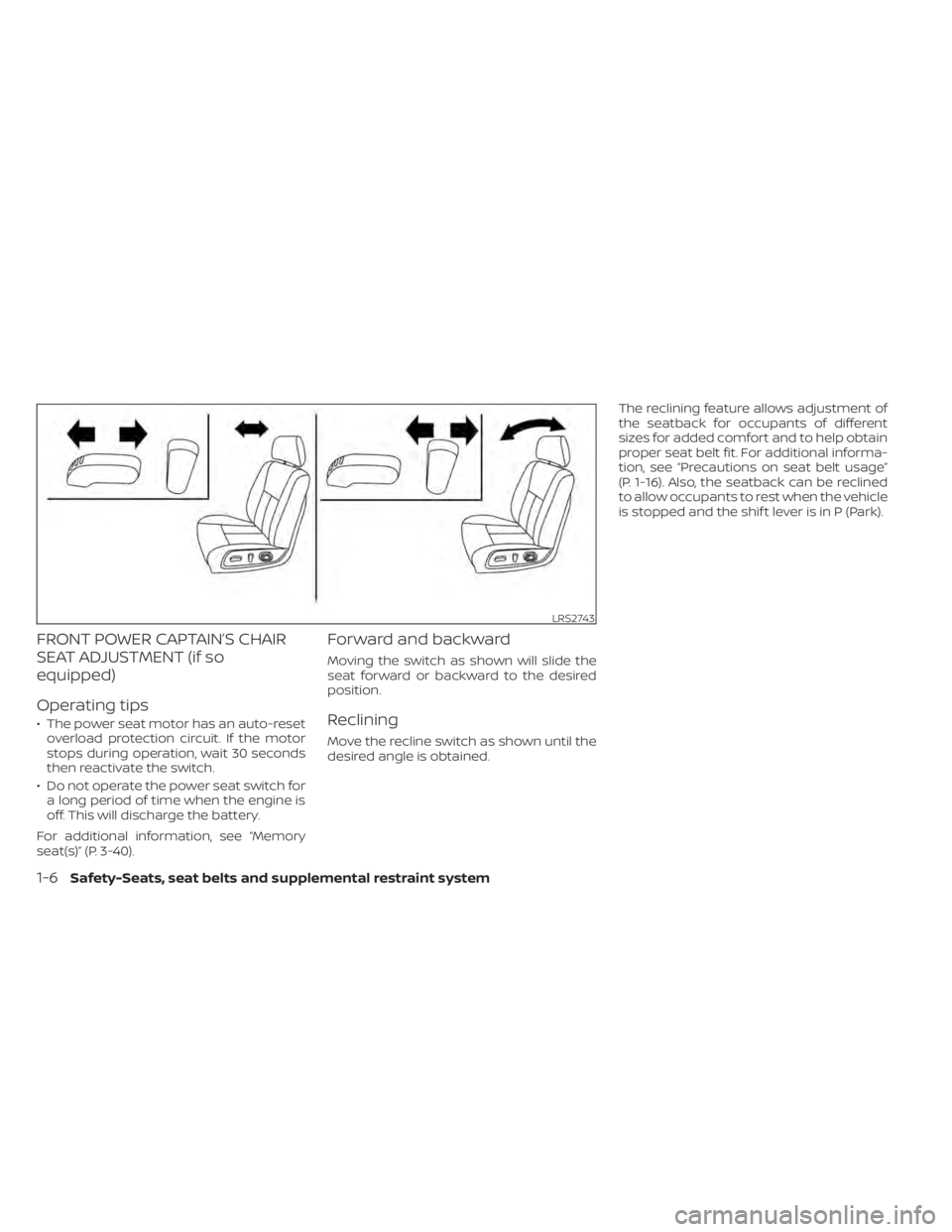
FRONT POWER CAPTAIN’S CHAIR
SEAT ADJUSTMENT (if so
equipped)
Operating tips
• The power seat motor has an auto-resetoverload protection circuit. If the motor
stops during operation, wait 30 seconds
then reactivate the switch.
• Do not operate the power seat switch for a long period of time when the engine is
off. This will discharge the battery.
For additional information, see “Memory
seat(s)” (P. 3-40).
Forward and backward
Moving the switch as shown will slide the
seat forward or backward to the desired
position.
Reclining
Move the recline switch as shown until the
desired angle is obtained. The reclining feature allows adjustment of
the seatback for occupants of different
sizes for added comfort and to help obtain
proper seat belt fit. For additional informa-
tion, see “Precautions on seat belt usage”
(P. 1-16). Also, the seatback can be reclined
to allow occupants to rest when the vehicle
is stopped and the shif t lever is in P (Park).
LRS2743
1-6Safety-Seats, seat belts and supplemental restraint system
Page 121 of 638
light remains on, have the system checked.
It is recommended that you visit a NISSAN
dealer for this service.
CAUTION
• Do not ground electrical accessories
directly to the battery terminal. Do-
ing so will bypass the variable volt-
age control system (if so equipped)
and the vehicle battery may not
charge completely. For additional in-
formation, see “Variable voltage con-
trol system” (P. 8-19).
• Do not continue driving if the genera-
tor belt is loose, broken or missing.
Electric shif t control system
warning light
This light illuminates when a malfunction
occurs in the electric shif t control system.
When the master warning light illuminates,
the chime sounds and the following mes-
sage is displayed in the vehicle information
display: “When parked apply parking brake”.
When the ignition is placed in the OFF posi-
tion, the chime sounds continuously. En-
sure the parking brake is applied Have the system checked. It is recom-
mended that you visit a NISSAN dealer for
this service.
Engine oil pressure
warning light
This light warns of low engine oil pressure. If
the light flickers or comes on during nor-
mal driving, pull off the road in a safe area,
stop the engine
immediately,and call a
NISSAN dealer or other authorized repair
shop.
The engine oil pressure warning light is
not designed to indicate a low oil level.
Use the dipstick to check the oil level.
For additional information, see “Engine oil”
(P. 8-7).
CAUTION
Running the engine with the engine oil
pressure warning light on could cause
serious damage to the engine almost
immediately. Such damage is not cov-
ered by warranty. Turn off the engine as
soon as it is safe to do so.
Malfunction Indicator Light
(MIL)
If this indicator light comes on steady or
blinks while the engine is running, it may
indicate a potential emission control mal-
function.
If this indicator light comes on steady for 20
seconds and then blinks for 10 seconds
when the engine is not running, it indicates
that the vehicle is not ready for an emission
control system inspection/maintenance
test. For additional information, see “Readi-
ness for inspection/maintenance (I/M)
test” (P. 10-59).
Instruments and controls2-15
Page 135 of 638
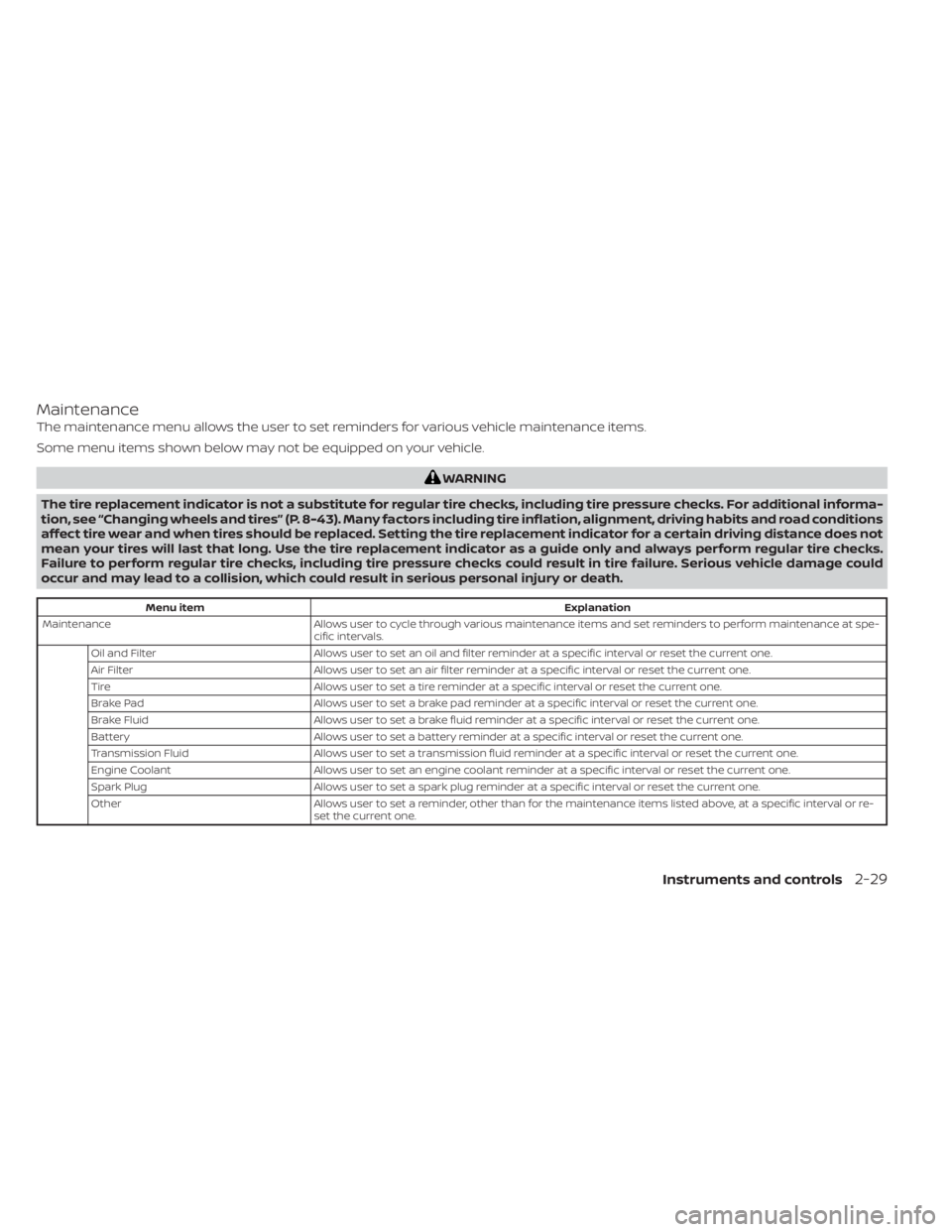
Maintenance
The maintenance menu allows the user to set reminders for various vehicle maintenance items.
Some menu items shown below may not be equipped on your vehicle.
WARNING
The tire replacement indicator is not a substitute for regular tire checks, including tire pressure checks. For additional informa-
tion, see “Changing wheels and tires” (P. 8-43). Many factors including tire inflation, alignment, driving habits and road conditions
affect tire wear and when tires should be replaced. Setting the tire replacement indicator for a certain driving distance does not
mean your tires will last that long. Use the tire replacement indicator as a guide only and always perform regular tire checks.
Failure to perform regular tire checks, including tire pressure checks could result in tire failure. Serious vehicle damage could
occur and may lead to a collision, which could result in serious personal injury or death.
Menu item Explanation
Maintenance Allows user to cycle through various maintenance items and set reminders to perform maintenance at spe-
cific intervals.
Oil and Filter Allows user to set an oil and filter reminder at a specific interval or reset the current one.
Air Filter Allows user to set an air filter reminder at a specific interval or reset the current one.
Tire Allows user to set a tire reminder at a specific interval or reset the current one.
Brake Pad Allows user to set a brake pad reminder at a specific interval or reset the current one.
Brake Fluid Allows user to set a brake fluid reminder at a specific interval or reset the current one.
Battery Allows user to set a battery reminder at a specific interval or reset the current one.
Transmission Fluid Allows user to set a transmission fluid reminder at a specific interval or reset the current one.
Engine Coolant Allows user to set an engine coolant reminder at a specific interval or reset the current one.
Spark Plug Allows user to set a spark plug reminder at a specific interval or reset the current one.
Other Allows user to set a reminder, other than for the maintenance items listed above, at a specific interval or re-
set the current one.
Instruments and controls2-29
Page 137 of 638
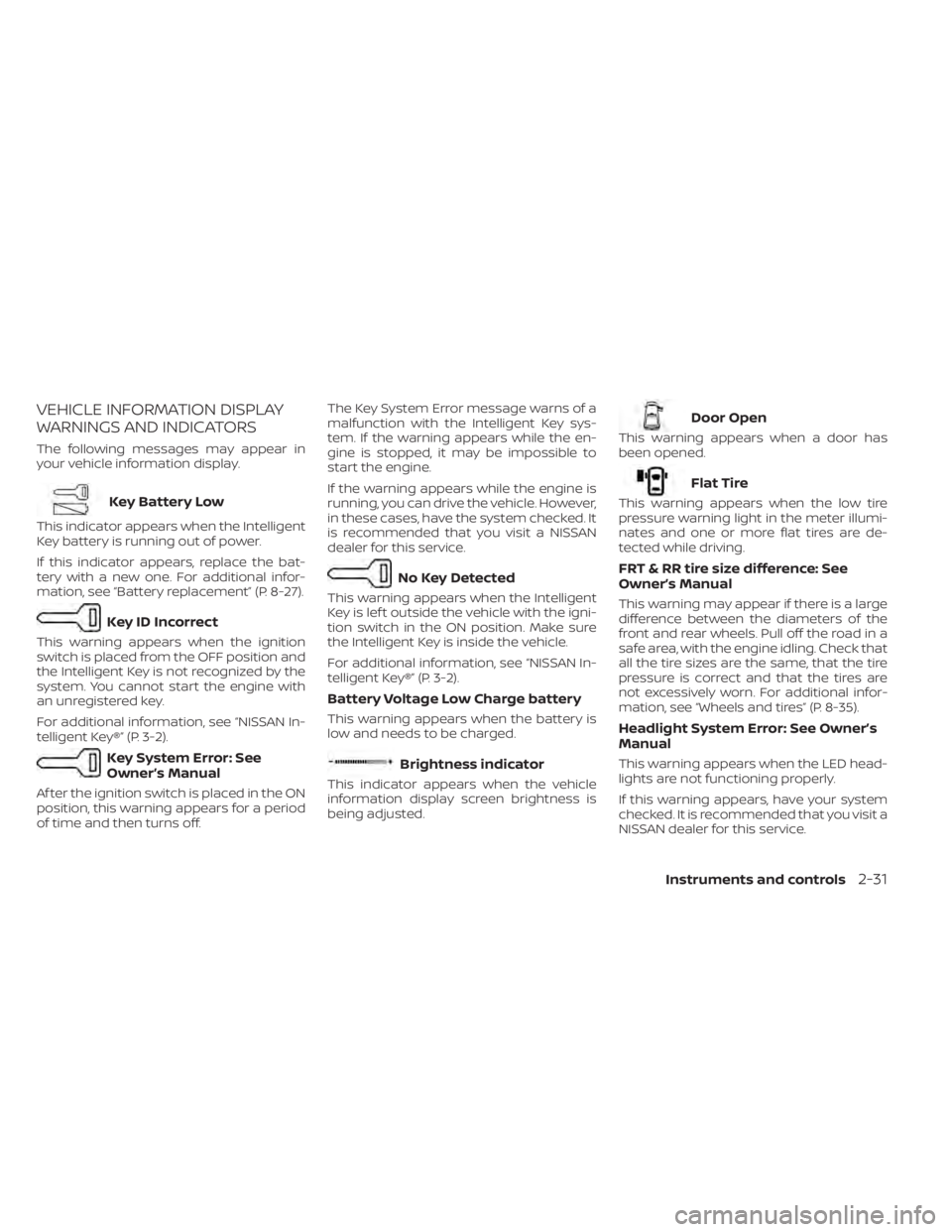
VEHICLE INFORMATION DISPLAY
WARNINGS AND INDICATORS
The following messages may appear in
your vehicle information display.
Key Battery Low
This indicator appears when the Intelligent
Key battery is running out of power.
If this indicator appears, replace the bat-
tery with a new one. For additional infor-
mation, see “Battery replacement” (P. 8-27).
Key ID Incorrect
This warning appears when the ignition
switch is placed from the OFF position and
the Intelligent Key is not recognized by the
system. You cannot start the engine with
an unregistered key.
For additional information, see “NISSAN In-
telligent Key®” (P. 3-2).
Key System Error: See
Owner’s Manual
Af ter the ignition switch is placed in the ON
position, this warning appears for a period
of time and then turns off.The Key System Error message warns of a
malfunction with the Intelligent Key sys-
tem. If the warning appears while the en-
gine is stopped, it may be impossible to
start the engine.
If the warning appears while the engine is
running, you can drive the vehicle. However,
in these cases, have the system checked. It
is recommended that you visit a NISSAN
dealer for this service.
No Key Detected
This warning appears when the Intelligent
Key is lef t outside the vehicle with the igni-
tion switch in the ON position. Make sure
the Intelligent Key is inside the vehicle.
For additional information, see “NISSAN In-
telligent Key®” (P. 3-2).
Battery Voltage Low Charge battery
This warning appears when the battery is
low and needs to be charged.
Brightness indicator
This indicator appears when the vehicle
information display screen brightness is
being adjusted.
Door Open
This warning appears when a door has
been opened.
Flat Tire
This warning appears when the low tire
pressure warning light in the meter illumi-
nates and one or more flat tires are de-
tected while driving.
FRT & RR tire size difference: See
Owner’s Manual
This warning may appear if there is a large
difference between the diameters of the
front and rear wheels. Pull off the road in a
safe area, with the engine idling. Check that
all the tire sizes are the same, that the tire
pressure is correct and that the tires are
not excessively worn. For additional infor-
mation, see “Wheels and tires” (P. 8-35).
Headlight System Error: See Owner’s
Manual
This warning appears when the LED head-
lights are not functioning properly.
If this warning appears, have your system
checked. It is recommended that you visit a
NISSAN dealer for this service.
Instruments and controls2-31
Page 138 of 638
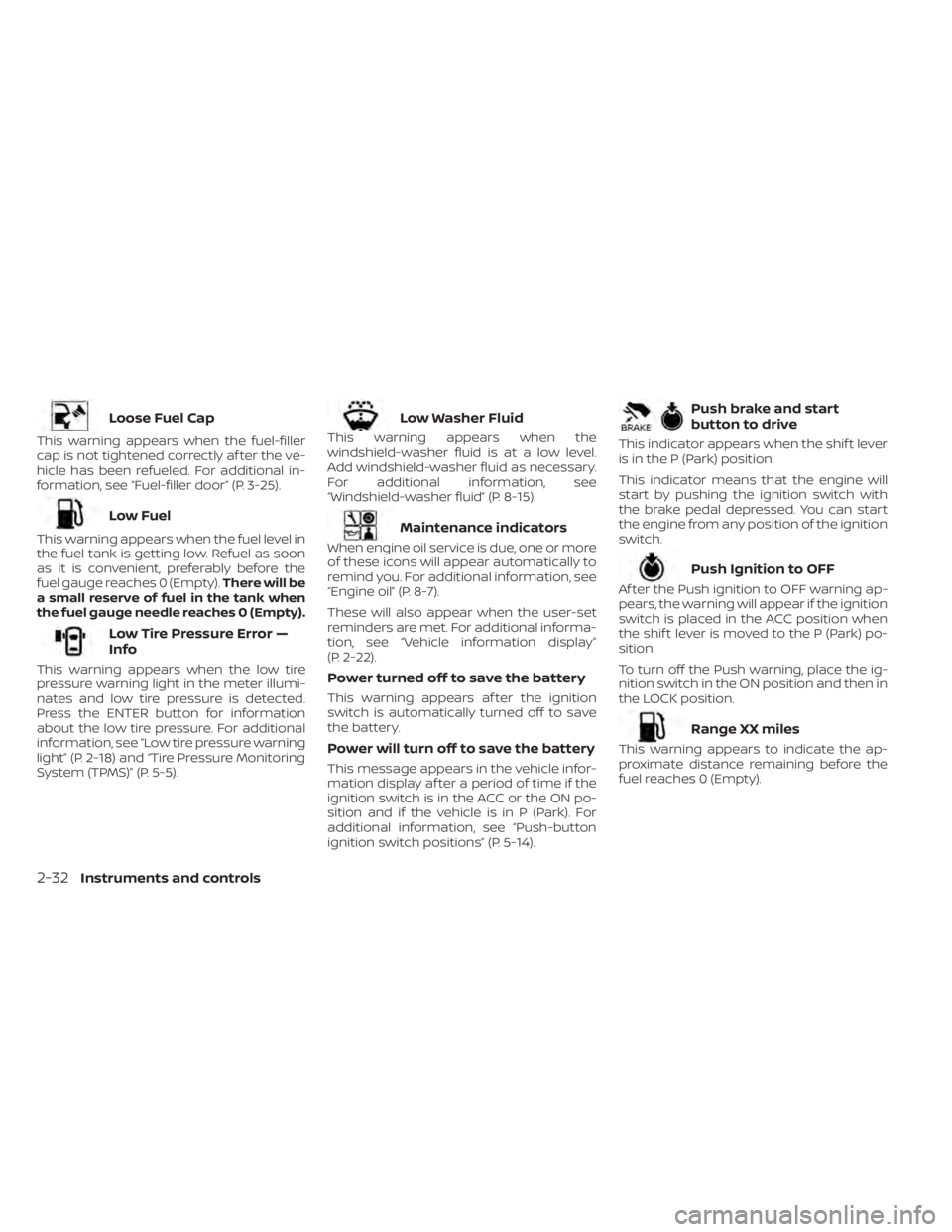
Loose Fuel Cap
This warning appears when the fuel-filler
cap is not tightened correctly af ter the ve-
hicle has been refueled. For additional in-
formation, see “Fuel-filler door” (P. 3-25).
Low Fuel
This warning appears when the fuel level in
the fuel tank is getting low. Refuel as soon
as it is convenient, preferably before the
fuel gauge reaches 0 (Empty).There will be
a small reserve of fuel in the tank when
the fuel gauge needle reaches 0 (Empty).
Low Tire Pressure Error —
Info
This warning appears when the low tire
pressure warning light in the meter illumi-
nates and low tire pressure is detected.
Press the ENTER button for information
about the low tire pressure. For additional
information, see “Low tire pressure warning
light” (P. 2-18) and “Tire Pressure Monitoring
System (TPMS)” (P. 5-5).
Low Washer Fluid
This warning appears when the
windshield-washer fluid is at a low level.
Add windshield-washer fluid as necessary.
For additional information, see
“Windshield-washer fluid” (P. 8-15).
Maintenance indicators
When engine oil service is due, one or more
of these icons will appear automatically to
remind you. For additional information, see
“Engine oil” (P. 8-7).
These will also appear when the user-set
reminders are met. For additional informa-
tion, see “Vehicle information display”
(P. 2-22).
Power turned off to save the battery
This warning appears af ter the ignition
switch is automatically turned off to save
the battery.
Power will turn off to save the battery
This message appears in the vehicle infor-
mation display af ter a period of time if the
ignition switch is in the ACC or the ON po-
sition and if the vehicle is in P (Park). For
additional information, see “Push-button
ignition switch positions” (P. 5-14).
Push brake and start
button to drive
This indicator appears when the shif t lever
is in the P (Park) position.
This indicator means that the engine will
start by pushing the ignition switch with
the brake pedal depressed. You can start
the engine from any position of the ignition
switch.
Push Ignition to OFF
Af ter the Push ignition to OFF warning ap-
pears, the warning will appear if the ignition
switch is placed in the ACC position when
the shif t lever is moved to the P (Park) po-
sition.
To turn off the Push warning, place the ig-
nition switch in the ON position and then in
the LOCK position.
Range XX miles
This warning appears to indicate the ap-
proximate distance remaining before the
fuel reaches 0 (Empty).
2-32Instruments and controls
Page 150 of 638
CAUTION
Use the headlights with the engine run-
ning to avoid discharging the vehicle
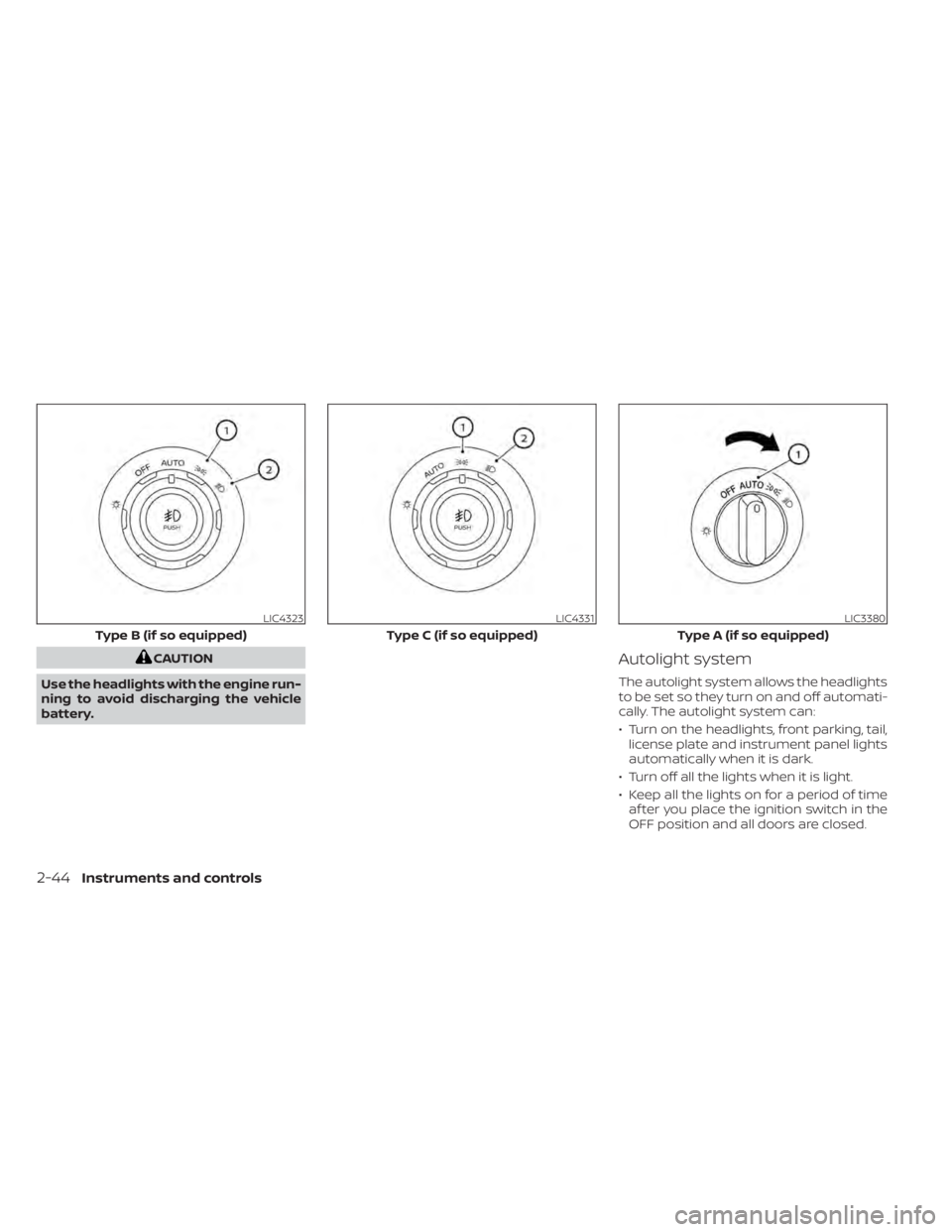
battery.Autolight system
The autolight system allows the headlights
to be set so they turn on and off automati-
cally. The autolight system can:
• Turn on the headlights, front parking, tail, license plate and instrument panel lights
automatically when it is dark.
• Turn off all the lights when it is light.
• Keep all the lights on for a period of time af ter you place the ignition switch in the
OFF position and all doors are closed.
LIC4323
Type B (if so equipped)
LIC4331
Type C (if so equipped)
LIC3380
Type A (if so equipped)
2-44Instruments and controls
Page 151 of 638
NOTE:
Autolight activation sensitivity and the
time delay for autolight shutoff can be
adjusted. For additional information, see
“How to use the vehicle information dis-
play ” (P. 2-23).
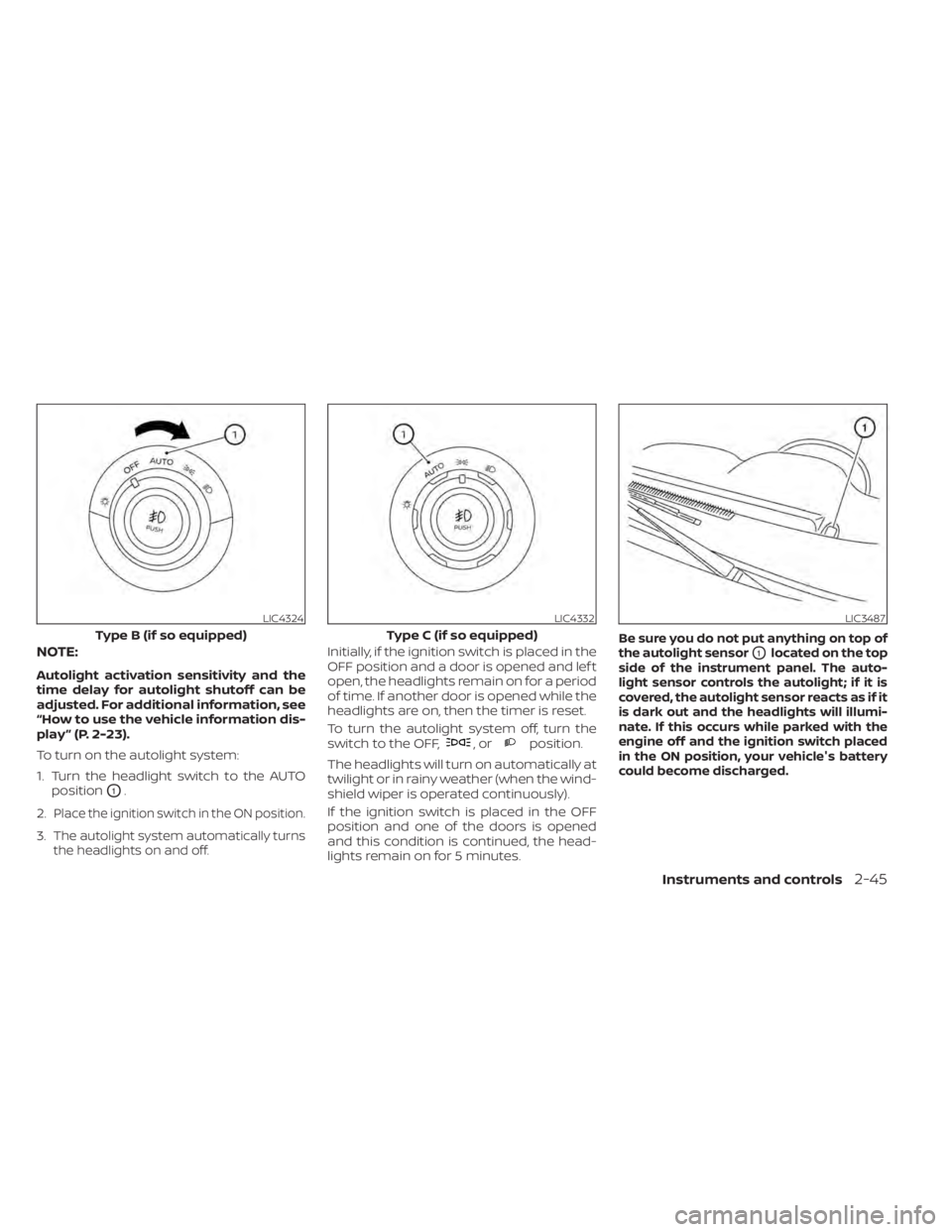
To turn on the autolight system:
1. Turn the headlight switch to the AUTOposition
O1.
2.
Place the ignition switch in the ON position.
3.The autolight system automatically turns
the headlights on and off.
Initially, if the ignition switch is placed in the
OFF position and a door is opened and lef t
open, the headlights remain on for a period
of time. If another door is opened while the
headlights are on, then the timer is reset.
To turn the autolight system off, turn the
switch to the OFF,
,orposition.
The headlights will turn on automatically at
twilight or in rainy weather (when the wind-
shield wiper is operated continuously).
If the ignition switch is placed in the OFF
position and one of the doors is opened
and this condition is continued, the head-
lights remain on for 5 minutes.
Be sure you do not put anything on top of
the autolight sensor
O1located on the top
side of the instrument panel. The auto-
light sensor controls the autolight; if it is
covered, the autolight sensor reacts as if it
is dark out and the headlights will illumi-
nate. If this occurs while parked with the
engine off and the ignition switch placed
in the ON position, your vehicle's battery
could become discharged.
LIC4324
Type B (if so equipped)
LIC4332
Type C (if so equipped)
LIC3487
Instruments and controls2-45
Page 154 of 638
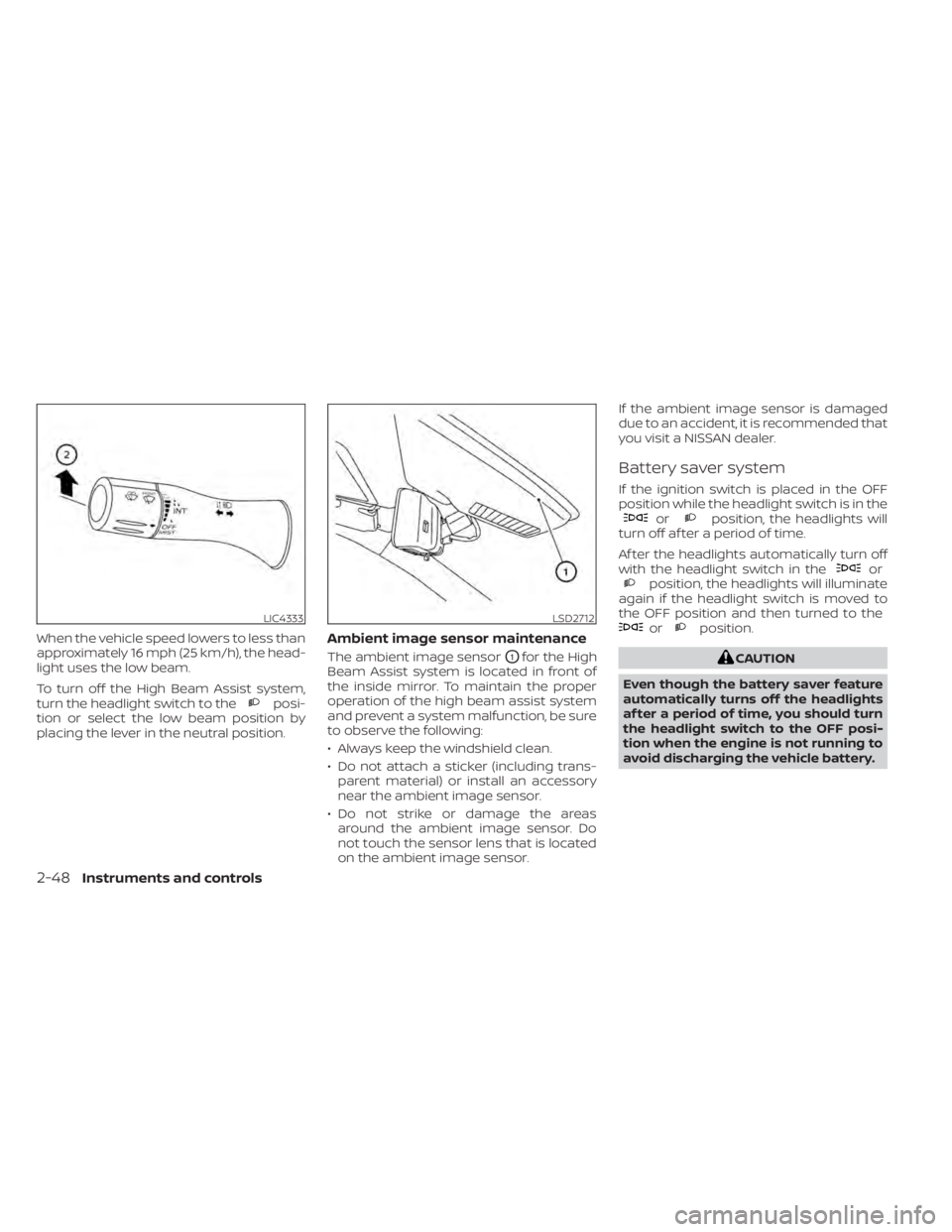
When the vehicle speed lowers to less than
approximately 16 mph (25 km/h), the head-
light uses the low beam.
To turn off the High Beam Assist system,
turn the headlight switch to the
posi-
tion or select the low beam position by
placing the lever in the neutral position.
Ambient image sensor maintenance
The ambient image sensorO1for the High
Beam Assist system is located in front of
the inside mirror. To maintain the proper
operation of the high beam assist system
and prevent a system malfunction, be sure
to observe the following:
• Always keep the windshield clean.
• Do not attach a sticker (including trans- parent material) or install an accessory
near the ambient image sensor.
• Do not strike or damage the areas around the ambient image sensor. Do
not touch the sensor lens that is located
on the ambient image sensor. If the ambient image sensor is damaged
due to an accident, it is recommended that
you visit a NISSAN dealer.
Battery saver system
If the ignition switch is placed in the OFF
position while the headlight switch is in the
orposition, the headlights will
turn off af ter a period of time.
Af ter the headlights automatically turn off
with the headlight switch in the
orposition, the headlights will illuminate
again if the headlight switch is moved to
the OFF position and then turned to the
orposition.
CAUTION
Even though the battery saver feature
automatically turns off the headlights
af ter a period of time, you should turn
the headlight switch to the OFF posi-
tion when the engine is not running to
avoid discharging the vehicle battery.
LIC4333LSD2712
2-48Instruments and controls