light NISSAN TITAN 2022 Owners Manual
[x] Cancel search | Manufacturer: NISSAN, Model Year: 2022, Model line: TITAN, Model: NISSAN TITAN 2022Pages: 635, PDF Size: 7.78 MB
Page 416 of 635
• Do not cover or attach stickers, or installany accessory near the sensors. This
could block sensor signals and/or cause
failure or malfunction.
• Do not attach metallic objects near the radar sensor (brush guard, etc.). This
could cause failure or malfunction.
• Do not place reflective materials, such as white paper or a mirror, on the instru-
ment panel. The reflection of sunlight
may adversely affect the camera unit's
detection capability.
• Do not alter, remove or paint the front bumper. Before customizing or restoring
the front bumper, it is recommended that
you visit a NISSAN dealer.
Radio frequency statement
FCC Notice
USA
FCC ID: OAYARS4B
This device complies with Part 15 of the
FCC Rules with Industry Canada Licence-
exempt RSS standard(s). Operation is subject to the following two
conditions:
1.
This device may not cause harmful in-
terference, and
2. This device must accept any interfer-
ence received, including interference
that may cause undesired operation.
Radio frequency radiation exposure
Information:
This equipment complies with FCC and IC
radiation exposure limits set forth for an
uncontrolled environment.
This equipment should be installed and
operated with minimum distance of 30
cm between the radiator and your body.
This transmitter must not be co-located
or operating in conjunction with any
other antenna or transmitter.
FCC Notice
Changes or modifications not expressly
approved by the party responsible for
compliance could void the user’s author-
ity to operate the equipment.
WARNING
Failure to follow the warnings and in-
structions for proper use of the I-FCW
system could result in serious injury or
death.
• The I-FCW system can help warn the
driver before a collision occurs but
will not avoid a collision. It is the driv-
er’s responsibility to stay alert, drive
safely and be in control of the vehicle
at all times.
The I-FCW system can help alert the driver
when there is a sudden braking of a second
vehicle traveling in front of the vehicle
ahead in the same lane.
INTELLIGENT FORWARD COLLISION
WARNING (I-FCW)
5-90Starting and driving
Page 417 of 635
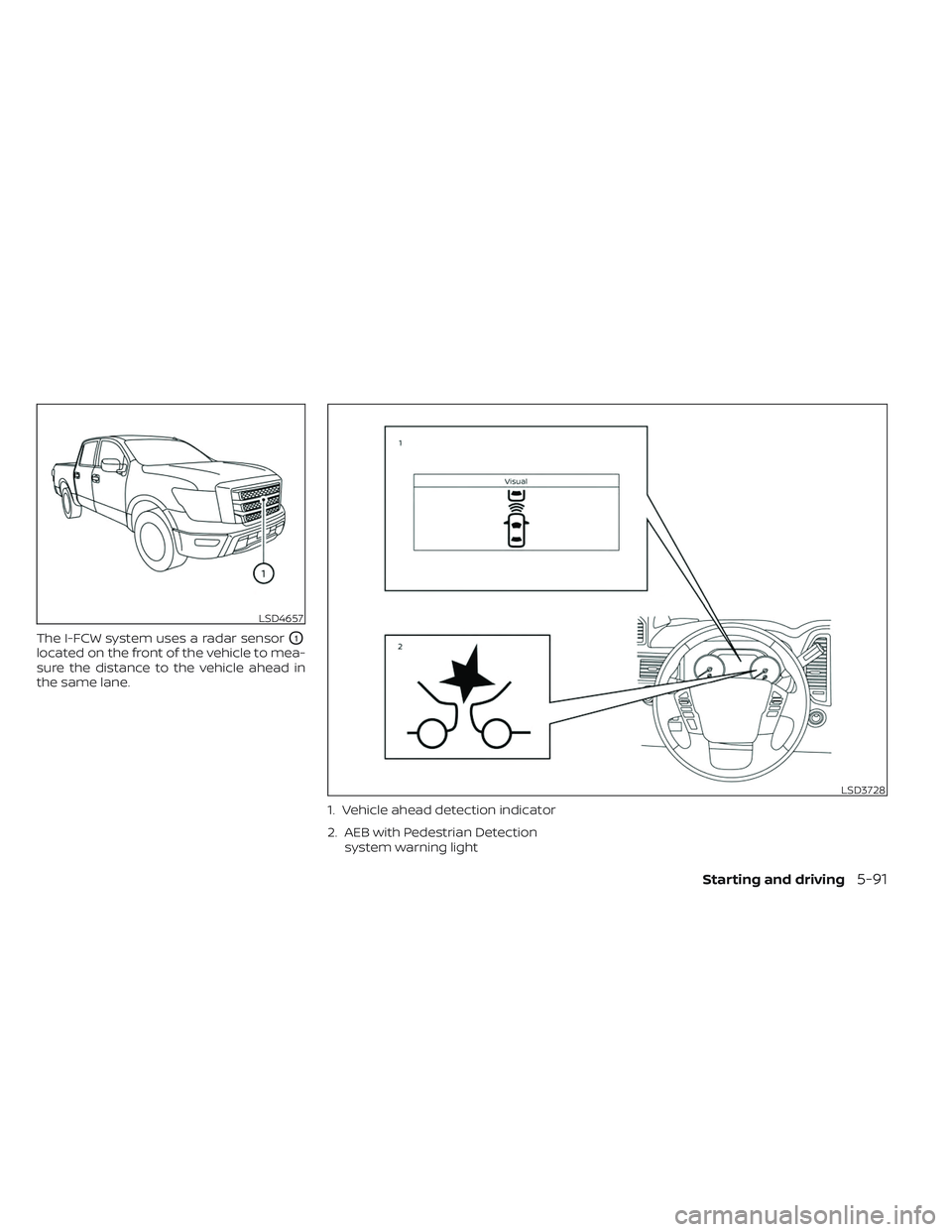
The I-FCW system uses a radar sensorO1
located on the front of the vehicle to mea-
sure the distance to the vehicle ahead in
the same lane.1. Vehicle ahead detection indicator
2. AEB with Pedestrian Detectionsystem warning light
LSD4657
LSD3728
Starting and driving5-91
Page 419 of 635
TURNING THE I-FCW SYSTEM
ON/OFF
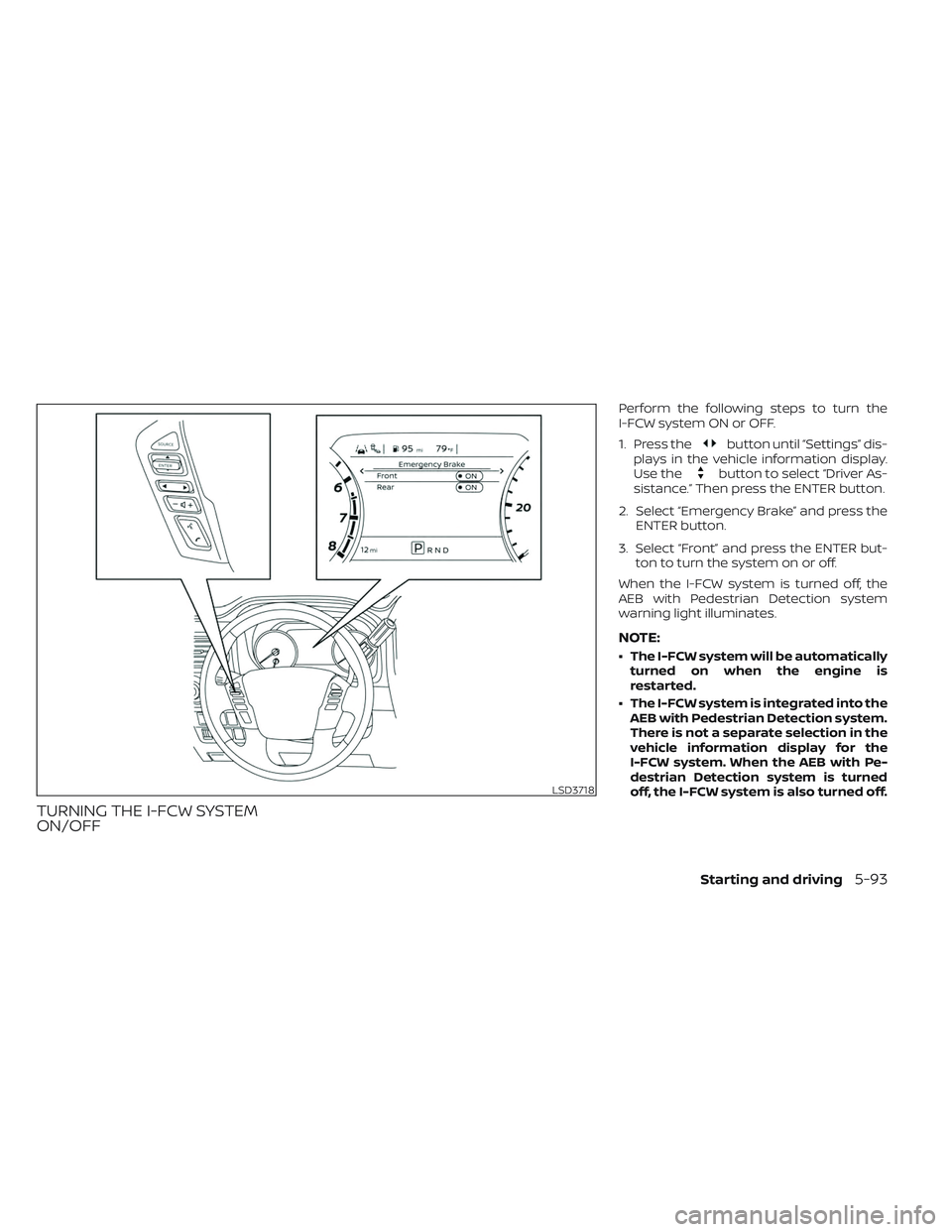
Perform the following steps to turn the
I-FCW system ON or OFF.
1. Press the
button until “Settings” dis-
plays in the vehicle information display.
Use the
button to select “Driver As-
sistance.” Then press the ENTER button.
2. Select “Emergency Brake” and press the ENTER button.
3. Select “Front” and press the ENTER but- ton to turn the system on or off.
When the I-FCW system is turned off, the
AEB with Pedestrian Detection system
warning light illuminates.
NOTE:
• The I-FCW system will be automatically turned on when the engine is
restarted.
• The I-FCW system is integrated into the AEB with Pedestrian Detection system.
There is not a separate selection in the
vehicle information display for the
I-FCW system. When the AEB with Pe-
destrian Detection system is turned
off, the I-FCW system is also turned off.
LSD3718
Starting and driving5-93
Page 425 of 635
SYSTEM TEMPORARILY
UNAVAILABLE
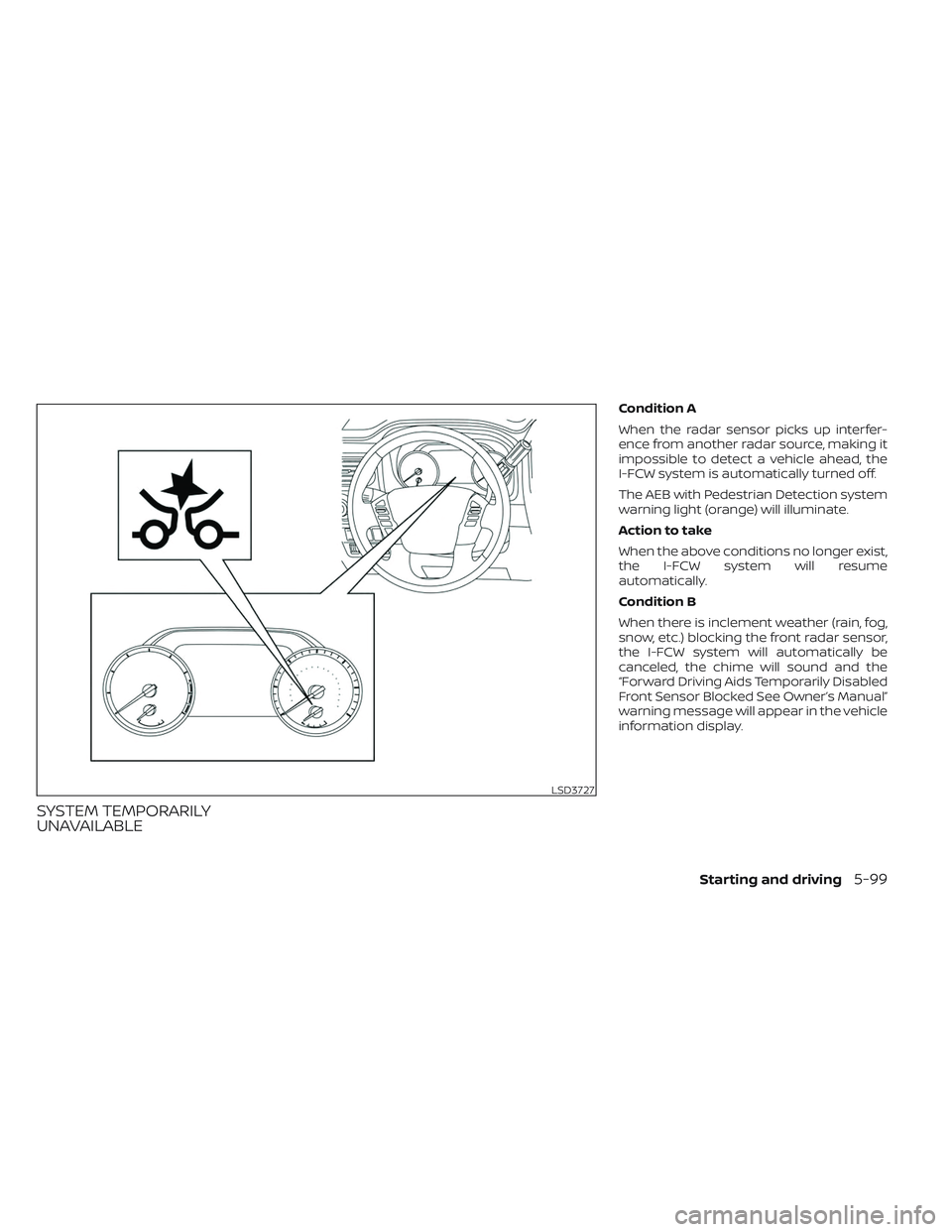
Condition A
When the radar sensor picks up interfer-
ence from another radar source, making it
impossible to detect a vehicle ahead, the
I-FCW system is automatically turned off.
The AEB with Pedestrian Detection system
warning light (orange) will illuminate.
Action to take
When the above conditions no longer exist,
the I-FCW system will resume
automatically.
Condition B
When there is inclement weather (rain, fog,
snow, etc.) blocking the front radar sensor,
the I-FCW system will automatically be
canceled, the chime will sound and the
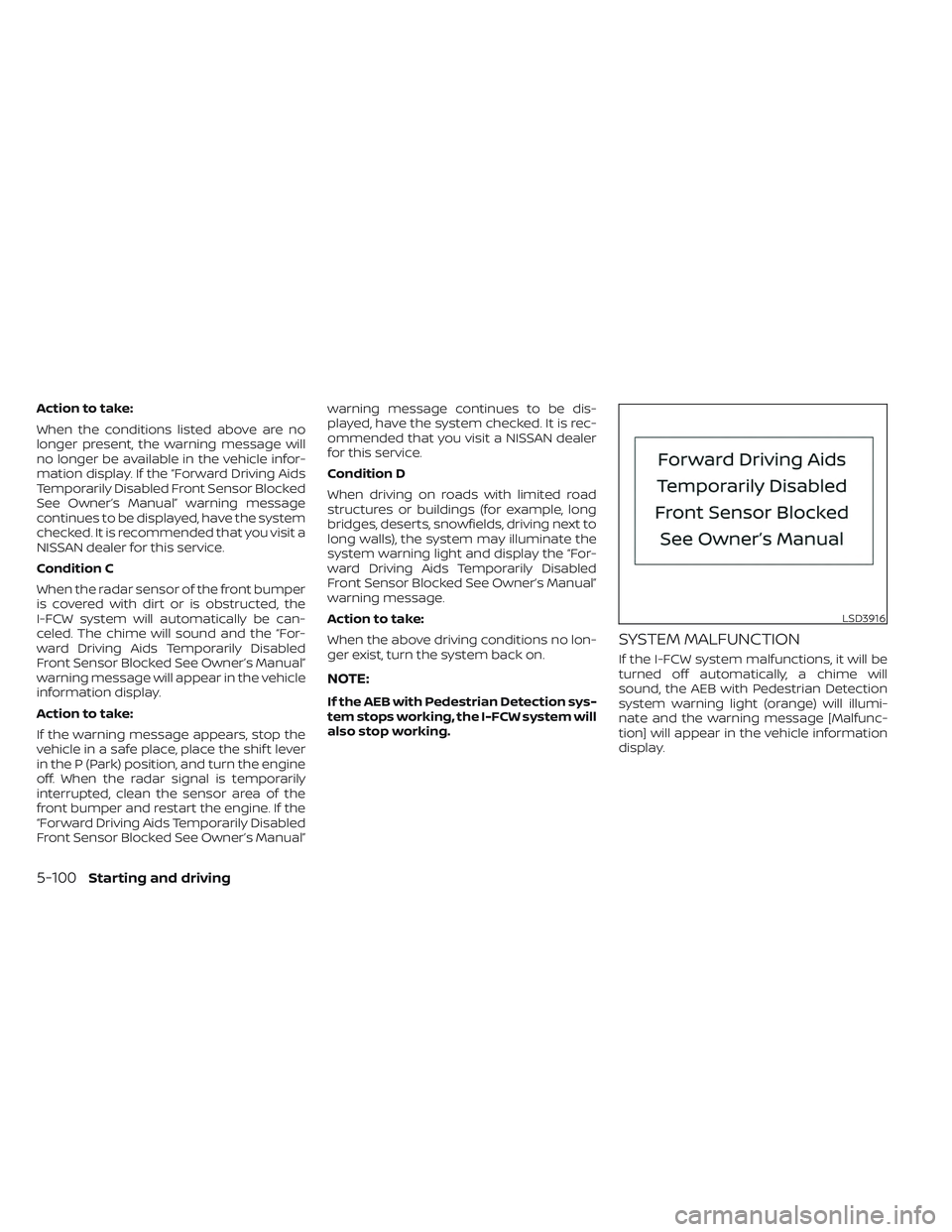
“Forward Driving Aids Temporarily Disabled
Front Sensor Blocked See Owner’s Manual”
warning message will appear in the vehicle
information display.
LSD3727
Starting and driving5-99
Page 426 of 635
Action to take:
When the conditions listed above are no
longer present, the warning message will
no longer be available in the vehicle infor-
mation display. If the “Forward Driving Aids
Temporarily Disabled Front Sensor Blocked
See Owner’s Manual” warning message
continues to be displayed, have the system
checked. It is recommended that you visit a
NISSAN dealer for this service.
Condition C
When the radar sensor of the front bumper
is covered with dirt or is obstructed, the
I-FCW system will automatically be can-
celed. The chime will sound and the “For-
ward Driving Aids Temporarily Disabled
Front Sensor Blocked See Owner’s Manual”
warning message will appear in the vehicle
information display.
Action to take:
If the warning message appears, stop the
vehicle in a safe place, place the shif t lever
in the P (Park) position, and turn the engine
off. When the radar signal is temporarily
interrupted, clean the sensor area of the
front bumper and restart the engine. If the
“Forward Driving Aids Temporarily Disabled
Front Sensor Blocked See Owner’s Manual”warning message continues to be dis-
played, have the system checked. It is rec-
ommended that you visit a NISSAN dealer
for this service.
Condition D
When driving on roads with limited road
structures or buildings (for example, long
bridges, deserts, snowfields, driving next to
long walls), the system may illuminate the
system warning light and display the “For-
ward Driving Aids Temporarily Disabled
Front Sensor Blocked See Owner’s Manual”
warning message.
Action to take:
When the above driving conditions no lon-
ger exist, turn the system back on.
NOTE:
If the AEB with Pedestrian Detection sys-
tem stops working, the I-FCW system will
also stop working.
SYSTEM MALFUNCTION
If the I-FCW system malfunctions, it will be
turned off automatically, a chime will
sound, the AEB with Pedestrian Detection
system warning light (orange) will illumi-
nate and the warning message [Malfunc-
tion] will appear in the vehicle information
display.
LSD3916
5-100Starting and driving
Page 427 of 635
Action to take
If the warning light (orange) comes on, stop
the vehicle in a safe location, turn the en-
gine off and restart the engine. If the
warning light continues to illuminate, have
the I-FCW system checked. It is recom-
mended that you visit a NISSAN dealer for
this service.
SYSTEM MAINTENANCE
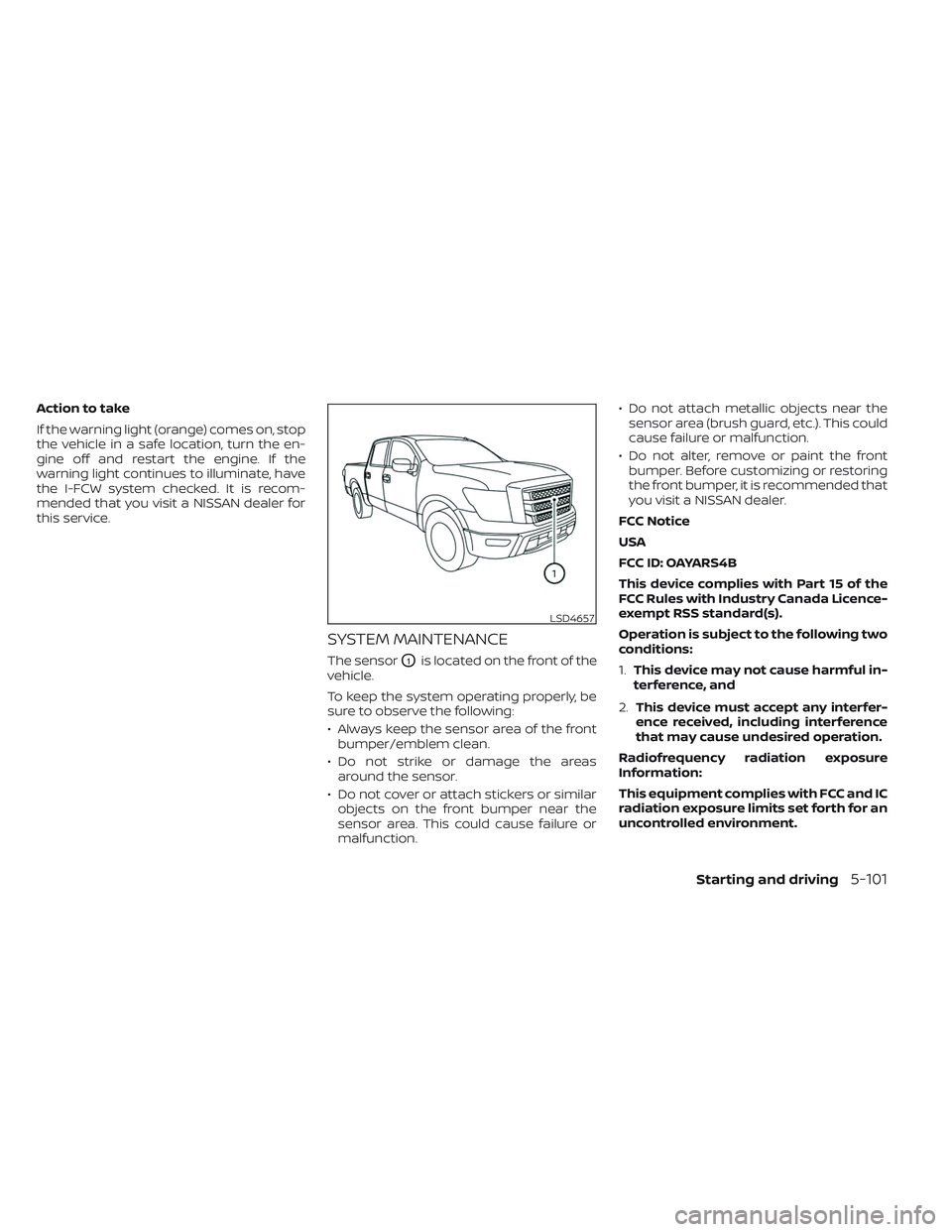
The sensorO1is located on the front of the
vehicle.
To keep the system operating properly, be
sure to observe the following:
• Always keep the sensor area of the front bumper/emblem clean.
• Do not strike or damage the areas around the sensor.
• Do not cover or attach stickers or similar objects on the front bumper near the
sensor area. This could cause failure or
malfunction. • Do not attach metallic objects near the
sensor area (brush guard, etc.). This could
cause failure or malfunction.
• Do not alter, remove or paint the front bumper. Before customizing or restoring
the front bumper, it is recommended that
you visit a NISSAN dealer.
FCC Notice
USA
FCC ID: OAYARS4B
This device complies with Part 15 of the
FCC Rules with Industry Canada Licence-
exempt RSS standard(s).
Operation is subject to the following two
conditions:
1. This device may not cause harmful in-
terference, and
2. This device must accept any interfer-
ence received, including interference
that may cause undesired operation.
Radiofrequency radiation exposure
Information:
This equipment complies with FCC and IC
radiation exposure limits set forth for an
uncontrolled environment.
LSD4657
Starting and driving5-101
Page 432 of 635
Follow these easy-to-use Fuel Efficient
Driving Tips to help you achieve the most
fuel economy from your vehicle.
1.Use Smooth Accelerator and Brake
Pedal Application
• Avoid rapid starts and stops.
• Use smooth, gentle accelerator and brake application whenever possible.
• Maintain constant speed while com- muting and coast whenever possible.
2. Maintain Constant Speed
• Look ahead to try and anticipate and minimize stops.
• Synchronizing your speed with traffic lights allows you to reduce your num-
ber of stops.
• Maintaining a steady speed can mini- mize red light stops and improve fuel
efficiency.
3. Use Air Conditioning (A/C) at Higher
Vehicle Speeds
• Below 40 mph (64 km/h), it is more efficient to open windows to cool the
vehicle due to reduced engine load.
• Above 40 mph (64 km/h), it is more efficient to use A/C to cool the vehicle
due to increased aerodynamic drag. • Recirculating the cool air in the cabin
when the A/C is on reduces cooling
load.
4. Drive at Economical Speeds and
Distances
• Observing the speed limit and not ex- ceeding 60 mph (97 km/h) (where le-
gally allowed) can improve fuel effi-
ciency due to reduced aerodynamic
drag.
• Maintaining a safe following distance behind other vehicles reduces unnec-
essary braking.
• Safely monitoring traffic to anticipate changes in speed permits reduced
braking and smooth acceleration
changes.
• Select a gear range suitable to road conditions.
5. Use Cruise Control
• Using cruise control during highway driving helps maintain a steady speed.
• Cruise control is particularly effective in providing fuel savings when driving
on flat terrains.
6. Plan for the Shortest Route
• Utilize a map or navigation system to determine the best route to save time. 7.
Avoid Idling
• Shutting off your engine when safe for stops exceeding 30–60 seconds saves
fuel and reduces emissions.
8. Buy an Automated Pass for Toll Roads
• Automated passes permit drivers to use special lanes to maintain cruising
speed through the toll and avoid stop-
ping and starting.
9. Winter Warm Up
• Limit idling time to minimize impact to fuel economy.
• Vehicles typically need no more than 30 seconds of idling at start-up to ef-
fectively circulate the engine oil before
driving.
• Your vehicle will reach its ideal operat- ing temperature more quickly while
driving versus idling.
10. Keeping your Vehicle Cool
• Park your vehicle in a covered parking area or in the shade whenever
possible.
• When entering a hot vehicle, opening the windows will help to reduce the
inside temperature faster, resulting in
reduced demand on your A/C system.
FUEL EFFICIENT DRIVING TIPS
5-106Starting and driving
Page 435 of 635
*1: Before moving the shif t lever from N (Neutral), wait until the 4LO indicator stays on steady. This indicates that the 4WD shif t procedure is completed and
the transfer gear is correctly set in the 4LO position. If the vehicle is shif ted into gear before the indicator is on steady, the transfer gear may grind , not engage
correctly or stay in the N (Neutral) position.
- If the 4WD vehicle information display warning message illuminates, perform the following procedure to return the transfer case to the correct oper ating
condition.
1. Turn off the engine by placing the ignition switch in the OFF position.
2. Start the engine.
- Check that the 4WD vehicle information display warning message turns off. If the warning message in the vehicle information display stays on, have th e
system checked. It is recommended that you visit a NISSAN dealer for this service.
3. Apply the parking brake, depress the brake pedal and move the shif t lever to the N (Neutral) position.
4. With the brake pedal depressed, move the 4WD shif t switch to the desired mode.
- Be sure to wait until the transfer gear change completes before shif ting the shif t lever from the N (Neutral) position.
*2: While changing in and out of 4LO, the ignition switch must be in the ON position and the vehicle's engine must be running for a shif t to take place and for the
4WD shif t and 4LO position indicators to be operable. Otherwise, the shif t will not take place and no indicators will be on or flashing.
*3: Make sure the transfer 4LO position indicator turns on when you shif t the 4WD shif t switch to 4LO. The
indicator light will also turn on when 4LO
is selected. For additional information, see “Vehicle Dynamic Control (VDC) system” (P. 5-120).
Starting and driving5-109
Page 436 of 635
The transfer case 4WD shif t switch is used
to select either 2WD or 4WD depending on
the driving conditions. There are three
types of drive modes available: 2WD, 4H and
4LO.
The 4WD shif t switch electronically controls
the transfer case operation. Rotate the
switch to move between each mode: 2WD,
4H and 4LO.
To change into or out of 4LO, the vehicle
MUST be stationary, move the shif t lever
to N (Neutral), and depress the brake
pedal. The switch must be pushed and
turned to select 4LO.
WARNING
• When parking, apply the parking
brake before stopping the engine
and make sure that the 4WD shif t in-
dicator is on and the Automatic
Transmission Park (ATP) warning
light goes off. Otherwise, the vehicle
could unexpectedly move even if the
A/T is in the P (Park) position. •
The 4LO indicator must stop blinking
and remain illuminated or turn off
before shif ting the transmission into
gear. If the shif t lever is shif ted from
the N (Neutral) position to any other
gear when the 4LO indicator is blink-
ing, the vehicle may move
unexpectedly.
CAUTION
• Never shif t the 4WD shif t switch be-
tween 4LO and 4H while driving.
• The 4H position provides greater
traction. Avoid excessive speed, as it
will cause increased fuel consump-
tion and higher oil temperatures, and
could damage drivetrain compo-
nents. Speeds over 62 mph (100
km/h) in 4H is not recommended.
• The 4LO position provides maximum
power and traction. Avoid raising ve-
hicle speed excessively, as the maxi-
mum speed is approximately 31 mph
(50 km/h).
• When driving straight, shif t the 4WD
shif t switch to the 2WD or 4H posi-
tion. Do not move the 4WD shif t
switch when making a turn or
reversing. •
Do not shif t the 4WD shif t switch (be-
tween 2WD and 4H) while driving on
steep downhill grades. Use the en-
gine brake and low A/T gears (M1 or
M2) for engine braking.
• Do not operate the 4WD shif t switch
(between 2WD and 4H) with the rear
wheels spinning.
• Do not drive on dry hard surface
roads in the 4H or 4LO position. Driv-
ing on dry hard surfaces in 4H or 4LO
may cause unnecessary noise and
tire wear. NISSAN recommends driv-
ing in the 2WD position under these
conditions.
• The 4WD transfer case may not be
shif ted between 4H and 4LO at low
ambient temperatures and the
transfer 4LO position indicator may
blink even when the 4WD shif t switch
is shif ted. Af ter driving for a while
you can change the 4WD transfer
case between 4H and 4LO.
5-110Starting and driving
Page 439 of 635
–In the 4LO position, stop the ve-
hicle, move the automatic trans-
mission shif t lever to the N (Neu-
tral) position with the brake pedal
depressed, and shif t the 4WD shif t
switch to 2WD.
• If the warning message is still on af-
ter the above operation, have your
vehicle checked as soon as possible.
It is recommended that you visit a
NISSAN dealer for this service.
• The transfer case may be damaged if
you continue driving with the
warning message on. The E-Lock system can provide additional
traction and should only be used when a
vehicle has become or is becoming stuck.
This system operates by electronically
“locking” the two rear drive wheels to-
gether, allowing them to turn at the same
speed. The system is used when it is not
possible to free a stuck vehicle even when
using the 4LO position (4-Wheel Drive
vehicles).
When added traction is required, activate
the E-Lock system by pushing the switch
on. For additional information, see “Elec-
tronic locking rear differential (E-Lock) sys-
tem switch” (P. 2-60). Once the system fully
engages, the indicator light in the instru-
ment panel will remain on. When the sys-
tem is activated, both rear wheels will en-
gage, providing added traction.
The rear wheels may momentarily slip or
move to engage the system, and the sys-
tem will only engage up to approximately 4
mph (7 km/h). Once the vehicle is free, the
system should be turned off and driving
resumed.
The Anti-lock Braking System (ABS) is dis-
abled and the ABS warning light illumi-
nates when the E-Lock system is on.WARNING
• Never leave the E-Lock system on
when driving on paved or hard-
surfaced roads. Turning the vehicle
may result in the rear wheels slipping
and result in an accident and per-
sonal injury. Af ter using the E-Lock
system to free the vehicle, turn the
system off.
• Use the E-Lock system only in an
emergency when it is not possible to
free a stuck vehicle even when using
4LO. Never use the E-Lock system on
a slippery road surface such as snow
or ice surface. Using the E-Lock sys-
tem when driving in these road con-
ditions may cause unexpected
movement of the vehicle during en-
gine braking, accelerating or turning,
which may result in an accident and
serious personal injury.
• Observe the above warnings. Other-
wise, loss of normal steering control
may result. This may result in an ac-
cident and serious personal injury.
ELECTRONIC LOCKING REAR
DIFFERENTIAL (E-Lock) SYSTEM (if
so equipped)
Starting and driving5-113