door lock NISSAN TITAN 2023 Owners Manual
[x] Cancel search | Manufacturer: NISSAN, Model Year: 2023, Model line: TITAN, Model: NISSAN TITAN 2023Pages: 644, PDF Size: 7.8 MB
Page 11 of 644
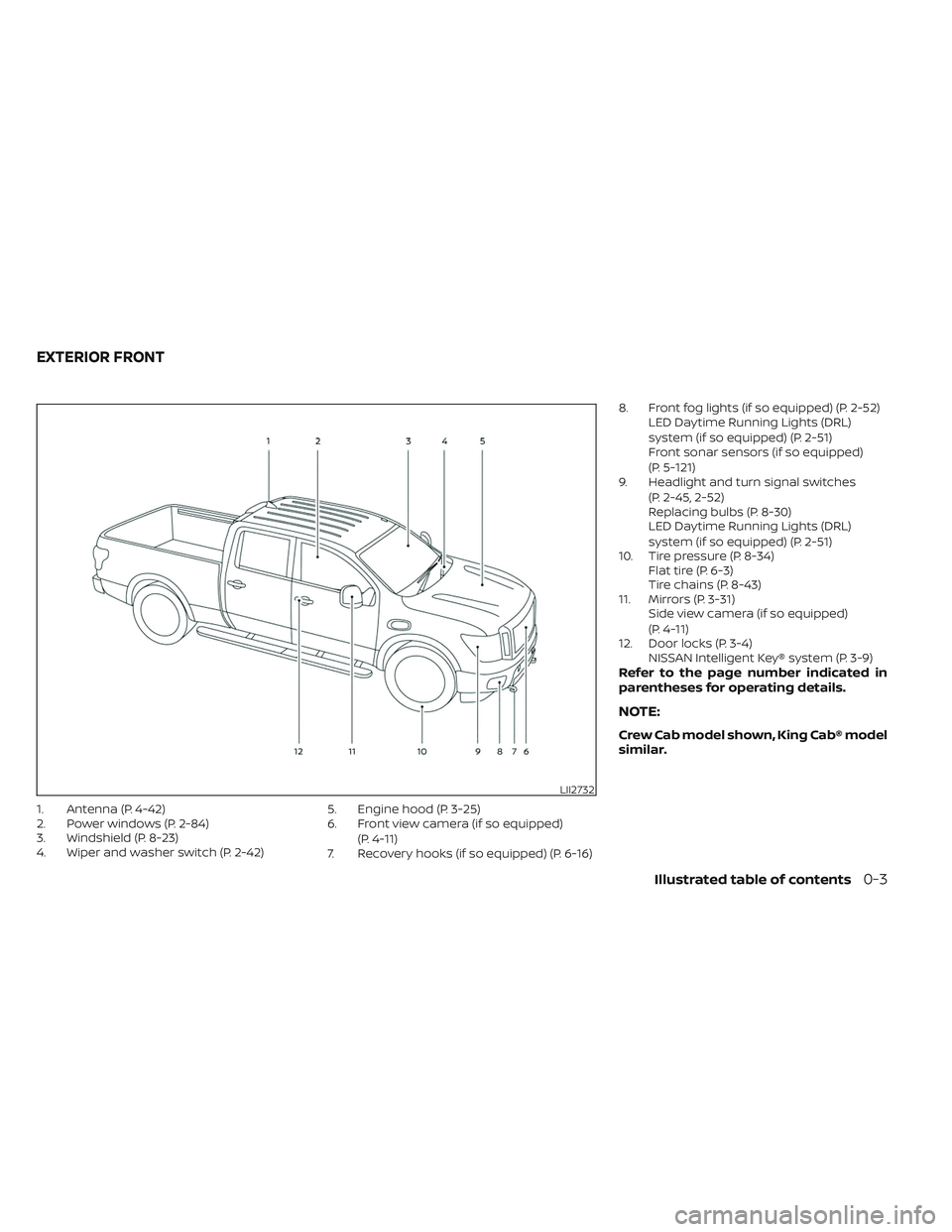
1. Antenna (P. 4-42)
2. Power windows (P. 2-84)
3. Windshield (P. 8-23)
4. Wiper and washer switch (P. 2-42)5. Engine hood (P. 3-25)
6. Front view camera (if so equipped)
(P. 4-11)
7. Recovery hooks (if so equipped) (P. 6-16) 8. Front fog lights (if so equipped) (P. 2-52)
LED Daytime Running Lights (DRL)
system (if so equipped) (P. 2-51)
Front sonar sensors (if so equipped)
(P. 5-121)
9. Headlight and turn signal switches
(P. 2-45, 2-52)
Replacing bulbs (P. 8-30)
LED Daytime Running Lights (DRL)
system (if so equipped) (P. 2-51)
10. Tire pressure (P. 8-34) Flat tire (P. 6-3)
Tire chains (P. 8-43)
11. Mirrors (P. 3-31) Side view camera (if so equipped)
(P. 4-11)
12. Door locks (P. 3-4) NISSAN Intelligent Key® system (P. 3-9)
Refer to the page number indicated in
parentheses for operating details.
NOTE:
Crew Cab model shown, King Cab® model
similar.
LII2732
EXTERIOR FRONT
Illustrated table of contents0-3
Page 12 of 644
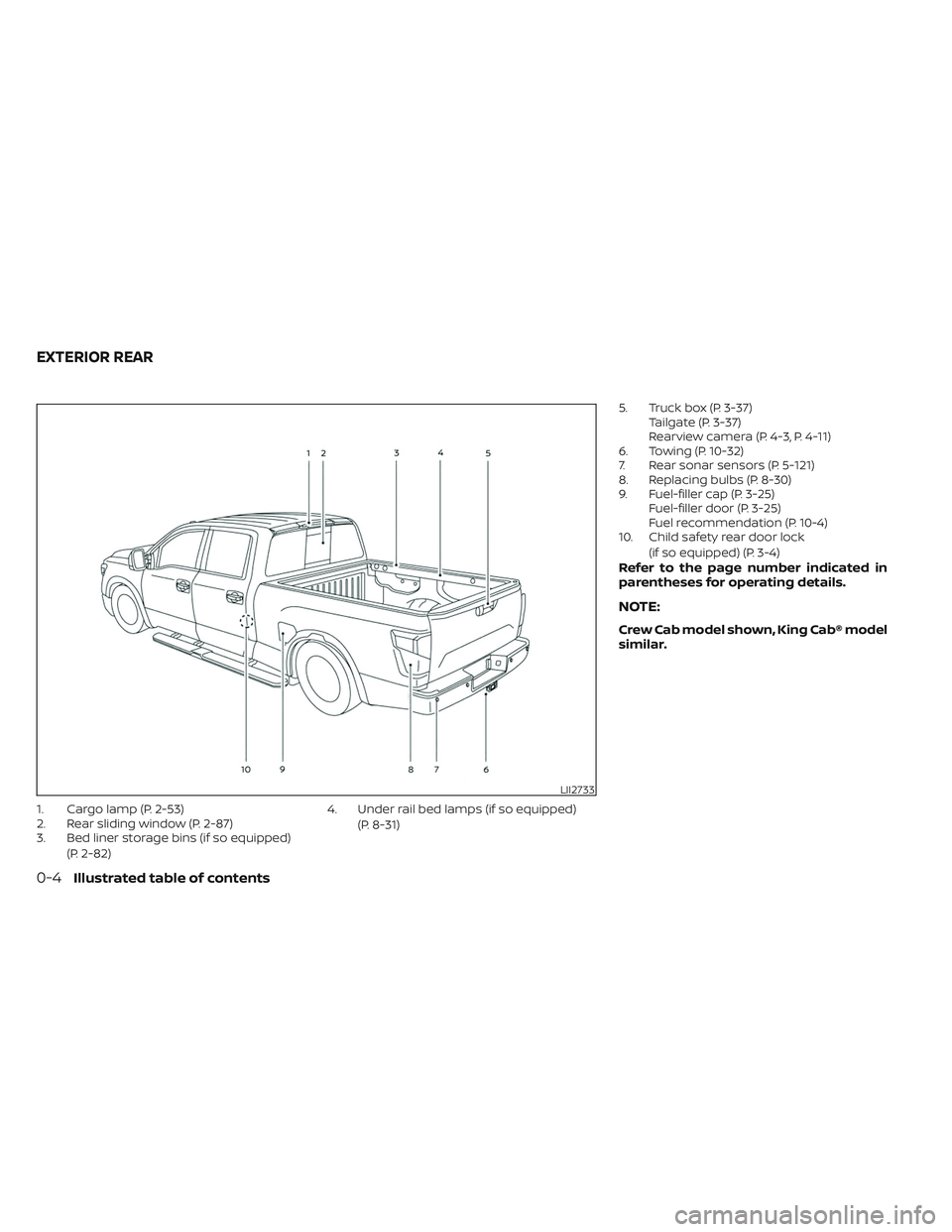
1. Cargo lamp (P. 2-53)
2. Rear sliding window (P. 2-87)
3. Bed liner storage bins (if so equipped)(P. 2-82) 4. Under rail bed lamps (if so equipped)
(P. 8-31) 5. Truck box (P. 3-37)
Tailgate (P. 3-37)
Rearview camera (P. 4-3, P. 4-11)
6. Towing (P. 10-32)
7. Rear sonar sensors (P. 5-121)
8. Replacing bulbs (P. 8-30)
9. Fuel-filler cap (P. 3-25) Fuel-filler door (P. 3-25)
Fuel recommendation (P. 10-4)
10. Child safety rear door lock
(if so equipped) (P. 3-4)
Refer to the page number indicated in
parentheses for operating details.
NOTE:
Crew Cab model shown, King Cab® model
similar.
LII2733
EXTERIOR REAR
0-4Illustrated table of contents
Page 85 of 644
NOTE:
This vehicle’s occupant classification
sensor system locks the classification
during driving so it is important that you
confirm that the front passenger is prop-
erly classified prior to driving. Also, the
occupant classification sensor system
may recalculate the weight of the occu-
pant when the vehicle comes to a stop
(i.e. stop light, stop sign, etc.), so front
passenger seat occupants should con-
tinue to remain seated as outlined
above.
Troubleshooting
If you think the front passenger air bag
status light is incorrect:
1. If the light is ON with no front passengerand no objects on the front passenger
seat:
This may be due to the following condi-
tions that may be interfering with the
weight sensors:
• An object weighing over 9.1 lbs. (4 kg) hanging on the seat or placed in the seat-
back pocket.
• A child restraint or other object pressing against the rear of the seatback. • A rear passenger pushing or pulling on
the back of the front passenger seat.
• Forcing the front seat or seatback against an object on the seat or floor be-
hind it.
• An object placed under the front passen- ger seat.
• An object placed between the seat cush- ion and center console or between the
seat cushion and the door.
If the vehicle is moving, please come to a
stop when it is safe to do so. Check and
correct any of the above conditions. Re-
start the vehicle and wait 1 minute.
NOTE:
A system check will be performed during
which the front passenger air bag status
light will remain lit for about 7 seconds
initially.
If the light is still ON af ter this, the vehicle
should be checked as soon as possible. It is
recommended that you visit a NISSAN
dealer for this service.
2. If the light is ON with an adult occupying the front passenger seat:
• Occupant is a small adult — the air bag light is functioning as intended. The
front passenger air bag is suppressed. However, if the occupant is not a small
adult, then this may be due to the following
conditions that may be interfering with the
weight sensors:
• Occupant is not sitting upright, leaning
against the seatback, and centered on
the seat cushion with his/her feet com-
fortably extended to the floor.
• A child restraint or other object pressing against the rear of the seatback.
• A rear passenger pushing or pulling on the back of the front passenger seat.
• Forcing the front seat or seatback against an object on the seat or floor be-
hind it.
• An object placed under the front passen- ger seat.
• An object placed between the seat cush- ion and center console or between the
seat cushion and the door.
If the vehicle is moving, please come to a
stop when it is safe to do so. Check and
correct any of the above conditions. Re-
start the vehicle and wait 1 minute.
Safety-Seats, seat belts and supplemental restraint system1-65
Page 106 of 644
Electronic locking rear differential (E-Lock)
system switch (if so equipped).................2-61
Power inverter switch (if so equipped) ..........2-62
Parking Aids system switch ....................2-63
Tow mode switch .............................. 2-63
Emergency call (SOS) button (if so equipped) . . . 2-64 Emergency support ......................... 2-64
Trailer Brake Controller Unit (TBCU)
(if so equipped) ................................. 2-65
Rear Door Alert ................................. 2-66
Power outlets .................................. 2-67
12v Outlets .................................. 2-67
120v outlets (if so equipped) .................2-68
USB/iPod® charging ports ......................2-70
Extended storage switch .......................2-71
Storage ........................................ 2-72
Front-door pockets ......................... 2-72
Rear-door pockets .......................... 2-72
Console side pockets (if so equipped) .......2-73
Seatback pockets ........................... 2-73
Under-seat storage (if so equipped) .........2-74
Console box storage trays
(if so equipped) .............................. 2-75
Cell phone storage tray (if so equipped) .....2-76
Glovebox ................................... 2-76Console box (if so equipped)
................2-76
Center armrest storage (if so equipped) .....2-77
Under front seat storage bin
(if so equipped) .............................. 2-78
Overhead sunglasses storage
(if so equipped) .............................. 2-78
Cup holders ................................. 2-79
Grocery hooks (if so equipped) ..............2-82
Bed liner storage bins (if so equipped) .......2-82
Cargo hooks (if so equipped) ................2-83
C-Channel cargo hooks (if so equipped) .....2-83
Windows ....................................... 2-84
Power windows ............................. 2-84
Rear power window switch
(if so equipped) .............................. 2-86
Rear sliding window (if so equipped) .........
2-87
Moonr
oof (if so equipped) ...................... 2-88
Power moonroof ............................ 2-88
Interior lights ................................... 2-90
Console light (if so equipped) ................2-91
Map lights (if so equipped) ...................2-91
Personal Lights (if so equipped) .............2-92
HomeLink® Universal Transceiver (Type A)
(if so equipped) ................................. 2-92
Programming HomeLink® ...................2-93
Page 119 of 644
CHECKING LIGHTS
With all doors closed, apply the parking
brake, fasten the seat belts and place the
ignition switch in the ON position without
starting the engine. The following lights (if
so equipped) will come on:
,,,,
The following lights (if so equipped) will
come on briefly and then go off:
,,,,,,,, ATP ,
If any light does not come on or operate in
a way other than described, it may indicate
a burned-out bulb and/or a system mal-
function. Have the system checked. It is
recommended that you visit a NISSAN
dealer for this service.
Some indicators and warnings are also dis-
played on the vehicle information display
between the speedometer and tachom-
eter. For additional information, see “Ve-
hicle information display” (P. 2-24).
WARNING/INDICATOR LIGHTS (red)
For additional information, see “Vehicle in-
formation display” (P. 2-24).
Automatic Transmission
Park warning light (
model)
WARNING
• If the 4WD mode indicator is off or the
ATP warning light is on, this indicates
that the automatic transmission P
(Park) position will not function and
could result in the vehicle moving un-
expectedly, causing serious personal
injury or property damage. Always
set the parking brake. For additional
information, see “Using 4–wheel
drive (4WD)” (P. 5-105).
• If the ATP light is on, this indicates
that the automatic transmission P
(Park) position will not function and
the transfer case is in neutral.
• When parking, always make sure that
the 4WD shif t indicator light illumi-
nates and the parking brake is set.
Failure to engage the transfer posi-
tion in 2WD, 4H or 4LO could result in
the vehicle moving unexpectedly, re-
sulting in serious personal injury or
property damage. •
Shif t the 4WD switch into the 2WD, 4H
or 4LO position again to turn off the
ATP warning light when the shif t le-
ver is in the P position and the ATP
warning light is on. (Before shif ting
the 4WD switch into the 4LO position,
move the shif t lever to the N position
once, shif t the shif t lever into P again
and make sure the ATP warning light
is off.)
This light indicates that the automatic
transmission parking function is not en-
gaged. If the transfer control is not secured
in any drive position while the shif t lever is
in the P (Park) position, the transmission will
disengage and the drive wheels will not
lock.
Brake warning light
This light functions for both the parking
brake and the foot brake systems.
Parking brake indicator
When the ignition switch is placed in the ON
position, the light comes on when the park-
ing brake is applied.
Instruments and controls2-15
Page 128 of 644
TOW mode ON indicator
light (green) (if so
equipped)
This light comes on when the tow mode
function is on.
Turn signal/hazard
indicator lights (green)
The appropriate light flashes when the turn
signal switch is activated.
Both lights flash when the hazard switch is
turned on.
AUDIBLE REMINDERS
Brake pad wear warning
The disc brake pads have audible wear
warnings. When a disc brake pad requires
replacement, it makes a high pitched
scraping sound when the vehicle is in mo-
tion, whether or not the brake pedal is de-
pressed. Have the brakes checked as soon
as possible if the warning sound is heard.
Light reminder chime
With the ignition switch placed in the OFF
position, a chime sounds when the driver's
door is opened if the headlights or parking
lights are on.
Turn the headlight control switch off before
leaving the vehicle.
NISSAN Intelligent Key® door
buzzer
The Intelligent Key door buzzer sounds if
any one of the following improper opera-
tions is found.
• The Intelligent Key is lef t inside the vehiclewhen locking the doors.
• The Intelligent Key is taken outside the vehicle when operating the vehicle.
When the buzzer sounds, be sure to check
both the vehicle and the Intelligent Key. For
additional information, see “NISSAN Intelli-
gent Key®” (P. 3-2). The vehicle information display is located
to the lef t of the speedometer. It displays
such items as:
• Vehicle settings
• Trip computer information
• Drive system warnings and settings (if so
equipped)
• Cruise control system information
• Blind Spot Warning (BSW) system
• Rear Cross Traffic Alert (RCTA) system
• NISSAN Intelligent Key® operation information
• Indicators and warnings
• Tire Pressure information
LIC3224
VEHICLE INFORMATION DISPLAY
2-24Instruments and controls
Page 132 of 644
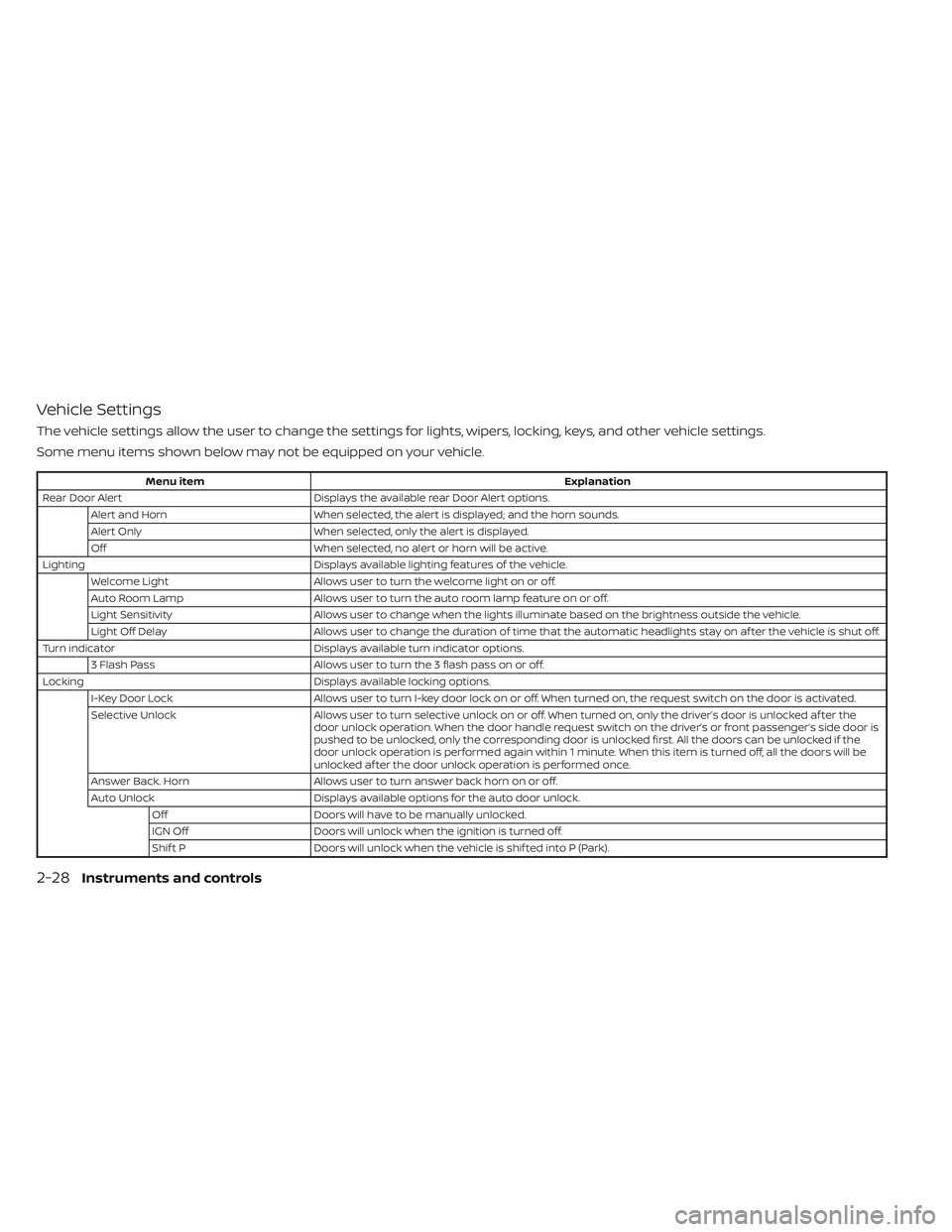
Vehicle Settings
The vehicle settings allow the user to change the settings for lights, wipers, locking, keys, and other vehicle settings.
Some menu items shown below may not be equipped on your vehicle.
Menu itemExplanation
Rear Door Alert Displays the available rear Door Alert options.
Alert and Horn When selected, the alert is displayed; and the horn sounds.
Alert Only When selected, only the alert is displayed.
Off When selected, no alert or horn will be active.
Lighting Displays available lighting features of the vehicle.
Welcome Light Allows user to turn the welcome light on or off.
Auto Room Lamp Allows user to turn the auto room lamp feature on or off.
Light Sensitivity Allows user to change when the lights illuminate based on the brightness outside the vehicle.
Light Off Delay Allows user to change the duration of time that the automatic headlights stay on af ter the vehicle is shut off.
Turn indicator Displays available turn indicator options.
3 Flash Pass Allows user to turn the 3 flash pass on or off.
Locking Displays available locking options.
I-Key Door Lock Allows user to turn I-key door lock on or off. When turned on, the request switch on the door is activated.
Selective Unlock Allows user to turn selective unlock on or off. When turned on, only the driver’s door is unlocked af ter the
door unlock operation. When the door handle request switch on the driver’s or front passenger’s side door is
pushed to be unlocked, only the corresponding door is unlocked first. All the doors can be unlocked if the
door unlock operation is performed again within 1 minute. When this item is turned off, all the doors will be
unlocked af ter the door unlock operation is performed once.
Answer Back. Horn Allows user to turn answer back horn on or off.
Auto Unlock Displays available options for the auto door unlock.
Off Doors will have to be manually unlocked.
IGN Off Doors will unlock when the ignition is turned off.
Shif t P Doors will unlock when the vehicle is shif ted into P (Park).
2-28Instruments and controls
Page 144 of 644
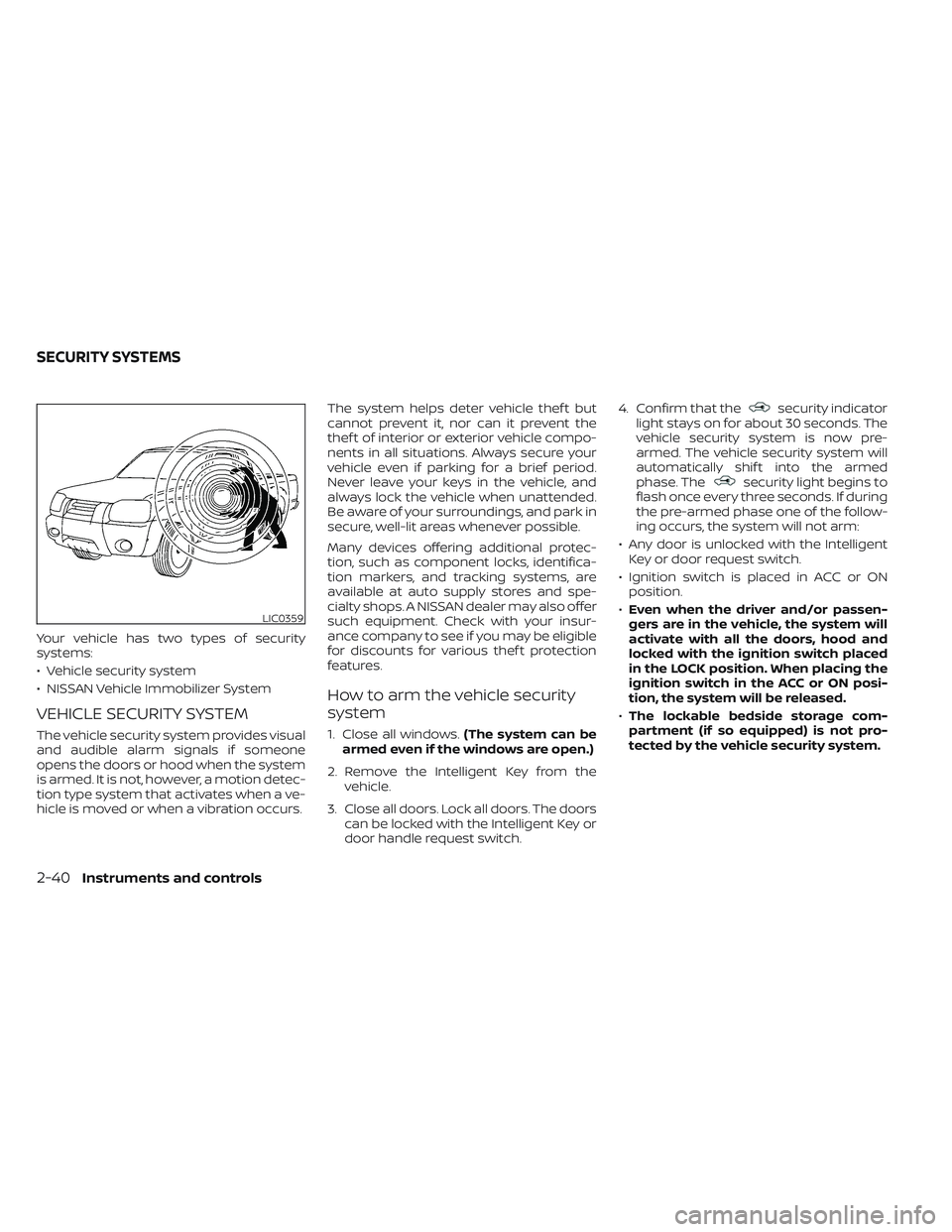
Your vehicle has two types of security
systems:
• Vehicle security system
• NISSAN Vehicle Immobilizer System
VEHICLE SECURITY SYSTEM
The vehicle security system provides visual
and audible alarm signals if someone
opens the doors or hood when the system
is armed. It is not, however, a motion detec-
tion type system that activates when a ve-
hicle is moved or when a vibration occurs.The system helps deter vehicle thef t but
cannot prevent it, nor can it prevent the
thef t of interior or exterior vehicle compo-
nents in all situations. Always secure your
vehicle even if parking for a brief period.
Never leave your keys in the vehicle, and
always lock the vehicle when unattended.
Be aware of your surroundings, and park in
secure, well-lit areas whenever possible.
Many devices offering additional protec-
tion, such as component locks, identifica-
tion markers, and tracking systems, are
available at auto supply stores and spe-
cialty shops. A NISSAN dealer may also offer
such equipment. Check with your insur-
ance company to see if you may be eligible
for discounts for various thef t protection
features.
How to arm the vehicle security
system
1. Close all windows.
(The system can be
armed even if the windows are open.)
2. Remove the Intelligent Key from the vehicle.
3. Close all doors. Lock all doors. The doors can be locked with the Intelligent Key or
door handle request switch. 4. Confirm that the
security indicator
light stays on for about 30 seconds. The
vehicle security system is now pre-
armed. The vehicle security system will
automatically shif t into the armed
phase. The
security light begins to
flash once every three seconds. If during
the pre-armed phase one of the follow-
ing occurs, the system will not arm:
• Any door is unlocked with the Intelligent Key or door request switch.
• Ignition switch is placed in ACC or ON position.
• Even when the driver and/or passen-
gers are in the vehicle, the system will
activate with all the doors, hood and
locked with the ignition switch placed
in the LOCK position. When placing the
ignition switch in the ACC or ON posi-
tion, the system will be released.
• The lockable bedside storage com-
partment (if so equipped) is not pro-
tected by the vehicle security system.
LIC0359
SECURITY SYSTEMS
2-40Instruments and controls
Page 145 of 644
Vehicle security system activation
The vehicle security system will give the
following alarm:
• The headlights blink and the horn soundsintermittently but synchronously.
• The alarm automatically turns off af ter a period of time. However, the alarm reacti-
vates if the vehicle is tampered with
again.
The alarm is activated by:
• opening any door or hood without using the Intelligent Key (even if the door is un-
locked by releasing the door inside lock
knob).
How to stop an activated alarm
The alarm stops only by pressing thebutton on the Intelligent Key.
NISSAN VEHICLE IMMOBILIZER
SYSTEM
The NISSAN Vehicle Immobilizer System
will not allow the engine to start without
the use of a registered key. If the engine fails to start using a registered
key (for example, when interference is
caused by another registered key, an auto-
mated toll road device or automatic pay-
ment device on the key ring), restart the
engine using the following procedures:
1. Leave the ignition switch placed in the
ON position for approximately 5
seconds.
2. Place the ignition switch in the OFF or LOCK position and wait approximately
10 seconds.
3. Repeat steps 1 and 2.
4. Restart the engine while holding the de- vice (which may have caused the inter-
ference) separate from the registered
key.
If the no start condition re-occurs, NISSAN
recommends placing the registered key on
a separate key ring to avoid interference
from other devices. FCC Notice:
For USA:
This device complies with Part 15 of the
FCC Rules. Operation is subject to the fol-
lowing two conditions: (1) This device
may not cause harmful interference, and
(2) this device must accept any interfer-
ence received, including interference
that may cause undesired operation.
NOTE:
Changes or modifications not expressly
approved by the party responsible for
compliance could void the user's author-
ity to operate the equipment.
For Canada:
This device contains license-exempt
transmitter(s)/receiver(s) that comply
with Innovation, Science and Economic
Development Canada’s licence-exempt
RSS(s). Operation is subject to the fol-
lowing two conditions: (1) This device
may not cause interference. (2) This de-
vice must accept any interference, in-
cluding interference that may cause un-
desired operation of the device.
Instruments and controls2-41
Page 170 of 644
The Rear Door Alert system functions un-
der certain conditions to indicate there
may be an object or passenger in the rear
seat(s). Check the seat(s) before exiting the
vehicle.
The Rear Door Alert system is initially dis-
abled. The driver can enable the system
using the vehicle information display. For
additional information, see “Vehicle infor-
mation display warnings and indicators”
(P. 2-33).
When the system is enabled:
• The system is activated when a rear dooris opened and closed within 10 minutes of
the vehicle being driven. When the driver’
door is closed and the system is acti-
vated, a visual message appears in the
vehicle information display. For additional
information, see “Rear Door Alert is acti-
vated” (P. 2-35).
• If a rear door is opened and closed but the vehicle is not driven within approxi-
mately 10 minutes, the system will not be
activated. A rear door must be opened
and closed and the car driven within 10
minutes for the system to activate. When the Rear Door Alert system is acti-
vated and a driver exits the vehicle af ter
arriving at a destination:
• When the driver puts the vehicle in the P
(Park) position, a message appears in the
vehicle information display for a driver to
“Dismiss Message” or “Disable Alert” if
desired.
• With the system enabled, when the driver exits the vehicle, an audible alert (horn
sound) will occur unless a rear door is
opened and closed within a short time to
deactivate the alert.
• If the doors are locked before the alert is deactivated by opening a rear door, the
horn will sound.
• If the audible horn alert occurs, a mes- sage will also appear in the vehicle infor-
mation display that states, “Check Rear
Seat for All Articles”.WARNING
• If the driver selects “Disable Alert”, no
audible alert will be provided regard-
less of rear door open/close status.
• There may be times when there is an
object or passenger in the rear seat(s)
but the audible alert does not sound.
For example, this may occur if rear seat
passengers enter or exit the vehicle
during a trip.
• The system does not directly detect
objects or passengers in the rear
seat(s). Instead, it can detect when a
rear door is opened and closed, indicat-
ing that there may be something in the
rear seat(s).
NOTE:
There may be times when the horn
sounds but there are no objects or pas-
sengers in the rear seat(s).
For additional information, see “Rear Door
Alert is activated” (P. 2-35).
REAR DOOR ALERT
2-66Instruments and controls