FRONT WIPER AND WASHER SYSTEM
WW-17
C
D
E
F
G
H
I
J
L
MA
B
WW
Revision: June 20062007 Versa
6. CHECK IPDM E/R
With CONSULT-ll
1. Connect IPDM E/R connector E45.
2. Turn ignition switch ON.
3. Select “IPDM E/R” by CONSULT-II, and select “ACTIVE TEST” on “SELECT DIAG MODE” screen.
4. Select “FRONT WIPER” on “SELECT TEST ITEM” screen.
5. Touch “LO” or “HI” screen.
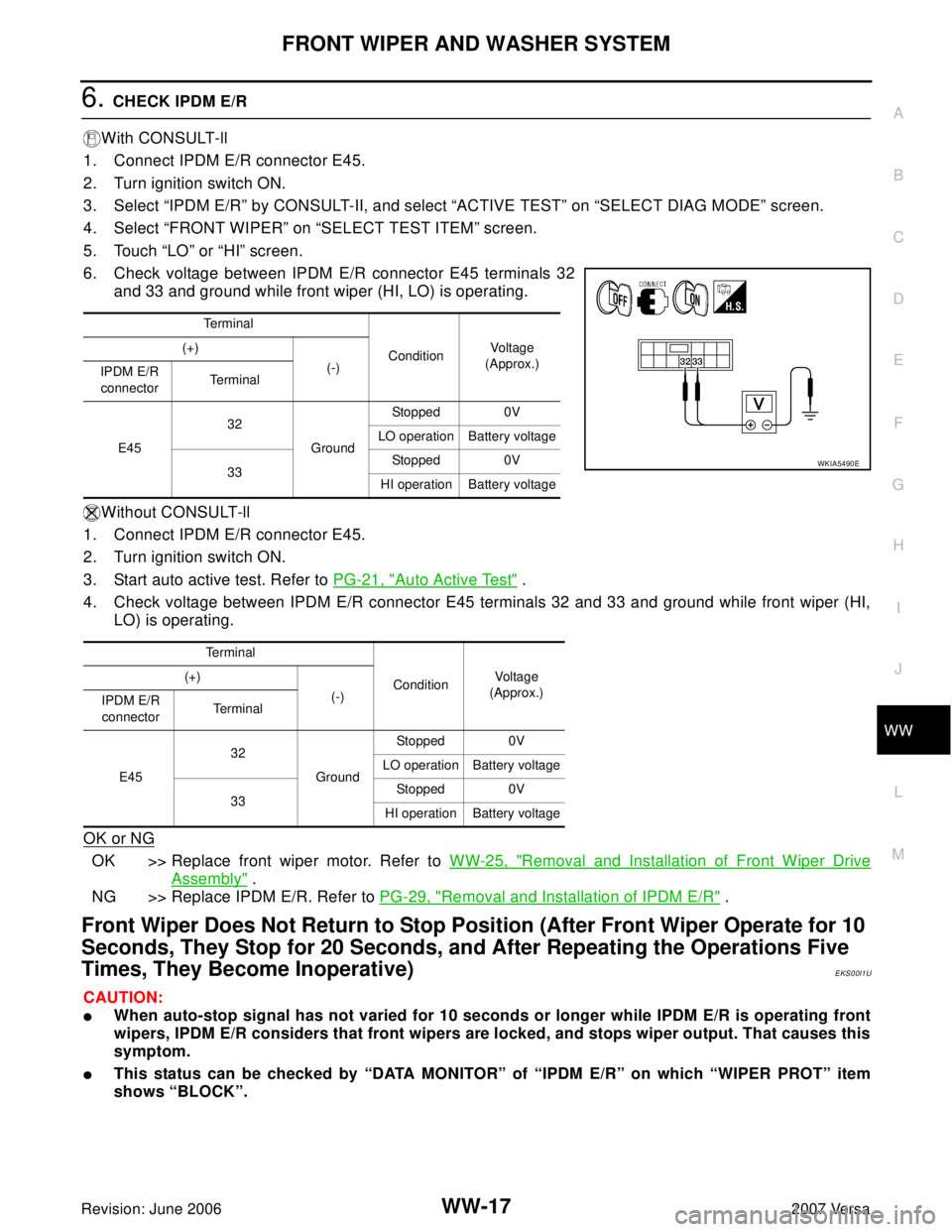
6. Check voltage between IPDM E/R connector E45 terminals 32
and 33 and ground while front wiper (HI, LO) is operating.
Without CONSULT-ll
1. Connect IPDM E/R connector E45.
2. Turn ignition switch ON.
3. Start auto active test. Refer to PG-21, "
Auto Active Test" .
4. Check voltage between IPDM E/R connector E45 terminals 32 and 33 and ground while front wiper (HI,
LO) is operating.
OK or NG
OK >> Replace front wiper motor. Refer to WW-25, "Removal and Installation of Front Wiper Drive
Assembly" .
NG >> Replace IPDM E/R. Refer to PG-29, "
Removal and Installation of IPDM E/R" .
Front Wiper Does Not Return to Stop Position (After Front Wiper Operate for 10
Seconds, They Stop for 20 Seconds, and After Repeating the Operations Five
Times, They Become Inoperative)
EKS00I1U
CAUTION:
�When auto-stop signal has not varied for 10 seconds or longer while IPDM E/R is operating front
wipers, IPDM E/R considers that front wipers are locked, and stops wiper output. That causes this
symptom.
�This status can be checked by “DATA MONITOR” of “IPDM E/R” on which “WIPER PROT” item
shows “BLOCK”.
Te r m i n a l
ConditionVo ltag e
(Approx.) (+)
(-)
IPDM E/R
connectorTe r m i n a l
E4532
GroundStopped 0V
LO operation Battery voltage
33Stopped 0V
HI operation Battery voltage
Te r m i n a l
ConditionVoltage
(Approx.) (+)
(-)
IPDM E/R
connectorTe r m i n a l
E4532
GroundStopped 0V
LO operation Battery voltage
33Stopped 0V
HI operation Battery voltage
WKIA5490E