phone NISSAN VERSA 2008 1.G 06IT Navigation Manual
[x] Cancel search | Manufacturer: NISSAN, Model Year: 2008, Model line: VERSA, Model: NISSAN VERSA 2008 1.GPages: 217, PDF Size: 6.62 MB
Page 76 of 217
![NISSAN VERSA 2008 1.G 06IT Navigation Manual Black plate (79,1)
Model "NAV2-N" EDITED: 2007/ 3/ 9
4. Enter the telephone number including the
area code.
5. After finishing the entry, highlight [Map] and
push<ENTER>.
“PHONE NUMBER INPUT SCREENâ](/img/5/795/w960_795-75.png "NISSAN VERSA 2008 1.G 06IT Navigation Manual Black plate (79,1)
Model \"NAV2-N\" EDITED: 2007/ 3/ 9
4. Enter the telephone number including the
area code.
5. After finishing the entry, highlight [Map] and
push<ENTER>.
“PHONE NUMBER INPUT SCREENâ")
Black plate (79,1)
Model "NAV2-N" EDITED: 2007/ 3/ 9
4. Enter the telephone number including the
area code.
5. After finishing the entry, highlight [Map] and
push
“PHONE NUMBER INPUT SCREEN”
(page 2-21)
6. Displays a list screen if there are two or
more search results. Highlight the preferred
destination from the list and push
7. The selected destination is displayed at the
center of the map. Highlight [Start] after
confirming the location of the displayed
destination, and push
system sets the destination to the selected
location and starts calculating a route.
INFO:
Even after setting a destination, you can adjust
the location of the destination, store the route,
etc.
“OPERATIONS AFTER SETTING A
DESTINATION” (page 4-24)
Setting by voice command
1. Push
switch.
2. After the tone sounds, speak a command.
To set the destination from Phone Number:
“Destination Phone Number”
SETTING A FREEWAY ENTRANCE/
EXIT
This allows you to set the destination to an
entrance or exit of a freeway, and then have the
system calculate a route.
1. Push
2. Highlight [Next Page] and push
3. Highlight [Freeway Entrance/Exit] and push
displayed.
Setting a destination4-19
Page 83 of 217
Black plate (86,1)
Model "NAV2-N" EDITED: 2007/ 3/ 9
ADDING ADDITIONAL DESTINATIONS
TO A ROUTE
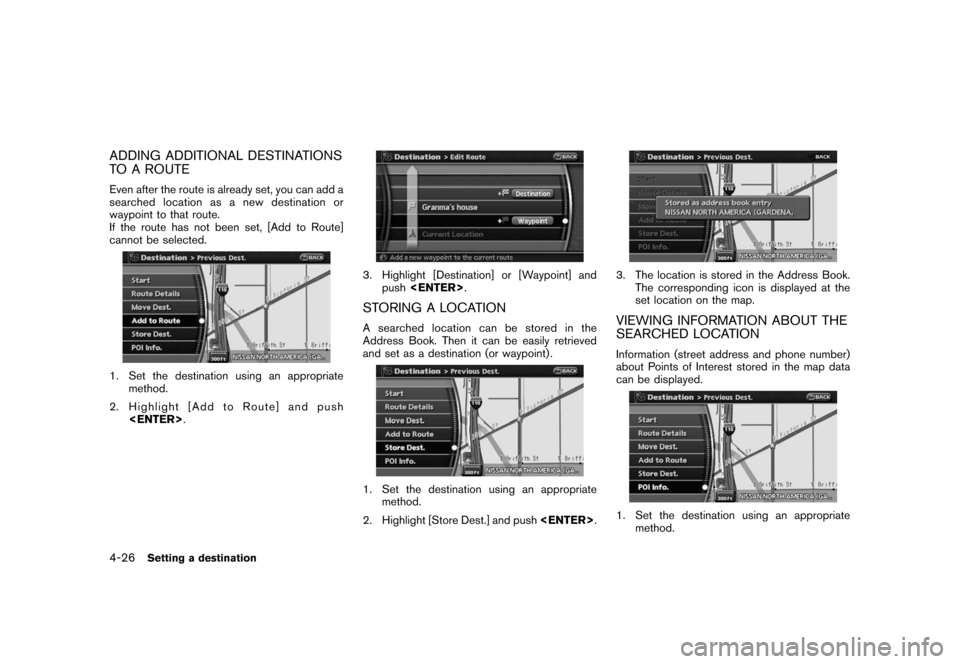
Even after the route is already set, you can add a
searched location as a new destination or
waypoint to that route.
If the route has not been set, [Add to Route]
cannot be selected.
1. Set the destination using an appropriate
method.
2. Highlight [Add to Route] and push
3. Highlight [Destination] or [Waypoint] and
push
STORING A LOCATION
A searched location can be stored in the
Address Book. Then it can be easily retrieved
and set as a destination (or waypoint) .
1. Set the destination using an appropriate
method.
2. Highlight [Store Dest.] and push
3. The location is stored in the Address Book.
The corresponding icon is displayed at the
set location on the map.
VIEWING INFORMATION ABOUT THE
SEARCHED LOCATION
Information (street address and phone number)
about Points of Interest stored in the map data
can be displayed.
1. Set the destination using an appropriate
method.
4-26Setting a destination
Page 121 of 217
Black plate (124,1)
Model "NAV2-N" EDITED: 2007/ 3/ 9
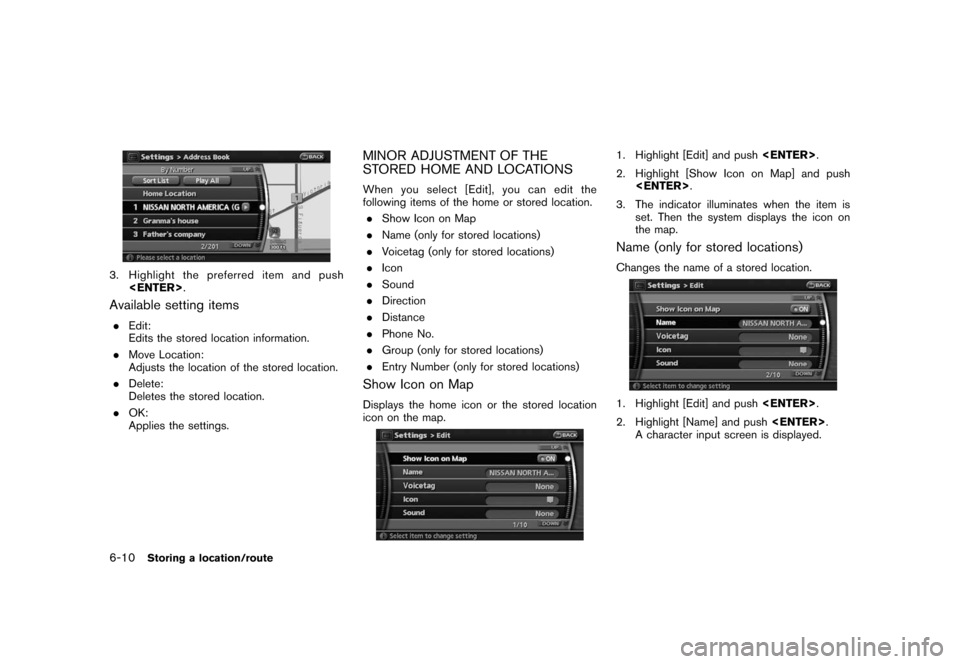
3. Highlight the preferred item and push
Available setting items
.Edit:
Edits the stored location information.
.Move Location:
Adjusts the location of the stored location.
.Delete:
Deletes the stored location.
.OK:
Applies the settings.
MINOR ADJUSTMENT OF THE
STORED HOME AND LOCATIONS
When you select [Edit], you can edit the
following items of the home or stored location.
.Show Icon on Map
.Name (only for stored locations)
.Voicetag (only for stored locations)
.Icon
.Sound
.Direction
.Distance
.Phone No.
.Group (only for stored locations)
.Entry Number (only for stored locations)
Show Icon on Map
Displays the home icon or the stored location
icon on the map.
1. Highlight [Edit] and push
2. Highlight [Show Icon on Map] and push
3. The indicator illuminates when the item is
set. Then the system displays the icon on
the map.
Name (only for stored locations)
Changes the name of a stored location.
1. Highlight [Edit] and push
2. Highlight [Name] and push
A character input screen is displayed.
6-10Storing a location/route
Page 126 of 217
![NISSAN VERSA 2008 1.G 06IT Navigation Manual Black plate (129,1)
Model "NAV2-N" EDITED: 2007/ 3/ 9
INFO:
.While setting the direction, you can change
the map scale.
.After the direction is set, if you highlight
[Direction] and push<ENTER>once ag](/img/5/795/w960_795-125.png "NISSAN VERSA 2008 1.G 06IT Navigation Manual Black plate (129,1)
Model \"NAV2-N\" EDITED: 2007/ 3/ 9
INFO:
.While setting the direction, you can change
the map scale.
.After the direction is set, if you highlight
[Direction] and push<ENTER>once ag")
Black plate (129,1)
Model "NAV2-N" EDITED: 2007/ 3/ 9
INFO:
.While setting the direction, you can change
the map scale.
.After the direction is set, if you highlight
[Direction] and push
a confirmation message is displayed. Con-
firm the contents of the message, highlight
[Yes] and push
is cancelled.
Distance
Sets the alarm to sound when reaching a
specific distance to the home or stored location.
1. Highlight [Edit] and push
2. Highlight [Distance] and push
3. Highlight the preferred distance option and
push
selected distance illuminates.
Available distance options:
.150 feet (50 m)
.300 feet (100 m)
.1000 feet (300 m)
.1500 feet (500 m)
INFO:
Once you set the direction and distance to
sound an alarm, the system will sound the alarm
when the vehicle icon passes a half circle outline
on the map, as shown in the figure.
Example: Set to 300 feet (100 m) distance,
upward direction
&1Stored location icon
&2Vehicle icon
&3Setting range
Phone No.
Stores the telephone number of the home or a
stored location.
1. Highlight [Edit] and push
2. Highlight [Phone No.] and push
The telephone number entry screen is
Storing a location/route6-15
Page 127 of 217
![NISSAN VERSA 2008 1.G 06IT Navigation Manual Black plate (130,1)
Model "NAV2-N" EDITED: 2007/ 3/ 9
displayed.
3. Enter the telephone number of the home or
stored location.
“PHONE NUMBER INPUT SCREEN”
(page 2-21)
4. Highlight [OK] and push<EN](/img/5/795/w960_795-126.png "NISSAN VERSA 2008 1.G 06IT Navigation Manual Black plate (130,1)
Model \"NAV2-N\" EDITED: 2007/ 3/ 9
displayed.
3. Enter the telephone number of the home or
stored location.
“PHONE NUMBER INPUT SCREEN”
(page 2-21)
4. Highlight [OK] and push<EN")
Black plate (130,1)
Model "NAV2-N" EDITED: 2007/ 3/ 9
displayed.
3. Enter the telephone number of the home or
stored location.
“PHONE NUMBER INPUT SCREEN”
(page 2-21)
4. Highlight [OK] and push
The telephone number is stored.
INFO:
If the phone number of your home or a location is
stored, the phone number can be used to search
for the destination even if it is not included in the
map data.
Group (only for stored locations)
This allows you to group the stored locations. By
grouping the stored locations, you can utilize the
[By Group] option of the sort function more
effectively.
1. Highlight [Edit] and push
2. Highlight [Group] and push
3. Highlight the preferred group and push
selected group illuminates, the stored loca-
tion is classified into the applicable group.
Entry Number (only for stored locations)
Swaps the position numbers of any two stored
locations in the list.
1. Highlight [Edit] and push
2. Highlight [Entry Number] and push
displayed.
3. Highlight the stored locations you want to
swap and push
numbers of the selected stored locations are
swapped.
6-16Storing a location/route
Page 147 of 217
Black plate (152,1)
Model "NAV2-N" EDITED: 2007/ 3/ 9
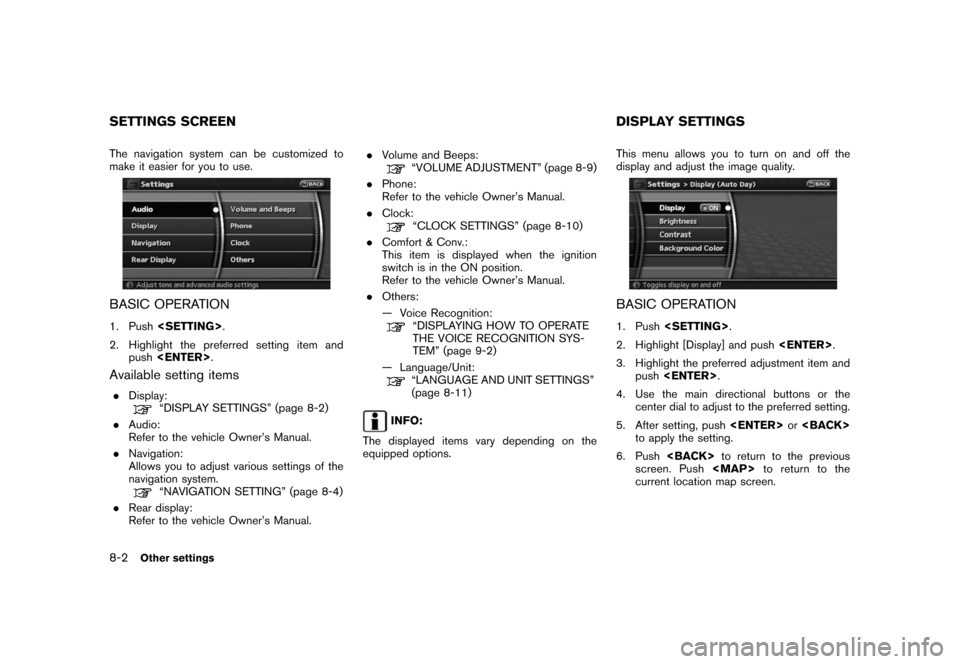
The navigation system can be customized to
make it easier for you to use.
BASIC OPERATION
1. Push
2. Highlight the preferred setting item and
push
Available setting items
.Display:“DISPLAY SETTINGS” (page 8-2)
.Audio:
Refer to the vehicle Owner’s Manual.
.Navigation:
Allows you to adjust various settings of the
navigation system.
“NAVIGATION SETTING” (page 8-4)
.Rear display:
Refer to the vehicle Owner’s Manual..Volume and Beeps:
“VOLUME ADJUSTMENT” (page 8-9)
.Phone:
Refer to the vehicle Owner’s Manual.
.Clock:
“CLOCK SETTINGS” (page 8-10)
.Comfort & Conv.:
This item is displayed when the ignition
switch is in the ON position.
Refer to the vehicle Owner’s Manual.
.Others:
— Voice Recognition:
“DISPLAYING HOW TO OPERATE
THE VOICE RECOGNITION SYS-
TEM” (page 9-2)
— Language/Unit:
“LANGUAGE AND UNIT SETTINGS”
(page 8-11)
INFO:
The displayed items vary depending on the
equipped options.This menu allows you to turn on and off the
display and adjust the image quality.
BASIC OPERATION
1. Push
2. Highlight [Display] and push
3. Highlight the preferred adjustment item and
push
4. Use the main directional buttons or the
center dial to adjust to the preferred setting.
5. After setting, push
to apply the setting.
6. Push
screen. Push
Page 154 of 217
![NISSAN VERSA 2008 1.G 06IT Navigation Manual Black plate (159,1)
Model "NAV2-N" EDITED: 2007/ 3/ 9
1. Highlight [Navigation] and push<ENTER>.
2. Highlight [Reset ALL navigation settings to
default] and push<ENTER>.
3. A confirmation message is d](/img/5/795/w960_795-153.png "NISSAN VERSA 2008 1.G 06IT Navigation Manual Black plate (159,1)
Model \"NAV2-N\" EDITED: 2007/ 3/ 9
1. Highlight [Navigation] and push<ENTER>.
2. Highlight [Reset ALL navigation settings to
default] and push<ENTER>.
3. A confirmation message is d")
Black plate (159,1)
Model "NAV2-N" EDITED: 2007/ 3/ 9
1. Highlight [Navigation] and push
2. Highlight [Reset ALL navigation settings to
default] and push
3. A confirmation message is displayed. Con-
firm the contents of the message, highlight
[Yes] and push
adjust, the phone function (ringer, incoming and
outgoing volume) , the voice guide function and
the beep function.
BASIC OPERATION
1. Push
2. Highlight [Volume and Beeps] and push
3. Highlight the preferred adjustment item and
push
4. Use the main directional buttons or the
center dial to adjust the volume.
Push
5. After setting, push
to apply the setting.
6. Push
screen. Push
Page 159 of 217
Black plate (166,1)
Model "NAV2-N" EDITED: 2007/ 3/ 9
NISSAN Voice Recognition allows hands-free
operation of the navigation system and other
systems equipped on this vehicle, such as the
display, audio, climate control and phone.
INFO:
For the voice commands for the audio, air
conditioner and other systems (except naviga-
tion system) , refer to the vehicle Owner’s
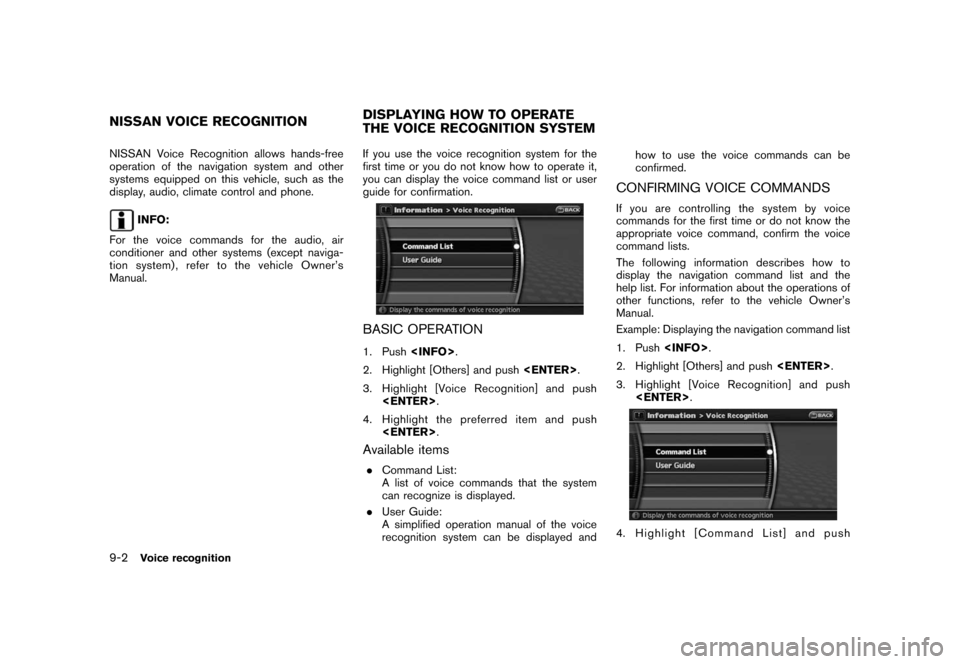
Manual.If you use the voice recognition system for the
first time or you do not know how to operate it,
you can display the voice command list or user
guide for confirmation.
BASIC OPERATION
1. Push
2. Highlight [Others] and push
3. Highlight [Voice Recognition] and push
4. Highlight the preferred item and push
Available items
.Command List:
A list of voice commands that the system
can recognize is displayed.
.User Guide:
A simplified operation manual of the voice
recognition system can be displayed andhow to use the voice commands can be
confirmed.
CONFIRMING VOICE COMMANDS
If you are controlling the system by voice
commands for the first time or do not know the
appropriate voice command, confirm the voice
command lists.
The following information describes how to
display the navigation command list and the
help list. For information about the operations of
other functions, refer to the vehicle Owner’s
Manual.
Example: Displaying the navigation command list
1. Push
2. Highlight [Others] and push
3. Highlight [Voice Recognition] and push
4. Highlight [Command List] and push
NISSAN VOICE RECOGNITIONDISPLAYING HOW TO OPERATE
THE VOICE RECOGNITION SYSTEM
9-2Voice recognition
Page 160 of 217
![NISSAN VERSA 2008 1.G 06IT Navigation Manual Black plate (167,1)
Model "NAV2-N" EDITED: 2007/ 3/ 9
<ENTER>.
5. Highlight [Navigation] and push<ENTER>.
6. Highlight the preferred item and push
<ENTER>.
Available items:
.Destination:
Allows you to](/img/5/795/w960_795-159.png "NISSAN VERSA 2008 1.G 06IT Navigation Manual Black plate (167,1)
Model \"NAV2-N\" EDITED: 2007/ 3/ 9
<ENTER>.
5. Highlight [Navigation] and push<ENTER>.
6. Highlight the preferred item and push
<ENTER>.
Available items:
.Destination:
Allows you to")
Black plate (167,1)
Model "NAV2-N" EDITED: 2007/ 3/ 9
5. Highlight [Navigation] and push
6. Highlight the preferred item and push
Available items:
.Destination:
Allows you to set a destination.
.Search:
Allows you to search for a location.
.Map:
Allows you to operate on the map.
.Route:
Allows you to set a route in detail.
.Others:
Allows you to store locations or set the
route guidance.
7. You can confirm the list by scrolling the
screen using the up and down switches of
the main directional buttons or the center
dial.
8. Press
screen.
Command List
INFO:
The voice command description in this manual
can be expressed in various ways. Different
phrases are available depending on the condi-
tions of each command.
Words that are not in brackets or parenthesis
must be spoken. Words identified by a slash
inside parenthesis ( / ) indicate alternatives, one
of which must be spoken.
Variable items, such as phone numbers, are
indicated in
italicswith < >.
Voice recognition9-3
Page 161 of 217
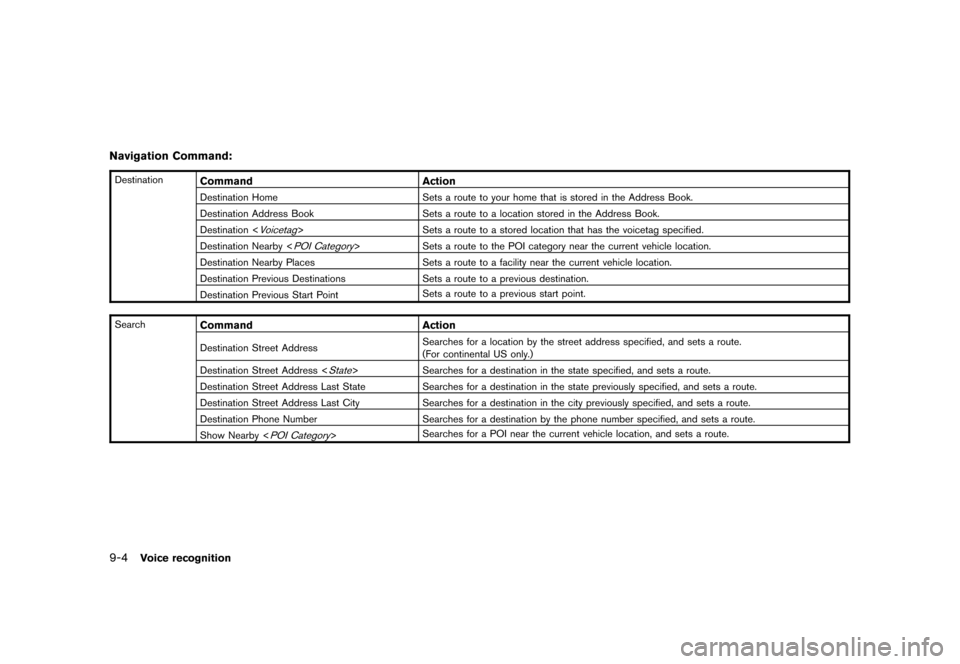
Black plate (168,1)
Model "NAV2-N" EDITED: 2007/ 3/ 9
Navigation Command:
DestinationCommand Action
Destination Home Sets a route to your home that is stored in the Address Book.
Destination Address Book Sets a route to a location stored in the Address Book.
Destination <
Voicetag> Sets a route to a stored location that has the voicetag specified.
Destination Nearby <
POI Category> Sets a route to the POI category near the current vehicle location.
Destination Nearby Places Sets a route to a facility near the current vehicle location.
Destination Previous Destinations Sets a route to a previous destination.
Destination Previous Start PointSets a route to a previous start point.
Search
Command Action
Destination Street AddressSearches for a location by the street address specified, and sets a route.
(For continental US only.)
Destination Street Address <
State> Searches for a destination in the state specified, and sets a route.
Destination Street Address Last State Searches for a destination in the state previously specified, and sets a route.
Destination Street Address Last City Searches for a destination in the city previously specified, and sets a route.
Destination Phone Number Searches for a destination by the phone number specified, and sets a route.
Show Nearby <
POI Category>Searches for a POI near the current vehicle location, and sets a route.
9-4Voice recognition