change NISSAN VERSA 2008 1.G 06IT Navigation Manual
[x] Cancel search | Manufacturer: NISSAN, Model Year: 2008, Model line: VERSA, Model: NISSAN VERSA 2008 1.GPages: 217, PDF Size: 6.62 MB
Page 8 of 217
Black plate (11,1)
Model "NAV2-N" EDITED: 2007/ 3/ 9
&11
Push to switch to the zoom mode to change
the map scale.
INFO:
If
setting in a settings screen, this manual will
explicitly include a step for this procedure.
Otherwise, pushing
the previous screen.
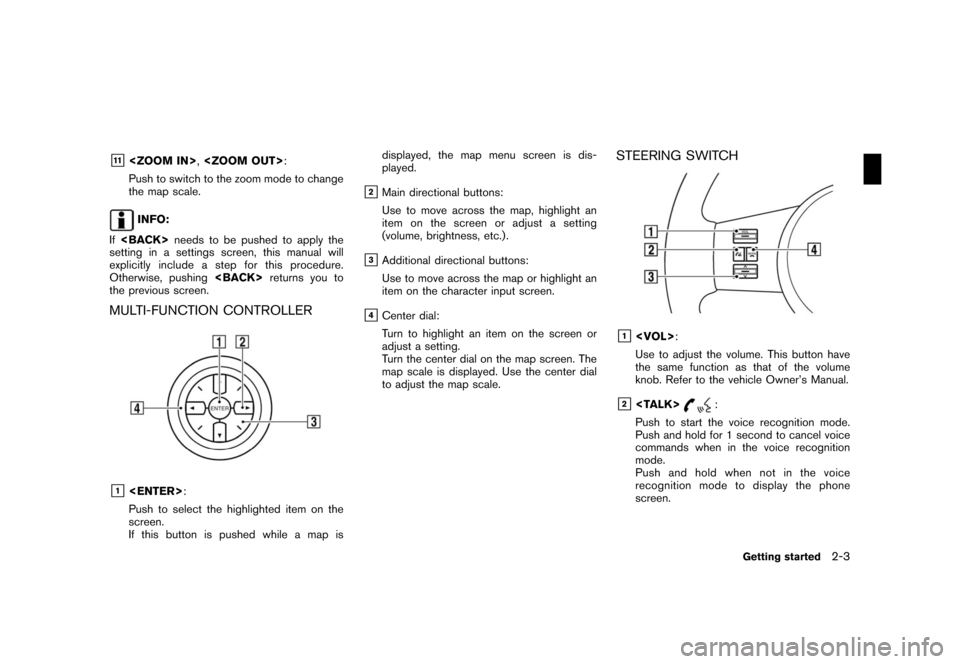
MULTI-FUNCTION CONTROLLER
&1
Push to select the highlighted item on the
screen.
If this button is pushed while a map isdisplayed, the map menu screen is dis-
played.
&2Main directional buttons:
Use to move across the map, highlight an
item on the screen or adjust a setting
(volume, brightness, etc.) .
&3Additional directional buttons:
Use to move across the map or highlight an
item on the character input screen.
&4Center dial:
Turn to highlight an item on the screen or
adjust a setting.
Turn the center dial on the map screen. The
map scale is displayed. Use the center dial
to adjust the map scale.
STEERING SWITCH
&1
Use to adjust the volume. This button have
the same function as that of the volume
knob. Refer to the vehicle Owner’s Manual.
&2
Push to start the voice recognition mode.
Push and hold for 1 second to cancel voice
commands when in the voice recognition
mode.
Push and hold when not in the voice
recognition mode to display the phone
screen.
Getting started2-3
Page 12 of 217
Black plate (15,1)
Model "NAV2-N" EDITED: 2007/ 3/ 9
MENU SCREENS AND THEIR PUR-
POSES
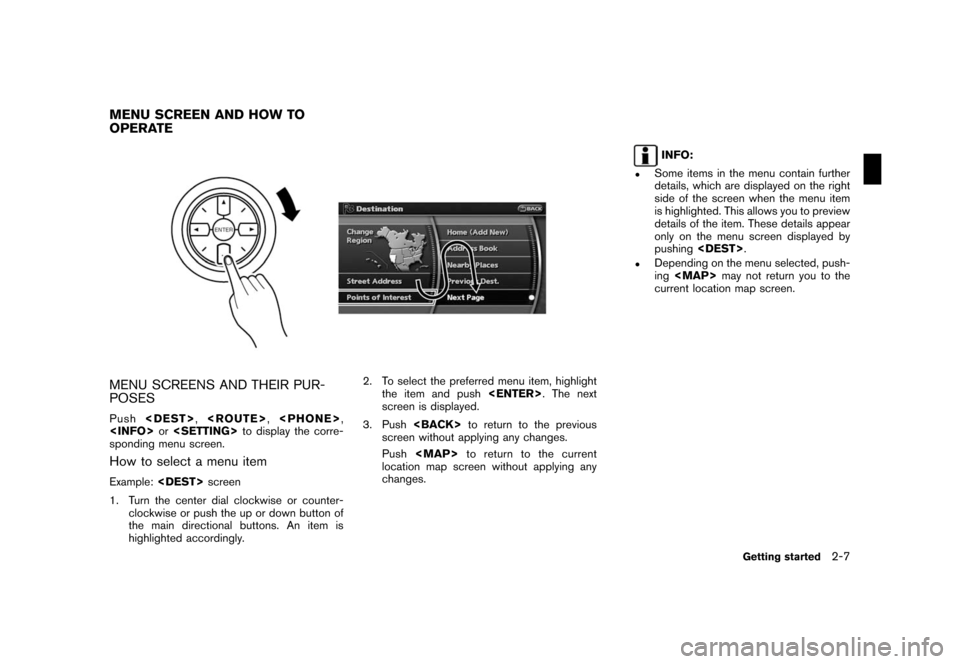
Push
sponding menu screen.
How to select a menu item
Example:
1. Turn the center dial clockwise or counter-
clockwise or push the up or down button of
the main directional buttons. An item is
highlighted accordingly.2. To select the preferred menu item, highlight
the item and push
screen is displayed.
3. Push
screen without applying any changes.
Push
Page 13 of 217
Black plate (16,1)
Model "NAV2-N" EDITED: 2007/ 3/ 9
USING CONTROLS TO ADJUST VA-
LUES, LEVELS, ETC.
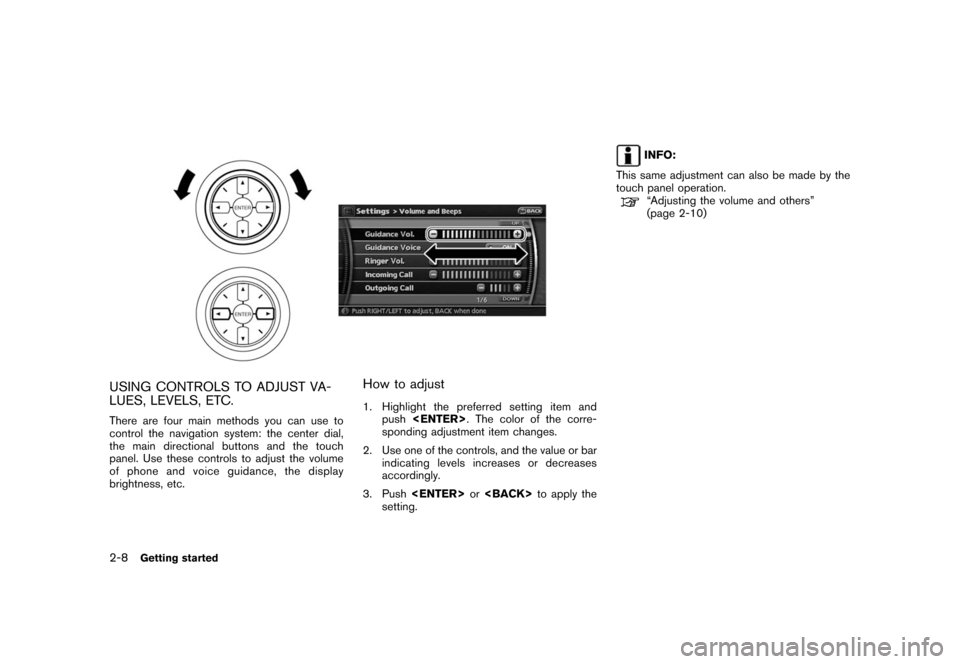
There are four main methods you can use to
control the navigation system: the center dial,
the main directional buttons and the touch
panel. Use these controls to adjust the volume
of phone and voice guidance, the display
brightness, etc.
How to adjust
1. Highlight the preferred setting item and
push
sponding adjustment item changes.
2. Use one of the controls, and the value or bar
indicating levels increases or decreases
accordingly.
3. Push
setting.
INFO:
This same adjustment can also be made by the
touch panel operation.
“Adjusting the volume and others”
(page 2-10)
2-8Getting started
Page 21 of 217
![NISSAN VERSA 2008 1.G 06IT Navigation Manual Black plate (24,1)
Model "NAV2-N" EDITED: 2007/ 3/ 9
STARTING ROUTE GUIDANCE
After setting the destination and performing
route calculation, the suggested route is dis-
played.
1. Highlight [Start] an](/img/5/795/w960_795-20.png "NISSAN VERSA 2008 1.G 06IT Navigation Manual Black plate (24,1)
Model \"NAV2-N\" EDITED: 2007/ 3/ 9
STARTING ROUTE GUIDANCE
After setting the destination and performing
route calculation, the suggested route is dis-
played.
1. Highlight [Start] an")
Black plate (24,1)
Model "NAV2-N" EDITED: 2007/ 3/ 9
STARTING ROUTE GUIDANCE
After setting the destination and performing
route calculation, the suggested route is dis-
played.
1. Highlight [Start] and push
2. Once route guidance is started, the system
navigates you through the guide points
using visual and voice guidance.
3. When approaching a guide point, the
system automatically changes to the split
screen and shows an enlarged view of the
intersection in the left screen.
Push
Page 22 of 217
![NISSAN VERSA 2008 1.G 06IT Navigation Manual Black plate (25,1)
Model "NAV2-N" EDITED: 2007/ 3/ 9
3. A confirmation message is displayed. High-
light [Yes] and push<ENTER>.
INFO:
If a route is cancelled, [Cancel Route] changes
to [Resume Route].](/img/5/795/w960_795-21.png "NISSAN VERSA 2008 1.G 06IT Navigation Manual Black plate (25,1)
Model \"NAV2-N\" EDITED: 2007/ 3/ 9
3. A confirmation message is displayed. High-
light [Yes] and push<ENTER>.
INFO:
If a route is cancelled, [Cancel Route] changes
to [Resume Route].")
Black plate (25,1)
Model "NAV2-N" EDITED: 2007/ 3/ 9
3. A confirmation message is displayed. High-
light [Yes] and push
INFO:
If a route is cancelled, [Cancel Route] changes
to [Resume Route].
Highlight [Resume Route] and push
to reactivate the cancelled route.
This is available only until a new route is set.
HOW TO VIEW MAP SCREEN
The navigation system displays various informa-
tion on the map screen.
Screen information
&1Vehicle icon:
Indicates the current vehicle location and
the direction that you are traveling.
&2Starting point:
Displays the vehicle location, with which the
route is set, as the starting point.
&3Guide point:
Indicates a guide point on the route.
OPERATING MAPS
Getting started2-17
Page 28 of 217
![NISSAN VERSA 2008 1.G 06IT Navigation Manual Black plate (31,1)
Model "NAV2-N" EDITED: 2007/ 3/ 9
Example: Displaying the navigation command list
1. Push<INFO>.
2. Highlight [Others] and push<ENTER>.
3. Highlight [Voice Recognition] and push
<EN](/img/5/795/w960_795-27.png "NISSAN VERSA 2008 1.G 06IT Navigation Manual Black plate (31,1)
Model \"NAV2-N\" EDITED: 2007/ 3/ 9
Example: Displaying the navigation command list
1. Push<INFO>.
2. Highlight [Others] and push<ENTER>.
3. Highlight [Voice Recognition] and push
<EN")
Black plate (31,1)
Model "NAV2-N" EDITED: 2007/ 3/ 9
Example: Displaying the navigation command list
1. Push
2. Highlight [Others] and push
3. Highlight [Voice Recognition] and push
4. Highlight [Command List] and push
5. Highlight [Navigation] and push
6. Highlight the preferred item and push
Available items:
.Destination:
Allows you to set a destination.
.Search:
Allows you to search for a location.
.Map:
Allows you to change the map settings.
.Route:
Allows you to set a route in detail.
.Others:
Allows you to store locations or set the
route guidance.
7. You can confirm the list by scrolling the
screen using the up and down switches of
the main directional buttons or the center
dial.
8. Press
screen.
For further details about the displayed command
list, refer to section 9.
“Command List” (page 9-3)
BEFORE STARTING
To get the best recognition performance out of
NISSAN Voice Recognition, observe the follow-
ing:
.The interior of the vehicle should be as quiet
as possible. Close the windows to eliminate
the surrounding noises (traffic noise and
vibration sounds, etc.) , which may prevent
the system from correctly recognizing the
voice commands.
Getting started2-23
Page 29 of 217
Black plate (32,1)
Model "NAV2-N" EDITED: 2007/ 3/ 9
.Wait until the tone sounds before speaking a
command. Otherwise, the command will not
be recognized properly.
.Speak in a natural conversational voice
without pausing between words.
.If the air conditioner is set to “Auto”, the fan
speed is automatically lowered so that your
commands can be recognized more easily.
VOICE COMMAND EXAMPLES
To use the voice recognition function, speaking
one command is sometimes sufficient, but at
other times it is necessary to speak two or more
commands.
As examples, some additional basic operations
by voice commands are described here.
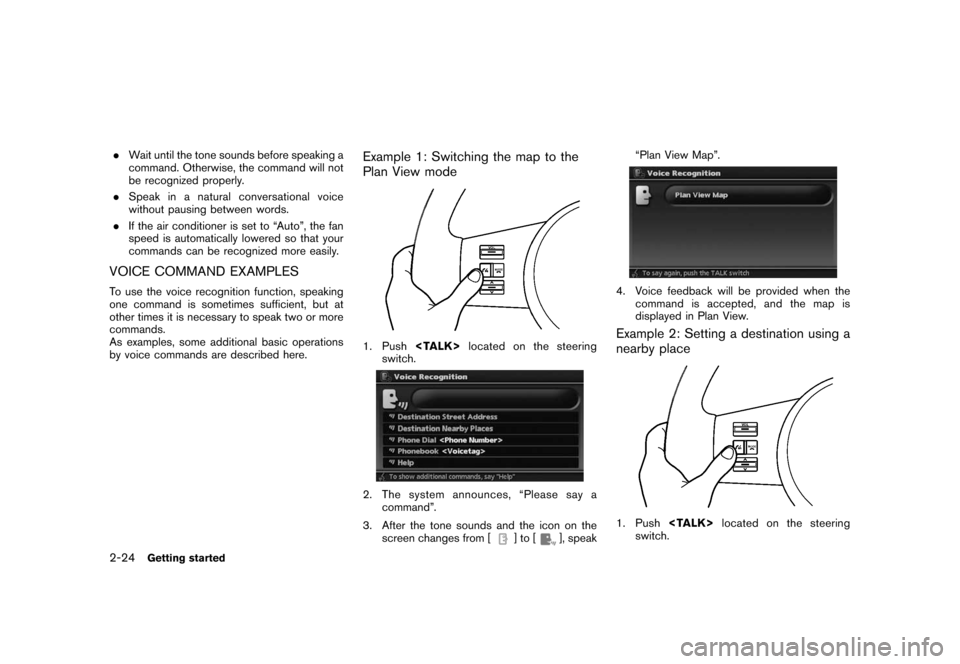
Example 1: Switching the map to the
Plan View mode
1. Push
switch.
2. The system announces, “Please say a
command”.
3. After the tone sounds and the icon on the
screen changes from [
]to[], speak“Plan View Map”.
4. Voice feedback will be provided when the
command is accepted, and the map is
displayed in Plan View.
Example 2: Setting a destination using a
nearby place
1. Push
switch.
2-24Getting started
Page 30 of 217
![NISSAN VERSA 2008 1.G 06IT Navigation Manual Black plate (33,1)
Model "NAV2-N" EDITED: 2007/ 3/ 9
2. The system announces, “Please say a
command”.
3. After the tone sounds and the icon on the
screen changes from [
]to[], speak
“Destination](/img/5/795/w960_795-29.png "NISSAN VERSA 2008 1.G 06IT Navigation Manual Black plate (33,1)
Model \"NAV2-N\" EDITED: 2007/ 3/ 9
2. The system announces, “Please say a
command”.
3. After the tone sounds and the icon on the
screen changes from [
]to[], speak
“Destination")
Black plate (33,1)
Model "NAV2-N" EDITED: 2007/ 3/ 9
2. The system announces, “Please say a
command”.
3. After the tone sounds and the icon on the
screen changes from [
]to[], speak
“Destination nearby places”.
4. Voice feedback will be provided when the
command is accepted, and the list of POI
categories appears.
5. After the tone sounds and the icon on the
screen changes again, speak “Three”.
6. If a route is already set, choose “Along
Route” or “Nearby”.
7. After the tone sounds and the icon on the
screen changes again, speak “Along Route”.
8. Voice feedback will be provided when the
command is accepted, and the list of Points
of Interest in the category specified in the
previous step appears.
9. After the tone sounds and the icon on the
screen changes again, speak “Three”.
10. Voice feedback will be provided when the
command is accepted, and the system
starts calculating a route to the selected
facility.
Example 3: Setting a destination by a
street address
1. Push
switch.
Getting started2-25
Page 31 of 217
Black plate (34,1)
Model "NAV2-N" EDITED: 2007/ 3/ 9
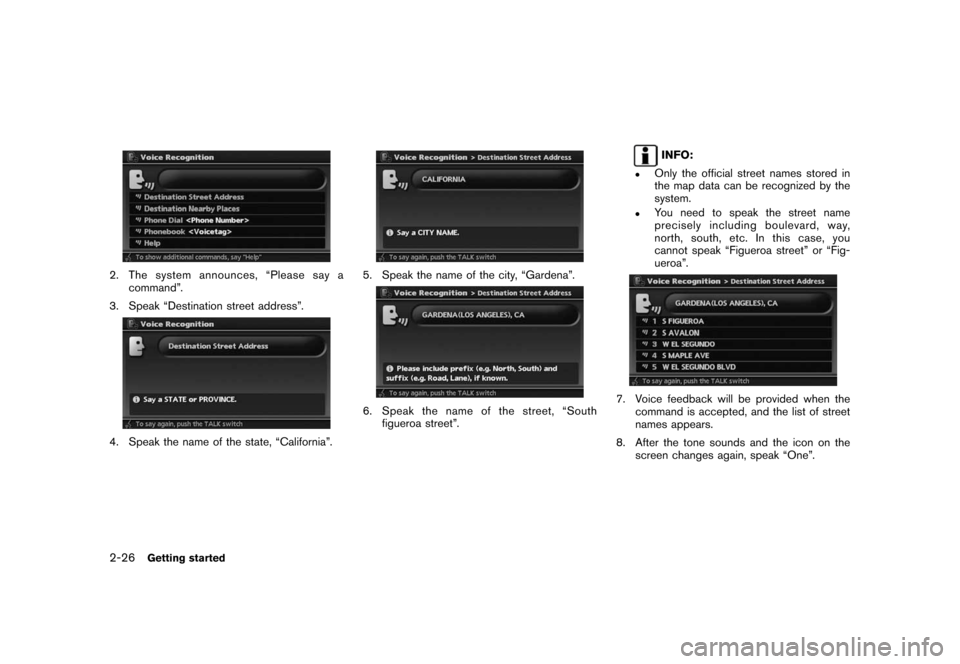
2. The system announces, “Please say a
command”.
3. Speak “Destination street address”.
4. Speak the name of the state, “California”.
5. Speak the name of the city, “Gardena”.
6. Speak the name of the street, “South
figueroa street”.
INFO:
.Only the official street names stored in
the map data can be recognized by the
system.
.You need to speak the street name
precisely including boulevard, way,
north, south, etc. In this case, you
cannot speak “Figueroa street” or “Fig-
ueroa”.
7. Voice feedback will be provided when the
command is accepted, and the list of street
names appears.
8. After the tone sounds and the icon on the
screen changes again, speak “One”.
2-26Getting started
Page 36 of 217
Black plate (39,1)
Model "NAV2-N" EDITED: 2007/ 3/ 9
&5/Direction indicator:
Indicates the direction of the map.
Touch the icon to switch the direction of the
map.
&6Scale indicator:
Indicates the scale of the map.
Touch the icon to display the scale bar.
This allows the map scale to be adjusted.
&7Arrow:
Indicates the distance to the next guide
point and the turning direction at that guide
point.
&8Stored location:
Displays the locations that are stored in the
Address Book. You can change the icons
according to your preferences.
&9Avoid Area:
Displays the areas to avoid that are stored in
the Address Book with green or blue icons.
During the route search, the route guidance
is performed by searching for a route that
avoids those areas.
&10Street name:
Displays the name of the street that you are
currently driving on.
&11Traffic indicator:
Displays the reception condition of traffic
information transmitted from the provider.
Green: Reception condition is good.
Gray: Reception condition is not good.
No mark: Subscription to XM
®NavTrafficTM
service is not detected.
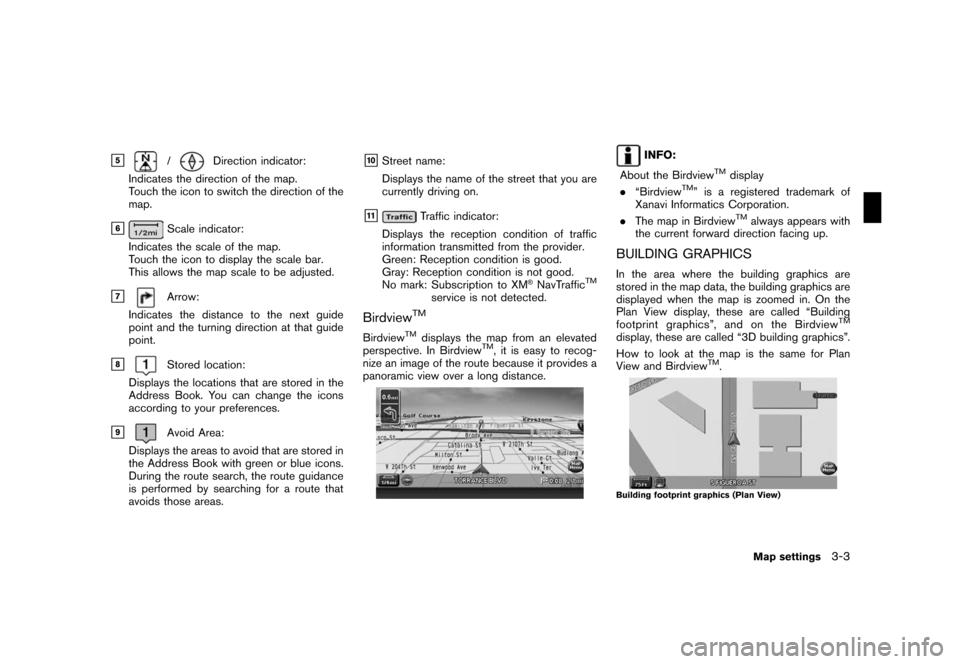
BirdviewTM
BirdviewTMdisplays the map from an elevated
perspective. In BirdviewTM, it is easy to recog-
nize an image of the route because it provides a
panoramic view over a long distance.
INFO:
About the Birdview
TMdisplay
.“BirdviewTM” is a registered trademark of
Xanavi Informatics Corporation.
.The map in Birdview
TMalways appears with
the current forward direction facing up.
BUILDING GRAPHICS
In the area where the building graphics are
stored in the map data, the building graphics are
displayed when the map is zoomed in. On the
Plan View display, these are called “Building
footprint graphics”, and on the Birdview
TM
display, these are called “3D building graphics”.
How to look at the map is the same for Plan
View and Birdview
TM.
Building footprint graphics (Plan View)
Map settings3-3