buttons NISSAN VERSA 2008 1.G User Guide
[x] Cancel search | Manufacturer: NISSAN, Model Year: 2008, Model line: VERSA, Model: NISSAN VERSA 2008 1.GPages: 304, PDF Size: 3.99 MB
Page 192 of 304
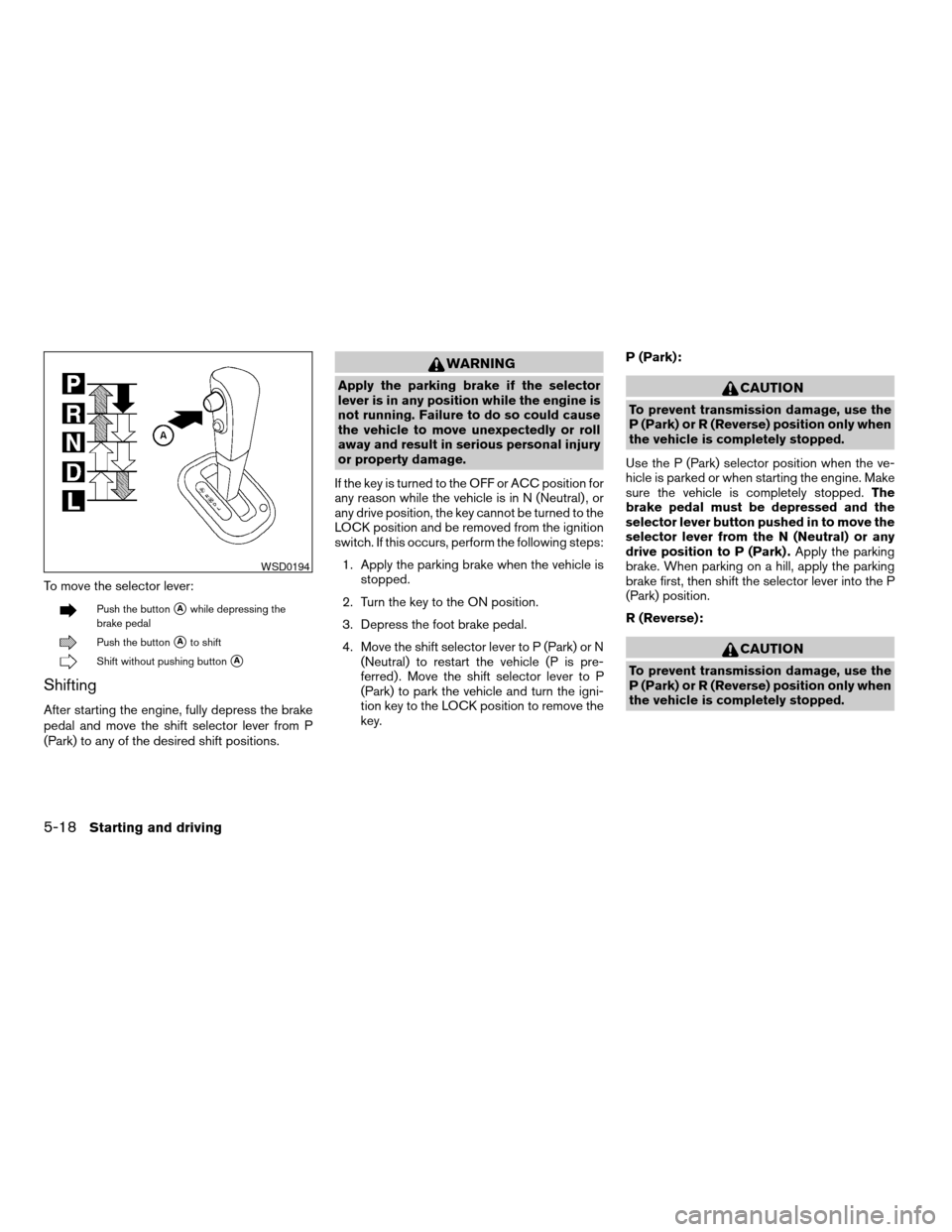
To move the selector lever:
Push the buttonsAwhile depressing the
brake pedal
Push the buttonsAto shift
Shift without pushing buttonsA
Shifting
After starting the engine, fully depress the brake
pedal and move the shift selector lever from P
(Park) to any of the desired shift positions.
WARNING
Apply the parking brake if the selector
lever is in any position while the engine is
not running. Failure to do so could cause
the vehicle to move unexpectedly or roll
away and result in serious personal injury
or property damage.
If the key is turned to the OFF or ACC position for
any reason while the vehicle is in N (Neutral) , or
any drive position, the key cannot be turned to the
LOCK position and be removed from the ignition
switch. If this occurs, perform the following steps:
1. Apply the parking brake when the vehicle is
stopped.
2. Turn the key to the ON position.
3. Depress the foot brake pedal.
4. Move the shift selector lever to P (Park) or N
(Neutral) to restart the vehicle (P is pre-
ferred) . Move the shift selector lever to P
(Park) to park the vehicle and turn the igni-
tion key to the LOCK position to remove the
key.P (Park):CAUTION
To prevent transmission damage, use the
P (Park) or R (Reverse) position only when
the vehicle is completely stopped.
Use the P (Park) selector position when the ve-
hicle is parked or when starting the engine. Make
sure the vehicle is completely stopped.The
brake pedal must be depressed and the
selector lever button pushed in to move the
selector lever from the N (Neutral) or any
drive position to P (Park) .Apply the parking
brake. When parking on a hill, apply the parking
brake first, then shift the selector lever into the P
(Park) position.
R (Reverse):
CAUTION
To prevent transmission damage, use the
P (Park) or R (Reverse) position only when
the vehicle is completely stopped.
WSD0194
5-18Starting and driving
ZREVIEW COPYÐ2008 Versa(vrs)
Owners ManualÐUSA_English(nna)
01/02/08Ðdebbie
X
Page 253 of 304
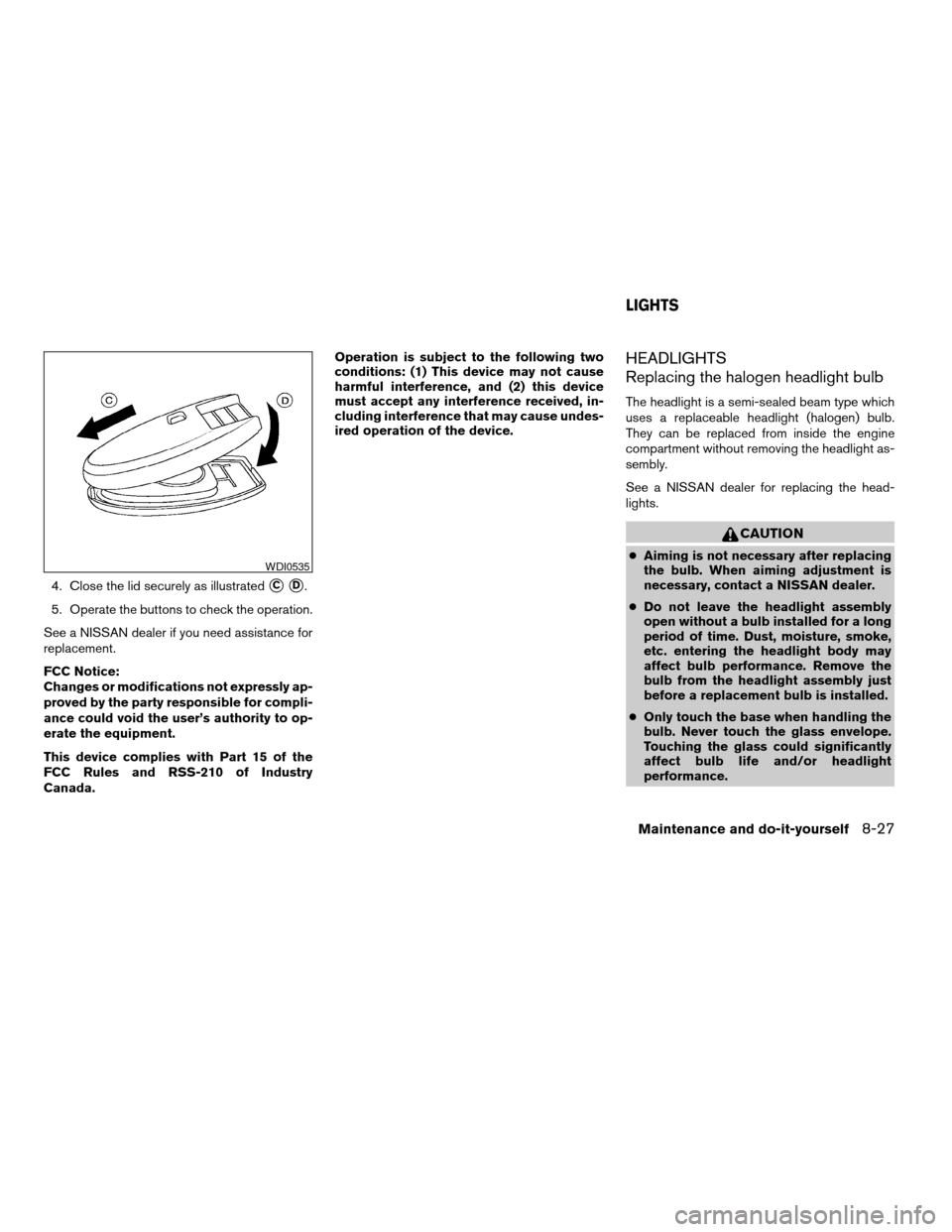
4. Close the lid securely as illustratedsCsD.
5. Operate the buttons to check the operation.
See a NISSAN dealer if you need assistance for
replacement.
FCC Notice:
Changes or modifications not expressly ap-
proved by the party responsible for compli-
ance could void the user’s authority to op-
erate the equipment.
This device complies with Part 15 of the
FCC Rules and RSS-210 of Industry
Canada.Operation is subject to the following two
conditions: (1) This device may not cause
harmful interference, and (2) this device
must accept any interference received, in-
cluding interference that may cause undes-
ired operation of the device.
HEADLIGHTS
Replacing the halogen headlight bulb
The headlight is a semi-sealed beam type which
uses a replaceable headlight (halogen) bulb.
They can be replaced from inside the engine
compartment without removing the headlight as-
sembly.
See a NISSAN dealer for replacing the head-
lights.
CAUTION
cAiming is not necessary after replacing
the bulb. When aiming adjustment is
necessary, contact a NISSAN dealer.
cDo not leave the headlight assembly
open without a bulb installed for a long
period of time. Dust, moisture, smoke,
etc. entering the headlight body may
affect bulb performance. Remove the
bulb from the headlight assembly just
before a replacement bulb is installed.
cOnly touch the base when handling the
bulb. Never touch the glass envelope.
Touching the glass could significantly
affect bulb life and/or headlight
performance.WDI0535
LIGHTS
Maintenance and do-it-yourself8-27
ZREVIEW COPYÐ2008 Versa(vrs)
Owners ManualÐUSA_English(nna)
01/02/08Ðdebbie
X